Advanced Signal SIGNAL Paging Data Decoder User Manual Partial Users Manual
Advanced Signal Corporation Paging Data Decoder Partial Users Manual
Partial Users Manual
Version 1.7 December, 1997 Console Operation 4 - 1
Slot 1-4
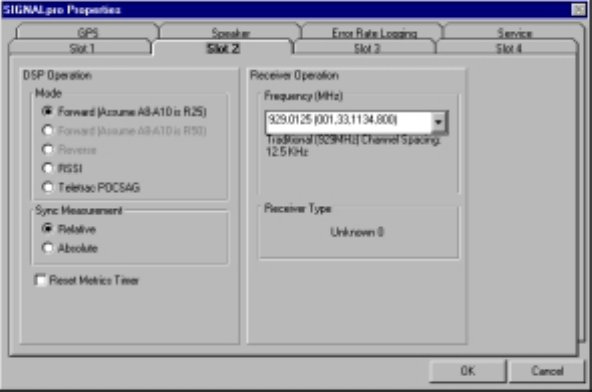
The four Slot folders allow you select several parameter settings for each of the four slots. If your
SIGNALpro contains less than four DSP Input Cards there will be certain slot folders that are not
accessible.
DSP Operation
Mode - This is used to place the DSP Input Card into different modes of operation. Forward (Assume A8-
A10 is R25) is for normal Golay, POCSAG, FLEX, and ReFLEX25 decoding. Forward (Assume A8-A10 is
R50) is for ReFLEX50 decoding and may be implemented at a later date. Reverse will be implemented at
a later date. RSSI places the DSP Input Card into an RSSI only mode. WHILE IN THIS MODE THE DSP
INPUT CARD WILL NOT DECODE PAGING DATA. THEREFORE THE LEDs WILL NOT OPERATE IN
THEIR NORMAL CAPACITY. THE FORMAT AND BER LEDs WILL BE GREEN. WHEN YOU HAVE
COMPLETED YOUR RSSI ONLY TASK PLEASE REMEMBER TO CHANGE THE DSP MODE
SELECTION TO FORWARD. Teletrac POCSAG was implemented for Teletrac, Inc.
Sync Measurement - This is used to determine how FLEX Sync Receive Time Measurements are
calculated. FLEX frames may be launched on a 1.875 second time boundary. If the launch times slip by
2-3 milliseconds (consult your pager supplier for exact specifications) the pager can lose sync and
become inactive until it receives a valid sync. This is a method to determine that the control system is
launching FLEX frames in accordance with the protocol specifications. These measurements will rarely
be zero because of many factors including delay through your system.
Set to Relative if your encoder is not creating FLEX frames synchronous to a GPS time source, or if you
are only interested in knowing that the frame just received is accurate relative to the last frame received.
A measurement baseline is established with the first frame received and is updated with a new baseline
every eight minutes (two cycles). Set to Absolute if your encoder is producing FLEX frames synchronous
to a GPS 1PPS reference and is also encoding FLEX frames synchronous to the beginning of a GPS
minute. This can be used if you are sharing a channel with another carrier, or if you want to determine if
your frames are being received with absolute accuracy. The baseline is established from the GPS 1PPS.
FLEX frames must begin exactly at the top of a minute and can be repeated every 1.875 seconds
thereafter. The last frame in a minute will be at 58.125 seconds. Absolute Sync measures the error
between your FLEX transmission and the fixed 1.875 second time slots. Refer to the Simulcast Delay
Spread section, page 6-3.
Reset the Metrics Timer - If you select this option all of your metrics will be cleared. This allows you to
start collecting new data for each of the static windows (Hourly Usage/Efficiencies, Call Count, Channel
Metrics, or Synchronous Receive Times). Depending on channel traffic and on the speed of your PC it
may take several minutes for the Windows to clear. Once the new data starts accumulating you will see a
new date and time in the Metrics Start Window(s).
Version 1.7 December, 1997 Console Operation 4 - 2
Receiver Operation - Under Frequency (MHz) you can access the pull down menu to select what
frequency you would like the internal receiver programmed to. If you want to program a frequency that is
not included on the list please contact Advanced Signal for assistance.