Advantra AR100 AR100 User Manual User manual AR100

Advantra International AR100 User manual AR100

user maual

Advantra International Flanders Language Valley 90      Tel:  +32 (0) 57 221711   8900 IEPER     Fax:  +32 (0) 57 221700 Belgium        Advantra International        Page 1 of 12 ReFLEX is a trademark of Motorola Inc.  Publication ref.  PTP 232 Issue 2             User manual The AR100
 Advantra International        Page 2 of 12 ReFLEX is a trademark of Motorola Inc. Amendment List  Amendment No.  Date  Initials  CN Number(s) applicable and Remarks Rev 1                                ERRORS AND OMISSIONS  The usefulness of this publication depends upon its accuracy. Whilst every endeavour has been made to eliminate errors, some may exist, it is therefore requested that any errors or omissions noted be advised as follows.     Please quote:      Please send to:   (a) Title of publication    Advantra International   (b) Ref No and issue No.    Customer Services Manager   (c) Last amendment No received    Flanders Language Valley 90   (d) Page and/or Fig No In error    8900 Ieper       BELGIUM
 Advantra International        Page 3 of 12 ReFLEX is a trademark of Motorola Inc. Table of Contents  1 PRODUCT DESCRIPTION.............................................................................................................4 2 DEVICE CONFIGURATOR ............................................................................................................ 5 2.1 Tabsheet ‘TitlePage’ ............................................................................................................... 5 2.2 Tabsheet ‘Customer’ inspection’ ..............................................Error! Bookmark not defined. 2.2.1 Product ID ........................................................................................................................... 6 2.2.2 Build ID................................................................................................................................ 7 2.2.3 Frequency (Hz) ................................................................................................................... 7 2.2.4 Checksum0 & Checksum1 ................................................................................................. 7 2.2.5 Electronic Serial number..................................................................................................... 8 2.2.6 Personal Address................................................................................................................8 2.2.7 Customer reference ............................................................................................................ 8 2.2.8 Read button......................................................................................................................... 8 2.3 Menu item ‘File’ ....................................................................................................................... 9 2.4 Menu item ‘Device’.................................................................................................................. 9 2.5 Menu item ‘Test’ ...................................................................................................................... 9 2.5.1 Test / Device status ............................................................................................................9 2.5.2 Test / Power calibration .................................................................................................... 11 2.6 Menu item ‘Debug’ ................................................................................................................ 11 2.7 Menu item ‘Serial port’.......................................................................................................... 11 2.8 Menu item ‘Help’.................................................................................................................... 12
 Advantra International        Page 4 of 12 ReFLEX is a trademark of Motorola Inc. 1 PRODUCT DESCRIPTION  The Advantra Model AR100 is a Telemetry module. This product is to be compatible with the so-called 2.7.1.1 requirements of the ReFLEX specifications. The module has two connections. One connection is the antenna port, the other connection is the data port / power supply. The host device will talk to the module over this data port and will instruct to execute some commands.  To use the device on a ReFLEX network, the device must be configured and this also happens over this data port. To be able to configure the device, a specific windows application exists. More explanations on that windows application ‘Configurator’ can be found in the sections below.
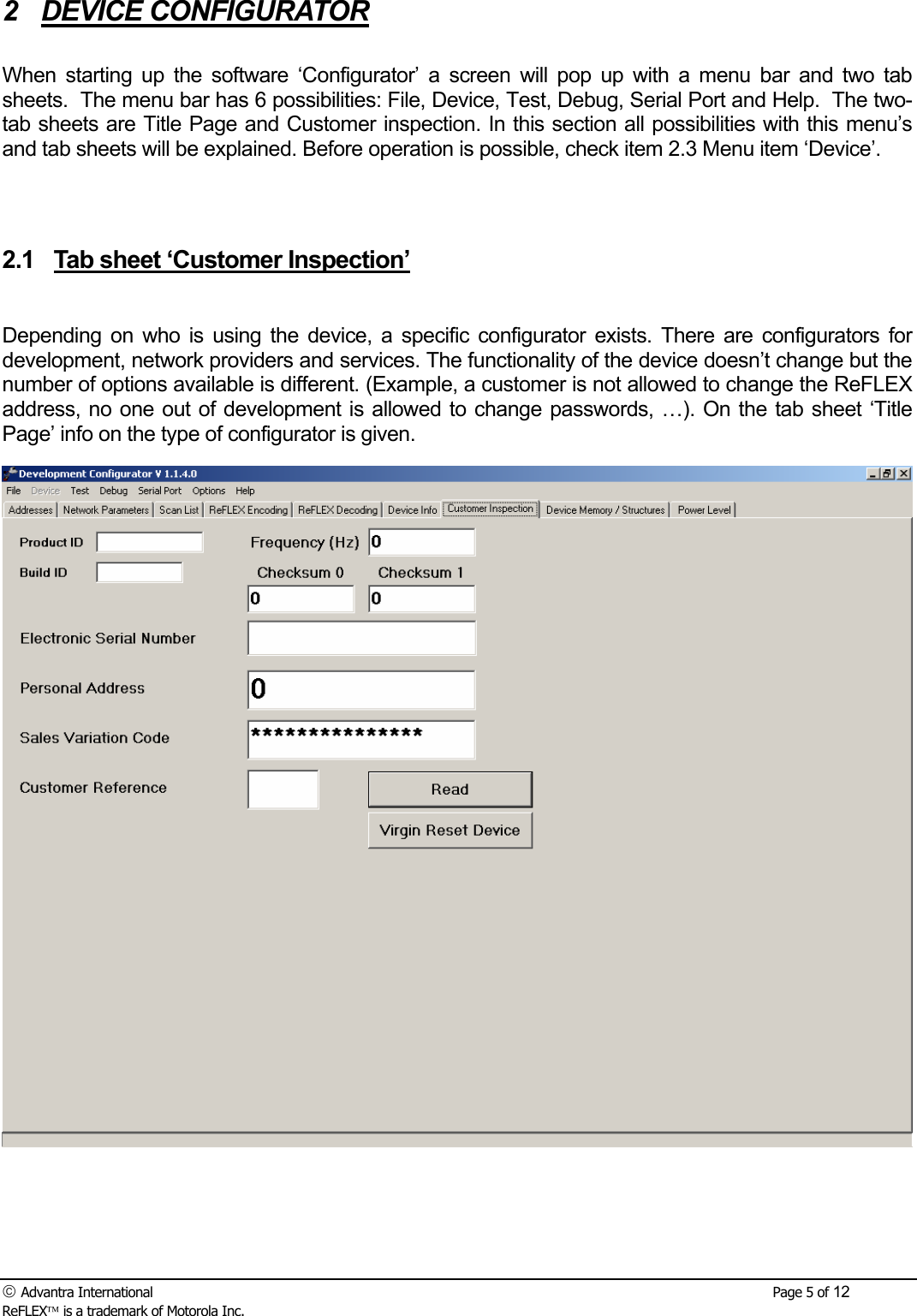
 Advantra International        Page 5 of 12 ReFLEX is a trademark of Motorola Inc. 2 DEVICE CONFIGURATOR  When starting up the software ‘Configurator’ a screen will pop up with a menu bar and two tab sheets.  The menu bar has 6 possibilities: File, Device, Test, Debug, Serial Port and Help.  The two-tab sheets are Title Page and Customer inspection. In this section all possibilities with this menu’s and tab sheets will be explained. Before operation is possible, check item 2.3 Menu item ‘Device’.   2.1  Tab sheet ‘Customer Inspection’  Depending on who is using the device, a specific configurator exists. There are configurators for development, network providers and services. The functionality of the device doesn’t change but the number of options available is different. (Example, a customer is not allowed to change the ReFLEX address, no one out of development is allowed to change passwords, …). On the tab sheet ‘Title Page’ info on the type of configurator is given.
 Advantra International        Page 6 of 12 ReFLEX is a trademark of Motorola Inc.  In the tab sheet ‘customer inspection’ following items can be found. • Product ID • Build ID • Frequency (Hz) •  Checksum0 & Checksum1 •  Electronic Serial Number • Personal Address • Customer Reference • Read-button   2.1.1 Product ID  The Product ID is a four-character ASCII string identifying the product: This data is “Retrieve” only which means it cannot be reprogrammed.
 Advantra International        Page 7 of 12 ReFLEX is a trademark of Motorola Inc. 2.1.2 Build ID  The Build ID is a three character ASCII string identifying the software builds in the range: 001 to 999.  This data is “Retrieve” only which means it cannot be reprogrammed.  2.1.3 Frequency (Hz)  This is the first frequency in the Global Scan List. This means this is the first frequency the Device will try to find the network.   2.1.4  Checksum0 & Checksum1  Item Function   Checksum 0  This is a four digit hexadecimal number indicating the Fletcher checksum of the ReFLEX Addresses index 1 to index 31 inclusive, and their associated options.    The checksum is formed from the data for each Address as shown in the Add Address command, excluding the index value. The complete set of data for each address is added to the checksum before moving to the next index.  The checksum excludes the Personal Address.  This command is “Retrieve” only.   Checksum 1  This is a four digit hexadecimal number indicating the Fletcher checksum of the ReFLEX Configuration Data.  The checksum excludes the following items of ReFLEX Configuration Data: Personal Address and associated options (address index 0); Information Service Addresses and associated options (address indexes 1 to 31); Reference Oscillator DAC structure values; Transmit Power Amp Ramp values; VCO Modulation values; VCO Offset; Reference Oscillator Modulation values; Reference Offset; Reference Oscillator Mod Factors; VCO Mod Factors.  This command is “Retrieve” only.
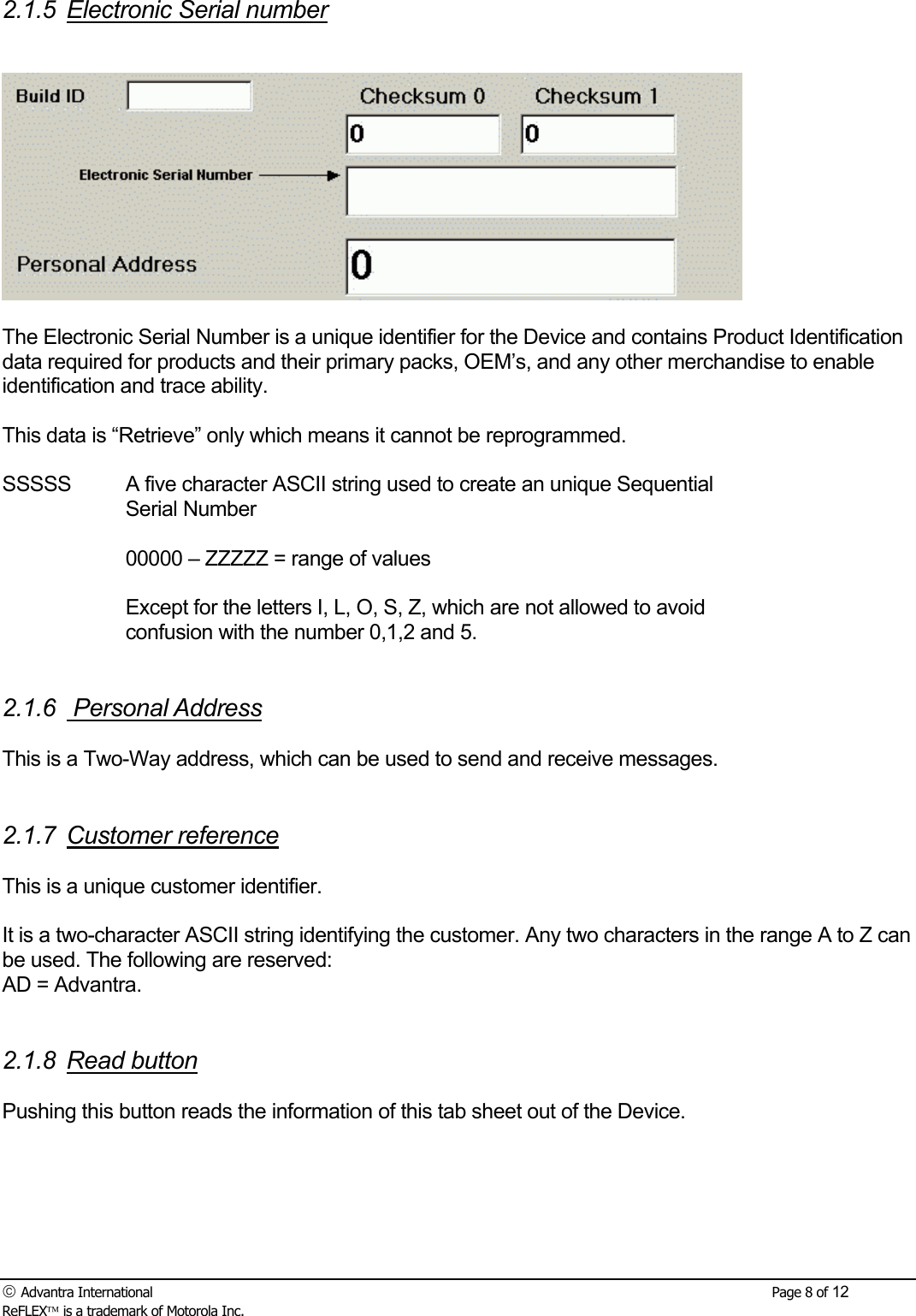
 Advantra International        Page 8 of 12 ReFLEX is a trademark of Motorola Inc. 2.1.5 Electronic Serial number    The Electronic Serial Number is a unique identifier for the Device and contains Product Identification data required for products and their primary packs, OEM’s, and any other merchandise to enable identification and trace ability.  This data is “Retrieve” only which means it cannot be reprogrammed.  SSSSS  A five character ASCII string used to create an unique Sequential Serial Number  00000 – ZZZZZ = range of values   Except for the letters I, L, O, S, Z, which are not allowed to avoid confusion with the number 0,1,2 and 5.   2.1.6  Personal Address  This is a Two-Way address, which can be used to send and receive messages.   2.1.7 Customer reference   This is a unique customer identifier.  It is a two-character ASCII string identifying the customer. Any two characters in the range A to Z can be used. The following are reserved: AD = Advantra.   2.1.8 Read button  Pushing this button reads the information of this tab sheet out of the Device.
 Advantra International        Page 9 of 12 ReFLEX is a trademark of Motorola Inc. 2.2  Menu item ‘File’  Data of a device can be stored under this menu. Data can also be picked up through ‘open’ and selecting the wanted file with extension ‘. adv’.  2.3  Menu item ‘Device’  Starting the software with no device connected, the word ‘Device’ in the menu bar will have another colour that the other items in the menu bar. Once the device is well connected through a hardware interface to the correct COM port, the word ‘Device’ will become the same colour as the other items in the menu bar.  2.4  Menu item ‘Test’  2.4.1  Test / Device status  Select from the Test Commands window, [Device Status] folder.
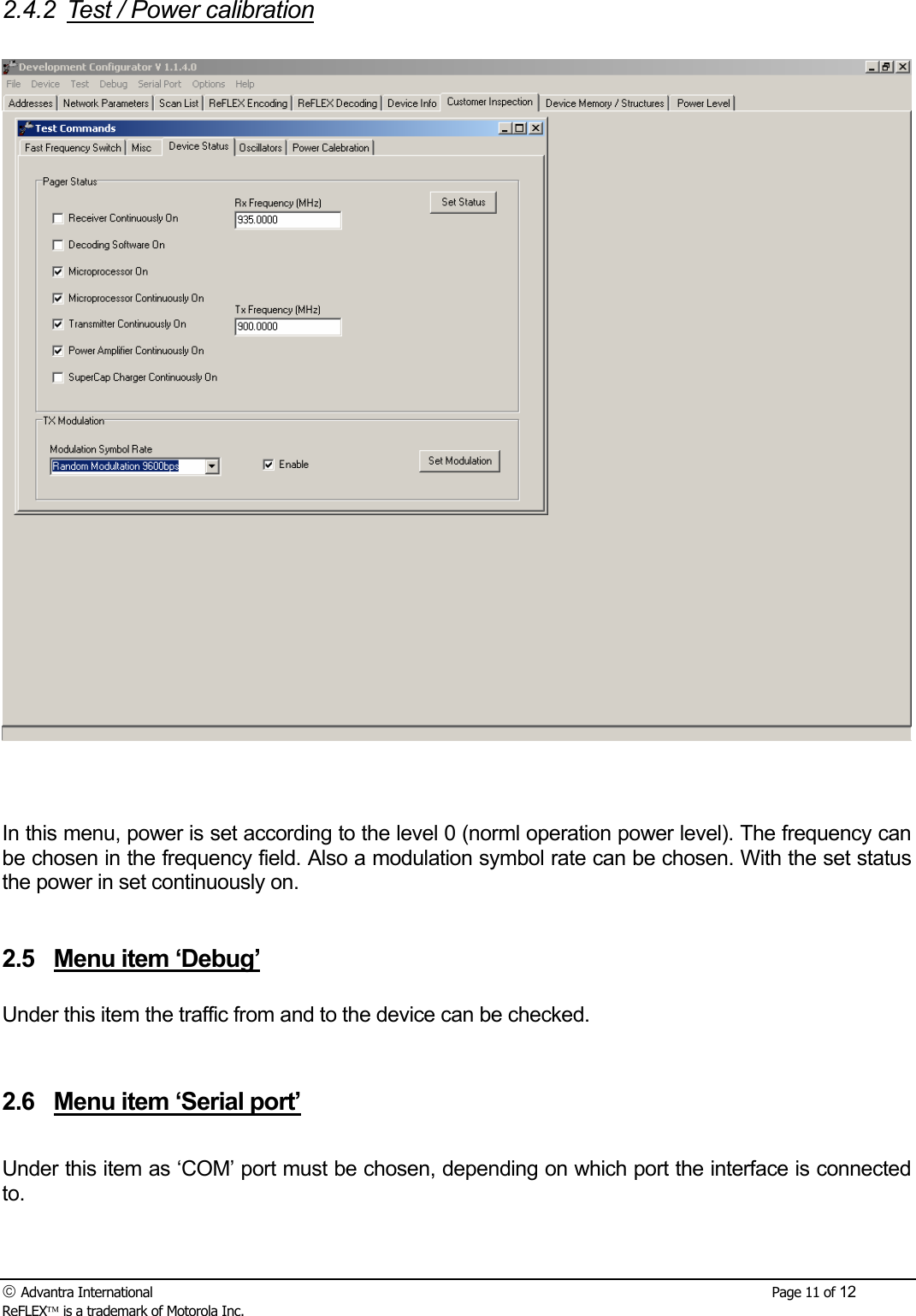
 Advantra International        Page 10 of 12 ReFLEX is a trademark of Motorola Inc. 2.4.1.1 Receiver Continuously On  Select [Receiver Continuously On] followed by [Set Status]. This will permanently enable control signal IFE, which in turn enables the transceiver power supplies VCC. It is assumed that receiver tests on the device will be done with the receiver in this test mode. Note: Test Commands in [Device Status] folder are automatically reset when the power supply is removed or the product is warm started in the Test Command folder.   2.4.1.2  Decoding Software On  Select [Decoding Software On] followed by [Set Status]. This action turns on the decoding software. Since this items is necessary on when receiver tests are done, this item is automatically on when ‘receiver continuously on’ is chosen.   2.4.1.3 Microprocessor On  Select [Microprocessor On] followed by [Set Status]. Microprocessor on is used in cases where current savings are required. Cause the micro controller goes sleeping between certain actions. This function is the basic of all actions so this should always be turned on.   2.4.1.4 Microprocessor continuously on  Select [Microprocessor continuously On] followed by [Set Status]. The micro controller is constantly on.    2.4.1.5 Transmitter continuously on  Select [Transmitter continuously On] followed by [Set Status]. The transmitter is turned on but the power amplifier is still disabled. This will enable the transmitter power supply functions, which supply the TX Buffer.    2.4.1.6 Power Amplifier continuously on  Select [Power Amplifier continuously On] followed by [Set Status]. This functions turns on the power amplifier. Together with this action the transmitter is also turned on.    2.4.1.7 TX Modulation  When the transmitter and/or power amplifier is on, a certain type of modulation can be chosen. By example random modulation 800 bps, random modulation 6400 bps, … Select [Modulation Symbol Rate] followed by [Set Modulation] and the modulation will start.
 Advantra International        Page 11 of 12 ReFLEX is a trademark of Motorola Inc. 2.4.2  Test / Power calibration     In this menu, power is set according to the level 0 (norml operation power level). The frequency can be chosen in the frequency field. Also a modulation symbol rate can be chosen. With the set status the power in set continuously on.    2.5  Menu item ‘Debug’  Under this item the traffic from and to the device can be checked.    2.6  Menu item ‘Serial port’  Under this item as ‘COM’ port must be chosen, depending on which port the interface is connected to.
 Advantra International        Page 12 of 12 ReFLEX is a trademark of Motorola Inc. 2.7  Menu item ‘Help’  Under this item there is a Help-file, which is actually this user manual.

Navigation menu