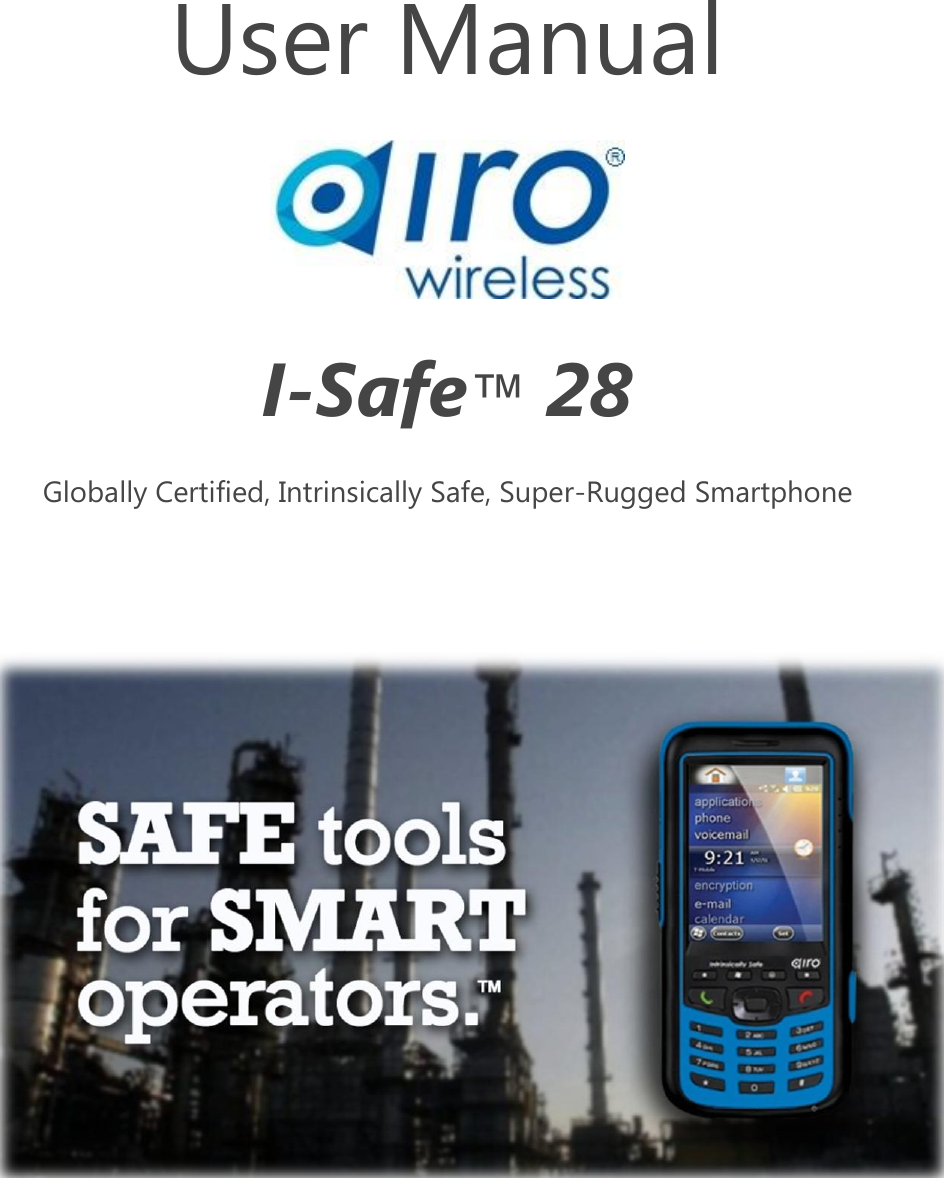
Airo Wireless ISAFE28 Intrinsically Safe Cell Phone User Manual

Airo Wireless LLC Intrinsically Safe Cell Phone

User Manual

   User Manual  I-Safe™ 28 Globally Certified, Intrinsically Safe, Super-Rugged Smartphone
 Airo Wireless  I-Safe™ 28       User Guide  (AW-UG-051013)        2    CONTENTS   Preface 3 Certifications........................................................................................................................................................................................... 3 Precautions for Safe Usage ............................................................................................................................................................... 4 Know your Handset ............................................................................................................................................................................. 5 Phone & Memory Setup .................................................................................................................................................................... 7 Charging the Battery ........................................................................................................................................................................... 9 First Start Up .........................................................................................................................................................................................11 Operating Basics .................................................................................................................................................................................11 Phone Operations ..............................................................................................................................................................................14 Connecting to Your Computer ......................................................................................................................................................15 Specifications .......................................................................................................................................................................................16 Regulatory Compliance ....................................................................................................................................................................17 General Safety Information ............................................................................................................................................................19 Maintenance and Repair..................................................................................................................................................................21 Battery Information............................................................................................................................................................................22 AC Adapter Precautions ...................................................................................................................................................................23 Contact Information ..........................................................................................................................................................................25
 Airo Wireless  I-Safe™ 28       User Guide  (AW-UG-051013)        3   PREFACE  Congratulations on your purchase of this Airo Wireless I-Safe™ 28 smartphone. The people at Airo take safety very seriously, and this document contains the usage and safety instructions necessary for safe and proper use of your new phone in explosive atmospheres.   Although the combination of explosive gas or dust, oxygen and ignition from a cell phone are generally low in probability, cell phones and other electronic devices can and do generate explosions and fires under perfect conditions. Given the enormous potential for loss of life in some enterprises with explosive areas, proper use of intrinsically safe (IS) communications is imperative.  Please review this manual and the safety instructions contained before using the phone. This User Guide contains important information regarding safe usage that must be followed to prevent injury, loss of life, or destruction of infrastructure. Ignorance of this information or operation in violation of these instructions can have serious consequences and may violate regulations, or laws.   Airo Wireless is serious about providing “Safe tools for smart operators,” but cannot be held responsible for any losses, or any direct or indirect damages caused by improper use of these tools. Also, please be aware that technical data herein is subject to change without notice. Changes, errors and misprints may not be used as a basis for any claim for damages and the English version controls, although every effort has been made to provide accurate translation. Visit the Airo website at www.airowireless.com for the most up-to-date version of this document.   CERTIFICATIONS  This Airo I-Safe™ 28 was specifically designed and built for use in explosive atmospheres. It was then tested and certified by SGS S.A. (formerly Société Générale de Surveillance), a multinational company with 75000 employees in 1350 offices and laboratories around the world, which is known for its high quality inspection, verification, testing and certification services. The I-Safe™ 28 is certified for use around the world under one or more of the following certifications:   Underwriter Laboratories UL 913 (new more stringent 7th Edition Standard) - Zone 1   ATEX Zone 1  IECEx Zone 1   Canadian Standards Authority CSA-C22.2 No. 157-92  The Airo I-Safe™ 28 was tested in a blast proof chamber filled with explosive gas and oxygen. The handset circuitry was loaded with all the electricity the circuits would hold, far beyond the conditions of regular use, and then shorted to determine if it would ignite and explosion. This was done for capacitance, then for inductance, and finally for both capacitance and inductance. It was tested 200 times for each. It is safe.  The I-Safe™ 28 performed successfully and safely without igniting the explosive atmosphere.  All current EC conformity certificates, EC declarations of conformity, safety instructions and manual for the Airo I-Safe™ 28 can be found at www.airowireless.com.
 Airo Wireless  I-Safe™ 28       User Guide  (AW-UG-051013)        4
 Airo Wireless  I-Safe™ 28       User Guide  (AW-UG-051013)        5   PRECAUTIONS FOR SAFE USAGE  Use of this phone assumes that the operator observes the conventional safety regulations and has read and understands the manual, safety instructions and certification. Follow these precautions.  Power the phone off, and remove it from any potentially ex-hazardous area if:   The phone housing or the battery appears damaged.   The phone has been subjected to excessive loads.   The phone has been stored improperly over a long period of time with the battery attached.   The inscriptions, markings or labels on the phone are illegible.  Return any phone that meets these criteria to your dealer or to Airo for inspection.   Charge the handset only outside any ex-hazardous area in safe, explosive free places, using the appropriate Airo charger or other equipment approved by Airo.   Change and charge the battery only in safe, explosive free areas  Charge phone in an area free of dust, and humidity.  The battery may be charged only at temperatures in between 32°F and 100°F.   Use only accessories approved by Airo to avoid damaging the electronics.  Use only the supplied Airo battery or Airo spare batteries.  Leave spare batteries in safe, explosive free areas.  Common Sense Precautions:  Be sure the black rubber end plug is closed while in use.  Wired ear buds can only be used outside explosive areas (unless the headset is certified IS)  The phone must be protected from exposure to acids or bases.  The phone must be protected from crushing, dropping, stabbing and other impacts.   The phone must be protected from the effects of long-term UV exposure.   The phone must be protected from friction that might cause static electricity release.   The phone must only be taken into zone 1 or 2 areas, NOT zone zero or 20.   USB connection should only be made only in safe, explosive free areas.  Unscrew and open the phone only in safe, explosive free areas.   Be sure gaskets are in good shape when replacing the battery.  Keep all batteries away from heat sources that my damage or ignite the batteries.  Keep abrasives and sharps away from the touch screen.  Avoid exposing phone to strong magnetic fields, like around induction ovens or microwaves.  Return the device for service. Only authorized personnel are allowed to repair the phone.  Observe laws about use of mobile phones while operating a vehicle, in hospitals, in airplanes.    Airo Wireless will not assume liability for damages caused by inappropriate use of the phone, or disregard for the Precautions for Safe Usage.
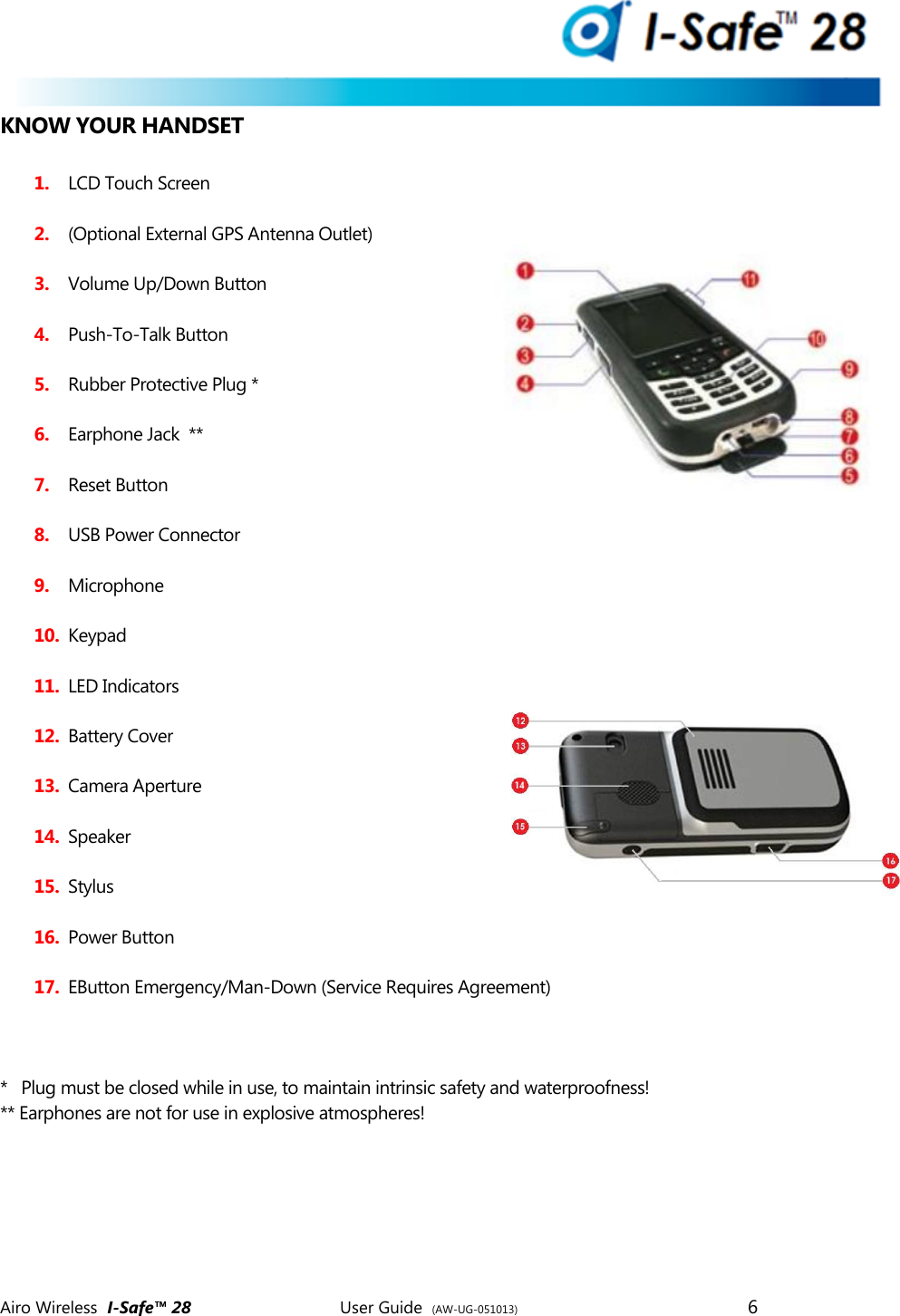
 Airo Wireless  I-Safe™ 28       User Guide  (AW-UG-051013)        6   KNOW YOUR HANDSET   1. LCD Touch Screen 2. (Optional External GPS Antenna Outlet) 3. Volume Up/Down Button 4. Push-To-Talk Button 5. Rubber Protective Plug * 6. Earphone Jack  ** 7. Reset Button 8. USB Power Connector 9. Microphone 10. Keypad 11. LED Indicators 12. Battery Cover 13. Camera Aperture  14. Speaker 15. Stylus 16. Power Button 17. EButton Emergency/Man-Down (Service Requires Agreement)    *   Plug must be closed while in use, to maintain intrinsic safety and waterproofness! ** Earphones are not for use in explosive atmospheres!
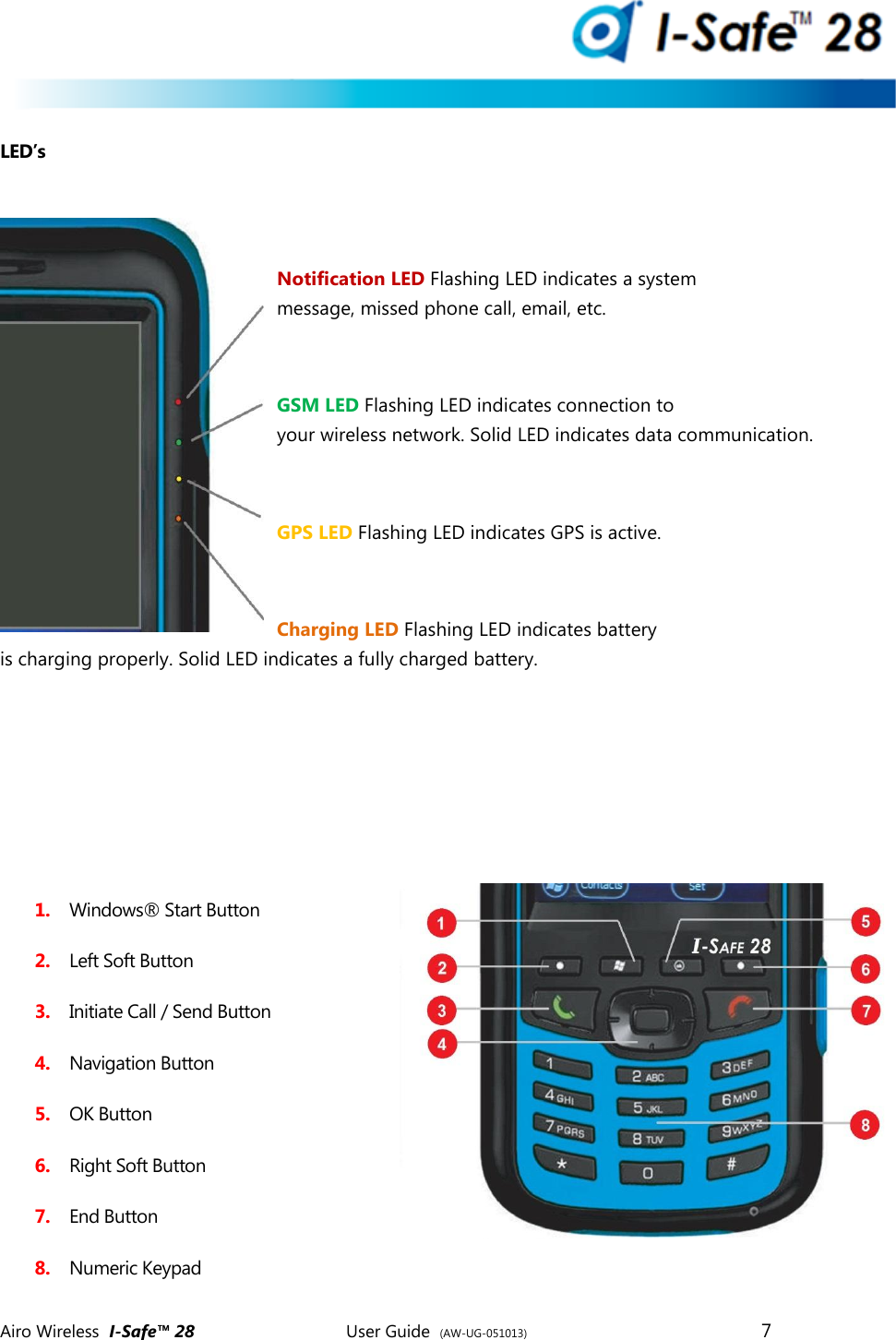
 Airo Wireless  I-Safe™ 28       User Guide  (AW-UG-051013)        7    LED’s     Notification LED Flashing LED indicates a system message, missed phone call, email, etc.  GSM LED Flashing LED indicates connection to your wireless network. Solid LED indicates data communication.  GPS LED Flashing LED indicates GPS is active.  Charging LED Flashing LED indicates battery is charging properly. Solid LED indicates a fully charged battery.        1. Windows® Start Button  2. Left Soft Button 3. Initiate Call / Send Button 4. Navigation Button  5. OK Button  6. Right Soft Button  7. End Button 8. Numeric Keypad
 Airo Wireless  I-Safe™ 28       User Guide  (AW-UG-051013)        8
 Airo Wireless  I-Safe™ 28       User Guide  (AW-UG-051013)        9   PHONE & MEMORY SETUP  Before charging or using your handset, you may want to install a SIM card to allow the handset to connect to a mobile telephone network and make phone calls. You may also want to install a 2 Gigabyte microSD card to increase the amount of the memory available on the device. A SIM card from a network operator that operates a GSM network will allow phone calls and data transport around the world. This handset will not operate on CDMA networks.  Insert the SIM Card & optional Micro SD Card   1. Turn the handset over, and fully loosen the four battery cover screws by turning them counter-clockwise with the special Airo screwdriver supplied with your handset.  (The screws are designed to stay in the cover when loose.)   2. Detach the battery cover from your handset.    3. Holding the phone with your left hand, open the SIM cage by inserting your thumbnail or Airo screwdriver into the slot and carefully pushing away from you, until you hear and feel the cage door “pop,” then carefully lift the edge.   4. If you have a MicroSD memory card, open the SD cage by inserting your thumbnail or Airo screwdriver into the slot and pushing to the right lightly until you until you hear and feel the cage door “pop,” then lift the edge. If you do not have an SD card, skip to step #6 on the next page.
 Airo Wireless  I-Safe™ 28       User Guide  (AW-UG-051013)        10      5. Insert the SD card into the SD cage with the gold contacts pointing down.  Be certain that the teeth on the cages hold the cards flat against the cages.    6. Insert the SIM card into the SIM cage with the missing corner up and right and the gold contact facing you. Be certain that the teeth on the cages hold the cards flat against the cages.   7. Close the SD cage by inserting your thumbnail or Airo screwdriver into the slot and pushing down and to the left lightly until you until you hear and feel the cage door “pop” shut.    8. Close the SIM cage by inserting your thumbnail or Airo screwdriver into the slot and pushing down and toward you lightly until you until you hear and feel the cage door “pop” shut.   9. Very carefully reattach the battery pack with the four screws. Using the Airo screwdriver, tighten the screws clockwise until the screws resist and the cover fits snuggly.  (Attaching the back securely is critical to maintaining intrinsic safety of the handset. Over-tightening the screws or not using the Airo screwdriver may damage or strip the screws and/or back cover, resulting in a poor seal.)
 Airo Wireless  I-Safe™ 28       User Guide  (AW-UG-051013)        11    Do not use handset in an explosive atmosphere if the battery is not seated properly. CHARGING THE HANDSET   For initial use, you need to charge your Airo I-Safe™ 28 for approximately four hours using only the purpose built Airo charger. (Using a non-certified charging devices will damage the electronics and will also void your warranty.)   First install the interchangeable clip plug to the AC adapter by sliding the clip plug into the clip plug holder. The clip plug locks into the clip plug holder with an audible click. Other clip plugs are available for use around the world.          Second, open the black Rubber Protector Plug at the bottom of the handset and do the following:  1. Connect the Mini USB cable into the MiniUSB connector on the bottom of the device   2. Connect the AC adapter cable into an electrical outlet
 Airo Wireless  I-Safe™ 28       User Guide  (AW-UG-051013)        12
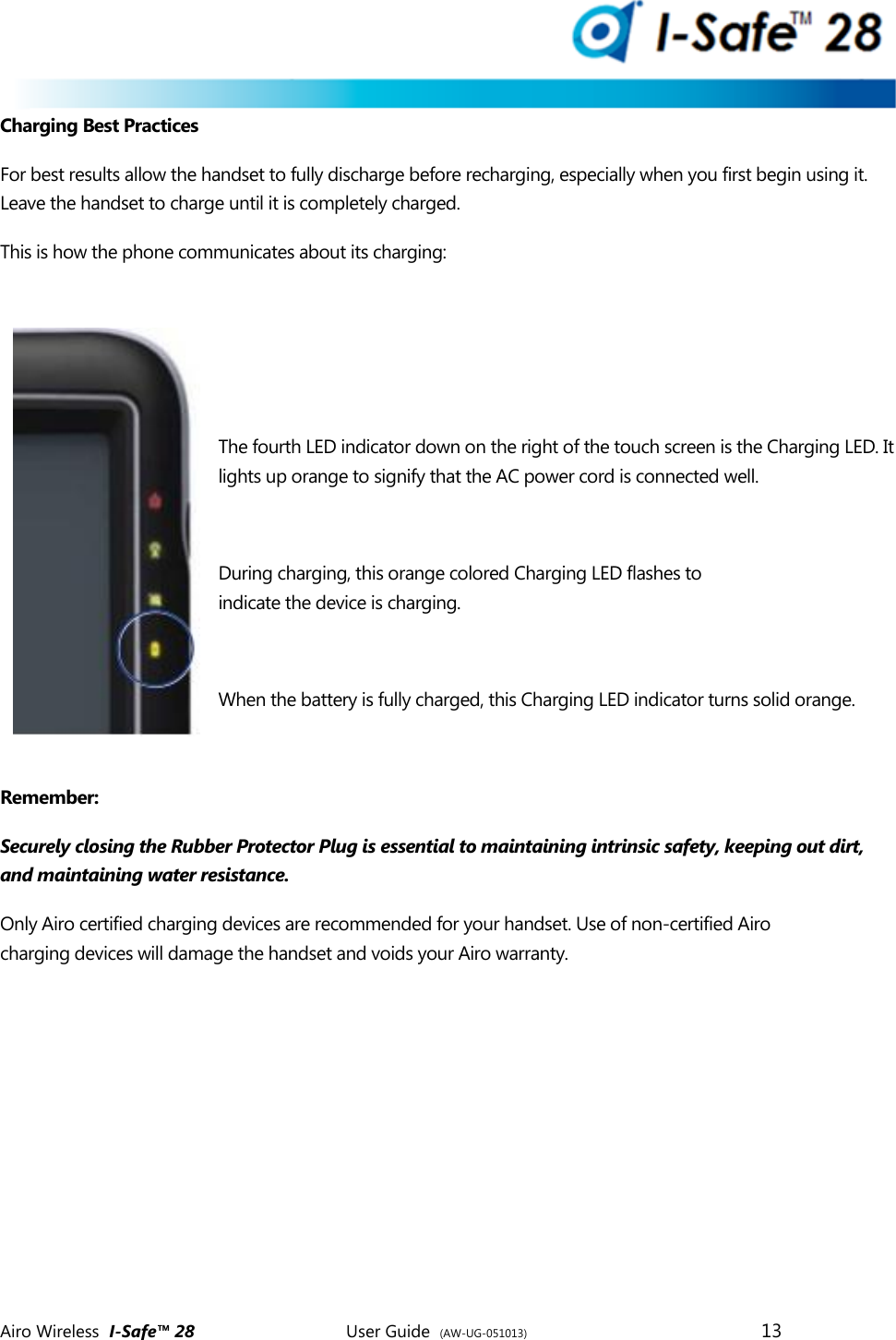
 Airo Wireless  I-Safe™ 28       User Guide  (AW-UG-051013)        13   Charging Best Practices For best results allow the handset to fully discharge before recharging, especially when you first begin using it. Leave the handset to charge until it is completely charged. This is how the phone communicates about its charging:    The fourth LED indicator down on the right of the touch screen is the Charging LED. It lights up orange to signify that the AC power cord is connected well.  During charging, this orange colored Charging LED flashes to indicate the device is charging.  When the battery is fully charged, this Charging LED indicator turns solid orange.  Remember:  Securely closing the Rubber Protector Plug is essential to maintaining intrinsic safety, keeping out dirt, and maintaining water resistance.  Only Airo certified charging devices are recommended for your handset. Use of non-certified Airo charging devices will damage the handset and voids your Airo warranty.
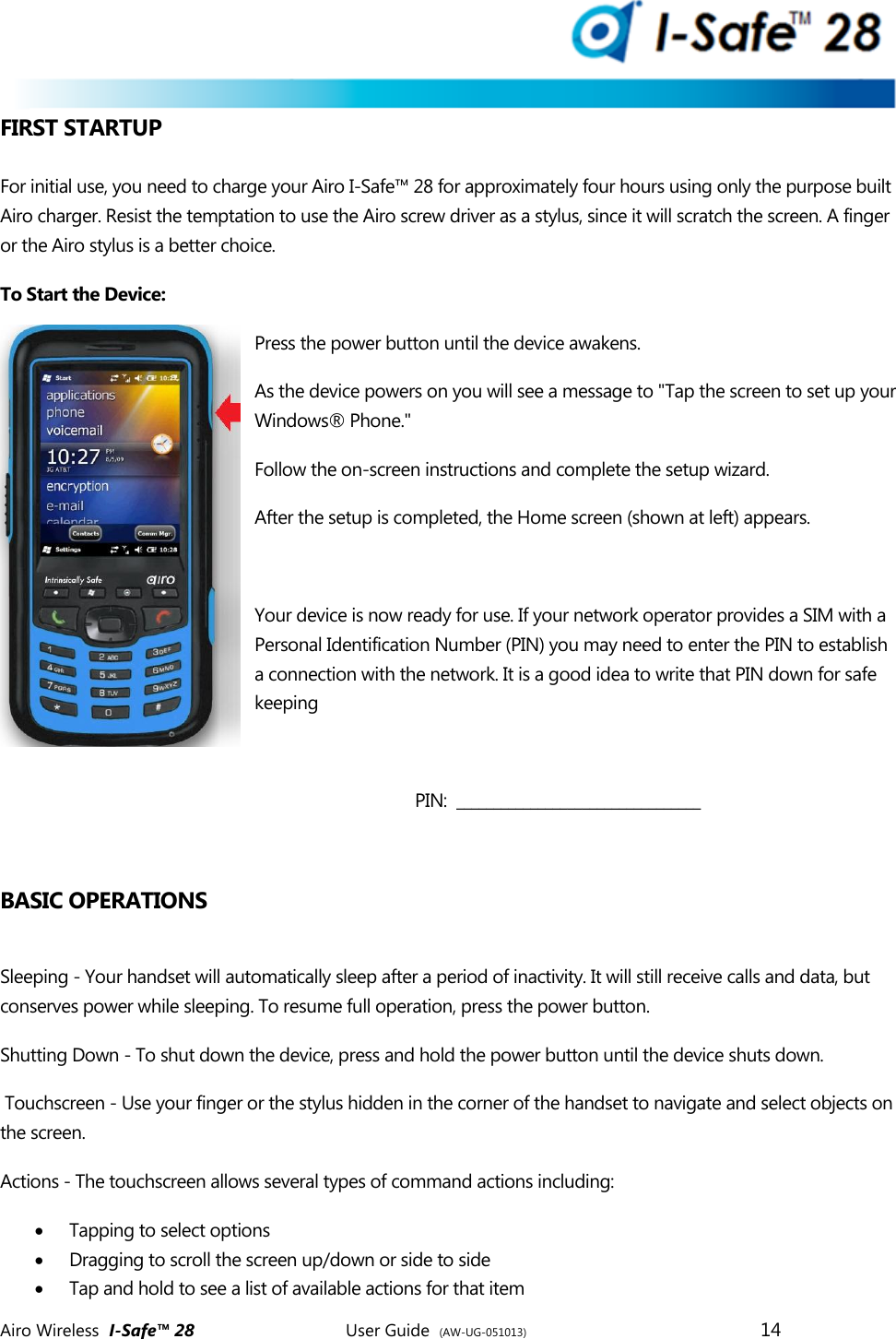
 Airo Wireless  I-Safe™ 28       User Guide  (AW-UG-051013)        14   FIRST STARTUP  For initial use, you need to charge your Airo I-Safe™ 28 for approximately four hours using only the purpose built Airo charger. Resist the temptation to use the Airo screw driver as a stylus, since it will scratch the screen. A finger or the Airo stylus is a better choice.  To Start the Device: Press the power button until the device awakens.  As the device powers on you will see a message to "Tap the screen to set up your Windows® Phone."  Follow the on-screen instructions and complete the setup wizard.  After the setup is completed, the Home screen (shown at left) appears.   Your device is now ready for use. If your network operator provides a SIM with a Personal Identification Number (PIN) you may need to enter the PIN to establish a connection with the network. It is a good idea to write that PIN down for safe keeping  PIN:  _________________________________  BASIC OPERATIONS  Sleeping - Your handset will automatically sleep after a period of inactivity. It will still receive calls and data, but conserves power while sleeping. To resume full operation, press the power button.  Shutting Down - To shut down the device, press and hold the power button until the device shuts down.   Touchscreen - Use your finger or the stylus hidden in the corner of the handset to navigate and select objects on the screen.  Actions - The touchscreen allows several types of command actions including:  Tapping to select options   Dragging to scroll the screen up/down or side to side  Tap and hold to see a list of available actions for that item
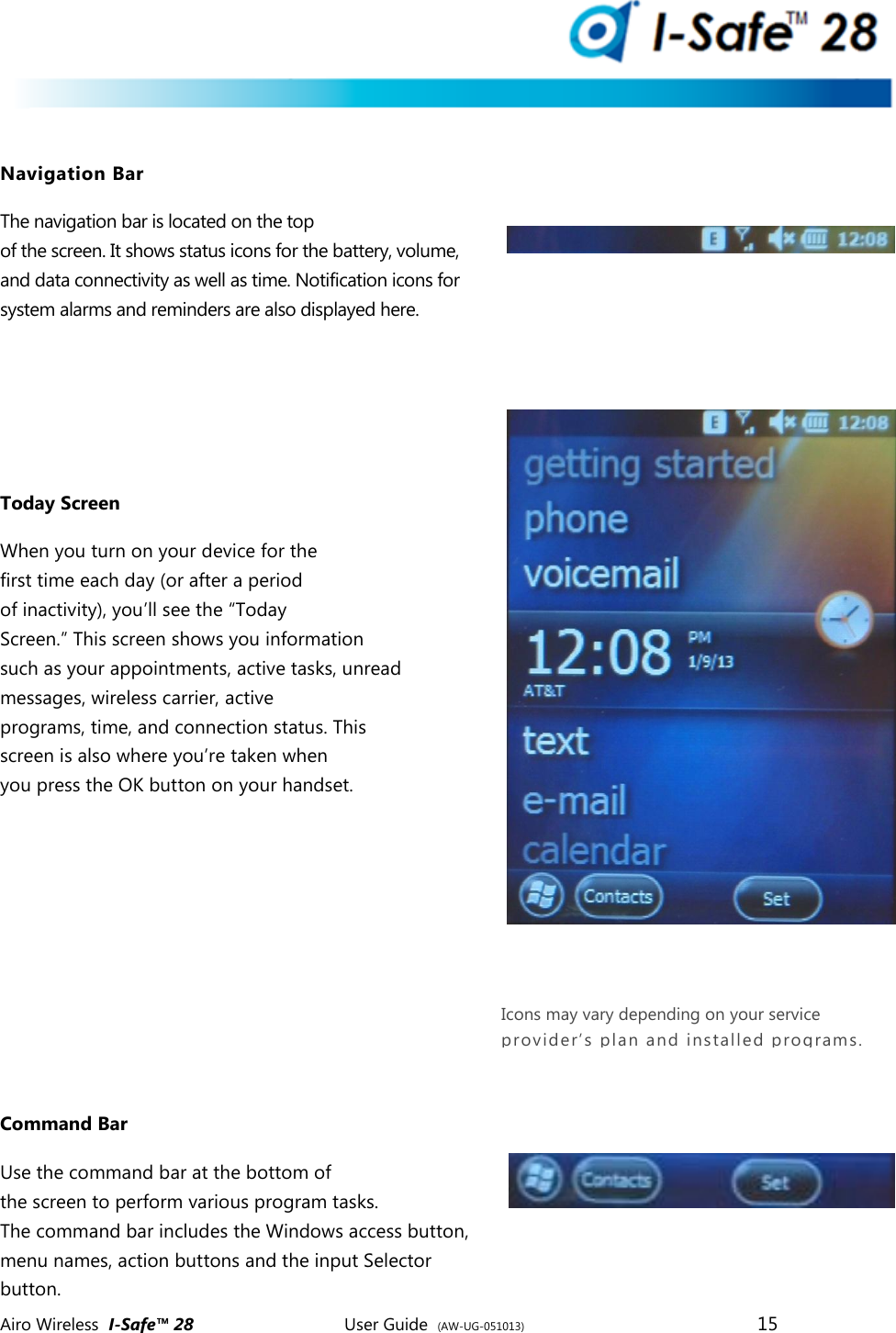
 Airo Wireless  I-Safe™ 28       User Guide  (AW-UG-051013)        15    Navigation Bar The navigation bar is located on the top of the screen. It shows status icons for the battery, volume, and data connectivity as well as time. Notification icons for system alarms and reminders are also displayed here.    Today Screen When you turn on your device for the first time each day (or after a period of inactivity), you’ll see the “Today Screen.” This screen shows you information such as your appointments, active tasks, unread messages, wireless carrier, active programs, time, and connection status. This screen is also where you’re taken when you press the OK button on your handset.       Command Bar Use the command bar at the bottom of the screen to perform various program tasks. The command bar includes the Windows access button, menu names, action buttons and the input Selector button. Icons may vary depending on your service provider’s plan and installed programs.
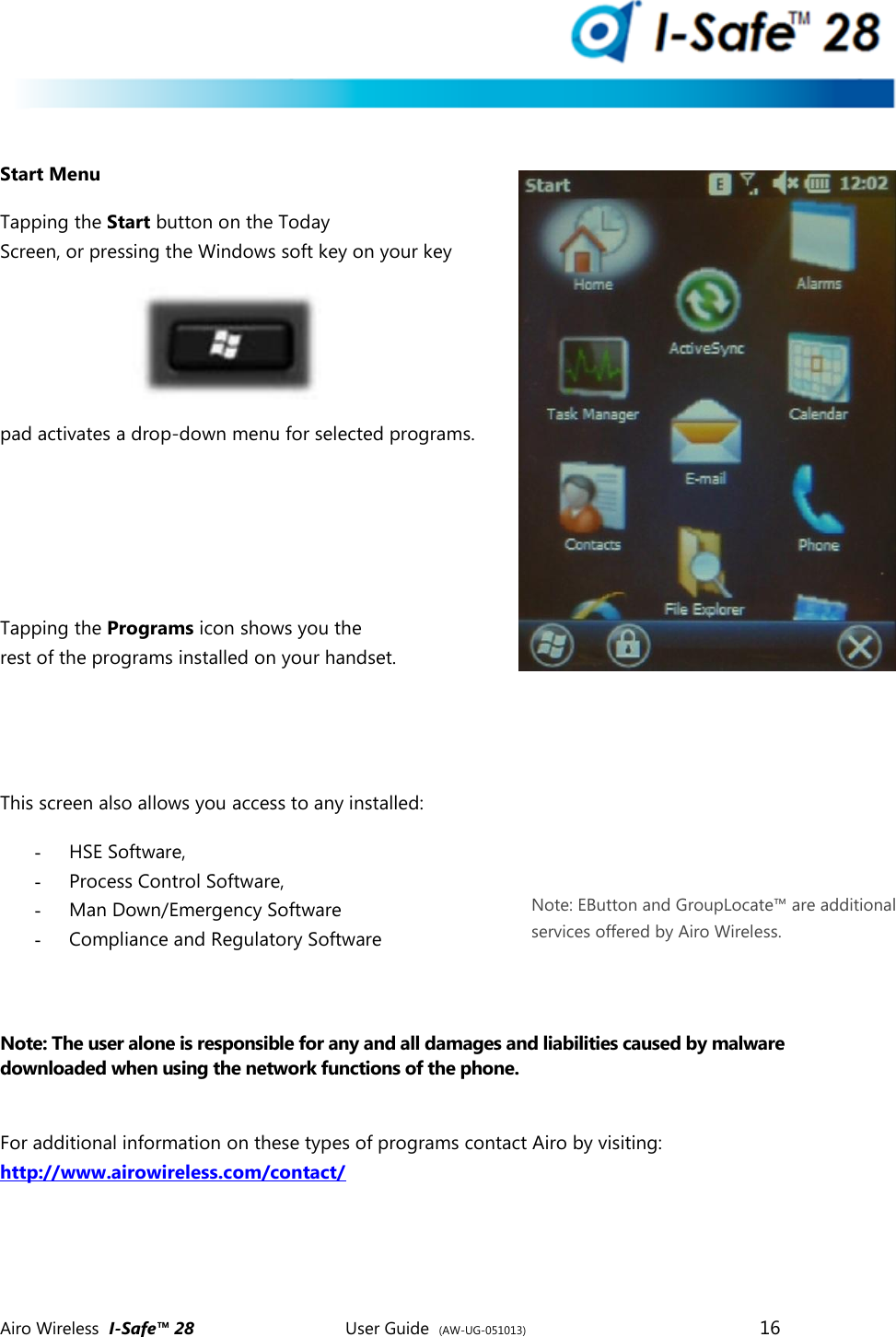
 Airo Wireless  I-Safe™ 28       User Guide  (AW-UG-051013)        16    Start Menu Tapping the Start button on the Today Screen, or pressing the Windows soft key on your key pad activates a drop-down menu for selected programs.     Tapping the Programs icon shows you the rest of the programs installed on your handset.   This screen also allows you access to any installed:  - HSE Software, - Process Control Software,  - Man Down/Emergency Software - Compliance and Regulatory Software   Note: The user alone is responsible for any and all damages and liabilities caused by malware downloaded when using the network functions of the phone.   For additional information on these types of programs contact Airo by visiting:  http://www.airowireless.com/contact/     Note: EButton and GroupLocate™ are additional services offered by Airo Wireless.
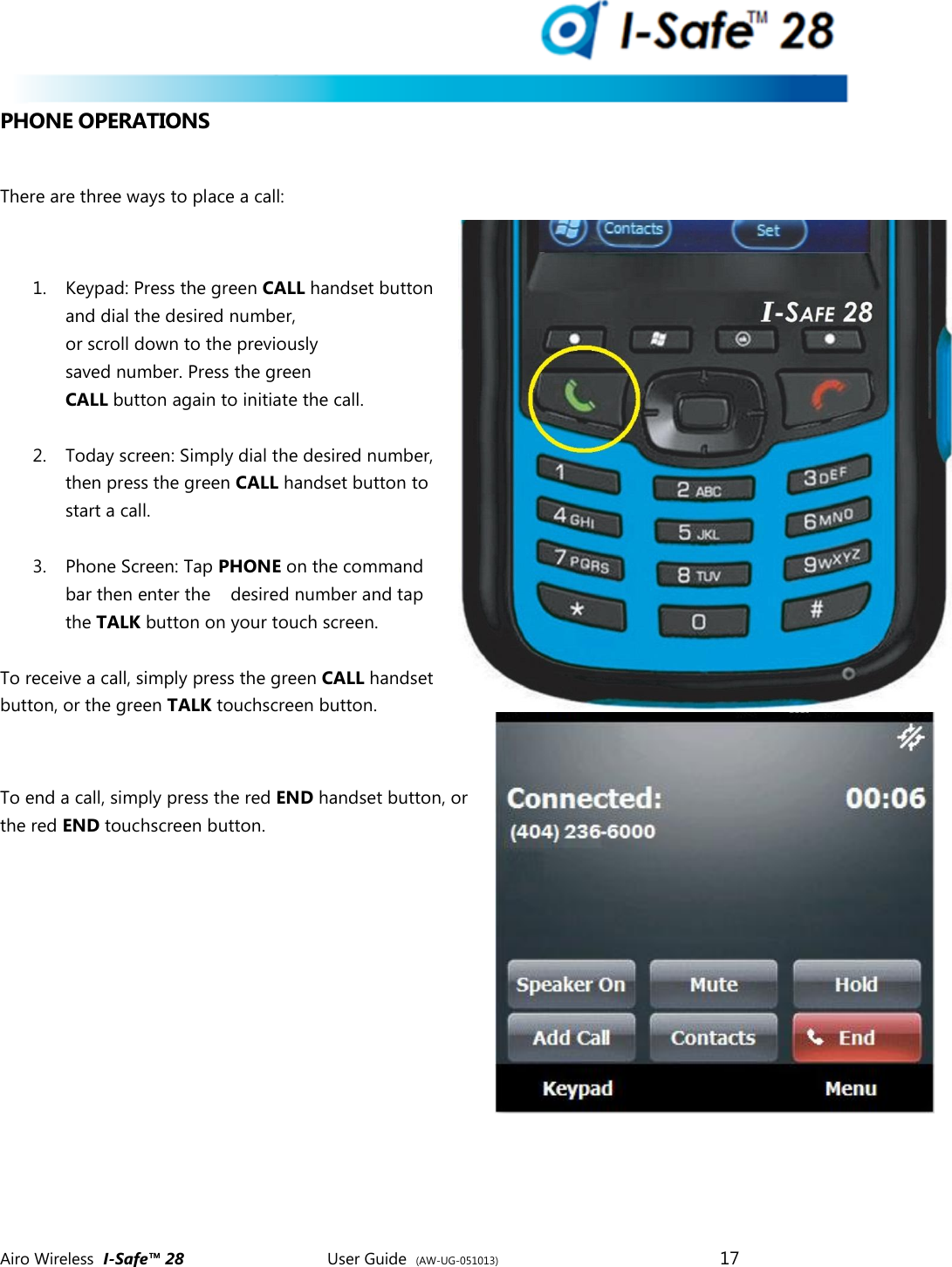
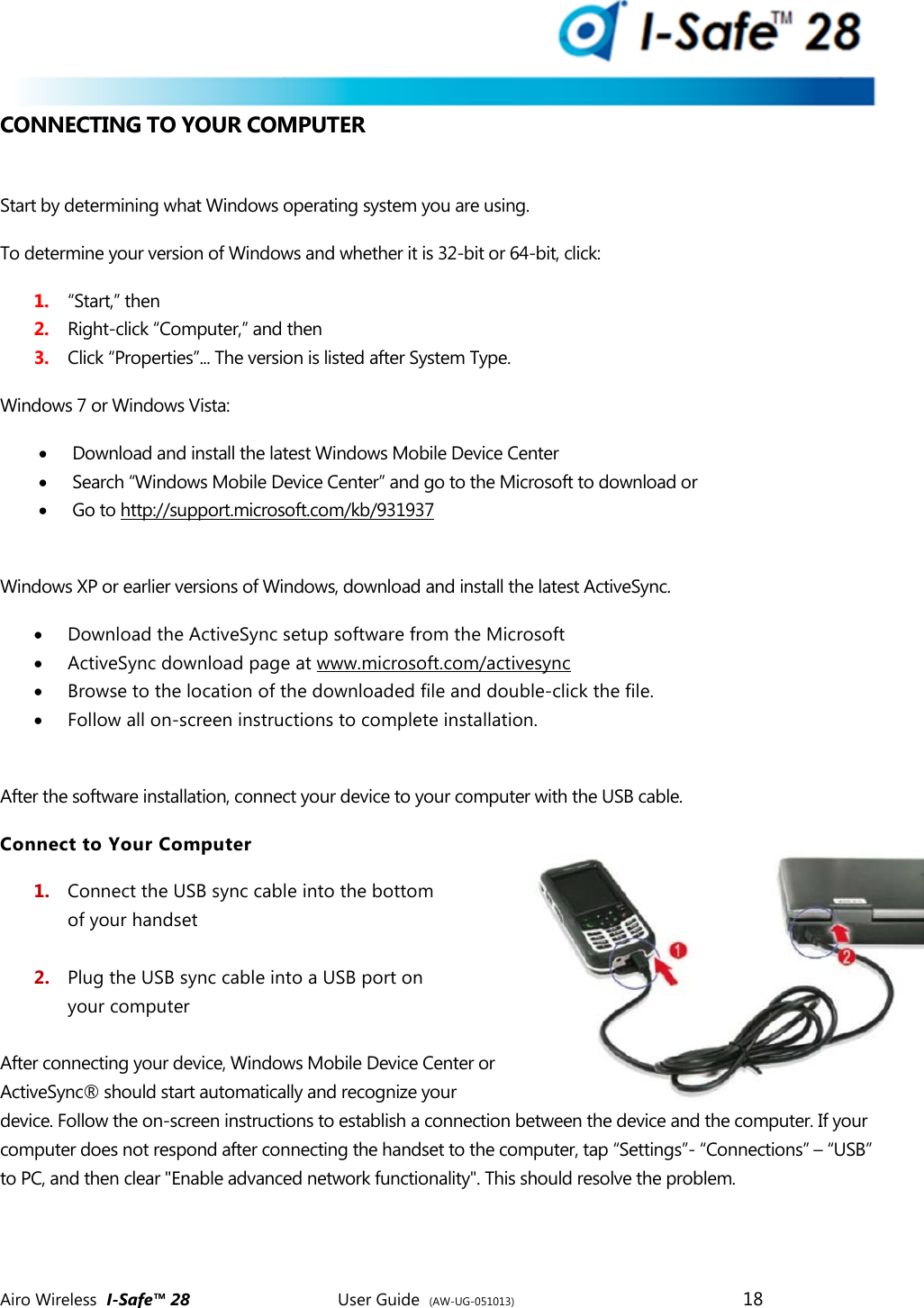
 Airo Wireless  I-Safe™ 28       User Guide  (AW-UG-051013)        17   PHONE OPERATIONS  There are three ways to place a call:  1. Keypad: Press the green CALL handset button and dial the desired number, or scroll down to the previously saved number. Press the green CALL button again to initiate the call.  2. Today screen: Simply dial the desired number, then press the green CALL handset button to start a call.  3. Phone Screen: Tap PHONE on the command bar then enter the    desired number and tap the TALK button on your touch screen.  To receive a call, simply press the green CALL handset  button, or the green TALK touchscreen button.  To end a call, simply press the red END handset button, or the red END touchscreen button.
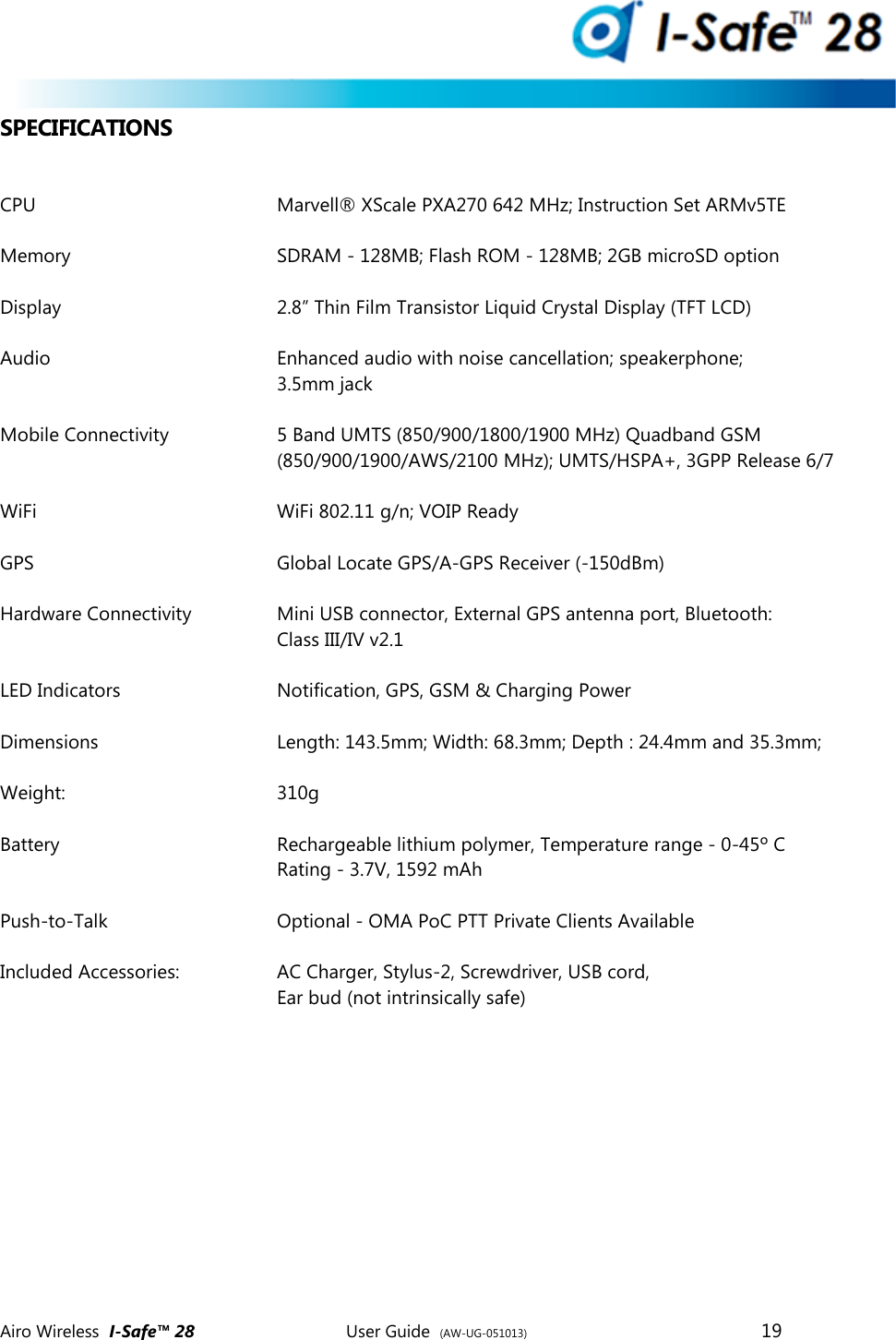
 Airo Wireless  I-Safe™ 28       User Guide  (AW-UG-051013)        18   CONNECTING TO YOUR COMPUTER  Start by determining what Windows operating system you are using. To determine your version of Windows and whether it is 32-bit or 64-bit, click: 1. “Start,” then 2. Right-click “Computer,” and then  3. Click “Properties”... The version is listed after System Type. Windows 7 or Windows Vista:  Download and install the latest Windows Mobile Device Center  Search “Windows Mobile Device Center” and go to the Microsoft to download or   Go to http://support.microsoft.com/kb/931937  Windows XP or earlier versions of Windows, download and install the latest ActiveSync.  Download the ActiveSync setup software from the Microsoft  ActiveSync download page at www.microsoft.com/activesync  Browse to the location of the downloaded file and double-click the file.  Follow all on-screen instructions to complete installation.  After the software installation, connect your device to your computer with the USB cable.  Connect to Your Computer 1. Connect the USB sync cable into the bottom of your handset  2. Plug the USB sync cable into a USB port on  your computer  After connecting your device, Windows Mobile Device Center or ActiveSync® should start automatically and recognize your device. Follow the on-screen instructions to establish a connection between the device and the computer. If your computer does not respond after connecting the handset to the computer, tap “Settings”- “Connections” – “USB” to PC, and then clear "Enable advanced network functionality". This should resolve the problem.
 Airo Wireless  I-Safe™ 28       User Guide  (AW-UG-051013)        19   SPECIFICATIONS  CPU        Marvell® XScale PXA270 642 MHz; Instruction Set ARMv5TE  Memory      SDRAM - 128MB; Flash ROM - 128MB; 2GB microSD option  Display        2.8” Thin Film Transistor Liquid Crystal Display (TFT LCD)  Audio        Enhanced audio with noise cancellation; speakerphone;          3.5mm jack   Mobile Connectivity    5 Band UMTS (850/900/1800/1900 MHz) Quadband GSM          (850/900/1900/AWS/2100 MHz); UMTS/HSPA+, 3GPP Release 6/7  WiFi        WiFi 802.11 g/n; VOIP Ready  GPS         Global Locate GPS/A-GPS Receiver (-150dBm)  Hardware Connectivity    Mini USB connector, External GPS antenna port, Bluetooth:  Class III/IV v2.1  LED Indicators      Notification, GPS, GSM & Charging Power  Dimensions      Length: 143.5mm; Width: 68.3mm; Depth : 24.4mm and 35.3mm;   Weight:       310g  Battery        Rechargeable lithium polymer, Temperature range - 0-45º C Rating - 3.7V, 1592 mAh  Push-to-Talk      Optional - OMA PoC PTT Private Clients Available  Included Accessories:    AC Charger, Stylus-2, Screwdriver, USB cord,  Ear bud (not intrinsically safe)
 Airo Wireless  I-Safe™ 28       User Guide  (AW-UG-051013)        20   REGULATORY COMPLIANCE  Phone Operation When speaking into the device microphone or the headset microphone, a minimum separation distance of 1 inch (2.5 cm) must be maintained between the user’s face and the device including its antenna, to comply with the FCC exposure limits. NOTE: Do not touch the antenna unnecessarily when using the phone function.  Contact with the antenna affects call quality and may cause the device to operate at a higher power level than otherwise needed.  Phone Usage Regulations Never violate any of the following FCC Rules and Regulations when using your device. The following offenses are punishable by fine, imprisonment, or both:  Using obscene, indecent, or profane language.  Using the unit to give off false distress calls.  Wiretapping or otherwise intercepting a telephone call, unless that person has obtained the consent of the parties participating in the call first.  Making anonymous calls to annoy, harass, or molest other people.  Charging to an account without authorization to avoid payment for service.  Refusing to yield a party line when informed that it is needed for an emergency call (it is also unlawful to take over a party line by stating falsely that it is needed for an emergency. FCC (Federal Communication Commission) Notice This device complies with part 15 of the FCC Rules. Operation is subject to the following two conditions: (1) This device may not cause harmful interference, and (2) this device must accept any interference received, including interference that may cause undesired operation. This device has been tested and found to comply with the limits for a Class B digital device pursuant to Part 15 of the FCC Rules. These limits are designed to provide reasonable protection against harmful interference in a residential installation.  This device generates, uses, and can radiate radio frequency energy, and if not installed and used in accordance to with the instructions, may cause harmful interference to radio communications. However, there is no guarantee that interference will not occur in a particular installation. If this device does cause harmful interference to radio or television reception, which can be determined by turning the device off and on, the user is encouraged to try to correct the interference by the following measures:  Reorient or relocate the receiving antenna.  Increase the separation between the device and receiver.  Connect the device into an outlet on a circuit different from that to which the receiver is connected.  Consult the dealer or an experienced radio/television technician for help.
 Airo Wireless  I-Safe™ 28       User Guide  (AW-UG-051013)        21   Notice: Shielded Cables All connections to other computing devices must be made using shielded cables to maintain compliance with FCC regulations. Notice: Peripheral Devices Only peripherals (input/output devices, terminals, printers, etc.) certified to comply with the Class A or Class B limits may be attached to this equipment. Operation with non-certified peripherals is likely to result in interference to radio and TV reception.  CAUTION: Changes or modifications not expressly approved by the manufacturer could void the user’s authority, which is granted by the Federal Communications Commission, to operate this device.  Use Conditions This part complies with Part 15 of the FCC Rules. Operation is subject to the following  Two conditions: (1) this device may not cause harmful interference, and (2) this device must accept any interference received, including interference that may cause undesired operation.  SAR Statement The FCC has granted an Equipment Authorization for this device with all reported SAR Levels evaluated as in compliance with the FCC RF exposure guidelines. SAR information on this device is on file the FCC and can be found under the Display Grant section of: http://www.fcc.gov/oet/fccid  After searching for FCC ID QDL-ISAFE28, additional information can be found on the Cellular Telecommunications & Internet Association (CTIA) web site at:  http://www.phonefacts.net Please note that this handset was NOT tested for SAR results with third-party ad hoc VoIP applications, therefore while these features cannot be blocked or disabled without impacting the normal functions of the phone, since such operations have not been tested for RF exposure compliance they are not recommended and must be avoided.
 Airo Wireless  I-Safe™ 28       User Guide  (AW-UG-051013)        22   GENERAL SAFETY INFORMATION  Radio Frequency (RF) Energy Emission Your device is a low power radio transmitter and receiver. When it is ON, it receives and sends RF signals. In August 1996, the Federal Communications Commissions (FCC) adopted RF exposure guidelines with safely levels for handheld wireless phones. Those guidelines are consistent with the safety standards previously set by both U.S. and International standards bodies: • ANSI C95.1 (1992)   •   NCRP Report 86 (1986)   •   ICNIRP (1996) Those standards were based on comprehensive and periodic evaluations of the relevant scientific literature. For example, over 120 scientists, engineers, and physicians from universities, government health agencies, and industry reviewed the available body of research to develop the ANSI Standard (C951). Your device has been equipped with internal shielding to minimize stray emissions of RF energy. However, using your device can still be limited in the some instances. Turn off your handset in any facility where posted notices require you do so. When Boarding an Aircraft  Most airline regulations prohibit the on-board use of portable PCs (and all other portable electronic devices that could potentially emit stray RF energy), particularly during take-offs and landings, to prevent any possible interference with the reception of signals by airborne electronic navigational devices.  FCC regulations prohibit using your device while in the air. Turn your device OFF before boarding an aircraft.   Always request and obtain prior consent and approval of an authorized airline representative before using your device aboard an aircraft.  Always follow the instructions of the airline representative whenever using your device aboard an aircraft, to prevent any possible interference with airborne electronic equipment. When Inside Hospitals and Other Health Care Facilities  Turn your device OFF in health care facilities when any regulations posted in these areas instruct you to do so. Hospitals or health care facilities may be using equipment that could be sensitive to external RF energy. “Device OFF” means to turn the radio stand by switch “OFF”, then turn the power off by pressing the Power button.  Always comply with posted prohibitions of the use of RF- emitting devices in hospitals and other medical facilities. Failure to follow such directives could result in the    interference with medical equipment and/or devices. When Near Blasting Areas
 Airo Wireless  I-Safe™ 28       User Guide  (AW-UG-051013)        23   To avoid interfering with blasting operations, turn your device OFF when in a “blasting area” or in areas posted “Turn off two-way radio”.  Obey all signs and instructions.  When Around Pacemakers The Health Industry Manufacturers Association recommends that a minimum                 separation of six (6”) must be maintained between your device and a pacemaker to avoid potential interference with the pacemaker. These recommendations are consistent with the independent research and recommendations of Wireless Technology Research. Never come closer than six (6”) to a person with a heart pacemaker implant when using this device. Failure to do so could result in interference with the function of the pacemaker. When Wearing a Pacemaker  You should ALWAYS keep the device more than six inches from their pacemaker when the device is turned ON.  You should not carry the device in a breast pocket.  If you have any reason to suspect that interference is taking place, turn your device OFF immediately. When Wearing Hearing Aids Some digital wireless phones may interfere with some hearing aids. In the event of such interference, you may want to consult your service provider (or call the customer service line to discuss alternatives). When Using Other Medical Devices If you use any other personal medical device, consult the manufacturer of your device to determine if they are adequately shielded from external RF energy.  Your  physician may be able to assist you in obtaining this information. When in Motor Vehicles  RF signals may affect improperly installed or inadequately shielded electronic systems in motor vehicles. Check with the manufacturer or its representative regarding your vehicle. You should also consult the manufacturer of any equipment that has been added to your vehicle.  Never use your device while driving an automobile or any other moving vehicle. Always pull out of traffic and come to a stop in a legally permissible and safe location before using your device. Failure to do so could result in serious bodily injury traffic accidents.  Never place your device on the passenger seat or any place else in the car where it can become a projectile during a collision or stop.
 Airo Wireless  I-Safe™ 28       User Guide  (AW-UG-051013)        24    An air bag inflates with great force. DO NOT place objects, including both installed and portable wireless equipment, in the area over the air bag or in the air bag deployment area. If in- vehicle wireless equipment is improperly installed and the air bag inflates, serious injury could result.   Talking on your phone while driving is extremely dangerous, and is illegal in some states. Remember, safety comes first. Check the laws and regulations on the use of phones in the areas where you drive. Always obey them. If you must use the phone function while driving, please: o Give full attention to driving. Driving safely is your first responsibility. o Use hands-free features by attaching the single ear bud headset and enabling the speed dial and auto-pick up functions.  o Pull off the road and park before making answering a call, if driving conditions so require. o Never use your device while walking. Usage while walking could result in bodily injury caused by attention to automobile traffic or other pedestrian hazards. o Never use your device in any area with a potentially explosive  atmosphere and obey all signs and instructions. Sparks in such areas could cause an explosion or fire resulting in bodily injury or even death. When Using Earbuds or Earphones  Never use the Airo accessory earbuds in explosive areas. They are not intended for use in explosive areas and are only included because legally Airo must supply a hands free option.  Never raise the sound volume level too high when using your device with earphones. An excessive sound volume level could cause damage to your hearing.  MAINTENANCE & REPAIR INSTRUCTIONS  Your Airo I-Safe™ 28 resists water very well, so feel free to clean it occasionally to remove dirt and grime that might otherwise be abrasive on the screen.  Always use AIRO authorized accessories and optional devices when operating this device, as the use of incompatible auxiliary equipment or unauthorized accessories could result in fire, electric shock or other bodily injury, and will also void your warranty. Never attempt to disassemble, repair or make any modification to your device. Disassembly, modification or any attempt at repair could cause bodily injury or property damage, as well as damage to the device itself. Never touch the liquid that might leak from a broken liquid crystal display. Contact with this liquid could cause a skin rash. If the crystal-display liquid should come into contact with the skin or clothing, wash it immediately with clean water. If there is a problem with the handset, or it appears to need repair, please contact your vendor or consult the service center.
 Airo Wireless  I-Safe™ 28       User Guide  (AW-UG-051013)        25
 Airo Wireless  I-Safe™ 28       User Guide  (AW-UG-051013)        26   BATTERY INFORMATION  Your device is not a toy. Never allow children to play with your device. Misuse, rough, or improper handling of your device by children could result in serious bodily injury related to any of the enumerated safety warnings in this user guide. In addition, always keep all accessories and components out of reach of small children as small parts might present a choking hazard. Seek immediate medical attention if choking occurs or if any small part has been swallowed.  This device is equipped with a removable and rechargeable Lithium polymer battery. When a replacement is needed, please request the dealer from whom your device was purchased to assist you. Use only manufacturer-approved batteries. CAUTION: DANGER OF EXPLOSION IF BATTERY IS INCORRECTLY REPLACED. REPLACE  ONLY WITH THE SAME OR EQUIVALENT TYPE RECOMMENDED BY THE MANUFACTURER, DISPOSE OF USED BATTERIES ACCORDING TO THE MANUFACTURER’S INSTRUCTIONS. Battery Pack Reminders  Use the battery only for its intended purpose.  Replace only with equivalent type battery (Sony battery model US454261A8T).   Use of another battery may present a risk of EXPLOSION, FIRE, or high temperatures.  Never expose the battery terminals to any other metal object, as this can short- circuit the battery.  When not in use, store the battery uncharged in a cool, dark, dry place.  The battery is a self-contained unit. Do not attempt to open its case. Battery operating time gradually decreases. You may need to buy a new battery.  Never dispose of the battery with ordinary waste.  Never dispose of a battery in a fire!  Dispose of used batteries in accordance with local regulations.  Recycle! Lithium polymer batteries are recyclable. When you replace your built-in battery, please request the repair center to recycle the batter in accordance with RBRC standards.
 Airo Wireless  I-Safe™ 28       User Guide  (AW-UG-051013)        27   AC ADAPTER PRECAUTIONS   Never attempt to disassemble or repair an AC adapter, and never alter the power cables or plugs as exposure to electric shock hazards may result.  Always contact an authorized AIRO service center, if repair or replacement is required.  If the plug will not fit into the available outlet, have a proper outlet installed by a qualified electrician. Improper connection can result in the risk of electric shock.  Never allow the AC adapter to come into contact with water or any other liquid or water in contact with AC adapter can create a risk of fire or electric shock.  Always use an authorized AIRO AC adapter to avoid any risk of fire or damage    to your device or battery.  Bodily injury or property damage may occur as a result of the use of an unauthorized and incompatible AC adapter.  Never use an AC adapter if it has a damaged or worn power cord or plug. The use of damaged or worn power cords or plugs could result in electric shock, burns or fire. Contact an authorized AIRO service center immediately to obtain a suitable replacement.  Never attempt to connect or disconnect the power plug with damp or wet hands.   Connecting or disconnecting the power plug with damp or wet hands could result in an electric shock.  Always unplug the AC adapter from the power source before attempting any  Cleaning in order to avoid the risk of electric shock. Always use a soft dry cloth to clean the equipment, after it has been unplugged.  Never attempt to use an unauthorized AC adapter with your device in order to avoid any risk of bodily injury or property damage. Since unauthorized accessories have different specifications, they may be incompatible with your device.  Always locate the power supply cable in an area where it will not be stepped on, tripped over, or otherwise subjected to damage or stress.  Never place heavy objects on the power supply cable, as this could result in damage to the cable.   Never bend or twist a power supply cable, and never pull it in an attempt to remove the AC adapter or accessory plug from a socket. Always grasp the AC adapter or the accessory plug directly when unplugging the power supply cable in order to avoid damaging the cable.  Always ensure the power plug pins are clean and free of dust or other foreign materially wiping the pins with a clean dry cloth. Dust or other foreign material accumulation on the power plug pins could cause fire.  Be certain to insert the power plug deeply into a socket. Failure to do so could   cause a fire and an electric shock.  Always disconnect the AC adapter from the power source when it is not in use.  Never place an AC adapter on a wooden surface (or any other surface that could be marred by exposure to heat) while it is in use. Since the surface temperature of the AC adapter increases during normal use, always rest it on a suitable heat-insulating material.  Never cover the AC adapter with any object while it is in use, and never place it adjacent to a heat source. An excessive temperature increase could detrimentally affect performance.  Never place the power supply cable near a heat source, as damage to the cord or to its insulation could result.  Always use a surge protector when utilizing the AC adapter during an electrical   storm. Otherwise, a power surge could result in the loss of stored data.  Always use a surge protector when utilizing the AC adapter near an electrical noise source such as high
 Airo Wireless  I-Safe™ 28       User Guide  (AW-UG-051013)        28   voltage line or power source. Otherwise, a power surge could result in loss of stored data.  In order to avoid any possibility of a fire, always insert the power plug into household electric outlet supplying 120V AC.  When traveling abroad, never plug the AC adapter into a power source that does not correspond to both the voltage and the frequency specified on the rating plate of the AC adapter, as equipment damage and fire will result. When you connect to a power of more than 125V AC, change the power supply cable with one that corresponds to the power supply specification. Failure to do so could cause a fire.  Never drop the AC adapter or subject it to severe shock. This may cause ignition or electric shock, as well as damage to the adapter.
 Airo Wireless  I-Safe™ 28       User Guide  (AW-UG-051013)        29   From the entire team at Airo, we hope you enjoy your I-Safe™ 28.  Copyright © 2012-2013 Airo Wireless, LLC. All Rights Reserved. Airo™, Airo Wireless™, I-Safe™, eButton™ marks, images, and symbols are the exclusive properties of Airo Wireless LLC. and the stylized “a” is a trademark of Airo Wireless LLC, registered with the US Patent and Trademark Office. This and other marks may be pending in other countries as well. The “a®” including components or features thereof and/or associated software are protected by copyright, international treaties, and various patents pending. All other brands, product names, company names, trademarks and service marks are the properties of their respective owners.  While every effort has been made to achieve technical accuracy, information in this document is subject to change without notice and does not represent a commitment on the part of Airo Wireless, LLC or any of its subsidiaries, affiliates, agents, licensors, or resellers. For the most current information and warnings, visit http://www.airowireless.com/resources/2013usermanual.pdf There are no warranties, expressed or implied, with respect to the content of this document.     Airo Wireless, LLC 12 Piedmont Center Suite 310 Atlanta, GA 30305 USA +1.404.526.9700   www.airowireless.com

Navigation menu