Aiwa Tv S2700 Users Manual Tnze144
TV-S2700 to the manual 4813fe1c-290e-4ade-8f79-26fc7c0a3846
2015-02-04
: Aiwa Aiwa-Tv-S2700-Users-Manual-360883 aiwa-tv-s2700-users-manual-360883 aiwa pdf
Open the PDF directly: View PDF  .
.
Page Count: 40
+TABLE OF CONTENTS
important Safety Tips . . .. 2-3 @ESPANOL
Safety Precautions ..4 ImportancesMedidas
Guide to Using this Manual . . . . . . ...5 de Seguridad, ..................3-4
Specifications .,,........,5....,.,,.5 Indite . . . . . . . . . . . . . . . . . . . . . . . . . . . . . .16
Features, , .,, ,,, . ., . ., .,,,,... ,,.,5
Basic Setup ,.,, ,, ., ...............6
Basic Hookup ......................6
Front /Rear Panel,,, ,...,,,,.7, ........7 OFRAN~AIS
Universal Remote Control ...........7-9 Mesuresdesecurite ,, ...,.,,...,,,,.4
On-Screen Feature Setup . . . . . . . ...10-11 Tabledes Matieres28
UsingAudio/Video(A/V)Jacks ... ,,,,12
Closed-Captioning ,,, .,, , . .,, ,. .,..13
Setting the Sleep Timer..,,,.,.,,, ,.,13
Troubleshooting . . . . . . . . . . . ...14-15
Care and Cleaning.,.....,,.,,,,.. .,15
OWNER’S RECORD
For your convenience, record the model number
and serial number (you will find them on the rear
or your set) in the space provided below. Please Model No. EEEl
refer to them when you contact your AIWAdealer
in case of difficulty. Serial No. ~~
For assistance and information
call toll free I-800-BUY-AIWA
(United States and Puerto Rico)
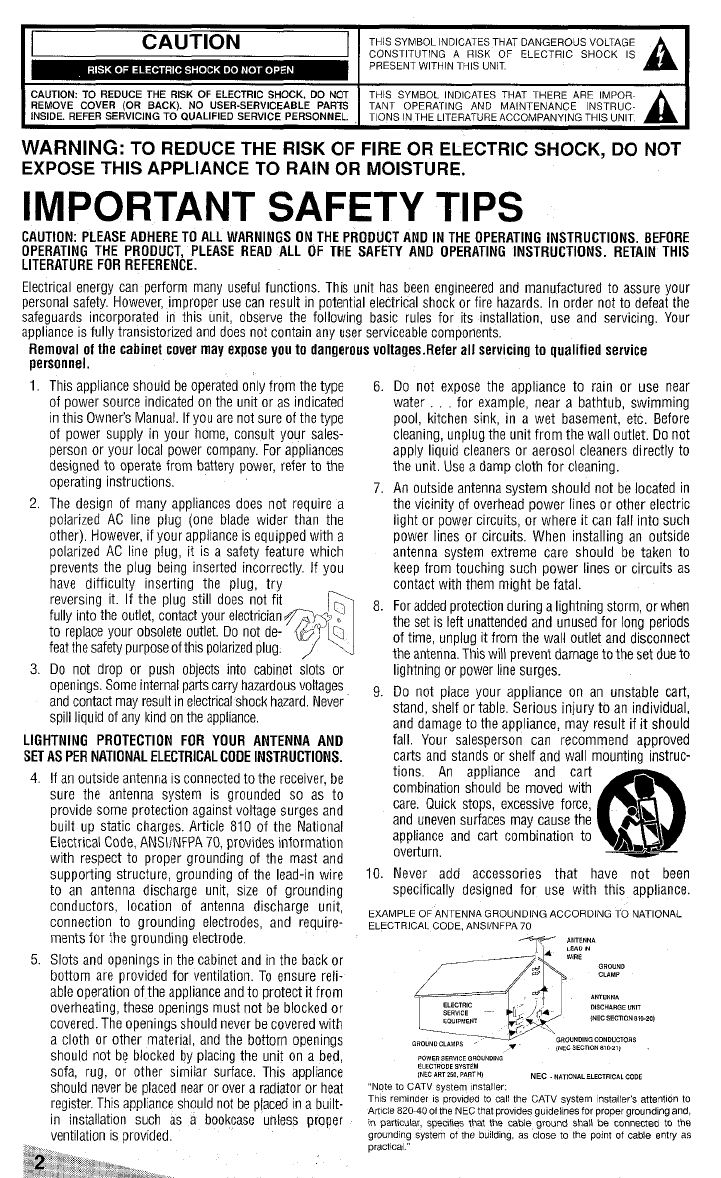
CAUTION THIS SYMBOL INDICATES THAT DANGEROUS VOLTAGE
CONSTITUTING A RISK OF ELECTRIC SHOCK IS
PRESENT WITHIN THIS UNIT A
CAUTION: TO REDUCE THE RISK OF ELECTRIC SHOCK, DO NOT THIS SYMBOL INOICATES THAT THERE ARE IMPOR.
REMOVE COVER (OR BACK). NO USER.SERVICEABLE PARTS TANT OPERATING AND MAINTENANCE lNSTRUC-
fNSIDE. REFER SERVICING TO QUALIFIED SERVICE PERSONNEL. TIONS IN THE LITERATURE ACCOMPANYING THIS UNIT A
WARNING: TO REDUCE THE RISK OF FIRE OR ELECTRIC SHOCK, DO NOT
EXPOSE THIS APPLIANCE TO RAIN OR MOISTURE.
IMPORTANT SAFETY TIPS
CAUTION: PLEASE ADHERE TO ALL WARNINGS ON THE PROOUCT ANO IN THE OPERATING INSTRUCTIONS, BEFORE
OPERATING THE PROOUCT, PLEASE REAO ALL OF THE SAFETY ANO OPERATING INSTRUCTIONS. RETAIN THIS
LITERATURE FOR REFERENCE.
Electrical energy can perform many useful functions. This unit has been engineered and manufactured to assure your
personal safety. However, improper use can result in potential electrical shock or fire hazards. in order not to defeat the
safeguards incorporated in this unit, observe the following basic rules for its installation, use and servicing. Your
appliance is fully transistorized and does not contain any user serviceable components.
Removal of the cabinet cover may expose you to dangerous voltages. Refer all servicing to qualified service
oersonnel.
1.
2,
3.
This appliance should be operated only from the type
of power source indicated on the unit or as indicated
in this Owner’s Manual. If you are not sure of the type
of power supply in your home, consult your sales-
person or your local power company. For appliances
designed to operate from battery power, refer to the
operating instructions.
The design of many appliances does not require a
polarized AC line plug (one blade wider than the
other). However, if your appllance is equipped with a
polatized AC line plug, it is asafety feature which
prevents the plug being inserted incorrectly. If you
have difficulty inserting the plug, try
reversing it. If the plug still does not fit
fully into the outlet, contact your electrician &y
to replace your obsolete outlet. Do not de- &Q
feat the safety purpose of this polarized plug. / .
Do not drop or push objects into cabinet slots or
open ings. Some internal parts carry hazardous voltages
and contact may result melectrical shock hazard. Never
spill liquid of any hnd on the appliance.
LIGHTNING PROTECTION FOR YOUR ANTENNA AND
SET AS PER NATIONAL ELECTRICAL COOE INSTRUCTIONS.
4. If an outside antenna IS connected to the receiver, be
sure the antenna system is grounded so as to
provide some protection against voltage surges and
built up static charges. Article 810 of the National
Electrical Code, ANS1/NFPA 70, provides information
with respect to proper grounding of the mast and
supporting structure, grounding of the lead-in wire
to an antenna discharge unit, size of grounding
conductors, location of antenna discharge unit,
connection to grounding electrodes, and require-
ments for the grounding electrode,
5. Slots and openings in the cabinet and in the back or
bottom are provided for ventilation. To ensure reli-
able operation of the appliance and to protect it from
overheating, these openings must not be blocked or
covered. The openings should never be covered with
acloth or other material, and the bottom openings
should not be blocked by placing the unit on a bed,
sofa, rug, or other similar surface. This appliance
should never be placed near or over aradiator or heat
register. This appliance should not be placed in abuilt.
in installation such as abookcase unless proper
ventilation is Drovided.
6
7
8
9
to
Do not exoose the a~oliance to rain or use near
water ‘for examp(e~ near abathtub, swimming
pool, kitchen sink, in awet basement, etc. Before
cleaning, unplug the unit from the wall outlet. Do not
apply liquid cleaners or aerosol cleaners directly to
the unit. Use adamp cloth for cleaning.
An outside antenna system should not be located in
the vicinity of overhead power lines or other electric
light or power circuits, or where it can fall into such
power lines or circuits. When installing an outside
antenna system extreme care should be taken to
keep from touching such power lines or circuits as
contact with them might be fatal,
For added protection during alightning storm, or when
the set is left unattended and unused for long pefiods
of time, unplug it from the wall outlet and disconnect
the antenna, This will prevent damage to the set due to
lightning or power line surges.
Oo not place your appliance on an unstable cart,
stand, shelf or table. Serious injury to an individual,
and damage to the appliance, may result if it should
fall. Your salesperson can recommend approved
carts and stands or shelf and wall mounting instruc-
tions, An appliance and cart
combination should be moved with
care, Quick stops, excessive force,
and uneven surfaces may cause the
appliance and cart combination to
overturn.
(!!!!
A&
Never add accessories that have not been
specifically designed for use with this appliance.
EXAMPLE OF ANTENNA GROUNDING ACCORDING TO NATIONAL
ELECTRICAL CODE. ANS1/NFPA 70
..,”,,., -- @
0,s,”,,,, “m
I./v W. SECTION810-201
>. \
=~ *‘ROu”O’NG-cro’$
{WC Smno. *30.? ,
,O.,,,,,”,,,,,O ”,,,,,
a,,,..,, SYSTEM
[N,, ,,, ,s0,,,,, H, NEC .,,,,0..,,,,.,,,,,,,,0,
,Note to CATV system Installer.
Th,s mnndw ,s mo,,ded to call the CATV s“stem m,talle,,s Wten!lon to
AM. 82040 of the NEC that prrwdes gudelks for proper gro”.d!ng and,
mparfwlar, spe’afms that the cable ground shall be connected to the
gro.ndmg system of the bulld(ng, as close to the potnt of cable entry as
practl.al,
11.
12.
13.
DO not allow anything tO rest on the power cord. Do
not locate the appliance where the cord will be
abused by persons waiting on it
Do not olver~~~~ lw~!~ ~Qt!ets W. ex.” ,...,
dtrw<inn CQ@ ZS
this can resulf in fire or electric shock.
Unplug the appliance from the wall outlet and refer
servicing t’o qualified service personnel under the
following conditions:
A. If the power cord or plug is damaged or frayed
6. If liquid has been spilled into the appliance,
C. If the appliance has been exposed to rain or water,
D. If the appliance has been dropped or the cabinet
has been damaged.
E. If the appliance exhibits adistinct change in
performance.
f4.
F. If the appliance does not operate normally by fol-
lowing the operating instructions, adjust only those
controls that are covered in the operating instru-
ctions Improper adjustment of other controls may
result in damage arm wiii often require extensive
work by aqualifitd techmciim to restore the
appliance to normal operation.
Upon completion of any service or repair, request the
service technician’s assurance that only Factory
Authorized Replacement Parts that have the same
characteristics as the original parts were used, and
that routloe safety checks have been performed to
determine that the appliance is in safe operating
conctnion. unauinorized Suosiiiuilut”[s may rmtik in
fire, electticai shock, or other hazards.
PRECAUTION ESTE SIMBOLO INDICA OUEVOLTAJES PELIGROSOS
QUE CONSTITUYEN UN RIESGO DE TOQUE ELEC
TRICO ESTAN PRESENTES DENTRO DE ESTA UNIDAD A
PRECAuclON: pARAREDUCIR EL RIEsGODETOQUE ELEcTRtCO, N0 ESTE SIMBOLO INDICA QUE HAY INSTRUCC10NE5
QUITE LA CUBIERTA (O LA TAPA TRASERA). NO HAY PARTES fMPORTANTES OEOPERACION yMANTEN,MIENTOEN
ADENTRO QUE LAS PUEDA REPARAR EL USUARIO. REFIERASE A
D.cI.nkl A, r.., ,.,P.,,,,,O,. DA m.m. mfimc, AmAn&T” LA LITERATURE OUE SE ANEXA AESTA UNIDAD Al
ADVERTENCIA: PARA REDUCIR EL RIESGO DE FLIEGO OTOQUE ELEC-
TRICO, NO EXPONGA ESTE APARATO A LLUWA OI-NJMEDAD.
IMPORTANTESMEDIDASDE SEGURIDAD
PRECAUTION: POR FAVOR SIGA TOOAS LAS ADVERTENCIAS EN EL PRODUCTO YEN LAS INSTRUCCIONES DE OPERA-
CION, ANTES DE OPERAR EL PRODUCTO, POR FAVOR LEA TODAS LAS INSTRUCCIONES DE OPERACIDN YSEGURIOAD.
GUAROE ESTA LITERATURE PARA SU REFERENCIA.
La energia electtica puede Hevar acabo muchas funciones utiles. Esta unidad asido diseilada ymanufacturada para
asegurar su seguridad personal. Sin embargo, uso impropio puede resrdtar un toque electrlco oriesgos de fuego. Para
no deshabilitar Ias medidas de seguridad incorporadas en esta unidad, observe Ias siguientes reglas basicas para Su insta-
lacion, uso yservlcio, Su aparato esta totalmente transistorizado yno contiene ninguna parte al que el usuano Ie pueda
dar serviclo.
Remover la cubierta del gabinete puede exponerlo avoltajes peligrosos. Refiera todo setvicio apersonal de
servicio calificado.
1.
2
3
Este aparato debera de ser operado solamente por el tipo
de fuente de poder indicado en la Iinea ocomo es indicado
en el manual del propietarlo. Si usted no esta seguro del
tipo de fuente de porler en su casa, consulte asu vendedor
o a la Comision Federal de Electricldad. Para aparatos que
operen de potencla de bateria, refierase aIas instrucciones
de operacibn
El diserio de muchos aparatos electrlcos no requiere un
conector de Iinea A.C. polarlzado (una ho}a mas grande
que la otra).Sln embargo, si su aparato esta equipado
con un conector de Iinea A.C. polarizado, esta es una
medida de seguridad que previene que el conector sea
insertado incorrectamente. Si usted tiene dificulfades al
insertar el conector de A. C., trate de mvertlrlo. S[ el
conector todavia no se puede msertar en el
receptaculo de A. C., pongase en contacto R
con un tecrvco electricista para que fir~~: !
reemplaze 5U receptaculo obsoleto. No &/Y ~~ ~
trate de elimlnarel proposito de seguridad de
este conector polatizado. ,/ \J
No deje caer oempuje obietos dentro de Ias ranuras y
aperturas del gabinete. Algunas pactes interiors Ilevan
voltajes pehg rosos Ycontacio con ellas puede resultar en
peligro de toque electtico. Nunca vierta cualquier clase de
Iiquido en el aparato.
PROTECTION EN CONTRA DE RAYOS ELECTRICOS PARA SU
ANTENA YAPARATO DE ACUERDD ALAS INSTRUCCIONES OEL
CODIGO KtACIONAL ELECTRICO (EUA).
4. Si una antena exterior es conectada al receptor,
asegtirese que el sisterna de antena este aterrizado para
proveer alguna protecclon en contra de impulses de
voltaje yla acumulacih de cargas estiticas. El art!culo
810 del codigo national electrico de Ios Estados Unidos
de Ametica (National Electrical Code, ANWNFPA 70),
provee mformacion con respecto al aterrizamlento
correcto del mastll yla estructura de soporte, el
aterrizamiento del alambre ala antena en una umdad de
descarga, el tamafio de Ios conductors de aterriza-
miento, la Iocalizaclon de la unidad de descarga,
conexion aIos electrodes de aterrizamiento, y
requerlmlentos para Ios electrodes de aterrizamiento,
EJEMPLO OE ATERRIZAMIENTO DE ANTENA DE ACUUERDO AL
CODIGO NACiONAL ELECTRICO (Natjonal Ele.tr,cal Code,
ANS1/NFPA70] —
.,., ,
0. Las ramrras yaperruras en el gamne[e yen ia parte
trasera einferior fueron provistas para ventilation del
aparato. Para asegurar una operation confiable del
aparato yprotejedo de sobrecalentamiento, estas apefi
turas no deberan de ser tapadas ocubiertas. Las
aperturas nunca deberan de ser cubiertas con un trapo
uotro material, yIas aperturas de la parte inferior no
deberan de ser tapadas poniendo la unidad en una
cama, sofa, alfombra, uotra superlicie similar. Este
aparato nunca debera de ser puesto cerca osobre radi.
adores de calor. Este aparato nunca debera de ser
puesto en instalaciones tales como Iibreros a no ser que
haya una adequada ventilation en tales instalaciones
6. No exponga el aparato aIluvia o a uso cerca de
agrra por ejemplo, cerca a una baifera, una alberca,
un Iavabo, en un sotano htimedo, etc. Antes de Iimpiar,
desconecte la unidad del receptaculo de la pared. No
aplique Iimpiadores I[quidos o de aerosol directamente
ala unidad. Use un trapo htimedo para Iimpiar.
7. Una antena exterior no debera de ser Iocalizada en la
vecindad de Iineas de potencia qlle pasen por encima
de otros circuitos de Iuz electrica o de potencia, o en
donde pueda caer sobre tales Ikreas de potencia o
circuitos. Cuando se instale un sistema de antena
externa, se debe de tener cuidado extremo en no tocar
tales Iineas de potencia ocircuitos ya que contacto con
ellos puede Ilegar aser fatal.
8. Para proteccifm adicional durante una torments electrica, o
cuando el aparato es dejado sin atencion ni uso du rante
Iargos petiodos de tiempo, desconictelo del receptaculo
de la pared ydesconecte la antena. Esto evitara dafros al
aparato debido arayos oacambios bruscos en el voltaje
de Iinea
9. No coloque su aparato en carrito, pedestal, anaquel o
mesa que scan inestables. Hetidas serias a un
indlviduo, yaveria al aparato, pueden resultar si este
cae. Su vendedor puede recomendar cartitos
ypedestaled oanaqueles einstrucciones
para montaje en la pared.
@
●L
Una combination de aparato ycartito debera ~
IVIESURES DE SECURITE
Afin d’eviter tout risque d’[ocendie ou de choc electrique,
n’exposez pas I’apparell ala pluie ni aI’humidite.
Afin d’eviter tout risque de choc electrique, n’enlevez pas Ie
panneau artiere. Lappareil est entierement transistorize et ne
contlent aucune piece rempla~able ou reparable par I’usager.
En cas de probleme, confiez I’appareil a un reparateur qualifie.
Le b%couleur est muni d’un cordon d’alimentation CA a
fiche polarisee dent une lame est plus large que I’autre. Ce
dispositif de securite permet de brancher la fiche d’une
seule fa$on sur une prise de courant.
Lorsque vous utilisez Ie te16couleur avec des jeux video, ne
saturez pas la Iuminosite ni Ie contraste. Avec Ie temps, ceci
pourrait causer I’impression permanerle de I’image du
chamo de ieu sur I’ecran.
de ser movida con cuidado. Paradas rapidas, fuerza
exceswa, ysuperficies irregulars pueda causar que la
combination de aparato ycartito se volteen ycaigan,
10. Nunca adicione accesorlos que no han sido
especificamente diseitados para uso con este aparato,
11. No deje que nada descanse sobre el cordon de
potencia. No coloque el aparato en donde el cordon de
potencia pueda ser abusado por personas caminando
sobre el.
12, No sobrecarge receptaculos de pared oextensions
electrical ya que esto puede resultar en fuegD otoques
e16ctricos
13, Desconecte el aparato del receptaculo de pared y
refiera servicio apersonal de servicio electrico
caliticado bajo Ias siguientes condiciones
ASi el cordon de potencia oel conector est~n
averiados oraidos.
B. Si Iiquido ha sido derramado en el aparato,
C. Si el aparato ha sido expuesto aIluvia oagua,
D. Nel aparato ha sido tirado oel gabinete asido
averiado.
E. Si el aparato exhibe un cambio perceptible en
funcionamiento.
F. Sel aparato no opera normalmente siguiendo Ias
instrucciones de operation, ajuste solamente
aquellos controles que han sido cubiertos en Ias
instrucciones de operation, Ajuste impropio de
otros controles puede resultar en averia al aparato y
posiblemente requiera de trabajo extensivo por un
tecnico califlcado para restaurar el aparato asu
operation normal.
14. Cuando se termine cualquier servicio oreparation,
requiera del tecnico de sewicio confirmation de que solo
Parles Autorizadas de Remplazo de Fabrice que tengan Ias
mismas caractedsticas que Ias partes originals hayan
sido usadas, yque vetificaciones de seguridad rutinatias
hayan sido Ilevadas acabo para determiner que el aparato
se encuentra en condiciones seguras de operation,
Substituciones no autorizadas pueden resultar en
fuego, toque electrico uotros peligros,
SAFETY PRECAUTIONS
To reduce the risk of fire or electrical shDck, do not expose
this appliance to rain or other moisture.
To prevent electrical shock, do not remove the back cover This
unit is fully transistorized and does not contain user-serviceable
components. Report any problems to qualified sewlce personnel,
This TV set is equipped with apolatized AC line plug. One
blade of the plug is wider than the other. CAUTION: To
prevent electrical shock, match wide blade of plug to
wide slot, Iully insert. This is asafety feature to ensure
that the plug fits only one way into an electrical outlet.
When playing TV video games, do not use intense brightness
and)or contrast sefiings. Over an extended pedod of time, this
may leave apermanent image of the playing field on the picture
,. mscreen
Ne placez pas cet apparell sur un chariot,
support ou table instable. II risquerait de .L Do not place this product on an unstable cafl,
tomber et ainsl d’~tre endommage; cela pour-
@
stand, tripod, bracket, or table, The product ●L
rait aussi vous causer de graves blessures. h> may fall, causing setious personal injury and
setious damage to the product. A
N’utihsez qu’un chariot, support ou table recommafii par
Iefabricant ouvendu avecl’appareil. Lorsdeson installa-
tiOn, SuivezIes instructionsdu fabricant et utlhsez Ies
accessoires d’installation recommandes. Prenez garde
Iorsque vous deplacez Ie televiseur se trorrvant sur un
chariot, Des arr?ts brutaux, une force excessive et des
surfaces inegales peuvent renverser Ie chariot et I’apparell.
Lisez aitentivement Ie present manuel et conservez-le.
Useonly with acart, stand, tripod, bracket, ortablerecom-
mended by the manufacturer, or sold with the product. Follow
the manufacturer’s instructions when installing the product
and use mounting accessories recommended by the mano-
facturer. Aproduct andcart combination should be moved
with care. Quick stops, excessive force, and uneven surfaces
may cause the product and earl combination to overturn,
Please read and keep these instructions.
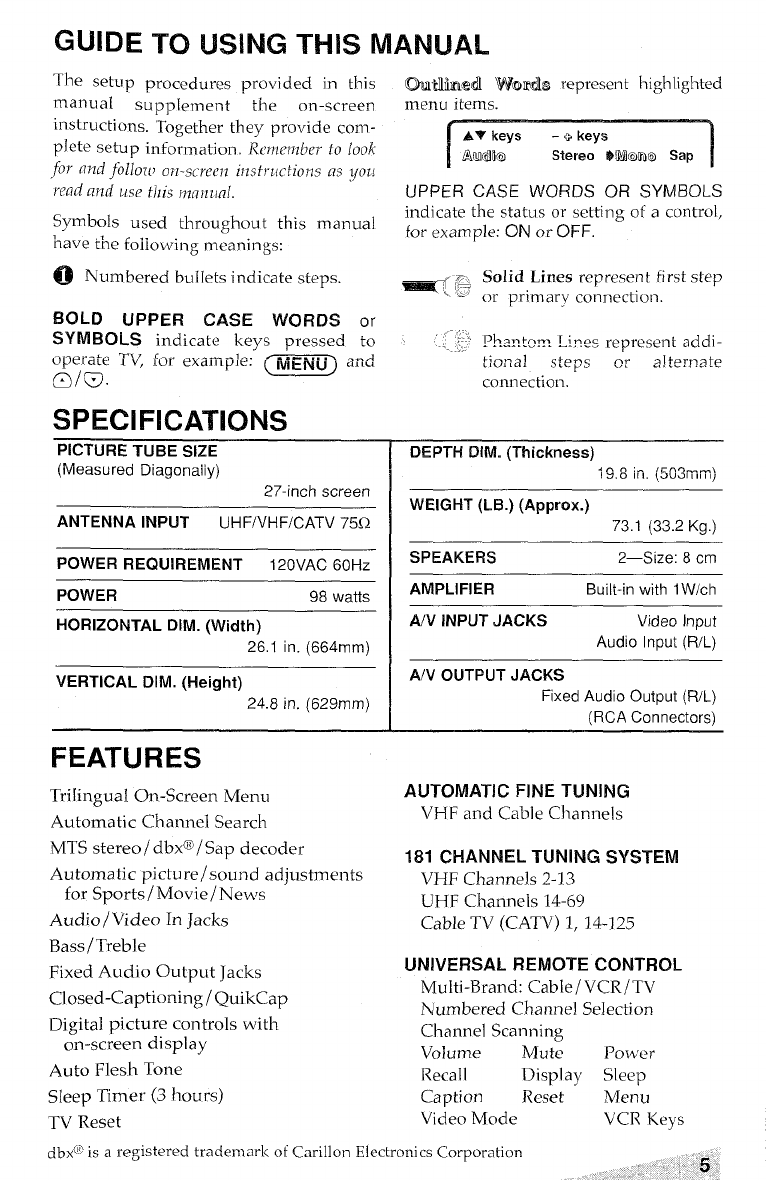
GUIDE TO USING THIS MANUAL
The setcrp procedures provided in this CMNimdl Womils represent highlighted
manual supplement the on-screen menu items.
instructi mrs. ‘Together they provide com -
plete setup information, Remember fo look
fo1’ (rTzdfollozl, on-screen instructions as you
wfld and use this mn?nm[.
Symbols used throughout this manual
‘nave the foiiowing meanings:
~Numbered bullets indicate steps.
BOLD UPPER CASE WORDS or
SYMBOLS indicate keys pressed to
SPECIFICATIONS
PICTURE TUBE SIZE
(ivieasureci Diagonaiiy)
27-inch screen
ANTENNA INPUT UH F/VHF/CATV 75Q
POWER REQUIREMENT 120VAC 60Hz
[
AV keys -+keys
Arudla Stereo MWlmo Sap 1
UPPER CASE WORDS OR SYMBOLS
indicate the status or setting of acontrol,
for example: ON or OFF.
POWER 98 watts
HORIZONTAL DIM. (Width)
26.1 in. (664mm)
VERTICAL DIM. (Height)
24.8 in. (629mm)
FEATURES
Trilingual On-screen Menu
Automatic Ch armel Search
MTS stereo/ clbx~l Sap decoder
Automatic picture/sound adjustments
for Sports/ Movie/ News
Audio/Video In Jacks
Bass /Treble
Fixed Audio Output Jacks
Closed-Captioning /QuikCap
Digital picture controls with
on-screen display
Auto Flesh Tone
Sleep Timer (3 hours)
TV Reset
Solid Lines represent first step
or primary connection.
Pb.aRtern. Lines represent addi-
tioL-Lal steps ,9~~!terna~e
cormection.
DEPTH DIM. (Thickness)
19.8 in. (5G3mrii)
WEIGHT (LB.) (fApprOX.)
73.1 (33.2 Kg.)
SPEAKERS 2—Size: 8cm
AMPLIFIER Built-in with 1W/ch
A/V INPUT JACKS Video Input
Audio Input (R/L)
A/V OUTPUT JACKS
Rxed Audio Output (R/L)
(RCA Connectors)
AUTOMATIC FINE TUNING
VHF and Cable Channels
181 CHANNEL TUNING SYSTEM
VHF Channels 2-13
UHF Channels 14-69
Cable TV (CATV) 1, 14-125
UNIVERSAL REMOTE CONTROL
Multi-Brand: Cable/ VCR/TV
Numbered Channel Selection
Channel Scanning
Volume Mute Power
Recall Display Sleep
Caption Reset Menu
Video Mode VCR Keys
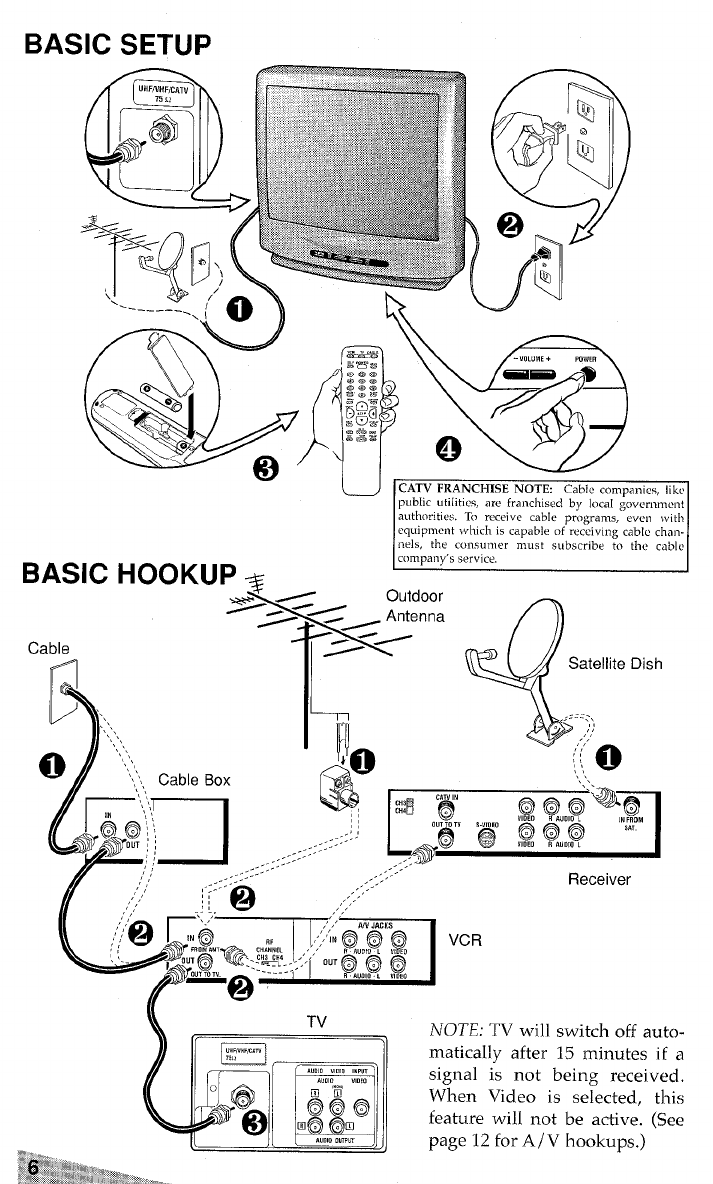
BASIC SETUP
-“r
CATV FRANCHISE NOTE Cable companies, Iikc
public utilitms, arc franchised by local govwnnwnt
10 rectvw cable programs. even wtth
equipment ,vhlch is capable of reccivmg cable than.
nels, the consumm must subscribe to tho cabl<~
NOTE; TV will switch off autcx
matically after 15 minutes ifa
signal is not being received,
When Video is selected, this
feature will not be active. (See
page 12 for A/ Vhookups.)
;@;*F.w
$.=,,*>,*<**;3,+#3T;/&>q..
...
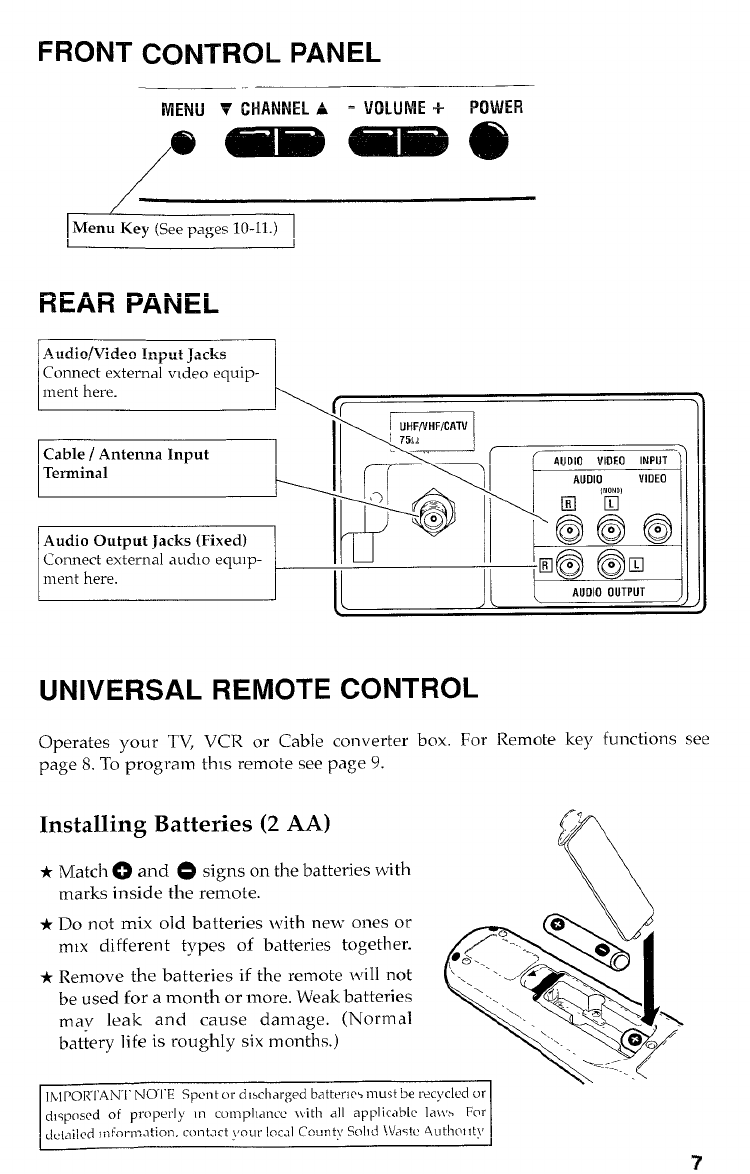
FRONT CONTROL PANEL
li4~14i.1~U-IAWU%A =VOLUME+ POWER
aMiimiBaiiili B6)
/
/
Menu Key (See pages 10-11.)
II
REAR PANEL
c
Connect external video equip-
lCable/ Antenna Input II( ( \
Terminal
Audio Output Jacks (Fixed)
Connect external aucho equ]p-
~m I‘@~
0
ment here. II II
UNIVERSAL REMOTE CONTROL
Operates your TV, VCR or Cable converter box. For Remote key functions see
page 8. To-program this remote see page 9.
Installing Batteries (2 AA)
*Match ~and @signs on the batteries with
marks inside the remote.
*Do not mix old batteries with new ones or
mlx different types of batteries together.
*Remove the batteries if the remote will not
be used for amonth or more. Weak batteries
may leak and cause damage. (Normal
battery life is roughly six months.)
!)
<q
/
*1
●,/-....\
“’.._/’i- .,,
‘., ‘\ ..
‘N. .,3”.
. . ‘%
,,...
/
c)@/’
.,
=. :.’ /
. .
\\ \
Ihl POR’1’AN’l’ NOI”E Spent or cllscharged battenw must be recycled or
cflsposed of pr[~perl~ III cLmlplIancc \\ith all applicab[c la~t% For
dct.lild tnf0rn2Llti0n. co17t.3ct your IOCJI County %lld iVastc 4ut11m1ty
?
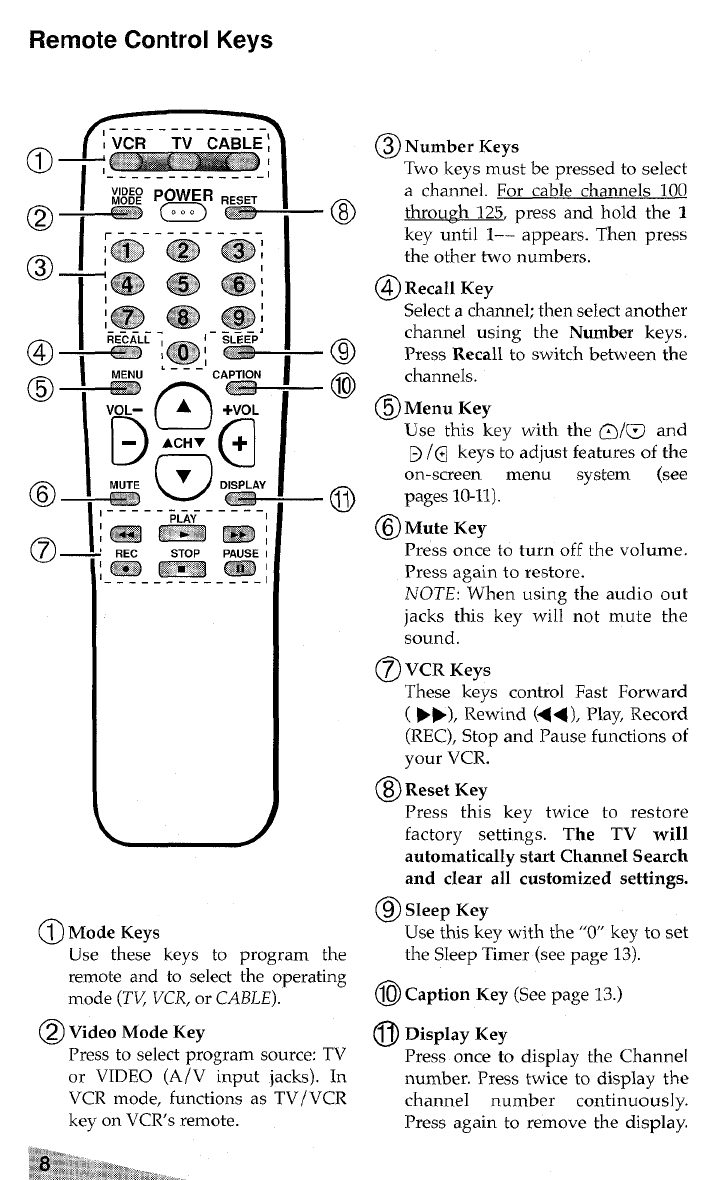
Remote Control Keys
/-------------
—,--------------
@Number Keys
Two keys must be pressed to select
achannel. For cable channels 100
–0 throu~h 125, press and hold the 1
key until 1–– appears. Then press
the other two numbers.
@Recall Key
Select achannel; then select another
–-+
channel using the Number keys.
Press Recall to switch between the
–@ channels.
@Menu Key
Use this key with the ~/w and
~/@ keys to adjust features of the
on-screen menu system (see
–@ pages 10-11).
@lMute Key
Press once to turn off the volume.
Press again to restore.
NOTE: When using the audio out
jacks this key will not mute the
sound.
@VCR Keys
These keys control Fast Forward
(➤F), Rewind (<<), Play, Record
(REC), Stop and Pause functions of
your VCR.
@Reset Key
Press this key twice to restore
factory settings. The TV will
automatically start Channel Search
and clear all customized settings.
@Sleep Key
Use thk key with the “O” key to set
@Mode Keys
Use these keys to program the the Sleep T~mer (see page 13).
remote and to”select the ‘operating
mode (l”V/VCR, or CABLE). @) Caption Key (See page 13.)
@Video Mode Key @Display Key
Press to select program source: TV Press once to display the Channel
or VIDEO (A/V input jacks). In number. Press twice to display the
VCR mode, functions as TV/VCR channel number continuous 1y.
key on VCRs remote. Press again to remove the display.
%%~’”$$%%., ,..
-$%!S$3*% ~~$@&*,~,
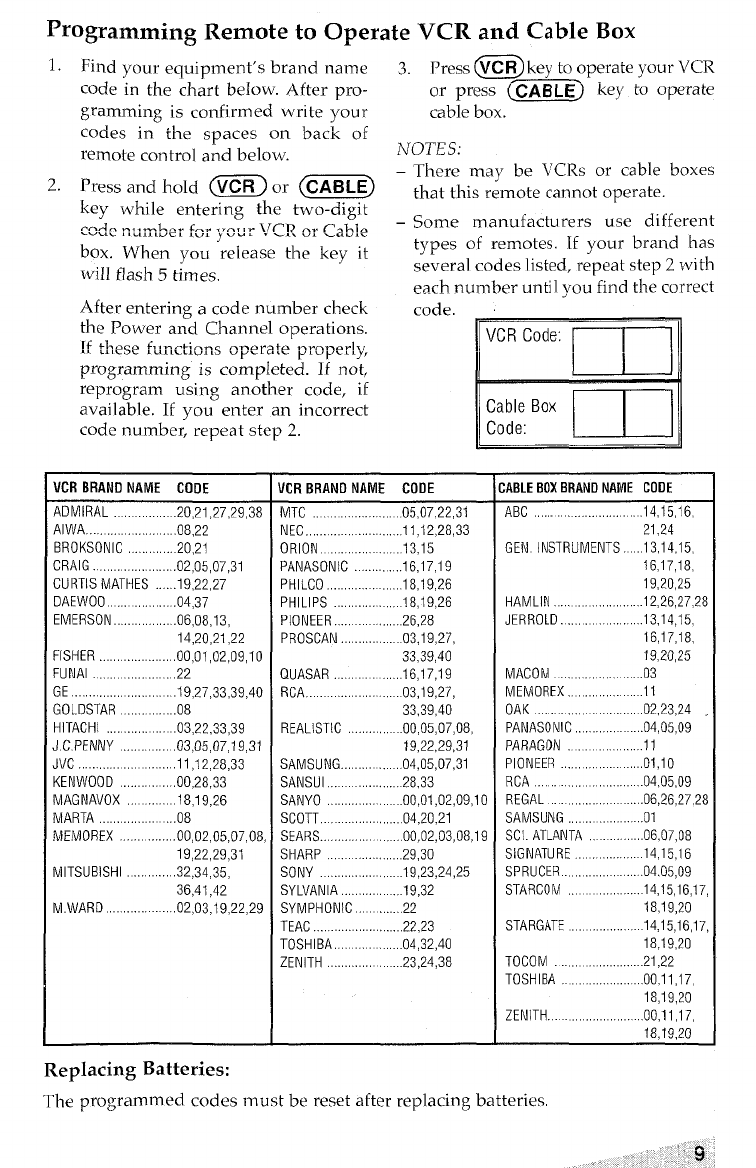
programming Remote to Operate VCR and Cable BOX
1. Find your equipment’s brand name 3. Press @key to operate your VCR
code in the chart below. After pro- or press ~CAB LEj key to operate
gramming is confirmed write your cable box.
codes in the spaces on back of
remote contro] and below. NOTES:
There may be VCRs or cable boxes
2. Press and hold ~ or (C~E) -
key while entering the two-digit that this remote cannot operate.
--A- -<,-L-. r-. ,ra,,. ll~l? -. Pablo –Some manufacturers use different
U“uu,, U,,LUCL,“, y“u L.. . . “L -“L.-
box. When you release the key it types of remotes. If your brand has
will flash 5times. several codes listed, repeat step zwith
each number until vou find the correct
After entering acode number check code.
the Power and Channel operations.
rf +Loso A,mf14;Gn~~peraie ~roper~y,
ALL,,QLLLL,LL-L,
programming is completed. If not,
reprogram using another code, if
available. If you enter an incorrect
code number, repeat step 2.
VCR BRAND NAME CODE
ADMIRAL ,. .20,21 .27,29,38
AIWA .. ... . ...08.22
BROKSONIC .............20.21
CRAIG ..,.,,,.,.,..,., .... ....02.05 .07.31
CURTIS MATHES ..,...19,22,27
DAEWOO .. .. .. .....04.37
EMERSON,,...,,,,.06,08,13,6,O8,I3,
14,20,21,22
FISHER ..,,,,,,.,..,,.., .. ...00.01.02,09,10
FUNAl .,..,., ,,.,...,..,,,.,,22
GE ............... .......... ...19.27 .33.39.40
GOLDSTAR .,..............08
HITACHI .. ...03.22.33,39
J.C. PENNY ................03.05 .07.19.31
JVC .........11 .12.28.33
KENWOOD .. ... . .. .. ....00.28 .33
MAGNAVOX ...... .18.19.26
MARTA ...08
MEMOREX ........00.02.05.07.08.
19,22,29,31
MITSUBISHI ............32.34.35.
36,41,42
M.WARD .. .. .... ... .. ....02.03 .19.22.29
VCR Code: [~1
L--i_.i
code: l--L.-!
Cable Box
VCR BRAND NAME CODE
MTC .05,0722 ,31
NECK.,,...,..,..,. .............11.12 .28.33
ORION .... .......13.15
PANASONIC . ... .. .. . ..16.17 .19
PHILCO .,.,,,..,.,. ., ,,,18,19,26
PHILIPS 18,19,26
PIONEER .,.., ,,.,,,.,26,28
PROSCAN 03,19,27,
33,39,40
QUASAR ,.....16.17 .19
RCA,. . .. ... ... . .... ....03.19.27.
33,39,40
REALISTIC .00,05,07,08,
19,22,29,31
SAMSUNG .. ... .. .. ,,04,05,07,31
SANSUI ............28.33
SANYO ..00,01,02,09,10
SCOTT,.., .................04.20 .21
SEARS ........... ... ..,.00,02,03,08,19
SHARP ..... .........29.30
SONY . . ... ..... .. .... . ...19.23 .24.25
SYLVANIA,., ......... .,.19 ,32
SYMPHONIC .,.....22
TEAC ... ... .. ... ...............22>23
TOSHIBA .. .. .. .. . .. .....04.32 .40
ZENITH ...23.24,38
CABLE BOX BRAND NAME CODE
A8C ..14,15 ,16,
21.24
GEN INSTRUMENTS. .13,14,15,
16,17,18,
19,20,25
HAMLIN ...............12.26 .27.28
JERROLD. .. .. . . ..... ....13.14.15.
16,17,18,
19,20,25
MACOM ....03
MEMOREX., ......... ....11
OAK .. .. .. .. .... .02.23.24
PANASONIC ....04.05,09
PARAGON . ...........11
PIONEER .....01.10
RCA ..04,05 ,09
REGAL ....06.26,27,28
SAMSUNG .. ..... .. ....01
SCI. ATLANTA . . ........06.07>08
SIGNATURE 14,15,16
SPRUCER .......... . . ....04.05 .09
STARCOM ............14.15 .16.17
18>19,20
STARGATE 14,15,16,17
18,19,20
TOCOM ............ ...21.22
TOSHIBA . .. .. ..... ...... ...00.11.17.
18,19,20
ZENITH. .,...................00.11.17.
18,19,20
Replacing Batteries:
The programmed codes must be reset after replacing batteries
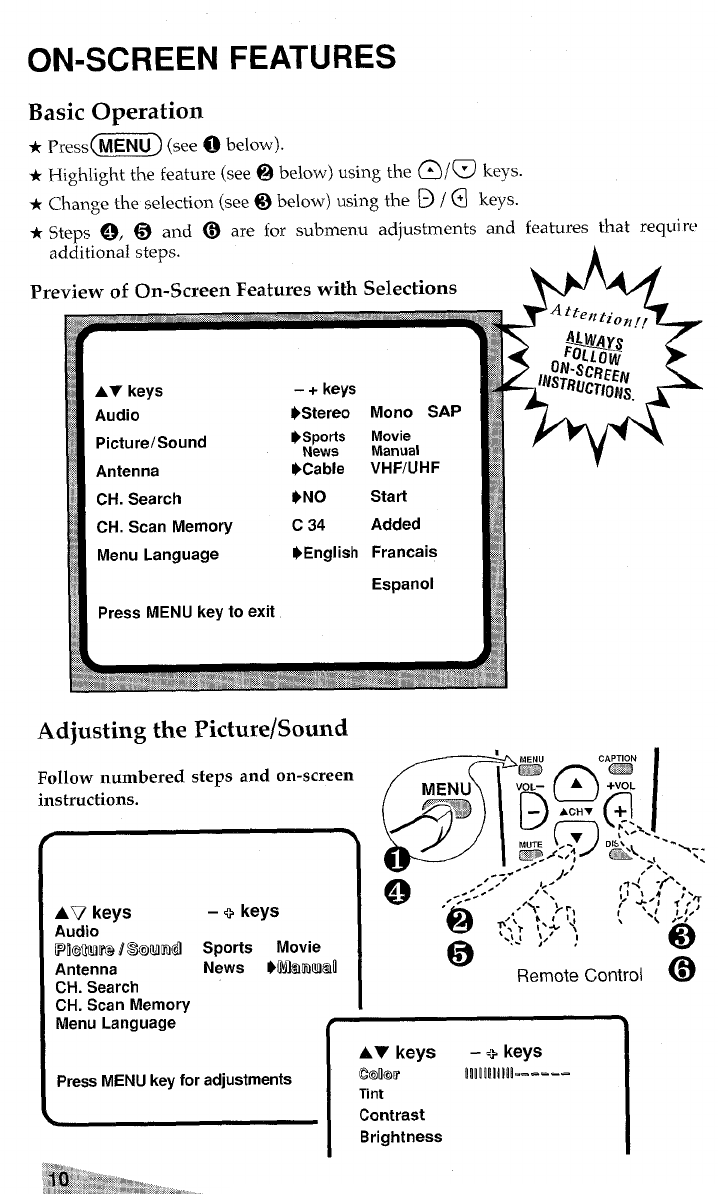
ON-SCREEN
Basic Operation
FEATURES
*Press (MENU) (see obelow).
*Highlight the featuze (see @below) using the ~/@ keys.
+Change the selection (see@ below) using the D/~ keys.
*Steps @, @and @are for submenu adjustments and features that reWi ‘c’
additional steps.
Preview of On-Screen Features with Selections
AT keys -+ keys
Audio $Stereo Mono SAP
Picture/Sound ~.sports Movie
I
$Antenna 9Cable VHF/UHF
.9
~’ CH. Search *NO Start
CH. Scan Memory c34 Added
Menu Language $English Francais
E.wanol
Adjusting the Picture/Sound
Follow numbered steps and on-screen
instructions.
r.
AT7 keys –+keys
Aucfio
~~@M~ /@IQum~ Sports Movie
Antenna News }~8moMaIl
CH. Search
CH. Scan Memory
Menu Language t\
AV keys -+keys
Press MENU key for adjustments Emkm’ lllllllilk-=---
Tint
Contrast
Brightness
‘“\. -
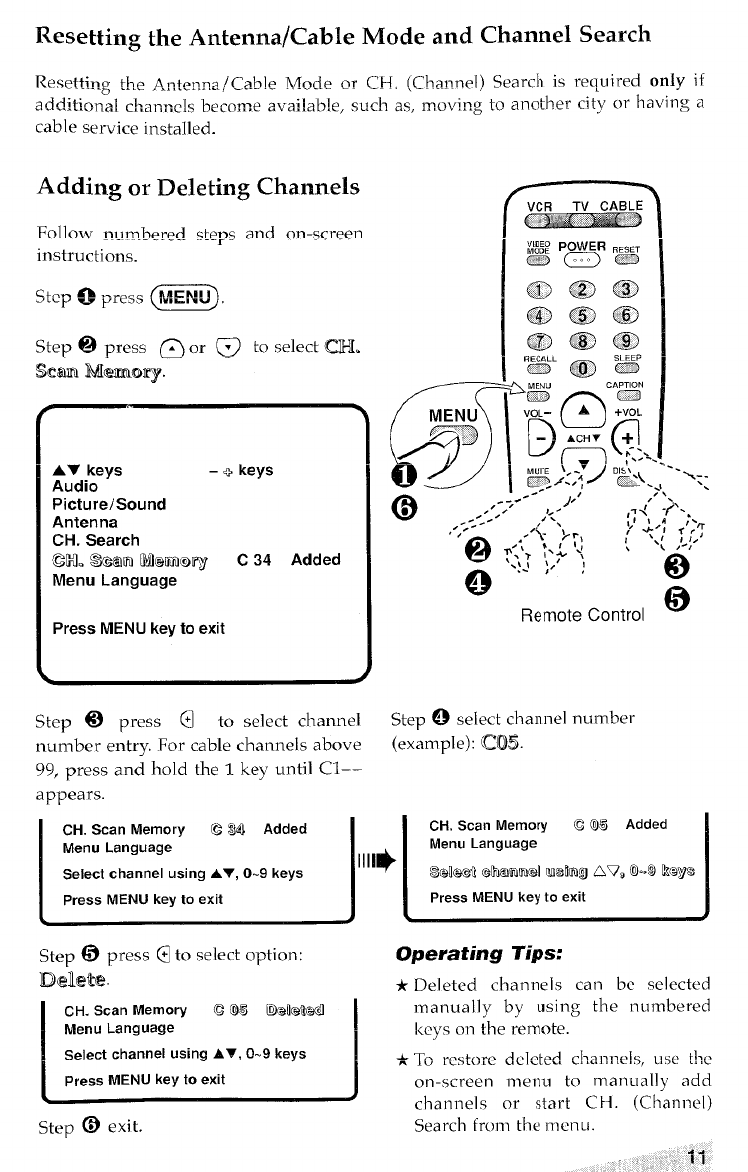
Resetting the Antenna/Cable Mock and Channel Search
Resetting tho A~+omm. /~a~le IVTO~.e or CH (~halnrl~l) search is required only if
~...- ,.. .. . ..- ,= “1 b~e, such as, ~,oviRg to another city or having a
additional ch,anncls become ava~.a
cable service installed.
Adding Or Deleting Channels
%1 low nl.]rn.bered c~eps and On-screen
instructions.
“c~Qpr”s @E!!D
Step @press @or @to select Gil.
scamMemory
.
AV keys –+keys
Audio
Picture/Sound
Antenna
CH. Search
ccl. %Xtml UllemloTy/ C34 Added
Menu Language
Press MENU key to exit
k
Step @press @to select channel
number entry. For cable channels above
99, press and hold the 1key until Cl-–
appears.
(J
MENU
$--=3
A#J_/
G)
CH. Scan Memory CWI Added
Menu Language
Select channel using AT, O-9 keys I
IHI*
Press MENU key to exit I
Step @select channel number
(example): CX!E5.
‘k-.
CH. Scan Memory C@)5 Added
Menu Language
Sek!dl mmmd Wrhg Av, &~ kaya
Press MENU key to exit
Step @press @to select option: Operating lips:
mdlete. *Deleted channels can bc selected
c‘cyso’’theremote”
manually by using the numbered
Select channelUsingAW,O-9 keys *To restore deleted channels, use i!w
on-screen menu to manually add
channels or start CH. (Channel)
step @exit. Search from the menu.
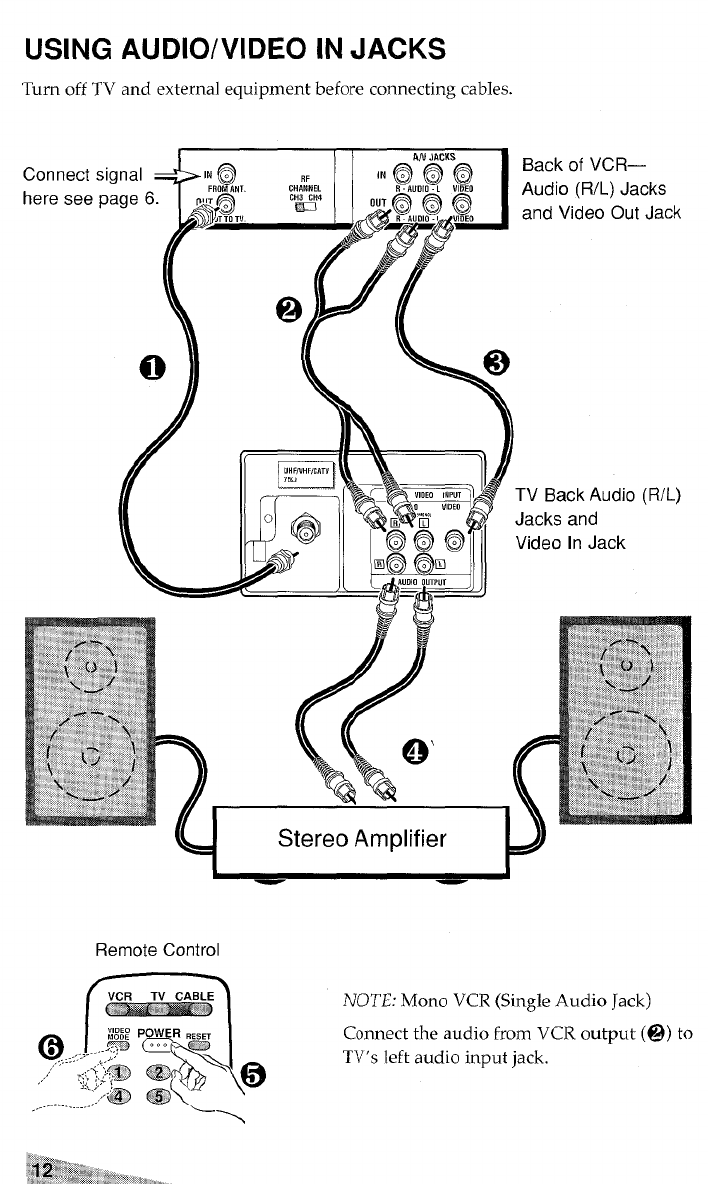
USING AUDIO/VIDEO IN JACKS
Turn off TV and external equipment before connecting cables.
Back of VCR—
Audio (R/L) Jacks
and Video Out Jack
Jacks and
Video In Jack
P——J
Remote Control
,. m
VCR TV CABLE NOTE: Mono VCR (Single Audio Jack)
:&,,, y~
@:,,,..y ‘p ‘s Connect the audio from VCR output (@)
,,.,..-
%\@
TV’S left audio input jack.
..,’ X&Q @(
...?.”’& my
->
to
—
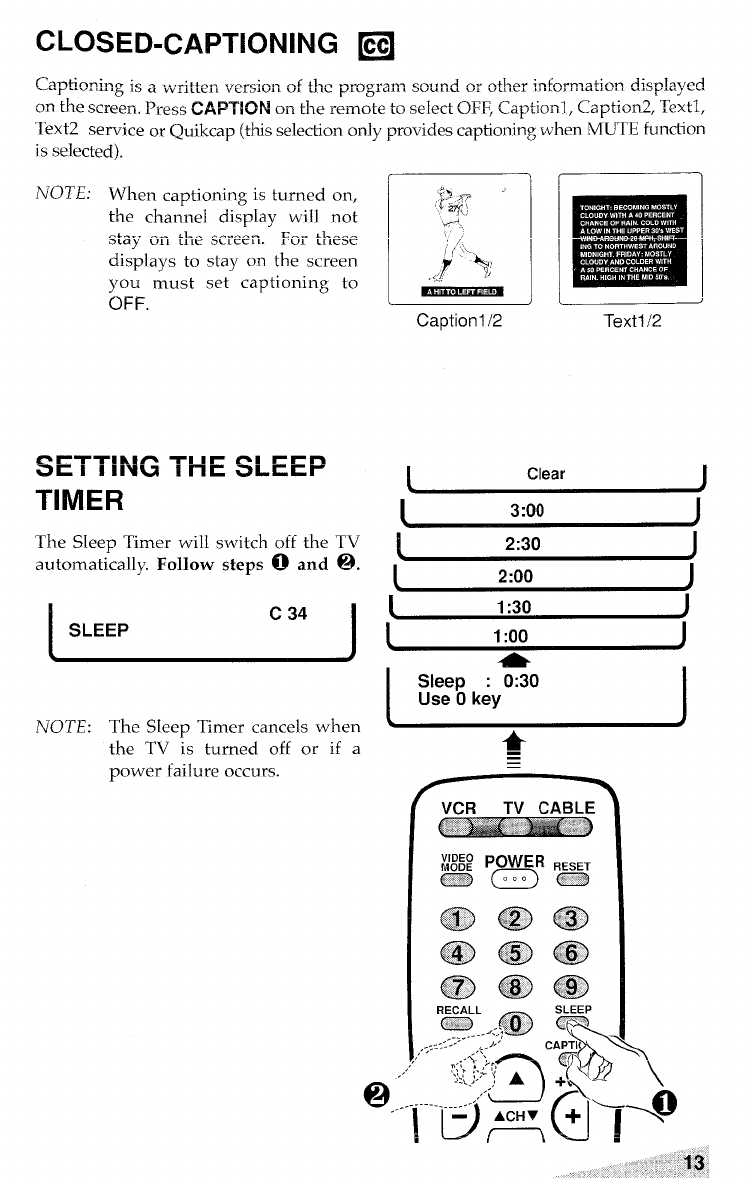
CLOSED-CAPTIONING ❑
is selected).
NOTE: When captioning is turned on,
the channel display will not
-. =.. . .. .l_. .-.--- ~,-i. ~~ke-e
OLCI~ “IL LILC DLL CCLL.
displays to stay on the screen
you must set captioning to
OFF.
SETTING THE SLEEP
TIMER
The Sleep Timer will switch off the TV
automatically. Follow steps 6) and ~.
ISLEEP c34
I
NOTE: The S[eep Timer cancels when
Caption l/2 Text 112
IClear I
13:00 J
!2:30 I
I2:00 I
11:30 J
11:00 J
ISleep :0:30
Use Okey I
the TV is turned off or if a
power failure occurs.
Q.....-.
I
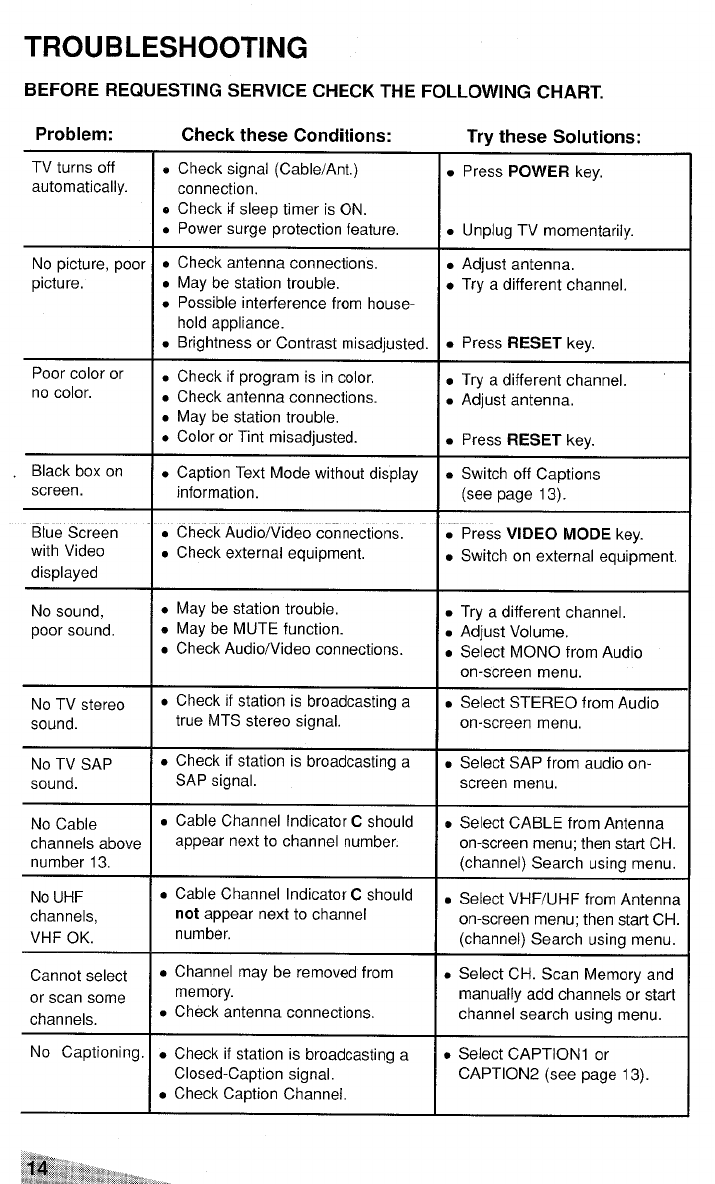
TROUBLESHOOTING
BEFORE REQUESTING SERVICE CHECK THE FOLLOWING CHART.
Problem: Check these Conditions:
TV turns off oCheck signal (Cable/Ant. )
automatically. connection,
oCheck if sleep timer is ON.
●Power surge protection feature,
No picture, poor oCheck antenna connections.
picture. ●May be station trouble,
●Possible interference from house-
hold appliance.
.Brightness or Contrast misadjusted.
Poor color or ●Check if program is in color,
no color. ●Check antenna connections.
.May be station trouble,
●Color or Tint misadjusted.
Black box on ●Caption Text Mode without display
screen. information.
Blue Screen .Check Audio/Video connections.
with Video .Check external equipment,
displayed
No sound, ●May be station trouble.
poor sound. oMay be MUTE function.
.Check Audio/Video connections.
No TV stereo ●Check if station is broadcasting a
sound. true MTS stereo signal,
No TV SAP
sound.
No Cable
channels above
number 13,
No UHF
channels,
VHF OK.
Cannot select
or scan some
channels.
.Check if station is broadcasting a
SAP signal.
.Cable Channel Indicator Cshould
appear next to channel number.
●Cable Channel Indicator Cshould
not appear next to channel
number,
●Channel may be removed from
memory.
●Check antenna connections,
No Captioning. ●Check if station is broadcasting a
Closed-Caption signal.
●Check Caption Channel.
Try these Solutions:
.Press POWER key,
.Unplug TV momentarily.
●Adjust antenna,
●Try adifferent channel,
●Press RESET key.
.Try adifferent channel
.Adjust antenna,
●Press RESET key.
.Switch off Captions
(see page 13).
.Press VIDEO MODE key.
●Switch on external equipment,
.Try adifferent channel,
●Adjust Volume.
.Select MONO from Audio
on-screen menu.
.Select STEREO from Audio
on-screen menu,
.Select SAP from audio on-
screen menu,
oSelect CABLE from Antenna
on-screen menu; then start CH,
(channel) Search using menu.
.Select VHF/UHF from Antenna
on-screen menu; then start CH.
(channel) Search using menu.
●Select CH. Scan Memory and
manually add channels or start
channel search using menu.
●Select CAPTION1 or
CAPTION2 (see page 13).
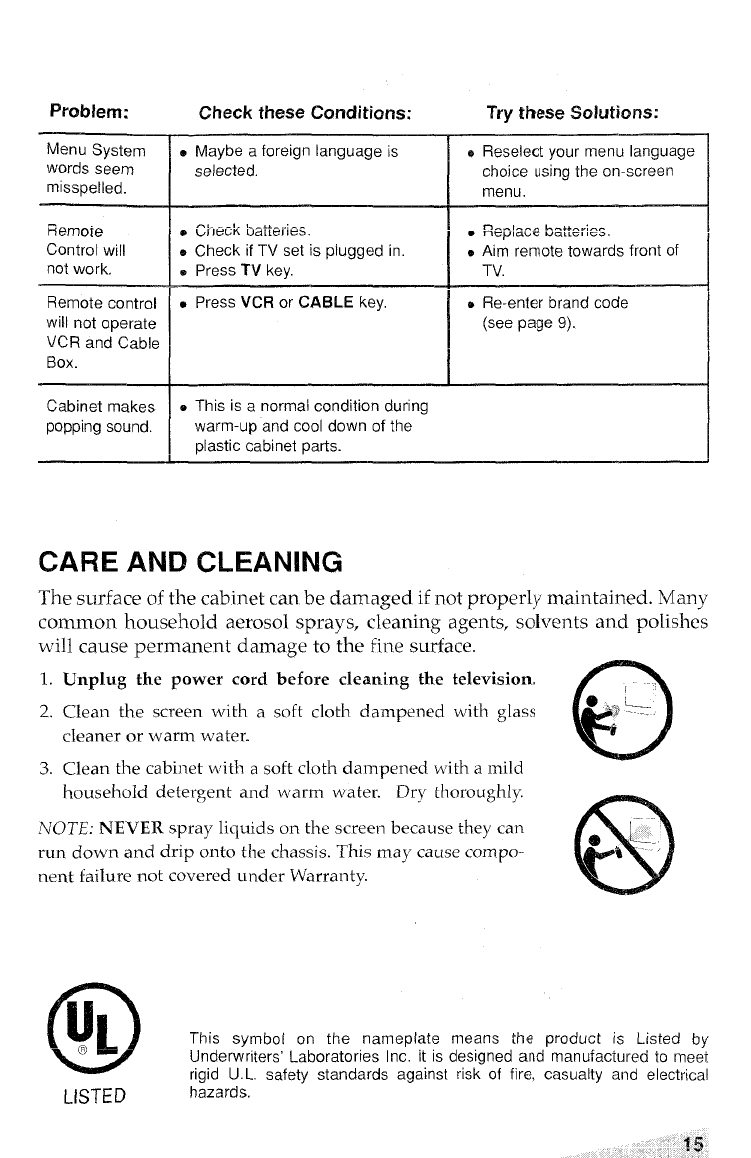
Problem: Check these Conditions: Try these Solutions:
Menu System .Maybe aforeign language is ~Reselect your menu language
words seem selected. choice using the on-screen
misspelled. menu.
, ,._.._..,__ I
F?emoie 0~he~~ UdiiGJIG>. L.,.++,.”:n-
.Replace UQ, LC, IG>, I
Control will eCheck if TV set is plugged in. .Aim remote towards front of
not work. 0Press TV kev. TV.
Remote control .Press VCFI or CAf3LE key. DRe-enter brand code
will not operate (see page 9).
ij~~ and Cable
Box. I
Cabinet makes eThis is anormal condition during
popping sound. warm-up and cool down of the
plastic cabinet parts.
CARE AND CLEANING
The surface of the cabinet can be damaged if not properly maintained. Many
common household aerosol sprays, cleaning agents, solvents and polishes
will cause ~ermanent damaze to the fine surface.
.
1. Unplug the power cord before cleaning the television.
c
2. Clean the screen with asoft cloth dampened with glass {
cleaner or warm water.
3. Clean the cabinet with asoft cloth dalmpened with amild
household detergent and warm water. Dry thoroughly
NOTE: NEVER spray liquids on the screen because they can
@
eL._.
run down and drip onto the chassis. This may cause compo- ~,
nent failure not covered under Warranty. r
o
lu~ This symbot on the nameplate means the product is Listed by
LB Underwriters’ Laboratories Inc. it is designed and manufacture to meet
rigid U. L. safety standards against risk of fire, casualty and electrical
LISTED hazards.
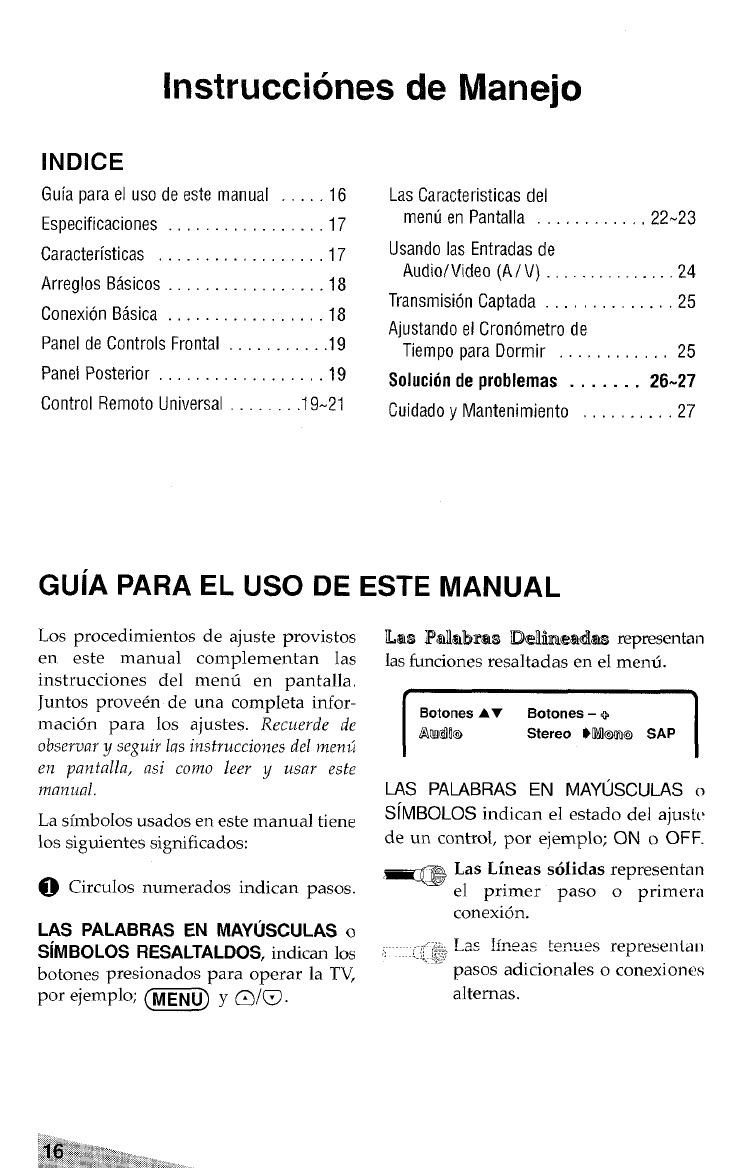
Instrucciones de Manejo
INDICE
Guia para el uso de este manual ., ., .16
Especificaciones .,, . . . . . . . . ..17 ..l7
Caracterkticas ,.................17
Arreglos Basicos ... ,.. ,,, ,., . . . ..l8
Conexion Basica. ,...............l8
Panel decontrols Frontal ..,.,.,,..,19
Panel Posterior, ,, ., .,, ...,.,.., .19
Control Remoto Universal ,.......19-21
Las Caracteristicas del
menu en Pantalla . . . . . . . . . . ..22N23
Usando Ias Entradas de
Audio/Video (A/ V) .........24....24
Transmision Captada ., .,, ,, .,.,.,.25
Ajustando el Cronometro de
Tiempopara Dormir ....,.,,,.,,25
Solucion de problemas . . . . . . . 26-27
Cuidado yMantenimiento ., . .,.,.,.27
GUIA PARA EL USO DE ESTE MANUAL
Los procedimientos de ajuste provistos
en este manual complemental Ias
instrucciones del menfi en pantalla,
Juntos prove6ndeuna completa infor-
macitm para Ios ajustes. Recuerde de
obsemaryseguirla sinstrucciones de[rnenti
en pantalla, asi corno lee~ yusar este
manual.
La simbolos usados en este manual tiene
10S siguientes significados:
~Circulos numerados irrdican pasos.
LAS PALABRAS EN MAYUSCULAS O
SIMBOLOS RESALTALDOS, indican 10S
botones presionados Para operar la TV,
por ejemplo; m- y~i~.
IIas I%lalbR’aN3 lle]tieadl~ representan
Ias funciones resaltadas en el menti.
IBotones AY Botones –+
AurQlfl@ Stereo Wt@m@ SAP I
LAS PALABRAS EN MAY@X’ULAS o
S~MBOLOS indican el estado del ajust(’
de un control, por ejemplo; ON oOFF.
_Las Lin eas solidas representan
el primer paso oprirnera
conexi6n.
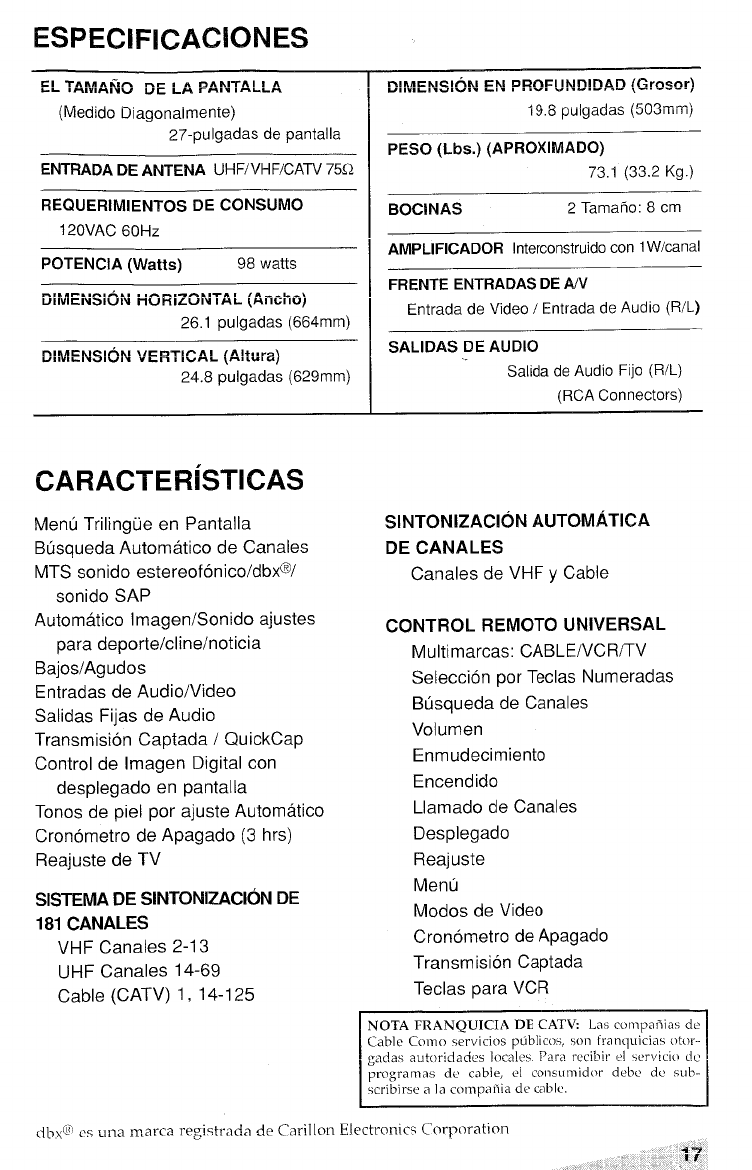
ESPECIFICACKINES
~~ ~~p”q~~~~ rir , . DAml-rAl IA
WE L- .-,. ,--~-
(Meciido Diagonaimente)
27-pulgadas de pantalla
ENTRADA DE ANTENA UHF/VHF/CATV 75Q
REQUERIMIENTOS DE CONSUMO
120VAC 60Hz
POTENCIA (Watts) 98 watts
DiMSi@i&4 iiOFliZCW4TAL (AfiChO)
26.1 pulgadas (664mm)
iXvlENSIGN VERTICAL (A!tura)
24.8 pulgadas (629mm)
nlr.n=~lclhkl CM DDnFl INlllll Ail (Grnsnr)
“1!.. -,.”.-,. -!. , . .. . ~, .-.-r.- ,-. ---.,
19.8 puigadas (503mIM)
PESO (Lbs.) (APROKIMADO)
73.1 (33.2 Kg.)
BOCINAS 2Tamaiio: 8cm
AMPLIFICADOR Interconstruido con 1W/canal
FRENTE ENTRADAS DE AN
Entrada de Video /Entrada de Audio (R/L)
SALIDAS DE AUDIO
Salida de Audio Fijo (R/L)
(RCA Connectors)
CARACTERISTICAS
Menu Trilingue en Pantalla
Busqueda Automatic de Canales
MTS sonido estereofonico/dbx@/
sonido SAP
Automatic lmagen/Sonido ajustes
para deportelclinelnoticia
Bajos/Agudos
Entradas de Audio/Video
Salidas Fijas de Audio
Transmission Captada /QuickCap
Control de Imagen Digital con
desplegado en pantalla
Tonos de piel por ajuste Automatic
Cronometro de Apagado (3 hrs)
Reajuste de TV
SISTEMA DE SINTONIZACION DE
181 CANALES
VHF Canales 2-13
UHF Canales 14-69
Cable (CATV) 1, 14-125
SINTONIZAC!ON AUTOMATICA
DE CANALES
Canales de VHF yCable
CONTROL REMOTO UNIVERSAL
Multimarcas: CABLE/VCR/TV
Seleccion por Teclas Numeradas
Btisqueda de Canales
Volumen
Enmudecimiento
Encendido
Llamado de Canales
Desplegado
Reajuste
Menu
Modos de Video
Cronometro de Apagado
Transm ision Captada
Teclas para VCR
NOTAFRANQUICIA
DE CATV Las compafiicis de
Cable CCIInC wrvicios ptiblicos, >017 fra nqui cia~ otor-
gada. autori clacics local,,. P2.rC]rwibir cl wrvic(c) dc
~rqyamas de cable, cl consu)nid(x debt de sLlll-
scribirsc ala cotmpafiia de cable.
dbx@ Muna marca regi$trada de Carill[~llElectronics c~~rp~~rati~n q~
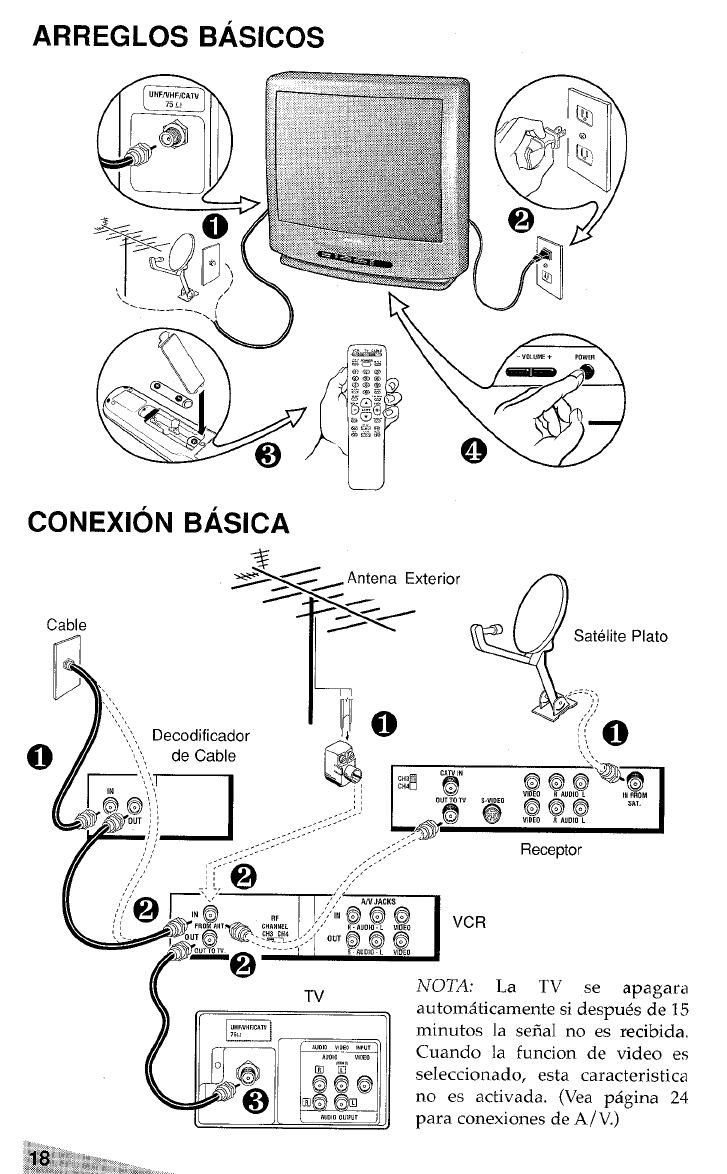
ARREGLOS BASICOS
CONEXION BASICA
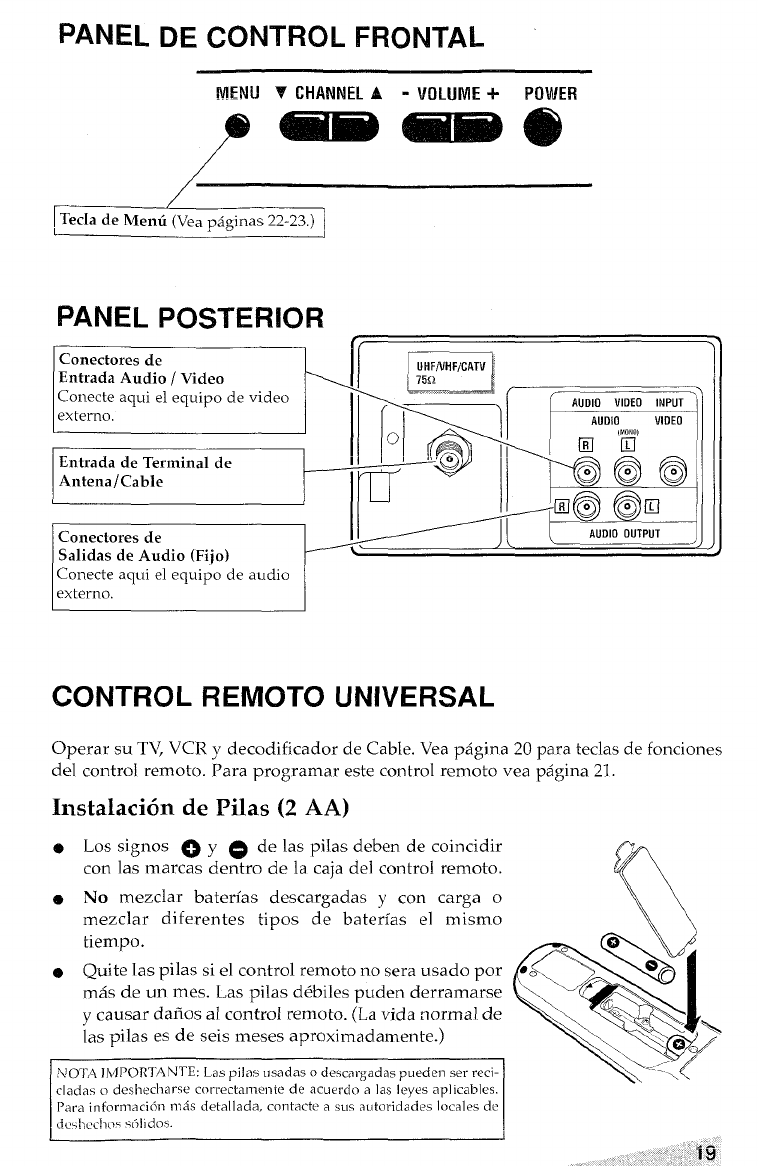
PANEL DE CONTROL FRONTAL
MENU VCHANNELA -VOLUME+ POWHl
/
~TecIade Menti(Vea ~Aginas 22-23.) 1
PANEL POSTERIOR r,
Conectores de
Entrada Audio /Video
Conecte aqui el equipo de video
externo,
Entrada de Terminal de
Antena/Cable
Conectores de
Salidas de Audio (Fijo)
Conecte aqui el equipo de audio
externo. I
CONTROL REMOTO UNIVERSAL
Operar su TV, VCR ydecodificador de Cable. Vea pagina 20 para teclas de fonciones
del control remoto. Para programar este control remoto vea pagina 21.
Instalaci6n de Pilas (2 AA)
eLos signos ~y@de Ias pilas deben de coincidir
con Ias marcas dentro de la caja del control remoto. h
eNo mezclar bateri’as descargadas ycon carga o\\
mezclar diferentes ti~os de baterfas el mismo \\
tiempo. v
%
*!
[&f” e
oQuite Ias pilas si el control remoto no sera usado por 80
m~s de un roes. Las pilas d~biles puden derramarse
ycausar dafios al control remoto. (La viola normal de ->>
Ias pilas es de seis meses aproximadamente.) <e ‘L
[
‘a~,/
\ltX~ lMJ’OR?ANT~:
Las pilas usaclas odescargadas pueden ser reci- \..__:- \
cladas odcslwcharw correctam?nte de acuerdo alas Ieyes aplicablcs.
Para informaci6c IIICiS detallada, contacte asus autoridades locales dc
dc<l>cdx>s s[jli do>.
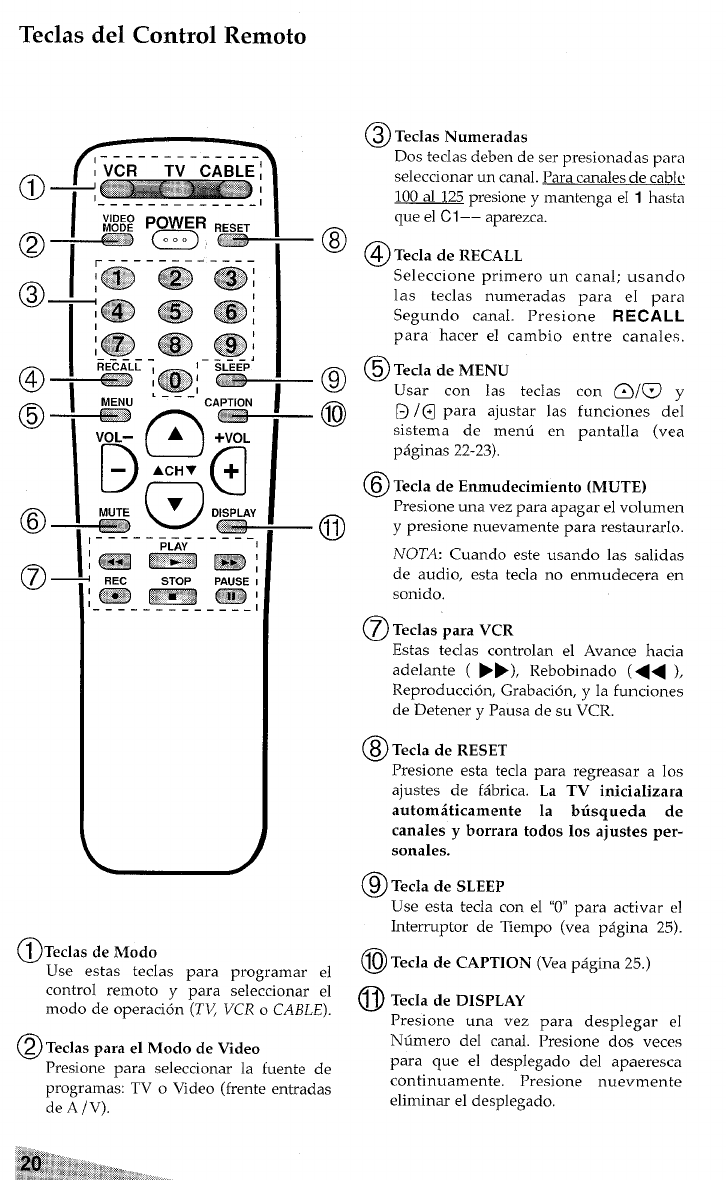
Teclas del Control Remoto
ACH VL_
+
o
vDISPL,
s
PLAY ----
-m
STOP PAUSI
mm
----- ---
@TecLlsNunleractas
Dos teclas deben de ser presionadas para
seleccionar un canal. Para canales de cabk~
100 al 125 presione ymantenga el 1hasta
que el Cl –– aparezca.
@ @Tec~a deRECALL
Seleccione primero un canal; usando
las teclas numeradas para el para
Segundo canal. Presione RECALL
para hater e] cambio entre canales,
@%:’‘eMENU
rcon las teclas con @/@ y
–@ ~/@ para ajustar Ias funciones d~l
sistema de mend en pantalla (vea
pi$ginas 22-23),
@Tecla de Enrnudecimiento (MUTE)
Presione una vez para apagar el volumen
“o ypresione nuevamente para restaurarlo.
@)Teclas de Modo
Use estas teclas para programar el
control remoto ypara seleccionar el
modo de operacitm (TU VCR oCABLE).
@Teclas para e, Modo de Video
Presione para seleccionar la fuente de
programas: TV oVideo (frente entradas
de A/V).
NOTA: Cuando este usando las salidas
de audio, esta tecla no enmudecera en
sonido,
@TecLx9 para VCR
Estas teclas controlan el Avarice hacia
adelante (›~), Rebobinado (<< ),
Reproduction, Grabaci6n, yla funciones
de Detener yPausa de su VCR.
@Tecla de RESET
Presione esta tecla para regreasar a10s
ajustes de f~brica. La TV inicializara
autom&ticamente la bisqueda de
can ales yborrara todos 10S ajustes per-
sonages.
@TeclacleSLEEl?
Use esta tecla con el ‘(0”para activar el
Interruptor de Tiempo (vea p~gina 25).
@Teclade CAPTION @’eap4gina 2.5)
@Teclade131SE’LAY
Presione una vez para desplegar el
Nfimero del canal. Presione dos vecm
para que e] desplegado del apaeresca
continuamente, Presione nuevmente
eliminar el desplegado,
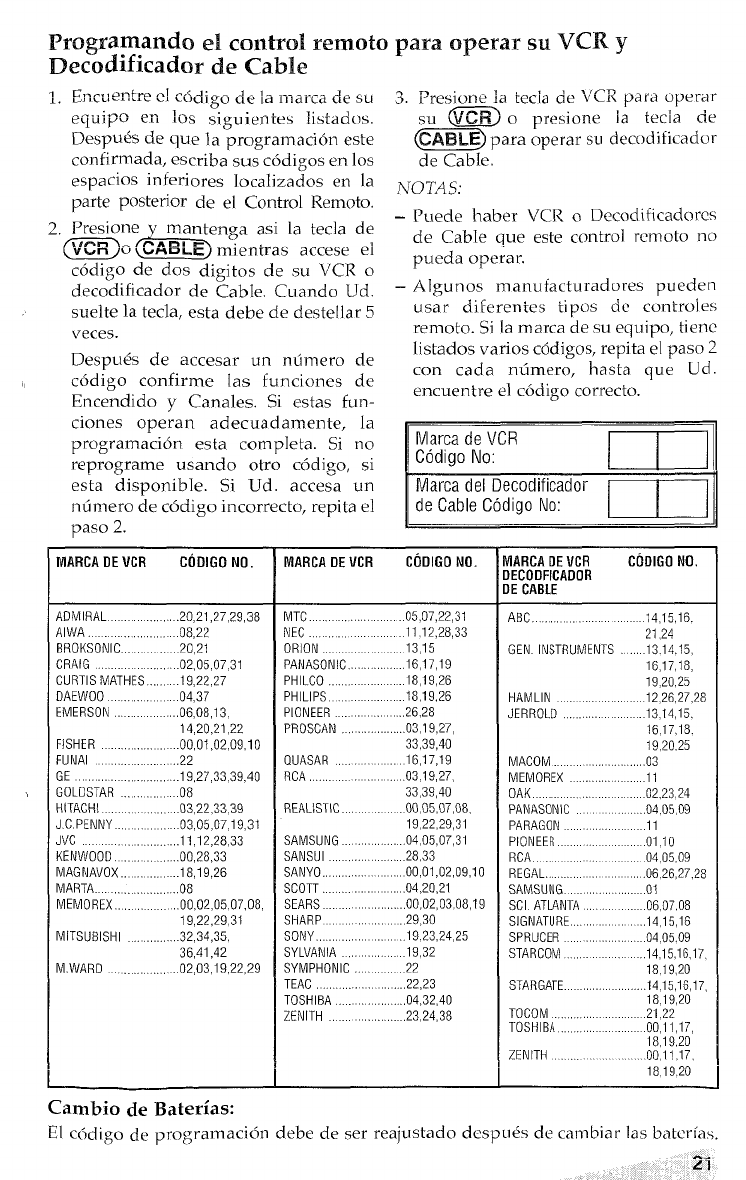
Programndo dcontrol mnoto pm operar su VCR. y
~ecod~ficador de cable
1Cm,.<, anka,. lAA-J... 3. 1- -------- 2. --
1. LJLLLIGLLLLL GJ LUUI U(,le Id llldlLd UC b(-1
83. Presione la Eecia cie ‘v’CR pdra uperar
eCl”tiipG e~L 10S siguientes Iisiacios. su @’&& opresione ia tecia de
Despu& de que la prcrgramaci6n este ~m~para operar wdecodific.dor
confirmada, escriba sus c6digos en 10S de Cable.
espacim inferiors localizados en 1a NOTAS:
parte posterior de el Control Remoto.
2B~{ZWWa asi la tecla de -Puede haber VCR oDecodificadores
de Cable que este control rcmoto no
-CAg~E, mientras accese ei
codigo de dos digitos de su VCR opueda operar.
decodificador de Cable. Cuando Ud. –Algunos manufacturadores pueden
suelte la tecla, esta debe de destellar 5usar diferentes tipos de controles
veces. remoto. Si la marca de su equipo, tienc
Despu&k de accesar un numero de listados varies c6digos, repita el paso 2
codigo confirme [as funciones de con cada nfimero, hasta que Ud.
Encendido yCanales, Si estas fun- encuentre el c6digo correcto.
ciones operan adecuadamente, la
programaci6n esta completa. Si no Marca de VCR
reprogram usando otro c6digo, si Codigo No:
esta disponible. Si Ud. accesa un Marca del Decodificador
numero de codigo incorrect, repita el de Cable Codigo No:
paso 2.
MARCADEVCR CODIGONO. MARCADEVCR CODIGONO. MARCA
DE VCR C6DIG0NO.
DECODFICADOR
DECABLE
ADMIRAL .... ... .20.21 .27.29.38 MTC. . . . . . .05.07 .22.31 ABC, ..,,..... 14,15,16.
AlWA. 08,22 NEC. ,., 11,12,28,33 21,24
8ROKSONIC,,, 20,21 ORION.. 13,15 GEN INSTRUMENTS 13.14.15,
CRAIG .02,05,07,31 PANASONIC,. .16,17,19 16,17,18,
CURTIS MATHES ..,, .19,22,27 PHILCO .,,. ,, .18,19,26 19,20,25
DAEWOO ..,,. ,. 04,37 PHILIPS 18,19,26
EMERSON
HAMLIN 12,26,27,28
....06.08,13, PIONEER :.:.26,28 JERROLD .13,14,15.
14,20,21,22 PROSCAN ,..........-03,19,27, 16,17,18.
FISHER .,,,,,.,.,. ..00,01,02,09,10 33,39,40 19,20,25
FUNAI .,,,. ..22 QUASAR 16,17,19 MACOM ,03
GE .,,.,,,.. ,,, ..19,27,33,39,40 RCA 03>19,27, MEMOREX 11
GOLOSTAR 08 33,39,40 OAK. 02,2324
HITACHI .,.,. ., ,.,,,,,, ,,03,22,33,39 REALISTIC ,,,, .00,05,07> 08, PANASONIC .04,05,09
JCPENNY 03,05,07,19,31 19,22,29,31 PARAGON 11
JVC .,,,,.:. -11,12,28,33 SAMSUNG . ....04. 05.07 PIONEER 01,10
KENWOOO .,,,. ,,, ,.,.,..OO,28,33 SANSUI ,.. 28,33 RCA. 04,05,09
MAGNAVOX,. ., . ..18.19,26 SANYO... 00,01,02,09,10 REGAL. .. .06.26,27 .28
MARTA. ,... ..,,...,,, .,08 SCOTT .04,20,21 SAMSUNG 01
MEMOREX.. ,. ,, ..00,02,05,07,08, SEARS. ..,,,,,..,,00,02,0308,19 SCI ATLANTA 06,07,08
19,22,29,31 SHARP .29,30 SIGNATURE ..14,15,16
MITSUBISHI ,. ,,,,,.,.,,.32 ,34,35, SONY... .19,23,24,25 SPRUCER
36,41,42
04,05.09
SYLVANIA ,.. 19,32 STARCOM .14,15,16,17,
M.WARO ..,,., ..,,, . 02,03,19,22,29 SYMPHONIC 22 18,19,20
TEAC ., .,, .,,22,23 STARGATE. ,, ,,. ,,,..14,15,16,17,
TOSHIBA ,, ...,. .,,04,32,40 18,19,20
ZENITH .23,24,38 TOCOM ... . . ... . . . . 21,22
TOSH18A ., . 00,11,17,
18,19,20
ZENITH 00,11,17,
18,1920
Cambio de J3aterias:
El c6digo de programacid debe de ser reajustado dcspu& de cambiar Ias batcrias.
21
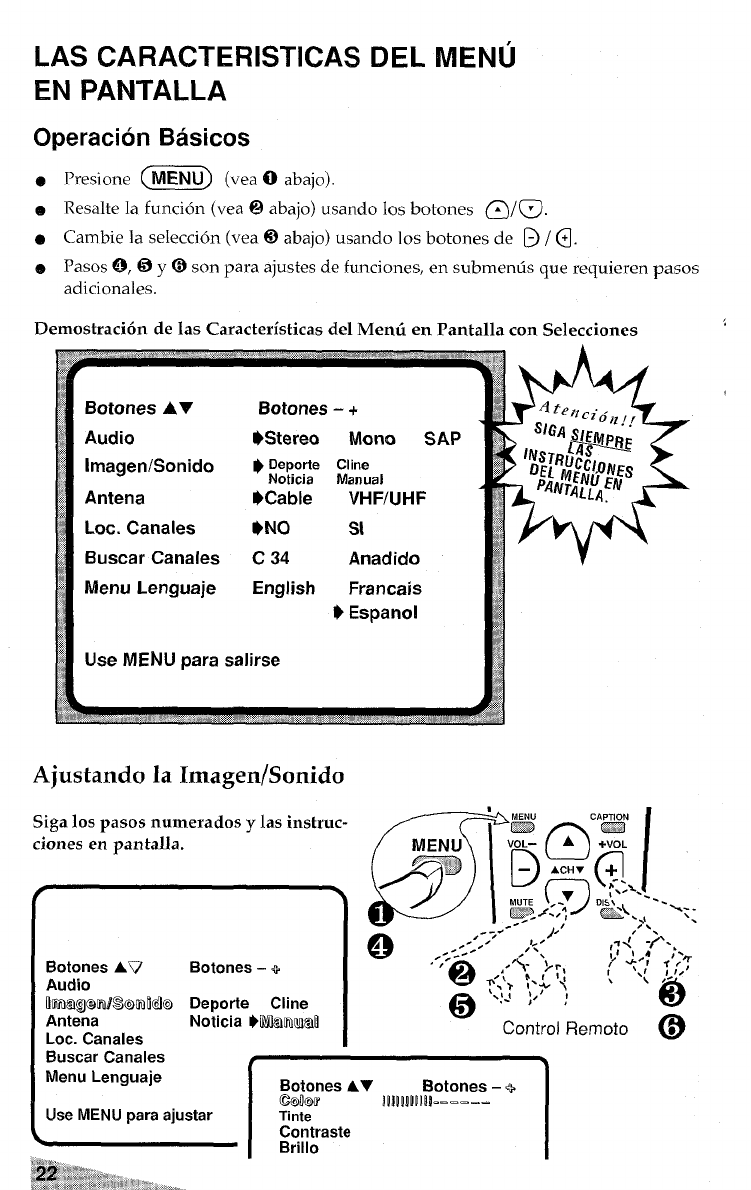
LAS CARACTERISTICAS DEL MENU
EN PANTALLA
Operation Basicos
e
e
o
@
Presi.ne @Ei@ (v,. O.b.j.).
Resalte la funci6n (vea@abajo) usandolosbotones @/@.
Cambiela selection (vea@abajo) usandolosbotonesde ~/@.
Pasos ~, 6y@son para ajustes de funci ones, en submemk que requieren pasos
adicionales.
Demostracion de Ias Caracteristicas del Memi en Pantalla con Selecciones
Botones AV Botones –+
Audio 9Stereo Mono SAP
lmagen/Sonido $O&r: ;$”a,
Antena OCable VHF/UHF
Lot. Canales *NO St
Buscar Canales c34 Anadido
Menu Lenguaje English Francais
$Espanol
Use MENU para salirse
b. ,~
<,.,f, ,.,.,, ,.,~,.,”.,,, ,,., .,:, ,,,,
Ajustando la Imagen/Sonido
Siga 10S pasos numerados ylas instruc-
ciones en pantalla.
Botones AV
Audio
Rrmalgwmmlkb
Antena
Lot. Canales
Buscar Canales
Menu Lenguaje
Botones -+I
Deporte Cline
Noticia bMmIuI@
I
IBotones AV Botones -Q
IUse MENU rxwa aiustar’ mow !mRQm------
Tinte I
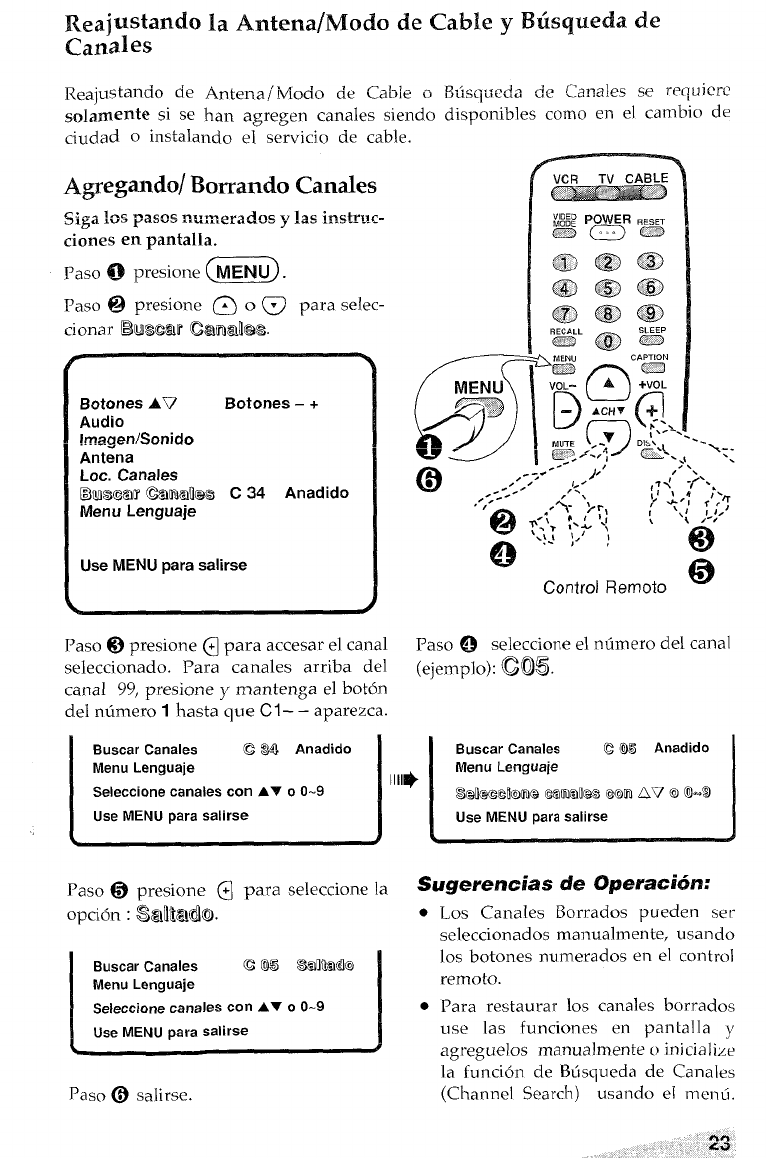
Reaj~stando la Antena/Modo de Cable yBtisqueda de
Canales
D.<.Z...-J. de ~~~~]~~wrwuicrc
Reajustalldo de ,Antena /IYfocio de Cab]e oDU..[U. ~.
solamente si se han agregen canales siendo disponibles como en el cambio de
ciudad oinstalando e: servicio de cable.
Agregando/ Bowando Canales
Siga 10s paws nwmxwlos yhimtruc-
ciones en pantalla.
Paso @presione G@@
Paso Qpresione @o@para selec-
h
Botones AV Botones -+
Audio
imagen/Sonido
Antena
Lot. Canales
E3MSG~Ff&~akas C34 Anadido
Menu Lenguaje
Use MENU para salirse
.
@
‘\--
Control Remoto w
Paso @presione @para accesar e] canal Paso @
seleccionado. Para canales arriba del (eiem~lo): (205.
seleccione el ntimero del canal
JL
canal 99, presione ymantenga el boton
del ntimero 1hasta que Cl –– aparezca.
Buscar Canales CWAnadido
Menu Lenguaje
Seleccione canales con AV 00-9
Use MENU para salirse
1111$
Buscar Canales Q@5 Anadido
Menu Lenguaje
s@wxmmle Csml’ms cmn &v a@l-s
Use MENU para salirse
Paso @presione ~para seleccione la Sugerencias de 0peraci6n:
-.
opci6n :&flNMIO.
Buscar Canales c@s S%mMk7
Menu Lenguaje
Seleccione canales con AT 00-9
Use MENU para salirse
Paso @salirse.
●
●
Los Canales Borrados pueden ser
seleccionados manualrnente, usando
10S botones numerados en el control
remoto.
Para restaurar 10S canales borrados
use las funciones en pantal la y
agreguelos manual mente oinitialize
la funci6n de Btisqueda de Canales
(Channel Search) usando el menii.
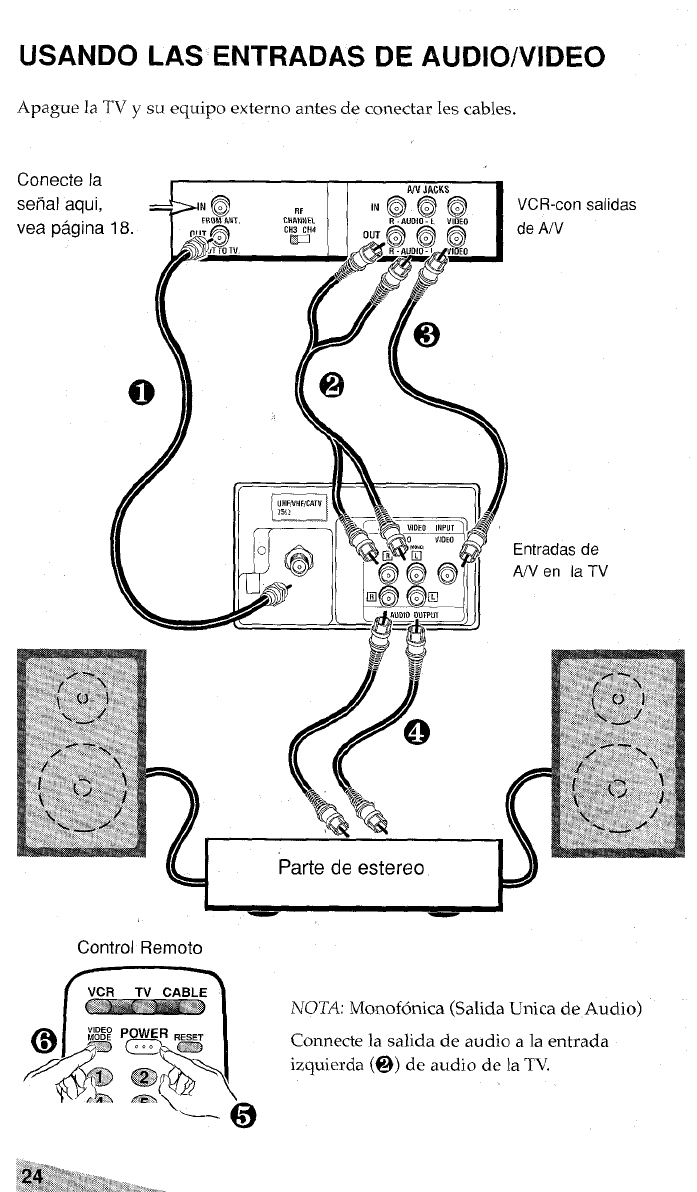
USANDO LAS ENTRADAS DE AUDIO/VIDEO
Apague la TV ysu equipo externo antes de conectar les cables.
Conecte la
seiial aqui,
vea pagina 18.
VCR-con salidas
de AN
][ &=+”
#JD!OOUTPUT
. . =AJJ
Entradas de
A/V en la TV
q
Parte de estereo
P
Control Remoto
m
VCR TV CABLE
NOTA: Monofonica (Salida Unica de Audio)
~Zp\ Connecte la salida de audio ala entrada
izquierda (@) de audio de la TV.
“@
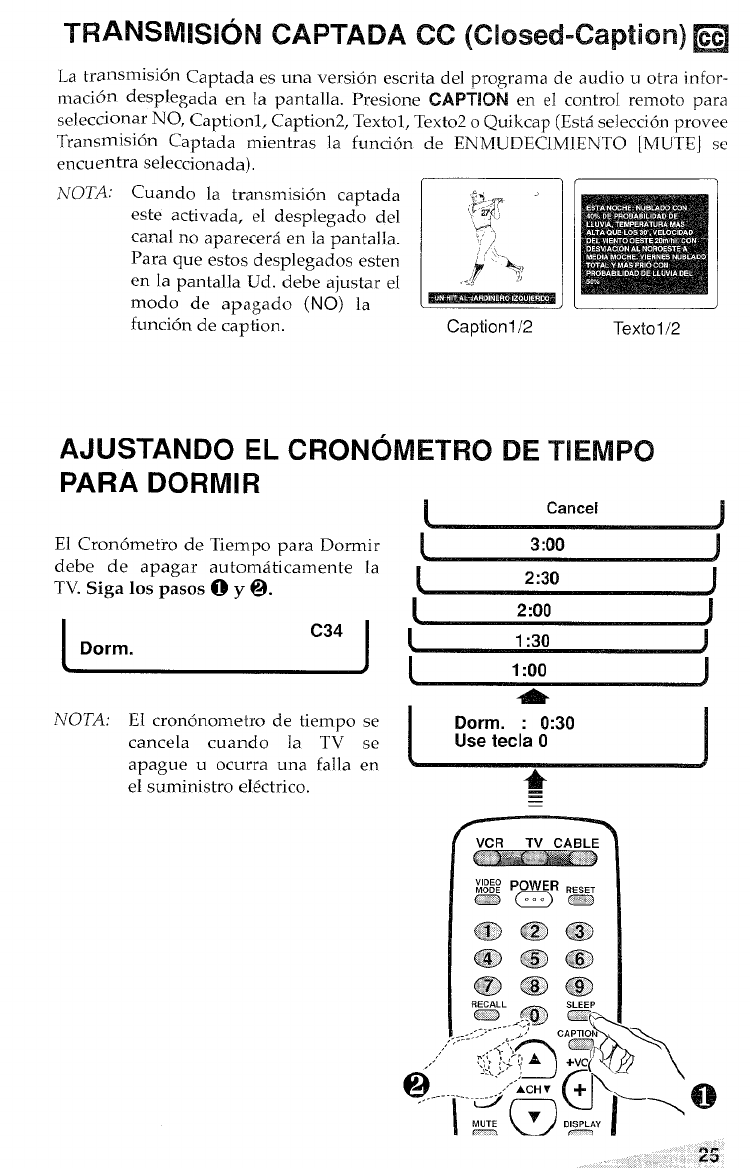
La transrnisi6n Captada es una versi6n escrita del programa de audio uotra infor-
maci6n desplegada en. la pantalla. Presione CAPTION en el control remoto para
seleccionar NO, Captionl, Caption2, Textol, Texto2 oQuikcap (Est4 selecci6n provee
Transmisi6n Captada mientras la funci6n de ENIWJDECIMIENTO [MUTE] se
encuentra seleccionada),
NOTA: Cuando la transmission captada
este activada, el desplegado del
canal no aparecer~ en la pantalla.
Para que estos desplegados esten
en la pantalla Ud. debe ajustar el
modo de apagado (NO) la
funci6n de caption.
>p~ ,
‘d, ~
,,
,,/$+9
->....,,
Caption l/2 Textol/2
AJUSTANDO EL CRONOMETRO DE TIEMPO
PARA DORMIR
(Cancel )
El Cron6metro de Tiempo para Dormir 13:00
debe de apagar automaticamente la J
TV. Siga 10S pasos @y@. [2:30 J
2:00
C34 J
Dorm. 0
1:30 )
11:00 I
NOTA:
\J
El crondnometro de tiempo se IDorm. :0:30 i
cancela cuando la TV se
\
Use tecla O
a~awe uocurra una falla en )
1“
el suministro e16ctrico
@
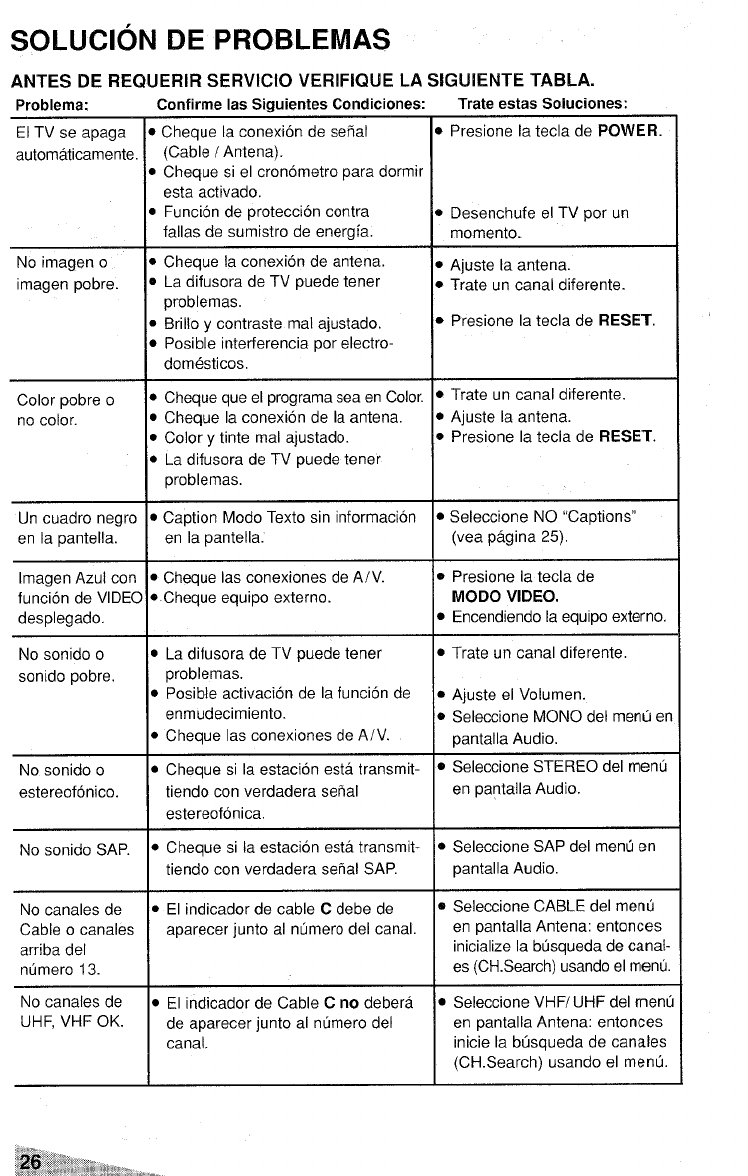
SOLLJCION DE PROBLEMAS
ANTES DE RECNJERIR SERVICIO VERIFIQLJE LA SIGUIENTE TABLA.
Problems: Confirme Ias Siauientes Condiciones: Trate estas Soluciones:
El TV se apaga
automaticamente.
No imagen o
imagen pobre.
Color pobre o
no color.
Un cuadro negro
en la pantella.
Imagen Azul con
funcion de VIDEO
desplegado.
No sonido o
sonido pobre.
No sonido o
estereofonico.
No sonido SAP.
No canales de
Cable ocanales
arriba del
nfimero 13.
No canales de
UHF, VHF OK.
Cheque la conexion de sefial
(Cable /Antena).
Cheque si el cronometro para dormir
esta activado.
Funcion de protection contra
fallas de sumistro de energfa.
Cheque la conexion de antena.
La difusora de TV puede tener
problemas.
Brillo ycontraste mal ajustado.
Posible interferencia por electro-
domesticos.
Cheque que el programa sea en Color.
Cheque la conexion de la antena.
Color ytinte mal ajustado.
La difusora de TV puede tener
problemas.
Caption Modo Texto sin information
en la pantella.
Cheque Ias conexiones de A/V.
Cheque equipo externo.
La difusora de TV puede tener
problemas.
Posible activation de la funcion de
enmudecimiento.
Cheque Ias conexiones de A/V.
Cheque si la estacion esta transmit-
tiendo con verdadera setial
estereofonica.
Cheque si la estacion esta transmit-
tiendo con verdadera sehal SAP.
El indicador de cable Cdebe de
aparecer junto al ntimero del canal.
El indicador de Cable Cno debera
de aparecer junto al numero del
canal.
IPresione la tecla de POWER.
IDesenchufe el TV por un
memento.
IAjuste la antena.
ITrate un canal diferente.
~Presione la tecla de RESET.
ITrate un canal diferente.
IAjuste la antena.
IPresione la tecla de RESET.
ISeleccione NO “Captions”
(vea pagina 25).
IPresione la tecla de
MODO VIDEO.
~Encendiendo la equipo externo.
~Trate un canal diferente.
IAjuste el Volumen.
~Seleccione MONO del menu en
~antalla Audio.
~Seleccione STEREO del menu
en pantalla Audio.
ESeleccione SAP del mend en
pantalla Audio.
BSeleccione CABLE del menu
en pantalla Antena: entonces
initialize la busqueda de canal-
es (CH.Search) usando el menu.
DSeleccione VHF/UHF del men~
en pantalla Antena: entonces
inicie la busqueda de canales
(CH.Search) usando el menu.
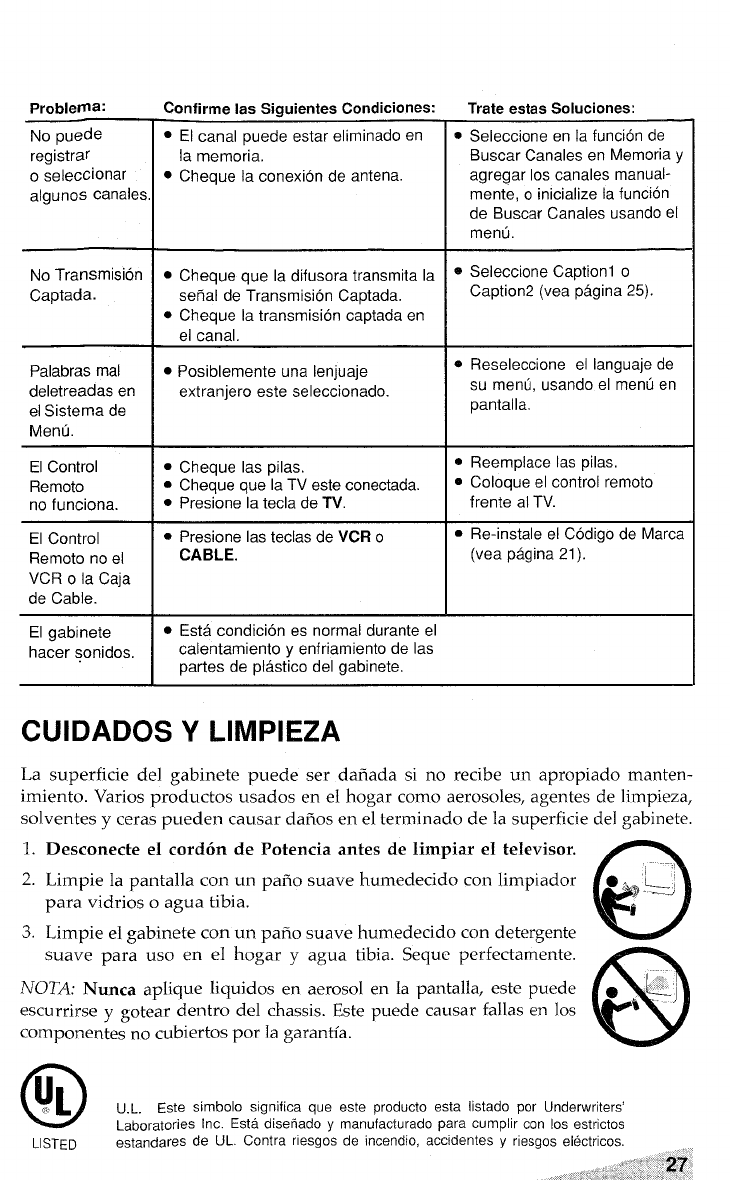
No puede
registrar
oseleccionar
algunos canales
No Transmission
Captada.
Palabras mal
deletreadas en
el Sistema de
Menu.
El Control
Remoto
no funciona.
El Control
Remoto no el
VCR ola Caja
de Cable.
El gabinete
hater sonidos,
Confirme ias Siguientes Condiciones:
sEl canal puedeestar eliminadoen
la memoria,
.Cheque Iaconexionde antena.
.Cheque que Iadifusora transmita la
sefial de Transmision Captada,
●Cheque Iatransmision captadaen
el canal.
●Posiblemente una Ienjuaje
extranjero este seleccionado.
.Cheque Iaspilas.
●Cheque que la TVesteconectada.
●Presione lateclade TV.
oPresione lasteclasde VCRo
CABLE.
●Estacondicion es normal duranteel
calentamiento yenfriamiento de Ias
partes de plastico del gabinete.
Trate estas Soiuciones:
oSeleccione en Iafuncionde
Buscar Canales en Memoria y
agregar Ios canales manual-
mente, oinitialize Iafuncion
de Buscar Canales usando el
menu.
eSeleccione Captionl o
Caption2 (vea pagina 25).
oReseleccione el Ianguajede
su menu, usandoel menu en
pantalla
@Reemplace Ias pilas,
QColoque el control remoto
frente al TV.
.Re-instale el Codigo de Marca
(vea pagina 21 ).
CUIDADOS YLIMPIEZA
La superficie del gabinete puede ser daiiada si no recibe un apropiado manten-
imiento. Varies productos usados en el hogar como aerosoles, agentes de limpieza,
solventes yceras pueden causar daiios en el terminado de la superficie del gabinete.
1. Desconecte el cord6n de Potencia antes de Iimpiar el televisor.
a
2. Limpie lapantalla con un pafio suave humedecido con limpiador .~;%-
para vidrios oagua tibia. @
3. Limpie el gabinete con un paiio suave humedecido con detergente
suave para uso en e] hogar yagua tibia. Sequc perfectamente.
8
NOTA: Nunca aplique liquidos en aerosol en la pantallar este puede e~&
escu rrirse ygotear dentro del chassis. Este puede causar fallas en 10S
components no cubi ertos por la garantia. Y
o
UL
@U.L. Este simbolo significa que este producto esta Iistado por Underwriters’
Laboratories Inc. Esta disefiado Yrnanufacturado para cumplir con Ios esttictos
LISTED estandares de LJL.Contra riewos de incendio, accidents Yriesgos electficos.
““: ‘‘ “%??
, ,. :,’; >! ..; 4.. .,
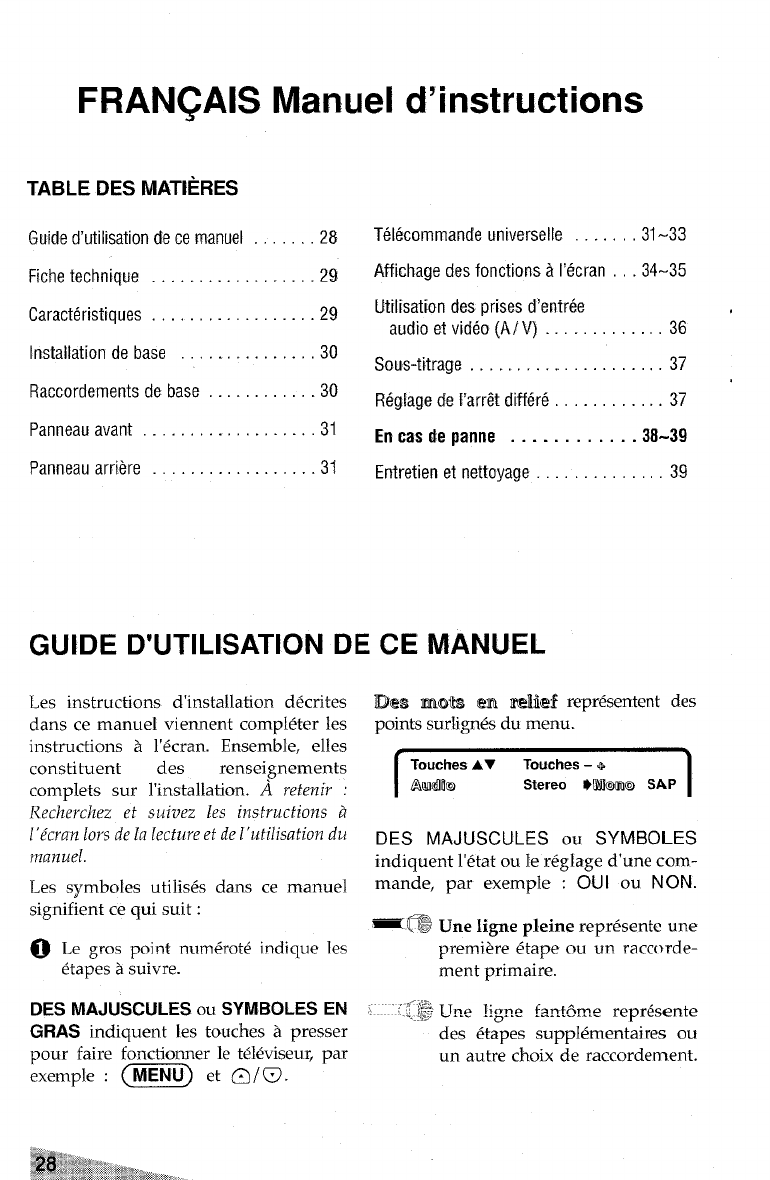
FRAN~AIS
TABLE DES MAT[ERES
Guide d’utilisation de ce manuel
Fiche technique . . . .
Manuel d’instructions
.28
.29
Caracteristiques . . . . . . . . . . . . . . . ...29
Installation debase . . . . . . . . . . . . ...30
Raccordements debase ............30
Panneau avant ...................31
Panneau arriere . . . . . . . . . . . . . . . . ..31
Telkomrnand euntverselle .......31-33
Affichage desfonctions ~l’6cran ...34-35
Utilisation des prises d’entree
audio etvid60(A/V) . . . . . . . . . ...36 ‘
Sous-titrage .....................37
R6gfagede f’arr&diff6r6 ............37
Encastiepanne ............38-39
Entretien etnettoyage .............39
GUIDE D’UTILISATION DE CE MANUEL
Les instructions d’installation ddcrites
clans ce manuel viennent compldter les
instructions ~l’6cran. Ensemble, elles
constituent des renseignements
complets sur l’installation. Areterzir :
Recke~chez et suivez les instructions d
[’{c~an 10YSde la lectwe ef de 1‘utilisation du
manuel.
Les symboles utilis6s clans ce manuel
signifient ce qui suit:
~Le gros point nurm%otd indique Ies
&apes asuivre.
DES MAJUSCULES OU SYMBOLES EN
GRAS indiquent les touches ~presser
pour faire fonctionner le t~leviseur, par
exemple :@@ et~f~
JDes mobs wm%ieff repr~sentent des
points sudigrv% du menu.
ITouches AT Touches –+
Awml Stereo WWiI@I SAP I
DES MAJUSCULES OU SYMBOLES
indiquent l’etat ou Ie reglage d’une com-
mande, par exemple :OUI ou NON.
zmUne Iignepleine repr&entc une
premii%e &apeou un raccorde-
ment primaire.
,,. “’”f@+~TRe ligne k?t&??e repr&+ente
,,~..,i,<,
des @tapes supplementaires ou
un autre choix de raccordement.
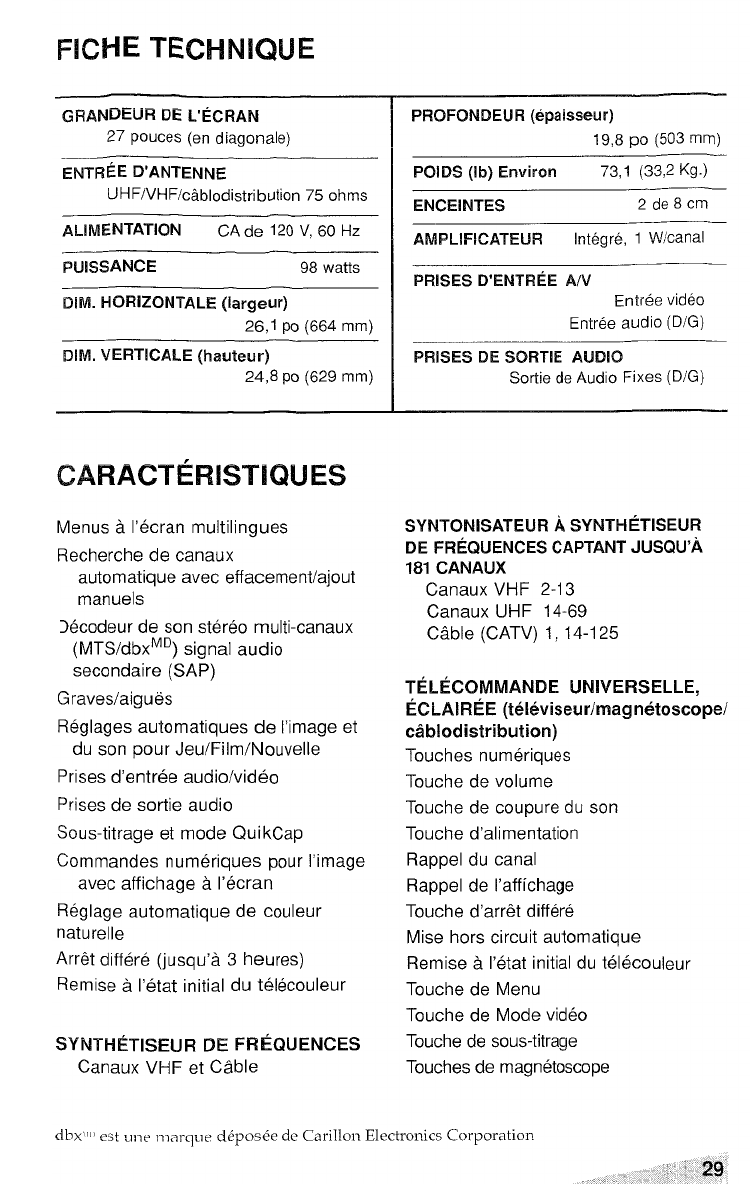
FICHE TECHNIQUE
——..—
GRANDEUR DE L’ECRAN
27 pouces (en diagonale)
ENTREE 13’ANTENNE
UHF/VHF/c~blodistribution 75 ohms
AIJMENTATION CA de 120 V, 60 Hz
PUISSANCE 98 watts
Dlk!. HORIZONTALE (Iargeur)
26,1 pO (664 mm)
\
DIM. VERTICALE (hauteur)
24,8 PO (629 mm)
;ARACT~RISTIQUES
lenus aI’ecran multilingues
Iecherche de canaux
automatique avec effacement/ajout
manuels
)@codeur de son stereo multi-canaux
(MTS/dbxMD) signal audio
secondaire (SAP)
iraves/aigues
leglages automatiques de I’image et
du son pour Jeu/Film/Nouvelle
‘rises d’entree audio/video
‘rises de sortie audio
Sous-titrage et mode QuikCap
Commandes numeriques pour I’image
avec affichage aI’ecran
Reglage automatique de couleur
naturelle
Arr& diff&-@ (jusqu’a 3heures)
Remise aI’@tat initial du tel~couleur
SYNTHk’TISEUR DE FRl%NJENCES
Canaux VHF et Cable
PF40F0NDElJR (epaisseur)
19,8 PO (503 mm)
F’OIDS (lb) Environ 73,1 (33,2 Kg.)
ENCEINTES 2de8cm
AMFILIFICATEUR lnt6gr6, 1W/canal
PRISES D’ENTREE A/V
Entree video
Entree audio (D/G)
PRISES DE SORTIE AUKW3
Sortie de Audio Fixes (D/G)
SYNTONISATEUR ASYNTHETISEUR
DE FREQUENCIES CAPTANT JUSQU’A
181 CANAIJX
Canaux VHF 2-13
Canaux UHF 14-69
Cable (CATV) 1, 14-125
TELkCOMMANDE UNWERSELLE,
ECLAIRkE (te16viseur/magnetoscope/
cablodistritwtion)
Touches numeriques
Touche de volume
Touche de coupure du son
Touche d’alimentation
Rappel du canal
Rappel de I’affichage
Touche d’arr6t differe
Mise hors circuit automatique
Remise aI’etat initial du telecouleur
Touche de Menu
Touche de Mode video
Touche de sous-titrage
Touches de magnetoscope
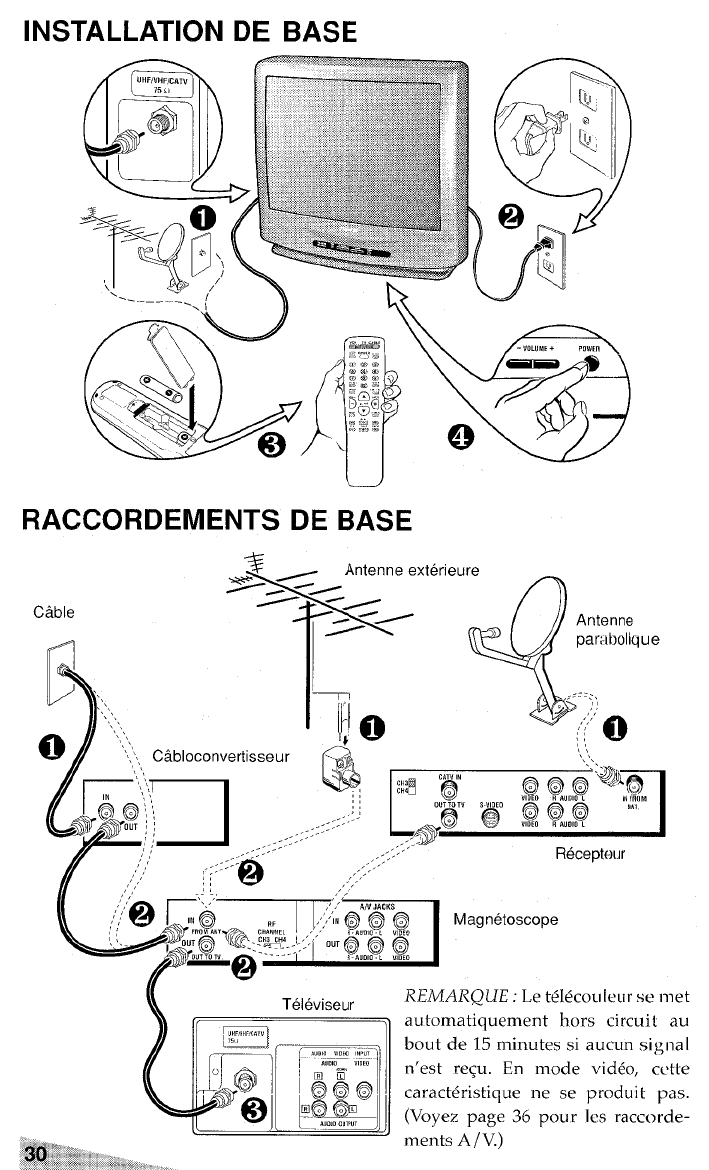
INSTALLATION
RACCORDEIWIENTS DE BASE
Cable
m
j$i$i<.
Antenne exterieure
~“ %“ Antenne
par:abolique
=:.-,
(Q
C~bloconvertisseur
REMARQUE: Le t~ldcou Ieurse met
automatiquement hors circuil au
bout de 15 minutes si aucun signal
n’est re~u. En mode vid60, cckte
caract&istique ne se produit pas.
(Voyez page 36pourlcs raccorde-
ments A/ V.)
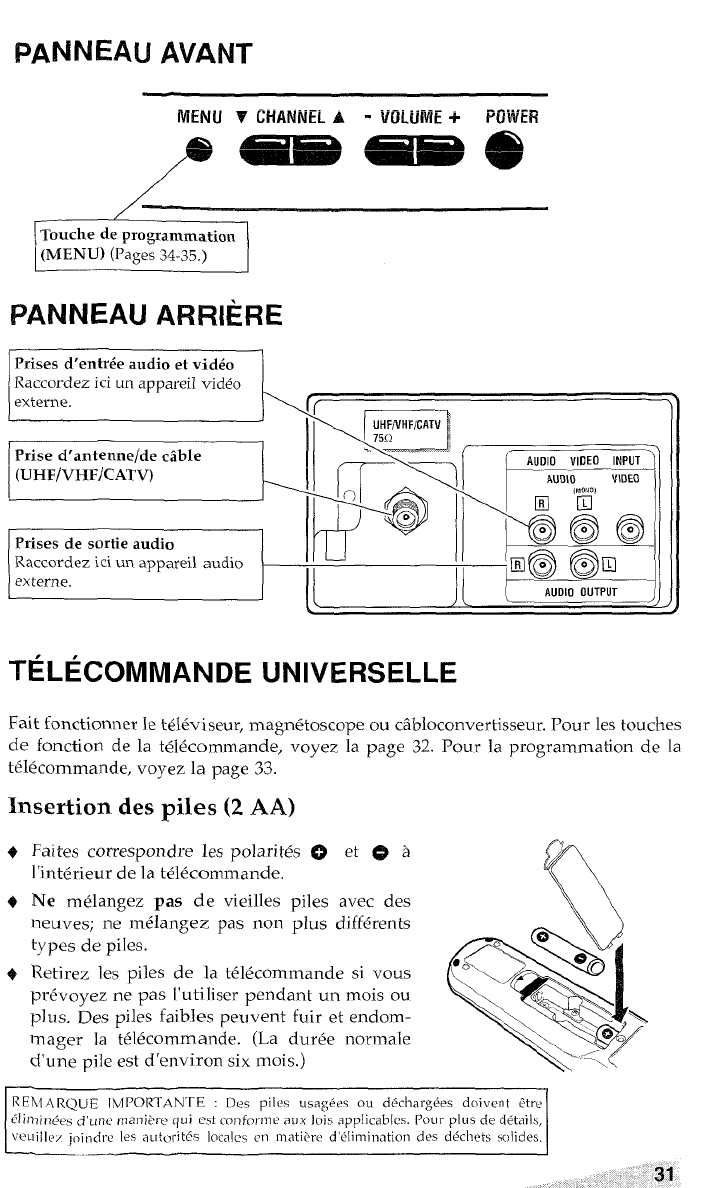
PANNEAU AVANT
MENU VCHANNEL A-VL!LUh’i~+
..-. FW”WER
PANNEAU ARRIERE
\~~
Raccordez ici un appareil vid40
IPrise d’antenne/de cable I
1’
(UHF/VHF/CATV)
1
~
Raccordez ici un appareil audio
[~ J[ [AUDID OUTPUT J.
TELECOMMANDE UNIVERSELLE
Fait fonctionner le te16viseur, ma~nstoscope ou c~bloconvertisseur. Pour les touches
de fonction de la t~ldcommande~ voyez ia page 32. Pour la programmation de la
t~lecommande, voyez la page 33.
Insertion des piles (2 AA)
Faites correspondre les polarit6s ~
l’int6rieur de la te14commande.
Ne melangez pas de vieilles piles
neuves; ne mc$langez pas non plus
types de piles.
avec des
diff~rents
Retirez les piles de la t616commande si vous
pr6voyez ne pas l’uti Iiser pendant un mois ou
plus. Des piles faibles peuvent fuir et endom-
lmager la tc!ldcommande. (La durde norlmale
cf’une pile est d’environ six mois.)
L
REIVf AR~LJE IMPORIAN’rE :[k piles usag4es ou ci+clwrg&3 doivcnt ttrc
dlimim+,s d>UIW mani<. re qui est co11fon12c aLIX Jois applicabks. Pot!r plus de d@tails,
~euiilc., i(>i17drc [es ,~utoritds Iocalcs m? matitvv d’elimination des ddchcts soiid es.
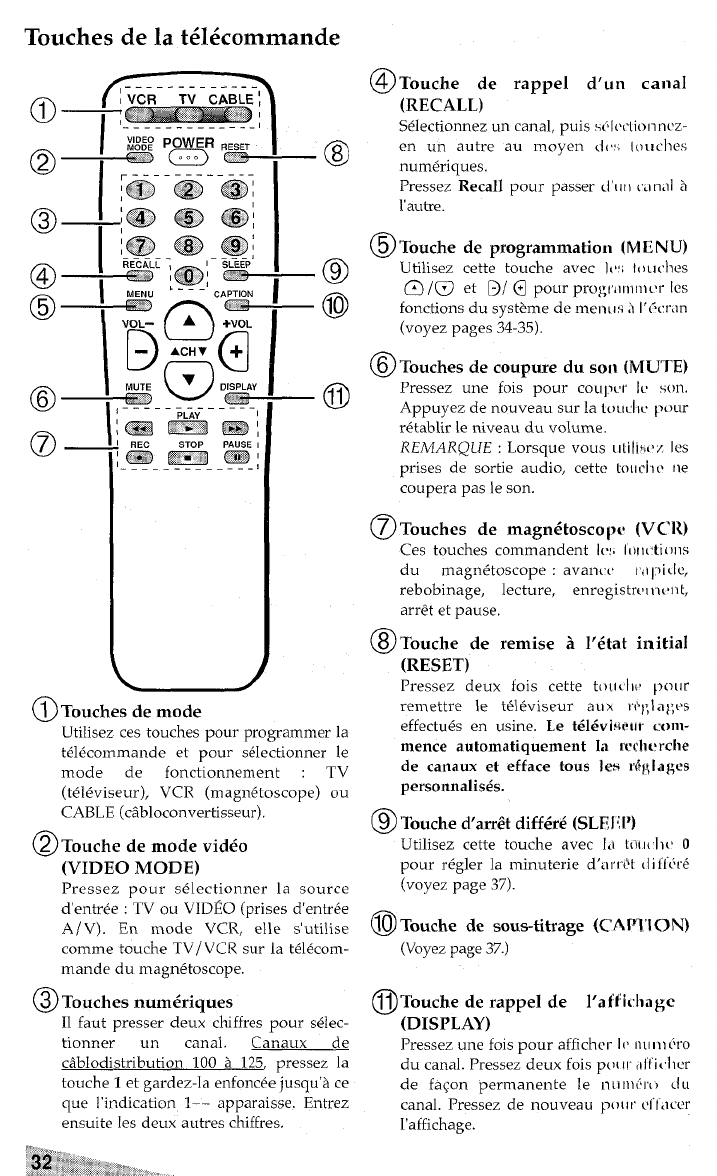
Touches de la t616commande
.--— .--— —--- .
@$~
.———--————.-—
–-a
–c)
–@
–(I
--J
(iJTmlchesde mock
Utilisez ces touches pour programmer la
t414commande et pour s+lectionner le
mode de fonctionnement :TV
(tel&iseur), VCR (magn6toscope) ou
CABLE (c~bloconvertisseur).
@Touche de mode vid6
(VIDEO MODE)
Pressez pour sc!lectionner la source
d’entree :TV ou VIDEO (prises d’entrc!e
A/V). En mode VCR, elle s’utilise
comme touche TV/ VCR sur la t6lecom-
mande du magn~toscope.
@Touches nwdriques
11 faut presser deux chiffres pour selec-
tionner un canal. Canaux de
c~blodistribution 100 21 125, pressez la
touche Iet gardez-la enfonc6e jusqu’~ ce
que I’indication 1-- apparaisse. Entrez
ensuite les deux autres chiffres.
@Tcmchede rappel dun canal
(RECALL)
S@Iectionnez un canal, puis sdlrc[ionnrz-
en un autre au moyen c{(, Itluclles
numiiriques.
Pressez Recall pour passer d‘i1t)(.I tn,ll h
I’autre.
@Touche de programmation (MENU)
Utilisez cette touche avec I(,; f(~uches
@/0 et D/@ pour pro~ri,l),l,cv Ies
fonctions du syst?me de men, is ;i l’~crm
(voyez pages 34-35).
@Touches de cor.qxme du SOI,(MUTE)
Pressez une fois pour COLIp~,r k, son.
Appuyez de nouveau sur 1a tL)LIcl IL) pc)ur
r4tabtir le niveau du volume.
REMARQUE :Lorsque vous ulili*.(,~ Ies
prises de sortie audio, cette toucllr ne
coupera pas le son.
@Touches de rnagn6toscop, (VCR)
Ces touches commandant 1(.!. I,)ll(tii}ils
du magn&oscope :avanlt, tii 1~i,le,
rebobinage, lecture, enregistrt,l Il{,llt,
arr& et pause,
@Tcmche de remise i16tat initial
(RESET)
pressez deux fois cette t[)ll(ll{ pour
remettre 1et61eviseur au xr+fila]; rs
effectu& en usine. Le tt$k%i+mur mm-
mence automatiquement la Wchv rche
de canaux et efface tous Ies rf~logw
personnalist%.
@Touched’.mri2tc liff6r6 (SLEI{IJ)
Utilisez cette touche avec Iii tfli[{ Ii{, O
pour r6gler la minuterie d’arre[ (1ifldr~
(voyez page 37).
@) Touche de sous-titmge (CAP’! ’ION)
(Voyez page 37.)
@Touche de rappel de Iaffkhagc
(DISPLAY)
Pressez une fois pour affichcr IV nl(II]$ro
du canal. Pressez deux fois p~)(11-,Illi<]lcr
de fagon permanence Ie nil nldr( )du
canal. Pressez de nouveau pt~(it ~f[acer
I’affichage.
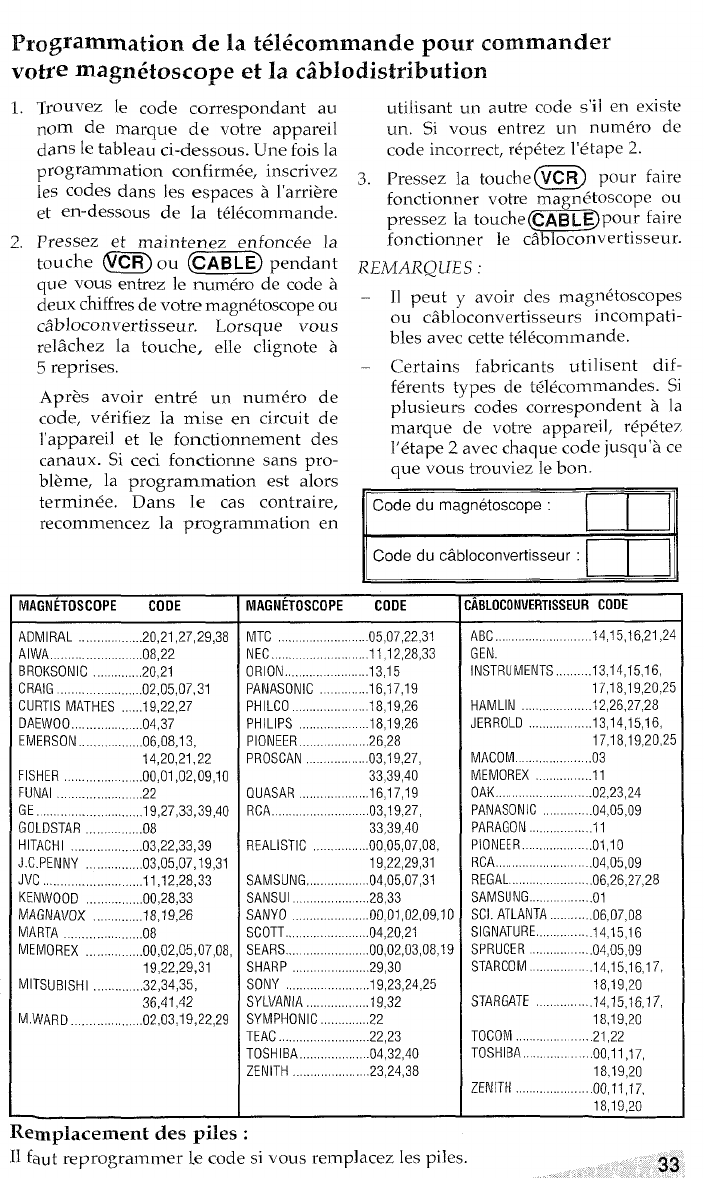
Programmation de la t616commande pour commander
Votre magn6toscope et la c~blodistribution
1. Trouvez [e code correspondent au
nom de marque de votre appareil
clans Ie tableau ci-dessous. Une fois la
programmation confirm~e, inscrivez
les codes clans les espaces ii l’arri&e
et en-dessous de la tWcommande.
2. Pressez et maintenez en foncke la
tou che ~ou (C=E) pendant
qu evous entrez le num@ro de code a
deux chiffres de votre magn&oscope ou
c2bloconvertisseu r. Lorsque vous
re]~chez la toucher e]le clignote a
5reprises.
Apr& avoir entr~ un num&o de
code, vdrifiez la mise en circuit de
l’appareil et le fonctionnement des
canaux. Si ceci fonctionne saris pro-
bl?me, la programmation est alors
termin~e. Dans Ie cas contraire,
recommence la programm ation en
MAGNETOSCOPE CODE
ADMIRAL .. ...20.21.27,29,38
AIWA,, . .. .. ... . .. . .. ... .. ..,.08 ,22
BROKSONIC ..............20.21
CRAIG .,.... ...........02.05.07.31
CURTIS MATHES ......19.22.27
DAEWOO .,,............ ...04.37
EMERSON ..................O6.O8.I3.
14,20,21,22
FISHER,..,..,,,.,..,.....00.01.02,09,10
FUNAl,. ,22
GE. .,.,...,................19.27.33.39.40
GOLDSTAR ,...,...........08
HITACHI...................03.22.33.39
J.C.PENNY ..,.,.,......03.05,07,19,31
JVC.,,.,,,..,..,..............ll.l2.28.33
KENWOOD ,..,,.,..,,....00,28,33
MAGNAVOX ..,..,.,..,...18,19,26
MARTA ..................08
MEMOREX ...............00.02.05.07.08.
19,22,29,31
MITSUBISHI.,,..,........32.34.35.
36,41,42
M.WARO. ..,..,.,,,.,.,,02,03.19,22,29
Replacement ctes piles :
uti Iisant un autre code s’ii en existe
un. Si vous entrez un num&o de
code incorrect, rep&ez I’etape 2.
3. Pressez la touche mpour faire
fonctionner votre rnagn&oscope ou
pressez la touche@~Ejpour faire
fonctionner le cilbloconvertisseur.
REMARQUES :
– 11 peut yavoir des rnagndtoscopes
ou cilbloconverti sseurs incompati-
bles avec cette t~l~commande.
—Certains fabricants utilisent dif-
f6rents types de t@lecommandes. Si
plusieurs codes correspondent 5la
marque de votre appareil, rdp~tez
l’&ape 2avec chaque code jusqu’a ce
que vous trouviez Ie bon.
=
Code du cabloconvertisseur :
MAGNETOSCOPE COOE
MTC ...,.-...........05.07.22.31
NEC ...... ..........11.12.28.33
ORION.....................13.15
PANASONIC ...........16.17.19
PHILCO .............. ...18.19.26
PHILIPS ..18,19,26
PIONEER...................26.28
PROSCAN ..............03.19.27.
33)39,40
QUASAR ..................16.17.19
RCA .........................03.19.27.
33,39,40
REALISTIC .........00.05.07.08.
19,22,29,31
SAMSUNG, .............. .04,05,07,31
SANSUI .................28.33
SANYO ....................00.01.02.09.10
SCOTT.....................04.20.21
SEARS.... ................00.02.03.08.19
SHARP ............29.30
SONY ......................19.23.24.25
SYLVANIA.................I9.32
SYMPHONIC ..............22
TEAC ..........................22.23
TOSHIBA...................04,32,40
ZENITH....................23.24.38
ABLOCOMvERTISSEURcoDE
ABC... 14,15,16,21,24
GEN.
INSTRUMENTS.........13,14,15.16,
17,18,19,20,25
HAMLIN ......12.26.27.28
JERROLO ................13.14.15.16.
17,18,19,20,25
MACOM ...............03
MEMOREX ..............11
OAK .... .02,23,24
PANASONIC ............04.05.09
PARAGON ................11
PIONEER.................01.10
RCA ............ .04,05,09
REGAL .........06.26>27.28
SAMSUNG ...... ......01
SC!.ATLANTA... ......06.07.08
SIGNATURE.............14.15.16
SPRUCER ................04.05.09
STARCOM. ...14.15,16,17,
18,19,20
STARGATE ..........14.15.16.17.
18,19,20
TOCOM ......... .....21.22
TOSHIBA.................00.11.17.
ZENITH
18,19,20
00,11,17,
18,19,20
—,
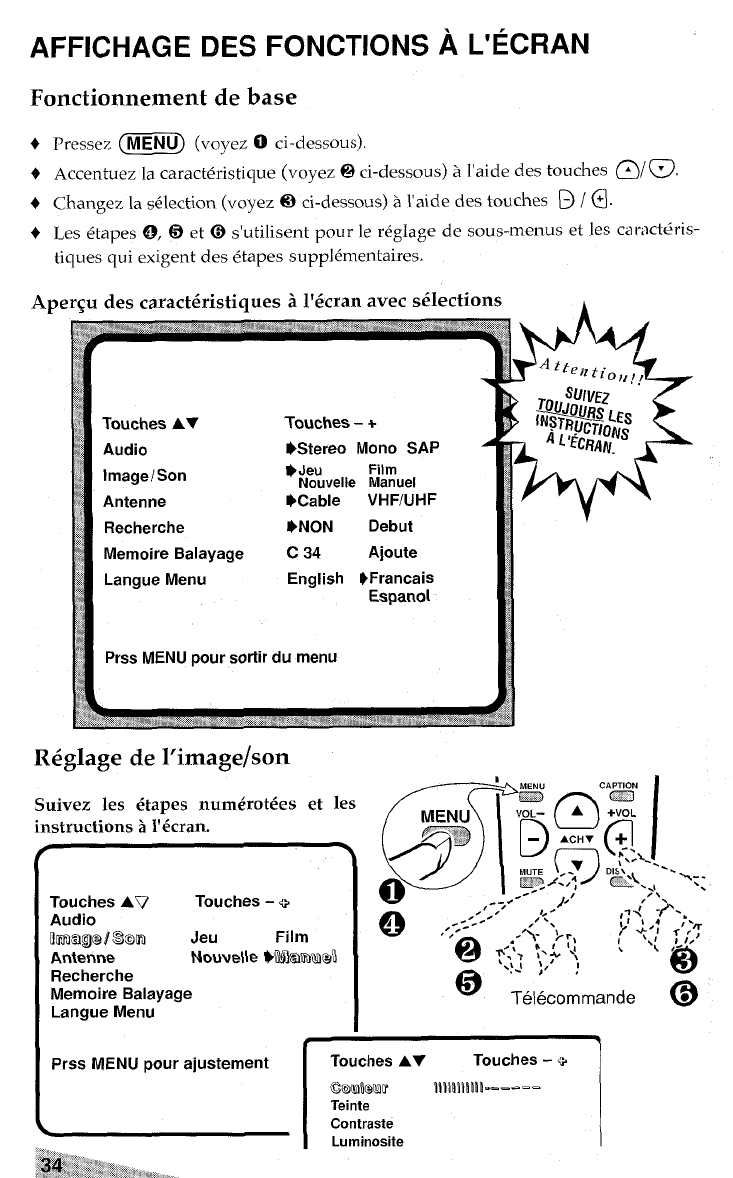
AFFICHAGE DES FONCTIONS AL’ECRAN
Fonctionnement de base
Pressez (~U) (voyez Oci-dessous).
Accentuez la caract&-istique (voyez @ci-dessous) &I’aide des touches @/@.
Changez la s61ection (voyez @ci-dessous) aI’aide d= touches ~/@.
Les @tapes0, @et @s’utilisent pour le reglage de sous-menus et les ca r;lc&ris-
tiques qui exigent des &apes supp16mentaires.
Aper$u des caracti%istiques ii l’6cran avec selections
Y
Touches –+
W3tereo Mono SAP A
Jeu Film
Nouvelle Manuel
Prss MENU pour sortir du menu
R6glage de l’image/son
Suivez les dtapes numt%otdes et les
instructions k1’6cran.
f,~a;g~.~,
Touches AV Touches -+,--,-
Audio
Bmagw son Jeu Film o““”’ ;;4<:, fp:’1
,0,---- ,l,)
Anienne ~:t, :,.; ‘.: \‘( ,-
Nowe\le WkIm@
Recherche @
Memoire Balayage @‘;e,:co:mande @
Langue Menu
Prss MENU pour ajustement
~
Touches -+
.---. =
\
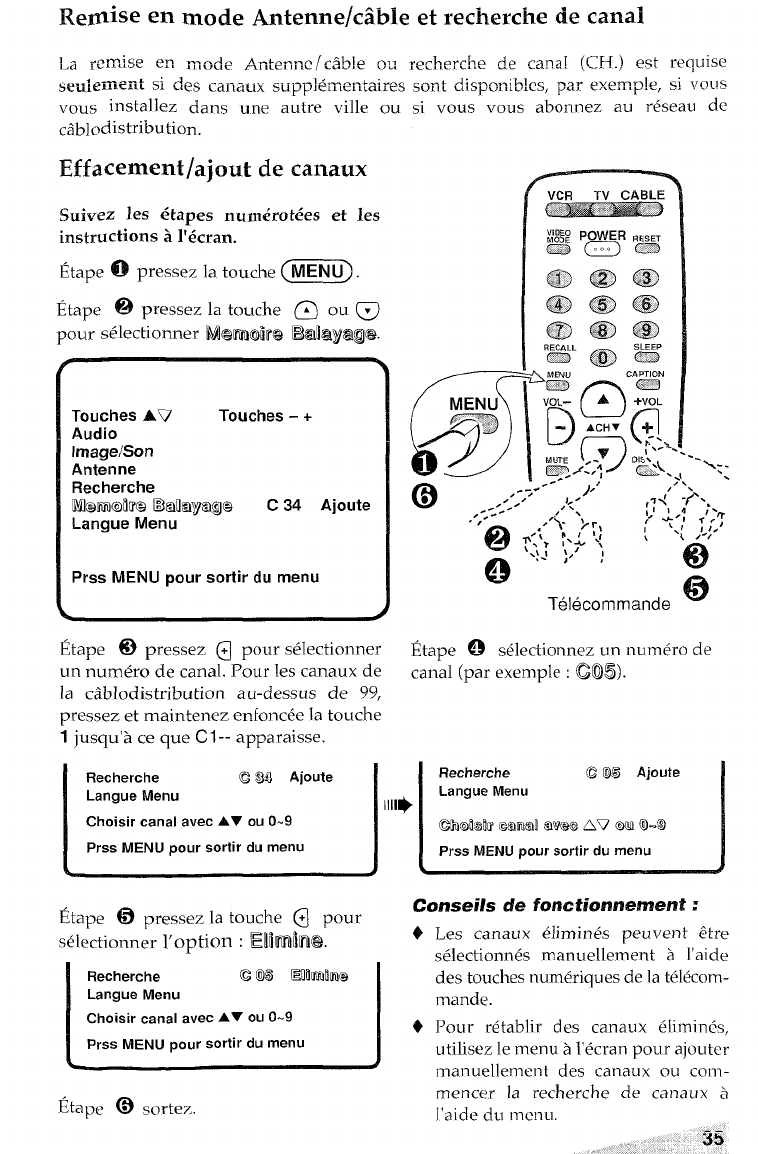
citblodistri-bu tion.
Effacement/ajout de canaux
Suivez les @tapes num&ot6es et Ies
instructions bl’6cran.
Etape @pressez la touche (=).
Etape @pressez la touche @ou @
pour sdectionner N@lirimim Bt~l&y/8tg@
+
Touches AV Touches -+
Audio
lrnage/Son
Antenne
Recherche
Mfwmobe Ekaoayage C34 Ajoute
Langue Menu
Prss MENU pour sortir du menu
,d
Etape @pressez @pour sdectionner
un num~ro de canal. Pour les canaux de
la c&rlodistribution au-dessus de 99,
pressez et maintenez enfonc~e la touche
1jusqu’~ ce que C1-- apparaisse.
Recherche CWI Ajoute
Langue Menu
Choisir canal avec AY ou 0.9
Prss MENU pour sortir du menu
EtaPe @pressez la touche @pour
+lectionner I’option :Hi~hil@.
Recherche e 05 Enhf’nb
Langue Menu
Choisir canal avec AY ou O-9
Prss MENU pour sortir du menu
Etape @sortez.
G)
‘-x-.
Etape @ s~lectionnez un num~ro de
canal (par exemple :(XS).
IRecherche G05 Ajoute
Langue Menu
1111+ I
cmwr Mm51n6N?@c2Av @ml0-9
Prss MENU pour sortir du menu
\#
Conseils de fonctionnement:
Les canaux elimin~s peuvent dtre
s~lectionn~s manuellement 5l’aide
des touches num&-iques de la tel6com-
mande.
Pour r+tablir des canaux 61imin&,
utilisez Ie menu .5I’dcran pour ajouter
manuellement des canaux ou conl -
mencer la recherche de canaux 5
I’aide du menu,
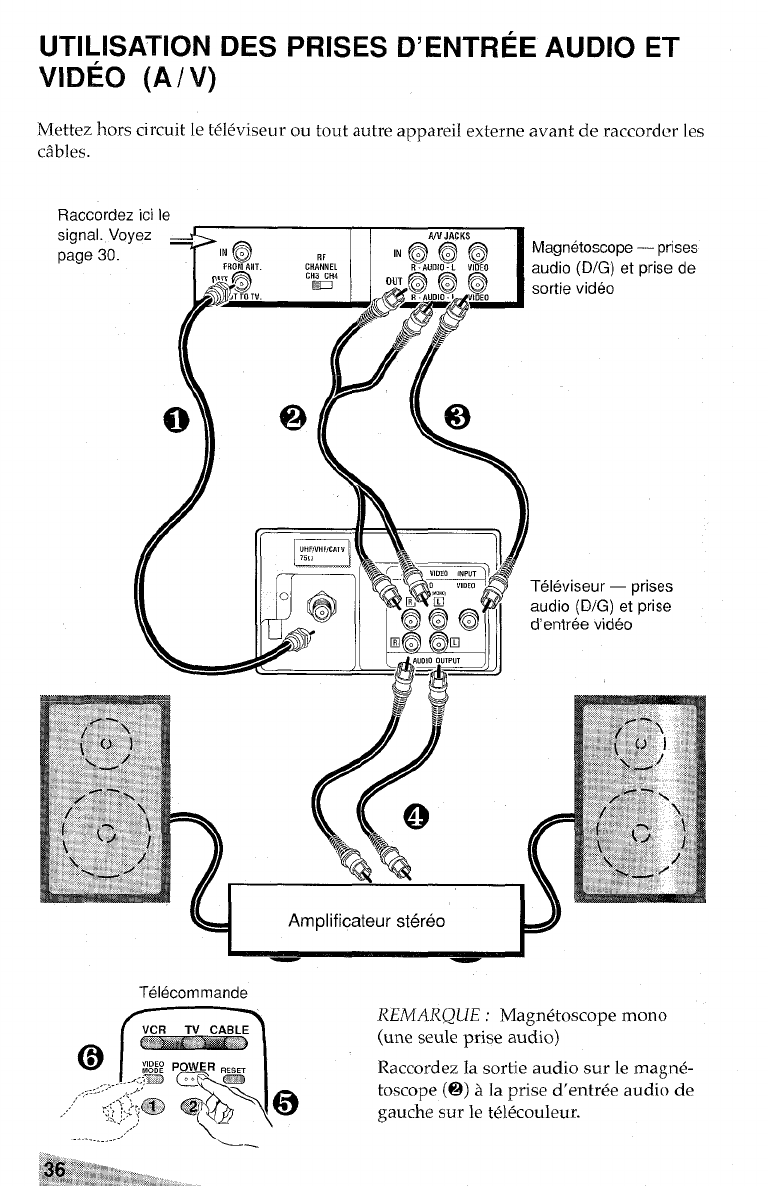
UTILISATION DES PRISES D’ENTREE AUDIO ET
VIDEO (A/V)
Mettez hors circuit Ie t@l&iseur ou tout autre appareil externe avant de raccorcier les
cables.
RaccorcIez ici Ie
Televiseur —prises
audio (D/G) et prise
d’entree video
Telecommande
~~ .T
REMARQUE :Magn6toscope mono
VCR TV CABLE
@~
(une seule prise audio)
{I:- ~~~~~~E*,T Raccordez la sortie audio sur le magn6-
.......-.-+~ Tm
,,+ ~,,,.J,
&\@
toscope (Q) ala prise d’entr~e audio de
..,’ V&ta qgauche sur le t~l~couleur.
,.-,’
.............. \=.
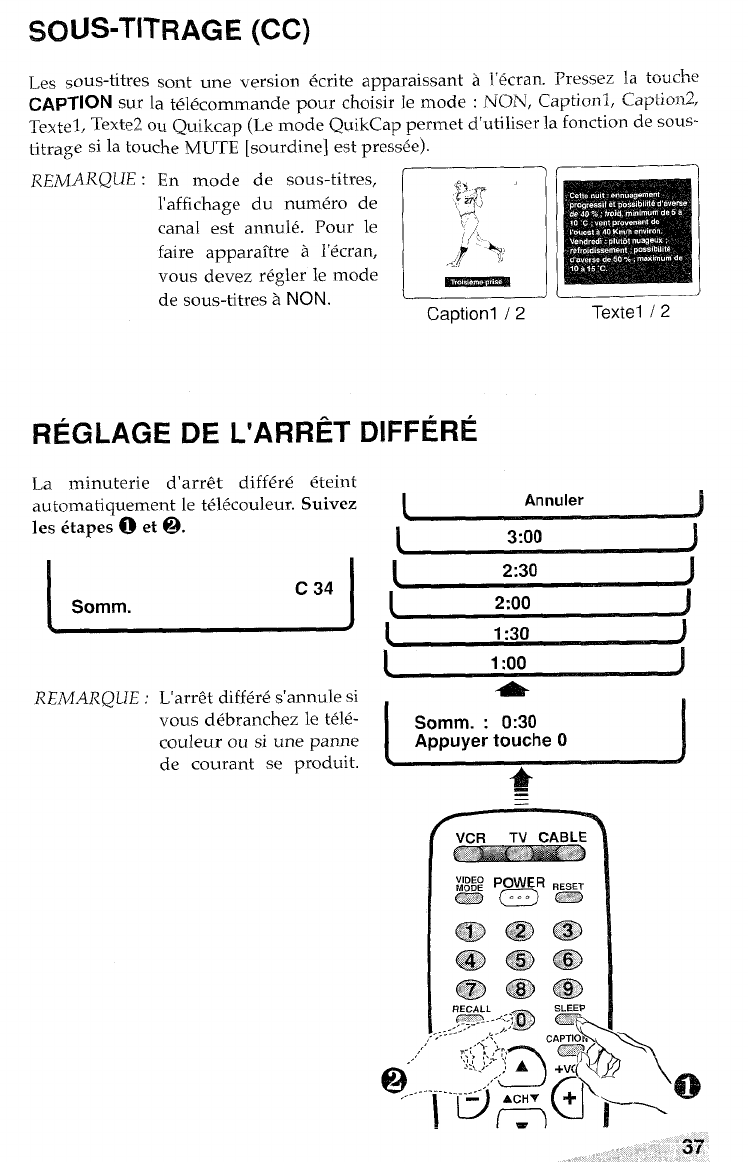
SOUS-TITRAGE (CC)
Les sous-titres sent une version @trite apparaissant AI“@cran. Pressez la touche
CAPTION Sur la t&clcommande pour choisir le mode :NCIN, Ca~tionl, Captior12,
-- ,,
TexteI, Texte2 ~IJ Qu-ikcaP (Le mode QUikQp perrnet d’utiliser k
titrage Si la touche MUTE [sourdine] est pre&ee).
REMARQUE :En mode de sous-titres,
l’affichage du num6ro de
n
F:JJ
r-.,
canal est annul@. Pour le \;
faire apparaftre al’ecran, ,,[: ~
vous devez r6gler le mode .
de sous-titres 5NON. Captionl /2
REGLAGE DE L’ARRET DIFFERk
La minuterie d’arr& diff6re &eint
au tomatiquement le tc%+couleur. Suivez
les 6tapes 0et 9.
c34
Somm.
REMARQUE :
—.——_
L’arr& differ~ s’annule si
vous debranchez le teld-
couleur ou si une panne
de courant se produit.
fonction de sous-
)
J
Textel /2
1Annuler !
13:00 J
(2:30 J
L2:00 J
11:30 J
ISomm. :0:30
Appuyer touche OI
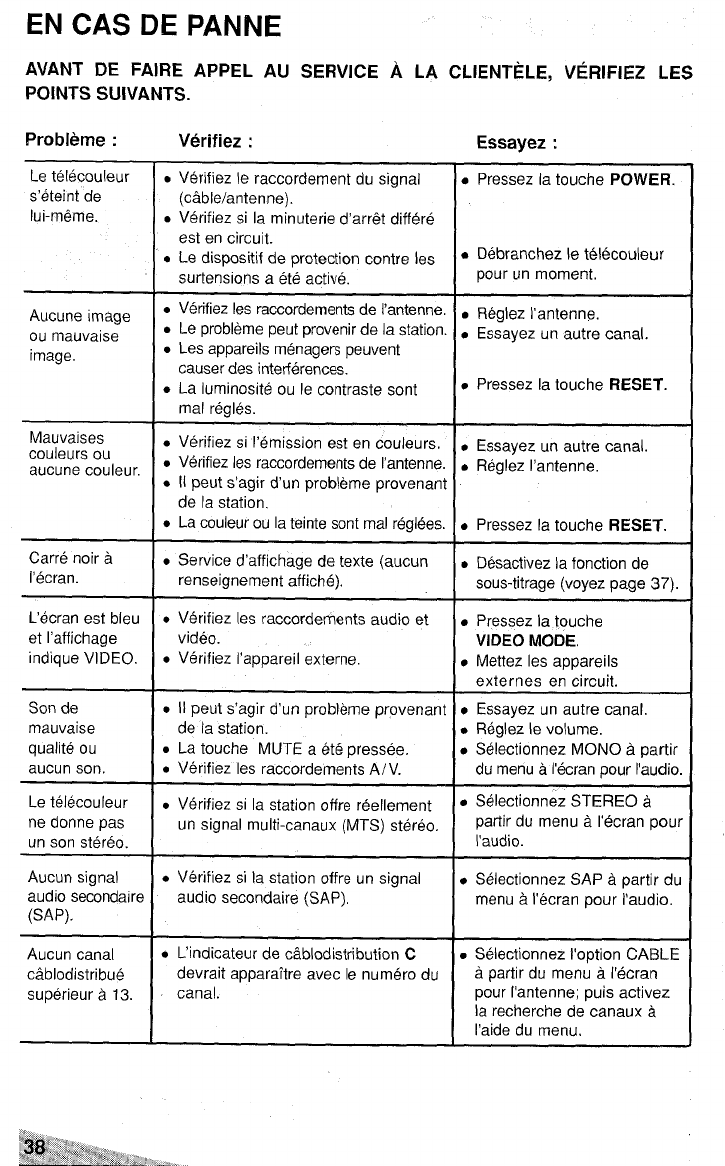
EN CAS DE PANNE
AVANT DE FAIRE APPEL AU SERVICE ALA CLIENTELE, VERIFIEZ LES
POINTS SUIVANTS.
Probleme :Verifiez :Essayez :
Le telecouleur
s’eteint de
lui-m6me.
●Verifiez Ie raccordementdu signal
(cable/antenne).
.Verifiez si la minuterie d’arret differe
est en circuit.
●Le dispositif de protection contre Ies
surtensions aete active.
Aucune image
ou mauvaise
image.
Mauvaises
couleurs ou
aucune couleur.
Carre noir a
I’ecran.
L’ecran est bieu
et I’affichage
indique VIDEO,
Son de
mauvaise
qualiteou
aucun son,
●Verifiez Ies raccordements de I’antenne.
.Le probleme peut provenirde Ia station.
.Lesappareils menagers peuvent
causer des interferences.
●La Iuminositb ou Ie contraste sent
mal regles.
●Verifiez si I’emission est en couleurs.
●Verifiez Ies raccordementsde I’antenne.
●Ii peuts’agird’un probleme provenant
de la station,
●Lacouleurou Iateintesont malreglees.
●Service d’affichage detexte (aucun
renseignement affiche),
●Verifiez Ies raccordements audioet
video.
●Verifiez I’appareil externe.
●Ilpeuts’agir d’unprobleme provenant
de la station.
.La touche MUTE a.Wpressee.
●Verifiez Ies raccordements A/V.
Le telecouleur ●Verifiez si la station offre reellement
ne donne pas un signal multi-canaux (MTS) stereo.
un son stereo.
Aucun signal
audio secondaire
(SAP).
Aucun canal
cablodistribue
superieur a13.
●Verifiez si Ia station offre un signal
audio secondaire (SAP),
●L’indicateur dec&blodistribution C
devrait appara~tre avec Ie numero du
canal.
.Pressez Iatouche POWER.
●Debranchez Ietelecouleur
pour un moment,
●Reglez I’antenne.
.Essayez un autre canal.
●Pressez Iatouche RESET.
●Essayez un autre canal.
●Reglez I’antenne,
●Pressez Iatouche RESET.
●D&activez Iafonction de
sous-titrage (voyez page 37).
●Pressezlatouche
VIDEO MODE,
cMettez Ies appareils
externes en circuit.
●Essayez un autre canal,
●Reglezle volume.
●Selectionnez MONO Apartir
du menu aI’ecran pour ~audio.
●Selectionnez STEREO A
partir du menu aI’ecran pour
I’audio.
●Selectionnez SAP A.partir dL
menu aI’ecran pour I’audio.
●Selectionnez I’option CABLE
apartir du menu al’ecran
pour I’antenne; puis activez
la recherche de canaux a
I’aide du menu.
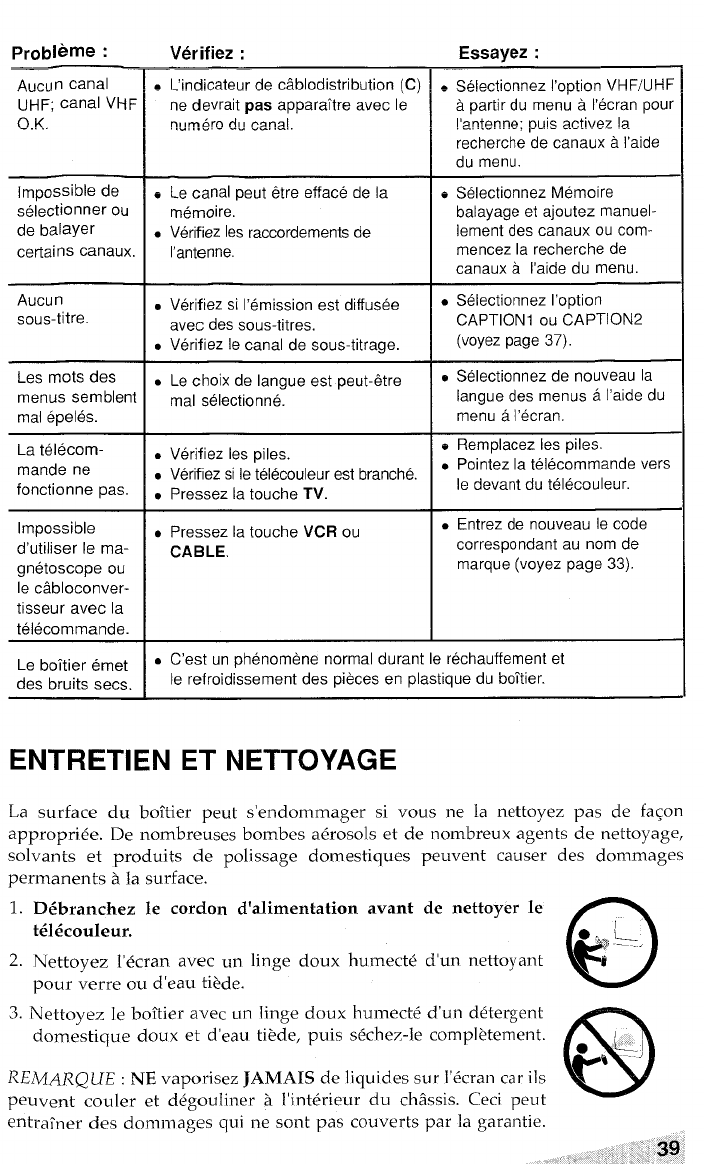
probieme :
,Au~~n canal
UHF; canal VHF
O.K.
Impossible de
selectionner ou
de balayer
certains canaux.
Aucu n
sous-titre.
Les roots des
menus semblent
mal epeles.
La telecom-
mande ne
fonctionne pas.
Impossible
d’utiliser Ie ma-
gnetoscope ou
Ie c~bloconver-
tisseur avec la
telecommande.
Le bo~tier emet
des bruits sees.
Verifiez :
~bin~icateur dec~.hlndistfihu?i~n (C)
ne devrait pas appara~tre avec Ie
n~rn.sro ~~ ~~n~[.
e Le canal peut &re efface de la
memoire.
●Vetifiez Ies raccordements de
I’antenne.
●Verifiez si I’emission est diffusee
avec des sous-titres.
●Verifiez Ie canal de sous-titrage.
●Lechoix de Iangue est peut-dre
mal selectionne.
●Verifiez Ies piles.
.Vetifiez si Ie telecouleur est branche.
.Pressez la touche TV.
.Pressez la touche VCR ou
CABLE.
Essayez :
=~~!~C~~QRn~~ l’nntinn\j~F/~HF
-r .,-,,
apartirdu menu aI’ecran pour
I’antenne; puis a.ctivez la.
.— ..-
recherchedecanaux al’aide
du menu.
eSelectionnez M6moire
balayage et ajoutez manuel-
Iement des canaux ou com-
mencezlarecherche de
canauxa I’aide du menu.
●Selectionnez I’option
CAPTION1 OU CAPT10N2
(voyez page 37).
*Selectionnez de nouveau la
Iangue des menus aI’aide du
menu aI’ecran.
eRemplacez Ies piles.
.Pointez la telecommande vers
Ie devant du telecouleur.
.Entrez de nouveau Ie code
correspondent au nom de
marque (voyez page 33).
●C’est un phenomene normal durant Ie rechauffement et
Ie refroidissement des pieces en plastique du bo~tier.
ENTRETIEN ET NETTOYAGE
La surface du boitier peut s’endommager si vous ne la nettoyez pas de faqon
. .
approprlee. De nombreuses bombes aerosols et de nombreux agents de nettoyage,
solvants et produits de polissage domestiques peuvent causer
permanents ala surface.
1. D&ranchez Ie cordon d’alimentation avant de nettoyer Ie
t616couleur.
2. Nettoyez l’~cran avec un linge doux humect6 d’un nettoyant
pour verre ou d’eau ti?de.
3. Nettoyez le boftier avec un Iinge doux humectd d’un detergent
domestique doux et d’eau ti@de, puis s~chez-le compl~tement.
REAIARQUE :NE vaporisez JAMAIS de liquides sur i’~cran car ils
peuvent couler et d6gouliner ~I’interieur du ch%sis. Ceci peut
entrafner des dornmages qui ne sent pas couverts par la garantie.

For iissista~c~ and information
call tolj free I-80D-BUY-AIWA
(United States and Puerto Rico)
Printed in U.S.A. AIWA CO.,LTll 88-JBA-901 -01
980305ATN-YX
