Aiwa X15 Speaker User Manual Manual

Aiwa Corporation Speaker Manual

Manual

Professional Mobile Audio AmplifierOperating InstructionsPlease carefully read the operating instruction before using our product
To customers:Respectable users,Thank you for your support and trust on purchasing the products of our company. Tofully exert the function of the product, we suggest you to read the operatinginstruction carefully before using it, for the convenience of grasping the connectionmethod and using points. Please take care of the operating instruction after reading itfor the purpose of further reference.Product features●Ultra-low distortionamplifying circuit● Digital karaoke, trebleand bass independentadjustment● Built-in MP3 encodingsupporting U disk●Unique acousticappearance design● Professional treble andbass gain controllingcircuit● Built-in battery foroutdoor activities● Built-in professionalwireless microphonesystem●Professionalhigh-effectiveloud-speaking unit●Compatible toDVD/VCD/PC and othersound sources● Suitable for adaptorand charging● Intelligent powerswitch charging circuitAttentionThe product has been installed with battery, making it applicable to the outdoorsinging, advertisement, recreation and other activities. Please charge the batterybefore using it outdoors, so as to guarantee that the machine can be used for a longertime outdoors. The machine has been set with power switch circuit. When youconnect the adaptor to the power and insert the plug to the charging interface, themachine will switch to the power supplied by the adaptor automatically and chargethe built-in battery. When the adaptor interrupts the power, the machine willintelligently switch to the built-in battery for work continuously. When adaptor is usedto charge the battery, the integrated intelligent charging circuit within the machinewill give hints about charging and the charging indicator lamp will light. Aftercharging is finished, the intelligent charging circuit will give hint to that that thecharge has been fully charged and light the charging indicator lamp. At this momentyou can close the AC power of the adaptor. If you still use adaptor in the machine towork, the charging circuit will automatically cut off the charging circuit and it isunnecessary for you to worry about the charging breaking. You shall notice that thebattery has certain service life and it is beyond the warranty scope of the company.Under general circumstances, the built-in battery needs charging 8-10 hours. Withmore charging times, the battery volume will change and full charging time willreduce accordingly. When the battery is out of charge after being used for a short time,please change the built-in battery. The user shall also notice that if the electricityquantity of the battery is reduced when using the machine outdoors, please close thepower switch on the rear plate and charge the built-in battery within 24hours. If theelectricity quantity of battery is totally consumed, the situation that the battery can notbe charged and the service life is expired will happen. When you don’t use themachine for a long time and leave it alone, please charge the battery every six months,
so as to avoid the invalidity of battery.Instruction of U disk MP3 encoding playingWhen you need to use the built-in MP3 encoding function, please format your USDdisk (U disk for short below) as FA-T32 format in computer first and then copy thefile in MP3 format in U disk. When reading U disk, the encoding system will engagein encoding playing according to the generation sequence of MP3 songs file.Therefore, the song which is copied to U disk first will be played in priority or viceversa. When the user needs to play according to the specific sequence, they canarrange the copying sequence. If the files copied to U disk can not be played, pleaseinspect whether the file format is in MP3 format. If not, please switch to MP3 formatin computer and then copy to U disk in order to play normally. When copying MP3file, you shall copy to the catalogue of U disk. It is suggested to delete all theunnecessary files and file catalogues in order to reduce the occurrence of reading errorwhen the encoding is played. When the user buys U disk, please select the ones withbetter quality and internal encoding supporting64MB/128MB/256MB/512MB/1GB/2GB/4GB/8GB and other volumes. During theplaying process, please make it far away from the places with high temperature, highmagnetic field and high frequency interference. In case of crash, please close thepower and restart for recovery!Panel/rear plate/MP3 function and operationVolume: it is used to adjust the sound of volume.TREBLE (treble): it is used to adjust the gain of music treble. Bass: it is used toadjust the gain of music bass.EQ (equilibrium): it is used to adjust music frequency curve and gain and attenuationwithin certain frequency.
MIC. VOL (microphone volume): it is used to adjust the volume of microphone  MIC. TREBLE (microphone treble): it is used to adjust the gain of microphone treble.  MIC. BASS (microphone bass): it is used to adjust the gain of microphone bass.  ECHO (microphone echo): it is used to adjust the echo depth of microphone.  DELAY (microphone delay): it is used to adjust the effect of microphone echo delay.  MIC1 MIC2 (microphone 1 and microphone 2): they are used to connect the plug interface of the wire microphone.  GT 1, GT2 (guitar 1 and guitar 2): they are used to connect the interface of guitar audio wire.  GUITAR. VOLUME (guitar volume): it is used to adjust the volume after the guitar input function is amplified.  DC FUSE (DC fuse): it is used for the power to supply the fuse of the whole machine with the protective tube of F10A/250V.  POWER (power switch): the switch break-make power is applicable to the power control of sound amplifier of the whole machine instead of that of charging power. When the adapter is connected, the battery charging is not controlled by the switch.  DC15V IN (15V DC power input): the interface of external power adaptor; please use the original adapter.  CHARGING (indicator lamp of battery power): after the power adaptor is connected, the indicator lamp will be on and battery starts to be charged  FULL (indicator lamp of full charge): when adapter is used to charge the battery, it means full charge when the indicator lamp is on.  WIRELESS MIC ANT (built-in microphone antenna): when you use wireless microphone, please make the antenna vertically upward, so as to reach a better receiving effect.  The Microphone used IR function. 12V BATTERY IN (external 12V battery interface): please carefully check the anode and cathode when connecting and the applied connection line can not be smaller than 0.75 square meters. Attention shall also be paid to the firmness when connecting it.  LINE IN (external audio interface): it is used to connect the compatible audio equipment such as DVC and computer.  Display screen of MP3 encoding player: it is used to display the playing track, playing time or the receiving rate under receiving status.  USD interface (U disk interface): when MP3 function of U disk is needed, insert the U disk with MP3 songs to the interface.  SD/MMC CARD (interface of SD card and MMC card): insert SD card or MCC card with copied MP3 songs to the interface.   Key: pressing the key to switch pause status under playing status or vice versa.  Stop key: pressing the key to stop playing under playing status; you are suggested to stop the key and change U disk when you want to change U disk. MP3/LINE-MODE (audio input switch): it is used to switch to use the external audio or built-in MP3 encoding sound as the signal source of audio amplifier.  VOL-key: select the previous song for playing: the volume will be reduced by pressing the key for longer than 3seconds.
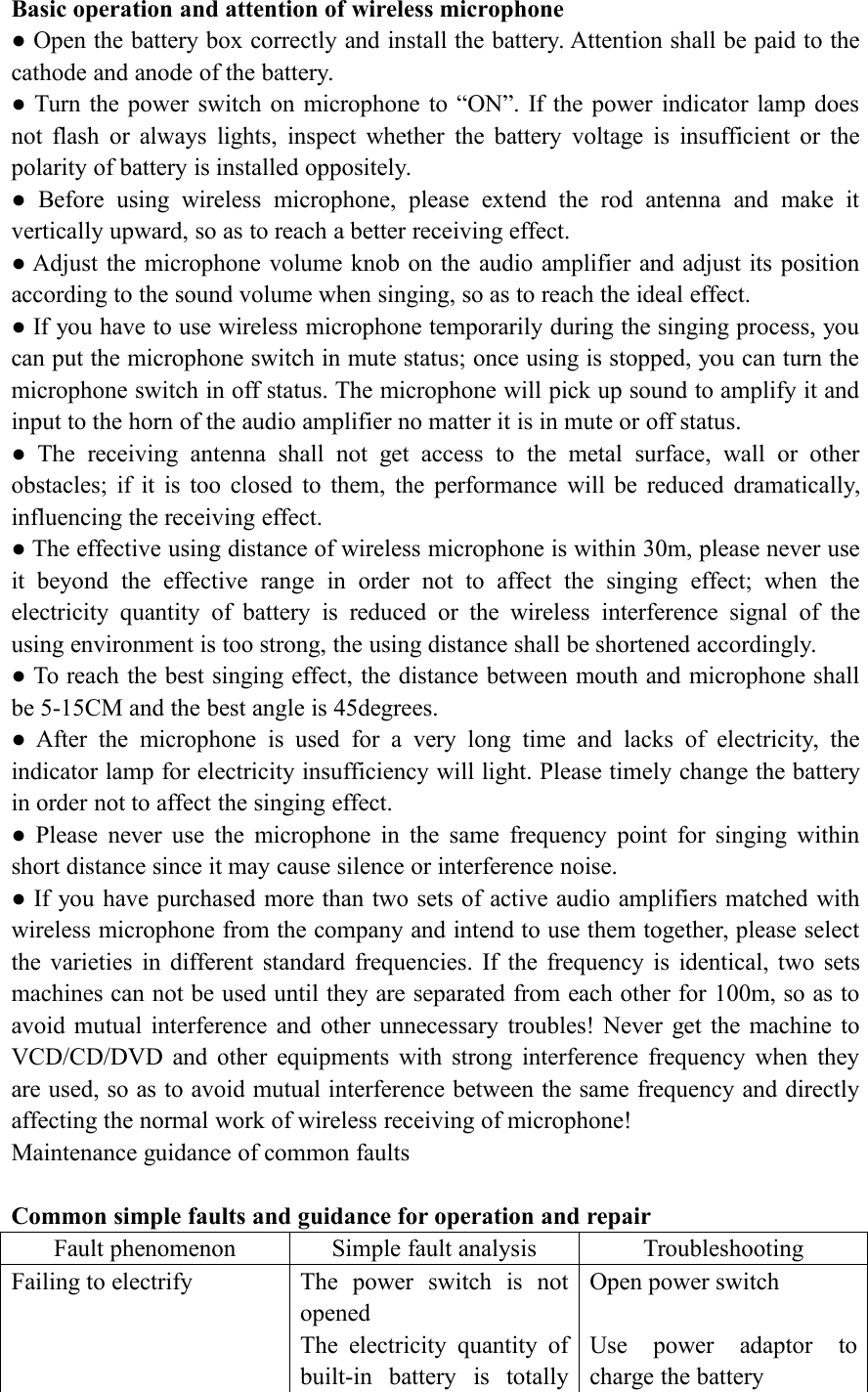
VOL+ key: select the next song for playing: the volume will be increased bypressing the key for longer than 3 seconds.REPEAT (repetitive playing): press the key for repeating of single song or total songs.Operation of FM receiving functionSCAN key-pressing: press the key and the radio will scan the local radio station andsave it automatically.CH+ key-pressing: press the key and the radio will read the saved radio station andselect the next one in ascending order;CH- key-pressing: press the key and the radio will read the saved radio station andselect the previous one in descending order;Note: MODE key is used to switch radio status in order to use radio key-pressingfunction; if the receiving frequency needs inputting manually, press the numbers onremote control directly to input the frequency of radio station.  FCC Statement This equipment has been tested and found to comply with the limits for a Class B digital device, pursuant to Part 15 of the FCC Rules. These limits are designed to provide reasonable protection against harmful interference in a residential installation. This equipment generates uses and can radiate radio frequency energy and, if not installed and used in accordance with the instructions, may cause harmful interference to radio communications. However, there is no guarantee that interference will not occur in a particular installation. If this equipment does cause harmful interference to radio or television reception, which can be determined by turning the equipment off and on, the user is encouraged to try to correct the interference by one or more of the following measures: -- Reorient or relocate the receiving antenna.     -- Increase the separation between the equipment and receiver.       -- Connect the equipment into an outlet on a circuit different from that to which the receiver is connected.   -- Consult the dealer or an experienced radio/TV technician for help.  This device complies with part 15 of the FCC Rules. Operation is subject to the following two conditions:(1) This device may not cause harmful interference, and (2) this device must accept any interference received, including interference that may cause undesired operation.  Changes or modifications not expressly approved by the party responsible for compliance could void the user's authority to operate the equipment.
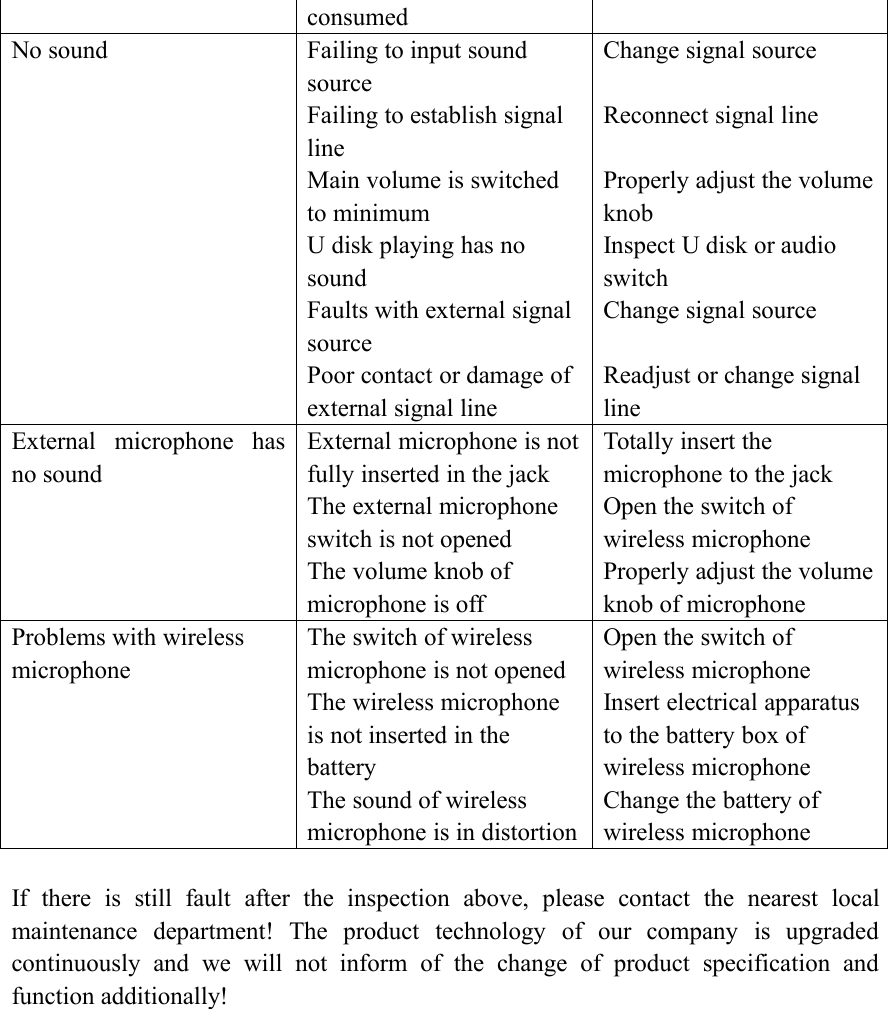
Basic operation and attention of wireless microphone● Open the battery box correctly and install the battery. Attention shall be paid to thecathode and anode of the battery.● Turn the power switch on microphone to “ON”. If the power indicator lamp doesnot flash or always lights, inspect whether the battery voltage is insufficient or thepolarity of battery is installed oppositely.● Before using wireless microphone, please extend the rod antenna and make itvertically upward, so as to reach a better receiving effect.● Adjust the microphone volume knob on the audio amplifier and adjust its positionaccording to the sound volume when singing, so as to reach the ideal effect.● If you have to use wireless microphone temporarily during the singing process, youcan put the microphone switch in mute status; once using is stopped, you can turn themicrophone switch in off status. The microphone will pick up sound to amplify it andinput to the horn of the audio amplifier no matter it is in mute or off status.● The receiving antenna shall not get access to the metal surface, wall or otherobstacles; if it is too closed to them, the performance will be reduced dramatically,influencing the receiving effect.● The effective using distance of wireless microphone is within 30m, please never useit beyond the effective range in order not to affect the singing effect; when theelectricity quantity of battery is reduced or the wireless interference signal of theusing environment is too strong, the using distance shall be shortened accordingly.● To reach the best singing effect, the distance between mouth and microphone shallbe 5-15CM and the best angle is 45degrees.● After the microphone is used for a very long time and lacks of electricity, theindicator lamp for electricity insufficiency will light. Please timely change the batteryin order not to affect the singing effect.● Please never use the microphone in the same frequency point for singing withinshort distance since it may cause silence or interference noise.● If you have purchased more than two sets of active audio amplifiers matched withwireless microphone from the company and intend to use them together, please selectthe varieties in different standard frequencies. If the frequency is identical, two setsmachines can not be used until they are separated from each other for 100m, so as toavoid mutual interference and other unnecessary troubles! Never get the machine toVCD/CD/DVD and other equipments with strong interference frequency when theyare used, so as to avoid mutual interference between the same frequency and directlyaffecting the normal work of wireless receiving of microphone!Maintenance guidance of common faultsCommon simple faults and guidance for operation and repairFault phenomenonSimple fault analysisTroubleshootingFailing to electrifyThe power switch is notopenedThe electricity quantity ofbuilt-in battery is totallyOpen power switchUse power adaptor tocharge the battery
consumedNo soundFailing to input soundsourceFailing to establish signallineMain volume is switchedto minimumU disk playing has nosoundFaults with external signalsourcePoor contact or damage ofexternal signal lineChange signal sourceReconnect signal lineProperly adjust the volumeknobInspect U disk or audioswitchChange signal sourceReadjust or change signallineExternal microphone hasno soundExternal microphone is notfully inserted in the jackThe external microphoneswitch is not openedThe volume knob ofmicrophone is offTotally insert themicrophone to the jackOpen the switch ofwireless microphoneProperly adjust the volumeknob of microphoneProblems with wirelessmicrophoneThe switch of wirelessmicrophone is not openedThe wireless microphoneis not inserted in thebatteryThe sound of wirelessmicrophone is in distortionOpen the switch ofwireless microphoneInsert electrical apparatusto the battery box ofwireless microphoneChange the battery ofwireless microphoneIf there is still fault after the inspection above, please contact the nearest localmaintenance department! The product technology of our company is upgradedcontinuously and we will not inform of the change of product specification andfunction additionally!

Navigation menu