Alcatel ONETOUCH FLING User Guide Manual.fling
Fling (Boost Mobile) - User Guide BMfling_EN Free User Guide for Alcatel Mobile Phone, Manual - page5
User Manual: Alcatel ALCATEL ONETOUCH FLING User Manual – Alcatel
Open the PDF directly: View PDF  .
.
Page Count: 54
- Title
- Contents
- Get Started
- Phone Basics
- Phone Calls
- Contacts
- Messaging
- Music
- Web and Data
- Camera and Video
- Tools and Calendar
- Settings
- Regulatory Information
- Copyright Information
- Index
Available applications and services are subject to change at any time.

i
Table of Contents
GetStarted 1
YourPhoneataGlance 1
SetUpYourPhone 2
ActivationandService 4
CreateYourAccountandPickYourPlan 4
ActivateYourPhone 4
ManageYourAccount 4
Re-Boost 5
AdditionalInformation 5
SetUpVoicemail 5
PhoneBasics 6
YourPhone’sLayout 6
TurnYourPhoneOnandOff 7
NavigateThroughtheMenus 8
StatusBar 8
EnterText 9
PhoneCalls 12
MakePhoneCalls 12
CallUsingthePhoneDialer 12
CallfromRecentHistory 12
CallfromContacts 12
CallUsingaSpeedDialNumber 13
CallEmergencyNumbers 13
ReceivePhoneCalls 13
Voicemail 14
VoicemailSetup 14
VoicemailNotification 14
RetrieveYourVoicemailMessages 14
PhoneCallOptions 15
In-callOptions 15
CallerID 16
ConferenceCalling 16
CallUsingaSpeedDialNumber 17
RecentHistory 17

ii
Contacts 19
ViewContacts 19
ContactsListOptions 20
AddaContact 20
CreateaGroup 21
SaveaPhoneNumber 22
EditaContact 22
AddorEditInformationforaContact 22
AssignaRingtonetoaContact 22
DeleteaContact 22
RemoveaMemberfromaGroup 23
AssignaSpeedDialNumbertoaContact 23
Messaging 24
TextandMultimediaMessaging 24
SendaTextMessage 24
SendaMultimediaMessage(MMS) 25
SaveandResumeaDraftMessage 25
NewMessagesNotification 25
ManageMessageConversations 25
Music 28
WebandData 29
LaunchaWebConnection 29
LearntoNavigatetheBrowser 29
AdjustBrowserSettings 29
DownloadGames,Ringtones,andMore 30
CameraandVideo 31
OpenorClosetheCamera 31
TakeaPicture 31
RecordVideos 31
ViewPicturesandVideosUsingMyAlbum 32
OpenorCloseMyAlbum 32
ViewPicturesandVideos 32
WatchVideos 33
SharePicturesandVideos 33
ToolsandCalendar 34
AlarmClock 34
Calendar 34
AddanEventtotheCalendar 34

iii
ViewanEvent 34
Edit/DeleteanEvent 34
Bluetooth 35
UpdatePhone 35
PhoneMemory 35
microSDCard 36
InsertorremoveamicroSDCard 36
ViewmicroSDCardMemory 36
FormatthemicroSDCard 36
UsethePhone’smicroSDCardasaUSBDrive 37
TransferFilesBetweenYourPhoneandaComputer 37
Calculator 37
StopWatch 38
VoiceMemo 38
WorldTime 38
Settings 39
DisplaySettings 39
WallpaperSettings 39
BacklightControl 39
BrightnessSettings 39
FontSize 39
PowerSaveMode 39
VolumeSettings 40
RingtoneSettings 40
PhoneInformation 40
LockPhone 40
LocationServices 40
ParentalControlSettings 40
ResetPhone 41
Language&InputSettings 41
LanguageSettings 41
DefaultTextEntry 41
AccessibilitySettings 41
CallAnswerSettings 41
AirplaneMode 42
DataSettings 42
RoamingSettings 42
PersistentAlerts 42

Get Started 1
Get Started
Thefollowingtopicsgiveyoualltheinformationyouneedtosetupyourphoneandservicethefirst
time.
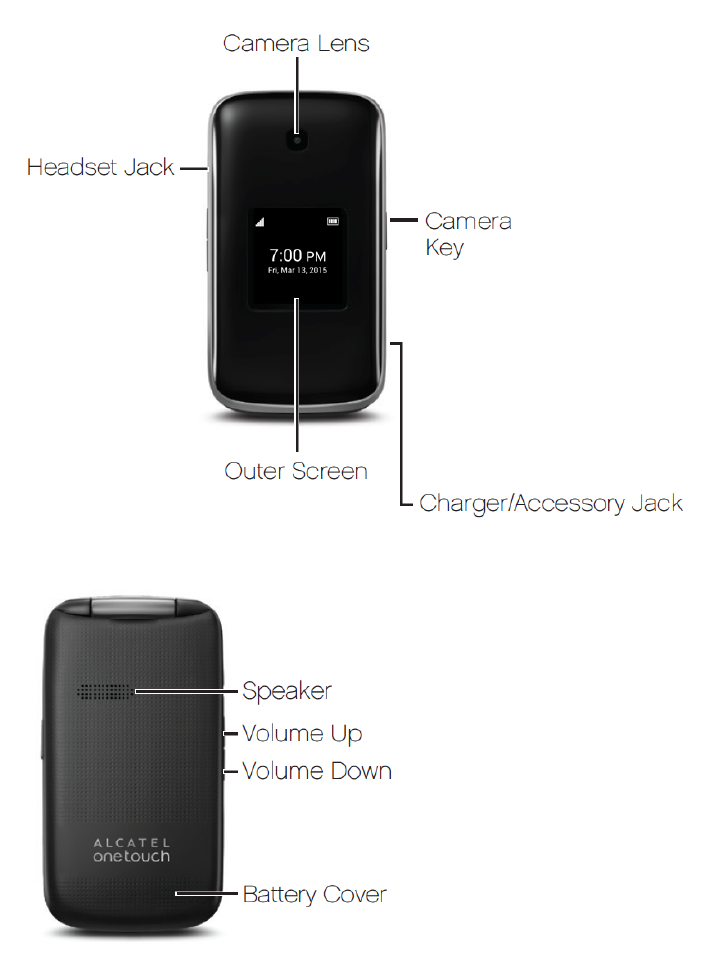
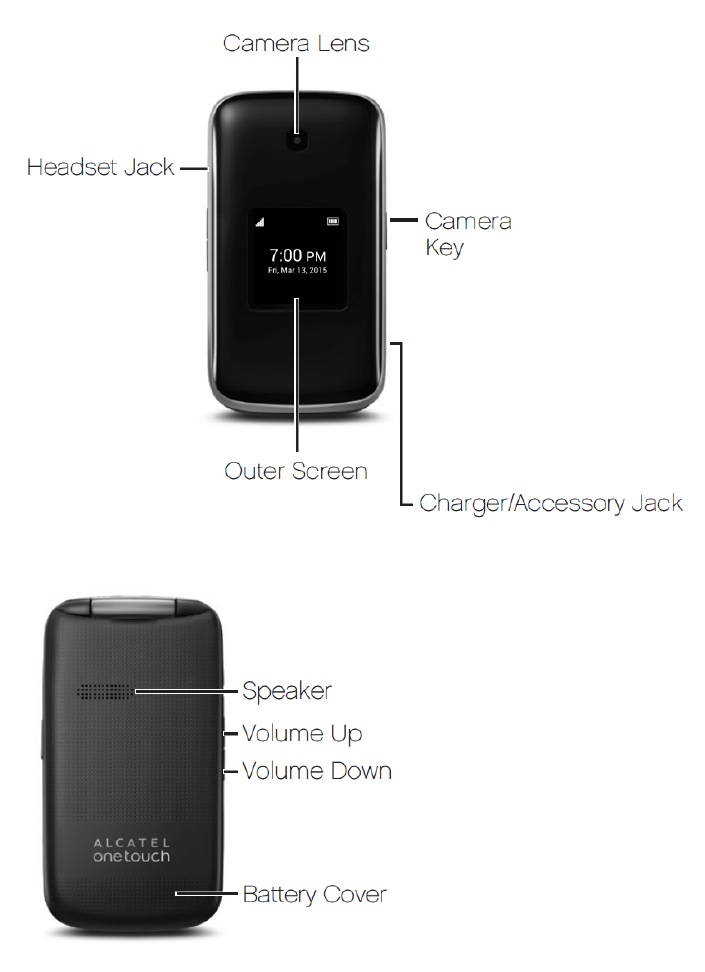
Your Phone at a Glance
Thefollowingillustrationoutlinesyourphone’sprimaryexternalfeaturesandbuttons.
Get Started 2
Set Up Your Phone
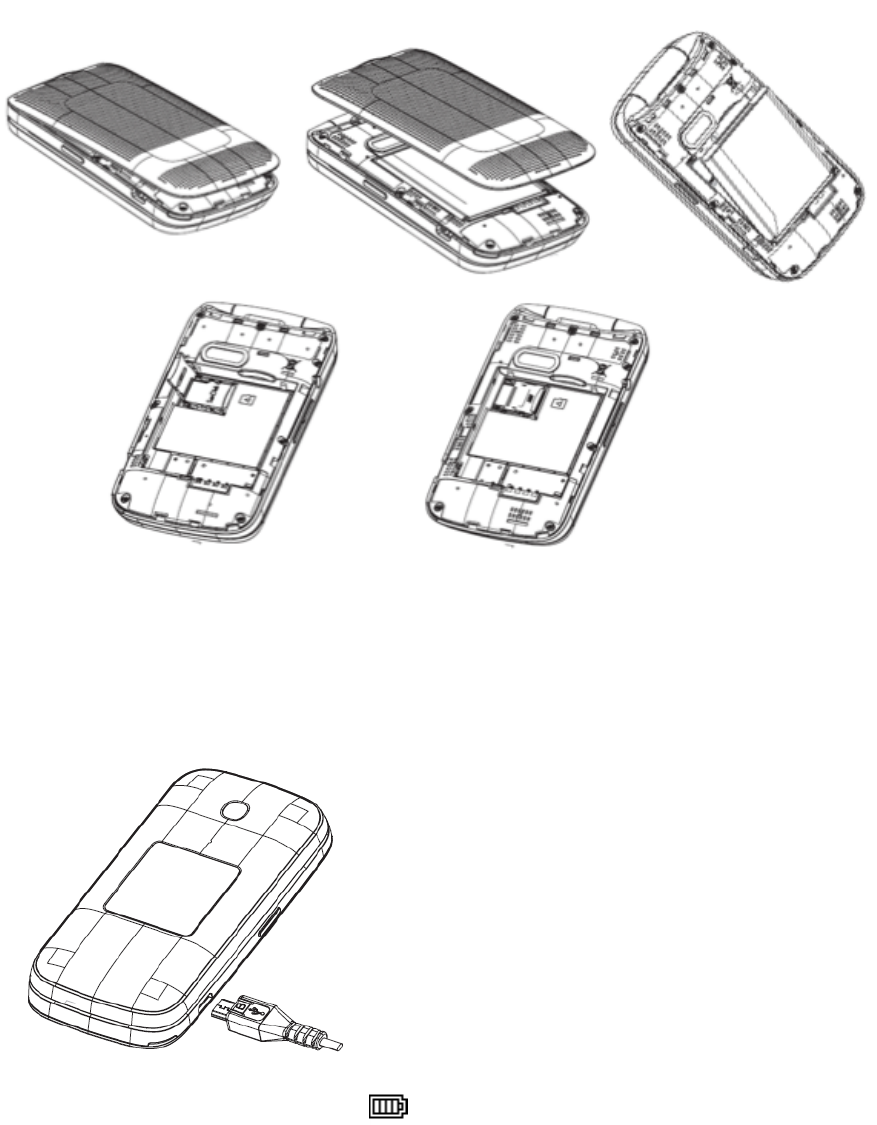
Youmustfirstinstallandchargethebatterytobeginsettingupyourphone.
InstalltheBattery:
1. Removethebackcoverusingthenotchinthebottom-leftcornerofthephone.
2. InserttheexternalmicroSDcardintotheslotwiththegoldcontactfacingdown.Toremovethe
externalmicroSDcard,gentlypressandslideitout.
Get Started 3
3. Insertthebatteryintothebatterycompartment,makingsuretheconnectorsalign.Gentlypress
downtosecurethebattery.
ChargetheBattery:
1. InsertthechargercableintotheCharger/AccessoryJackonthebottomofthephone.
2. Plugtheotherendofthechargercableintoanelectricaloutlet.
Youareadvisedtofullychargethebattery( ).Chargingstatusisindicatedbythepercentageon
screenwhilethephoneispoweredoff.Thepercentageincreasesasthephoneischarged.

Get Started 4
Note:Thechargingstatusbarwillnotfloatifyourbatteryisextensivelyconsumed.Toreduce
powerconsumptionandenergywaste,whenbatteryisfullycharged,disconnectyourchargerfrom
theplug;switchoffWi-Fi,GPS,Bluetoothorbackground-runningapplicationswhennotinuse;
reducethebacklighttime,etc.
Activation and Service
Beforeusingyourphone,youmustsetupyourservicewithBoostMobile.Youwillneedyour
phone’sserialnumber(MEID),printedonastickerinsidethebatterycompartment.
Create Your Account and Pick Your Plan
SetupyourBoostMobileaccount.
1. Fromyourcomputer,visitboostmobile.com/activate.
2. Enteryourphone’sMEIDandclickstart activation process.
3. Yourphone’sMEID(serialnumber)isprintedonthestickerlocatedonthebackofyourphone
inthebatterycompartment.Thisnumbercanalsobefoundonthebottompanelofthephone’s
package.
4. Followtheremaininginstructionstochooseyourplanandselectapaymentmethod.
5. Followtheactivationinstructionsbelowandyou’llbeabletostartusingyourphone.
Note:Youcanalsoactivatebyphonebycalling1-888-BOOST-4U (1-888-266-7848)fromany
otherphone.
Activate Your Phone
Aftersettingupyouraccountonboostmobile.com,simplyturnyourdeviceon.Yourdeviceis
designedtoactivateautomatically.IfyouareswappingfromanotherVirginMobiledevicetoanew
one,besuretoturnofftheolddevicebeforeswappingtheserialnumber(MEID).OncetheMEID
swapiscomplete,turnonthenewdeviceandtheprogramminginformationwillbepushedtoyour
deviceautomatically.
Manage Your Account
Accessinformationaboutyouraccount.Youcan:
n Checkyourminutes
n Re-Boost® (addmoneytoyouraccount)
n Changeplans
n Andmore
From Your Computer
n LoginwithyourwirelessphonenumberandaccountPINatboostmobile.com.

Get Started 5
Re-Boost
BoostMobilemakesiteasytoaddmoneytoyouraccount.Youdecideexactlyhowandwhereyou
wanttopay.Keepyouraccountactivebyusingyourphoneandaddingmoneytoyouraccount.
Pay with Cash
FindanAuthorizedRe-Boost℠Retailernearyou.PickupaRe-BoostCardorrechargeforaslow
as$10attheregister,whereavailable.
Set Up Worry-Free Payments with Auto Re-Boost
It’stheeasiestwaytomakesureyouraccountstaysonandactive.Useacreditcard,debitcardor
bankaccount—whatever’sbestforyou.
Visitboostmobile.com/reboosttogetthedetailsonallyourRe-Boostoptions.
Additional Information
FormoreinformationaboutyourBoostMobileaccount,aswellasotherBoostMobileservices,visit
usat:boostmobile.com.
Set Up Voicemail
Youshouldsetupyourvoicemailandpersonalgreetingassoonasyourphoneisactivated.Always
useapasswordtoprotectagainstunauthorizedaccess.Yourphoneautomaticallytransfersall
unansweredcallstoyourvoicemail,evenifyourphoneisinuseorturnedoff.
1. Fromthehomescreen,pressMESSAGING(leftsoftkey)>Voicemail >Call Voicemail.
2. Followthesystempromptsto:
l Createyourpassword.
l Recordyournameannouncement.
l Recordyourgreeting.
Important:Voicemail Password–Itisstronglyrecommendedthatyoucreateapasswordwhen
settingupyourvoicemailtoprotectagainstunauthorizedaccess.Withoutapassword,anyonewho
hasaccesstoyourphoneisabletoaccessyourvoicemailmessages.
Formoreinformationaboutvoicemail,seeVoicemail.
Phone Basics 6
Phone Basics
Yourphoneispackedwithfeaturesthatsimplifyyourlifeandexpandyourabilitytostayconnected
tothepeopleandinformationthatareimportanttoyou.Thefollowingtopicswillintroducethebasic
functionsandfeaturesofyourphone.
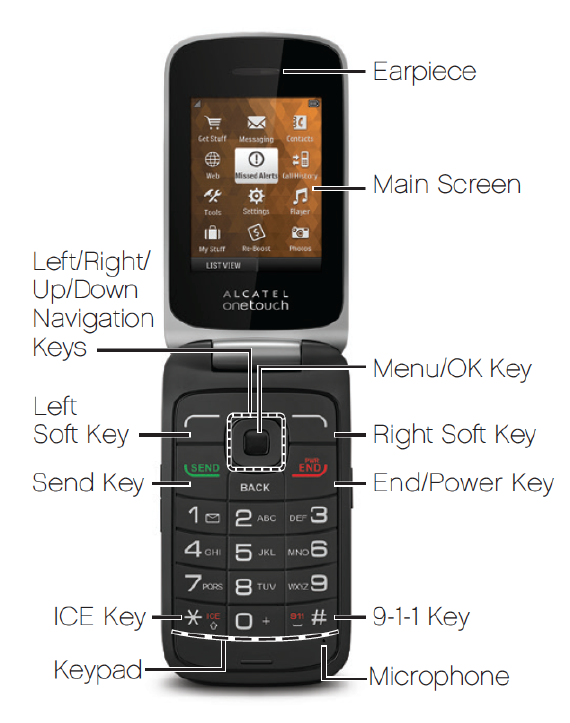
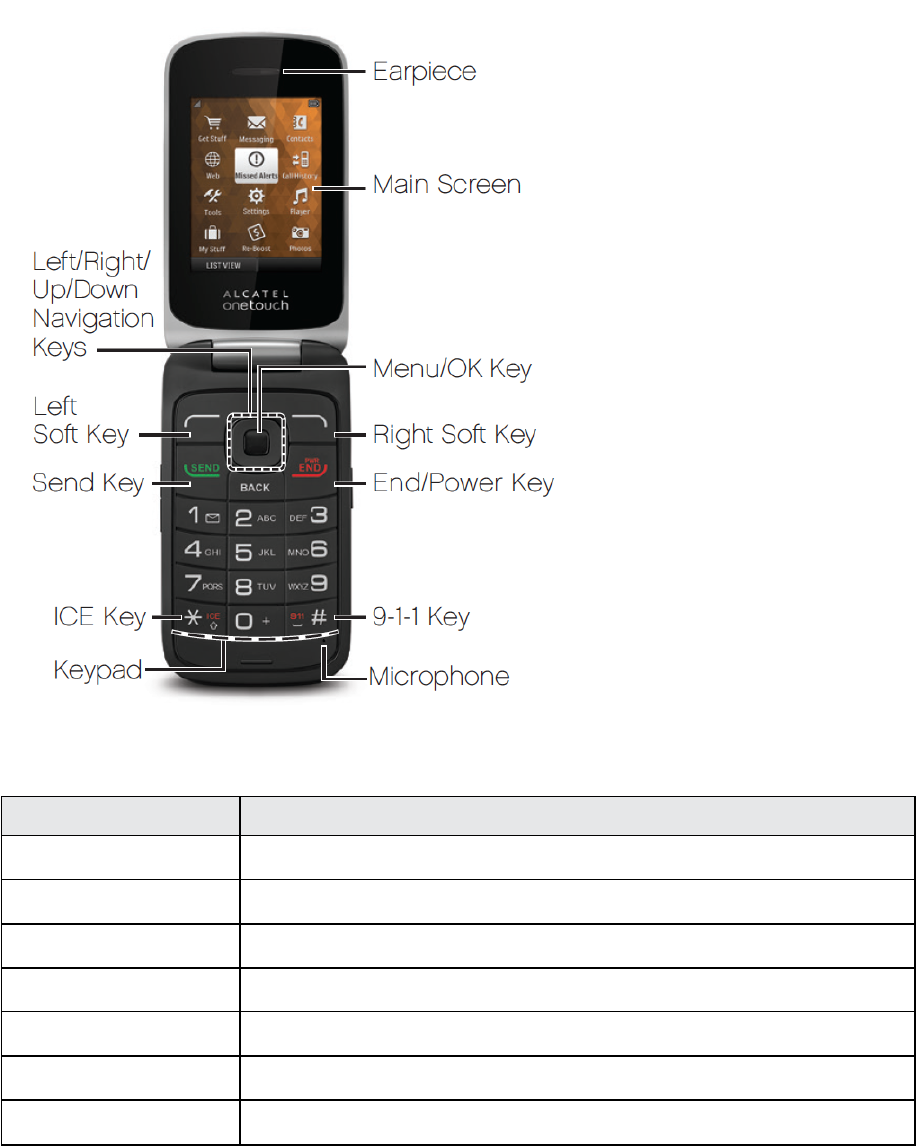
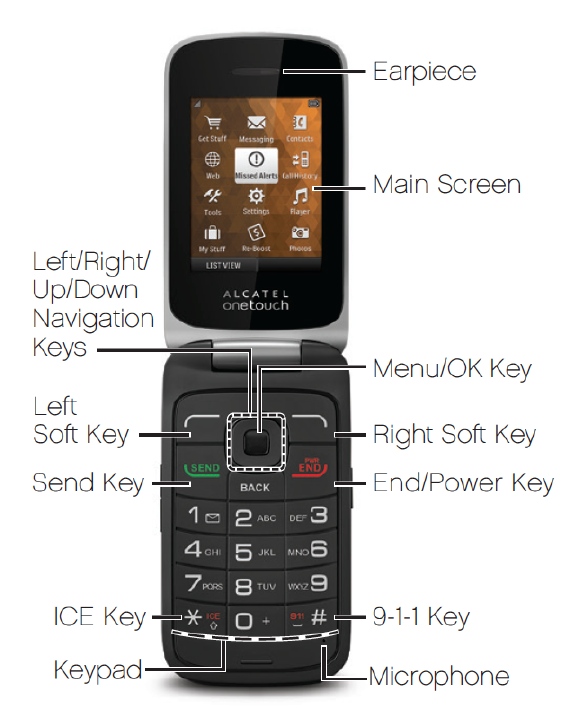
Your Phone’s Layout
Theillustrationsanddescriptionsbelowoutlineyourphone’sbasiclayout.
Phone Basics 7
Key Functions
Item Function
Menu/OKKey Enterthemainmenu/Confirmanoption
NavigationKeys Pressleft/right/up/downtonavigatemenusandoptions
Leftsoftkey Messaging
Rightsoftkey ContactsList
SendKey RecentCall(homescreen)/Answer/Sendacall
End/PowerKey Poweron/Poweroff/Endacall/ReturntotheHomescreen
1Key PressandholdtoaccessVoicemail
CAUTION!Insertinganaccessoryintotheincorrectjackmaydamagethephone.
Turn Your Phone On and Off
YoucanturnyourphoneonandoffusingtheEnd/PowerKey.
Phone Basics 8
Turn Your Phone On/Off
n PressandholdtheEnd/Power Key .
Yourscreenremainsblankwhileyourphoneisoff(unlessthebatteryischarging).
Navigate Through the Menus
Usethenavigationkeystoscrollthroughonscreenitems.Tonavigatethroughamenu,pressupor
downusingthenavigationkeys.
Select Menu Items
Asyounavigatethroughthemenu,menuoptionsarehighlighted.Selectanyoptionbyhighlighting
itandpressing .Iftheoptionisnumbered,youcanselectitbypressingthecorresponding
numberonthephone’skeypad.
Back Up Within a Menu
n Toreturntothepreviousmenu,press .
n Toreturntothehomescreen,press .
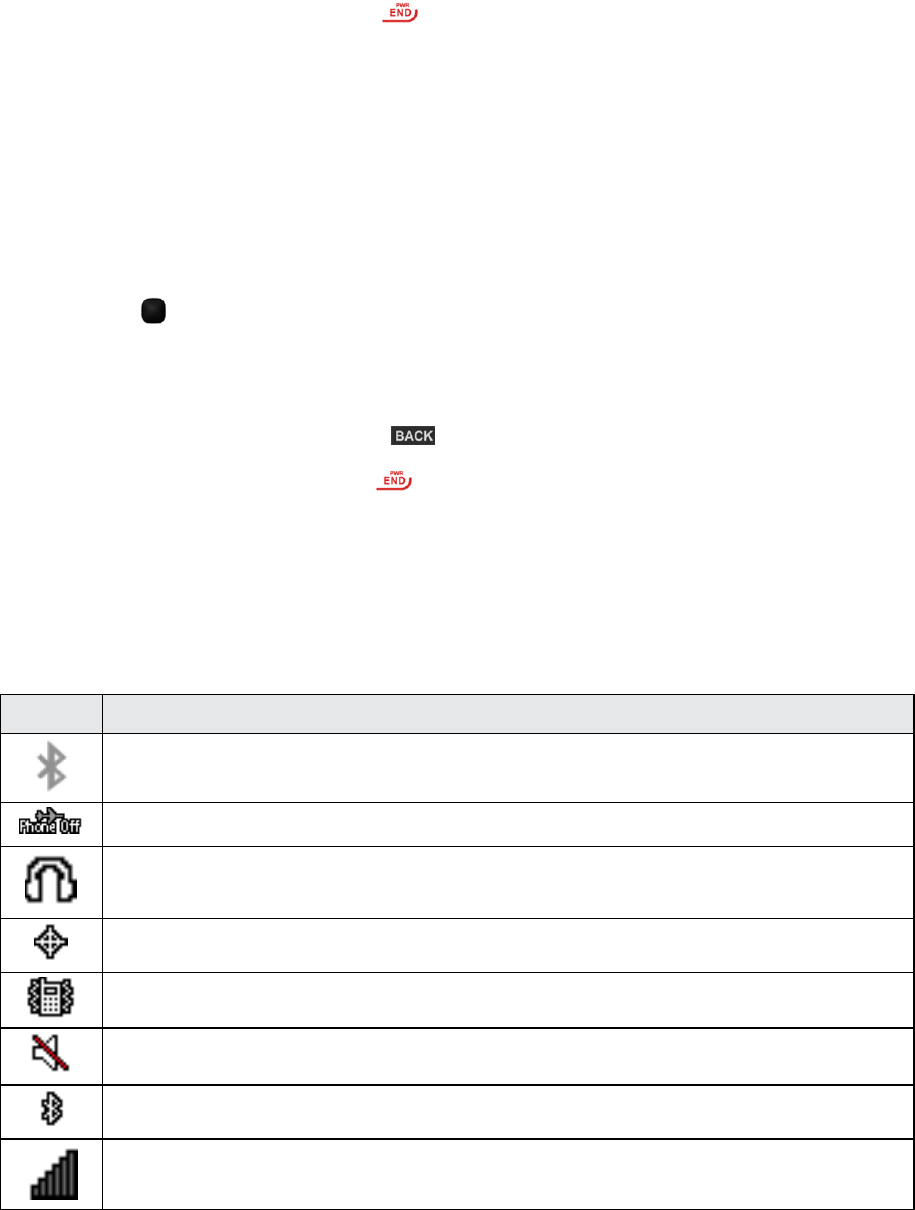
Status Bar
Thestatusbaratthetopofthehomescreenprovidesphoneandservicestatusinformationonthe
rightsideandnotificationalertsontheleft.
Status Icons
Icon Status
Bluetooth®active
AirplaneMode
Earphone
Locationon
Vibrate
Silent
Bluetooth
Network(fullsignal)

Phone Basics 9
Icon Status
Network(nosignal)
Network(roaming)
1Xnetwork(dataservice)
Alarmset
Battery(charging)
Battery(fullcharge)
Notification Icons
Icon Notification
Missedcall
Newmessage
Newvoicemail
Musicplaying
Event
Alarm
Enter Text
Yourphoneprovidesaconvenientkeypadtoenterletters,numbers,andsymbolswheneveryou
arepromptedtoentertext.
Phone Basics 10
1. Fromascreenwhereyoucanentertext,pressOPTIONS(rightsoftkey)tochangethetext
mode.(Ifyouareinthemessageentryscreen,pressOPTIONS[rightsoftkey]>Text Mode.)
2. Selectoneofthefollowingoptions:
l Abctoentercharactersbyusingthealphabetmode.
l T9Wordtoentertextusingapredictivetextsystemthatreducesthenumberofkeypresses
requiredwhileenteringaword.
l 123toenternumericcharacters.
l Symbolstoentersymbols.
l Smileystoentersmileicons.
l Paste Listtopastecopiedorcuttext(ifapplicable).
l Text Settingstodisplaythetextentrysettingsmenu(ifapplicable).

Phone Basics 11
Number Function
1 1,commonly-usedsymbols
2 a,b,c,A,B,C,2
3 d,e,f,D,E,F,3
4 g,h,i,G,H,I,4
5 j,k,l,J,K,L,5
6 m,n,o,M,N,O,6
7 p,q,r,s,P,Q,R,S,7
8 t,u,v,T,U,V,8
9 w,x,y,z,W,X,Y,Z,9
0 0,+
* *,changeinputmethods
# #,insertaspace
Phone Calls 12
Phone Calls
WithBoostMobileserviceandyourphone’scallingfeatures,youcanenjoyclearphonecallsacross
thecountry.
Make Phone Calls
Thereareseveralconvenientwaystoplacecallsfromyourphone.
Call Using the Phone Dialer
Themost“traditional”waytoplaceacallisbyusingthephone’sdialpad.
1. Fromthehomescreen,pressthenumberkeysonthedialpadtoenterthephonenumber.
2. Press tocallthenumber.
3. Toendthecall,press .
Call from Recent History
TheRecentHistorymenuletsyouquicklyplacecallstorecentincoming,outgoing,ormissed
numbers.
1. Fromthehomescreen,press todisplaythecallhistory.
2. Selectthenumber,andpress againtoplaceacall.
Call from Contacts
YoucanplacephonecallsdirectlyfromentriesinyourContactslist.

Phone Calls 13
1. Fromthehomescreen,pressCONTACTS(rightsoftkey)todisplaytheContactslist.
2. Highlightacontactandthenpress toplaceacall.
Call Using a Speed Dial Number
Speeddialnumbersletyoudialnumbersbypressingandholdingasinglenumberonthedialpad.
n Fromthehomescreen,enterthespeeddialnumberandthenpress toplaceacall.
Call Emergency Numbers
Youcanplacecallsto9-1-1evenifthephone’sscreenislockedoryouraccountisrestricted.
Tocallthe9-1-1emergencynumber:
n Fromthehomescreen,press“9-1-1”andthenpress .
Enhanced 9-1-1 (E 9-1-1) Information
ThisphonefeaturesanembeddedGlobalPositioningSystem(GPS)chipnecessaryforutilizingE
9-1-1emergencylocationserviceswhereavailable.
Whenyouplaceanemergency9-1-1call,theGPSfeatureofyourphoneseeksinformationto
calculateyourapproximatelocation.Dependingonseveralvariables,includingavailabilityand
accesstosatellitesignals,itmaytakeupto30secondsormoretodetermineandreportyour
approximatelocation.
Important:Alwaysreportyourlocationtothe9-1-1operatorwhenplacinganemergencycall.
Somedesignatedemergencycalltakers,knownasPublicSafetyAnsweringPoints(PSAPs),may
notbeequippedtoreceiveGPSlocationinformationfromyourphone.
Receive Phone Calls
Thefollowinginformationletsyouknowhowtoanswerincomingcalls,mutetheringeronincoming
calls,rejectincomingcalls,andmore.
Whenyoureceiveaphonecallfromacontact,theIncomingcallscreenappearsanddisplaysthe
callerIDicon,name,andphonenumberofthecallingparty.Whenyoureceiveaphonecallfrom
someonewhoisnotstored,onlythedefaultcallerIDiconandphonenumberappearonthe
Incomingcallscreen.
Note:Ifyourphoneisturnedoff,allcallsautomaticallygotovoicemail.
Answer an Incoming Call
n PresstheMenu/OK Key toansweranincomingcall.

Phone Calls 14
Mute the Ringing Sound
Tomutetheringerwithoutrejectingthecall,presstheVolume Down Button.
Reject an Incoming Call
n PresstheEnd/PowerKeytorejectanincomingcallandsendthecalltovoicemail.
Reject a Call and Send a Text Message
Youcanrejectanincomingcallandautomaticallysendatextmessagetothecaller.
n PressIgnore with Text Messagetoignorethecallandsendatextmessagetothecaller.
Voicemail
Thefollowingtopicsoutlineyourphone’svoicemailservice.
Voicemail Setup
Youshouldsetupyourvoicemailandpersonalgreetingassoonasyourphoneisactivated.
n Forinformationonsettingupyourvoicemail,seeSetUpVoicemail.
Voicemail Notification
Thereareacoupleofdifferentwaysyourphonealertsyoutoanewvoicemailmessage.
n Bysoundingtheassignedringertype.
n Bydisplaying withintheNotificationsareaoftheStatusbarwhenasinglenewunheard
voicemailmessageisreceived.
Note:Whenyouareoffnetwork,youmaynotreceivenotificationofnewvoicemailmessages.Itis
recommendedthatyouperiodicallycheckyourvoicemailbydialing1+areacode+yourwireless
phonenumber.Whenyourvoicemailanswers,press andenteryourpassword.
Note:Yourphoneacceptsmessagesevenwhenitisturnedoff.However,yourphonenotifiesyou
ofnewmessagesonlywhenitisturnedonandyouareinanetworkservicearea.
Retrieve Your Voicemail Messages
Youcanreviewyourmessagesdirectlyfromyourwirelessphone(usingeithertraditionalvoicemail)
orfromanyotherpress-tonephone.
Use Traditional Voicemail to Access Your Messages
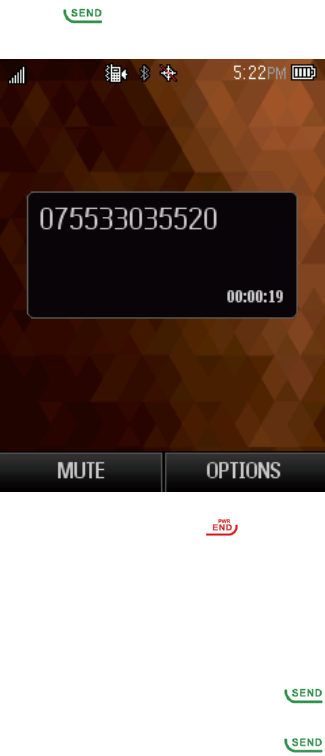
1. Touchandhold .Ifprompted,enteryourvoicemailpassword.
2. Followthevoicepromptstolistentoandmanageyourvoicemailmessages.
Phone Calls 15
Use Another Phone to Access Messages
1. Dialyourwirelessphonenumber.
2. Whenyourvoicemailanswers,presstheasteriskkeyonthephone(*).
3. Enteryourpassword.
Tip:Youcanrestoremessagesyouhavesenttothetrashfolder.
Phone Call Options
Yourphoneapplicationprovidesmanyusefulfeaturesandoptionstohelpyoumakethemostof
yourcallingexperience.
In-call Options
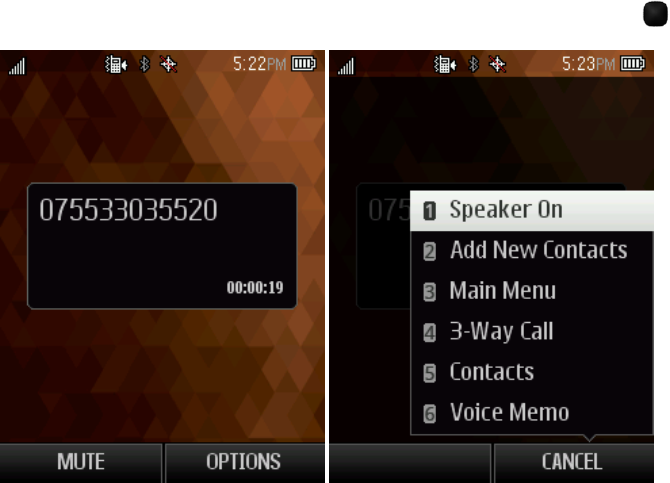
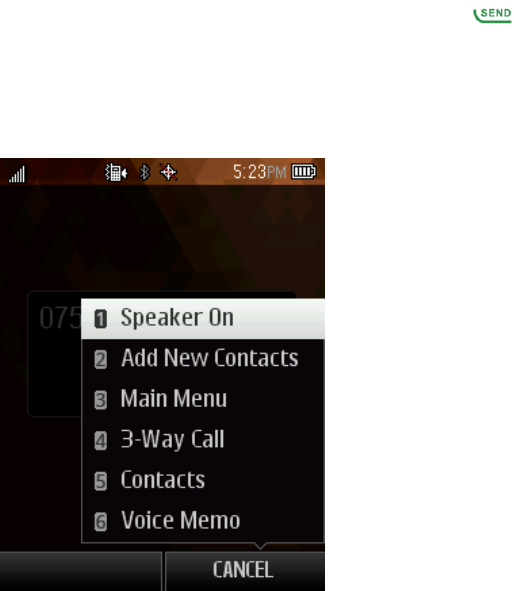
Whileyou’reonacall,youwillseeanumberofonscreenoptions.Selectafeaturebypressingthe
correspondingkeypadnumberorhighlighttheoptionandthenpress .
n Speaker On:Routethephone’saudiothroughthespeaker(On)orthroughtheearpiece(Off).
l ActivateSpeakertoroutethephone’saudiothroughthespeaker.(Youcanadjustthe
speakervolumeusingthevolumebuttons.)
l DeactivateSpeakertousethephone’searpiece.
n Mute:Mutethemicrophoneduringanactivecall.Pressagaintounmutethemicrophone.
n Add New Contacts: Addanewcontactorupdateexisting.
n Contact Details:Viewdetailedinformationoftheincomingnumber.
n Main menu: Displaythemainmenulist.
Phone Calls 16
n 3-Way Call:Initiatea3-wayconferencecall.
n Contacts: Displayyourcontactslist.
n Voice Memo:Createanewmemowhileremainingonthecall.
Warning:Becauseofhighervolumelevels,donotplacethephonenearyourearduring
speakerphoneuse.
Note:IfMuteisactivated,thespeakermodeisdeactivated.
Caller ID
CallerIDidentifiesacallerbeforeyouanswerthephonebydisplayingthenumberoftheincoming
call.Ifyoudonotwantyournumberdisplayedwhenyoumakeacall,callBoostcustomercareto
permanentlyblockyournumber.
Conference Calling
Withconferencecalling,alsoknownas3-waycalling,youcantalktotwopeopleatthesametime.
Whenusingthisfeature,thenormalairtimerateswillbechargedforeachofthetwocalls.
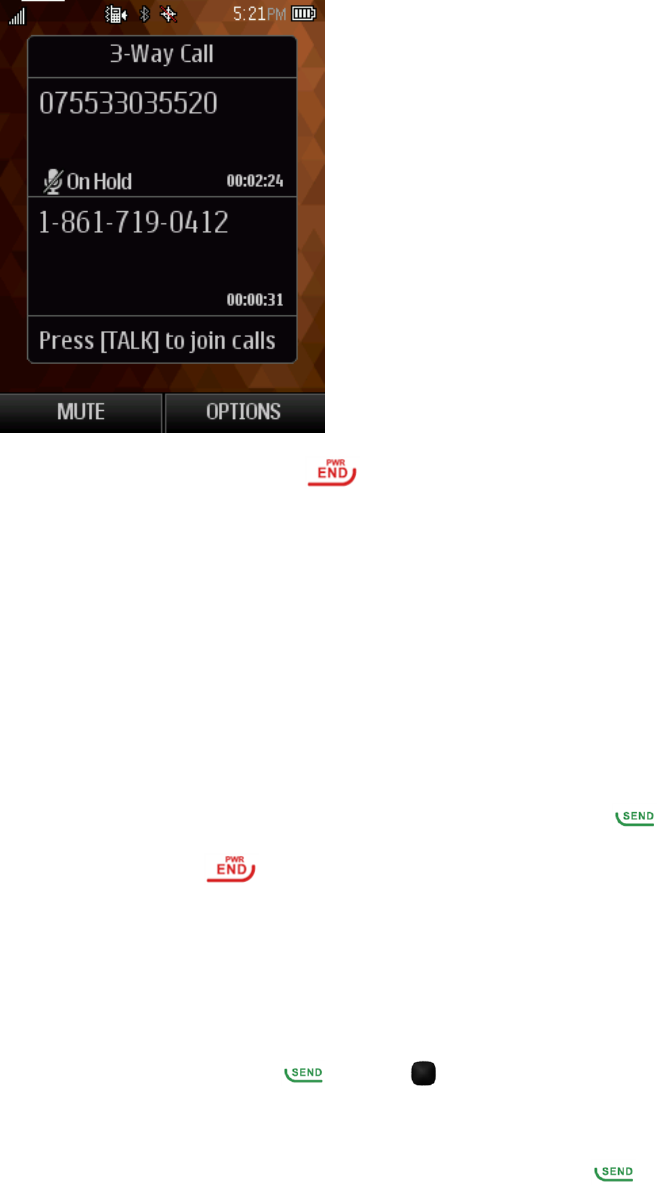
1. Fromthehomescreen,enteranumberandpress (orplaceacallfromRecentHistoryor
Contacts).
2. Onceyouhaveestablishedtheconnection,pressOPTIONS(rightsoftkey)>3-Way Call,and
thendialthesecondnumber(orplacethecallfromRecentHistoryorContacts).
3. Thisputsthefirstcalleronholdanddialsthesecondnumber.
Phone Calls 17
4. PressTALKtojoincalls.Yourconferencecallisnowinsession.
5. Toendthethree-waycall,press .
Note:Ifoneofthepeopleyoucalledhangsupduringyourcall,youandtheremainingcallerstay
connected.Ifyouinitiatedthecallandarethefirsttohangup,allcallersaredisconnected.
Call Using a Speed Dial Number
Youcanstoreupto99numbersinyourphone’sspeeddialmemorytomakecontactingfriendsand
familyeasier.
Youmusthavealreadyassignedaspeeddialnumbertoanexistingphonenumber.
Tousespeeddial:
n Fromthehomescreen,enteraspeeddialnumberandthenpress .
n Toendthecall,press .
Recent History
TheRecentHistorylistsallrecentincoming,outgoing,andmissedcalls.
View Recent History
n Fromthehomescreen,press orpress >Call History.
Recent History Options
n Tomakeacallfromthecalllog,highlightthenumberandpress again.
Foradditionaloptions,pressOPTIONS(rightsoftkey):
Phone Calls 18
n Newgroup
n Contactdetails
n Delete
n DeleteAll
Contacts 19
Contacts
Yourphone’sContactshelpyoustayintouchwithfamily,friends,andcolleaguesbykeepingtrack
ofalltheircontactinformation.Thefollowingtopicsexplainhowtouseyourphone’sContacts.
Personal Contacts Entries–Entriesforanindividual
Yourphonecanstoreupto600personalContactsentries.Eachentrycancontainupto7phone
numbers,and3emailaddresses,3IMaddresses,and3Webaddresses.
Group Contacts Entries–EntriesthatcontainmorethanonepersonalContactsentry.
Yourphonecanstoreupto25GroupContactsentries.Eachgroupentrycancontainupto40
members.
View Contacts
Youcanviewandcreatecontactsonyourphone.
ToaccessContacts:
n Fromthehomescreen,pressCONTACTS(rightsoftkey).
–or–
Fromthehomescreen,press >Go to Contacts.
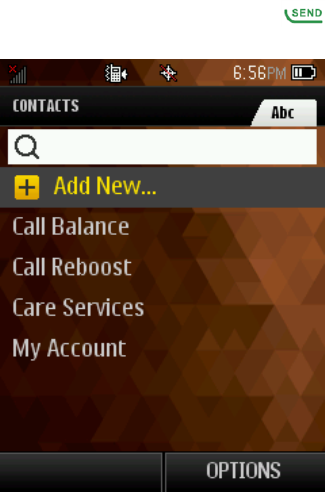
l Contacts List:TheContactslistdisplaysallcontactscurrentlystoredinyourphone.
l Add New:SelectAdd New…toaddanewcontactorgroup.

Contacts 20
Contacts List Options
TheContactsListprovidesvariousoptionsformanagingyourcontactentries.
n New Group:Createanewagroupforcontacts(s).
n Edit Contact:Editcontactinformation.
n Delete Contact:Deletethecontactyouselect.
n Delete All:Deleteallcontactsinthelist.
n Contact History:Viewcallhistory.
n Send Contact:SendcontactviaBluetooth,etc.
n Set as Secret/Show Secret:Hide/Unhideyourcontactfromcontactlist.
n Settings:Viewmoreoptionssuchassetseednumbers,showsecret,MyNameCard,
Services,andICE(InCaseofEmergency).
Add a Contact
Youcanaddandstorecontactswithdetailssuchasname,phonenumbers,emailaddresses,
mailingaddresses,andmore.
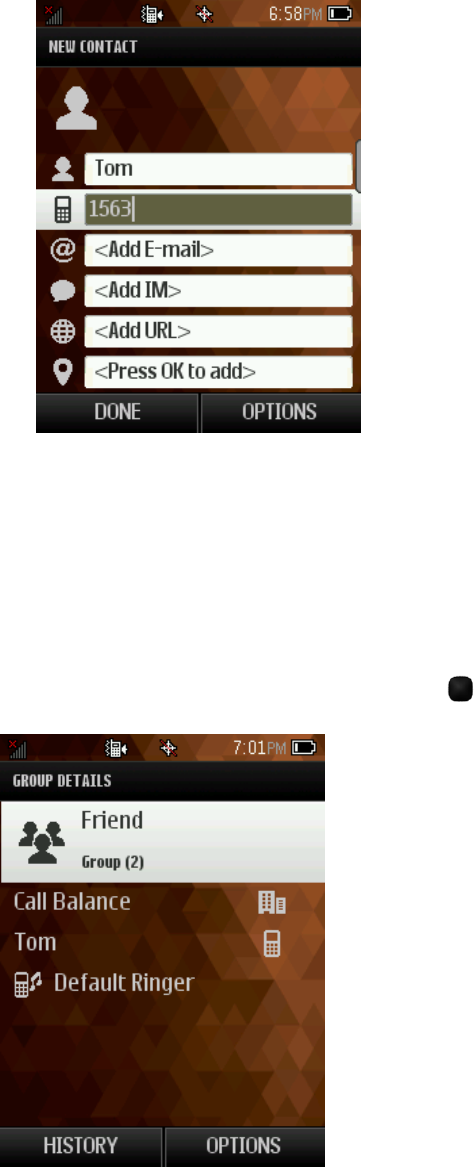
1. Fromthehomescreen,pressCONTACTS(rightsoftkey)>Add New>New Contact.
2. Usethekeypadtoenterasmuchoraslittleinformationasyouwant,including:
l Name
l PhoneNumber
l EmailAddress
l IMAddress
l WebsiteURL
l Location-Press toselectandenteranaddress.
l Ringtone
l Birthday
l Memo
l JobTitle
Contacts 21
l Company
Create a Group
YoucancreateagroupbyassigningpersonalContactsentriesasmembersandthennamingthe
newgroup.Eachgroupentrycancontainupto40membersforsendingmessages.
1. Fromthehomescreen,pressCONTACTS(rightsoftkey)>OPTIONS(rightsoftkey)>New
Group.
2. PressSTART (leftsoftkey),markthecheckboxtoselectcontactsforthegroup,press
Continue, createanameforgroup,thenpress tosave.

Contacts 22
Save a Phone Number
YoucansaveaphonenumbertoContactsdirectlyfromRecentHistoryorCallHistory.
1. Fromthehomescreen,press .
2. HighlightaphonenumberandpressOPTIONS(rightsoftkey)>Save Contact.
3. Toaddthenumbertoanexistingcontact,pressUpdate existing.Toaddanewcontact,press
Add New Contact.
4. Foranexistingcontact,selectthecontactname,selectanumbertypeforthenewnumber,and
thenpressDONE (leftsoftkey).
–or–
Foranewcontact,enterthenameandanyadditionalinformation,andthenpressDONE (left
softkey).
Edit a Contact
Onceyou’veaddedacontact,youcanaddoreditanyoftheinformationintheentry,customizewith
auniqueringtone,andmore.
Add or Edit Information for a Contact
UsetheEditcontactmenutoaddoreditinformationforanexistingcontact.
1. Fromthehomescreen,pressCONTACTS(rightsoftkey).
2. Selectacontacttodisplayit,andthenpressOPTIONS(rightsoftkey)>Edit Contact.
3. WhenyouarefinishededitingtheContactdetails,pressDONE(leftsoftkey).
Assign a Ringtone to a Contact
Knowwho’scallingwithoutlookingatyourphonebyassigningaspecificringertoacontact.
1. Fromthehomescreen,pressCONTACTS(rightsoftkey).
2. Selectacontacttodisplayit,andthenpressOPTIONS(rightsoftkey)>Edit Contact>
Ringtone.
3. Highlightanavailableringtone.
l PressPLAY(leftsoftkey)topreviewtheringtone.
4. Press andthenpressDONE (leftsoftkey)toassigntheringtone.
Delete a Contact
Youcandeleteacontactfromthecontactsdetailspage.
Contacts 23
1. Fromthehomescreen,pressCONTACTS(rightsoftkey).
2. SelectacontacttodisplayandthenpressOPTIONS(rightsoftkey)>Delete Contact.
3. PressDELETE(leftsoftkey)toconfirm.
Remove a Member from a Group
YoucanremoveamemberfromacurrentGroup.
1. Fromthehomescreen,pressCONTACTS(rightsoftkey).
2. HighlightagroupandthenpressOPTIONS(rightsoftkey)>Edit Group.
3. HighlightacontactandthenpressOPTIONS(rightsoftkey)>Remove From Group.
Assign a Speed Dial Number to a Contact
Yourphonecanassignupto99phonenumberstospeeddiallocations.
Toassignaspeeddialnumber:
1. Fromthehomescreen,pressCONTACTS(rightsoftkey).
2. Highlightacontact.
3. PressOPTIONS(rightsoftkey)>Settings>Speed Numbers.
4. Enteranumbertoassignthespeeddiallocation.
5. PressAssign (rightsoftkey).
6. Highlightacontacttobeaddedtothespeeddiallocation.
7. PressDONE(leftsoftkey).
Note:Ifyouassignanumbertoanalreadyin-usespeeddiallocation,thenewphonenumberwill
automaticallyreplacethepreviousspeeddialassignment.
Messaging 24
Messaging
Sendmessagestoyourfamilyandfriendswithtextmessaging(SMS)andmultimediamessaging
(MMS).
Text and Multimedia Messaging
WithTextMessaging(SMS),youcansendandreceiveinstanttextmessagesbetweenyour
wirelessphoneandanothermessaging-readyphone.
Multimediamessages(MMS)cancontaintextandpictures,recordedvoice,audioorvideofiles.
Refertoyourserviceplanforapplicablechargesrelatedtomessaging.
Send a Text Message
Quicklycomposeandsendtextmessagesfromyourphone.
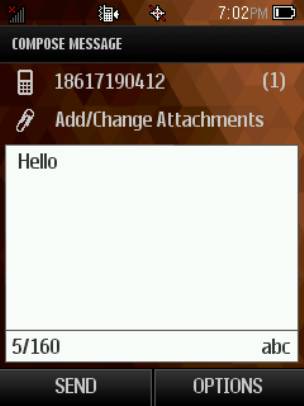
1. Fromthehomescreen,pressMESSAGING(leftsoftkey).
2. OntheMessagingscreen,selectSend Message.
3. Toenterarecipient,selectacontactorpressNEW ADDRESS(rightsoftkey).
l Toentermultiplerecipients,pressMULTIPLE(leftsoftkey).Whenyouhaveselectedallthe
messagerecipients,pressCONTINUE(leftsoftkey).
4. Composeyourmessage.
Note:AcounterappearsabovetheSENDbuttontotellyouhowmanycharactersyouhave
enteredandhowmanycharactersareleft.Onceyougooverthe160-characterlimit,anew
messageiscreatedbutautomaticallyjoinedintoonewhenreceived.
5. ReviewyourmessageandthenpressSEND(leftsoftkey)tosendthetextmessage.

Messaging 25
Send a Multimedia Message (MMS)
Whenyouneedtoaddalittlemoretoatextmessage,youcansendamultimediamessage(MMS)
withpictures,voicerecordings,audioorvideofiles.
1. Fromthehomescreen,pressMESSAGING(leftsoftkey).
2. OntheMessagingscreen,selectSend Message.
3. Toenterarecipient,selectacontactorpressNEW ADDRESS(rightsoftkey).
l Toentermultiplerecipients,pressMULTIPLE(leftsoftkey).Whenyouhaveselectedallthe
messagerecipients,pressCONTINUE(leftsoftkey).
4. Composeyourmessage.
5. Select .
6. IntheAttachwindow,selectfromthefollowingfileattachments:
l My Albums.Selectpicturesorvideosfrom My Albumstoattach.
l Take a new picture. Takeanewpictureasattachment.
l Take a new video. Takeanewvideoasattachment.
l Voice.Addanexistingornewvoiceasattachment.
Save and Resume a Draft Message
AMessagecanbesavedorresumedaftercomposing.
n Whilecomposingatextormultimediamessage,pressOPTIONS(rightsoftkey)>Save As
Drafttoautomaticallysaveyourmessageasadraft.
New Messages Notification
Dependingonyournotificationsettings,thephonewillplayaringtone,vibrate,ordisplaythe
messagebrieflyinthestatusbarwhenyoureceiveanewtextormultimediamessage.
Manage Message Conversations
Textandmultimediamessagesthataresenttoandreceivedfromacontact(oranumber)are
groupedintoconversationsormessagethreadsintheMessagingscreen.Threadedtextor
multimediamessagesletyouseeexchangedmessages(similartoachatprogram)withacontact
onthescreen.

Messaging 26
Read a Text Message
1. Fromthehomescreen,pressMESSAGING(leftsoftkey)>Messages.
2. Selectthetextmessageormessagethreadtoopenandreadit.
3. Ifyouhaveanewmessagenotification,pressOPTIONS(rightsoftkey)toreply,forwardor
deleteit.
4. ToreturntotheMessagingscreenfromatextmessagethread,presstheBACKkey .
View a Multimedia Message (MMS)
1. Fromthehomescreen,pressMESSAGING(leftsoftkey)>Messages.
2. OntheMessagesscreen,selectamultimediamessageormessagethreadtoopenit.
3. Selecttheattachmenttoopenit.
Reply to a Message
1. Fromthehomescreen,pressMESSAGING(leftsoftkey)>Messages.
2. OntheMessagesscreen,selectatextormultimediamessagethreadtoopenit.
3. PressREPLY (leftsoftkey),enteryourmessage,andthenpressSEND.
Delete a Message Thread
1. Fromthehomescreen,pressMESSAGING(leftsoftkey)>Messages.
2. OntheMessagesscreen,selectthemessagethreadthatyouwanttodelete.
3. PressOPTIONS (rightsoftkey)>Deletemessage.
4. PressYES (leftsoftkey)toconfirm.
Delete Multiple Message Threads
1. Fromthehomescreen,pressMESSAGING(leftsoftkey)>Messages.
2. OntheMessagesscreen,pressOPTIONS (rightsoftkey)>DeleteMultiple.
3. Markthecheckboxtoselectthemessagethreadsyouwanttodelete,pressDONEandthen
pressYES(leftsoftkey)toconfirm.
4. PressSelect All>Clear All todeleteallmessages.
Delete a Single Message
1. Fromthehomescreen,pressMESSAGING(leftsoftkey)>Messages.
2. Whileviewingamessagethread,usethenavigationkeystohighlightthemessageyouwantto
Messaging 27
delete.
3. PressOPTIONS(rightsoftkey)>Delete message.
4. PressYES(leftsoftkey)toconfirm.

Music 28
Music
Yourphoneletsyoudiscover,download,andlistentoyourfavoritemusicthroughtheMusicPlayer
application.Itletsyoulistentoandorganizemusicfilesyouhaveloadedintoyourphone’smicroSD
card.
Note:Forinformationaboutloadingmusicontoyourphone,seeTransferFilesBetweenYour
PhoneandaComputer.
Listen to Music Using the Player
1. Fromthehomescreen,press >Player .
2. Toadjustthevolume,presstheVolume uporVolume downkeys.

Web and Data 29
Web and Data
Yourphone’sdatacapabilitiesletyouwirelesslyaccesstheInternet.Thefollowingtopicsaddress
yourphone’sdataconnectionsandthebuilt-inWebbrowser.Yourphonesupportsa1Xnetwork.
Launch a Web Connection
LaunchingaWebconnectionisassimpleasopeningthebrowseronyourphone.
1. Fromthehomescreen,press >Web.(Yourdataconnectionstartsandyouseethehome
page.)
2. Toscrollthroughthescreen,usetheUpandDown Navigationkeys.
3. ToexittheWebatanytime,simplypress .
Note:TheBrowserautomaticallylauncheswhenaWeblinkisselectedfromatextmessage.
Learn to Navigate the Browser
Navigatingthroughmenusandwebsitesduringadatasessioniseasyonceyouhavelearnedafew
basics.
n ToscrollthroughWebitems,presstheUporDown Navigation keys.
n ToaccesstheWebmenulist,pressNavigation(leftsoftkey).
n Toreturntothepreviouspage,pressNavigation(leftsoftkey)andthenselecttheBackbutton.
n Tomovetothenextpage,pressNavigation(leftsoftkey)andthenselecttheForward button.
Optionsavailablewithinthebrowsermenuinclude:
n Search the Web:TolaunchaWebsearch.
n Addthis page to Bookmarks:AddthecurrentpagetoyourBookmarks.
n View all bookmarks:Todisplayalistofsavedbookmarks.
n View browsing history:TodisplayalistofvisitedWebpages.
n Send this page to a friend:YoucansendthecurrentpageaddressasSMSorMMS.
n Overview Mode:TodisplaytheentireWebpage.
n Browser settings:Configuresettingsforthebrowser.
Adjust Browser Settings
Youcancontrolmanyofthesettingsforyourbrowserthroughthebrowsersettingsmenu.

Web and Data 30
n FromanyopenWebpage,pressOPTIONS(rightsoftkey)>Browser settings.
l Startup page:Setstartuppage.
l AutomaticOverviewMode:Turnon/offAutomaticOverviewMode.
l Defaultzoomsize:Selectautomaticorcustomizedzoomvalue.
l Do not show images/Show images:DisplayorHideimagesontheWebpage.
l Icon row:Displayorhidetheareashowingicons.
l Popups:Alloworblockpop-ups.
l Clear private data:Clearcookies,cache,history,orstoredpasswords.
l Advanced:Viewmoresettingssuchaspageinformation,browserinformation,disable
JavaScript,etc.
Download Games, Ringtones, and More
Youhaveaccesstoadynamicvarietyofdownloadablecontent,suchasringtonesandapplications.
(Additionalchargesmayapply.)Followthestepsbelowtoaccessanddownloadcontent.
Todownloadcontent:
1. Fromthehomescreen,press >Download.
2. SelectVirgin Mobile Music Store todownloadRingtonesandRingbacktones.

Camera and Video 31
Camera and Video
Youcanuseyourphone'scameraorcamcordertotakeandsharepicturesandvideos.Yourphone
comeswitha2-megapixelcamerathatletsyoucapturesharppicturesandvideos.
Open or Close the Camera
Youcanopenthecamerathroughtheapplicationslistandcloseitfromthecameramenu.In
additiontousingtheapplicationslisttoopenthecamera,youmaybeabletolaunchthecamera
fromwithinotherapplicationssuchasContactsorMessaging.
Open the Camera
Youcantakeandviewpicturesusingyourphone'scamera.
n Toopenthecamerainpicturemodeandtakepictures,press >Photos>Camera.
Close the Camera
Closethecamerawhenyouarefinishedtakingpictures.
n Onthecamerascreen,press or .
Take a Picture
Thefollowingtopicsteachyouhowtotakepictureswithyourphone’scamera.
1. Fromthehomescreen,press >Photos>Camera.
2. Press totakeapicture.
3. PressOPTIONS(rightsoftkey)toSend,Assign,DeleteorReviewAlbum.
Record Videos
Recordvideosusingyourphone’svideocamera.

Camera and Video 32
1. Fromthehomescreen,press >Photos>Camcorder.
2. Ifprompted,choosearecordingmode:Video Mail orLong Video.
3. Press tostartcapturingvideo.
4. Press againtostoprecording.
5. PressOPTIONS(rightsoftkey)toSend,Play,Delete,orReviewAlbum.
View Pictures and Videos Using My Album
UsingMyAlbum,youcanviewpicturesandwatchvideosthatyou’vetakenwithyourphone’s
camera,downloaded,orcopiedontoyourstoragecardorphonememory.
Open or Close My Album
Yourpicturesandvideosareorganizedbyalbumsforeasyviewing.
Open My Album
n Fromthehomescreen,press >Photos>My Album.
Close My Album
n TocloseMyAlbumandreturntothehomescreen,press .
View Pictures and Videos
YoucanaccessandviewallyourstoredpicturesandvideosfromMyAlbum.

Camera and Video 33
1. Fromthehomescreen,press >Photos>My Album.
2. Selectanimageorvideotoview.
Note:Ifyouwanttoselectanotherimageorvideo,press toreturntotheMy Album.
Watch Videos
Usetheonscreencontrolstoplay,pause,fast-forwardorrewindthevideo.
1. Fromthehomescreen,press >Photos>My Album.
2. Selectanalbumcontainingavideoyouwanttowatch,andthenselectanimagetoviewthe
video.
3. Usetheonscreeniconstocontrolyourplayback.
Share Pictures and Videos
ThePhotosapplicationletsyousendpicturesandvideosusingmultimediamessages.Multimedia
Messaging(MMS)letsyousendpicturesandvideosusingyourphone’smessagingapp.Although
youcansendseveralpicturesorvideosinamultimediamessage,itmaybebettertojustsendone
atatime,especiallyifthefilesarelargeinsize.
1. Fromthescreen,press >Photos>My Album.
2. Selectthealbumthatcontainsthepicturesorvideosyouwanttoshare.
3. Selectthepicturesorvideosyouwanttoshare.
4. PressSEND(leftsoftkey).
5. Selectacontactorenteranewrecipientaddress.
6. ComposeyourmessageandthenpressSEND(leftsoftkey).

Tools and Calendar 34
Tools and Calendar
Learnhowtousemanyofyourphone’sproductivity-enhancingfeatures.
Alarm Clock
Setmultiplealarmsusingyourphone’sAlarmapplication.
1. Fromthehomescreen,press >Tools>Alarm.
2. Ifyouhaven’tcreatedanalarmyet,pressCREATE NEW (leftsoftkey).
l Ifyouhaveexistingalarmsset,pressOPTIONS(rightsoftkey)>Create New.
3. Fillinallrequiredinformationforthisalarm
4. Whendone,pressDONE(leftsoftkey).
Calendar
UseCalendartocreateandmanageevents,meetings,andappointments.YourCalendarhelps
organizeyourtimeandremindsyouofimportantevents.
Add an Event to the Calendar
AddeventstoyourcalendardirectlyfromtheCalendarapplication.
1. Fromthehomescreen,press >Tools>Calendar.
2. PressOPTIONS(rightsoftkey)>Add New Event.
3. Fillinallrequiredinformationforthisnewevent.
4. Whendone,pressSAVE (leftsoftkey)tosave.
View an Event
ViewdetailedinformationaboutyourCalendarevents.
1. Fromthehomescreen,press >Tools> Calendar.
2. Selectadatethathasanevent.
3. Selectaneventtoviewdetails.
Edit/Delete an Event
UseCalendartoeditordeleteanexistingevent.

Tools and Calendar 35
1. Fromthehomescreen,press >Tools> Calendar.
2. Selectadatethathasanevent.
3. Toeditanevent,selecttheeventandthenpressEDIT(rightsoftkey);todeletetheevent,press
DELETE(leftsoftkey).
Event Reminders
Ifyouhavesetatleastonereminderforanevent,theupcomingeventicon willappear.
n SelectView NoworDismiss.
Bluetooth
Bluetoothisashort-rangecommunicationstechnologythatallowsyoutoconnectwirelesslytoa
numberofBluetoothdevices,suchasheadsetsandhands-freecarkits,andBluetooth-enabled
handhelds,computers,printers.TheBluetoothcommunicationrangeisusuallyapproximately30
feet.
Turn Bluetooth On or Off
BluetoothcanbeturnedonandofffromtheToolsmenu.
n Fromthehomescreen,press >Tools>Bluetooth.
TopairanduseyourphonewithaBluetooth-enableddevice:
1. Fromthehomescreen,press >Tools>Bluetooth>Add New.
2. Selectthedeviceyouwishtopairwithandpress >YES.
3. (Optional)EditthedevicenameandthenpressSAVE(leftsoftkey).
Note:TurnoffBluetoothwhennotinusetoconservebatterypower.
Update Phone
UsetheUpdatePhonemenutoupdateyourphone’sfirmwareandPRL.
n Fromthehomescreen,press >Tools>Update Phone.
Phone Memory
Theinternalstoragemenuletsyouviewyourphone’sinternalstoragecapabilityandavailable
space.
n Fromthehomescreen,press >Tools>Mass Storage>Memory Info>Phone.
Tools and Calendar 36
microSD Card
AmicroSD™cardisanoptionalaccessorythatallowsyoutostoreimages,videos,music,
documents,andvoicedataonyourphone.
Insert or remove a microSD Card
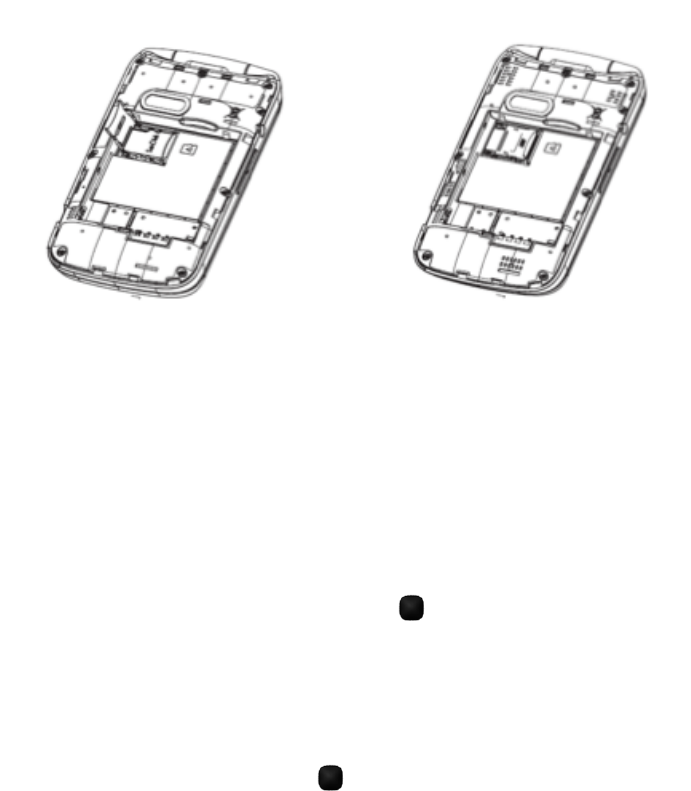
InserttheexternalmicroSDcardintotheslotwiththegoldcontactfacingdown.Toremovethe
externalmicroSDcard,gentlypressandslideitout.
Note:YoucaneasilydamagethemicroSDcardbyimproperoperation.Pleasebecarefulwhen
inserting,removing,orhandlingthemicroSDcard.
Note:MakesureyourbatteryisfullychargedbeforeusingthemicroSDcard.Yourdatamay
becomedamagedorunusableifthebatteryrunsoutwhileusingthemicroSDcard.
View microSD Card Memory
TheStoragesettingsmenugivesyouaccesstoyourmicroSDcardmemoryinformation.
n WiththemicroSDcardinserted,press >Tools>Mass Storage>Memory Info>
Memory Card.(Thetotalandavailablememoryspacewillbedisplayed.)
Format the microSD Card
FormattingamicroSDcardpermanentlyremovesallfilesstoredonthecard.
1. Fromthehomescreen,press >Tools>Mass Storage >Format Memory Card.
2. PressYEStoconfirm.
Note:TheformattingprocedureerasesallthedataonthemicroSDcard,afterwhichthefiles
CANNOTberetrieved.Topreventthelossofimportantdata,pleasecheckthecontentsbeforeyou
formatthecard.

Tools and Calendar 37
Use the Phone’s microSD Card as a USB Drive
Totransfermusic,pictures,andotherfilesfromyourcomputertoyourphone’smicroSDcard,you
needtosetthephone’smicroSDcardasaUSBdrive.Formoredetailsabouttransferringcontent
betweenyourphoneandacomputer,seeTransferFilesBetweenYourPhoneandaComputer.
1. ConnectthephonetoyourcomputerusingaUSBcable(notincluded).
2. Fromthehomescreen,press >Tools>Mass Storage >Connect to PC.
3. Onyourcomputer,theconnectedphoneisrecognizedasaremovabledisk.Navigatetothis
removablediskandopenit.
4. Dooneofthefollowing:
l Copyfilesfromthecomputertotherootfolderonthephone’sstoragecard.
l Copyfilesfromthephone’sstoragecardtoafolderonyourcomputerorcomputerdesktop.
5. Press todisconnectthephonefromthecomputer.
Note:ThephonewillnotrecognizethemicroSDcardwhenitisconnectedtoacomputerasadisk
drive.Youwillnotbeabletousesomeofthephone’sapplicationssuchasthecameraorMusic.
Transfer Files Between Your Phone and a
Computer
YoucanuseaUSBcable(notincluded)toconnectyourphonedirectlytoyourcomputerand
transfermusic,pictures,andothercontentfiles.Forexample,ifyouhaveamusicalbumstoredon
yourcomputerthatyouwanttolistentoonyourtabletwiththemusicplayeroranyotherapp,just
attachyourphonetothecomputerandcopythefilestothemusicfolder.
1. ConnectyourphonetoyourcomputerusingthesuppliedUSB/chargingcable.
2. Fromthehomescreen,press >Tools>Mass Storage >Connect to PC.
3. Selectafolder(forexample,Musicforsongsandalbums)andcopyfilestoitfromyour
computer.
4. Whenyouaredone,press todisconnectyourphonefromyourcomputer.
Calculator
Yourphone’sconvenientbuilt-incalculatorletsyouperformbasicmathematicalequations.
n Fromthehomescreen,press >Tools>Calculator.
l Enteranumber,selectthetypeofoperationtobeperformedusingtheNavigationkeys,
enterthesecondnumber,thenpress todisplaytheresult.

Tools and Calendar 38
l Onceanoperationiscomplete,youcanselectCLEAR(rightsoftkey)toclearnumbersand
carryoutanewoperation.
Stop Watch
Yourphoneprovidesaconvenientandeasy-to-useStopWatchapplication.
n Fromthehomescreen,press >Tools>Stop Watch.
Voice Memo
Recordaudiomemosusingyourphone’sVoiceMemoapplication.
n Fromthehomescreen,press >Tools>Voice Memo.
World Time
ViewthecurrenttimeincitiesaroundtheworldusingtheWorldTimeapplication.
n Fromthehomescreen,press >Tools>World Time.

Settings 39
Settings
Thefollowingtopicsprovideanoverviewofitemsyoucanchangeusingyourphone’sSettings
menus.
Display Settings
Adjustingyourphone’sdisplaysettingsnotonlyhelpsyouseewhatyouwant,itcanalsohelp
increasebatterylife.
Wallpaper Settings
Selectandassignyourphone’sbackgroundwallpaper.
1. Fromthehomescreen,press >Settings>Display>Main Screen>Wallpaper.
2. Selectanoptiontosetthewallpaper.
Backlight Control
Adjustyourphone’sbacklighttocontrolwhenthescreenisdimmed.
1. Fromthehomescreen,press >Settings>Display>Backlight Control.
2. SelectasettingforBacklight.
Brightness Settings
Adjustyourphone’sbrightnesstocontrolbatteryconsumption.
1. Fromthehomescreen,press >Settings>Display>Brightness.
2. Selectabrightnesslevel.
Font Size
Adjustyourphone’sfontsizeforeasierviewing.
1. Fromthehomescreen,press >Settings>Display>Font Size.
2. Selectafontsize.
Note:FontSizesettingdoesn’taffectallscreens.
Power Save Mode
EnablePowerSaveModetoextendbatterylife.
1. Fromthehomescreen,press >Settings>Display>Power Save Mode.
2. SelectOnandthenpressOK(leftsoftkey)toconfirm.

Settings 40
Volume Settings
UsetheVolumesettingsmenutoconfiguretheincomingringervolume,playbackvolume,andkey
beeps.
n Fromthehomescreen,press >Settings>Volume.
Ringtone Settings
UsetheRingtonessettingsmenutoconfigureoptionsrelatedtoincomingcalls,voicemail,
messages,powerup/down,andbatteryalert.
n Fromthehomescreen,press >Settings>Ringtones.
Phone Information
UsethePhoneInformationmenutoviewinformationrelatedtoyourphonenumber/userID,
memory,battery,iconglossary,version,andadvanceddetails.
n Fromthehomescreen,press >Settings>Phone Information.
Lock Phone
Lockphonesettingsletyouprotectyourphoneanddatafromunauthorizedaccess.Itis
recommendedyoufrequentlychangeyourpasswordtoensurethesafetyofyourphoneand
personaldata.
1. Fromthehomescreen,press >Settings >Lock Phone.
2. Enteryour4-digitsecuritycode.
Location Services
UseyourLocationsettingsmenutoenablelocationdetection.
1. Fromthehomescreen,press >Settings>Location.
2. SelectOntoallowthenetworktodetectyourpositionusingGPS.
Note:TurninglocationoffwilldisabletheGPScapabilityofyourphoneforallpurposesexcept9-1-
1.GPSsupportforE9-1-1serviceisnotavailableinallareas.
Parental Control Settings
UseParentalControlstoconfigurerestrictionsforyourphone.
n Fromthehomescreen,press >Settings >Parental Controls.

Settings 41
Reset Phone
Yourphone’sresetmenuerasesalldatafromthephone’sapplicationstorage,includingmessages,
phonescalls,downloadedapplication,etc.
Tip:Beforeperformingafactorydataresetonyourphone,youmaywanttoremovethemicroSD
cardtoavoidlosinganydatayoumayhavestoredonit.
1. Fromthehomescreen,press >Settings>Reset/Delete.
2. Enteryour4-digitsecuritycode.
Language & Input Settings
Yourphone’slanguageandinputsettingsletyouselectalanguageforthephone’smenusand
keyboards,selectandconfigurekeyboardsettings,configurespeechinputsettings.
Language Settings
Thelanguagesettingsmenuletsyouselectanonscreenlanguageandaddcustomwordstoyour
phone’suserdictionary.
1. Fromthehomescreen,press >Settings>Others>Language.
2. Pressanavailablelanguage(EnglishorEspañol).
Default Text Entry
Thetextentrysettingsletyouselectavarietyofchoiceswhileenteringtext.
1. Fromthehomescreen,press >Settings>Others>Text Entry.
2. Avarietyoftextentryoptionsareavailable.
Accessibility Settings
TheAccessibilitymenuletsyouenableandmanageaccessibility-relatedapplications.Toaccess
themenu,pleasefollowbelowinstructions:
n Fromthehomescreen,press >Settings >Others>Accessibility.
l Voice Guide:Presstoturnon/offVoiceGuide.
l TTY:PresstoselectTTYfunctionsorturnoffTTY.
l Hearing AID:Turnonhearingaidtoreduceunacceptablenoise.
l Font Size:Selectfontsize.
Call Answer Settings
TheCallAnswersettingsmenuletsyoudeterminehowcallsareansweredonyourphone.

Settings 42
n Fromthehomescreen,press >Settings >Others>Call Answer.
Airplane Mode
AirplaneModeallowsyoutousemanyofyourphone’sfeatures,suchasCameraandMusic,when
youareonanairplaneorinanyotherareawheremakingorreceivingcallsordataisprohibited.
WhenyousetyourphonetoAirplaneMode,itcannotsendorreceiveanycallsoraccessonline
information.
ToturnAirplaneModeonoroff:
n Fromthehomescreen,press >Settings>Others>Airplane Mode.
Data Settings
UsetheDatasettingsmenutoturndataserviceson/off,enableNetGuard,andUpdateData
Profile.
n Fromthehomescreen,press >Settings>Others>Data.
Roaming Settings
TheRoamingsettingsletyouconnect/disconnectfromadataservicewhileroaming.
n Fromthehomescreen,press >Settings>Others>Roaming:
l Roaming Guard:Setroamingvoice,data,andmessageasdomesticorinternational.
l RoamingMode:SelectroamingmodeasautomaticorBoostonly.
l Roaming Settings:Toallowvoiceanddatacommunicationondomesticorinternational.
Persistent Alerts
UsethePersistentAlertsmenutoconfiguresettingsrelatedtoalerts.
n Fromthehomescreen,press >Settings>Others>Persistent Alerts.

Regulatory Information 43
Regulatory Information
Thefollowingtopicsprovideimportantregulatoryinformation.
Specific Absorption Rates (SAR) for Wireless
Phones
TheSARvaluecorrespondstotherelativeamountofRFenergyabsorbedintotheheadofauser
ofawirelesshandset.
TheSARvalueofaphoneistheresultofanextensivetesting,measuringandcalculationprocess.
ItdoesnotrepresenthowmuchRFthephoneemits.Allphonemodelsaretestedattheirhighest
valueinstrictlaboratorysettings.Butwheninoperation,theSARofaphonecanbesubstantially
lessthanthelevelreportedtotheFCC.Thisisbecauseofavarietyoffactorsincludingitsproximity
toabasestationantenna,phonedesignandotherfactors.Whatisimportanttorememberisthat
eachphonemeetsstrictfederalguidelines.VariationsinSARsdonotrepresentavariationin
safety.
Allphonesmustmeetthefederalstandard,whichincorporatesasubstantialmarginofsafety.As
statedabove,variationsinSARvaluesbetweendifferentmodelphonesdonotmeanvariationsin
safety.SARvaluesatorbelowthefederalstandardof1.6W/kgareconsideredsafeforusebythe
public.
ThehighestreportedSARvaluesoftheALCATELONETOUCHFLINGare:
Head:1.075W/kg(1g)
Body-worn:1.473W/kg(1g)
Forbody-wornoperation,thisdevicehasbeentestedandmeetstheFCCRFexposureguidelines
whenusedwithanaccessorythatcontainsnometalandthatpositionsthehandsetaminimumof
1.5cmfromtheuser’sbody.
FCC Radio Frequency Emission
ThisphonemeetstheFCCRadioFrequencyEmissionGuidelines.
FCC ID number:RAD506
Moreinformationonthephone’sSARcanbefoundfromthefollowingFCCwebsite:
http://fcc.gov/oet/ea/
Using Your Phone with a Hearing Aid Device
AnumberofBoostMobilephoneshavebeentestedforhearingaiddevicecompatibility.When
somewirelessphonesareusedwithcertainhearingdevices(includinghearingaidsandcochlear
implants),usersmaydetectanoisewhichcaninterferewiththeeffectivenessofthehearingdevice.

Regulatory Information 44
Somehearingdevicesaremoreimmunethanotherstothisinterferencenoise,andphonesalso
varyintheamountofinterferencenoisetheymaygenerate.ANSIstandardC63.19wasdeveloped
toprovideastandardizedmeansofmeasuringbothwirelessphoneandhearingdevicesto
determineusabilityratingcategoriesforboth.
Ratingshavebeendevelopedformobilephonestoassisthearingdeviceusersfindphonesthat
maybecompatiblewiththeirhearingdevice.Notallphoneshavebeenratedforcompatibilitywith
hearingdevices.Phonesthathavebeenratedhavealabellocatedonthebox.YourALCATEL
ONETOUCHFLINGhasanM4/T4rating.
Theseratingsarenotguarantees.Resultswillvarydependingontheuser’shearingdeviceand
individualtypeanddegreeofhearingloss.Ifahearingdeviceisparticularlyvulnerableto
interferencenoise;evenaphonewithahigherratingmaystillcauseunacceptablenoiselevelsin
thehearingdevice.Tryingoutthephonewithyourhearingdeviceisthebestwaytoevaluateitfor
yourpersonalneeds.
M Ratings: PhonesratedM3orM4meetFCCrequirementsforhearingaidcompatibilityandare
likelytogeneratelessinterferencetohearingdevicesthanunratedphones.(M4isthebetter/higher
ofthetworatings.)
T-Ratings: PhonesratedT3orT4meetFCCrequirementsandarelikelytobemoreusablewitha
hearingdevice’stelecoil(“TSwitch”or“TelephoneSwitch”)thanunratedphones.(T4isthe
better/higherofthetworatings.Notethatnotallhearingdeviceshavetelecoilsinthem.)
Note:NewTechnologies.Thisphonehasbeentestedandratedforusewithhearingaidsforsome
ofthewirelesstechnologiesthatituses.However,theremaybenewerwirelesstechnologiesused
inthisphonethathavenotbeentestedforusewithhearingaids.
Hearingaiddevicesmayalsobemeasuredforimmunitytointerferencenoisefromwirelessphones
andshouldhaveratingssimilartophones.Askyourhearinghealthcareprofessionalfortheratingof
yourhearingaid.Addtheratingofyourhearingaidandyourphonetodetermineprobableusability:
n Anycombinedratingequaltoorgreaterthansixoffersexcellentuse.
n Anycombinedratingequaltofiveisconsiderednormaluse.
n Anycombinedratingequaltofourisconsideredusable.
Thus,ifyoupairanM3hearingaidwithanM3phone,youwillhaveacombinedratingofsixfor
“excellentuse.”ThisissynonymousforTratings.
Itisfurthersuggestedyouexperimentwithmultiplephones(eventhosenotlabeledM3/T3or
M4/T4)whileinthestoretofindtheonethatworksbestwithyourhearingaiddevice.Shouldyou
experienceinterferenceorfindthequalityofserviceunsatisfactoryafterpurchasingyourphone,
promptlyreturnittothestore.Moreinformationabouthearingaidcompatibilitymaybefoundat:
fcc.gov,fda.gov,andaccesswireless.org.
ThisequipmentcomplieswiththehearingaidcompatibilitytechnicalrequirementsofSection20.19
oftherules.HACRatings:M4T4-2011.
Regulatory Information 45
Warning Statements
THISDEVICECOMPLIESWITHPART15OFTHEFCCRULES.OPERATIONISSUBJECT
TOTHEFOLLOWINGTWOCONDITIONS:(1)THISDEVICEMAYNOTCAUSEHARMFUL
INTERFERENCE,AND(2)THISDEVICEMUSTACCEPTANYINTERFERENCE
RECEIVED,INCLUDINGINTERFERENCETHATMAYCAUSEUNDESIREDOPERATION.
Theusermanualforanintentionalorunintentionalradiatorshallcautiontheuserthatchangesor
modificationsnotexpresslyapprovedbythepartyresponsibleforcompliancecouldvoidtheuser’s
authoritytooperatetheequipment.
Note:THEGRANTEEISNOTRESPONSIBLEFORANYCHANGESORMODIFICATIONS
NOTEXPRESSLYAPPROVEDBYTHEPARTYRESPONSIBLEFORCOMPLIANCE.SUCH
MODIFICATIONSCOULDVOIDTHEUSER’SAUTHORITYTOOPERATETHEEQUIPMENT.
Note:ThisequipmenthasbeentestedandfoundtocomplywiththelimitsforaClassBdigital
device,pursuanttopart15oftheFCCRules.Theselimitsaredesignedtoprovidereasonable
protectionagainstharmfulinterferenceinaresidentialinstallation.
Thisequipmentgenerates,usesandcanradiateradiofrequencyenergyand,ifnotinstalledand
usedinaccordancewiththeinstructions,maycauseharmfulinterferencetoradio
communications.However,thereisnoguaranteethatinterferencewillnotoccurinaparticular
installation.Ifthisequipmentdoescauseharmfulinterferencetoradioortelevisionreception,which
canbedeterminedbyturningtheequipmentoffandon,theuserisencouragedtotrytocorrectthe
interferencebyoneormoreofthefollowingmeasures:
n Reorientorrelocatethereceivingantenna.
n Increasetheseparationbetweentheequipmentandreceiver.
n Connecttheequipmentintoanoutletonacircuitdifferentfromthattowhichthereceiveris
connected.
n Consultthedealeroranexperiencedradio/TVtechnicianforhelp.
Copyright Information 46
Copyright Information
©2014BoostWorldwide,Inc.Boost,theLogo,Re-BoostandBoostMobilearetrademarksof
BoostWorldwide,Inc.ALCATELisatrademarkofAlcatel-LucentusedunderlicensebyTCT
MobileLimited.ONETOUCHandFLINGaretrademarksofTCTMobileLimited.Othermarksare
propertyoftheirrespectiveowners.
Index 47
3
3-wayCalling16
A
Accessibility41
ActivateYourPhone4
ActivationandService4
AdditionalInformation5
AirplaneMode42
AlarmClock34
AnsweraCall13
B
Backlight39
Bluetooth35
Turnonoroff35
Brightness39
Browser
Navigate29
Settings29
C
Calculator37
Calendar34
Addevent34
Edit/DeleteanEvent34
ViewanEvent34
CallLogs
Makecallfrom12
Options17
View17
CallSettings41
CallerID16
Camera31
OpenandClose31
Takeapicture31
ConferenceCalling16
Contacts19
Addcontact20
Assignaringtone22
AssignaSpeedDialNumbertoa
Contact23
CreateaGroup21
Delete22
Edit22
Makecallfrom12
RemoveaMemberfromaGroup23
Saveaphonenumber22
ContactsList19
ContactsListOptions20
CopyrightInformation46
CreateYourAccountandPickYourPlan4
D
Data29
DataSettings42
DefaultTextInput41
DisplaySettings39
E
EmergencyNumbers13
Enhanced9-1-1(E9-1-1)13
EnterText9
Entertainment31
F
FCCRadioFrequencyEmission43
Files
Transferbetweenphoneandcomputer37
FontSize39
G
Gallery32
Close32
Open32
Viewpicturesandvideos32
GetStarted1
GPSSatellites40
H
HearingAidDevice43
I
In-callOptions15
IncomingCall
Answer13
Reject14
K
Keypad9
Index
Index 48
L
Language41
Language&InputSettings41
Location
GPSsatellites40
LocationServices40
LockPhone40
M
ManageYourAccount4
Messaging24
Drafts25
microSDCard36-37
Format36
Insert36
Viewmemory36
MMS
Sendmessages25
MultimediaMessaging
SharePicturesandVideos33
Music28
MyAlbum32
N
NavigateThroughtheMenus8
NotificationIcons9
Notifications8-9
P
ParentalControlSettings40
PersistentAlerts42
Phone
Dialer12
PhoneBasics6
PhoneCalls12
Emergencynumbers13
Makecalls12
Options15
Receive13
RecentHistory17
UsingCallLogs12
Usingcontacts12
Usingphonekeypad12
Usingspeeddial13
PhoneIllustration1
PhoneInformation40
PhoneLayout(illustration)6
PhoneNumber
Savetocontacts22
Pictures
Takewithcamera31
View32
PowerSaveMode39
R
Re-Boost5
RegulatoryInformation43
RejectIncomingCall14
ResetPhone41
Ringtone
Assigntoacontact22
RingtoneSettings40
RoamingSettings42
S
SaveaPhoneNumber22
SDCard36
SetUpYourPhone2
Settings39
Display39
Language&Input41
SpecificAbsorptionRates43
SpeedDialing17
StatusBar8
StatusIcons8
StopWatch38
Storage
Settings35
StorageCard36
T
TextEntry9
TextInput
Default41
TextMessaging
Conversations25
Notifications25
Sendmessages24
Tools34
TurnYourPhoneOnandOff7
Typing9
U
UpdatePhone35
USB37
