Altec Lansing Inmotion Users Manual A11057 R01 US IMT1 MAN
INMOTION to the manual 2e46ee6c-ae81-4834-b2aa-385ae16908bc
2015-02-02
: Altec-Lansing Altec-Lansing-Inmotion-Users-Manual-414667 altec-lansing-inmotion-users-manual-414667 altec-lansing pdf
Open the PDF directly: View PDF  .
.
Page Count: 12
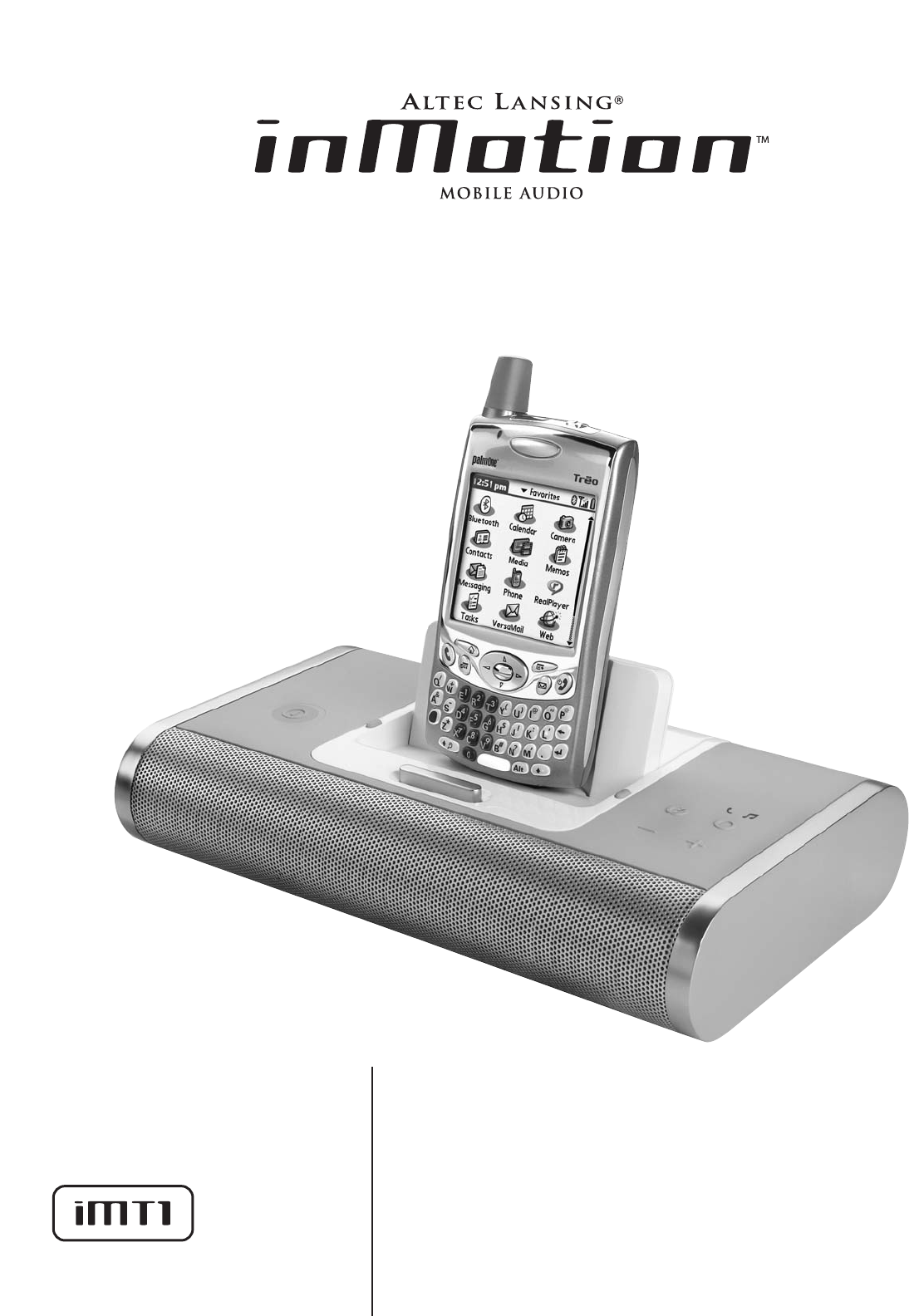
User’s guide
Guía del usuario


1
The lightning flash with arrowhead, within an
equilateral triangle, is intended to alert the user to the
presence of uninsulated “dangerous voltage” within the
product’s enclosure that may be of sufficient magnitude
to constitute a risk of electric shock to persons.
Caution: To prevent the risk of electric shock, do not
remove cover (or back). No user-serviceable parts
inside. Refer servicing to qualified service personnel.
The exclamation point within an equilateral triangle is
intended to alert the user to the presence of important
operating and maintenance (servicing) instructions in
the literature accompanying the appliance.
CONNECTING THE POWER CORD (AC WALL OUTLET)
Snap plug into power supply and then insert the blades into the outlet. The power
supply may be plugged upside down with no effect on product. Please note, the
inMotion iMT1 can also be powered with four AA batteries (not included).
IMPORTANT SAFETY INSTRUCTIONS
1. Read these instructions.
2. Keep these instructions.
3. Heed all warnings.
4. Follow all instructions.
5. Do not use this apparatus near water – This apparatus shall not be exposed to
dripping or splashing, and no objects filled with liquids, such as vases, shall be
placed on the apparatus.
6. Clean only with dry cloth.
7. Do not block any ventilation openings. Install in accordance with the
manufacturer’s instructions. The apparatus should not be situated on a bed, sofa,
rug or similar surface that may block the ventilation openings. The apparatus must
not be placed in a built-in installation, such as a closed bookcase or cabinet that
may impede the flow of air through the ventilation openings. Ventilation should
not be impeded by covering the openings with items such as newspapers,
tablecloths, curtains, etc.
8. Do not install near any heat sources such as radiators, heat registers, stoves, or
other apparatus (including amplifiers) that produce heat.
9. No naked flame sources, such as lighted candles, should be placed on the
apparatus.
10. Do not defeat the safety purpose of the polarized or grounding-type plug. A
polarized plug has two blades with one wider than the other. A grounding type
plug has two blades and a third grounding prong. The wide blade or the third
prong are provided for your safety. If the provided plug does not fit into your
outlet, consult an electrician for the replacement of the obsolete outlet.
11. Protect the power cord from being walked on or pinched — particularly at plugs,
convenience receptacles, and the point where they exit from the apparatus.
12. Do not install in an area which impedes the access to the power plug.
Disconnecting the power plug is the only way to completely remove power to the
product and must be readily accessible at all times.
13. Power source – Use only power supplies of the type specified in the operating
instructions or as marked on the appliance. If a separate power supply is included
with this apparatus, do not substitute with any other power supply – use only
manufacturer-provided power supplies.
14. Unplug this apparatus during lightning storms or when unused for long periods of
time.
15. Refer all servicing to qualified service personnel. Servicing is required when the
apparatus has been damaged in any way, such as power-supply cord or plug is
damaged, liquid has been spilled or objects have fallen into the apparatus, the
apparatus has been exposed to rain or moisture, does not operate normally, or has
been dropped. For service, refer to qualified service personnel, return to the
dealer, or call the Altec Lansing service line for assistance.
16. For products which incorporate batteries, please refer to local regulations for
proper battery disposal.
ALTEC LANSING TECHNOLOGIES, INC. ONE YEAR LIMITED WARRANTY
(TWO-YEAR LIMITED WARRANTY INTHE EUROPEAN UNION AND ASIA)
What Does The Warranty Cover?: Altec Lansing warrants that its products shall be free
from defects in materials or workmanship, with the exceptions stated below.
What Is The Period Of Coverage?: For units purchased in European Union or Asia, this
warranty runs for two years from the date of purchase. For units not purchased in
Europe or Asia, this warranty runs for one year from the date of purchase. The term of
any warranties implied by law shall expire when your limited warranty expires. Some
states and/or Member States in the European Union do not allow limitations on how
long an implied warranty lasts, so the above limitation may not apply to you.
What Does The Warranty Not Cover?: This warranty does not cover any defect,
malfunction or failure that occurs as a result of: improper installation; misuse or failure
to follow the product directions; abuse; or use with improper, unintended or faulty
equipment. (For information on proper installation, operation and use consult the
manual supplied with the product. If you require a replacement manual, you may
download a manual from www.alteclansing.com.) Also, consequential and incidental
damages are not recoverable under this warranty. Some states do not allow the
exclusion or limitation of incidental or consequential damages, so the above limitation
or exclusion may not apply to you.
What Will Altec Lansing Do To Correct The Problem?: Altec Lansing will, at its option,
repair or replace any product that proves to be defective in material or workmanship.
If your product is no longer being manufactured, or is out of stock, at its option, Altec
Lansing may replace your product with a similar or better Altec Lansing product.
How To Get Warranty Service: To get a covered product repaired or replaced, you must
contact Altec Lansing during the warranty period by email (csupport@alteclansing.com).
You must include in your email, your name, address, email address, telephone number,
date of purchase and a complete description of the problem you are experiencing.
In the United States, you may alternatively contact Altec Lansing by telephone at
1-800-ALTEC88 — please be prepared to provide the same information. If the problem
appears to be related to a defect in material or workmanship, Altec Lansing will
provide you a return authorization and instructions for return shipment. Return
shipments shall be at the customer’s expense, and the return must be accompanied by
the original proof of purchase. You should insure the shipment as appropriate because
you are responsible for the product until it arrives at Altec Lansing.
How Will State Law Affect Your Rights?: This warranty gives you specific legal rights,
and you may also have other rights which vary from state to state. Please note that in
the European Union, you as a consumer might have other legal rights under national
legislation of European Union Member States governing the sale of Altec Lansing’s
goods. Those rights are not affected by this guarantee.
The above limited warranties and remedies are sole warranties and remedies available
to purchaser, if, and to the extent, valid and enforceable under the applicable law.
CUSTOMER SERVICE
The answers to most setup and performance questions can be found in the
Troubleshooting guide. You can also consult the FAQs in the customer support section
of our Web site at www.alteclansing.com. If you live in North America and still can’t
find the information you need, please call our customer service team for assistance
before returning the speakers to your retailer under their return policy.
Tel: 800-258-3288
Email: csupport@alteclansing.com
If you live outside of North America, please visit our website at www.alteclansing.com
and select your region to locate your country’s distributor.
For the most up-to-date information, be sure to check our Web site at
www.alteclansing.com.
INTERNATIONAL DISTRIBUTION
International customers: For information regarding the distribution of Altec Lansing
products in your country, please visit www.alteclansing.com and click on your region.
FCC NOTE
This device complies with Part 15 of the FCC Rules. Operation is subject to the following
two conditions:
1. This device may not cause harmful interference.
2. This device must accept any interference received, including interference that may
cause undesired operation.
CAUTION
To prevent electric shock do not use this (polarized) plug with an
extension cord, receptacle or other outlet unless the blades can be fully
inserted to prevent blade exposure.
WARNING
TO REDUCE THE RISK OF FIRE OR ELECTRIC SHOCK, DO NOT EXPOSE THIS
APPLIANCE TO RAIN OR MOISTURE.

2
INMOTION IMT1 MOBILE AUDIO
Thank you for purchasing this Altec Lansing product. For generations,
Altec Lansing has been first in audio innovation. Today, our line of
powered speakers has received more performance awards than any
other brand. In all kinds of environments, in every price range, Altec
Lansing offers sound of distinction — giving even the most demanding
customers the audio enjoyment they seek. Just listen to this!
Box Contents
• inMotion iMT1 mobile speaker system
• Universal power supply with international plug set
• 3.5mm stereo cable
• User’s guide and quick connect instructions
Compatible Palm Smartphone and PDA:
Works with:
• Palm®LifeDrive™
• Palm Treo™650
• Palm Tungsten™T5, E2
Placing the INMotion IMt1
Position the inMotion iMT1 on a level surface, preferably close to you.
Power
Use one of the following two options to power your inMotion iMT1:
AC (Wall outlet) Power
Insert the barrel connector from the power supply into the DC
connector on the back of the inMotion iMT1. After this connection
is made, insert the power supply into a wall outlet.
DC (Battery) Power
Install four AA batteries (not included) into the battery compartments
on the bottom of the inMotion iMT1 (two to each compartment).
Make sure the batteries are installed as illustrated in the battery
compartments.
To Listen to Music
1. Place your Palm device onto the docking connector.
2. Turn on your Palm device.
3. Turn on the inMotion iMT1 by pushing the power button located on
the top of the unit. A blue LED will light around the button when the
power is on.
4. Ensure that the inMotion iMT1 is in music mode by pushing the mode
button until the blue LED with the music icon turns on.
Note: Consult your Palm device’s user manual for instructions on how
to play music.
Note: The microphone is muted when the inMotion iMT1 is in music
mode.
Note: To avoid hearing a popping sound when you turn on your
inMotion iMT1, always turn on your audio source first.
To Use as a Speakerphone
1. Place your Palm device onto the docking connector.
2. Turn on your Palm device.
3. Turn on the inMotion iMT1 by pushing the power button located on
the top of the unit. A blue LED will light around the button when the
power is on.
4. Ensure that the inMotion iMT1 is in phone mode by pushing the mode
button until the green LED with the phone icon turns on.
Note: Consult your Palm device’s user manual for instructions on how
to answer a call.
Note: To end a conversation, first hang up using the controls on your
Palm device, then push the mode button until the blue LED with
the music icon turns on.
Note: To avoid hearing a popping sound when you turn on your
inMotion iMT1, always turn on your audio source first.
To sync your Palm device with your PC
via the inMotion iMT1
1. Place your Palm device onto the docking connector.
2. Turn on your Palm device.
3. Use a USB cable (not included) to connect the back of the inMotion
iMT1 to the USB port on your PC.
4. Press the sync button on top of the inMotion iMT1 or use the
hotsync menu on the Palm device.
Power Off
Turn off the inMotion iMT1 by pushing the power button located on
the top of the unit. The blue LED will turn off.
Auto Shut-down (Standby)
When operating on battery power, the inMotion iMT1 automatically
shuts down (standby) if no audio is detected after three minutes. The
blue LED will turn off.
To restore audio, push the power button located on the top of the
unit. The blue LED will turn on.
Connecting to alternate audio source
Connect an alternate audio source — such as a CD player, MP3 player,
or portable DVD player — to your inMotion iMT1 by plugging one end
of the 3.5mm stereo cable to the line out of your portable device (if it
has one) or to the device’s headphone jack. Connect the other end to
the input marked “AUX” on the back of the inMotion iMT1.
Volume
The “+” and “–” buttons on the top of the inMotion iMT1 are the
master volume controls. Press and hold the “+” button to increase the
volume and the “–” button to decrease the volume.
For Additional Bass
The inMotion iMT1 is equipped with a subwoofer jack (“SUB OUT”).
This output should only be used to connect an Altec Lansing optional
subwoofer specifically designed to increase the bass output of this
speaker system. Please check www.alteclansing.com for availability
information.

3
Blue LED is
not lit (AC
Operation).
Blue LED is
not lit (Battery
Operation).
No sound
is coming
from speakers.
The voice of
the person on
the other end
of the phone
line cannot be
heard through
the speakers.
The power supply isn’t connected to a wall
outlet and/or the power supply connector is not
plugged into the DC connector on the back of
the inMotion iMT1.
The surge protector (if used) isn’t powered on.
The wall outlet is not functioning.
The power isn’t turned on.
No batteries are installed.
The power isn’t turned on.
The volume is set too low.
The Palm device is not correctly seated onto the
docking connector.
The Palm device is properly docked and the
inMotion iMT1’s blue LED is lit, but the Palm
device is in the “mute” mode.
If using an alternate audio source, the audio
source is not properly connected to the
inMotion iMT1 or there is a problem with the
alternate audio source.
The inMotion iMT1 is not in phone mode.
Insert the barrel connector from the power supply into the DC
connector on the back of the inMotion iMT1. After this connection
is made, insert the power supply into a wall outlet.
If the power supply is plugged into a surge protector, make sure the
surge protector is switched on.
Plug another device into the same wall outlet to confirm the outlet
is working.
Turn on the inMotion iMT1 by pushing the power button located on
the top of the unit. A blue LED will light around the button when
the power is on.
Install four AA batteries (not included) into the battery
compartments on the bottom of the inMotion iMT1 (two to each
compartment). Make sure the batteries are installed as illustrated
in the battery compartments.
Turn on the inMotion iMT1 by pushing the power button located on
the top of the unit. A blue LED will light around the button when
the power is on.
The “+” and “–” buttons on the top of the inMotion iMT1 are the
master volume controls. Press and hold the “+” button to increase
the volume.
Remove the Palm device and re-seat it in the docking station.
Turn off the “mute” function on the Palm device.
Connect an alternate audio source — such as a CD player, MP3 player,
or portable DVD player — to your inMotion iMT1 by plugging one
end of the 3.5mm stereo cable to the line out of your portable
device (if it has one) or to the device’s headphone jack. Connect
the other end to the input marked “AUX” on the back of the
inMotion iMT1.
Ensure that the inMotion iMT1 is in phone mode by pushing the
mode button until the green LED with the phone icon turns on.
Troubleshooting
Symptom Possible Problem Solution

4
There is a
crackling
sound coming
from speakers.
There is a
crackling
sound coming
from speakers
(when
connected to
PC or laptop).
The sound is
distorted.
The sound
quality is poor.
There is radio
interference.
If using an alternate audio source, the audio
source is not properly connected to the
inMotion iMT1 or there is a problem with the
alternate audio source.
The volume level in operating system is set
too high.
The volume level on inMotion iMT1 is set too
high.
The inMotion iMT1 is in phone mode.
The unit is too close to a radio tower.
Connect an alternate audio source — such as a CD player, MP3 player,
or portable DVD player — to your inMotion iMT1 by plugging one
end of the 3.5mm stereo cable to the line out of your portable
device (if it has one) or to the device’s headphone jack. Connect
the other end to the input marked “AUX” on the back of the
inMotion iMT1.
Check the operating system volume level and decrease if necessary.
The “+” and “-” buttons on the top of the inMotion iMT1 are the
master volume controls. Press and hold the “-” button to decrease
the volume.
Ensure that the inMotion iMT1 is in music mode by pushing the
mode button until the blue LED with the music note turns on.
Move your speakers to see if the interference goes away.
Symptom Possible Problem Solution
5
La figura de relámpago que termina en punta de flecha
y se encuentra dentro de un triángulo equilátero, tiene
por finalidad alertar al usuario de la presencia de
“voltaje peligroso” sin aislamiento en el interior del
producto que podría tener potencia suficiente para
constituir riesgo de choque eléctrico para las personas.
Precaución: Para evitar el riesgo de choque eléctrico,
no retire la cubierta (o parte posterior). En su interior
hay piezas que no debe manipular el usuario. El
servicio debe realizarlo personal de servicio calificado.
El signo de exclamación que se encuentra dentro de un
triángulo equilátero tiene por finalidad alertar al
usuario de la presencia de importantes instrucciones de
operación y mantenimiento (servicio) en la literatura
que viene incluida con el artefacto.
CONEXIÓN DEL CORDÓN DE ALIMENTACIÓN (TOMA DE CA DE PARED)
Conecte el enchufe a presión en la fuente de suministro y luego inserte las cuchillas
en el tomacorriente. La fuente de suministro se puede enchufar al revés sin afectar el
producto. Tome nota, el sistema inMotion iMT1 también se puede alimentar con cuatro
baterías AA (no incluidas).
INSTRUCCIONES IMPORTANTES DE SEGURIDAD
1. Lea estas instrucciones.
2. Guarde estas instrucciones.
3. Preste atención a todas las advertencias.
4. Siga todas las instrucciones.
5. No use este aparato cerca del agua — El aparato no debe estar expuesto a goteo o
salpicaduras, y no se deben colocar encima objetos llenos de agua, como jarrones.
6. Limpie únicamente con un paño seco.
7. No bloquee ninguna abertura de ventilación. Efectúe la instalación según las
instrucciones del fabricante. No coloque el aparato sobre una cama, sofá, alfombra
o superficie similar que pueda bloquear las aberturas de ventilación. El aparato no
se debe colocar en una instalación empotrada, como un estante o armario cerrado
que pueda impedir el flujo de aire a través de las aberturas de ventilación. No
impida la ventilación cubriendo las aberturas con artículos como periódico,
manteles, cortinas, etc.
8. No instale el aparato cerca de fuentes de calor como radiadores,
termorregistradores, hornos u otros aparatos (incluyendo amplificadores) que
produzcan calor.
9. Las fuentes de llama descubierta, como velas encendidas, no se deben colocar
sobre el aparato.
10. No anule el propósito de seguridad del enchufe tipo conector a tierra o
polarizado. Un enchufe polarizado tiene dos puntas, una más ancha que la otra.
Un enchufe de tipo conexión a tierra tiene dos cuchillas y una tercera cuchilla que
se conecta a tierra. La cuchilla ancha o tercera cuchilla se proporciona para su
seguridad. Si el enchufe proporcionado no encaja en su tomacorriente, consulte
con un electricista para reemplazar el tomacorriente obsoleto.
11. Proteja el cordón de alimentación para que no lo pisen o prensen —
especialmente en los puntos de enchufes, receptáculos, y el lugar donde salen
del aparato.
12. No lo instale en un área que impida el acceso al enchufe de alimentación. El único
medio de impedir completamente el ingreso de suministro eléctrico al producto es
desconectar el enchufe de alimentación que debe estar accesible en todo
momento.
13. Fuente de alimentación – Use únicamente fuentes de alimentación del tipo
especificado en las instrucciones de operación o como se indique en el artefacto.
Si se incluye una fuente de alimentación separada con este aparato no la sustituya
con ninguna otra fuente de alimentación – use únicamente fuentes de
alimentación suministradas por el fabricante.
14. Desenchufe el aparato durante las tormentas eléctricas o cuando permanezca sin
uso por largos periodos de tiempo.
15. Para realizar el servicio técnico acuda al personal de servicio calificado. Es
necesario que se efectúe el servicio técnico cuando el aparato se haya dañado de
alguna forma, como por ejemplo, cuando el cordón o enchufe de alimentación
esté dañado o cuando se haya derramado líquido o se hayan caído objetos dentro
del aparato, o que el mismo haya estado expuesto a la lluvia o humedad, no
funcione normalmente o se haya dejado caer. Para efectuar el servicio técnico,
envíe el artefacto al personal de servicio calificado, devuélvalo al distribuidor o
llame a la línea de servicio de Altec Lansing para solicitar ayuda.
16. Para los productos que usan baterías, refiérase a las normas locales para disponer
de ellas de manera adecuada.
ALTEC LANSING TECHNOLOGIES, INC. GARANTÍA LIMITADA DE UN AÑO
(GARANTÍA LIMITADA DE DOS AÑOS EN LA UNIÓN EUROPEA Y ASIA)
¿Qué cubre la garantía?: Altec Lansing garantiza que sus productos no tendrán defectos
de material o de mano de obra, con las excepciones que se indican a continuación. ¿Cuál
es el periodo de cobertura? Para las unidades adquiridas en la Unión Europea o Asia, la
garantía es de dos años, contados a partir de la fecha de compra. Para las unidades no
adquiridas en la Unión Europea o Asia, la garantía es de un año, contado a partir de la
fecha de compra. El término de cualquiera de las garantías de acuerdo a ley deberá
expirar al vencimiento de la garantía limitada. Algunos estados y/o Estados Miembros de
la Unión Europea no permiten limitaciones en el periodo de vigencia de la garantía, por
lo tanto, las limitaciones antes mencionadas pueden no aplicarse a su caso.
¿Qué es lo que no cubre la garantía? La presente garantía no cubre cualquier defecto,
mal funcionamiento o falla que resulte de: instalación inadecuada, mal uso o
incumplimiento de las instrucciones del producto; abuso o uso con equipo inadecuado,
no correspondiente o defectuoso. (Para obtener información sobre la instalación,
operación y uso adecuado consulte el manual proporcionado con el producto. Si
necesita un manual de reemplazo, puede descargar un manual visitando
www.alteclansing.com). Asimismo, los daños incidentales e indirectos no son
recuperables de acuerdo con esta garantía. Algunos estados no permiten exclusiones o
limitaciones por daños incidentales o indirectos, por lo tanto, dicha limitación o
exclusión es posible que no sea aplicable a su caso.
¿Qué hará Altec Lansing para corregir el problema? Altec Lansing, de acuerdo a su
criterio, reparará o reemplazará cualquier producto que presente defectos en el
material o en la mano de obra. Si su producto ya no se fabrica más, o está agotado, de
acuerdo a su criterio, Altec Lansing puede reemplazarlo con otro producto similar o
mejor de Altec Lansing.
Cómo obtener servicio de garantía: Para obtener el reemplazo o reparación de un
producto en garantía, debe ponerse en contacto con Altec Lansing durante el periodo
de garantía vía correo electrónico a (csupport@alteclansing.com). En su correo
electrónico debe colocar su nombre, dirección, dirección de correo electrónico, número
de teléfono, fecha de compra y una descripción completa del problema experimentado.
En los Estados Unidos, también puede comunicarse con Altec Lansing llamando al
teléfono 1-800-ALTEC88 — por favor esté listo para proporcionar la misma información.
Si el problema aparenta ser un defecto en el material o mano de obra, Altec Lansing le
proporcionará una autorización de devolución y las instrucciones para el envío de la
misma. Los envíos de devolución deberán ser pagados por el cliente, y el envío deberá
incluir el comprobante de compra original. Deberá asegurar el envío en forma adecuada
puesto que usted es el responsable del producto hasta que éste llegue a Altec Lansing.
¿Cómo afectará la legislación estatal sus derechos? Esta garantía le brinda derechos
legales específicos, y además puede contar con otros derechos que pueden variar de
estado a estado. Tome nota que en la Unión Europea, en su calidad de consumidor,
podría tener otros derechos de ley de acuerdo a la legislación nacional de los Estados
Miembros de la Unión Europea que rigen la venta de mercadería de Altec Lansing. Esos
derechos no se verán afectados por la presente garantía.
Las garantías y recursos limitados antes mencionados constituyen las garantías y
recursos exclusivos disponibles para el comprador, siempre y cuando, y en la medida en
que tengan validez y sean exigibles bajo la ley aplicable.
SERVICIO AL CLIENTE
En la Guía de solución de problemas encontrará respuestas a la mayoría de las
preguntas sobre configuración y rendimiento. De igual manera, puede consultar la
sección de las FAQ (Preguntas y respuestas frecuentes) de nuestro sitio Web en
www.alteclansing.com. Si vive en América del Norte y todavía no puede encontrar la
información que necesita, comuníquese con nuestro equipo de servicio al cliente para
que le proporcione ayuda antes de devolver los parlantes a su distribuidor en virtud de
la política de devolución.
Teléfono: 800-258-3288
Correo electrónico: csupport@alteclansing.com
Si no vive en América del Norte, por favor visite nuestro sitio Web en
www.alteclansing.com y selecciones su región para ubicar al distribuidor de su país.
Para obtener la información más actualizada, asegúrese de visitar nuestro sitio Web en
www.alteclansing.com.
DISTRIBUCIÓN INTERNACIONAL
Clientes internacionales: Para obtener información sobre la distribución de los
productos Altec Lansing en su país, visite www.alteclansing.com y haga clic en
su región.
PRECAUCIÓN
Para evitar choques eléctricos no utilice este enchufe (polarizado) con
una extensión, receptáculo u otra toma de corriente a menos que se
pueda insertar completamente las cuchillas para evitar que estas
queden expuestas.
ADVERTENCIA
PARA REDUCIR EL RIESGO DE INCENDIO O CHOQUE ELÉCTRICO, NO
EXPONGA EL ARTEFACTO A LA LLUVIA O HUMEDAD.

6
INMOTION IMT1 AUDIO PORTÁTIL
Gracias por comprar este producto de Altec Lansing. Por generaciones,
Altec Lansing ha ocupado el primer puesto en innovación de audio.
Hoy día, nuestra línea de parlantes amplificados ha recibido más
premios por rendimiento que cualquier otra marca en el mercado. En
todos los ámbitos de escritorio, en cualquier rango de precio, Altec
Lansing ofrece el sonido de distinción — brindando aun a los clientes
más exigentes el placer de audio que ellos buscan. ¡Sólo escuche esto!
Contenido de la caja
• Sistema portátil de parlantes inMotion iMT1
• Fuente de suministro universal con juego de enchufes internacionales
• Cable estéreo de 3.5mm
• Guía del usuario e instrucciones Quick Connect
Palm Smartphone y PDA compatibles:
Funciona con:
• Palm®LifeDrive™
• Palm Treo™650
• Palm Tungsten™T5, E2
Colocación del sistema INMotion IMt1
Coloque el sistema inMotion iMT1 sobre una superficie plana,
preferentemente cerca de usted.
Encendido
Use una de las siguientes dos opciones para encender su inMotion
iMT1:
Alimentación de CA (Tomacorriente de pared)
Inserte el conector cilíndrico de la fuente de suministro en el conector
de CC ubicado en la parte posterior del sistema inMotion iMT1.
Después de hacer esta conexión, inserte la fuente de suministro en un
tomacorriente de pared.
Suministro de potencia CC (Batería)
Instale cuatro baterías AA (no incluidas) en el compartimiento de
baterías ubicado en la parte inferior del sistema inMotion iMT1 (dos en
cada compartimiento). Tenga cuidado de instalar las baterías tal como
se indica en el compartimiento de baterías.
Para escuchar música
1. Coloque su dispositivo Palm en el conector de acople.
2. Encienda su dispositivo Palm.
3. Encienda el sistema inMotion iMT1 pulsando el botón de encendido
ubicado en la parte superior de la unidad. Un indicador LED azul se
iluminará alrededor del botón cuando el sistema se encuentre
encendido.
4. Asegúrese que el sistema inMotion iMT1 se encuentre en el modo
música presionando el botón de modo hasta que se encienda el
indicador LED azul con el icono de música.
Nota: Consulte el manual de usuario de su dispositivo Palm para
obtener las instrucción sobre como reproducir música.
Nota: El micrófono está en silencio cuando el sistema inMotion iMT1
se encuentra en el modo música.
Nota: Para evitar escuchar un ruido seco cuando encienda su sistema
inMotion iMT1, siempre encienda primero la fuente de audio.
Para usarlo como teléfono de altoparlante
1. Coloque su dispositivo Palm en el conector de acople.
2. Encienda su dispositivo Palm.
3. Encienda el sistema inMotion iMT1 pulsando el botón de encendido
ubicado en la parte superior de la unidad. Un indicador LED azul se
iluminará alrededor del botón cuando el sistema se encuentre
encendido.
4. Asegúrese que el sistema inMotion iMT1 se encuentre en el modo
teléfono presionando el botón de modo hasta que se encienda el
indicador LED verde con el icono de teléfono.
Nota: Consulte el manual del usuario de su dispositivo Palm para
obtener las instrucciones sobre como contestar una llamada.
Nota: Para finalizar una conversación, primero cuelgue usando los
controles en su dispositivo Palm, luego presione el botón de modo
hasta que se encienda el indicador LED azul con el icono de música.
Nota: Para evitar escuchar un ruido seco cuando encienda su sistema
inMotion iMT1, siempre encienda primero la fuente de audio.
Para sincronizar su dispositivo Palm
con su PC a través del sistema inMotion iMT1
1. Coloque su dispositivo Palm en el conector de acople.
2. Encienda su dispositivo Palm.
3. Use un cable USB (no incluido) para conectar la parte posterior del
sistema inMotion iMT1 al puerto USB en su PC.
4. Presione el botón sync en la parte superior del sistema inMotion
iMT1 o use el menú hotsync en el dispositivo Palm.
Apagado
Apague el sistema inMotion iMT1 pulsando el botón de encendido
ubicado en la parte superior de la unidad. El indicador LED azul se
apagará.
Apagado automático (En espera)
Cuando funciona con batería, el sistema inMotion iMT1 se apaga
automáticamente (en espera) si no se detecta una señal de audio
después de tres minutos. El indicador LED azul se apagará.
Para restaurar el audio, presione el botón de encendido ubicado en la
parte superior de la unidad. El indicador LED azul se encenderá.
Conexión a una fuente de audio alternativa
Conecte una fuente de audio alternativa — como un reproductor de
CD, reproductor de MP3 o reproductor de DVD portátil — a su sistema
inMotion iMT1 conectando un extremo del cable estéreo de 3.5mm a
la línea de salida de su dispositivo portátil (si lo tuviera) o en la clavija
de audífono del mismo. Conecte el otro extremo de la entrada
marcada como “AUX” en la parte posterior del sistema inMotion iMT1.
Volumen
Los botones “+” y “–” ubicados en la parte superior del sistema
inMotion iMT1 son los controles del volumen maestro. Pulse y
mantenga presionado el botón “+” para aumentar el volumen y el
botón “–” para disminuirlo.
Para obtener un nivel de graves adicional
El inMotion iMT1 está equipado con una clavija de parlante secundario
para graves. (“SUB OUT”). Esta salida solo debe usarse para conectar
un parlante secundario para graves opcional de Altec Lansing diseñado
especialmente para aumentar la salida de graves de este sistema de
parlantes. Visite www.alteclansing.com para obtener información
de disponibilidad.

7
El indicador
LED azul no
está iluminado
(Operación
de CA).
El indicador
LED azul no
está encendido
(Operación
a batería).
Los parlantes
no emiten
sonido alguno.
La voz de la
persona en el
otro extreme
de la línea
telefónica
no puede
escucharse
a través de
los parlantes.
La fuente de suministro no está conectada a un
tomacorriente de pared y/o el conector de la
fuente de suministro no está enchufado en el
conector CC ubicado en la parte posterior del
sistema inMotion iMT1.
El supresor de picos (si se utiliza) no está
encendido.
El tomacorriente de pared no funciona.
El sistema no está encendido.
No hay baterías instaladas.
El sistema no está encendido.
El volumen está fijado demasiado bajo.
El dispositivo Palm no está correctamente
colocado en la estación de acople.
El dispositivo Palm está acoplado de manera
correcta y el indicador LED azul del inMotion
IMT1 está encendido, pero el dispositivo Palm
se encuentra en el modo “mute” (silencio).
Si está usando una fuente de audio alternativa,
la fuente de audio no está conectada de manera
correcta al sistema inMotion iMT1 o hay un
problema con la fuente de audio alternativa.
El sistema inMotion iMT1 no se encuentra en el
modo teléfono.
Inserte el conector cilíndrico de la fuente de suministro en el
conector de CC ubicado en la parte posterior del sistema inMotion
iMT1. Después de hacer esta conexión, inserte la fuente de suministro
en un tomacorriente de pared.
Si la fuente de suministro está conectada a un supresor de picos,
asegúrese que el supresor de picos esté encendido.
Enchufe otro dispositivo en el mismo tomacorriente de pared para
confirmar que está funcionando.
Encienda el sistema inMotion iMT1 presionando el botón de
encendido ubicado en la parte superior de la unidad. Un indicador
LED azul se iluminará alrededor del botón cuando el sistema se
encuentre encendido.
Instale cuatro baterías AA (no incluidas) en el compartimiento de
baterías ubicado en la parte inferior del sistema inMotion iMT1 (dos
en cada compartimiento). Tenga cuidado de instalar las baterías tal
como se indica en el compartimiento de baterías.
Encienda el sistema inMotion iMT1 presionando el botón de
encendido ubicado en la parte superior de la unidad. Un indicador
LED azul se iluminará alrededor del botón cuando el sistema se
encuentre encendido.
Los botones “+” y “–” ubicados en la parte superior del sistema
inMotion iMT1 son los controles del volumen maestro. Presione y
mantenga presionado el botón “+” para aumentar el volumen.
Retire el dispositivo Palm y vuelva a colocarlo en la estación de acople.
Apague la función “mute” del dispositivo Palm.
Conecte una fuente de audio alternativa — como un reproductor de
CD, reproductor de MP3 o reproductor de DVD portátil — a su
sistema inMotion iMT1 conectando un extremo del cable estéreo de
3.5mm a la línea de salida de su dispositivo portátil (si lo tuviera) o
en la clavija de audífono del mismo. Conecte el otro extremo de la
entrada marcada como “AUX” en la parte posterior del sistema
inMotion iMT1.
Asegúrese que el sistema inMotion iMT1 se encuentre en el modo
teléfono presionando el botón de modo hasta que se encienda
el indicador LED verde con el icono de teléfono.
Solución de problemas
Síntoma Posible problema Solución

8
Los parlantes
emiten
un sonido
crepitante.
Los parlantes
emiten
un sonido
crepitante
(cuando se
conectan a la
computadora o
computadora
portátil).
El sonido está
distorsionado.
La calidad
de sonido
es deficiente.
Hay
interferencia
de radio.
Si está usando una fuente de audio alternativa,
la fuente de audio no está conectada de manera
correcta al sistema inMotion iMT1 o hay un
problema con la fuente de audio alternativa.
El nivel de volumen del sistema operativo está
fijado demasiado alto.
El nivel de volumen del sistema inMotion iMT1
está fijado demasiado alto.
El sistema inMotion iMT1 no se encuentra en el
modo teléfono.
La unidad se encuentra demasiado cerca de una
torre de radio.
Conecte una fuente de audio alternativa — como un reproductor de
CD, reproductor de MP3 o reproductor de DVD portátil — a su
sistema inMotion iMT1 conectando un extremo del cable estéreo de
3.5mm a la línea de salida de su dispositivo portátil (si lo tuviera) o
en la clavija de audífono del mismo. Conecte el otro extremo de la
entrada marcada como “AUX” en la parte posterior del sistema
inMotion iMT1.
Verifique el nivel de volumen del sistema operativo y disminúyalo si
fuera necesario.
Los botones “+” y “–” ubicados en la parte superior del sistema
inMotion iMT1 son los controles del volumen maestro. Pulse y
mantenga presionado el botón “–” para disminuir el volumen.
Asegúrese que el sistema inMotion iMT1 se encuentre en el modo
música presionando el botón de modo hasta que se encienda el
indicador LED azul con la nota de música.
Mueva sus parlantes para ver si la interferencia desaparece.
Síntoma Posible problema Solución

9

A11057 R01
This Class B digital apparatus complies with Canadian ICES-003. • Cet appareillage digital de Classe B est conforme au ICES-003 canadien.
Corporate Headquarters 535 Rte. 6 & 209, Milford, PA 18337-0277, USA • 866-570-5702 • 570-296-4434 • Fax 570-296-6887
Europe 13 Rue Beaumont, L-1219 Luxembourg, Luxembourg • Tel: +352 26 15 76 36 • Fax: +352 26 15 76 26
Asia/Pacific 25 Canton Road, Tsim Sha Tsui, Kowloon, Hong Kong • (852) 2735-7331 • Fax (852) 2730-7748
Engineered in USA. Made in China
