American Security spol s r o MMS-NCU 20 kHz MMS System User Manual

American Security spol. s r.o. 20 kHz MMS System

User Manual

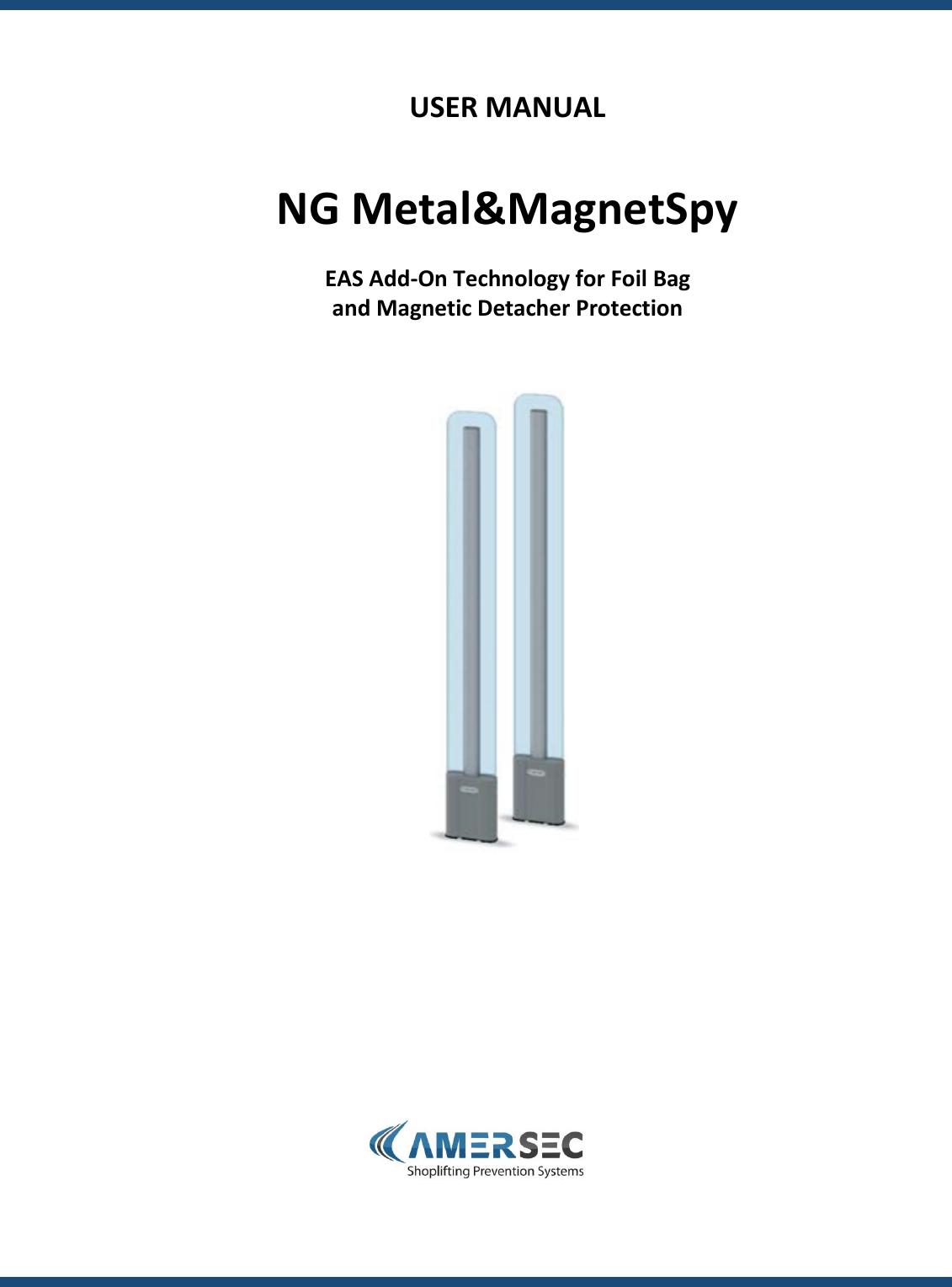
                USER MANUAL   NG Metal&MagnetSpy  EAS Add-On Technology for Foil Bag and Magnetic Detacher Protection
User Manual – NG METAL&MAGNETSPY                           TEL:  +420 271 960 054          FAX:  +420 271 770 732          SUPPORT:  +420 296 150 610                 Page 2 of 13 technical.support@amersec.com          www.amersec.com  Contents 1.0 SPECIFICATIONS & FEATURES .............................................................................................................................................................. 3 2.0  INSTALLATION PROCEDURE .......................................................................................................................................................... 4 2.1  Set up Antenna Configuration ........................................................................................................................................................ 4 2.2  Antenna Placement ........................................................................................................................................................................ 4 2.3  Run Cables ...................................................................................................................................................................................... 5 2.4  Alarm Output .................................................................................................................................................................................. 6 3.0  SOFTWARE TUNING ...................................................................................................................................................................... 7 3.1  Connect PC ..................................................................................................................................................................................... 7 3.2 Configuration .................................................................................................................................................................................. 8 3.3 Metal Detection Settings ................................................................................................................................................................. 9 3.4 Magnet Detection Settings............................................................................................................................................................ 11 4.0  TESTING ...................................................................................................................................................................................... 12 5.0  TROUBLESHOOTING .................................................................................................................................................................... 13 6.0 DECLARATION .................................................................................................................................................................................... 13
User Manual – NG METAL&MAGNETSPY                           TEL:  +420 271 960 054          FAX:  +420 271 770 732          SUPPORT:  +420 296 150 610                 Page 3 of 13 technical.support@amersec.com          www.amersec.com   1.0 SPECIFICATIONS & FEATURES  Features  •-  Advanced evaluation of foil bags and magnets  •-  Compatible with RF and AM systems  •-  Advanced blocking functions for trolleys and doors  •-  Capture and store signals of foil bags or false signals for increased performance  •-  Integrated AM Jammer detection (standard)  •-  2 alarm outputs  •-  Integrated digital oscilloscope for advanced diagnostics  •-  Connection of up to 4 pedestals to 1 controller unit  •-  Software tuned – remote tuning available  Technical Specifications Power Input:        15-18V AC Power Consumption:      12W max    Cable Requirement:    1 CAT5 stranded FTP per pedestal           Max 10m (32ft)    Alarm Output:      2  N/O or N/C relay switches (non-powered 3A max)    Operating Frequency:    20kHz    Operating Temperature:  0-50˚C    Communication Port:    RS232 serial    Operating System (for SW):  Windows XP or later
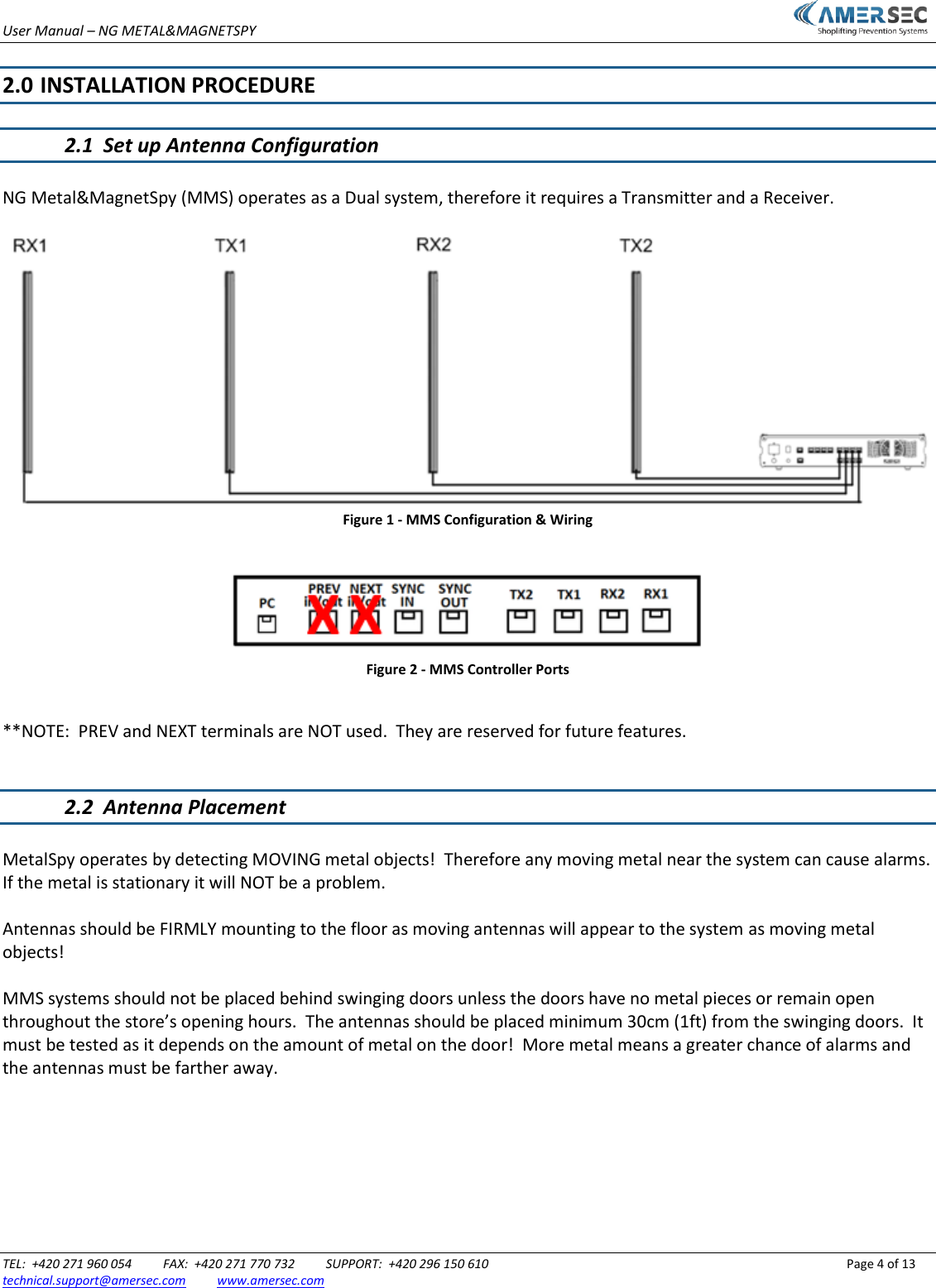
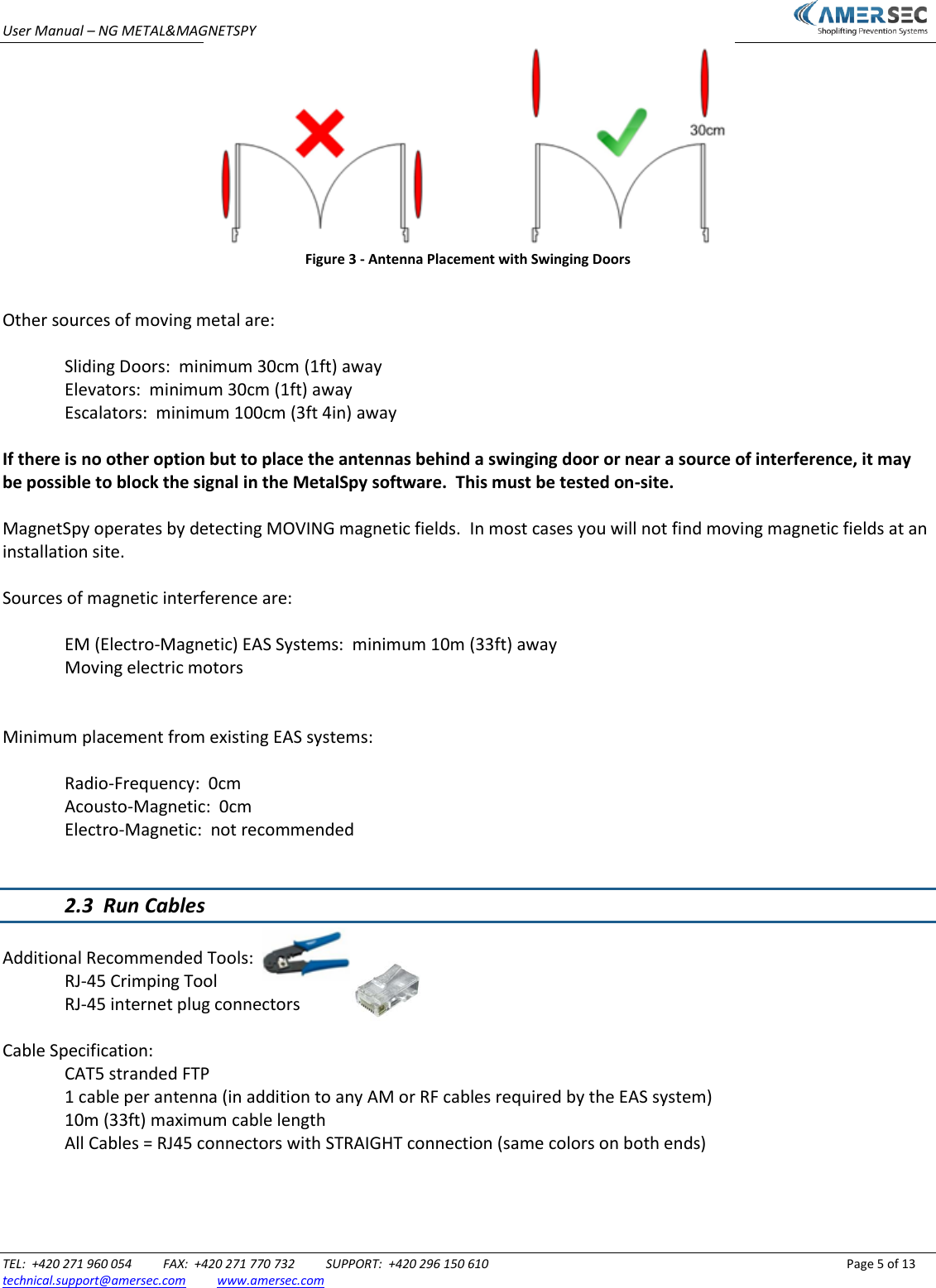
User Manual – NG METAL&MAGNETSPY                           TEL:  +420 271 960 054          FAX:  +420 271 770 732          SUPPORT:  +420 296 150 610                 Page 4 of 13 technical.support@amersec.com          www.amersec.com   2.0  INSTALLATION PROCEDURE  2.1  Set up Antenna Configuration  NG Metal&MagnetSpy (MMS) operates as a Dual system, therefore it requires a Transmitter and a Receiver.   Figure 1 - MMS Configuration & Wiring   Figure 2 - MMS Controller Ports  **NOTE:  PREV and NEXT terminals are NOT used.  They are reserved for future features.   2.2  Antenna Placement  MetalSpy operates by detecting MOVING metal objects!  Therefore any moving metal near the system can cause alarms.  If the metal is stationary it will NOT be a problem.  Antennas should be FIRMLY mounting to the floor as moving antennas will appear to the system as moving metal objects!  MMS systems should not be placed behind swinging doors unless the doors have no metal pieces or remain open throughout the store’s opening hours.  The antennas should be placed minimum 30cm (1ft) from the swinging doors.  It must be tested as it depends on the amount of metal on the door!  More metal means a greater chance of alarms and the antennas must be farther away.
User Manual – NG METAL&MAGNETSPY                           TEL:  +420 271 960 054          FAX:  +420 271 770 732          SUPPORT:  +420 296 150 610                 Page 5 of 13 technical.support@amersec.com          www.amersec.com   Figure 3 - Antenna Placement with Swinging Doors  Other sources of moving metal are:  Sliding Doors:  minimum 30cm (1ft) away Elevators:  minimum 30cm (1ft) away Escalators:  minimum 100cm (3ft 4in) away  If there is no other option but to place the antennas behind a swinging door or near a source of interference, it may be possible to block the signal in the MetalSpy software.  This must be tested on-site.  MagnetSpy operates by detecting MOVING magnetic fields.  In most cases you will not find moving magnetic fields at an installation site.  Sources of magnetic interference are:    EM (Electro-Magnetic) EAS Systems:  minimum 10m (33ft) away   Moving electric motors   Minimum placement from existing EAS systems:    Radio-Frequency:  0cm   Acousto-Magnetic:  0cm   Electro-Magnetic:  not recommended   2.3  Run Cables  Additional Recommended Tools:   RJ-45 Crimping Tool    RJ-45 internet plug connectors    Cable Specification:   CAT5 stranded FTP   1 cable per antenna (in addition to any AM or RF cables required by the EAS system)   10m (33ft) maximum cable length   All Cables = RJ45 connectors with STRAIGHT connection (same colors on both ends)
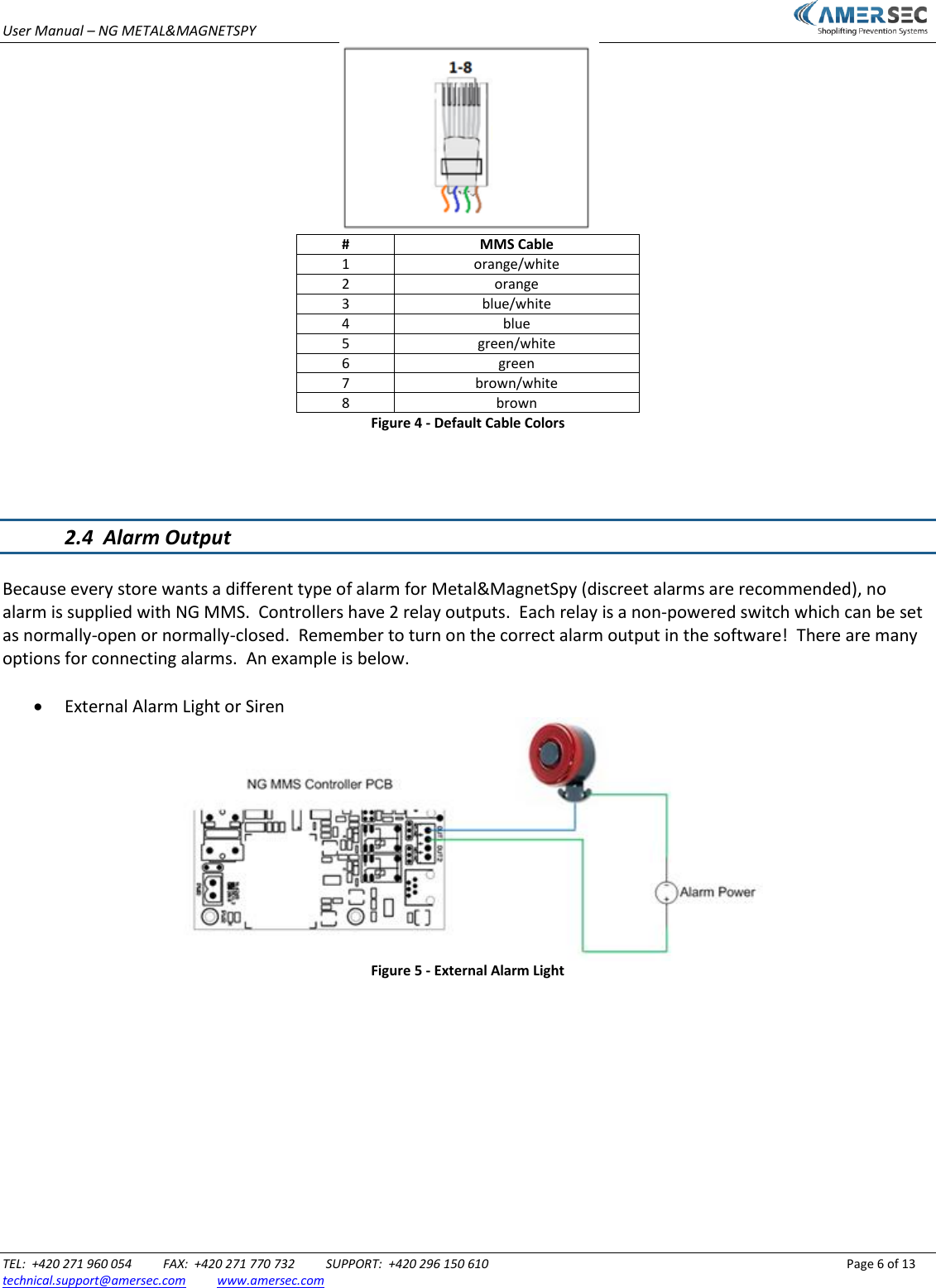
User Manual – NG METAL&MAGNETSPY                           TEL:  +420 271 960 054          FAX:  +420 271 770 732          SUPPORT:  +420 296 150 610                 Page 6 of 13 technical.support@amersec.com          www.amersec.com   # MMS Cable 1 orange/white 2 orange 3 blue/white 4 blue 5 green/white 6 green 7 brown/white 8 brown Figure 4 - Default Cable Colors    2.4  Alarm Output  Because every store wants a different type of alarm for Metal&MagnetSpy (discreet alarms are recommended), no alarm is supplied with NG MMS.  Controllers have 2 relay outputs.  Each relay is a non-powered switch which can be set as normally-open or normally-closed.  Remember to turn on the correct alarm output in the software!  There are many options for connecting alarms.  An example is below.   External Alarm Light or Siren  Figure 5 - External Alarm Light
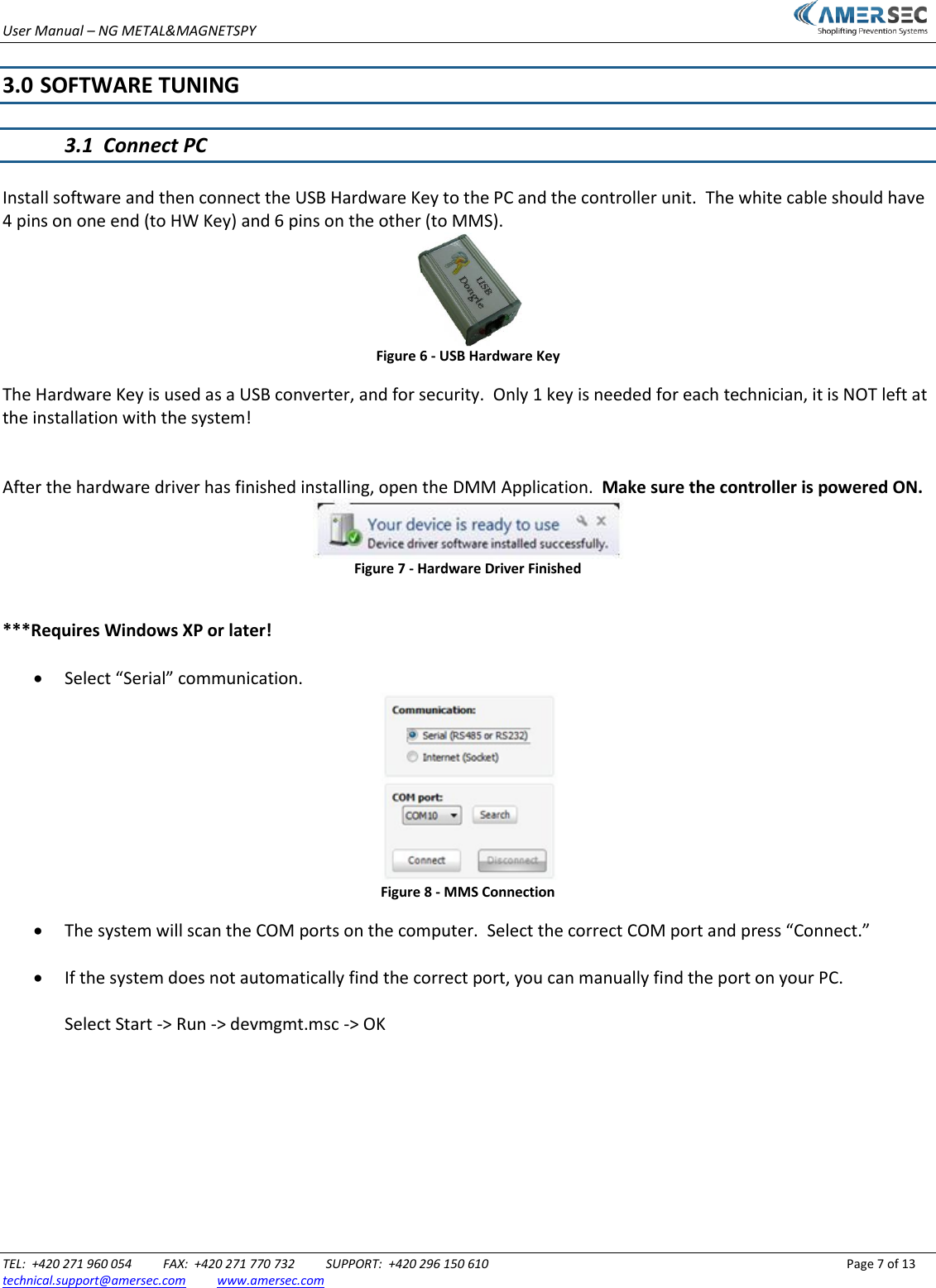
User Manual – NG METAL&MAGNETSPY                           TEL:  +420 271 960 054          FAX:  +420 271 770 732          SUPPORT:  +420 296 150 610                 Page 7 of 13 technical.support@amersec.com          www.amersec.com   3.0  SOFTWARE TUNING  3.1  Connect PC  Install software and then connect the USB Hardware Key to the PC and the controller unit.  The white cable should have 4 pins on one end (to HW Key) and 6 pins on the other (to MMS).  Figure 6 - USB Hardware Key The Hardware Key is used as a USB converter, and for security.  Only 1 key is needed for each technician, it is NOT left at the installation with the system!   After the hardware driver has finished installing, open the DMM Application.  Make sure the controller is powered ON.  Figure 7 - Hardware Driver Finished  ***Requires Windows XP or later!   Select “Serial” communication.  Figure 8 - MMS Connection  The system will scan the COM ports on the computer.  Select the correct COM port and press “Connect.”   If the system does not automatically find the correct port, you can manually find the port on your PC.  Select Start -> Run -> devmgmt.msc -> OK
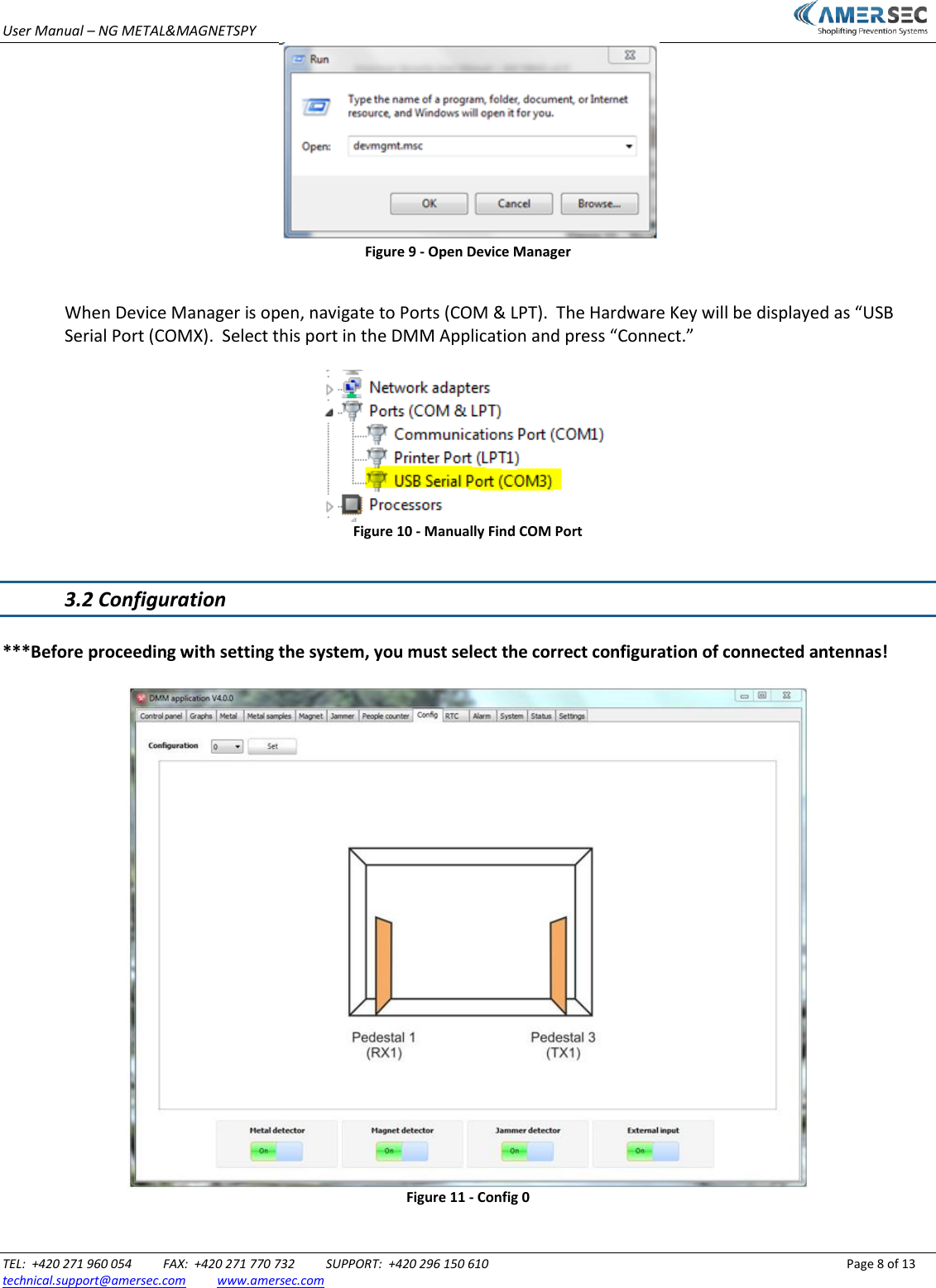
User Manual – NG METAL&MAGNETSPY                           TEL:  +420 271 960 054          FAX:  +420 271 770 732          SUPPORT:  +420 296 150 610                 Page 8 of 13 technical.support@amersec.com          www.amersec.com   Figure 9 - Open Device Manager  When Device Manager is open, navigate to Ports (COM & LPT).  The Hardware Key will be displayed as “USB Serial Port (COMX).  Select this port in the DMM Application and press “Connect.”   Figure 10 - Manually Find COM Port  3.2 Configuration  ***Before proceeding with setting the system, you must select the correct configuration of connected antennas!   Figure 11 - Config 0
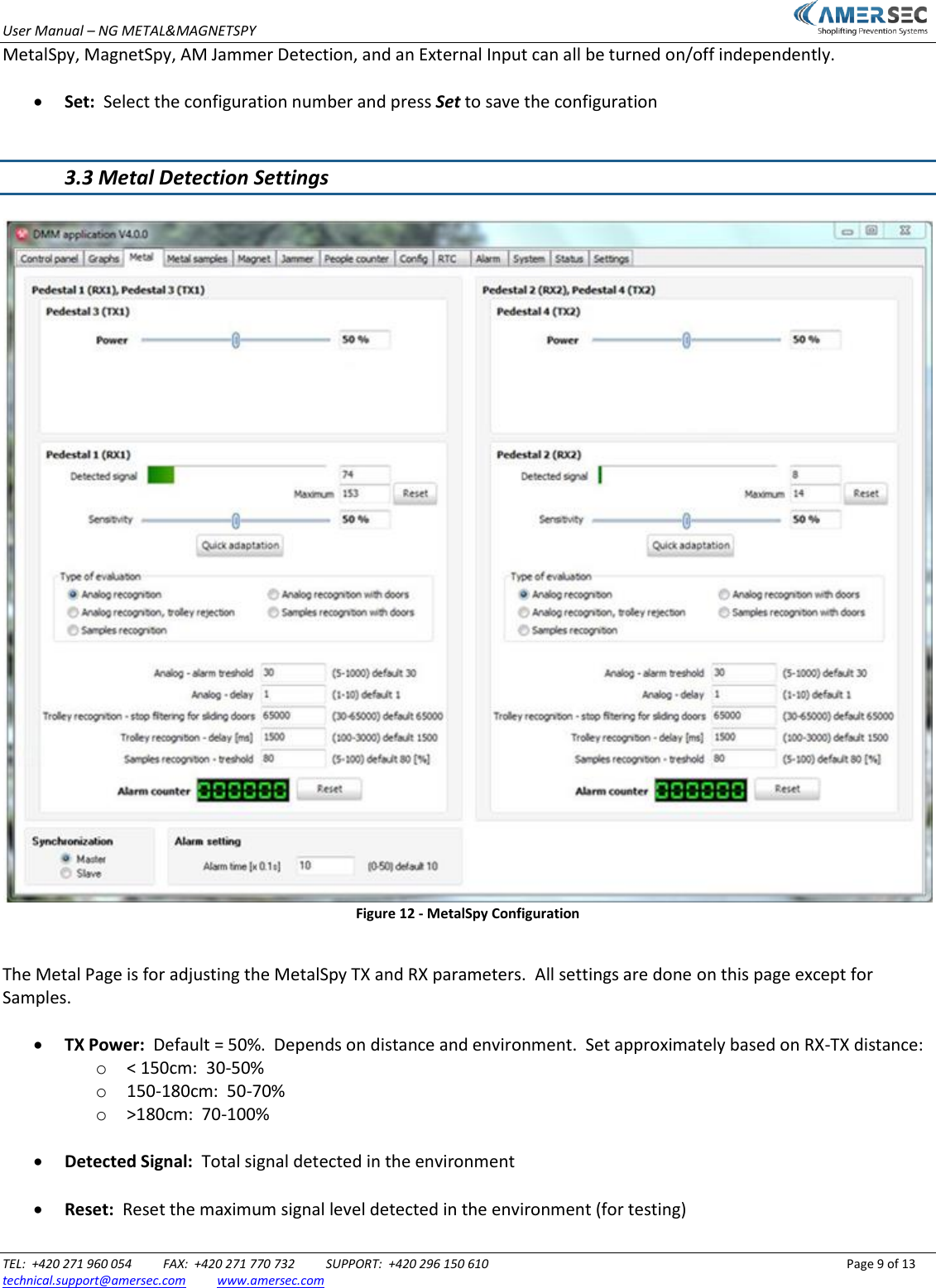
User Manual – NG METAL&MAGNETSPY                           TEL:  +420 271 960 054          FAX:  +420 271 770 732          SUPPORT:  +420 296 150 610                 Page 9 of 13 technical.support@amersec.com          www.amersec.com  MetalSpy, MagnetSpy, AM Jammer Detection, and an External Input can all be turned on/off independently.   Set:  Select the configuration number and press Set to save the configuration   3.3 Metal Detection Settings   Figure 12 - MetalSpy Configuration  The Metal Page is for adjusting the MetalSpy TX and RX parameters.  All settings are done on this page except for Samples.   TX Power:  Default = 50%.  Depends on distance and environment.  Set approximately based on RX-TX distance: o < 150cm:  30-50% o 150-180cm:  50-70% o >180cm:  70-100%   Detected Signal:  Total signal detected in the environment   Reset:  Reset the maximum signal level detected in the environment (for testing)
User Manual – NG METAL&MAGNETSPY                           TEL:  +420 271 960 054          FAX:  +420 271 770 732          SUPPORT:  +420 296 150 610                 Page 10 of 13 technical.support@amersec.com          www.amersec.com   Sensitivity:  Default = 50%.  RX sensitivity to moving metal objects and resistance to interfering signals   Quick Adaptation:  System will adapt immediately to current signal levels in the environment instead of waiting for slow adaptation (for testing purposes)   Type of Evaluation:  Sets the mode of operation of the MetalSpy RX.  Analog evaluation is the simplest mode of detecting foil bags.  However, when interference or false alarms from other objects is a problem, it can be better to use Samples Recognition.   Analog – Alarm Threshold:  Use the “Detected Signal RX1” (or RX2) on the Graphs page to help you set this threshold value.  When the signal exceeds this threshold, an alarm will occur.  This setting will have no effect in Samples Recognition mode.   Analog – Delay:  The metal signal must be present for longer than this time delay.  This can help to avoid false alarms from pulses in the environment or from slight bumps to the antenna.  Range is 0-1 second.  This setting will have no effect in Samples Recognition mode.   Trolley Recognition – stop filtering for sliding doors:  Threshold for large signals.  When the signal exceeds this high threshold, the alarm will be blocked.  The signal must be between the Analog alarm threshold and this threshold for an alarm to occur.  This setting will have no effect in Samples Recognition mode.   Trolley Recognition – Delay:  Works together with the previous setting.  The large trolley signal must be present for LONGER than this setting to be blocked.  This helps to prevent a foil bag from being blocked when it passes right beside an antenna (the signal will be very large).  A foil bag signal will pass by the system relatively fast compared to a trolley.  Range of this setting is 1-3 seconds.  This setting will have no effect in Samples Recognition mode.   Samples Recognition – threshold:  Used only for Samples Recognition mode.  Use the “Samples Recognition RX1” (or RX2) on the Graphs Page to help you set this value.  This is the percentage (5-100%) of how close the detected signal is to one of the “learned” and saved samples of a foil bag.  See section 4.6 for more details.   Alarm Setting:  Switch time of the MetalSpy alarm output relay(s).  Range is 0-5 seconds.   Synchronization:  Master/Slave setting for cable synchronization of multiple controller units.
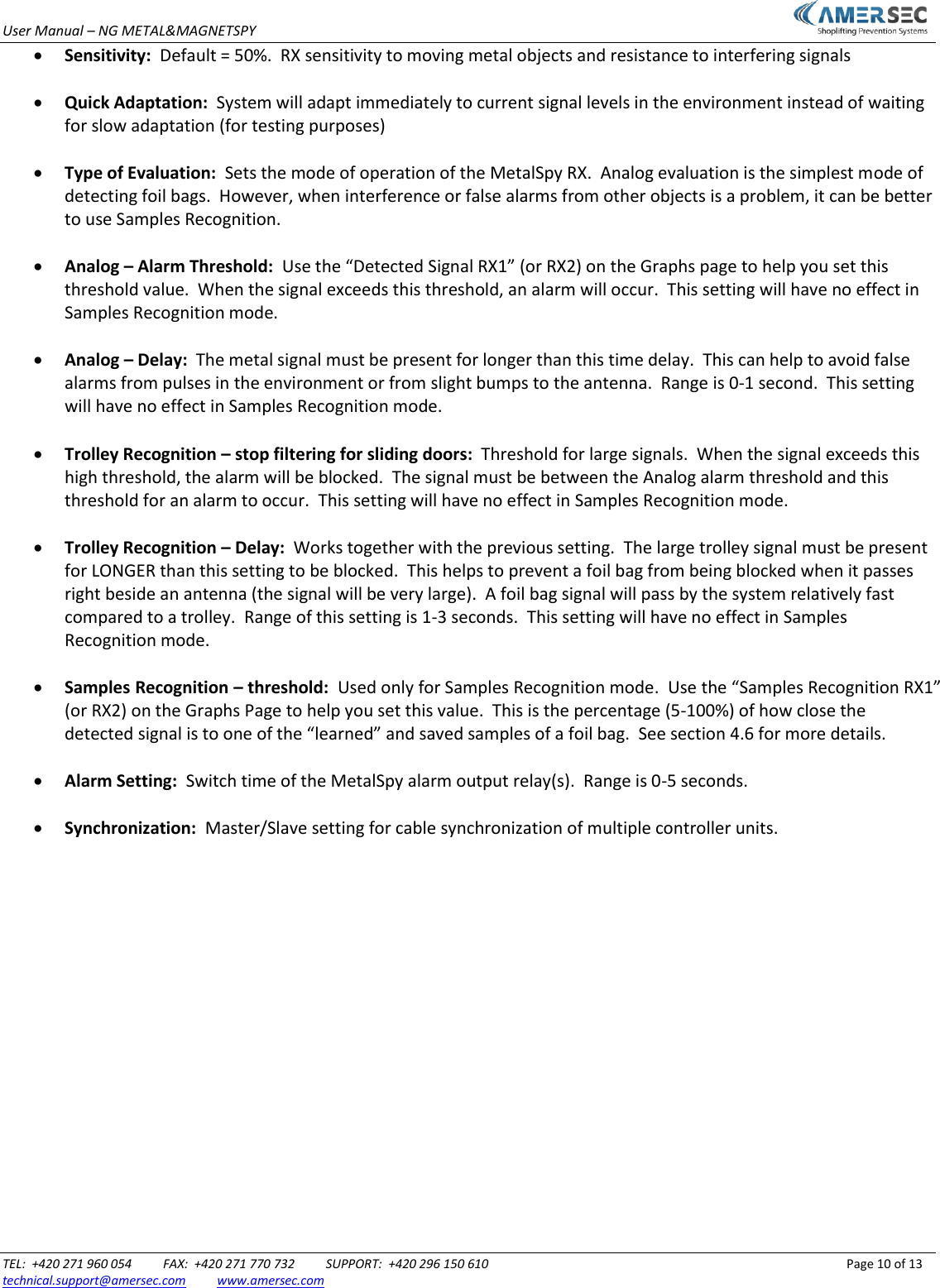
User Manual – NG METAL&MAGNETSPY                           TEL:  +420 271 960 054          FAX:  +420 271 770 732          SUPPORT:  +420 296 150 610                 Page 11 of 13 technical.support@amersec.com          www.amersec.com   3.4 Magnet Detection Settings   Figure 13 - MagnetSpy Settings The Magnet Page is for setting the MagnetSpy.  Only 2 settings are used for each pedestal.  The MagnetSpy operates by detecting moving magnetic fields.   Input Signal:  Total signal level in the surrounding environment   Detected Signal:  Signal of moving magnetic fields in the environment   Reset:  Resets the maximum detected magnetic signal   Threshold (solo):  Alarm threshold for the single pedestal, operating alone.  Decrease this value to make the system more sensitive   Threshold (zone):  Alarm threshold for 2 pedestals, operating together.  Decrease this value to make the system more sensitive   Alarm Time:  Switch time of the MagnetSpy alarm output relay(s).  Range is 0-5 seconds.
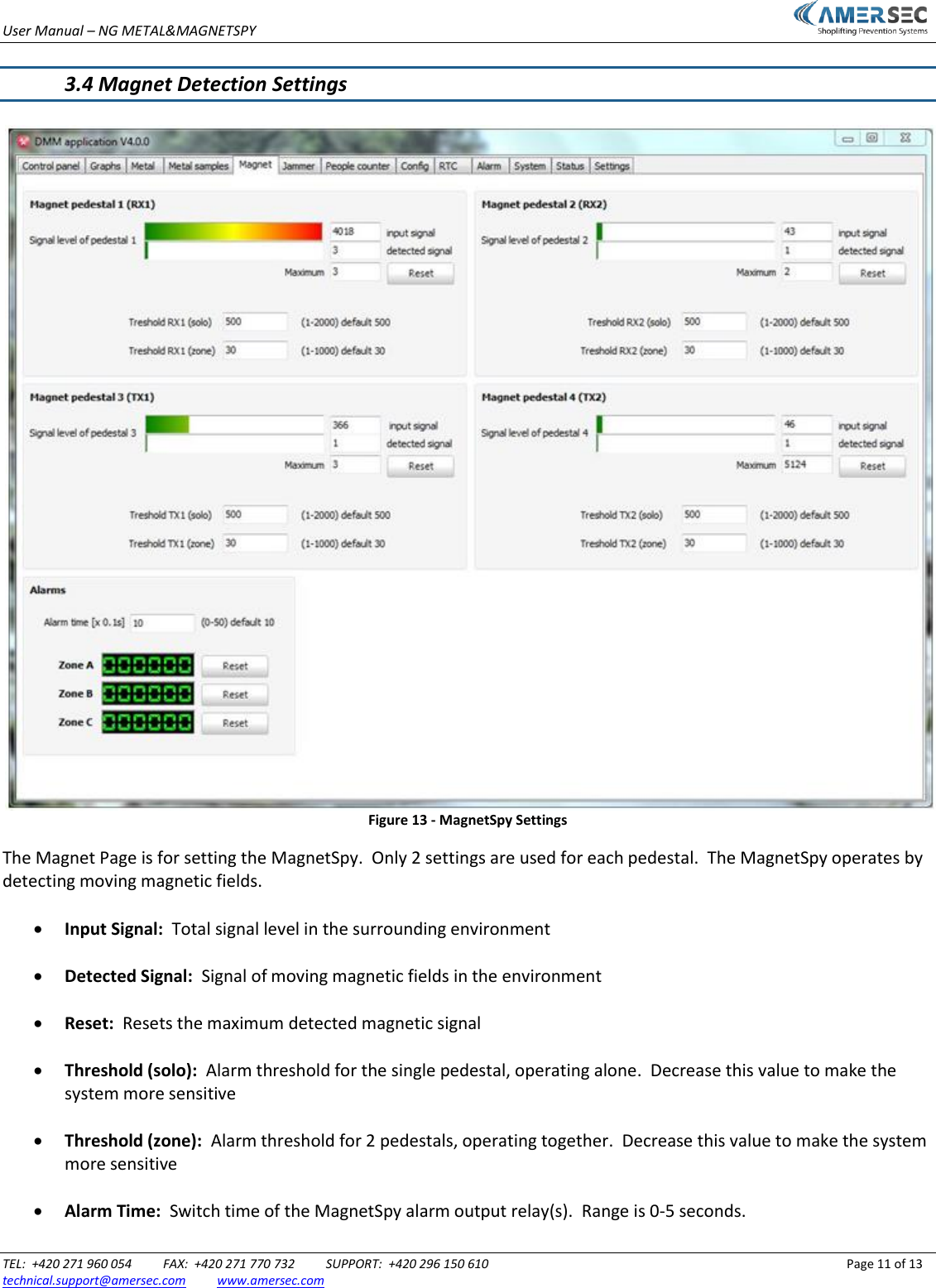
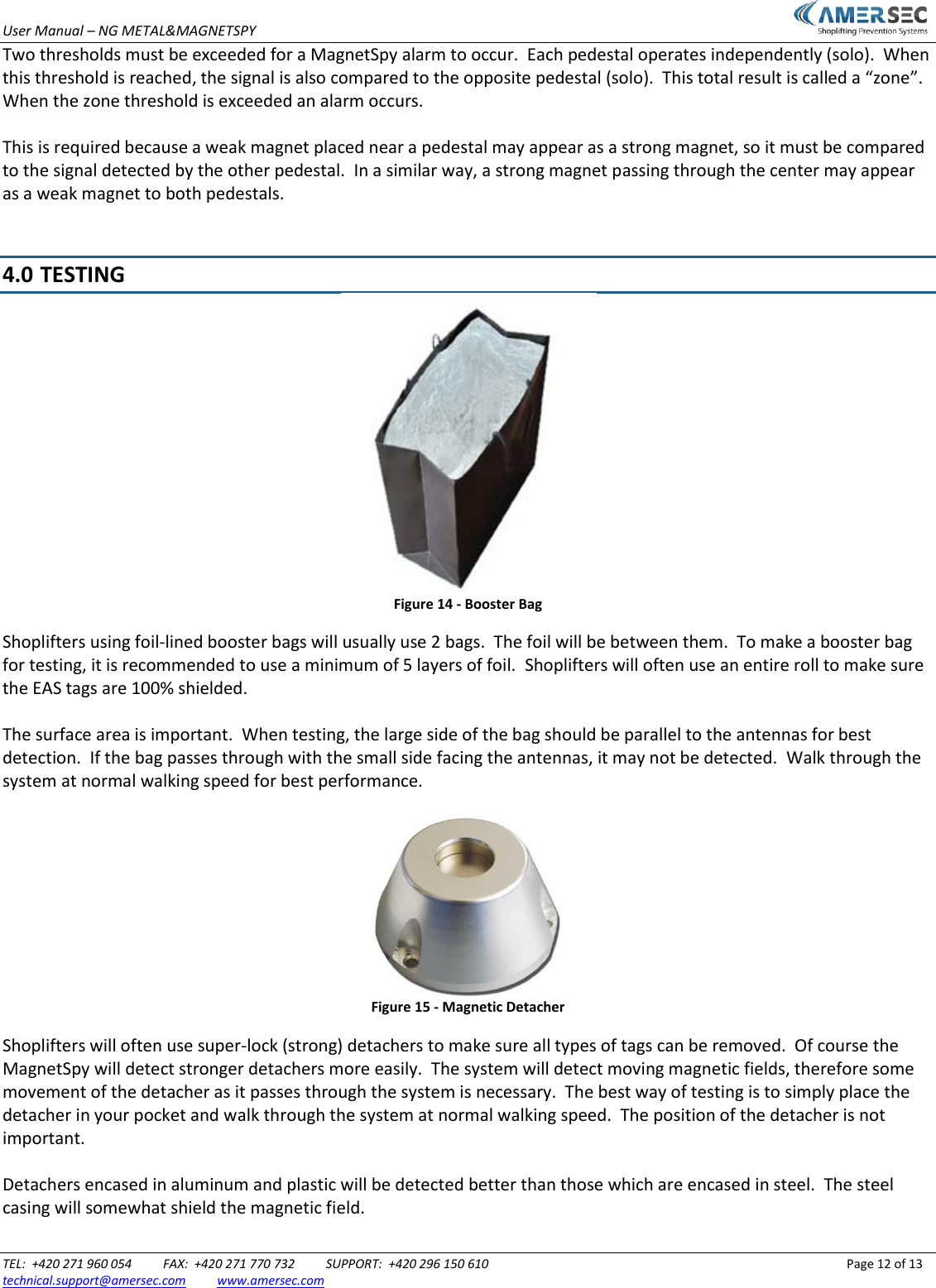
User Manual – NG METAL&MAGNETSPY                           TEL:  +420 271 960 054          FAX:  +420 271 770 732          SUPPORT:  +420 296 150 610                 Page 12 of 13 technical.support@amersec.com          www.amersec.com  Two thresholds must be exceeded for a MagnetSpy alarm to occur.  Each pedestal operates independently (solo).  When this threshold is reached, the signal is also compared to the opposite pedestal (solo).  This total result is called a “zone”.  When the zone threshold is exceeded an alarm occurs.  This is required because a weak magnet placed near a pedestal may appear as a strong magnet, so it must be compared to the signal detected by the other pedestal.  In a similar way, a strong magnet passing through the center may appear as a weak magnet to both pedestals.   4.0  TESTING  Figure 14 - Booster Bag Shoplifters using foil-lined booster bags will usually use 2 bags.  The foil will be between them.  To make a booster bag for testing, it is recommended to use a minimum of 5 layers of foil.  Shoplifters will often use an entire roll to make sure the EAS tags are 100% shielded.  The surface area is important.  When testing, the large side of the bag should be parallel to the antennas for best detection.  If the bag passes through with the small side facing the antennas, it may not be detected.  Walk through the system at normal walking speed for best performance.   Figure 15 - Magnetic Detacher Shoplifters will often use super-lock (strong) detachers to make sure all types of tags can be removed.  Of course the MagnetSpy will detect stronger detachers more easily.  The system will detect moving magnetic fields, therefore some movement of the detacher as it passes through the system is necessary.  The best way of testing is to simply place the detacher in your pocket and walk through the system at normal walking speed.  The position of the detacher is not important.  Detachers encased in aluminum and plastic will be detected better than those which are encased in steel.  The steel casing will somewhat shield the magnetic field.
User Manual – NG METAL&MAGNETSPY TEL:  +420 271 960 054       FAX:  +420 271 770 732       SUPPORT:  +420 296 150 610              Page 13 of 13 technical.support@amersec.com          www.amersec.com  5.0  TROUBLESHOOTING The system has low detection Decrease the Analog alarm threshold for MetalSpyDecrease the solo and zone thresholds for MagnetSpyIncrease RX Sensitivity for MetalSpyThe system is false-alarming Increase the Analog alarm threshold for MetalSpyIncrease the solo and zone thresholds for MagnetSpyUse Samples mode for MetalSpyMake sure pedestals are securely fixed to the floorThe system does not work at all Make sure an alarm is connected to the output relays, is properly wired, powered, and is enabled on the AlarmPageCheck the Status LED and Power LEDMake sure the cables are properly connectedThe system will not block the sliding/swinging doors Try making Trolley samples of the sliding/swinging doors in MetalSpy Samples modeMove the system farther away from the doors6.0 DECLARATION Operate the system only as described in these operating instructions.  Damage to hardware due to improper use will result in loss of warranty. WARNING!  Do not open the antenna or touch the electronic boards while system is powered on.  RISK OF ELECTRIC SHOCK! CAUTION!  When connecting or disconnecting cables make sure transmitters are switched off or power to system is off. CAUTION!  Switch off power when servicing the NG MMS hardware This product conforms with the requirements of the following harmonized standards for electromagnetic compatibility: - EN 55022: 2006 + A1: 2007; - EN 61000-3-2: 2006 + A1: 2009+A2: 2009; - EN 61000-3-3: 2008; - ETSI EN 300 330-1 V1.7.1: 2010 - ETSI EN 300 330-2 V1.3.1: 2006; - ETSI EN 301 489-1 V1.8.1: 2008; - ETSI EN 301 489-3 V1.4.1: 2003. This equipment has been tested and found to comply with the limits for a class A digital device, pursuant to part 15 of the FCC Rules. These limits are designed to provide reasonable protection against harmful interference when the equipment is operated in a commercial environment.  This equipment generates, uses, and can radiate radio frequency energy and, if not installed and used in accordance with the instruction's manual, may cause interference to radio communications.  Operation of this equipment in a residential area is likely to cause interference in which case the user will be required to correct the interference at his own expense.The user is cautioned that changes and modifications made to the equipment without approval of the manufacturer could void the user's authority to operate this equipment.

Navigation menu