Amgoo Telecom AM208 mobile phone User Manual AM208
Amgoo Telecom Co., Ltd. mobile phone AM208
User Manual

FCCID:UOSAM208


Please note
All the functions in this manual should
be operated in Standby Mode
Like the picture below.
Tips:
Press END go back to the
Standby Mode
(Standby Mode)

Make a call
Input the numbers, Press Send
Answer a call.
Press theSend
Tips:
*down Key to volume down..
*up Key to volume up.
*Press Left Soft Key >*to unlock the
keypad
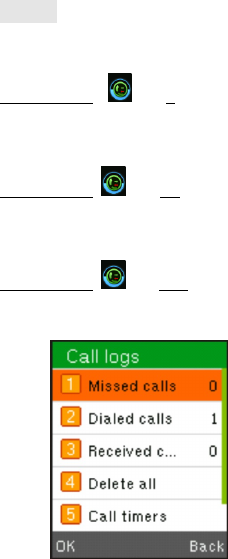
Call log
Missed
Left Soft Key> >ok>1
Dialed
Left Soft Key>>ok> 2
Received
Left Soft Key>>ok> 3

contacts
To browse the name card holder, store,
edit and delete the names and phone
numbers in the phone and SIM card.
Contact List
Left Soft Key>>ok
Group
Left Soft Key>>ok>Right Key

Message
To receive and send the message.
Write Message
Press left key
You could write new message by using this
function.
In box Left Soft Key>>ok >2
Store the SMS and Push message received
Out box Left Soft Key>>ok >3
Store the SMS you’ve sent in failure.
Drafts Left Soft Key>>ok >4
Store the SMS you’ve edited.
Sent box Left Soft Key>>ok >5
Store the SMS you’ve sent successfully.
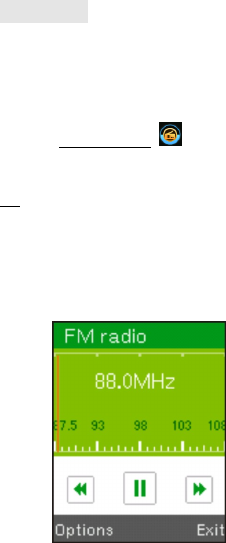
Multimedia
FM Radio
Please connect with the earphone You can
listen in to Fm radio freely.
Press Left Soft Key>>ok
Tip:
up Volume up
down Volume down
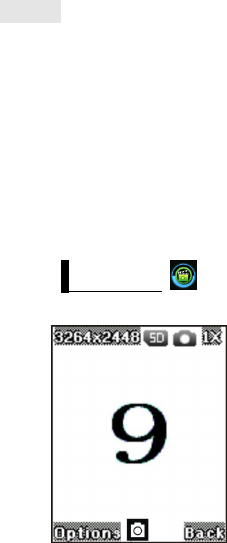
Camera
Select CAMERA on main menu to active it to
capturing mode.
Roll the phone to align the camera to the
picture.
Zoom in or out by pressing up or down
direction key. Then select snapshot key (OK
button) to capture the object.
Press Left Soft Key>>ok>1
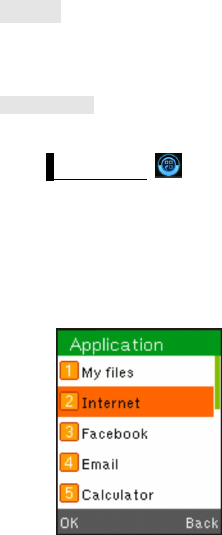
Internet
With the browser, you can view html web
pages on internet.
Data account
Access this menu to set GPRS,
Press Left Soft Key> >ok>2
*Depends on network support.
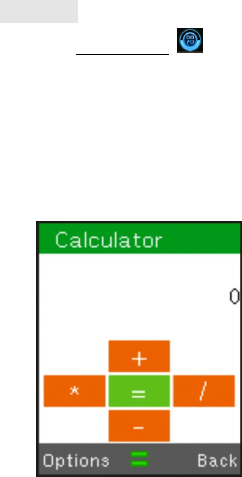
Calculator
Press Left Soft Key> >ok>5
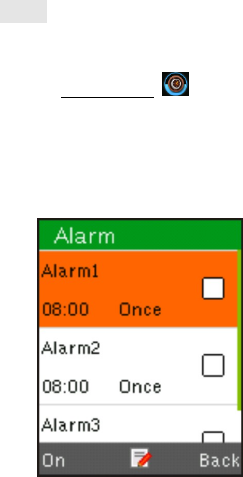
Alarm
You can setting the alarm by you phone
Press Left Soft Key> >ok

Calendar
To view date and add new schedule
for you working or live
Press Left Soft Key> >ok
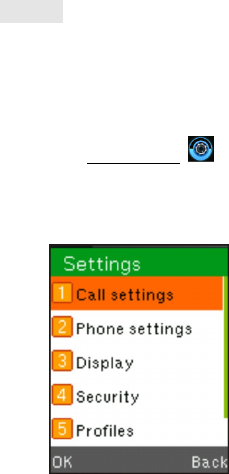
Settings
You can customize the settings, such as
time and date, language, call settings etc.
Tips:
PressLeft Soft Key> >ok

Bluetooth
Bluetooth is a short-range wireless
communication technology. Phones
or other devices with Bluetooth
capabilities can exchange information
wirelessly within a distance of about
10 meters. The Bluetooth devices
must be paired before the communi-
cation is performed.
Turning On Wi-Fi
Wi-Fi provides wireless Internet access
over distances of up to about 300 feet.
Press Home key > tap > Settings.
Click next to the Wi-Fi
menu to turn it on, click you can
turn off the Wi-Fi function.

Ring settings:
PressLeft Soft Key> >ok>5
Choose the Options To customize the
ring settings options>setting>OK

Thank You!


FCC RF EXPOSURE INFORMATION:
WARNING!! Read this information before using your phone
In August 1986 the Federal Communications Commission (FCC) of the United States with its
action in Report and Outer FCC 96-326 adopted an updated safety standard for human exposure
to radio frequency (RF) electromagnetic energy emitted by FCC regulated transmitters. Those
guidelines are consistent with the safety standard previously set by both U.S. and international
standards bodies. The design of this phone complies with the FCC guidelines and these
international standards. Use only the supplied or an approved antenna. Unauthorized antennas
modifications, or attachments could impair call quality, damage the phone, or result in violation
of FCC regulations. Do not use the phone with a damaged antenna. If a damaged antenna comes
into contact with the skin, a minor burn may result. Please contact your local dealer for
replacement antenna.
BODY-WORN OPERATION:
This device was tested for typical body-worn operations with the back of the phone kept 10mm
from the body. To comply with FCC RF exposure requirements, a minimum separation distance
of 10mm must be maintained between the user's body and the back of the phone, including the
antenna. Third-party belt-clips, holsters and similar accessories containing metallic components
shall not be used. Body-worn accessories that cannot maintain 10mm separation distance between
the user’s body and the back of the phone, and have not been tested for typical body-worn
operations may not comply with FCC RF exposure limits and should be avoided.
For more information about RF exposure, please visit the FCC website at www.fcc.gov
Your wireless handheld portable telephone is a low power radio transmitter and receiver. When
it is ON, it receives and also sends out radio frequency (RF) signals. In August, 1996, the Federal
Communications Commissions (FCC) adopted RF exposure guidelines with safety levels for
hand-held wireless phones. Those guidelines are consistent with the safety standards previously
set by both U.S. and international standards bodies:
<ANSIC95.1> (1992) / <NCRP Report 86> (1986) / <ICIMIRP> (1996)
Those standards were based on comprehensive and periodic evaluations of the relevant
scientific literature. For example, over 120 scientists, engineers, and physicians from universities,
government health agencies, and industry reviewed the available body of research to develop
the ANSI Standard (C95.1). Nevertheless, we recommend that you use a hands-free kit with
your phone (such as an earpiece or headset) to avoid potential exposure to RF energy. The
design of your phone complies with the FCC guidelines (and those standards).
Use only the supplied or an approved replacement antenna. Unauthorized antennas,
modifications, or attachments could damage the phone and may violate FCC regulations.
NORMAL POSITION:
Hold the phone as you would any other telephone with the antenna pointed up and over your
shoulder.
RF Exposure Information:
This product is compliance to FCC RF Exposure requirements and refer to FCC website search for FCC
ID: UOSAM208 to gain further information include SAR Values.
This device complies with part 15 of the FCC rules. Operation is subject to the following two
conditions:
(1) this device may not cause harmful interference, and
(2) this device must accept any interference received, including interference that may
cause undesired operation.
NOTE: The manufacturer is not responsible for any radio or TV interference caused by
unauthorized modifications to this equipment. Such modifications could void the user’s
authority to operate the equipment.
NOTE: This equipment has been tested and found to comply with the limits for a Class B
digital device, pursuant to part 15 of the FCC Rules. These limits are designed to provide
reasonable protection against harmful interference in a residential installation. This equipment
generates uses and can radiate radio frequency energy and, if not installed and used in
accordance with the instructions, may cause harmful interference to radio communications.
However, there is no guarantee that interference will not occur in a particular installation. If
this equipment does cause harmful interference to radio or television reception, which can be
determined by turning the equipment off and on, the user is encouraged to try to correct the
interference by one or more of the following measures:
- Reorient or relocate the receiving antenna.
- Increase the separation between the equipment and receiver.
-Connect the equipment into an outlet on a circuit different from that to which the receiver is
connected.
-Consult the dealer or an experienced radio/TV technician for help
Do not use the device with the environment which below minimum -10℃ or over maximum
50℃, the device may not work.
Changes or modifications to this unit not expressly approved by the party responsible for
compliance could void the user’s authority to operate the equipment.