Amgoo Telecom AM86 Mobile Phone User Manual AM86 V01 ok

Amgoo Telecom Co., Ltd. Mobile Phone AM86 V01 ok

Users Manual

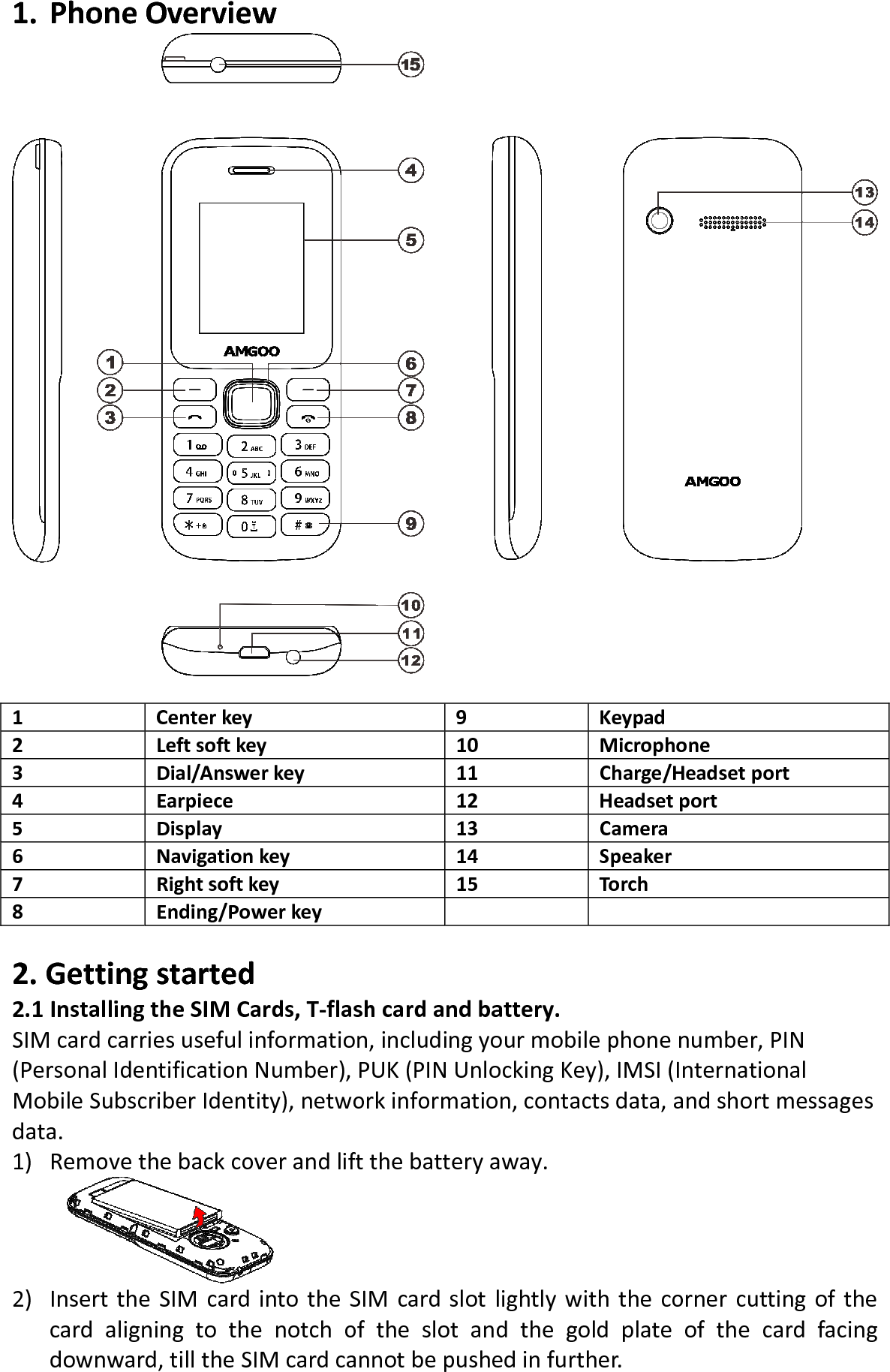
1. PhoneOverview1Centerkey9Keypad2Leftsoftkey10 Microphone3Dial/Answerkey11 Charge/Headsetport4Earpiece12 Headsetport5Display13 Camera6Navigationkey14 Speaker7Rightsoftkey15 Torch8Ending/Powerkey2.Gettingstarted2.1InstallingtheSIMCards,T‐flashcardandbattery.SIMcardcarriesusefulinformation,includingyourmobilephonenumber,PIN(PersonalIdentificationNumber),PUK(PINUnlockingKey),IMSI(InternationalMobileSubscriberIdentity),networkinformation,contactsdata,andshortmessagesdata.1) Removethebackcoverandliftthebatteryaway.2) InserttheSIMcardintotheSIMcardslotlightlywiththecornercuttingofthecardaligningtothenotchoftheslotandthegoldplateofthecardfacingdownward,tilltheSIMcardcannotbepushedinfurther.

Navigation menu