Amgoo Telecom AM86B Mobile Phone User Manual 3 ok

Amgoo Telecom Co., Ltd. Mobile Phone 3 ok

User manual

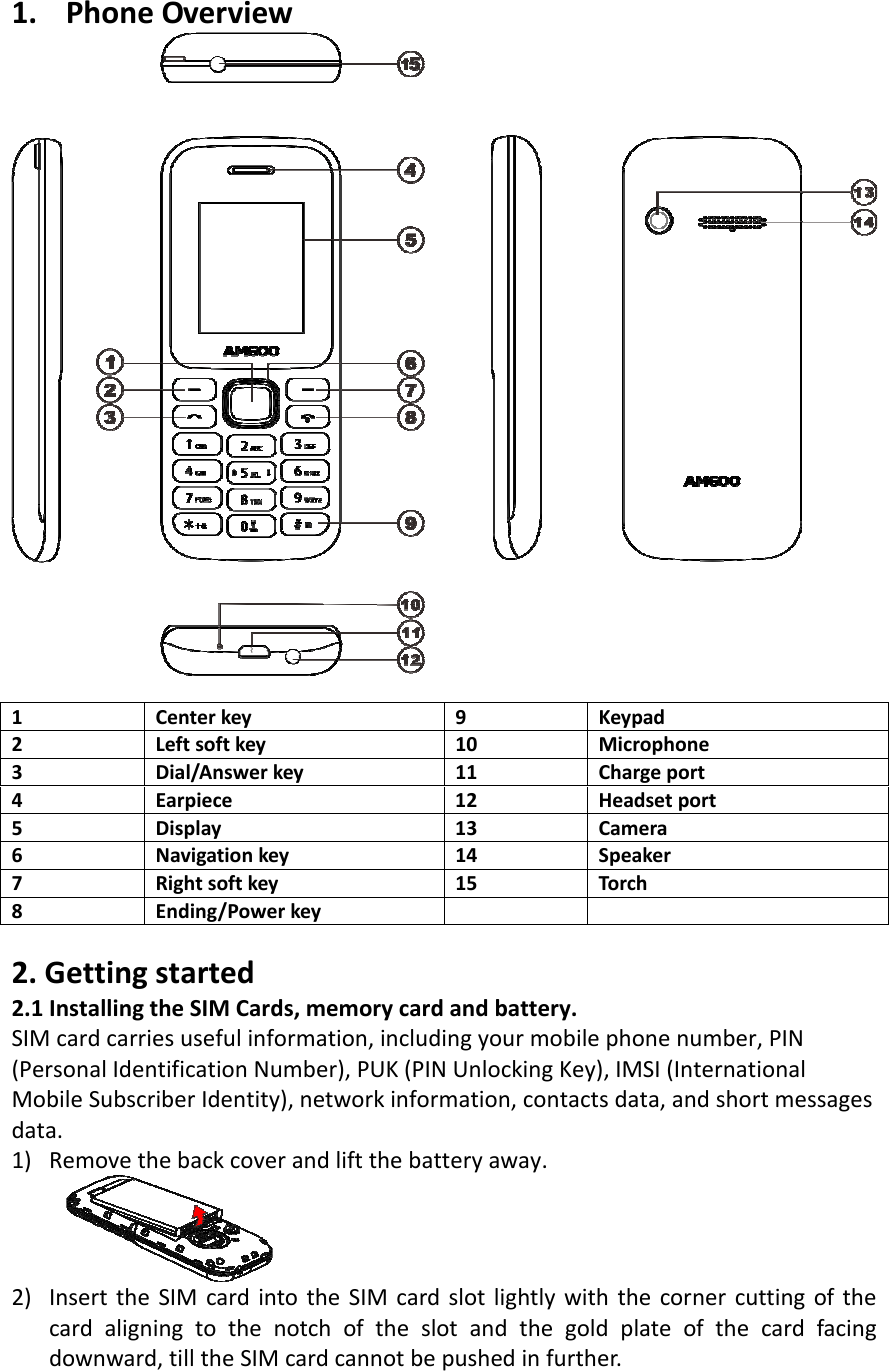
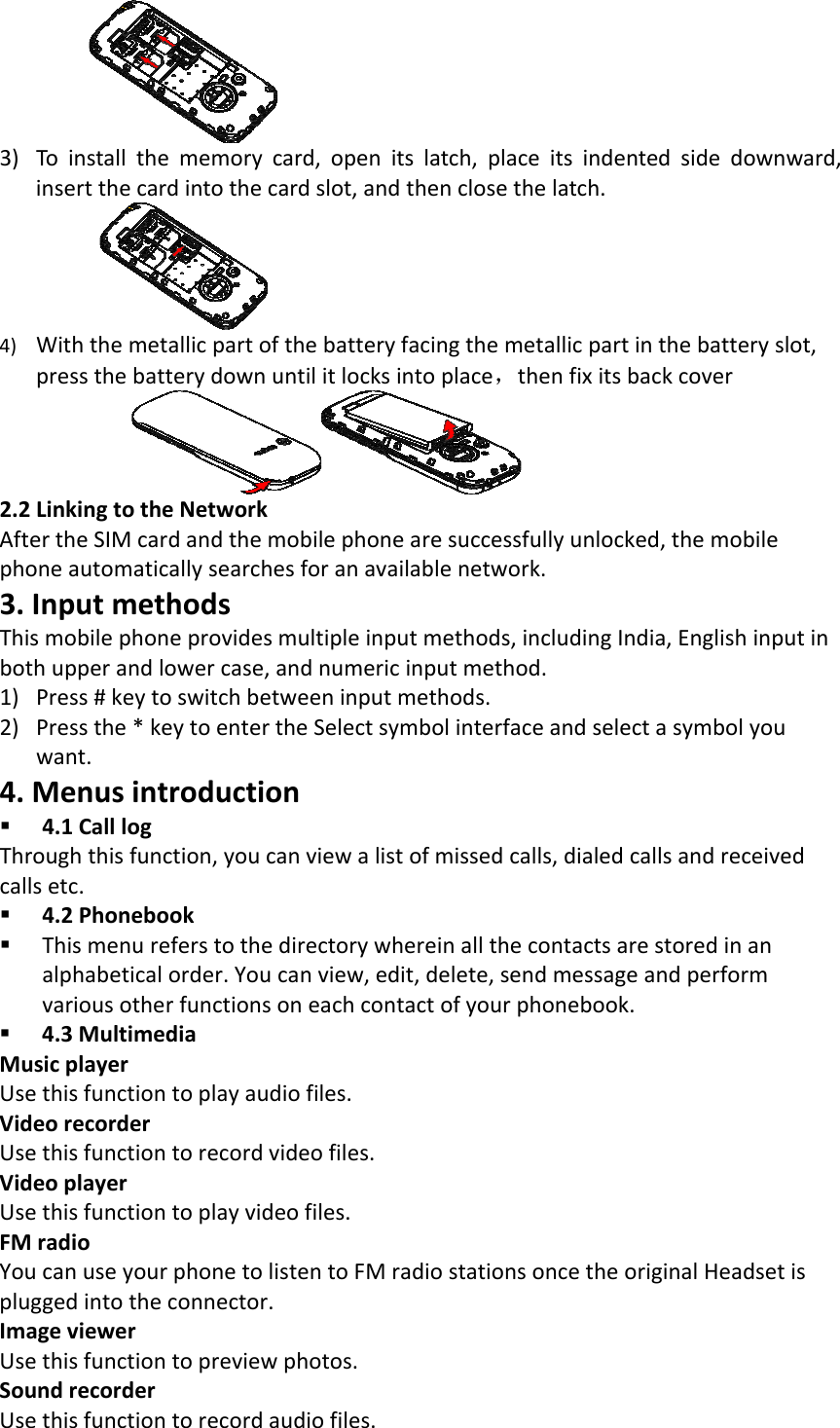
1. PhoneOverview1Centerkey9Keypad2Leftsoftkey10 Microphone3Dial/Answerkey11 Charge port4Earpiece12 Headsetport5Display13 Camera6Navigationkey14 Speaker7Rightsoftkey15 Torch8Ending/Powerkey2.Gettingstarted2.1InstallingtheSIMCards,memorycardandbattery.SIMcardcarriesusefulinformation,includingyourmobilephonenumber,PIN(PersonalIdentificationNumber),PUK(PINUnlockingKey),IMSI(InternationalMobileSubscriberIdentity),networkinformation,contactsdata,andshortmessagesdata.1) Removethebackcoverandliftthebatteryaway.2) InserttheSIMcardintotheSIMcardslotlightlywiththecornercuttingofthecardaligningtothenotchoftheslotandthegoldplateofthecardfacingdownward,tilltheSIMcardcannotbepushedinfurther.
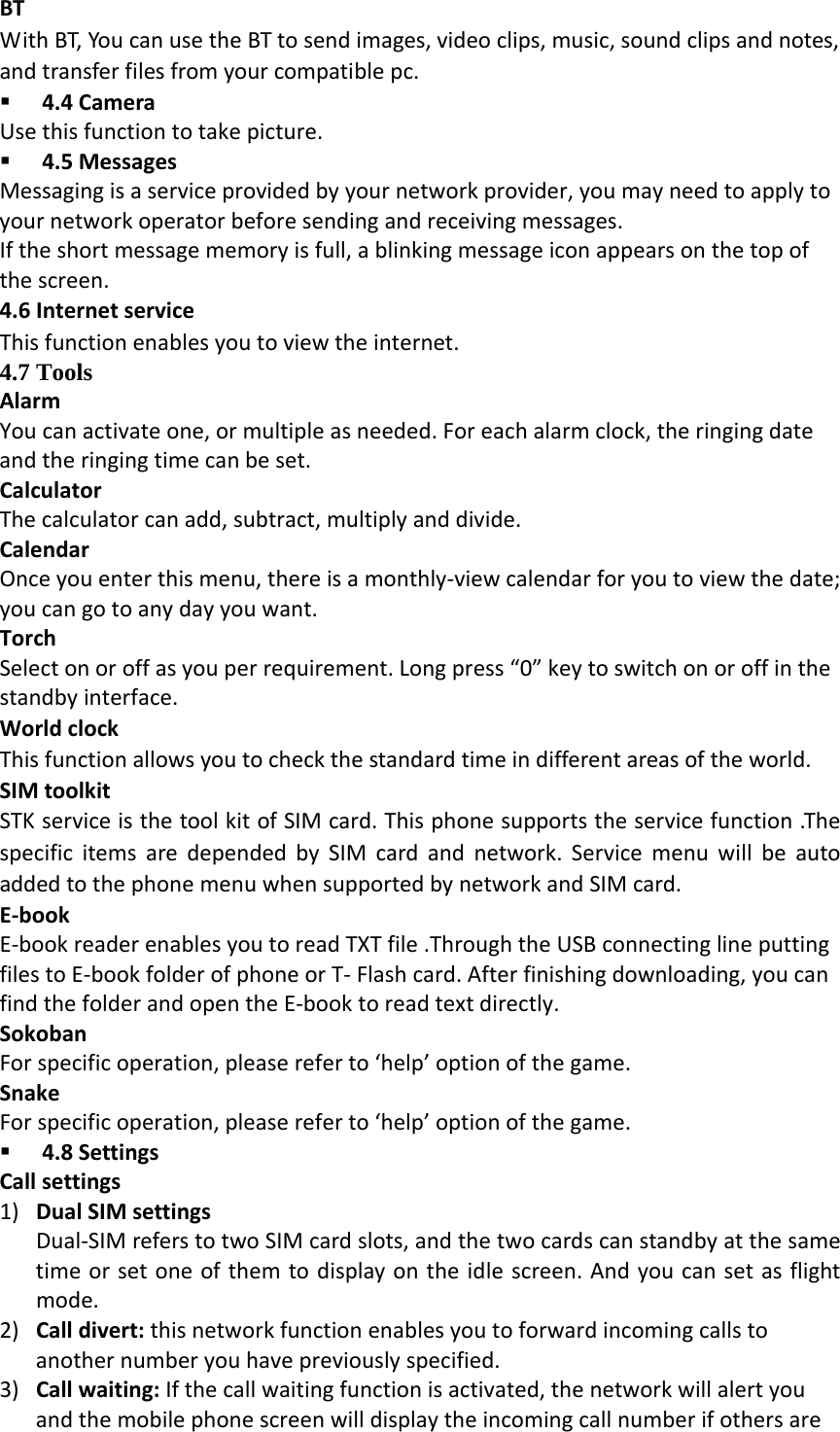
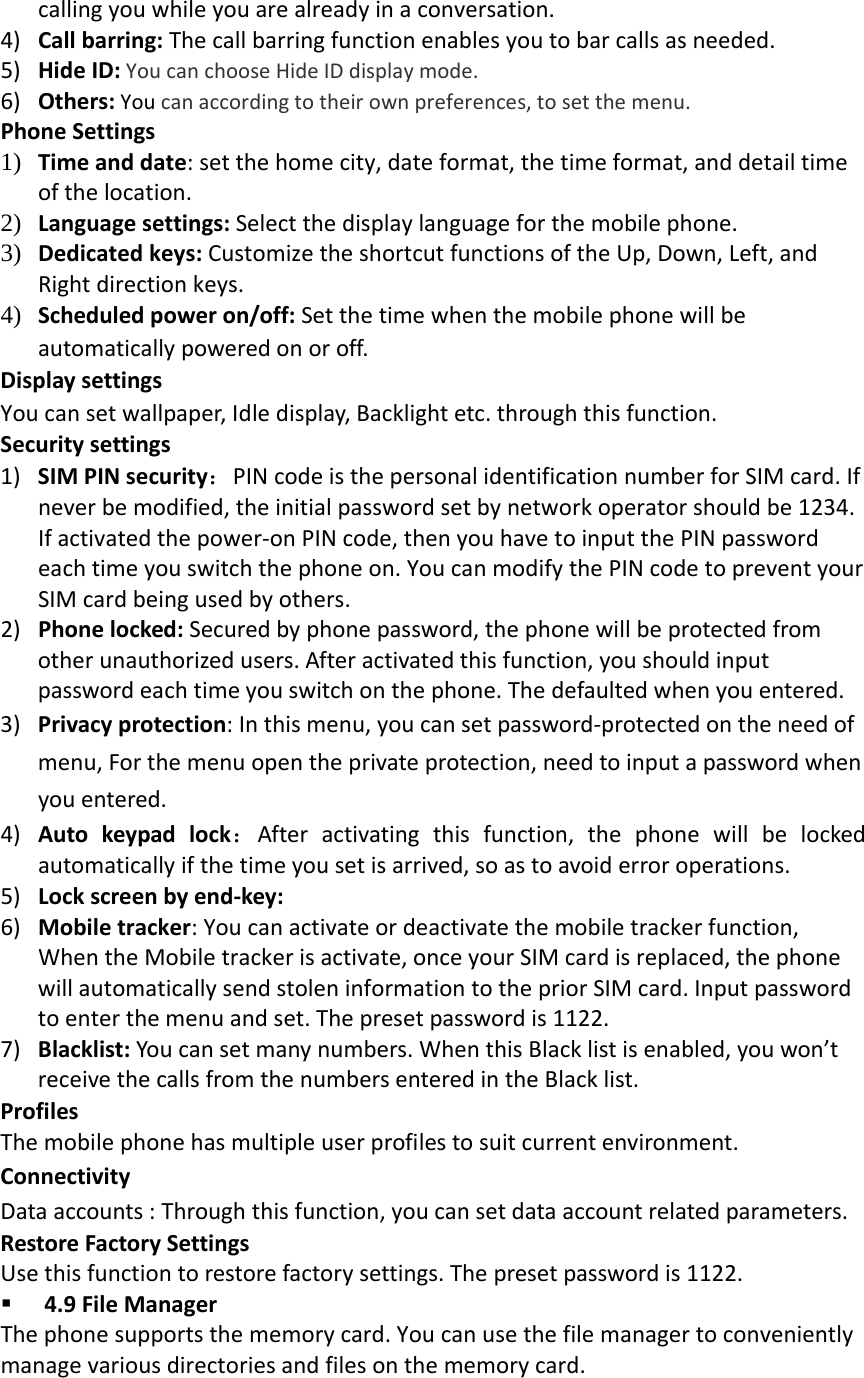
3) Toinstallthememorycard,openitslatch,placeitsindentedsidedownward,insertthecardintothecardslot,andthenclosethelatch.4) Withthemetallicpartofthebatteryfacingthemetallicpartinthebatteryslot,pressthebatterydownuntilitlocksintoplace,thenfixitsbackcover 2.2LinkingtotheNetworkAftertheSIMcardandthemobilephonearesuccessfullyunlocked,themobilephoneautomaticallysearchesforanavailablenetwork.3.InputmethodsThismobilephoneprovidesmultipleinputmethods,includingIndia,Englishinputinbothupperandlowercase,andnumericinputmethod.1) Press#keytoswitchbetweeninputmethods.2) Pressthe*keytoentertheSelectsymbolinterfaceandselectasymbolyouwant.4.Menusintroduction 4.1CalllogThroughthisfunction,youcanviewalistofmissedcalls,dialedcallsandreceivedcallsetc. 4.2Phonebook Thismenureferstothedirectorywhereinallthecontactsarestoredinanalphabeticalorder.Youcanview,edit,delete,sendmessageandperformvariousotherfunctionsoneachcontactofyourphonebook. 4.3MultimediaMusicplayerUsethisfunctiontoplayaudiofiles.VideorecorderUsethisfunctiontorecordvideofiles.VideoplayerUsethisfunctiontoplayvideofiles.FMradioYoucanuseyourphonetolistentoFMradiostationsoncetheoriginalHeadsetispluggedintotheconnector.ImageviewerUsethisfunctiontopreviewphotos.SoundrecorderUsethisfunctiontorecordaudiofiles.
BTWithBT,YoucanusetheBTtosendimages,videoclips,music,soundclipsandnotes,andtransferfilesfromyourcompatiblepc. 4.4CameraUsethisfunctiontotakepicture. 4.5MessagesMessagingisaserviceprovidedbyyournetworkprovider,youmayneedtoapplytoyournetworkoperatorbeforesendingandreceivingmessages.Iftheshortmessagememoryisfull,ablinkingmessageiconappearsonthetopofthescreen.4.6InternetserviceThisfunctionenablesyoutoviewtheinternet.4.7 Tools AlarmYoucanactivateone,ormultipleasneeded.Foreachalarmclock,theringingdateandtheringingtimecanbeset.CalculatorThecalculatorcanadd,subtract,multiplyanddivide.CalendarOnceyouenterthismenu,thereisamonthly‐viewcalendarforyoutoviewthedate;youcangotoanydayyouwant.TorchSelectonoroffasyouperrequirement.Longpress“0”keytoswitchonoroffinthestandbyinterface.WorldclockThisfunctionallowsyoutocheckthestandardtimeindifferentareasoftheworld.SIMtoolkitSTKserviceisthetoolkitofSIMcard.Thisphonesupportstheservicefunction.ThespecificitemsaredependedbySIMcardandnetwork.ServicemenuwillbeautoaddedtothephonemenuwhensupportedbynetworkandSIMcard.E‐bookE‐bookreaderenablesyoutoreadTXTfile.ThroughtheUSBconnectinglineputtingfilestoE‐bookfolderofphoneorT‐Flashcard.Afterfinishingdownloading,youcanfindthefolderandopentheE‐booktoreadtextdirectly.SokobanForspecificoperation,pleasereferto‘help’optionofthegame.SnakeForspecificoperation,pleasereferto‘help’optionofthegame. 4.8SettingsCallsettings1) DualSIMsettingsDual‐SIMreferstotwoSIMcardslots,andthetwocardscanstandbyatthesametimeorsetoneofthemtodisplayontheidlescreen.Andyoucansetasflightmode.2) Calldivert:thisnetworkfunctionenablesyoutoforwardincomingcallstoanothernumberyouhavepreviouslyspecified.3) Callwaiting:Ifthecallwaitingfunctionisactivated,thenetworkwillalertyouandthemobilephonescreenwilldisplaytheincomingcallnumberifothersare
callingyouwhileyouarealreadyinaconversation.4) Callbarring:Thecallbarringfunctionenablesyoutobarcallsasneeded.5) HideID:YoucanchooseHideIDdisplaymode.6) Others:Youcanaccordingtotheirownpreferences,tosetthemenu.PhoneSettings1) Timeanddate:setthehomecity,dateformat,thetimeformat,anddetailtimeofthelocation.2) Languagesettings:Selectthedisplaylanguageforthemobilephone.3) Dedicatedkeys:CustomizetheshortcutfunctionsoftheUp,Down,Left,andRightdirectionkeys.4) Scheduledpoweron/off:Setthetimewhenthemobilephonewillbeautomaticallypoweredonoroff.DisplaysettingsYoucansetwallpaper,Idledisplay,Backlightetc.throughthisfunction.Securitysettings1) SIMPINsecurity:PINcodeisthepersonalidentificationnumberforSIMcard.Ifneverbemodified,theinitialpasswordsetbynetworkoperatorshouldbe1234.Ifactivatedthepower‐onPINcode,thenyouhavetoinputthePINpasswordeachtimeyouswitchthephoneon.YoucanmodifythePINcodetopreventyourSIMcardbeingusedbyothers.2) Phonelocked:Securedbyphonepassword,thephonewillbeprotectedfromotherunauthorizedusers.Afteractivatedthisfunction,youshouldinputpasswordeachtimeyouswitchonthephone.Thedefaultedwhenyouentered.3) Privacyprotection:Inthismenu,youcansetpassword‐protectedontheneedofmenu,Forthemenuopentheprivateprotection,needtoinputapasswordwhenyouentered.4) Autokeypadlock:Afteractivatingthisfunction,thephonewillbelockedautomaticallyifthetimeyousetisarrived,soastoavoiderroroperations.5) Lockscreenbyend‐key:6) Mobiletracker:Youcanactivateordeactivatethemobiletrackerfunction,WhentheMobiletrackerisactivate,onceyourSIMcardisreplaced,thephonewillautomaticallysendstoleninformationtothepriorSIMcard.Inputpasswordtoenterthemenuandset.Thepresetpasswordis1122.7) Blacklist:Youcansetmanynumbers.WhenthisBlacklistisenabled,youwon’treceivethecallsfromthenumbersenteredintheBlacklist.ProfilesThemobilephonehasmultipleuserprofilestosuitcurrentenvironment.ConnectivityDataaccounts:Throughthisfunction,youcansetdataaccountrelatedparameters.RestoreFactorySettingsUsethisfunctiontorestorefactorysettings.Thepresetpasswordis1122. 4.9FileManagerThephonesupportsthememorycard.Youcanusethefilemanagertoconvenientlymanagevariousdirectoriesandfilesonthememorycard.
 5.AddendumCommonfaultdiagnosisFaultphenomenonpossiblereasonsCannotturnonThebatteryisdischarged.ChargeitwithelectricityWrongSIMCardSIMcardsmudgy,cleantheSIMcard.ReinstalltheSIMcard.SIMcardhasbeendamaged,replacetheSIMcard。ReceptionbadCheckonthescreenofthesignalstrengthindicator,andthisisthenumberofsymbolsinthisfor5casesaidthestrongsignal,2casesaidtheweaksignalPhonecan'tdialyoumaysetthehidethemachinenumber,butyournetworkoperatordoesnotprovidethisservice;mayhaveastronginterferenceenvironmentaroundsignal;mayyouactivatethecallbarringfunction;mayyouactivatetheline2,butyournetworkoperatordoesnotprovidethisserviceBatterycan’tchargemayhaveexcessivedischargebattery,chargerneededtoconnectafteraperiodoftimetocharge;batteryperformancehavebeenworse;Unabletoconnecttothenetworksignalistooweak,oraroundtheradiointerferenceSIMcardisinstalledcorrectly,whethercontactundesirableorSIMcardhasbeendamaged?SuchastheSIMcardisdamaged,pleaseyouconsultationnetworkserviceoperatorsPhotographstoodarkbrightnesssetlow;environmentlightaroundadark;PhotographstoovagueShootinginastateofmotionobject;Presstheshuttermomentcellphonehasaslightshaking;DarkCan'tenterservicemenuMaybeyourSIMcarddoesnotsupportservicesSafetyprecautions:•Useawirelesshands‐freesystem(Headphone,headset)withalowpowerBluetoothemitter•MakesurethecellphonehasalowSAR•Keepyourcallsshortorsendatextmessage(SMS)instead.Thisadviceappliesespeciallytochildren,adolescentsandpregnantwomen•UsecellphonewhenthesignalqualityisgoodPeoplehavingactivemedicalimplantsshouldpreferablykeepthecellphoneatleast15cmawayfromtheimplantDo’sandDon’tsfordisposale‐wasteDo’s:•EnsurethatanAuthorizedPersonrepairsyourproducts•CallOurLocalAuthorizedCollectionCenterstoDisposeproducts•Alwaysdropyourusedelectronicproducts,batteriesoranyaccessoriesthereofaftertheendoftheirlifeatnearestAuthorizedCollectionPointorCollectionCenter.
•Separatethepackagingmaterialaccordingtoresponsiblewastedisposaloptionsandsortingforrecycling.•Alwaysremovethebatteryfromtheproduct,whenyoudonotintendtousetheproductanymoreitinfuture.Don’ts:•DonotDismantleyourProductonyourown•Donotgiveyoure‐wastetoKabbadiWala/ScrapDealer/RagPickers.•Donotdispose‐offthee‐wasteinlandfills•NeverdumpE‐wasteingarbagebins.•Donotdisposeofyourproductatmunicipalwastebinsorrooms.•Donotthrowusedbatteriesintohouseholdwaste.ConsequencesofimproperhandlinganddisposalofE‐Waste•Improperdisposalofwastepreventsnaturalresourcesfrombeingre‐used.•Somewastecontainshazardouschemicalsandifnotdisposedofproperlymayreleasetoxinsintothesoilandwater,andalsoreleasesgreenhousegasesintotheenvironment•Ife‐wasteisnotproperlydisposedof,itcanthreattothehealthandwell‐beingofhumansandanimalsanditalsohasadverseeffectontheenvironment.•Placingofbatteriesordevicesonorinheatingdevices,suchasmicrowave,ovens,stoves,orradiatorsandimproperdisposalofbatteriesmayleadtoexplosion.•Ifthebatteryterminalsareincontactwithmetalobjects,itmaycauseafire.FCCCA AnyChangesormodificationsnotexpresslyapprovedbythepartyresponsibleforcompliancecouldvoidtheuser'sauthoritytooperatetheequipment. Thisdevicecomplieswithpart15oftheFCCRules.Operationissubjecttothefollowingtwoconditions:(1)Thisdevicemaynotcauseharmfulinterference,and(2)thisdevicemustacceptanyinterferencereceived,includinginterferencethatmaycauseundesiredoperation. SpecificAbsorptionRate(SAR)informationSARtestsareconductedusingstandardoperatingpositionsacceptedbytheFCCwiththephonetransmittingatitshighestcertifiedpowerlevelinalltestedfrequencybands,althoughtheSARisdeterminedatthehighestcertifiedpowerlevel,theactualSARlevelofthephonewhileoperatingcanbewellbelowthemaximumvalue,ingeneral,thecloseryouaretoawirelessbasestationantenna,Beforeanewmodelphoneisaavailableforsaletothepublic,itmustbetestedandcertifiedtotheFCCthatitdoesnotexceedtheexposurelimitestablishedbytheFCC,Testsforeachphoneareperformedinpositionsandlocations(e.g.attheearandwornonthebody)asrequiredbytheFCC.Forbodywornoperation,thismodelphonehasbeentestedandmeetstheFCCRFexposureguidelineswhenusedwithanaccessorydesignatedforthisproductorwhenusedwithanaccessorythatContainsnometalandthatpositionsthehandsetaminimumof0.5cmfromthebody.Non‐compliancewiththeaboverestrictionsmayresultinviolationofRFexposureguidelines.

Navigation menu