Gx Serial
2016-06-18
: And Mercury Gx Serial gx serial manuals uploads wp-content
Open the PDF directly: View PDF  .
.
Page Count: 12
65
16. RS-232C SERIAL INTERFACE / EXTERNAL INPUT
RS-232C
The balance is a DCE device. Connect the balance to a personal computer (DTE), using a straight
through cable or a modem cable.
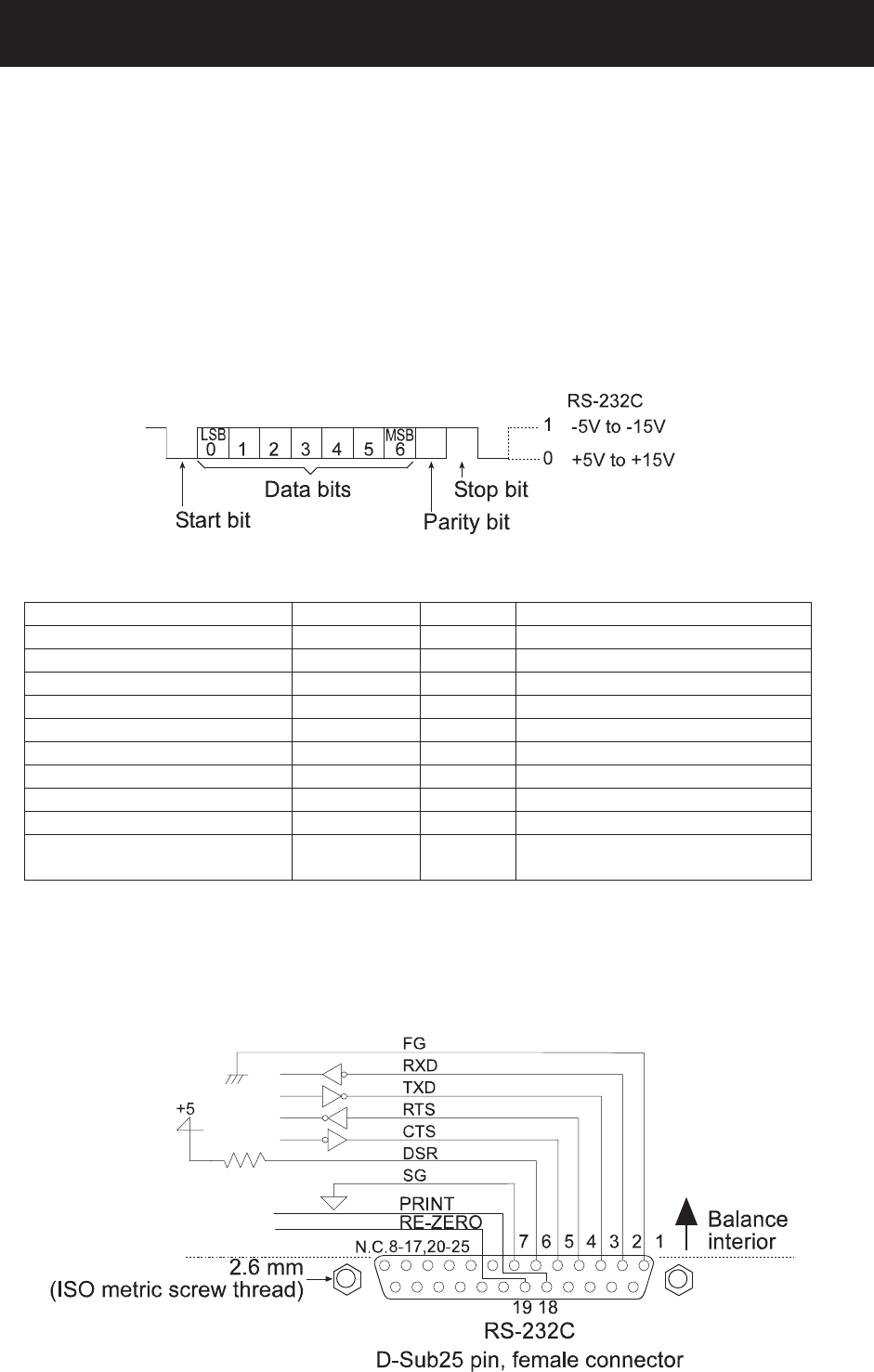
Transmission system : EIA RS-232C
Transmission form : Asynchronous, bi-directional, half duplex
Data format : Baud rate : 600, 1200, 2400, 4800, 9600 bps
Data bits : 7 or 8 bits
Parity : Even, Odd (Data bits 7 bits)
None (Data bits 8 bits)
Stop bit : 1 bit
Code : ASCII
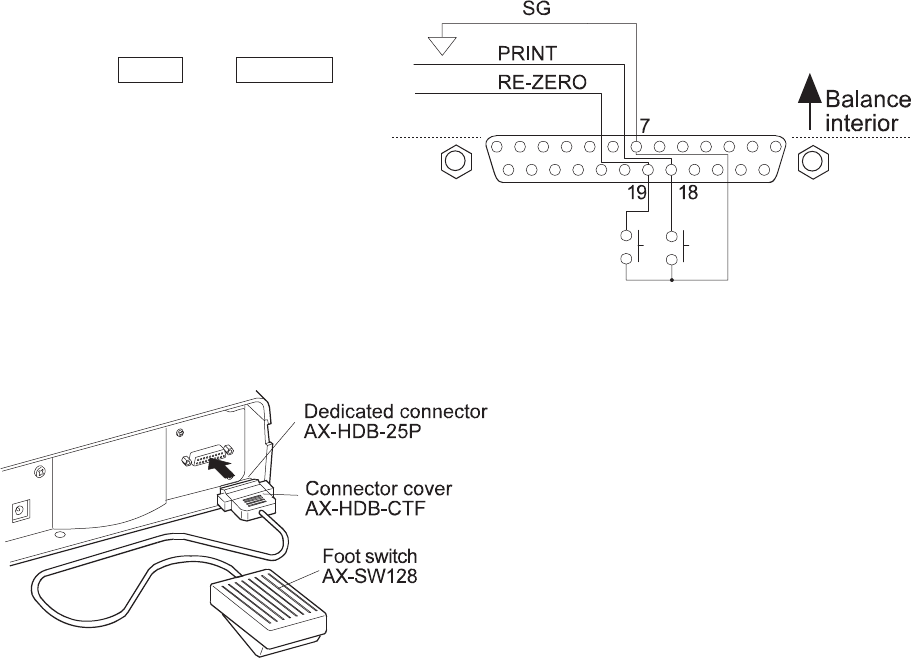
Pin connections
Pin No. Signal name Direction Description
1 FG - Frame ground
2 RXD Input Receive data
3 TXD Output Transmit data
4 RTS Input Ready to send
5 CTS Output Clear to send
6 DSR Output Data set ready
7 SG - Signal ground
18 PRINT Input Same as the PRINT key
19 RE-ZERO Input Same as the RE-ZERO key
8 – 25 (Excluding 18 and
19)
- - Not connected
Note
The signal names for the RS-232C are the same as those for the DTE side except TXD and
RXD.
Circuits
66
External input
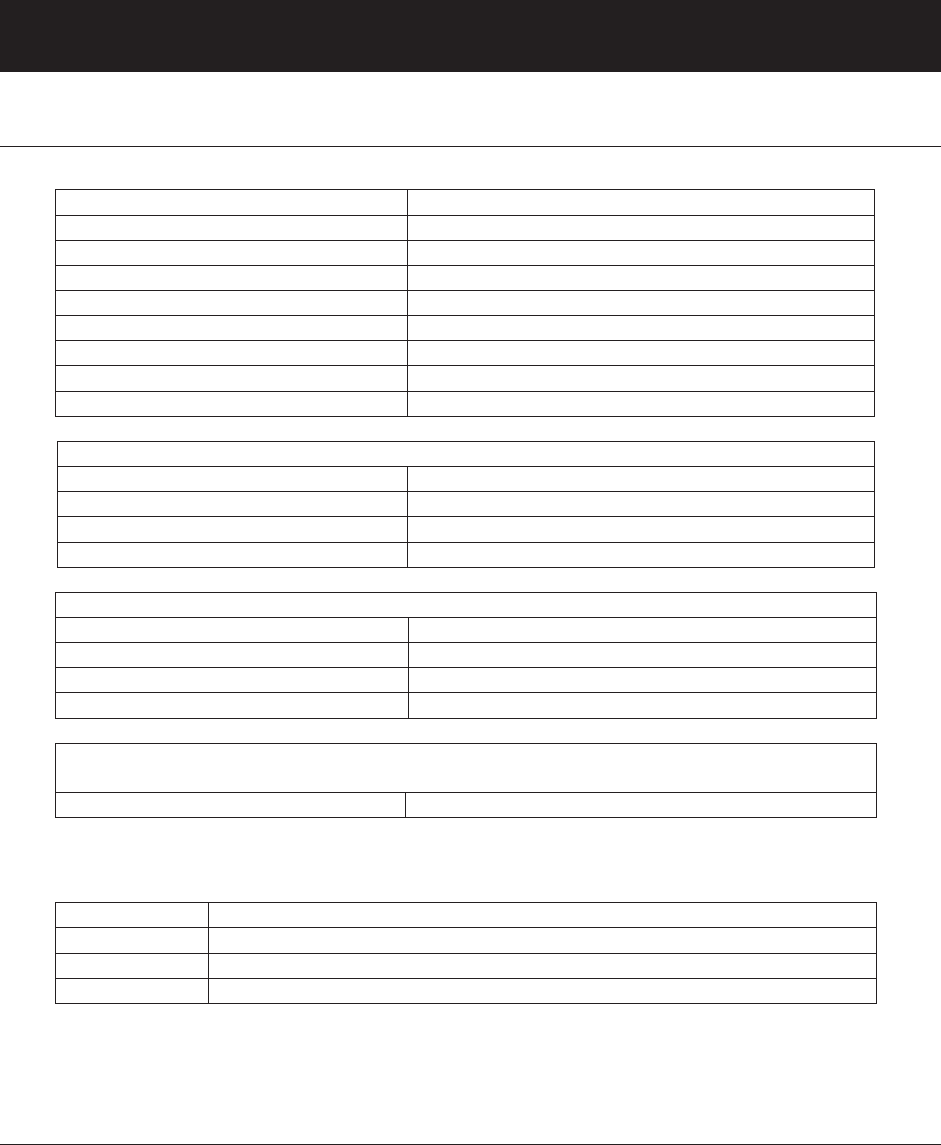
Pin 18 and pin 19 perform the same function
as pressing the PRINT and RE-ZERO keys
respectively by connecting each pin to pin 7
for at least 100 m seconds.
Use of example
The external input connector
(AX-HDB-25P/CTF) and the foot switch
(AX-SW128) are sold separately.
67
17. CONNECTION TO PERIPHERAL EQUIPMENT
17-1 Connection to the AD-8121B Printer
Set the following parameters to use the AD-8121B printer.
Function setting Description
dout prt 0-3 Selects a print mode.
dout ap-p 0-2 Selects the polarity for the auto print mode.
dout ap-b 0-2 Selects the auto print difference.
dout pU5e 0,1 Selects data output pause.
5if bp5 2 Factory setting 2400 bps
5if btpr 0 Factory setting 7 bits, Even parity check
5if Crlf 0 Factory setting CR, LF
5if Ct5 0 Factory setting CTS and RTS control, not used
When “MODE 1” or “MODE 2” of the AD-8121B printer is used
dout 5-td 0 Factory setting Not to output the time and date.
dout 5-id 0 Factory setting Not to output the ID number.
dout at-f 0 Factory setting Not to use auto feed.
5if type 0 Factory setting A&D standard format
When “MODE 3” of the AD-8121B printer is used.
dout 5-td 0-3 Outputs the time and date as necessary.
dout 5-id 0,1 Outputs the ID number as necessary.
dout at-f 0,1 Uses auto feed as necessary.
5if type 1 DP format
When data is transmitted continuously.
When all memory data is transmitted at one time.
dout pU5e 1 Uses pause.
Note
The printer performs as follows, depending on the data memory setting.
Setting What is printed
data 0 The weighing data
data 2 The weighing data stored in memory
data 3 The calibration or calibration test data stored in memory
Refer to “11. ID NUMBER AND GLP REPORT” for a print sample.
17-2 Connection to a Computer
The GX series balance is of the DCE type (Data Communication Equipment), which can be
connected to a personal computer using the RS-232C interface.
Before connection, read the personal computer manual thoroughly.
Use a standard DCE cable for connection (cable type: straight-through).

68
17-3 Using Windows Communication Tools (WinCT)
When Windows is used as an operating system in a personal computer, the provided WinCT can be
used to transmit the weighing data to the personal computer.
The WinCT has two communication methods: “RsCom” and “RsKey”. For details on WinCT, refer to
the WinCT instruction manual.
The current version of the WinCT can be downloaded from the A&D website.
RsCom
Can transmit commands to control the balance.
Can make a bi-directional communication between the balance and a personal computer using
the RS-232C interface.
Can display or store the data using a text file format. Can also print the data using a printer
connected to the personal computer.
When several ports of a personal computer have balances connected, the personal computer
can communicate with each balance simultaneously.
Can share a personal computer with other application software.
Can receive the balance GLP report.
RsKey
Can transmit the weighing data output from the balance directly to other application software
such as Microsoft Excel.
Can be used with most application software.
Can receive the balance GLP report.
Note
Windows and Excel are the registered trademarks of the Microsoft Corporation.
Using the WinCT, the balance can do the following:
1 Analyzing the weighing data and the statistics input by “RsKey”
The weighing data can be input directly into an Excel worksheet. Then, Excel can analyze the
data to obtain total, average, standard deviation, maximum and minimum value, and display
them in a graph.
2 Controlling the balance using commands from a personal computer
By using “RsCom”, the personal computer sends commands such as “re-zero” or “send
weighing data” to the balance and controls the balance.
3 Printing the balance GLP report using your printer
The balance GLP report can be printed using a printer connected to the personal computer.
4 Receiving weighing data at a certain interval
The weighing data can be received at a certain interval and data characteristic with elapsed
time can be obtained.
69
5 Using the GX series balance memory function
The weighing data, instead of outputting it immediately to an external device, can be stored in
the balance’s memory. Later, all of the weighing data stored can be output to a personal
computer at one time.
6 Using a personal computer as an external indicator
With the “RsKey” test mode function, a personal computer can be used as an external weight
indicator for the balance. (To do this, set the balance data output mode to stream mode.)
70
18. COMMANDS
18-1 Command List
Commands to query weighing data
C Cancels the S or SIR command.
Q Requests the weighing data immediately.
S Requests the weighing data when stabilized.
SI Requests the weighing data immediately.
SIR Requests the weighing data continuously.
ESCP Requests the weighing data when stabilized.
Note: The “Q” and “SI” commands, the “S” and “ESCP” commands behave the same.
Commands to control the balance
CAL Same as the CAL key.
MCL Deletes all data in memory.
MD:nnn Deletes weighing data with the data number nnn.
OFF Turns the display off.
ON Turns the display on.
P Same as the ON:OFF key
PT: . g Sets the tare value.
The unit added is the unit that is output in the A&D standard format. For
the counting or percent mode, gram is used. Set the tare value so that
the total value of the sample and the tare does not exceed the weighing
capacity. Negative values can not be used.
?PT Requests the tare value.
Outputs the tare value set by the TR or PT: command.
PRT Same as the PRINT key
R Same as the RE-ZERO key
SMP Same as the SAMPLE key.
U Same as the MODE key
T Same as the RE-ZERO key
TR Tares the balance (Cancels the container’s weight.)
Available only when the load on the weighing pan is greater than the
zero point. The zero point is set by the R, T or Z command, by pressing
the RE-ZERO key, or using the external input.
Z Same as the RE-ZERO key
ESCT Same as the RE-ZERO key
Note: The “R”, “T”, “Z” and “ESCT” commands behave the same.
Commands to control the memory function
?MA Outputs all data in memory.
?MQnnn Outputs weighing data with the data number nnn.
?MX Outputs the number of weighing data in memory.
MCL Deletes all data in memory.
MD:nnn Deletes weighing data with the data number nnn.
UN:mm Changes the unit mass stored in memory with the number of mm (01-20).
?UN Outputs the unit mass number of the selected unit mass.
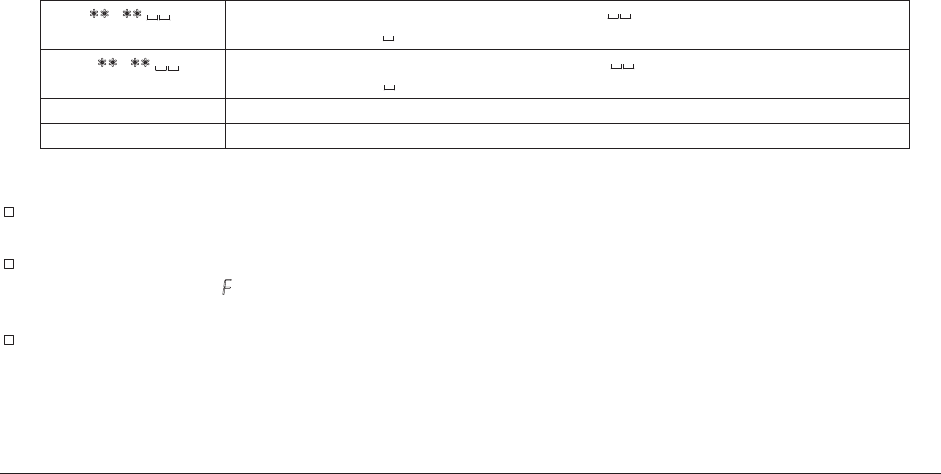
UW: . g Sets the unit mass value. e.g.,UW:+0.123 g (to set the unit mass to
0.123 g: represents a space.)
?UW Outputs the unit mass value of the selected unit mass number.
?ID Requests the ID number.
?SN Requests the serial number.
?TN Requests the model name.
71
Commands to control the comparator function
HI: . g Sets the upper limit value. e.g.,HI:+2.34 g (to set the upper limit
value to 2.34 g: represents a space.)
LO: . g Sets the lower limit value. e.g.,LO:+1.23 g (to set the lower limit
value to 1.23 g: represents a space.)
?HI Outputs the upper limit value.
?LO Outputs the lower limit value.
Notes
“nnn” and “mm” indicate, respectively, three-digit and two-digit numerical values.
ESC : 1Bh in ASCII code
Before transmitting a command, add the terminator (<CR><LF> or <CR>), that is specified in
the “Terminator (Crlf)” parameter of “Serial interface (5if)” in the function table, to the
command.
To use a command to control the comparator function, set the “Input method (Cpin)” parameter to “0” or
“1”.
18-2 Acknowledge Code and Error Codes
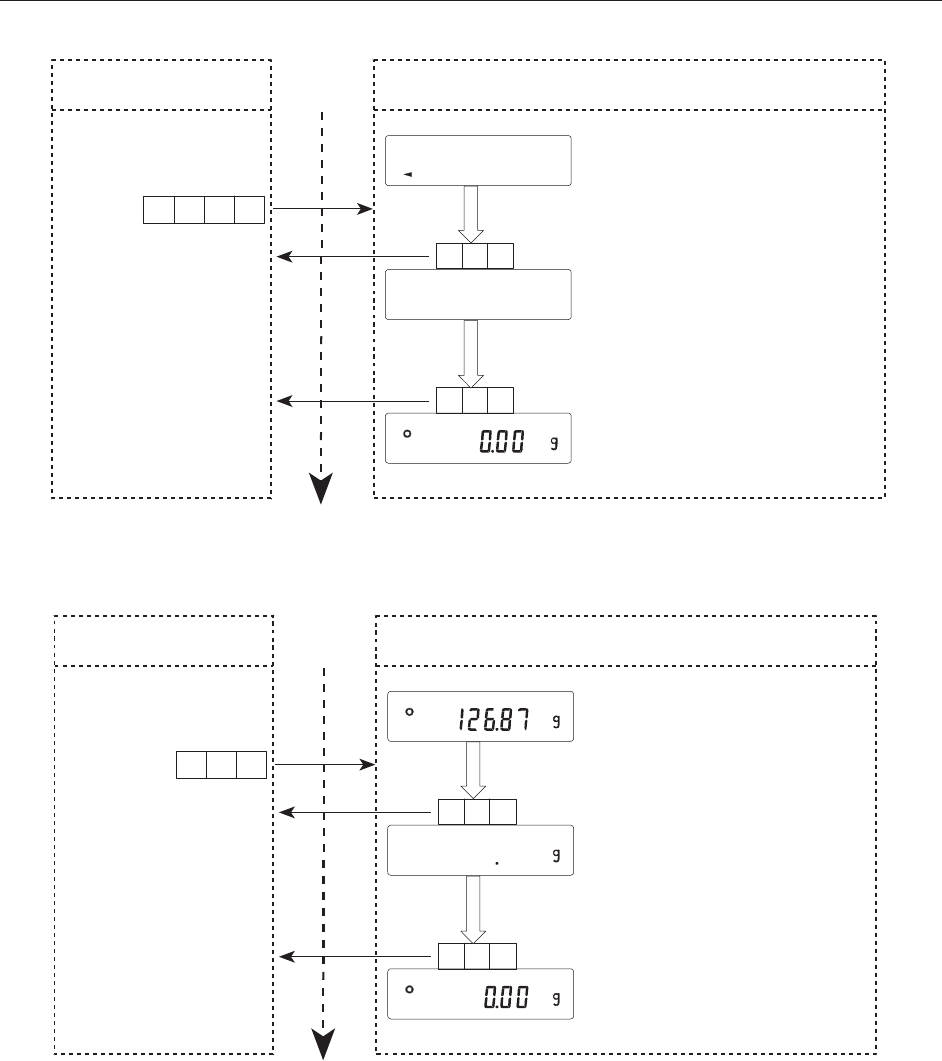
When the “Serial interface function ( 5if )” parameter is set to “erCd 1”, the balance outputs <AK>
code or error code to each command as follows:
<AK> (06h) Acknowledge in ASCII code.
When the balance receives a command to request data and can not process it, the balance
transmits an error code (EC, Exx).
When the balance receives a command to request data and can process it, the balance
outputs the data.
When the balance receives a command to control the balance and can not process it, the
balance transmits an error code (EC, Exx).
When the balance receives a command to control the balance and can process it, the balance
transmits the acknowledge code.
When a communication error has occurred due to external noise, or a parity error has
occurred due to transmission error, the balance transmits an error code. In this case, send the
command again.
Among commands to control the balance, the following transmit the acknowledge code both
when the balance receives the command and when the balance has accomplished the
command. If the command can not be processed properly, the balance transmits an error code
(EC, Exx). This error can be released using the CAL command.
CAL command (Calibration command) ON command (Display ON command)
P command (Display ON/OFF command) R command (RE-ZERO command)
TR command (Tare command)
72
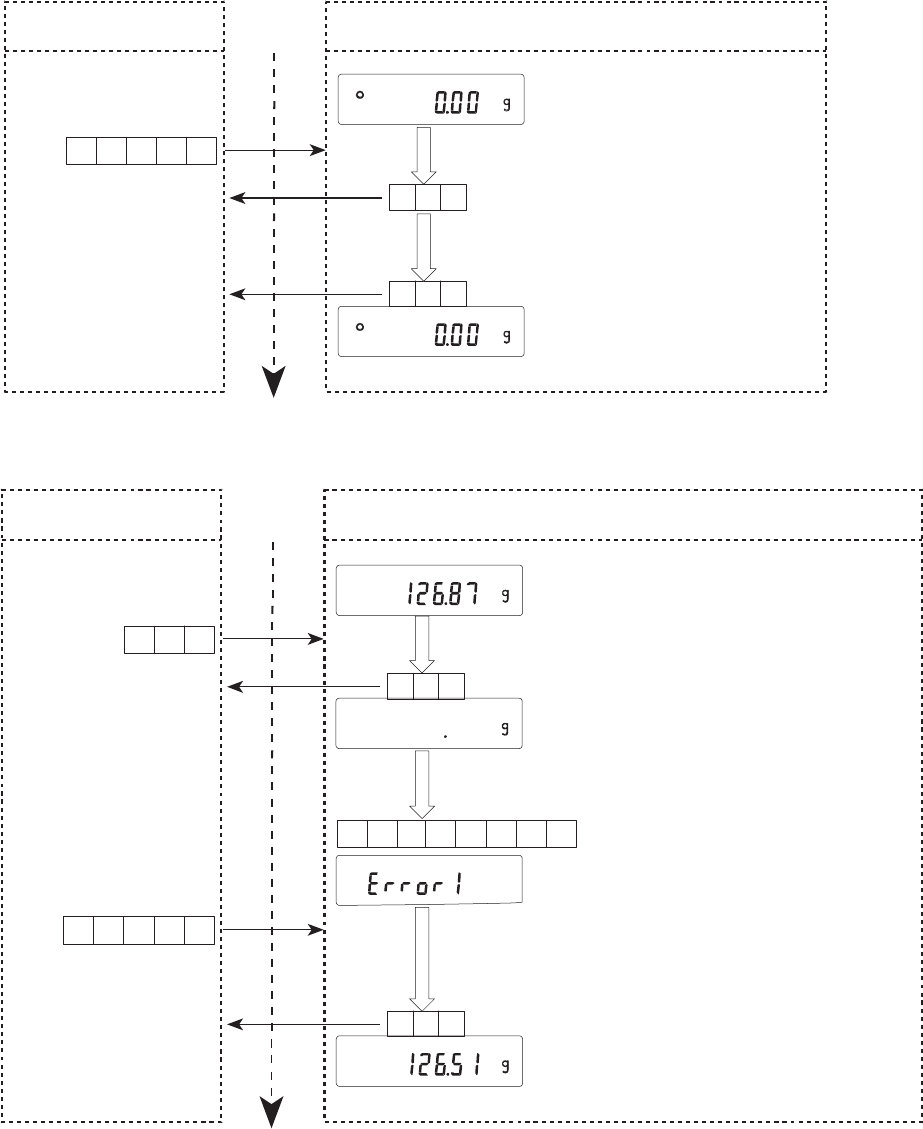
18-3 Command Examples
ON command
R command
Standby mode
Zero display
All segments are displayed
Personal computer Time Balance
ON command
NCRLF
Command received
Command completed
AKCRLF
AKCRLF
O
All segments
Weighing mode
Zero display
In process
Personal computer Time Balance
R command
RCRLF
AKCRLF
AKCRLF
Command received
Command completed
73
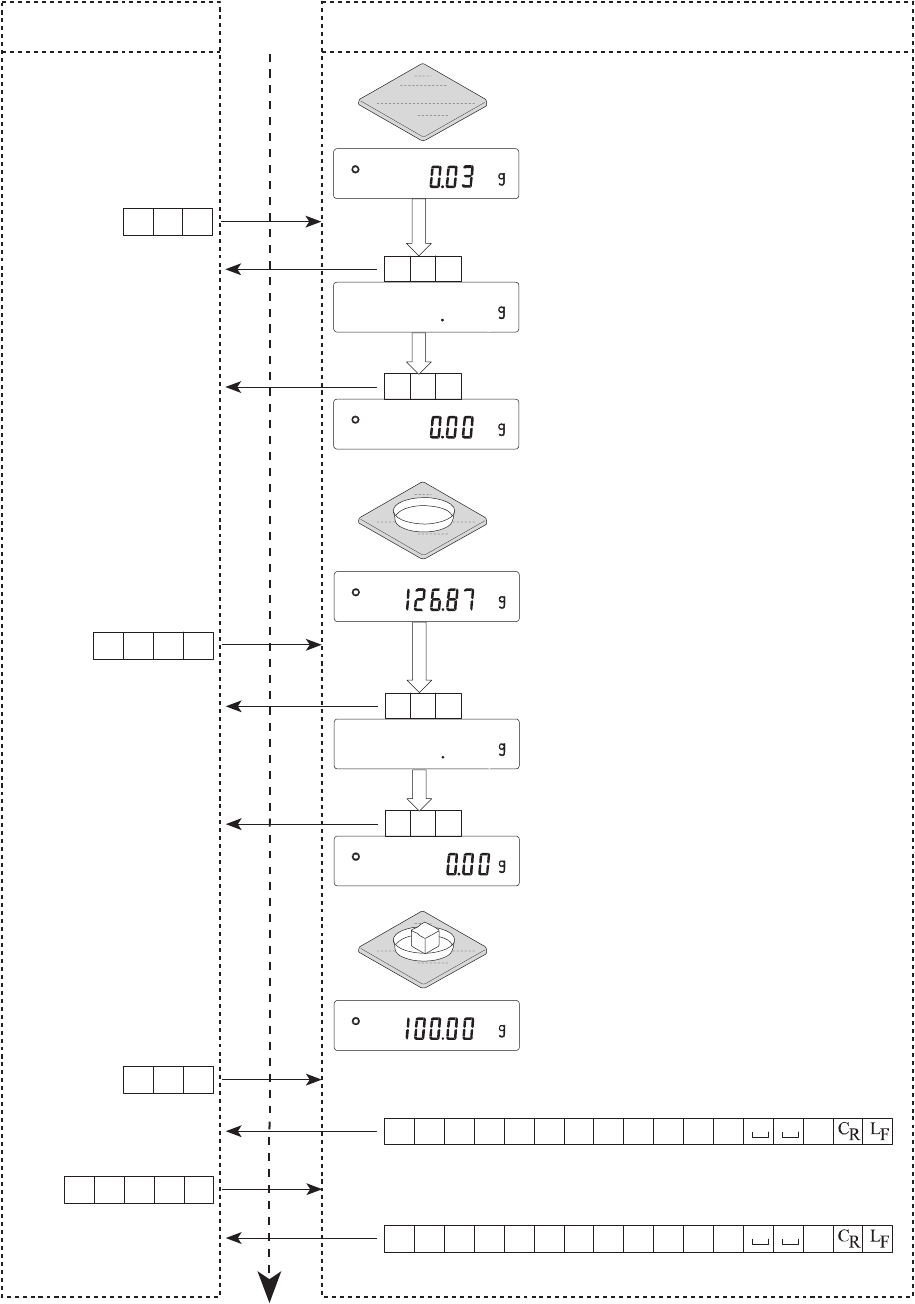
CAL command
Error code
Command received
Command completed
Zero display
Zero display
Personal computer Time Balance
CAL command
AC L CRLF
AKCRLF
AKCRLF
Weighing mode (unstable)
Weighing mode
Personal computer Time Balance
R command
RCRLF
AKCRLF
AKCRLF
CR
1LF
1E,CE
When the CAL command is
received, the balance returns to
the weighing mode
Error code
CAL command
AC L CRLF
In process
Command received
Command completed
When the R command can not be
achieved due to unstable weighing:
74
Weighing with a tare
Sets the display to zero
Zero display
Personal computer Time Balance
R command
RCRLF
AKCRLF
AKCRLF
Place a container
Zero display
TR command
RCRLF
AKCRLF
AKCRLF
TTares
㹎 㹒 㸪 㸩 㸮 㸮 㸯 㸰 㸴 㸬 㸶 㸵 ࠉ ࠉ 㹥
㹑 㹒 㸪 㸩 㸮 㸮 㸯 㸮 㸮 㸬 㸮 㸮 ࠉ ࠉ 㹥
CRLF
S command
R
?PT command
P? T CRLF
In process
Command received
Command completed
In process
Command received
Command completed
(Net value)
(Tare value)
75
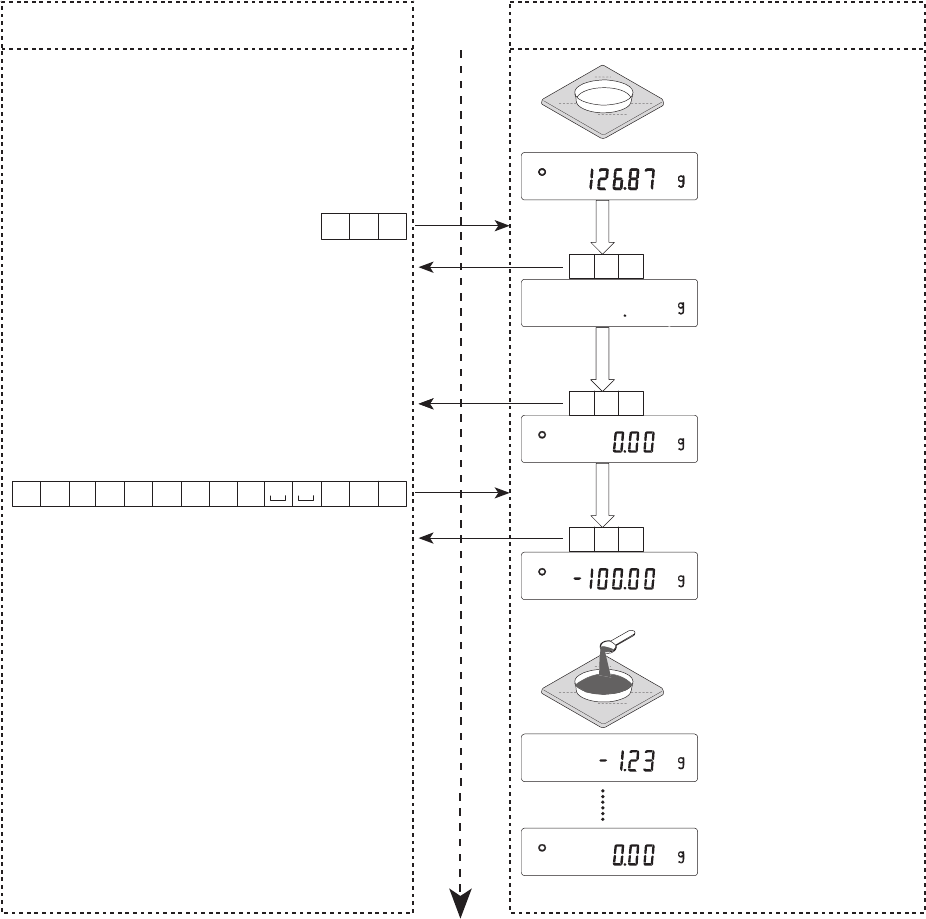
Setting a negative target value and filling with a sample until the display becomes
zero
Place a container
Zero display
Personal computer Time Balance
R command
CR
RLF
AKCRLF
AKCRLF
CRLF
g00001:TP .
PT:
command to set a target weight of 100 g
Before command
execution
AKCRLF
AKCRLF
Target weight display
Fill with sample until the
display becomes zero
In process
Command received
Command completed
Command received

76
18-4 Control Using CTS and RTS
Depending on the “Ct5” parameter of “Serial interface ( 5if )”, the balance performs as follows:
Ct5 0
Regardless of whether the balance can receive a command or not, the balance keeps the CTS line
HI. The balance outputs data regardless of condition of the RTS line.
Ct5 1
The CTS line is kept Hi normally. When the balance can not receive the next command (e.g. while
the balance is processing last command), the balance sets the CTS line to Lo. The balance confirms
the level of the RTS line before outputting a set of data. If the RTS level is Hi, the balance outputs
data. If the RTS level is Lo, data is not output (The data is canceled).
18-5 Settings Related to RS-232C
Concerning the RS-232C, the balance has two functions: “Data output ( dout )” and “Serial interface
( 5if )”. Set each function as necessary.
