User Manual
HomeAssure
QUICKSTARTGUIDE
In‐HomeCellularPersonal
EmergencyResponseSystem(PERS)

Page2
TableofContents
ItemsinyourBox.............................................................3
Step1:ReadingtheDirections........................................5
Step2:PreparingyourSystem........................................6
Step3:ActivatingyourSystem........................................7
Step4:TalkingtotheCallCenter....................................8
Step5:WearableAccessories..........................................9
Step6:SettingupyourWearable....................................10
Step7:365AccessApp.....................................................11
Step8:ReceivingMessages.............................................12
Step9:UsingtheTestButton..........................................13
Step10:TheNightlight....................................................14
QuickReference:BatteryLife..........................................15
QuickReference:LEDIndicators......................................16
ImportantTipsandReminders........................................18
RegulatoryCompliance:FCC/IC.......................................19
3
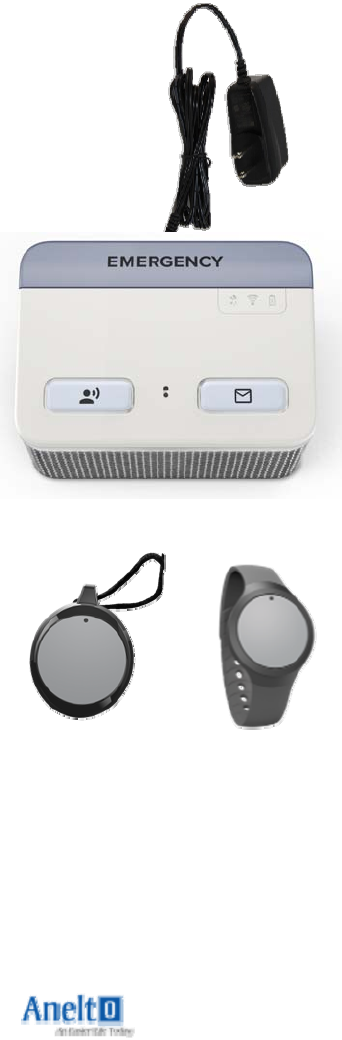
ItemsinyourBox
SoteriaSystemwith
IntegralPowerCord
1Wearable
(withPendantandWristbandAccessories)
Page4
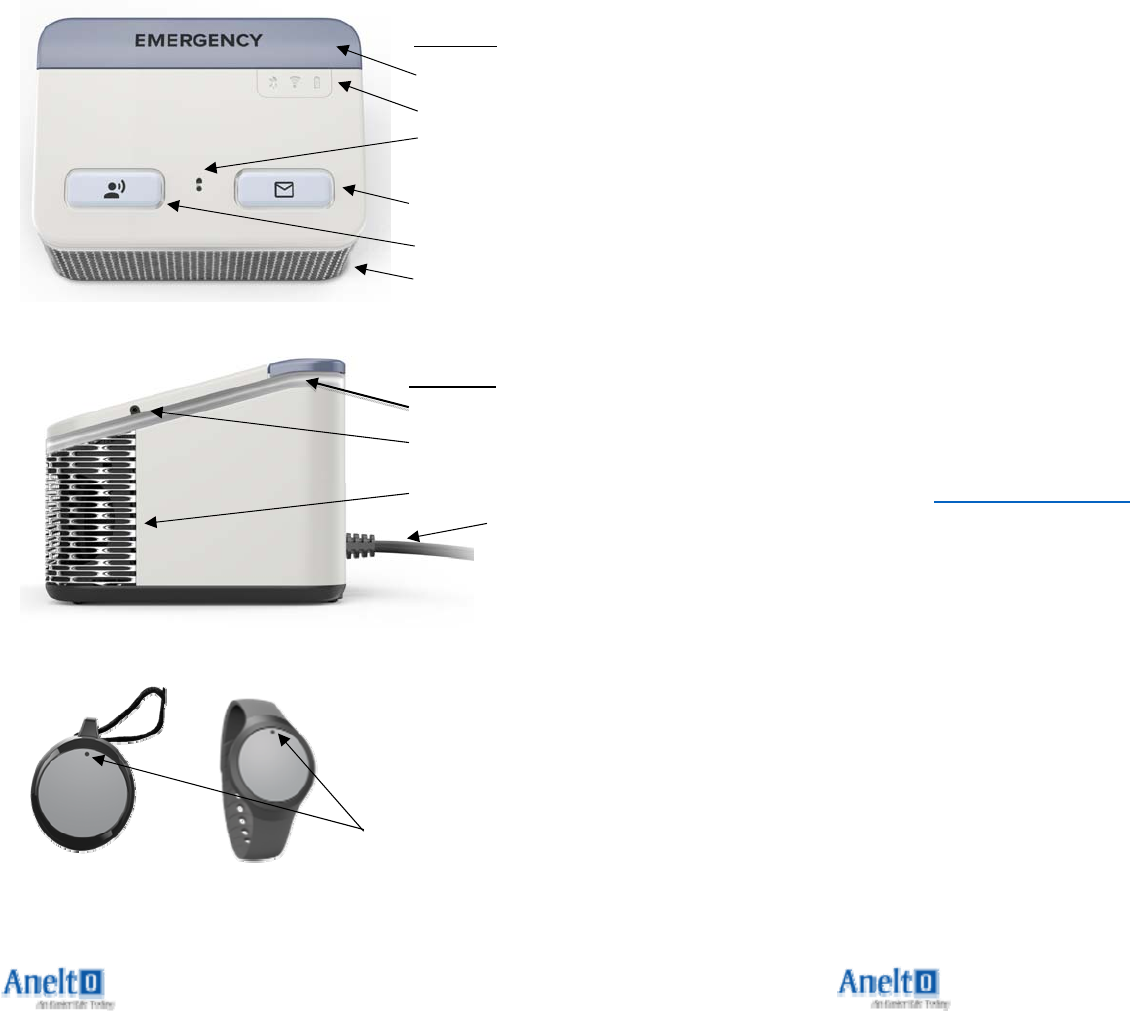
ItemsinyourBox
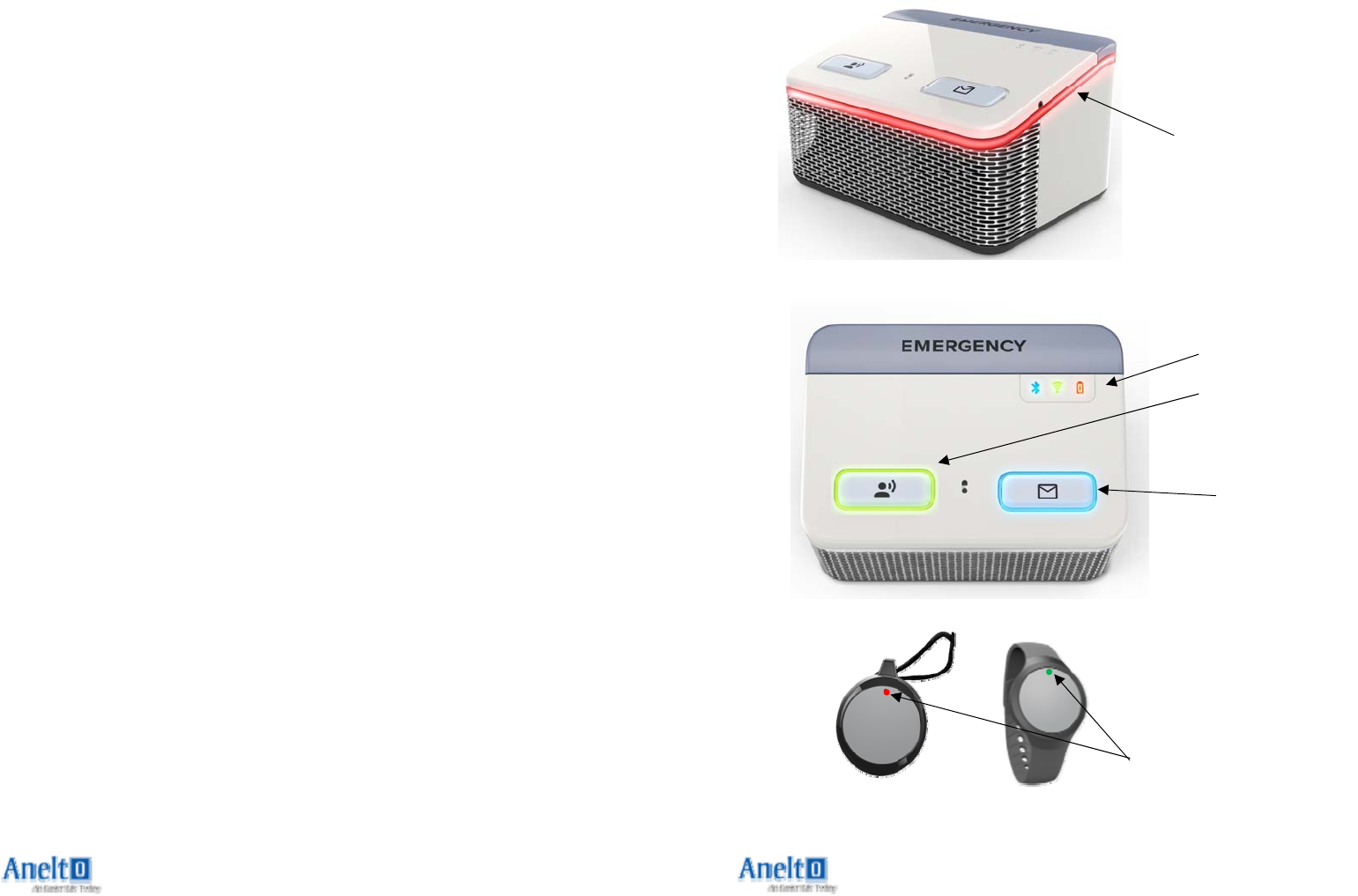
LEDCallIndicator
(GreenorRed)
EmergencyButton
LEDs
MessageButton
TopView
TestCallButton
Speaker
Microphone&
NightlightSensor
PlugintoWall
Socket
SideView
Microphone
Speaker
LightRing
21
HAVEQUESTIONS?
Pleaserefertothemoredetailedinformationat
www.anelto.comorcontactyourDealer.

Page20
English
ThisdevicecomplieswithIndustryCanada’slicense‐exemptRSSs.Operation
issubjecttothefollowingtwoconditions:
(1)Thisdevicemaynotcauseinterference;and
(2)Thisdevicemustacceptanyinterference,includinginterferencethatmay
causeundesiredoperationofthedevice.
French
CetappareilestconformeauxfluxRSSexemptsdelicenced'Industrie
Canada.L'opérationestsoumiseauxdeuxconditionssuivantes:
(1)Cetappareilnedoitpasprovoquerd'interférence;et
(2)Cetappareildoitacceptertouteinterférence,ycomprislesinterférences
susceptiblesdeprovoquerunfonctionnementindésirabledel'appareil.
5
Step1:ReadingtheDirections
1) . Pleasetakeafewminutestoreadthroughthisquick
startguidesoyouwillbefamiliarwiththesteps
requiredtosetupyourIn‐HomeCellularPersonal
EmergencyResponseSystem(PERS).
2) . Pleasemakesuresomeoneiswithyouwhileyouare
settingupandtestingyoursystem.
3) TheIn‐HomeCellularPERSisprogrammedwith
multipleaudiopromptstomakeiteasiertouse.
Pleasefollowtheaudiopromptsiftheyoccur.
Page6
Step2:PreparingyourSystem
1) Locateaplaceinyourhomethatisnearanavailable
standardwalloutlet.Youmaywishtoplaceitnearyourbedor
inacentrallocation.Itshouldbeeasytoaccessfordailyand/or
emergencyuse.
2) PlugthePowerCordintoawallsocketnotcontrolledbya
switch.
3) Thereisasmallon/offswitchonthebottomofyourIn‐
HomeCellularPERSunit.Theunitisturnedoffpriorto
shipment.Pleaseturntheunitoverandslidetheswitchtoturn
yoursystemON.
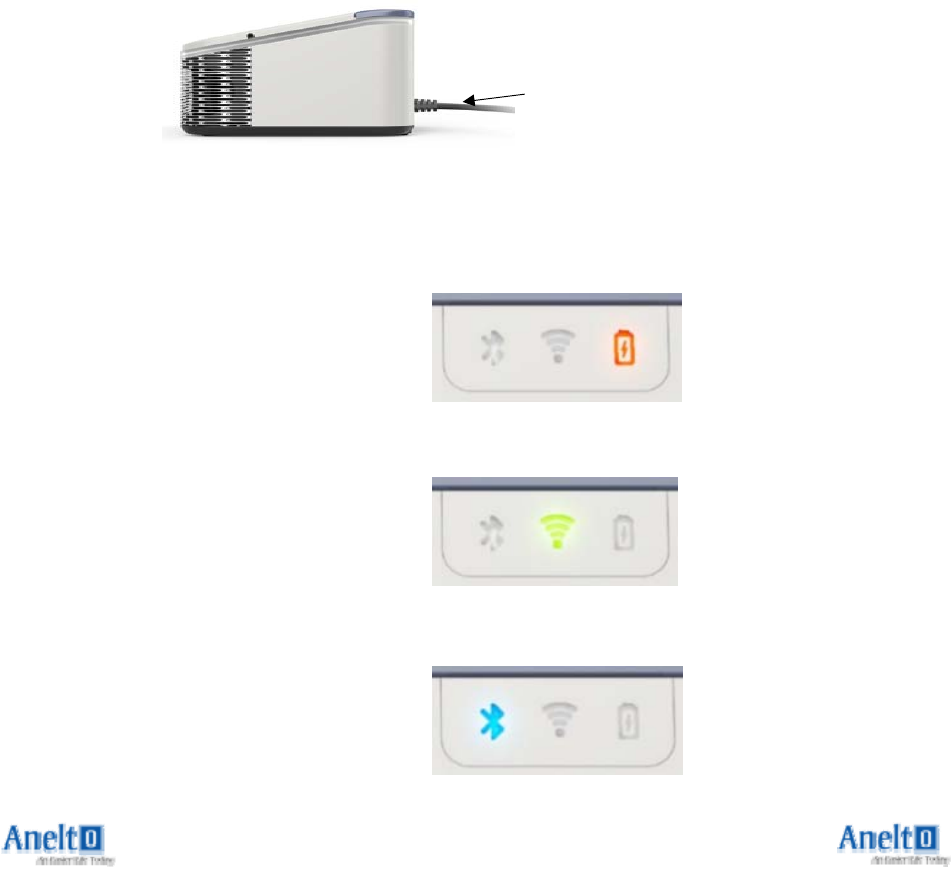
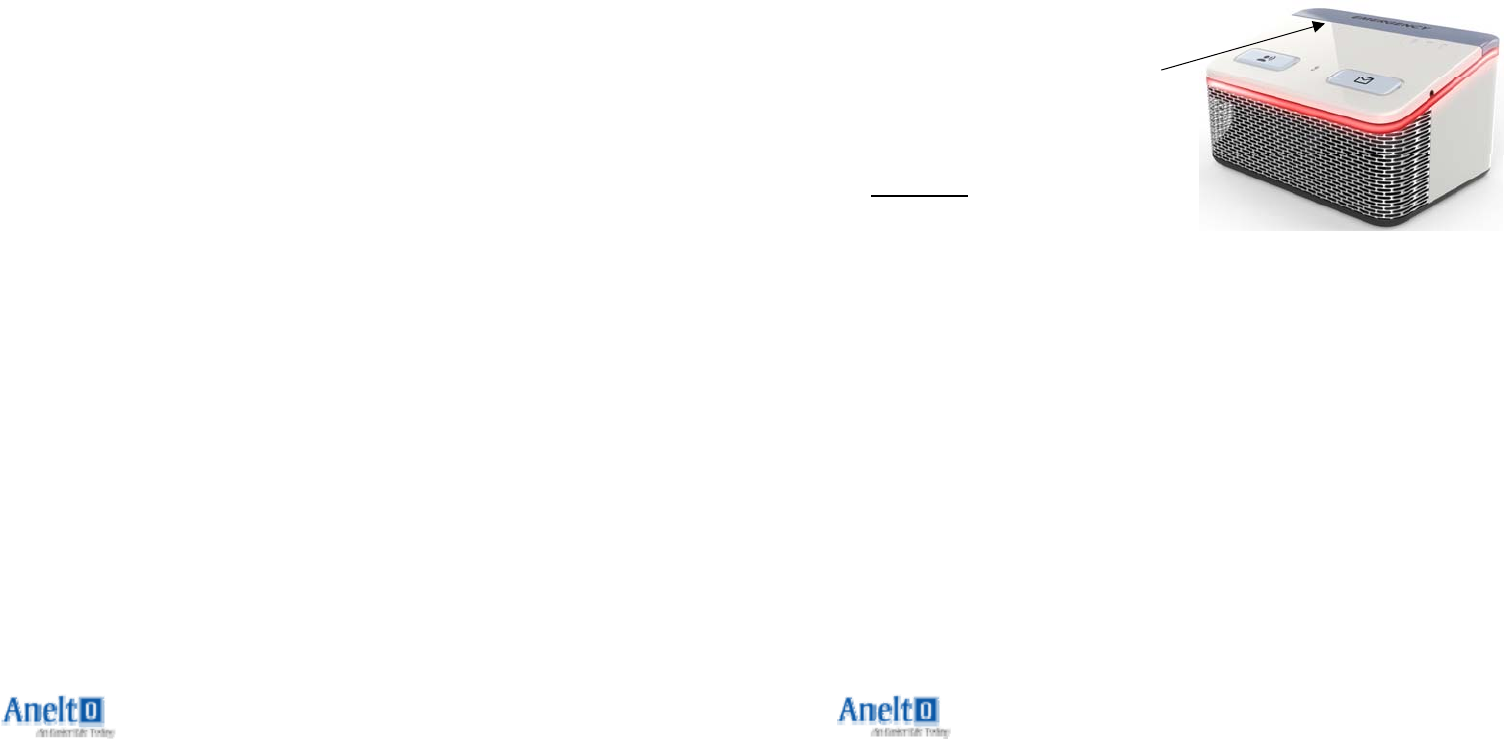
4) TheIn‐HomeCellularPERSwill
takeafewmomentstowakeup.Itwill
announce“NowCharging”.The
BatteryLEDwillblinkREDtoshowyou
thatitispluggedincorrectlyand
charging;itwillbeOFFwhenfullycharged.
5) TheNetworkLEDwillblinkGREEN
whileitisattemptingtofindyour
networkandwillbesolidGREENwhen
yourIn‐HomeCellularPERSis
connectedtothenetworkandisreadytomakeemergency
calls.
6) TheBluetoothRadioLEDwillbe
solidBLUEwhenyourIn‐Home
CellularPERSisconnectedtoa
Bluetoothcompatibledevice.
PlugintoWall
Socket
19
RegulatoryCompliance:FCC/IC
Theuser’smanualorinstructionmanualforanintentionalorunintentional
radiatorshallcautiontheuserthatchangesormodificationsnotexpressly
approvedbythepartyresponsibleforcompliancecouldvoidtheuser's
authoritytooperatetheequipment.
ThisdevicecomplieswithPart15oftheUnitedStatesFCCregulationsand
hasanIndustryCanadaregistration(ICID)of20951‐ANH0217.Operationis
subjecttothefollowingtwoconditions:(1)Thisdevicemaynotcause
harmfulinterference,and(2)thisdevicemustacceptanyinterference
received,includinginterferencethatmaycauseundesiredoperation.
NOTE:Thisequipmenthasbeentestedandfoundtocomplywiththelimits
foraClassBdigitaldevice,pursuanttopart15oftheFCCRulesandtheIC
Rules.Theselimitsaredesignedtoprovidereasonableprotectionagainst
harmfulinterferenceinaresidentialinstallation.Thisequipmentgenerates,
usesandcanradiateradiofrequencyenergyand,ifnotinstalledandusedin
accordancewiththeinstructions,maycauseharmfulinterferencetoradio
communications.However,thereisnoguaranteethatinterferencewillnot
occurinaparticularinstallation.Ifthisequipmentdoescauseharmful
interferencetoradioortelevisionreception,whichcanbedeterminedby
turningtheequipmentoffandon,theuserisencouragedtotrytocorrect
theinterferencebyoneormoreofthefollowingmeasures:
Reorientorrelocatethereceivingantenna.
Increasetheseparationbetweentheequipmentandreceiver.
Connecttheequipmentintoanoutletonacircuitdifferentfromthatto
whichthereceiverisconnected.
Consultthedealeroranexperiencedradio/TVtechnicianforhelp.
Thisequipmenthasbeentestedandfoundtocomplywiththelimits
pursuanttoPart15SubpartB,Part22,andPart24oftheFCCrulesandthe
ICRules.Theselimitsaredesignedtoprovidereasonableprotectionagainst
harmfulinterferenceinanappropriateinstallation.Thisequipment
generates,uses,andcanradiateradiofrequencyenergyand,ifnotusedin
accordancewithinstructions,cancauseharmfulradiationtoradio
communication.However,thereisnoguaranteethatinterferencewillnot
occurinaparticularinstallation.
ThisdevicecomplieswithFCCRFradiationexposurelimitssetforthforan
uncontrolledenvironment.Itshallbeinstalledandoperatedwitha
minimumdistanceof20centimetersbetweentheradiatorandyourbody.
Page18
ImportantTipsandReminders
1) Important:YourIn‐HomeCellularPERSrequiresadequatebattery
chargeandcellularsignaltomakeanemergencycall.
2) TheBLUELEDMessagesystemallowsustokeepintouchwithyou
andprovideyouwithimportantinformation.PleasePresstheblue
MessageButtonwheneveritislittolistentothesemessages.
3) TheWearableButtoniswaterresistantanddesignedtobewornin
theshowerorbath.Youshouldalwayswearyourwearabledevice.
4) YourIn‐HomeCellularPERSisnotwaterorsplashresistant.
5) YouraccountnumberislocatedonthebackofyourIn‐HomeCellular
PERS.
6) Pleasetestyoursystematleastonceamonth.
7) Byactivatingtheproduct,UseragreestoallowCallCenterandtheir
affiliatestousetheHomeaddressonfiletoprovideservicesinthe
caseofanemergencyresponse.
8) Pendantlanyardsaredesignedtobreakawayundercertain
conditions;however,anycordwornaroundtheneckcanposearisk
ofstrangulation,includingthepossibilityofseriousinjuryordeath.
9) YourIn‐HomeCellularPERSdoesnotprovidemedicaladvice.User
shouldalwaysconsulthisorherphysicianorotherhealthcare
professionalwithquestionsregardinganymedicalormentalhealth
conditionorforspecificguidanceregardingnutritionorphysical
activity.
10) Ourproductsaretested,asareothercellularandwireless
communicationsproductslicensedinCanadaandtheUnitedStates.
Individualswithpacemakersshouldreviewtheirpacemakermaterials
regardinginteractionwithcellphonesandtakethesameprecautions
thematerialsrecommendforthisdevice.
11) YourIn‐HomeCellularPERSusestheCellularNetworkto
communicate.Theunit’slocation,Networkproviderservice
availabilityandotherissuesmaydisruptcommunications.
7
Step3:ActivatingyourSystem
1) YourIn‐HomeCellularPERSwillpromptyouandguide
youthroughtheremainingsetup.
2) WhenyourIn‐HomeCellularPERShassufficient
charge,itwillsay“Hello,it’stimetotestyoursystem
tomakesureitisworkingproperly.Pleasepressand
holdyourEMERGENCYCallButtonforthreeseconds
nowtoallowustoconfirmthatyoursystemisworking
properly.”
3) Pressandholdthe
EMERGENCYCallButton
forthreeseconds.Youwill
hearatoneandwhenyou
RELEASEthebutton,the
REDlightaroundtheIn‐
HomeCellularPERSwillturnON.Atthispoint,theIn‐
HomeCellularPERSwillannounce“Dialingthe
EmergencyCallCenternow.Tocancelthiscall,press
andholdtheEMERGENCYCallButtonforthree
secondsnow.”
4) Ifthecallisnotcancelled,youwillheararing‐back
soundfromyourIn‐HomeCellularPERSandan
operatorfromthecallcenterwillansweryourcall.
Page8
Step4:TalkingtotheCallCenter
1) Theoperatorshouldhaveyournamefromyour
originalorderform,aswellastheaddresswhereyour
In‐HomeCellularPERSwillbelocated.Theoperator
willconfirm:
a. Yourname
b. YourIn‐HomeCellularPERSaddress**
c. Thequalityofyourcall
2) TheIn‐HomeCellularPERSwillautomaticallyend
thecallwhentheoperatorhangsup.
3) TheIn‐HomeCellularPERSwillannounce“Yourcall
hasended.Thankyou.”
**PleasenotethatthelocationoftheIn‐Home
CellularPERSasyourcallcenterregisteredaddressisa
keypartofidentifyingyourlocationshouldyouneed
emergencyhelp.PLEASEDONOTMOVETHEIN‐
HOMECELLULARPERSTOANOTHERADDRESS
WITHOUTNOTIFYINGTHECALLCENTER.
17
QuickReference:LEDIndicators
#1
#2
#3
#4
#5
Page16
QuickReference:LEDIndicators
ThefollowingisaguidetotheLEDindicatorsontheIn‐Home
CellularPERSandWearable:
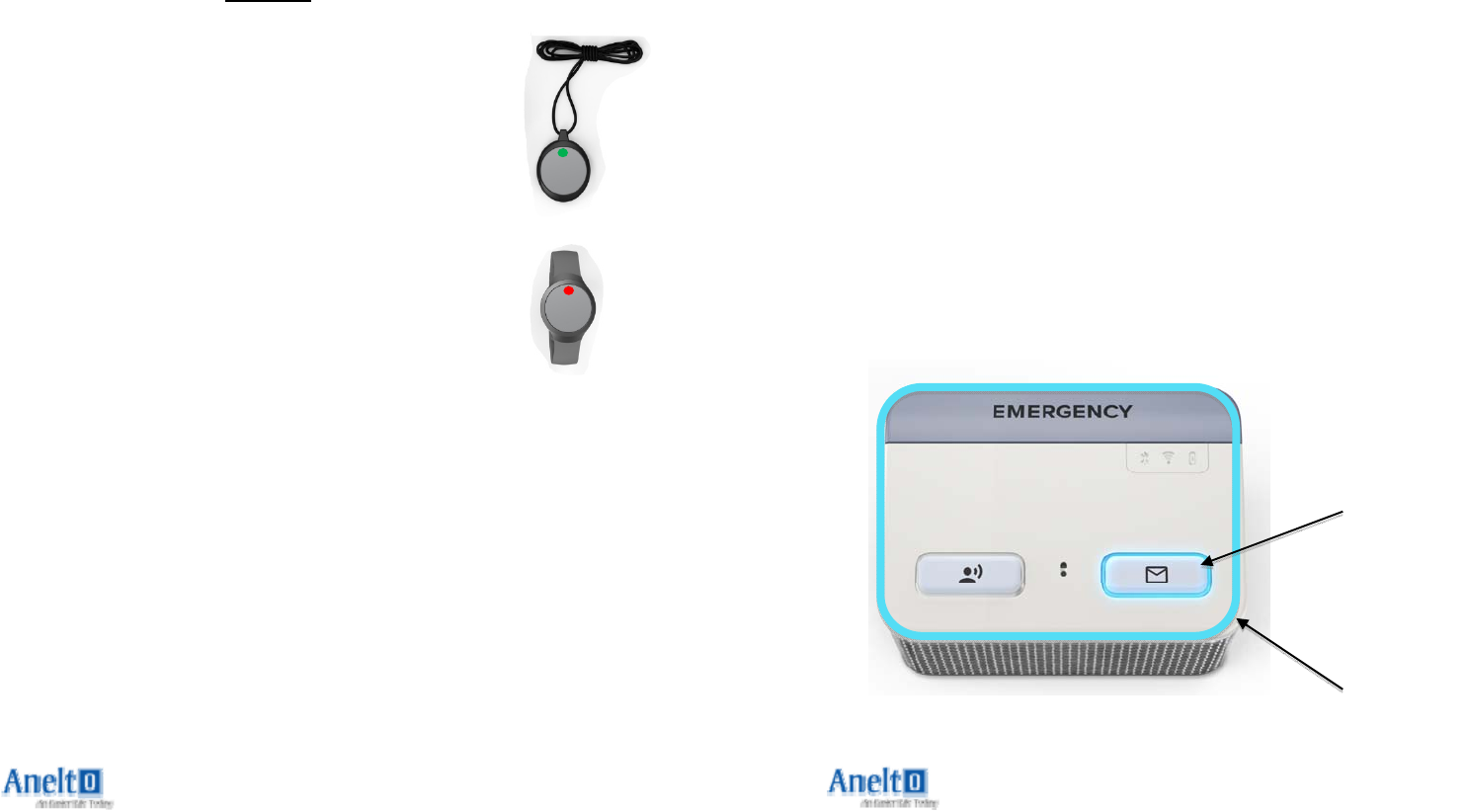
1) EMERGENCYREDLED–Blinkingred:Emergencycallis
beingmade.Solidred:Emergencycallisinprogress.No
LED:Nocallisinprogress.
2) ICONLEDs–
a. TheBatteryLEDwillblinkREDtoshowyouthatitis
pluggedincorrectlyandcharging;itwillbeOFFwhenfully
charged.
b. TheNetworkLEDwillblinkGREENwhileitisattempting
tofindyournetworkandwillbesolidGREENwhenyourIn‐
HomeCellularPERSisconnectedtothenetworkandisready
tomakeemergencycalls.
c. TheBluetoothRadioLEDwillbesolidBLUEwhenyourIn‐
HomeCellularPERSisconnectedtoaBluetoothcompatible
device.
3) TESTBUTTONGREENLED–Blinkinggreen:Connecting
yourcall.Solidgreen:Callinprogress.NoLED:Nocallisin
progress.
4) MESSAGEBUTTONBLUELED–SolidBlue:Youhavea
voicemessagetellingyoutochargetheIn‐HomeCellular
PERS.BlinkingBlue:Youwillalsohearatonelettingyou
knowthatanewmessageisavailable.PushtheMessage
Buttontoplaythemessage.NoLED:Allmessageshavebeen
played.
5) WEARABLELED–BlinkingRed:WearableisNOTin
communicationwithIn‐HomeCellularPERSandNOCALLcan
bemade.BlinkingGreen:Callisbeinginitiatedfrom
Wearable(willceaseblinkingaftersevenseconds).Solid
Greenforsevensecondswhenthecallisconnected.
9
Step5:WearableAccessories
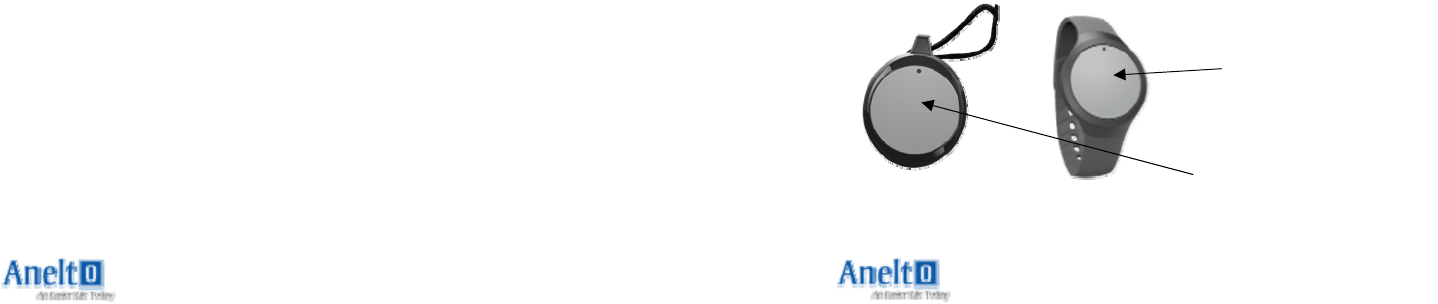
1) . TheWearableButtoncanbeexchangedbetweenthe
WristbandandPendant.LocateyourWearableButton
inthebox.
a. TurntheWristbandorPendantaccessorysothe
frontisrestingonasolidsurface.Youarenow
lookingatthebackoftheaccessory.Youwill
inserttheWearableButtonintotheWristband
orPendantaccessoryfromtheback.Withthe
greybuttonsidefacingdown,pushthebutton
intotheaccessory.Pleaseusesufficientforceto
pushandlocktheWearableButtonintothe
WristbandorPendantaccessory.
b. RemovetheWearableButtonfromthe
WristbandorPendantaccessorybypressingon
theoutsideedgeofthefrontoftheWearable
whileholdingtheoutsidebracket.Sufficient
forceisrequiredtopushtheWearableoutof
theaccessory.
c. DonotpushonthecenteroftheWearable
Buttonwhileinsertingorremovingit.
WearableButton
InPendant
WearableButton
InWristband
Page10
Step6:SettingupyourWearable
1) TheWearableisreadytouse.Pleasemakesuresomeone
isnearyourIn‐HomeCellularPERSwhentestingyour
Wearable.
2) PressthecenteroftheWearable(thisiswherethecall
buttonislocated)forthreeseconds.
3) YouwillfeeltheclickoftheButtonwhenyoufirstpushit.
HoldtheButtondownuntilthegreenLEDturnson(3
seconds)andthenRELEASEit.YouwillseetheLEDatthetop
ofthebuttonstarttoflash.AgreenLEDflash
indicatesthatyouareinitiatingacallfrom
yourIn‐HomeCellularPERStothecallcenter.
WhilethegreenLEDisflashing,youmay
cancelthecallbypressingandholdingthe
Buttonforthreeseconds.TheLEDwillstop
flashingandthecallwillbecancelled.
4) AredLEDflashindicatesthatyour
Wearableisunabletoinitiateacallfromyour
In‐HomeCellularPERS.Pleasemovecloserto
yourIn‐HomeCellularPERSandtryagain.
5) Wheneveracallisinitiated,theIn‐Home
CellularPERSwillannounce“DialingCallCenter”.Youmay
cancelthiscallbypressingandholdingthecallbuttononthe
Wearableforthreeseconds.ThegreenLEDwillstopflashing
andtheIn‐HomeCellularPERSwillannounce“Call
Cancelled”.
6) Ifthecallgoesthrough,pleasetelltheCallCenterthat
youareOKandthatthisisatestcall.
7) YourWearableisnowpairedandyouhaveverifiedthat
youareabletostartacalltothecallcenterontheWearable.
8) YourWearableiswaterresistant;youmaywearitinthe
showerorbath.
15
QuickReference:BatteryLife
1) TheIn‐HomeCellularPERSisdesignedtolastupto40
hoursfromafullchargeifremovedfrompower.The
Wearableisdesignedtolastthreeyears,atwhichtimea
newWearablewillbesentautomaticallytoreplacetheold
one.
2) IfyourIn‐HomeCellularPERSbatteryhasachargeof
lessthan20%,theIn‐HomeCellularPERSwillannounce
“Nopoweravailable,pleasechecksystem”.Itisimportant
thatyouchargeyourIn‐HomeCellularPERSbypluggingit
intoawallsocketassoonaspossible.
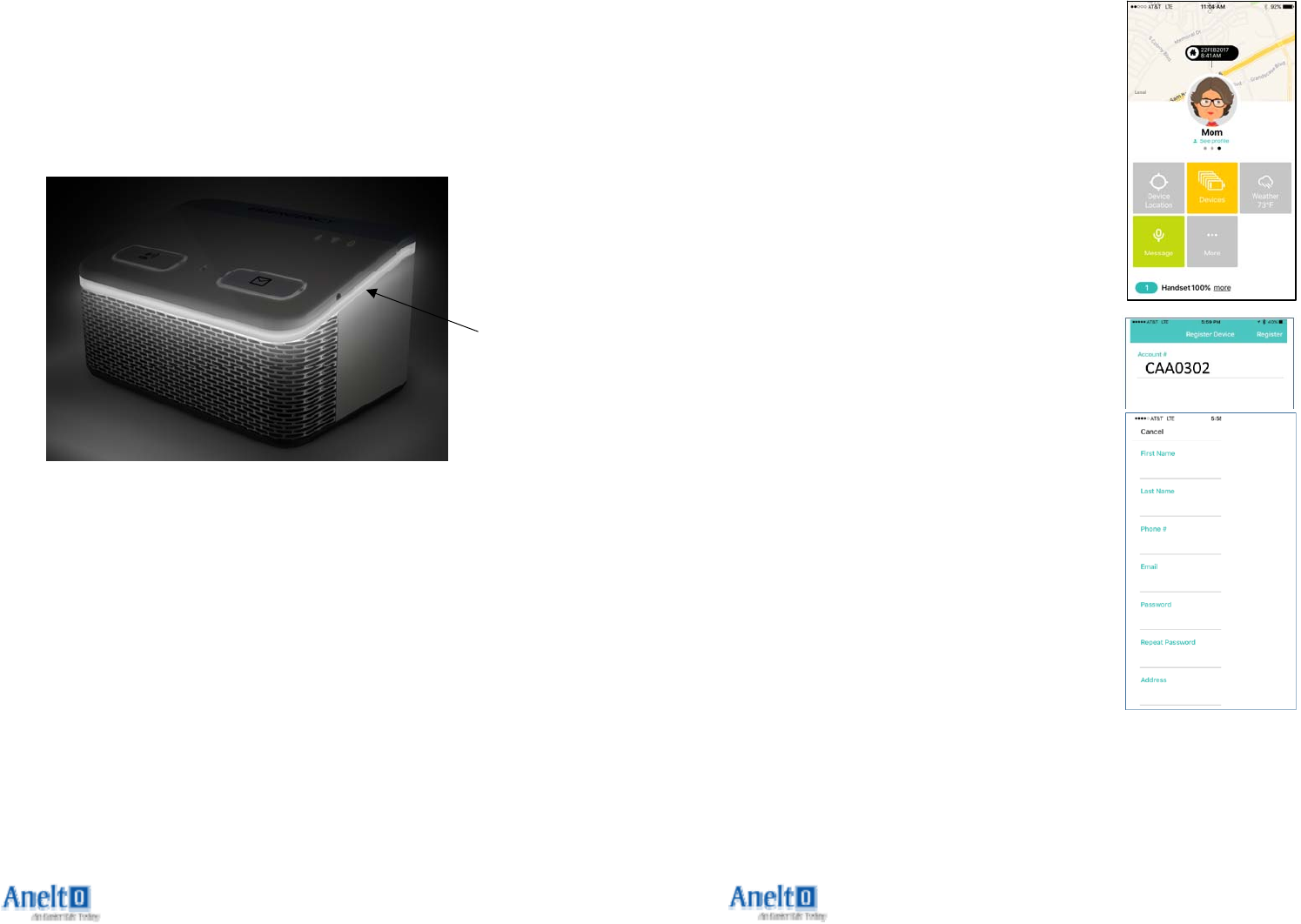
3) IfyoudonotplugintheIn‐HomeCellularPERS,then
theblueMessageButtonLEDandLightRingwilllight.
PushtheMessageButtonandtheIn‐HomeCellularPERS
willremindyou“Nopoweravailable,pleasecheck
system”.IfyoudonotchargeyourIn‐HomeCellularPERS,
itwillremindyouagain30minuteslater.
Message
Button
LightRing
Page14
Step10:TheNightlight
1) Thenightlightwillautomaticallyturnonwhenneeded.It
makesiteasiertoseeyourunitinlowlightconditions.
Nightlight
11
Step7:365AccessApp
1) Yourlovedonescankeepintouchwith
youusingthe365Accessapp.Itmaybe
downloadedfromtheAppleorGoogle
appstore.Youmayalsousethisapp
yourselfifyouhaveanAndroidoriOS
smartphone.
2) Thisispartofyourserviceandoffersthe
capabilitytosendareminder,locate
yourIn‐HomeCellularPERSwherever
youare,andtoseeifyoursystemis
properlychargedandreadytouse.
3) Oncetheappisinstalledandopened,
youwillneedtocompletetheCaregiver
profile.Ifyouareusingtheappyourself,
thiswillbeyourinformation.Ifyouwish
tohavesomeoneelseusetheapp,they
willbeenteringtheirinformation.When
requested,yourAccountNumbercanbe
foundonthebarcodedstickeronthe
backoftheIn‐HomeCellularPERS.
Pleasebesuretheemailaddressand
telephonenumberinformationis
enteredcorrectly.Weusesomeofthis
informationtoverifyyouasan
authorizeduser.
4) Tobeginseeingdetailedinformation
aboutyoursystem,youorthoseyou
authorizewillneedtobelistedasacontactwithyourdealer.If
thisauthenticationstepdoesnotmatchwiththeinformation
theDealerhasprovided,youwillbeaskedtocontactthemto
correctthisbeforeyouaregrantedaccess.
Page12
Step8:ReceivingMessages
1) Yourlovedonesmaysendyoumessagesusingthe
365Accessapp.Theymaywishtoremindyouofa
doctor’sappointmentorjustwishyouagoodday.
2) YourIn‐HomeCellularPERSmayalsoautomatically
sendyouremindermessageswhenneeded.
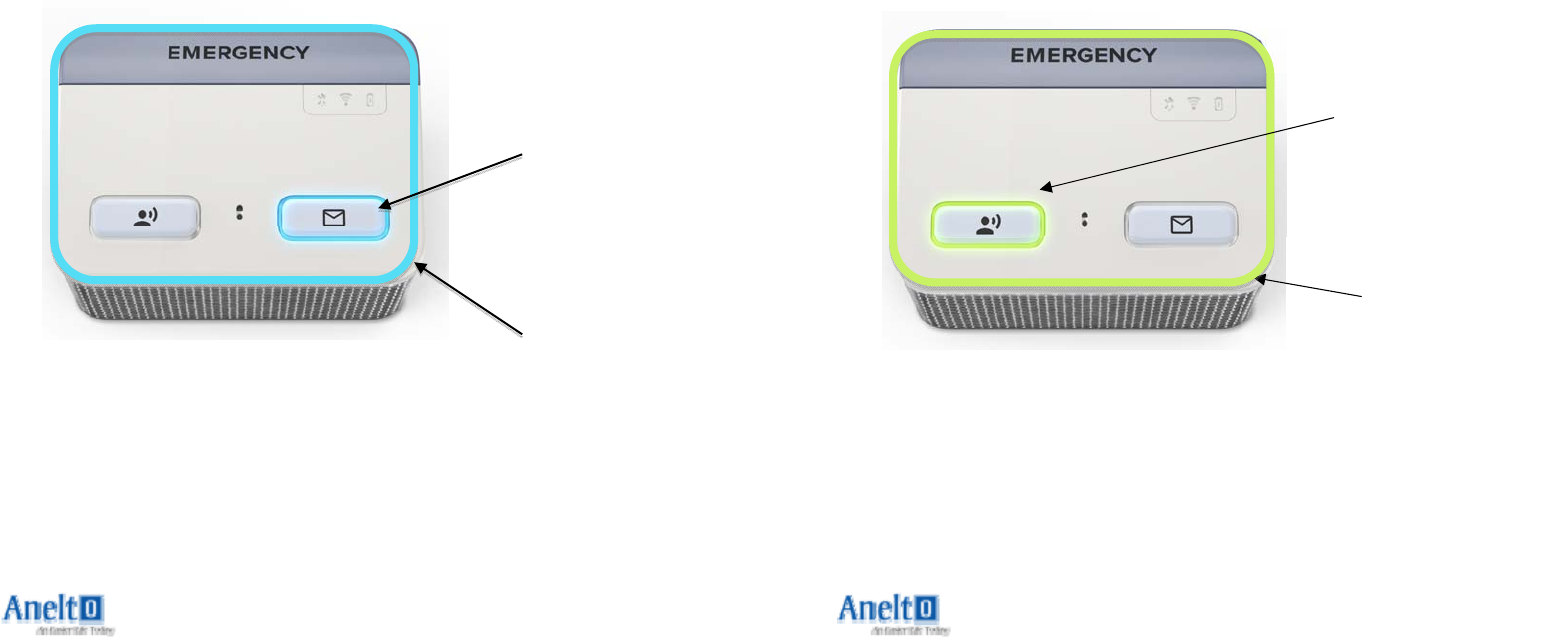
3) WhenyouseetheblueLEDblinkingonthe
MessageButtonandtheLightRing,pushthebutton
andlistentothemessage.Youmaywishtohavea
notepadandpencilreadyincaseyouneedtojotdown
anyinformation.
Message
Button
LightRing
13
Step9:UsingtheTestButton
1) TheTestbuttonallowsyoutocallaspecialnumbertotest
yoursystem.Youwillberemindedtotestyoursystem
whenitistimetodoso.
2) PresstheTestButtontoplaceacall.Youwillbegiven
audiopromptstoguideyoutotheservicesyouneed.
3) TheLEDontheTestButtonandtheLightRingaroundyour
unitwillflashgreenwhileyourcallisbeingconnectedand
thenturnsolidgreenduringthecall.Whenthecallis
completedyoursystemwillannounce“Thankyou,
Goodbye”andthecallwilldisconnect.
LightRing
Test
Button
LightRing