Ansen Electronics Co EC-B130TX Remote Sensor User Manual

Ansen Electronics Co Remote Sensor

User manual

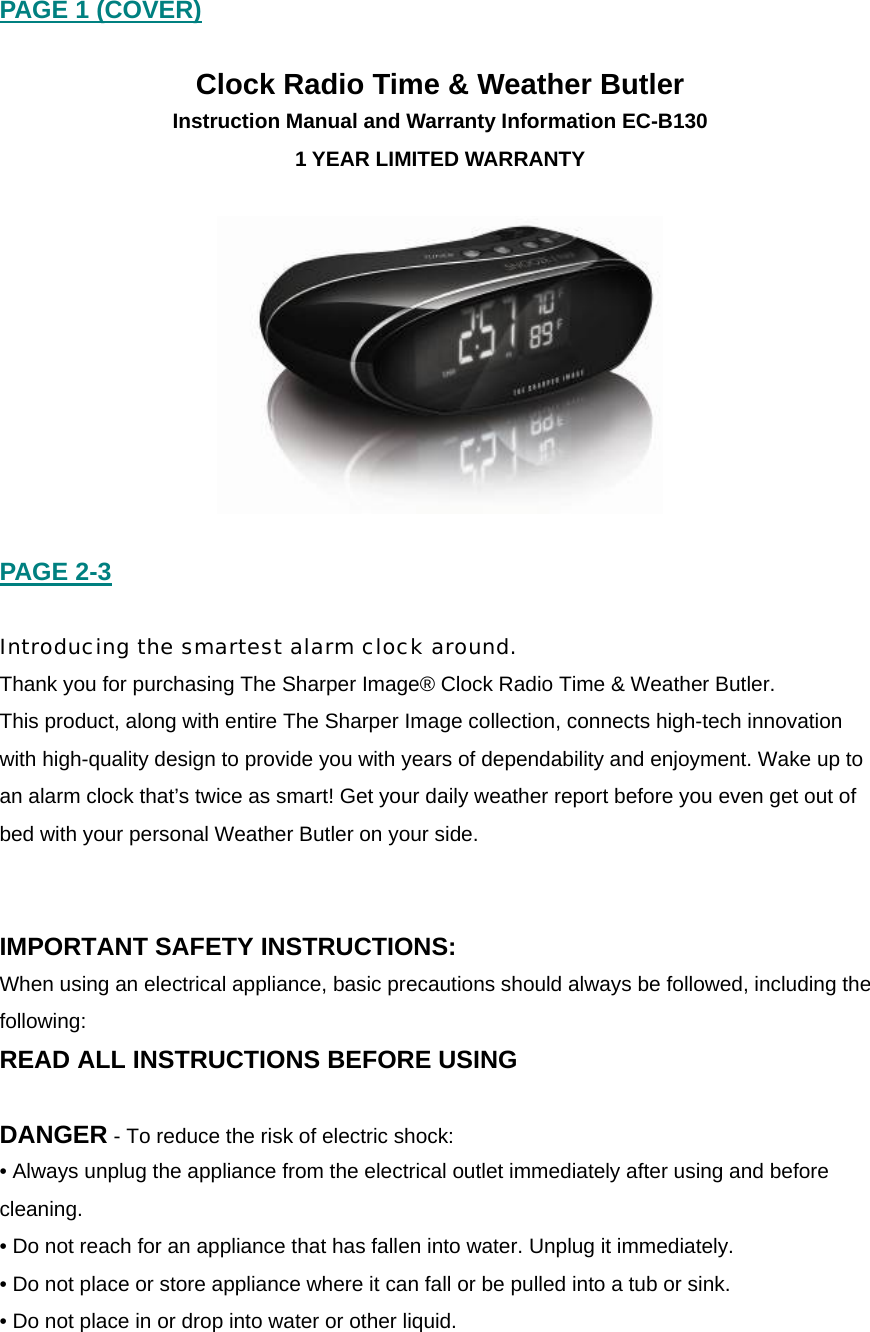
PAGE 1 (COVER)  Clock Radio Time & Weather Butler Instruction Manual and Warranty Information EC-B130 1 YEAR LIMITED WARRANTY    PAGE 2-3  Introducing the smartest alarm clock around. Thank you for purchasing The Sharper Image® Clock Radio Time & Weather Butler.  This product, along with entire The Sharper Image collection, connects high-tech innovation with high-quality design to provide you with years of dependability and enjoyment. Wake up to an alarm clock that’s twice as smart! Get your daily weather report before you even get out of bed with your personal Weather Butler on your side.     IMPORTANT SAFETY INSTRUCTIONS: When using an electrical appliance, basic precautions should always be followed, including the following: READ ALL INSTRUCTIONS BEFORE USING  DANGER - To reduce the risk of electric shock: • Always unplug the appliance from the electrical outlet immediately after using and before cleaning. • Do not reach for an appliance that has fallen into water. Unplug it immediately. • Do not place or store appliance where it can fall or be pulled into a tub or sink. • Do not place in or drop into water or other liquid.
WARNING - To reduce the risk of burns, fire, electric shock or injury to persons: • Close supervision is necessary when this appliance is used by or near children, invalids or disabled persons. • Use this appliance only for its intended use as described in this manual. Do not use attachments not recommended by THE SHARPER IMAGE; specifically any attachments not provided with the unit. • Never operate this appliance if it has a damaged cord, plug, cable or housing. If it is not working properly, if it has been dropped or damaged, return it to THE SHARPER IMAGE Service Center for examination and repair. • Keep cord away from heated surfaces. • Never drop or insert any object into any opening. • Do not operate where aerosol (spray) products are being used or where oxygen is being administered. • Do not carry this appliance by power cord or use cord as handle. • To disconnect, remove plug from outlet. • This appliance is designed for indoor use only. Do not use outdoors. • Only set on dry surfaces. Do not place on surface wet from water or cleaning solvents.  SAVE THESE INSTRUCTIONS Caution – Please read all instructions carefully before operating. • Never leave the appliance unattended, especially if children are present. • Never cover the appliance when it is in operation. • This unit should not be used by children without adult supervision. • Always keep the cord away from high temperature and fire. • Do not lift, carry, hang, or pull the product by the power cord. • If the adaptor sustains damage, you must stop using this product immediately and contact   The Sharper Image Service Center. (See the warranty section for The Sharper Image address.)  Caution: All  servicing of  this product  must be  performed by  authorized  The Sharper Image  Service Personnel  only.
PAGE 4 [INSERT LINE DRAWING OF FRONT OF IMAGE]  Clock Radio Time & Weather Butler Features:  • Indoor & Outdoor Temperature Display • Male voice announces time reporting and alarm mode • Easy-to-read display with illuminated LCD/3-level white backlight (HI/MED/LO) • AM/FM Digital Radio tuning with 8 preset memory • Dual Alarm Clock  – 3 Wake Modes: Radio, Beep Tone or Male voice (report looping) • Convenient Snooze/Nap function • Digital Volume (0 1~8 level) • Speaker included (3” diameter) • Operation temperature: 0~50degC • Indoor temperature range: 0~50degC  • Operating frequency: 434MHz  • Transmission distance: 30m (open area) • Powered by 6V 300mA (120V input) AC/DC adaptor (included) • Back-up battery  (3V DC - 1 x CR2032 (included ) for clock memory and alarm setting only during power failure   Outdoor Temperature Remote Sensor Specifications: • Outdoor temperature range: - 20~60degC • Operating frequency: 434MHz  • Transmission distance: 30m (open area) • Powered by 3V DC ( A total of 2 (two) AAA batteries (not included))
 Battery installation:  • Alarm clock uses AC adaptor and 1 CR2032 (included).  • Outdoor Temperature Remote Sensor (Transmitter) requires a total of 2 (two) AAA batteries (not included).  1. Remove compartment cover. Insert battery/batteries into the compartment on the bottom of the unit according to the polarity direction indicated. Replace cover and snap into place.  2. Attach the adaptor into the DC jack on the base of the unit and insert the cord into a 120V household outlet.  The battery power is designed only to provide MEMORY BACK-UP for the clock and alarm settings (in the event of power outages or if the unit is unplugged). However, the time will not be illuminated on the clock display. As soon as the power supply returns, the display will indicate the correct time.  NOTE: Battery must be installed in order for clock memory back-up to operate. In the event of a power failure or disconnection, if the battery is not installed, the clock and alarm, and radio memory will need to be re-set when power is restored.   [Need to show image and instructions for how to install batteries  (do we have anything like this on file?)]   PAGE 5-9 [INSERT LINE DRAWING OF TOP OF IMAGE SHOWING BUTTONS]  Setting the Clock: 1.  TIMER: Press TIMER button and it will display 15, 30, 45, 60 and OFF. This feature allows you to choose how long you listen.  2.  RADIO: Press RADIO button once and it will be at FM. Press RADIO button twice for AM. If memory is not empty, under radio off status, pressing it once will return to last memory station frequency, but not in memory mode.  Volume Control: •  Press “+” to increase the volume level 1~8. •  Press “-“ to decrease the volume level 8~1.
 Setting the Alarm: For your convenience, two separate alarms may be set to accompany individual wake-up times: ALARM 1 & ALARM 2  Alarm 1 button Short press:  Set Alarm mode Æ Beep Æ Radio Æ Voice Æ Off The display will show the Alarm 1 bell icon next to your selected mode. Press and hold:  1. Time flashing for HH, press +/- button to change Hour setting, press Alarm 1 button to confirm and change to minute setting. 2. Time flashing for MM, press +/- button to change Minute setting, wait for timeout to save and go back to normal mode. The display will show: Alarm 1 bell icon: HH: MM (AM/PM)  Alarm 2 button Short press:  Set Alarm mode Æ Beep Æ Radio Æ Voice Æ Off The display will show the Alarm 2 bell icon next to your selected mode. Press and hold:  1. Time flashing for HH, press +/- button to change Hour setting, press Alarm 2 button to confirm and change to minute setting. 2. Time flashing for MM, press +/- button to change Minute setting, wait for timeout to save and go back to normal mode. The display will show: Alarm 2 bell icon: HH: MM (AM/PM)   OFF:  Press the OFF button to turn off the “radio” feature or “audio” feature, and “Alarm OFF” during alarm mode.  REPORT:  Press the REPORT button once and real time data and outdoor temperature reading will be announced.  MEMORY: The AM/FM radio station memory records a maximum of 8 channels. •  Normal mode radio off, short-press [MEM] button to turn on radio and automatically return to the last memory radio station.   •  Press and hold [MEM] button more than 2 seconds to record new station. The “MEM” icon will appear and the memory digit will flash.  •  Press the [VOL +/-] to select memory number, press “Tuner +/-“ to tune the station, press the [MEM] button to confirm current station into memory.
  TUNER/TIME SET: 1.  In “DATE SET” mode or “ALARM SET” mode, press the [+] button to increase and press [-] to decrease digital values. 2.  In RADIO mode, short press the [+] & [-] buttons to manually adjust the frequency.  Long press to auto search forward [+] and for backward [-] selection.   SNOOZE/NAP:  Press the SNOOZE/NAP bar to snooze. This will automatically activate snooze time for nine minutes. Or you may choose to set the alarm in 15, 30, 45, 60 minutes or OFF for nap.  Controls located underneath Clock Radio:  Backlight HI/MED/LO: Slide switch to select the brightness level of backlight on display. C/F: Slide switch to interchange between Celsius (°C) or Fahrenheit (°F) for temperature level.  Daylight Savings Time:  Slide DST ON/OFF switch to activate or inactivate the Daylight Savings Time feature.  DATE/TIME:  1. Press and hold [DATE/TIME] button for more than 3 seconds, and enter the “DATE/TIME SET MODE” setting.  2. Press [DATE/TIME] button once, to set “year->month->day->hour->minute-exit”   USING INDOOR TEMPERATURE The unit will begin reading indoor temperature when it is plugged in. Allow a few minutes for the correct temperature to register on the LCD display.   USING OUTDOOR TEMPERATURE Be sure the Clock Radio Time & Weather Butler unit is plugged in prior to the remote sensor battery installation.
   Remote Sensor Battery Installation: 1. Loosen the 4 screws securing the battery cover with a small screwdriver (included) and remove. Insert 2 alkaline AAA batteries according to the polarity direction indicated. 2. Place the home receiver (Clock Radio Time & Weather Butler) as close as possible to the remote sensor. This will help with synchronization between the two units. NOTE: Once you are ready to position your remote sensor and home receiver, ensure that the distance is not outside the effective transmission range (100 feet). Some building materials and location of the home receiver or remote sensor can affect transmission quality and range. Try various locations for best results. 3. Press the C/F button inside the remote sensor to change between °C and °F.  (The remote sensor is preset on °F.) 4. Press the TX button inside of the remote sensor to verify the reception. 5. Replace the cover and tighten the 4 screws.  NOTE: It is recommended to test the units next to each other to ensure that both the remote sensor and home receiver are properly synchronized.  Remote Sensor Mounting Instructions The Remote Sensor comes with a table stand or can be wall mounted. Table Stand - Simply fold out the attached stand from the mounting bracket. Wall Mounting - Set a screw in the desired hanging location and mount.  A screw and wall anchor have been included for your convenience.  NOTE: Keep the remote sensor out of direct sunlight and rain. Do not mount  on metal surface.  Remote Sensor Low Battery Indication Low battery indication is available for the remote sensor. A battery life icon will display on the remote sensor. Replace the batteries as necessary and follow the setup procedure.  MAINTENANCE AND CARE INSTRUCTIONS • Extreme temperatures, shock or areas of unusual vibration should be avoided to prevent damage to the units. • Clean the units using only a soft, damp cloth to wipe. Do not use solvents, abrasives, detergents or other strong cleaning agents. After cleaning, wipe surfaces with a dry cloth. • Do not submerge units in water or other liquids.
• Do not subject the units to extremely severe temperatures - DO NOT PLACE UNITS INTO OVENS, FREEZERS or MICROWAVE UNITS.  NOTE: Opening the housing (other than the battery compartment) of the Remote Sensor or the Clock Radio Time & Weather Butler Unit will invalidate your warranty. Do not attempt to repair this unit - There are no consumer serviceable parts.  TROUBLE SHOOTING If Indoor and Outdoor temperatures do not match when placed next to each other:  The sensor is manufactured to be +/- 2 degree in accuracy under normal conditions. So it is possible to have up to four degrees difference shown on the separate temperature sensors (one could be “+2 degree” and the other “-2 degree”. Additionally, the calibration curve is different between the two units because of the greater temperature range of the outdoor sensor. Errors are usually noted on the extreme ends of the temperature ranges. If Clock Radio Time & Weather Butler unit is not accepting remote transmissions: The units may not be properly synchronized or the batteries may need to be replaced. See “USING OUTDOOR TEMPERATURE” section for detailed instructions. With the two units next to each other, attempt synchronization. Remember to always place the remote sensor within the effective transmission range and away from large metal surfaces. What is the recommended battery type? We recommend using only alkaline batteries. Where can I mount the remote sensor? To get accurate readings and to prolong the life of your sensor, we recommend that you mount it out of direct sunlight and rain. Fog and mist will not affect the sensor, but large volumes of soaking rain may. To guard against this, we recommend that you mount it under the eve of your house, your garage or any other suitable place that will keep it out of direct sun and rain. Modifications not authorized by the manufacturer may void users authority to operate this device. If Outdoor Temperature Reading shows “- -”: This may indicate a low battery or out of transmission range.  SPECIFICATIONS Range of temperature measurement: Indoor temperature: +32° F to +122° F (0° C to + 50° C) Remote sensor: -4° F to +140° F (-20° C to +60° C) Transmission: Max. 100 ft. (30 m) Open area, RF434 MHz
PAGE 10-11  Maintenance To Store You may leave the unit on display, or you can store it in its box in a cool, dry place.  To Clean Use only a soft dry cloth to clean the enclosure of the unit. NEVER use liquids or abrasive cleaner to clean.  Modifications not authorized by the manufacturer may void user warranty. Note: This equipment has been tested and found to comply with the limits for a Class B digital device, pursuant to Part 15 of the FCC Rules. These limits are designed to provide reasonable protection against harmful interference in a residential installation. This equipment generates, uses and can radiate radio frequency energy and, if not installed and used in accordance with the instructions, may cause harmful interference to radio communications. However, there is no guarantee that interference will not occur in a particular installation. If this equipment does cause harmful interference to radio or television reception, which can be determined by turning the equipment off and on, the user is encouraged to try to correct the interference by one or more of the following measures: • Reorient or relocate the receiving antenna. • Increase the separation between the equipment and receiver. • Connect the equipment into an outlet on a circuit different from that to which the receiver is connected. • Consult the dealer or an experienced radio/TV technician for help.  Operation is subject to the following two conditions: (1) this device may not cause interference, and (2) this device must accept any interference, including interference that may cause undesired operation of the device. This device complies with part 15 of the FCC Rules. Operation is subject to the following two conditions: (1) This device may not cause harmful interference, and (2) this device must accept any interference received, including interference that may cause undesired operation. NOTE: THE MANUFACTURER IS NOT RESPONSIBLE FOR ANY RADIO OR TV INTERFERENCE CAUSED BY UNAUTHORIZED MODIFICATIONS TO THIS EQUIPMENT. SUCH MODIFICATIONS COULD VOID THE USER AUTHORITY TO OPERATE THE EQUIPMENT
PAGE 12  LIMITED ONE YEAR WARRANTY The Sharper Image sells its products with the intent that they are free of defects in manufacture and workmanship for a period of one year from the date of original purchase, except as noted below. The Sharper Image warrants that its products will be free of defects in material and workmanship under normal use and service.  This warranty extends only to consumers and does not extend to Retailers. To obtain warranty service on your The Sharper Image product, mail the product and your dated sales receipt (as proof of purchase), postpaid, to the following address: The Sharper Image Consumer Relations Service Center Dept. 168 3000 Pontiac Trail Commerce Township, MI 48390 No COD's will be accepted. The Sharper Image does not authorize anyone, including, but not limited to, Retailers, the subsequent consumer purchaser of the product from a Retailer or remote purchasers, to obligate The Sharper Image in any way beyond the terms set forth herein. This warranty does not cover damage caused by misuse or abuse; accident; the attachment of any unauthorized accessory; alteration to the product; improper installation; unauthorized repairs or modifications; improper use of electrical/power supply; loss of power; dropped product; malfunction or damage of an operating part from failure to provide manufacturer’s recommended maintenance; transportation damage; theft; neglect; vandalism; or environmental conditions; loss of use during the period the product is at a repair facility or otherwise awaiting parts or repair; or any other conditions whatsoever that are beyond the control of The Sharper Image. This warranty is effective only if the product is purchased and operated in the country in which the product is purchased. A product that requires modifications or adoption to enable it to operate in any other country than the country for which it was designed, manufactured, approved and/or authorized, or repair of products damaged by these modifications is not covered under this warranty. THE WARRANTY PROVIDED HEREIN SHALL BE THE SOLE AND EXCLUSIVE WARRANTY. THERE SHALL BE NO OTHER WARRANTIES EXPRESS OR IMPLIED INCLUDING ANY IMPLIED WARRANTY OF MERCHANTABILITY OR FITNESS OR ANY OTHER OBLIGATION ON THE PART OF THE COMPANY WITH RESPECT TO PRODUCTS COVERED BY THIS WARRANTY. THE SHARPER IMAGE SHALL HAVE NO LIABILITY FOR ANY INCIDENTAL, CONSEQUENTIAL OR SPECIAL DAMAGES. IN NO EVENT SHALL THIS WARRANTY REQUIRE MORE THAN THE REPAIR OR REPLACEMENT OF ANY PART OR PARTS WHICH ARE FOUND TO BE DEFECTIVE WITHIN THE EFFECTIVE PERIOD OF THE WARRANTY. NO REFUNDS WILL BE GIVEN. IF REPLACEMENT PARTS FOR DEFECTIVE MATERIALS ARE NOT AVAILABLE, THE SHARPER IMAGE RESERVES THE RIGHT TO MAKE PRODUCT SUBSTITUTIONS IN LIEU OF REPAIR OR REPLACEMENT. This warranty does not extend to the purchase of opened, used, repaired, repackaged and/or resealed products, including but not limited to sale of such products on Internet auction sites and/or sales of such products by surplus or bulk resellers. Any and all warranties or guarantees shall immediately cease and terminate as to any products or parts thereof which are repaired, replaced, altered, or modified, without the prior express and written consent of The Sharper Image. This warranty provides you with specific legal rights. You may have additional rights which may vary from country to country. Because of individual country regulations, some of the above limitations and exclusions may not apply to you.
For more information regarding our product line in the USA, please visit: www.siproducts.com ©2009 The Sharper Image and its affiliated companies, all rights reserved. The Sharper Image® is a registered trademark of  The Sharper Image and its affiliated companies.  IB-EC-B130 The Sharper Image Service Center 1.888.856.6781 8:30a.m. – 7:00p.m. (EST) M – F Mail To: The Sharper Image Consumer Relations Service Center Dept. 168 3000 Pontiac Trail Commerce Township, MI 48390 e-mail: cservice@siproducts.com

Navigation menu