Anticimex Innovation Center A S 200612 Rodent trap system User Manual
Anticimex Innovation Center A/S Rodent trap system
User manual

1
Version 1 - 21.06.2018
GB
Anticimex
Smart Box Link FCC
Manual
3
Smart Box Link FCC Compliance Statement
Smart Box Link - Article number 200 612
FCC ID 2AOFP-200612
This device complies with part 15 of the FCC Rules. Operation is subject to the following two conditions:
(1) This device may not cause harmful interference, and (2) this device must accept any interference
received, including interference that may cause undesired operation.
Information to user
• The Smart Box Link are only in compliance if no changes or modifications is made to the device.
• The Smart Box Link are in compliance with the requirement for RF exposure in US with 20 cm
separation distance between the user and/or bystander of the device.
• The antenna is fixed to the device and no change in antenna or fixation of the antenna is acceptable
and such modification is considered to violate the Compliance Statement.
• The latest version of the manuals and datasheets are always available on One.Anticimex.com
Note:
This equipment has been tested and found to comply with the limits for Class B digital device,
pursuant to part 15 of the FCC Rules. These limits are designed to provide reasonable protection
against harmful interference in a residential installation. The equipment generates, uses and can
radiate radio frequency energy and, if not installed and used in accordance with the instructions, may
cause harmful interference to radio communications.
However, there is no guarantee that interference will not occur in a particular installation. If this
equipment does cause harmful interference to radio or television reception, which can be determined
by turning the equipment off and on, the user is encouraged to try to correct the interference by one
or more of the following measures:
o Reorient or relocate the receiving antenna.
o Increase the separation between the equipment and the receiver.
o Connect the equipment into an outlet on a circuit different from that to which the receiver is
connected.
o Consult the dealer or an experienced radio/TV technician for help.
4
Requirements
The technician operating this equipment must be familiar with the traditional Smart Box, as well
as the Smart Connect family, since Smart Box Link is a merge of the two product groups.
It is a requirement to link Smart Box Link to a Smart Connect to receive information.
For basic instruction of Smart Box, see “Smart Box Manual” and for basic instructions of the
Smart Connect series, see “Smart Connect Manual”.
Note: A Smart Connect can have 50 linked devices. Five of those can be Smart Box Link, the rest
must be Smart Eye or Smart Catch.
Setting up Smart Box Link
Make sure to have a Smart Connect in Link mode, before starting up the Smart Box Link. Place
the Box where it is meant to be installed. Do not link all the equipment close to the Smart
Connect.
Connect the Smart Box battery to the Box. When the box says “Ready” in the display, you can use
to go through the menus.
a. When the trap shows ”Ready” in the display, press
b. Answer the question “Link now?”, by pressing for ”Yes” or for ”No”.
The Smart Box Link will now try a maximum of 60 times to link to a Smart Connect system.
c. Answer the question “Bucket empty?”, by pressing for ”Yes” or for ”No”.
d. When the display of the Box shows “Waiting for darkness 10:00”, put on the lid.
After counting down from 10 minutes, the Box is armed.
5
Main differences between Smart Box Link and traditional Smart
Box
Since Smart Box Link is not a standalone device, but a device in the Smart Connect family, you
have to make notice of the following:
a. The communication is on an hourly basis, and follows the same communication pattern as the
Smart Connect family.
This means, that a Smart Box Link will communicate shots, mechanical errors etc. on an hourly basis
and not immediately after the situation occurs.
b. The Smart Box Link is no longer stand-alone with individual settings.
Because Smart Box Link is a device of the Smart Connect family, certain settings will be set on the
Smart Connect. Settings like “Active period”, “Alarm for every rat” and “Bucket capacity” is only set on
the Smart Connect. If you need different settings for different Smart Box Links within the same
installation, you must put of more Smart Connects.
Search out Smart Box Link in WisePlan
Since Smart Box Link is not an independent unit, but linked to a Smart Connect, you have two
options for searching out the Box:
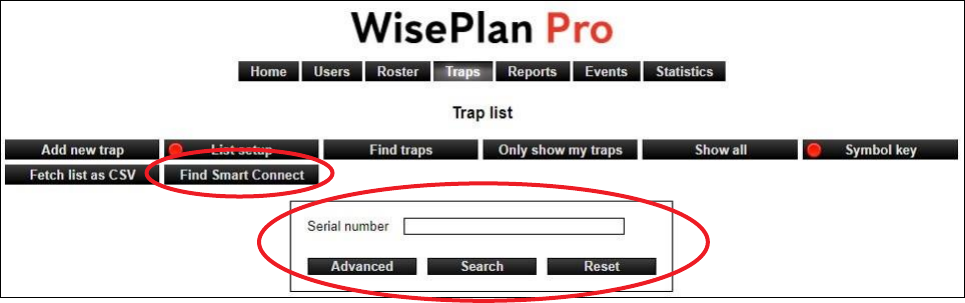
a. Use the “Find Smart Connect” option, and type in the serial number of the Smart Box Link.
b. Use the search field, but search out the Smart Connect it is linked to.
6
Information of a Smart Box Link
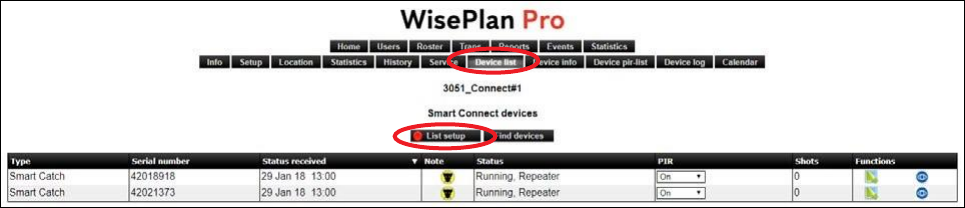
The information of the Smart Box Link is now visible in the device list of a Smart Connect. To
change the list setup, simply use “List setup” menu in the device list.
Note: The column “Shots”, will only show the amount of shots since emptying the bucket.

7
Anticimex Innovation Center
+45 48 79 93 78
AIC@anticimex.com