Apc Galaxy 5000 Users Manual
5000 to the manual 6f78c1df-9108-4230-9ade-a8ec13f8f48a
2015-02-03
: Apc Apc-Galaxy-5000-Users-Manual-471069 apc-galaxy-5000-users-manual-471069 apc pdf
Open the PDF directly: View PDF  .
.
Page Count: 68
- 1. Presentation
- 2. Installation
- 2.1 Location
- 2.2 Layout of cabinets
- 2.3 Removing the cardboard protecting the batteries
- 2.4 Required protective devices and cable sizes
- 2.5 2.5 System earthing arrangements
- TNS upstream and TNS downstream installation
- TNC upstream, TNS downstream
- Installation with upstream IT and downstream TNS
- Installation with upstream TT and downstream TT (with upstream differential protection)
- Frequency converter (without Bypass AC input)
- Parallel configuration without external bypass cabinet and with common normal and Bypass AC inputs (maximum two units in parallel)
- Parallel configuration without external bypass cabinet and with separate normal and Bypass AC inputs (maximum two units in parallel)
- Parallel UPS with external bypass cabinet and separate Normal and Bypass AC network inputs (6 UPS in parallel for 4PN)
- 2.6 Connection of power cables in a single UPS unit
- 2.7 Earth-cable connection for a single unit in a TNC earthing system
- 2.8 Connection of power cables for parallel UPS units
- 2.9 Connection of the 150 kVA external bypass cabinet
- 2.10 Connection of the 360 kVA external bypass cabinet
- 2.11 Connection of the 600 kVA external bypass cabinet
- 2.12 Auxiliary interconnections between UPS units in parallel configurations
- 2.13 Connection of general shutdown or emergency power off (EPO) terminal block
- 2.14 Connection of the relay communications card
- 2.15 Running the control/communications cables
- 2.16 Power connections for an external battery cabinet
- 2.17 Assembly and connection of an empty battery cabinet
- 2.18 Control connections for an external battery cabinet
- 2.19 Connection of an input isolating transformer
- 2.20 Connection of an output isolating transformer
- 3. Operation
- 3.1 Shutting down a single UPS
- 3.2 Restarting a single UPS
- 3.3 Shutting down a parallel configuration
- 3.4 Restarting a parallel configuration
- 3.5 Operation of mimic-panel LEDs
- 3.6 Operating modes
- 3.7 Load on battery power
- 3.8 UPS personalisation
- 3.9 Relay contacts (communications card)
- 3.10 Display functions
- 4. Maintenance
- 5. Environment
- 6. Available options
- 7. Appendices
MGETM GalaxyTM 5000
20 - 120 kVA
Installation and user manual
34001813EN/AE - Page 2
Introduction
Thank you for selecting an APC by Schneider Electric product to protect your electrical equipment.
The MGETM GalaxyTM 5000 range has been designed with the utmost care.
We recommend that you take the time to read this manual to take full advantage of the many features of your UPS.
APC by Schneider Electric pays great attention to the environmental impact of its products.
Measures that have made MGETM GalaxyTM 5000 a reference in environmental protection include:
◗ the eco-design approach used in product development,
◗ the elimination of harmonic disturbances reinjected into the AC source,
◗ production in an ISO 14001 certified factory,
◗ recycling of the MGETM GalaxyTM 5000 at the end of its service life.
To discover the entire range of APC by Schneider Electric products and the options available for the MGETM GalaxyTM 5000
range, we invite you to visit our web site, www.apc.com, or contact your local APC by Schneider Electric representative.
All products in the MGETM GalaxyTM 5000 range are protected by patents. They implement original technology not available to
competitors of APC by Schneider Electric.
To take into account evolving standards and technology, equipment may be modified without notice. Indications concerning
technical characteristics and dimensions are not binding unless confirmed by APC by Schneider Electric.
This document may be copied only with the written consent of Schneider Electric and its affiliated companies. Authorised copies
must be marked
"MGETM GalaxyTM 5000 Installation and user manual no. 3400181300".

34001813EN/AE - Page 3
Safety
Safety rules
Safety of persons
Product safety
Special precautions
The UPS must be installed in a room with restricted access (qualified personnel only, according to standard 62040-1-2).
A UPS has its own internal power source (the battery). Consequently, the power outlets may be energised even if the UPS is
disconnected from the AC-power source.
Dangerous voltage levels are present within the UPS. It should be opened exclusively by qualified service personnel.
The UPS must be properly earthed.
The battery supplied with the UPS contains small amounts of toxic materials.
To avoid accidents, the instructions below must be observed.
◗ Never operate the UPS if the ambient temperature and relative humidity are higher than the levels specified in the
documentation.
◗ Never burn the battery (risk of explosion).
◗ Do not attempt to open the battery (the electrolyte is dangerous for the eyes and skin).
◗ Comply with all applicable regulations for the disposal of the battery.
◗ Caution, wait five minutes before opening the UPS to allow the capacitors to discharge.
◗ Caution, there is high leakage current, the earthing conductor must be connected first.
◗ The product must be installed on a non-inflammable surface (e.g. concrete).
◗ Caution, battery replacement must be carried out by qualified personnel.
A protection circuit breaker must be installed upstream and be easily accessible.
◗ Never install the UPS near liquids or in an excessively damp environment.
◗ Never let a liquid or foreign body penetrate inside the UPS.
◗ Never block the ventilation grates of the UPS.
◗ Never expose the UPS to direct sunlight or a source of heat.
◗ When replacing battery cells, use the same type and number of cells.
◗ The UPS connection instructions contained in this manual must be followed in the indicated order.
◗ Check that the indications on the rating plate correspond to your AC-power system and to the actual electrical consumption
of all the equipment to be connected to the UPS.
◗ If the UPS must be stored prior to installation, storage must be in a dry place.
◗ The admissible storage temperature range is -25° C to +45° C.
◗ If the UPS remains de-energised for a long period, we recommend that you energise the UPS for a period of 24 hours, at
least once every month. This charges the battery, thus avoiding possible irreversible damage.
◗ The UPS is designed for normal climatic and environmental operating conditions concerning the altitude, ambient operating
temperature, relative humidity and ambient transport and storage conditions.
◗ Using the UPS within the given limits guarantees its operation, but may affect the service life of certain components,
particularly that of the battery and its autonomy. The maximum storage time of the UPS is limited due to the need to recharge
its integrated battery.
◗ Unusual operating conditions may justify special design or protection measures:
- harmful smoke, dust, abrasive dust,
- humidity, vapour, salt air, bad weather or dripping,
- explosive dust and gas mixture,
- extreme temperature variations,
- bad ventilation,
- conductive or radiant heat from other sources,
- cooling water containing acid or impurities which may cause scale, silt, electrolysis or corrosion of converter parts exposed
to water,
- strong electromagnetic fields,
- radioactive levels higher than those of the natural environment,
- fungus, insects, vermin, etc.,
- battery operating conditions.
◗ The UPS must always be installed in compliance with:
◗ the requirements of standard IEC 60364-4-42: Protection from thermal effects.
◗ standard IEC 60364-4-41: Protection from electric shock.
◗ standard IEC 60364-4-482: Electrical installations of buildings.
◗ in France, the requirements of standard NFC 15-100.
34001813EN/AE - Page 4
Foreword
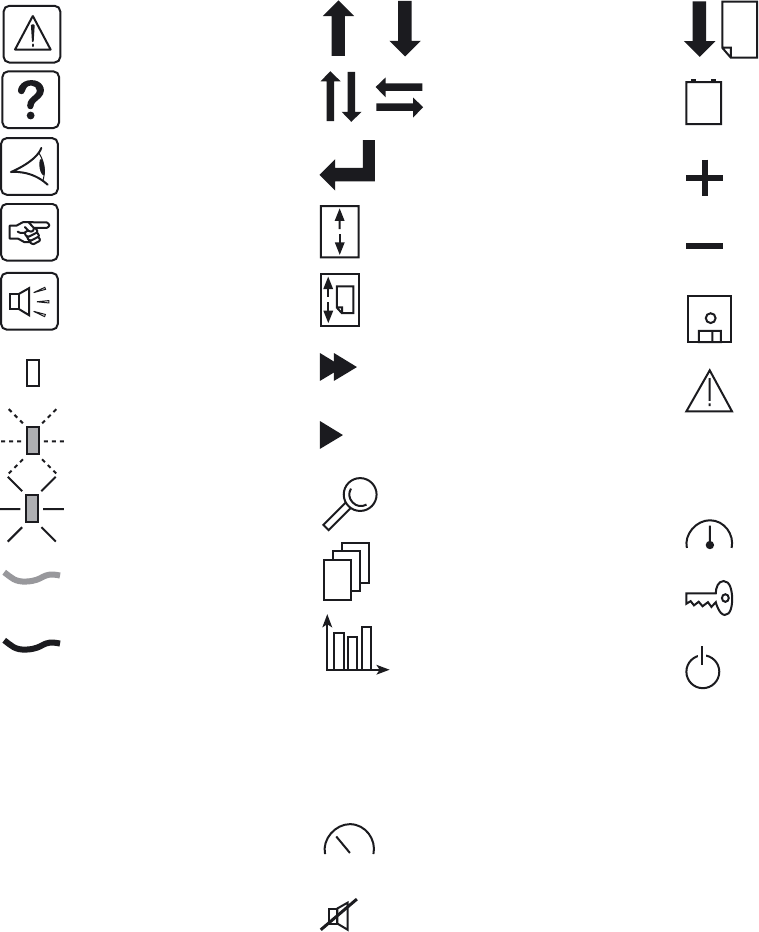
Pictograms
Document Display
Danger, these instructions are
imperative.
Information, advice, help
Visual indication
Action
Audio signal
LED OFF
LED flashing
LED ON
Earth cables
Other cables
Vertical selection
Other selection
Enter / Confirm
Event scroll in log
Page scroll in log
Fast forward
Forward
Details
Circular menu
Graphical display
Return to previous display
Delete
Access to measurements
Buzzer off
Move up or down one page
Event selection in log by date and
time
Increase
Decrease
Save
Alarm
Status conditions
Settings
Maintenance
Control
E
S
C
D
E
L
VOLT
17
mai
0101
1010
0101
334001813EN/AE - Page 5
Contents
1. Presentation
1.1 MGE TM Galaxy TM 5000 .............................................................................................................. 8
UPS cabinet .................................................................................................................................. 8
External battery cabinet / auxiliary cabinet ...................................................................................8
1.2 Inside the UPS cabinet, access to connections ......................................................................... 9
1.3 Cabinet layout (normal or false floor) ...................................................................................... 10
1.4 User-machine interface ...............................................................................................................11
1.5 Relay communication card .........................................................................................................11
2. Installation
2.1 Location ....................................................................................................................................... 12
2.2 Layout of cabinets ...................................................................................................................... 12
2.3 Removing the cardboard protecting the batteries ................................................................... 13
In the UPS .................................................................................................................................. 13
In the external battery cabinet ..................................................................................................... 13
2.4 Required protective devices and cable sizes ........................................................................... 14
Recommended upstream protection ........................................................................................... 14
Recommended downstream protection ...................................................................................... 14
Earth-leakage current ................................................................................................................. 14
Required cable sizes ................................................................................................................... 15
Required cable sizes for parallel UPS installations with an external bypass .............................. 16
2.5 2.5 System earthing arrangements ........................................................................................... 17
TNS upstream and TNS downstream installation ....................................................................... 17
TNC upstream, TNS downstream ............................................................................................... 18
Installation with upstream IT and downstream TNS ................................................................... 18
Installation with upstream TT and downstream TT (with upstream differential protection) ......... 18
Frequency converter (without Bypass AC input) ......................................................................... 19
Parallel configuration without external bypass cabinet and with common normal and Bypass AC
inputs (maximum two units in parallel) ........................................................................................ 19
Parallel configuration without external bypass cabinet and with separate normal and Bypass AC
inputs (maximum two units in parallel) ........................................................................................ 20
Parallel UPS with external bypass cabinet and separate Normal and Bypass AC network inputs (6
UPS in parallel for 4PN) .............................................................................................................. 21
2.6 Connection of power cables in a single UPS unit ................................................................... 22
2.7 Earth-cable connection for a single unit in a TNC earthing system ...................................... 23
2.8 Connection of power cables for parallel UPS units ................................................................. 24
Equipotential bonding between parallel-connected units ............................................................ 24
Redundant parallel configuration (maximum two UPS units for Pn) ........................................... 25
2.9 Connection of the 150 kVA external bypass cabinet ............................................................... 28
2.10 Connection of the 360 kVA external bypass cabinet ............................................................. 29
2.11 Connection of the 600 kVA external bypass cabinet ............................................................. 30
2.12 Auxiliary interconnections between UPS units in parallel configurations .......................... 31
Redundant parallel configuration (maximum two UPS units) ...................................................... 31
.................................................................................................................................................... 31
Parallel configuration for increased capacity (maximum four UPS units) ................................... 32
Fitting the protection cover for the auxiliary interconnection cables ........................................... 33
2.13 Connection of general shutdown or emergency power off (EPO) terminal block .............. 33
2.14 Connection of the relay communications card ...................................................................... 34
2.15 Running the control/communications cables ........................................................................ 36
Single UPS ................................................................................................................................. 36
Parallel UPS ................................................................................................................................ 37
334001813EN/AE - Page 6
Contents
2.16 Power connections for an external battery cabinet ...............................................................38
2.17 Assembly and connection of an empty battery cabinet ........................................................38
Mounting the battery circuit breaker kit ........................................................................................38
Mounting the shelves and the battery cells .................................................................................39
2.18 Control connections for an external battery cabinet .............................................................40
2.19 Connection of an input isolating transformer .........................................................................41
2.20 Connection of an output isolating transformer ......................................................................41
3. Operation
3.1 Shutting down a single UPS .......................................................................................................42
3.2 Restarting a single UPS ..............................................................................................................42
3.3 Shutting down a parallel configuration .....................................................................................43
3.4 Restarting a parallel configuration .............................................................................................43
3.5 Operation of mimic-panel LEDs .................................................................................................44
Single UPS start sequence on Normal AC input .........................................................................44
Single UPS start sequence on Bypass AC input .........................................................................44
3.6 Operating modes .........................................................................................................................45
Normal (double conversion) mode ..............................................................................................45
ECO mode (single UPS only) ......................................................................................................45
3.7 Load on battery power ................................................................................................................46
Transfer to battery power .............................................................................................................46
End of battery power ...................................................................................................................46
3.8 UPS personalisation ....................................................................................................................46
Access to the personalisation functions ......................................................................................46
Operating mode ...........................................................................................................................47
Frequency ....................................................................................................................................47
Automatic bypass ........................................................................................................................47
Battery .........................................................................................................................................47
3.9 Relay contacts (communications card) .....................................................................................48
3.10 Display functions .......................................................................................................................49
4. Maintenance
4.1 Identification of alarms ...............................................................................................................50
4.2 Life Cycle Monitoring (LCM) .......................................................................................................50
4.3 UPS isolation ................................................................................................................................51
Single UPS ..................................................................................................................................51
Frequency converter ....................................................................................................................51
UPS operating in ECO mode .......................................................................................................51
Parallel UPS configuration without external bypass cabinet ........................................................52
Parallel UPS configuration with external bypass cabinet .............................................................53
4.4 Return to the normal position ....................................................................................................54
Single UPS ..................................................................................................................................54
Frequency converter ....................................................................................................................54
Parallel UPS configuration without external bypass cabinet ........................................................55
Parallel UPS configuration with external bypass cabinet .............................................................56
4.5 Training centres ...........................................................................................................................57
5. Environment
6. Available options
Backfeed option ...........................................................................................................................59
334001813EN/AE - Page 7
Contents
NMC (Network Management Card) option .................................................................................. 59
Optional communications card with additional power relay ........................................................ 59
Optional serial communications card .......................................................................................... 59
Telpac Power Services option ..................................................................................................... 59
AS4I option ................................................................................................................................. 59
Multislot option ............................................................................................................................ 59
External synchronisation module option ..................................................................................... 59
IP32 option .................................................................................................................................. 59
7. Appendices
7.1 Technical sheets ......................................................................................................................... 60
Center of gravity .......................................................................................................................... 60
Electrical characteristics ............................................................................................................. 61
Thermal characteristics ............................................................................................................... 64
General characteristics of MGE TM Galaxy TM 5000 UPSs ...................................................... 65
General characteristics of MGE TM Galaxy TM 5000 UPSs (cont.) ........................................... 66
UPS components ........................................................................................................................ 66
7.2 Options ........................................................................................................................................ 67
IP32 installation ........................................................................................................................... 67
7.3 Glossary ....................................................................................................................................... 68
34001813EN/AE - Page 8
1. Presentation
1.1 MGE
TM Galaxy
TM 5000
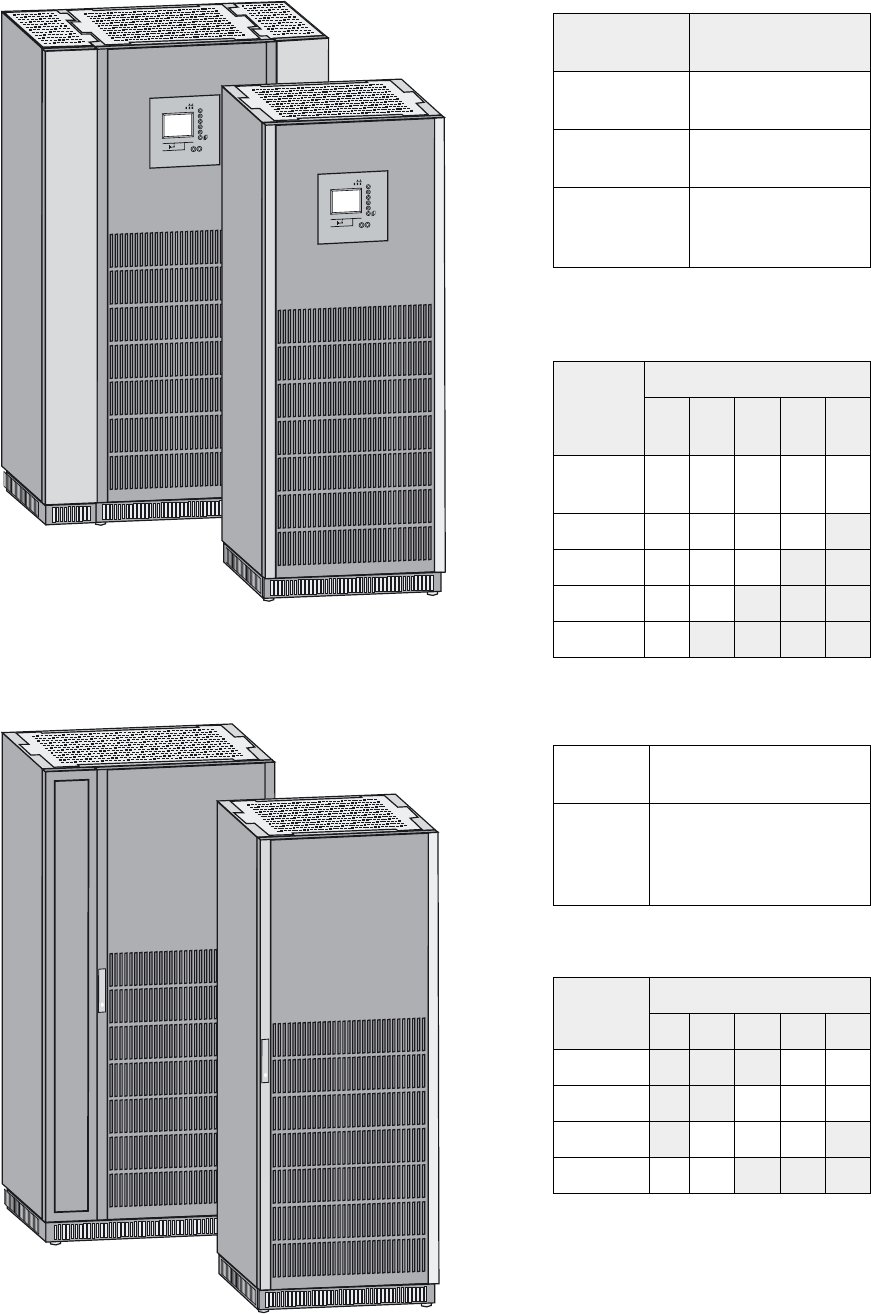
UPS cabinet
External battery cabinet / auxiliary cabinet
Dimensions
UPS power
rating (kVA)
Dimensions
(H x W x D)
20/30/40/60
without battery
1900 x 712 x 850 mm
80/100/120
without battery
1900 x 712 x 850 mm
20/30/40/60/80
with internal
battery
1900 x 1112 x 850 mm
Weight in kg (UPS without battery or with
built-in battery)
Backup
time
UPS power rating (kVA)
20
30
40 60 80 100
120
Without
battery
400 400 400 520 520
5 min 808 808 958 1120
10 min 808 958 1045
15 min 958 1045
30 min 1045
Dimensions (H x W x D) and weight
Cabinet 700
mm (empty)
1900 x 712 x 850 mm
135 kg
Cabinet
1000 mm
wide
(empty)
1900 x 1012 x 850 mm
150 kg
Weight in kg (cabinet alone)
Backup
time
UPS power rating (kVA)
40 60 80 100 120
5 min 885 980
10 min 885 1142 1307
15 min 885 1142 1307 1764
30 min 882 1307 1764 2439 2742
Weights highlighted in grey are for double
cabinets.
IO
3s
?
~
IO
3s
?
~
34001813EN/AE - Page 9
1. Presentation
1.2 Inside the UPS cabinet, access to connections
Example of version with built-in battery
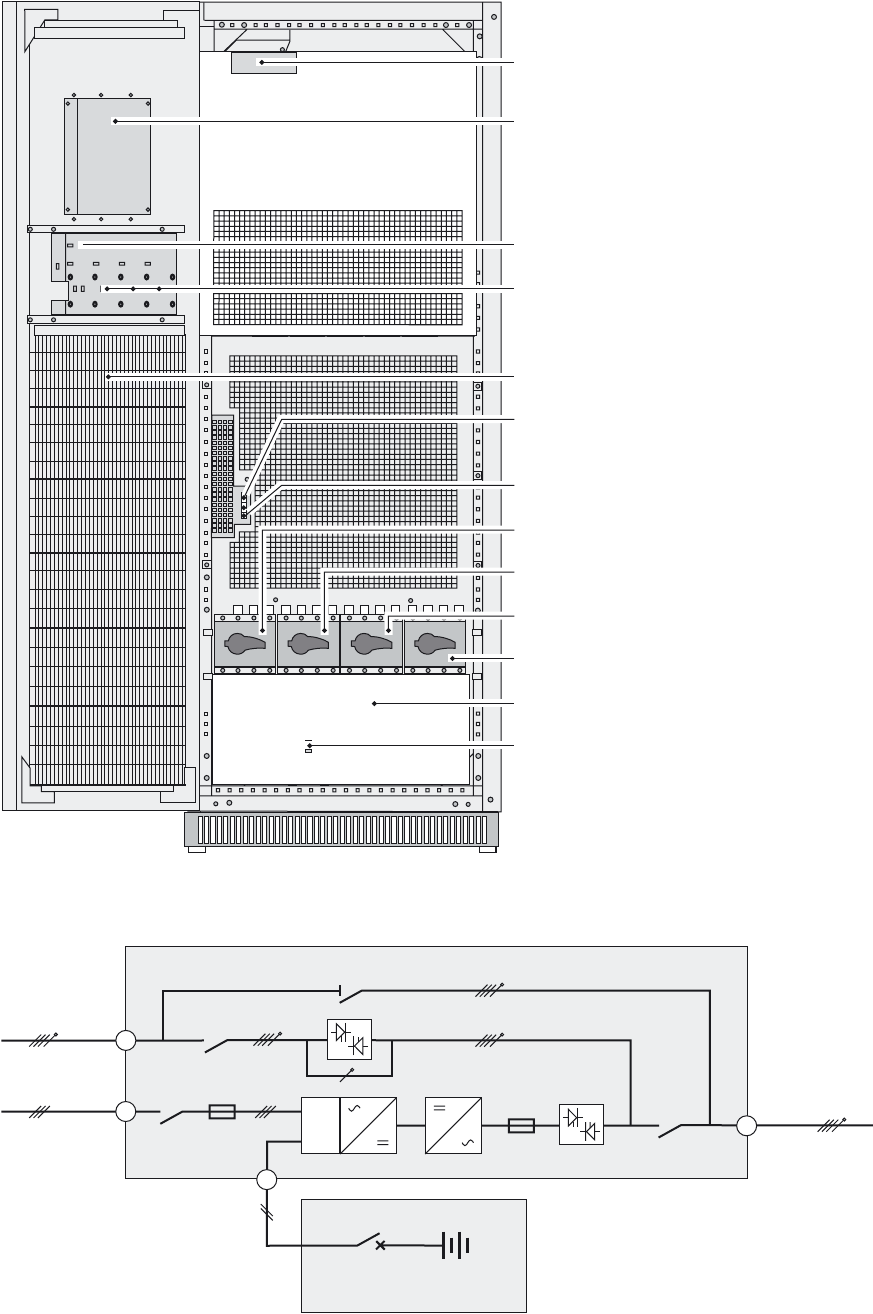
Simplified diagram of power connections
(1)Connectors for auxiliary interconnections
of parallel UPS units (INTN card)
(2)User-machine interface
(3)Slot for relay communications card
(4) Free slots for optional communication
cards
(5) Open cabinet door
(6) Screw-type terminal block for connections
of contacts and coils for two external battery
circuit breakers
(7) Screw-type terminal block for connection
of emergency power off (EPO)
(8) Q1: input switch for Normal AC input
(9) Q4S: input switch for Bypass AC input
(10) Q3BP: bypass switch
(11) Q5N: UPS output switch
(12) Protection cover for power-connection
terminal blocks
(13) QF1: battery circuit breaker (only
versions with built-in battery)
Q1 Q4S Q3BP Q5N
QF1
16 Q1
14
Q4S
Q5N
Normal AC
Bypass AC 15
FU
Q3BP
FU
PFC
QF1
22
Load
Battery cabinet
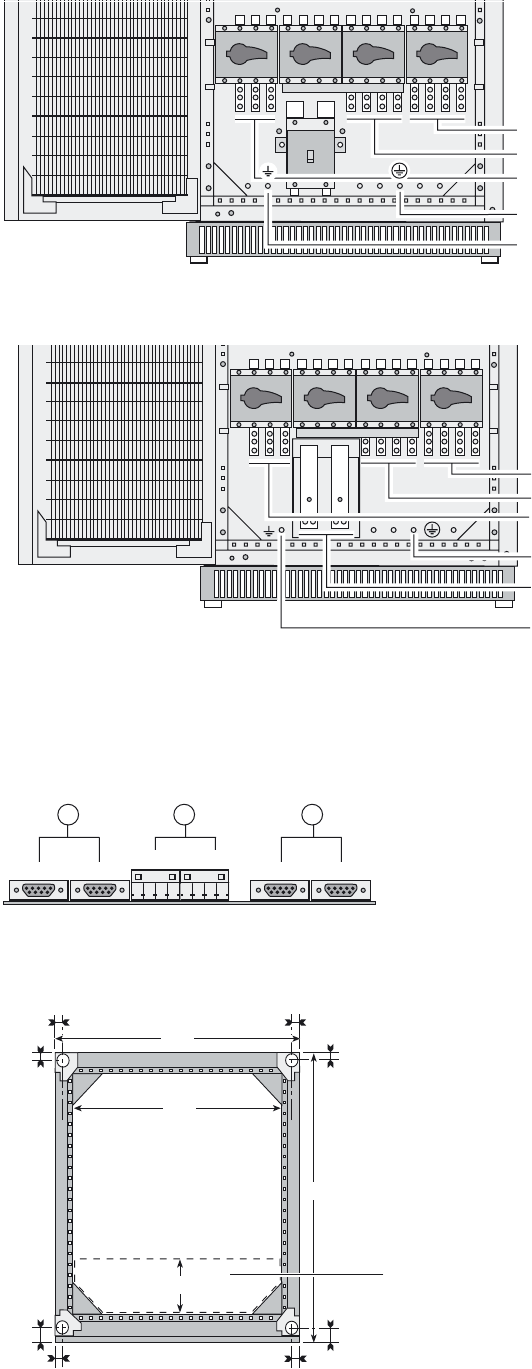
34001813EN/AE - Page 10
1. Presentation
Power-connection terminal blocks (version with built-in battery)
Power-connection terminal blocks (version with external battery)
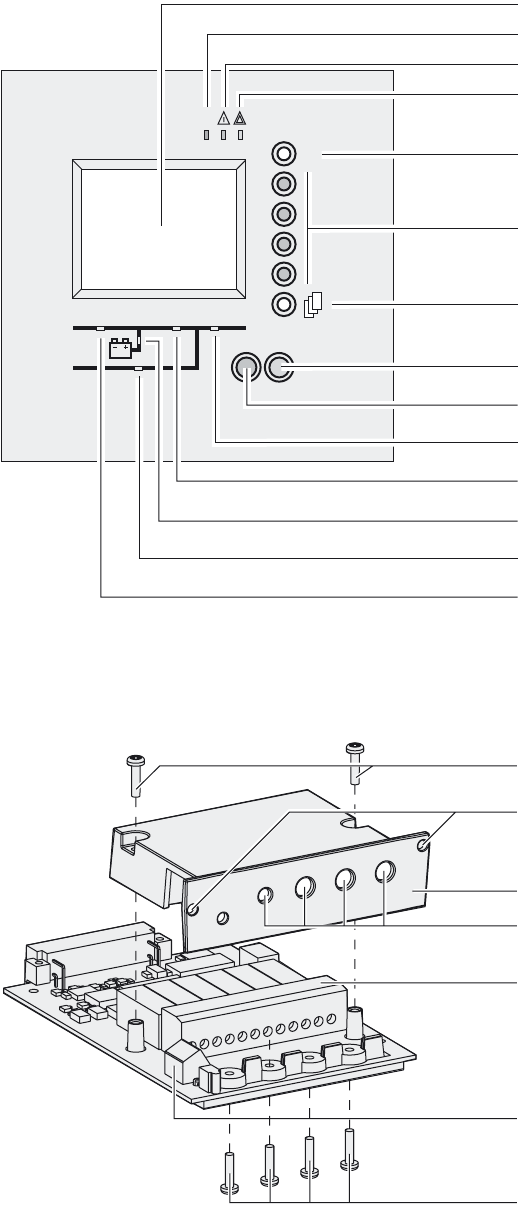
INTN card for auxiliary interconnections of parallel UPS units
1.3 Cabinet layout (normal or false floor)
View with terminal-block protection cover
removed
(14) Terminal block for load output
(15) Terminal block for Bypass AC input
(16) Terminal block for Normal AC input
(17) Main earthing connector
(18) Secondary earthing connector (auxiliary
cabinets)
(14) Terminal block for load output
(15) Terminal block for Bypass AC input
(16) Terminal block for Normal AC input
(17) Main earthing connector
(22) Connection of external battery
(+/- poles)
(18) Secondary earthing connector (auxiliary
cabinets)
(19) DB9 connectors: exchange-current
information
(20) Screw connectors: position information
on Q5N, Q4S and Q3BP switches, from the
external bypass
(21) DB9 connectors: CAN communication
information between UPSs
The four feet of the cabinet are cylindrical, 40
mm in diameter.
The measurements opposite include cabinet
siding (panels and door).
Q1 Q4S Q3BP Q5N
QF1
Q1 Q4S Q3BP Q5N
+-
XMS02 XMS03 XMS06 XMS07
XMS04 XMS05
19 20 21
850
33.5
33.5 712
590
70.5
33.5
70.5
33.5
33.5
33.5
170
Cable-
running
zone
Front
34001813EN/AE - Page 11
1. Presentation
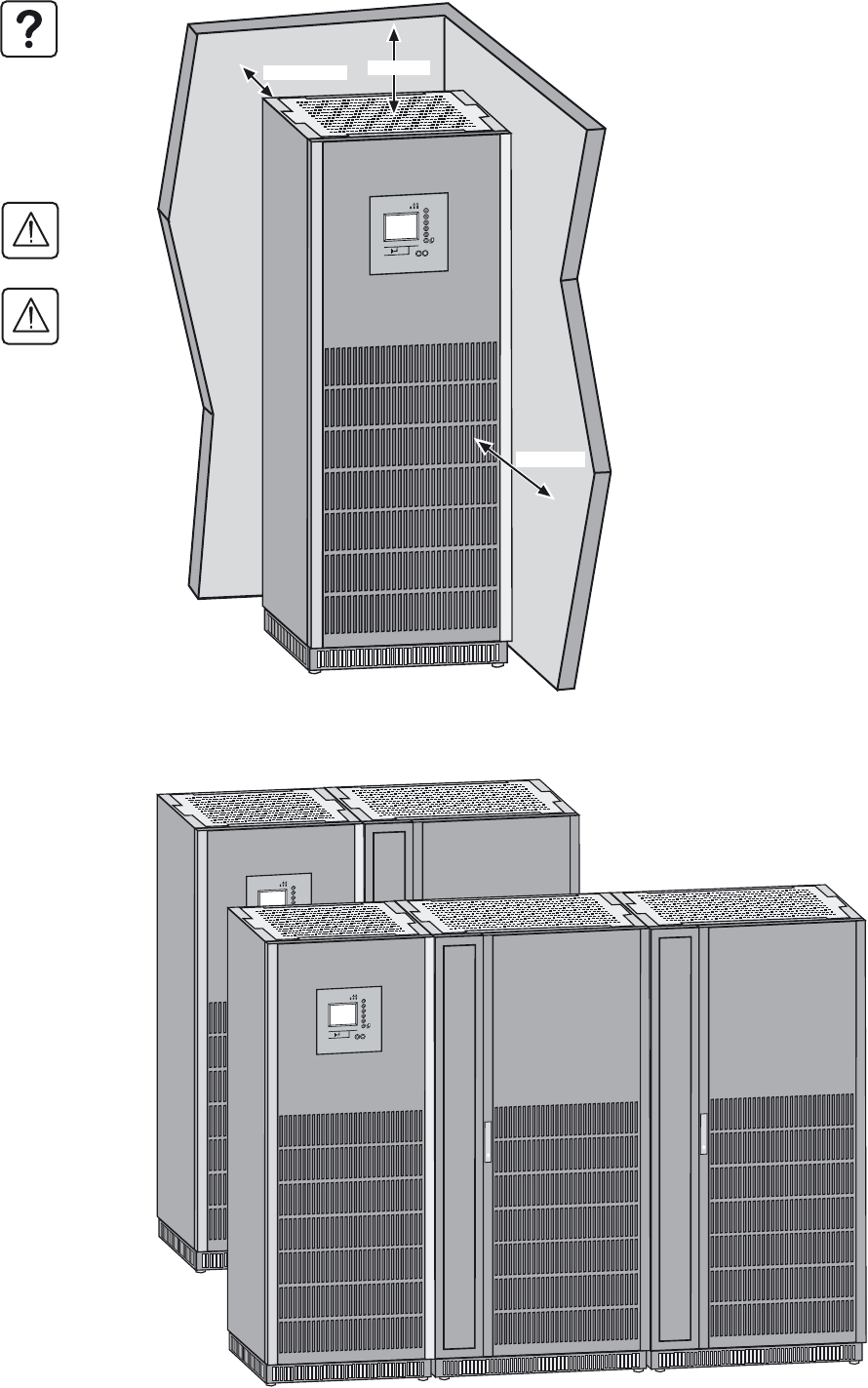
1.4 User-machine interface
1.5 Relay communication card
(30) Graphical display
(31) Load protected LED
(32) Minor fault LED
(33) Major fault LED
(34) Help key
(35) Function keys
(36) Menu key
(38) OFF button
(37) ON button
(42) Load supplied LED
(40) UPS ON LED
(41) Operation on battery power LED
(43) Bypass in operation LED
(39) PFC ON LED
(50) Card cover screws
(51) Card screw holes
(52) Card cover
(53) Cable entry holes
(54) Output terminal block
(55) Input terminal block
(56) Cable clamping screws
IO
3s
?
~
123456
A
B
34001813EN/AE - Page 12
2. Installation
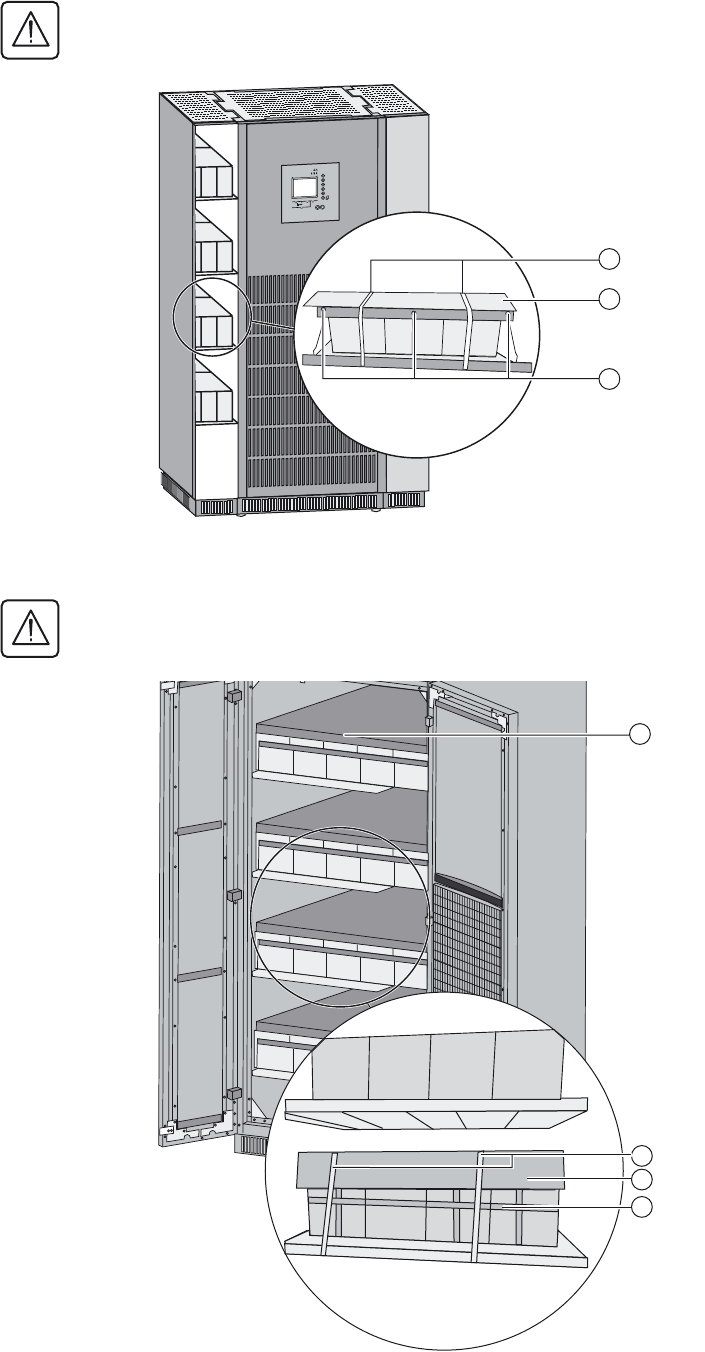
2.1 Location
2.2 Layout of cabinets
To ensure correct ventilation, leave nothing
on top of the UPS.
Leave one meter of free space in front of the
UPS for door opening.
The cabinet rests on four cylindrical feet,
40 mm in diameter, positioned in the four
corners of the cabinet to spread the weight.
If 500 mm of free space is not maintained
above the UPS, abnormal temperature rise
may occur.
The UPS must be installed in a room with
restricted access (qualified personnel
only).
(*) The UPS can operate correctly back to the
wall, but it is preferable to leave some space
for easier maintenance.
0 - 600 mm*
IO
3s
?
~
>500 mm
>1000 mm
IO
3s
?
~
IO
3s
?
~
UPS cabinet
UPS cabinet
Battery cabinet
Battery cabinet 2
Battery cabinet 1
34001813EN/AE - Page 13
2. Installation
2.3 Removing the cardboard protecting the batteries
In the UPS
In the external battery cabinet
The cardboard protecting the batteries must always be removed once the equipment is installed in its final location.
1 - Remove the ties holding the cardboard (1).
2 - Remove the cardboard (2).
3 - Remove the struts (3).
The cardboard protecting the batteries must always be removed once the equipment is installed in its final location.
1 - Remove the battery support upright (1).
2 - Remove the ties holding the cardboard (2)
(1000 mm external battery cabinet).
3 - Remove the cardboard protecting the
batteries (3).
4 - Remove the ties holding the batteries (4).
IO
3s
?
~
3
1
2
2
3
4
1
34001813EN/AE - Page 14
2. Installation
2.4 Required protective devices and cable sizes
Recommended upstream protection
Recommended downstream protection
Earth-leakage current
UPS earth-leakage current is 1 A.
UPS
power
rating
Upstream circuit-breaker on
separate Normal AC input
Upstream circuit-breaker on
separate Bypass AC input
Upstream circuit-breakers on
common bypass and Normal AC
input
20 kVA C60L - 50 A NS100N 4P-TM100A NS100N 4P-TM100A
30 kVA C60L - 63 A NS100N 4P-TM100A NS100N 4P-TM100A
40 kVA NS100N 3P-TM80A NS100N 4P-TM100A NS100N 4P-TM100A
60 kVA NS125E 3P-TM125A NS125E 4P-TM125A NS125E 4P-TM125A
80 kVA NS160N 3P-TM160A NS160N 4P-TM160A NS160N 4P-TM160A
100 kVA NS250N 3P-TM200A NS250N 4P-TM250A NS250N 4P-TM250A
120 kVA NS250N 3P-TM250A NS250N 4P-TM250A NS250N 4P-TM250A
The circuit breakers recommended above respect the requirements for discrimination with the UPS fuses
Stick a label with the following text on each upstream circuit breaker:
"Isolate Uninterrptible Power Supply (UPS) before working on this circuit".
UPS power rating Downstream
circuit breaker
Trip unit Curve N for the downstream circuit breaker
may be replaced by curve H or L, depending
on the installation.
The indicated protection ensures
discrimination for each output circuit
downstream of the UPS, whether supplied by
via the normal or the Bypass AC source. If
these recommendations are not followed, a
short-circuit on an output circuit can result in
a break in power longer than 20 milliseconds
on all the other output circuits.
20-30-40 kVA C60N C 16A
C60N B 25A
60 kVA C60N C 20A
C60N B 32A
80 kVA C60N C 25A
C60N B 50A
100-120 kVA C60N C 32A
C120N B 63A
NS100 TMG 50A
Note. See the simplified diagrams in the appendix for common or separate AC inputs, indicating the positions of the protection
devices, the characteristics of the internal UPS fuses and UPS line currents under overload conditions.
34001813EN/AE - Page 15
2. Installation
Required cable sizes
Cable sizes are determined for copper conductors (for aluminium conductors, increase the size by 30%). Size
calculations also take into account a voltage of 400 V and grouping of four cables.
UPS power
rating
Minimum sizes for
separate Normal AC
input copper cables
(<100 m)
Minimum sizes for
separate Bypass
AC input copper
cables (<100 m)
Minimum sizes
for common
bypass and
Normal AC input
copper cables
(<100 m)
Minimum sizes
for copper load-
circuit cables
(<100 m)
Battery/terminal
connection
(<15 m)
20 kVA 10 mm216 mm216 mm216 mm216 mm2
30 kVA 16 mm216 mm216 mm216 mm225 mm2
40 kVA 16 mm216 mm216 mm216 mm235 mm2
60 kVA 25 mm225 mm225 mm225 mm270 mm2
80 kVA 50 mm250 mm250 mm250 mm295 mm2
100 kVA 50 mm270 mm270 mm270 mm22 x 50 mm2
120 kVA 70 mm270 mm270 mm270 mm22 x 70 mm2
Connections are made to pre-drilled terminals.
Hole diameter: 6.5 mm (8.5 mm for 120 kVA).
Earthing cables connect to the earthing plate.
Hole diameter: 6.5 mm (8.5 mm for 120 kVA).
34001813EN/AE - Page 16
2. Installation
Required cable sizes for parallel UPS installations with an external bypass
Rated
power of
each UPS
unit
Number of
parallel
UPS units
Total rated
power of
the UPS
Bypass AC
input or
load line
current
Cable
size(1)
in mm2
The table opposite is an example for an
installation with up to four UPS units.
◗ For installations with redundant units, take
into account only the number of units required
to supply the loads (e.g. in a three-unit
installation where one unit is redundant, only
two units count in determining the input and
load currents).
◗ This table is valid for 400 V input and load
phase-to-phase voltages, at rated load with a
power factor of 0.8. For voltages of 380 or
415 V, multiply the current values by 1.05 or
0.96 respectively and, if necessary, modify
the cable sizes accordingly.
◗ The cable sizes in this table concern the bold
sections in the diagram below.
(1) Cable sizes are determined for U1000
R02V type copper conductors (for aluminium
conductors, increase the size by 30%). Size
calculations also take into account a voltage
of 400 V and grouping of four cables.
20 kVA 2
3
4
40 kVA
60 kVA
80 kVA
58 A
87 A
116 A
16
35
50
30 kVA 2
3
4
60 kVA
90 kVA
120 kVA
80 A
129 A
172 A
25
50
70
40 kVA 2
3
4
80 kVA
120 kVA
160 kVA
116 A
174 A
232 A
35
70
120
60 kVA 2
3
4
120 kVA
180 kVA
240 kVA
174 A
261 A
348 A
70
150
185
80 kVA 2
3
4
160 kVA
240 kVA
320 kVA
232 A
348 A
464 A
120
185
2 x 120
100 kVA 2
3
4
200 kVA
300 kVA
400 kVA
288 A
432 A
576 A
150
2 x 95
2 x 150
120 kVA 2
3
4
240 kVA
360 kVA
480 kVA
348 A
522 A
696 A
185
2 x 150
2 x 185
Bypass AC
Normal AC
Bypass AC
GALAXY 5000
1
Normal AC
Bypass AC
GALAXY 5000
2
Normal AC
Bypass AC
GALAXY 5000
3
Load
External bypass
34001813EN/AE - Page 17
2. Installation
2.5 2.5 System earthing arrangements
This chapter lists the main system earthing arrangements and their wiring requirements. For system earthing arrangements
which are not listed in this document, please refer to the “SEA guide” reference 34002636XT..
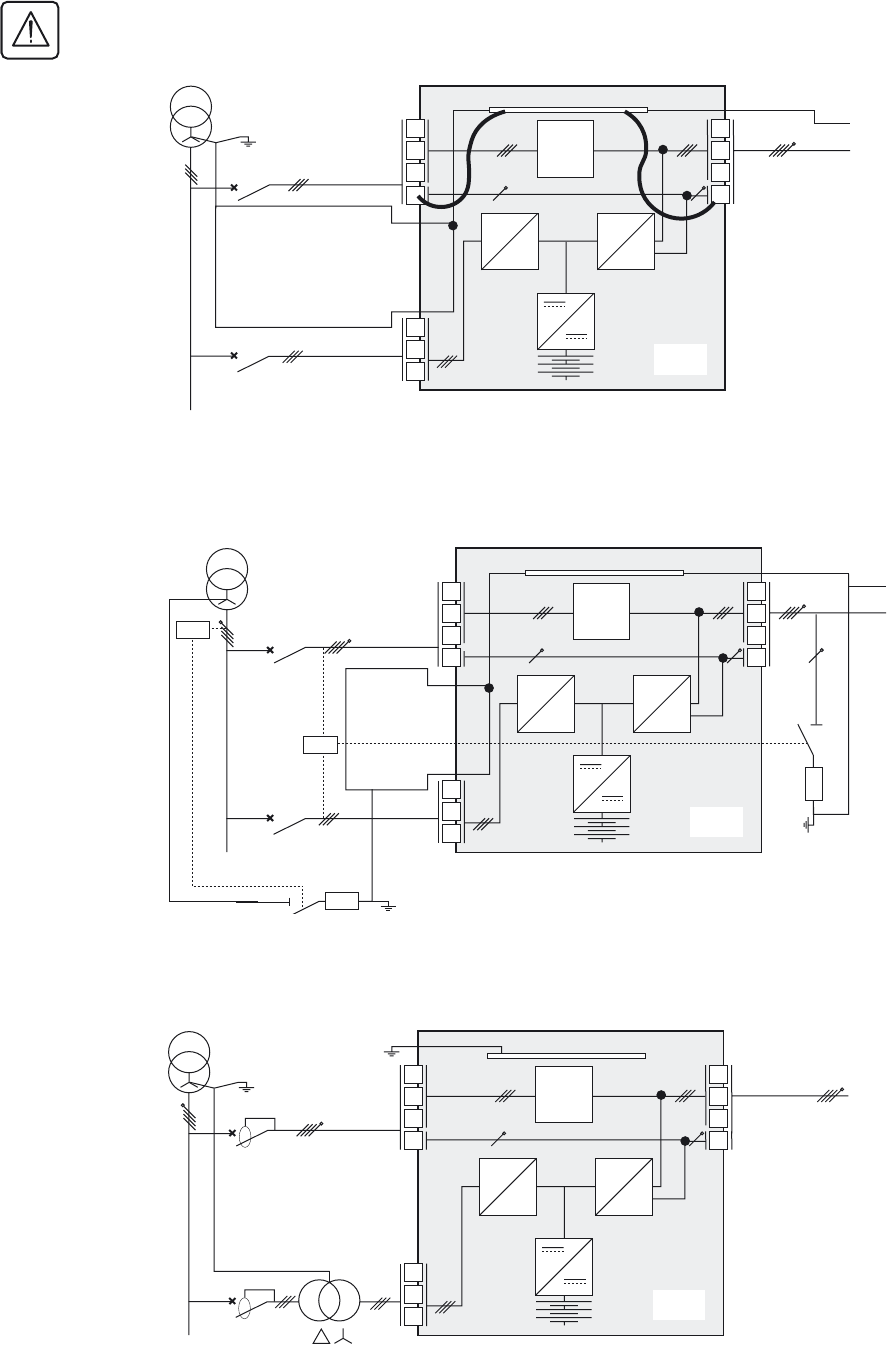
TNS upstream and TNS downstream installation
For separate Normal AC and Bypass AC lines from a single source.
With differential circuit breaker:
Without differential circuit breaker:
The Normal and Bypass AC lines must be galvanically isolated
Upstream differential protection rating must be at least 3A
Bypass AC
Normal AC
L1
L2
L3
L1
L2
L3
N
L1
L2
L3
N
Load
SS
UPS
PFC INV
PE
MLVS
PE
PE
Bypass AC
Normal AC
L1
L2
L3
L1
L2
L3
N
L1
L2
L3
N
Load
PE
SS
UPS
PFC INV
PE
MLVS
PE
34001813EN/AE - Page 18
2. Installation
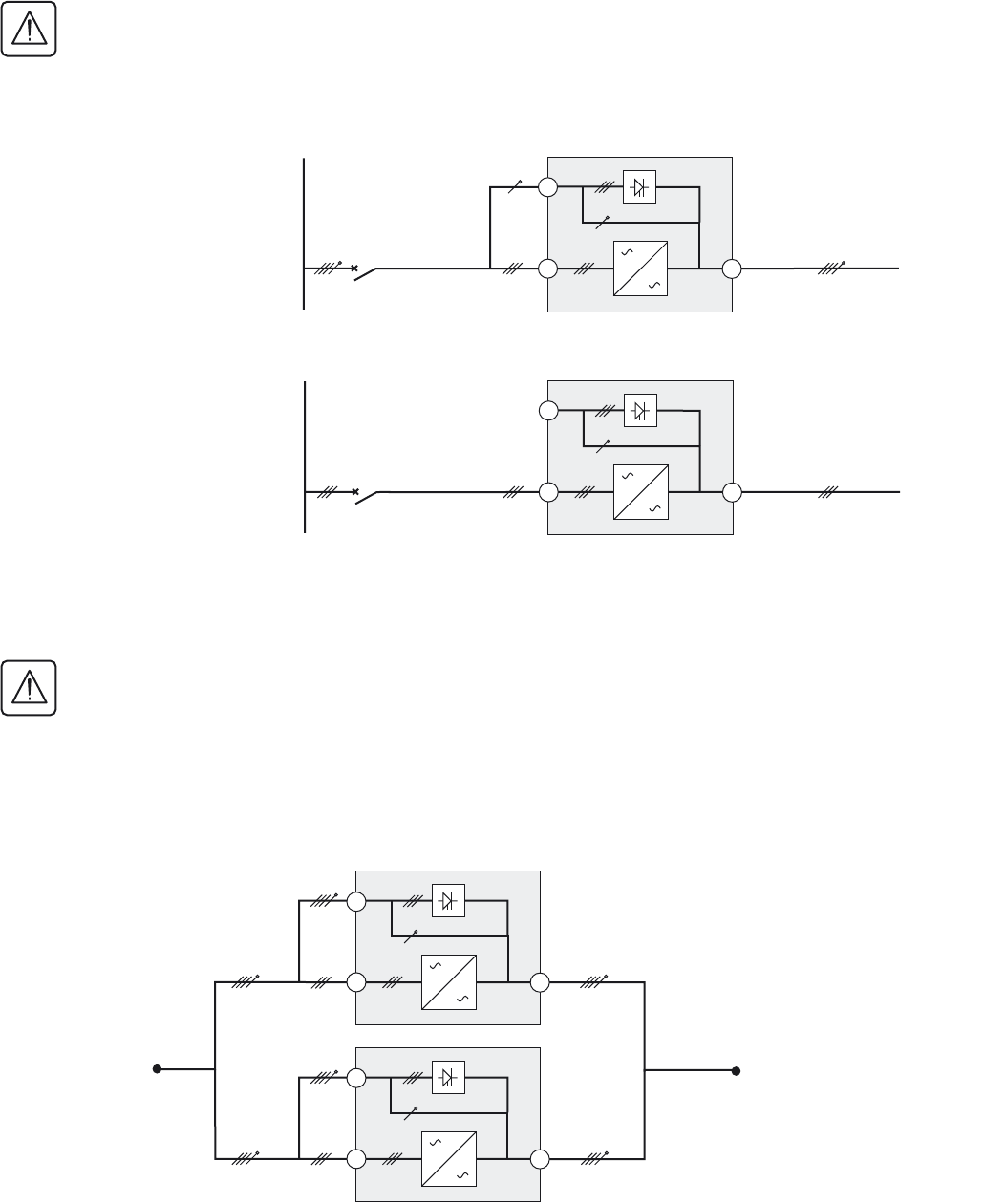
TNC upstream, TNS downstream
For separate Normal AC and Bypass AC lines from a single source
Installation with upstream IT and downstream TNS
For separate Normal AC and Bypass AC lines from a single source
Installation with upstream TT and downstream TT (with upstream differential protection)
For separate Normal AC and Bypass AC lines from the same source
The upstream differential protection rating must be at least 3A
1.the UPS internal PEN bar must be connected to the Q4S neutral upstream of Q4S
2.The UPS internal PEN bar must be connected to the Q5N neutral downstream of Q5N
3.The UPS internal PE bar must be transformed into a PEN bar (cables supplied for TNC options)
Bypass AC
Normal AC
L1
L2
L3
L1
L2
L3
N
L1
L2
L3
N
Load
PEN
SS
UPS
PFC INV
MLVS
PEN
PEN
PE
Bypass AC
Normal AC
L1
L2
L3
L1
L2
L3
N
L1
L2
L3
N
CPI
R1
R2
CPI2
Load
PE
SS
UPS
PFC INV
MLVS
PE
Bypass AC
Normal AC
L1
L2
L3
L1
L2
L3
N
L1
L2
L3
N
Load
PE
SS
UPS
PFC INV
MLVS
34001813EN/AE - Page 19
2. Installation
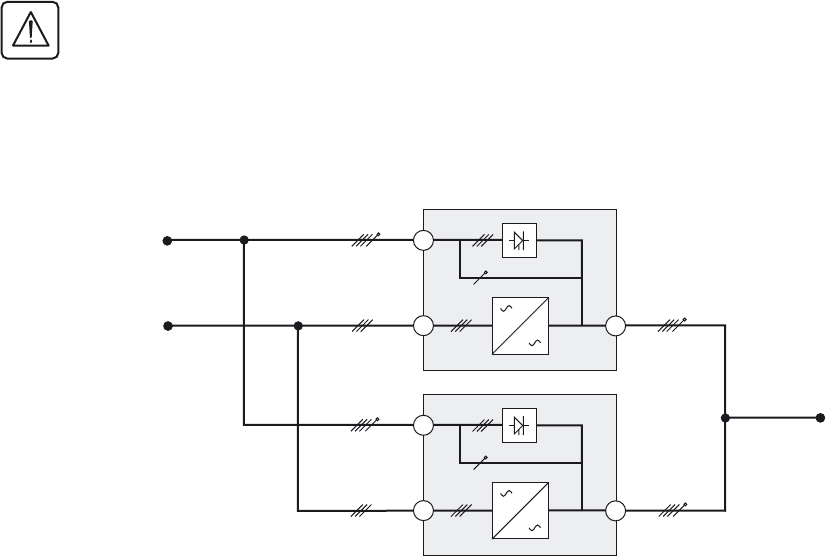
Frequency converter (without Bypass AC input)
Upstream and downstream: TT, TN or IT system with neutral distributed
Upstream and downstream: Neutral not distributed
Parallel configuration without external bypass cabinet and with common normal and Bypass AC
inputs (maximum two units in parallel)
The requirements for the different system earthing arrangements (SEA) are similar to those for single UPS
configurations. In the diagrams on page 17, simply replace the single UPS units between points A and B by the
following parallel configuration.
The UPS installation may be equipped with earth-leakage protection upstream on the condition that the protection
apply to:
- the normal and Bypass AC inputs
- all the parallel-connected UPSs.
Main low-
voltage
switchboard
(MLVS)
b Load
Main low-
voltage
switchboard
(MLVS)
b Load
The UPS installation may be equipped with earth-leakage protection upstream on the condition that the protection
apply to:
- the normal and Bypass AC inputs
- all the parallel-connected UPSs.
Normal AC
14
16
15
Normal AC
14
16
15
Normal AC
14
16
14
16
AB
Bypass AC
15
15
Normal AC
Bypass AC
34001813EN/AE - Page 20
2. Installation
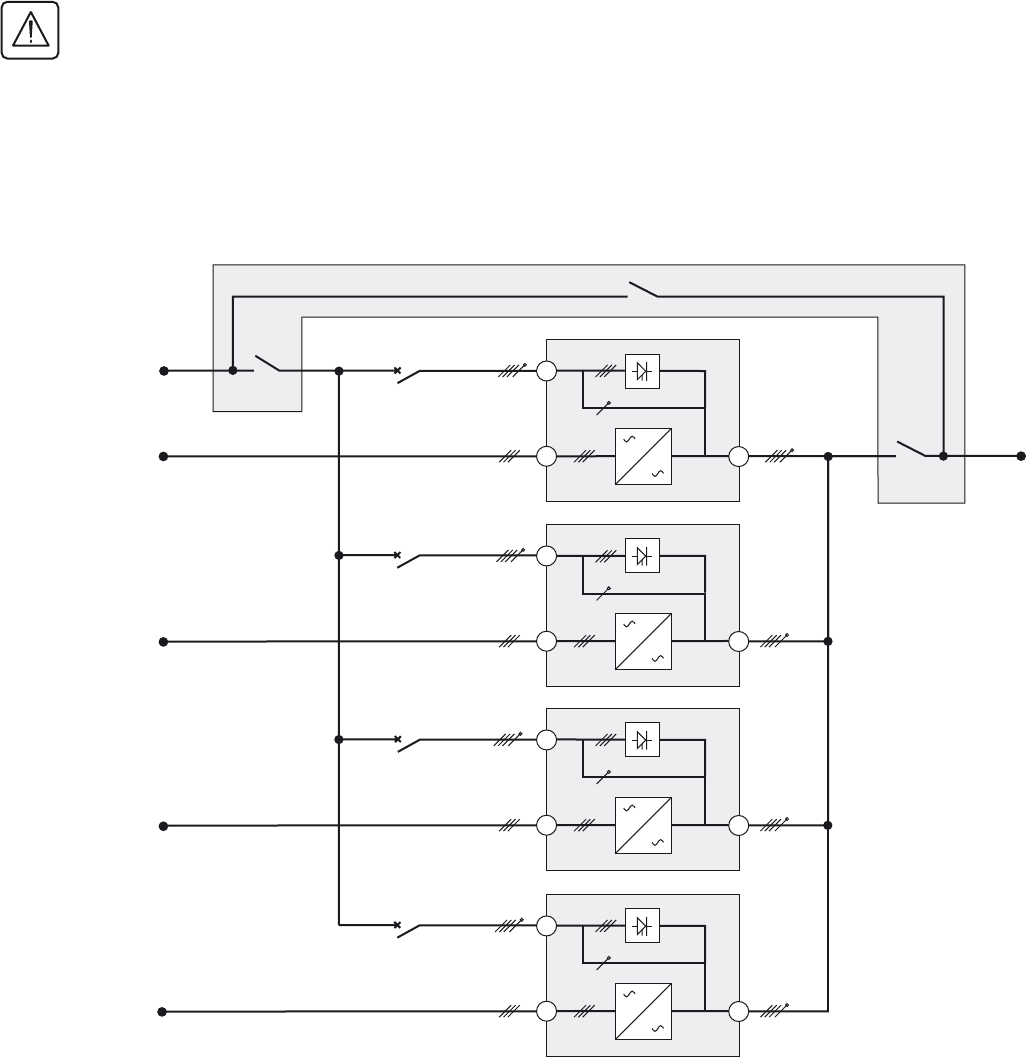
Parallel configuration without external bypass cabinet and with separate normal and Bypass AC
inputs (maximum two units in parallel)
The requirements for the different system earthing arrangements (SEA) are similar to those for single UPS
configurations. In the diagrams on page 18, simply replace the single UPS units between points A, B and C by the
following parallel configuration.
The UPS installation may be equipped with earth-leakage protection upstream on the condition that the protection
apply to:
- the normal and Bypass AC inputs
- all the parallel-connected UPSs.
Normal AC
15
Bypass AC
16 14
Normal AC
15
Bypass AC
16 14
B
A
C
34001813EN/AE - Page 21
2. Installation
Parallel UPS with external bypass cabinet and separate Normal and Bypass AC network inputs (6
UPS in parallel for 4PN)
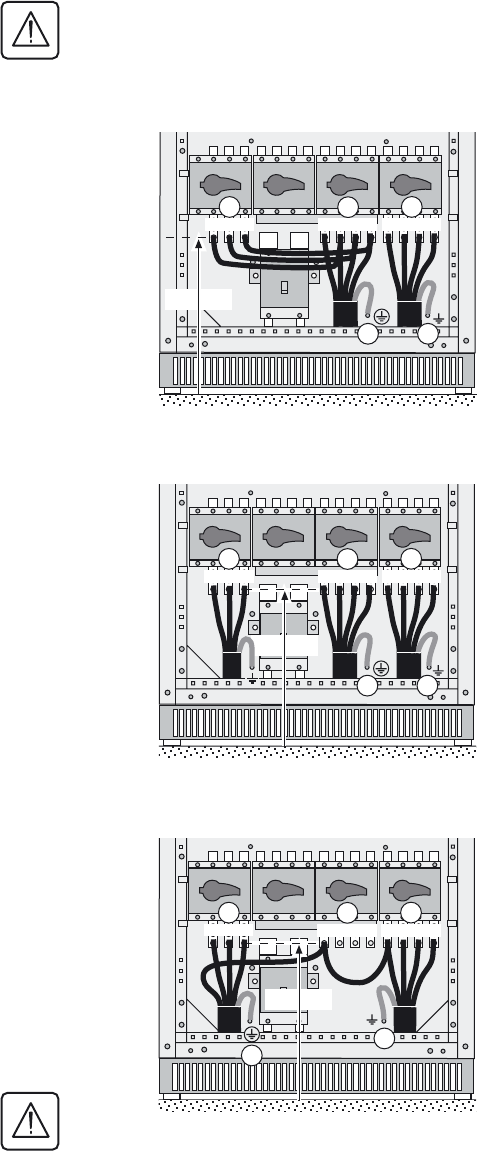
The requirements for the different system earthing arrangements (SEA) are similar to those for single UPS
configurations. In the diagrams on page 18, simply replace the single UPS units between points A, B and C by the
following parallel configuration.
The UPS installation may be equipped with earth-leakage protection upstream on the condition that the protection
apply to:
- the normal and Bypass AC inputs
- all the parallel-connected UPSs.
The standard diagrams presented below may be adapted to your needs by qualified personnel.
Connection for the Bypass AC input and the output cables to the external bypass cabinet must use cables having the same
length and size to ensure correct balancing of the Bypass AC input currents.
Normal AC
15
Bypass AC
16 14
Normal AC
15
Bypass AC
16 14
Normal AC
15
Bypass AC
16 14
Normal AC
Bypass AC
16 14
Q4S
Q3BP
Q5N
15
A
B
B
B
B
C
34001813EN/AE - Page 22
2. Installation
2.6 Connection of power cables in a single UPS unit
Interconnecting the cabinet earths
UPS units with common normal and Bypass AC inputs
UPS units with separate normal and Bypass AC inputs
Frequency converter
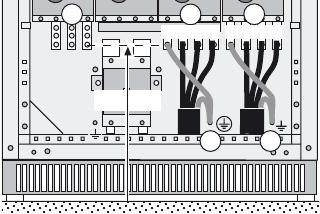
All the cabinet earths must be interconnected: external Bypass cabinet, external battery cabinet, etc.
To access the connection terminal blocks, see section 1.2.
1 - The earthing conductors must be connected to the UPS earthing-plate
connectors (17) and (18).
2 - Connect the four conductors of the Normal AC source to terminal block
(15).
3 - Connect the three phases of the Normal AC input (16) with the three
phases of the Bypass AC input (15).
4 - Connect the four conductors supplying the load to terminal block (14).
5 - Tie the cables down to the frame.
6 - Put the cover back in place (see section 1.2).
To access the connection terminal blocks, see section 1.2.
1 - The earthing conductors must be connected to the UPS earthing-plate
connectors (17) and (18).
2 - Connect the three phases of the Normal AC source to terminal block
(16).
3 - Connect the four conductors of the Bypass AC source to terminal block
(15).
4 - Connect the four conductors supplying the load to terminal block (14).
5 - Tie the cables down to the frame.
6 - Put the cover back in place (see section 1.2).
To access the connection terminal blocks, see section 1.2.
1 - The earthing conductors must be connected to the UPS earthing plate.
2 - Connect the neutral conductor of the Normal AC source to the neutral
terminal on terminal block (15).
3 - Connect the three phases of the Normal AC source to terminal block
(16).
4 - Connect the four conductors supplying the load to terminal block (14).
5 - Connect the neutral on terminal block (15) with the neutral of the
supplied loads on terminal block (14).
6 - Tie the cables down to the frame.
7 - Put the cover back in place (see section 1.2).
Do not connect anything to the three phases on the Bypass AC
source terminal block (15).
N L1 L2 L3
14
16 15
N L1 L2 L3L1 L2 L3
17 18
370 mm
370 mm
N L1 L2 L3
14
16 15
N L1 L2 L3L1 L2 L3
17 18
370 mm
N L1 L2 L3
14
16 15
N L1 L2 L3L1 L2 L3
17 18
34001813EN/AE - Page 23
2. Installation
2.7 Earth-cable connection for a single unit in a TNC earthing system
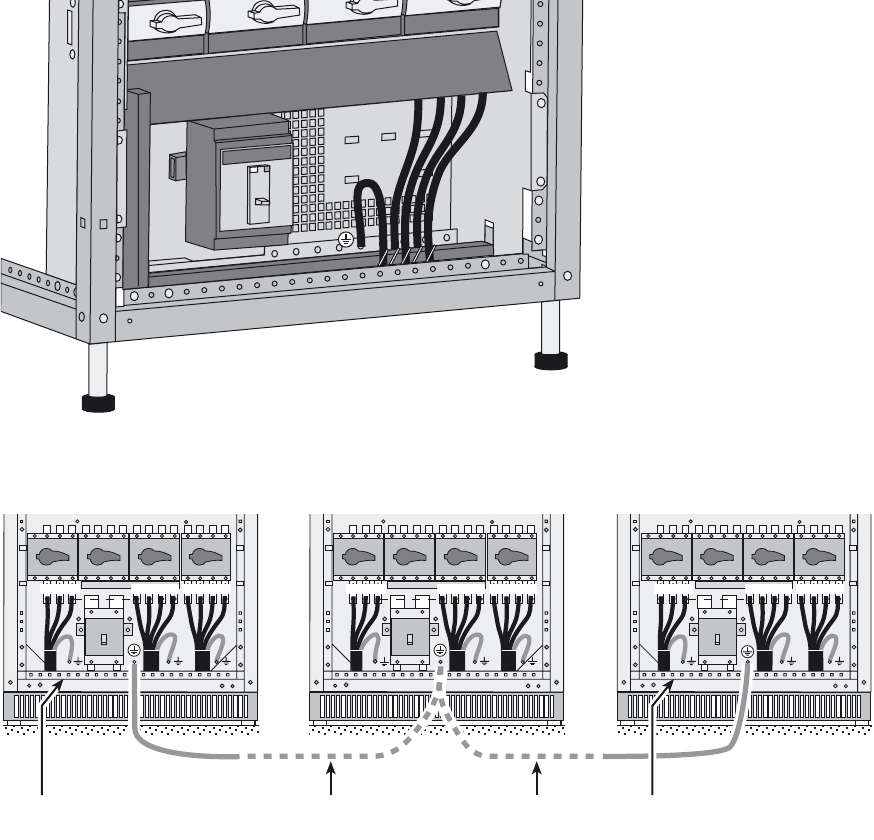
1.Connect the power network cable PEN to the UPS earthing terminal
2.Connect the usage cable PEN to the UPS earthing terminal
3.Connect the Q4S (15) neutral terminal to the UPS earth using the cable
supplied
4.Connect the Q5N (14) neutral terminal to the UPS earth using the cable
supplied
370 mm
N L1 L2 L3
14
16 15
N L1 L2 L3
17 18
34001813EN/AE - Page 24
2. Installation
2.8 Connection of power cables for parallel UPS units
Equipotential bonding between parallel-connected units
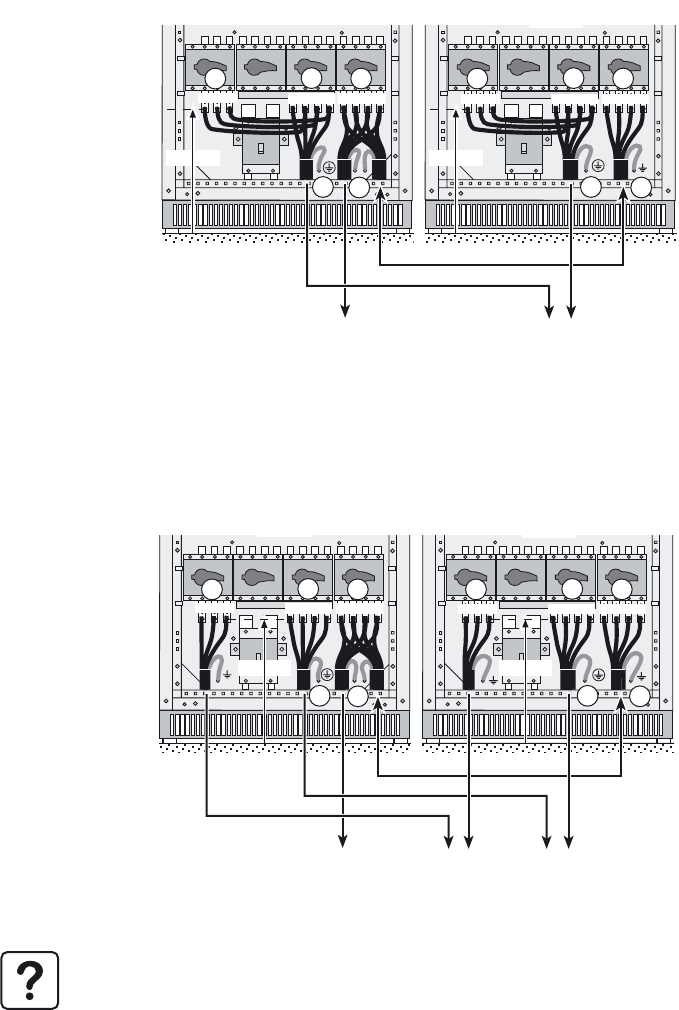
Connect the exposed conductive parts (ECP) of the parallel-connected UPS units using an additional earthing cable (not
supplied) with the following characteristics:
- size equivalent to that of the supply cables,
- as short as possible.
Connection of earth cable and tying of cables
Connections must be made according to the diagram below:
N L1 L2 L3N L1 L2 L3L1 L2 L3 N L1 L2 L3N L1 L2 L3L1 L2 L3N L1 L2 L3N L1 L2 L3L1 L2 L3
Main earth
Main earth Additional equipotential
bonding between units.
UPS 1 UPS 3
UPS 2
34001813EN/AE - Page 25
2. Installation
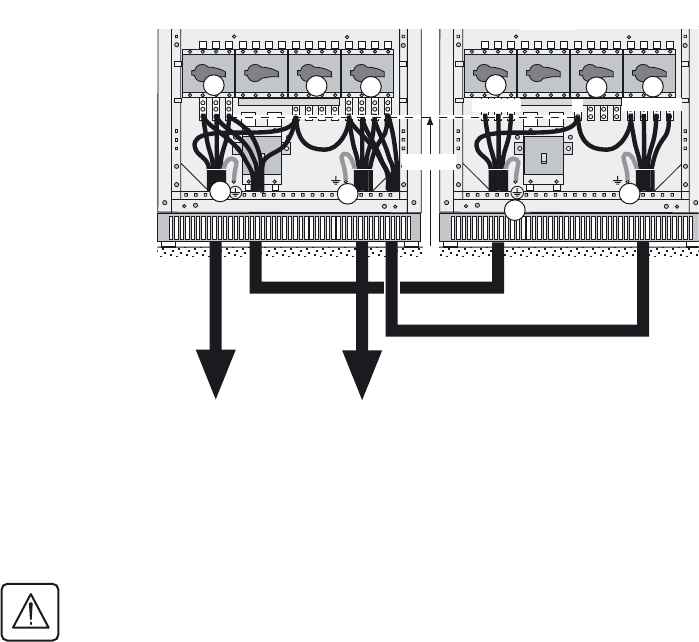
Redundant parallel configuration (maximum two UPS units for Pn)
This configuration does not have an external bypass.
UPS units with common normal and Bypass AC inputs
To access the connection terminal blocks, see section 1.2.
UPS units with separate normal and Bypass AC inputs
To access the connection terminal blocks,
see section 1.2.
1 - The earthing conductors must be
connected to the earthing plate of each UPS.
2 - Connect the four conductors of the Bypass
AC source to terminal block (15) in each UPS
unit.
3 - Connect the three phases of the Normal
AC input (16) with the three phases of the
Bypass AC input (15) in each UPS unit.
4 - Connect the four conductors of the
supplied loads to terminal block (14) in UPS1.
5 - Connect terminal block (14) in UPS2 to
terminal block (14) in UPS1 using the four
load conductors.
6 - Tie the cables down to the cabinet frames.
7 - Put the covers back in place (see section
1.2).
To access the connection terminal blocks,
see section 1.2.
1 - The earthing conductors must be
connected to the earthing plate of each UPS.
2 - Connect the three phases of the Normal
AC source to terminal block (16) in each UPS
unit.
3 - Connect the four conductors of the Bypass
AC source to terminal block (15) in each UPS
unit.
4 - Connect the four conductors of the
supplied loads to terminal block (14) in UPS1.
5 - Connect terminal block (14) in UPS2 to
terminal block (14) in UPS1 using the four
load conductors.
6 - Tie the cables down to the cabinet frames.
7 - Put the covers back in place (see section
1.2).
Caution. If the two UPSs are placed side by side, connect as indicated above. In the other configurations, always make sure
that the cables between the UPSs and Bypass AC source have the same cross-section and the same length. The same is
true for the cables between the UPSs and the load.
14
16 15
17 18
14
16 15
17 18
N L1 L2 L3N L1 L2 L3L1 L2 L3
370 mm
N L1 L2 L3N L1 L2 L3L1 L2 L3
400 mm
N L1 L2 L3N L1 L2 L3L1 L2 L3
370 mm
To loadTo loadTo loadTo load To normal / bypass
AC source
UPS 1 UPS 2
14
16 15
17 18
14
16 15
17 18
N L1 L2 L3N L1 L2 L3L1 L2 L3
370 mm
370 mm
N L1 L2 L3N L1 L2 L3L1 L2 L3 N L1 L2 L3N L1 L2 L3L1 L2 L3
To load To bypass
AC source
To normal
AC source
UPS 1 UPS 2
34001813EN/AE - Page 26
2. Installation
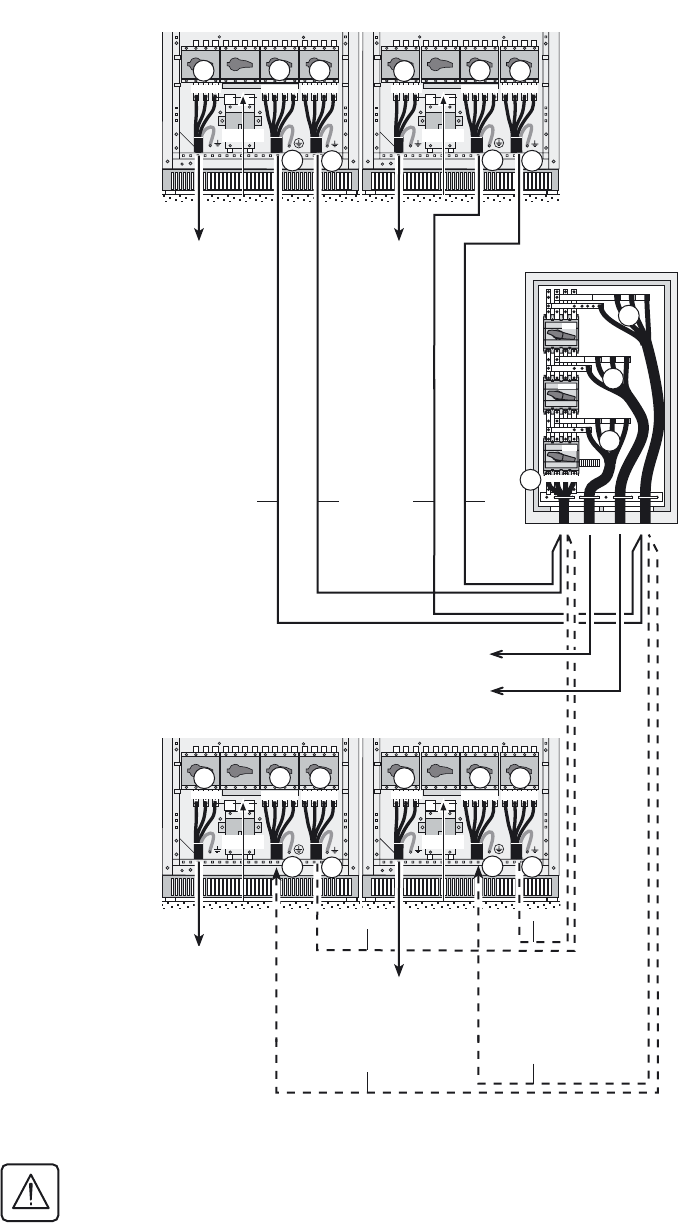
Frequency converter
To access the connection terminal blocks,
see section 1.2.
1 - The earthing conductors of each UPS
must be connected to the UPS earthing plate.
2 - Connect the neutral conductor of the
Normal AC source to the neutral terminal on
terminal block (15) of UPS1.
3 - Connect the three phases of the Normal
AC source to terminal block (16).
4 - Connect terminal block (16) in UPS1 to
terminal block (16) in UPS2 using the three
conductors of the Normal AC source.
5 - Connect the neutral cable on terminal
block (15) in UPS1 to terminal block (15) in
UPS2.
6 - Connect the four conductors supplying the
load to terminal block (14).
7 - Connect terminal block (14) in UPS1 to
terminal block (14) in UPS2 using the four
load conductors.
8 - Connect the neutral on terminal block (15)
with the neutral of the supplied loads on
terminal block (14).
9 - Tie the cables down to the frame.
10 - Put the cover back in place (see section
1.2).
Do not connect anything to the three
phases on the Bypass AC source terminal
block (15).
To normal
AC source To load
14
16 15
18
N L1 L2 L3
14
16 15
N
L1 L2 L3
17 18
17
370 mm
UPS 2
UPS 1
34001813EN/AE - Page 27
2. Installation
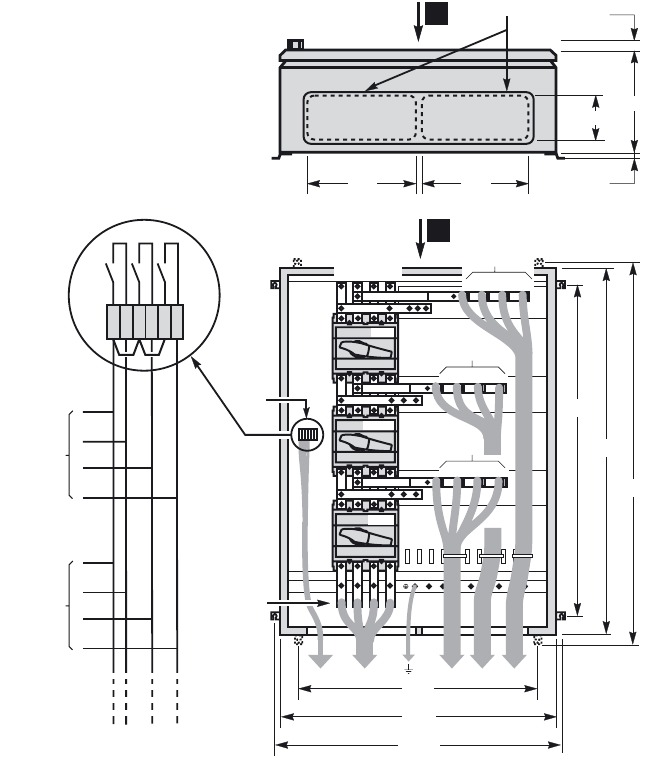
UPS units with separate normal and Bypass AC inputs
To access the connection terminal blocks,
see section 1.2.
1 - The earthing conductors must be
connected to the earthing plate of each UPS.
2 - Connect the three phases of the Normal
AC source to terminal block (16) in each UPS
unit.
3 - Connect the four conductors of the Bypass
AC source to terminal (61) in the bypass
cabinet.
4 - Connect terminal blocks (15) in each UPS
unit to terminal (60) in the bypass cabinet,
using cables with identical lengths and sizes.
5 - Connect the four load conductors to
terminal (62) in the bypass cabinet.
6 - Connect terminal blocks (14) in each UPS
unit to terminal (63) in the bypass cabinet,
using cables with identical lengths and sizes.
7 - Tie the cables down to the frames of the
UPS cabinets and the bypass cabinet.
8 - Put the covers back in place (see section
1.2).
The cables marked A must be identical,
i.e. same size and length.
Similarly, the cables marked B must be
identical, i.e. same size and length.
To avoid errors, it is advised to remove the handle on switch Q3BP (10) in each UPS.
N L1 L2 L3N L1 L2 L3L1 L2 L3
370 mm
N L1 L2 L3N L1 L2 L3L1 L2 L3
370 mm
N L1 L2 L3N L1 L2 L3L1 L2 L3
370 mm
N L1 L2 L3N L1 L2 L3L1 L2 L3
370 mm
14
16 15 14
16 15
Q4S
Q3BP
Q5N
L1 L2 L3
N
L1 L2 L3
N
L1 L2 L3
N
L1 L2 L3
N
60
61
62
63
14
16 15 14
16 15
17 18
17 18
17 18 17 18
AB AB
A
B
A
B
To
Normal
AC
source
To bypass AC source
To normal AC
/
bypass AC
To normal AC
/
bypass AC
To normal AC
/
bypass AC
To Normal AC
source To Normal AC
source
To
Normal
AC
source
UPS 1 UPS 2
Bypass
UPS 3 UPS 4
To load
34001813EN/AE - Page 28
2. Installation
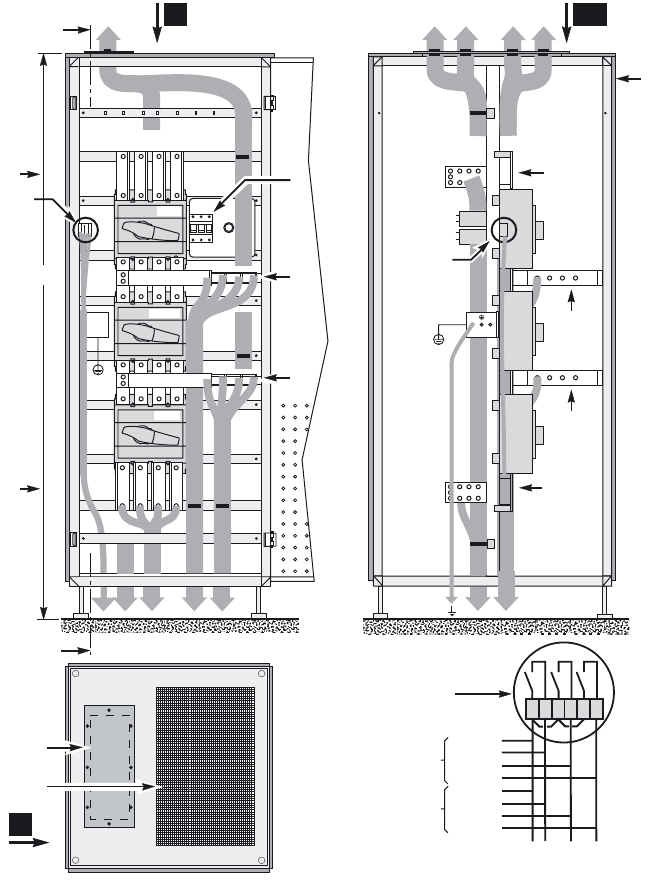
2.9 Connection of the 150 kVA external bypass cabinet
Key
A: top view of cabinet
B: front view of cabinet
C: 317 x 120 mm opening for cable running
D: connection of Bypass AC source to the UPSs
E: connection of auxiliary wires for position of Q4S, Q3BP and Q5N switches
F: connection of UPS load outputs
G: connection of Bypass AC source
H: connection of the load
15,5
15
A
120 303
317
C
317
750
E
F
800
857,5
B
1000
950
1057,5
L1 L2 L3
N
Q3BP
Q5N
Q4S
L1 L2 L3
N
H
L1 L2 L3
N
G
L1 L2 L3
N
D
L1 L2 L3
N
UPS 1
XMS04 /
XMS05
UPS 3
UPS 4
Q4S
Q3BP
123456
Q5N
UPS 2
XMS04 /
XMS05
34001813EN/AE - Page 29
2. Installation
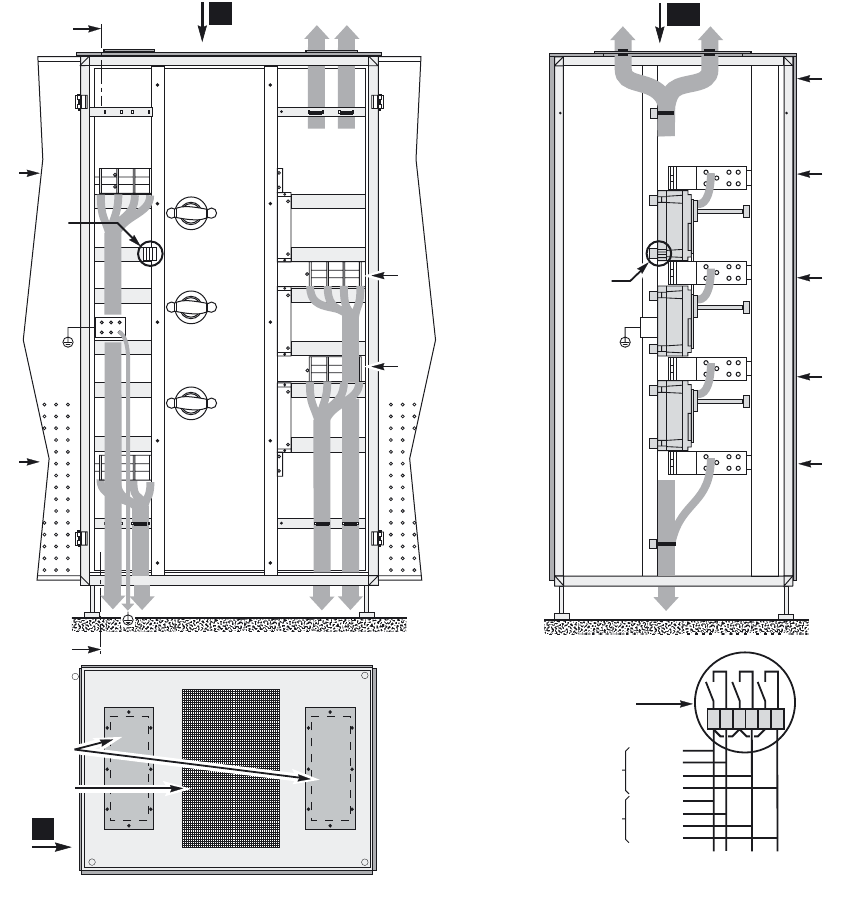
2.10 Connection of the 360 kVA external bypass cabinet
Key
AA: section AA of cabinet
B: front view of cabinet
C: front
D: connection of Bypass AC source to the UPSs
E: connection of auxiliary wires for position of Q4S, Q3BP and Q5N switches
F: connection of UPS load outputs
G: connection of Bypass AC source
H: connection of the load
I : ventilation grate for air exit from cabinet
J: cable running through top, 460 x 197 mm opening and gland plate
K: protection fuses for RC voltage surge suppressor on the Bypass AC line (must be replaced when LED is ON)
L: top view of cabinet
C
D
G
H
F
E
A
1900
A
L1 L2 L3
N
L1 L2 L3
N
L1 L2 L3
L1 L2 L3
N
H
G
EK
I
J
B AA
L
UPS 1XMS04 /
XMS05
UPS 2
UPS 3
UPS 4
E
Q4S
Q3BP
Q4S
Q3BP
Q5N
N
D
F
Q5N
XMS04 /
XMS05
123456
34001813EN/AE - Page 30
2. Installation
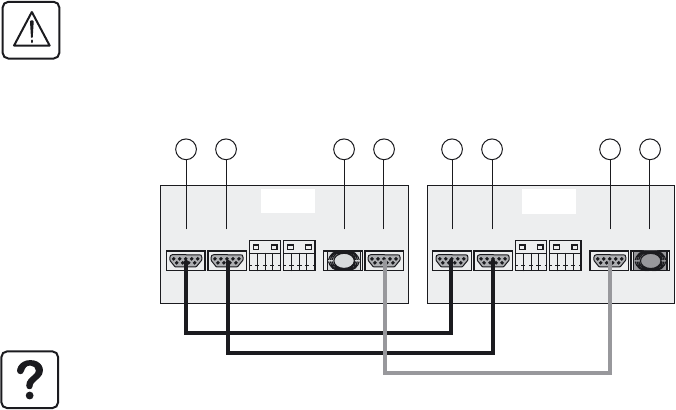
2.11 Connection of the 600 kVA external bypass cabinet
Key
AA: section AA of cabinet
B: front view of cabinet
C: front
D: connection of Bypass AC source to the UPSs
E: connection of auxiliary wires for position of Q4S, Q3BP and Q5N switches
F: connection of UPS load outputs
G: connection of Bypass AC source
H: connection of the load
I : ventilation grate for air exit from cabinet
J: cable running through top, 460 x 197 mm opening and gland plate
L: top view of cabinet
C
D
E
AA
G
H
F
I
J
L
A
A
H
G
B
D
E
Q4S
Q3BP
Q5N
F
UPS 1XMS04 /
XMS05
UPS 2
UPS 3
UPS 4
E
Q4S
Q3BP
Q5N
XMS04 /
XMS05
123456
34001813EN/AE - Page 31
2. Installation
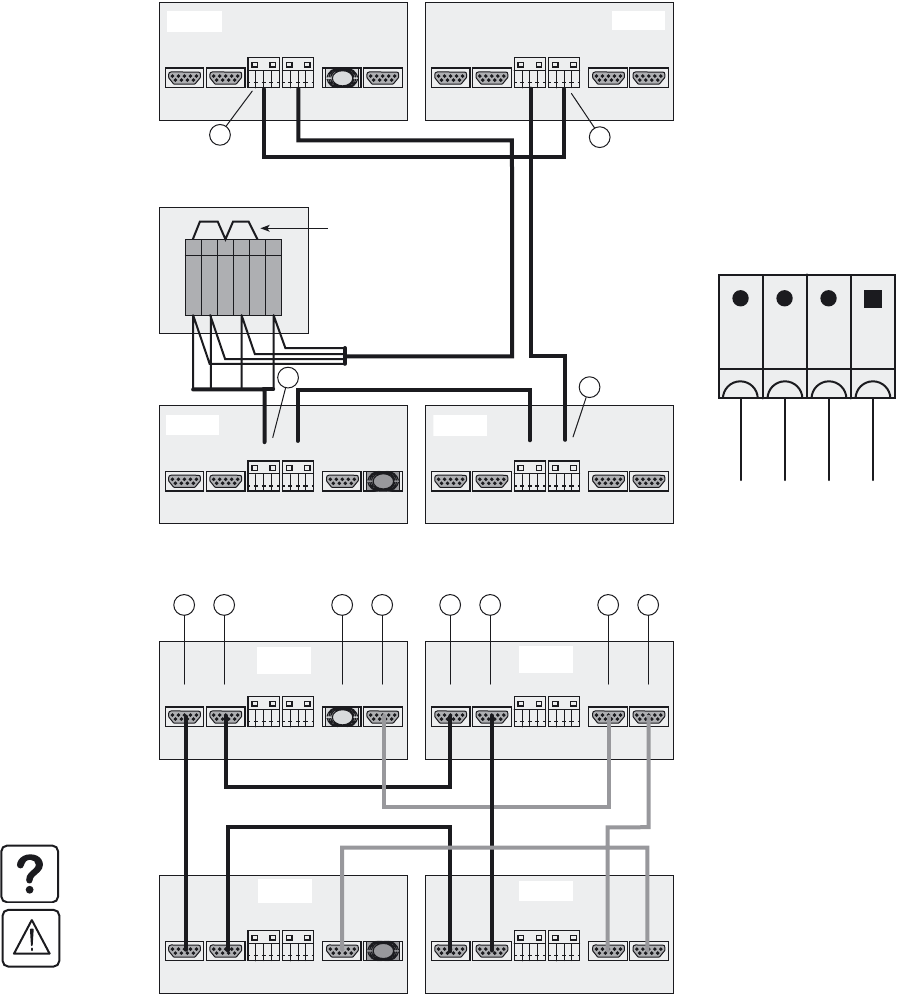
2.12 Auxiliary interconnections between UPS units in parallel configurations
Redundant parallel configuration (maximum two UPS units)
For security reasons, the connections of the auxiliary interconnections of the parallel UPSs must be carried out
whilst all the UPSs are de-energised.
Exchange-current interconnections
Link connectors XMS02 and XMS03 on the
two UPS units.
CAN // interconnections:
Fit a blue plug on connector XMS06 on
UPS1.
Link connector XMS07 on UPS1 to connector
XMS06 on UPS2.
Fit a red plug on connector XMS07 on U PS2.
Note. The supplied cables (10 m) limit the
distance between the two UPS units to
approximately six meters.
XMS02 XMS03 XMS06 XMS07
XMS04 XMS05
CAN //
XMS02 XMS03 XMS06 XMS07
XMS04 XMS05
CAN //
10 10 12 12 10 10 12 12
UPS 1 UPS 2
Blue
plug
Red plug
34001813EN/AE - Page 32
2. Installation
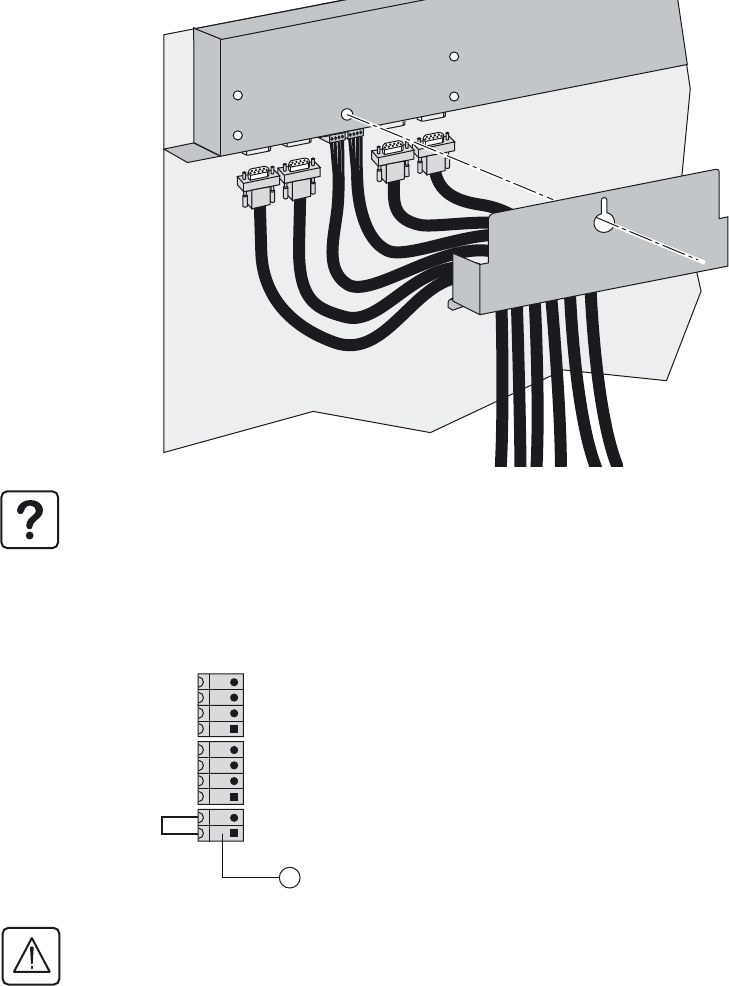
Parallel configuration for increased capacity (maximum four UPS units)
Interconnections with the external bypass
cabinet
◗ Interconnect terminals 1, 3 and 5 on the
auxiliary terminal block in the cabinet.
◗ Create a loop between the cabinet and the
UPS units for terminals 1, 2, 4 and 6 on the
auxiliary terminal block in the cabinet. The
order for the XMS04 and XMS05 connectors
in each UPS unit, from right to left, is
common, Q3BP, Q4S and Q5N.
Details of terminal blocks (11)
Note. The interconnection cables for the
external bypass cabinet are not supplied
(size 2.5 mm2 maximum).
Exchange-current interconnections (10):
Use the XMS02 and XMS03 connectors to
create a loop between the UPS units (all the
XMS02 and XMS03 connectors must be
used).
CAN // interconnections (12):
Daisy-chain the UPS units using the XMS06
and XMS07 connectors. Fit a blue plug on the
first UPS unit and a red plug on the last unit
(all the XMS06 and XMS07 connectors must
be used).
Note. The supplied cables are ten meters
long.
To ensure sufficient isolation of
exchange-current, CAN and external
bypass cabinet cables, they must be run
separately from the power cables
XMS02 XMS03 XMS06 XMS07
XMS04 XMS05
CAN //
XMS02 XMS03 XMS06 XMS07
XMS04 XMS05
CAN //
XMS02 XMS03 XMS06 XMS07
XMS04 XMS05
CAN //
XMS02 XMS03 XMS06 XMS07
XMS04 XMS05
CAN //
Q3BP
Q4S
Q5N
2 3 4 5 61
11
11
11 11
UPS 2
UPS 1
UPS 4 UPS 3
External bypass cabinet
Jumpers connected to
aux. terminal block of
external bypass cabinet
(if necessary)
Blue
plug
Red
plug
XMS 04 / XMS 05
Q4S
Q3BP
Q5N
Common
XMS02 XMS03 XMS06 XMS07
XMS04 XMS05
CAN //
XMS02 XMS03 XMS06 XMS07
XMS04 XMS05
CAN //
XMS02 XMS03 XMS06 XMS07
XMS04 XMS05
CAN //
XMS02 XMS03 XMS06 XMS07
XMS04 XMS05
CAN //
10 10 12 12 10 10 12 12
UPS 1 UPS 2
UPS 4 UPS 3
Blue
plug
Red plug
34001813EN/AE - Page 33
2. Installation
Fitting the protection cover for the auxiliary interconnection cables
The protection cover supplied with the parallel connected UPS units protects the user against direct contact with voltages
other than SELVs and ensures the auxiliary interconnection cables are maintained in position.
2.13 Connection of general shutdown or emergency power off (EPO) terminal
block
Note. Tie down the cables as indicated in the diagram in section 2.10.
1 - Remove the wire from terminal block (7).
2 - Connect the general shutdown NC contact to terminals 1 and 2 (SELV).
3 - Tie the cable down as illustrated in section 2.10.
Caution.
In the UPS, pressing the general shutdown button causes UPS shutdown and opening of the battery circuit breaker
(with opening of the bypass static switch depending on personalisation settings) .
The Emergency Power Off (EPO) notion is applicable to installations where pressing the button also causes the
upstream Normal AC source and Bypass AC source circuit-breakers to open.
In parallel configurations, there must be a single general shutdown button with a separate contact for each UPS unit.
XMB 08 XMB 07 XMS 06
7
34001813EN/AE - Page 34
2. Installation
2.14 Connection of the relay communications card
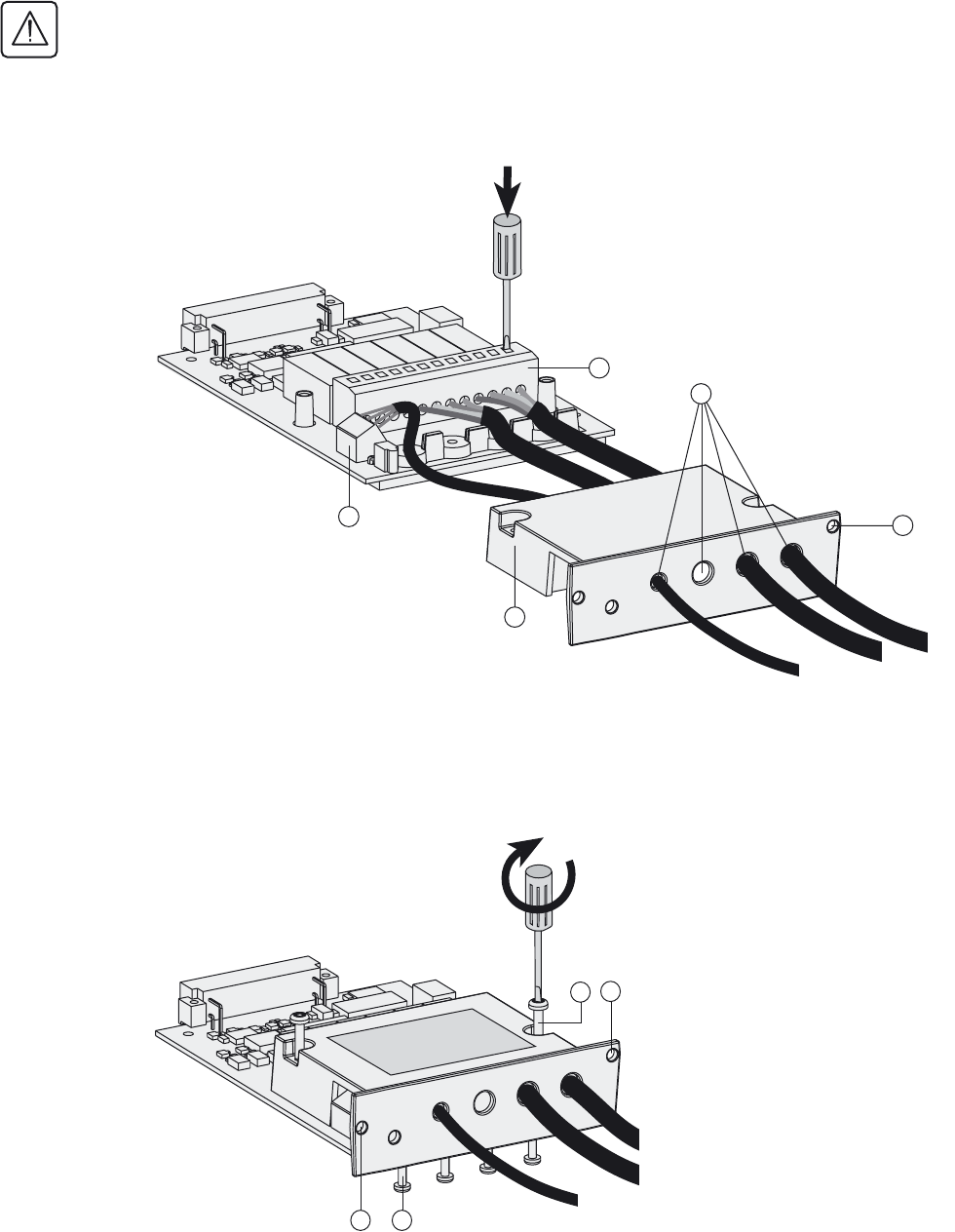
Isolate and lock-out all power sources for this card before making connections.
Never connect SELV (safety extra low voltage) and non-SELV circuits to the different outputs of the same card.
1 - Remove the cover (52) secured by the screws (50).
2 - Run the communications cables through the cable entry holes (53).
3 - Connect the conductors to the input (55) and output (54)terminal blocks.
4 - Put the cover back in place and secure it with the screws (50).
5 - Tighten the screws (56) to block the cables.
6 - Indicate the locations of the power sources on the labels.
7 - Insert the card in its slot.
8 - Secure the card with two screws (51).
123456
A
B
53
55
54
51
52
51
50
51 56
34001813EN/AE - Page 35
2. Installation
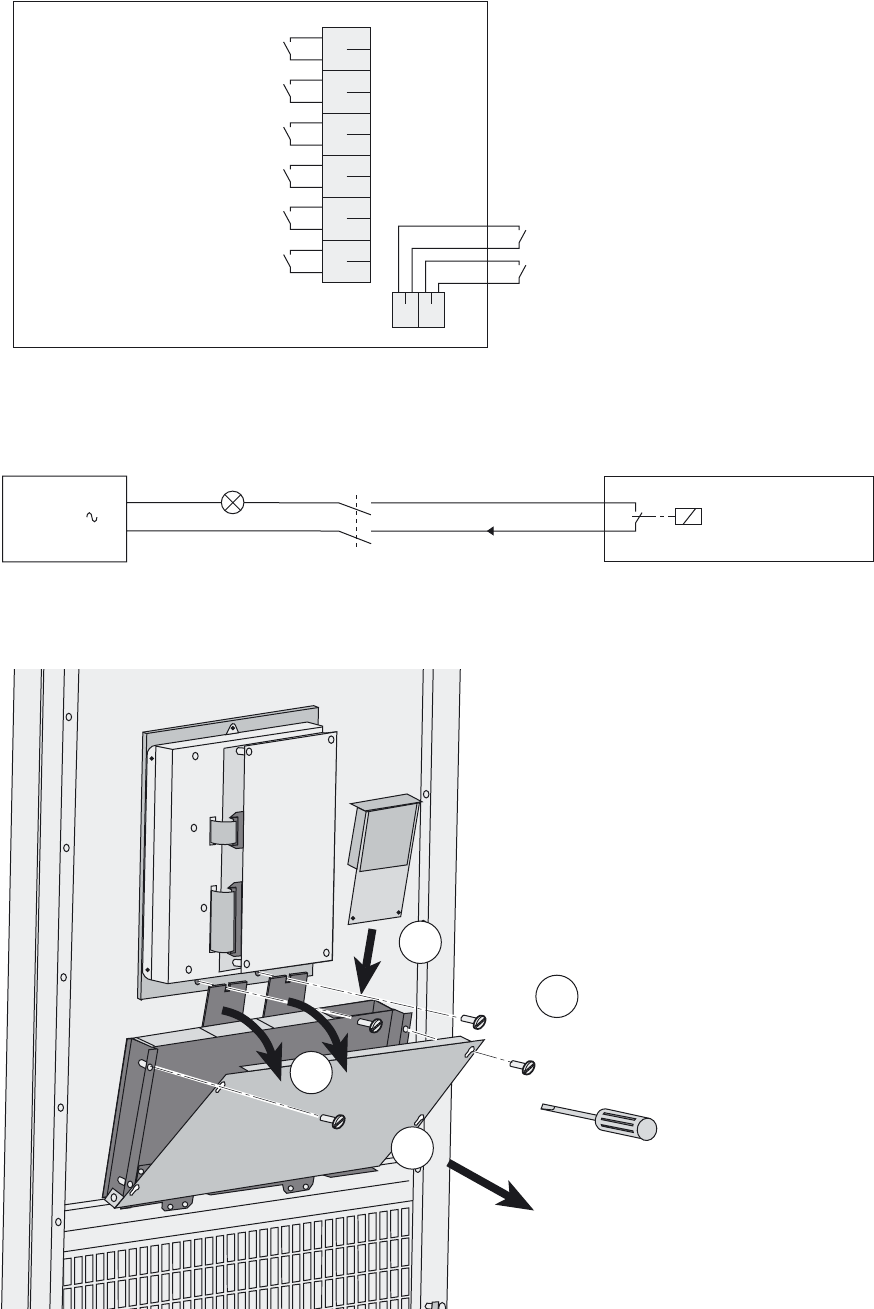
Characteristics of the contacts on the relay communications card.
Communications card connection example
If a SELV (safety extra low voltage) source is used, it must always be possible to isolate the communications card from the
upstream source to ensure the safety of personnel working on the installation.
Adding communication cards
Characteristics of the output contacts:
Permissible voltage: 250V AC, 30V DC.
Permissible current: 2 A.
Cable : 4 x 0.93 mm2, Ø 6.6 ± 0.3 mm.
Characteristics of the input contacts:
Switched voltage: 5 V DC
Consumption: 10 mA.
Cable: 4 x 0.34 mm2, Ø 5 ± 0.5 mm.
UPS OFF
UPS ON
6
5
4
3
2
1
BA
Low battery warning
Load on battery power
Load on automatic bypass
Load on UPS
Battery fault
General alarm
carte de
communication
source
Disconnecting device that can be locked
AC communication
card
2
4
1
3
34001813EN/AE - Page 36
2. Installation
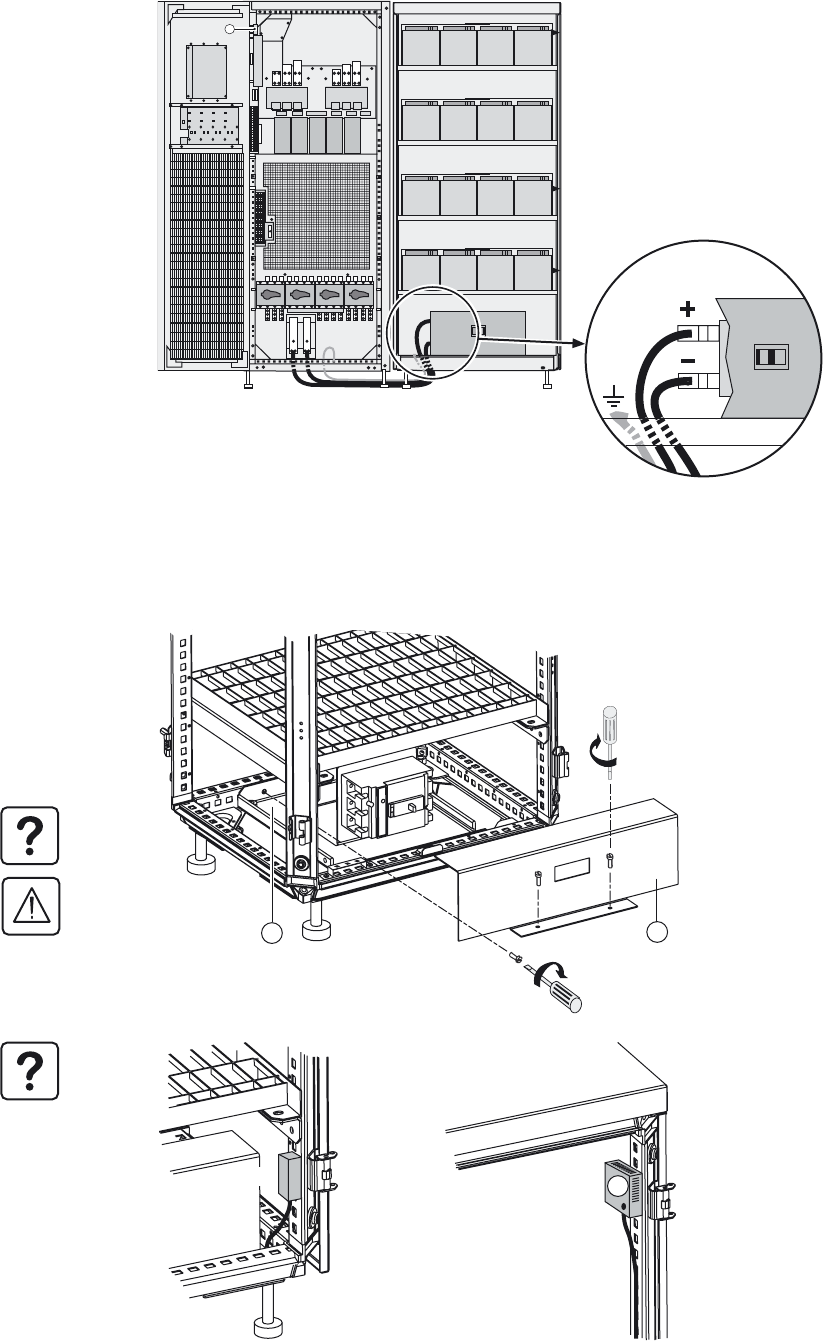
2.15 Running the control/communications cables
Single UPS
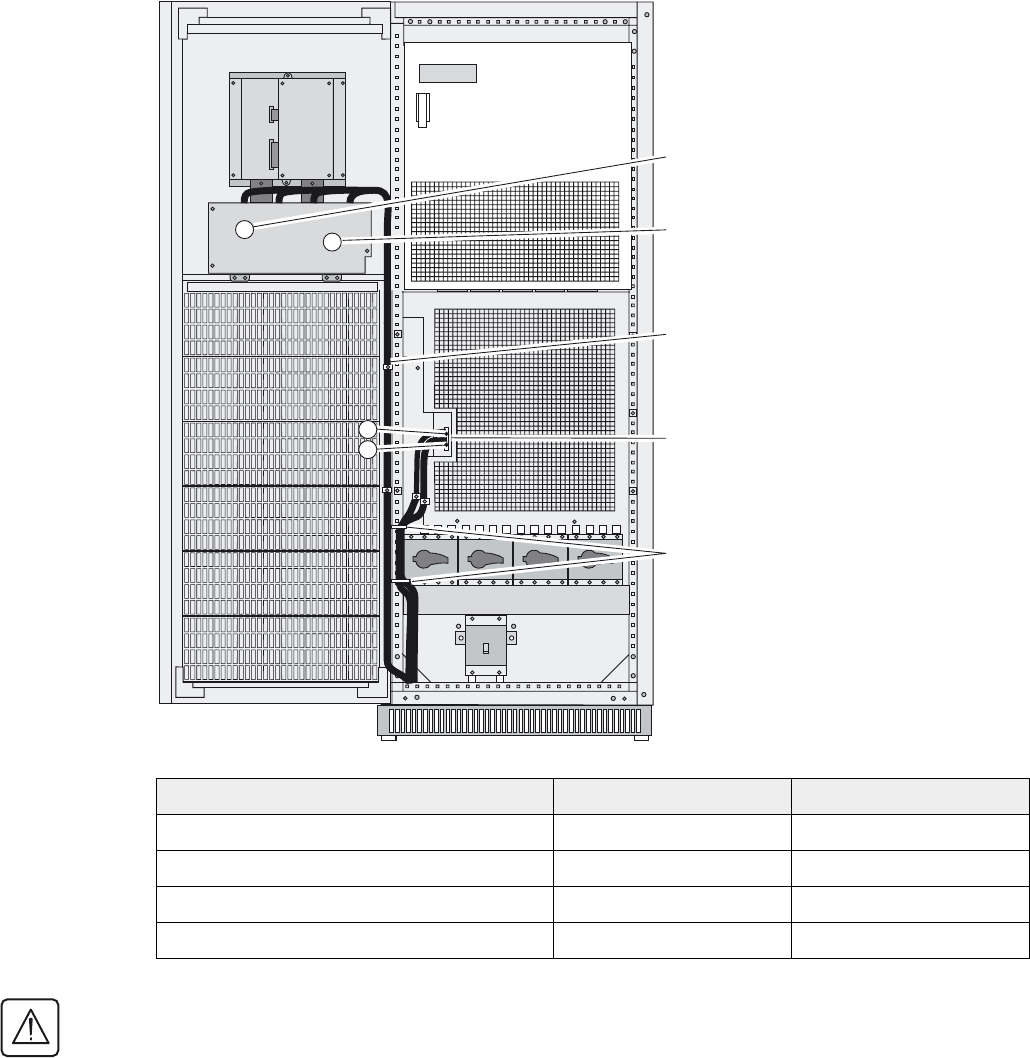
The following assembly recommendations must be followed to ensure correct positioning and support of the various strands
of the control and communication cables on the front face of the UPS.
Separate the control and communication
cables from the power cables.
Run the cables together in front of the
protection panels and tie them to the panels
as indicated in the figure opposite.
Slot for relay communications card
Free slot for optional communication cards
Tie
Screw-type terminal block for connection of
EPO and battery circuit-breakers.
Ties
Cable description Insulation level Location on illustration
Relay communication card SELV or LV 3
Optional communication card SELV 4
General-shutdown cable SELV 6
External battery circuit-breaker cables SELV 7
To ensure sufficient isolation of exchange-current, CAN and external bypass cabinet cables, they must be run
separately from the power cables. Reinforce the insulation of these control and communication cables if any risk of
contact with the power cables subsists.
34
6
7
34001813EN/AE - Page 37
2. Installation
Parallel UPS
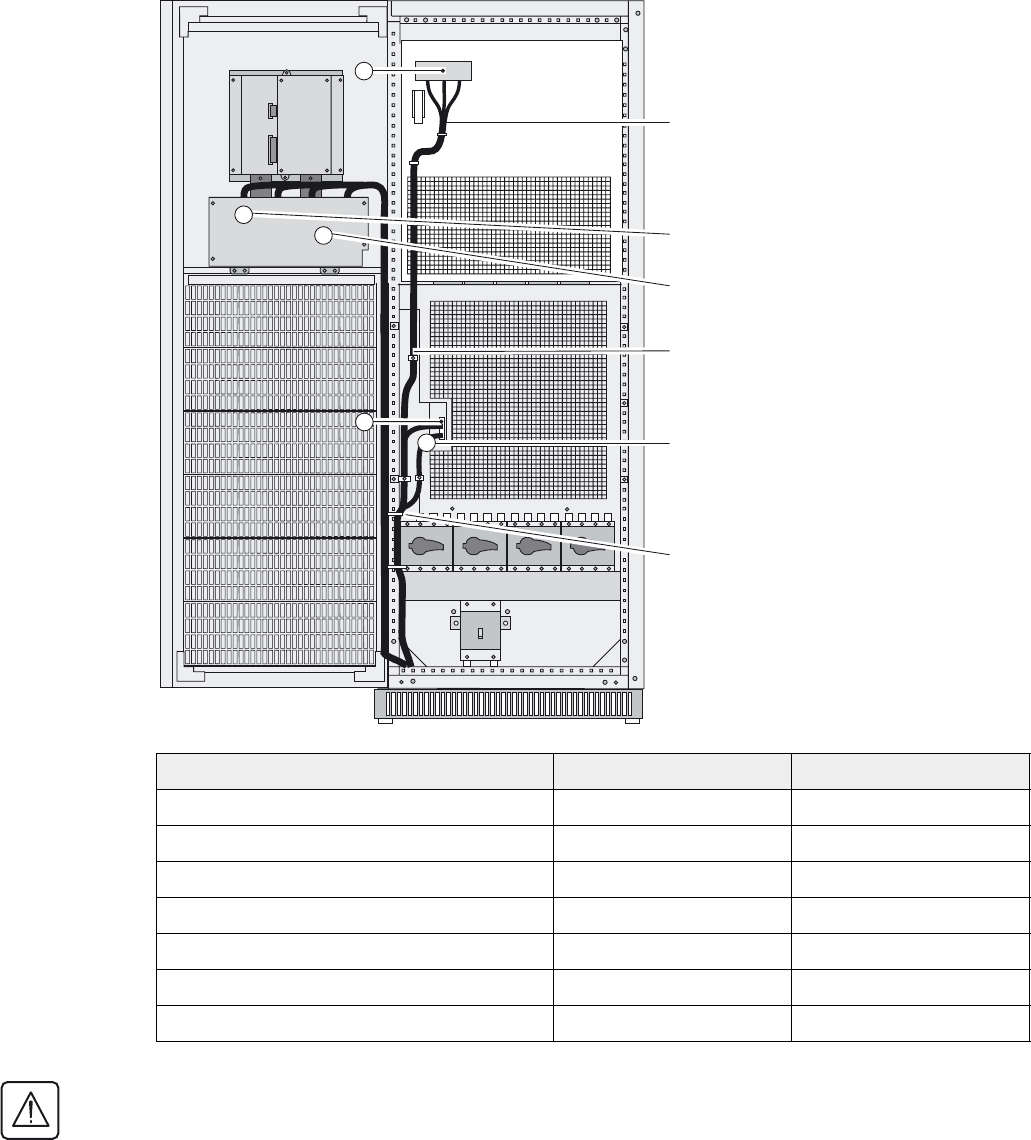
Parallel-connection cables for connection to
the external bypass cabinet (not supplied
max. 2.5 mm2). The CAN and I exchange
cables are supplied.
Relay communication card
Optional communications cards
Ties
General-shutdown cable (not supplied, max.
2.5 mm2) and external battery circuit breaker
cable must be tied down separately
Ties
Cable description Insulation level Location on illustration
External bypass cabinet cable ELV 1
CAN cables SELV 1
Exchange-current cables SELV 1
Relay communication card SELV or LV 3
Optional communication card SELV 4
General-shutdown cable SELV 6
External battery circuit-breaker cables SELV 7
To ensure sufficient isolation of exchange-current, CAN and external bypass cabinet cables, they must be run
separately from the power cables. Reinforce the insulation of these control and communication cables if any risk of
contact with the power cables subsists.
3
1
6
4
7
34001813EN/AE - Page 38
2. Installation
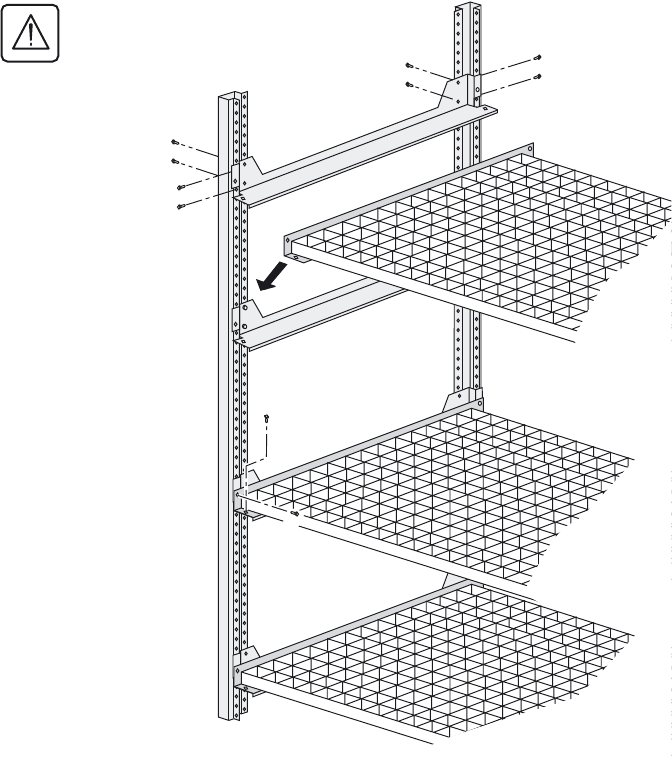
2.16 Power connections for an external battery cabinet
The earth on an external battery cabinet must be connected to the UPS
2.17 Assembly and connection of an empty battery cabinet
Mounting the battery circuit breaker kit
Secure:
1 - The base plate (60) supporting the circuit
breaker.
2 - Connector XR1.
3 - The temperature sensor (3).
4 - The front plate (4), after connecting the
batteries to the circuit breaker.
Only one circuit breaker is necessary even if
there are several battery cabinets.
The coil control wires and the position
contact wires of circuit-breaker QF1 must
be connected to the UPS (see page 24).
Please contact our Sales department when
selecting the battery circuit breaker.
Q1 Q4S Q3BP Q5N
1
+-
x4
x2
4
60
XR1 3
34001813EN/AE - Page 39
2. Installation
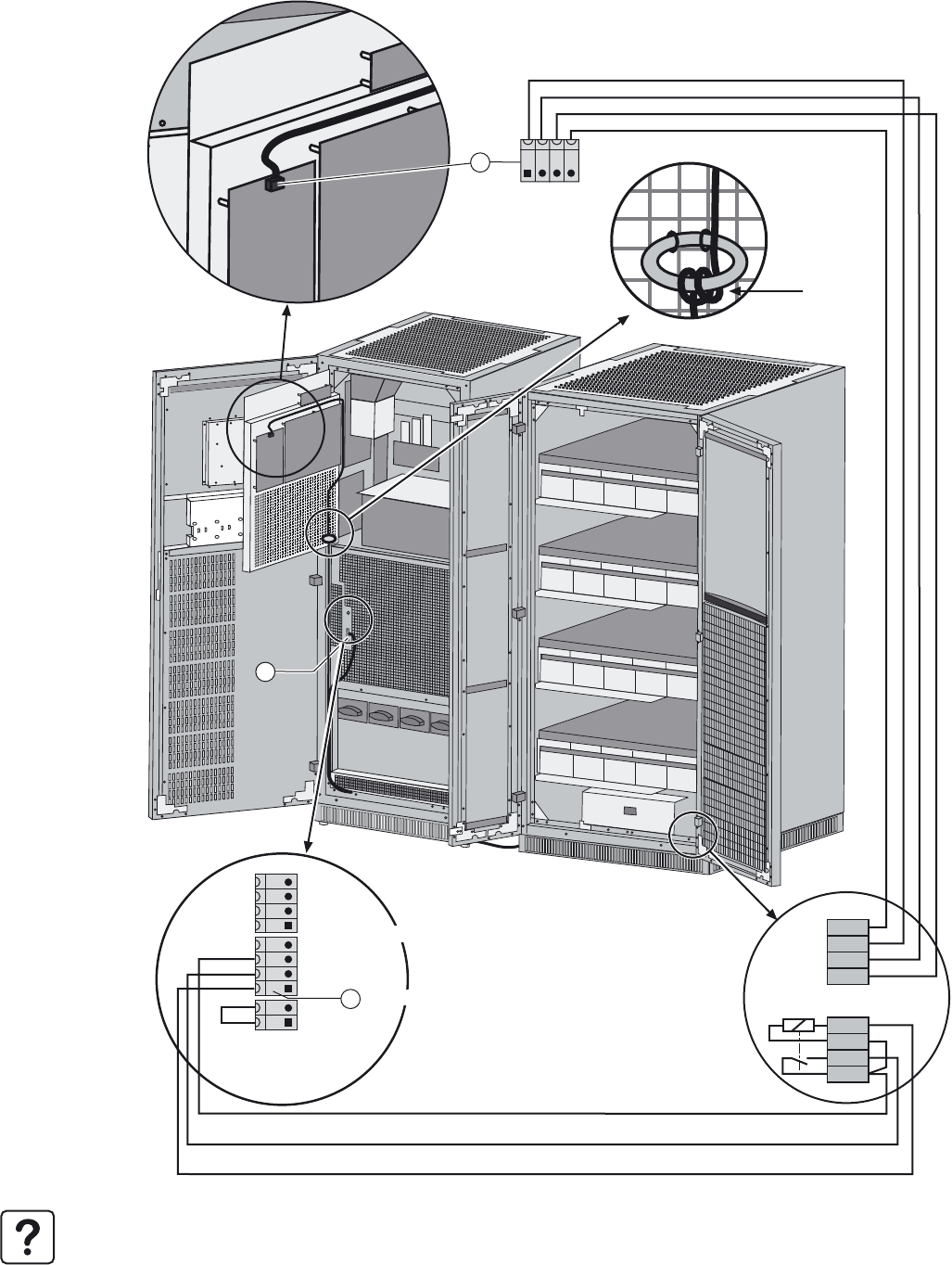
Mounting the shelves and the battery cells
Caution. Assembly of the battery cabinet
must be carried out by certified personnel
(standard EN 50091-1-2).
Caution. The minimum clearance between
the top of battery cells and the next shelf
is 150 millimeters.
1 - Secure the angle supports (6 screws per
support).
For each shelf:
2 - position the shelf,
3 - secure the shelf with two screws in each
angle,
4 - install the battery cells, secure and
interconnect them.
5 - Interconnect all the shelves and then
connect the overall battery assembly to the
battery circuit breaker.
2
1
1
1
3
3
34001813EN/AE - Page 40
2. Installation
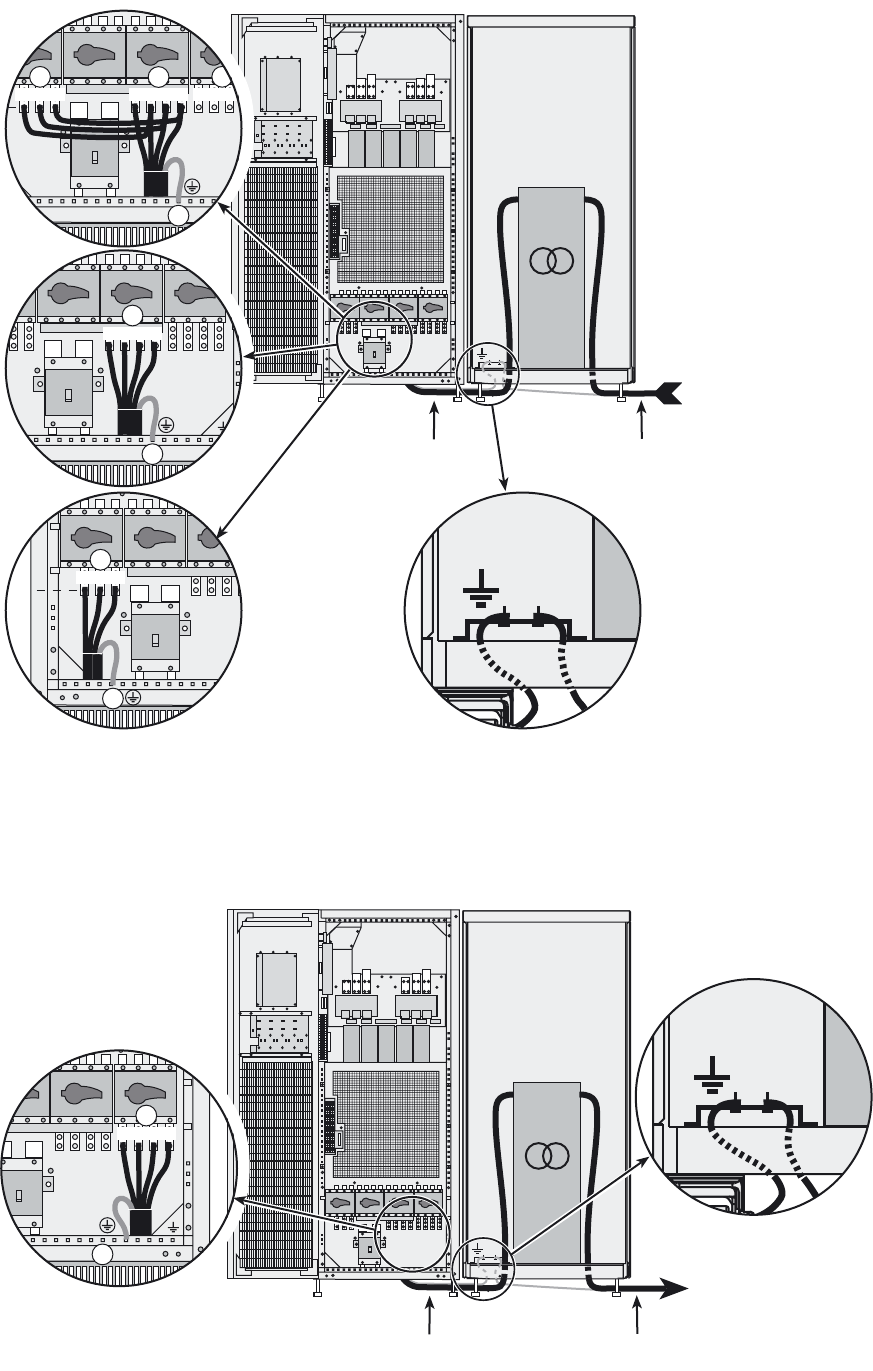
2.18 Control connections for an external battery cabinet
1 - Connect wires 1-2-3-4 on connector XR1 (QF1 position and coil) in the external battery cabinet to connector XMB07 (6)
(SELV) and wires 7-8-9-10 (temperature sensor) to connector XMD3 (22) (SELV).
Note. The wires for the screw-type terminal block are not supplied (max. size 2.5 mm2 and total length less than 100 m).
8
7
6
5
4
3
2
1
XMD3 XMD3
QF1
-12V
+12V
BC+
BC-
XR1
22
XMB 08 XMB 07 XMB 06
6
5
12V
+
12V
BC
+
BC
Circuit breaker 2
Common
Open-close contact
QF1 command
Circuit breaker 1
Pass through
three times
34001813EN/AE - Page 41
2. Installation
2.19 Connection of an input isolating transformer
2.20 Connection of an output isolating transformer
A - Connection of an input transformer for common normal and Bypass AC source.
B - Connection of a Bypass AC input transformer for separate normal and Bypass AC sources.
C - Connection of a Normal AC input transformer for separate normal and Bypass AC sources.
16
L1 L2 L3
17
Q1 Q4S Q3BP Q5N
QF1
N L1 L2 L
14
16 15
N L1 L2 L3L1 L2 L3
17
15
N L1 L2 L3
17
A
B
C
AC input
Cable not supplied Cable not supplied
Option
Q1 Q4S Q3BP Q5N
QF1
N L1 L2 L3
14
17
To load
Cable not supplied Cable not supplied
Option
34001813EN/AE - Page 42
3. Operation
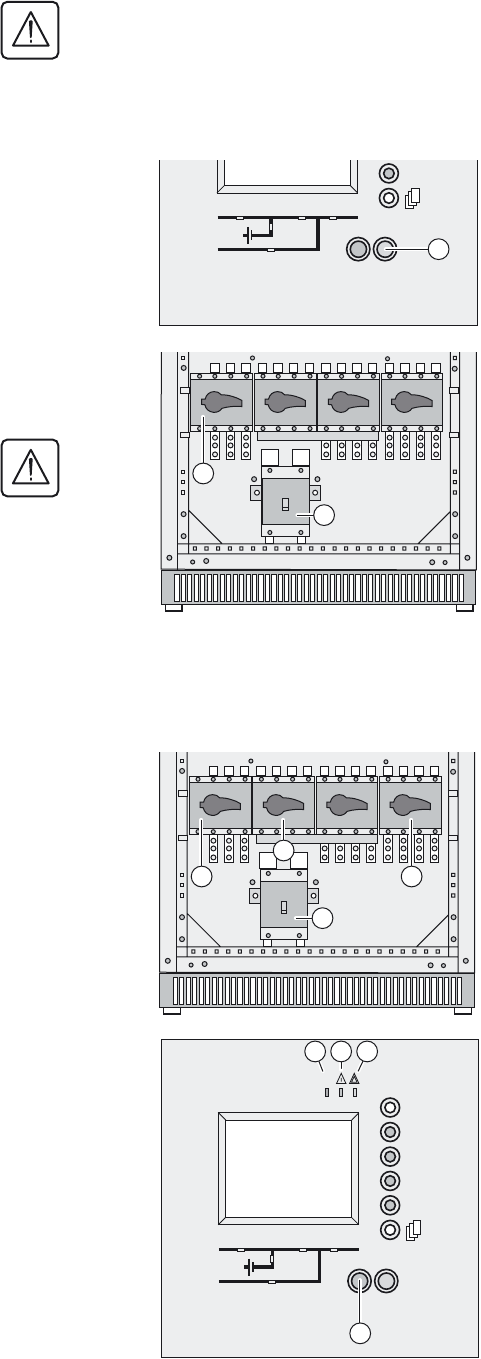
3.1 Shutting down a single UPS
The UPS remains energised unless it is shut down.
3.2 Restarting a single UPS
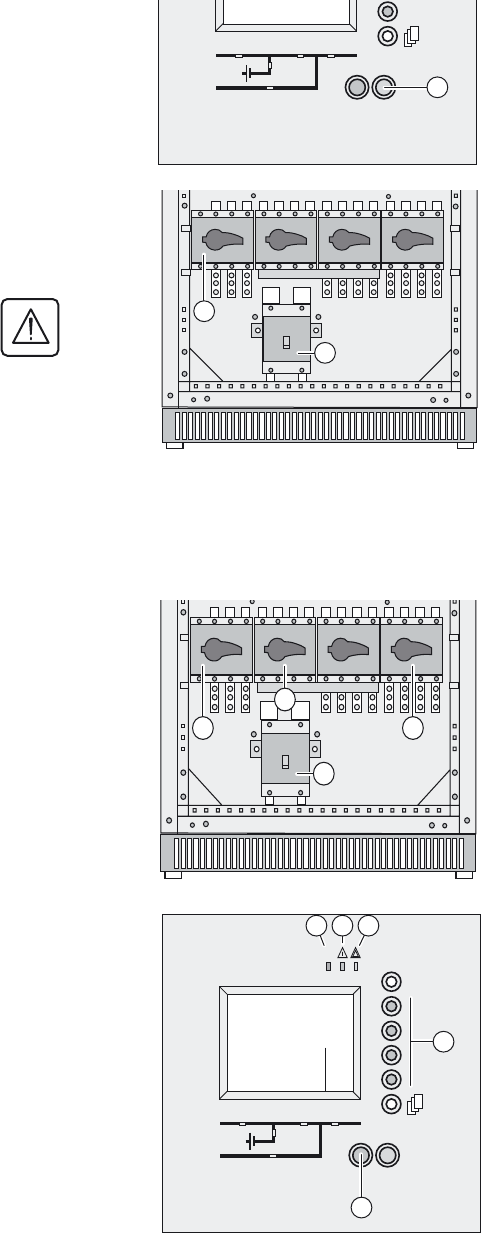
Check that switches Q4S (9) and Q5N (11) are closed. If this is the case, continue with this procedure, otherwise refer
to paragraph 4.4 "Return to the Normal position, Single UPS".
All operations concerning system start-up and compliance with standards and regulations, including those related to the
battery cabinet, must be carried out by trained and certified personnel before using the UPS.
1 - Press a button to exit sleep mode.
2 - Confirm by pressing the function key (38) for 3 seconds.
The load is no longer protected by the UPS. It is supplied via the
bypass.
3 - Set the battery circuit-breaker QF1 (13) (or set the battery circuit-
breakers of the auxiliary cabinets if any) to OFF.
4 - Set the input circuit-breaker Q1 (8) to OFF.
The charger no longer operates to keep the batteries fully charged.
5 - Open the upstream circuit-breakers of the Normal AC source and
Bypass AC source to completely power off the UPS.
1 - Set the Normal AC source input switch Q1 (8) to the ON position.
2 - Wait until the end of the start sequence.
3 - Set the battery circuit breaker QF1 (13) (or the battery circuit breakers
in the auxiliary cabinets) to the ON position.
The UPS unit starts automatically.
LED (31) is ON.
The load is protected by the UPS.
If LED (31) remains OFF, press the ON button (37)
If LED (31) still remains OFF and either of LEDs (32) or (33) is ON, a fault
has occurred (see section 4.1).
IO
3s
38
Q1 Q4S Q3BP Q5N
QF1
13
8
Q1 Q4S Q3BP Q5N
QF1
13
8
9
11
IO
3s
?
~
37
31 32 33
34001813EN/AE - Page 43
3. Operation
3.3 Shutting down a parallel configuration
3.4 Restarting a parallel configuration
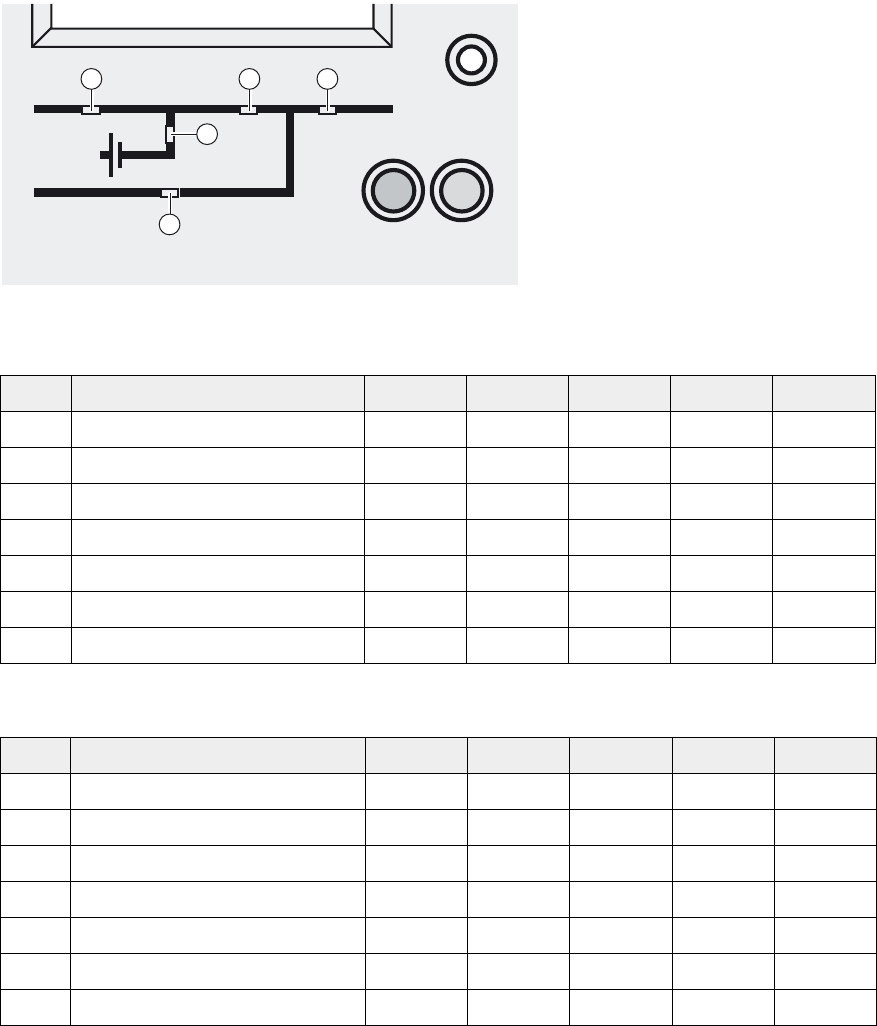
Check that switches Q4S (9) and Q5N (11) are closed. If this is the case, continue with this procedure, otherwise refer
to paragraph 4.4 "Return to the Normal position, Parallel UPS...".
1 - Press a button on each unit to exit sleep mode.
2 - Press the OFF button (38) on each unit for 3 seconds.
The load is no longer protected by the UPSs. It is supplied via the
bypass.
3 - Set the battery circuit breaker QF1 (13) in each UPS unit to the OFF
position (or trip the battery circuit breakers in the auxiliary cabinets if
applicable).
4 - Set the input switch Q1 (8) in each UPS unit to the OFF position.
The charger no longer operates to keep the batteries fully charged.
5 - Open the upstream circuit-breakers of Normal AC source and Bypass
AC source to completely power off the installation.
1 - Check that the Bypass AC source input switch Q4S in the external
bypass cabinet is closed.
2 - Check that the output switch Q5N in the external bypass cabinet is
closed.
3 - Check that the bypass switch Q3BP in the external bypass cabinet is
open.
Then carry out steps 4 to 6 below on all the UPS units.
4 - Set the Normal AC source input switch Q1 (8) to the ON position.
5 - Wait until the end of the start sequence.
6 - Set the battery circuit breaker QF1 (13) (or the battery circuit breakers
in the auxiliary cabinets) to the ON position.
The UPS units start automatically. On each unit, LEDs (32) and (33) go
OFF and LED (31) goes ON.
The load is protected by the UPSs.
If LED (31) remains OFF, press the ON button (37) on each UPS unit (the
UPS is in manual start mode) and confirm if necessary by pressing the
function key (35) marked©.
If LED (31) still remains OFF and either of LEDs (32) or (33) is ON, a fault
has occurred (see section 4.1).
IO
3s
38
Q1 Q4S Q3BP Q5N
QF1
13
8
Q1 Q4S Q3BP Q5N
QF1
13
8
9
11
IO
3s
?
~
37
31 32 33
35
34001813EN/AE - Page 44
3. Operation
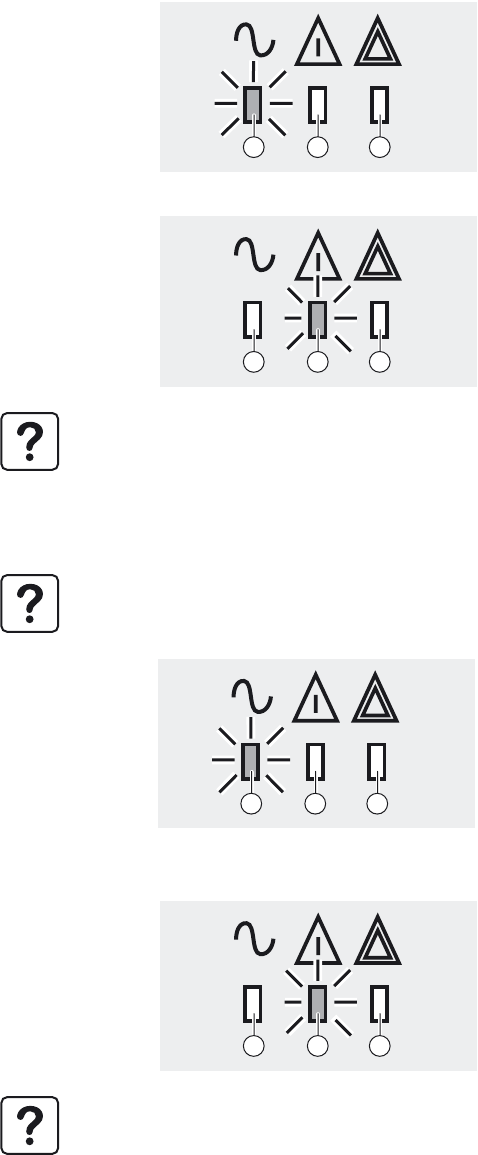
3.5 Operation of mimic-panel LEDs
Single UPS start sequence on Normal AC input
Single UPS start sequence on Bypass AC input
Steps Action LED (39) LED (40) LED (41) LED (42) LED (43)
1 Q1 open Off Off Off Off Off
2 Close Q1 green Off red Off red
3 Close QF1 green Off Off Off red
4 Close Q4S green Off Off Off green
5 Close Q5N green Off Off green green
6 Open Q3BP green Off Off green green
7 Press ON button (37) green green Off green Off
Steps Action LED (39) LED (40) LED (41) LED (42) LED (43)
1Q4S open Off Off Off Off Off
2 Close Q4S red Off red Off green
3 Close Q5N red Off red green green
4 Open Q3BP red Off red green green
5 Close Q1 green Off red green green
6 Close QF1 green Off Off green green
7 Press ON button (37) green green Off green Off
IO
3s
39 40 42
41
43
34001813EN/AE - Page 45
3. Operation
3.6 Operating modes
Normal (double conversion) mode
This is the standard operating mode, set by default in the factory. Two possible cases:
ECO mode (single UPS only)
1 - Normal AC source available:
LED (31) is ON.
The load is protected by the UPS.
2 - Normal AC source not available:
LED (32) is ON.
The buzzer sounds intermittently.
The load is supplied by the UPS from battery power.
The display indicates any anomalies related to the AC source or the UPS as well as remedial action if applicable.
Press the function key (35) indicated by the display to turn the buzzer OFF.
The main advantage of this mode is that it reduces the consumption of electrical power.
ECO mode may be selected exclusively via the control panel on the UPS.
Three possible cases:
1 - Bypass AC source available:
LED (31) is ON.
The load is supplied in ECO mode.
2 - Bypass AC source not available:
LED (31) is ON.
The buzzer sounds intermittently.
The load is automatically supplied in normal mode via the Normal AC
input.
3 - Both normal and Bypass AC sources not available or out of
tolerance:
LED (32) is ON.
The buzzer sounds intermittently.
The load is supplied by the UPS from battery power.
The display indicates the UPS operating status conditions and the required action.
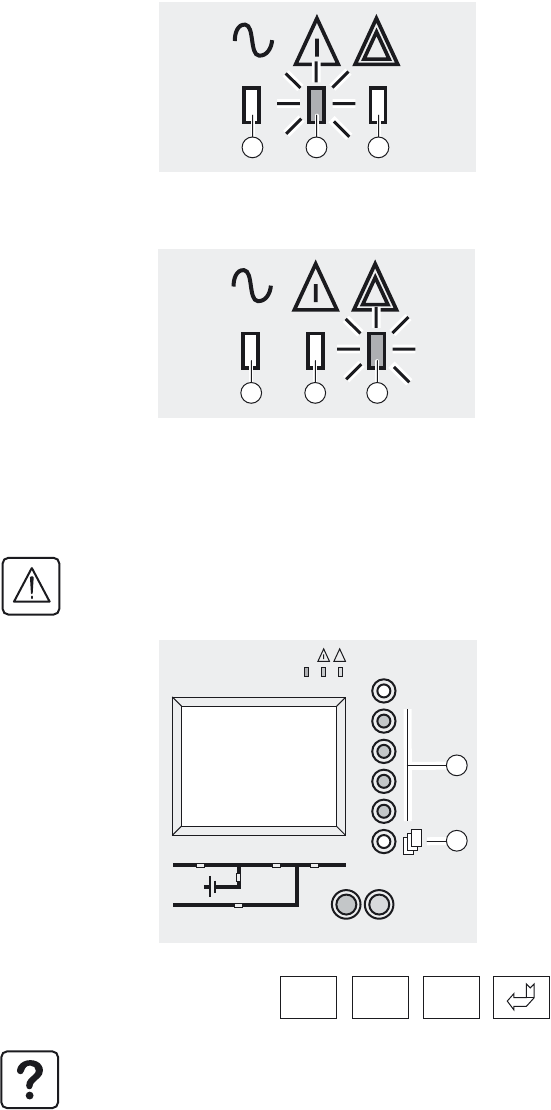
31 32 33
31 32 33
31 32 33
31 32 33
34001813EN/AE - Page 46
3. Operation
3.7 Load on battery power
The load continues to be protected by the UPS when the Normal AC source is not available. Power is supplied by the battery.
Transfer to battery power
End of battery power
3.8 UPS personalisation
Access to the personalisation functions
LED (32) is ON.
The buzzer sounds intermittently.
The load is supplied by the battery.
LED (33) is ON.
The buzzer sounds intermittently.
The load is transferred on the Bypass AC input if it is present.
Personalisation must be carried out with switches Q1 (8) and Q5N (11) open (OFF) and switches Q4S (9) and Q3BP
(10) closed (ON).
1 - Press the menu key (36) .
2 - Select "Settings", then "Personalisation" using the function keys (35)
Ï or Ð.
3 - Confirm by pressing the function key (35) ©.
4 - Enter the password by successively selecting each icon using the
corresponding function key.
5 - Confirm by pressing the function key (35) ©.
6 - To save the personalisation settings, confirm by pressing the function
key (35) ©.
The password is factory set.
To change the password, see the Settings menu.
31 32 33
31 32 33
IO
3s
?
~
36
35
ØØØ

34001813EN/AE - Page 47
3. Operation
Operating mode
Frequency
Automatic bypass
Battery
Function Factory setting Options
UPS operating mode NORMAL ECO
UPS automatic start Disabled Enabled
Authorised number of starts 4 1 to 255
Delay before reset of number of
executed automatic starts
4 seconds 1 to 60 seconds
UPS output frequency 50 Hz 60 Hz
Tolerance for Bypass AC source 8 % 0.5 - 1 - 2 - 4 %
Synchronisation speed with Bypass
AC source
2 Hz / s 1 Hz / s
Transfer to Bypass AC source Enabled Disabled - disabled when limiting
Transfer to bypass with Bypass AC
source out of tolerances
Enabled Disabled
Low battery warning threshold if
battery monitor inactive
40% remaining backup time 20 - 60 - 80 % remaining backup time
Low battery warning threshold if
battery monitor active
4 minutes of battery backup time 1 to X minutes of battery backup time
Interval between two battery tests 30 days 1 to 180 days
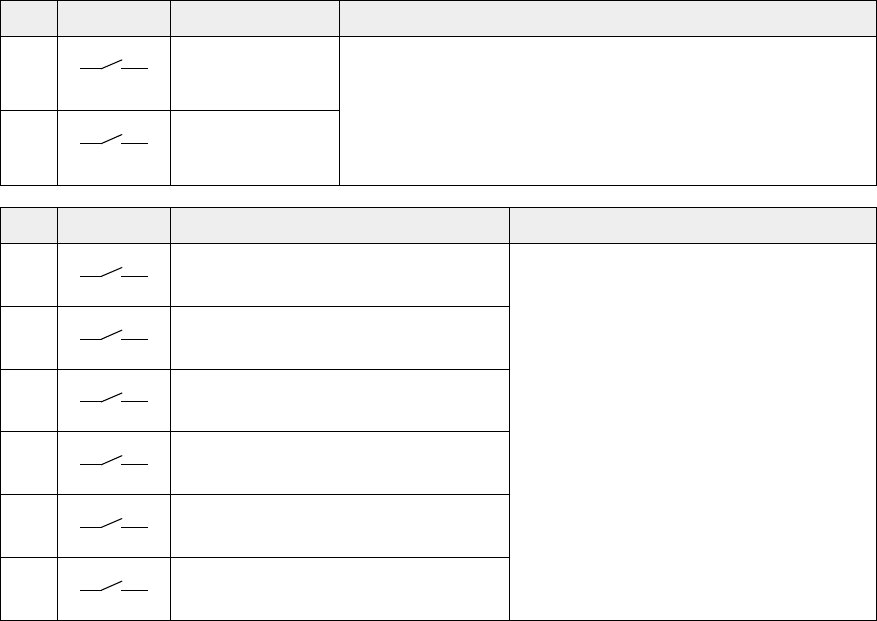
34001813EN/AE - Page 48
3. Operation
3.9 Relay contacts (communications card)
The indications 1.X become 2.X for a second identical card in the UPS.
Contacts are of the NO (normally open) type.
(1) The general alarm can be tested by opening the battery circuit breaker.
Inputs Factory setting Options (available on all contacts)
1.A
UPS ON - Room temperature fault
- Transfer to bypass disabled
- Transfer to bypass disabled if Bypass AC source out of tolerance
- Desynchronise UPS from Bypass AC source
1.B
UPS OFF
Outputs Factory setting Options (available on all contacts)
1.1
General alarm (1) - Overload
- PFC fault
- Inverter fault
- Charger fault
- Automatic-bypass fault
- Bypass AC source out of tolerance
- Battery-temperature fault
- Fan fault
- Emergency power off activated
- Battery circuit breaker(s) open (at least one)
- Phase-sequence fault on normal or Bypass AC
source
- Blown fuse(s)
- Transfer to Bypass AC source disabled
- Operation in ECO mode
- UPS on manual bypass
1.2
Battery fault
1.3
Load on NORMAL source
1.4
Load on automatic bypass
1.5
Load on battery power
1.6
Low battery warning
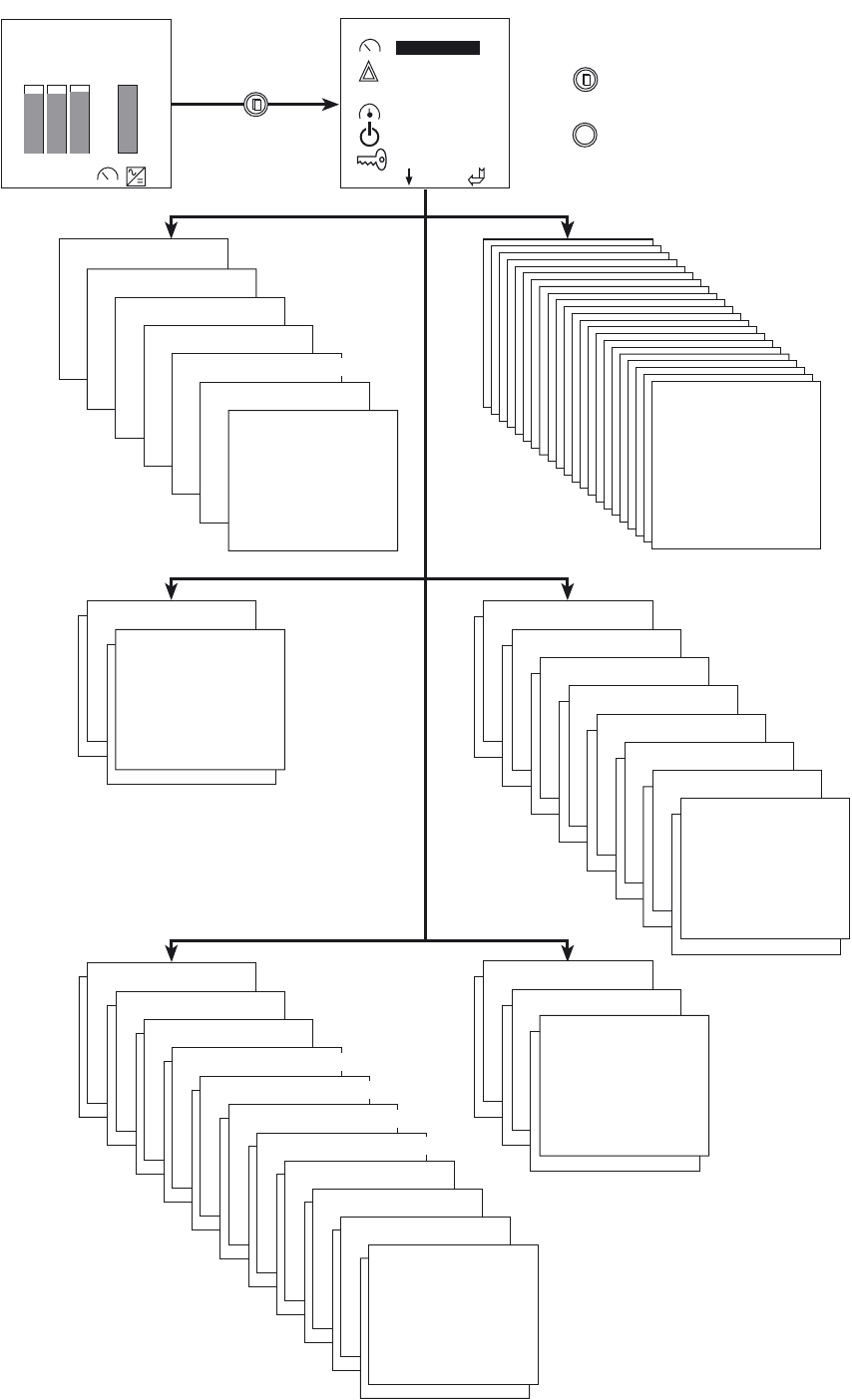
34001813EN/AE - Page 49
3. Operation
3.10 Display functions
Battery measurements
Welcome screen Main menu
?
Press this key to return
to the main menu
Help key for information
on the pictogram functions
(must be held down)
Measurements
Current measurements
Voltage measurements
Power measurements
Status
Time stamped events
Statistics
Reset alarms
Controls
Inverter off
Inverter on
Alarms
Settings
Language
Display contrast
Buzzer volume
Personalisation
Output voltage
Date / time
Start-up
Password
Ratios measurements
Load protected
01/Jan./2000 10:10
8.8 8.8 8.9 32
kVA min
Ph1 Ph2 Ph3 Battery
+++
VOLT
Select
VOLT
Measurements
Alarms
Status
Controls
Settings
01010
10101
01010
Dry-contact settings
Force load transfer to bypass
Parallel measurements
(option)
Start-up
Transfer to manual
bypass
UPS shutdown
Maintenance
Tests leds
Desynchronize inverter from bypass
Buzzer OFF
Enable LCM indications
Disable LCM indications
Frecuency measurements
Resynchronize inverter and bypass
Force load transfer to inverter
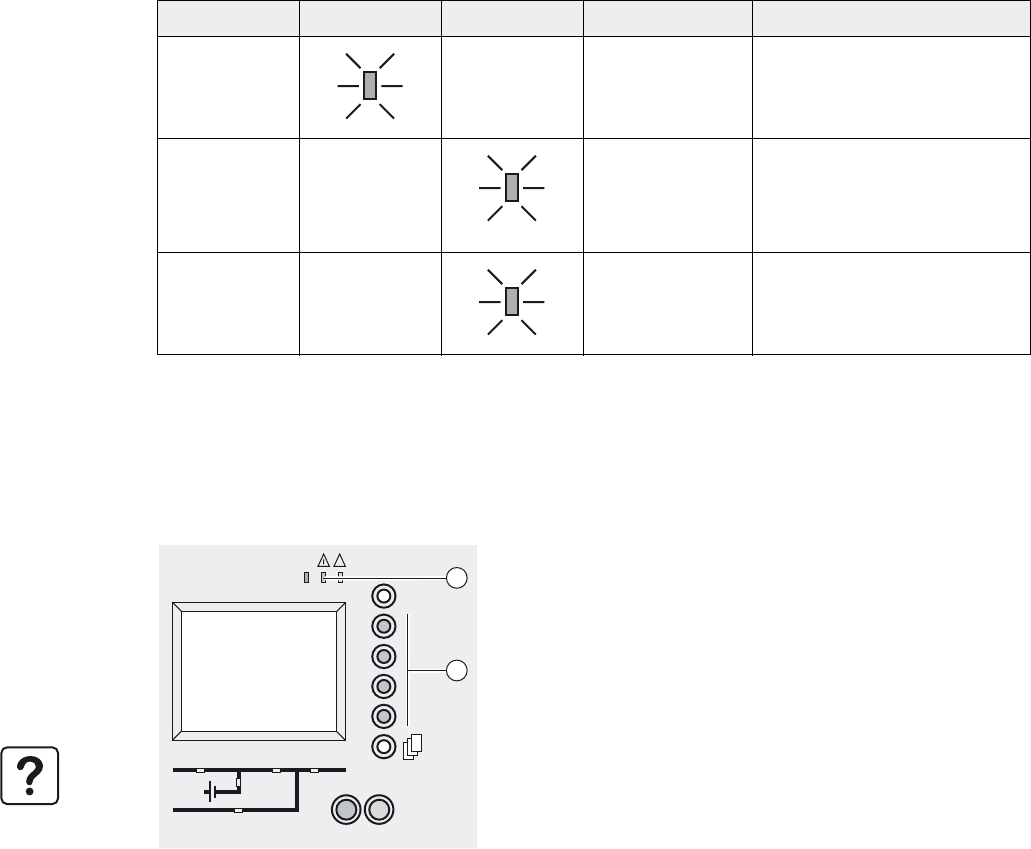
34001813EN/AE - Page 50
4. Maintenance
4.1 Identification of alarms
Alarm conditions are identified by LEDs (31), (32), (33) and the buzzer.
Detailed information on all alarms is supplied on the display.
1 - On the screen, select the alarm for which information is required.
2 - Hold down the corresponding function key to display the possible causes of the fault and the required action.
4.2 Life Cycle Monitoring (LCM)
LED (31) LED (32) LED (33) Buzzer Signification
-
- Intermittent Normal AC source not available
- - Intermittent UPS shut down following end of
battery power
- - Intermittent UPS shut down on fault requiring
servicing by after-sales support
◗ The "Life Cycle Monitoring" function provides UPS maintenance advice
to guarantee installation availability for the user.
◗ The display gives 3 messages enabling the following to be identified:
- The end of the contractual legal warranty: "End of warranty check
recommended".
- Regular maintenance requirements and the end of service life for
consumable components: "Technical check recommended".
- The end of the battery service life: "Battery check required".
In addition to these messages, the minor fault LED (32) lights up and the
buzzer sounds.
These messages can be deleted by pressing the function key (35). This
also causes LED (32), to go out, the buzzer to stop and the removal of the
"Global Alarm" remote signalling.
To completely disable LCM indications, use the display to enter the
password required to disable the function.
IO
3s
?
~
32
35
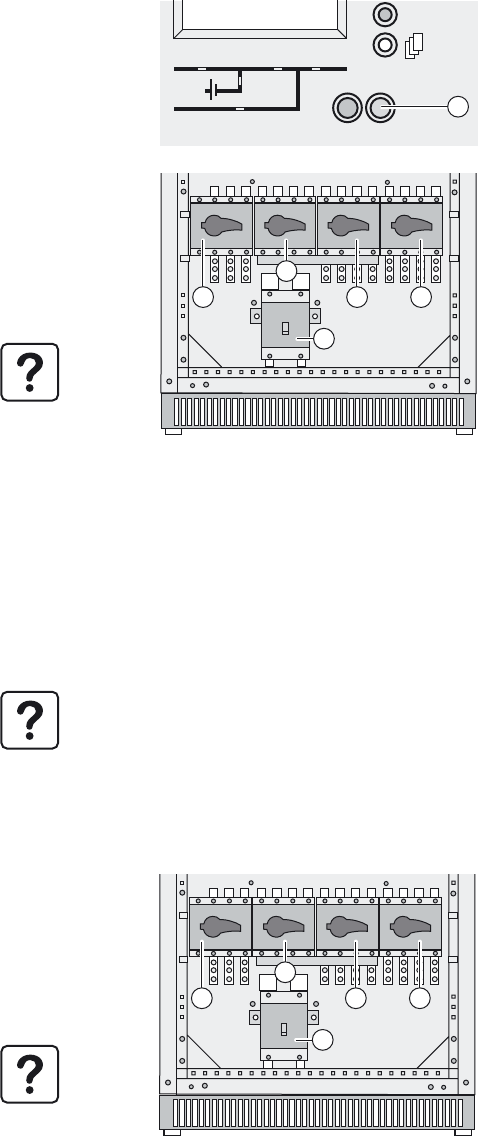
34001813EN/AE - Page 51
4. Maintenance
4.3 UPS isolation
Single UPS
To isolate the UPS from the electrical power source and supply the load directly by the normal or Bypass AC source, follow
the instructions below.
Frequency converter
UPS operating in ECO mode
If supplied by the network via the Bypass AC channel:
1 - Press a button to exit sleep mode.
2 - Shut down the UPS by pressing the OFF button (38) for 3 seconds.
The load is no longer protected by the UPS.
3 - Set bypass switch Q3BP (10) to ON.
4 - Set output switch Q5N (11) to OFF.
5 - Set the battery circuit-breaker QF1 (13) (or set the battery circuit-
breakers of the auxiliary cabinets if any) to OFF.
6 - Set the input circuit-breaker Q1 (8) to OFF.
7 - Set the input circuit-breaker Q4S (9) to OFF.
8 - Wait until the display and LEDs go off.
The load is no longer protected by the UPS, but continues to be
supplied with AC power.
UPS maintenance or servicing can now be carried out.
1 - Press a button to exit sleep mode.
2 - Shut down the UPS by pressing the OFF button (38) for 3 seconds.
The load is no longer protected by the unit.
3 - Set the battery circuit-breaker QF1 (13) (or set the battery circuit-breakers of the auxiliary cabinets if any) to OFF.
4 - Set the input circuit-breaker Q1 (8) to OFF.
5 - To ensure operator safety, open all Q4S (9) and Q5N (11) switches.
UPS maintenance or servicing can now be carried out.
1 - Check that the load is operating via the Bypass AC input.
2 - Set bypass switch Q3BP (10) to ON.
3 - Set output switch Q5N (11) to OFF.
4 - Set the battery circuit-breaker QF1 (13) (or set the battery circuit-
breakers of the auxiliary cabinets if any) to OFF.
5 - Set the input circuit-breaker Q1 (8) to OFF.
6 - Set the input circuit-breaker Q4S (9) to OFF.
The load is no longer protected by the UPS, but continues to be
supplied with AC power.
UPS maintenance or servicing can now be carried out.
IO
3s
38
Q1 Q4S Q3BP Q5N
QF1
13
810 11
9
Q1 Q4S Q3BP Q5N
QF1
13
810 11
9
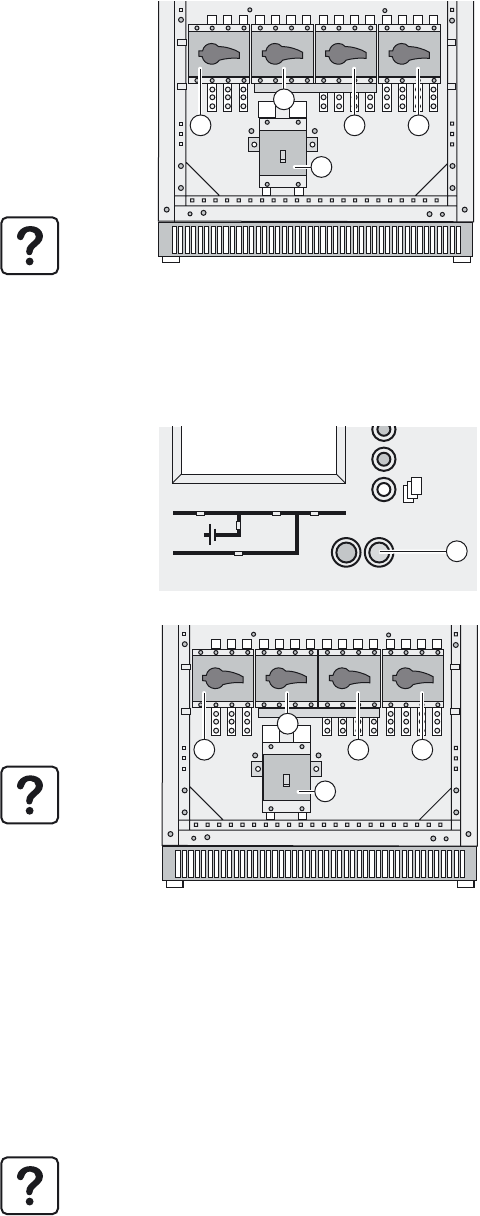
34001813EN/AE - Page 52
4. Maintenance
If the load is supplied by the UPS with Bypass AC source present:
Parallel UPS configuration without external bypass cabinet
Shutdown and isolation of the first UPS unit:
Shutdown and isolation of the second UPS unit:
1 - Press a button to exit sleep mode.
2 - Shut down the UPS by pressing the OFF button (38) for 3 seconds.
3 - Set bypass switch Q3BP (10) to ON.
4 - Set output switch Q5N (11) to OFF.
5 - Set the battery circuit-breaker QF1 (13) (or set the battery circuit-
breakers of the auxiliary cabinets if any) to OFF.
6 - Set the input circuit-breaker Q1 (8) to OFF.
7 - Set the input circuit-breaker Q4S (9) to OFF.
8 - Wait until the display and LEDs go off.
The load is no longer protected by the UPS, but continues to be
supplied with AC power.
UPS maintenance or servicing can now be carried out.
1 - Check that the two UPS units are operating.
2 - Press a button to exit sleep mode.
3 - Shut down the UPS by pressing the OFF button (38) for 3 seconds.
4 - Set output switch Q5N (11) to OFF.
5 - Set the battery circuit-breaker QF1 (13) (or set the battery circuit-
breakers of the auxiliary cabinets if any) to OFF.
6 - Set the input circuit-breaker Q1 (8) to OFF.
7 - Set the input circuit-breaker Q4S (9) to OFF.
8 - Wait until the display and LEDs go off.
The load is still protected by the other UPS unit.
Maintenance or servicing can now be carried out on the UPS unit that
has been shut down.
1 - Press a button to exit sleep mode.
2 - Shut down the UPS by pressing the OFF button (38) for 3 seconds.
3 - Set bypass switch Q3BP (10) to ON.
4 - Set output switch Q5N (11) to OFF.
5 - Set the battery circuit-breaker QF1 (13) (or set the battery circuit-breakers of the auxiliary cabinets if any) to OFF.
6 - Set the input circuit-breaker Q1 (8) to OFF.
7 - Set the input circuit-breaker Q4S (9) to OFF.
8 - Wait until the display and LEDs go off.
The load is no longer protected by the UPS, but continues to be supplied with AC power.
UPS maintenance or servicing can now be carried out.
Q1 Q4S Q3BP Q5N
QF1
13
810 11
9
IO
3s
38
Q1 Q4S Q3BP Q5N
QF1
13
810 11
9
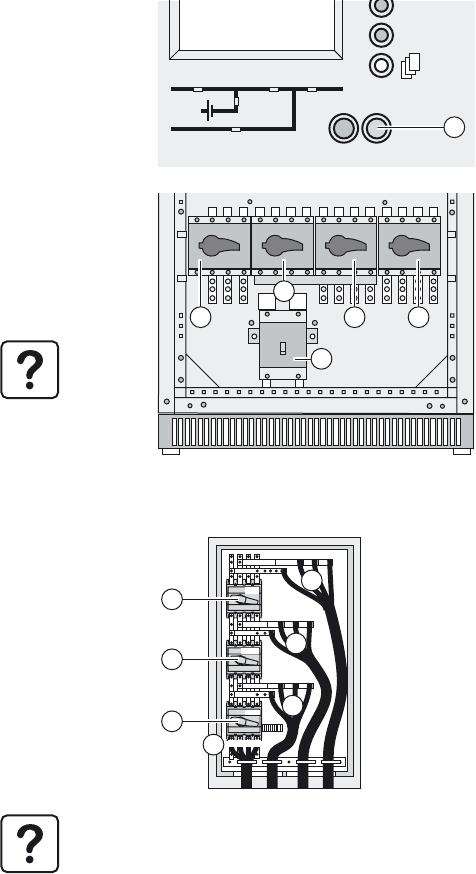
34001813EN/AE - Page 53
4. Maintenance
Parallel UPS configuration with external bypass cabinet
Shutdown and isolation of one UPS unit
Shutdown and isolation of all the UPS units:
1 - First check that the total capacity of the remaining UPS units is
sufficient to supply the connected load.
2 - Press a button to exit sleep mode.
3 - Shut down the UPS by pressing the OFF button (38) for 3 seconds.
4 - Set output switch Q5N (11) to OFF.
5 - Set the battery circuit-breaker QF1 (13) (or set the battery circuit-
breakers of the auxiliary cabinets if any) to OFF.
6 - Set the input circuit-breaker Q1 (8) to OFF.
7 - Set the input circuit-breaker Q4S (9) to OFF.
8 - Wait until the display and LEDs go off.
The load is still protected by the other UPS units.
Maintenance or servicing can now be carried out on the UPS unit that
has been shut down.
1 - On each UPS unit, press a button to exit sleep mode.
2 - Shut down each UPS unit by pressing their OFF buttons (38) for 3
seconds.
3 - Set switch Q3BP (65) in the external bypass cabinet to ON.
4 - Set switch Q5N (66) in the external bypass cabinet to OFF.
5 - Set switch Q4S (64) in the external bypass cabinet to OFF.
6 - Set output switch Q5N (11) of each UPS unit to OFF.
7 - Set the battery circuit-breaker QF1 (13) of each UPS unit (or set the
battery circuit-breakers of the auxiliary cabinets if any) to OFF.
8 - Set the input circuit-breaker Q1 (8) of each UPS unit to OFF.
9 - Set switch Q4S (9) of each UPS unit to OFF.
10 - Wait until the control electronics of all UPS units have fully shut down.
The load is no longer protected by the UPS, but continues to be
supplied with AC power.
Maintenance or servicing can now be carried out.
IO
3s
38
Q1 Q4S Q3BP Q5N
QF1
13
810 11
9
Q4S
Q3BP
Q5N
L1 L2 L3
N
L1 L2 L3
N
L1 L2 L3
N
L1 L2 L3
N
60
61
62
63
64
65
66
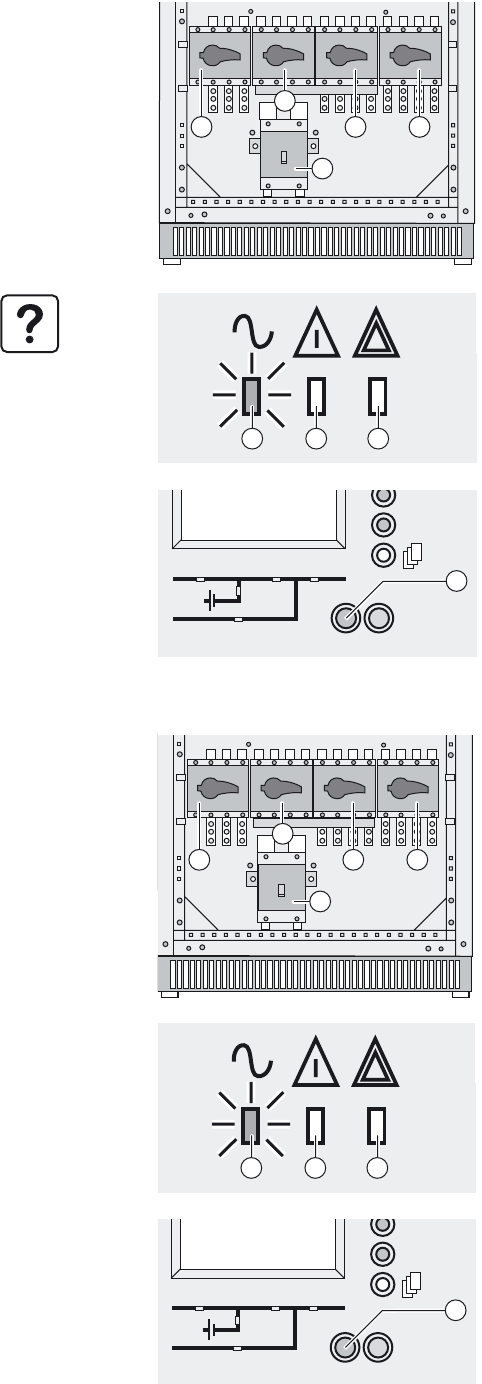
34001813EN/AE - Page 54
4. Maintenance
4.4 Return to the normal position
Single UPS
Frequency converter
1 - Check that bypass switch Q3BP (10) is ON and that all other switches
are OFF.
2 - Set input switch Q4S (9) to ON.
3 - Set output switch Q5N (11) to ON.
4 - Wait until the display goes on and check that there are no faults on the
static-switch on the bypass line.
5 - Set bypass switch Q3BP (10) to OFF.
6 - Set the input circuit-breaker Q1 (8) to ON.
7 - Set the battery circuit-breaker QF1 (13) (or set the battery circuit-
breakers of the auxiliary cabinets if any) to ON.
The UPS unit starts automatically.
LED (31) is ON.
If LED (31) remains OFF, press the ON button (37)
(the system is in manual start mode).
If LED (31) still remains OFF and either of LEDs (32) or (33) is ON, a fault
has occurred (see section 4.1).
1 - Check that all switches are set to OFF.
2 - Set the input circuit-breaker Q4S (9) to ON (check that no cable is
connected on phase 1, phase 2 and phase 3).
3 - Set the input circuit-breaker Q1 (8) to ON.
4 - Set output switch Q5N (11) to ON.
5 - Set the battery circuit-breaker QF1 (13) (or set the battery circuit-
breakers of the auxiliary cabinets if any) to ON.
6 - Press the ON button (37).
If LED (31) still remains OFF and either of LEDs (32) or (33) is ON, a fault
has occurred (see section 4.1).
Q1 Q4S Q3BP Q5N
QF1
13
810 11
9
IO
3s
?
~
37
31 32 33
Q1 Q4S Q3BP Q5N
QF1
13
810 11
9
IO
3s
?
~
37
31 32 33
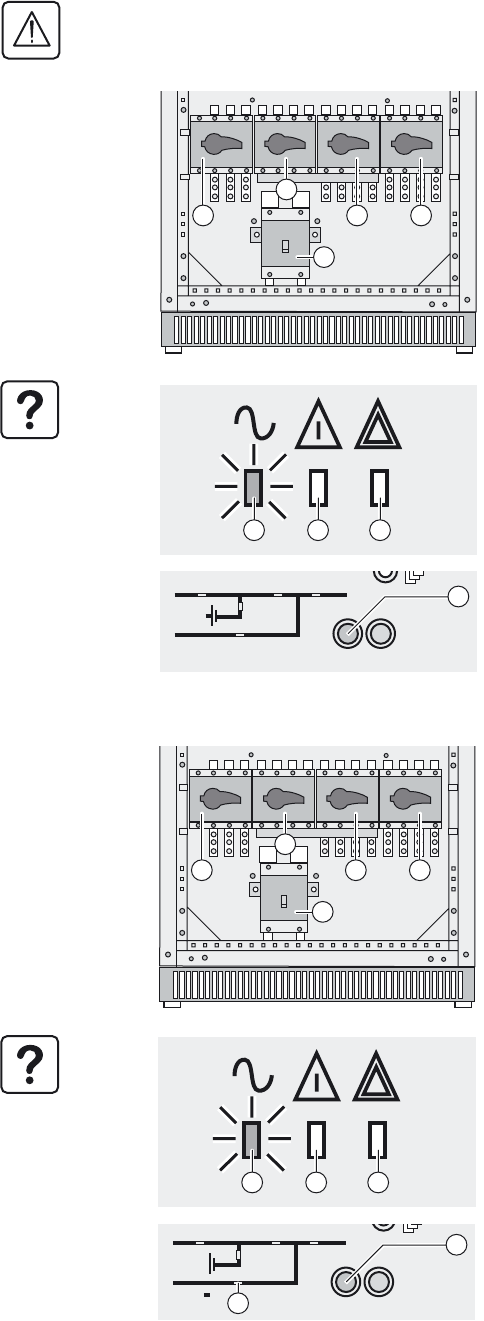
34001813EN/AE - Page 55
4. Maintenance
Parallel UPS configuration without external bypass cabinet
Restart the UPS unit for which switch Q3BP (10) is ON and the other switches are OFF.
Restart the UPS unit for which all switches are set to OFF.
Caution. It is imperative to restart this UPS unit. Otherwise, load power is cut if the other two UPSs are shut down.
1 - Set the input circuit-breaker Q4S (9) to ON.
2 - Set output switch Q5N (11) to ON.
3 - Check that the UPS is listed by the display, then confirm by pressing
the function keys (35).
4 - Set bypass switch Q3BP (10) to OFF.
5 - Set the input circuit-breaker Q1 (8) to ON.
6 - Set the battery circuit-breaker QF1 (13) (or set the battery circuit-
breakers of the auxiliary cabinets if any) to ON.
The UPS unit starts automatically. LED (31) is ON.
The load is protected by the UPS.
If LED (31) remains OFF, press the ON button (37)
If LED (31) still remains OFF and either of LEDs (32) or (33) is ON, a fault
has occurred (see section 4.1).
1 - Set the input circuit-breaker Q4S (9) to ON.
2 - Set output switch Q5N (11) to ON.
3 - Check that all the UPS units present in the installation are included in
the list on the display and confirm by pressing the function buttons (35).
4 - Set the input circuit-breaker Q1 (8) to ON.
5 - Set the battery circuit-breaker QF1 (13) (or set the battery circuit-
breakers of the auxiliary cabinets if any) to ON.
The UPS restarts and LED (31) is ON.
If LED (31) remains OFF, press the ON button (37)
(the system is in manual start mode).
If LED (31) still remains OFF and either of LEDs (32) or (33) is ON, a fault
has occurred (see section 4.1).
Q1 Q4S Q3BP Q5N
QF1
13
810 11
9
IO
3s
37
31 32 33
Q1 Q4S Q3BP Q5N
QF1
13
810 11
9
IO
3s
37
31 32 33
43
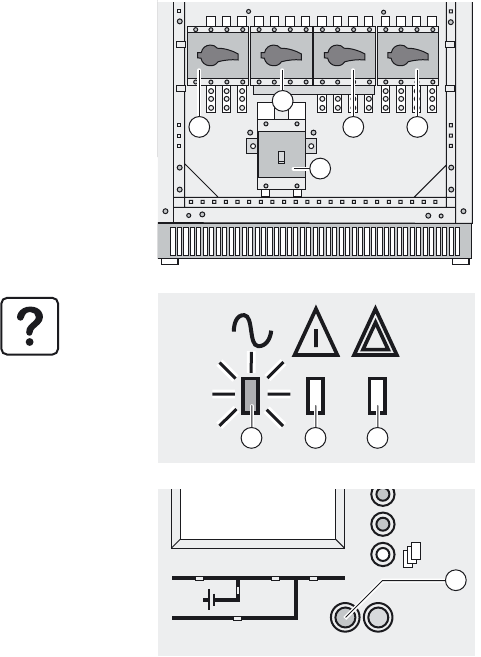
34001813EN/AE - Page 56
4. Maintenance
Parallel UPS configuration with external bypass cabinet
1 - Check that all switches on the UPS units are set to OFF.
2 - Set switch Q4S in the external bypass cabinet to ON.
3 - Set switch Q4S (9) on each UPS unit to ON.
4 - Set output switch Q5N (11) on each UPS unit to ON.
5 - Check that all the UPS units present in the installation are included in
the list on the display and confirm by pressing the function button (35) on
each UPS unit.
6 - Set switch Q5N in the external bypass cabinet to ON.
7 - Set switch Q3BP in the external bypass cabinet to OFF.
8 - Set the input circuit-breaker Q1 (8) on each UPS unit to ON.
9 - Set the battery circuit-breaker QF1 (13) on each UPS unit to ON (or set
the battery circuit-breakers of the auxiliary cabinets if any)
The UPS units start automatically. LED (31) is ON.
The load is protected by the UPS.
If LED (31) remains OFF, press the ON button (37) on each UPS unit (the
system is in manual start mode).
If LED (31) still remains OFF and either of LEDs (32) or (33) is ON, a fault
has occurred (see section 4.1).
Q1 Q4S Q3BP Q5N
QF1
13
810 11
9
IO
3s
?
~
37
31 32 33

34001813EN/AE - Page 57
4. Maintenance
4.5 Training centres
To allow you to use APC by Schneider Electric products effectively and carry out basic maintenance, we offer a complete
range of technical training courses in English and French.
Schneider Critical Power & Cooling Services 50
Hz training centres
Schneider Critical Power & Cooling Services 50-
60 Hz training centre
France Training Centre
140, Avenue Jean Kuntzmann
Innovallée
38334 - St Ismier Cedex - FRANCE
Brazil Training Centre
Al. Xingu, 850-Alphaville
06455-030 Barueri, São Paulo
Brazil
Tél : +33 (0)4 76 18 34 14
Fax : +33 (0)4 76 18 45 21
Tél : +55 11 4689-8600
Denmark Training Centre
Silcon Allé
6000 Kolding
Denmark
Tél : +45 72 19 03 12
Singapore Training Centre
10 Ang MO Kio Street 65, #03-06/10
Techpoint Building
Singapore 569059
Tél : +65 6389 6792
China Training Centre
Floor 3, Building B10, Universal Plaza
10 juxianqiao Road
Chaoyang District, Beijing 100016
Tél : +86 10 6431 8899
Internet : http://powerlearning.apc.com
Catalogue and registration available on line.
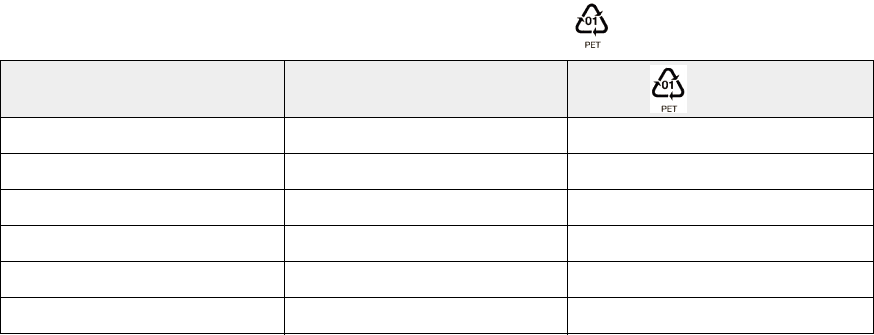
34001813EN/AE - Page 58
5. Environment
APC by Schneider Electric has implemented an environmental-protection policy.
Products are developed according to an eco-design approach.
Substances
This product does not contain CFCs, HCFCs or asbestos.
Packing
To improve waste treatment and facilitate recycling, separate the various packing components.
The cardboard we use includes over 50% of recycled cardboard.
Sacks and bags are made of polyethylene.
Packing materials are recyclable and bear the appropriate identification symbol .
Follow all local regulations for the disposal of packing materials.
End of life
APC by Schneider Electric will process products at the end of their service life in compliance with local regulations.
APC by Schneider Electric works with companies in charge of collecting and eliminating our products at the end of their
service life.
Product
The product is made up of recyclable materials.
Dismantling and destruction must take place in compliance with all local regulations concerning waste.
At the end of its service life, the product must be transported to a processing center for electrical and electronic waste.
Make the product unusable by cutting the internal supply cables.
Battery
The product contains lead-acid batteries that must be processed according to applicable local regulations concerning
batteries.
The battery may be removed to comply with regulations and in view of correct disposal.
The "Material Safety Data Sheets" (MSDS) for the batteries are available on our web site*.
(*) For more information or to contact the Product Environmental manager, use the "Environmental Form" on the site:
http://environment.apc.com
Material Abbreviation Symbol
number
Polyethylene terephthalate PET 01
High-density polyethylene HDPE 02
Polyvinyl chloride PVC 03
Low-density polyethylene LDPE 04
Polypropylene PP 05
Polystyrene PS 06

34001813EN/AE - Page 59
6. Available options
Backfeed option
This option opens the Bypass AC input or the Normal AC input if power fails. This option is mandatory to meet standard IEC
62040-1-2.
If an external backfeed protection system is used, it must comply with the requirements indicated in Annex L of standard IEC
62040-1-2.
NMC (Network Management Card) option
This option is a communications card for supervision and protection of a three-phase device. Each UPS can be equipped with
a maximum of four NMC communications cards.
Optional communications card with additional power relay
The UPS is already equipped with a relay communications card. But it is possible, with this option, to add another card with
programmable power-relay functions.
Optional serial communications card
This option is an RS232 or RS485 serial communications card operating under the JBUS protocol.
Telpac Power Services option
This option consists of a communications card operating under the JBUS protocol for Teleservice functions.
AS4I option
This option consists of a low-power relay card for shut-off and scheduling functions.
Multislot option
This option consists of communications cards to concentrate the communication of two parallel-connected UPSs.
External synchronisation module option
With this option, a SYNIN communications card and two circuit breakers are added to each UPS unit. The external
synchronisation module issues a reference frequency used to synchronise the UPS units. For more information, see
document no. 34000346.
IP32 option
This option protects the UPS against solid objects larger than 2.5 mm and falling drops of water from up to 15° from vertical.
For roof installation, See “IP32 installation”, page 67.
Check the different input/output signal levels (LV, ELV, SELV) on the optional communication cards (4) and use
appropriate wiring.
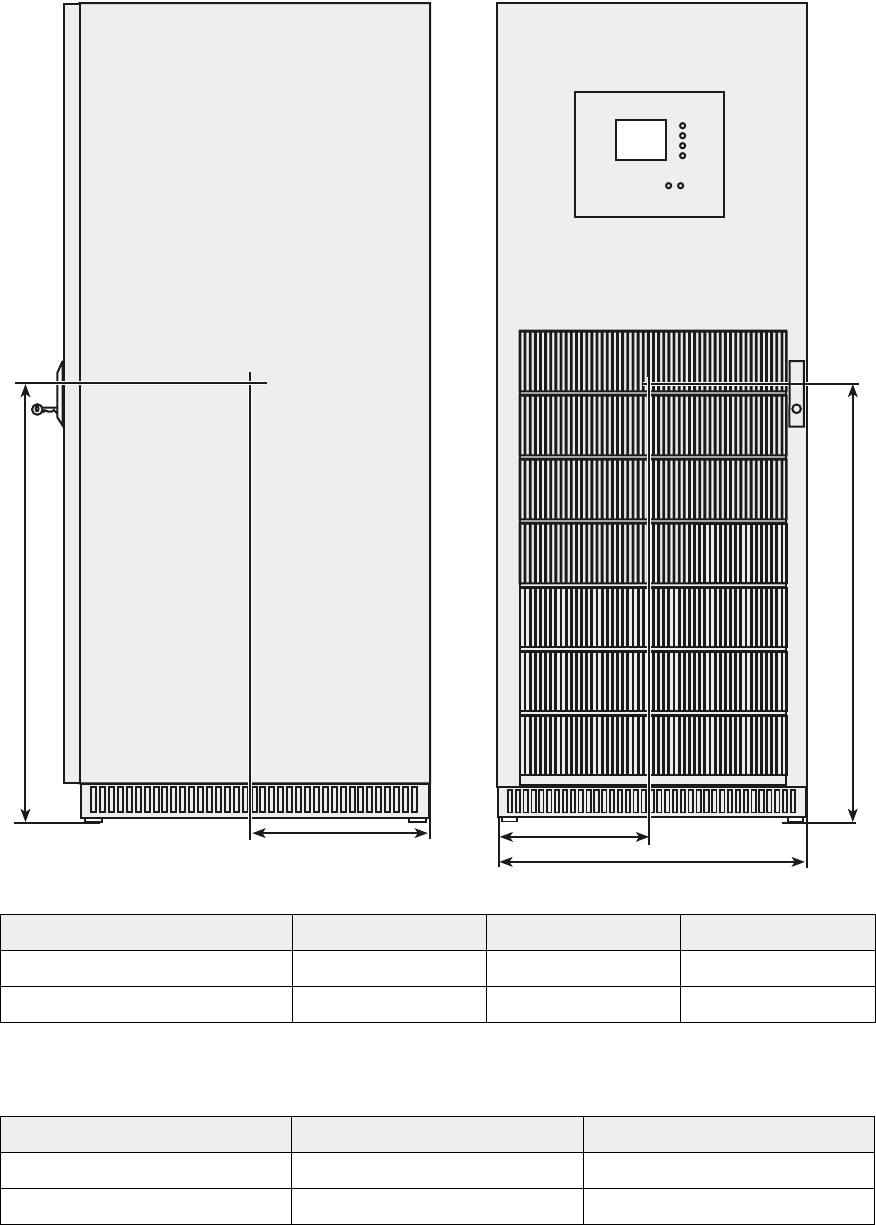
34001813EN/AE - Page 60
7. Appendices
7.1 Technical sheets
Center of gravity
Tip angle (to the rear)
UPS power rating (kVA) H (mm) W (mm) D (mm)
20/30/40/60 kVA 950 350 360
80/100/120 kVA 950 350 360
UPS power rating (kVA) UPS on feet UPS on pallet
20/30/40/60 kVA 17.5° 22°
80/100/120 kVA 17.5° 22°
L
H
P
H
712 mm
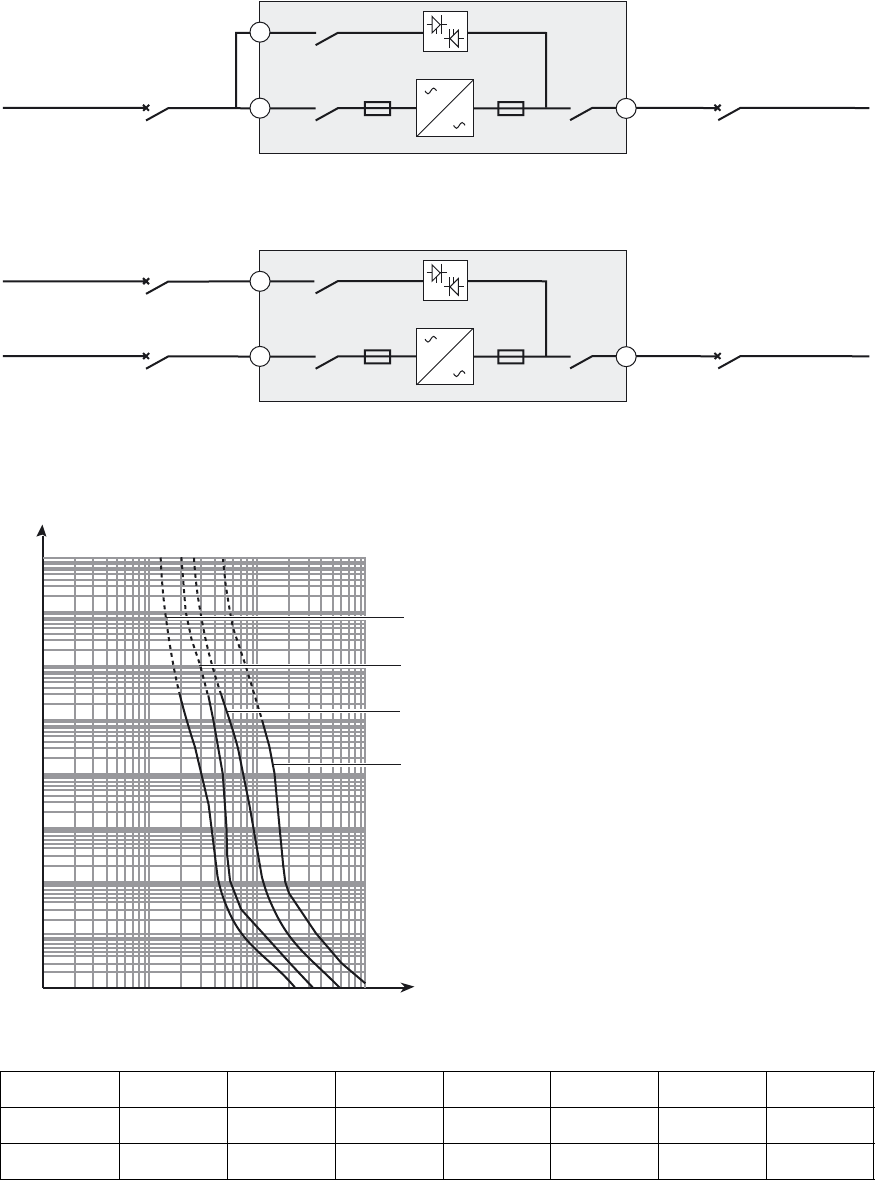
34001813EN/AE - Page 61
7. Appendices
Electrical characteristics
Selection of protection devices
UPS short-circuit current with inverter coupled and By-pass AC source out of tolerances:
UPS unit with common normal and Bypass AC inputs
UPS unit with separate normal and Bypass AC inputs
When sizing the upstream circuit breakers, the parameters presented below must be taken into account:
Time/current curves for UPS input and output fuses:
Sn 20 kVA 30 kVA 40 kVA 60 kVA 80 kVA 100 kVA 120 kVA
In 29 A 43 A 58 A 87 A 115 A 144 A 173 A
Limitation 190 A 190 A 190 A 240A 360 A 480 A 480A
14
Q1
16
Q4S
Q5N
15
Normal AC
Bypass AC
Upstream
circuit breaker
(not supplied)
Downstream
circuit breaker
(not supplied)
Output
fuses
Input
fuses Load
14
Q1
16
Q4S
Q5N
15
Upstream
circuit breaker
(not supplied)
Downstream
circuit breaker
(not supplied)
Normal AC
Bypass AC
Upstream
circuit breaker
(not supplied)
Output
fuses
Input
fuses Load
104
103
102
10
1
10
-
1
10
-
2
10
-
3
10
-
4
104
103
102
10 I (A)
t (s)
80 kVA : 160A
100-120 kVA : 315A
60 kVA : 125A
20-30-40 kVA : 80A
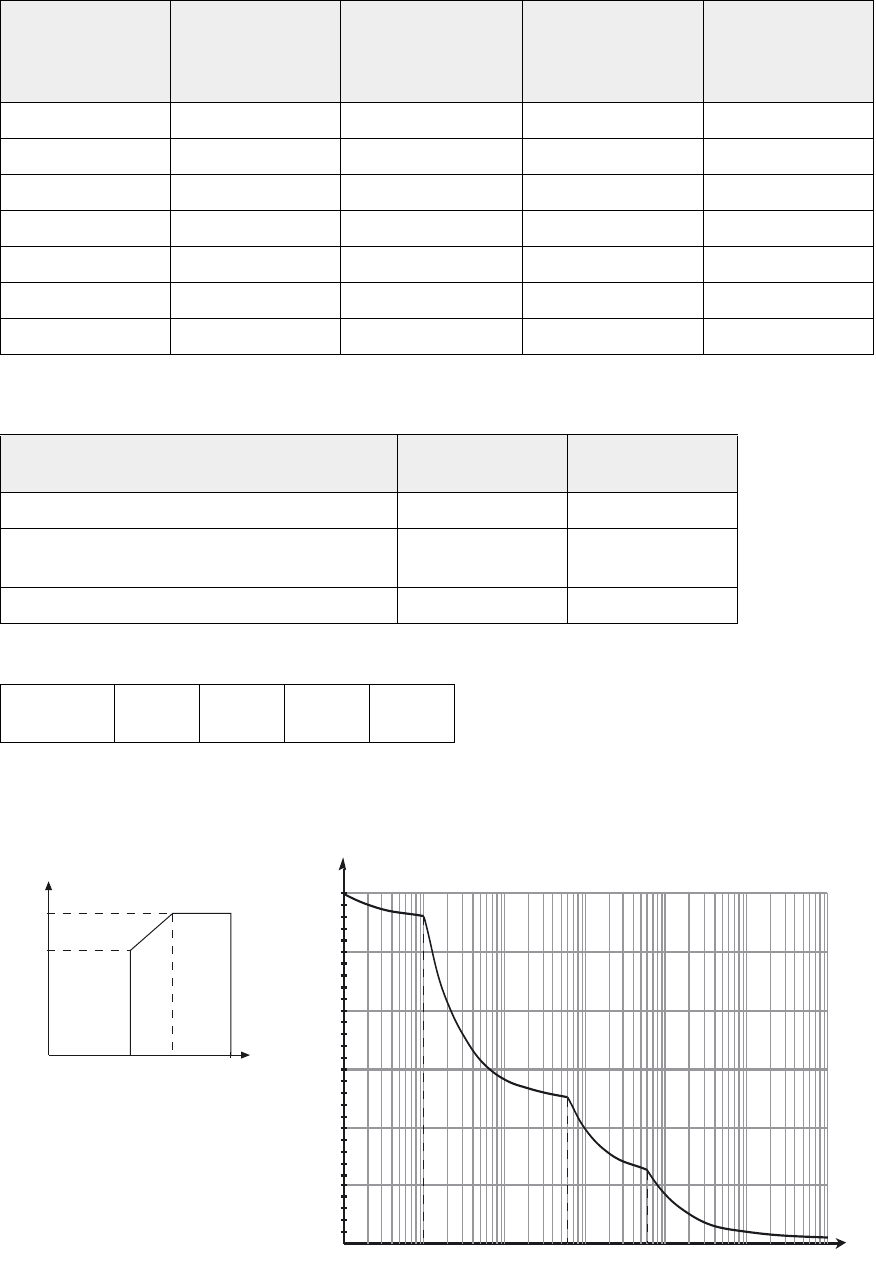
34001813EN/AE - Page 62
7. Appendices
Line current values
Input / output characteristics
Normal AC source / Bypass AC source
Load output
Rated power of each
UPS unit
Continuous input
current at U=400V
Input current at
U=400V overload =
1.25 In limited to 10
min.
Input current at
U=400V overload =
1.5 In limited to 1 min.
Input/output fuse
ratings
20 kVA 29 A 36 A 44 A 80 A
30 kVA 43 A 55 A 65 A 80 A
40 kVA 58 A 72 A 87 A 80 A
60 kVA 87 A 108 A 130 A 125 A
80 kVA 115 A 145 A 174 A 160 A
100 kVA 144 A 181 A 217 A 315 A
120 kVA 173 A 217 A 260 A 315 A
Standard UPS UPS with backfeed
protection
Uin 380 to 443 V 380 to 443 V
Input voltage range permitted by the standard
according to the curve below
250 to 470 V 340 to 470 V
Fin 45 to 65 Hz 45 to 65 Hz
Uout 380 V 400 V 415 V + 3%
- 3%
Power supplied as a function of
input voltage
Permissible UPS overloads as a function of time
P/Pn
100%
70%
250V 340V 470V U
I/In
2,2
2
1,8
1,6
1,4
1,2
110
4
1010,1 t (s)
10
5
10
3
10
2
60 600
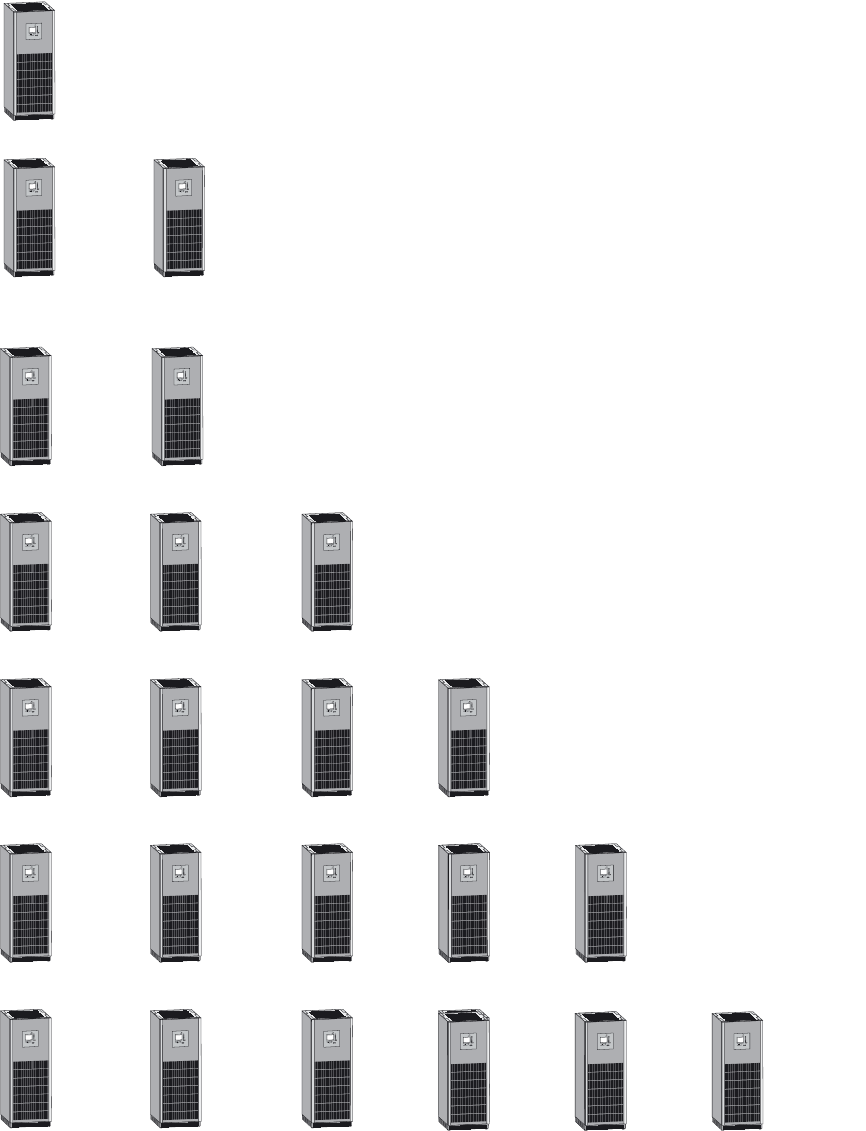
34001813EN/AE - Page 63
7. Appendices
Maximum allowable power for parallel UPS units
Without external bypass cabinet:
With external bypass cabinet:
+
= 1 x Pn
= 1 x Pn
IO
3s
?
~
IO
3s
?
~
IO
3s
?
~
= 2 x Pn
+
IO
3s
?
~
IO
3s
?
~
+= 3 x Pn
+
IO
3s
?
~
IO
3s
?
~
IO
3s
?
~
+= 4 x Pn
++
IO
3s
?
~
IO
3s
?
~
IO
3s
?
~
IO
3s
?
~
+++
IO
3s
?
~
IO
3s
?
~
IO
3s
?
~
IO
3s
?
~
+++
IO
3s
?
~
IO
3s
?
~
IO
3s
?
~
IO
3s
?
~
+= 4 x Pn
IO
3s
?
~
IO
3s
?
~
+
IO
3s
?
~
IO
3s
?
~
+= 4 x Pn
IO
3s
?
~
IO
3s
?
~
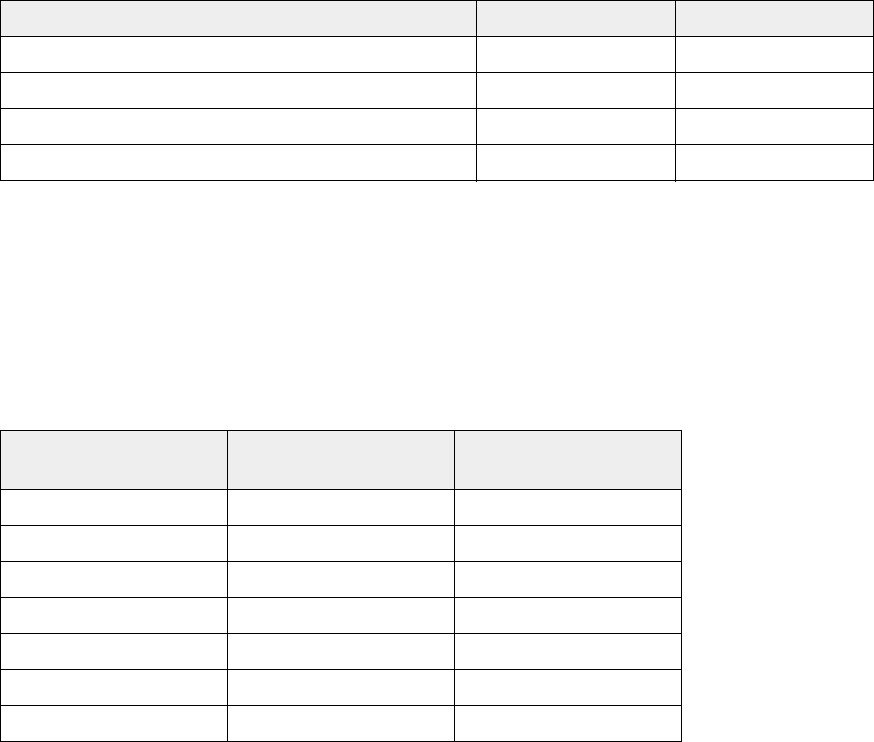
34001813EN/AE - Page 64
7. Appendices
The maximum allowable power for 4 parallel UPS units is limited to 4 x Pn.
Restrictions to parallel operation
(*) : except in ECO mode or bypass mode.
Thermal characteristics
◗ The operating temperature range is 0°C to +40°C (0°C to 30°C for overload conditions), however optimum operation is within
the +20°C to +25°C range.
◗ Battery backup time is adversely affected by high and low temperatures. It is significantly reduced at temperatures under
10°C.
Above 25°C, battery service life is cut in half every 10°C. Above 40°C, battery manufacturers no longer guarantee operation
due to the risk of thermal runaway.
.
Air enters through the bottom.
Air exits through the top.
Single UPS Parallel UPS
EMC level Category C3 Category C3
ECO mode Yes No
Frequency converter Yes Yes (for two UPSs)
Compatibility with the synchronisation module Yes Yes
UPS power rating Heat losses Recommended air
throughput
20 kVA 2.4 kW 1 332 m3/h
30 kVA 3 kW 1 332 m3/h
40 kVA 3.4 kW 1 332 m3/h
60 kVA 4.9 kW 1 332 m3/h
80 kVA 5.8 kW 2 556 m3/h
100 kVA 7 kW 2 556 m3/h
120 kVA 8.4 kW 2 556 m3/h

34001813EN/AE - Page 65
7. Appendices
General characteristics of MGE
TM Galaxy
TM 5000 UPSs
(1)Losses are calculated for n-1%.
UPS power in kVA 20 30 40 60 80 100 120
Normal AC input
Number of conductors 3 phases
Reference voltage at Pn 380 V to 443 V
Reference frequency 45 Hz to 65 Hz
THDI Typically 3% at Pn
Power factor >0.99
Bypass AC input
Number of conductors 3 phases + neutral
Reference voltage at Pn 380 V to 443 V
Reference frequency 45 Hz to 65 Hz
Load output
Number of conductors 3 phases + neutral
Set phase-to-phase voltages 380 V or 400 V or 415 V
Set phase-to-neutral voltages 220 V or 230 V or 240 V
Voltage variation ± 1%
Adjustable frequencies and tolerance
(on battery power)
50 Hz or 60 Hz ± 0.1 Hz
Voltage variation for 0 to 100% load
step change
± 1%
Permissible overloads 150% for 1 minute, 125% for 10 minutes
THDU Ph-to-Ph and Ph-to-N for
nonlinear load
< 2% Ph-to-Ph
Battery
Standard battery technology Sealed lead-acid battery (gas-recombination)
Inverter
Active power (kW) 16 24 32 48 64 80 96
Heat losses in kW(1)
Heat losses in calories/s
2.7
648
3
720
3.54
850
4.7
1128
5.31
1275
6.5
1560
7.64
1834
Storage temperature range -25°C to +45°C
Operating temperature range at Pn 0°C to 40°C
Relative humidity 20% to 95%
Maximum operating altitude without
derating
< 1000 m
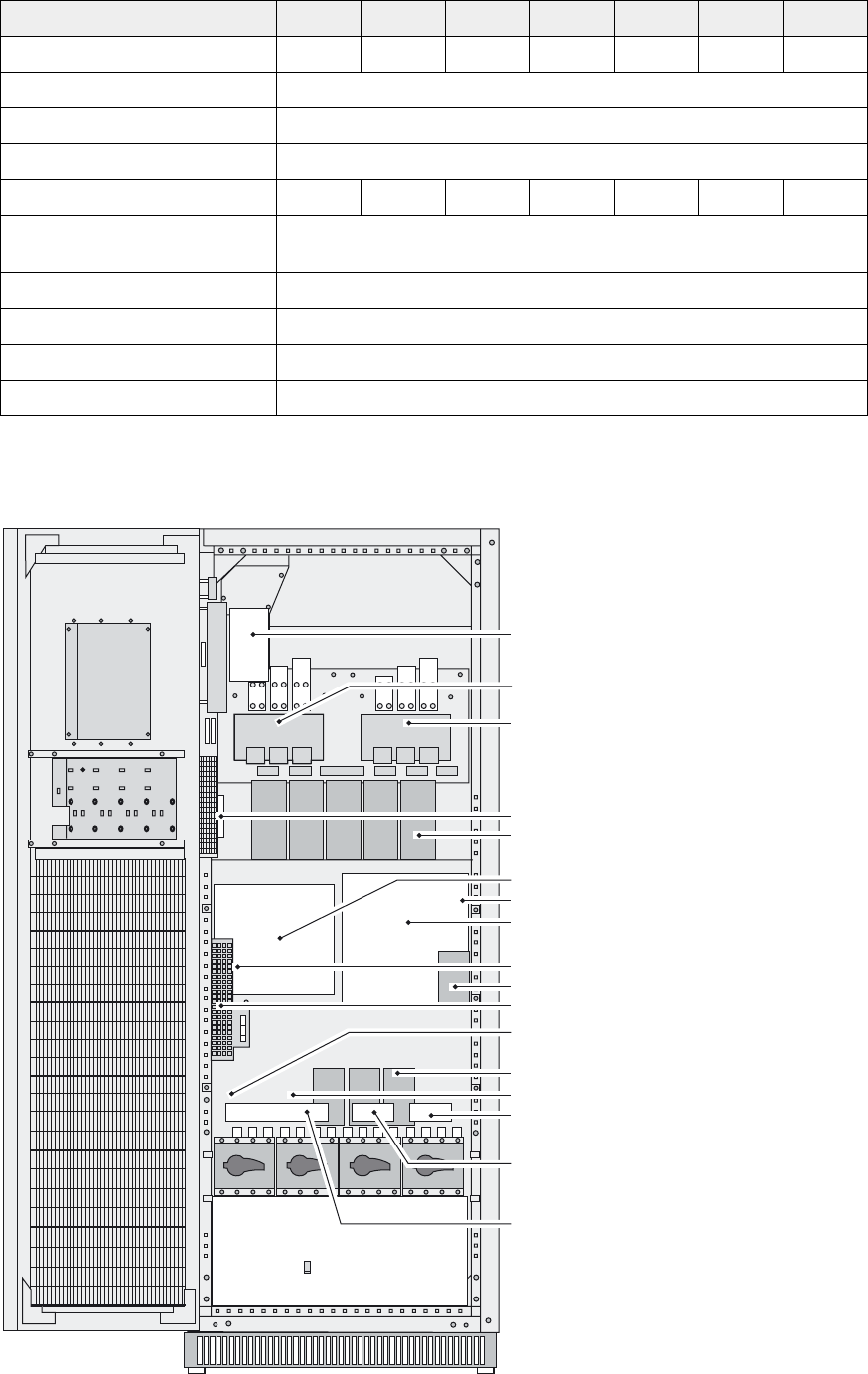
34001813EN/AE - Page 66
7. Appendices
General characteristics of MGE
TM Galaxy
TM 5000 UPSs (cont.)
UPS components
UPS power in kVA 20 30 40 60 80 100 120
Noise level (dBa) 65656565636363
Width 710 mm
Depth 850 mm
Height 1900 mm
Weight (kg) 400 400 400 400 520 520 520
Recommended upstream residual
current protection
1 A
Product standards IEC 62040
Safety standards IEC 62040-1-2
Protection standards IEC 62040-3
EMC standards IEC 62040-2
IGBT charger + neutral leg
IGBT PFC
IGBT inverter
EXTN board
DC capacitors
Normal AC SS board + battery
Output fuse
Bypass AC SS and inverter board
DALIN board
Output capacitors
ALIN board
Input fuse
Input capacitors
Inductor and SS fans
Output-filter board
ETON board
Input-filter board
Q1 Q4S Q3BP Q5N
QF1
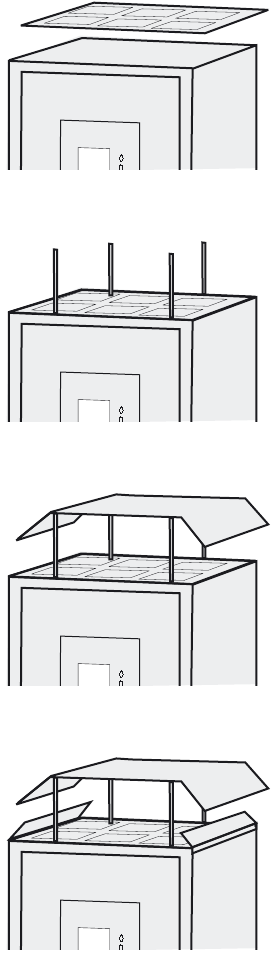
34001813EN/AE - Page 67
7. Appendices
7.2 Options
IP32 installation
Install the protection cover above the UPS.
Install the spacers. The longer spacers must
be positioned toward the front of the UPS.
Install the roof.
Install the side deflectors.

3400181300/AE
7. Appendices
7.3 Glossary
Backup time Time that the connected loads can operate on battery power.
Bypass AC source Source supplying the bypass line. The load can be transferred to the bypass line if an overload
occurs on the UPS output, for maintenance or in the event of a malfunction.
ECO mode Operating mode by which the load is supplied directly by the AC source if it is within the
tolerances defined by the user. This mode reduces the consumption of electrical power.
External
synchronisation port
Input used to synchronise the UPS to an external signal.
Fin UPS input frequency (normal or Bypass AC input).
Load Devices or systems connected to the UPS output.
Normal (double
conversion) mode
The normal UPS operating mode in which the AC source supplies the UPS which in turn supplies
the connected loads (after electronic double conversion).
Normal AC source Normal source of power for the UPS.
PFC Sinusoidal input module used to eliminate the harmonics reinjected by the UPS upstream.
Relay contacts Contacts supplying information to the user in the form of signals.
Uin UPS input voltage (normal or Bypass AC input).
Uout UPS output voltage.
UPS Uninterruptible Power Supply.
