Aquis Wasser Luft Systeme Lindau Zweigniederlassung Rebstein 60900138 RFID Box User Manual UserManual
Aquis Wasser-Luft-Systeme GmbH, Lindau, Zweigniederlassung Rebstein RFID Box UserManual
UserManual.pdf

User Manual
1
RFID Module – RFID Box 1JU
User / Installation Manual
Version 1.0

RFID Module Installation Manual
2
1 BEFORE USAGE ........................................................................................................................... 3
2 SAFETY INSTRUCTIONS ............................................................................................................... 3
3 INSTALLATION REQUIREMENTS ................................................................................................... 3
4 INSTALLATION ............................................................................................................................ 3
4.1 T
YPICAL
I
NSTALLATION
........................................................................................................................ 4
5 FIRST USAGE ............................................................................................................................... 5
6 SPECIFICATIONS .......................................................................................................................... 5
6.1 RFID
R
EADER TYPE
............................................................................................................................. 5
6.2 I
NTERFACE
......................................................................................................................................... 5
6.3 S
ECURITY
.......................................................................................................................................... 5
6.4 U
SED FREQUENCIES
............................................................................................................................ 5
7 MAXIMUM RATINGS ................................................................................................................... 5
8 RECOMMENDED OPERATING CONDITIONS .................................................................................. 6
9 MODULE REVISION HISTORY ....................................................................................................... 6
10 TROUBLESHOOTING ................................................................................................................ 6
10.1 S
YMBOL FOR WORKING
RFID
MODULE IS MISSING
............................................................................... 6
10.2 S
YMBOL FOR WORKING
RFID
MODULE IS ON BUT IT IS STILL NOT WORKING
.............................................. 6
11 FCC / IC ................................................................................................................................... 7
User Manual
3
1 Before usage
- Unpack the parts and check for any damages and full content
- Read the user manual carefully before first usage
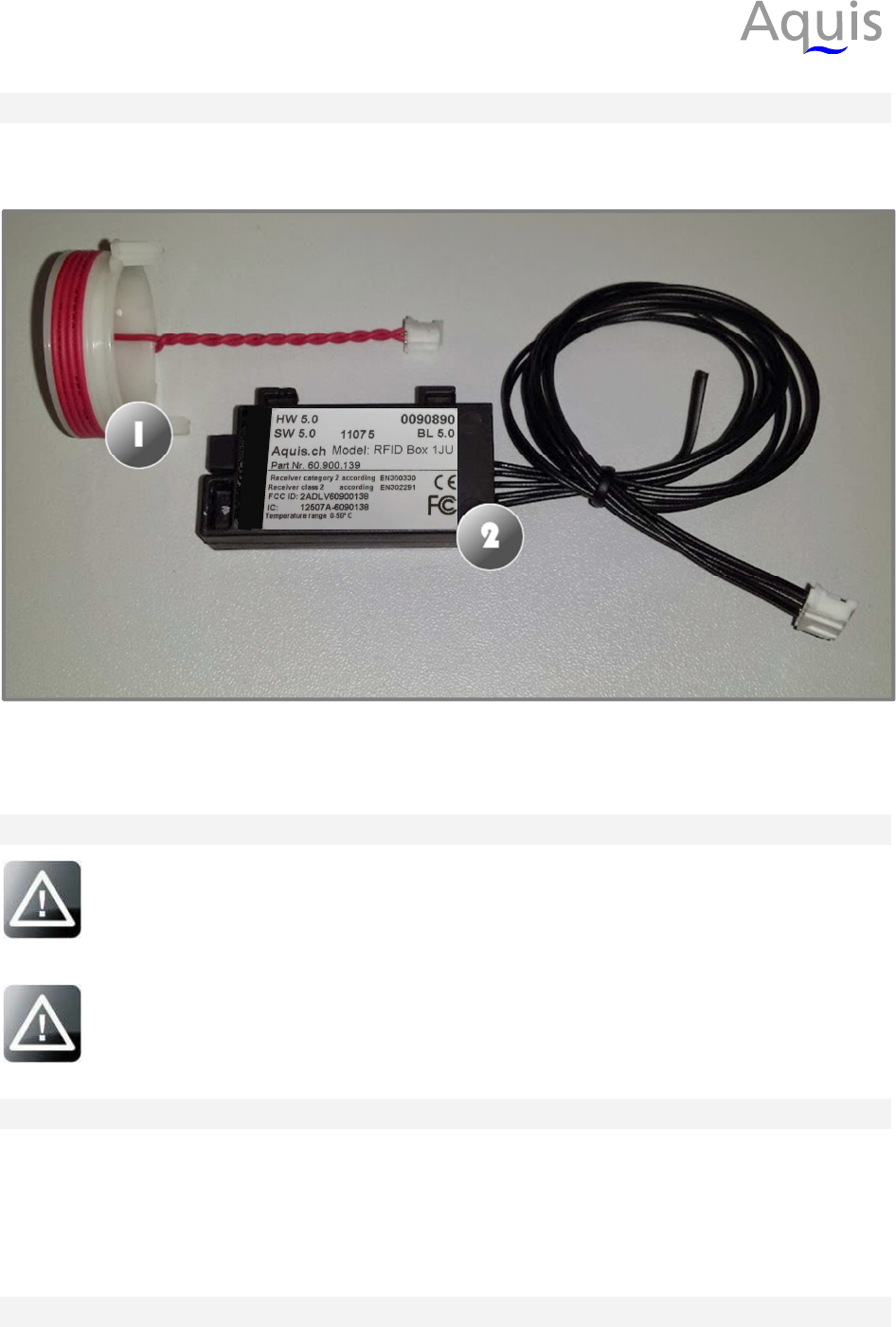
Figure 1: RFID antenna and module
1 – RFID antenna
2 – RFID module
2 Safety instructions
Well-educated experts must install the RFID module to avoid any damage on
the module and the host device. Please contact the manufacturer in case of any
problem during the installation!
Make sure that the host device is disconnected from the mains during
installation to avoid any damage!
3 Installation Requirements
•
Antenna: Use RFID Antenna 1 JU (Aquis# 60.900.140) only.
•
Cable length: Maximum length of digital cable is 100cm. Antenna must be directly
connected to the module (no extension is allowed).
•
Module/Antenna placement: distance between module or antenna to human body must
be at least 20cm
4 Installation
Please follow the instructions below to install the RFID antenna and module in the host device:
RFID Module Installation Manual
4
a) Open the machine to access the filter area
b) Place the RFID antenna in the machine next to the filter
c) Connect the RFID antenna to the module (plug in the 2 pin connector)
d) Place the RFID module in the machine next to the RFID antenna
e) Connect the RFID module to the machine (plug in the 5 pin connector)
f) Make sure that every part is in place and secure them with the plastic clips
g) Close the machine
Check for proper function after the installation process.
4.1 Typical Installation
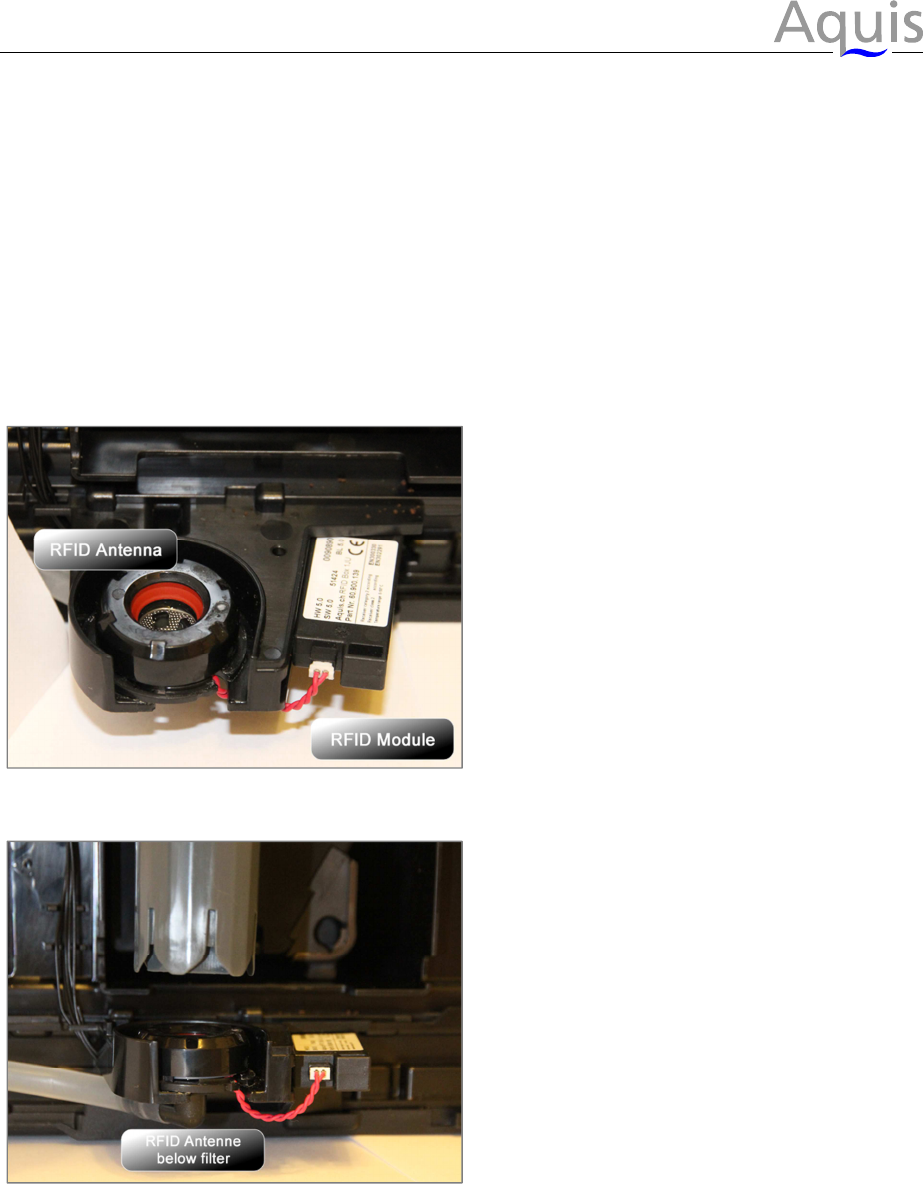
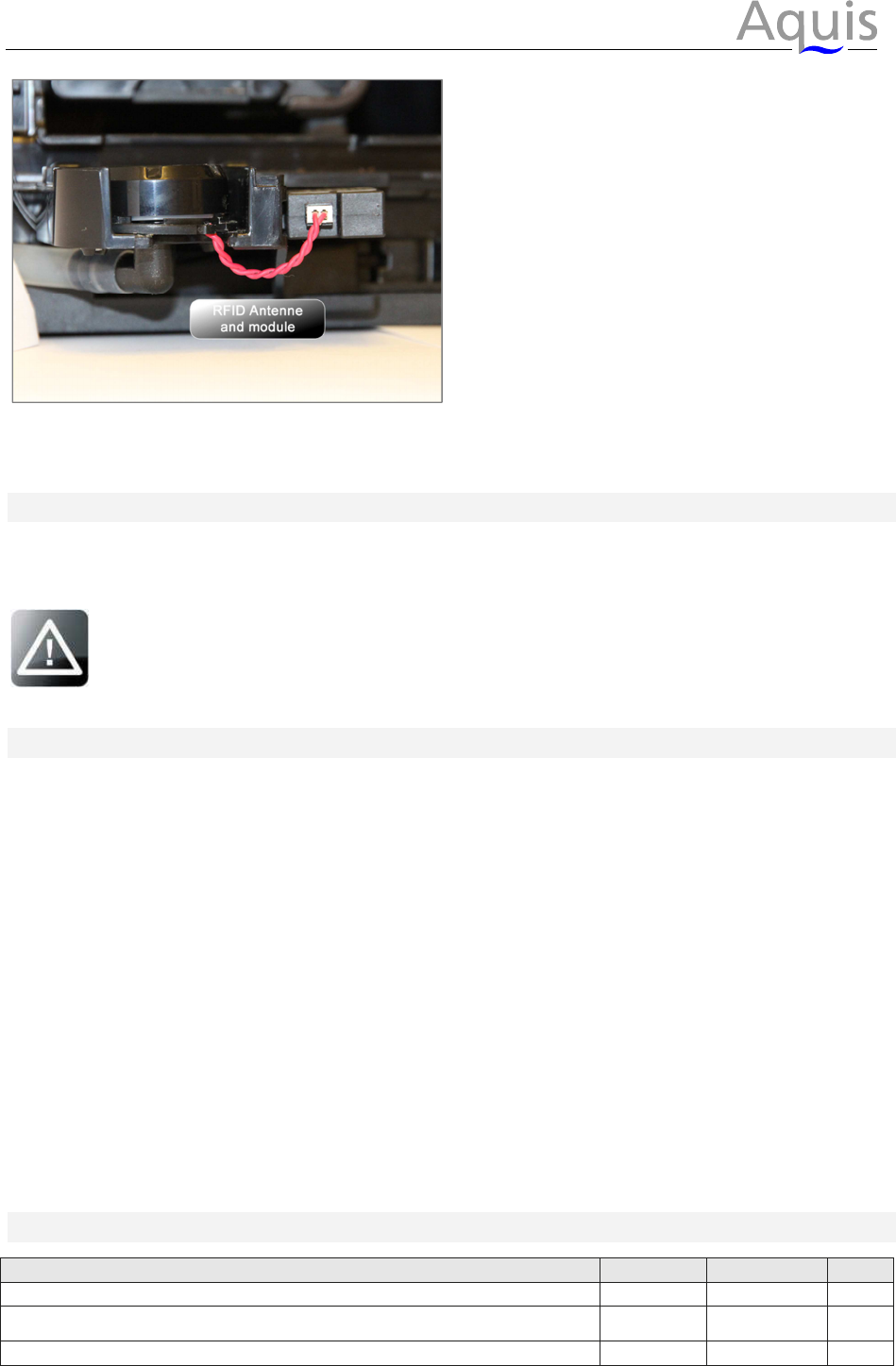
The pictures below show the typical installation situation in the host device.
Figure 2: RFID Antenna and RFID Module
Figure 3: Placement below filter and RFID tag
RFID Module Installation Manual
5
Figure 4: RFID Antenna and RFID Module connected
5 First usage
Make sure that the module is placed correct and all connections are made. Install the filter into
the machine and check if the RFID symbol is shown and everything is working correct.
In case of any troubles see section 8 ‘Troubleshooting’ or contact the
manufacturer for assistance.
6 Specifications
6.1 RFID Reader type
Passive RFID Reader with read/write functionality for a variety of passive RFID chips.
Frequency Band: 13,56MHz. Air protocol according to ISO 15693 Standard with data
transmission speed of 26kbps.
6.2 Interface
TTL UART interface (2 Wires: RX, TX) with 9600Baud, No Parity, 8 Data bits, 1 Stop bit, No
Handshaking. Proprietary serial protocol with transmission checksum.
6.3 Security
Reader supports different levels of securitydepending on features of the used RFID
Chip(e.g.: Data locking, Write Password, Mutual Authentication).
6.4 Used frequencies
Controller: 8MHz RFID: 13,56MHz
7 Maximum Ratings
Parameter
min.
max.
Unit
Supply Voltage
0
6
V
Voltage on any I/O pin (RxD, TxD, Reset#, ANT1, ANT2)
-0,3
1
VCC+0,3
1
V
Storage temperature range
-40
85
°C
Note 1: max. current must be limited to +/- 4mA, if the max. or min. values cannot be respected
RFID Module Installation Manual
6
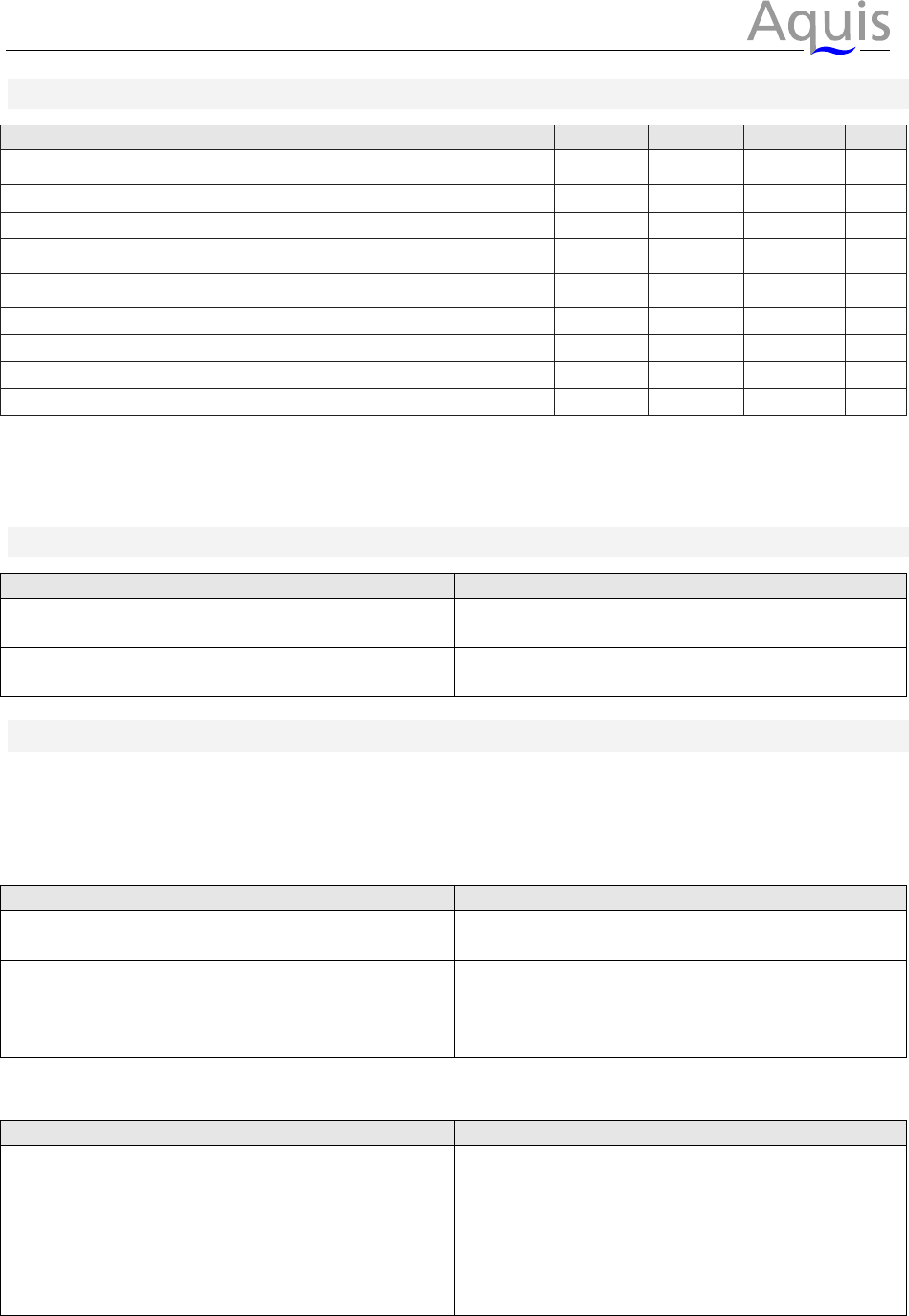
8 Recommended Operating Conditions
Parameter
min.
typ.
max.
Unit
Supply Voltage
5
4,75
5
5,25
V
Input low level voltage
1,0
V
Input high level voltage
2,3
V
Output low level voltage
0,1
4
1,5
3
V
Output high level voltage
2,8
3
4,9
4
V
Supply current during communication
100
150
mA
Supply current in standby mode
2,5
mA
Operating temperature range
0
85
°C
Electrostatic discharge voltage (Human body model)
14
kV
Note 3: @ 10mA output current and 5V supply voltage
Note 4: @ 0,1mA output current and 5V supply voltage
Note 5: power supply must meet requirements of Safety Extra Low Voltage (SELV) or Protected Extra
Low Voltage (PELV); Input current must be externally limited to max. 1A.
9 Module revision history
Version
Description
4.1 Initial version HW4.1
5.0 added pull up @ CPU TxD
10 Troubleshooting
10.1 Symbol for working RFID module is missing
In the case the symbol for the RFID module is not shown on the coffee machine there could be
several reasons:
What happens
What to do
Main power is off, machine is not working Turn machine on by pressing the main power
button.
Machine is on, but the RFID symbol is missing Disconnect machine from the mains and re-
check if all electrical connections are properly
made. Afterwards connect the machine again
to the mains and retry.
10.2 Symbol for working RFID module is on but it is still not working
What happens
What to do
RFID symbol is shown Disconnect machine from the mains and re-
check if all electrical connections are properly
made. Afterwards connect the machine again
to the mains and retry.
If the machine is still not working please
contact the manufacturer about this problem!
RFID Module Installation Manual
7
11 FCC / IC
Radiofrequency radiation exposure Information:
This equipment complies with FCC radiation exposure limits set forth for an uncontrolled environment.
This equipment should be installed and operated with minimum distance of 20 cm between the radiator
and your body.
NOTICE:
This device complies with Part 15 of the FCC Rules and with Industry Canada licence-exempt RSS
standard(s).
Operation is subject to the following two conditions:
(1) this device may not cause harmful interference, and
(2) this device must accept any interference received, including interference that may
cause undesired operation.
This transmitter must not be co-located or operating in conjunction with any other antenna or transmitter.
Le présent appareil est conforme aux CNR d'Industrie Canada applicables aux appareils radio
exempts de licence. L'exploitation est autorisée aux deux conditions suivantes:
(1) l'appareil ne doit pas produire de brouillage, et
(2) l'utilisateur de l'appareil doit accepter tout brouillage radioélectrique subi, même si le brouillage
est susceptible d'en compromettre le fonctionnement.
NOTICE:
Changes or modifications made to this equipment not expressly approved by Aquis may void the FCC
authorization to operate this equipment.
This transmitter must not be co-located or operating in conjunction with any other antenna or transmitter.
NOTE: This equipment has been tested and found to comply with the limits for a Class B digital device,
pursuant to Part 15 of the FCC Rules. These limits are designed to provide reasonable protection against
harmful interference in a residential installation. This equipment generates, uses and can radiate radio
frequency energy and, if not installed and used in accordance with the instructions, may cause harmful
interference to radio communications. However, there is no guarantee that interference will not occur in a
particular installation. If this equipment does cause harmful interference to radio or television reception,
which can be determined by turning the equipment off and on, the user is encouraged to try to correct the
interference by one or more of the following measures:
• Reorient or relocate the receiving antenna.
• Increase the separation between the equipment and receiver.
• Connect the equipment into an outlet on a circuit different from that to which the receiver is
connected.
• Consult the dealer or an experienced radio/TV technician for help.
RFID Box
Model: RFID Box 1JU
FCC ID: 2ADLV60900138
IC: 12507A-60900138
This device complies with Part 15 of the FCC Rules and with Industry Canada licence-exempt
RSS standard(s). Operation is subject to the following two conditions: (1) this device may not
cause harmful interference, and (2) this device must accept any interference received, including
interference that may cause undesired operation.
Le présent appareil est conforme aux CNR d'Industrie Canada applicables aux appareils radio
exempts de licence. L'exploitation est autorisée aux deux conditions suivantes: (1) l'appareil ne
doit pas produire de brouillage, et (2) l'utilisateur de l'appareil doit accepter tout brouillage
radioélectrique subi, même si le brouillage est susceptible d'en compromettre le fonctionnement.