Arcade Big Win Super Spin Manual 0 Prize Wheel Service 10 31 08 User
Big Win Super Spin Manual Big Win Super Spin Manual
Big Win Super Spin Manual Big Win Super Spin Manual Big Win Super Spin Manual sharedfiles soe-web-arcade2-pub
2013-11-07
User Manual: Arcade Big Win Super Spin Manual 0
Open the PDF directly: View PDF  .
.
Page Count: 25

1
WEBSITE: www.icegame.com

2
TABLE OF CONTENTS
Safety 3
Setup and marquee assembly 4
Game Play - Credits and Payout percentages - Tickets 5
Pie values examples 6-7
Programming 8-9
Power supply Information 9-10
Assemblies 11-19
Pull arm assembly and diagram 20-21
Large Button assembly 22
Parts number listing 23
IREVISION D 10-31-08

3
SAFETY AND WARNINGS
BEFORE YOU BEGIN
WARNING: WHEN INSTALLING THIS GAME, A GROUNDED A.C. RECEPTACLE MUST BE USED. FAILURE
TO DO SO COULD RESULT IN INJURY TO YOURSELF OR OTHERS. FAILURE TO USE A GROUNDED RE-
CEPTACLE COULD ALSO CAUSE IMPROPER GAME OPERATION, OR DAMAGE TO THE ELECTRONICS.
DO NOT DEFEAT OR REMOVE THE GROUNDING PRONG ON THE POWER CORD FOR THE SAME
REASON AS GIVEN ABOVE. USING AN IMPROPERLY GROUNDED GAME COULD VOID YOUR WAR-
RANTY.
HAVE A QUALIFIED ELECTRICIAN CHECK YOUR A.C. RECEPTACLE TO BE SURE THE GROUND IS
FUNCTIONING PROPERLY.
INSTALLATION
The game comes ready to play with just a few simple things to keep in mind.
1. Plug the game into the A.C. outlet and turn on power to the game. The switch for the game is located on a
power module on the outside rear of the game.
THIS GAME IS DESIGNED TO DISSIPATE STATIC ELECTRICITY THROUGH THE GROUNDING PLANE OF THE
GAME. IF THE A.C. GROUND DOES NOT WORK, THE GAME COULD DISCHARGE STATIC ELECTRICITY
THROUGH THE GAME CIRCUITRY, WHICH COULD CAUSE DAMAGE.
2. Make sure the game is level after installation. It is necessary to make sure the game is level for safety
concerns.
3. Check that the A.C. voltage rating on the back of the game matches the A.C. voltage of your location.
4. Power cord replacement must be supplied by a trained technician.
THE POWER SUPPLY IS NOT VOLTAGE ADJUSTABLE. TO OPERATE THE GAME AT VOLTAGES OTHER THAN
THOSE IT WAS DESIGNED FOR. PLEASE CONTACT OUR SERVICE DEPARTMENT FOR VOLTAGE CONVERSION
INFORMATION.
WARNING
DO NOT remove any of the components on the main board (e.g. compact flash and eproms) while
the game is powered on. This may cause permanent damage to the parts and the main board. Re-
moving any main board component part while powered on will void the warranty.
NOTE: THIS GAME IS INTENDED FOR INDOOR USE ONLY.
ON THE BACK PANEL OF THE GAME: WARNING: SHOCK HAZARD - DO NOT OPEN. REFER
SERVICING TO SERVICE PERSONNEL. THE GAME MUST NOT BE CLEANED WITH A WATER
JET.
4
SETUP - MARQUEE ASSEMBLY
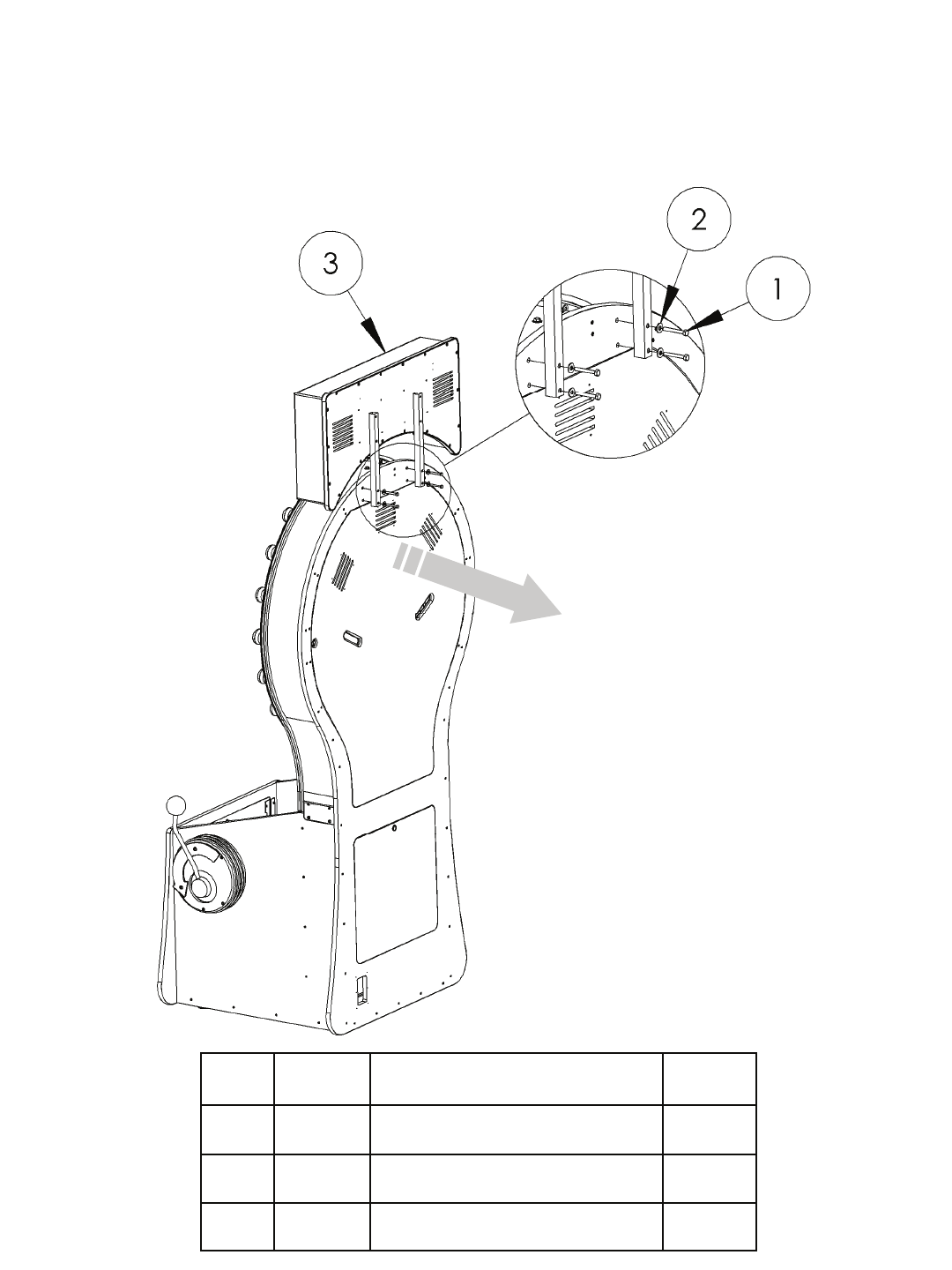
Refer to the below diagram for the physical assembly of the marquee. Once all bolts are tighten,
open the upper back door and connect the AC power. Your marquee is now installed.
ITEM
NO. PART
NO. DESCRIPTION QTY.
1 6082 1/4-20 x 2 Hex Head Machine Bolt 4
2 6075 1/4 x 3/4 FLAT WASHER 4
3 PW3132X MARQUEE ASSEMBLY 1
5
SETUP - Programming
Game Play
The object of the game is to stop the light ring on any of the three bonuses to win the amount of tickets shown
in the center of the light ring. The player begins by inserting the correct amount of coinage required to start a
game. Then the player pulls the large level to begin the light ring’s motion. The large red button will begin to
flash. Pressing this button will stop the light ring giving the value of the tickets for that pie. If the light ring
was stopped at the bonus pie, the player wins the bonus tickets displayed in the center of the light ring.
Credits required to play and Payout Percentages
The game has ticket payouts that are divided into 24 sections or pies. There are three bonus pies in addition to
the 24 pies for a total of 27. Each of the three bonus pies can be configured different for their difficulty. When
the game arrives the graphics will be installed for a two credit game (.50 cents US) assuming your location is
using a .01 cent ticket. If you desire to change the credit required to start a game, you will have to change the
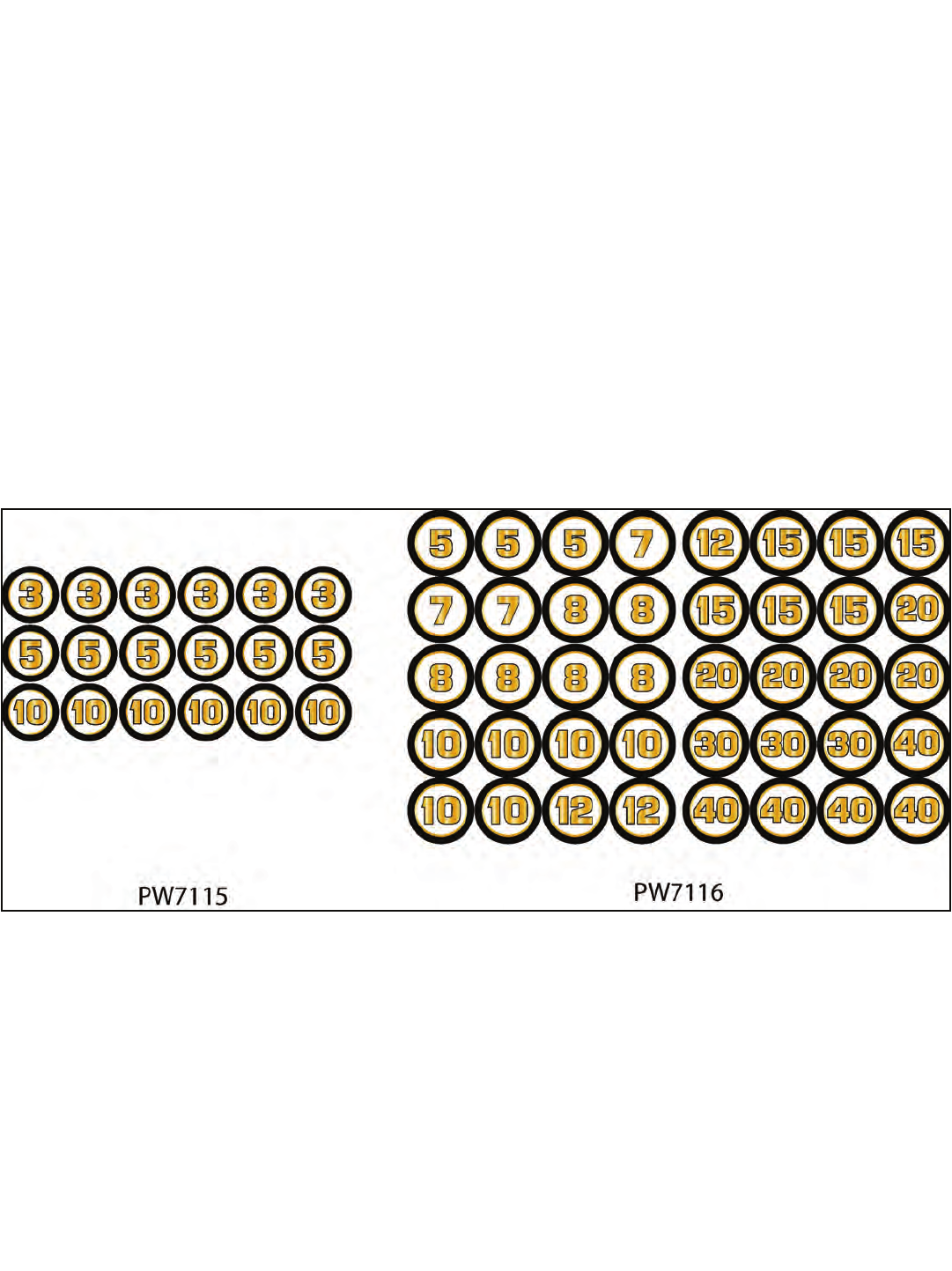
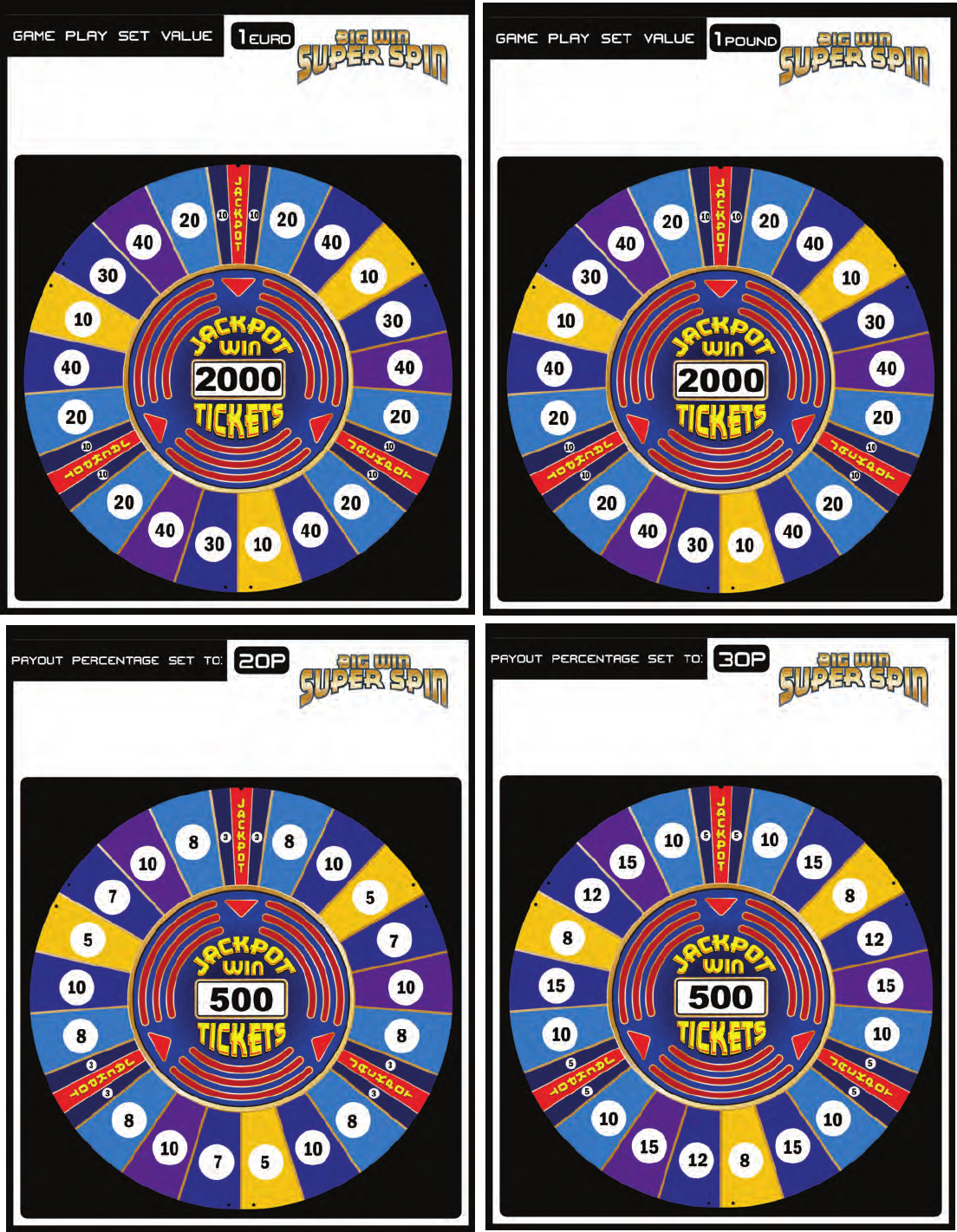
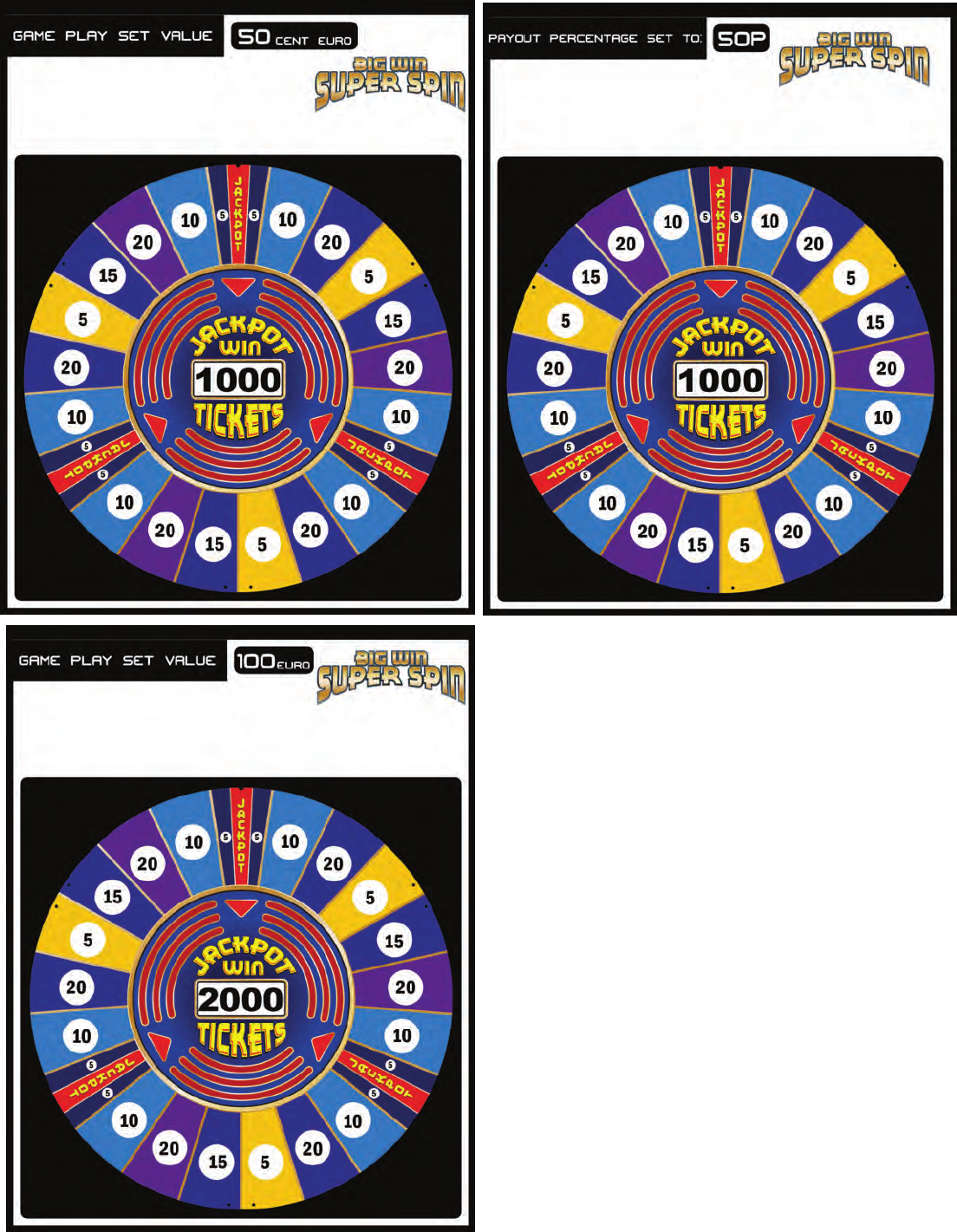
payout graphics. When your game arrived a decal package should have been included (ICE part numbers
PW7115 and PW7116). These two packages should contain all the possible numbers required to change the
payout pies to the required setup. Remove the graphics already installed and discard. Peel and apply the
stickers to the recommended pie. Refer to the next page for ICE recommendations:
TICKETS
Your game has the capacity to hold up to 16 thousand tickets giving you plenty of play between col-
lections. This game features automatic detection of tickets and will pay out whatever is owed to the
customer when tickets are replaced. The game will dispense tickets from both dispensers at the
same time. When loading tickets it is recommended to balance them between both ticket dispens-
ers. The total number of tickets paid out are kept by the Ticket meter located in the coin door.
ACCESS TO MAINTENANCE AREA
The maintenance area is where you access the ticket dispenser, cash box, and programming but-
tons. It is located in the lower front of the game. A key is required to unlock each section to gain
access. The programming buttons are located in the upper coin door.
6
7
8
PROGRAMMING YOUR BIG WIN SUPER SPIN - Software game version 1.0
The program button is located inside the coin door next to the ticket and coin meters. Press this but-
ton to enter programming. The top display shows the current value held for that option. To cycle
through your options use the large red button on the control panel. To accept the current value
shown on the LED screen press the pull arm on the side of the cabinet to advance to the next op-
tion. This game has its coin wiring cash flow ready. Other options are available. Contact your ICE
sales representative for details. Refer to the chart below.
Option Default Minimum Maximum Description
Volume 5 0 8 Sets the volume level for the game.
Coin Input 1 2 0 9 Sets how many pulses to start a game.
Coin Input 2 0 0 9 Sets how many pulses to start a game.
Coin Input 3 0 0 9 Sets how many pulses to start a game.
Coin Input 4 0 0 9 Sets how many pulses to start a game.
Coin Input 5 0 0 9 Sets how many pulses to start a game.
Coin Input 6 0 0 9 Sets how many pulses to start a game.
**** NOTE **** There are six coin lines to allow different values of coinage per line. For ex-
ample the default has coin input 1 set for 2 and a standard US coin mechanism installed in the coin
door. When the customer wishes to play the game they will be required to insert two coins (.50
cents) to start the game.
Coin Discounting 0 0 9 This option is used to create “Bonus
Credits”. The way this option works is
as follows: if a “3” is set, for every 3
coins put in AT THE SAME TIME, 1
extra credit would be given. The range
for this option is 0-9. Setting a “0” turns
this option off. The default value for this
option is ”0”.
Bonus Thousands 1 0 9
Bonus Hundreds 0 0 9
Bonus Tens 0 0 9
Difficulty Top 2 1 5 These options sets the difficulty of play.
Difficulty Right 2 1 5 A setting of 1 is the most difficult where
Difficulty Left 2 1 5 a setting of 5 is the easiest.
On all the pie wedges there will be P for pie and the light will light up corresponding with what that
option refers to. Be sure to match the numbers to the whatever sticker you have applied.
Pie 1 5 0 99
Pie 2 10 0 99
Pie 3 20 0 99
Pie 4 5 0 99
Pie 5 15 0 99
9
PROGRAMMING YOUR BIG WIN SUPER SPIN - cont.
Option Default Minimum Maximum Description
Pie 6 20 0 99
Pie 7 10 0 99
Pie 8 5 0 99
Pie 9 5 0 99
Pie 10 10 0 99
Pie 11 20 0 99
Pie 12 5 0 99
Pie 13 15 0 99
Pie 14 20 0 99
Pie 15 10 0 99
Pie 16 5 0 99
Pie 17 5 0 99
Pie 18 10 0 99
Pie 19 20 0 99
Pie 20 5 0 99
Pie 21 15 0 99
Pie 22 20 0 99
Pie 23 10 0 99
Pie 24 5 0 99
Attract Time 3 3 99
Auto Window 0 0=Off 500 How many plays before the jackpot
window opens up.
Factory Default 0 0 1 = Reset Reset all settings back to defaults.
POWER SUPPLY INFORMATION
PX2002CEAX - Step down transformer
WA2010CBX - Main power supply
4 AMP Slow Blow main AC power
10
TROUBLESHOOTING
Troubleshooting
CAUTION
This game uses complex electronic components that are very sensitive to static electricity. Observe precau-
tions below before handling these electronics. Failure to do so may void the warranty and damage electronic
assemblies.
Before servicing electronics, turn off AC power to the game. Wait for capacitors to discharge.
DO NOT remove any of the components on the main board (e.g. compact flash and eproms) while the game is
powered on. This may cause permanent damage to the parts and the main board.
Before touching or handling electronic assemblies, discharge static electricity on your body. To discharge this
static, begin by connecting the line cord to a grounded outlet. Don’t turn on the game. Next, touch the safety
ground stud of the power supply chassis.
Store electronic assemblies in an anti-static area. Use anti-static bags to store or transport the game circuit boards.
Don’t remove or connect electronic assemblies when cabinet power is on. Otherwise, you’ll damage electronic as-
semblies and void the game’s warranty.
After you complete maintenance or service, replace ground wires, shields, safety covers and install and tighten
ground and mounting screw.
Fuses / Main Power Supply
MAIN AC FUSE
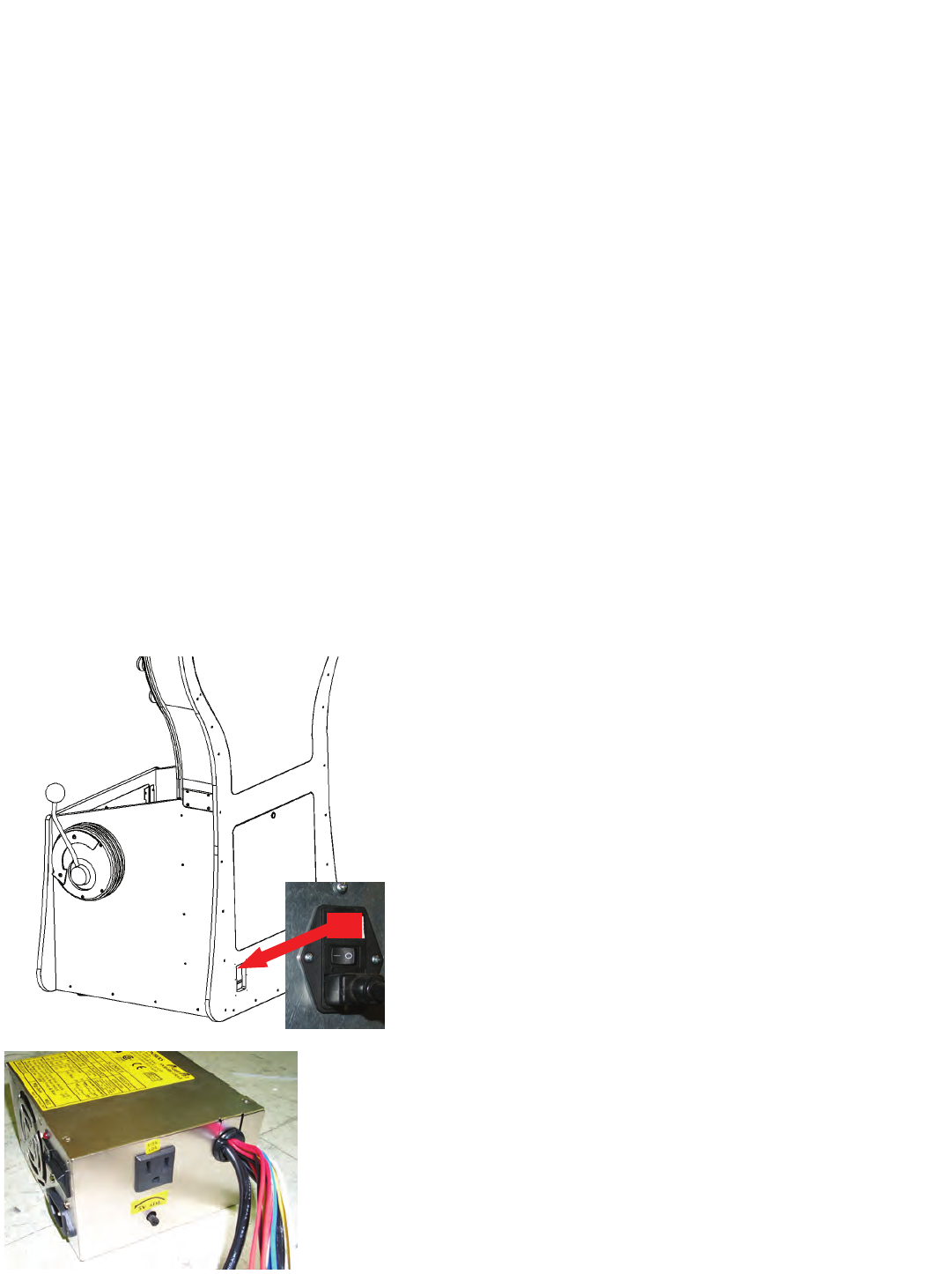
Located at the back of the cabinet is the main power fuse. To
access fuse, pull fuse box out that is shown .
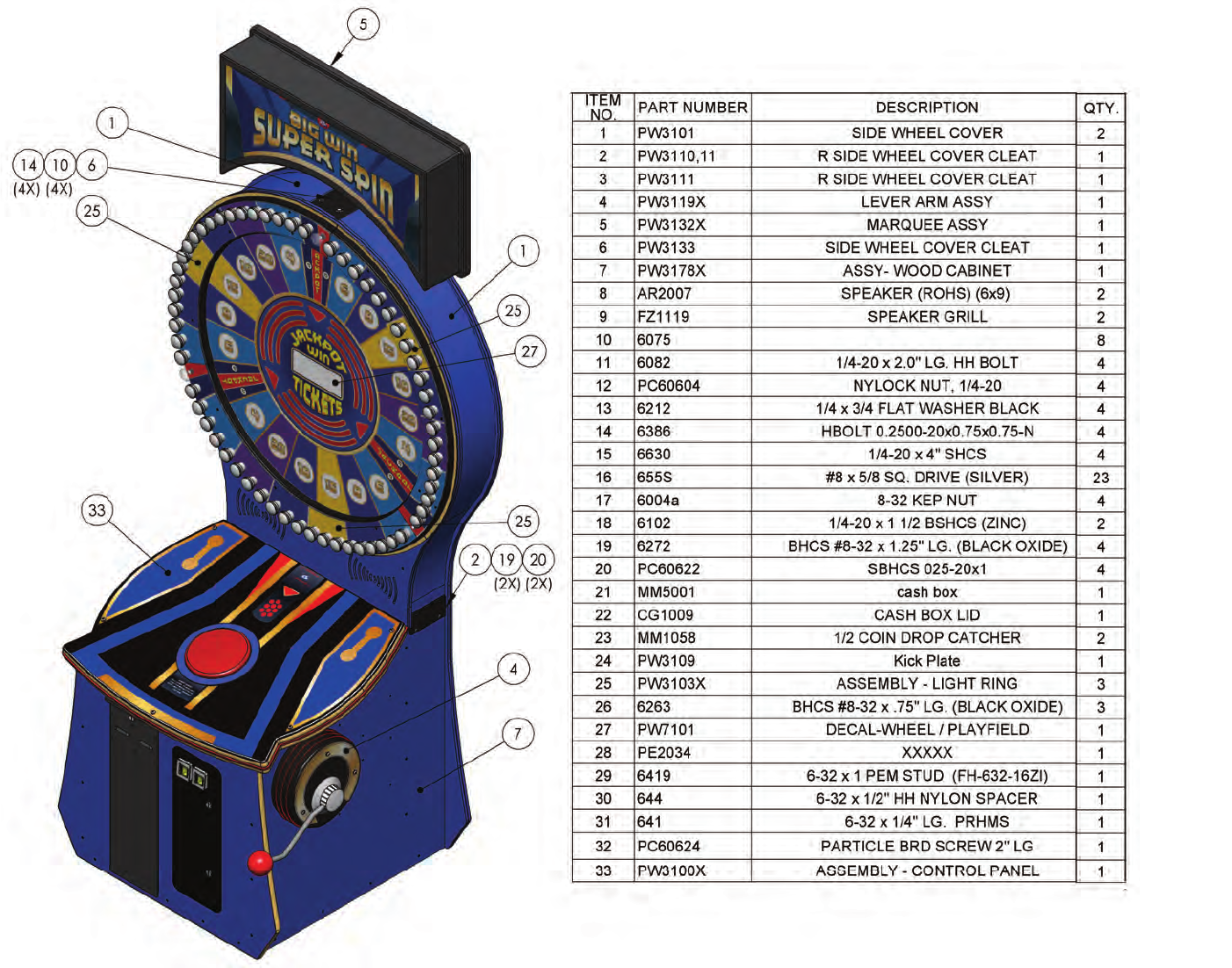
This is the low voltage power supply and has a external breaker to protect
itself from external shorts. No serviceable components are located in this
power supply and should only be replaced in its entirety. Located on the
side of the supply is the +5 volt adjustment. This has been set at the fac-
tory but may need adjustment once in its final location.
11
ASSEMBLIES AND DRAWINGS
12
13
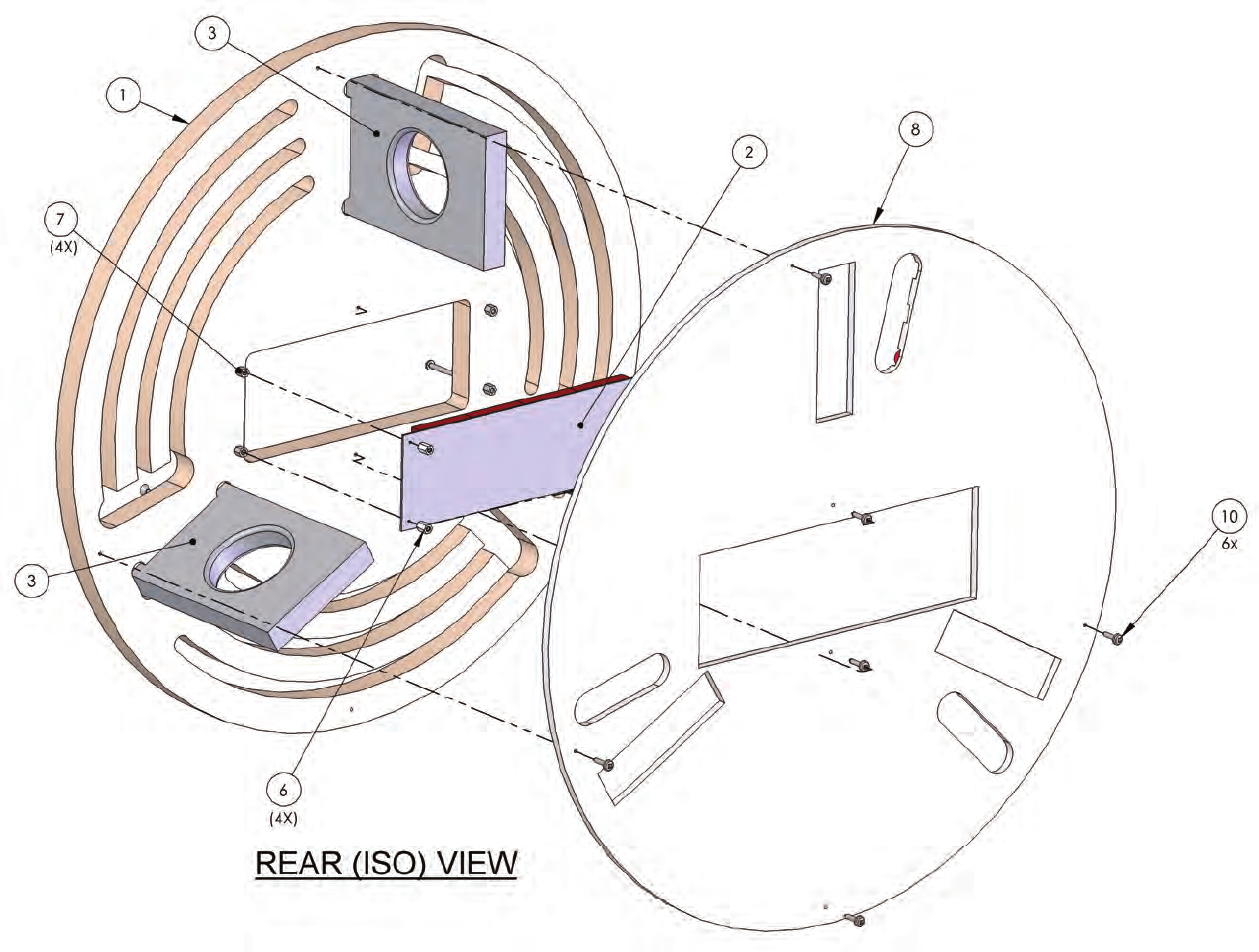
14
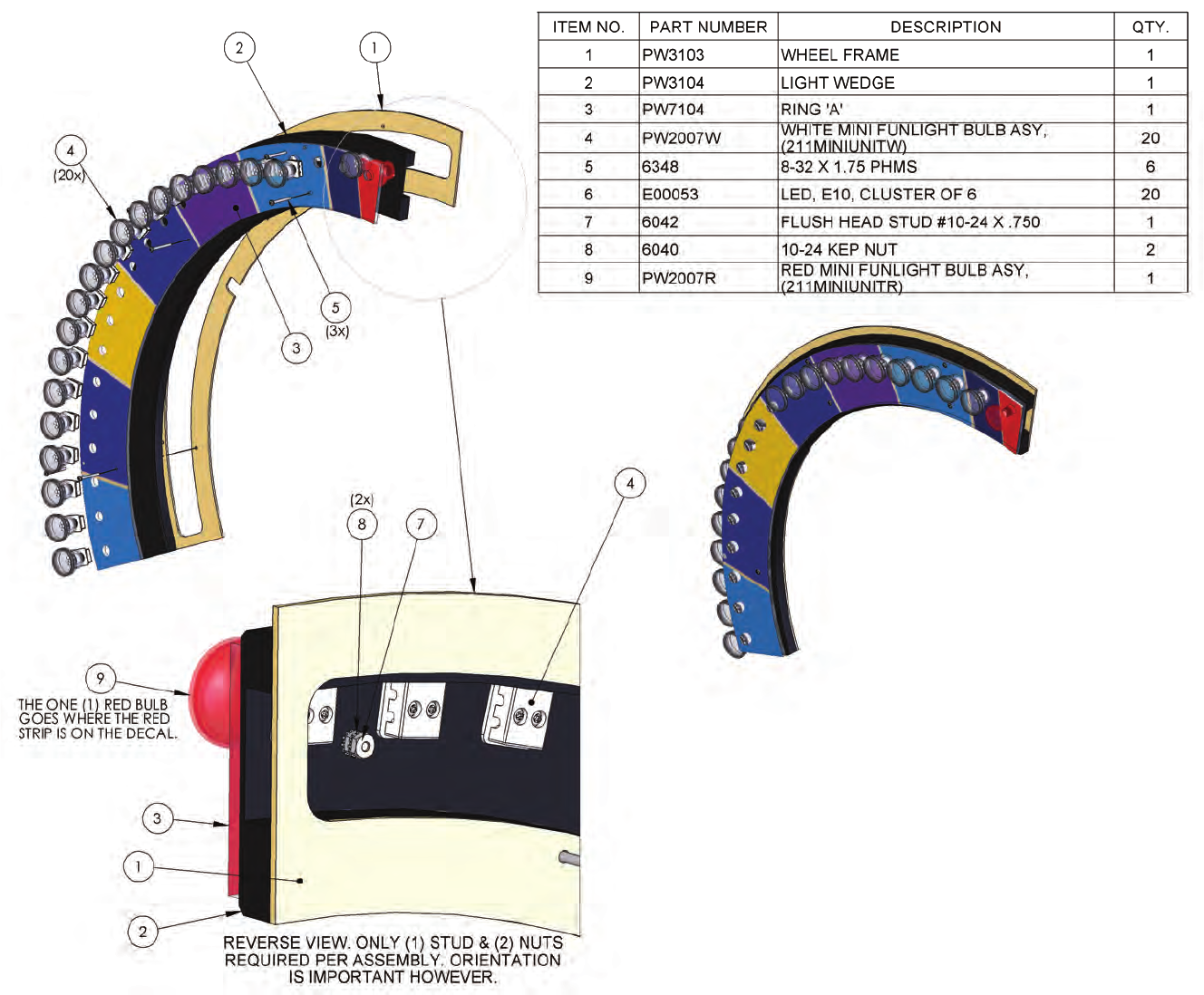
15
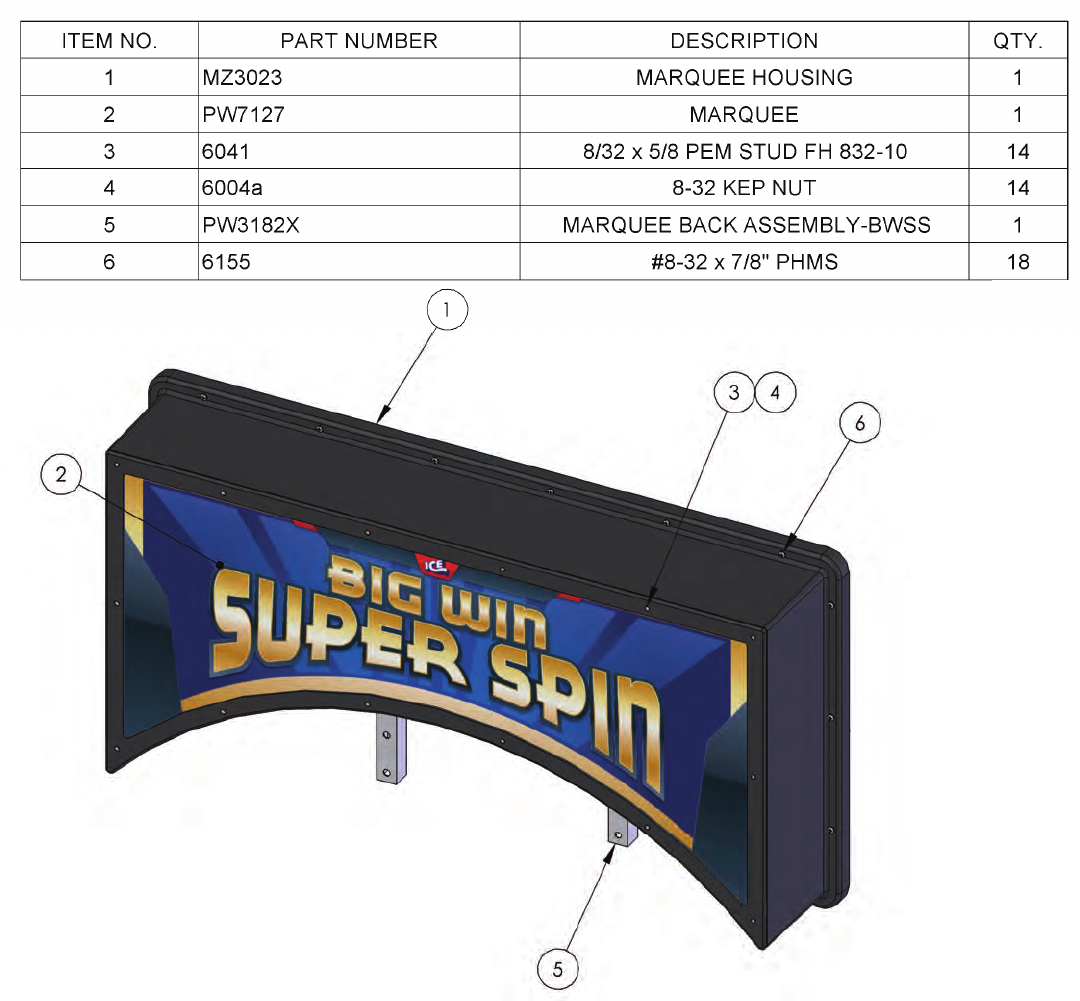
16
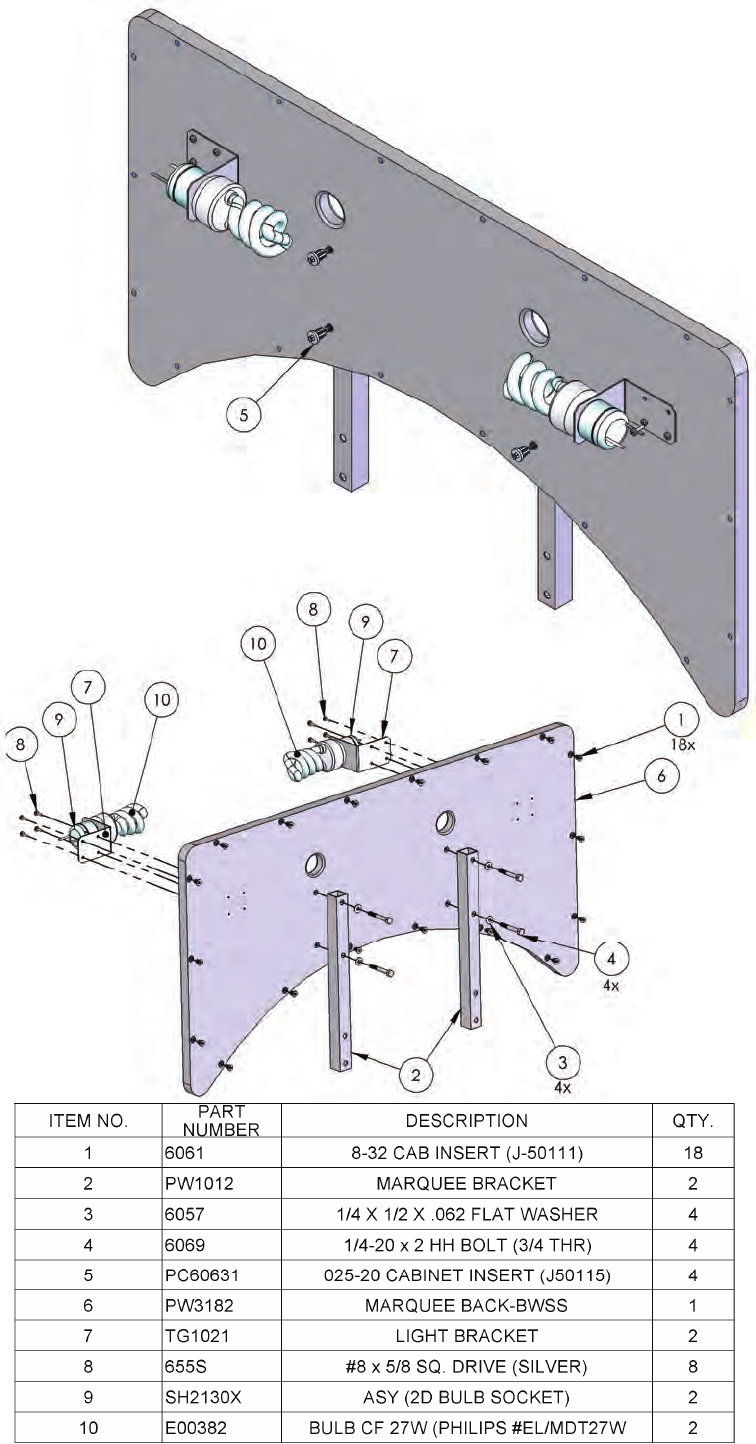
17
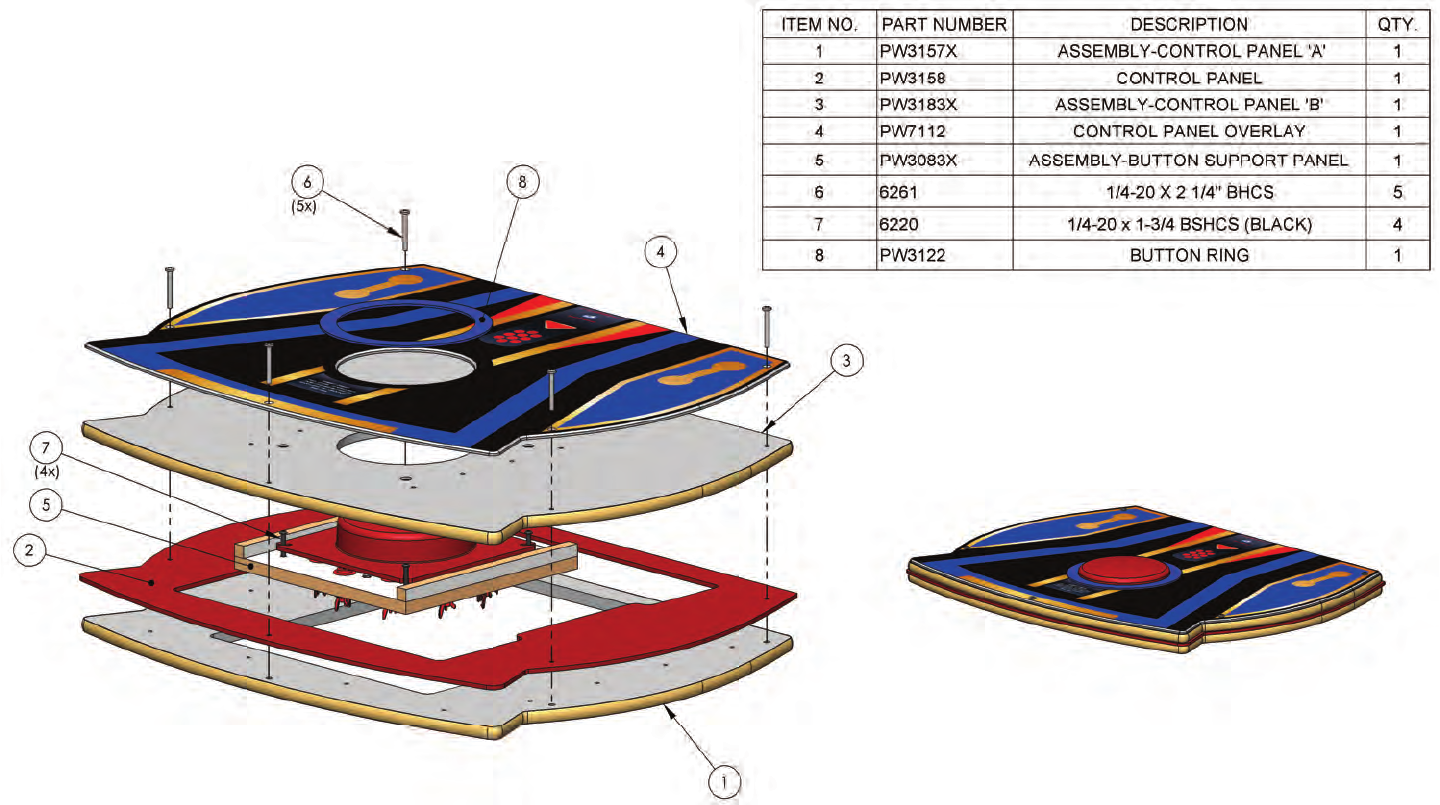
18
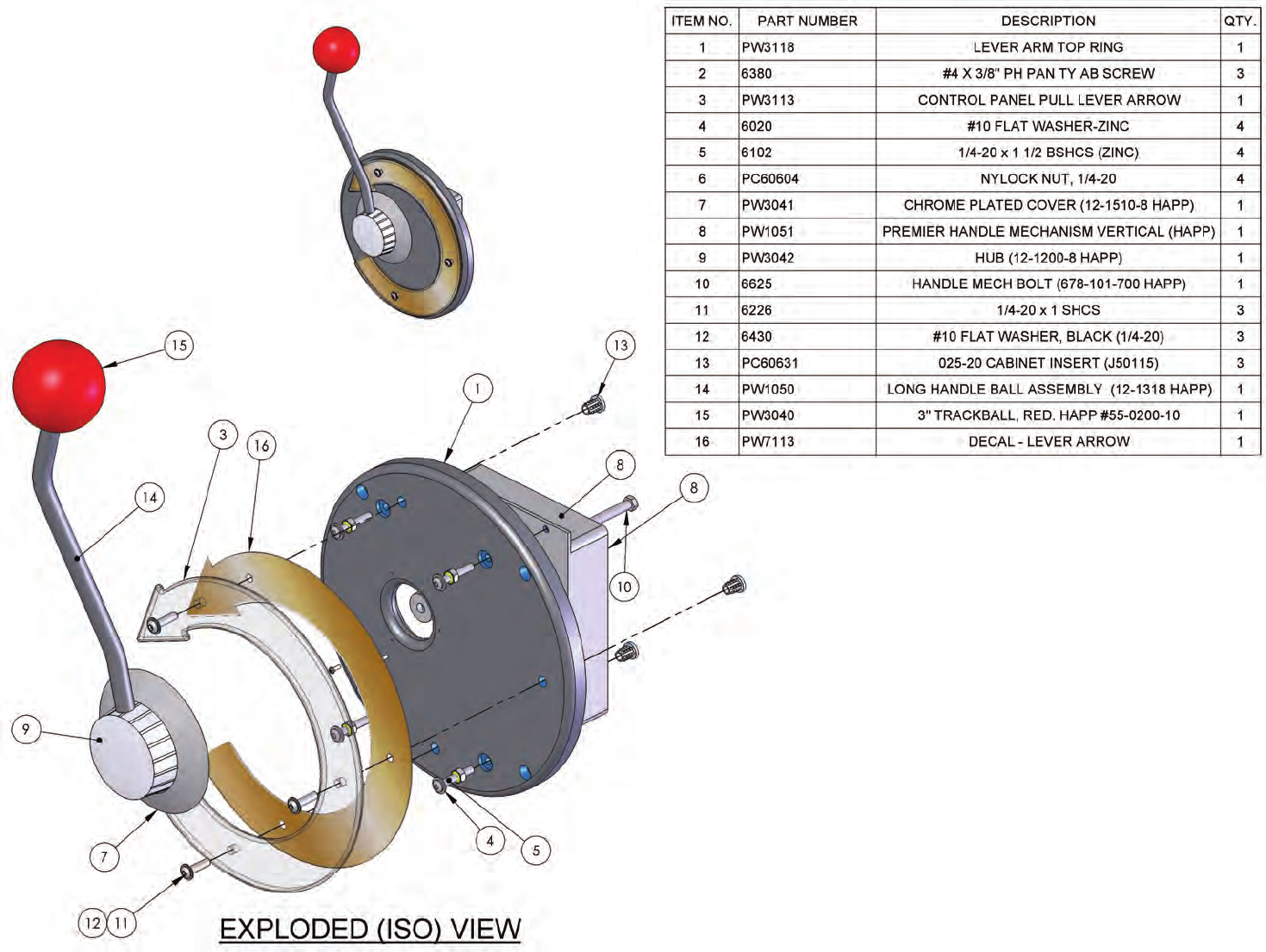
19
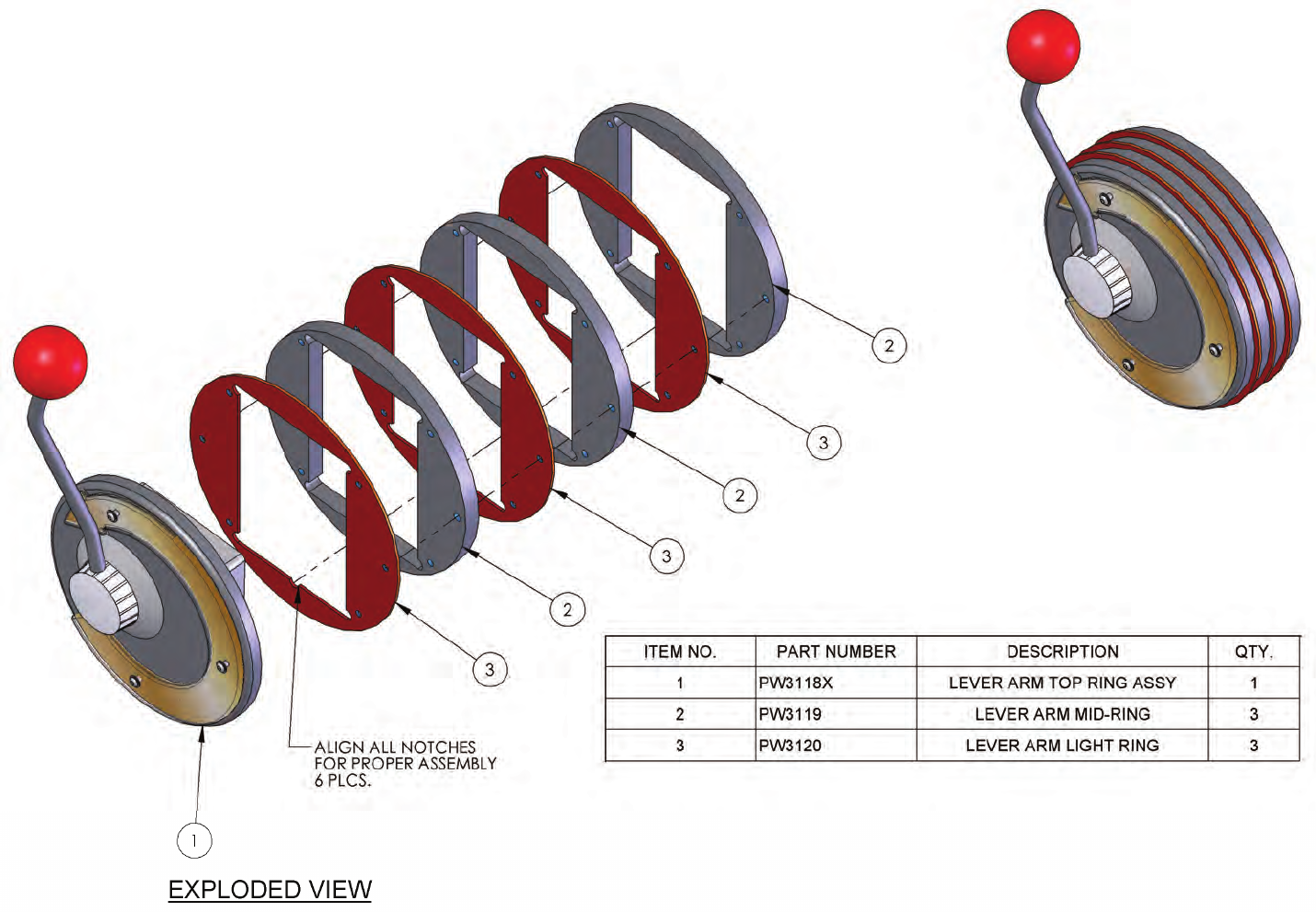
20
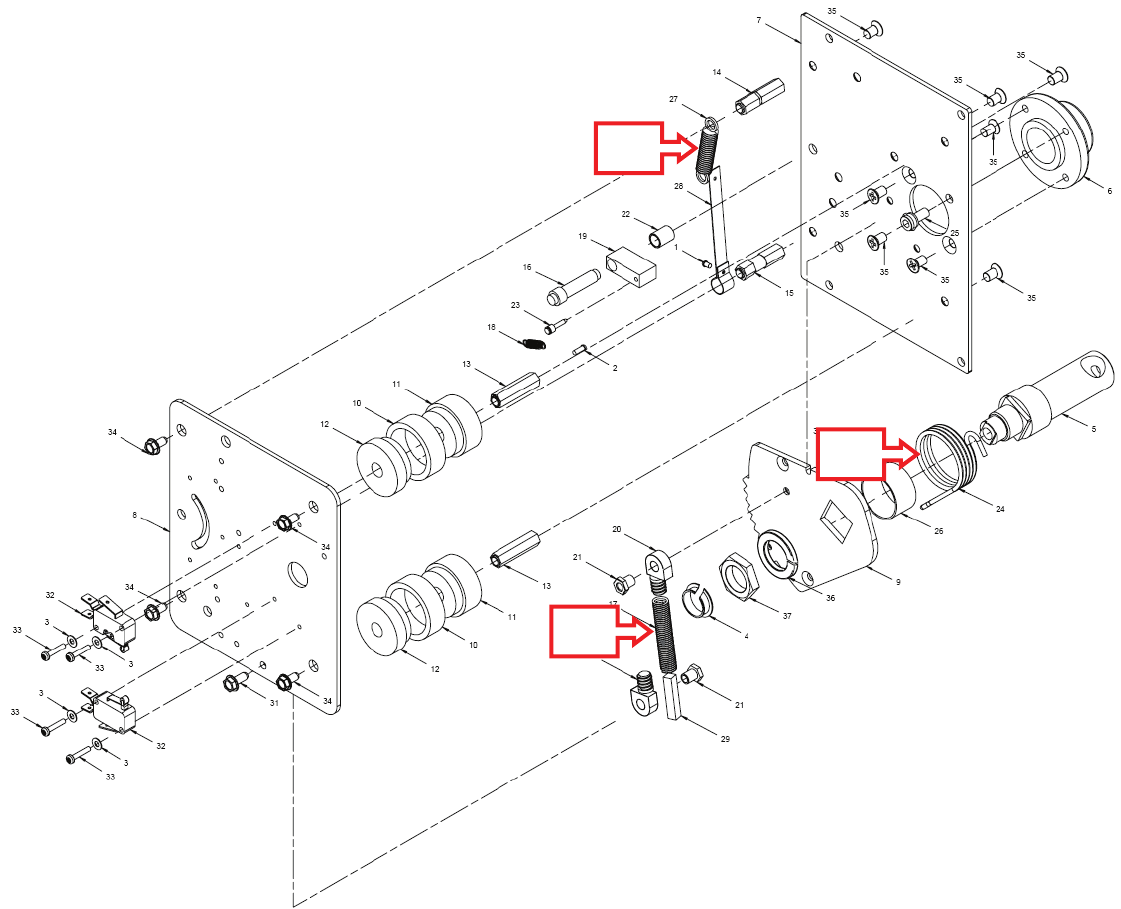
21
PW1051 Spring Part Break Down
ICE PART Description Location
PW1052 Spring Stop (Part 27 above)
PW1053 Spring Torsion (Part 24 above)
PW1054 Spring Main (Part 17 above)
17
24
27
22
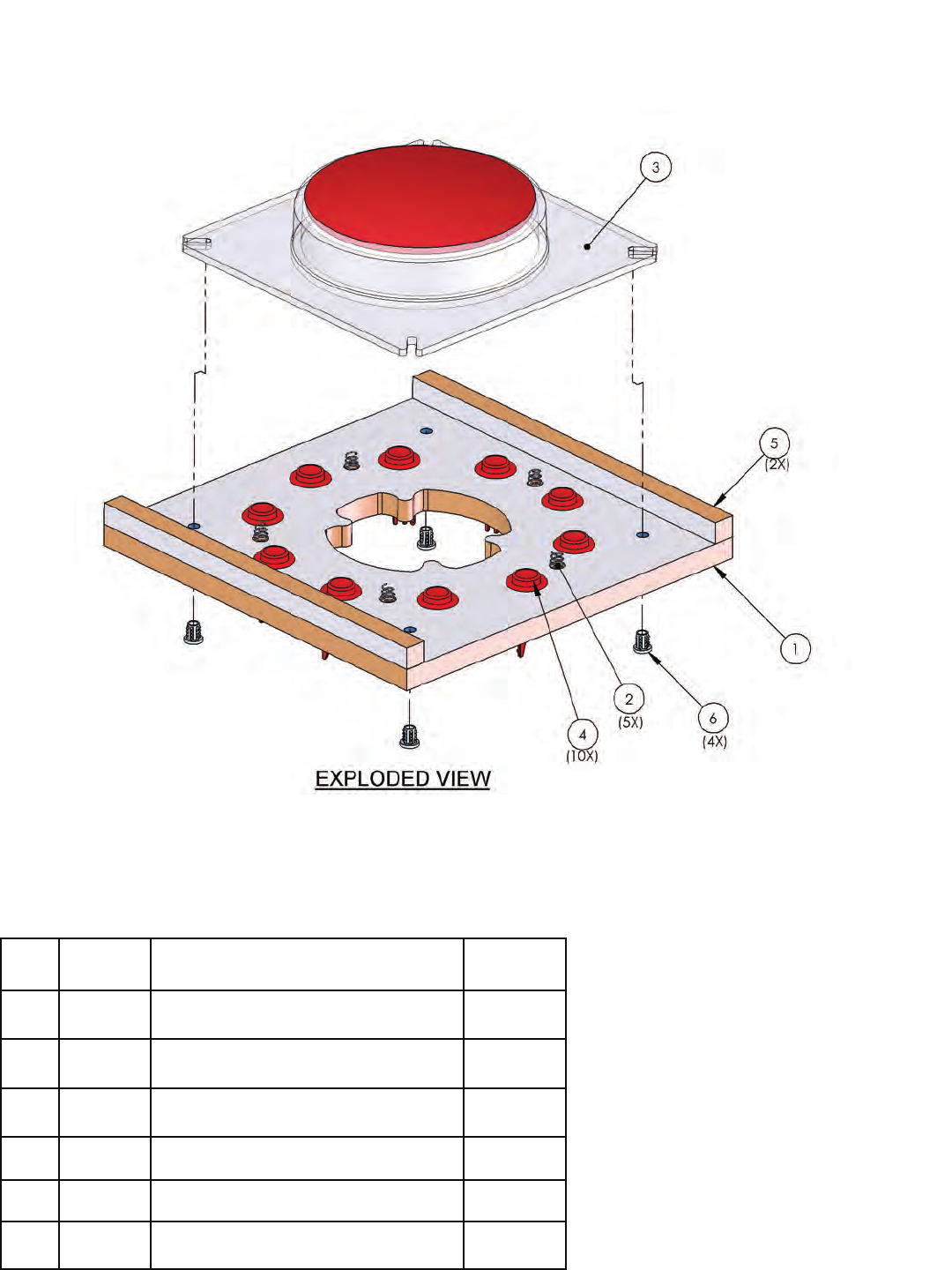
MAINTENANCE / REPAIR
ITEM
NO. PART
NO. DESCRIPTION QTY.
1 PW3083 BUTTON SUPPORT PANEL 1
2 CG1066 .700 X .3125 SPRING 5
3 BW3003 8” PUSH BUTTON 1
4 EV2005 RED SOLID BUTTON 10
5 PW3084 PUSH BUTTON CLEAT 2
6 PC60631 1/4-20 CABINET INSERT 4

23
PARTS LISTINGS
Misc. Parts
PW1050 Handle
PW1051 Handle Mechanism
PX1007-P802 Ticket door
PX1050 Drawer slide 12”
Electrical Parts
DA2001X PCBA Power supply
DA2002CEX PCBA Transformer for DA2001X
MS2002CEAX Step down Transformer
1029CLX Reset Assembly
E02295 Fuse 6 amp 250v Slow Blow
E00211 Low Ticket switch
E00382 Bulb
PE2034X Main I/O board (requires E2034X and E08716 to function)
E2034X ARM 7 CPU Brain Board
E08716 Flash Card (Request software version)
HH5005 Ticket Dispenser
PW2130X Socket Assembly
PW3040 3” Tack ball red
PW3041 Cover Plate
PW3042 Hub
2145 Bulb
BW3003 Large red plastic button (plastic only)
PW2007R Red mini Fun light bulb assembly
PW2007W White mini Fun light bulb assembly
E00053 LED, E10, Cluster of 6
E00416PWX LED strip Red assembly
NA2032X PCB display
E00382 Bulb CF 27W
PW7127 Marquee BWSS
SH2130X Ceramic socket assembly
PW3083X Large Button support panel
Graphics and Decals
PW7104 Decal - Ring A
PW7101 Wheel / Playfield
PW7102 Front Door
PW7105 Ticket Door
PW7112 Control Panel
PW7113 Control Panel Pull lever
PW7115 Wheel Value (small)
PW7116 Wheel value (large)
D
C
B
A
4321
D
C
B
A
4321
DATE 8/12/08
DESCRIPTION
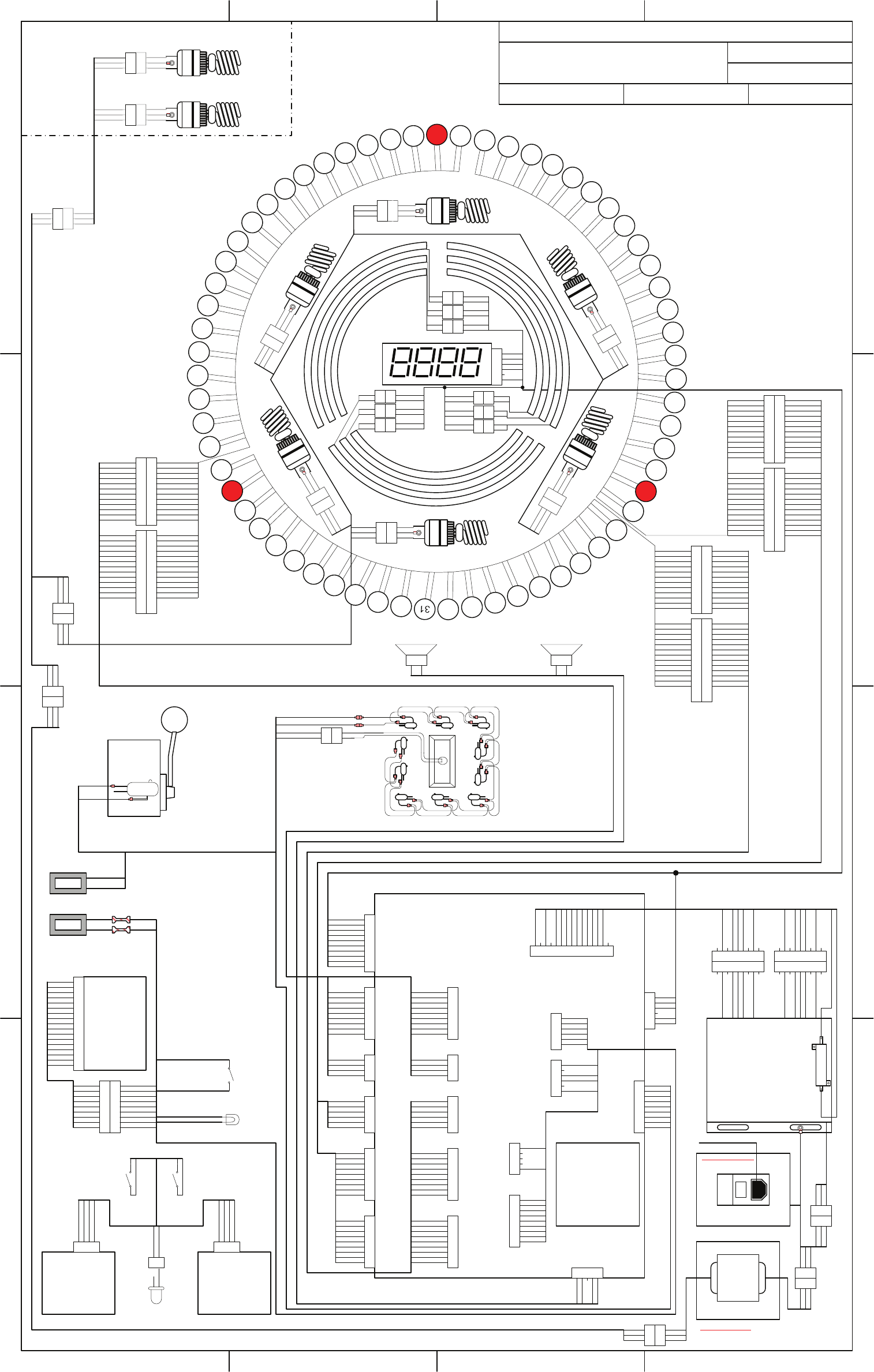
BIG WIN SUPER SPIN
INTERNATIONAL SYSTEM
SCHEMATIC DRAWN BY NBRANCATO
FILENAME PW1100X SYSTEM
SCHEMATIC.VSD
PAGE 1 OF 1
REVISED 8/27/08
TITLE PW1100X
1
2
3
4
5
6
7
8
9
10
11
12
13
14
16
15
17
18
19
21
20
22
23
24
25
26
27
28
29
30
32
33
34
35
37
36
38
39
40
42
41
43
44
45
46
47
48
49
50
51
52
53
54
55
56
58
57
59
60
61
63
62
violet
black/white
white/black
black/white
white
black/white
white/gray
black/white
white/violet
black/white
white/blue
black/white
white/green
black
white/yellow
black
white/orange
black
white/red
black
white/brown
black
white/black
black/white
white
black/white
white/gray
black/white
white/violet
black/white
white/blue
black/white
white/green
black
white/yellow
black
white/orange
black
white/red
black
white/brown
black
ORANGE
WHITE
GREEN
BROWN
BLACK
1
2
3
4
5
6
J1
violet
black/white
white/black
black/white
white
black/white
white/gray
black/white
white/violet
black/white
white/blue
black/white
white/green
black
white/yellow
black
white/orange
black
white/red
black
white/brown
black
white/black
black/white
white
black/white
white/gray
black/white
white/violet
black/white
white/blue
black/white
white/green
black
white/yellow
black
white/orange
black
white/red
black
white/brown
black
violet
black/white
white/black
black/white
white
black/white
white/gray
black/white
white/violet
black/white
white/blue
black/white
white/green
black
white/yellow
black
white/orange
black
white/red
black
white/brown
black
white/black
black/white
white
black/white
white/gray
black/white
white/violet
black/white
white/blue
black/white
white/green
black
white/yellow
black
white/orange
black
white/red
black
white/brown
black
1
2
red
black
red
black
red
black
1
2
1
2
1
2
red
black
red
black
red
black
1
2
1
2
1
2
red
black
red
black
red
black
1
2
1
2
1
2
1
2
1
2
orange
yellow/brown
orange x2
yellow/red
orange x2
yellow/orange
1
2
1
2
1
2
orange x2
yellow/violet
orange x2
yellow/white
org & org/blk
yellow/black
1
2
1
2
1
2
orange x2
yellow/blue
orange x2
yellow/green
orange x2
yellow
1
2
3
BLACK
G/Y
WHITE
1
2
3
1
2
3
BLACK
G/Y
WHITE
1
2
3
1
2
3
BLACK
G/Y
WHITE
1
2
3
BLACK
G/Y
WHITE
1
2
3
BROWN x2
G/Y x2
BLUE x2
1
2
3
1
2
3
BROWN
G/Y
BLUE
1
2
3
BLACK
G/Y
WHITE
1
2
3
BROWN x2
G/Y x2
BLUE x2
1
2
3
1
2
3
BLACK
G/Y
WHITE
1
2
3
1
2
3
BLACK
G/Y
WHITE
1
2
3
1
2
3
BROWN
G/Y
BLUE
1
2
3
BROWN
G/Y
BLUE
MARQUEE
1
2
3
4
5
6
7
8
9
10
11
12
1
2
3
4
5
6
7
8
9
10
11
12
13
14
15
1
2
3
4
5
6
7
8
9
10
11
12
1
2
3
4
5
6
7
8
9
10
11
12
13
14
15
BLACK
WHITE/BROWN
WHITE/RED
WHITE/ORANGE
WHITE/YELLOW
WHITE/GREEN
BLACK/WHITE
WHITE/BLUE
WHITE/VIOLET
WHITE/GRAY
WHITE
WHITE/BLACK
BLACK
WHITE/BROWN
WHITE/RED
WHITE/ORANGE
WHITE/YELLOW
WHITE/GREEN
BLACK/WHITE
WHITE/BLUE
WHITE/VIOLET
WHITE/GRAY
WHITE
WHITE/BLACK
VIOLET
1
2
3
4
5
6
7
8
9
10
11
12
1
2
3
4
5
6
7
8
9
10
11
12
13
14
15
1
2
3
4
5
6
7
8
9
10
11
12
1
2
3
4
5
6
7
8
9
10
11
12
13
14
15
BLACK
WHITE/BROWN
WHITE/RED
WHITE/ORANGE
WHITE/YELLOW
WHITE/GREEN
BLACK/WHITE
WHITE/BLUE
WHITE/VIOLET
WHITE/GRAY
WHITE
WHITE/BLACK
BLACK
WHITE/BROWN
WHITE/RED
WHITE/ORANGE
WHITE/YELLOW
WHITE/GREEN
BLACK/WHITE
WHITE/BLUE
WHITE/VIOLET
WHITE/GRAY
WHITE
WHITE/BLACK
VIOLET
1
2
3
4
5
6
7
8
9
10
11
12
1
2
3
4
5
6
7
8
9
10
11
12
13
14
15
1
2
3
4
5
6
7
8
9
10
11
12
1
2
3
4
5
6
7
8
9
10
11
12
13
14
15
BLACK
WHITE/BROWN
WHITE/RED
WHITE/ORANGE
WHITE/YELLOW
WHITE/GREEN
BLACK/WHITE
WHITE/BLUE
WHITE/VIOLET
WHITE/GRAY
WHITE
WHITE/BLACK
BLACK
WHITE/BROWN
WHITE/RED
WHITE/ORANGE
WHITE/YELLOW
WHITE/GREEN
BLACK/WHITE
WHITE/BLUE
WHITE/VIOLET
WHITE/GRAY
WHITE
WHITE/BLACK
VIOLET
1
2
3
4
5
6
7
8
9
10
1
2
3
4
5
6
7
8
9
1
2
3
4
1
2
3
4
5
6
7
8
9
1
2
3
4
1
2
3
4
5
6
1
2
3
4
5
6
7
8
9
1
2
3
4
5
6
7
8
9
1
2
3
4
5
6
7
8
9
10
11
12
13
14
15
1
2
3
4
5
6
1
2
3
4
5
6
1
2
3
4
5
61
2
3
4
5
6
7
8
9
1
2
3
4
5
6
7
8
9
1
2
3
4
5
1
2
3
4
5
RED
ORANGE
gray/red
BLACK
WHITE
black
black/white
gray/brown
yellow/brown
yellow/red
yellow/orange
yellow
yellow/green
yellow/blue
yellow/violet
yellow/white
yellow/black
ORANGE/BLACK
ORANGE
BROWN
GREEN
WHITE
BLACK
yellow/brown
yellow/red
yellow/orange
yellow
yellow/green
yellow/blue
yellow/violet
yellow/gray
ORANGE
J8
1
2
3
4
5
6
7
8
9
yellow/brown
yellow/red
yellow/orange
yellow
yellow/green
yellow/blue
yellow/violet
yellow/gray
ORANGE
J9
yellow/white
yellow/black
violet/brown
violet/red
violet/orange
violet/yellow
violet/green
violet/blue
ORANGE
J6
1
2
3
4
5
6
7
8
9
yellow/white
yellow/black
violet/brown
violet/red
violet/orange
violet/yellow
violet/green
violet/blue
ORANGE
J10
violet
violet/gray
violet/white
violet/black
black/brown
ORANGE/BLACK
J50
1
2
3
4
5
6
violet
violet/gray
violet/white
violet/black
black/brown
ORANGE/BLACK
J51
J5J11 violet/black
black/brown
ORANGE/BLACK
violet
violet/gray
violet/white
ORANGE
J7J12
J47
yellow/brown
yellow/red
yellow/orange
yellow
yellow/green
yellow/blue
yellow/violet
yellow/gray
ORANGE
yellow/white
yellow/black
violet/brown
violet/red
violet/orange
violet/yellow
violet/green
violet/blue
ORANGE/BLACK
NA2032X display
ORANGE/BLACK
RED
BLACK/BLUE
BLACK/WHITE
ORANGE
BLACK
ORANGE/BLACK
BLACK
BLUE
BLACK
ORANGE
BLACK/WHITE
ORANGE
orange
violet/white
violet/blue
black/brown
BLACK
ORANGE/BLACK
yellow/white
yellow/blue
BLACK/WHITE
orange
violet/brown
violet/red
violet/orange
violet/yellow
violet/green
violet/blue
violet/black
black/white
white/green
black
red/gray
brown/gray
red/white
brown/white
J49
J26
J25
J16
J33
J35
J48
J1+ 12V
+ 5V
audio ground
ground
+ 12V
ground
+ 12V
ground
+ 15V (audio)
ground
+ 12V
ground
+ 12V
clock
data
latch
ground
+ 12V counter
+ 12V light
button
coin counter
button light
arm ground
button ground
arm
+ 12V
+ 12V
ticket 1 run
ticket 1 sense
ticket count
ground
+ 12V
ticket 2 run
ticket 2 sense
ground
program button
ground
+ 12V
coin 1
coin 2
coin 3
coin 4
coin 5
coin 6
lockout
ground
L. speaker +
L. speaker -
R. speaker +
R. speaker -
3
2
1
6
5
4
7
8
9
LED 1
LED 2
LED 3
LED 4
LED 5
LED 6
LED 7
LED 8
LED 9
+ 12V
ORANGE x 2
yellow/brown
yellow/red
yellow/orange
yellow
yellow/green
ORANGE
yellow/blue
yellow/violet
yellow/gray
yellow/white
yellow/black
ORANGE
violet/brown
violet/red
violet/orange
violet/yellow
violet/green
ORANGE/BLACK
violet/blue
violet
violet/gray
violet/white
violet/black
black/brown
light 21
light 20
light 19
light 18
light 17
light 16
light 15
light 14
+ 12V
light 13
light 12
light 11
light 10
light 9
light 8
light 7
light 6
+ 12V
light 5
light 4
light 3
light 2
light 1
+ 12V
light 22
light 23
light 24
light 25
light 26
light 27
light 28
light 29
+ 12V
light 30
light 31
light 32
light 33
light 34
light 35
light 36
light 37
+ 12V
light 38
light 39
light 40
light 41
light 42
+ 12V
ORANGE x 2
yellow/brown
yellow/red
yellow/orange
yellow
yellow/green
ORANGE
yellow/blue
yellow/violet
yellow/gray
yellow/white
yellow/black
ORANGE
violet/brown
violet/red
violet/orange
violet/yellow
violet/green
ORANGE/BLACK
violet/blue
violet
violet/gray
violet/white
violet/black
black/brown
ORANGE
yellow/brown
yellow/red
yellow/orange
yellow
yellow/green
ORANGE/BLACK
yellow/blue
yellow/violet
yellow/gray
yellow/white
yellow/black
ORANGE
violet/brown
violet/red
violet/orange
violet/yellow
violet/green
ORANGE/BLACK
violet/blue
violet
violet/gray
violet/white
violet/black
black/brown
light 43
light 44
light 45
light 46
light 47
light 48
light 49
light 50
+ 12V
light 51
light 52
light 53
light 54
light 55
light 56
light 57
light 58
+ 12V
light 59
light 60
light 61
+ 12V
light 62
light 63
light 64
+ 12V
WA2010CBX
1
2
3
4
5
6
7
8
9
I
O
POWER ENTRY MODULE
PW2107X
2A MDQ
POWER CORD
HH5005
TICKET
DISPENSER
1
2
3
4
yellow/blue
BLACK/WHITE
yellow/white
ORANGE/BLACK
1
2
orange
violet/green
LOW TICKET SWITCH
#E08212 LED
FLASHING
violet/green
black
HH5005
TICKET
DISPENSER
1
2
3
4
LOW TICKET SWITCH
violet/green
black
1
2
3
4
5
6
7
8
9
violet/brown
violet/red
violet/orange
violet/yellow
violet/green
violet/blue
orange x 2
violet/black
black/white x 2
1
2
3
4
5
6
7
8
9
violet/brown
violet/red
violet/orange
violet/yellow
violet/green
violet/blue
orange
violet/black
black/white
COIN
TICKET
orange
black/brown
black
red
0000
0000 red
black
CASH
FLOW
MECH
violet/brown
violet/blue
white/black
violet/green
KEY #2991
violet/yellow
violet/orange
KEY #2991
violet/red
violet/black
orange
white/black
violet/black
violet/black
violet/black
violet/black
violet/black
1
2
3
4
5
6
7
8
9
10
11
12
13
14
15
16
17
COIN LAMP
#161 BULB
PROGRAMMING
BUTTON
white/green
black
orange
black/white
PW3019X
LEVER ARM
ASSEMBLY
ORANGE
WHITE BLACK
WHITE
1
2
1
2
PW2415X
PW2059X
gray/brown
black
gray/red
black/white
1
2
3
BLACK
G/Y
WHITE
1
2
3
BROWN
G/Y
BLUE
1
2
3
BROWN
G/Y
BLUE
1
2
3
BROWN
G/Y
BLUE
1
2
3
BROWN
G/Y
BLUE
1
2
3
BROWN
G/Y
BLUE
1
2
3
BROWN
G/Y
BLUE
1
2
3
BROWN x2
G/Y x2
BLUE x2
FOR 110V GAME: REMOVE MS2002CEAX STEP
DOWN TRANSFORMER AND PLUG
PW2061X INTO POWER MOD
PW2181HX
PW2183HX
PW2183HX
PW2183HX
PW2183EMX
PW2183EMX
PW2184EMX
PW2162HX
PW2185LX
PW2161LX
PW2067X
PW2061X
PW2180LX
PW2151HX
CX2066X
PW2160LX
PE2034X
E2034X
E00382
BULB
SH2130X
SOCKET
E00382
BULB
SH2130X
SOCKET
E00382
BULB
SH2130X
SOCKET
E00382
BULB
E00416PWX LED
STRIP x9
E00382
BULBSH2130X
SOCKET
E00382
BULBSH2130X
SOCKET
E00053 LED
BULB x63
PW2007W WHITE
BULB HOUSING
x60
PW2007R RED
BULB HOUSING x3
E00382
BULB
SH2130X
SOCKET
E00382
BULB
SH2130X
SOCKET
AR2007 AR2007
BROWN x 2
G/Y x 2
BLUE x 2
BROWN
G/Y
BLUE
BROWN x2
G/Y x2
BLUE x2
BROWN x2
G/Y x2
BLUE x2
BROWN x2
G/Y x2
BLUE x2
O1
M1
I1
I2
M2
O2
O3
M3
I3
ORANGE
yellow/brown
yellow/red
yellow/orange
yellow
yellow/green
ORANGE/BLACK
yellow/blue
yellow/violet
yellow/gray
yellow/white
yellow/black
black/orange
black
violet/blue
BLACK & black
violet/white
ORANGE & orange
FOR 110V GAME FUSE:
REPLACE 2 AMP FUSE
WITH A 4 AMP
1
2
3
4
5
6
7
8
9
1
2
3
4
5
6
7
8
9
1
2
3
4
5
6
7
8
9
RED
BLACK
BLACK
BLACK
YELLOW
RED
BLACK
BLACK
BLACK
YELLOW
RED/BLACK
BLACK
BLACK/BLUE
BLACK/WHITE x2
ORANGE x3
RED
BLACK
BLACK
BLACK
ORANGE/BLACK x2
2 OHM 50W RED/BLACKBLACK
PW2163LX
1
2
3
BLACK
G/Y
WHITE
1
2
3
BROWN
G/Y
BLUE
MS2002CEAX
MA1019
Contacts at SEGA
Machine Sales
Telephone: +44 (0) 208 391 8090
Fax: +44 (0) 208 391 8099
www.sega-amusements.co.uk
SEGA Spares
Telephone: +44 (0) 208 391 8060
Fax: +44 (0) 208 391 8096
www.segatotalsolutions.com
Customer Services
Telephone: +44 (0) 208 391 8065
Fax: +44 (0) 208 391 8096
