Arcade Deal Or No Dlx Manual User
2013-11-13
User Manual: Arcade Deal Or No Deal Dlx Manual
Open the PDF directly: View PDF  .
.
Page Count: 23
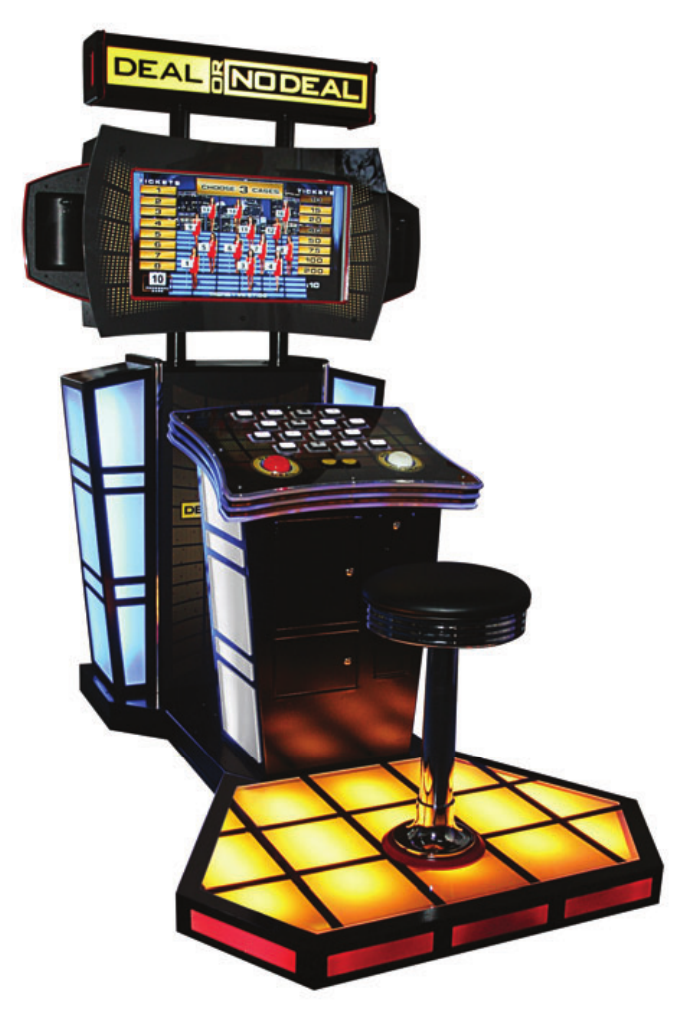
OWNERS AND SERVICE MANUAL
INNOVATIVE CONCEPTS IN ENTERTAINMENT INC.
2
TABLE OF CONTENTS
SAFETY AND WARNINGS 3
• Before You Begin
• Installation
• Warning
GAME SETUP AND FEATURES 4
• Player Controls
• Playing The Game
• Initial Game Setup
• Assembly - Main cabinet to Podium & Speakers 5
• Stool to Platform Assembly 6
ADJUSTMENTS & AUDIT MENU SYSTEM
SEE INCLUDED BOOKLET
MAINTENANCE 8
• Access the Computer
• AC Power fuse
• Power Supply Replacement and Adjustments 9
• Main and I/O board replacement 10
• Platform Lights replacement 11
• Marquee Bulbs replacement 13
• Cleaning 14
• Monitor Replacement
• Speaker Replacement
• Monitor Adjustments 15
• Deal No Deal and Suit case Buttons and bulbs 16
• Side Light Replacement
• Spare Parts List 18
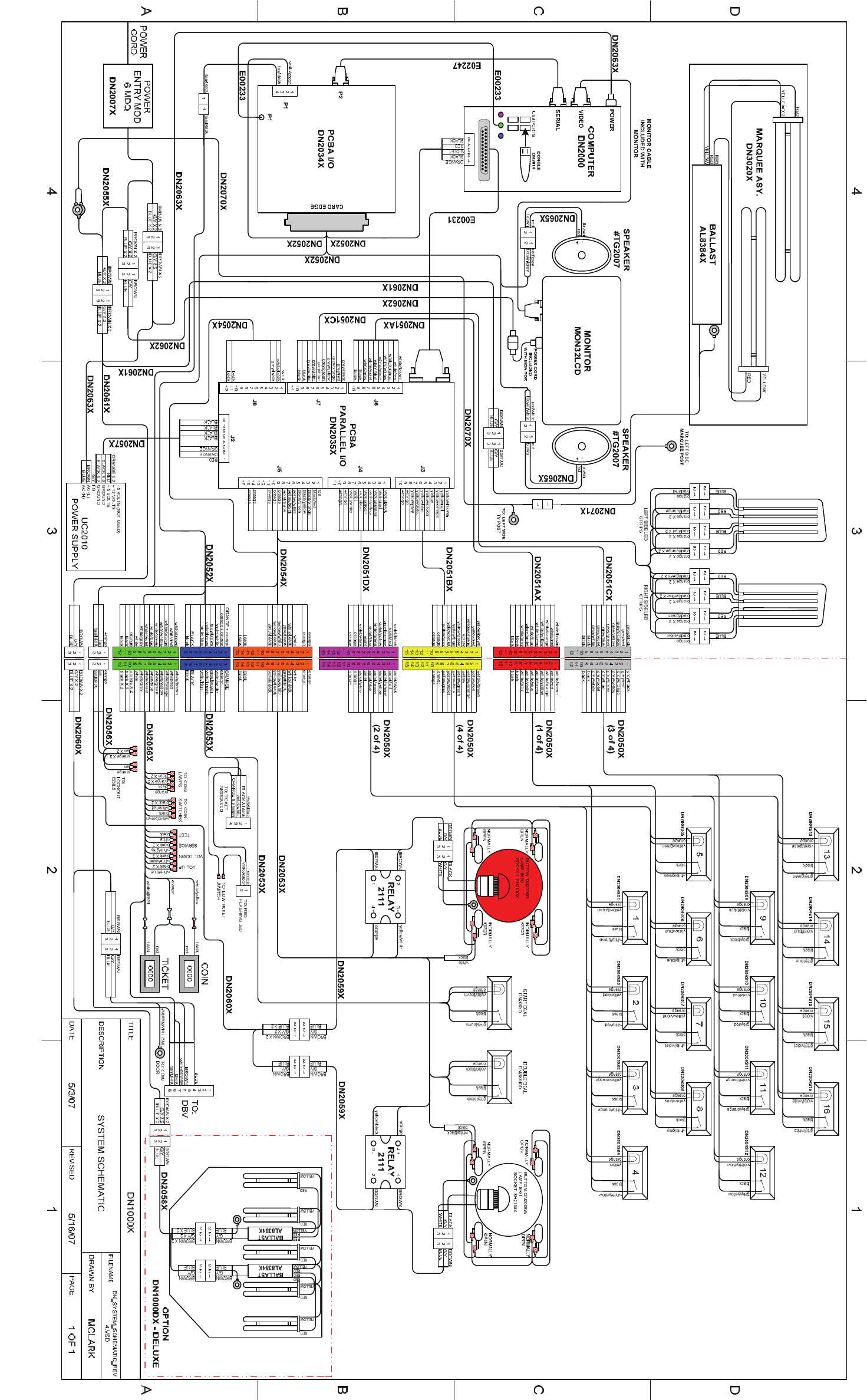
SCHEMATICS
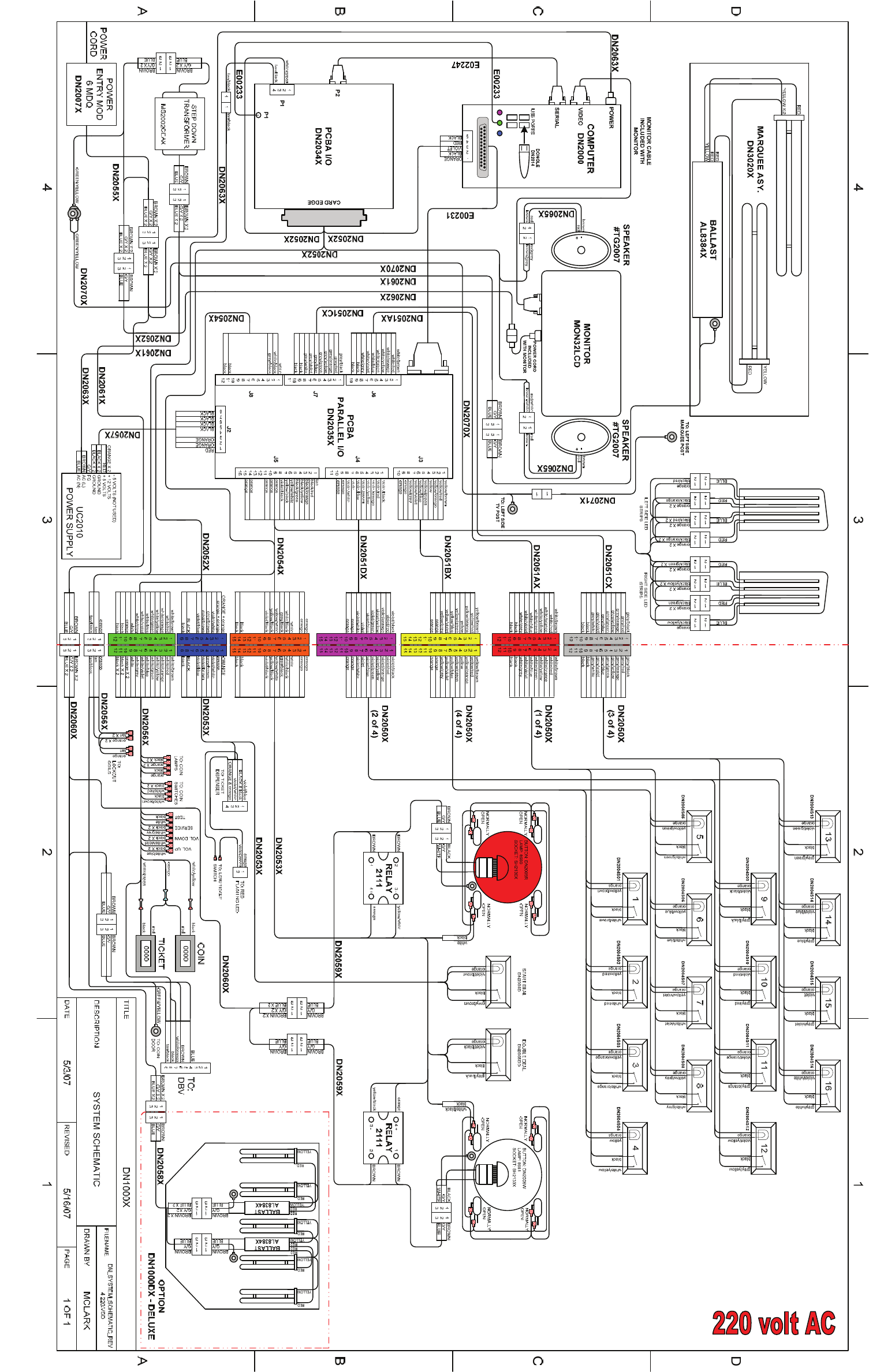
SEE INCLUDED BOOKLET
Revision D 7/10/2008

3
BEFORE YOU BEGIN
WARNING: WHEN INSTALLING THIS GAME, A GROUNDED A.C. RECEPTACLE MUST BE
USED. FAILURE TO DO SO COULD RESULT IN INJURY TO YOURSELF OR OTHERS. FAIL-
URE TO USE A GROUNDED RECEPTACLE COULD ALSO CAUSE IMPROPER GAME OPERA-
TION, OR DAMAGE TO THE ELECTRONICS.
DO NOT DEFEAT OR REMOVE THE GROUNDING PRONG ON THE POWER CORD FOR
THE SAME REASON AS GIVEN ABOVE. USING AN IMPROPERLY GROUNDED GAME
COULD VOID YOUR WARRANTY.
HAVE A QUALIFIED ELECTRICIAN CHECK YOUR A.C. RECEPTACLE TO BE SURE THE
GROUND IS FUNCTIONING PROPERLY.
INSTALLATION
The game comes ready to play with just a few simple things to keep in mind.
1. Plug the game into the A.C. outlet and turn on power to the game. The switch for the game
is located on a power module on the outside rear of the game.
THIS GAME IS DESIGNED TO DISSIPATE STATIC ELECTRICITY THROUGH THE GROUNDING
PLANE OF THE GAME. IF THE A.C. GROUND DOES NOT WORK, THE GAME COULD DISCHARGE
STATIC ELECTRICITY THROUGH THE GAME CIRCUITRY, WHICH COULD CAUSE DAMAGE.
2. Make sure the game is level after installation. It is necessary to make sure the game is
level for safety concerns.
3. Check that the A.C. voltage rating on the back of the game matches the A.C. voltage of
your location.
THE POWER SUPPLY IS NOT VOLTAGE ADJUSTABLE. TO OPERATE THE GAME AT VOLTAGES
OTHER THAN THOSE IT WAS DESIGNED FOR. PLEASE CONTACT OUR SERVICE DEPARTMENT
FOR VOLTAGE CONVERSION INFORMATION.
WARNING
DO NOT remove any of the components on the main board (e.g. compact flash and
eproms) while the game is powered on. This may cause permanent damage to the
parts and the main board. Removing any main board component part while powered
on will void the warranty. DO NOT attempt to clean the game with any kind of pres-
sure washer or powered water cleaner. Serious injury could occur.
NOTE: THIS GAME IS INTENDED FOR INDOOR USE ONLY.
ON THE BACK PANEL OF THE GAME: WARNING: SHOCK HAZARD - DO NOT
OPEN. REFER SERVICING TO SERVICE PERSONNEL.
SAFETY AND WARNINGS
4
Player Controls
To begin the game, insert the proper number of credits. DEAL OR NO DEAL is a one player
game. Select DEAL or DOUBLE DEAL to begin the game. Selecting Double Deal dou-
bles the amount of tickets!
Playing the Game
The object of the game is to wind up with the highest value deal as possible. The player se-
lects his/her case. Then the player must determine which cases he/she feels hold the lowest
value. By selecting the cases, the player eliminates potential deal values. Round to round the
banker will offer a deal value that the player is entitled to take. If a deal is taken, the game dis-
penses the deal value in tickets and the game ends. If the player does not take the bankers
deal value throughout the game, he/she will be left with the value inside his/her case. The
game will dispense the value of tickets in his/her case and the game ends.
Initial Game Setup
The game is setup at the factory with the recommended factory settings. The settings may be
adjusted by accessing the menu system. The game’s menu system is a series of on screen
menus that allow the operator to setup or adjust the settings. Each menu provides the ability to
adjust a specific setting or access another menu with other game settings.
To access the menu system press the program button inside the coin door. The main menu will
appear on the game screen. To navigate the menu system use volume up to scroll up and vol-
ume down to scroll down. To select a menu option use the program button. Use the volume
up and down buttons to scroll through the setting levels on specific menu option screens. Use
the program button to select and save desired setting level.
Assembly - Main cabinet to podium and speaker mount
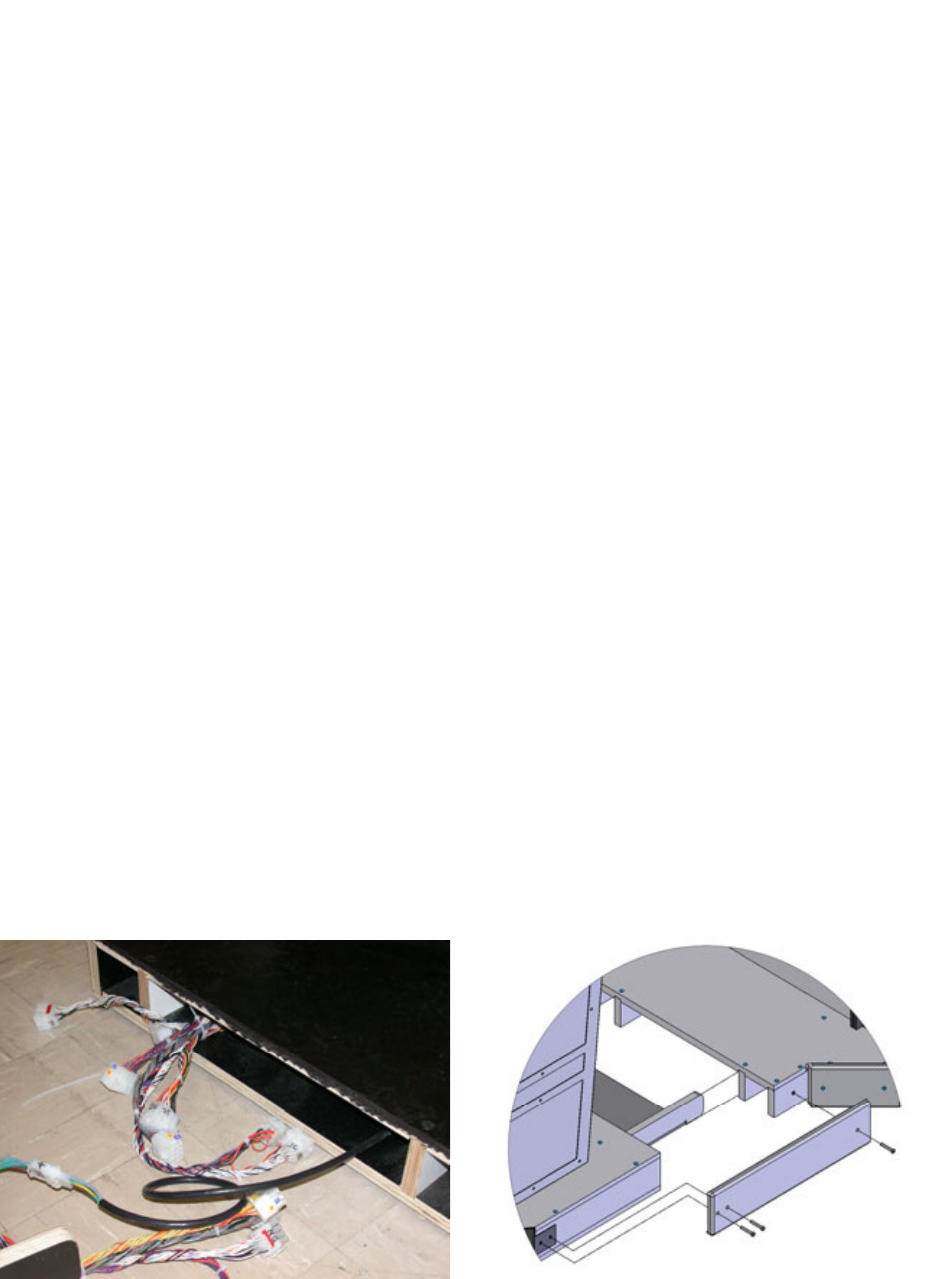
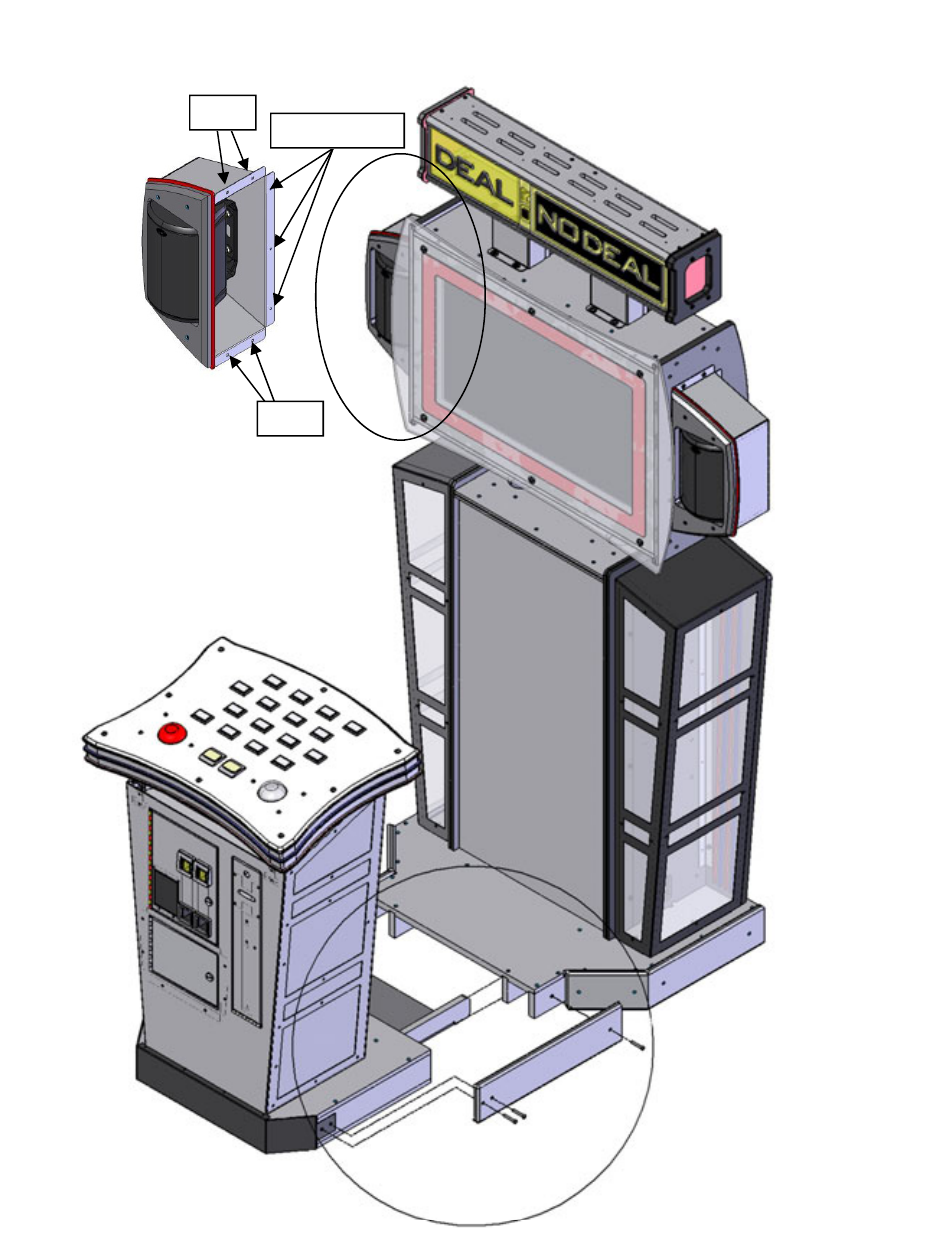
Start by attaching all electrical connections first. Now slide the podium flush to the main cabi-
net and attach the side mounting brackets with three mounting screws. To attach the side
speakers onto the main cabinet first connect the two wire connector to the speaker. Then in-
stall the two top and bottom bolts. Finally install the three back wood screws to complete the
mounting of the speaker unit. See diagrams below and on the next page.
GAME SETUP AND FEATURES
5
GAME SETUP AND FEATURES
Assembly - Main cabinet to podium Hardware.
Bolts
Bolts Wood screws
6
GAME SETUP AND FEATURES
Stool to Platform Assembly
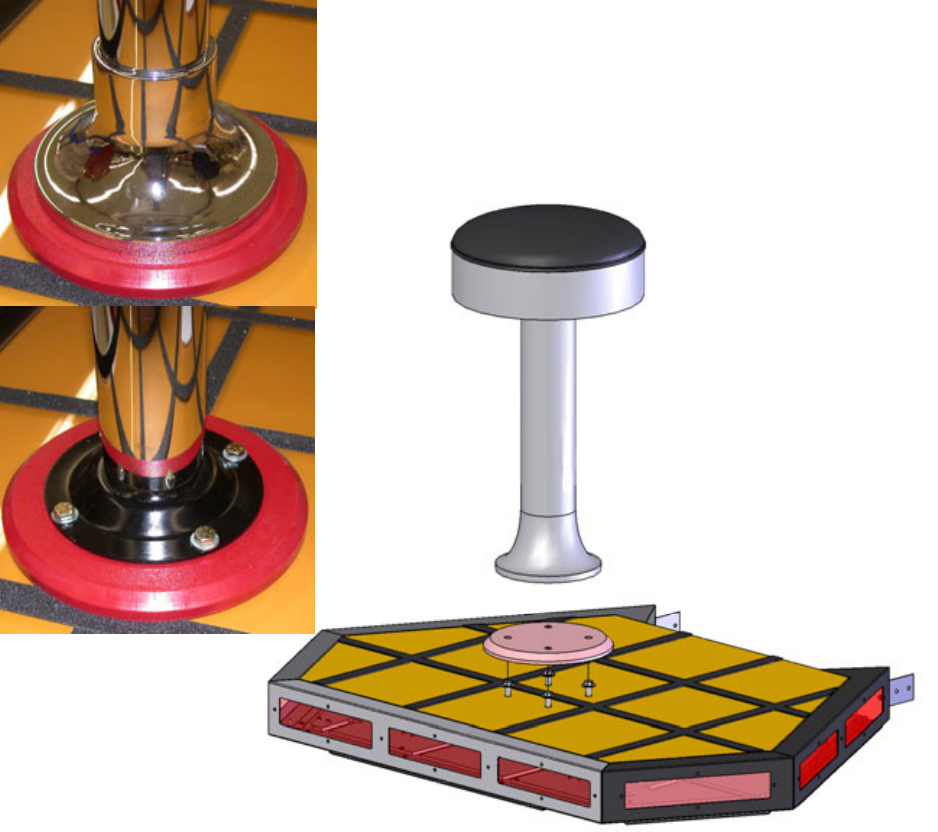
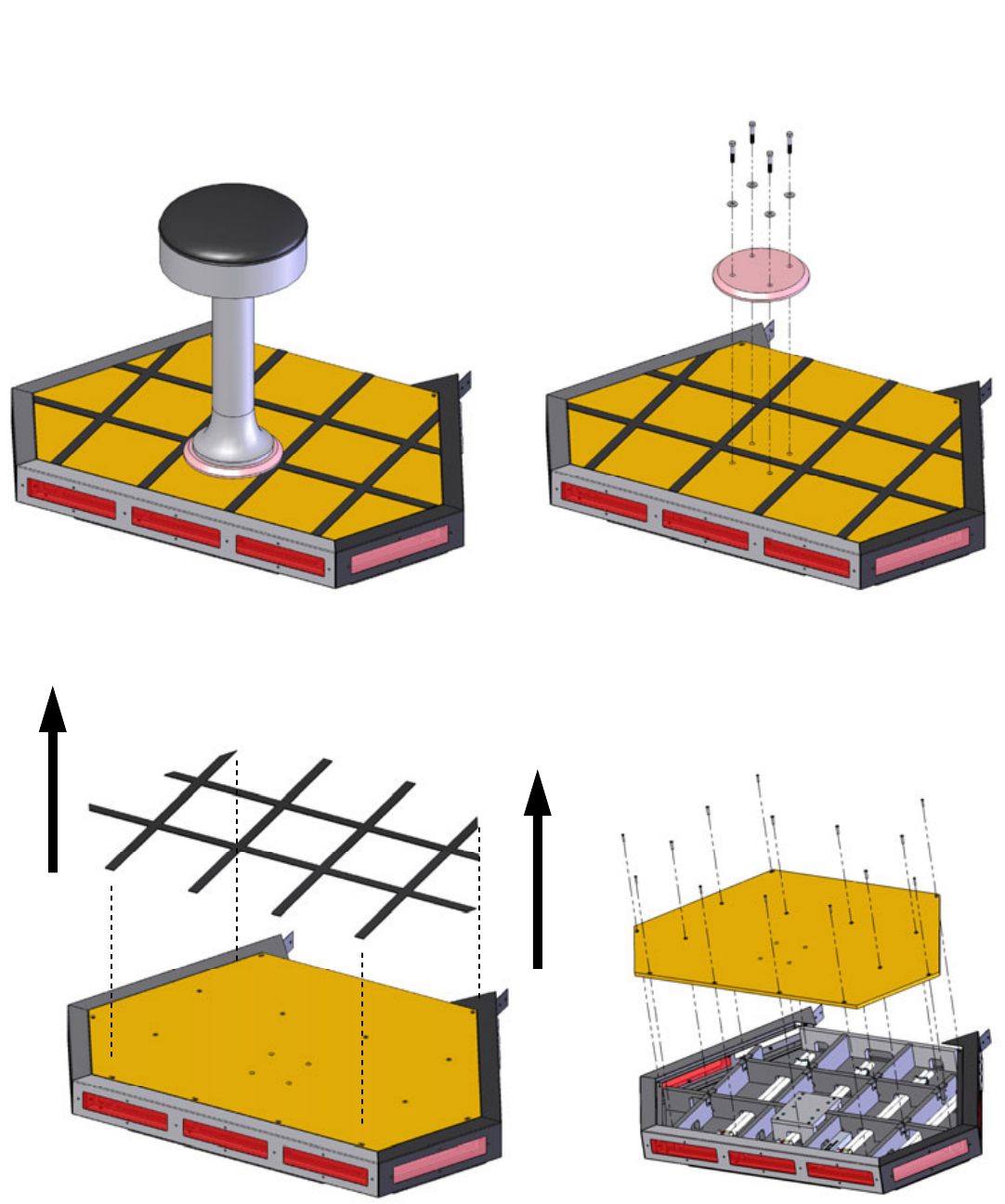
If you purchased the Deluxe version of Deal or No Deal you will need to attach the
stool onto the base by removing the bolts and washers holding the red spacer to the
platform. Lift the bottom collar ring up on the stool and exposing the four mounting
holes. See pictures below. . Align the stool so you can insert four bolts with washers
through the mounting holes and tighten. Replace the collar. See diagram below.
Platform to Cabinet Assembly
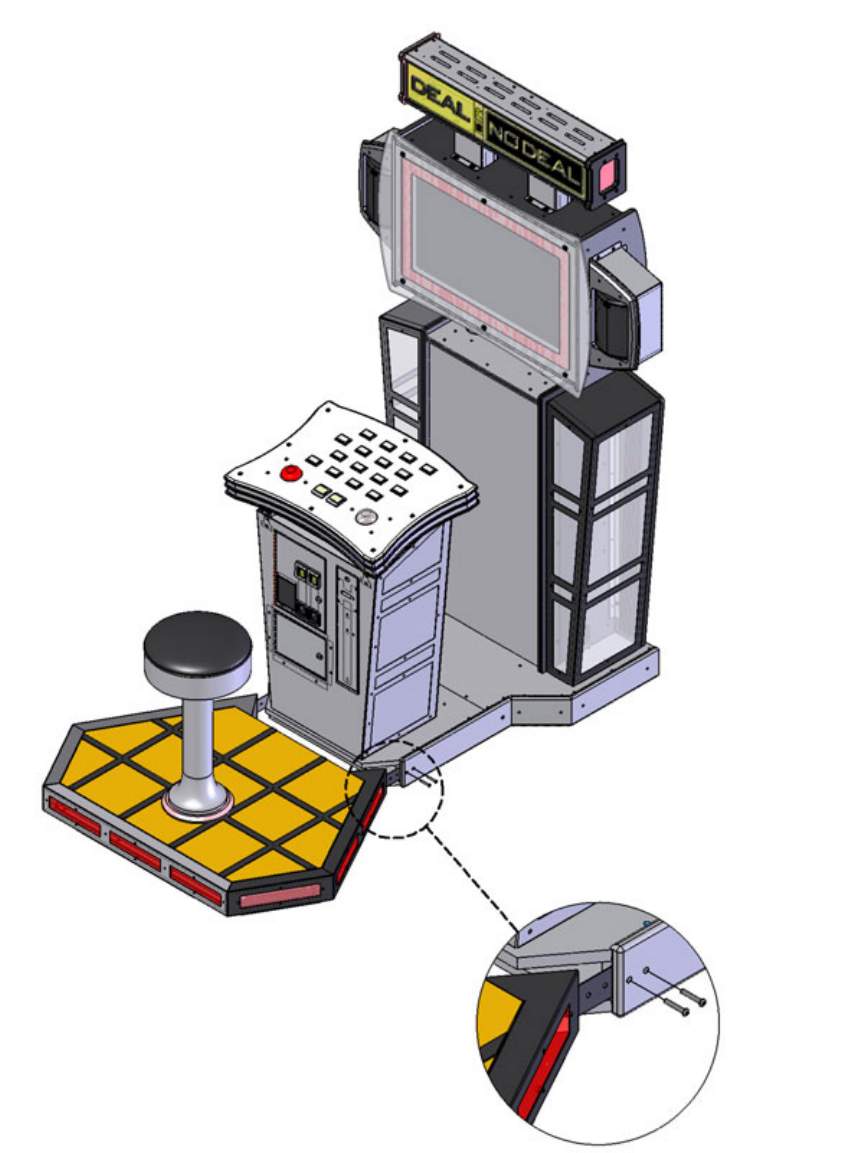
Now attach the stool assembly to the podium by removing the front bottom bezel. Now
slide the stool assembly into the cabinet and attach two mounting screws on both
sides. See pictures below and diagram on the next page.
7
GAME SETUP AND FEATURES
Platform to Cabinet Assembly cont.
8
Maintenance
Access the Computer
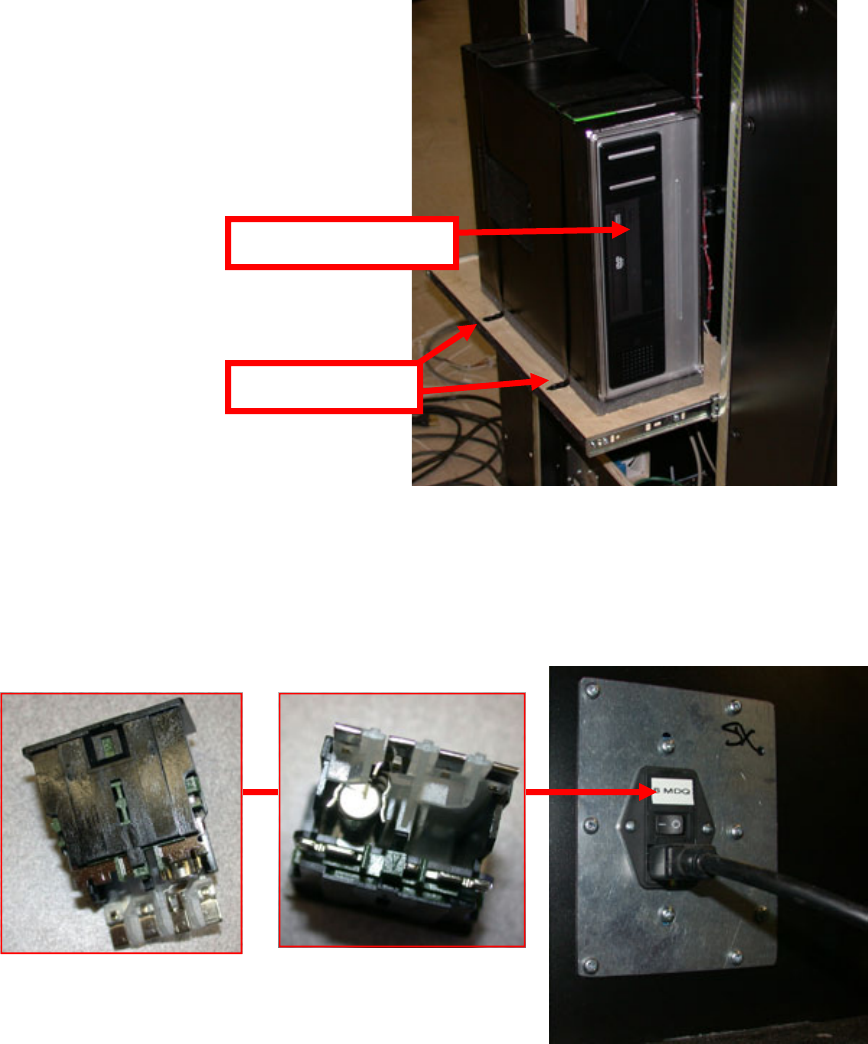
Remove the back cover and slide the computer drawer out. You can access the CDROM drive from the
front of the computer. To replace the computer remove the two screws that hold the computer clamp
down to the drawer. Remove all connectors to the computer before removing. See picture below.
AC Power Fuse
Located in the power module is a 6 amp slow blow fuse. To check or replace the fuse
pull the tab with the label out. There is only one fuse installed. See diagram below.
Mounting Screws
CDROM Drive
9
Maintenance
Power Supply Adjustment/Replacement
The power supply is accessed through the back of the game. Remove the back door
panel to gain access to the power supply.
To replace the power supply remove the two mounting screws and all wires connecting
to the power supply. Take note in which wires go into which connector before remov-
ing them. Replace the power supply with same type of unit and reconnect all wires
matching their previous locations then install the two mounting screws.
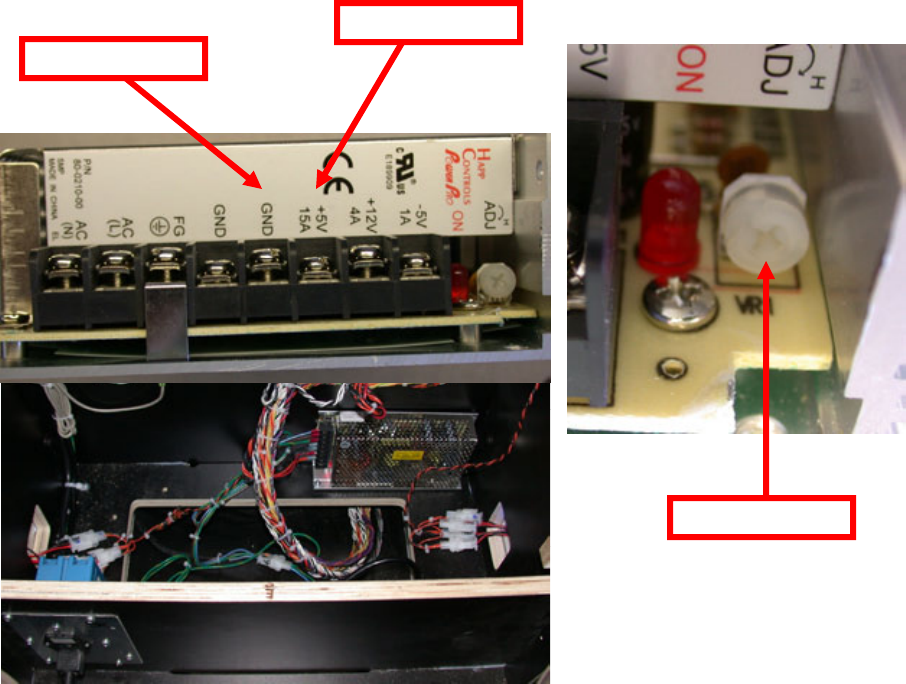
To adjust the power supply turn the adjustment pot located at the bottom of the power
supply until +5 is between +4.95 – 5.10. To measure the power supply’s voltage
place the positive lead on the red wire and the negative lead on the black wire. Set
your meter to DC voltage. See pictures below.
Black/Negative lead
Red/Positive lead
Adjustment Pot
10
Maintenance
Main Board and I/O Replacement
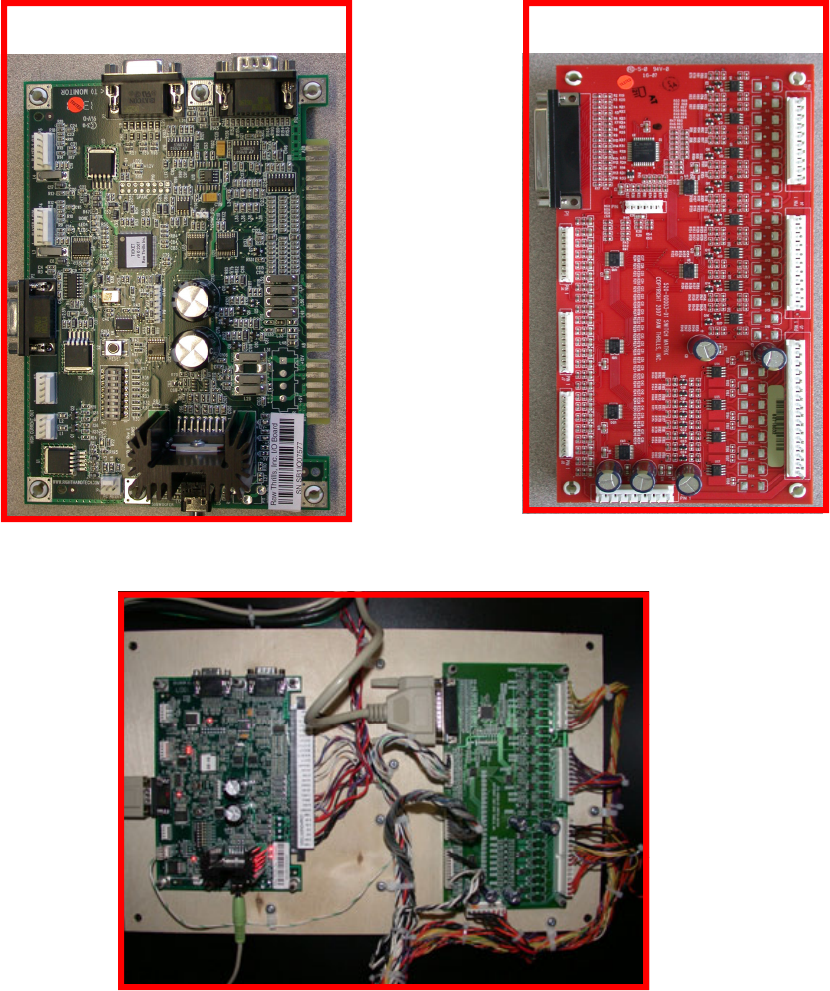
To Remove the main board, unplug the JAMMA connector, serial cable (P2), audio ca-
ble (P8), and p1. Now remove the four plastic hex nuts. Assembly in reverse.
To remove the I/O board, unplug connectors P1, J2, J3, J4, J5, J6, J7, and J8. Re-
move the four plastic hex nuts. Assembly in reverse.
I/O Board
J3
J4
J5
P1
J6
J7
J8
J2
Main Board
JAMMA
P2
P1
P8
11
Maintenance
Platform Light Bulb Replacement
Begin by removing the stool. Lift up the chrome bezel at the bottom of the stool and remove the four
bolts that attach the stool to the platform.
Remove the anti-slip tape from the platform to expose the fourteen screws that attach the floor to the
stage. Now remove the floor. You can now access the fluorescent bulbs.
12
Maintenance
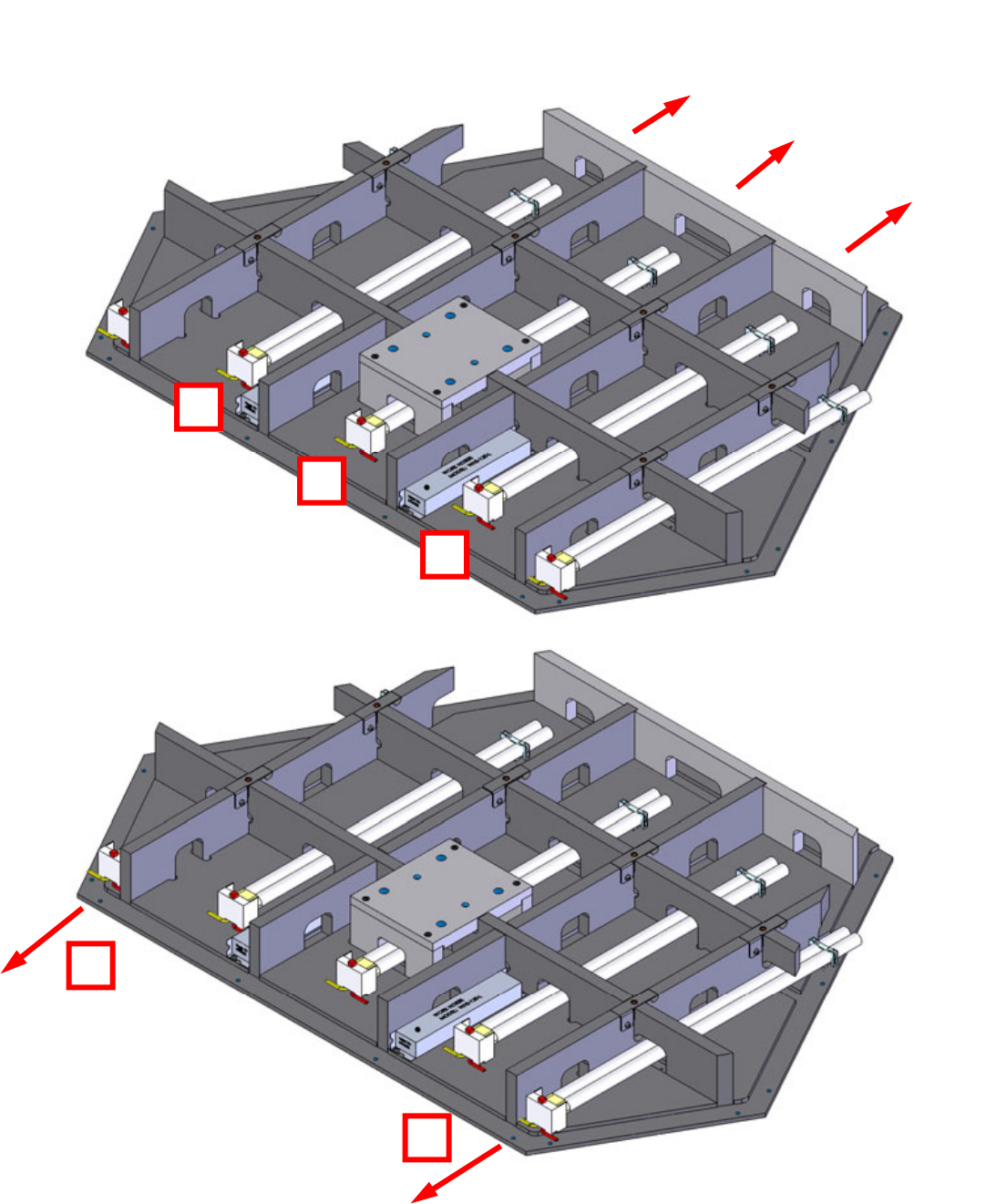
To replace bulbs 2,3, and 4 press the red button, remove the plastic retainers, lift up, and slide out
as shown below. To replace bulbs 1 and 5 press the red button, remove the plastic retainers, and lift
up and out as shown below.
4
2
3
5
1
13
Marquee Bulb Replacement
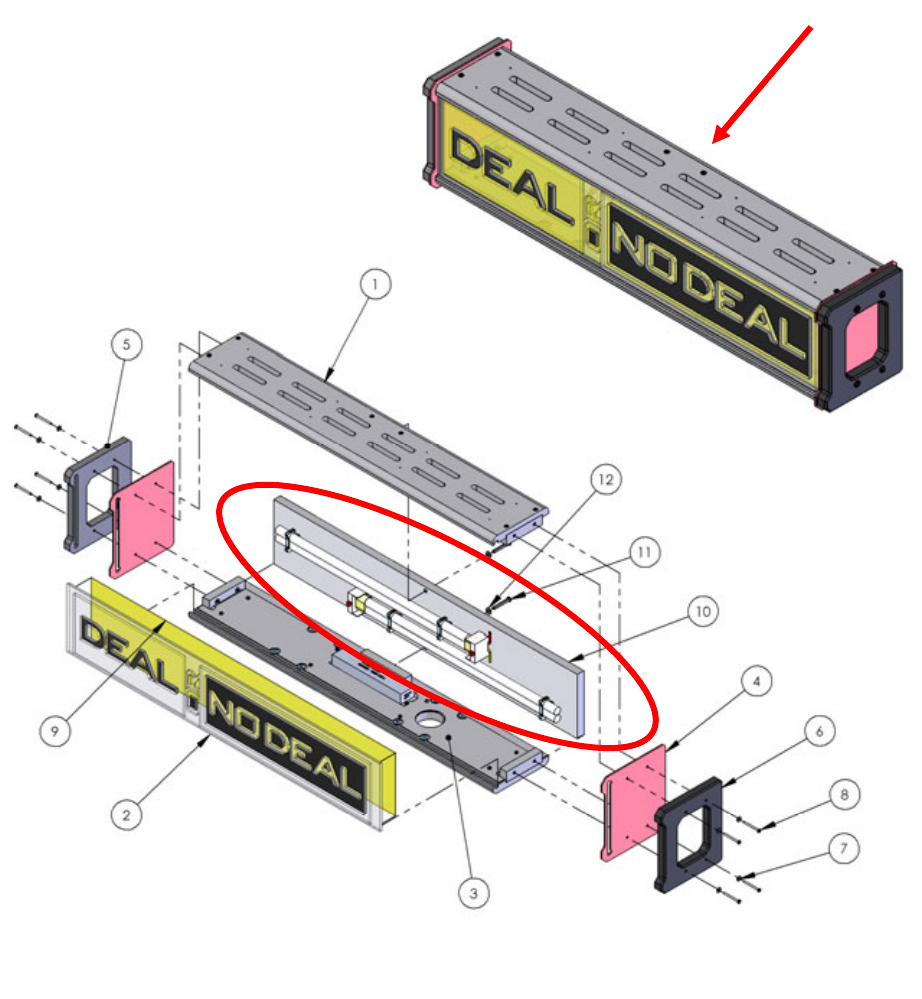
To replace the fluorescent bulbs inside the marquee, remove the back panel by remov-
ing the upper and lower bolts from behind only. The bulbs are mounted onto this
panel. Remove the plastic retainer clips and press the red buttons to eject the bulbs.
Replace in reverse order. See Red circle below.
Maintenance
14
Maintenance - Monitor Enclosure
Monitor Replacement
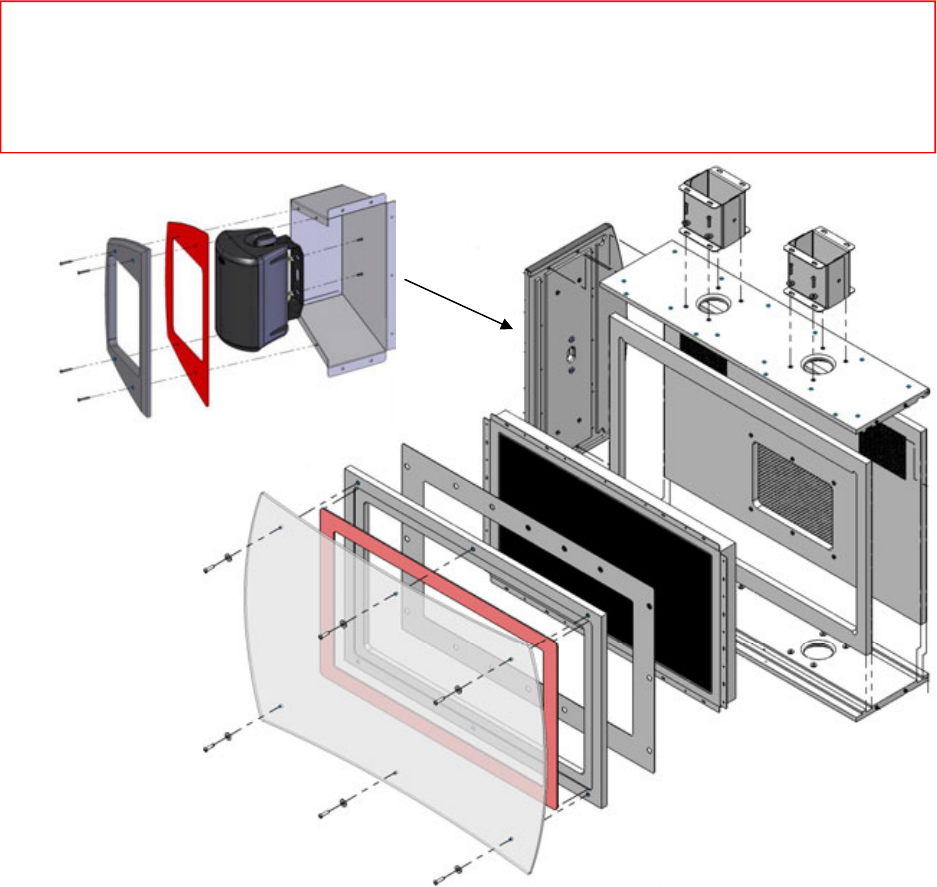
To access the monitor, remove the six front screws shown below. Remove the front
plastic and bezel. Now remove the mounting screws that hold the monitor to the cabi-
net. See diagram below
Speaker Replacement
The speaker is accessed through the front of the assembly as shown below. Unscrew
the four security screws and remove the front cover. Now remove the two nuts holding
the speaker to the speaker housing. Unplug the speaker wire connection. Assembly
in reverse. See diagram below.
** Warning **
Use a soft lint free cloth to clean the plastic. Do not use ammonia based glass cleaners on clear plastic
surfaces. Doing so will cause the plastic to fog over a period of time. Any ammonia free glass cleaner
is recommended. Novus (cleaner #1) makes a special plastic cleaner that reduces static build up and
restores a glass shine back to the plastic.
15
Maintenance - Monitor Enclosure
Monitor Adjustments
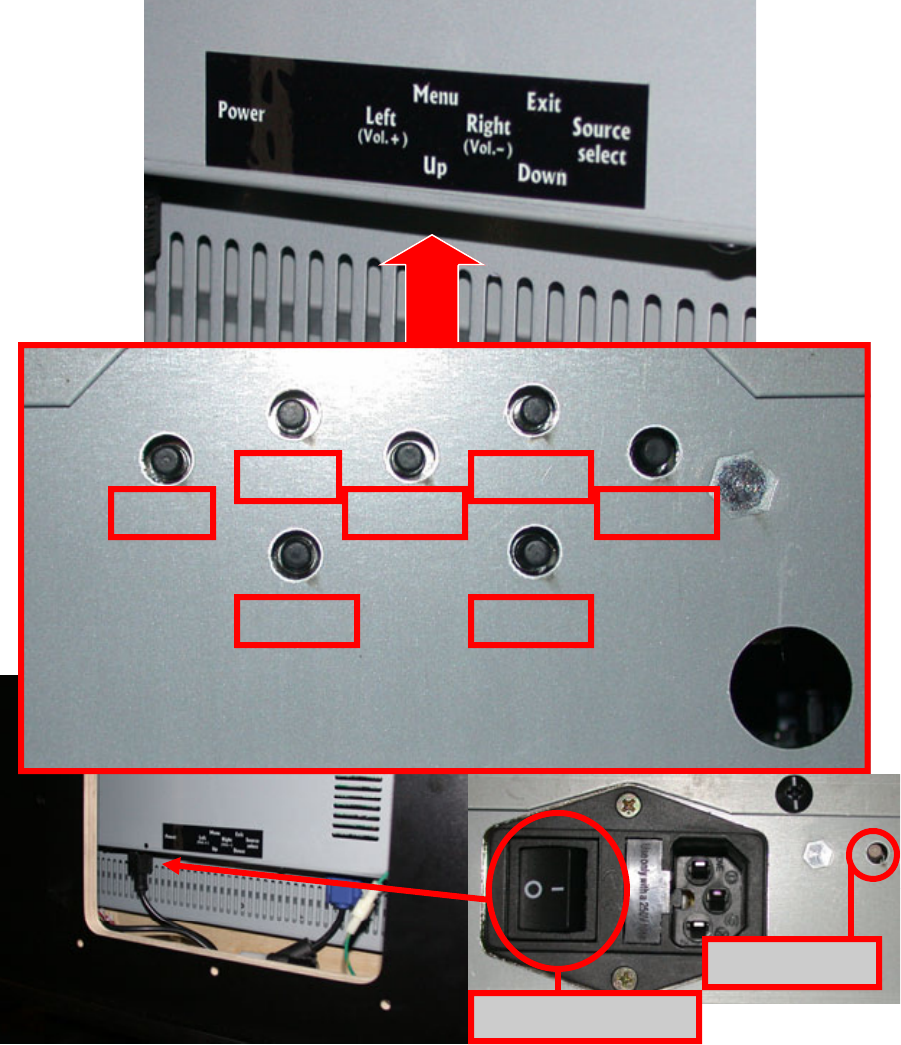
The controls of the monitor are accessed through the back of the monitor cabinet di-
rectly underneath the black label. The configuration of the buttons are in the same pat-
tern printed. See pictures below.
Left
Up
Menu
Right
Down
Exit
Source
Power LED
Power Switch
16
Deal No Deal buttons
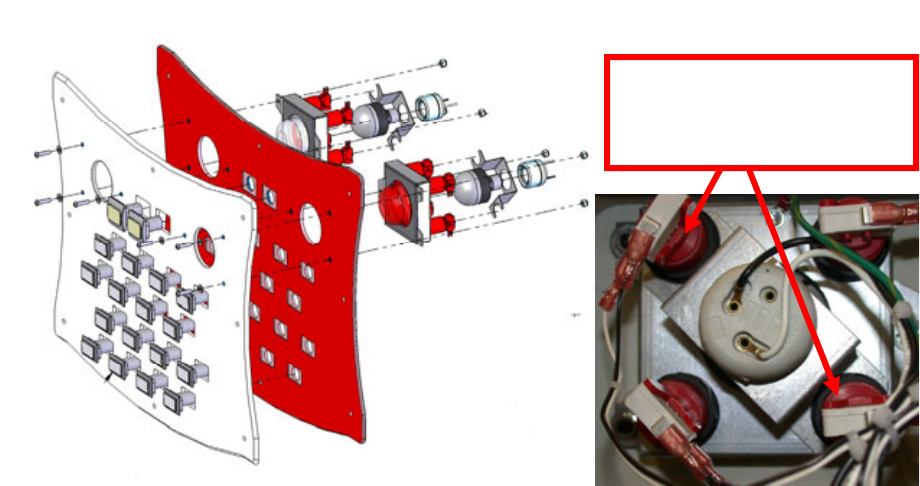
Bulbs:
The Fluorescent bulbs are 110V ac and should only be replaced with the power off.
Do not replace with incandescent type bulbs as the socket is not designed for this and
is a fire hazard. When replacing use ICE Part numbers 8980 (red) and 8981 (white).
To access the bulbs remove the two switches holding the metal bracket with the bulb
socket on it. Now slide the bracket out and replace the bulb. Assemble in reverse.
See diagram below.
Switches:
The MEGA switch is made up with four smaller switches acting as one. When replac-
ing the switch it is important to connect the normally open lead of the switch and
ground. No wire should connect to Normally closed. When testing switches, your me-
ter should read less then a ohm with it set to ohms test. There are two different switch
assemblies used. ICE part number DN2006R (red) and DN2006W (white).
Suit Case Buttons
Bulbs and Switches:
The bulbs used in the suit cases are 12volt DC LEDs. They are glued in the socket
and cannot be removed. You must replace this as a assembly. The ICE part numbers
are DN2004S01 through DN2004S16. These are connected Normally open and no
wire should be connected to Normally closed lead. When testing switches, your meter
should read less then a ohm with it set to ohms test. The positive wire (orange) must
connect to the + lead on the LED bulb. The yellow with a color strip is the - on the LED
bulb. The Yellow start buttons are DN2005DD (double deal) and DN2005S (Deal).
Maintenance - Buttons
Remove these buttons to
remove bulb socket
bracket.
17
Side Light Replacement
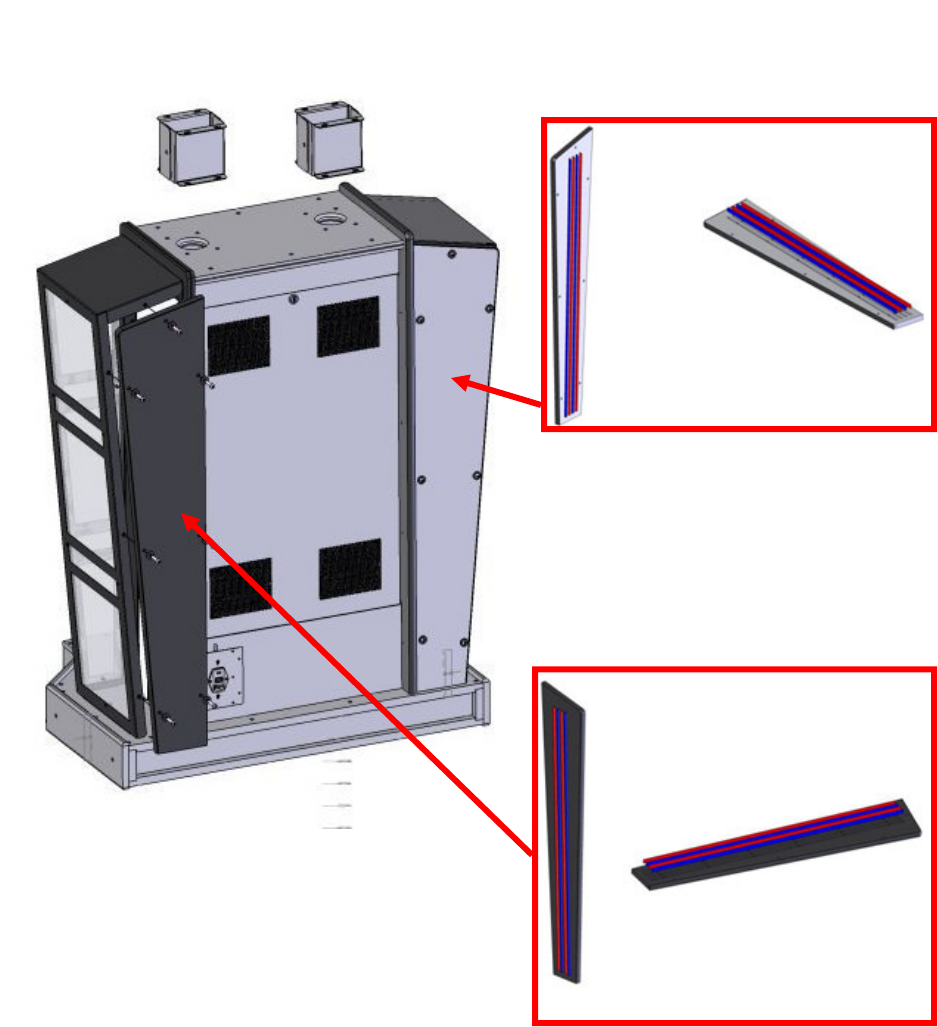
Your cabinet changes color depending on the action of the game. To accomplish this
LED technology is used. There are three separate colors of LED strips which look the
same. It is important to replace the color strips with the correct color. To access the
strips, remove the back side panels. The LED strips are mounted on this panel. Refer
to the diagram below for correct part numbers when ordering.
Maintenance - Cabinet Mood Lighting
ICE Part numbers:
DN8978x - RED
DN8979X - BLUE
QTY 4 per game
18
Spare Parts Listing
Mechanical
CP1050 DRAWER SLIDE
DN1015 COMPUTER STRAP
DN4001 COMPUTER FOAM PAD
TG4002 Stool
Electrical
DN8978X DIP red LED
DN8979X DIP red LED
DN2000 Computer
DN2014 Dongle
DN2034x I/O Board (serial)
MON32LCD 32” TFT Monitor
DN2007x Power Module
TG2007 Polk Speakers
UC2010 Switching Power Supply
DN2035x I/O Board (parallel)
E00231 Parallel Cable
E02247 Serial Cable
DN2090x Restore CD
8980 LED Bulb 110VAC (red)
8981 LED Bulb 110VAC (white)
DN2004S01 ‘Briefcase’ #1 Button
DN2004S02 ‘Briefcase’ #2 Button
DN2004S03 ‘Briefcase’ #3 Button
DN2004S04 ‘Briefcase’ #4 Button
DN2004S05 ‘Briefcase’ #5 Button
DN2004S06 ‘Briefcase’ #6 Button
DN2004S07 ‘Briefcase’ #7 Button
DN2004S08 ‘Briefcase’ #8 Button
DN2004S09 ‘Briefcase’ #9 Button
DN2004S10 ‘Briefcase’ #10 Button
DN2004S11 ‘Briefcase’ #11 Button
DN2004S12 ‘Briefcase’ #12 Button
DN2004S13 ‘Briefcase’ #13 Button
DN2004S14 ‘Briefcase’ #14 Button
DN2004S15 ‘Briefcase’ #15 Button
DN2004S16 ‘Briefcase’ #16 Button
HH5005D Ticket Dispenser
DN2005DD Yellow “Double Deal” Button
DN2005S Yellow “Start” Button
DN2006R Mega Push Button (RED)
DN2006W Mega Push Button (WHITE)
8312 Bulb (40W)
AL8384x Ballast (marquee)
CX8384x Ballast (Stool Base)
PP250x Bulb Socket
Graphics
DN7003 Cabinet Front
DN7005 Monitor Bezel
DN7006 Floor Graphic—Yellow
19
Warranty
I.C.E warrants all components in the Deal Or No Deal™ game to be free of
defects in materials and workmanship for a period of ninety days and the
LCD monitor one year from the date of purchase.
This warranty does not cover items damaged due to normal wear and tear,
subjected to abuse, improperly assembled by the end user, modified, re-
paired, or operated in a fashion other than that described in the service man-
ual.
If your Deal or No Deal™ game fails to conform to the above-mentioned
warranty, our sole responsibility shall be at our option to repair or replace any
defective component with a new or remanufactured component of equal to or
greater O.E.M. specification.
I.C.E. will assume no liability whatsoever, for costs associated with labor to
replace defective parts, or travel time associated therein.
Our obligation will be to ship free of charge, replacement parts by domestic
U.P.S. Ground, domestic U.S. mail, or other comparable domestic shipping
means. Any express mail, overnight, or international shipping expense is at
the cost of the purchaser.
Products will be covered under warranty only when:
· The serial number of the game with the defective parts is given. A RMA
number has been issued by an I.C.E. technical representative.
· The serial number of the defective part, if applicable, is given..
· A copy of the sales receipt is available as proof of purchase upon request
of I.C.E.
I.C.E. distributors are independent, privately owned and operated. In their
judgment, they may sell parts or accessories other than those manufactured
by I.C.E. We cannot be responsible for the quality, suitability, or safety of any
non-I.C.E. part, or any modification, including labor, which is performed by
such a distributor.

20
ICE Inc warrants that all of its products will be free from defects in material and workmanship.
When placing a warranty request, please be prepared to provide the following information:
· Serial Number of Game or Bill of Sale
· Machine Type
· A Detailed Description of the Equipment Fault Symptoms
ICE product, including Cromptons, Sam’s Billiards, Uniana and Bell Fruit is warranted as fol-
lows:
· 180 days on the Main PCB and Computers
⋅ 180 days on Motors
· 90 days on all other components (i.e. DBV’s, Ticket Dispensers, etc)
· 30 days on repaired items
· 3 years on all Crane Harnessing
· 9 Months on Printers
ICE Inc shall not be obligated to furnish a warranty request under the following conditions:
· Equipment has been subjected to unwarranted stress through abuse or neglect
· Equipment has been damaged as a result of arbitrary repair/modification attempts
· Equipment that has failed through normal wear and tear
ICE Inc will assume no liability whatsoever for costs associated with labor to replace defective
parts or travel time associated therein.
All defective warranty covered components will be replaced with new or factory refurbished
components equal to OEM specifications. ICE Inc will cover all UPS ground, or comparable
shipping means, freight costs during the warranty period. Expedited shipments are available for
an additional charge.
Defective parts are returned to ICE Inc, at the customer’s expense, in a timely fashion.
ICE distributors are independent, privately owned and operated. In their judgment, they may
sell parts
and/or accessories other than those manufactured by ICE Inc. We cannot be responsible for
the quality, suitability or safety of any non-ICE part, modification (including labor) that is per-
formed by such a
distributor.
I.C.E. Parts/Service Dept.
Innovative Concepts in Entertainment
10123 Main St.
Clarence, NY 14031
Phone #: (716) - 759 – 0360
Fax #: (716) – 759 – 0884
ICE Inc warrants that all of its products will be free from defects in material and workmanship.
When placing a warranty request, please be prepared to provide the following information:
· Serial Number of Game or Bill of Sale
· Machine Type
· A Detailed Description of the Equipment Fault Symptoms
ICE product, including Cromptons, Sam’s Billiards, Uniana and Bell Fruit is warranted as follows:
· 180 days on the Main PCB and Computers
⋅ 180 days on Motors
· 90 days on all other components (i.e. DBV’s, Ticket Dispensers, etc)
· 30 days on repaired items
· 3 years on all Crane Harnessing
· 9 Months on Printers
ICE Inc shall not be obligated to furnish a warranty request under the following conditions:
· Equipment has been subjected to unwarranted stress through abuse or neglect
· Equipment has been damaged as a result of arbitrary repair/modification attempts
· Equipment that has failed through normal wear and tear
ICE Inc will assume no liability whatsoever for costs associated with labor to replace defective parts or
travel time associated therein.
All defective warranty covered components will be replaced with new or factory refurbished components
equal to OEM specifications. ICE Inc will cover all domestic UPS ground, or comparable shipping means,
freight costs during the warranty period. Expedited shipments are available for an additional charge.
Defective parts are returned to ICE Inc, at the customer’s expense, in a timely fashion.
ICE distributors are independent, privately owned and operated. In their judgment, they may sell parts
and/or accessories other than those manufactured by ICE Inc. We cannot be responsible for the quality,
suitability or safety of any non-ICE part, modification (including labor) that is performed by such a
distributor.
I.C.E. Parts/Service Dept.
Innovative Concepts in Entertainment
10123 Main St.
Clarence, NY 14031
Phone #: (716) - 759 – 0360
Fax #: (716) – 759 – 0884
WARRANTY
Contacts at SEGA
Machine Sales
Telephone: +44 (0) 208 391 8090
Fax: +44 (0) 208 391 8099
www.sega-amusements.co.uk
SEGA Spares
Telephone: +44 (0) 208 391 8060
Fax: +44 (0) 208 391 8096
www.segatotalsolutions.com
Customer Services
Telephone: +44 (0) 208 391 8065
Fax: +44 (0) 208 391 8096
