Arcade Deal Or No Street Manual User
2013-11-13
User Manual: Arcade Deal Or No Deal Street Manual
Open the PDF directly: View PDF  .
.
Page Count: 25
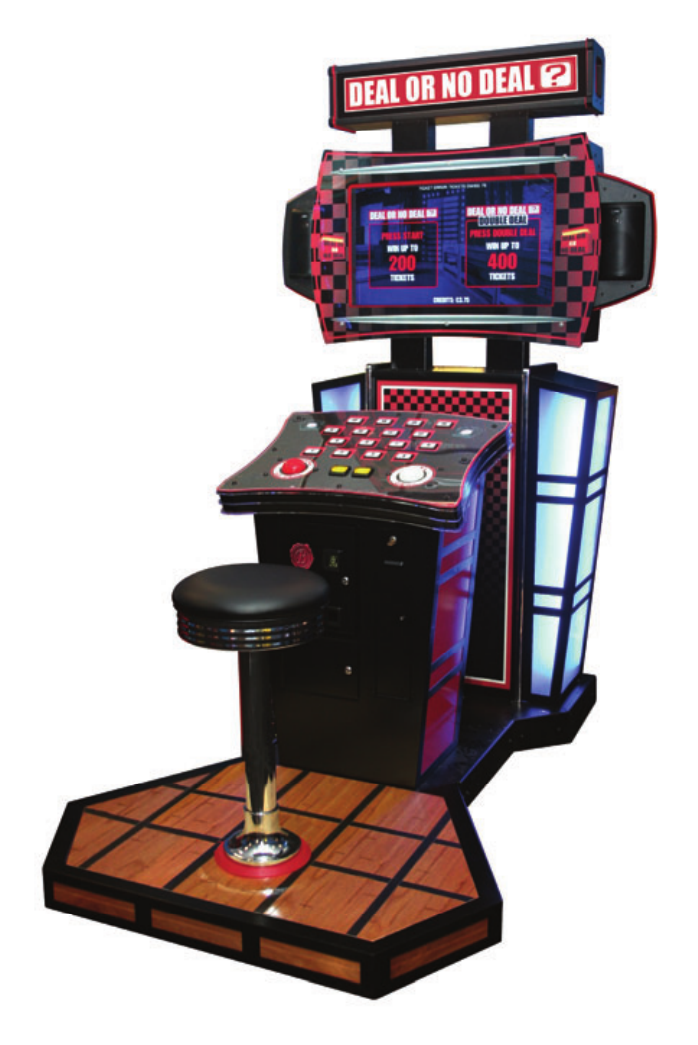
OWNERS AND SERVICE MANUAL
INNOVATIVE CONCEPTS IN ENTERTAINMENT INC.
2
TABLE OF CONTENTS
SAFETY AND WARNINGS 3
• Before You Begin
• Installation
• Warning
GAME SETUP AND FEATURES 4
• Player Controls
• Playing The Game
• Initial Game Setup
• Assembly - Main cabinet to Podium & Speakers 5
• Stool to Platform Assembly 6
ADJUSTMENTS & AUDIT MENU SYSTEM 8
• Main Menu
• Operator Adjustments
• Game Adjustments
• Ticket MECH adjustments
• Coin Settings
• Player Cost/ Payout
• Volume
• General Audits
• Game Audits
• Ticket Audits
• System Audits
• Coin Audits
• Reset Menu
• System Test
MAINTENANCE 15
• Access the Computer
• AC Power fuse
• Power Supply Replacement and Adjustments 16
• Main and I/O board replacement 17
• Platform Lights replacement 18
• Marquee Bulbs replacement 19
• Cleaning 20
• Monitor Replacement
• Speaker Replacement
• Monitor Adjustments 21
• Deal No Deal and Suit case Buttons and bulbs 22
• Side Light Replacement
• System Wiring both 110v and 220v See Insert
• Spare Parts List 23
Rev A 1-9-2008

3
BEFORE YOU BEGIN
WARNING: WHEN INSTALLING THIS GAME, A GROUNDED A.C. RECEPTACLE MUST BE
USED. FAILURE TO DO SO COULD RESULT IN INJURY TO YOURSELF OR OTHERS. FAIL-
URE TO USE A GROUNDED RECEPTACLE COULD ALSO CAUSE IMPROPER GAME OPERA-
TION, OR DAMAGE TO THE ELECTRONICS.
DO NOT DEFEAT OR REMOVE THE GROUNDING PRONG ON THE POWER CORD FOR
THE SAME REASON AS GIVEN ABOVE. USING AN IMPROPERLY GROUNDED GAME
COULD VOID YOUR WARRANTY.
HAVE A QUALIFIED ELECTRICIAN CHECK YOUR A.C. RECEPTACLE TO BE SURE THE
GROUND IS FUNCTIONING PROPERLY.
INSTALLATION
The game comes ready to play with just a few simple things to keep in mind.
1. Plug the game into the A.C. outlet and turn on power to the game. The switch for the game
is located on a power module on the outside rear of the game.
THIS GAME IS DESIGNED TO DISSIPATE STATIC ELECTRICITY THROUGH THE GROUNDING
PLANE OF THE GAME. IF THE A.C. GROUND DOES NOT WORK, THE GAME COULD DISCHARGE
STATIC ELECTRICITY THROUGH THE GAME CIRCUITRY, WHICH COULD CAUSE DAMAGE.
2. Make sure the game is level after installation. It is necessary to make sure the game is
level for safety concerns.
3. Check that the A.C. voltage rating on the back of the game matches the A.C. voltage of
your location.
THE POWER SUPPLY IS NOT VOLTAGE ADJUSTABLE. TO OPERATE THE GAME AT VOLTAGES
OTHER THAN THOSE IT WAS DESIGNED FOR. PLEASE CONTACT OUR SERVICE DEPARTMENT
FOR VOLTAGE CONVERSION INFORMATION.
WARNING
DO NOT remove any of the components on the main board (e.g. compact flash and
eproms) while the game is powered on. This may cause permanent damage to the
parts and the main board. Removing any main board component part while powered
on will void the warranty.
NOTE: THIS GAME IS INTENDED FOR INDOOR USE ONLY.
ON THE BACK PANEL OF THE GAME: WARNING: SHOCK HAZARD - DO NOT
OPEN. REFER SERVICING TO SERVICE PERSONNEL.
SAFETY AND WARNINGS
4
Player Controls
To begin the game, insert the proper number of credits. DEAL OR NO DEAL is a one player
game. Select DEAL or DOUBLE DEAL to begin the game. Selecting Double Deal dou-
bles the amount of tickets!
Playing the Game
The object of the game is to wind up with the highest value deal as possible. The player se-
lects his/her case. Then the player must determine which cases he/she feels hold the lowest
value. By selecting the cases, the player eliminates potential deal values. Round to round the
banker will offer a deal value that the player is entitled to take. If a deal is taken, the game dis-
penses the deal value in tickets and the game ends. If the player does not take the bankers
deal value throughout the game, he/she will be left with the value inside his/her case. The
game will dispense the value of tickets in his/her case and the game ends.
Initial Game Setup
The game is setup at the factory with the recommended factory settings. The settings may be
adjusted by accessing the menu system. The game’s menu system is a series of on screen
menus that allow the operator to setup or adjust the settings. Each menu provides the ability to
adjust a specific setting or access another menu with other game settings.
To access the menu system press the program button inside the coin door. The main menu will
appear on the game screen. To navigate the menu system use volume up to scroll up and vol-
ume down to scroll down. To select a menu option use the program button. Use the volume
up and down buttons to scroll through the setting levels on specific menu option screens. Use
the program button to select and save desired setting level.
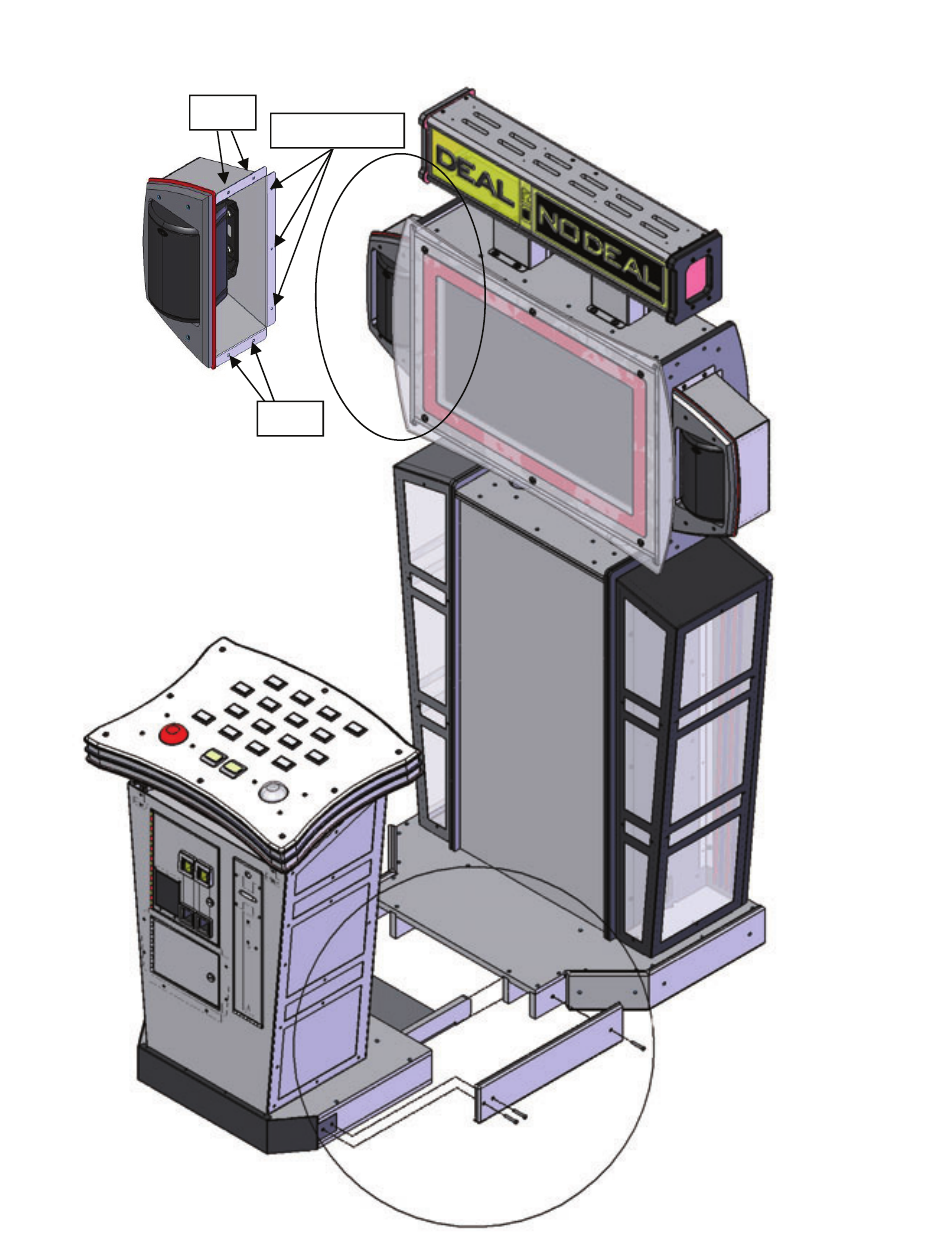
Assembly - Main cabinet to podium and speaker mount
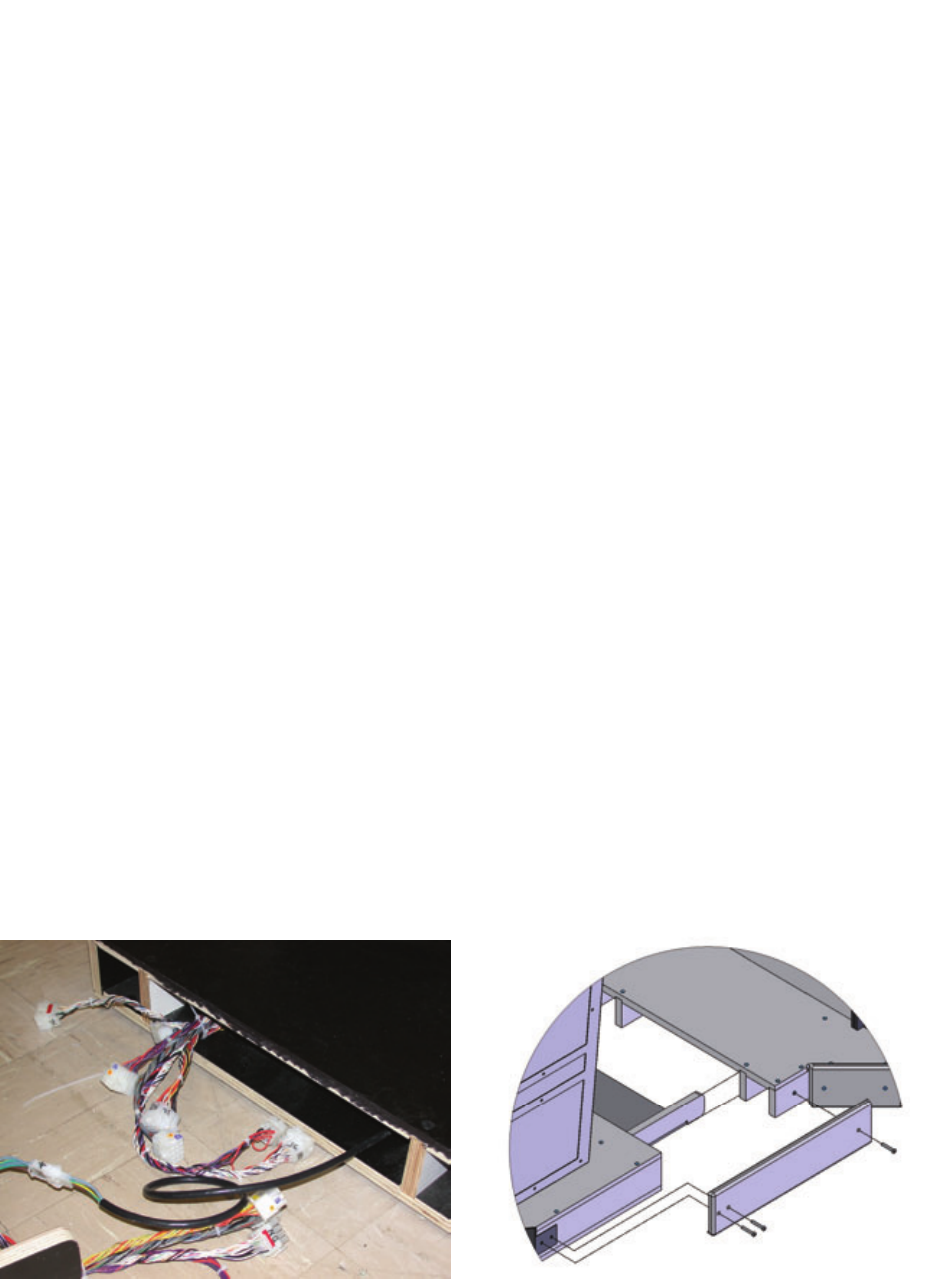
Start by attaching all electrical connections first. Now slide the podium flush to the main cabi-
net and attach the side mounting brackets with three mounting screws. To attach the side
speakers onto the main cabinet first connect the two wire connector to the speaker. Then in-
stall the two top and bottom bolts. Finally install the three back wood screws to complete the
mounting of the speaker unit. See diagrams below and on the next page.
GAME SETUP AND FEATURES
5
GAME SETUP AND FEATURES
Assembly - Main cabinet to podium Hardware.
Bolts
Bolts Wood screws
6
GAME SETUP AND FEATURES
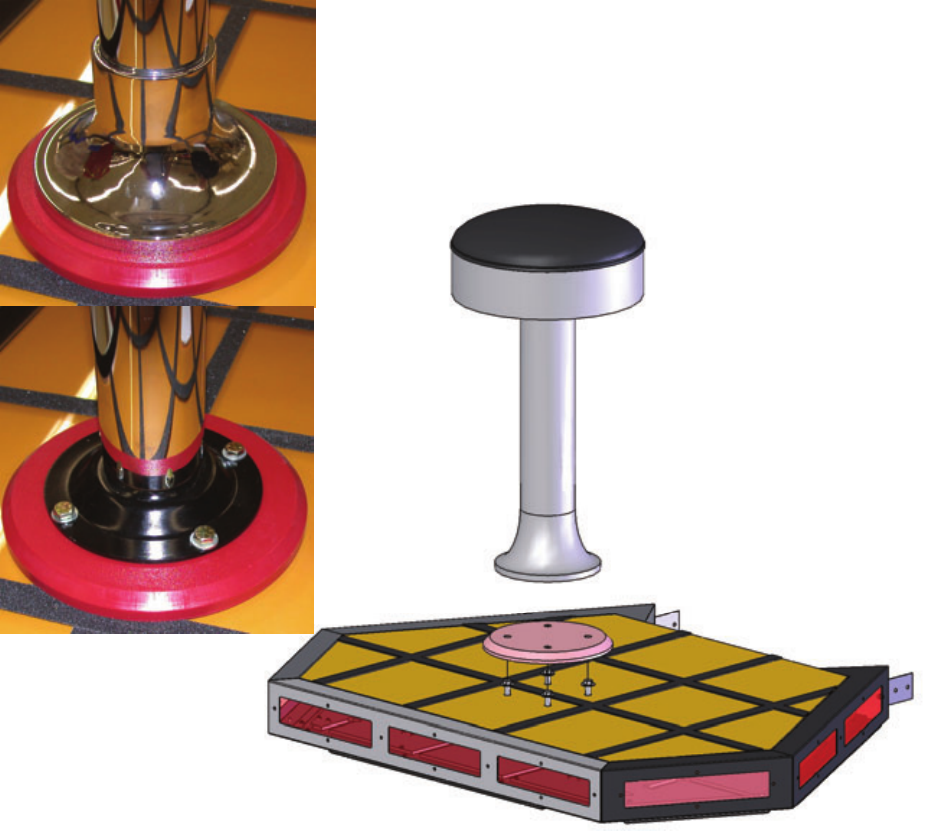
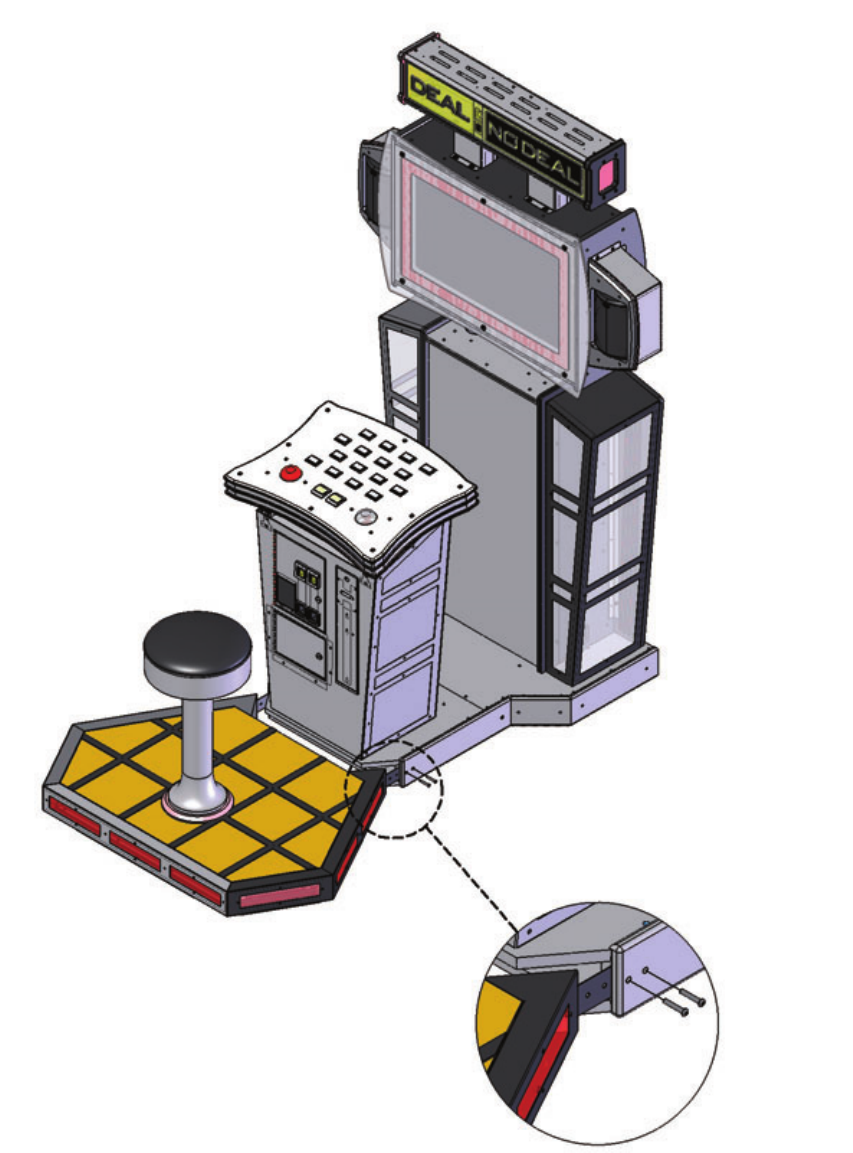
Stool to Platform Assembly
If you purchased the Deluxe version of Deal or No Deal you will need to attach the
stool onto the base by lifting the bottom collar ring up on the stool and exposing the
four mounting holes. See pictures below. Insert four washers and four bolts through
the mounting holes and tighten. See diagram below. Replace the collar. See picture
below.
Platform to Cabinet Assembly
Now attach the stool assembly to the podium by removing the front bottom bezel. Now
slide the stool assembly into the cabinet and attach two mounting screws on both
sides. See pictures below and diagram on the next page.
7
GAME SETUP AND FEATURES
Platform to Cabinet Assembly cont.

8
MAIN MENU
OPERATOR ADJUSTMENTS
- adjust various game play/operation settings
GENERAL AUDITS
- view game/coin/ticket audit data
RESET MENU
- reset game/coin/ticket audits
SYSTEM TESTS MENU
- perform various system tests/diagnostics
Main Menu - OPERATOR ADJUSTMENTS
GAME ADJUSTMENTS
- adjust game play settings
TICKET MECH ADJUSTMENT
- turn the ticket mechanism on/off
COIN ADJUSTMENTS
- adjust the currency type and coin switch values
PLAYER COST / PAYOUT
- adjust the cost of the game and the level of payout
VOLUME
- adjust the volume for the game
Main Menu - Operator Adjustments - GAME ADJUSTMENTS
FIXED TICKET MODE DEFAULT=OFF
- gives a fixed number of tickets per play
COUNTDOWN TIMER DEFAULT = 10
- the amount of time that the user has to make an input before the game makes an auto-input.
The value ranges from 3 to 20 seconds [min = 3, max = 20]
COUPONS OR TICKETS DEFAULT = TICKETS
- the prizes given out by the game can be labeled as either TICKETS or COUPONS
Main Menu - Operator Adjustments - TICKET MECH ADJUSTMENT
TICKET OUTPUT DEFAULT = ON
- enables/disables output from the ticket
mechanism. [ON / OFF]
DIAGNOSTIC, ADJUSTMENTS & AUDIT MENU SYSTEM

9
Main Menu - Operator Adjustments - COIN SETTINGS
FREEPLAY DEFAULT = OFF
-allow the game to be played without credits
[ON / OFF]
CURRENCY TYPE DEFAULT = DOLLAR
- the currency type can be set to a variety
of world currency values. the default
is the US dollar.
CURRENCY UNIT VALUE DEFAULT = $0.25
-the unit value of a single credit.
COIN 1 VALUE DEFAULT = $0.25
- the amount of credits given by one pulse
from coin switch #1
COIN 2 VALUE DEFAULT = $0.25
- the amount of credits given by one pulse
from coin switch #2
COIN 3 VALUE / DBV PULSE DEFAULT = $1.00
- the amount of credits given by one pulse
from coin switch #3 or the dollar bill
acceptor.
MAXIMUM CREDITS DEFAULT = $500.00
- the maximum number of credits allowed by
the machine. if more credits than this are
inserted, the internal coin meters will still
tick, but the game will ignore the input.
CREDIT VALUE (Coins Only) DEFAULT = $0.25
- when coins are selected as the currency type,
there is an added option for a credit value.
this allows the operator to set an alternate
value for each coin. for example, if a token
was worth only $0.05, the credit value would be
set to 0.05.
DIAGNOSTIC, ADJUSTMENTS & AUDIT MENU SYSTEM

10
Main Menu - Operator Adjustments - PLAYER COST / PAYOUT
PAY MODEL DEFAULT = PAY UP FRONT
- the game can be set to PAY UP FRONT, where there
is a one-time cost to play the game, or
PAY PER ROUND, where an individual price can be set
for each round of play, and the player is prompted to
enter more money as the game goes on.
[PAY UP FRONT / PAY PER ROUND]
GAME START COST DEFAULT = $1.00
- cost to start the game [min = FREE, max = $25.00]
GAME START COST (DOUBLE DEAL) DEFAULT = $2.00
- cost to start the Double Deal game.
(note: the Double Deal mode is the same as the regular
game, except that all the payout values are doubled.
the cost of the Double Deal game should almost always
be twice the cost of the regular game.)
[min = FREE, max = $25.00]
TICKET VALUE DEFAULT = $0.01
- the value of a single ticket in relation to a
unit of currency. the default setting is 0.01, which
means that one ticket equals one cent.
[min = $0.00, max = $1.00]
HIGHEST PAYOUT VALUE DEFAULT = 200
- the value of a single ticket in relation to a
unit of currency. the default setting is 0.01, which
means that one ticket equals one cent.
[SETTINGS = 100 / 200 / 500 / 1000]
(THE FOLLOWING ADJUSTMENTS ONLY APPEAR IF SET TO “PAY PER ROUND”)
ROUND 2 COST DEFAULT = FREE
ROUND 3 COST DEFAULT = FREE
ROUND 4 COST DEFAULT = FREE
ROUND 2 COST (DOUBLE DEAL) DEFAULT = FREE
ROUND 3 COST (DOUBLE DEAL) DEFAULT = FREE
ROUND 4 COST (DOUBLE DEAL) DEFAULT = FREE
- if PAY PER ROUND is selected as the pay model, the
operator has the option to set individual costs for
each round of play. if a particular round is set to
FREE, the player is allowed to play that round without
being prompted to enter more credits.
DIAGNOSTIC, ADJUSTMENTS & AUDIT MENU SYSTEM

11
Main Menu - Operator Adjustments - VOLUME
GAME VOLUME DEFAULT = 24
- in-game volume [min = 0, max = 32]
ATTRACT VOLUME DEFAULT = 24
- volume of the attract mode [min = 0, max = 32]
MINIMUM VOLUME DEFAULT = 4
- the lowest level that both the game and attract
mode volumes can be set to. [min = 0, max = 32]
ATTRACT SOUNDS DEFAULT = OCCASIONALLY
- how frequently the sounds will play while in
attract mode. [SETTINGS = OFF / OCCASIONALLY / ALWAYS]
Main Menu - GENERAL AUDITS
GAME AUDITS
- audits for total number of plays, game time, etc.
TICKET AUDITS
- audits for the number of tickets won, average tickets,
number of tickets owed, etc.
SYSTEM AUDITS
- audits for play time, up time, etc.
COIN AUDITS
- audits for the number of coins in, etc.
DIAGNOSTIC, ADJUSTMENTS & AUDIT MENU SYSTEM

12
DIAGNOSTIC, ADJUSTMENTS & AUDIT MENU SYSTEM
Main Menu - General Audits - GAME AUDITS
TOTAL PLAYS
- total number of games played
TOTAL DEAL GAMES
-- total number of standard games played
TOTAL DOUBLE DEAL GAMES
- total number of "Double Deal" games played
TOTAL WON HIGHEST
- number of times the player has won the highest possible value
TOTAL WON LOWEST
- number of times the player has won the lowest possible value
AVERAGE GAME TIME
- the length of the average game, specified in minutes
TOTAL GAME TIME
- the cumulative time the game has been played
TOTAL DEALS
- number of times players have chosen the "Deal"
TOTAL NO DEALS
- number of times players have chosen "No Deal"
Main Menu - General Audits - TICKET AUDITS
TOTAL TICKETS DISPENSED
- the total number of tickets given out by the game
AVERAGE TICKETS PER PLAY
- the average number of tickets given out each game
CURRENT PAYOUT PCT
- the current payout percentage of the game. this number changes as people play
the game, and the game tries to get this value as close to the target payout as possible.
TOTAL TICKETS (500 GAMES)
- the total number of tickets dispensed in the past 500 games
AVG. TICKETS (500 GAMES)
- the average number of tickets given out during the past 500 games
PAYOUT PCT. (500 GAMES)
- the payout percentage for the past 500 games
TICKETS OWED
- how many tickets are currently owed to the player. this number will be non-zero if
there has been some kind of ticket mechanism error (i.e. out of tickets, ticket jam)
13
Main Menu - General Audits - SYSTEM AUDITS
PLAY TIME
- total play time logged on the game
UP TIME
- length of time the game has been powered on
WATCHDOGS
- the number of times the game has forced itself to reset (power cycle)
EXCEPTIONS
- the number of times the game has detected a software error of type #1
BAD TRAPS
- the number of times the game has detected a software error of type #2
Main Menu - General Audits - COIN AUDITS
TOTAL COIN 1
- total number of coins read by coin counter #1
TOTAL COIN 2
- total number of coins read by coin counter #2
TOTAL COIN 3 (DBV)
- total number of coins read by coin counter #3 (often used for dollar bill acceptors)
LIFETIME COIN COUNT
- cumulative coin count for all three coin counters
SERVICE CREDITS
- total number credits added via the "service credits" button
Main Menu - RESET MENU
RESET GAME AUDITS
- reset the game audits (total plays, current payout, etc.)
RESET CREDITS
- reset the number of credits currently in the game
RESET COIN COINTERS
- reset the coin audits
RESET ADJUSTMENTS
- reset the game adjustments (game cost, highest payout, etc.)
RESET TICKETS
- reset the ticket audits
FACTORY RESET
- reset all audits (game, credits, coin, adjustments and tickets)
DIAGNOSTIC, ADJUSTMENTS & AUDIT MENU SYSTEM

14
DIAGNOSTIC, ADJUSTMENTS & AUDIT MENU SYSTEM
Main Menu - SYSTEM TESTS
VERSION LIST
- display the individual software versions for the game
SWITCH TEST
- perform a switch test for coin counters, start, volume, test and service buttons
SCREEN TESTS
- perform a series of screen tests such as color and grid adjustment
SOUND TEST
- play a series of test sounds to diagnose audio problems
FILE TEST
- perform a test to validate all of the files used by the game
COIN METER TEST
- tick the coin meter once
TICKET DISPENSER TEST
- dispense one ticket from the ticket mechanism
DIPSWITCH SETTINGS
- read the state of the eight dip switches on the IO board
START BUTTON LAMPS
- alternately flash the two starts buttons
WATCHDOG TEST
- test the reset capability of the IO board. NOTE: this will reset the game!
LPT SWITCH TEST
- perform a switch & lamp test for the 16 case buttons and Deal / No Deal buttons.
15
Maintenance
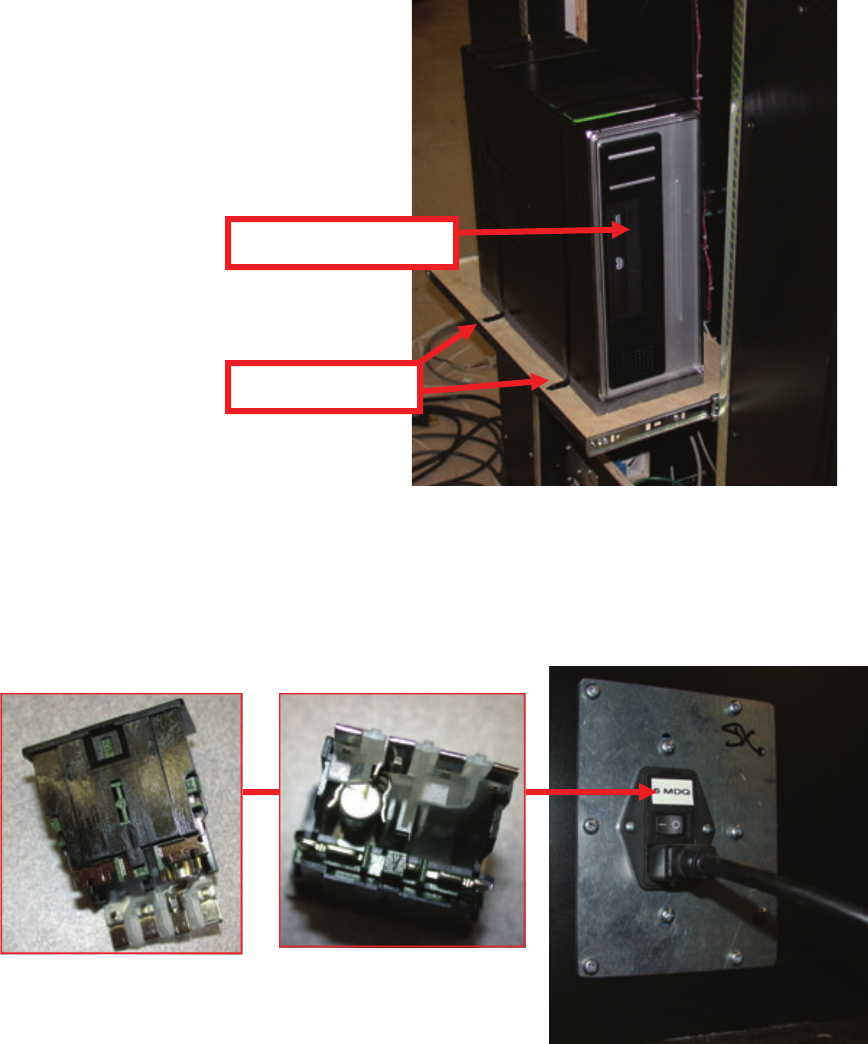
Access the Computer
Remove the back cover and slide the computer drawer out. You can access the CDROM drive from the
front of the computer. To replace the computer remove the two screws that hold the computer clamp
down to the drawer. Remove all connectors to the computer before removing. See picture below.
AC Power Fuse
Located in the power module is a 6 amp slow blow fuse. To check or replace the fuse
pull the tab with the label out. There is only one fuse installed. See diagram below.
Mounting Screws
CDROM Drive
16
Maintenance
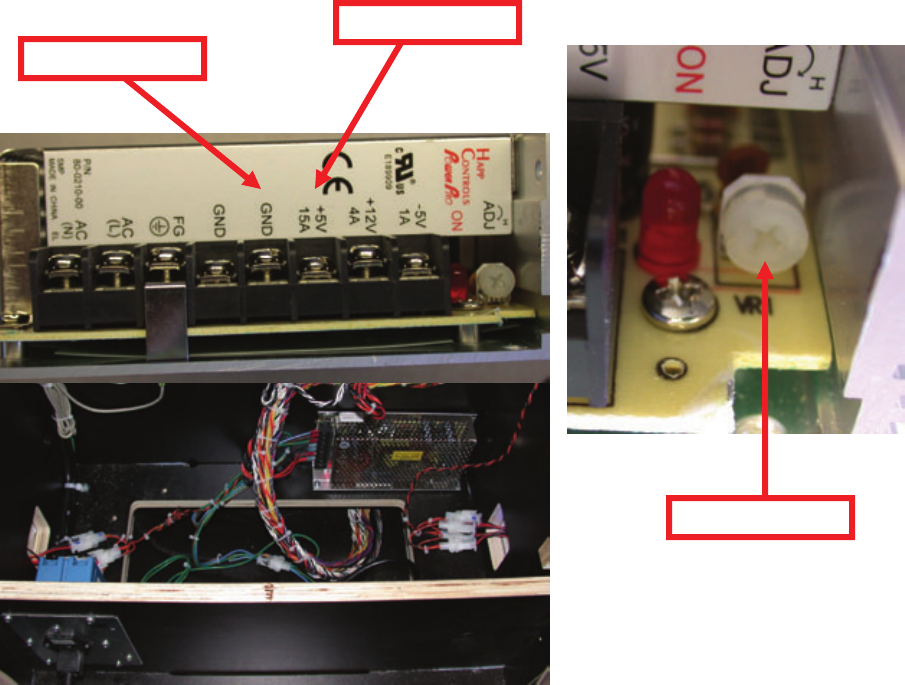
Power Supply Adjustment/Replacement
The power supply is accessed through the back of the game. Remove the back door
panel to gain access to the power supply.
To replace the power supply remove the two mounting screws and all wires connecting
to the power supply. Take note in which wires go into which connector before remov-
ing them. Replace the power supply with same type of unit and reconnect all wires
matching their previous locations then install the two mounting screws.
To adjust the power supply turn the adjustment pot located at the bottom of the power
supply until +5 is between +4.95 – 5.10. To measure the power supply’s voltage
place the positive lead on the red wire and the negative lead on the black wire. Set
your meter to DC voltage. See pictures below.
Black/Negative lead
Red/Positive lead
Adjustment Pot
17
Maintenance
Main Board and I/O Replacement
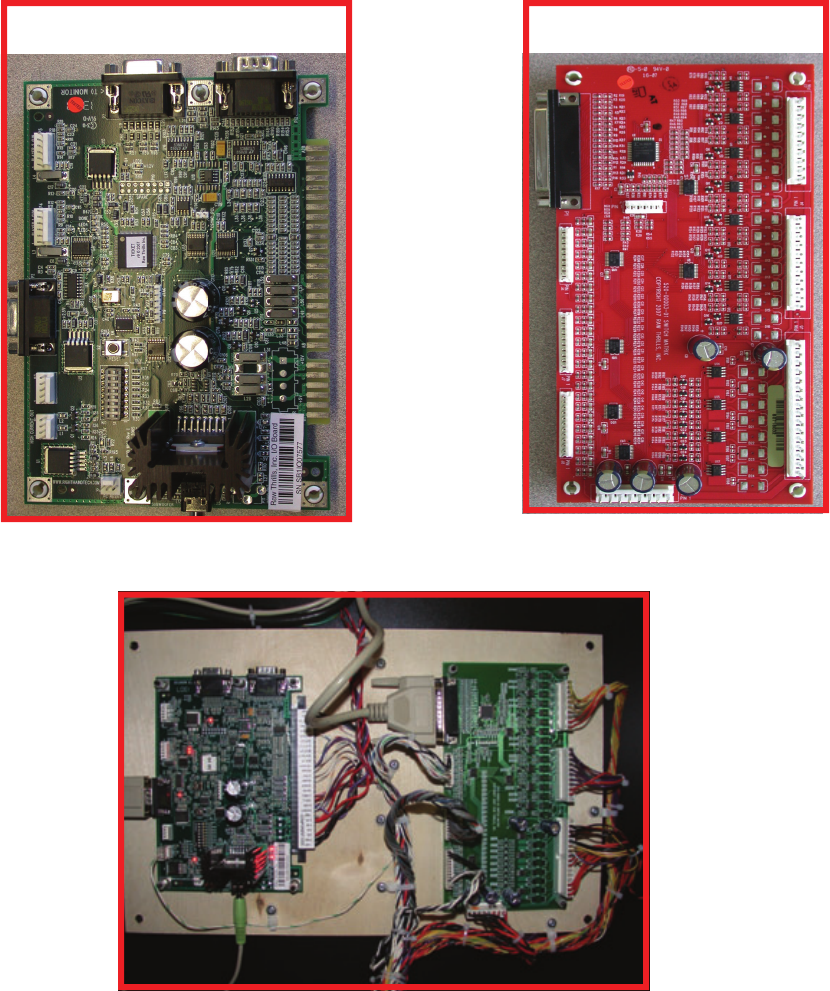
To Remove the main board, unplug the JAMMA connector, serial cable (P2), audio ca-
ble (P8), and p1. Now remove the four plastic hex nuts. Assembly in reverse.
To remove the I/O board, unplug connectors P1, J2, J3, J4, J5, J6, J7, and J8. Re-
move the four plastic hex nuts. Assembly in reverse.
I/O Board
J3
J4
J5
P1
J6
J7
J8
J2
Main Board
JAMMA
P2
P1
P8
18
Maintenance
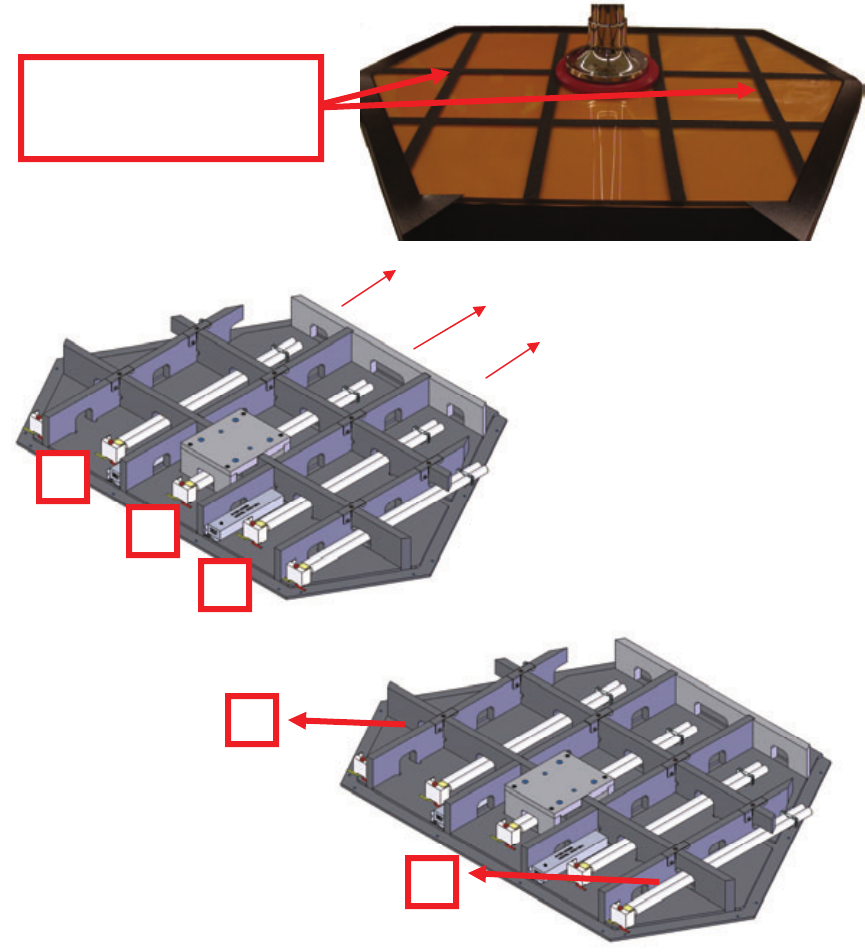
Platform Light Bulb Replacement
Remove the two strips shown below to access the top screws that hold the floor to the
stage. Now remove the floor. You can now access the fluorescent bulbs. To replace
bulbs 2,3, and 4 press the red button, remove the plastic retainers, lift up, and slide out
as shown below. To replace bulbs 1 and 5 press the red button, remove the plastic
retainers, and lift up and out as shown below.
Remove these two strips to access
the screws which hold the top on
the platform.
4
2
3
5
1
19
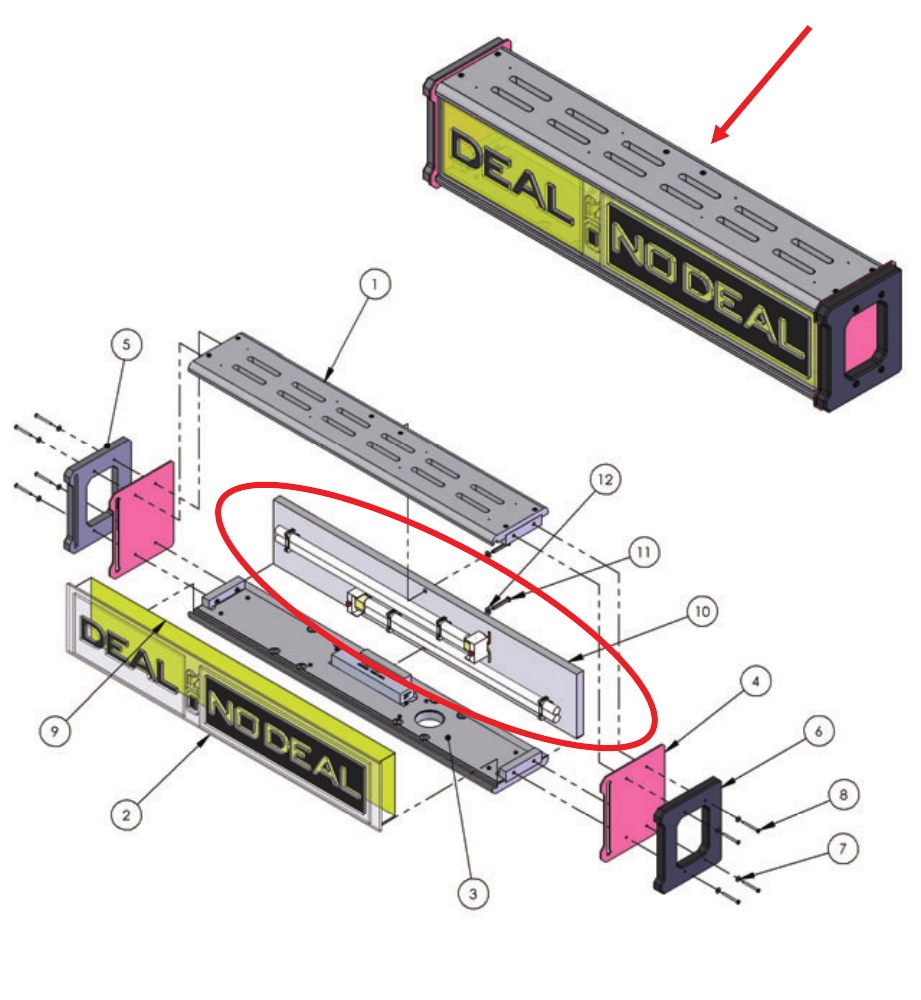
Marquee Bulb Replacement
To replace the fluorescent bulbs inside the marquee, remove the back panel by remov-
ing the upper and lower bolts from behind only. The bulbs are mounted onto this
panel. Remove the plastic retainer clips and press the red buttons to eject the bulbs.
Replace in reverse order. See Red circle below.
Maintenance
20
Maintenance - Monitor Enclosure
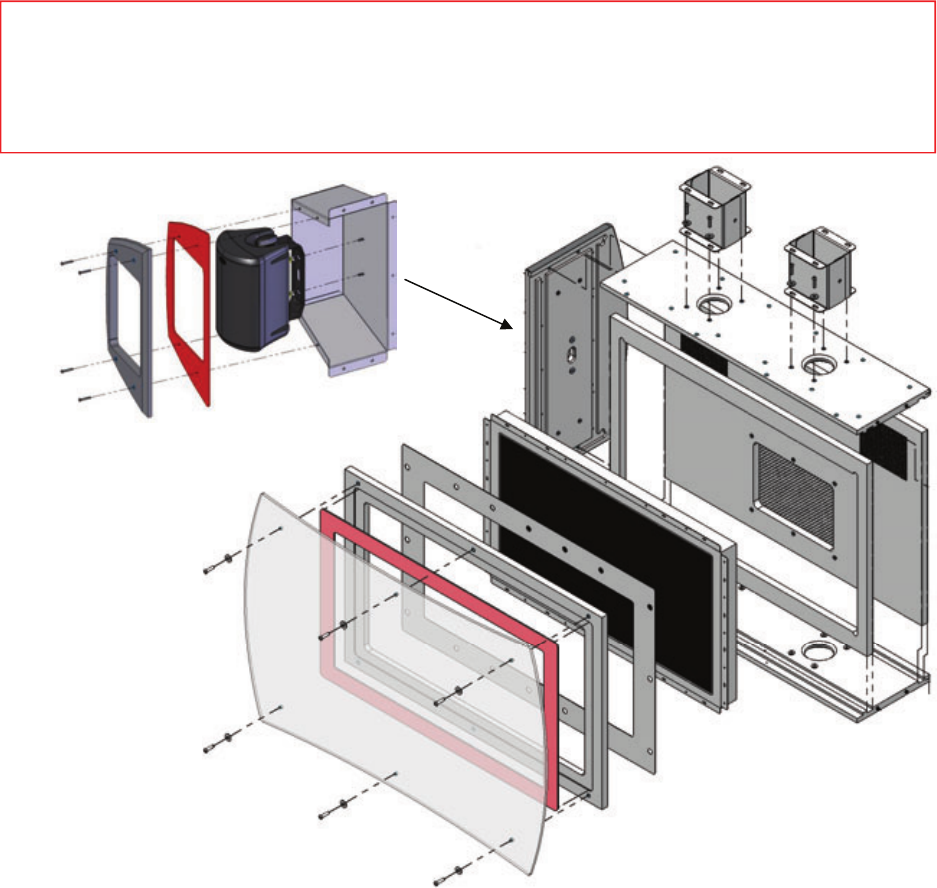
Monitor Replacement
To access the monitor, remove the six front screws shown below. Remove the front
plastic and bezel. Now remove the mounting screws that hold the monitor to the cabi-
net. See diagram below
Speaker Replacement
The speaker is accessed through the front of the assembly as shown below. Unscrew
the four security screws and remove the front cover. Now remove the two nuts holding
the speaker to the speaker housing. Unplug the speaker wire connection. Assembly
in reverse. See diagram below.
** Warning **
Use a soft lint free cloth to clean the plastic. Do not use ammonia based glass cleaners on clear plastic
surfaces. Doing so will cause the plastic to fog over a period of time. Any ammonia free glass cleaner
is recommended. Novus (cleaner #1) makes a special plastic cleaner that reduces static build up and
restores a glass shine back to the plastic.
21
Maintenance - Monitor Enclosure
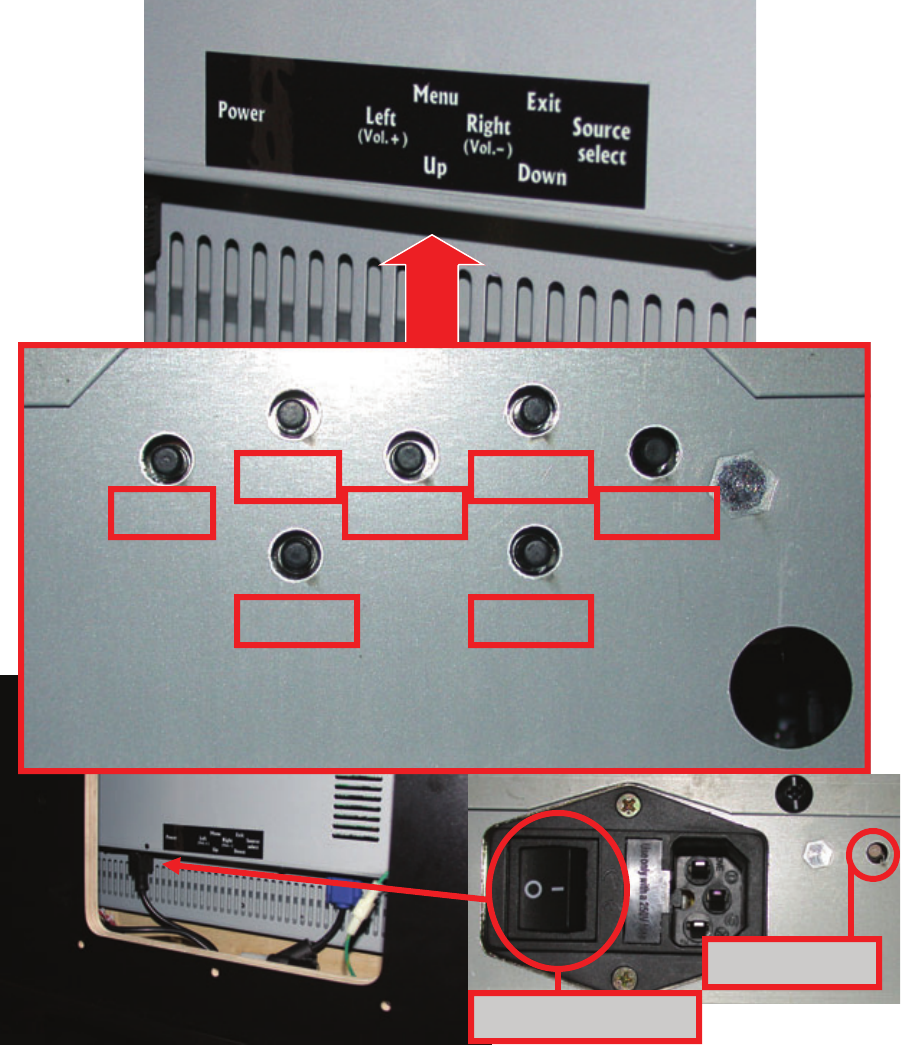
Monitor Adjustments
The controls of the monitor are accessed through the back of the monitor cabinet di-
rectly underneath the black label. The configuration of the buttons are in the same pat-
tern printed. See pictures below.
Left
Up
Menu
Right
Down
Exit
Source
Power LED
Power Switch
22
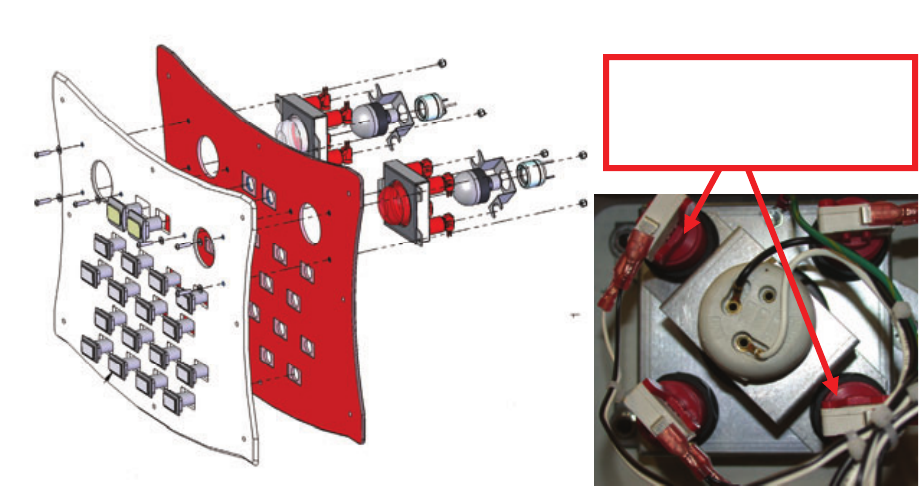
Deal No Deal buttons
Bulbs:
The Fluorescent bulbs are 110V ac and should only be replaced with the power off.
Do not replace with incandescent type bulbs as the socket is not designed for this and
is a fire hazard. When replacing use ICE Part numbers 8980 (red) and 8981 (white).
To access the bulbs remove the two switches holding the metal bracket with the bulb
socket on it. Now slide the bracket out and replace the bulb. Assemble in reverse.
See diagram below.
Switches:
The MEGA switch is made up with four smaller switches acting as one. When replac-
ing the switch it is important to connect the normally open lead of the switch and
ground. No wire should connect to Normally closed. When testing switches, your me-
ter should read less then a ohm with it set to ohms test. There are two different switch
assemblies used. ICE part number DN2006R (red) and DN2006W (white).
Suit Case Buttons
Bulbs and Switches:
The bulbs used in the suit cases are 12volt DC LEDs. They are glued in the socket
and cannot be removed. You must replace this as a assembly. The ICE part numbers
are DN2004S01 through DN2004S16. These are connected Normally open and no
wire should be connected to Normally closed lead. When testing switches, your meter
should read less then a ohm with it set to ohms test. The positive wire (orange) must
connect to the + lead on the LED bulb. The yellow with a color strip is the - on the LED
bulb. The Yellow start buttons are DN2005DD (double deal) and DN2005S (Deal).
Maintenance - Buttons
Remove these buttons to
remove bulb socket
bracket.
23
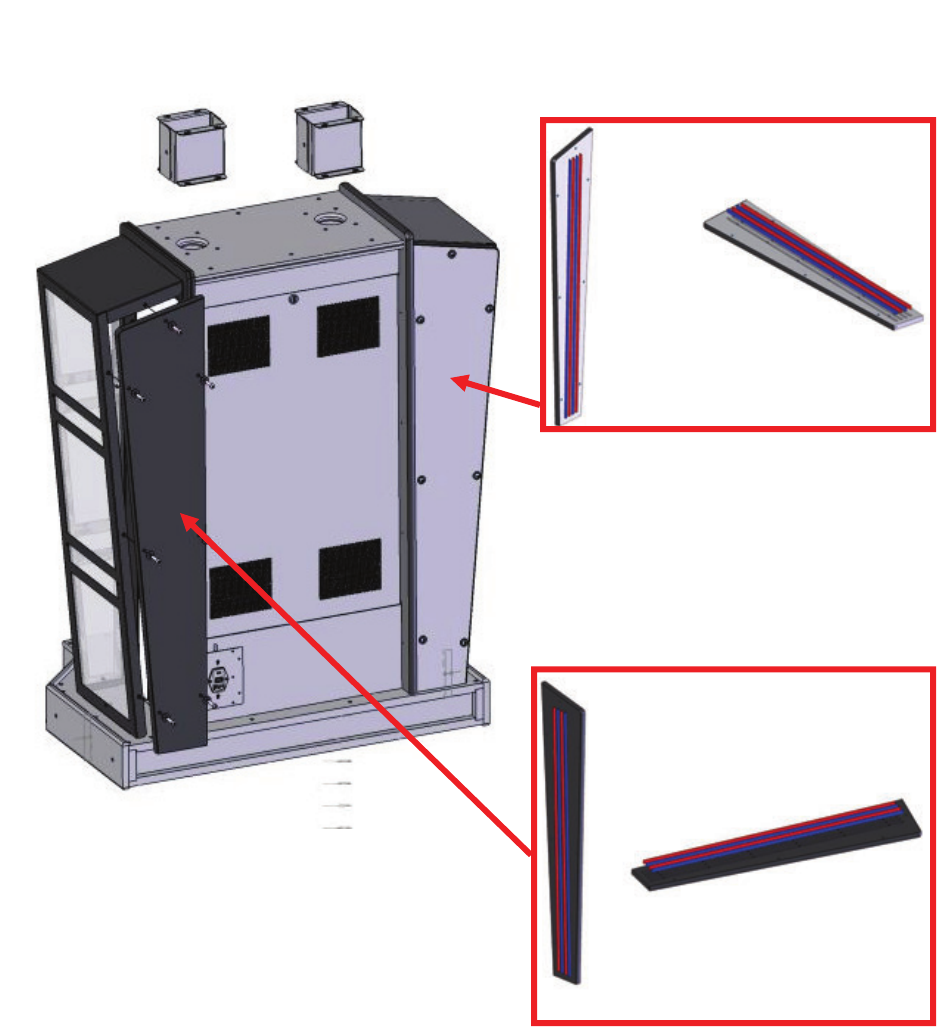
Side Light Replacement
Your cabinet changes color depending on the action of the game. To accomplish this
LED technology is used. There are three separate colors of LED strips which look the
same. It is important to replace the color strips with the correct color. To access the
strips, remove the back side panels. The LED strips are mounted on this panel. Refer
to the diagram below for correct part numbers when ordering.
Maintenance - Cabinet Mood Lighting
ICE Part numbers:
DN8978x - RED
DN8979X - BLUE
QTY 4 per game
24
Spare Parts Listing
Mechanical
CP1050 DRAWER SLIDE
DN1015 COMPUTER STRAP
DN4001 COMPUTER FOAM PAD
TG4002 Stool
Electrical
DN8978X DIP red LED
DN8979X DIP red LED
DN2000 Computer
DN2014 Dongle
DN2034x I/O Board (serial)
MON32LCD 32” TFT Monitor
DN2007x Power Module
TG2007 Polk Speakers
UC2010 Switching Power Supply
DN2035x I/O Board (parallel)
E00231 Parallel Cable
E02247 Serial Cable
DN2090x Restore CD
8980 LED Bulb 110VAC (red)
8981 LED Bulb 110VAC (white)
DN2004S01 ‘Briefcase’ #1 Button
DN2004S02 ‘Briefcase’ #2 Button
DN2004S03 ‘Briefcase’ #3 Button
DN2004S04 ‘Briefcase’ #4 Button
DN2004S05 ‘Briefcase’ #5 Button
DN2004S06 ‘Briefcase’ #6 Button
DN2004S07 ‘Briefcase’ #7 Button
DN2004S08 ‘Briefcase’ #8 Button
DN2004S09 ‘Briefcase’ #9 Button
DN2004S10 ‘Briefcase’ #10 Button
DN2004S11 ‘Briefcase’ #11 Button
DN2004S12 ‘Briefcase’ #12 Button
DN2004S13 ‘Briefcase’ #13 Button
DN2004S14 ‘Briefcase’ #14 Button
DN2004S15 ‘Briefcase’ #15 Button
DN2004S16 ‘Briefcase’ #16 Button
HH5005D Ticket Dispenser
DN2005DD Yellow “Double Deal” Button
DN2005S Yellow “Start” Button
DN2006R Mega Push Button (RED)
DN2006W Mega Push Button (WHITE)
8312 Bulb (40W)
AL8384x Ballast (marquee)
CX8384x Ballast (Stool Base)
PP250x Bulb Socket
Graphics
DN7003 Cabinet Front
DN7005 Monitor Bezel
DN7006 Floor Graphic—Yellow

Contacts at SEGA
Machine Sales
Telephone: +44 (0) 208 391 8090
Fax: +44 (0) 208 391 8099
www.sega-amusements.co.uk
SEGA Spares
Telephone: +44 (0) 208 391 8060
Fax: +44 (0) 208 391 8096
www.segatotalsolutions.com
Customer Services
Telephone: +44 (0) 208 391 8065
Fax: +44 (0) 208 391 8096
