Arcade Doodle Jump Manual User
Doodle Jump Manual Doodle Jump Manual
2013-09-30
User Manual: Arcade Doodle Jump Manual
Open the PDF directly: View PDF  .
.
Page Count: 20
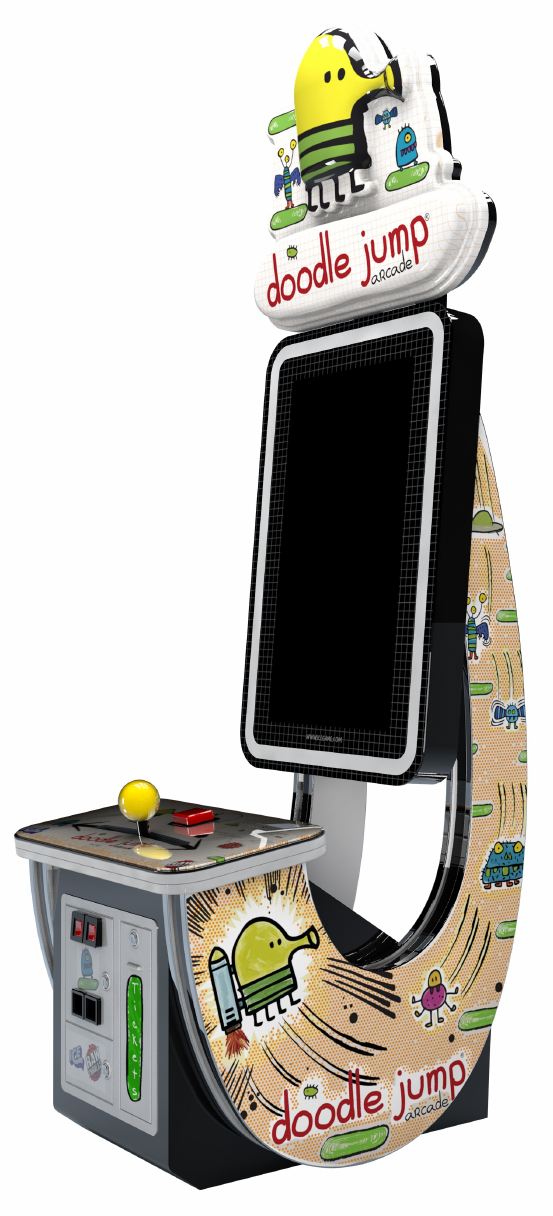
OWNERS AND SERVICE MANUAL
INNOVATIVE CONCEPTS IN ENTERTAINMENT INC.
10123 MAIN STREET, CLARENCE, NY 14031
SERVICE: 1-716-759-0360
FAX: 1-716-759-0884
E-MAIL: service@icegame.com
WEBSITE: www.icegame.com
2
3
Table of Contents
Safety, Warnings, and Power Requirements 4
Setup Marquee 5
Game Play 6
Game Configuration 7-10
Restoring Hard drive 10
Power supply information and testing 11-12
Computer Removal 13
Monitor Removal 14
Player Rod Removal 15
Servicing player controls 16
The Hall Effect Sensor
Control Panel LED Access 17
Spares 18
Warranty 19
Rev A July 19, 2012
4
SAFETY AND WARNINGS BEFORE YOU BEGIN
WARNING: WHEN INSTALLING THIS GAME, A GROUNDED A.C. RECEPTACLE MUST BE
USED. FAILURE TO DO SO COULD RESULT IN INJURY TO YOURSELF OR OTHERS. FAIL-
URE TO USE A GROUNDED RECEPTACLE COULD ALSO CAUSE IMPROPER GAME OP-
ERATION, OR DAMAGE TO THE ELECTRONICS.
NOTE: THIS GAME IS INTENDED FOR INDOOR USE ONLY.
DO NOT DEFEAT OR REMOVE THE GROUNDING PRONG ON THE POWER CORD FOR THE
SAME REASON AS GIVEN ABOVE. USING AN IMPROPERLY GROUNDED GAME COULD
VOID YOUR WARRANTY.
HAVE A QUALIFIED ELECTRICIAN CHECK YOUR A.C. RECEPTACLE TO BE SURE THE
GROUND IS FUNCTIONING PROPERLY.
THIS GAME IS DESIGNED TO DISSIPATE STATIC ELECTRICITY THROUGH THE GROUND-
ING PLANE OF THE GAME. IF THE A.C. GROUND DOES NOT WORK, THE GAME COULD
DISCHARGE STATIC ELECTRICITY THROUGH THE GAME CIRCUITRY, WHICH COULD
CAUSE DAMAGE.
THE POWER SUPPLY IS NOT VOLTAGE ADJUSTABLE. TO OPERATE THE GAME AT VOLT-
AGES OTHER THAN THOSE IT WAS DESIGNED FOR. PLEASE CONTACT OUR SERVICE
DEPARTMENT FOR VOLTAGE CONVERSION INFORMATION.
WARNING
DO NOT remove any of the components on the main board (e.g. compact flash and eproms)
while the game is powered on. This may cause permanent damage to the parts and the main
board. Removing any main board component part while powered on will void the warranty.
ALWAYS REMOVE POWER TO THE GAME, BEFORE ATTEMPTING ANY SERVICE,
UNLESS NEEDED FOR SPECIFIC TESTING. FAILURE TO OBSERVE THIS PRECAUTION
COULD RESULT IN SERIOUS INJURY TO YOURSELF OR OTHERS.
THIS GAME IS NOT SUITABLE FOR INSTALLATION IN AN AREA WHERE A WATER JET COULD BE
USED.
This appliance is not intended for use by persons (including children) with reduced physical, sensory or
mental capabilities, or lack of experience and knowledge, unless they have been given supervision or in-
struction concerning use of the appliance by a person responsible for their safety. Children should be su-
pervised to ensure that they do not play with the appliance
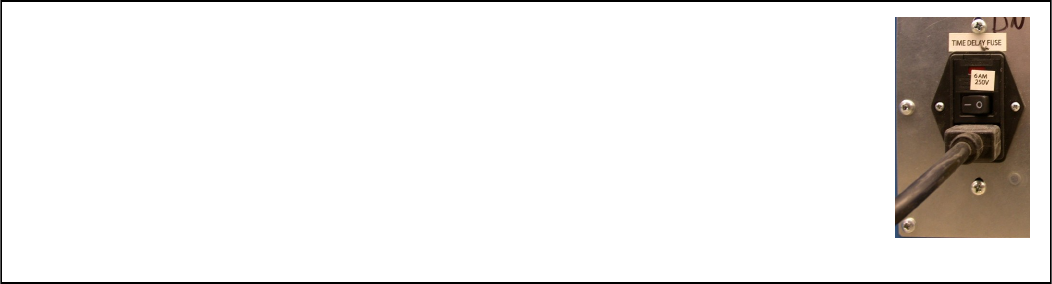
AC Power Information
The games main fuse is accessed through the back of the game at the power
mod. Above the power cord is a small panel that contains the main fuse. The
value of the fuse for 110 volt users is 5 AMPS at 250Volt type slow blow. The
value of the fuse for 220 users is 2.5 AMPS at 250Volt type slow blow.
5
SETUP
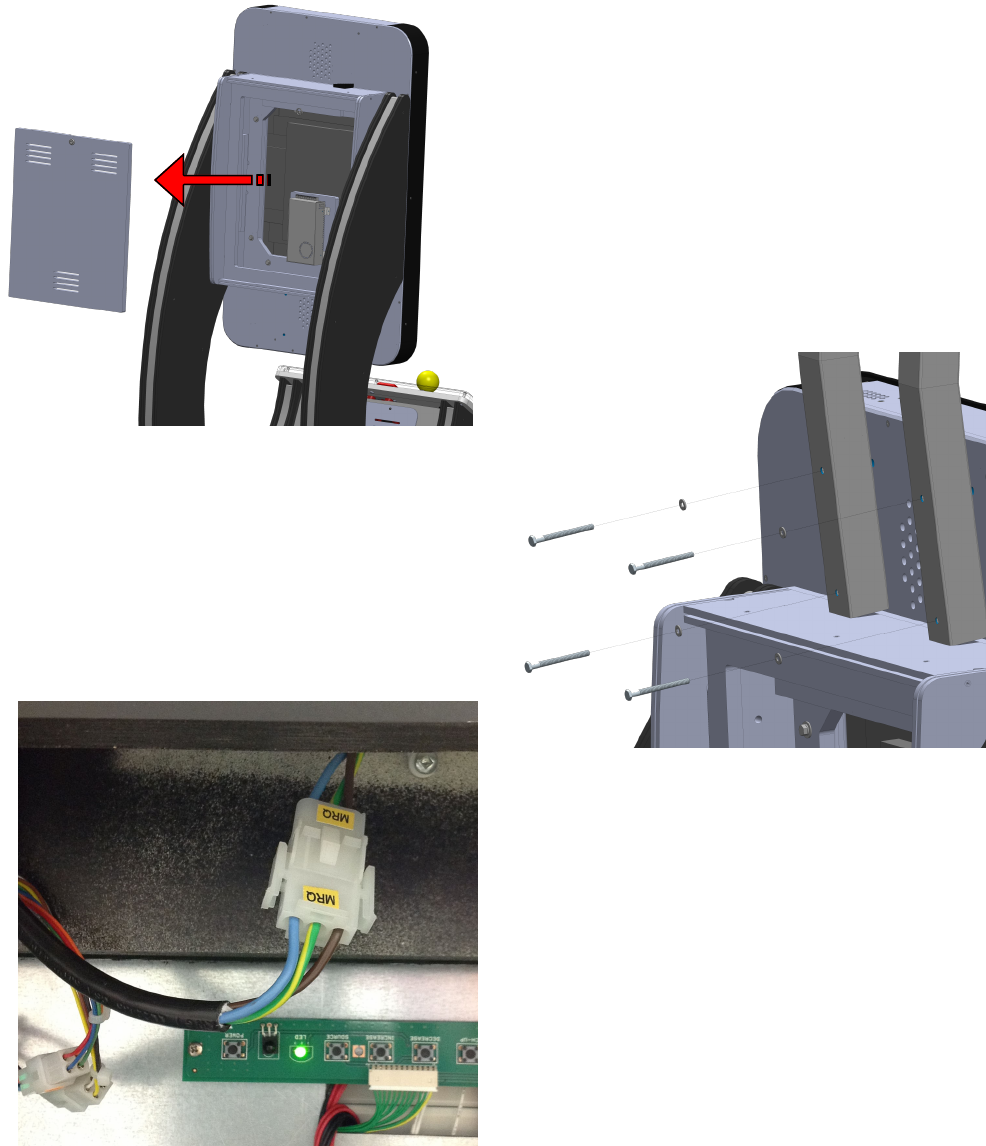
The game is shipped with the upper marquee removed. It is recommended to have another per-
son available to hold the marquee steady while inserting the mounting bolts.
Follow the steps below to install the marquee.
STEP 1:
Remove the upper back door to access the 110v plug
for the marquee connection.
STEP 2:
Place the marquee on top of the cabinet as shown and
using the four mounting bolts and washers located in
the cash box, attach the upper marquee onto the cabi-
net and tighten.
STEP 3:
Plug the AC 3 pin connector labeled “MRQ” to the
marquee power plug. Replace the upper back cover
to complete the setup.
6
GAME PLAY
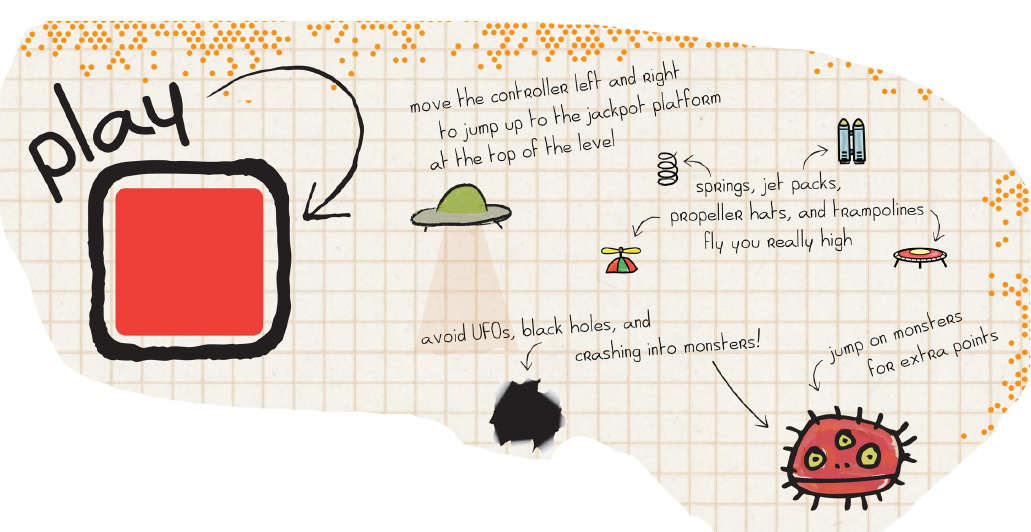
ICE brings one of the most successful smart phone apps to FEC’s and Ar-
cade’s worldwide! Doodle Jump, the 2010 winner of the Apple Design Award, is
one of the most popular AND addicting apps in the marketplace today, and now
players can use their skill to win tickets! Featuring an easy to use joystick that
slides left to right, ICE has transformed one of the highest ranked apps on
ITunes into an amazing video-redemption piece that will bring kids and parents
together to see who can win the Super Bonus. Players enter their names on
the leader board as bragging rights to encourage repeat play.
The officially licensed video redemption game features a 42” high definition
monitor, authentic Doodle Jump game play, and a stunning vacuum-formed
marquee.
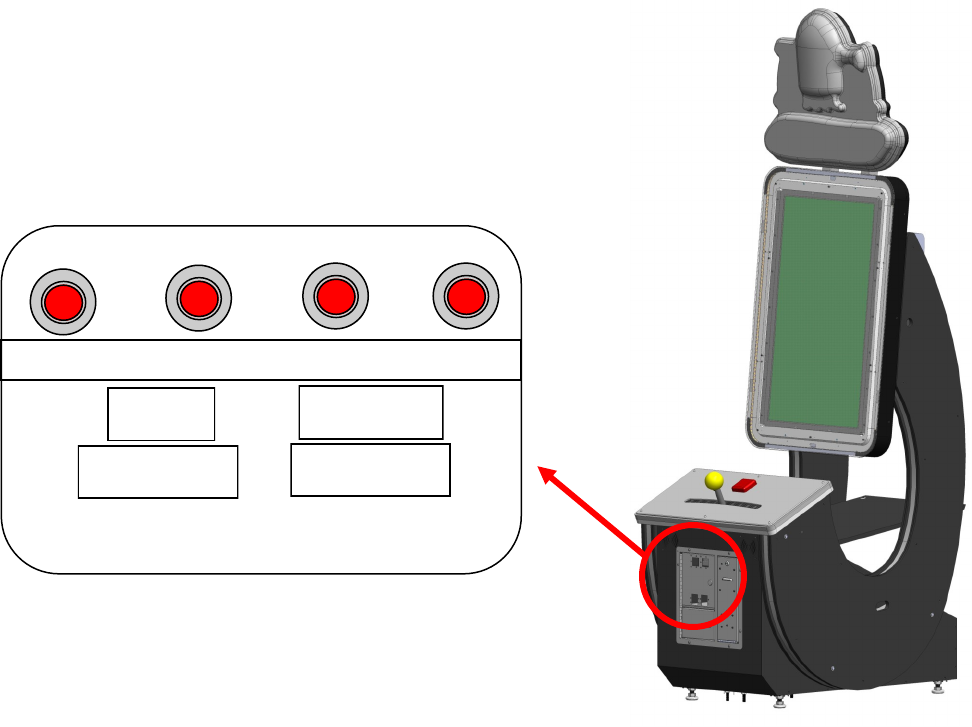
7
SETUP - Game Options
To access your game options, open the upper front door and press the “DIAG” button. Pressing
the “UP” and “DOWN” buttons will cycle up and down through the different menus. Press the
“DIAG” button to select a menu. Press the “TEST” button to exit back to the game.
The different submenus are :
Diagnostics - these set of options allow you to test the functionality of your game.
Coin Adjustments - These options allow you to set the price of play.
Payout Adjustments - These options allow you to adjust your payout.
Audits - These options allow you to check various statistics of your game.
Reset - Allows you to clear various statistics and options.
View Errors - See any reported issues with your game.
Volume - Adjust game volume.
Attract Volume - Adjust game attract volume.
Attract music volume mode - Adjust game music.
Jackpot terminology - Explanation of a Jackpot.
DOWN UP TEST DIAG
000000 000000
COIN TICKET

8
Main menu
Diagnostics
Submenus include
Switch test- you get a visual confirmation when inserting coin 1 and coin 2 also when pressing the test, volume
up, volume down, start and “DIAG” buttons
(You must hold DIAG button to exit this test)
Monitor test menu- Here you get a set of color bars followed by a white, red, green, and blue purity test then
finally a convergence screen. (pressing “DIAG” button will exit)
Lights test- Selecting light toggle will flash the cabinet lights.
Sound test menu- There are options here to toggle music, sound effects, 100Hz tone, 1000Hz tone and
you may pan center, left, and finally right
Coin meter test- This option allows you to press “DIAG” button to advance the coin meter and pressing the
start button will advance the ticket meter
Ticket dispenser test- You can prospectively select weather to advance one ticket or ten in this test
Watchdog test- Choosing this will reset the computer
Calibrate bar – Here you press start to begin the test. Then you will be asked to press the start button after you
move the bar all the way to the left. Next you will be asked to press the start button with the bar all the way to the right.
Coin adjustments
Submenus include
Coin value- Select from .05 to 2.00 ; in .05 increments, what is the value of your coin.
Coins to play- Select from 1 to 10 ; how many coins to start a game.
Plays per game- Select from 1 to 10; how many games/lives they get to play.
Coins per swipe- Select from 1 to 10; how many coins you are credited per swipe.
Coins per swipe pulse- Select from 1 to 8; how many coins you get for every pulse the swipe sends.
(Test button exits from coin adjustments menu)
Payout adjustments menu
Submenus include
Payout percent- Select from 5% to 95%; How much in tickets to give back to the player?
Ticket value- - Select from .0025 to.1; What do you value your ticket at?
Two point tickets- select on or off; Turn on if you value each ticket as 2 tickets. The software will use even
numbers of tickets when paying out.
Starting jackpot- Select from 50 to 1000;
Progressive jackpot- - Select on or off; when on it will increment the jackpot by the next option’s value.
Progressive increment- Select from 1 to 10; How many tickets to increment?
Audits
Submenus include
System audits- Displays time on, times played, games played, repeat plays, time per game, time on
since boot, times played since boot, games played since boot. Boot count, test entry count, watchdog count, periodic reboot
count, Rio disconnects, Rio reconnects
Coin audits- Displays coin drops left, right swipe, and service credits
9
Payout audits- Displays tickets, tickets per game, points, points per game, min points per game, max points per
game, bonus points, bonus points per game, min bonus points, max bonus points, jackpot tickets, jackpot tickets per game, and
max jackpot tickets
Game audits- Displays jackpots, jackpot win percent, min game since jackpot,
Average games since jackpot, max games since jackpot, fall deaths, stun deaths, black hole deaths, UFO deaths, spring uses,
trampoline uses, jetpack uses, propeller uses, spring shoe uses, monsters killed, purple spiders killed, blue Cyclops killed, red
three eyes killed, green 2 eyes killed, green three eyes killed, UFO killed, blue winged killed, winged three eyes killed, green
three eyes tall, blue two eyes killed, original theme selected, space theme selected, jungle theme selected, and level select timeout
Easy map audits- Displays
Easy map 1 plays, deaths, average points, average bonus, bonus pickup percent
Easy map 2 plays, deaths, average points, average bonus, bonus pickup percent
Easy map 3 plays, deaths, average points, average bonus, bonus pickup percent
Easy map 4 plays, deaths, average points, average bonus, bonus pickup percent
Easy map 5 plays, deaths, average points, average bonus, bonus pickup percent
Easy map 6 plays, deaths, average points, average bonus, bonus pickup percent
Easy map 7 plays, deaths, average points, average bonus, bonus pickup percent
Easy map 8 plays, deaths, average points, average bonus, bonus pickup percent
Easy map 9 plays, deaths, average points, average bonus, bonus pickup percent
Easy map 10 plays, deaths, average points, average bonus, bonus pickup percent
Medium map 1 plays, deaths, average points, average bonus, bonus pickup percent
Medium map 2 plays, deaths, average points, average bonus, bonus pickup percent
Medium map 3 plays, deaths, average points, average bonus, bonus pickup percent
Medium map 4 plays, deaths, average points, average bonus, bonus pickup percent
Medium map 5 plays, deaths, average points, average bonus, bonus pickup percent
Medium map 6 plays, deaths, average points, average bonus, bonus pickup percent
Medium map 7 plays, deaths, average points, average bonus, bonus pickup percent
Medium map 8 plays, deaths, average points, average bonus, bonus pickup percent
Medium map 9 plays, deaths, average points, average bonus, bonus pickup percent
Medium map 10 plays, deaths, average points, average bonus, bonus pickup percent
Hard map 1 plays, deaths, average points, average bonus, bonus pickup percent jackpots
Hard map 2 plays, deaths, average points, average bonus, bonus pickup percent jackpots
Hard map 3 plays, deaths, average points, average bonus, bonus pickup percent jackpots
Hard map 4 plays, deaths, average points, average bonus, bonus pickup percent jackpots
Hard map 5 plays, deaths, average points, average bonus, bonus pickup percent jackpots
Hard map 6 plays, deaths, average points, average bonus, bonus pickup percent jackpots
Hard map 7 plays, deaths, average points, average bonus, bonus pickup percent jackpots
Hard map 8 plays, deaths, average points, average bonus, bonus pickup percent jackpots
Hard map 9 plays, deaths, average points, average bonus, bonus pickup percent jackpots
Hard map 10 plays, deaths, average points, average bonus, bonus pickup percent jackpots
Extra Hard map 1 plays, deaths, average points, average bonus, bonus pickup percent jackpots
Extra Hard map 2 plays, deaths, average points, average bonus, bonus pickup percent jackpots
Extra Hard map 3 plays, deaths, average points, average bonus, bonus pickup percent jackpots
Extra Hard map 4 plays, deaths, average points, average bonus, bonus pickup percent jackpots
Extra Hard map 5 plays, deaths, average points, average bonus, bonus pickup percent jackpots
Extra Hard map 6 plays, deaths, average points, average bonus, bonus pickup percent jackpots
Extra Hard map 7 plays, deaths, average points, average bonus, bonus pickup percent jackpots
Extra Hard map 8 plays, deaths, average points, average bonus, bonus pickup percent jackpots
Extra Hard map 9 plays, deaths, average points, average bonus, bonus pickup percent jackpots
Extra Hard map 10 plays, deaths, average points, average bonus, bonus pickup percent jackpots
Easy Hard map 1 plays, deaths, average points, average bonus, bonus pickup percent jackpots
Easy Hard map 2 plays, deaths, average points, average bonus, bonus pickup percent jackpots
Easy Hard map 3 plays, deaths, average points, average bonus, bonus pickup percent jackpots
Easy Hard map 4 plays, deaths, average points, average bonus, bonus pickup percent jackpots
Easy Hard map 5 plays, deaths, average points, average bonus, bonus pickup percent jackpots
Easy Hard map 6 plays, deaths, average points, average bonus, bonus pickup percent jackpots
Easy Hard map 7 plays, deaths, average points, average bonus, bonus pickup percent jackpots
Easy Hard map 8 plays, deaths, average points, average bonus, bonus pickup percent jackpots
Easy Hard map 9 plays, deaths, average points, average bonus, bonus pickup percent jackpots
Easy Hard map 10 plays, deaths, average points, average bonus, bonus pickup percent jackpot
10
Resets menu- includes
Clear coins
Clear tickets
Reset audits
Reset adjustments
Factory reset
CRC check
Copy Audits to USB
View errors
Volume- Select 0 to 20
Attract volume Select 0 to 20
Attract music volume mode- On, on occasionally, or off
Jackpot terminology- Changes the jackpot display from “jackpot” to “super bonus” However has nothing to do
with payout. This is only for aesthetics
Restoring Software
To use a restore disc you must access the PC and insert the DVD into the computer’s DVD drive.
To access the pc follow the instructions under “PC Access and Removal”. You will need to do
this with the power on. Press the “open” button located on the DVD drive. Insert the DVD disc
into the DVD drive with the label side facing up. Now press the open button again to close the
DVD drive’s door or slightly push in the drawer and it will close automatically. Turn off the game
and wait 5 seconds. Turn the game back on and in a short time the screen will warn you that it is
going to write over your hard drive. If you wish to not continue turn off the game now. It will count
down and begin installing the software. This should be done if you experienced data corruption,
replaced the hard drive, received updated software or told to do so by ICE technical representa-
tive.
11
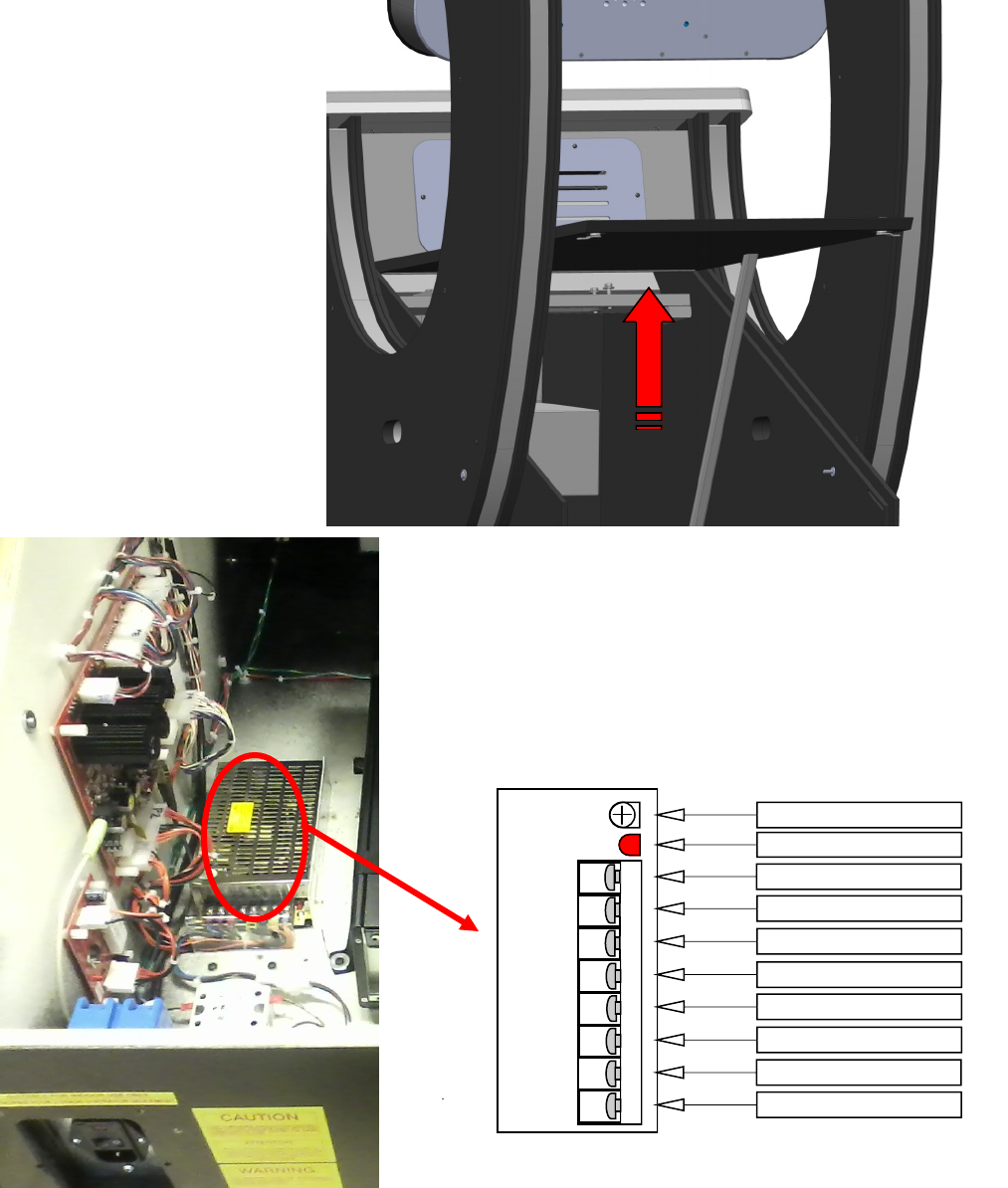
Power Supply Access
The power supply is accessed through the bottom back panel. Unlock the bottom locks and lift
the panel up. Locate the panel door prop and raise it so that it will support the back access panel
up. See picture below.
Located on the left side wall is a +5 volt power supply. This
is ICE part number PE2010X. The +12 volt supply is on the
floor of the cabinet and its ICE part number is IA2010.
SUZO HAPP Power Pro
Turn clockwise to increase power if low
Power on status
+ 12 Volts DC - 10 Amps; orange
+ 12 Volts DC - 10 Amps ; orange
DC Ground - Black
DC Ground - Black
DC Ground - Black
AC Earth Ground - Green with Yellow
AC Line - Black or Brown
AC Neutral - White or Blue
GND
GND
FG
Input
95V - 135VAC
3.2A
190V - 250VAC
1.6A
47Hz - 63Hz
AC
(L)
AC
(N)
+12
10A
ON
ADJ
+12V
10A
GND
12
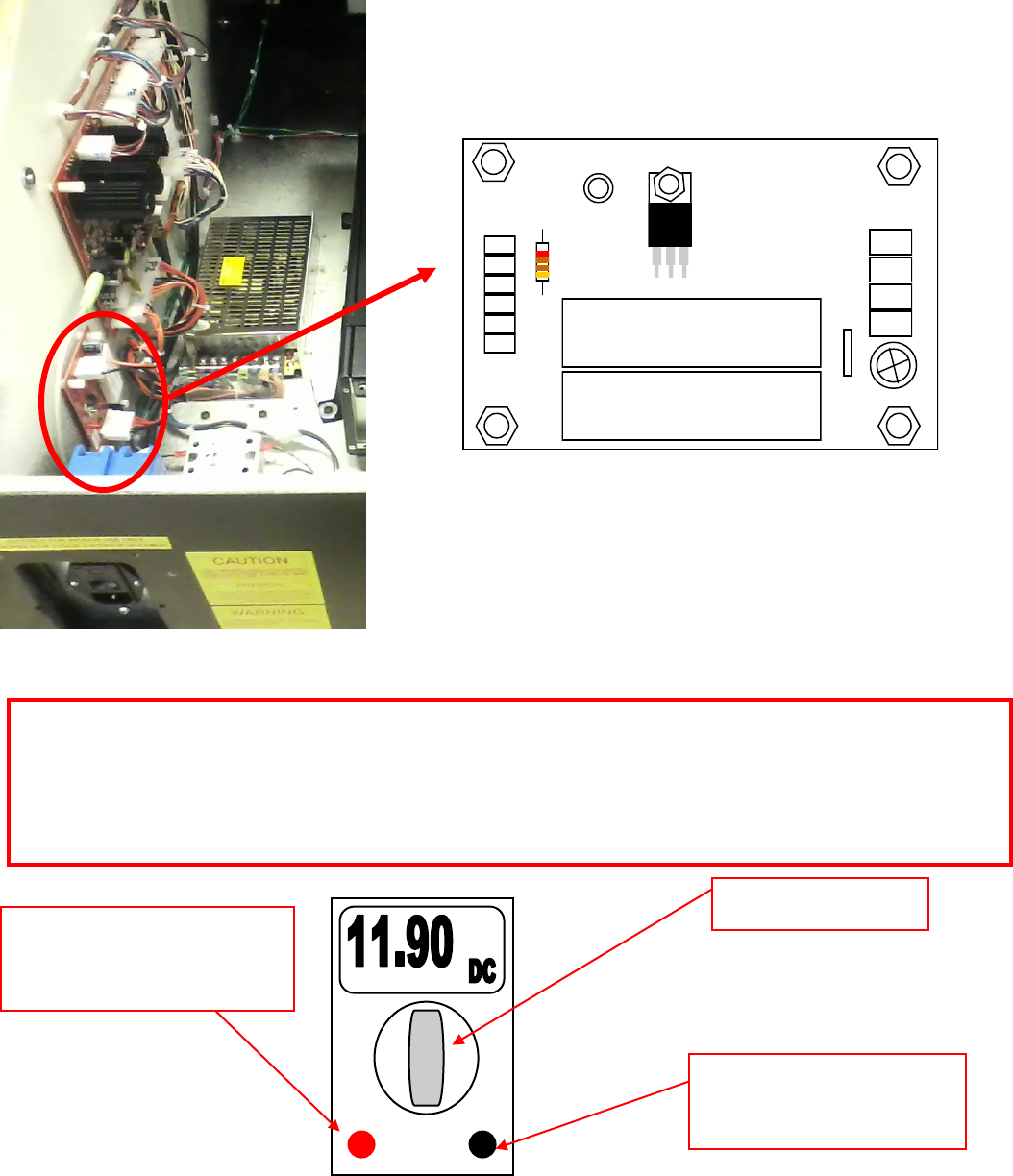
Checking DC Voltages
Volt test with the volt meter set to DC voltage. The +5 output can be adjusted by turning
the adjustment screw of the power supply. Adjust to as close to +5 as possible. Increasing
the +5 will also increase the +12. The voltage range can be plus or minus 5%.
Ground Probe:
Connect to GND on power supply
(Black wire to power supply)
Positive Probe:
Connect to +12V on power supply
(orange wire to power supply)
Turn to DC voltage check
10 W 10 Ω J
YAGEO 817
10 W 10 Ω J
YAGEO 817
GND
GND
+12
+12
GND
GND
GND
+5
+5
+5
PE2010
Copyright 2009
I.C.E. Inc.
+5 volt regulator PCB. Incoming voltage is +12 volts of
DC. Output is +5 DC regulated. If there is no +5 out
check for +12 DC in or +12 out from PE2010X. If +12 is
also missing, check 110v in to PE2010X power supply.
PE2010 5 volt regulator power supply.
13
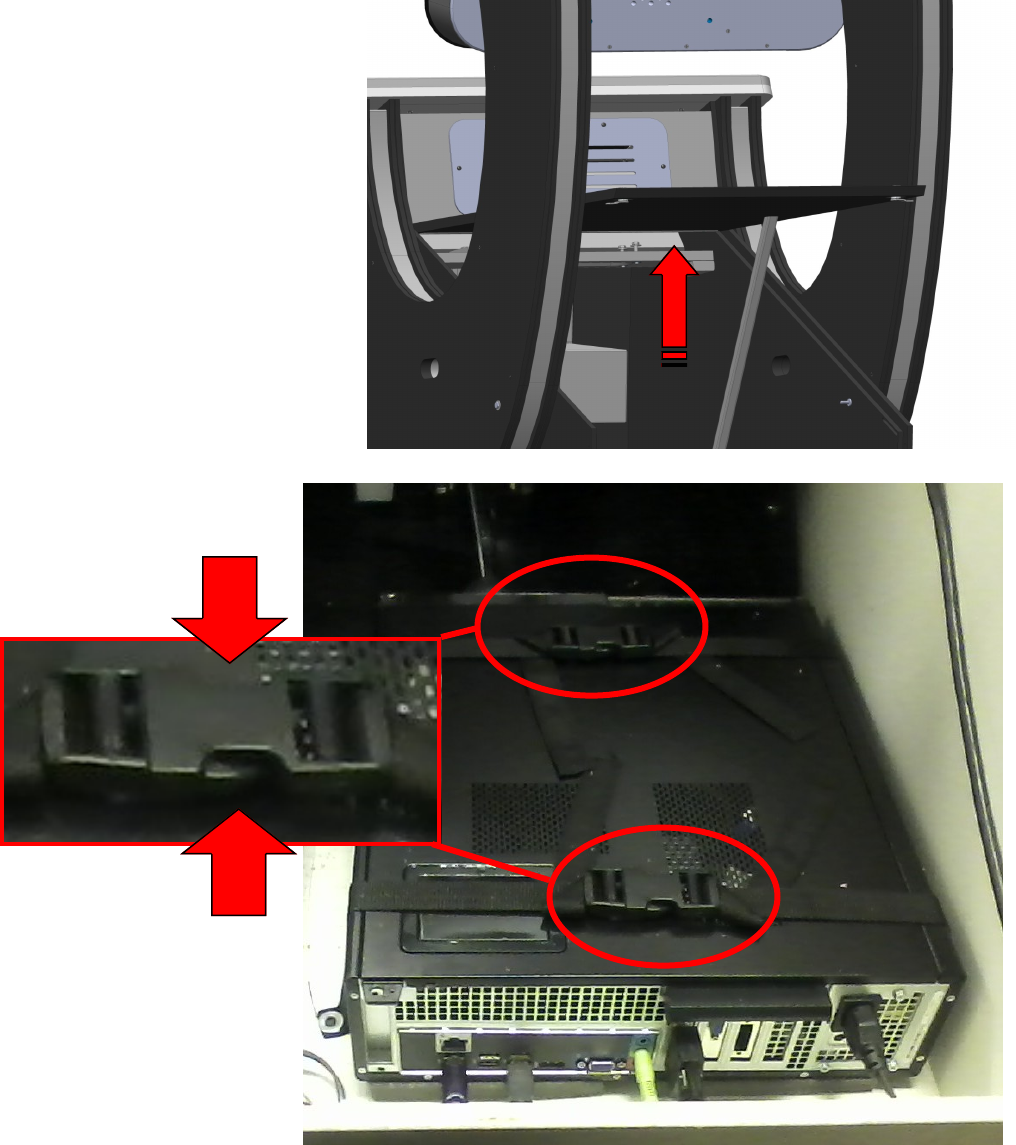
Computer Removal
The computer is accessed through the bottom back panel. Unlock the bottom locks and lift the
panel up. Locate the panel door prop and raise it so that it will support the back access panel up.
There are two straps which hold the computer to the cabinet floor. Press both buttons shown with
the arrows below to release each strap. Disconnect the computer connections before removing.
14
Monitor Replacement
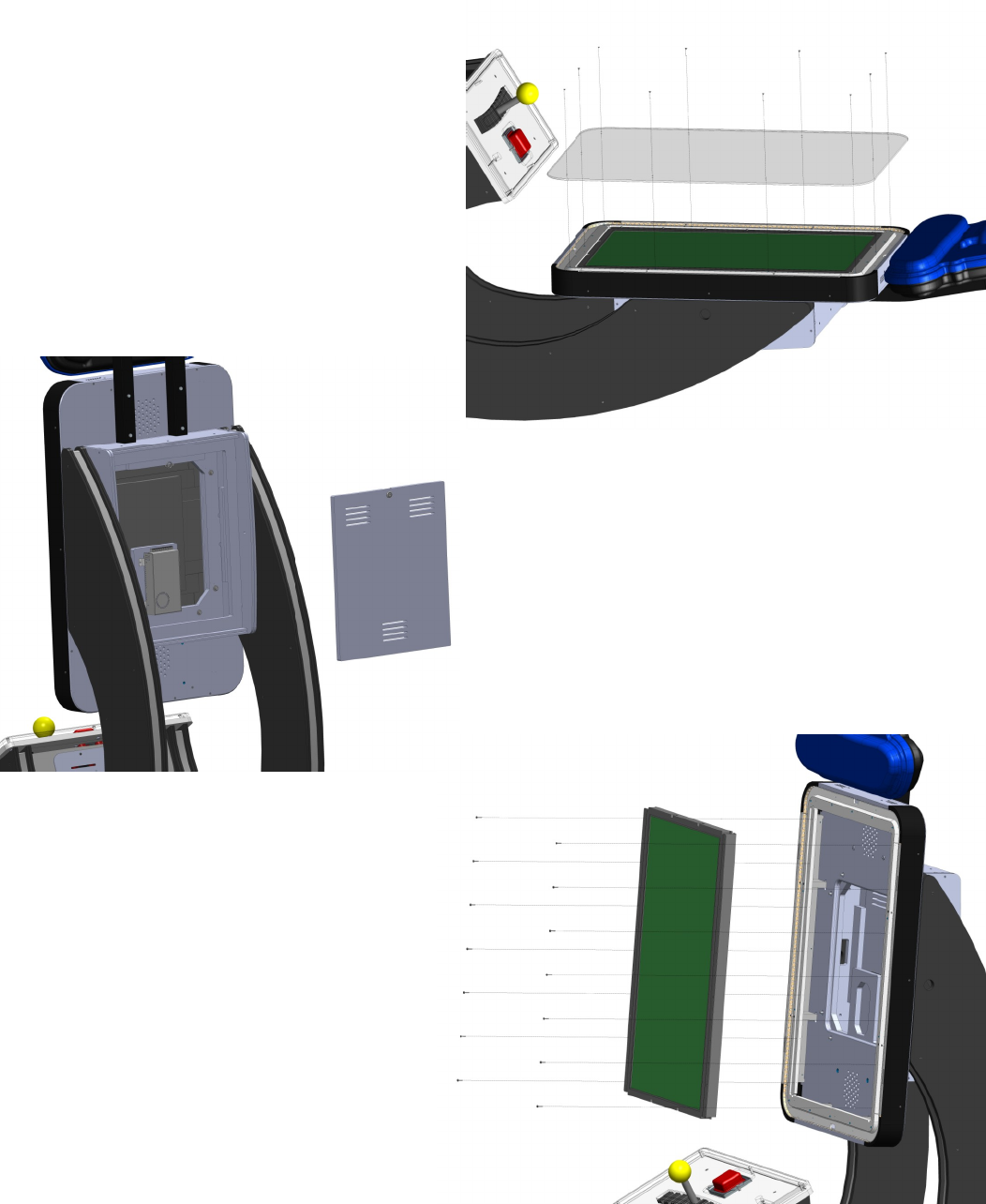
It is recommended to have a seconds person
assist in the removal of the monitor.
Begin by laying the game on its back. Re-
move the front glass by removing the 10
screws shown. Lift the game upright again.
Remove the back cover and disconnect the DC
power from the +24 volt power supply and the DVI
video cable to the monitor.
Remove the 14 screws holding the moni-
tor to the cabinet. With a second person,
push slightly from the back while someone
from the front catches the monitor at the
bottom as it slides out.
15
Player rod removal
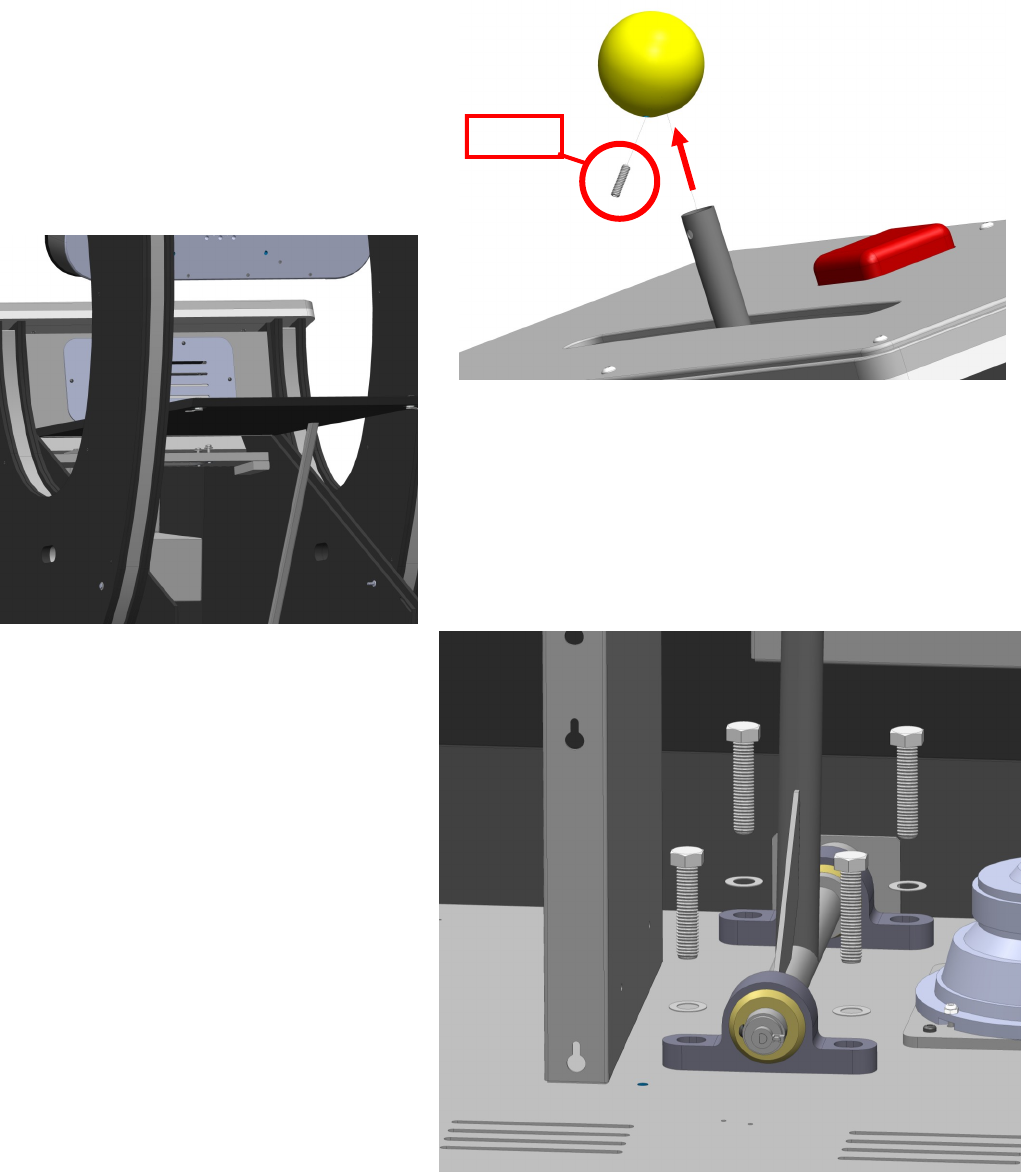
Remove the top ball by removing the set screw and lifting the ball up.
Unlock the bottom locks and lift the panel up. Locate
the panel door prop and raise it so that it will support
the back access panel up.
Remove the four bolts and washers to re-
move rod assembly.
Set screw
16
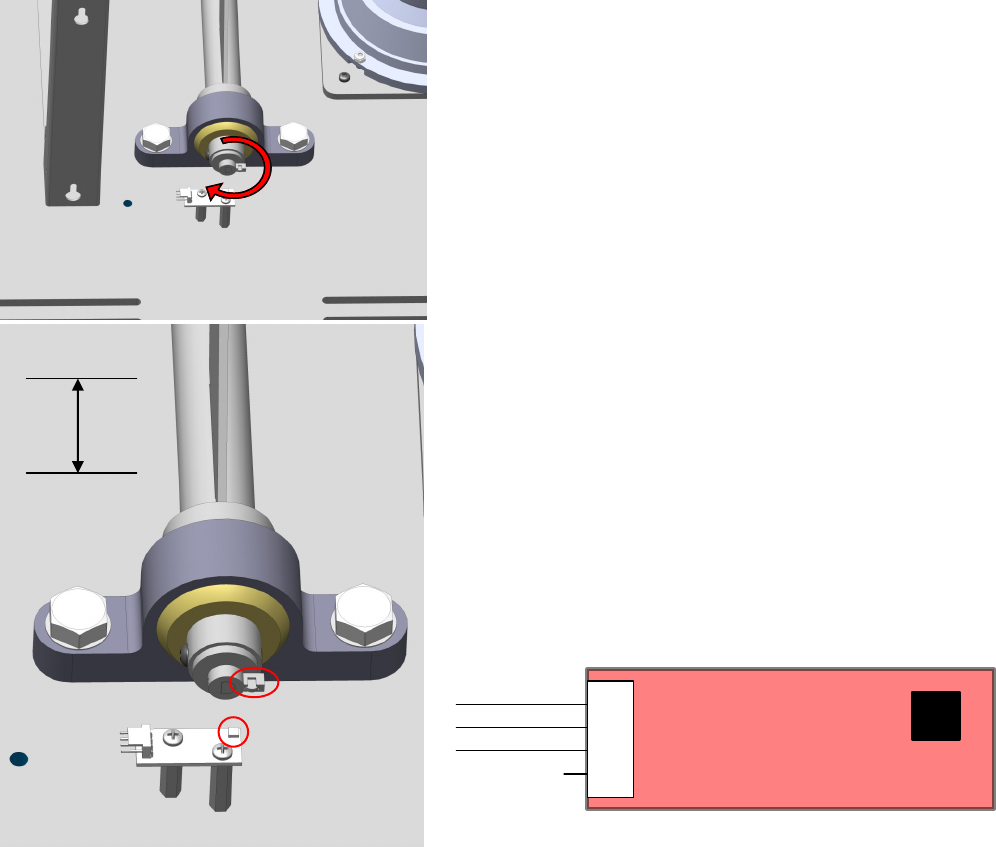
A=Metal tab
B=Sensor
A
B
Hall Effect Sensor
The hall effect sensor measures the magnetic
strength between the metal tab and the sensor.
As the play rod turns the rod back and fourth,
the distance between the metal tab and sensor
increases and decreases. The sensor reads
this field and compares it to the calibration table
to determine if you are moving left or right. If
you are unable to move the character left or
right, perform a calibration by following the di-
rections on page 8 under diagnostics.
Also check for the presents of +5 volts DC on
pin 1 (red wire) of the hall effect sensor itself.
Pin 2 is the output and should have voltage that
changes depending on the position of the
player rod.
BX2034X
MAIN I/O PCB
D
C
B
A
4 3 2 1
D
C
B
A
4 3 2 1
DATE 12/3/07
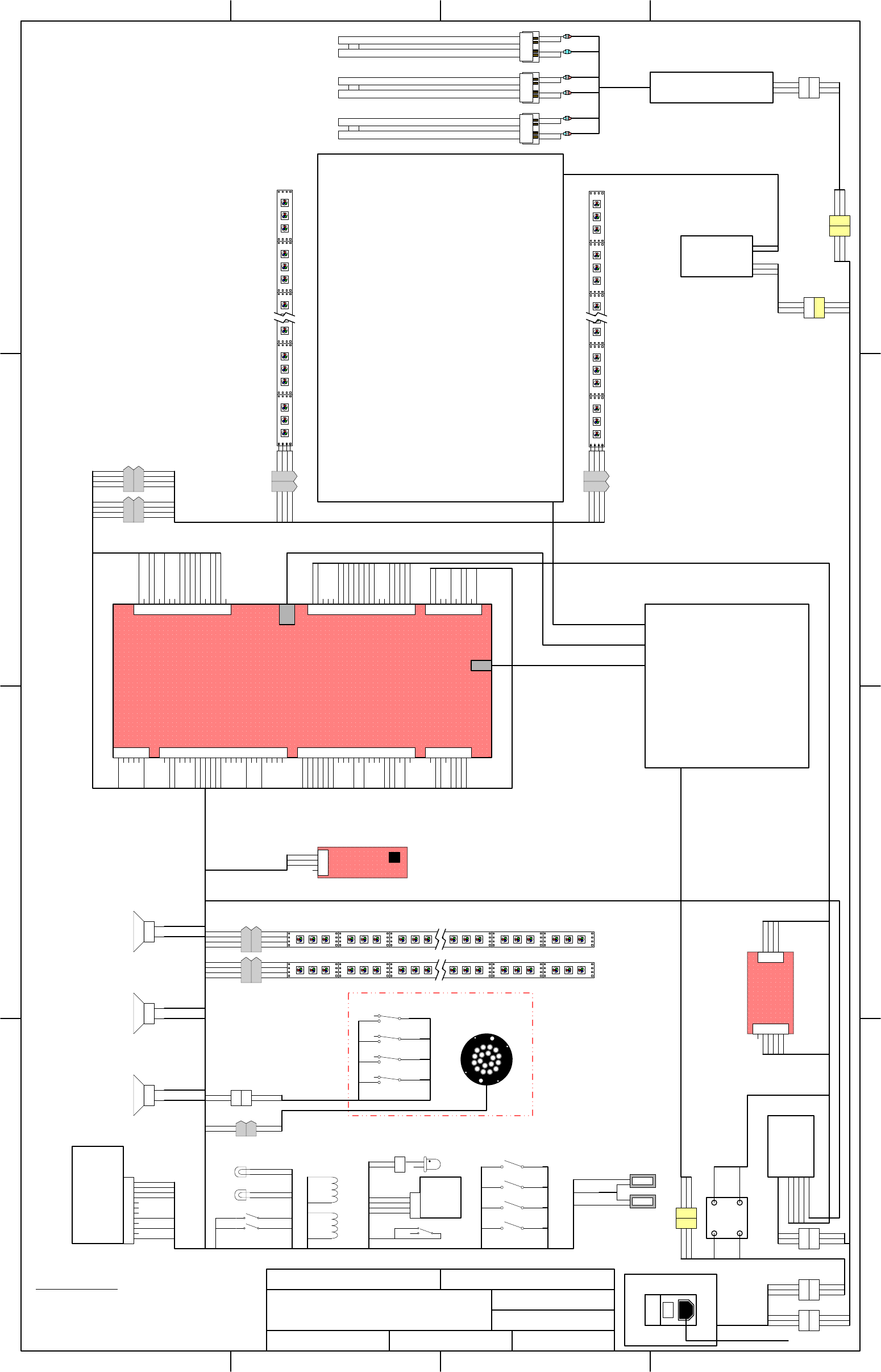
DESCRIPTION SYSTEM SCHEMATIC
DRAWN BY NBRANCATO
FILENAME DJ1100X SYSTEM
SCHEMATIC.VSD
PAGE 1 OF 1
REVISED 7/17/12
TITLE DOODLE JUMP
PART NO. DJ1100X
I
O
POWER ENTRY MODULE
TX2007X
5A MDA
POWER CORD
42" LCD MONITOR
#MON42LCD
1
2
3
BLACK
GREEN
WHITE
BROWN
G/Y
BLUE
PP250X
RED
RED
YELLOW
YELLOW
PP250X
RED
RED
YELLOW
YELLOW
E00139 – 36W PL-L
RED
RED
YELLOW x 2
YELLOW
E00139 – 36W PL-L
COIN
black
red 0000
TICKET
red
black 0000
1
2
orange
violet/green
1
2
3
4
LOW TICKET
SWITCH
violet/green
black
violet/blue
black x 2
violet/white
orange x 2
FLASHING LOW
TICKET LED
white/yellow
white/green
orange red x 2
white/brown
white/red
black/white x 2
orange/black x 2
COIN SWITCHES
COIN
LIGHTS HH5005
TICKET
DISPENSER
DOWN
UP
TEST
DIAG
white/blue
white/violet
white/gray
white
black x 2
black x 2
black x 2
black
orange/black x 2
tan x 2
LOCKOUT
COIL
LOCKOUT
COIL
orange/black x 2
tan
DJ2000X
COMPUTER
24VDC
POWER
SUPPLY
BLACK x 2
RED x 2
BROWN
GRN/YLW
BLUE
1
2
3
BROWN
GRN/YLW
BLUE
BA2063LX
1
2
3
BROWN
GRN/YLW
BLUE
DJ2050HX
E00233
XFE25.002080
E00474 DVI
USB
AUDIO
DJ2050HX
1
2
3
1
2
3
BROWN x 2
G/Y x 2
BLUE x 2
BROWN x 2
G/Y x 2
BLUE x 2
1
2
3
1
2
3
BROWN
G/Y
BLUE
BROWN
G/Y
BLUE
1
2
3
1
2
3
BLACK
GREEN
WHITE
BROWN
G/Y
BLUE
1
2
1
2START BUTTON
gray/black
gray/black x 2
gray/black x 2
gray/black x 2
black
black x 2
black x 2
black x 2
black
gray/black
black
gray/black
BX2052HX
DJ2063LX
START BUTTON BX2006X
1
2
3
4
5
6
1
2
3
4
5
6
7
8
9
10
11
12
13
14
15
16
17
18
1
2
3
4
5
6
7
8
9
10
11
12
13
14
15
16
17
18
19
20
P6
P2
P4
1
2
3
4
5
6
7
8
9
10
11
12
13
14
15
16
17
18
19
20
21
22
23
24
1
2
3
4
5
6
7
8
9
10
11
12
13
14
15
16
17
18
19
20
21
22
P8
P7
P11
P10
gray/white
black
1
2
3
4
5
6
7
8
P9
red/gray
brown/gray
brown/white
red/white
red/brown
gray/brown
+12 VDC (Audio)
+12 VDC
Ground (Audio)
Ground (Digital)
Ground (Digital)
+5 VDC
+5 VDC
+5 VDC
+12 VDC (Audio)
+12 VDC
Ground (Audio)
Ground (Digital)
Ground (Digital)
+5 V stdby-switced
PS_ON (control signal)
Ground
Coin 1
Coin 2
Diag
Test
Volume up
Volume down
Ticket notch
Ticket enable
Coin meter
Ticket meter
+12 VDC
Speaker left +
Speaker left -
Speaker right -
Speaker right +
Woofer +
Woofer -
Start button
+12 VDC
Ground
Start light
control panel red led 1
control panel geen led 1
control panel blue led 1
control panel red led 2
control panel geen led 2
control panel blue led 2
Lockout
monitor red led 1
monitor geen led 1
monitor blue led 1
monitor red led 2
monitor geen led 2
monitor blue led 2
+12 VDC
+12 VDC
Controller horizontal
Ground
230V GAME NOTE:
FOR 220V GAME SWAP CX8384X 120V BALLAST
FOR CX8384CEX 230V BALLAST
CHANGE FUSE TO 2.5A #E02025
MONITOR
red/gray
brown/gray
red/white
brown/white
PP250X
RED
RED
YELLOW
YELLOW
RED
YELLOW x 2
E00139 – 36W PL-L
1
2
red
white
1
2
orange/black
violet/black
1
2
3
BROWN
G/Y
BLUE
2111
relay
3 4
1 2
violet/brown
orange
BROWN
BROWN
IA2010
+12VDC
1
2
3
BROWN
G/Y
BLUE
DJ2065LX
ORANGE/WHITE x 2
ORANGE x 3
BLACK/WHITE x 2
BLACK x 3
BA2063LX
1
2
3
4
1
2
3
4
orange
red
green
light blue
+
G
R
B
+
G
R
B
+
G
R
B
+
G
R
B
+
G
R
B
+
G
R
B
+
G
R
B
+
G
R
B
+
G
R
B
+
G
R
B
+
G
R
B
+
G
R
B
orange/black
black/red
black/green
black/blue
orange/black
red
green
light blue
1
2
3
4
1
2
3
4
orange
red
green
light blue
+
G
R
B
+
G
R
B
+
G
R
B
+
G
R
B
+
G
R
B
+
G
R
B
+
G
R
B
+
G
R
B
+
G
R
B
+
G
R
B
+
G
R
B
+
G
R
B
PC
DJ2062LX
DJ2060LX
AC
1
2
3
1
2
3
4
orange
red
green
light blue
+
G
R
B
+
G
R
B
+
G
R
B
+
G
R
B
+
G
R
B
+
G
R
B
+
G
R
B
+
G
R
B
+
G
R
B
+
G
R
B
+
G
R
B
+
G
R
B
+
G
R
B
+
G
R
B
+
G
R
B
+
G
R
B
+
G
R
B
+
G
R
B
+
G
R
B
+
G
R
B
1
2
3
4
5
6
1
2
3
4
RED
RED
red
black
black
BLACK
ORANGE
PE2010X
+5VDC
1
2
3
4
1
2
3
4
1
2
3
4
orange
red
green
blue
yellow
black
white
brown
yellow
black
white
brown
1
2
3
4
orange
red
green
light blue
1
2
3
4
orange
red
green
blue
1
2
3
4
orange/white
red/white
green/white
blue/white
orange/black
red/black
green/black
blue/black
1
2
3
4
E00724DJAX
E00724DJX
DJ2060MX
black/white x 2
white/brown
white/red
white
white/gray
white/violet
white/blue
violet/blue
violet/white
white/yellow
white/green
orange & orange/black
gray/black
orange/black
black
violet/black
red
green
light blue
black/red
black/green
black/blue
1
2
3
4
5
6
7
8
9
10
P1
orange/black
red
black
orange
+12 VDC
+ 5 VDC
Ground
+12 VDC
tan
red/white
green/white
blue/white
red/black
green/black
blue/black
orange/white
orange/black
E00724DJAX
red/brown
gray/brown
1
2
3
4
DJ2039
HALL
EFFECT
red
gray/white
black
E00732
BROWN
G/Y
BLUE
1
2
3
BROWN
G/Y
BLUE
1
2
3
BALLAST
#CX8384X
MRQ
DJ2061MX
black/white x 2
black/white x 2
black/white
orange/black
CG2027
DJ2050HX
DJ2080LX
DJ2007
FP2007
FP2007
ORANGE/WHITE
ORANGE
BLACK/WHITE
BLACK
black
RED
RED
red
ORANGE/WHITE
ORANGE
BLACK/WHITE
BLACK
black
violet/orange
green
red led
START BUTTON LIGHT
Service - Player Controls
17
Control Panel LED Access
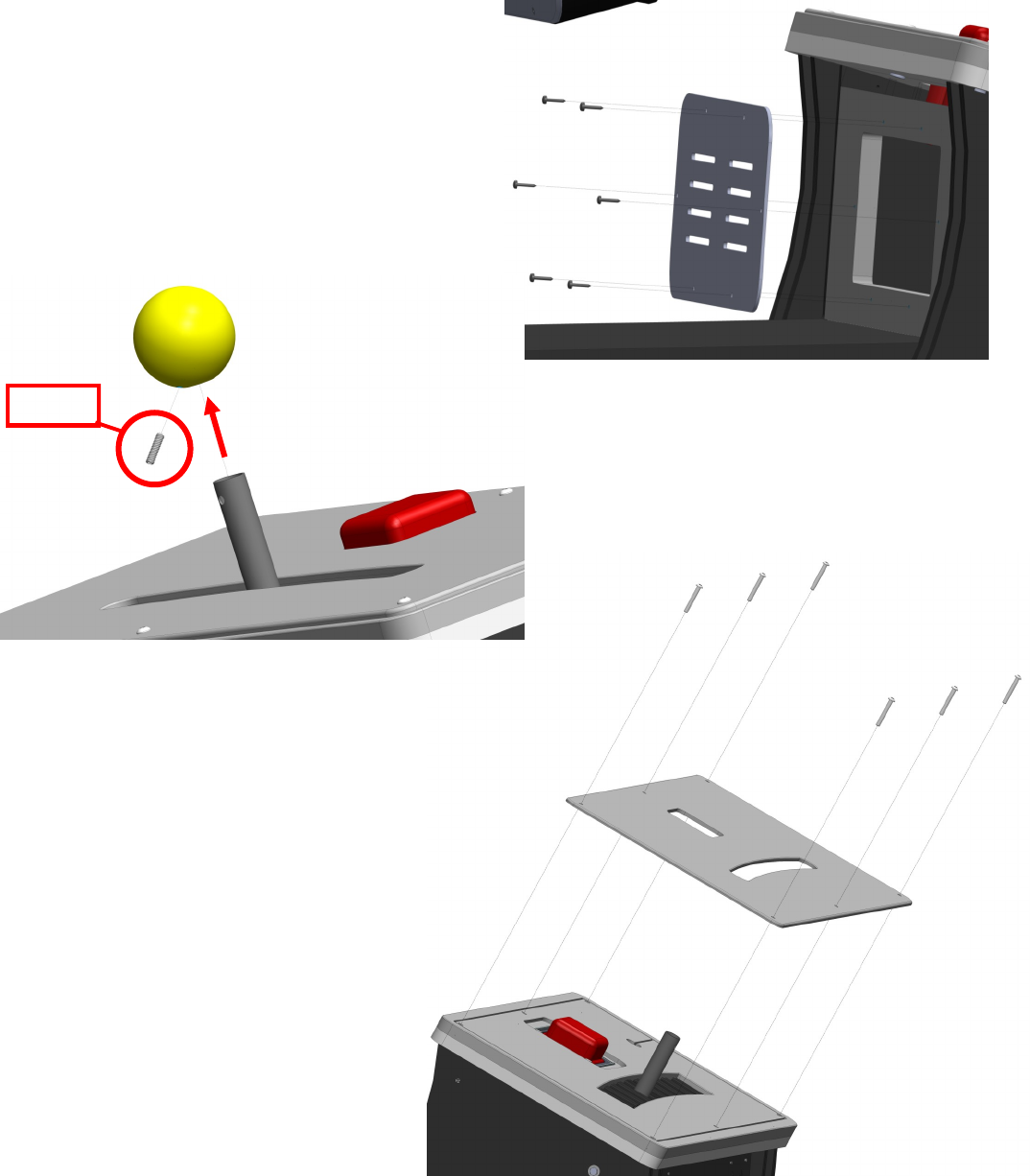
To gain access to the wiring of the control panel LED’s you need to remove the small grill located
at the back of the control panel.
There is six screws holding the back grill to the
control panel. Remove them to remove the
access panel.
Remove the top ball by removing the set
screw and lifting the ball up.
Set
Remove the six bolts that hold the con-
trol panel’s top to the cabinet. You can
now access the LEDs in the control
panel.
18
Spares: Electrical
BX2000DJX - Main computer
DJ2090X - Restore disk
BX2034X - I/O Board
DJ3024X - Joystick ball
DJ7127X - Marquee assembly
CX8384X - Ballast Workhorse 5
HH5005 - Ticket Dispenser
IA2010 - +12 Power supply
MON42LCD - 42” LCD monitor
PE2010X - +5 volt regulator supply
DJ2039 - Hall effect sensor
FP2007 - Speaker
DJ2007 - Speaker
E00724DJAX - 135 count RGB color LED
E00724DJA - 108 count RGB color LED
CG2027 - Power cord
2111 - Computer power relay
E00732 - Start button red LED board.
BX2006X - Start button assembly
XFE25.002080 - USB cable.
E00474 - DVI cable.
E00233 - Audio cable.
E00139-36w PL-L - PLL bulbs, 36w.
MON42/47ORCH - A/D board
MON42/47PS - Power supply for monitor
DJ2014 Dongle
TX2007X Power mod
Graphics:
DJ7000 Cabinet left side.
DJ7001 Cabinet right side.
DJ7002 Ticket Door decal
DJ7004 Front cabinet logos
DJ7012 Control Panel
DJ7027 Marquee Vacuum Formed decal.
201 Chrome T-molding
211 Black T-molding
5014 #45 lock
BX3004 Pillow block
BX3008 Square button
*** Refer to wiring diagram for harness part numbers ***

19
WARRANTY POLICY
I.C.E. Inc warrants all components in new machines to be free of defects in materials and workmanship for the
period listed below:
■ 180 days on Main PCB’s, Computers & Motors
■ 1 year on all LCD monitor panels
■ 90 days on all other electronic and mechanical components
■ 30 days on all I.C.E. repairs and parts purchases
I.C.E. Inc shall not be obligated to furnish a warranty request under the following conditions:
■ Equipment or parts have failed through normal wear and tear
■ Equipment has been subjected to unwarranted stress, abuse or neglect
■ Equipment has been damaged as a result of arbitrary repair/modification
Products will only be covered under warranty by obtaining an I.C.E. authorized RMA #. To obtain an RMA #
please provide I.C.E. tech support with the game serial # or original I.C.E. invoice # and a detailed description
of the failure or fault symptoms.
I.C.E. Inc will assume no liability whatsoever for costs associated with labor or travel time to replace defective
parts. All defective warranty covered components will be replaced with new or factory refurbished compo-
nents equal to OEM specifications.
I.C.E. Inc will cover domestic UPS ground, or comparable shipping costs during the warranty period. Interna-
tional or expedited shipments are available for an additional charge. To obtain credit defective parts must be
returned to I.C.E. Inc, at the customer’s expense, within 30 days. After 30 days a 15% re-stocking fee will ap-
ply to all returns.
ICE distributors are independent, privately owned and operated. In their judgment, they may sell parts and/or
accessories other than those manufactured by I.C.E. Inc. We cannot be responsible for the quality, suitability
or safety of any non-I.C.E. part or modification (including labor) that is performed by such a distributor.
Innovative Concepts in Entertainment
10123 Main St.
Clarence, NY 14031
Phone #: (716) - 759 – 0360
Fax #: (716) – 759 – 0884
www.icegame.com
BX2034X
MAIN I/O PCB
D
C
B
A
4321
D
C
B
A
4321
DATE 12/3/07
DESCRIPTION SYSTEM SCHEMATIC
DRAWN BY NBRANCATO
FILENAME DJ1100X SYSTEM
SCHEMATIC.VSD
PAGE 1 OF 1
REVISED 10/17/12
TITLE DOODLE JUMP
PART NO. DJ1100X
I
O
POWER ENTRY MODULE
TX2007X
5A MDA
POWER CORD
42" LCD MONITOR
#MON42LCD
1
2
3
BLACK
GREEN
WHITE
BROWN
G/Y
BLUE
PP250X
RED
RED
YELLOW
YELLOW
PP250X
RED
RED
YELLOW
YELLOW
E00139 – 36W PL-L
RED
RED
YELLOW x 2
YELLOW
E00139 – 36W PL-L
COIN
black
red 0000
TICKET
red
black 0000
1
2
orange
violet/green
1
2
3
4
LOW TICKET
SWITCH
violet/green
black
violet/blue
black x 2
violet/white
orange x 2
FLASHING LOW
TICKET LED
white/yellow
white/green
orange red x 2
white/brown
white/red
black/white x 2
orange/black x 2
COIN SWITCHES
COIN
LIGHTS HH5005
TICKET
DISPENSER
DOWN
UP
TEST
DIAG
white/blue
white/violet
white/gray
white
black x 2
black x 2
black x 2
black
orange/black x 2
tan x 2
LOCKOUT
COIL
LOCKOUT
COIL
orange/black x 2
tan
DJ2000X
COMPUTER
24VDC
POWER
SUPPLY
BLACK x 2
RED x 2
BROWN
GRN/YLW
BLUE
1
2
3
BROWN
GRN/YLW
BLUE
BA2063LX
1
2
3
BROWN
GRN/YLW
BLUE
DJ2050HX
E00233
XFE25.002080
E00731 DVI
USB
AUDIO
DJ2050HX
1
2
3
1
2
3
BROWN x 2
G/Y x 2
BLUE x 2
BROWN x 2
G/Y x 2
BLUE x 2
1
2
3
1
2
3
BROWN
G/Y
BLUE
BROWN
G/Y
BLUE
1
2
3
1
2
3
BLACK
GREEN
WHITE
BROWN
G/Y
BLUE
1
21
2START BUTTON
gray/black
gray/black x 2
gray/black x 2
gray/black x 2
black
black x 2
black x 2
black x 2
black
gray/black
black
gray/black
BX2052HX
DJ2063LX
START BUTTON BX2006X
1
2
3
4
5
6
1
2
3
4
5
6
7
8
9
10
11
12
13
14
15
16
17
18
1
2
3
4
5
6
7
8
9
10
11
12
13
14
15
16
17
18
19
20
P6
P2
P4
1
2
3
4
5
6
7
8
9
10
11
12
13
14
15
16
17
18
19
20
21
22
23
24
1
2
3
4
5
6
7
8
9
10
11
12
13
14
15
16
17
18
19
20
21
22
P8
P7
P11
P10
gray/white
black
1
2
3
4
5
6
7
8
P9
red/gray
brown/gray
brown/white
red/white
gray/red
gray/brown
+12 VDC (Audio)
+12 VDC
Ground (Audio)
Ground (Digital)
Ground (Digital)
+5 VDC
+5 VDC
+5 VDC
+12 VDC (Audio)
+12 VDC
Ground (Audio)
Ground (Digital)
Ground (Digital)
+5 V stdby-switced
PS_ON (control signal)
Ground
Coin 1
Coin 2
Diag
Test
Volume up
Volume down
Ticket notch
Ticket enable
Coin meter
Ticket meter
+12 VDC
Speaker left +
Speaker left -
Speaker right -
Speaker right +
Woofer +
Woofer -
Start button
card stuck
card empty
payout ok
+12 VDC
Ground
Start light
control panel red led 1
control panel geen led 1
control panel blue led 1
control panel red led 2
control panel geen led 2
control panel blue led 2
card payout
Lockout
monitor red led 1
monitor geen led 1
monitor blue led 1
monitor red led 2
monitor geen led 2
monitor blue led 2
+12 VDC
+12 VDC
Controller horizontal
Ground
230V GAME NOTE:
FOR 220V GAME SWAP CX8384X 120V BALLAST
FOR CX8384CEX 230V BALLAST
CHANGE FUSE TO 2.5A #E02025
MONITOR
red/gray
brown/gray
red/white
brown/white
PP250X
RED
RED
YELLOW
YELLOW
RED
YELLOW x 2
E00139 – 36W PL-L
1
2
red
white
1
2
orange/black
violet/black
1
2
3
BROWN
G/Y
BLUE
2111
relay
34
12
green
violet/orange
BROWN
BROWN
IA2010
+12VDC
1
2
3
BROWN
G/Y
BLUE
DJ2065LX
orange/black x 2
ORANGE/WHITE x 2
ORANGE x 3
BLACK/WHITE x 2
BLACK x 3
BA2063LX
1
2
3
4
1
2
3
4
orange
red
green
light blue
+
G
R
B
+
G
R
B
+
G
R
B
+
G
R
B
+
G
R
B
+
G
R
B
+
G
R
B
+
G
R
B
+
G
R
B
+
G
R
B
+
G
R
B
+
G
R
B
orange/black
black/red
black/green
black/blue
orange/black
red
green
light blue
1
2
3
4
1
2
3
4
orange
red
green
light blue
+
G
R
B
+
G
R
B
+
G
R
B
+
G
R
B
+
G
R
B
+
G
R
B
+
G
R
B
+
G
R
B
+
G
R
B
+
G
R
B
+
G
R
B
+
G
R
B
PC
DJ2062LX
DJ2060LX
AC
1
2
3
1
2
3
4
orange
red
green
light blue
+
G
R
B
+
G
R
B
+
G
R
B
+
G
R
B
+
G
R
B
+
G
R
B
+
G
R
B
+
G
R
B
+
G
R
B
+
G
R
B
+
G
R
B
+
G
R
B
+
G
R
B
+
G
R
B
+
G
R
B
+
G
R
B
+
G
R
B
+
G
R
B
+
G
R
B
+
G
R
B
1
2
3
4
5
6
1
2
3
4
RED
RED
red
black
black
BLACK
ORANGE
PE2010X
+5VDC
1
2
3
4
1
2
3
4
1
2
3
4
orange
red
green
blue
yellow
black
white
brown
yellow
black
white
brown
1
2
3
4
orange
red
green
light blue
1
2
3
4
orange
red
green
blue
1
2
3
4
orange/white
red/white
green/white
blue/white
orange/black
red/black
green/black
blue/black
1
2
3
4
E00724DJAX
E00724DJX
DJ2060MX
black/white x 2
white/brown
white/red
white
white/gray
white/violet
white/blue
violet/blue
violet/white
white/yellow
white/green
orange & orange/black
gray/black
gray/red
gray/yellow
gray/green
orange/black
black
violet/black
red
green
light blue
black/red
black/green
black/blue
1
2
3
4
5
6
7
8
9
10
P1
orange/white
red
black
orange
black/white
black/white
+12 VDC
+ 5 VDC
Ground
+12 VDC
yellow/white
tan
red/white
green/white
blue/white
red/black
green/black
blue/black
orange/white
orange/black
E00724DJAX
gray/red
gray/brown
1
2
3
4
DJ2039
HALL
EFFECT
red
gray/white
black
E00732
BROWN
G/Y
BLUE
1
2
3
BROWN
G/Y
BLUE
1
2
3
BALLAST
#CX8384X
MRQ
DJ2061MX
black/white x 2
black/white x 2
black/white
orange/black
CG2027
DJ2050HX
DJ2080LX
DJ2007
FP2007
FP2007
ORANGE/WHITE
ORANGE
BLACK/WHITE
BLACK
black
RED
RED
red
ORANGE/WHITE
ORANGE
BLACK/WHITE
BLACK
black
violet/orange
green
red led
START BUTTON LIGHT
1
2
3
4
5
6
7
8
9
10
11
12
black/white
orange/white
black/white
yellow/white
gray/green
gray/red
gray/yellow
DJ5002
CARD
DISPENSER
