Arcade Kc Cobra Manual Sting 6 25 User
2013-10-17
User Manual: Arcade Kc Cobra Manual
Open the PDF directly: View PDF  .
.
Page Count: 37
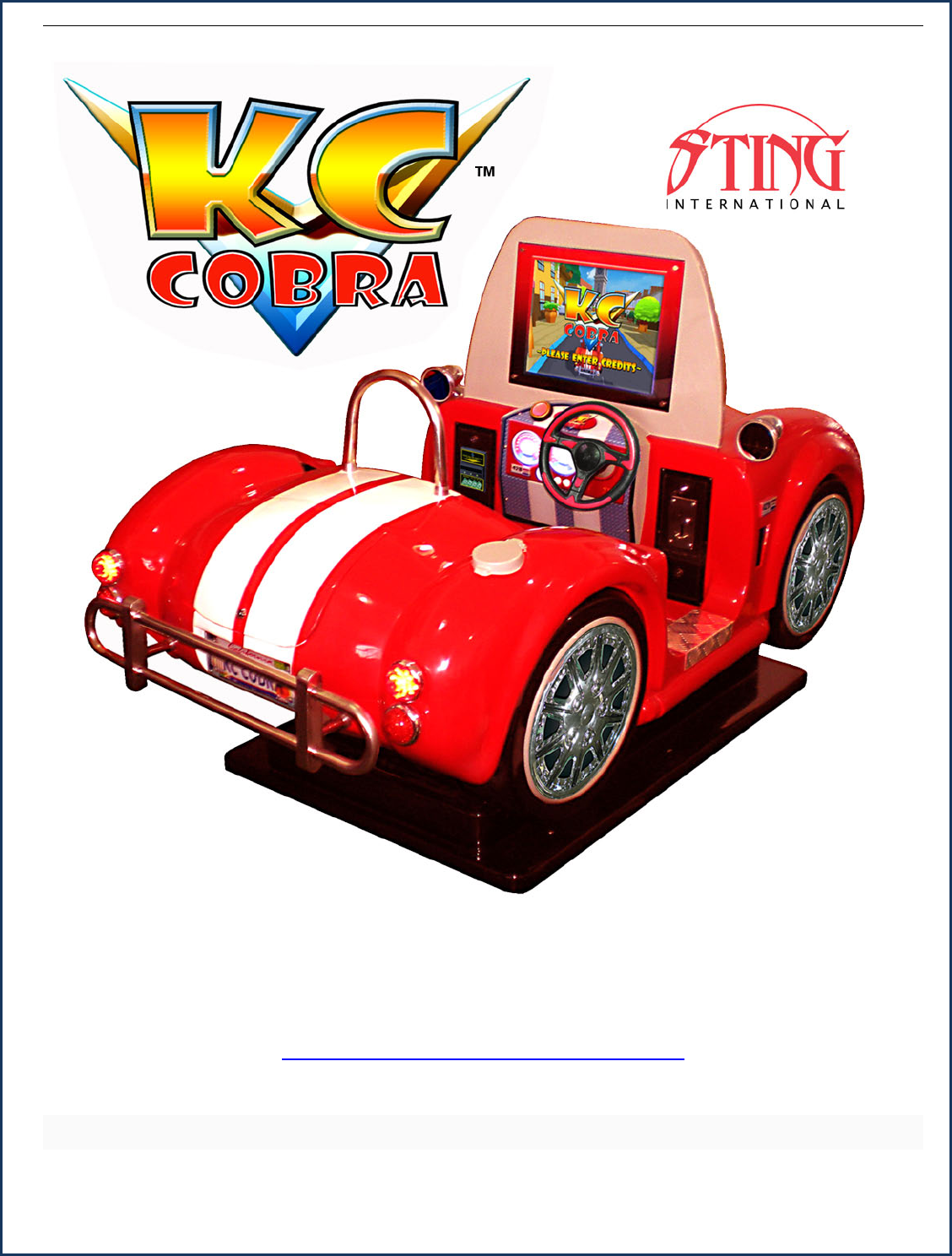
SERVICE AND TECHNICAL SUPPORT CALL: FAMILY FUN COMPANIES (708) 598-7320 WWW.FAMILYFUNCOMPANIES.COM
GAME OPERATION & INSTRUCTION MANUAL
FOR ALL PARTS, SERVICE, AND TECHNICAL SUPPORT
PHONE: 708-598-3720 FAX: 708-598-3720
WWW.FAMILYFUNCOMPANIES.COM
STING INTERNATIONAL, © 2013 ALL RIGHTS RESERVED

SERVICE AND TECHNICAL SUPPORT CALL: FAMILY FUN COMPANIES (708) 598-7320 WWW.FAMILYFUNCOMPANIES.COM
THIS GAME IS INTENDED FOR INDOOR USE ONLY

SERVICE AND TECHNICAL SUPPORT CALL: FAMILY FUN COMPANIES (708) 598-7320 WWW.FAMILYFUNCOMPANIES.COM
CONTENTS
1. SPECIFICATION ................................................................................................................. 1
2. INTRODUCTION ................................................................................................................. 2
2-1 OVERVIEW .................................................................................................................. 2
2-2 IMPORTANT SAFETY INFORMATION ....................................................................... 3
2-3 SET UP......................................................................................................................... 3
3. PACKAGE CONTENTS ...................................................................................................... 4
4. INSTALLATION .................................................................................................................. 4
4-1 LOCATIONS TO AVOID............................................................................................... 5
4-2 INSTALLING AT SITE .................................................................................................. 5
5. CONNECTING THE POWER CORD .................................................................................. 6
5-1 WIRE HOLDER ............................................................................................................ 6
6. PARTS DESCRIPTION ....................................................................................................... 7
6-1 GAME APPEARANCE and FEATURES ...................................................................... 7
6-2 TICKET MECHANISM(ENTROPY)......................................................................... 8
6-3 BILL ACCEPTOR OPTION (OPERATOR INSTALLED) .............................................. 9
6-4 COIN MECHANISM(MECHANICAL)D-200 ........................................................... 12
6-5 COIN MECHANISM(ELECTRONIC)........................................................................ 12
6-6 TRUNK ....................................................................................................................... 14
7. SERVICE ............................................................................................................................. 15
8. CONTROL SIGNAL AND INSTRUCTION ........................................................................ 18
8-1 PCB LAYOUT ............................................................................................................. 18
8-2 HOW TO ENTER INTO MENUS ................................................................................ 19
9. INSTRUCTION OF GAME PLAY...................................................................................... 24
10. GENERAL TROUBLESHOOTING.................................................................................... 26
11. PART LIST ........................................................................................................................ 27
11-1 BASE MECHANICAL ASSY ..................................................................................... 27
11-2 HARDWARE COMPONENT .................................................................................... 29
11-3 MACHINE PARTS LIST............................................................................................ 29!
SERVICE AND TECHNICAL SUPPORT CALL: FAMILY FUN COMPANIES (708) 598-7320 WWW.FAMILYFUNCOMPANIES.COM
1
1. SPECIFICATION
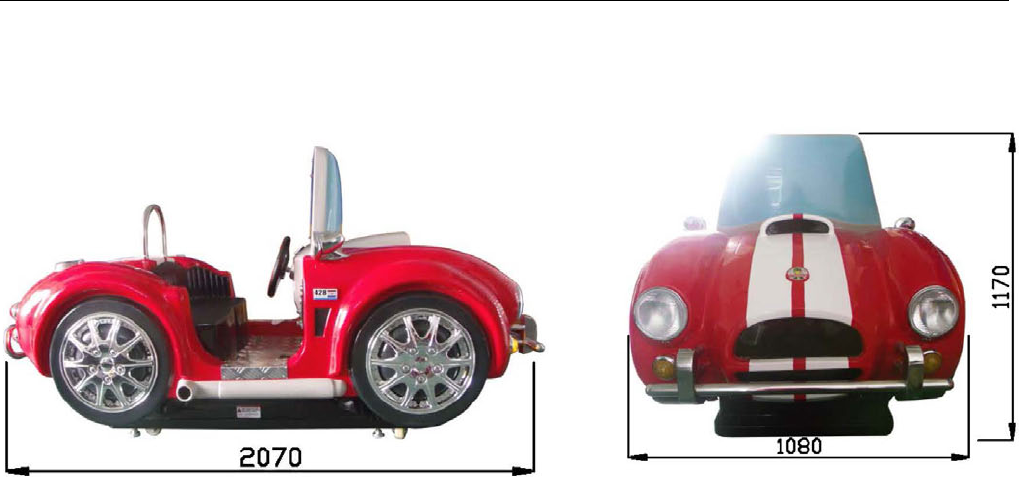
(1) Dimension: L2070mm,W1080mm,H1170mm
W43” x D81” x H44”
(2) Weight: 164KG 331 Lbs.
(3) Voltage: AC 110V -120V, 220-240V 50Hz-60Hz;
(4) Power: 68W-500W(when playing, the more load, the higher the power required)
(5) Current:0.9A-10A
Note:Please refer to the nameplate at the back of game for the actual voltage
(6) Environment: (indoor) temperature -10+40; humidity ≤90% ; pressure 86Pa106Pa
Note: Game parameters are subject to change without notice.
SERVICE AND TECHNICAL SUPPORT CALL: FAMILY FUN COMPANIES (708) 598-7320 WWW.FAMILYFUNCOMPANIES.COM
2
2. INTRODUCTION
2-1 OVERVIEW
Thank you for purchasing the KC-COBRA video game ride.
This owner’s Manual is intended to provide detailed descriptions together with all the
necessary information regarding the general operation of electronic assemblies, servicing
control, spare parts, etc., pertaining to the game.
This manual is intended for the owner, operator, personnel and managers in charge of
operation of the product. Operate the product after carefully reading and sufficiently
understanding the instructions. If the product fails to function satisfactorily, non-technical
personnel should under no circumstances attempt to service the internal system.
To Maintain Safety:
To ensure the safe usage of the product, be sure to read the following before using the
product. The following instructions are intended for the users, operators and the personnel in
charge of the operation of the product. After carefully reading and sufficiently understanding the
warning display and cautions, handle the product appropriately. Be sure to keep this operation
manual nearby the product or elsewhere convenient for referring to it when necessary.
For the safe usage of the product, the following pictographs are used:
Indicates: “HANDLE WITH CARE”. In order to protect the human body and equipment,
this display is attached to places where the instruction manual should be referred to.
Indicates: a “PROTECTIVE EARTH TERMINAL”. Before operating the equipment, be
sure to connect it to the ground. (The step may be omitted for products in which a power cable
with earth is used.)
Be sure to understand the contents of the displays before operating the equipment or
reading the text.
DANGER
WARNING
CAUTION
Indicates that mishandling the product by disregarding this pictograph
may cause severe injury or even death.
Indicates that mishandling the product by disregarding this warning may
cause a potentially hazardous situation which can result in death or
serious injury.
Indicates that mishandling the product by disregarding this caution may
cause a slight hazardous situation which can result in personal injury
and/or material damage.

SERVICE AND TECHNICAL SUPPORT CALL: FAMILY FUN COMPANIES (708) 598-7320 WWW.FAMILYFUNCOMPANIES.COM
3
2-2 IMPORTANT SAFETY INFORMATION
Unplug the game from the AC wall receptacle when servicing this product. Failure to do so
could result in serious injury to yourself or others.
Use only a GROUNDED AC receptacle. Failure to do so could result in improper operation
or damage to the game and could void your warranty. If you are unsure that your AC
receptacle is properly grounded, have a qualified electrician perform this check for you.
Always be sure power to the game is turned off when doing even routine maintenance
otherwise, moving parts could activate unexpectedly causing injury.
This product is heavy, necessitated by the design. When moving this game, be sure you
have adequate help. Use a suitable dolly or hand truck where practical.
2-3 SET UP
Be sure that the game is on a level surface. If the game is rocking unevenly on the floor
adjust the legs to remove the rocking of the game.
Be sure to plug the game into the proper A.C. GROUNDED receptacle. Do not use long
extension cords unless absolutely necessary and if so, be sure it is a heavy duty cord of at
least 16 Ga. and no longer than 20 ft. Check the label on the back of the game to make
sure the power requirements of the game match that of your location.
Turn the game on and check to be sure there are no unusual sounds and that everything
appears to be working correctly.

SERVICE AND TECHNICAL SUPPORT CALL: FAMILY FUN COMPANIES (708) 598-7320 WWW.FAMILYFUNCOMPANIES.COM
4
3. PACKAGE CONTENTS
Be sure to check that you have received all packages indicated below.
Game Unit
Accessories
No.
Name
Specification
Picture
Qty.
Remark
1
Manual
1
English version
2
Key
GUO711
2
Ticket door、coin door、
coin box、service door
3
Power
cord
UL/CE Version
1
Per request
4
Fuse
10A
1
This machine has included an additional “U” disc for situations caused by power surges.
Function
In the event of a sudden surge of power, the video may freeze or the game may
not log in normally. In this case, please take this U disc which is found next to the
main PC and insert into USB port on host PC. After inserting, game system
software will be reinitialized automatically. After installing, game will run normally.
Please put U disc back into the storage port for future use if necessary.
4. INSTALLATION
Check the parts list before installation. Verify that all parts that have been received and are in
good condition
For indoor use only!
。
ATTENTION
SERVICE AND TECHNICAL SUPPORT CALL: FAMILY FUN COMPANIES (708) 598-7320 WWW.FAMILYFUNCOMPANIES.COM
5
4-1 LOCATIONS TO AVOID
4-2 INSTALLING ON SITE
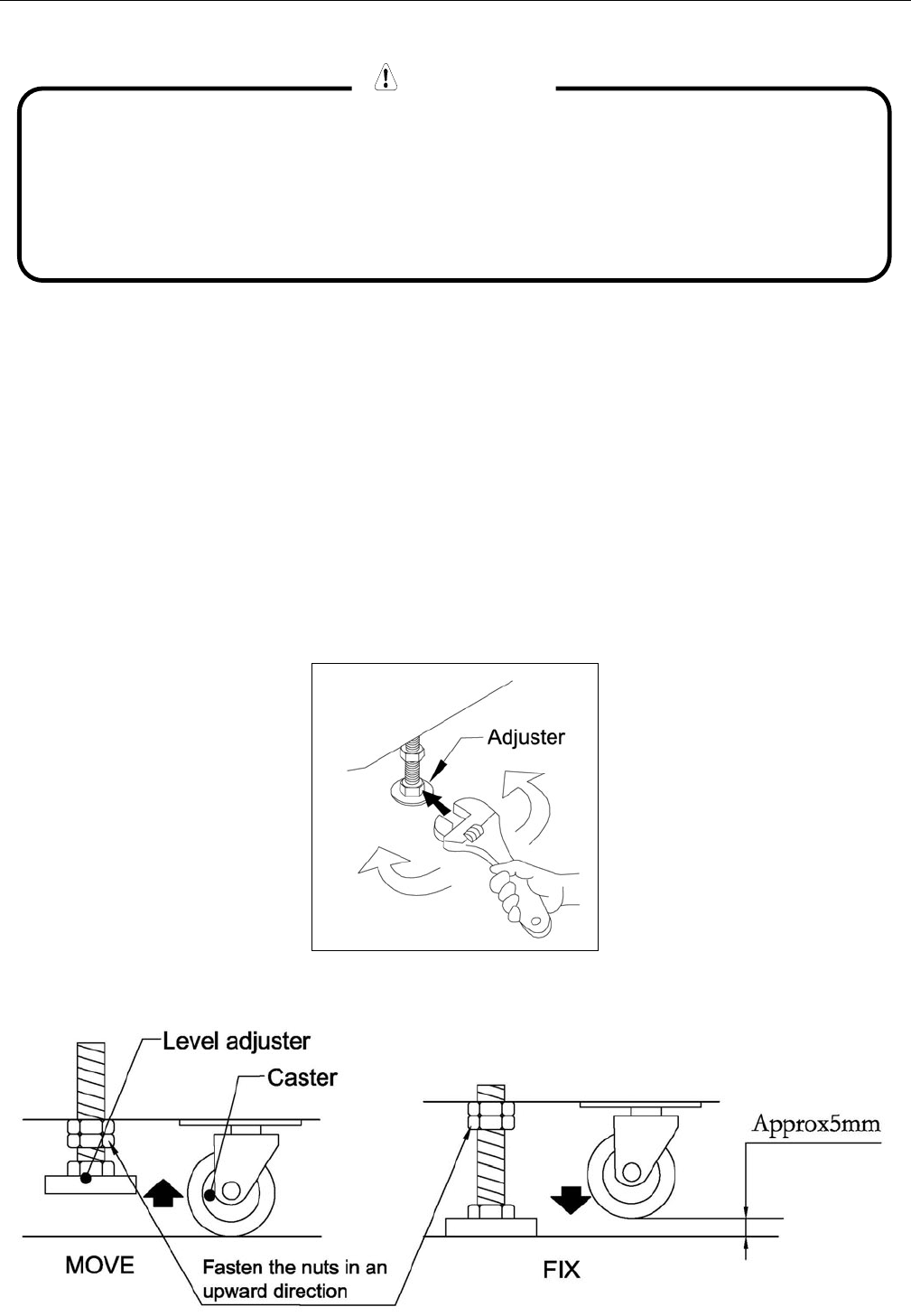
The machine must be fixed on level ground. The product is equipped with 4 casters and 4
adjusters. When installation position /site has been determined, have the adjusters come in
direct contact with the floor.
Establish a gap of about 5 mm between the floor and the casters and adjust the unit so that it
will remain level.
Move the product to the installation site.
Bring the adjusters into direct contact with the floor. Use a wrench to align the height of the
adjusters until the cabinet is perfectly level.
After setting, turn adjuster nuts upwards to tighten them and secure adjuster heights.
The machine is designed for indoor use only. Never install this machine
outdoors or in any of the following:
● Locations exposed to direct sunlight
● Locations subject to rain or water leakage.
● Unstable locations or locations subject to vibration.
● Dusty, hot, or damp locations.
WARNING

SERVICE AND TECHNICAL SUPPORT CALL: FAMILY FUN COMPANIES (708) 598-7320 WWW.FAMILYFUNCOMPANIES.COM
6
5. CONNECTING THE POWER CORD
5-1 WIRE HOLDER
WARNING
● Do not put heavy items on power cord.
- Disconnect game power before moving.
- Make sure all wheels are intact. Replace any wheels that are damaged or
broken before moving the game.
- When moving the game, DO NOT slide the game across the floor.
- Ensure the game is level before connecting the power.
- To insure a long life of your product we recommend always wrapping the
game with soft blankets for moving long distance to protect the finish.
WIRE
HOLDER
BASE
PLUG
SOCKET
PLUG
POWER
SWITCH
IEC SOCKET
WARNING
SERVICE AND TECHNICAL SUPPORT CALL: FAMILY FUN COMPANIES (708) 598-7320 WWW.FAMILYFUNCOMPANIES.COM
7
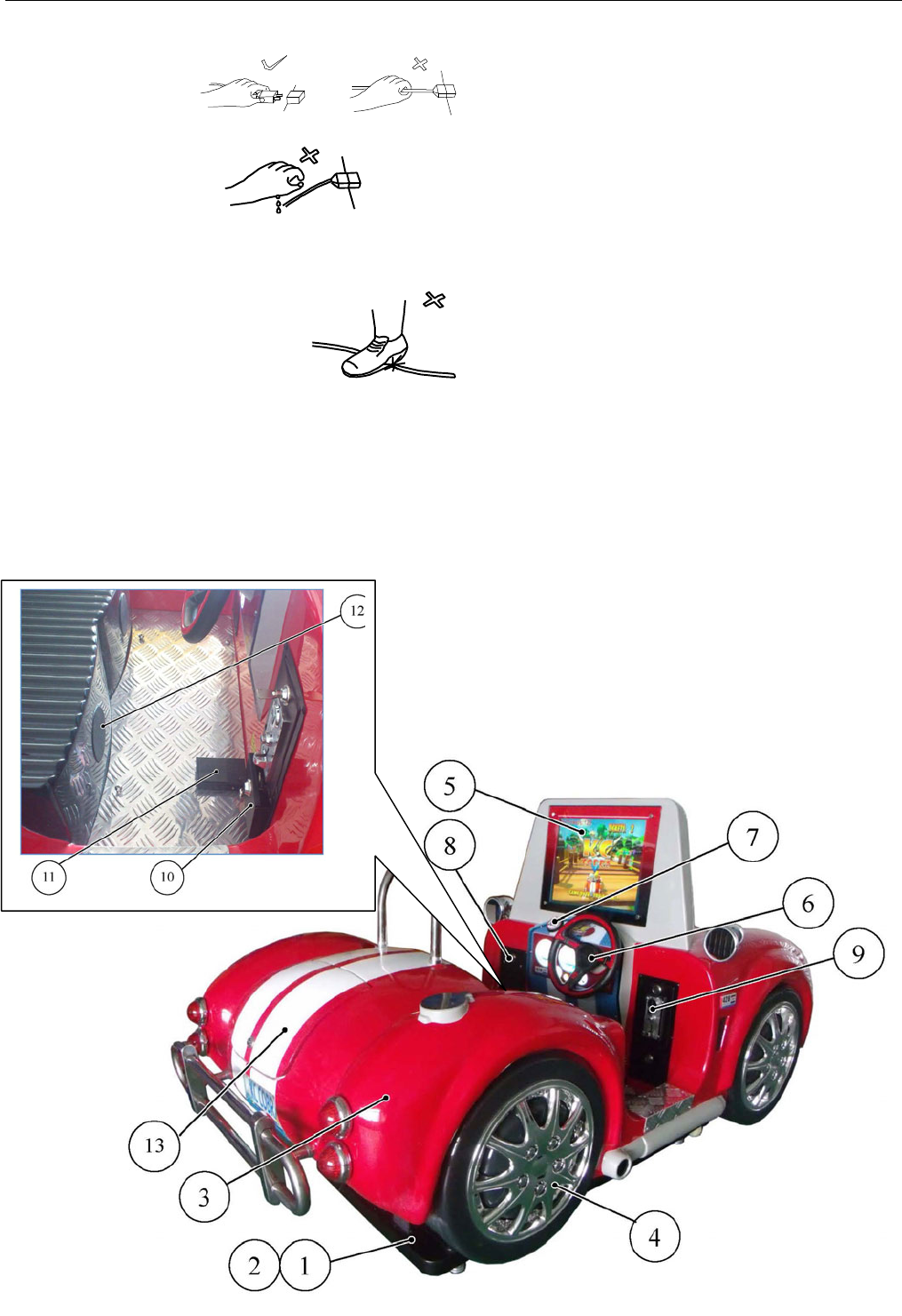
● Hold the power plug instead of the wire to draw the power cord out of the socket.
● Do not touch the power plug with wet hands.
● Do not draw or twist the cord or store near any high heat source.
● Do not place the cord where the player can easily trip over, or come in contact with it.
● Operate this game with the correct power and fuse configuration.
6. PARTS DESCRIPTION
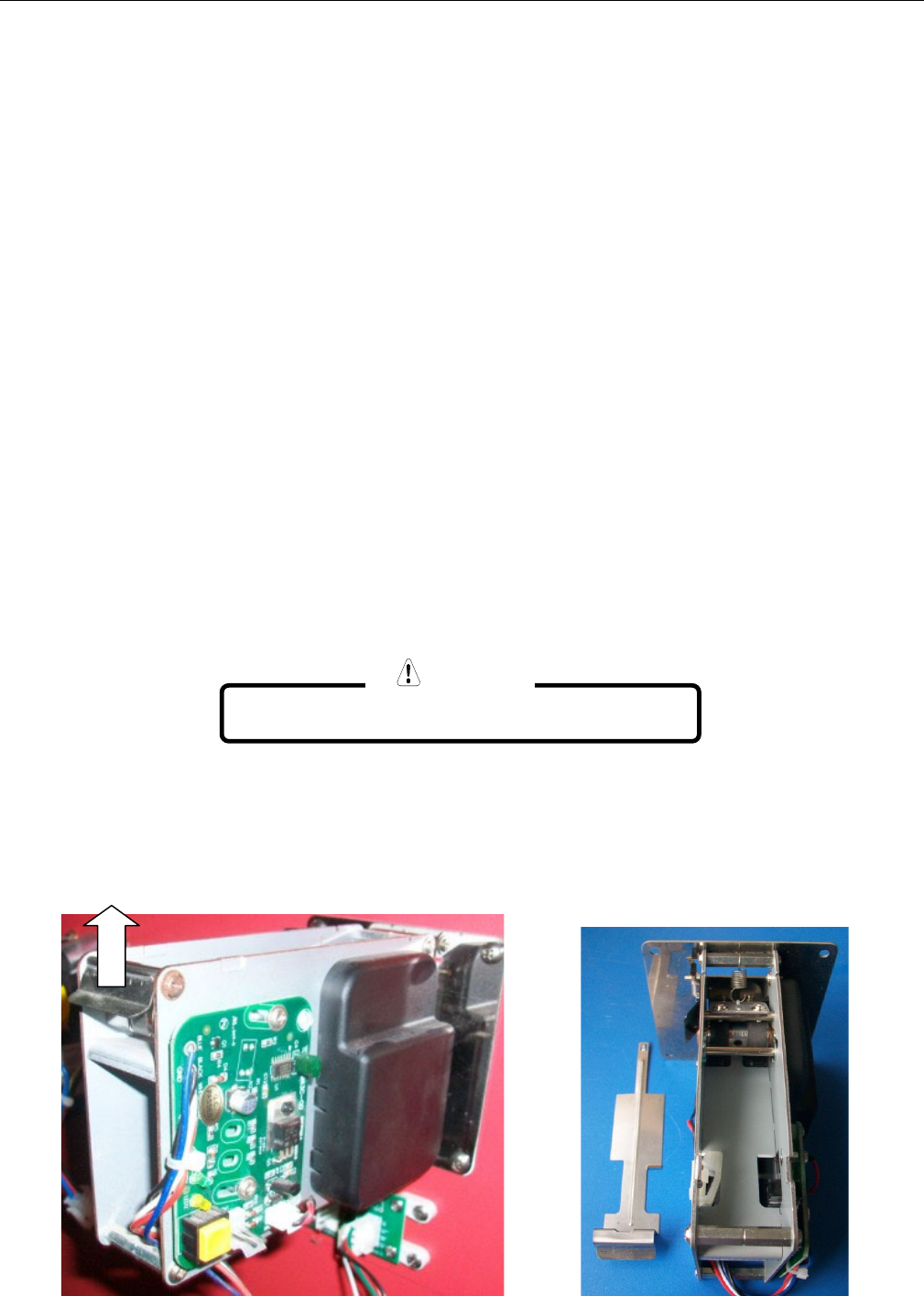
6-1 GAME APPEARANCE AND FEATURES
SERVICE AND TECHNICAL SUPPORT CALL: FAMILY FUN COMPANIES (708) 598-7320 WWW.FAMILYFUNCOMPANIES.COM
8
1 BASE:Base Mech
2 PROTECTION SKIRT: Prevent Player from reaching base
3 FIBERGLASS CAR:Main game(KC COBRA)
4 CHROME WHEEL COVER: Decoration
5 19”LCD MONITOR:For game video
6 STEERING WHEEL:Control car on video to move left and right
7 “JUMP” BUTTON:Press JUMP Button to jump car on video
8 TICKET/ DBV DOOR :For ticket version or DBV version. Key GUA71.
9 COIN DOOR:Key GUA711
10 COIN BOX:Key GUA711, collect coin.
11 GAS PEDAL:Increment the speed of the car in the video.
12 SPEAKER COVER:Protects the audio speakers.
13 TRUNK:Key GUA711, reach to mainboard, amplifier board, main motor.
6-2 TICKET MECHANISM(ENTROPY)
How to fill the ticket
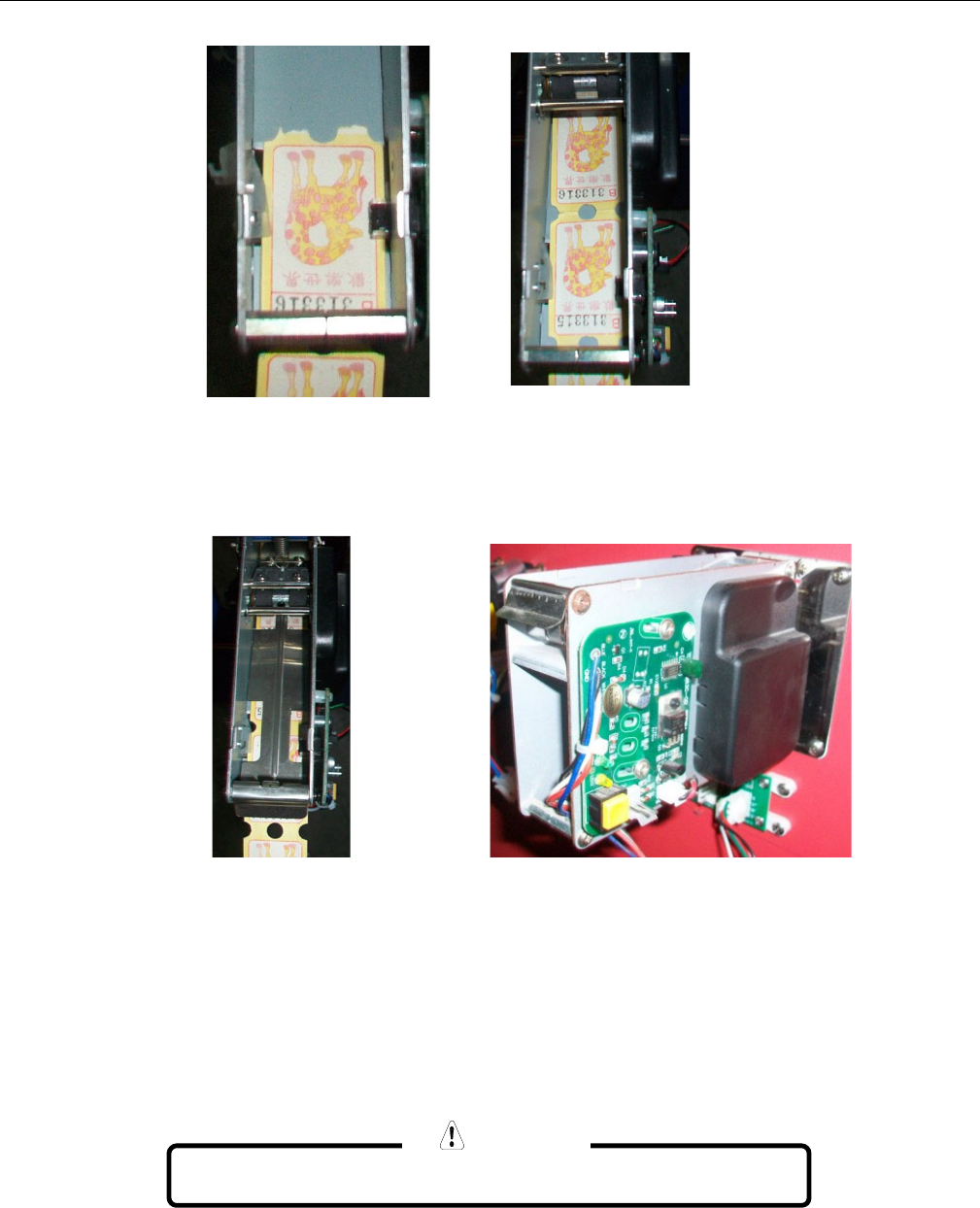
Open the Ticket Door, place the Tickets into the TICKET HOLDER.
Feed the Tickets into the TICKET MECH.
① Unclip and remove the Ticket retainier
Picture 1 Picture 2
For Ticket version only!
。
NOTE
SERVICE AND TECHNICAL SUPPORT CALL: FAMILY FUN COMPANIES (708) 598-7320 WWW.FAMILYFUNCOMPANIES.COM
9
Feed the tickets into the mechanism making sure that the ticket passes through the sensor.
Replace the ticket retainer to secure tickets into position.
Press the TEST button on the PCB to draw tickets through the mechanism and out of the door.
Close the Ticket Door, tear off any excess tickets.
.
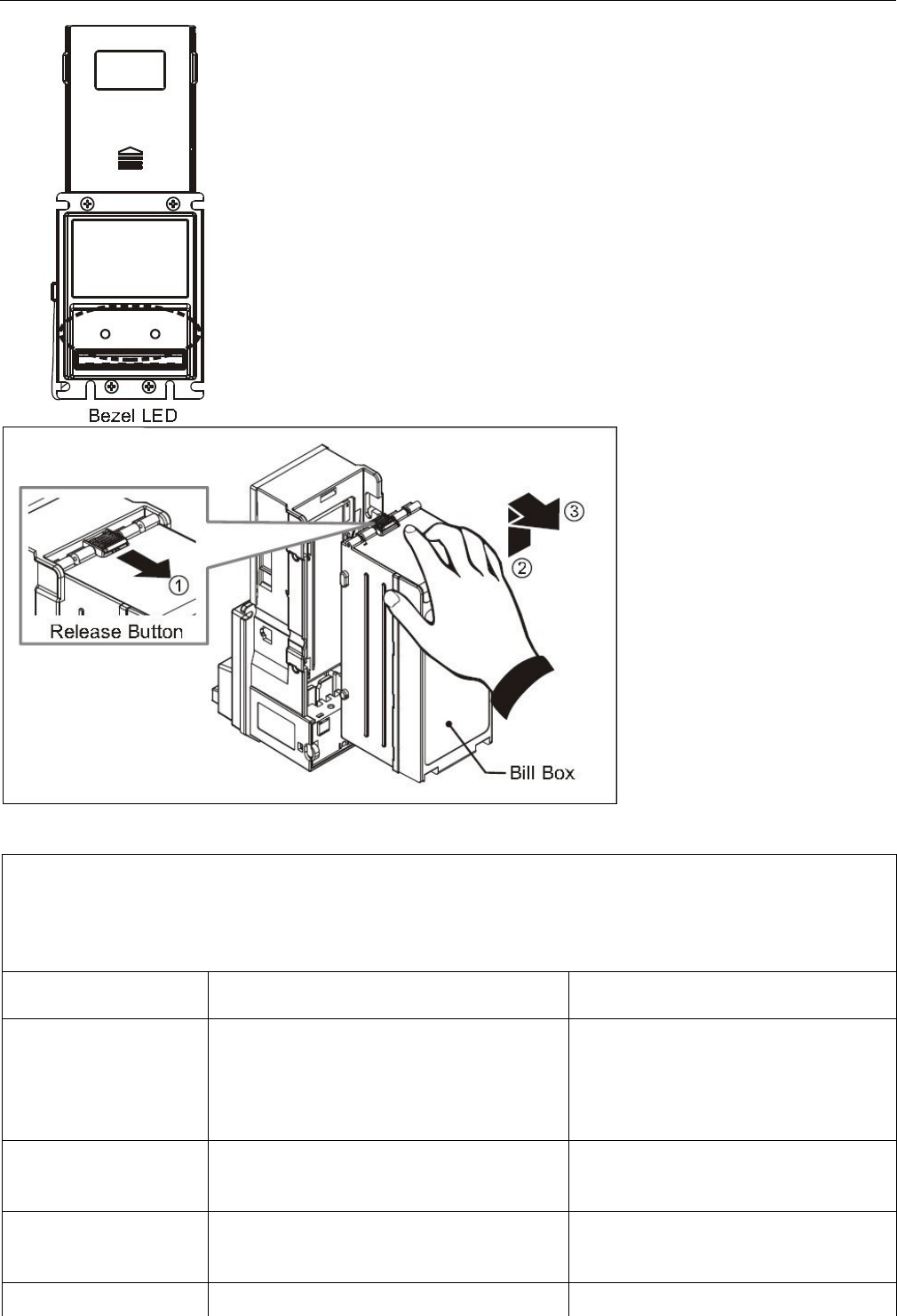
6-3 BILL ACCEPTOR (DBV) OPTION
- Maintenance
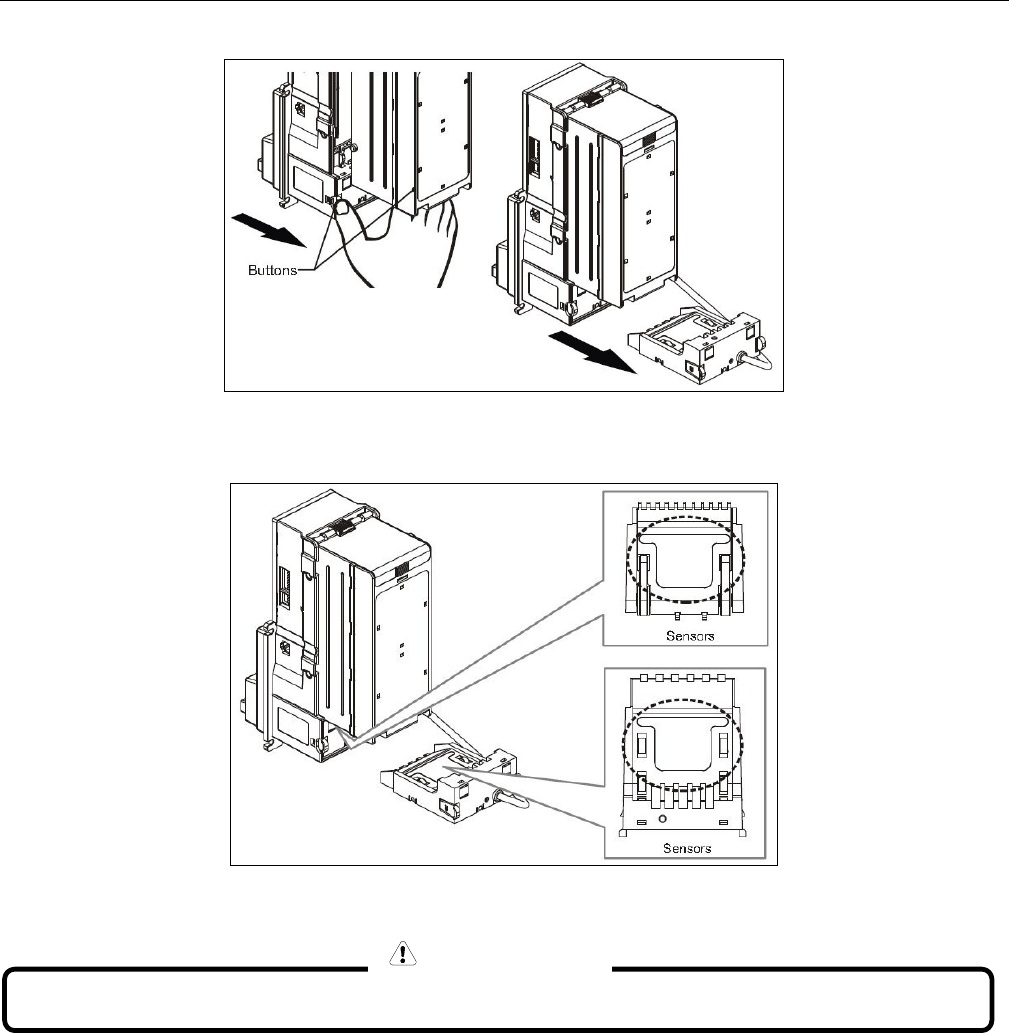
To make sure the bill acceptor always works smoothly, please clean the internal parts every
two weeks to every two months.
To clean the internal parts:
For DBV version only!
。
NOTE
SERVICE AND TECHNICAL SUPPORT CALL: FAMILY FUN COMPANIES (708) 598-7320 WWW.FAMILYFUNCOMPANIES.COM
10
1. Press the buttons on the sides of bill path unit and pull the unit out.
2. Use a soft, dry cloth or towel to clean the bill path and sensors.
- Trouble Shooting (Continued on the next page)
Do not use an organic solvent such as gasoline or paint thinner to clean the unit.
CAUTION
SERVICE AND TECHNICAL SUPPORT CALL: FAMILY FUN COMPANIES (708) 598-7320 WWW.FAMILYFUNCOMPANIES.COM
11
DIAGNOSTICS Bezel LED (Green LED)
LED ON = OK
LED OFF =POWER OFF
LED Flashes
Status
Corrective Actions
1
Bill jammed
Remove the bill box by sliding
the top button and the bill path
unit (as above figure), and then
remove the jammed bill.
2
Disable
Inspect for right DIP switch
setting.
3
Recognition sensor error.
Inspect for foreign objects on
sensor or bill path and clean.
3+2
Hook sensor error.
Inspect for foreign objects on
security
SERVICE AND TECHNICAL SUPPORT CALL: FAMILY FUN COMPANIES (708) 598-7320 WWW.FAMILYFUNCOMPANIES.COM
12
3+5
(Optional)
Out sensor error.
Inspect for foreign objects on
sensor or bill path and clean.
5
Bill box has been removed.
Replace the bill box.
6
Stacker error or stacker full.
Empty the bill box.
7
Motor error.
Inspect for foreign objects on bill
path and clean.
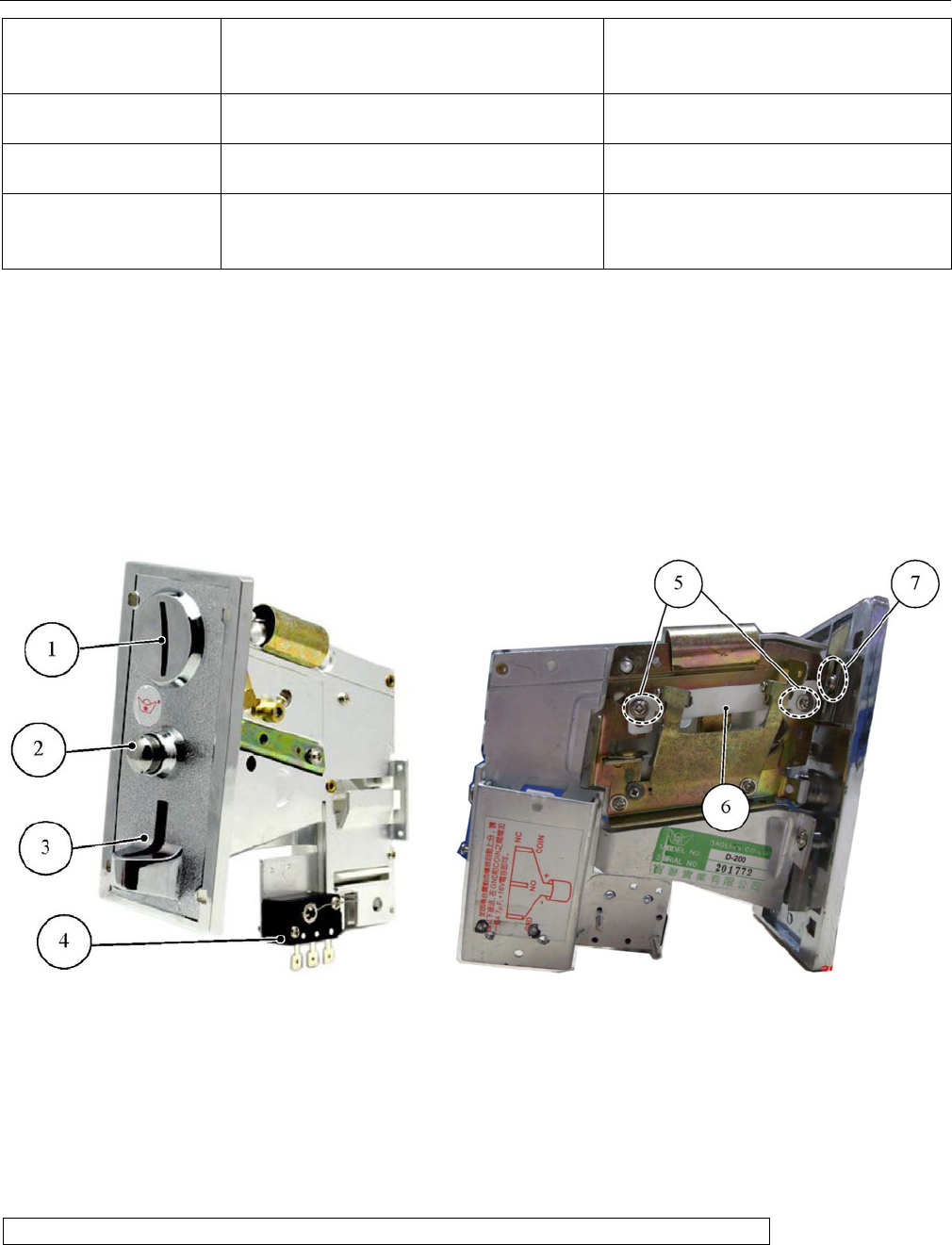
6-4 COIN MECH(MECHANICAL)D-200
(Aluminum; adjustment, reject iron material coin)
Scope of dimension :D=25mm-25.5mm, T=1.8mm
DC12V+/-2V,temperature -30-+120°;
1. COIN SLOT, 2. REJECT BUTTON, 3. REJECT SLOT, 4. COIN SWITCH
5. SCREW FOR ADJUSTMENT, 6. ADJUSTMENT ROD, 7. SET SCREW
Press Reject Button, the jamming coin will come out of the Reject Slot. If the coin does not
come out after pressing the Reject Button, please take apart the mechanism to take out the
jammed coin.
Note: please cut off the power before taking out the coin Mechanism.
Adjustment: Loosen screw # 5, move rod #6 up and down per coin dimension. Adjust the fixed
sheet at the back of mechanism by screw #7 to avoid coin jamming.
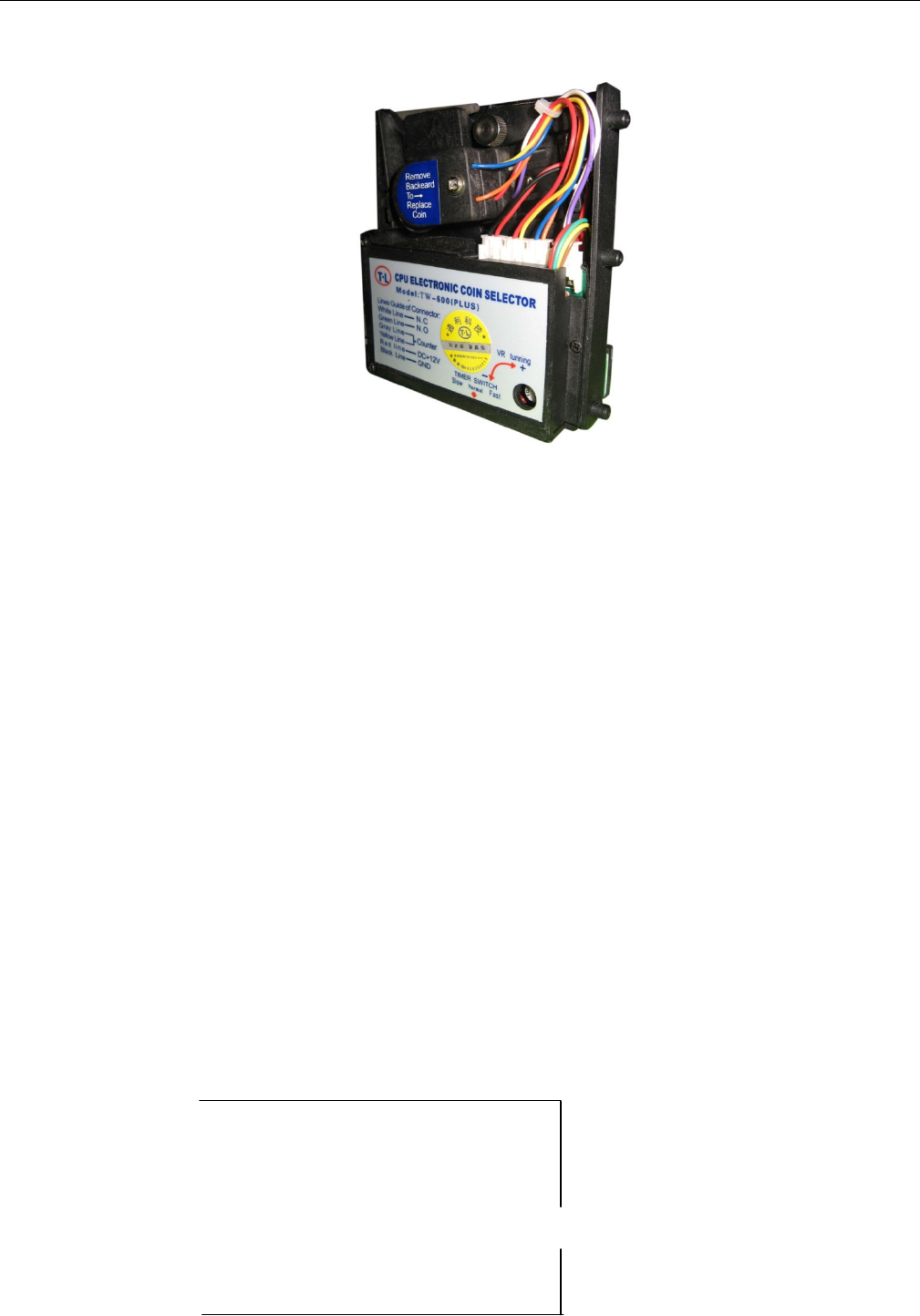
6-5 COIN MECH(ELECTRONIC)
SERVICE AND TECHNICAL SUPPORT CALL: FAMILY FUN COMPANIES (708) 598-7320 WWW.FAMILYFUNCOMPANIES.COM
13
INSTRUCTION OF ELECTRONIC COIN COMPARATOR TYPE
Continued on the following page;
A. REMOVE THE PLASTIC COIN FROM COIN SLOT,
REPLACE WITH THE DESIRED TOKEN OR COIN INSIDE
THE SPRING TENSIONED COIN HOLDER.
B. LOOSEN BOLTS AT THE BACK OF COIN ENTRANCE. USE THE DESIRED COIN
DIAMETER TO ADJUST SPACE AT THE BACK OF COIN ENTRANCE. AVOID ERROR
CAUSED BY LARGE DIAMETER TOKENS.
C. ADJUST FOR GAME MAIN BOARD PULSE RATE NEEDS. CHOOSE COIN LONG
SHORT AND FAST SLOW THREE PHASE SWITCH (TIMER SWITCH):30MS IS SHORT
FAST SIGNAL BEST FOR MACHINE THAT HAS HIGH POWER AND REQUIRES THE
INSERT OF COIN QUICKLY, 50MS IS MIDDLE SIGNAL, BEST FOR ORDINARY MACHINES
(IF NOT SPECIAL CIRCUMSTANCE, THE MACHINE USUALLY CAN USE THIS PHASE).
100MS IS LONG, SLOW SIGNAL, BEST FOR MACHINE THAT DOES NOT NEED INSERT
TO COINS QUICKLY.
D. VR COIN CHOOSE SENSITIVITY ADJUSTMENT,ANTICLOCKWISE ADJUSTMENT(—),
ACCEPT SMALLER AREA OF COIN TOLERANCE,COIN TYPE FILTRATION WILL BE
MORE RESTRICTED.
Wiring:
- Grey
Red -DC+12V
- White –COIN signal
Code Table
- Black-Grounded
- Grey
SERVICE AND TECHNICAL SUPPORT CALL: FAMILY FUN COMPANIES (708) 598-7320 WWW.FAMILYFUNCOMPANIES.COM
14
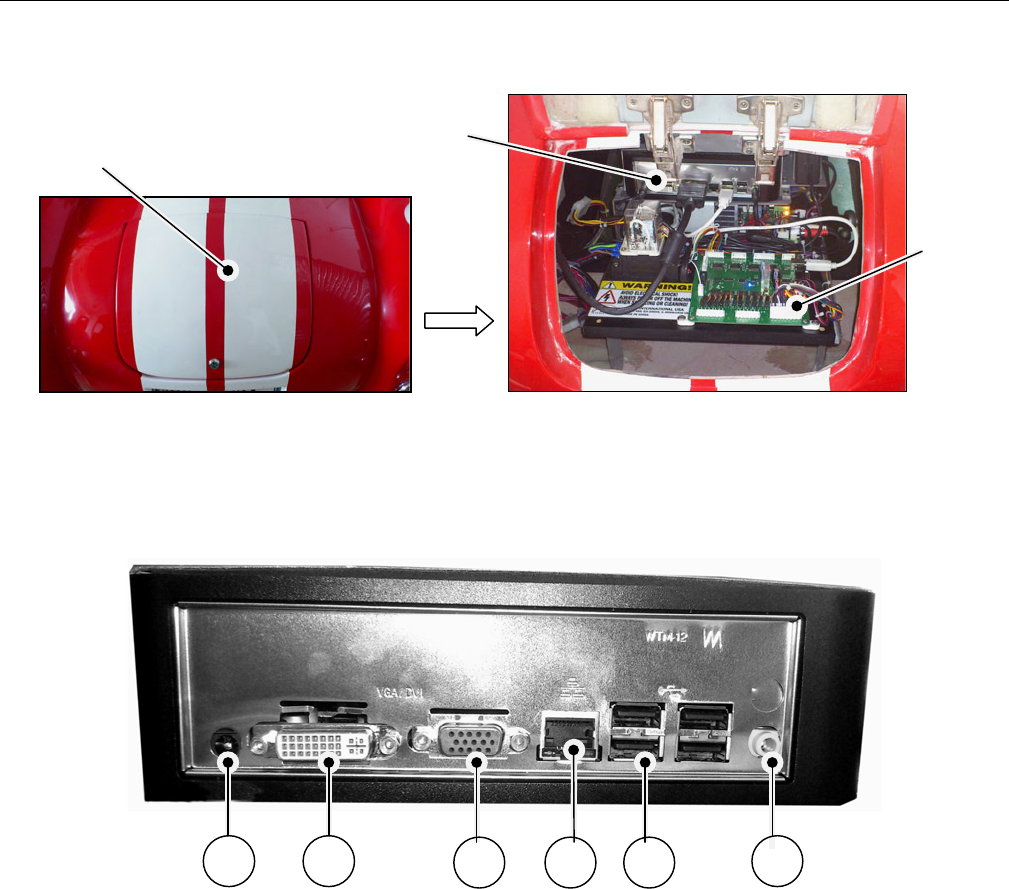
6-6 TRUNK
SERVICE DOOR KEY GUA711, open the service door to service the computer host,
circuit board etc
HOST COMPUTER
1 POWER INLET
2 CVI
3 VGA
4 NETWORK CONNECTION
5 USB(4PCS)
6 AUDIO CONNECTION
SERVICE DOOR
1
2
3
4
5
6
MAIN FRAME
MAIN
BOARD
SERVICE AND TECHNICAL SUPPORT CALL: FAMILY FUN COMPANIES (708) 598-7320 WWW.FAMILYFUNCOMPANIES.COM
15
7. SERVICE
Please remove fiberglass car body completely off when servicing the base. When removing the
body to access the base you should follow the instructions below.
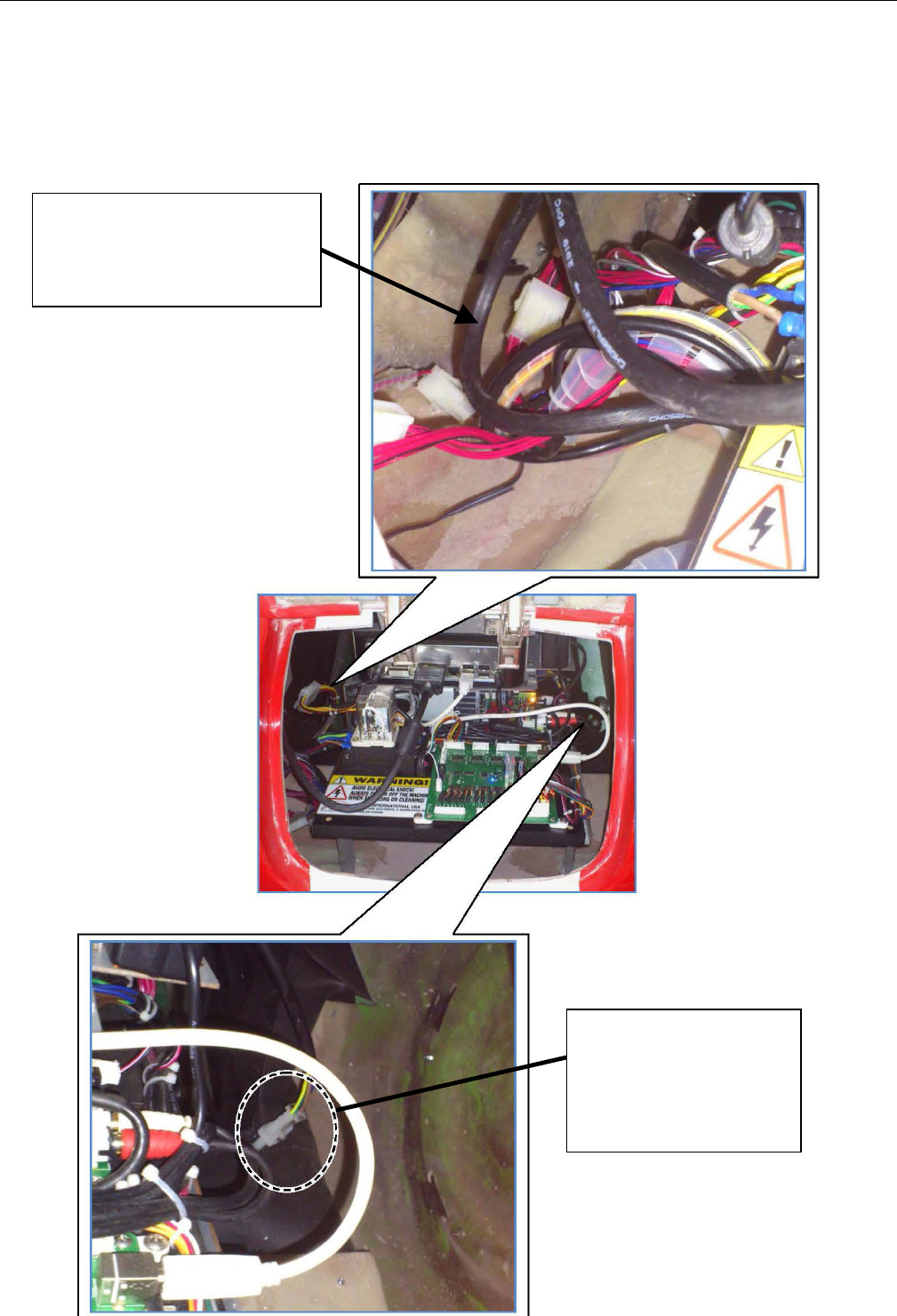
1. Turn off power, unscrew screws around skirt and remove the skirt
2. Open back door, disconnect ALL connectors at both sides . See instruction below
Disconnect the connector
at left side to separate
fiberglass and electrical
parts
Disconnect connector
at right side to
separate motor and
power
SERVICE AND TECHNICAL SUPPORT CALL: FAMILY FUN COMPANIES (708) 598-7320 WWW.FAMILYFUNCOMPANIES.COM
16
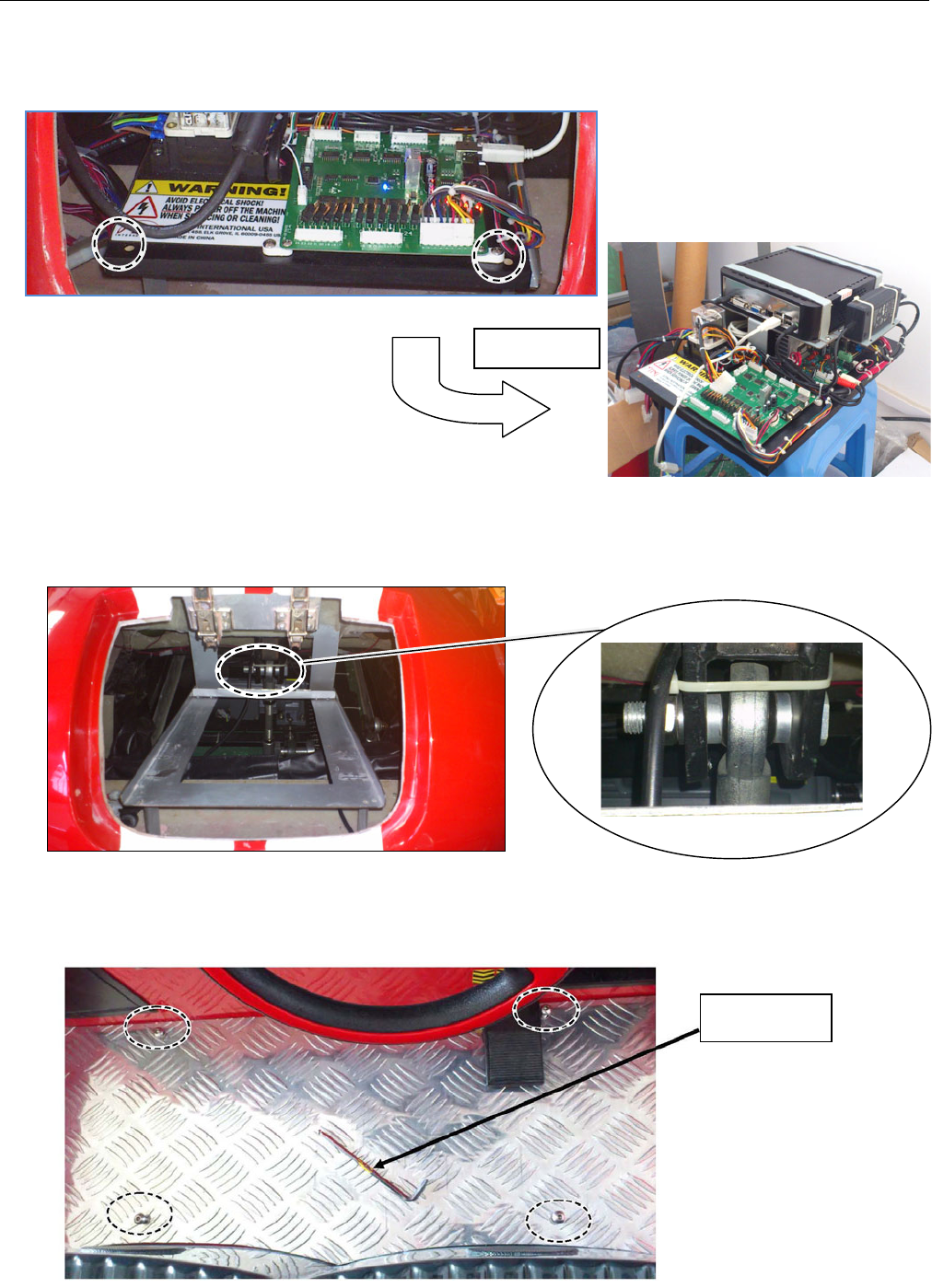
3. Unscrew and remove the 2 screws on fixed board, and slide (pull) out fixed board and the
all electrical parts on it. See the circle on picture
4. Look through the empty back door, you can see the long screw which fastens the fiberglass
car and base. Take out this long screw. See the circle on picture
5. Unscrew 4 screws on aluminum plate.
Move out
Allen key
SERVICE AND TECHNICAL SUPPORT CALL: FAMILY FUN COMPANIES (708) 598-7320 WWW.FAMILYFUNCOMPANIES.COM
17
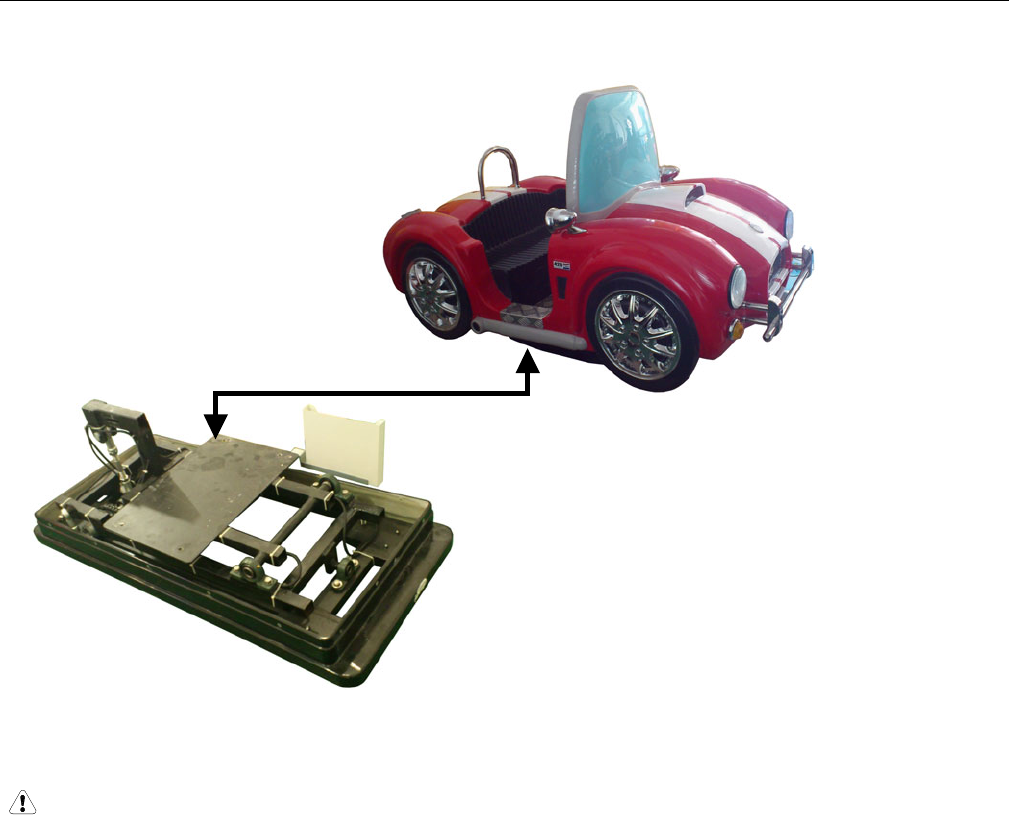
6. With two persons assisting, carefully raise up the fiberglass car and remove it from base. (2
persons are necessary to raise up the fiberglass car body)
7. Service the base assembly mechanism and motor after removing the fiberglass car body.
NOTE:
When replacing the fiberglass car back on the base, you should carefully align the 4 screw
holes on fiberglass step plate and the 4 screw holes on the base.
Please use caution in connecting the connectors in the proper place.
SERVICE AND TECHNICAL SUPPORT CALL: FAMILY FUN COMPANIES (708) 598-7320 WWW.FAMILYFUNCOMPANIES.COM
18
8. CONTROL SIGNAL AND INSTRUCTION
8-1 PCB LAYOUT
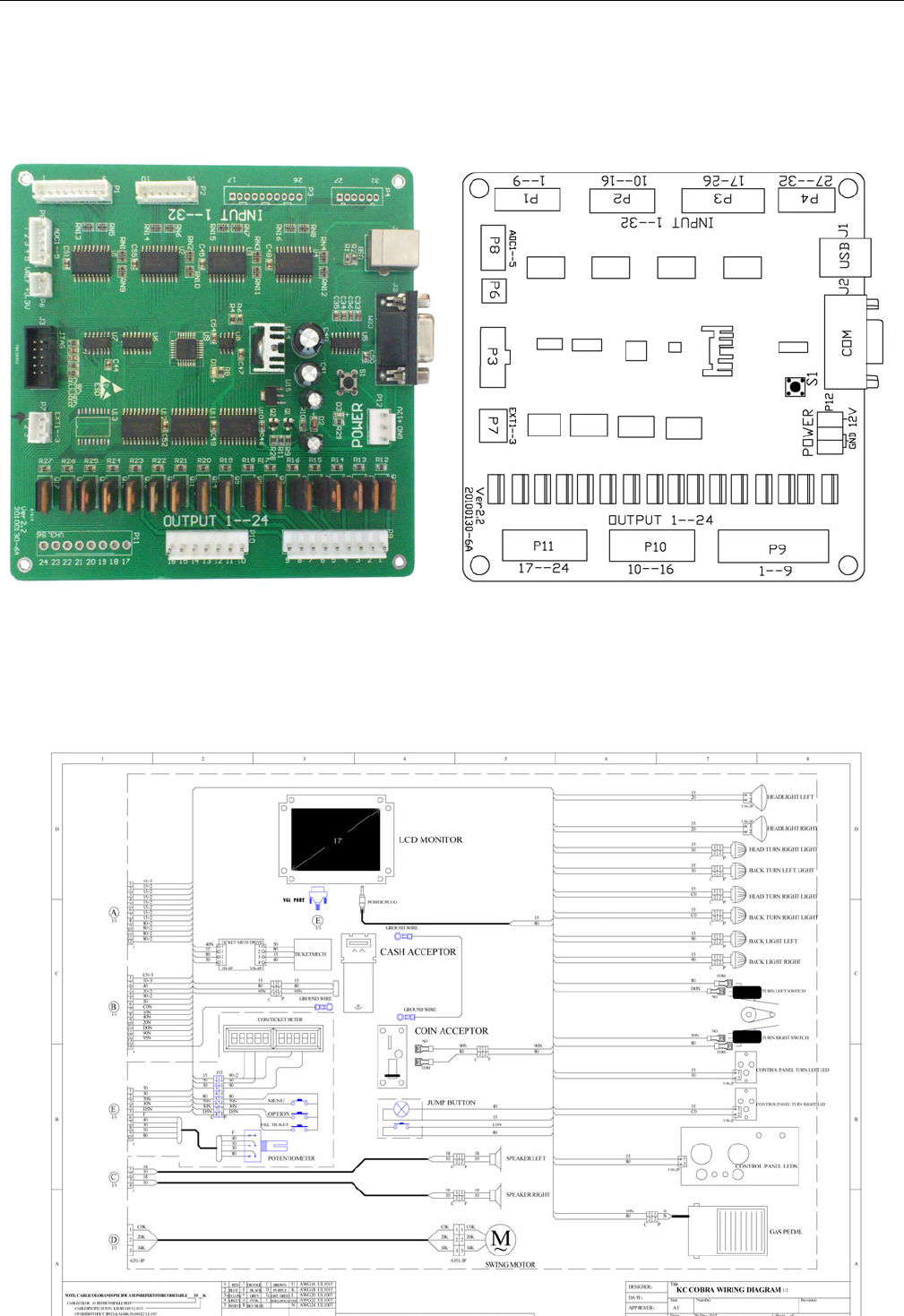
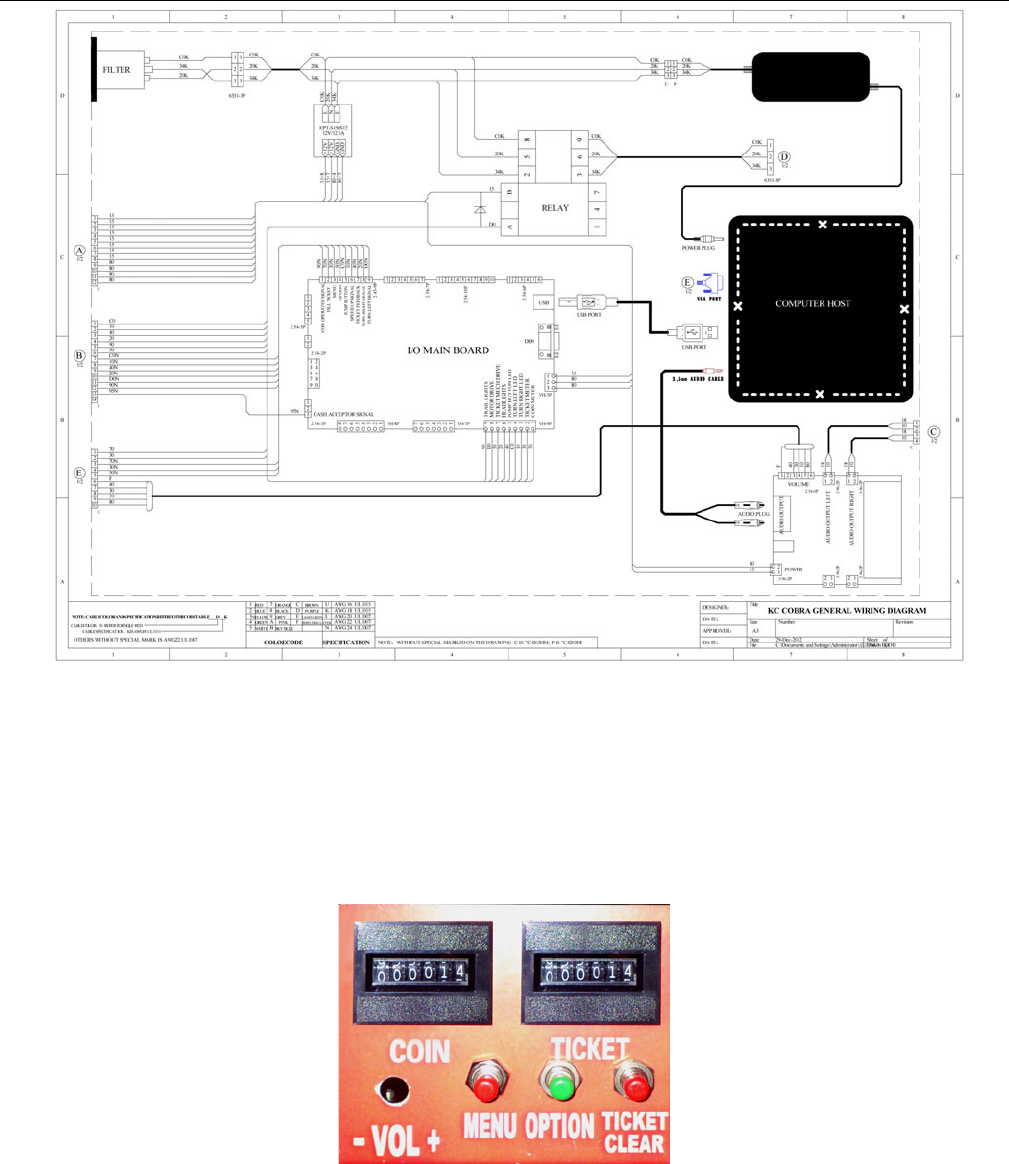
P1,P2,P3,P4 are for signal input port,P9,P10,P11 are signal output port, J1 is
for USB ,P12 is for power。
SERVICE AND TECHNICAL SUPPORT CALL: FAMILY FUN COMPANIES (708) 598-7320 WWW.FAMILYFUNCOMPANIES.COM
19
8-2 HOW TO ENTER INTO MENUS
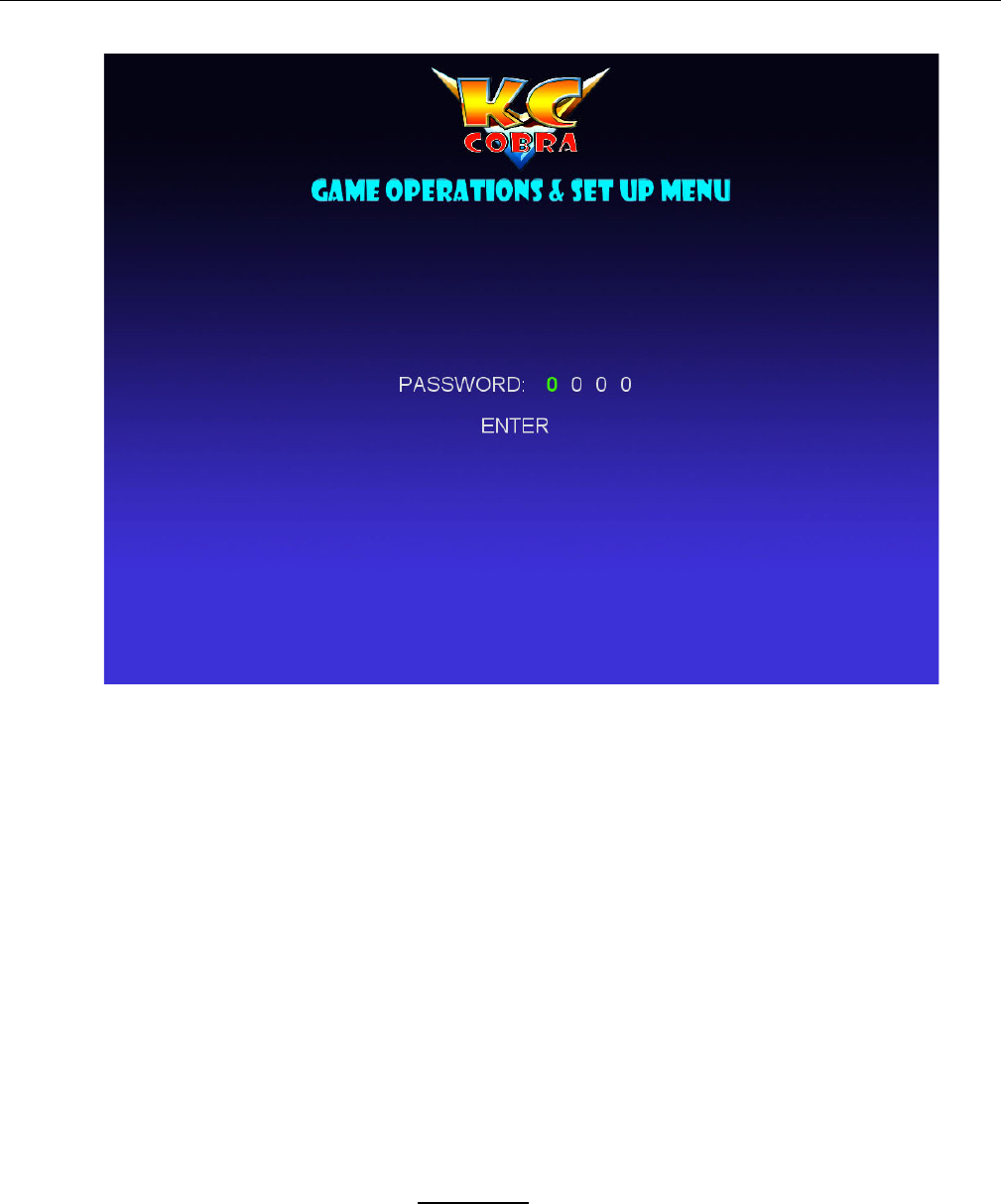
Open the coin door and you will see the Setting/Meter Panel at the top of coin box;
To enter the Menu state on screen- Press: “MENU” inside the door on this Setting/Meter
panel, then you will see the screen as below. Continue to press “MENU” until you
highlight the word: “ENTER”. To enter the Menu state, then press “OPTION”. In the event
you accidentally change the password, please enter the default password (default
password is 0000).
CONTINUED ON THE FOLLOWING PAGES;
SERVICE AND TECHNICAL SUPPORT CALL: FAMILY FUN COMPANIES (708) 598-7320 WWW.FAMILYFUNCOMPANIES.COM
20
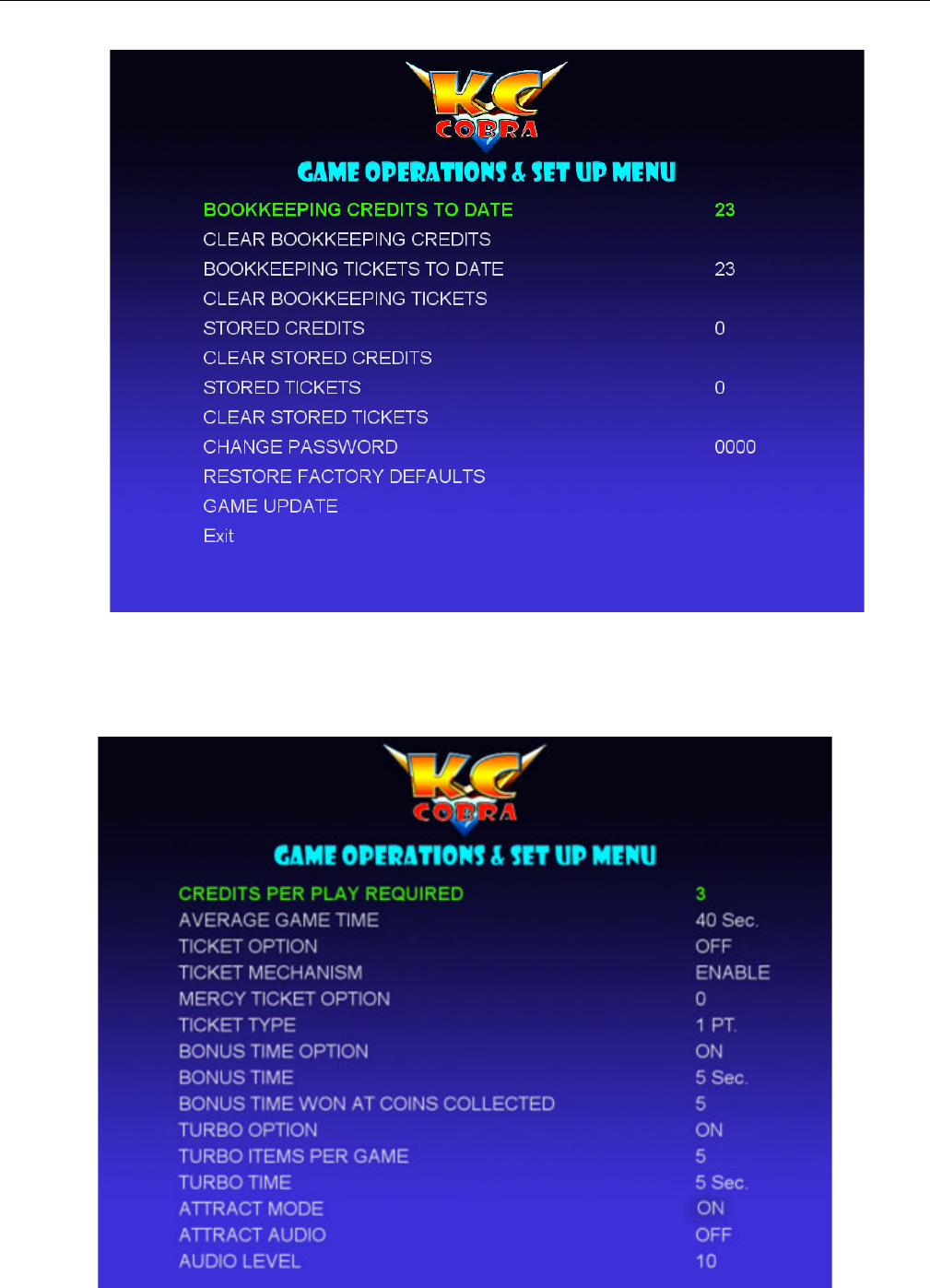
Figure 1
After enter password, press “MENU”, move to ENTER, then press; “OPTION” to enter into
next page(see figure 2 )
Pressing “Menu” again and again advances through all of the various Menus available.
Pressing “OPTION”, when in any given Menu, will highlight the Option desired and step through
the options of that Menu.
When all of the Menu options are chosen- or at any time- the Operator simply can press the
“JUMP” button and return to normal game play.
PRESS THE “JUMP” BUTTON ON THE CONTROL PANEL AT ANY TIME TO
EXIT THE MENU EXCEPT IN THE TEST MENU!
EXIT THE MENU AND RETURN TO NORMAL GAME PLAY FROM ANY
MENU SCREEN EXCEPT “TEST” BY PRESSING THE “JUMP” BUTTON.
SERVICE AND TECHNICAL SUPPORT CALL: FAMILY FUN COMPANIES (708) 598-7320 WWW.FAMILYFUNCOMPANIES.COM
21
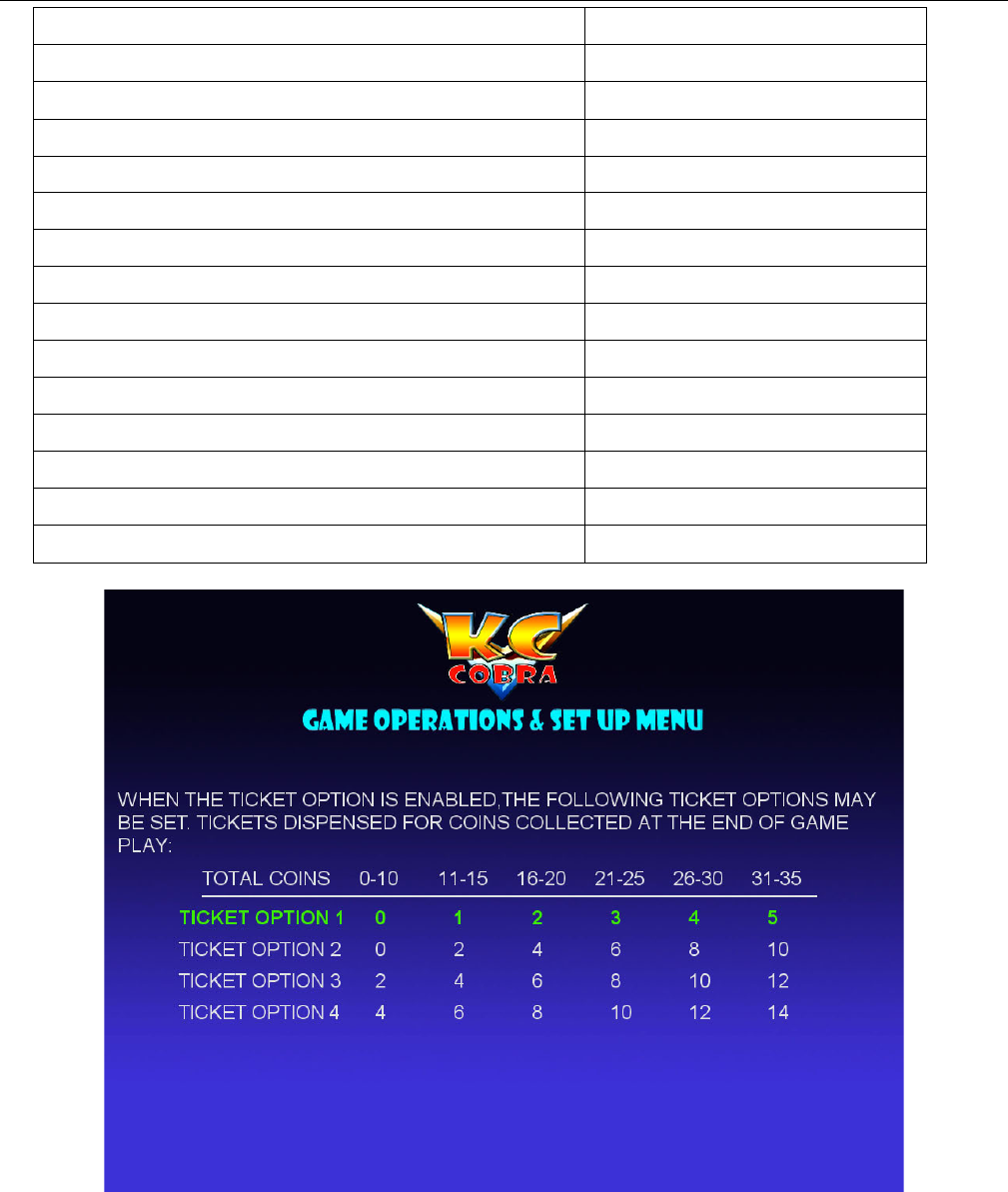
Figure 2
If desired, please set the desired password or leave at the default, 0-0-0-0.
Figure 3
SERVICE AND TECHNICAL SUPPORT CALL: FAMILY FUN COMPANIES (708) 598-7320 WWW.FAMILYFUNCOMPANIES.COM
22
CREDITS PER PLAY REQUIRED
1——8
AVERAGE GAME TIME
30 Sec——120 Sec
TICKET OPTION
ON/OFF
TICKET MECHANISM
ENABLE/ DISABLE
MERCY TICKET OPTION
0——8
TICKET TYPE
1PT/ 2PT
BONUS TIME OPTION
ON/OFF
BONUS TIME
5 Sec——30 Sec
BONUS TIME WON AT COINS COLLECTED
5——40
TURBO OPTION
ON/OFF
TURBO ITEMS PER GAME
1——5
TURBO TIME
5 Sec——30 Sec
ATTRACT MODE
ON/OFF
ATTRACT AUDIO
OFF/ 20——120
AUDIO LEVEL
1——10
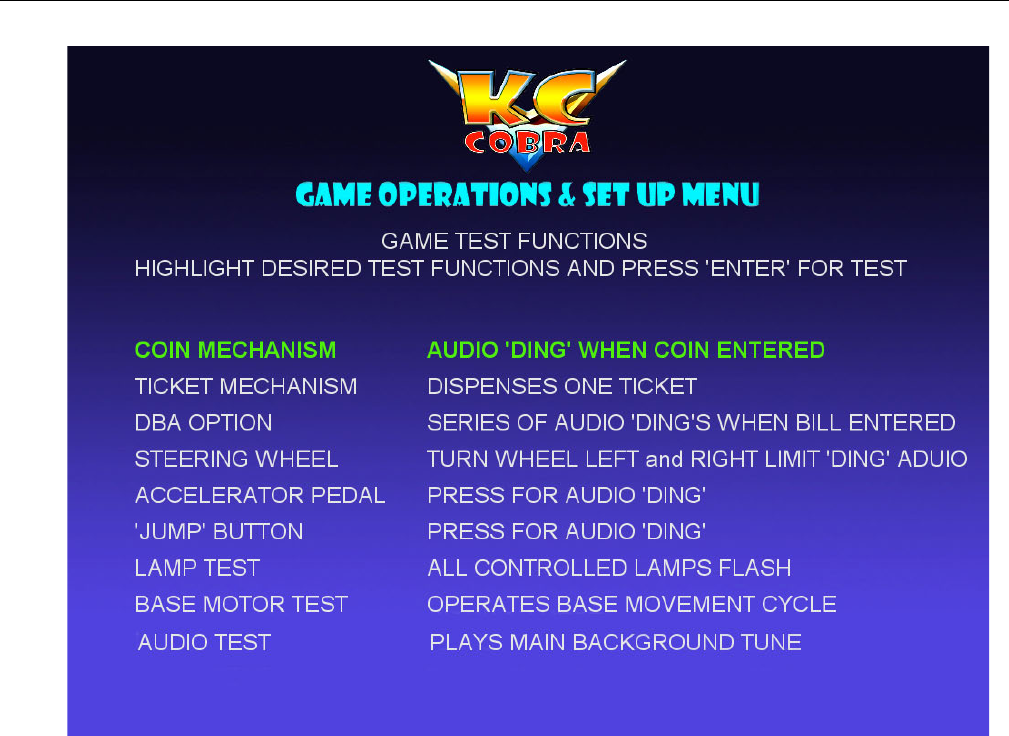
Figure 4
EXIT THE MENU AND RETURN TO NORMAL GAME PLAY FROM ANY
MENU SCREEN EXCEPT “TEST” BY PRESSING THE “JUMP” BUTTON.
SERVICE AND TECHNICAL SUPPORT CALL: FAMILY FUN COMPANIES (708) 598-7320 WWW.FAMILYFUNCOMPANIES.COM
23
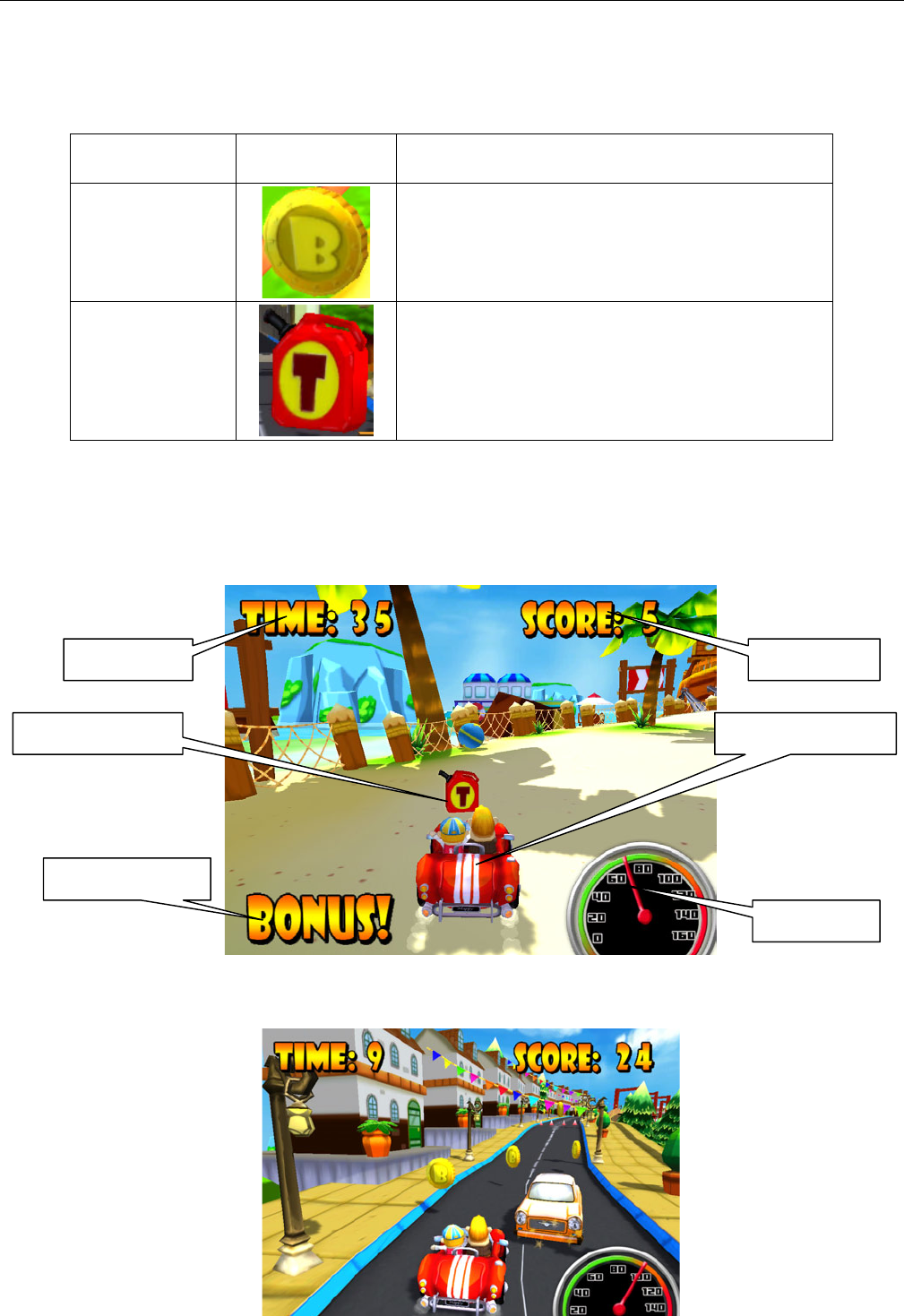
Figure 5
EXIT THE MENU AND RETURN TO NORMAL GAME PLAY FROM ANY
MENU SCREEN EXCEPT “TEST” BY PRESSING THE “JUMP” BUTTON.
SERVICE AND TECHNICAL SUPPORT CALL: FAMILY FUN COMPANIES (708) 598-7320 WWW.FAMILYFUNCOMPANIES.COM
24
9. INSTRUCTION OF GAME PLAY
9-1 GOAL ICONS
GOAL
IMAGE
FUNCTION
GOLD COIN
ADD SCORE, 1 POINT (TOWARDS
TICKET REWARDS IF TICKET FUNCTION
IS ENABLED)
OIL CAN
TURBO SPEED REWARD
9-2 HOW TO PLAY
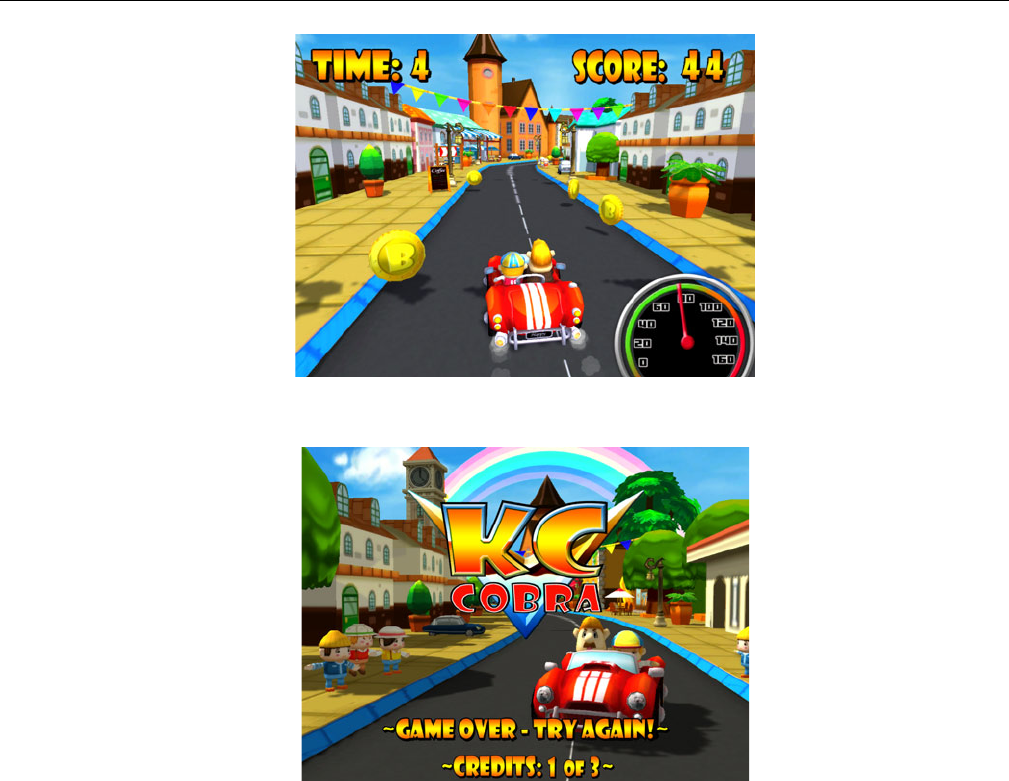
Insert the proper Credits and the game will begin at various points throughout the course;
Step on the gas pedal to speed up the car. Control steering wheel to collect more coins and
Turbo gas can, and to avoid obstacles.
Score
Speed
Play Time
Player’s Vehicle
Goal Example
Bonus Time
SERVICE AND TECHNICAL SUPPORT CALL: FAMILY FUN COMPANIES (708) 598-7320 WWW.FAMILYFUNCOMPANIES.COM
25
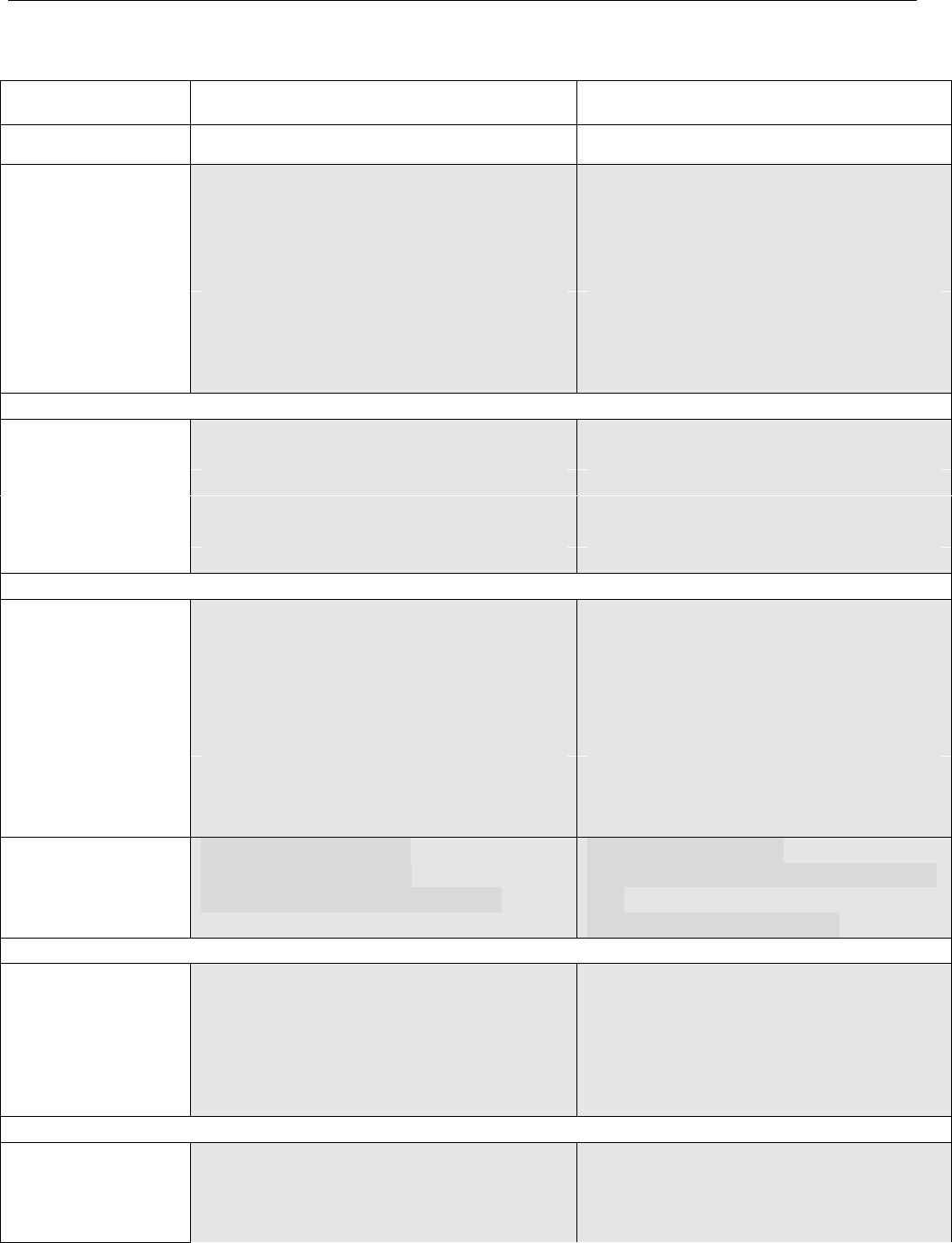
Press “JUMP” button to collect the higher coin or to avoid all obstacles throughout the game.
When the Time runs out, the game will end.
Tickets will be dispensed according to the total score after the game has ended. (Ticket version
when enabled)
SERVICE AND TECHNICAL SUPPORT CALL: FAMILY FUN COMPANIES (708) 598-7320 WWW.FAMILYFUNCOMPANIES.COM
26
10. GENERAL TROUBLESHOOTING
Symptom
Possible Problem
Solution
POWER
POWER
Low Volume
Check Volume Control and adjust as
necessary
Faulty speaker harnessing
Check connections and/or repair
harnessing
Faulty speaker
Check and/or replace speaker
Faulty sound board or sound board
harnessing
Check connections or Replace Sound
Board
Sound Problems
-No sound
-Low Sound
-Intermittent
Sound
Faulty Main P.C. Board
Check and/or repair or replace Main P.C.
Board
Coin switch out of adjustment
Re-form coin switch wire
Coin mech dirty or improperly adjusted
Clean and adjust mech as necessary
Faulty Coin switch
Check and/or replace switch
Faulty coin switch harness or connector
Check and/or repair harnessing
Game improperly programmed
Check programming options and adjust
Game does not take
or credit money
correctly
Faulty Main P.C. Board or component
Repair and/or replace Main P.C. board
No tickets in the game
Refill ticket dispenser
Tickets jammed in dispenser
Clear ticket jam
Ticket dispenser sensor blocked with
debris
Clean off sensor
Poor connection on the ticket dispenser
Check and/or replace connectors
Game improperly programmed
Check ticket programming options
Faulty ticket dispenser
Replace dispenser
Faulty ticket dispenser harnessing
Check and/or repair harnessing
Ticket Dispenser
not working
properly, or no
tickets being
dispensed
Faulty Main P.C. Board
Replace or repair Main P.C. Board
LED Light fail
Poor contact of terminal
LED light is burned out.
No voltage output form power box
Correct the connection
Replace the broken LED light with new
one.
Replace with new power box
Game power off
Electrical Power Switch Open
Check on/off switch and power cord
Close Electrical Power Switch
Main fuse blown
Check and/or replace fuse as necessary
Power Supply problem or failure
Check Power Supply output and
connections
Game will not
start.
Faulty P.C. board or component
Repair and/or replace main P.C. board
The power connector is disconnected.
Reconnect the connector securely.
Game stops or is
stopped with
nothing displayed
in video monitor
Possible faulty connection or short circuit.
Check all circuitry for faulty connections
or short circuits.
SERVICE AND TECHNICAL SUPPORT CALL: FAMILY FUN COMPANIES (708) 598-7320 WWW.FAMILYFUNCOMPANIES.COM
27
11. PART LIST
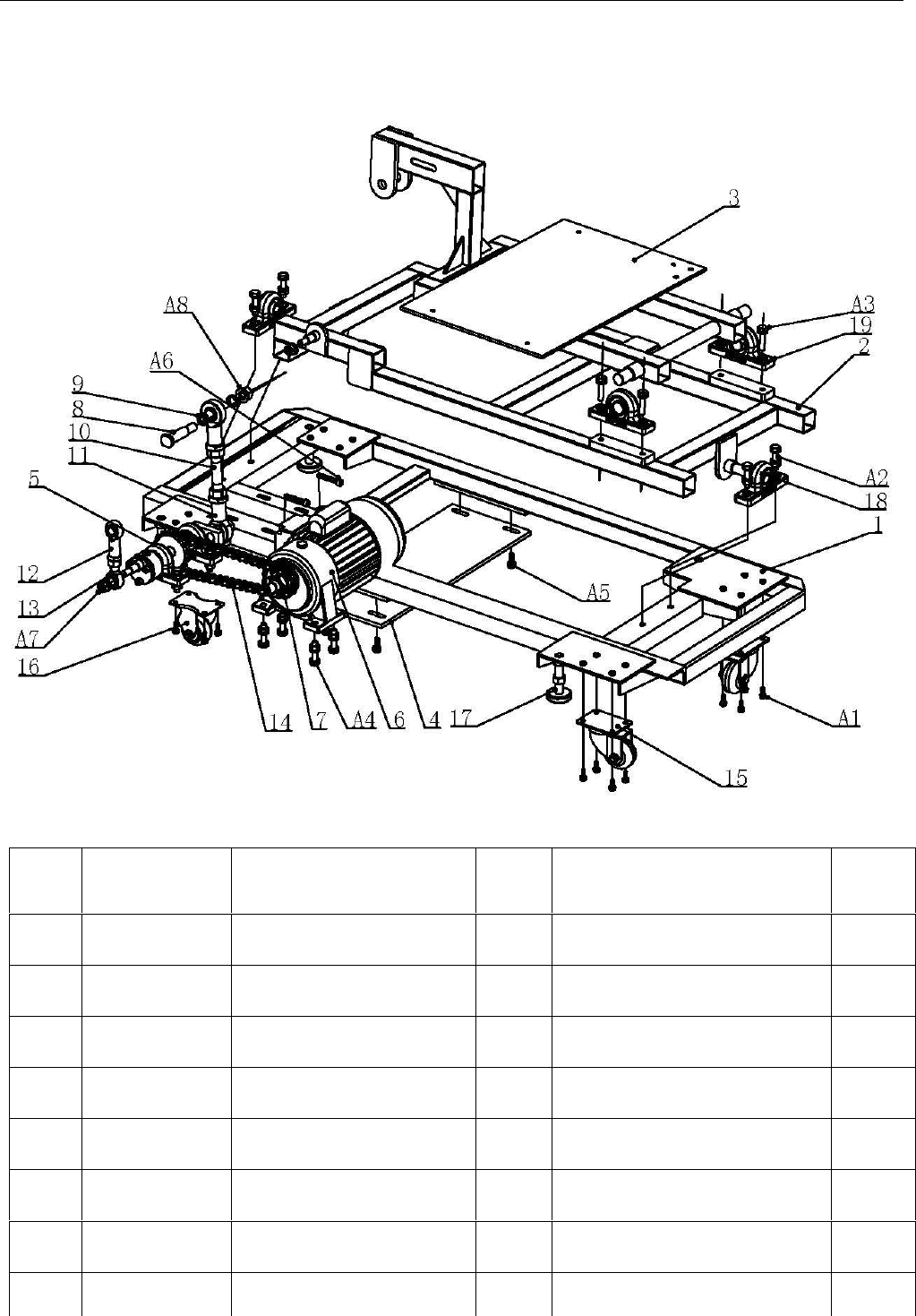
11-1 BASE MECH ASSY
NO.
PART CODE
FOR BASE
FRAME
DESCRIPTION
QTY
SPECIFICATION
REMA
EK
1
COB-M-01
BOTTOM FRAME
1
Q235
2
COB-M-02
MAIN MOTION FRAME
1
Q235
3
COB-M-03
UP MOTION FRAME
1
Q235
4
COB-M-04
PLATE FOR MOTOR
1
Q235
5
COB-M-05
AXIS OF ROTATION
FIXING ASSY
1
ASSY
6
COB-M-06
MOTOR
1
7
COB-M-07
MOTOR CHAIN WHEEL
1
45#
8
COB-M-08
HINGE PIN
1
Q235

SERVICE AND TECHNICAL SUPPORT CALL: FAMILY FUN COMPANIES (708) 598-7320 WWW.FAMILYFUNCOMPANIES.COM
28
9
COB-M-09
SLEEVE
2
Q235
10
COB-M-10
PULL ROD
1
Q235
11
COB-M-11
PLAIN BEARING
2
INSIDE TEETH M20
12
COB-M-12
PLAIN BEARING
1
INSIDE TEETH M16
13
COB-M-13
PLAIN BEARING
1
OUTSIDE TEETH M16
14
COB-M-14
CHAIN(5 CHAIN)
1
23 KNOB
15
COB-M-15
CASTER
2
2.5’’
16
COB-M-15
CASTER
2
2.5’’
17
COB-M-16
ADJUSTER
4
18
COB-M-17
MOUNTED BEARING
4
UCP204
19
COB-M-18
MOUNTED BEARING
2
UCP205
A1
COB-M-19
OUT HEXAGON
16
M6X20
A2
COB-M-20
OUT HEXAGON
8
M10X45
A3
COB-M-21
OUT HEXAGON
4
M10X35
A4
COB-M-22
OUT HEXAGON
4
M10X40
A5
COB-M-23
OUT HECAGON
4
M8X25
A6
COB-M-24
IN HEXAGON
2
M8X50(WHOLE)
A7
COB-M-25
NUT
2
212
A8
COB-M-26
NUT
2
M16
SERVICE AND TECHNICAL SUPPORT CALL: FAMILY FUN COMPANIES (708) 598-7320 WWW.FAMILYFUNCOMPANIES.COM
29
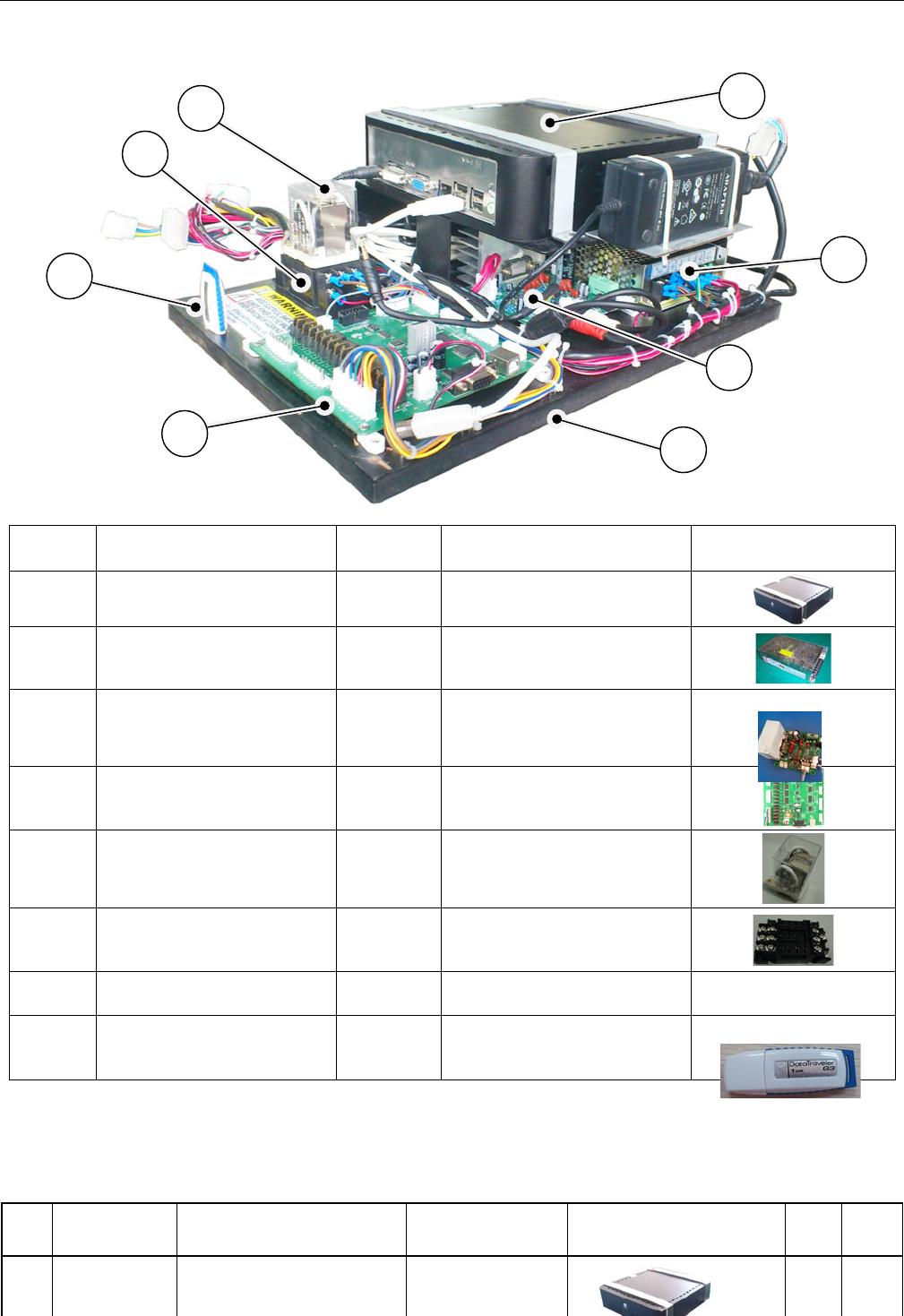
11-2 HARDWARE COMPONENT
11-3 MACHINE PARTS LIST
NO.
PART
CODE
DESCRIPTION
LOCATION
IMAGES
QTY
UNIT
1
KCC-US-001
MAIN GAME HARD
DRIVE PC
TRUNK
1
PC
NO
DESCRIPTION
QTY
SPECIFICATION/
MATERIAL
IMAGES
1
HOST COMPUTER
1
2
POWER SUPPLY
1
OUTPUT12V/12.5A
3
POWER AMPLIFIER
BOARD
1
GC-2.2
4
MAIN BOARD
1
Ver2.2 20100130-6A
5
RELAY
1
LJQX-38F/40A
6
RELAY BASE
1
LJQX-38F-11A
7
FIXED PLATE
1
BLACK WOOD
8
“U” disc
1
1
2
5
3
6
4
7
8
SERVICE AND TECHNICAL SUPPORT CALL: FAMILY FUN COMPANIES (708) 598-7320 WWW.FAMILYFUNCOMPANIES.COM
30
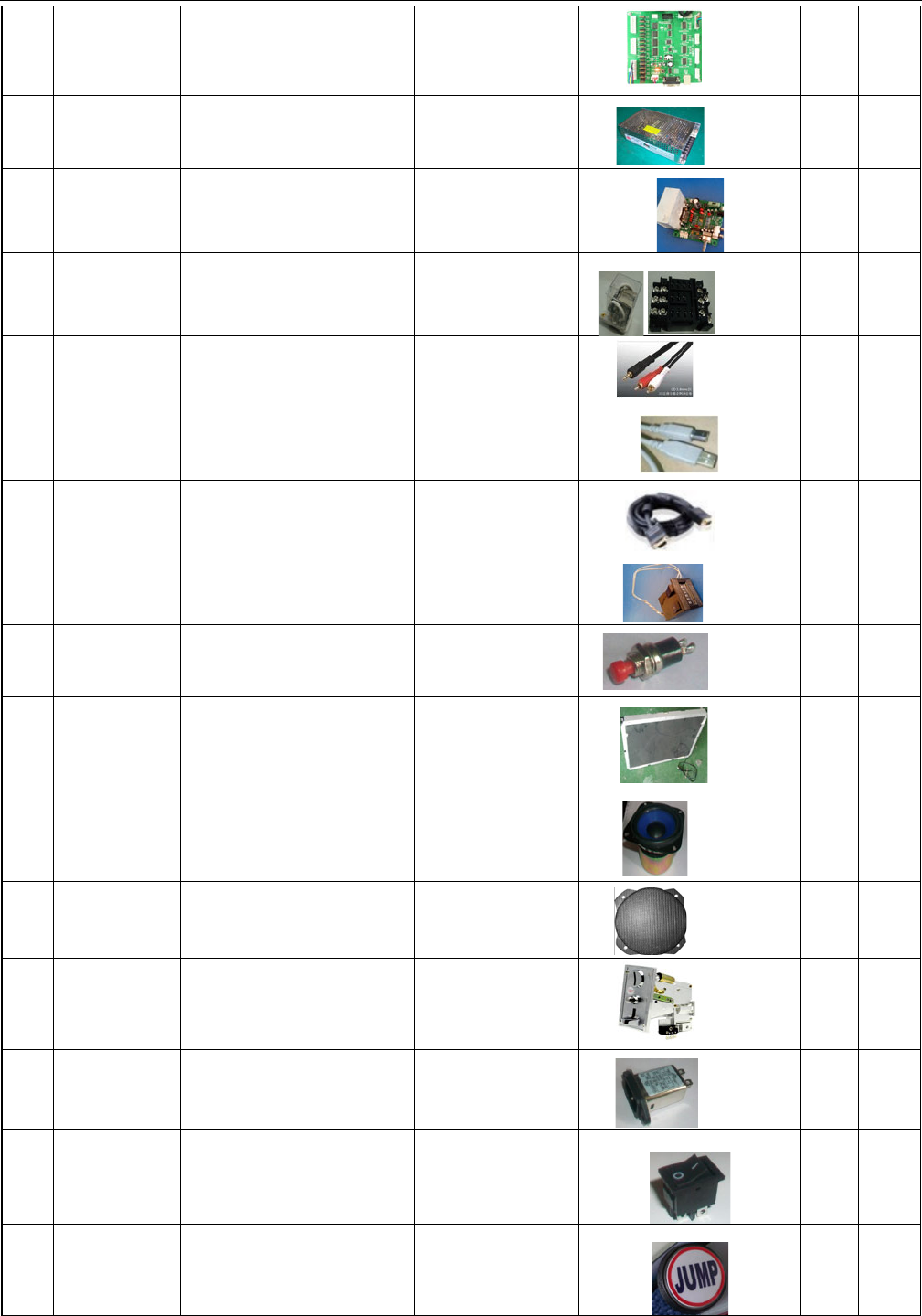
2
KCC-US-002
MAIN CONTROL I/O PCB
Ver2.2 20100130-6A
TRUNK
1
PC
3
KCC-US-003
MAIN POWER SUPPLY
OUTPUT12V/12.5A
TRUNK
1
PC
4
KCC-US-004
POWER AMPLIFIER PCB
GC-2.2
TRUNK
1
PC
5
KCC-US-005
RELAY AND BASE
SETLJQX-38F/40A
TRUNK
1
PC
6
KCC-US-006
AUDIO CABLE Q-562A
TRUNK
1
PC
7
KCC-US-007
LINK CABLE USB Q-515
TRUNK
1
PC
8
KCC-US-008
VGA MONITOR CABLE
FROM PC Q-550
TRUNK
1
PC
9
KCC-US-009
METER 6 DIGIT
INSIDE COIN
MECH DOOR
2
PC
10
KCC-US-010
MENU/OPTION/TICKET
CLEAR PUSHBUTTON
RED
INSIDE COIN
MECH DOOR
3
PC
11
KCC-US-011
LCD MONITOR
17inch,16:9/220V
INSIDE
1
PC
12
KCC-US-012
SPEAKER 8Ω/15W
INSIDE
2
PC
13
KCC-US-013
SPEAKER GRILL COVER
BLACK
INSIDE
2
PC
14
KCC-US-014
COIN MECH
COIN MECH
DOOR
1
PC
15
KCC-US-015
FILTER 10A
TRUNK
1
PC
16
KCC-US-016
POWER SIWTCH
250V/10A
TRUNK
1
PC
17
KCC-US-017
“JUMP” PUSHBUTTON
AND GRAPHICS AND
LAMP SET
CONTROL
PANEL
1
PC
SERVICE AND TECHNICAL SUPPORT CALL: FAMILY FUN COMPANIES (708) 598-7320 WWW.FAMILYFUNCOMPANIES.COM
31
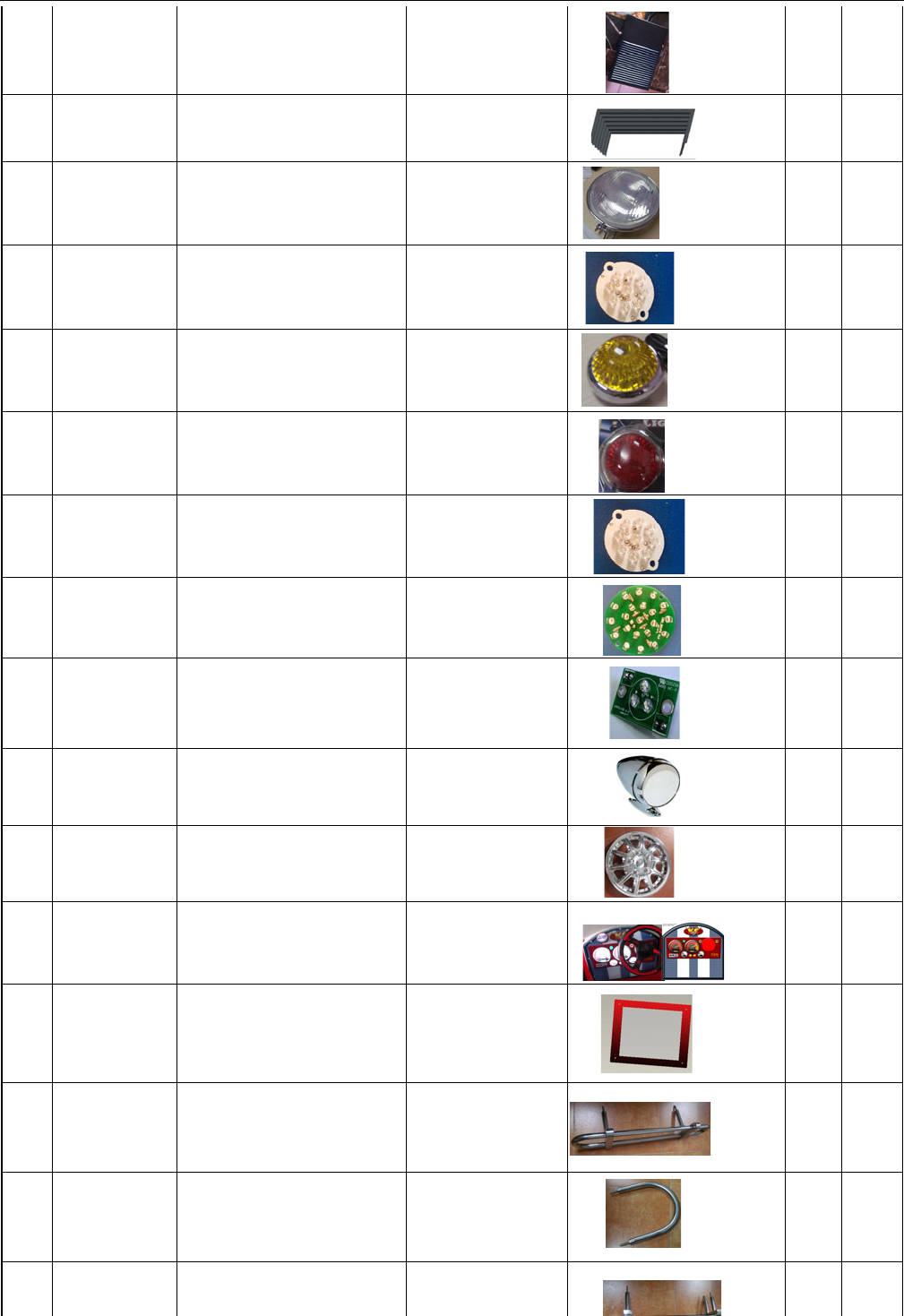
18
KCC-US-018
GAS PEDAL
ASSEMBLY
FLOOR INSIDE
1
PC
19
KCC-US-019
PROTECTION SKIRT
PVC BLACK
BOTTOM
2
PC
20
KCC-US-020
FRONT LAMP COVER
LA8020B(CHROMING)
FRONT
2
PC
21
KCC-US-021
FRONT LAMP LED PCB
FRONT
2
PC
22
KCC-US-022
FRONT LAMP SET
SQ-17 YELLOW
FRONT
2
PC
24
KCC-US-024
BACK LAMP SET SQ-17
RED
REAR
4
PC
25
KCC-US-025
BOOSTER AND FUEL
ON DASH BOARD LED
PCB
CONTROL
PANEL
2
PC
26
KCC-US-026
SPEED METER ON
DASH BOARD
LED PCB
CONTROL
PANEL
2
PC
27
KCC-US-027
LED PCB
CONTROL
PANEL
5
PC
28
KCC-US-028
BACKUP MIRROR
KT-421
TRUNK
2
PC
29
KCC-US-029
CHROMING WHEEL
COVER ø364
TIRE POSITION
4
PC
30
KCC-US-030
ACRYLIC DASHBOARD
(WITH GRAPHIC)
CONTROL
PANEL
1
PC
31
KCC-US-031
MONITOR GLASS WITH
GRAPHICS ;TEMPERING
GLASS
MONITOR
POSITION
1
PC
32
KCC-US-032
BACK BUMPER
BAR;STAINLESS STEEL
REAR
1
PC
33
KCC-US-033
ROLL BAR; STAINLESS
STEEL
TOP SEAT
1
PC
34
KCC-US-034
FRONT BUMPER BAR;
STAINLESS STEEL
FRONT
1
PC
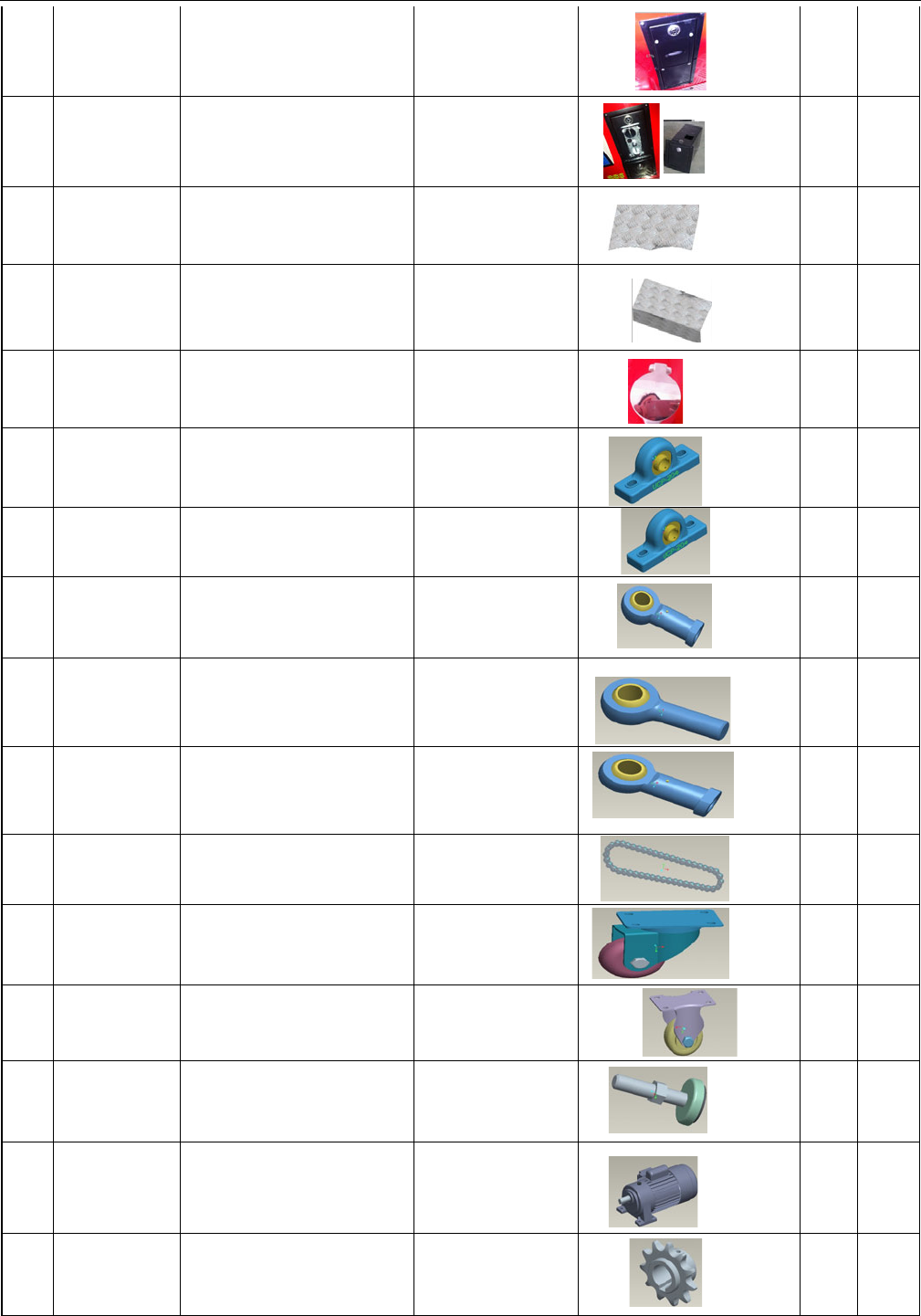
SERVICE AND TECHNICAL SUPPORT CALL: FAMILY FUN COMPANIES (708) 598-7320 WWW.FAMILYFUNCOMPANIES.COM
32
35
KCC-US-035
TICKET/DBV OPTION
FRAME SET/DBV门
LEFT OF
MONITOR
1
PC
36
KCC-US-036
COIN BOX AND COIN
MECH FRAME SET
RIGHT OF
MONITOR
1
PC
37
KCC-US-037
FLOOR PLATE;
DECORATION PATTERN
FLOOR AREA
1
PC
38
KCC-US-038
THRESHOLD STEP
COVER RIGHT AND
LEFT
ENTEANCE/EXIT
2
PC
39
KCC-US-039
GAS CAP;MIRROR
SURFACE STAINLESS
STEEL
TURNK
1
PC
40
KCC-US-040
MOTION LINKAGE
FRAME BEARING
UCP204
BASE FRAME
4
PC
41
KCC-US-041
MOTION LINKAGE
FRAME BEARING
UCP205
BASE FRAME
2
PC
42
KCC-US-042
MOTION LINKAGE JOINT
BEARING M16(IN
TEETH)
BASE FRAME
1
PC
43
KCC-US-043
MOTION LINKAGE JOINT
BEARING M16(OUT
TEETH)
BASE FRAME
1
PC
44
KCC-US-044
MOTION LINKAGE JOINT
BEARING M20(IN
TEETH)
BASE FRAME
2
PC
45
KCC-US-045
CYCLE CHAIN (23
KNOB)
BASE FRAME
1
PC
46
KCC-US-046
UNIVERSAL CASTER
(2.5'')
BASE FRAME
2
PC
47
KCC-US-047
DIRECTIONAL
CASTER(2.5'')
BASE FRAME
2
PC
48
KCC-US-048
ADJUSTER(M16)
BASE FRAME
4
PC
49
KCC-US-049
MOTION DRIVE MOTOR
BASE FRAME
1
PC
50
KCC-US-050
MOTOR CHAIN WHEEL
BASE FRAME
1
PC
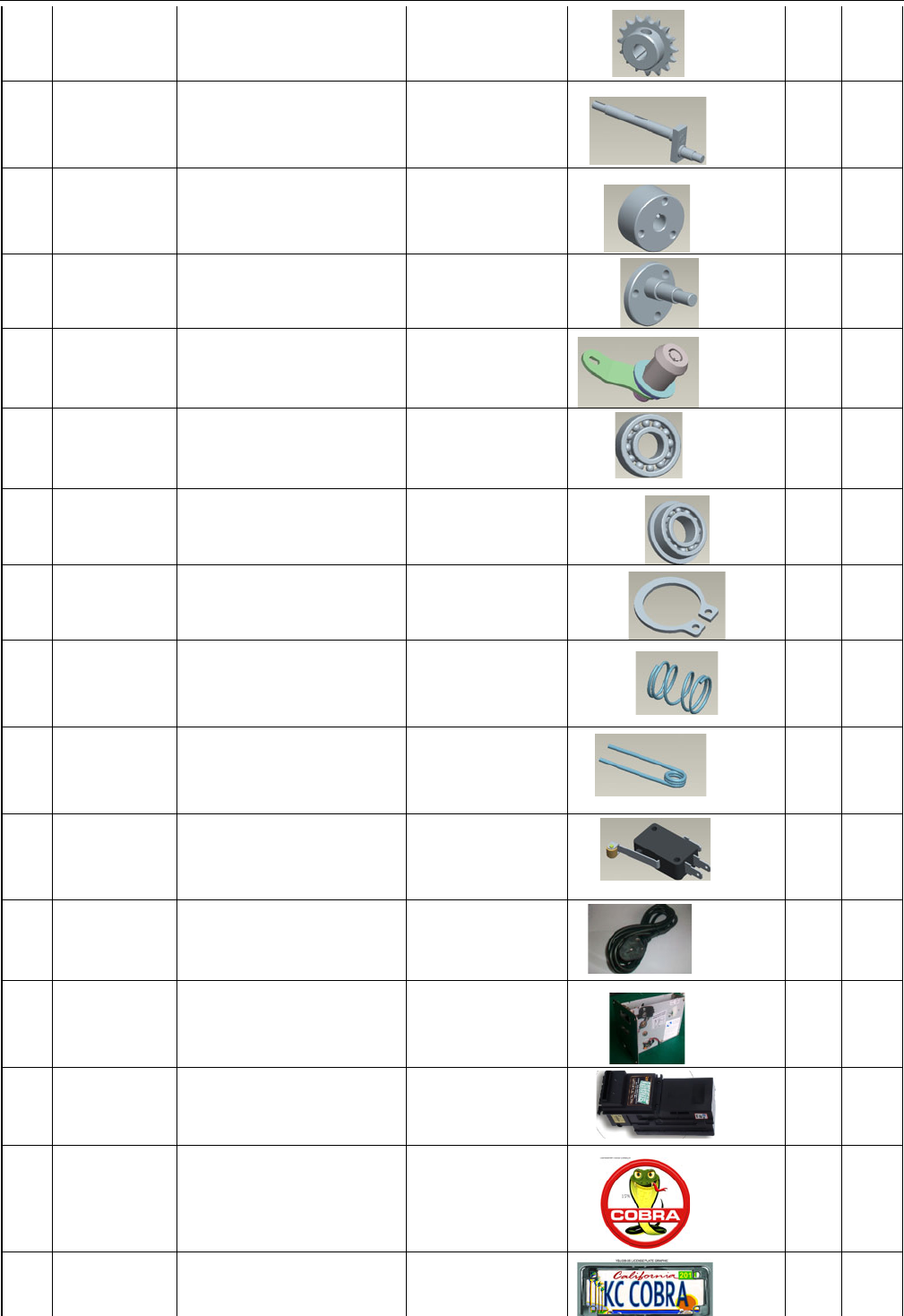
SERVICE AND TECHNICAL SUPPORT CALL: FAMILY FUN COMPANIES (708) 598-7320 WWW.FAMILYFUNCOMPANIES.COM
33
51
KCC-US-051
DRIVEN CHAIN WHEEL
BASE FRAME
1
PC
52
KCC-US-052
MOTION BEARING
BASE FRAME
1
PC
53
KCC-US-053
ECCENTRIC BLOCK A
BASE FRAME
1
PC
54
KCC-US-054
ECCENTRIC BLOCK B
BASE FRAME
1
PC
55
KCC-US-055
GU0711
TRUNK
3
PC
56
KCC-US-056
DEEO GROOVE BALL
BEARING 6202
TRUNK
2
PC
57
KCC-US-057
FLANGE BEARING
6901Z
TRUNK
1
PC
58
KCC-US-058
CLIP ø15
TRUNK
1
PC
59
KCC-US-059
DIRECTION
PRESSURE SPRING
TRUNK
1
PC
60
KCC-US-060
BACK-MOVING
BEARING
TRUNK
1
PC
61
KCC-US-061
DIRECTION SWITCH
TRUNK
2
PC
62
KCC-US-062
POWER CABLE
TRUNK
1
PC
63
KCC-US-063
TICKET MECH (OPTION)
TRUNK
1
PC
64
KCC-US-064
DBV (OPTION)
TRUNK
1
PC
65
KCC-US-065
COBRA HOOD EMBLEM
GRAPHICS
1
PC
66
KCC-US-066
LICENSE PLATE
GRAPHIC
GRAPHICS
1
PC
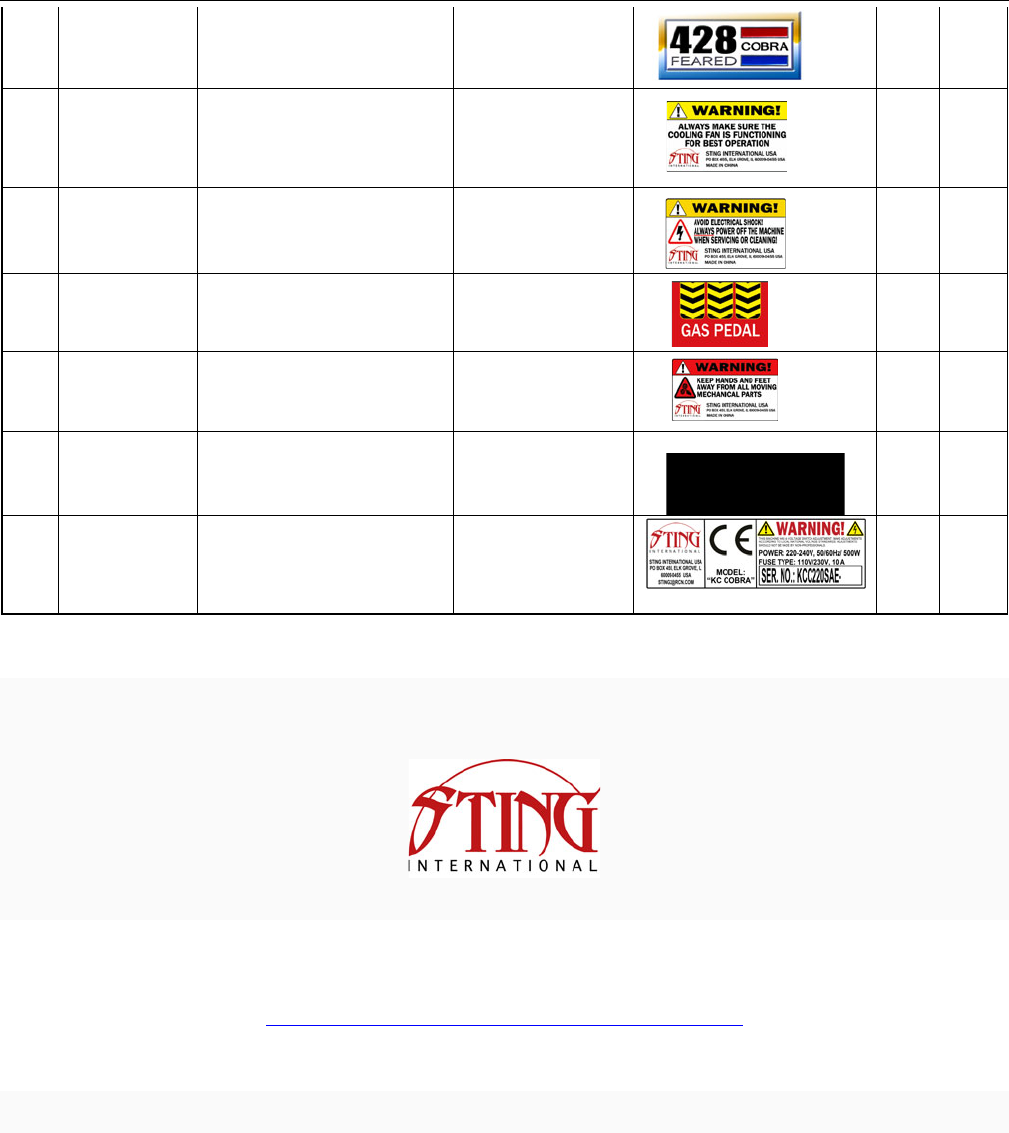
SERVICE AND TECHNICAL SUPPORT CALL: FAMILY FUN COMPANIES (708) 598-7320 WWW.FAMILYFUNCOMPANIES.COM
34
67
KCC-US-067
NAMEPLATE GRAPHICS
GRAPHICS
2
PC
68
KCC-US-068
COOLING FAN
WARNING
LABEL
1
PC
69
KCC-US-069
ELECTRIC SHOCK
WARNING
LABEL
1
PC
70
KCC-US-070
GAS PENAL LABEL
LABEL
1
PC
71
KCC-US-071
MOVING PART
WARNING
LABEL
1
PC
72
KCC-US-072
POWER SWITCH LABEL
LABEL
1
PC
73
KCC-US-073
SERIAL NO.
LABEL
1
PC
STING INTERNATIONAL, P.O. BOX 455, ELK GROVE VILLAGE, IL 60007 USA E-mail: sting2 @ rcn.com.
FOR ALL PARTS, SERVICE, AND TECHNICAL SUPPORT
PHONE: 708-598-3720 FAX: 708-598-3720
WWW.FAMILYFUNCOMPANIES.COM
STING INTERNATIONAL, © 2013 ALL RIGHTS RESERVED
