Ardi Technology PB101A01 Wireless Electronic Pick Buster(2.4G) User Manual

Ardi Technology Corp. Wireless Electronic Pick Buster(2.4G)

User manual

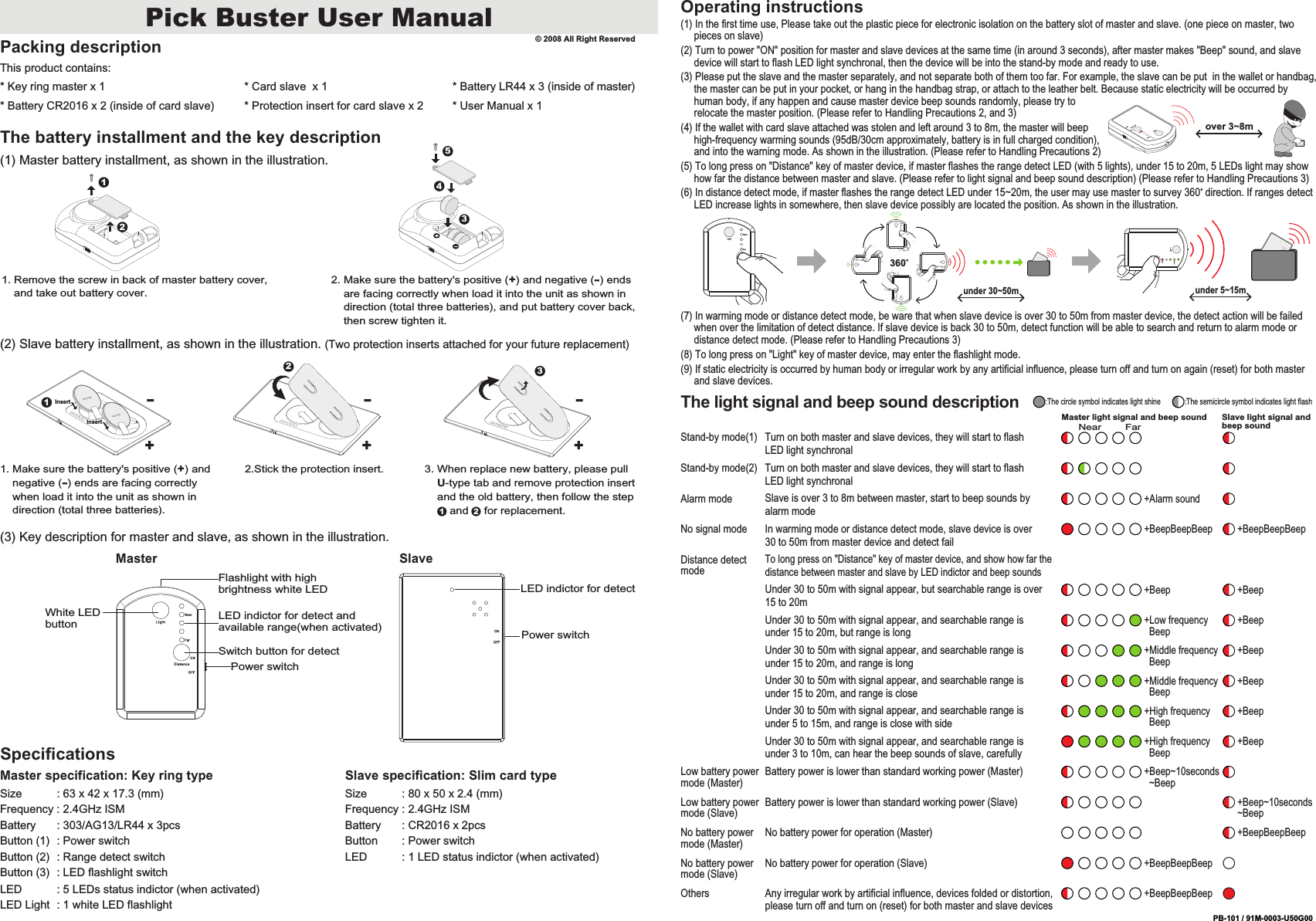
Pick Buster User ManualPacking descriptionThis product contains:* Key ring master x 1* Battery CR2016 x 2 (inside of card slave)* Card slave  x 1* Protection insert for card slave x 2* Battery LR44 x 3 (inside of master)The battery installment and the key description(1) Master battery installment, as shown in the illustration.(2) Slave battery installment, as shown in the illustration. (Two protection inserts attached for your future replacement)(3) Key description for master and slave, as shown in the illustration.SpecificationsMaster specification: Key ring typeSize           : 63 x 42 x 17.3 (mm)Frequency : 2.4GHz ISMBattery       : 303/AG13/LR44 x 3pcsButton (1)  : Power switchButton (2)  : Range detect switchButton (3)  : LED flashlight switchLED           : 5 LEDs status indictor (when activated)LED Light  : 1 white LED flashlightSlave specification: Slim card typeSize           : 80 x 50 x 2.4 (mm)Frequency : 2.4GHz ISMBattery       : CR2016 x 2pcsButton        : Power switchLED           : 1 LED status indictor (when activated)12LED indictor for detectPower switch1. Remove the screw in back of master battery cover,     and take out battery cover.2. Make sure the battery's positive (+) and negative (-) ends     are facing correctly when load it into the unit as shown in     direction (total three batteries), and put battery cover back,     then screw tighten it.3451. Make sure the battery's positive (+) and     negative (-) ends are facing correctly     when load it into the unit as shown in     direction (total three batteries).2.Stick the protection insert. 3. When replace new battery, please pull     U-type tab and remove protection insert     and the old battery, then follow the step        and     for replacement.1 2Operating instructions(1) In the first time use, Please take out the plastic piece for electronic isolation on the battery slot of master and slave. (one piece on master, two      pieces on slave)(2) Turn to power "ON" position for master and slave devices at the same time (in around 3 seconds), after master makes "Beep" sound, and slave      device will start to flash LED light synchronal, then the device will be into the stand-by mode and ready to use.(3) Please put the slave and the master separately, and not separate both of them too far. For example, the slave can be put  in the wallet or handbag,      the master can be put in your pocket, or hang in the handbag strap, or attach to the leather belt. Because static electricity will be occurred by      human body, if any happen and cause master device beep sounds randomly, please try to      relocate the master position. (Please refer to Handling Precautions 2, and 3)(4) If the wallet with card slave attached was stolen and left around 3 to 8m, the master will beep      high-frequency warming sounds (95dB/30cm approximately, battery is in full charged condition),      and into the warning mode. As shown in the illustration. (Please refer to Handling Precautions 2)(5) To long press on "Distance" key of master device, if master flashes the range detect LED (with 5 lights), under 15 to 20m, 5 LEDs light may show      how far the distance between master and slave. (Please refer to light signal and beep sound description) (Please refer to Handling Precautions 3)(6) In distance detect mode, if master flashes the range detect LED under 15~20m, the user may use master to survey 360° direction. If ranges detect      LED increase lights in somewhere, then slave device possibly are located the position. As shown in the illustration.(7) In warming mode or distance detect mode, be ware that when slave device is over 30 to 50m from master device, the detect action will be failed      when over the limitation of detect distance. If slave device is back 30 to 50m, detect function will be able to search and return to alarm mode or      distance detect mode. (Please refer to Handling Precautions 3)(8) To long press on "Light" key of master device, may enter the flashlight mode.(9) If static electricity is occurred by human body or irregular work by any artificial influence, please turn off and turn on again (reset) for both master      and slave devices.under 5~15munder 30~50m360° Master Slave* User Manual x 1© 2008 All Right ReservedWhite LED buttonFlashlight with high brightness white LEDLED indictor for detect and available range(when activated)Switch button for detectPower switchover 3~8m2+-3+-1InsertInsert+-PB-101 / 91M-0003-U50G00The light signal and beep sound descriptionMaster light signal and beep sound Slave light signal and beep soundNearTo long press on "Distance" key of master device, and show how far the distance between master and slave by LED indictor and beep soundsDistance detect mode+BeepBeepBeepNo battery power for operation (Slave)No battery power mode (Slave)+BeepBeepBeepAny irregular work by artificial influence, devices folded or distortion, please turn off and turn on (reset) for both master and slave devicesOthersStand-by mode(1) Turn on both master and slave devices, they will start to flash LED light synchronalTurn on both master and slave devices, they will start to flash LED light synchronalStand-by mode(2)+Beep +BeepUnder 30 to 50m with signal appear, but searchable range is over 15 to 20m+Middle frequency   Beep+BeepUnder 30 to 50m with signal appear, and searchable range is under 15 to 20m, and range is long+Middle frequency   Beep+BeepUnder 30 to 50m with signal appear, and searchable range is under 15 to 20m, and range is close+High frequency   Beep+BeepUnder 30 to 50m with signal appear, and searchable range is under 5 to 15m, and range is close with side+High frequency   Beep+BeepUnder 30 to 50m with signal appear, and searchable range is under 3 to 10m, can hear the beep sounds of slave, carefully+Beep~10seconds  ~BeepBattery power is lower than standard working power (Master)Low battery power mode (Master)+Beep~10seconds~BeepBattery power is lower than standard working power (Slave)Low battery power mode (Slave)+BeepBeepBeepNo battery power for operation (Master)No battery power mode (Master)+Alarm soundSlave is over 3 to 8m between master, start to beep sounds by alarm modeAlarm mode+Low frequency   Beep+BeepUnder 30 to 50m with signal appear, and searchable range is under 15 to 20m, but range is long:The circle symbol indicates light shine :The semicircle symbol indicates light flashIn warming mode or distance detect mode, slave device is over 30 to 50m from master device and detect failNo signal mode+BeepBeepBeep +BeepBeepBeepFar
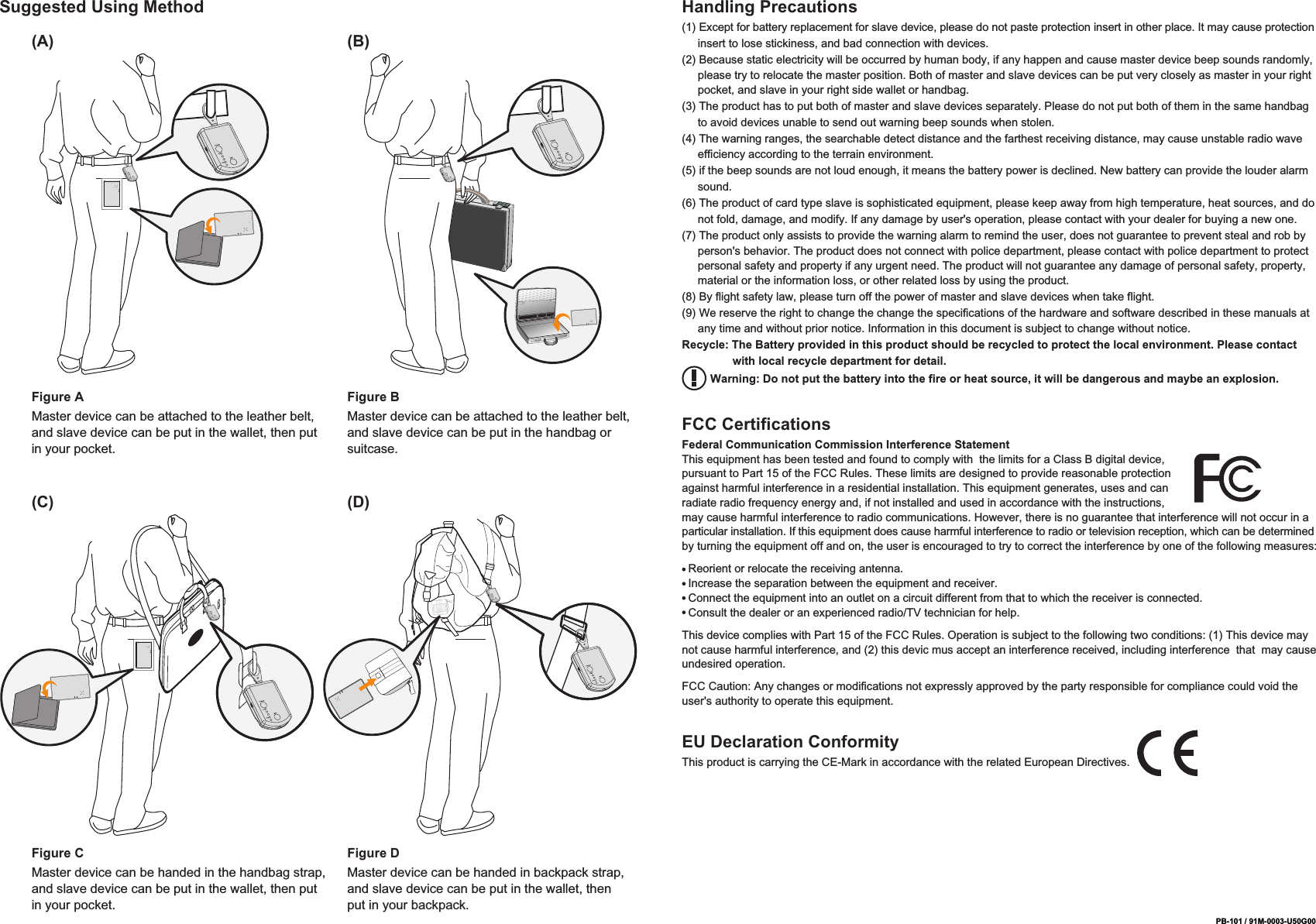
PB-101 / 91M-0003-U50G00Suggested Using Method Handling Precautions(1) Except for battery replacement for slave device, please do not paste protection insert in other place. It may cause protection      insert to lose stickiness, and bad connection with devices.(2) Because static electricity will be occurred by human body, if any happen and cause master device beep sounds randomly,      please try to relocate the master position. Both of master and slave devices can be put very closely as master in your right      pocket, and slave in your right side wallet or handbag.(3) The product has to put both of master and slave devices separately. Please do not put both of them in the same handbag      to avoid devices unable to send out warning beep sounds when stolen.(4) The warning ranges, the searchable detect distance and the farthest receiving distance, may cause unstable radio wave      efficiency according to the terrain environment.(5) if the beep sounds are not loud enough, it means the battery power is declined. New battery can provide the louder alarm      sound.(6) The product of card type slave is sophisticated equipment, please keep away from high temperature, heat sources, and do      not fold, damage, and modify. If any damage by user's operation, please contact with your dealer for buying a new one.(7) The product only assists to provide the warning alarm to remind the user, does not guarantee to prevent steal and rob by      person's behavior. The product does not connect with police department, please contact with police department to protect      personal safety and property if any urgent need. The product will not guarantee any damage of personal safety, property,      material or the information loss, or other related loss by using the product.(8) By flight safety law, please turn off the power of master and slave devices when take flight.(9) We reserve the right to change the change the specifications of the hardware and software described in these manuals at      any time and without prior notice. Information in this document is subject to change without notice.Recycle: The Battery provided in this product should be recycled to protect the local environment. Please contact                 with local recycle department for detail.         Warning: Do not put the battery into the fire or heat source, it will be dangerous and maybe an explosion.FCC CertificationsFederal Communication Commission Interference StatementThis equipment has been tested and found to comply with  the limits for a Class B digital device, pursuant to Part 15 of the FCC Rules. These limits are designed to provide reasonable protection against harmful interference in a residential installation. This equipment generates, uses and can radiate radio frequency energy and, if not installed and used in accordance with the instructions, may cause harmful interference to radio communications. However, there is no guarantee that interference will not occur in a particular installation. If this equipment does cause harmful interference to radio or television reception, which can be determined by turning the equipment off and on, the user is encouraged to try to correct the interference by one of the following measures:  Reorient or relocate the receiving antenna.  Increase the separation between the equipment and receiver.  Connect the equipment into an outlet on a circuit different from that to which the receiver is connected.  Consult the dealer or an experienced radio/TV technician for help.This device complies with Part 15 of the FCC Rules. Operation is subject to the following two conditions: (1) This device may not cause harmful interference, and (2) this devic mus accept an interference received, including interference  that  may cause undesired operation.FCC Caution: Any changes or modifications not expressly approved by the party responsible for compliance could void the user's authority to operate this equipment.Figure AMaster device can be attached to the leather belt, and slave device can be put in the wallet, then put in your pocket.(A) (B)Figure BMaster device can be attached to the leather belt, and slave device can be put in the handbag or suitcase.Figure CMaster device can be handed in the handbag strap, and slave device can be put in the wallet, then put in your pocket.(C) (D)Figure DMaster device can be handed in backpack strap, and slave device can be put in the wallet, then put in your backpack.EU Declaration ConformityThis product is carrying the CE-Mark in accordance with the related European Directives.

Navigation menu