Ardi Technology S05A01 Mini Tracker User Manual Mini Tracker 506 090518

Ardi Technology Corp. Mini Tracker Mini Tracker 506 090518

User manual

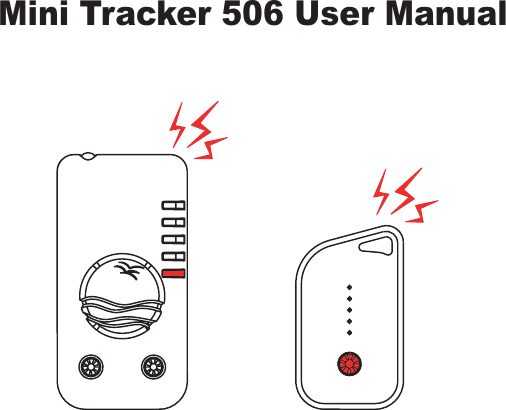
Mini Tracker 506 User Manual
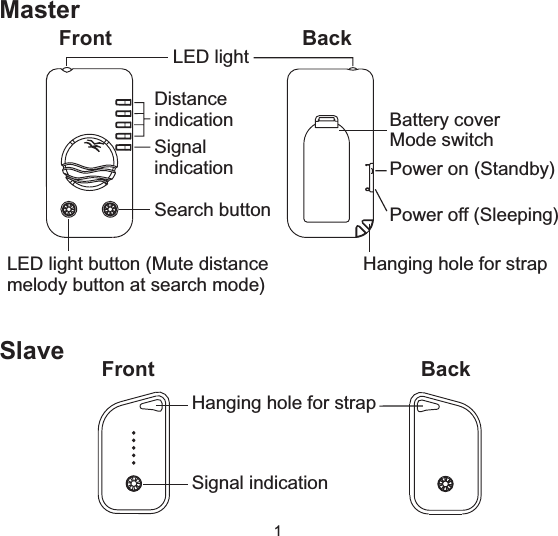
Front BackDistanceindicationSignalindicationSearch buttonLED light button (Mute distancemelody button at search mode)LED lightBattery coverMode switchPower on (Standby)Power off (Sleeping)Hanging hole for strapMasterFront BackHanging hole for strapSignal indicationSlave1
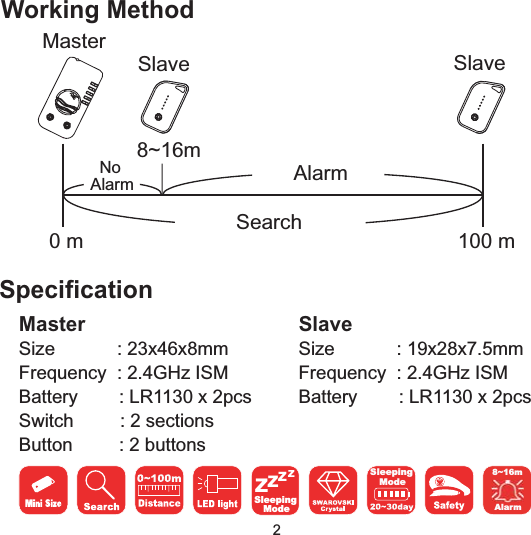
0m 100mSearch8~16mAlarmNoAlarmMasterSlave SlaveWorking Method8~16mAlarmMasterSpecificationSize : 23x46x8mmFrequency : 2.4GHz ISMBattery : LR1130 x 2pcsSwitch : 2 sectionsButton : 2 buttonsSlaveSize : 19x28x7.5mmFrequency : 2.4GHz ISMBattery : LR1130 x 2pcsSleepingModeZZZZSleepingMode2
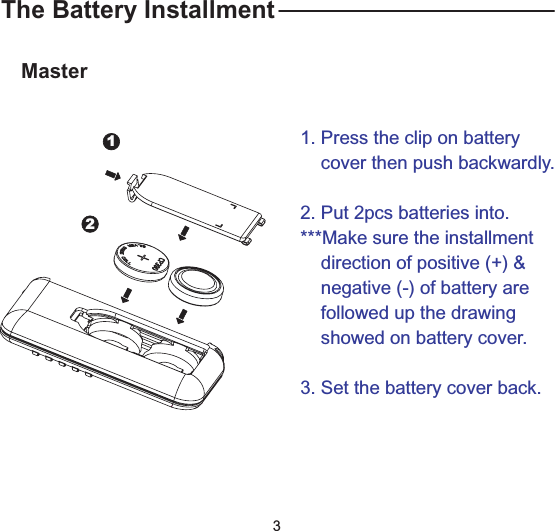
The Battery InstallmentMaster121. Press the clip on batterycover then push backwardly.2. Put 2pcs batteries into.***Make sure the installmentdirection of positive (+) &negative (-) of battery arefollowed up the drawingshowed on battery cover.3. Set the battery cover back.3
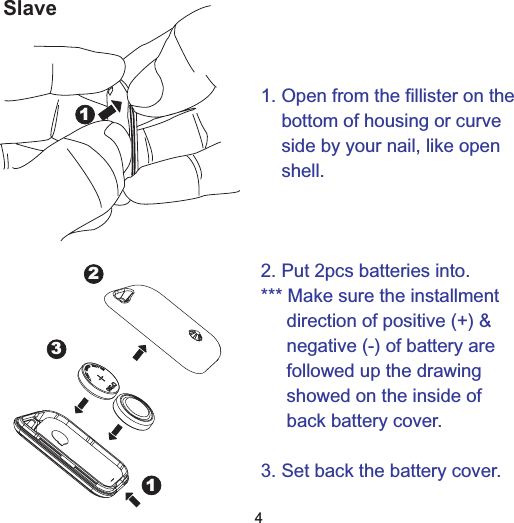
Slave1231. Open from the fillister on thebottom of housing or curveside by your nail, like openshell.2. Put 2pcs batteries into.*** Make sure the installmentdirection of positive (+) &negative (-) of battery arefollowed up the drawingshowed on the inside ofback battery cover.3. Set back the battery cover.14
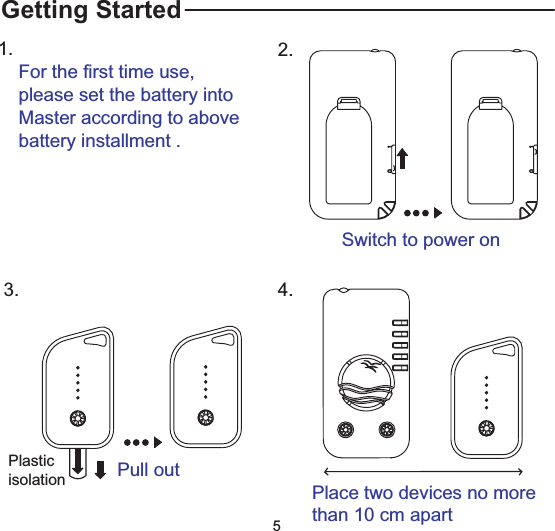
Switch to power on2.1.For the first time use,please set the battery intoMaster according to abovebattery installment .Getting StartedPlasticisolation Pull out3.Place two devices no morethan 10 cm apart4.5
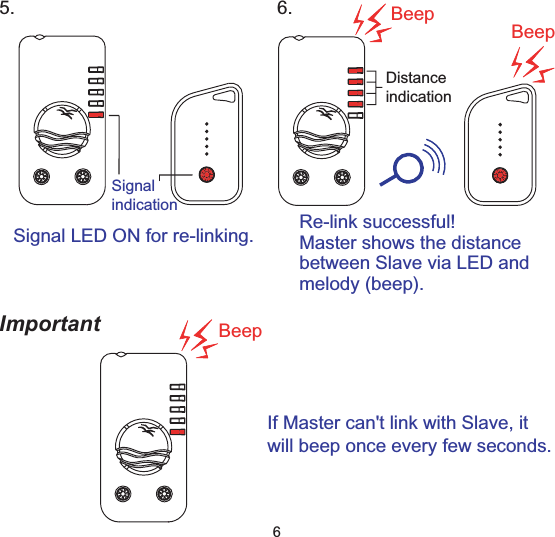
5.SignalindicationSignal LED ON for re-linking.Beep BeepDistanceindication6.Re-link successful!Master shows the distancebetween Slave via LED andmelody (beep).Important BeepIf Master can't link with Slave, itwill beep once every few seconds.6
[Suggested setting place]MasterSlave7
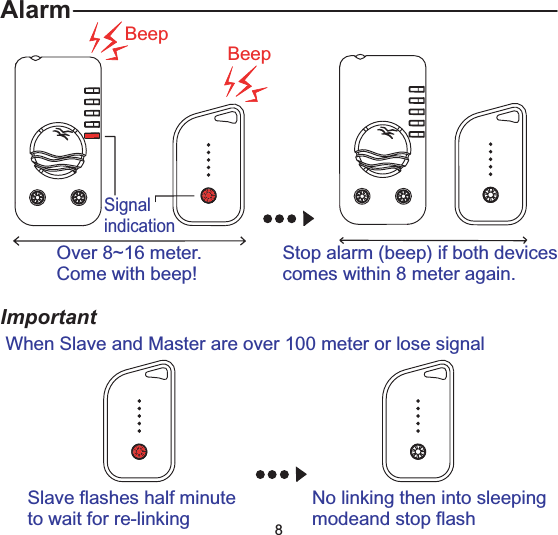
AlarmOver 8~16 meter.Come with beep!BeepBeepStop alarm (beep) if both devicescomes within 8 meter again.ImportantSignalindicationWhen Slave and Master are over 100 meter or lose signalSlave flashes half minuteto wait for re-linkingNo linking then into sleepingmodeand stop flash8
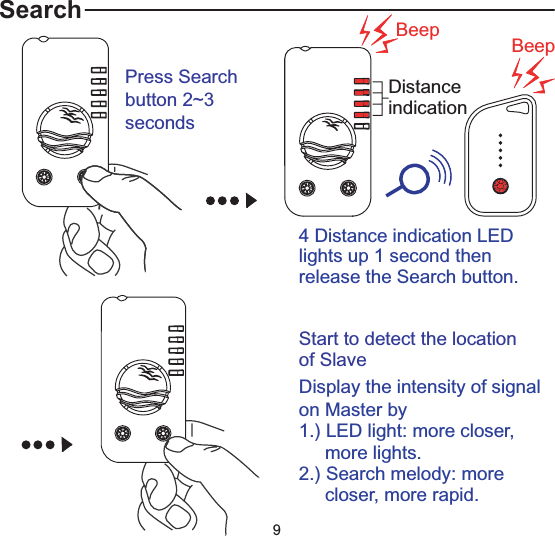
Search Beep BeepDistanceindicationPress Searchbutton 2~3seconds4 Distance indication LEDlights up 1 second thenrelease the Search button.Start to detect the locationof SlaveDisplay the intensity of signalon Master by1.) LED light: more closer,more lights.2.) Search melody: morecloser, more rapid.9
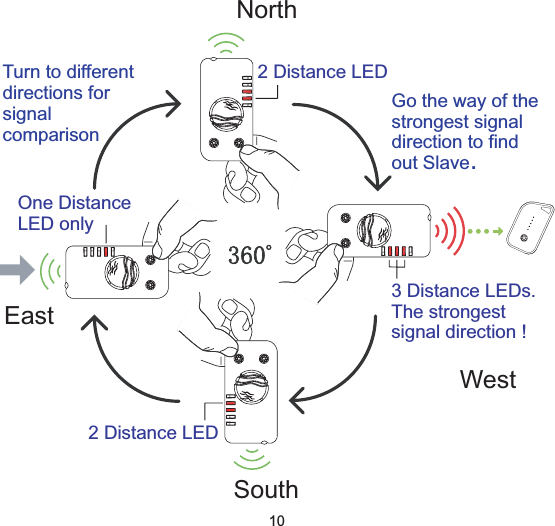
NorthSouthEastWestTurn to differentdirections forsignalcomparisonGo the way of thestrongest signaldirection to findout Slave.2 Distance LED2 Distance LEDOne DistanceLED only3 Distance LEDs.The strongestsignal direction !10
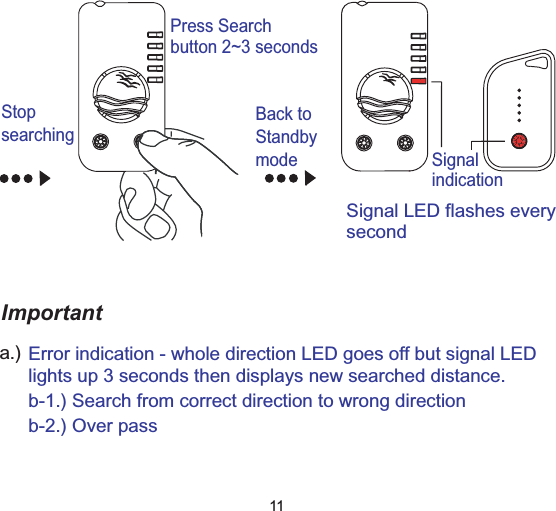
Importanta.)Press Searchbutton 2~3 secondsStopsearchingSignalindicationSignal LED flashes everysecondBack toStandbymodeError indication - whole direction LED goes off but signal LEDlights up 3 seconds then displays new searched distance.b-1.) Search from correct direction to wrong directionb-2.) Over pass11
NorthOriginal searching(Right direction)Go thewrongdirectionEastDistance LED goes outall lights suddenly andonly flash Signal LEDwith beep sound3 secondslaterEast0~100 meterLED displays newsearched distanceNorthGo back to originalsearch direction orlocationSignal indication LEDLocation:North[Suggestion]12
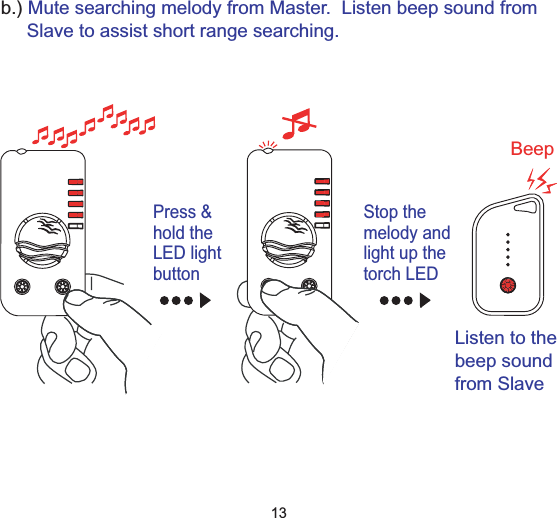
b.) Mute searching melody from Master. Listen beep sound fromSlave to assist short range searching.Press &hold theLED lightbuttonStop themelody andlight up thetorch LEDBeepListen to thebeep soundfrom Slave13
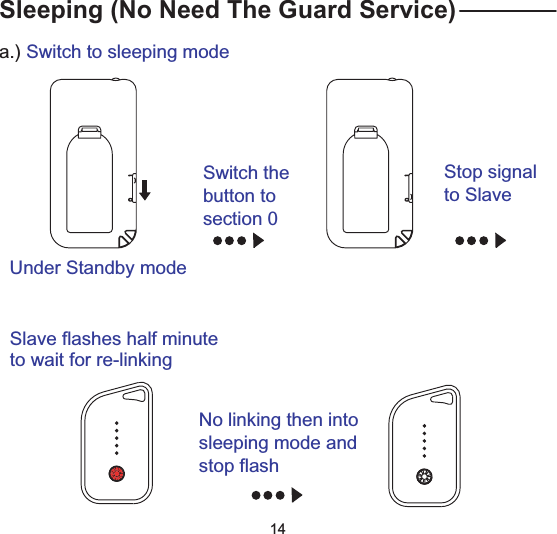
Sleeping (No Need The Guard Service)Switch thebutton tosection 0Under Standby modeStop signalto Slavea.) Switch to sleeping modeSlave flashes half minuteto wait for re-linkingNo linking then intosleeping mode andstop flash14
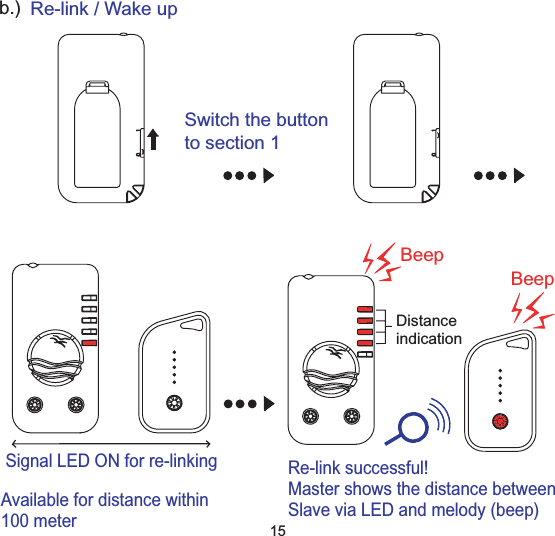
b.) Re-link / Wake upSwitch the buttonto section 1Available for distance within100 meterSignal LED ON for re-linkingBeepBeepDistanceindicationRe-link successful!Master shows the distance betweenSlave via LED and melody (beep)15
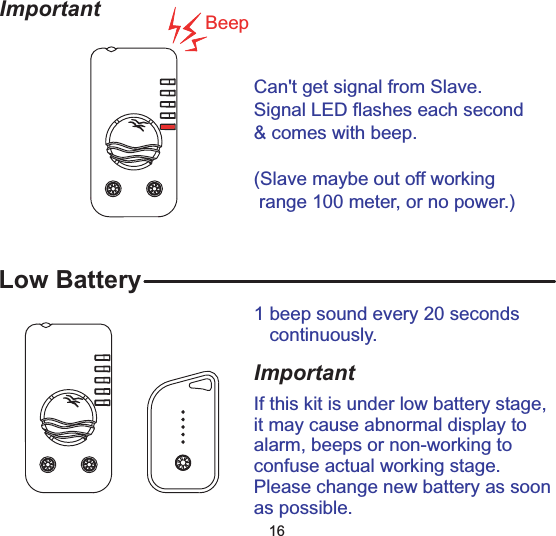
Important BeepCan't get signal from Slave.Signal LED flashes each second& comes with beep.(Slave maybe out off workingrange 100 meter, or no power.)Low Battery1 beep sound every 20 secondscontinuously.ImportantIf this kit is under low battery stage,it may cause abnormal display toalarm, beeps or non-working toconfuse actual working stage.Please change new battery as soonas possible.16
Care and maintenance(a) Keep the device dry. Precipitation, humidity, and all types of liquids or moisture cancontain minerals that will corrode electronic circuits. If your device does get wet,remove the battery, and allow the device to dry completely before replacing it.(b) Do not use or store the device in dusty, dirty areas. Its moving parts and electroniccomponents can be damaged.(c) Do not store the device in hot areas. High temperatures can shorten the life ofelectronic devices, damage batteries, and warp or melt certain plastics.(d) Do not store the device in cold areas. When the device returns to its normaltemperature, moisture can form inside the device and damage electronic circuit boards.(e) Do not attempt to open the device other than instructed in this guide.(f) Do not drop, knock, or shake the device. Rough handling can break internal circuitboards and fine mechanics.(g) Do not use harsh chemicals, cleaning solvents, or strong detergents to clean the device.(h) Do not paint the device. Paint can clog the moving parts and prevent proper operation.(i) Do not put Master and Slave at same place in case of this set is unable playingfunctions to guard your valued goods.(j) The working range, alarm range, searching and detection are depends the terrainenvironment because of radio wave efficiency.(k) If the beeps sound are not loud enough, it may means the battery low. Change newbattery for louder alarm sound.(l) This product only assists to provide the warning alarm for reminding the user. It doesnot guarantee to prevent steal or rob by personal safety and property if any urgentneed. This product does not guarantee any damage of personal safety, property,material or the information loss, or other related loss.(m) If you want to apply this product during the flight trip, please comply with the flightsafety law according to each country.(n) We reserve the right in changing the specification of the hardware and softwaredesigns to manuals at any time and without prior notice. Informationin this documentis subject to change without notice.(o) This product operational temperature is between 0 C ~ +55 C. Storage temperatureis between -10 C~ +60 C.17
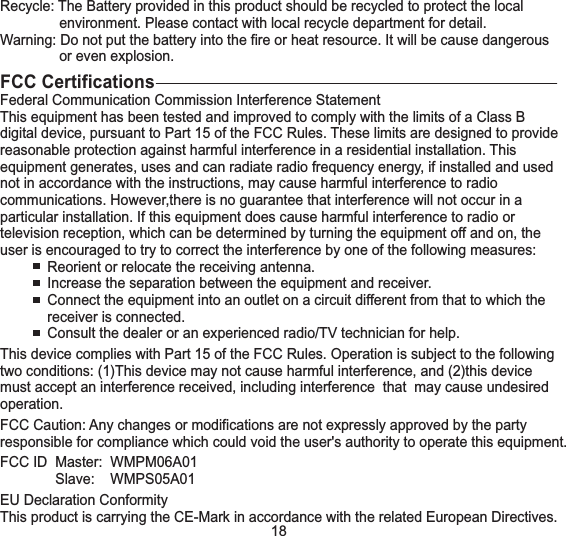
Recycle: The Battery provided in this product should be recycled to protect the localenvironment. Please contact with local recycle department for detail.Warning: Do not put the battery into the fire or heat resource. It will be cause dangerousor even explosion.FCC CertificationsFederal Communication Commission Interference StatementThis equipment has been tested and improved to comply with the limits of a Class Bdigital device, pursuant to Part 15 of the FCC Rules. These limits are designed to providereasonable protection against harmful interference in a residential installation. Thisequipment generates, uses and can radiate radio frequency energy, if installed and usednot in accordance with the instructions, may cause harmful interference to radiocommunications. However,there is no guarantee that interference will not occur in aparticular installation. If this equipment does cause harmful interference to radio ortelevision reception, which can be determined by turning the equipment off and on, theuser is encouraged to try to correct the interference by one of the following measures:Reorient or relocate the receiving antenna.Increase the separation between the equipment and receiver.Connect the equipment into an outlet on a circuit different from that to which thereceiver is connected.Consult the dealer or an experienced radio/TV technician for help.This device complies with Part 15 of the FCC Rules. Operation is subject to the followingtwo conditions: (1)This device may not cause harmful interference, and (2)this devicemust accept an interference received, including interference that may cause undesiredoperation.FCC Caution: Any changes or modifications are not expressly approved by the partyresponsible for compliance which could void the user's authority to operate this equipment.FCC ID Master: WMPM06A01Slave: WMPS05A01EU Declaration ConformityThis product is carrying the CE-Mark in accordance with the related European Directives.18
91E-0214-U50G00

Navigation menu