Ardi Technology S08A01 Guardian Angel 807 User Manual 807 1

Ardi Technology Corp. Guardian Angel 807 807 1

User manual

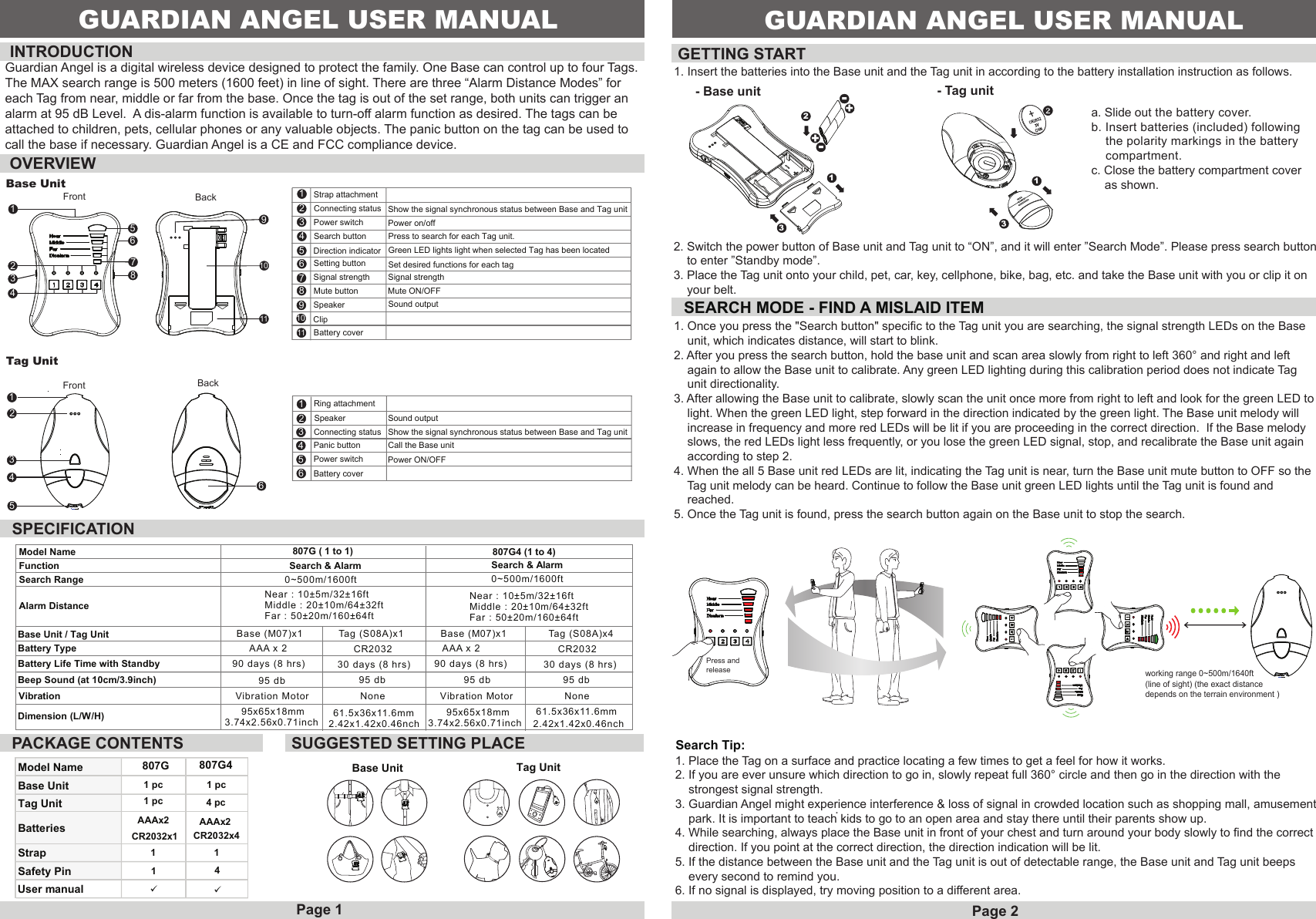
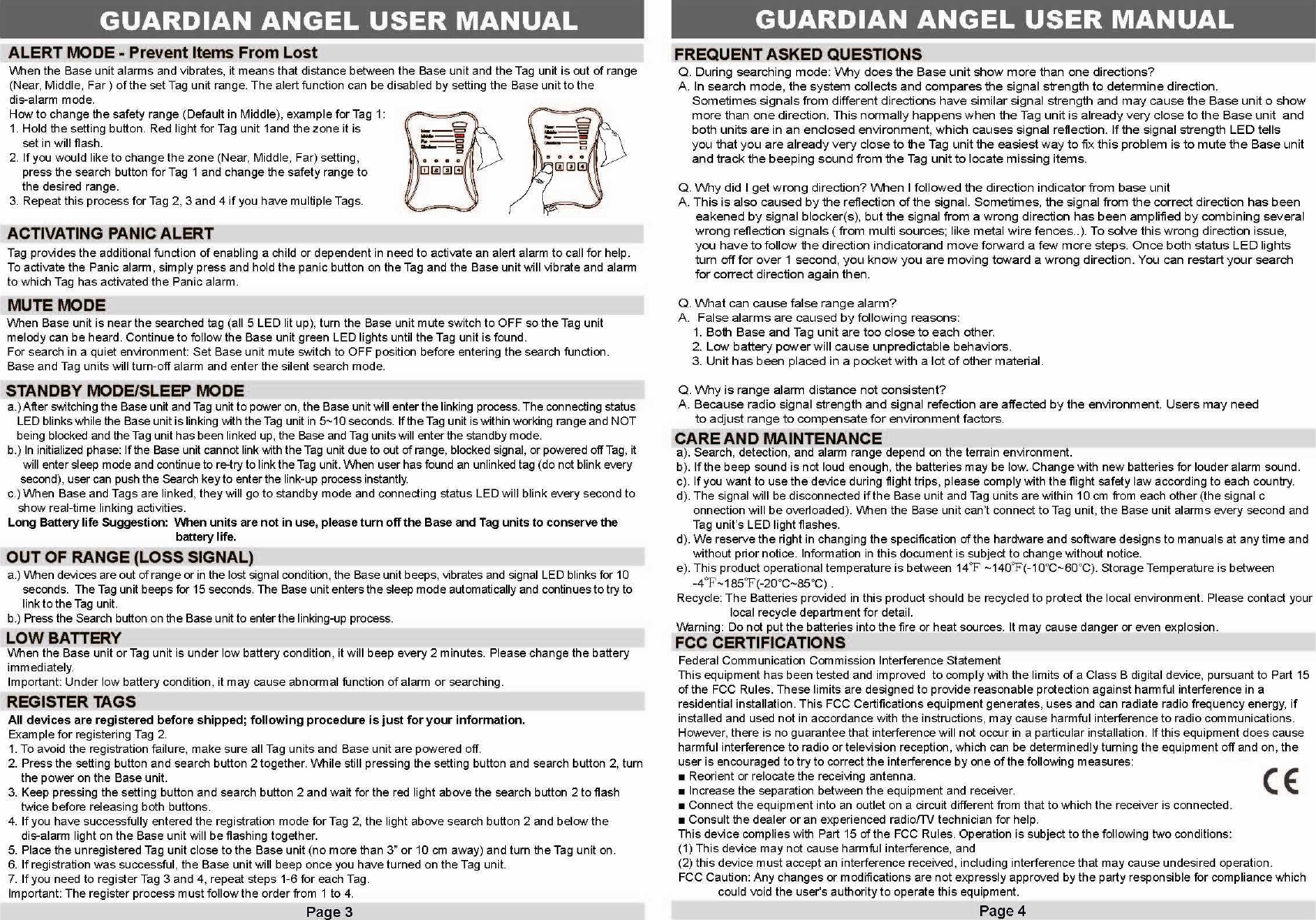
Front BackBase Unit1234567891011Strap attachment Connecting status Power switch1234567891011Search buttonDirection indicator Setting buttonSignal strengthMute buttonSpeakerClipBattery coverOVERVIEWPower on/offMute ON/OFFPress to search for each Tag unit.Set desired functions for each tagShow the signal synchronous status between Base and Tag unitGreen LED lights light when selected Tag has been locatedSignal strengthSound outputINTRODUCTION GETTING STARTSPECIFICATIONPACKAGE CONTENTSSEARCH MODE - FIND A MISLAID ITEM- Base unitFront BackModel Name 807GBase UnitTag Unit 1 pcBatteries AAAx2CR2032x1User manualStrapSafety Pin1141807G44 pcAAAx2CR2032x4SUGGESTED SETTING PLACEBase Unit Tag Unit13321. Insert the batteries into the Base unit and the Tag unit in according to the battery installation instruction as follows.a. Slide out the battery cover. b. Insert batteries (included) following     the polarity markings in the battery     compartment.c. Close the battery compartment cover    as shown.Search Tip: 1. Place the Tag on a surface and practice locating a few times to get a feel for how it works.2. If you are ever unsure which direction to go in, slowly repeat full 360° circle and then go in the direction with the     strongest signal strength.3. Guardian Angel might experience interference & loss of signal in crowded location such as shopping mall, amusement    park. It is important to teach kids to go to an open area and stay there until their parents show up.4. While searching, always place the Base unit in front of your chest and turn around your body slowly to find the correct    direction. If you point at the correct direction, the direction indication will be lit.5. If the distance between the Base unit and the Tag unit is out of detectable range, the Base unit and Tag unit beeps     every second to remind you.6. If no signal is displayed, try moving position to a different area. .1 pc1 pc1. Once you press the "Search button" specific to the Tag unit you are searching, the signal strength LEDs on the Base     unit, which indicates distance, will start to blink.2. After you press the search button, hold the base unit and scan area slowly from right to left 360° and right and left     again to allow the Base unit to calibrate. Any green LED lighting during this calibration period does not indicate Tag     unit directionality.3. After allowing the Base unit to calibrate, slowly scan the unit once more from right to left and look for the green LED to    light. When the green LED light, step forward in the direction indicated by the green light. The Base unit melody will     increase in frequency and more red LEDs will be lit if you are proceeding in the correct direction.  If the Base melody     slows, the red LEDs light less frequently, or you lose the green LED signal, stop, and recalibrate the Base unit again     according to step 2. 4. When the all 5 Base unit red LEDs are lit, indicating the Tag unit is near, turn the Base unit mute button to OFF so the     Tag unit melody can be heard. Continue to follow the Base unit green LED lights until the Tag unit is found and    reached.5. Once the Tag unit is found, press the search button again on the Base unit to stop the search.Tag Unit- Tag unit2. Switch the power button of Base unit and Tag unit to “ON”, and it will enter ”Search Mode”. Please press search button    to enter ”Standby mode”.3. Place the Tag unit onto your child, pet, car, key, cellphone, bike, bag, etc. and take the Base unit with you or clip it on     your belt.Page 1 Page 2Model NameFunctionSearch RangeAlarm DistanceBase Unit / Tag Unit Base (M07)x1 Tag (S08A)x1 Base (M07)x1 Tag (S08A)x4Battery Type AAA x 2 CR2032 AAA x 2 CR2032Battery Life Time with Standby 90 days (8 hrs) 30 days (8 hrs)90 days (8 hrs) 30 days (8 hrs)Beep Sound (at 10cm/3.9inch) 95 db 95 db 95 db 95 dbVibration Motor Vibration MotorDimension (L/W/H) 95x65x18mm3.74x2.56x0.71inch 807G ( 1 to 1)Search & Alarm  Search & Alarm807G4 (1 to 4)0~500m/1600ft 0~500m/1600ftNear : 10±5m/32±16ftMiddle : 20±10m/64±32ftFar : 50±20m/160±64ftNear : 10±5m/32±16ftMiddle : 20±10m/64±32ftFar : 50±20m/160±64ftVibration61.5x36x11.6mm2.42x1.42x0.46nchNone None1GUARDIAN ANGEL USER MANUAL95x65x18mm3.74x2.56x0.71inch61.5x36x11.6mm2.42x1.42x0.46nch123456123456Ring attachmentSpeakerConnecting statusPanic buttonPower switchBattery coverCall the Base unitPower ON/OFFShow the signal synchronous status between Base and Tag unitSound output--++GUARDIAN ANGEL USER MANUALGuardian Angel is a digital wireless device designed to protect the family. One Base can control up to four Tags.The MAX search range is 500 meters (1600 feet) in line of sight. There are three “Alarm Distance Modes” for each Tag from near, middle or far from the base. Once the tag is out of the set range, both units can trigger analarm at 95 dB Level.  A dis-alarm function is available to turn-off alarm function as desired. The tags can be attached to children, pets, cellular phones or any valuable objects. The panic button on the tag can be used to call the base if necessary. Guardian Angel is a CE and FCC compliance device.working range 0~500m/1640ft (line of sight) (the exact distance depends on the terrain environment )Press andrelease

Navigation menu