Arris HD DTA100u User Manual DTA100u: Quick Start Guide
User Manual: Arris HD-DTA100u HD-DTA100u: Quick Start Guide
Open the PDF directly: View PDF  .
.
Page Count: 2
H D - DTA10 0 u
Quick Start Guide
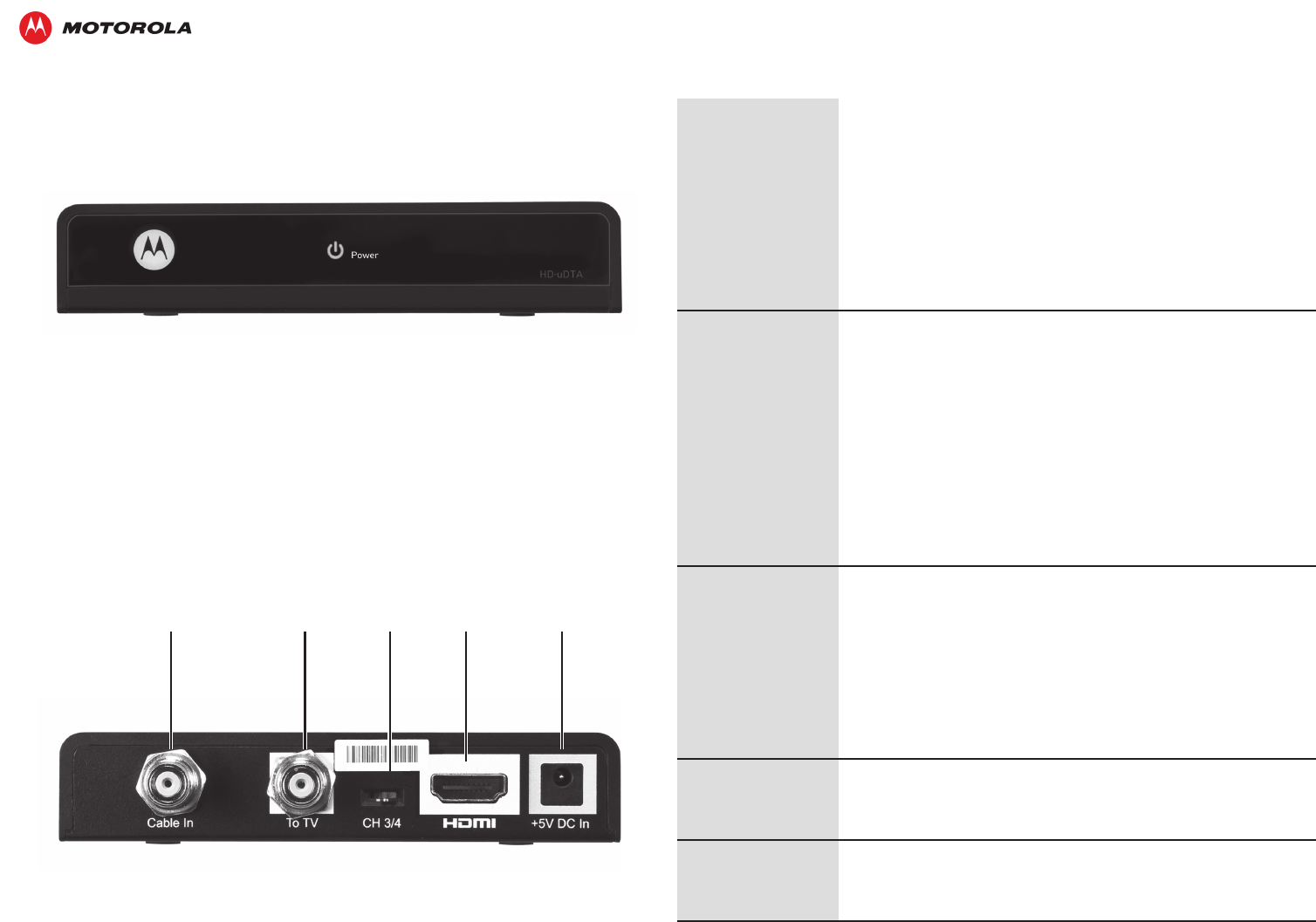
Cable In To TV
CH 3/4
Switch HDMI Power
The HD-DTA100u
will not turn on
• MakesurethePOWERLEDonthefrontoftheHD‑DTA100u
islitgreen.
• IftheHD‑DTA100uisconnectedtoaswitchedoutlet,make
suretheswitchisturnedon.Itisrecommendedtousean
unswitchedoutlet,ifpossible.
• UnplugtheHD‑DTA100ufromtheACoutlet,andthenplugit
backin.
• MakesuretheremotecontrolisinDTAmode,andturnthe
HD‑DTA100uonbypressingtheDTAbutton.
The remote
control does not
work
• MakesuretheremotecontrolisinDTAmode.
• Makesuretherearenoobstructionsbetweentheremote
controlandtheHD‑DTA100u.Aimtheremotecontroldirectly
attheHD‑DTA100ufrontpanel,nottheTVorVCR.
• TheanglebetweentheremotecontrolandtheHD‑DTA100u
maybetoolarge.StandinfrontoftheHD‑DTA100uandnot
toofartoeitherside.
• Pressandreleaseoperationbuttonsoneatatime,rmlyand
deliberately.
• Checkthebatteriesintheremotecontrol.Installnew
batteriesifneeded.
There is no video
on the TV screen
• MakesuretheTVisonandsettotheappropriateinput
sourcefortheHD‑DTA100u.
• MakesuretheHD‑DTA100uisonandtunedtoanauthorized
cablechannel.
• MakesurethecablesbetweentheHD‑DTA100uandtheTV
arermlyconnected.
• Makesurethecoaxialcablefeedisrmlyconnectedtothe
HD‑DTA100uandthewalljack.
There is no audio
when viewing
cable channels
• PressMUTEontheremotecontroltorestoresound.
No closed
captions display
• MakesureclosedcaptionsareenabledontheTV.(Note:
Closedcaptioningmaynotbeavailableforthecurrent
program.)
Troubleshooting
Checkherebeforecallingyourserviceprovider.
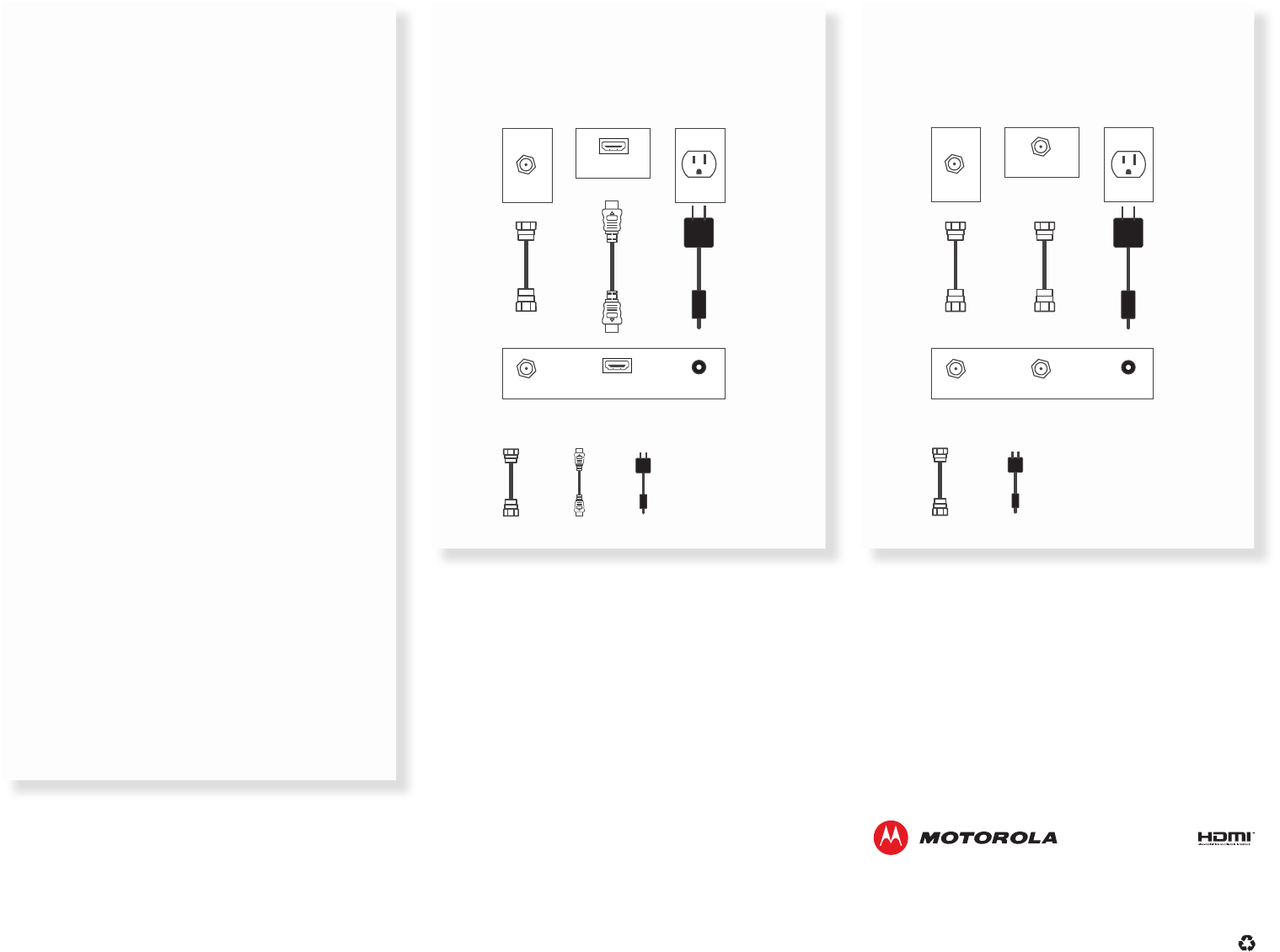
HDTV
HDMI
Coax cable Power cord
HD-DTA100u
HDTV Electrical OutletCable Outlet
Cable In +5V DC In
12 3
HDMI
HDMI
MOTOROLAandtheStylizedMLogoaretrademarksorregisteredtrademarksofMotorolaTrademarkHoldings,LLC.HDMI,
theHDMIlogo,andHigh‑DenitionMultimediaInterfacearetrademarksorregisteredtrademarksofHDMILicensing,LLC
intheUnitedStatesand/orothercountries.Allotherproductorservicenamesarethepropertyoftheirrespectiveowners.
Nopartofthispublicationmaybereproducedinanyformorbyanymeansorusedtomakeanyderivativework(suchas
translation,transformation,oradaptation)withoutwrittenpermissionfromMotorolaMobility,LLC.
©2012MotorolaMobility,LLC.Allrightsreserved.
589976‑001‑a09/12
SDTV
Coax cable
HD-DTA100u
SDTV Electrical OutletCable Outlet
Cable In/
RF In
To TVCable In +5V DC In
12 3
Power cord
Setting Up Your HD-DTA100u and
RF4CE Remote Control
IMPORTANT! Read the enclosed Safety Instructions
before you begin.
1. Connect your cable service.
Connectthecoaxialcablefromyourwalloutlettothe
Cable InportontheHD‑DTA100u.
2. Connect your TV.
Ifyouhaveahigh‑denitionTV,usetheHDMIconnector.
Ifyouhaveastandard‑denitionTV,usetheTo TV
connector.
3. Plug in the HD-DTA100u.
ConnectthepowercordtotheHD‑DTA100u,thenplugit
intoanunswitchedelectricaloutlet.
4. Turn on the TV and select the input.
IfyouhaveanHDTV,usetheremotecontrolforyour
TVtoselecttheHDMIportyouusedtoconnectthe
HD‑ DTA100u.
IfyouhaveanSDTV,tuneyourTVtoChannel3and
settheswitchonthebackoftheHD‑DTA100uto
CH3.Ifyourscreenremainsblack,switchyourTVand
HD‑DTA100utoCH4.
5. Put the batteries in the HD-DTA100u remote
control.
6. Program the RF4CE remote control.
PointtheremotecontrolattheHD‑DTA100u.Pressand
holdtheSETUPbuttonuntiltheLEDontheremote
controlblinkstwice,thenpresstheMenubutton.The
LEDwillblinkcontinuouslyuntiltheremotecontrolis
paired.Followthepairinginstructionsonthescreen.
(Pairinginstructionsarealsoprintedonthebackofthe
remotecontrol.)
