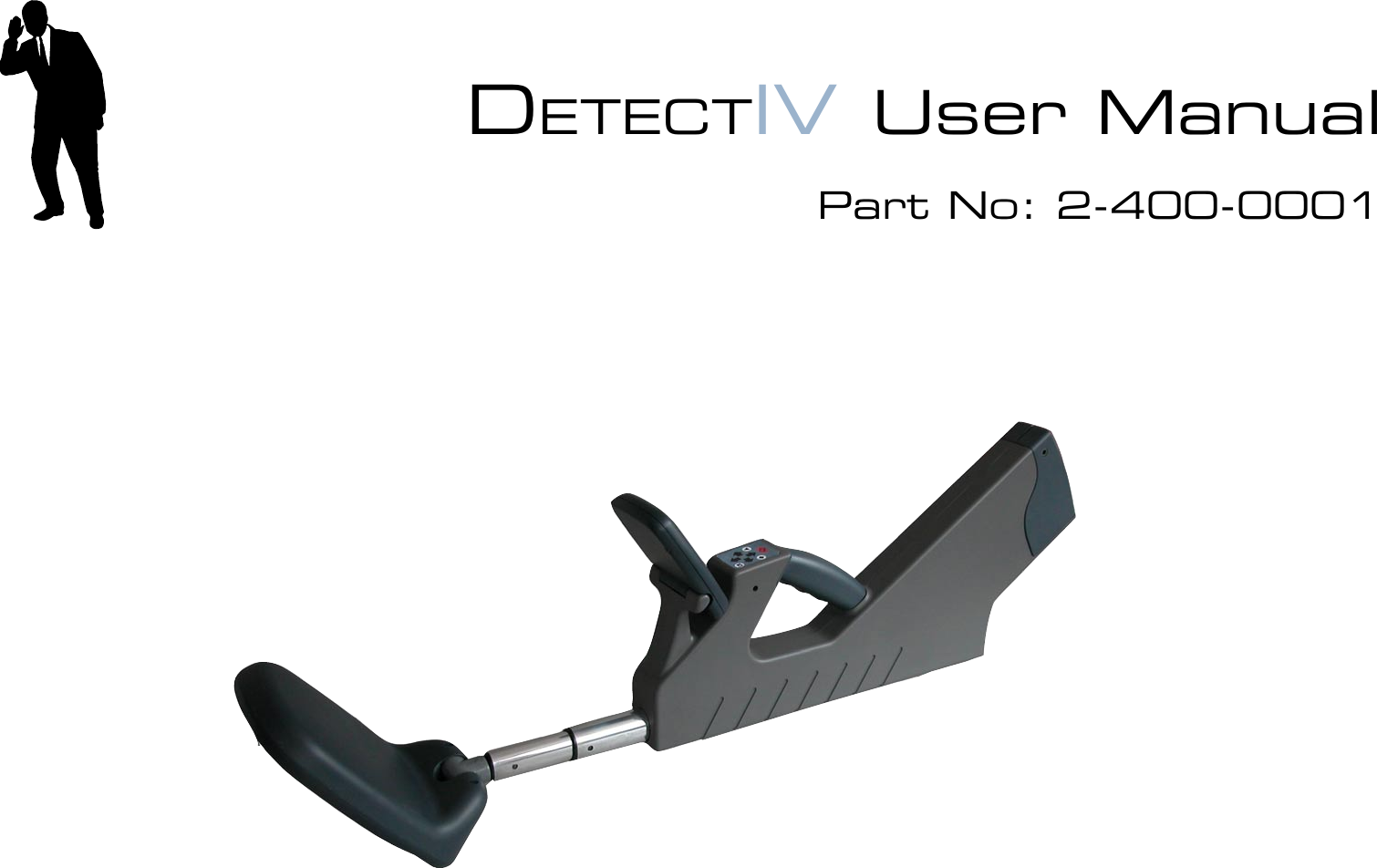
Audiotel 2-400-0001 DETECT IV Portable handheld covert Tx detector User Manual DetectIV iss 1 1

Audiotel International Limited DETECT IV Portable handheld covert Tx detector DetectIV iss 1 1

Contents

User manual
DETECTIV User ManualPart No: 2-400-0001
2 AUDIOTEL INTERNATIONAL MN400872 Issue 1 (08/04) DETECTIV User ManualAUDIOTEL INTERNATIONAL MN400872 Issue 1 (08/04)  3© 2004 Audiotel International LtdUnder the copyright laws, this manual may not be copied, in whole or part, without the written consent of Audiotel International Ltd.Every effort has been made to ensure the accuracy of this manual. The instructions and descrip-tions are accurate at the time of publication. However, succeeding versions of the equipment and manuals are subject to change without notice. Audiotel assumes no liability for damages incurred directly or indirectly from errors, omissions or discrepancies between the equipment described and the manual.If you have any comments or suggestions on improving this manual please contact Audiotel at the following address:Audiotel InternationalCorby RoadWeldonCORBYNorthantsNN17 3ARFax:  +44 (0)1536 266711or Email us at: marketing@audiotel-international.comDETECTIV™  is a registered trademark of Audiotel International LtdAUDIOTEL™ is a registered trademark of Audiotel International Ltd
2 AUDIOTEL INTERNATIONAL MN400872 Issue 1 (08/04) DETECTIV User ManualAUDIOTEL INTERNATIONAL MN400872 Issue 1 (08/04)  3How to use this manual..................................................................................4CE MARK EMC COMPLIANCE AND RADIO TYPE APPROVAL...... 5INTRODUCTION................................................................. 6GETTING STARTED -  ........................................................ 8Charging the battery.......................................................................................9Switching the unit ON (and Off) ...................................................................10Using the controls and selecting options .....................................................11Setting time & date ......................................................................................12BASIC OPERATING METHODOLOGY..................................... 13DETECT ........................................................................................................13IDENTIFY......................................................................................................13LOCATE ........................................................................................................13DETECT MODE ............................................................ 14Selecting a Detector .....................................................................................15Setting the unit Volume ................................................................................16Transmitter Detector Alarms ........................................................................16NLJD Display................................................................................................17Enabling / Disabling the NLJD ......................................................................17IDENTIFY MODE.......................................................... 18Broadband CW Identify screen.....................................................................18Broadband Burst IDENTIFY screen ..............................................................19Harmonic Receiver IDENTIFY screen........................................................... 20NLJD & Metal Detector IDENTIFY screen ...................................................22LOCATE MODE ............................................................ 25EVENT LOG................................................................... 26Alarms ..........................................................................................................27Snapshots.....................................................................................................27References ...................................................................................................28CONNECTION, DOWNLOAD TO A PC ..................................29ACCESSORY .................................................................. 30APPENDIX A - BATTERY & I/O ........................................ 32APPENDIX B - MENU STRUCTURE..................................... 33Contents
4 AUDIOTEL INTERNATIONAL MN400872 Issue 1 (08/04) DETECTIV User ManualAUDIOTEL INTERNATIONAL MN400872 Issue 1 (08/04)  5How to use this manualThis manual is divided into a number of sections. The following brief description shows the type of information presented in each section:Introduction to DETECTIV – a brief description of DETECTIV and how it works.Getting Started - Setting up and looking after your DETECTIV – contains a packing list of  the DETECTIV system. Details of the power requirements and battery care. How to set up DETECTIV ready for operation.Basic Operation – describes the basic procedures for using DETECTIV. This is not meant to be an exhaustive description of DETECTIV's capabilities or functionality, merely a quick guide to allow basic searches to be carried out. The following Mode sections give more details of the various modes and their use, in relation to the different detectors.Detect Mode – describes operating in this mode, which uses all of DETECTIV's detectors simultaneously, and interpreting the multi-detector display.Identify Mode –  describes how to navigate through the different detector's Identify screens and how to use them to identify whether or not a detected response is a possible threat.Locate Mode – this section describes how to use DETECTIV to locate accurately the source of any identied threat.Event log  – Gives details of the three Logs available within DETECTIV - Alarms, Snapshots and Reference. How entries are generated and what they are used for.Connection, download to a PC - gives details of how to connect to a PC and download Event log information.Appendices - Reference information about the DETECTIV unit, its component parts, controls and menu structure.
4 AUDIOTEL INTERNATIONAL MN400872 Issue 1 (08/04) DETECTIV User ManualAUDIOTEL INTERNATIONAL MN400872 Issue 1 (08/04)  5WarningsWhen operating the equipment within Europe where Type Approval is a legal requirement, all equipment, including transmitter, receivers, microphones, batteries and aerials must be to type approved standard in order for the system to remain type approved.  Therefore, only equipment supplied by Audiotel International should be used.It is the operator's responsibility to operate the equipment only on frequencies licensed to them.FCC  NOTE  This equipment has been tested and found to comply with the limits for a Class B digital device, pursuant to part 15 of the FCC Rules. These limits are designed to provide reasonable protection against harmful interference in a residential installation. This equipment generates, uses and can radiate radio frequency energy and, if not in-stalled and used in accordance with the instructions, may cause harmful interference to radio communications. However, there is no guarantee that interference will not occur in a particular installation. If this equipment does cause harmful interference to radio or television reception, which can be determined by turning the equipment off and on, the user is encouraged to try to correct the interference by one or more of the following measures:—Reorient or relocate the receiving antenna.—Increase the separation between the equipment and receiver.—Connect the equipment into an outlet on a circuit different from that to which the receiver is connected.—Consult the dealer or an experienced radio/TV technician for help.CE MARK EMC COMPLIANCE AND RADIO TYPE APPROVALThe CE mark is afxed to the DETECTIV to conrm compliance with the following European Community Directives:Council Directive 89/336/EEC on the approximation of Laws of Member States relating to Electromagnetic Compatibility and the following EMC and Radio Type Approval standards:         EN 300 220-1         EN 300 440-1         EN 301 489-3         EN 300 330-1         EN 60950 LVD
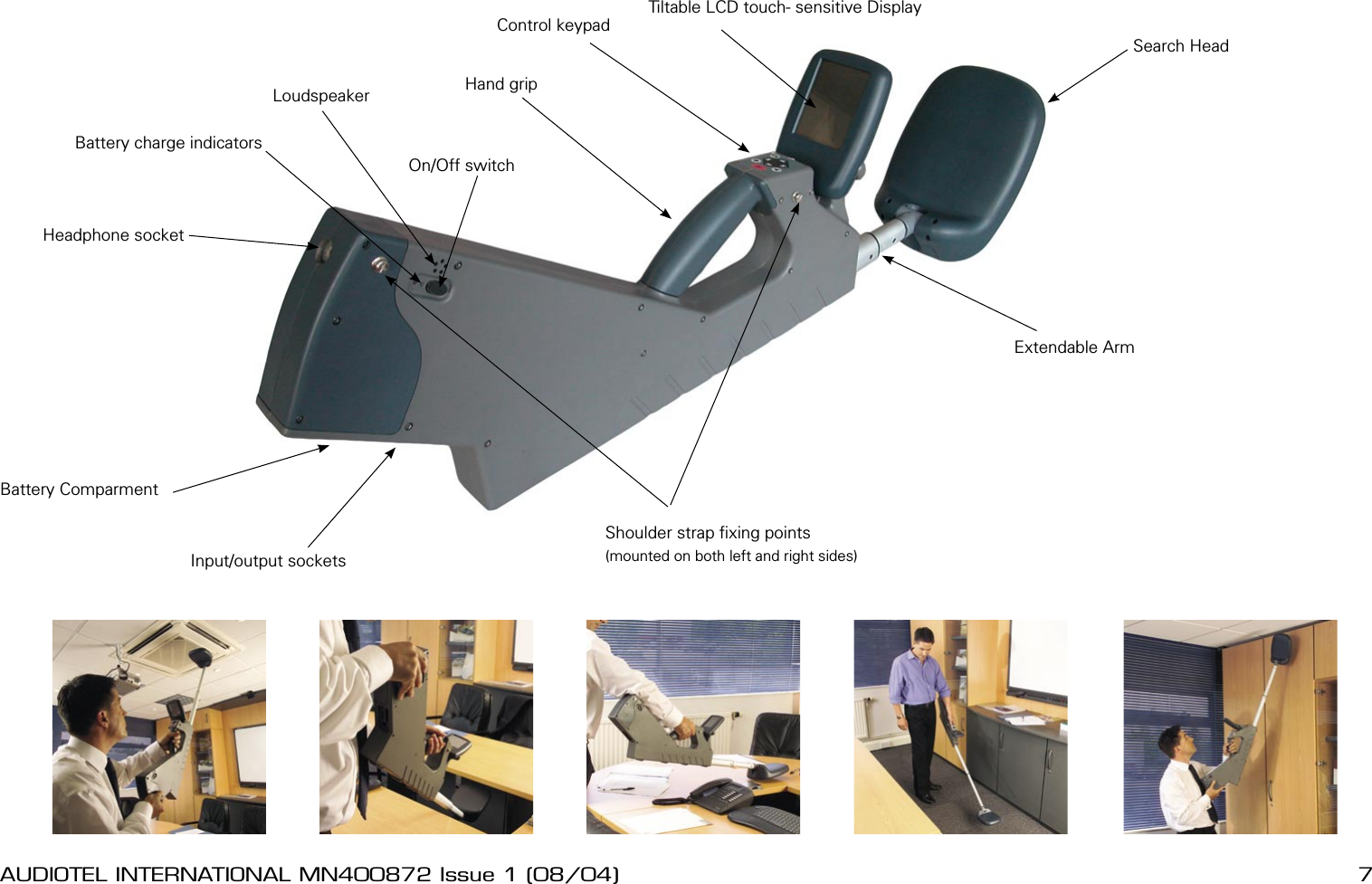
6 AUDIOTEL INTERNATIONAL MN400872 Issue 1 (08/04) DETECTIV User ManualAUDIOTEL INTERNATIONAL MN400872 Issue 1 (08/04)  7INTRODUCTIONDETECTIV is a sophisticated search tool integrating four detection sensors to provide a more complete and robust method of detecting electronic eavesdropping devices.Four tried and tested detection methods: Harmonic receiver, broadband detector, Non-linear junction detector and metal detector are integrated into one compact, easy to use unit.Combining four complementary sensor systems together means more effective and efcient search capability. With just one physical sweep of a target area four separate searches are  carried out. DETECTIV automatically switches between the four sensors using each detection method in turn, ve times a second, allowing a continuous display of all detector activity.Each sensor provides information which combines to provide a comprehensive picture of any concealed targets. DETECTIV presents the multisensor information in a simple, easily understood bar graph display. Additional expert screens give access to more detailed information for each of the sensors. Using multiple detector information in this way improves detection and gives more accurate identication between false alarms and real targets.The UnitThe DETECTIV unit, shown opposite, is a hand-held case with a paddle shaped search head on an extendable arm. Controls are grouped next to the handle for convenient thumb operation and information is presented on a tilt-able TFT LCD touch-sensitive screen.The input and output ports are grouped together under the tail of the unit along with the battery compartment. The On /Off switch, audio output and headphone socket are conveniently located at the top of the unit tail.HandlingThe extendable search head contains all the DETECTIV sensors and during a sweep search needs to be passed close to all parts of a target area. Rotatable on two axis the head can be twisted to provide the best attitude and position for searching most surfaces. The extendable arm provides convenient access for the difcult to reach parts of a typical target area, for example, ceilings and under desks. To minimise strain the unit has provision for a shoulder strap allowing DETECTIV to be handled like a guitar and is designed to be balanced with the search head arm extended approximately half way.  The tail of the unit is also designed to provide a convenient handle to control the unit when searching high surfaces.
6 AUDIOTEL INTERNATIONAL MN400872 Issue 1 (08/04) DETECTIV User ManualAUDIOTEL INTERNATIONAL MN400872 Issue 1 (08/04)  7Shoulder strap xing points(mounted on both left and right sides)Headphone socketBattery ComparmentInput/output socketsSearch HeadExtendable ArmTiltable LCD touch- sensitive DisplayControl keypadHand gripBattery charge indicatorsOn/Off switchLoudspeaker
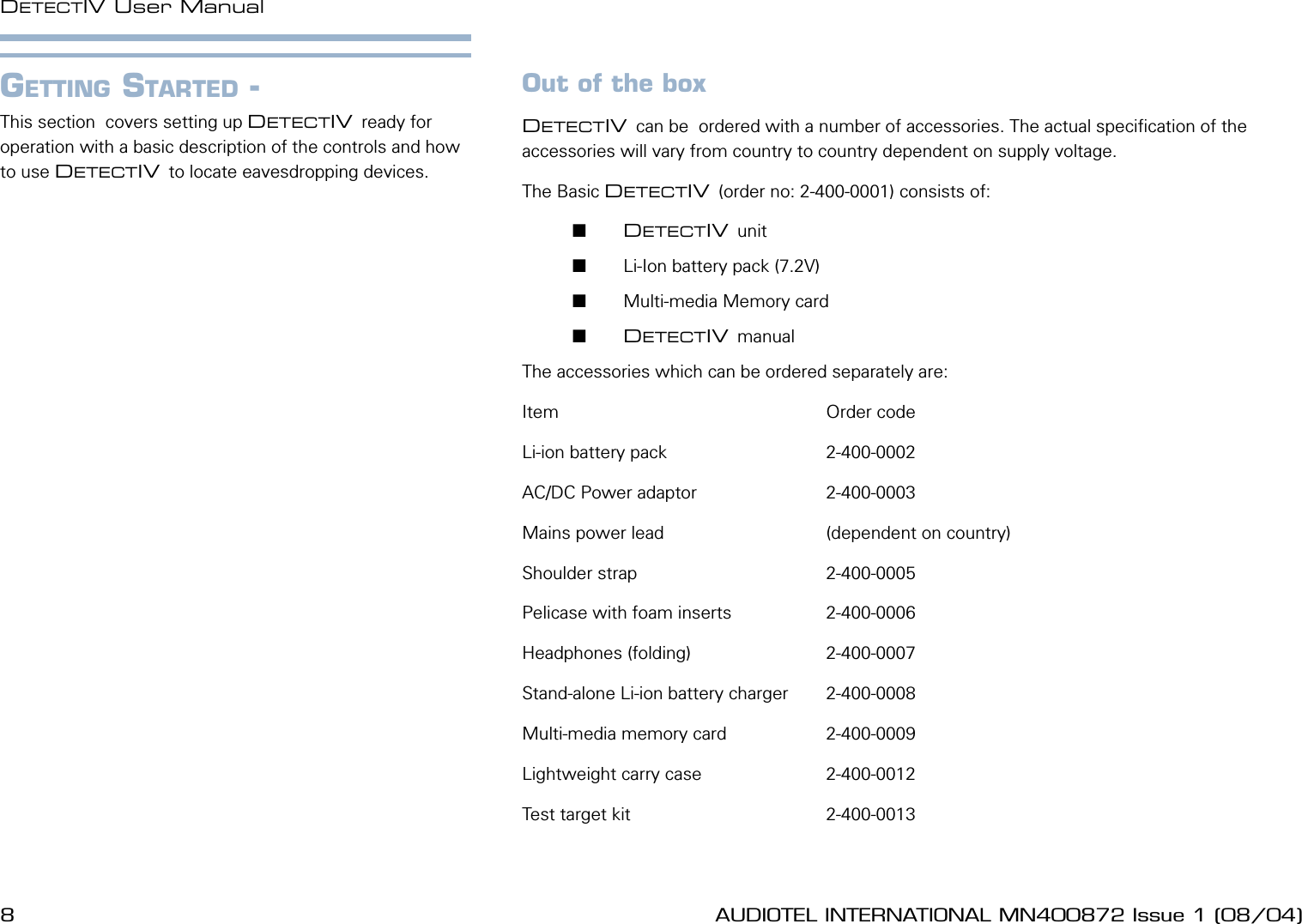
8 AUDIOTEL INTERNATIONAL MN400872 Issue 1 (08/04) DETECTIV User ManualAUDIOTEL INTERNATIONAL MN400872 Issue 1 (08/04)  9Out of the boxDETECTIV can be  ordered with a number of accessories. The actual specication of the accessories will vary from country to country dependent on supply voltage.The Basic DETECTIV (order no: 2-400-0001) consists of:       DETECTIV unit       Li-Ion battery pack (7.2V)       Multi-media Memory card       DETECTIV manualThe accessories which can be ordered separately are:Item                                                      Order codeLi-ion battery pack                                2-400-0002AC/DC Power adaptor                          2-400-0003Mains power lead                                (dependent on country)Shoulder strap                                      2-400-0005Pelicase with foam inserts                   2-400-0006Headphones (folding)                           2-400-0007Stand-alone Li-ion battery charger        2-400-0008Multi-media memory card                    2-400-0009Lightweight carry case                         2-400-0012Test target kit                                       2-400-0013GETTING STARTED - This section  covers setting up DETECTIV ready for operation with a basic description of the controls and how to use DETECTIV to locate eavesdropping devices.
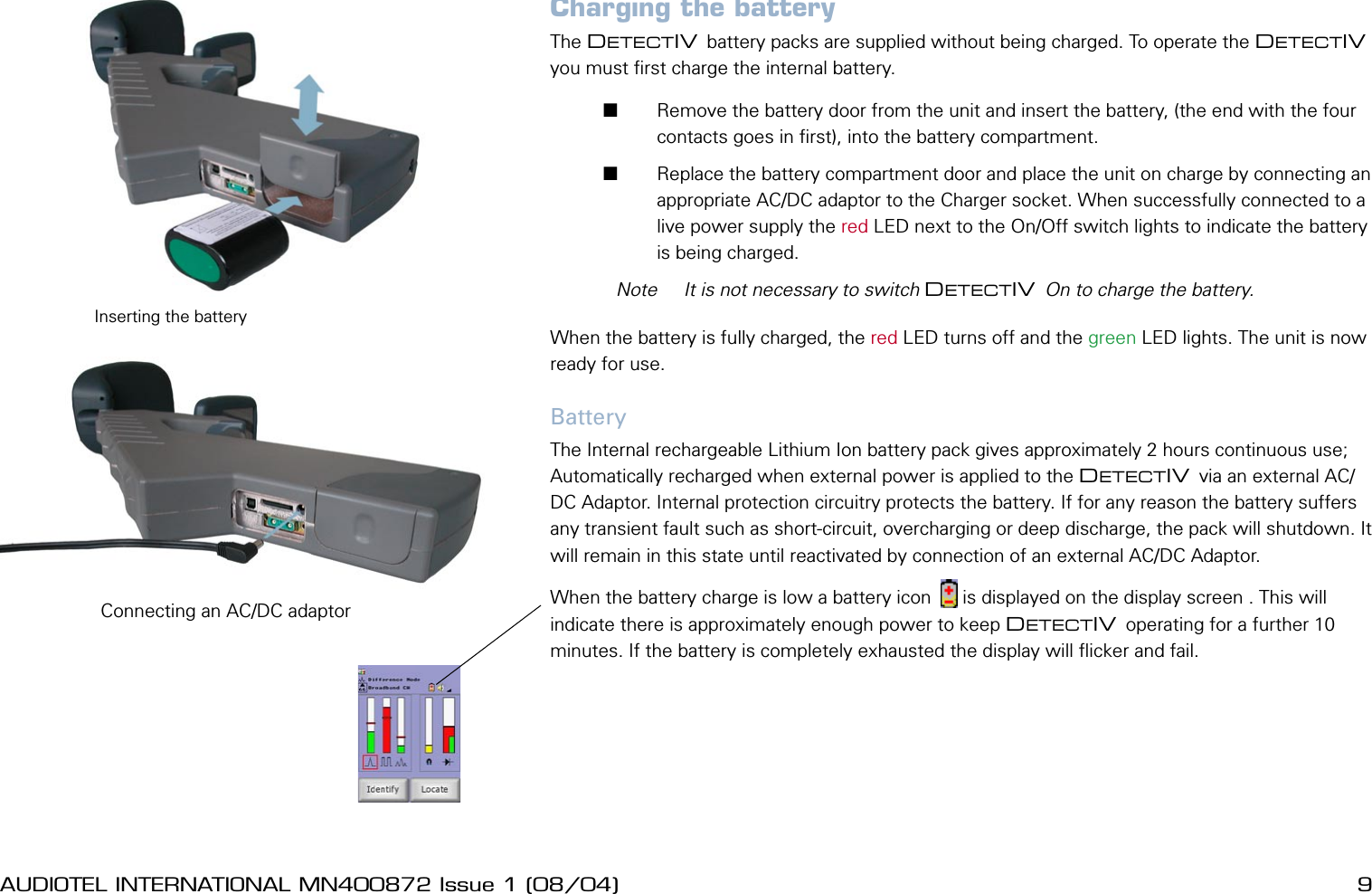
8 AUDIOTEL INTERNATIONAL MN400872 Issue 1 (08/04) DETECTIV User ManualAUDIOTEL INTERNATIONAL MN400872 Issue 1 (08/04)  9Charging the batteryThe DETECTIV battery packs are supplied without being charged. To operate the DETECTIV you must rst charge the internal battery.        Remove the battery door from the unit and insert the battery, (the end with the four contacts goes in rst), into the battery compartment.       Replace the battery compartment door and place the unit on charge by connecting an appropriate AC/DC adaptor to the Charger socket. When successfully connected to a live power supply the red LED next to the On/Off switch lights to indicate the battery is being charged.  Note  It is not necessary to switch DETECTIV On to charge the battery.When the battery is fully charged, the red LED turns off and the green LED lights. The unit is now ready for use.BatteryThe Internal rechargeable Lithium Ion battery pack gives approximately 2 hours continuous use; Automatically recharged when external power is applied to the DETECTIV via an external AC/DC Adaptor. Internal protection circuitry protects the battery. If for any reason the battery suffers any transient fault such as short-circuit, overcharging or deep discharge, the pack will shutdown. It will remain in this state until reactivated by connection of an external AC/DC Adaptor.When the battery charge is low a battery icon      is displayed on the display screen . This will indicate there is approximately enough power to keep DETECTIV operating for a further 10 minutes. If the battery is completely exhausted the display will icker and fail.Inserting the batteryConnecting an AC/DC adaptor
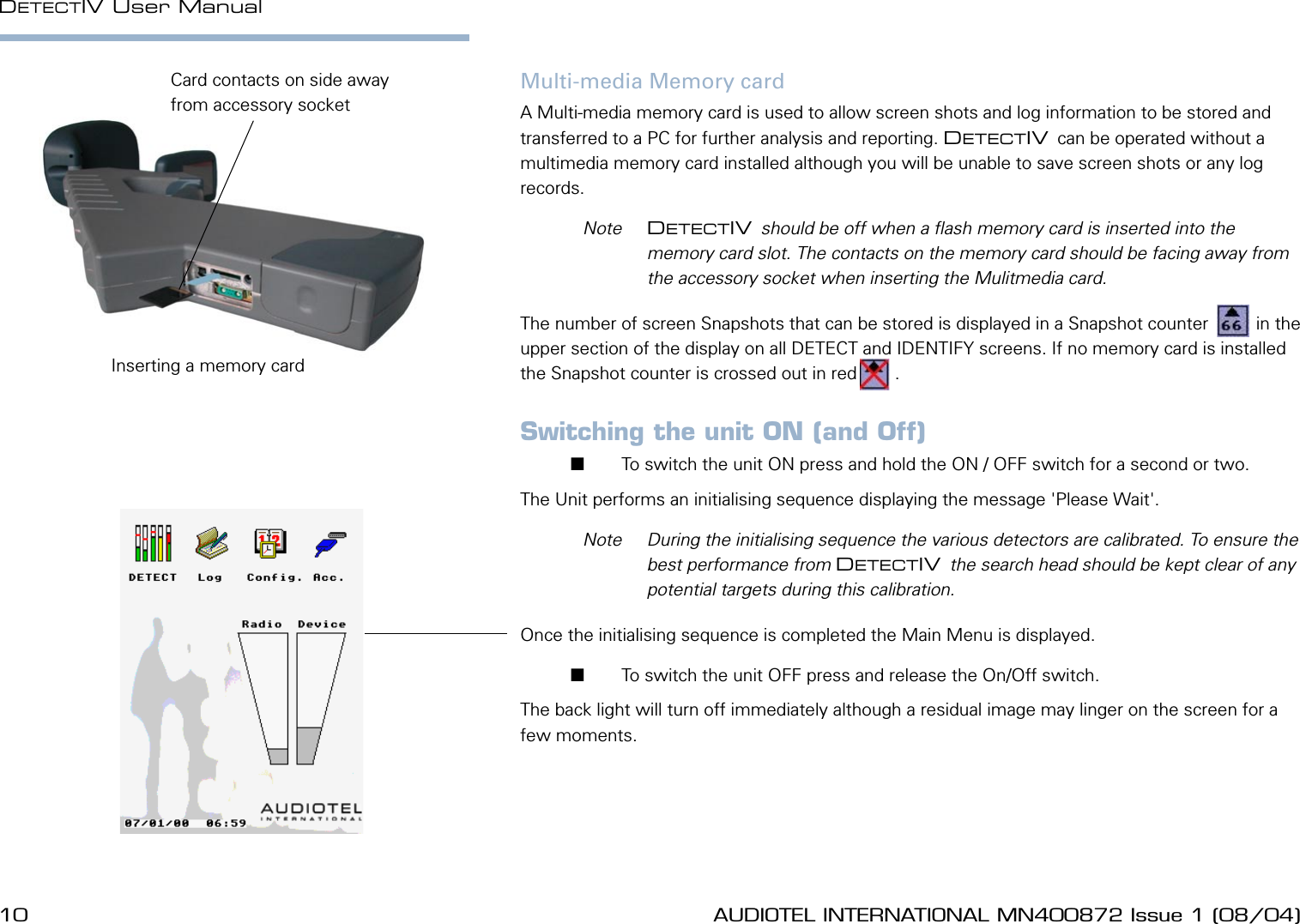
10 AUDIOTEL INTERNATIONAL MN400872 Issue 1 (08/04) DETECTIV User ManualAUDIOTEL INTERNATIONAL MN400872 Issue 1 (08/04)  11Multi-media Memory cardA Multi-media memory card is used to allow screen shots and log information to be stored and transferred to a PC for further analysis and reporting. DETECTIV can be operated without a multimedia memory card installed although you will be unable to save screen shots or any log records.   Note  DETECTIV should be off when a ash memory card is inserted into the memory card slot. The contacts on the memory card should be facing away from the accessory socket when inserting the Mulitmedia card.The number of screen Snapshots that can be stored is displayed in a Snapshot counter   sc   in the upper section of the display on all DETECT and IDENTIFY screens. If no memory card is installed the Snapshot counter is crossed out in red  sc  .Switching the unit ON (and Off)       To switch the unit ON press and hold the ON / OFF switch for a second or two. The Unit performs an initialising sequence displaying the message 'Please Wait'.   Note  During the initialising sequence the various detectors are calibrated. To ensure the best performance from DETECTIV the search head should be kept clear of any potential targets during this calibration.Once the initialising sequence is completed the Main Menu is displayed.       To switch the unit OFF press and release the On/Off switch. The back light will turn off immediately although a residual image may linger on the screen for a few moments.Inserting a memory cardCard contacts on side away from accessory socket
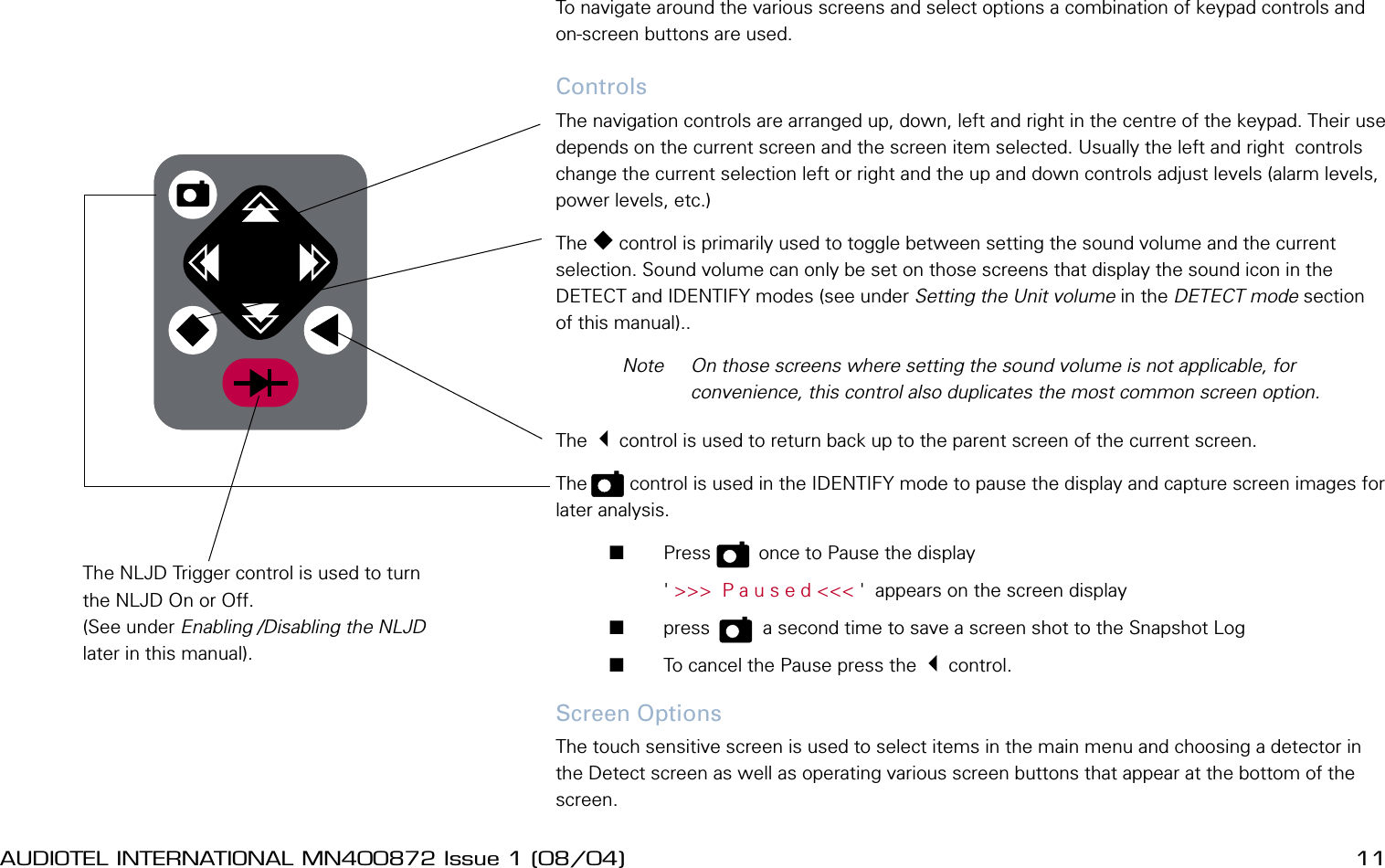
10 AUDIOTEL INTERNATIONAL MN400872 Issue 1 (08/04) DETECTIV User ManualAUDIOTEL INTERNATIONAL MN400872 Issue 1 (08/04)  11Using the controls and selecting optionsTo navigate around the various screens and select options a combination of keypad controls and on-screen buttons are used. ControlsThe navigation controls are arranged up, down, left and right in the centre of the keypad. Their use depends on the current screen and the screen item selected. Usually the left and right  controls change the current selection left or right and the up and down controls adjust levels (alarm levels, power levels, etc.) The  control is primarily used to toggle between setting the sound volume and the current selection. Sound volume can only be set on those screens that display the sound icon in the DETECT and IDENTIFY modes (see under Setting the Unit volume in the DETECT mode section of this manual)..  Note  On those screens where setting the sound volume is not applicable, for convenience, this control also duplicates the most common screen option.The 3control is used to return back up to the parent screen of the current screen.The   p   control is used in the IDENTIFY mode to pause the display and capture screen images for later analysis.       Press   p    once to Pause the display         ' >>>  P a u s e d <<< '  appears on the screen display       press    p    a second time to save a screen shot to the Snapshot Log       To cancel the Pause press the 3control.Screen OptionsThe touch sensitive screen is used to select items in the main menu and choosing a detector in the Detect screen as well as operating various screen buttons that appear at the bottom of the screen. The NLJD Trigger control is used to turn the NLJD On or Off. (See under Enabling /Disabling the NLJD later in this manual).
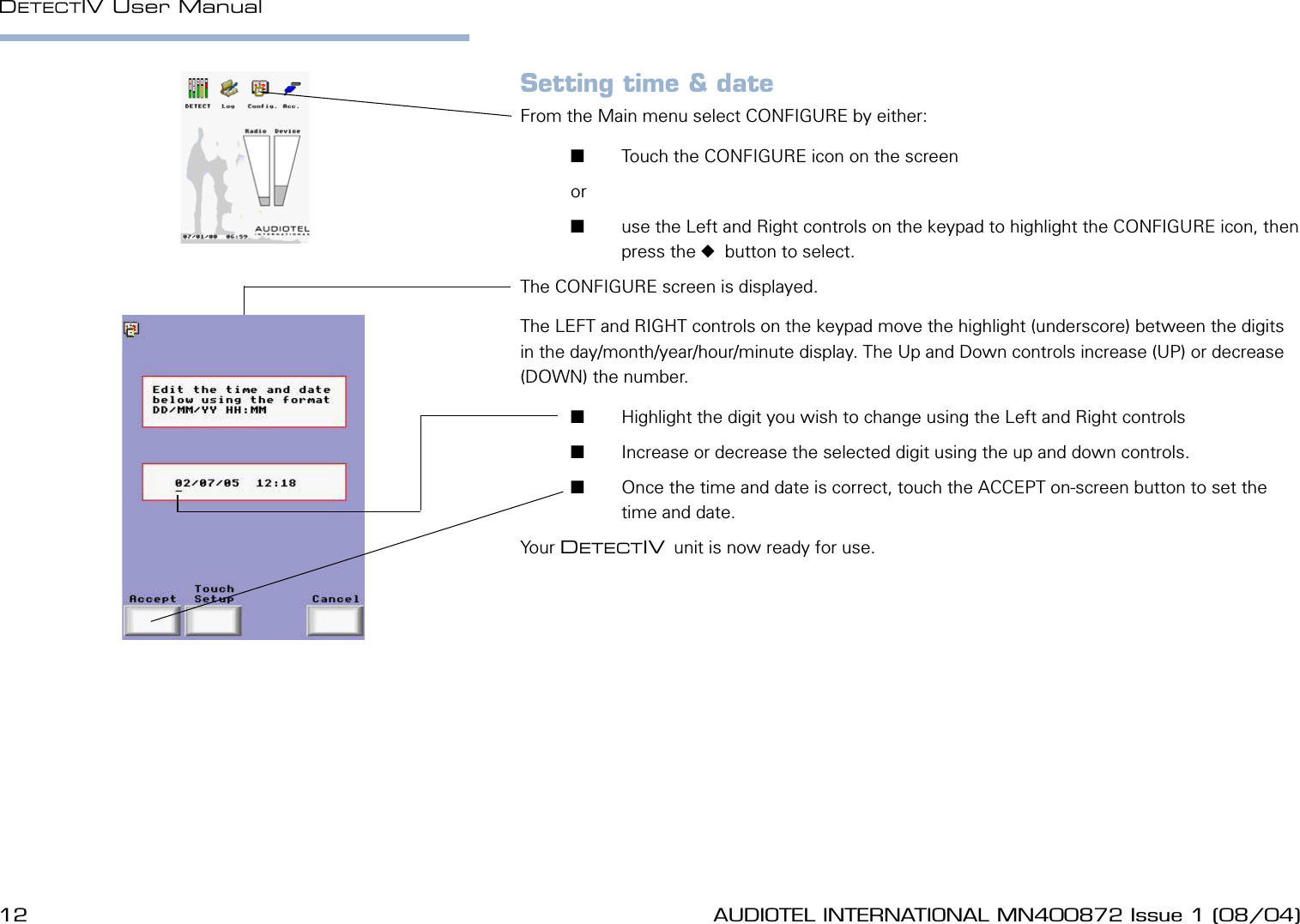
12 AUDIOTEL INTERNATIONAL MN400872 Issue 1 (08/04) DETECTIV User ManualAUDIOTEL INTERNATIONAL MN400872 Issue 1 (08/04)  13Setting time & dateFrom the Main menu select CONFIGURE by either:       Touch the CONFIGURE icon on the screen or        use the Left and Right controls on the keypad to highlight the CONFIGURE icon, then press the   button to select.The CONFIGURE screen is displayed.The LEFT and RIGHT controls on the keypad move the highlight (underscore) between the digits in the day/month/year/hour/minute display. The Up and Down controls increase (UP) or decrease (DOWN) the number.       Highlight the digit you wish to change using the Left and Right controls       Increase or decrease the selected digit using the up and down controls.       Once the time and date is correct, touch the ACCEPT on-screen button to set the time and date.Your DETECTIV unit is now ready for use.
12 AUDIOTEL INTERNATIONAL MN400872 Issue 1 (08/04) DETECTIV User ManualAUDIOTEL INTERNATIONAL MN400872 Issue 1 (08/04)  13BASIC OPERATING METHODOLOGY The basic operating method for using the DETECTIV follows three sequential steps.DETECTWith the DETECTIV displaying either the Main menu or the Detect display (Select DETECT from the main menu) move the DETECTIV  unit around the area to be secured.  Note  DETECTIV is intended to nd suspicious devices within a target area. To avoid excessive interference the sensors are optimised to limit the range at which devices are detected. To search effectively the search head needs to pass closely to all possible hiding places.The DETECT mode utilises all the DETECTIV  detectors simultaneously and should ensure that, as the unit search head is swept over areas of likely concealment, the opportunities for detecting a target are maximised.When a large response is noted from one or more of the detectors it can be investigated further using the Identify features for the appropriate detector.IDENTIFYThe IDENTIFY stage involves using the various tools built into each one of the DETECTIV  detectors to try and identify whether or not the detected response is a possible threat.If it seems likely that the detected response is a threat then the unit can move into the LOCATE mode.LOCATEThe LOCATE stage involves moving the DETECTIV  around the suspect area using both the display and the audio output to locate the source of the detected response.
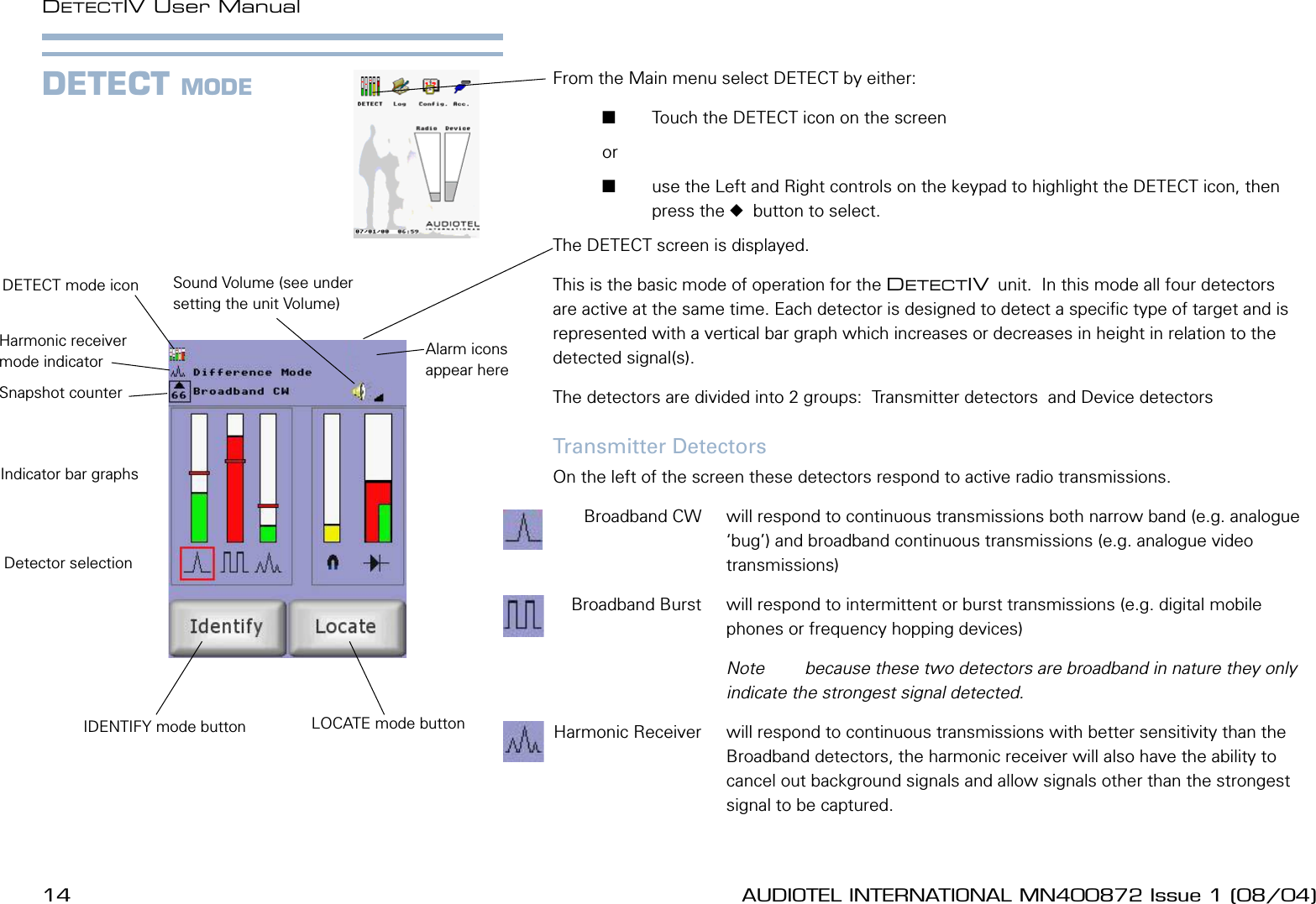
14 AUDIOTEL INTERNATIONAL MN400872 Issue 1 (08/04) DETECTIV User ManualAUDIOTEL INTERNATIONAL MN400872 Issue 1 (08/04)  15From the Main menu select DETECT by either:       Touch the DETECT icon on the screen or        use the Left and Right controls on the keypad to highlight the DETECT icon, then press the   button to select.The DETECT screen is displayed.This is the basic mode of operation for the DETECTIV unit.  In this mode all four detectors are active at the same time. Each detector is designed to detect a specic type of target and is represented with a vertical bar graph which increases or decreases in height in relation to the  detected signal(s).The detectors are divided into 2 groups:  Transmitter detectors  and Device detectors Transmitter DetectorsOn the left of the screen these detectors respond to active radio transmissions.   Broadband CW  will respond to continuous transmissions both narrow band (e.g. analogue ‘bug’) and broadband continuous transmissions (e.g. analogue video transmissions)  Broadband Burst  will respond to intermittent or burst transmissions (e.g. digital mobile phones or frequency hopping devices)    Note  because these two detectors are broadband in nature they only indicate the strongest signal detected. Harmonic Receiver  will respond to continuous transmissions with better sensitivity than the Broadband detectors, the harmonic receiver will also have the ability to cancel out background signals and allow signals other than the strongest signal to be captured.DETECT MODEDETECT mode iconDetector selectionIndicator bar graphsSound Volume (see under setting the unit Volume)Snapshot counterHarmonic receiver mode indicator Alarm icons appear hereIDENTIFY mode button LOCATE mode button
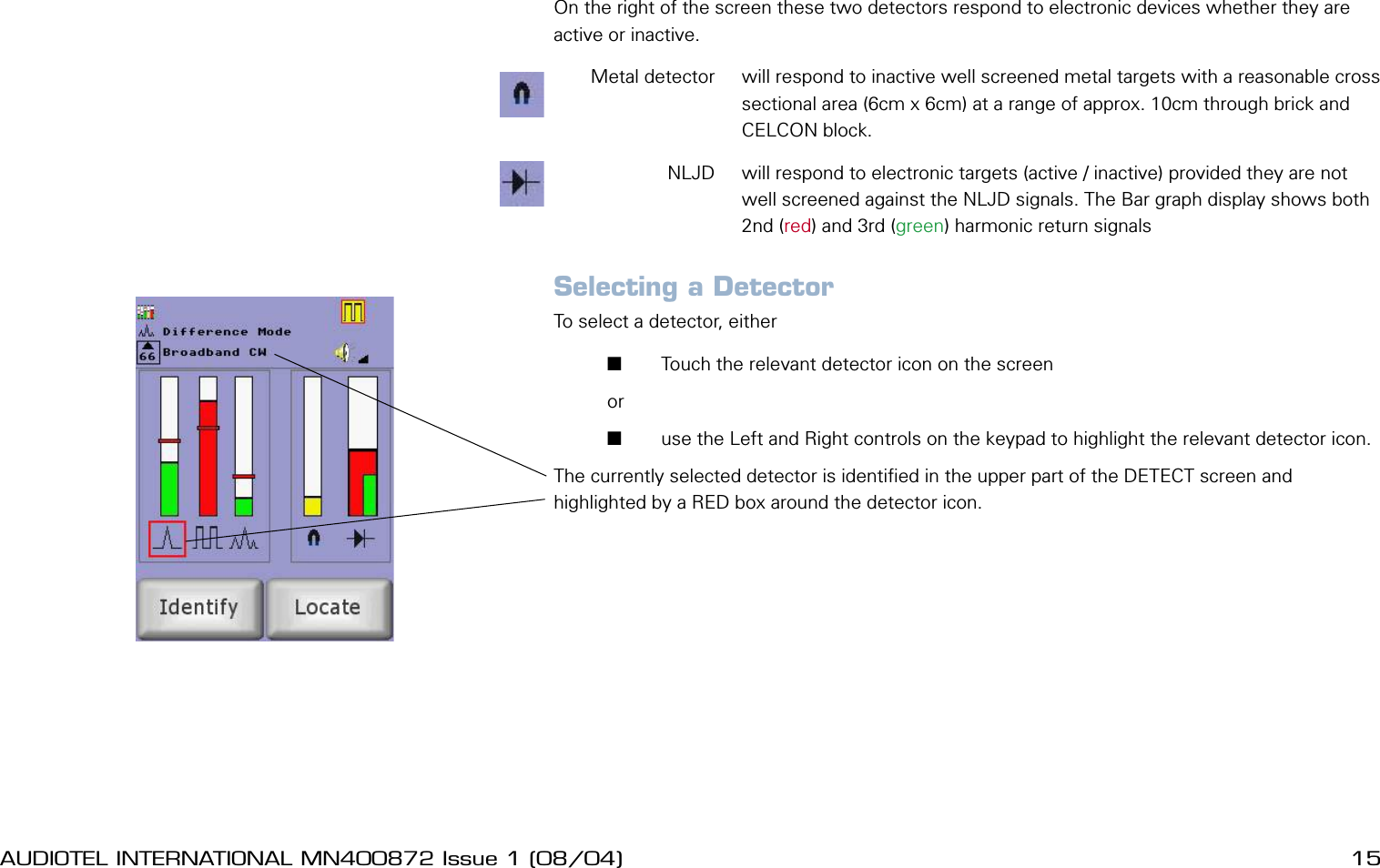
14 AUDIOTEL INTERNATIONAL MN400872 Issue 1 (08/04) DETECTIV User ManualAUDIOTEL INTERNATIONAL MN400872 Issue 1 (08/04)  15Device DetectorsOn the right of the screen these two detectors respond to electronic devices whether they are active or inactive.  Metal detector   will respond to inactive well screened metal targets with a reasonable cross sectional area (6cm x 6cm) at a range of approx. 10cm through brick and CELCON block.  NLJD  will respond to electronic targets (active / inactive) provided they are not well screened against the NLJD signals. The Bar graph display shows both 2nd (red) and 3rd (green) harmonic return signalsSelecting a DetectorTo select a detector, either       Touch the relevant detector icon on the screen or        use the Left and Right controls on the keypad to highlight the relevant detector icon.The currently selected detector is identied in the upper part of the DETECT screen and highlighted by a RED box around the detector icon.
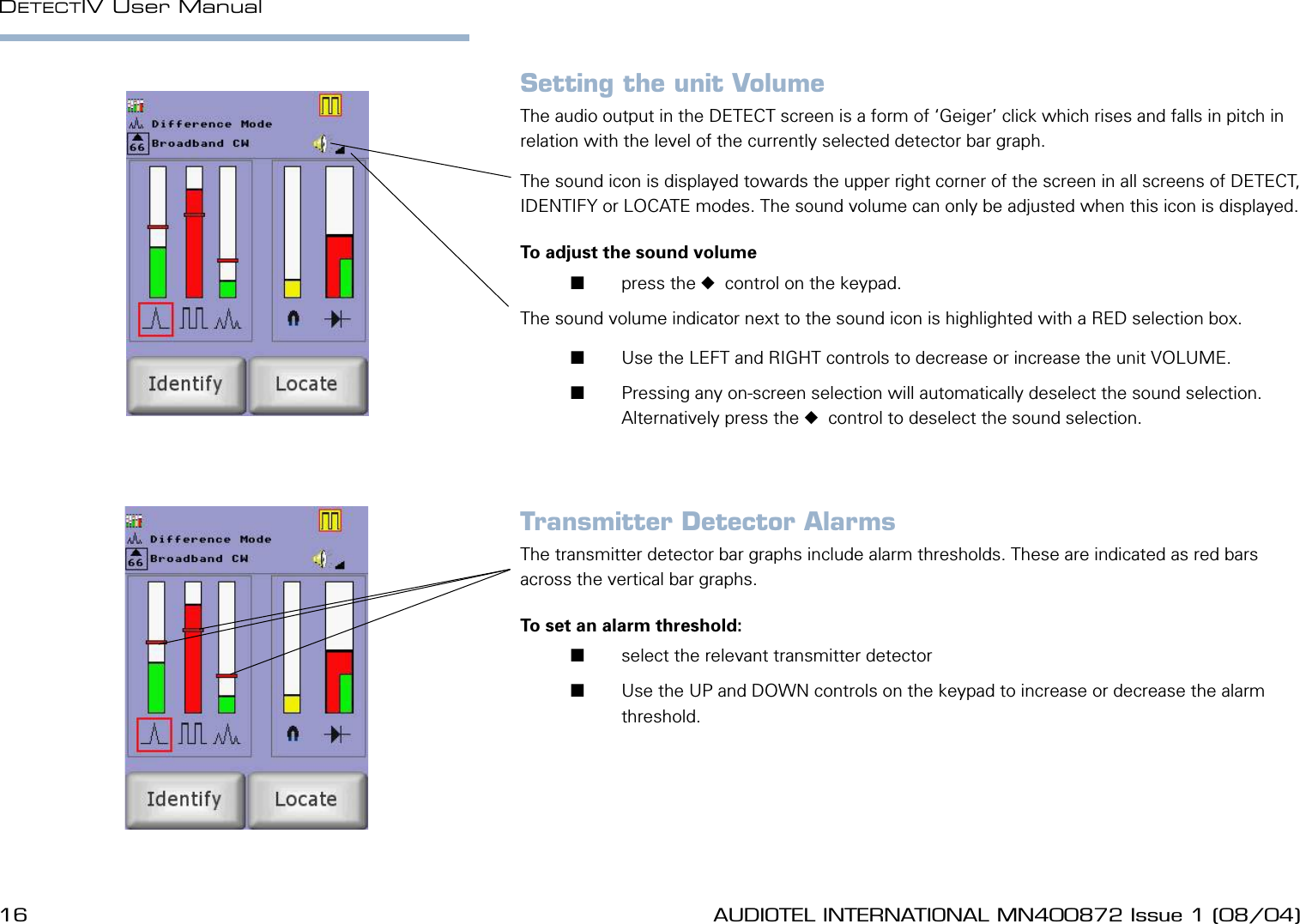
16 AUDIOTEL INTERNATIONAL MN400872 Issue 1 (08/04) DETECTIV User ManualAUDIOTEL INTERNATIONAL MN400872 Issue 1 (08/04)  17Setting the unit VolumeThe audio output in the DETECT screen is a form of ‘Geiger’ click which rises and falls in pitch in relation with the level of the currently selected detector bar graph.The sound icon is displayed towards the upper right corner of the screen in all screens of DETECT, IDENTIFY or LOCATE modes. The sound volume can only be adjusted when this icon is displayed.To adjust the sound volume       press the   control on the keypad.The sound volume indicator next to the sound icon is highlighted with a RED selection box.       Use the LEFT and RIGHT controls to decrease or increase the unit VOLUME.       Pressing any on-screen selection will automatically deselect the sound selection. Alternatively press the   control to deselect the sound selection.Transmitter Detector AlarmsThe transmitter detector bar graphs include alarm thresholds. These are indicated as red bars across the vertical bar graphs.To set an alarm threshold:       select the relevant transmitter detector        Use the UP and DOWN controls on the keypad to increase or decrease the alarm threshold.
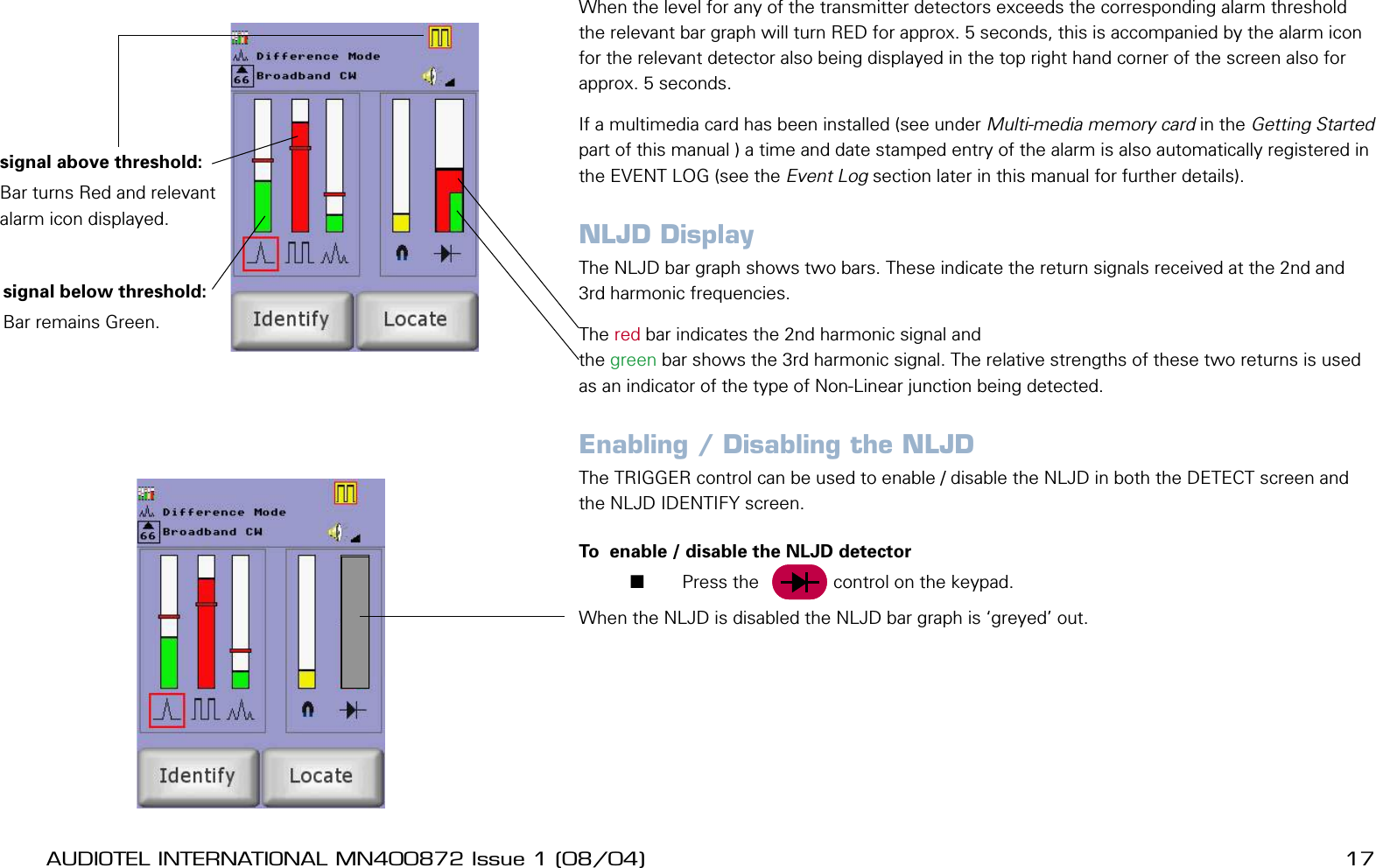
16 AUDIOTEL INTERNATIONAL MN400872 Issue 1 (08/04) DETECTIV User ManualAUDIOTEL INTERNATIONAL MN400872 Issue 1 (08/04)  17When the level for any of the transmitter detectors exceeds the corresponding alarm threshold the relevant bar graph will turn RED for approx. 5 seconds, this is accompanied by the alarm icon for the relevant detector also being displayed in the top right hand corner of the screen also for approx. 5 seconds.If a multimedia card has been installed (see under Multi-media memory card in the Getting Started part of this manual ) a time and date stamped entry of the alarm is also automatically registered in the EVENT LOG (see the Event Log section later in this manual for further details).NLJD DisplayThe NLJD bar graph shows two bars. These indicate the return signals received at the 2nd and 3rd harmonic frequencies. The red bar indicates the 2nd harmonic signal and the green bar shows the 3rd harmonic signal. The relative strengths of these two returns is used as an indicator of the type of Non-Linear junction being detected.Enabling / Disabling the NLJDThe TRIGGER control can be used to enable / disable the NLJD in both the DETECT screen and the NLJD IDENTIFY screen.To  enable / disable the NLJD detector       Press the     Trig    control on the keypad.When the NLJD is disabled the NLJD bar graph is ‘greyed’ out. signal below threshold:Bar remains Green.signal above threshold:Bar turns Red and relevant alarm icon displayed.
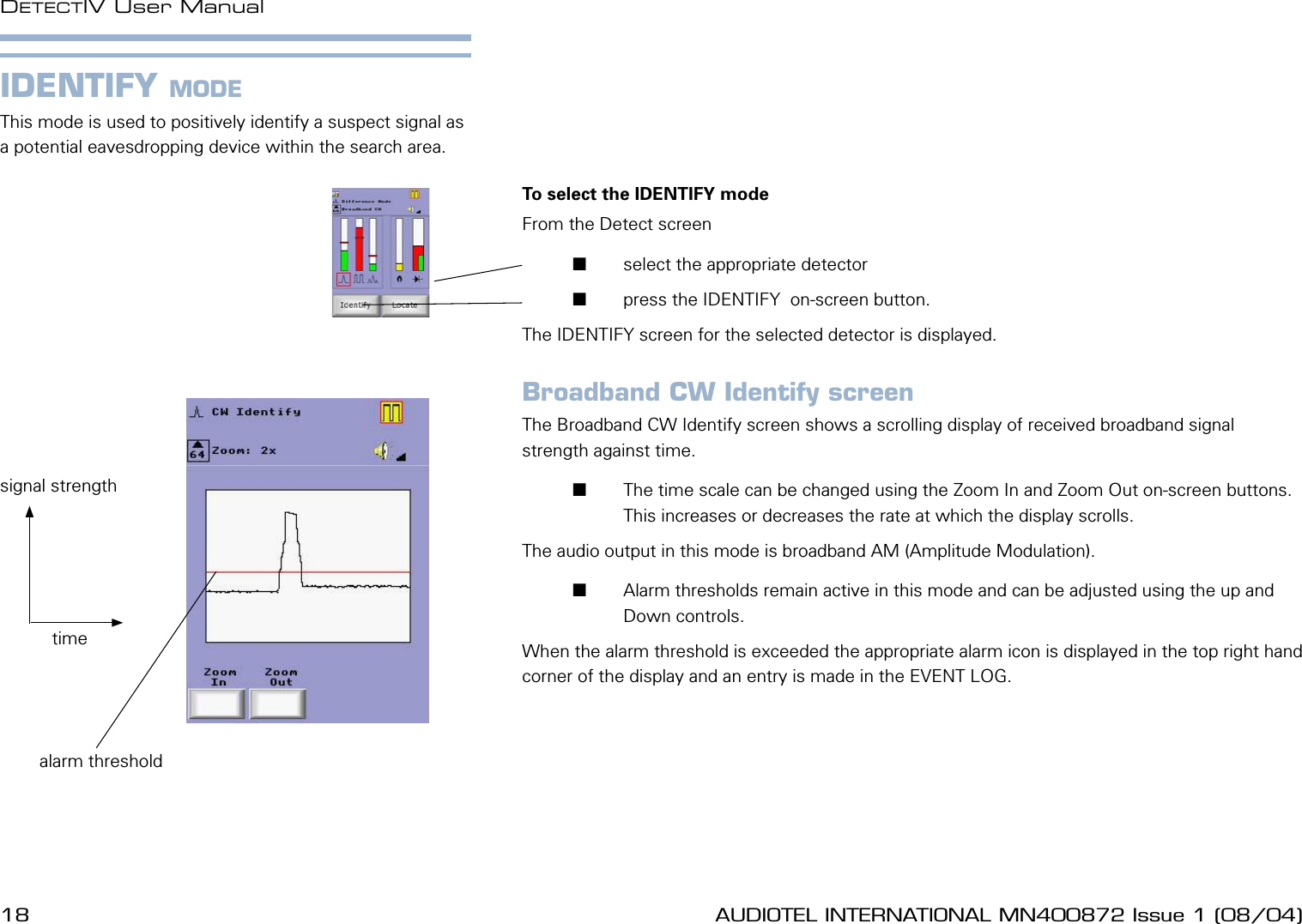
18 AUDIOTEL INTERNATIONAL MN400872 Issue 1 (08/04) DETECTIV User ManualAUDIOTEL INTERNATIONAL MN400872 Issue 1 (08/04)  19IDENTIFY MODEThis mode is used to positively identify a suspect signal as a potential eavesdropping device within the search area.To select the IDENTIFY mode From the Detect screen       select the appropriate detector       press the IDENTIFY  on-screen button.The IDENTIFY screen for the selected detector is displayed.Broadband CW Identify screenThe Broadband CW Identify screen shows a scrolling display of received broadband signal strength against time.       The time scale can be changed using the Zoom In and Zoom Out on-screen buttons. This increases or decreases the rate at which the display scrolls.The audio output in this mode is broadband AM (Amplitude Modulation).       Alarm thresholds remain active in this mode and can be adjusted using the up and Down controls. When the alarm threshold is exceeded the appropriate alarm icon is displayed in the top right hand corner of the display and an entry is made in the EVENT LOG.timesignal strengthalarm threshold
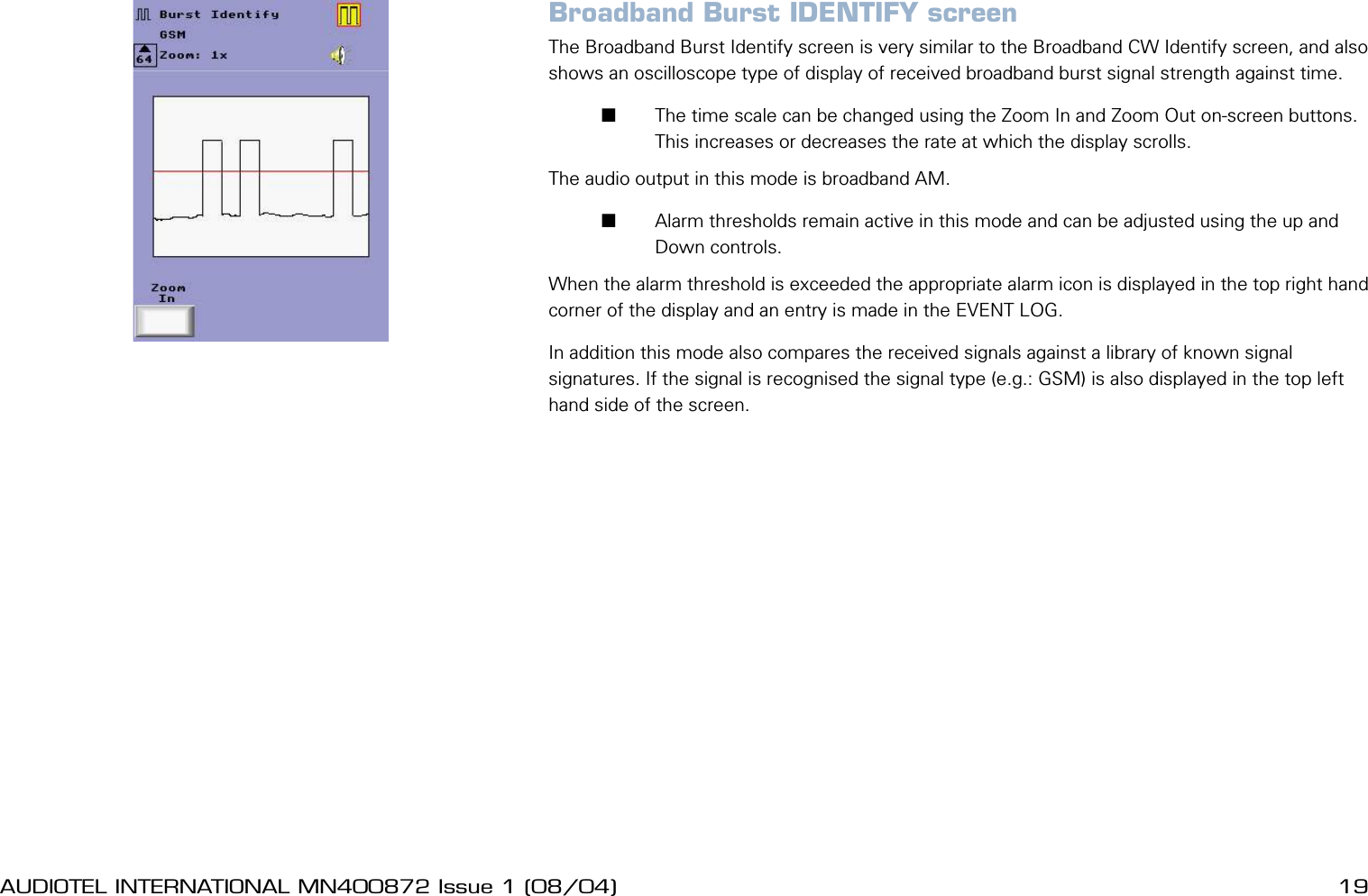
18 AUDIOTEL INTERNATIONAL MN400872 Issue 1 (08/04) DETECTIV User ManualAUDIOTEL INTERNATIONAL MN400872 Issue 1 (08/04)  19Broadband Burst IDENTIFY screenThe Broadband Burst Identify screen is very similar to the Broadband CW Identify screen, and also shows an oscilloscope type of display of received broadband burst signal strength against time.       The time scale can be changed using the Zoom In and Zoom Out on-screen buttons. This increases or decreases the rate at which the display scrolls.The audio output in this mode is broadband AM.       Alarm thresholds remain active in this mode and can be adjusted using the up and Down controls. When the alarm threshold is exceeded the appropriate alarm icon is displayed in the top right hand corner of the display and an entry is made in the EVENT LOG. In addition this mode also compares the received signals against a library of known signal signatures. If the signal is recognised the signal type (e.g.: GSM) is also displayed in the top left hand side of the screen.
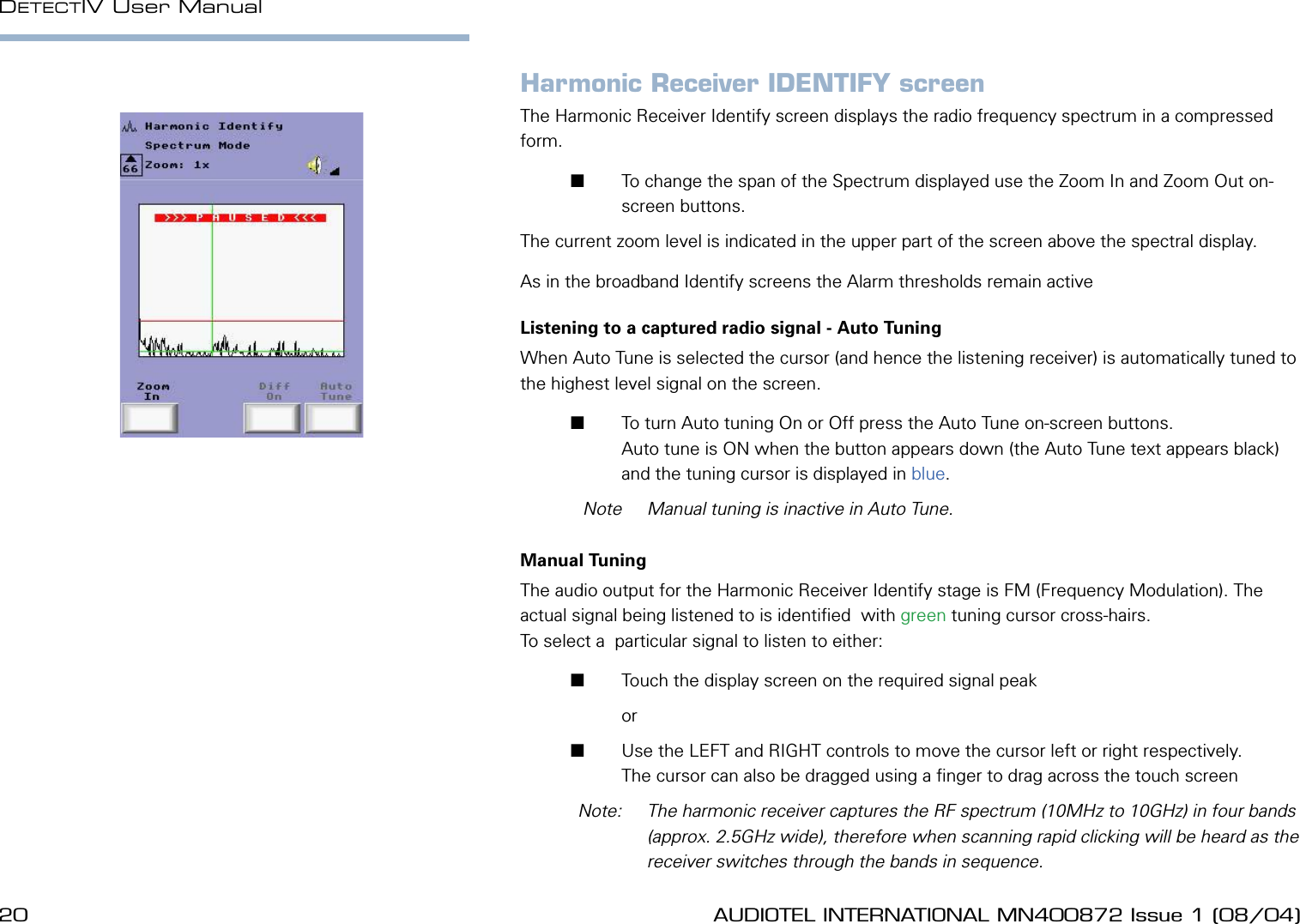
20 AUDIOTEL INTERNATIONAL MN400872 Issue 1 (08/04) DETECTIV User ManualAUDIOTEL INTERNATIONAL MN400872 Issue 1 (08/04)  21Harmonic Receiver IDENTIFY screenThe Harmonic Receiver Identify screen displays the radio frequency spectrum in a compressed form.       To change the span of the Spectrum displayed use the Zoom In and Zoom Out on-screen buttons. The current zoom level is indicated in the upper part of the screen above the spectral display.As in the broadband Identify screens the Alarm thresholds remain activeListening to a captured radio signal - Auto TuningWhen Auto Tune is selected the cursor (and hence the listening receiver) is automatically tuned to the highest level signal on the screen.       To turn Auto tuning On or Off press the Auto Tune on-screen buttons. Auto tune is ON when the button appears down (the Auto Tune text appears black) and the tuning cursor is displayed in blue.  Note  Manual tuning is inactive in Auto Tune.Manual TuningThe audio output for the Harmonic Receiver Identify stage is FM (Frequency Modulation). The actual signal being listened to is identied  with green tuning cursor cross-hairs. To select a  particular signal to listen to either:       Touch the display screen on the required signal peak         or        Use the LEFT and RIGHT controls to move the cursor left or right respectively.The cursor can also be dragged using a nger to drag across the touch screen  Note:   The harmonic receiver captures the RF spectrum (10MHz to 10GHz) in four bands (approx. 2.5GHz wide), therefore when scanning rapid clicking will be heard as the receiver switches through the bands in sequence.
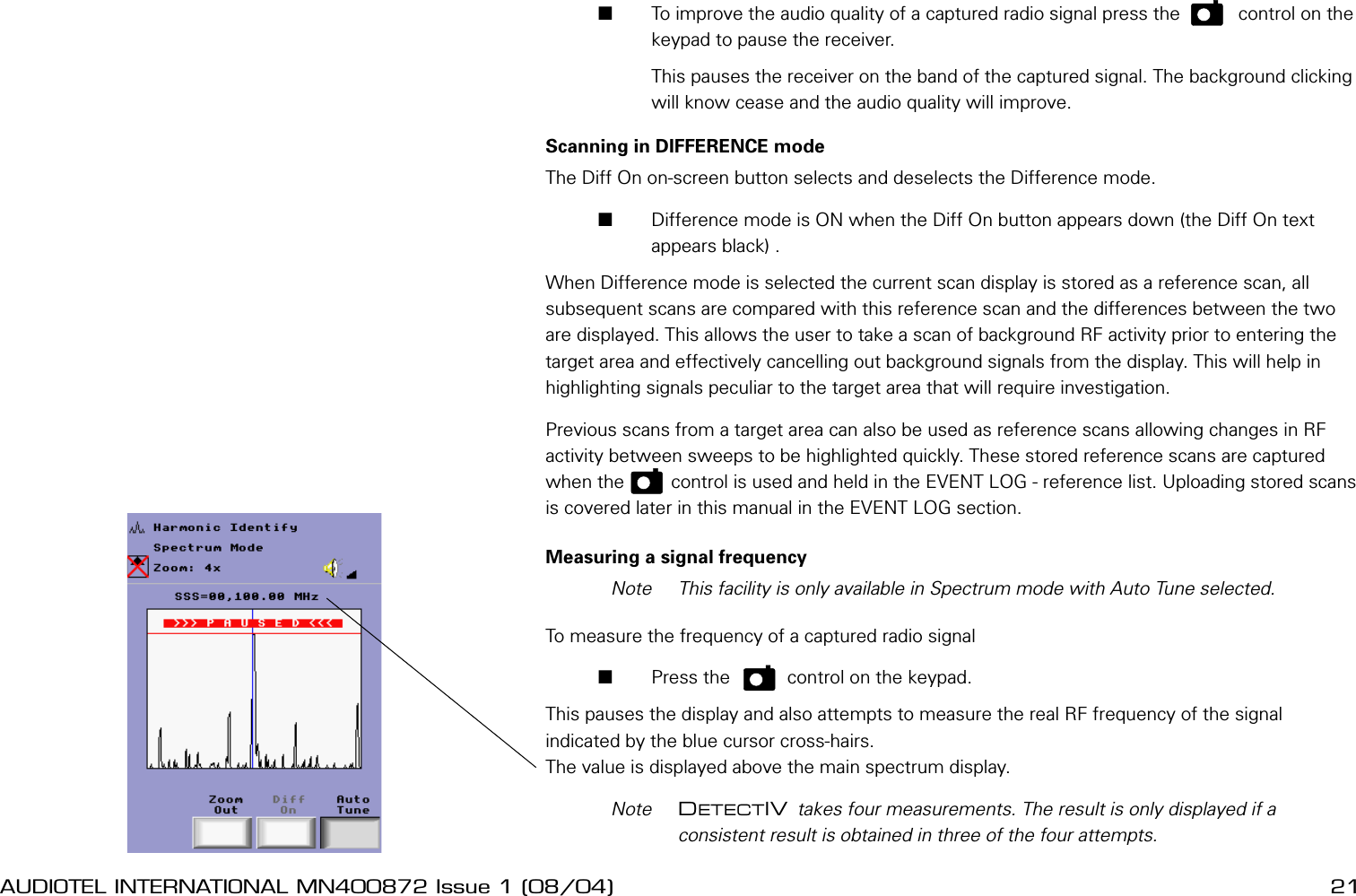
20 AUDIOTEL INTERNATIONAL MN400872 Issue 1 (08/04) DETECTIV User ManualAUDIOTEL INTERNATIONAL MN400872 Issue 1 (08/04)  21       To improve the audio quality of a captured radio signal press the    P     control on the keypad to pause the receiver.         This pauses the receiver on the band of the captured signal. The background clicking will know cease and the audio quality will improve.Scanning in DIFFERENCE modeThe Diff On on-screen button selects and deselects the Difference mode.       Difference mode is ON when the Diff On button appears down (the Diff On text appears black) .When Difference mode is selected the current scan display is stored as a reference scan, all subsequent scans are compared with this reference scan and the differences between the two are displayed. This allows the user to take a scan of background RF activity prior to entering the target area and effectively cancelling out background signals from the display. This will help in highlighting signals peculiar to the target area that will require investigation.Previous scans from a target area can also be used as reference scans allowing changes in RF activity between sweeps to be highlighted quickly. These stored reference scans are captured when the   p    control is used and held in the EVENT LOG - reference list. Uploading stored scans is covered later in this manual in the EVENT LOG section.Measuring a signal frequency  Note  This facility is only available in Spectrum mode with Auto Tune selected.To measure the frequency of a captured radio signal       Press the     p    control on the keypad.This pauses the display and also attempts to measure the real RF frequency of the signal indicated by the blue cursor cross-hairs. The value is displayed above the main spectrum display.  Note  DETECTIV takes four measurements. The result is only displayed if a consistent result is obtained in three of the four attempts.
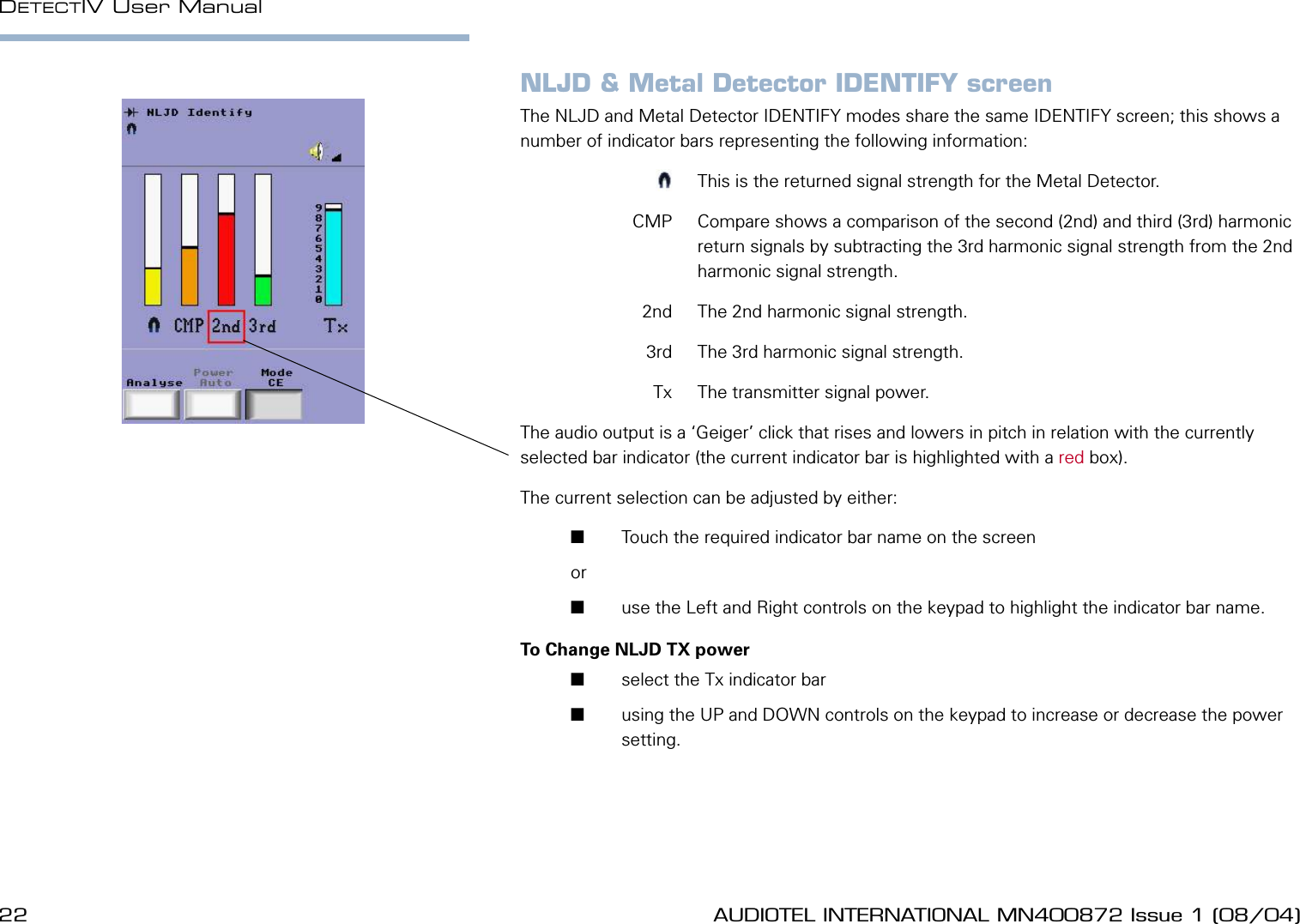
22 AUDIOTEL INTERNATIONAL MN400872 Issue 1 (08/04) DETECTIV User ManualAUDIOTEL INTERNATIONAL MN400872 Issue 1 (08/04)  23NLJD & Metal Detector IDENTIFY screenThe NLJD and Metal Detector IDENTIFY modes share the same IDENTIFY screen; this shows a number of indicator bars representing the following information:  m  This is the returned signal strength for the Metal Detector.  CMP  Compare shows a comparison of the second (2nd) and third (3rd) harmonic return signals by subtracting the 3rd harmonic signal strength from the 2nd harmonic signal strength.  2nd  The 2nd harmonic signal strength.  3rd  The 3rd harmonic signal strength.  Tx  The transmitter signal power.The audio output is a ‘Geiger’ click that rises and lowers in pitch in relation with the currently selected bar indicator (the current indicator bar is highlighted with a red box).The current selection can be adjusted by either:       Touch the required indicator bar name on the screen or        use the Left and Right controls on the keypad to highlight the indicator bar name.To Change NLJD TX power       select the Tx indicator bar       using the UP and DOWN controls on the keypad to increase or decrease the power setting.
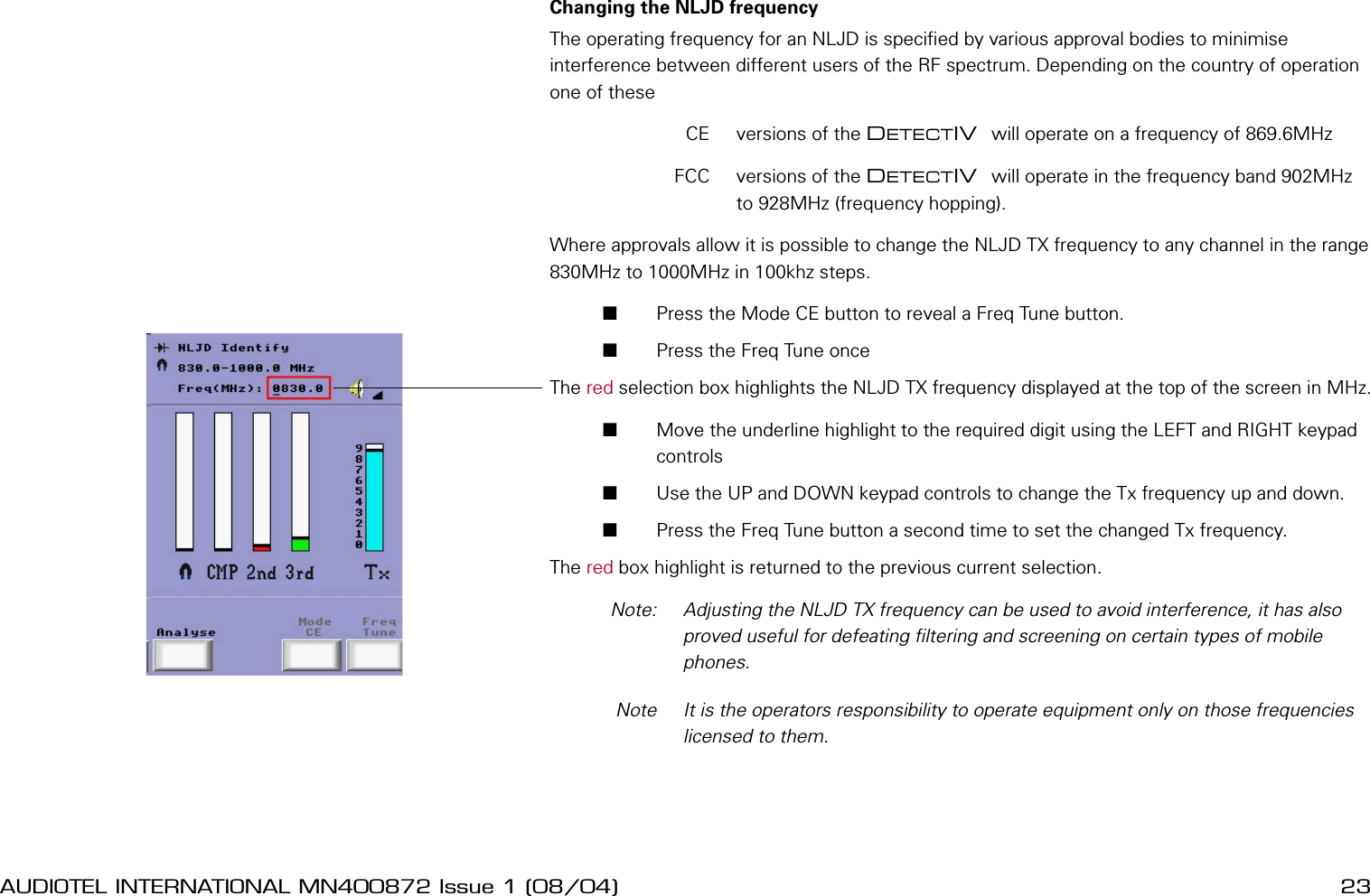
22 AUDIOTEL INTERNATIONAL MN400872 Issue 1 (08/04) DETECTIV User ManualAUDIOTEL INTERNATIONAL MN400872 Issue 1 (08/04)  23Changing the NLJD frequencyThe operating frequency for an NLJD is specied by various approval bodies to minimise interference between different users of the RF spectrum. Depending on the country of operation one of these  CE  versions of the DETECTIV  will operate on a frequency of 869.6MHz  FCC  versions of the DETECTIV  will operate in the frequency band 902MHz to 928MHz (frequency hopping).Where approvals allow it is possible to change the NLJD TX frequency to any channel in the range 830MHz to 1000MHz in 100khz steps.       Press the Mode CE button to reveal a Freq Tune button.       Press the Freq Tune once The red selection box highlights the NLJD TX frequency displayed at the top of the screen in MHz.       Move the underline highlight to the required digit using the LEFT and RIGHT keypad controls       Use the UP and DOWN keypad controls to change the Tx frequency up and down.       Press the Freq Tune button a second time to set the changed Tx frequency.The red box highlight is returned to the previous current selection.  Note:   Adjusting the NLJD TX frequency can be used to avoid interference, it has also proved useful for defeating ltering and screening on certain types of mobile phones.  Note  It is the operators responsibility to operate equipment only on those frequencies licensed to them.
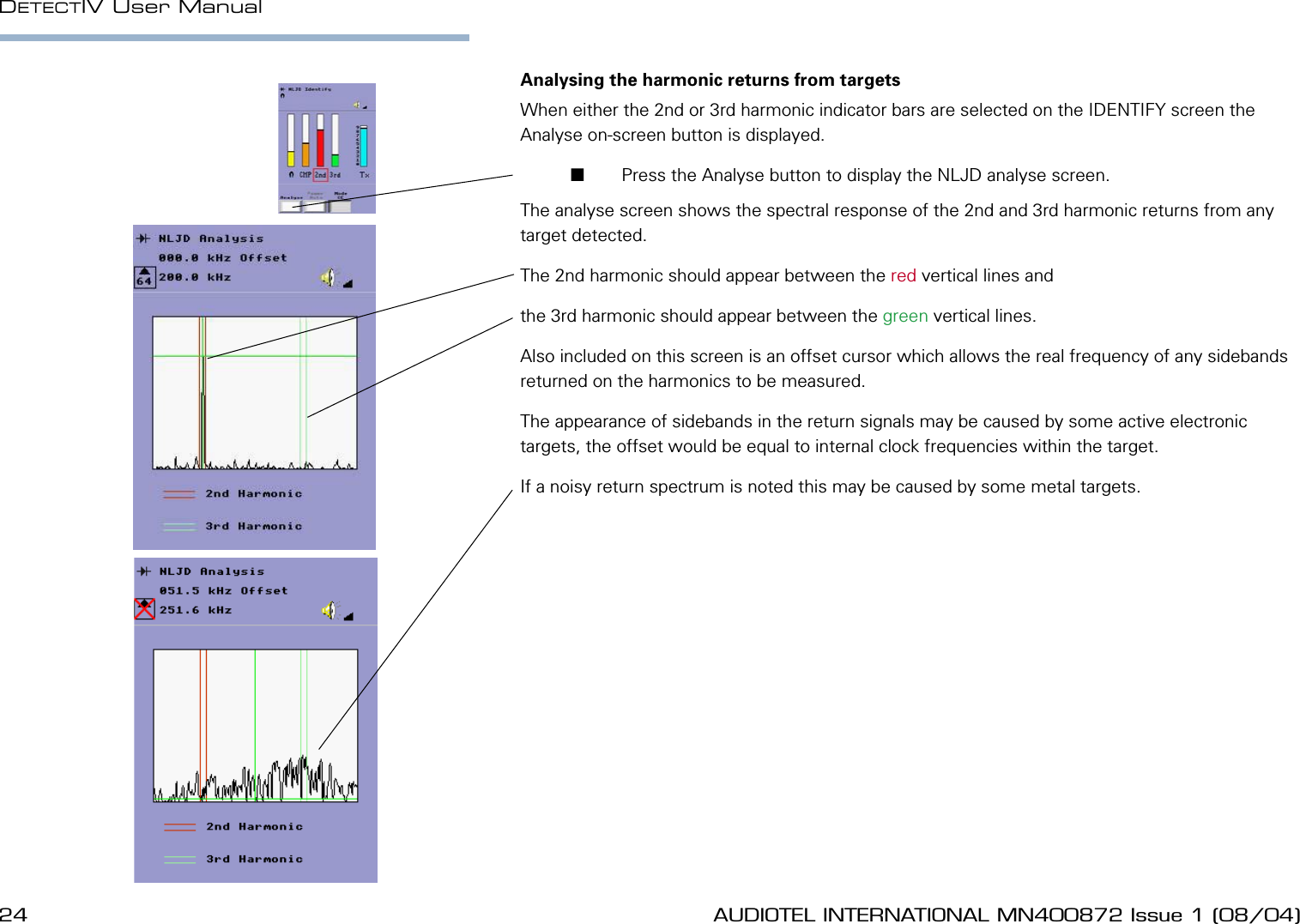
24 AUDIOTEL INTERNATIONAL MN400872 Issue 1 (08/04) DETECTIV User ManualAUDIOTEL INTERNATIONAL MN400872 Issue 1 (08/04)  25Analysing the harmonic returns from targetsWhen either the 2nd or 3rd harmonic indicator bars are selected on the IDENTIFY screen the Analyse on-screen button is displayed.       Press the Analyse button to display the NLJD analyse screen.The analyse screen shows the spectral response of the 2nd and 3rd harmonic returns from any target detected.The 2nd harmonic should appear between the red vertical lines and the 3rd harmonic should appear between the green vertical lines.Also included on this screen is an offset cursor which allows the real frequency of any sidebands returned on the harmonics to be measured.The appearance of sidebands in the return signals may be caused by some active electronic targets, the offset would be equal to internal clock frequencies within the target.If a noisy return spectrum is noted this may be caused by some metal targets.
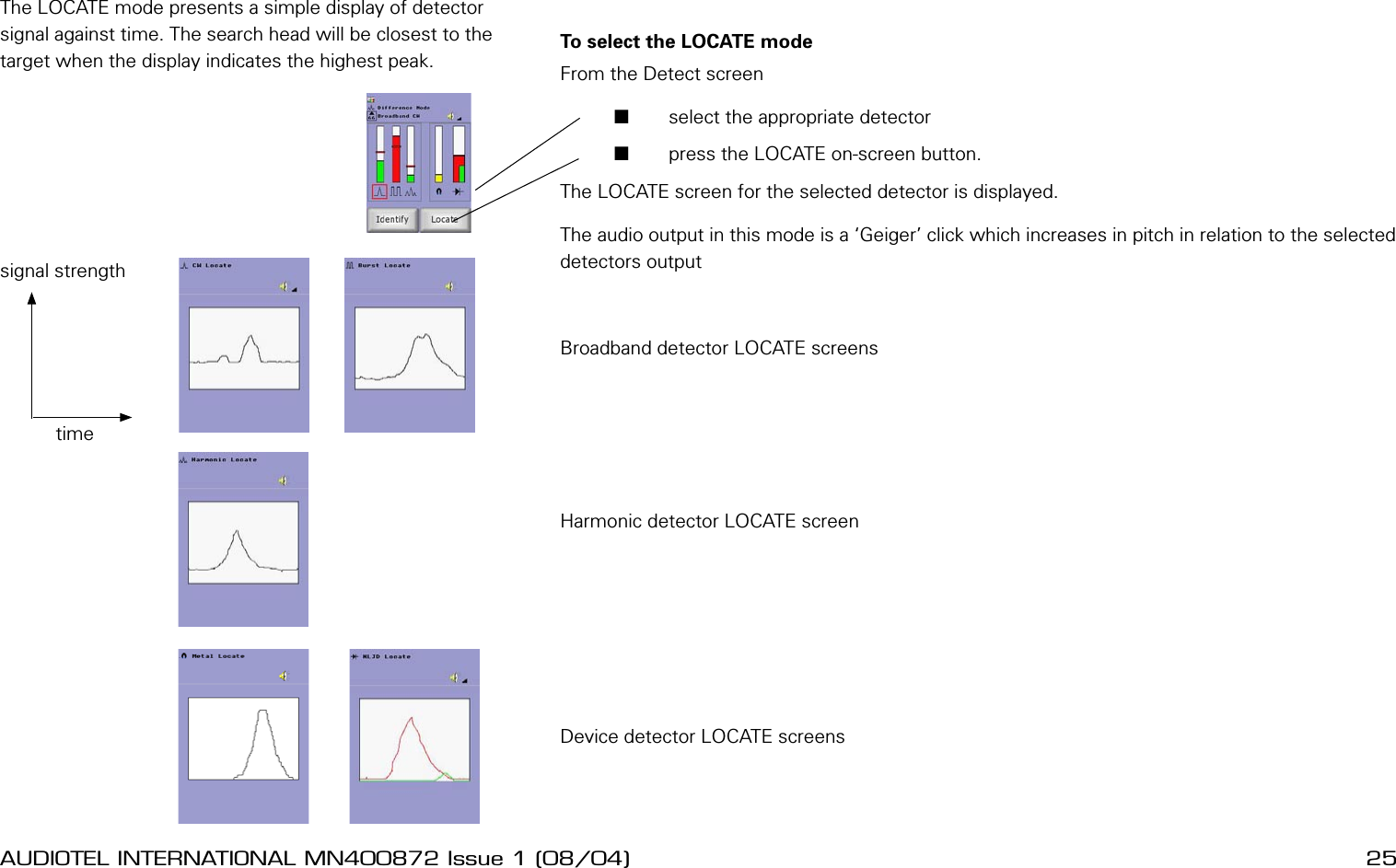
24 AUDIOTEL INTERNATIONAL MN400872 Issue 1 (08/04) DETECTIV User ManualAUDIOTEL INTERNATIONAL MN400872 Issue 1 (08/04)  25To select the LOCATE mode From the Detect screen       select the appropriate detector       press the LOCATE on-screen button.The LOCATE screen for the selected detector is displayed.The audio output in this mode is a ‘Geiger’ click which increases in pitch in relation to the selected detectors outputBroadband detector LOCATE screensHarmonic detector LOCATE screenDevice detector LOCATE screensLOCATE MODEThe LOCATE mode presents a simple display of detector signal against time. The search head will be closest to the target when the display indicates the highest peak.timesignal strength
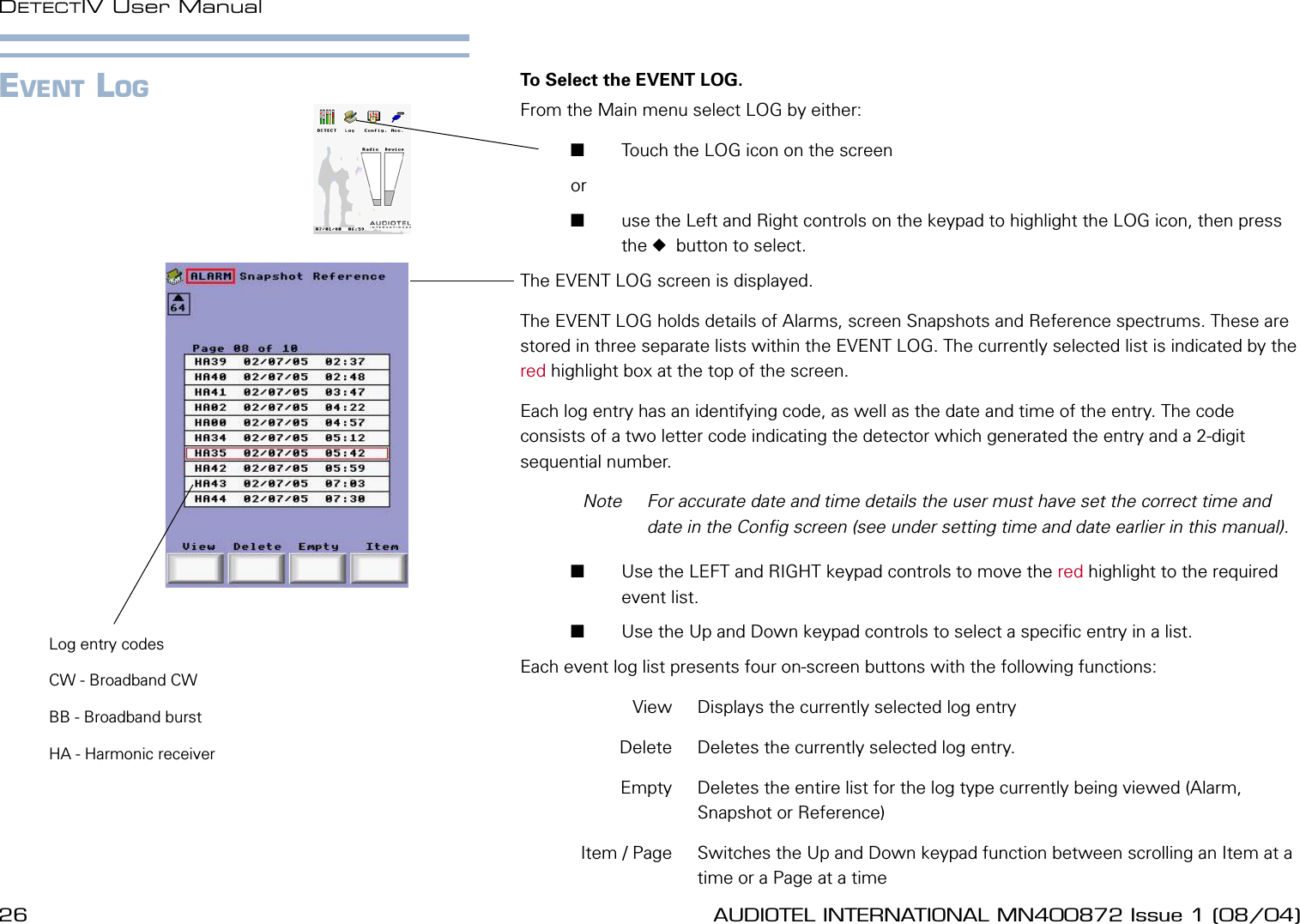
26 AUDIOTEL INTERNATIONAL MN400872 Issue 1 (08/04) DETECTIV User ManualAUDIOTEL INTERNATIONAL MN400872 Issue 1 (08/04)  27EVENT LOG To Select the EVENT LOG.From the Main menu select LOG by either:       Touch the LOG icon on the screen or        use the Left and Right controls on the keypad to highlight the LOG icon, then press the   button to select.The EVENT LOG screen is displayed.The EVENT LOG holds details of Alarms, screen Snapshots and Reference spectrums. These are stored in three separate lists within the EVENT LOG. The currently selected list is indicated by the red highlight box at the top of the screen.Each log entry has an identifying code, as well as the date and time of the entry. The code consists of a two letter code indicating the detector which generated the entry and a 2-digit sequential number.  Note  For accurate date and time details the user must have set the correct time and date in the Cong screen (see under setting time and date earlier in this manual).        Use the LEFT and RIGHT keypad controls to move the red highlight to the required event list.       Use the Up and Down keypad controls to select a specic entry in a list.Each event log list presents four on-screen buttons with the following functions:  View   Displays the currently selected log entry  Delete  Deletes the currently selected log entry.  Empty  Deletes the entire list for the log type currently being viewed (Alarm, Snapshot or Reference)  Item / Page  Switches the Up and Down keypad function between scrolling an Item at a time or a Page at a timeLog entry codesCW - Broadband CWBB - Broadband burstHA - Harmonic receiver
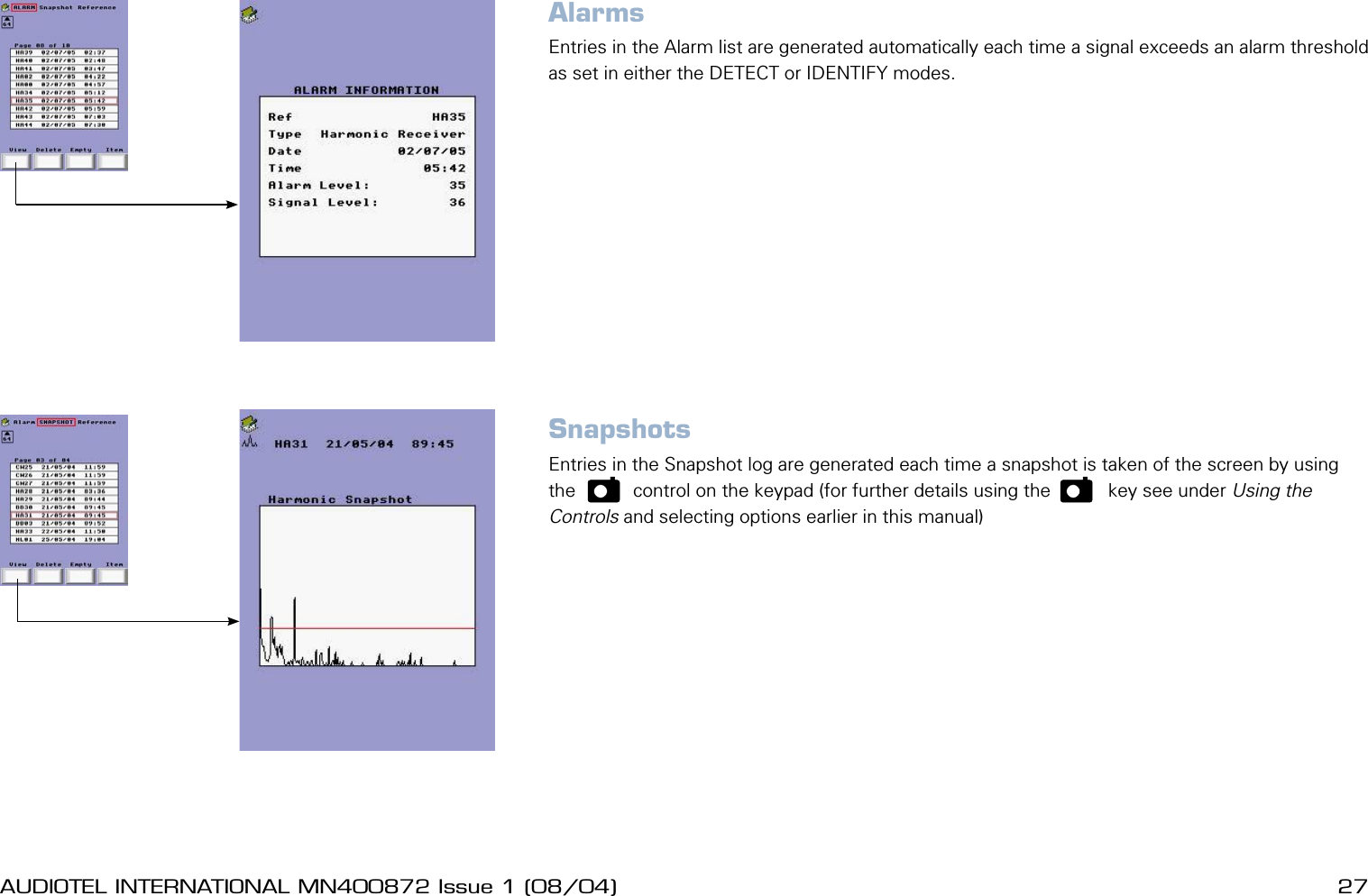
26 AUDIOTEL INTERNATIONAL MN400872 Issue 1 (08/04) DETECTIV User ManualAUDIOTEL INTERNATIONAL MN400872 Issue 1 (08/04)  27AlarmsEntries in the Alarm list are generated automatically each time a signal exceeds an alarm threshold as set in either the DETECT or IDENTIFY modes.SnapshotsEntries in the Snapshot log are generated each time a snapshot is taken of the screen by using the    p     control on the keypad (for further details using the    p     key see under Using the Controls and selecting options earlier in this manual)
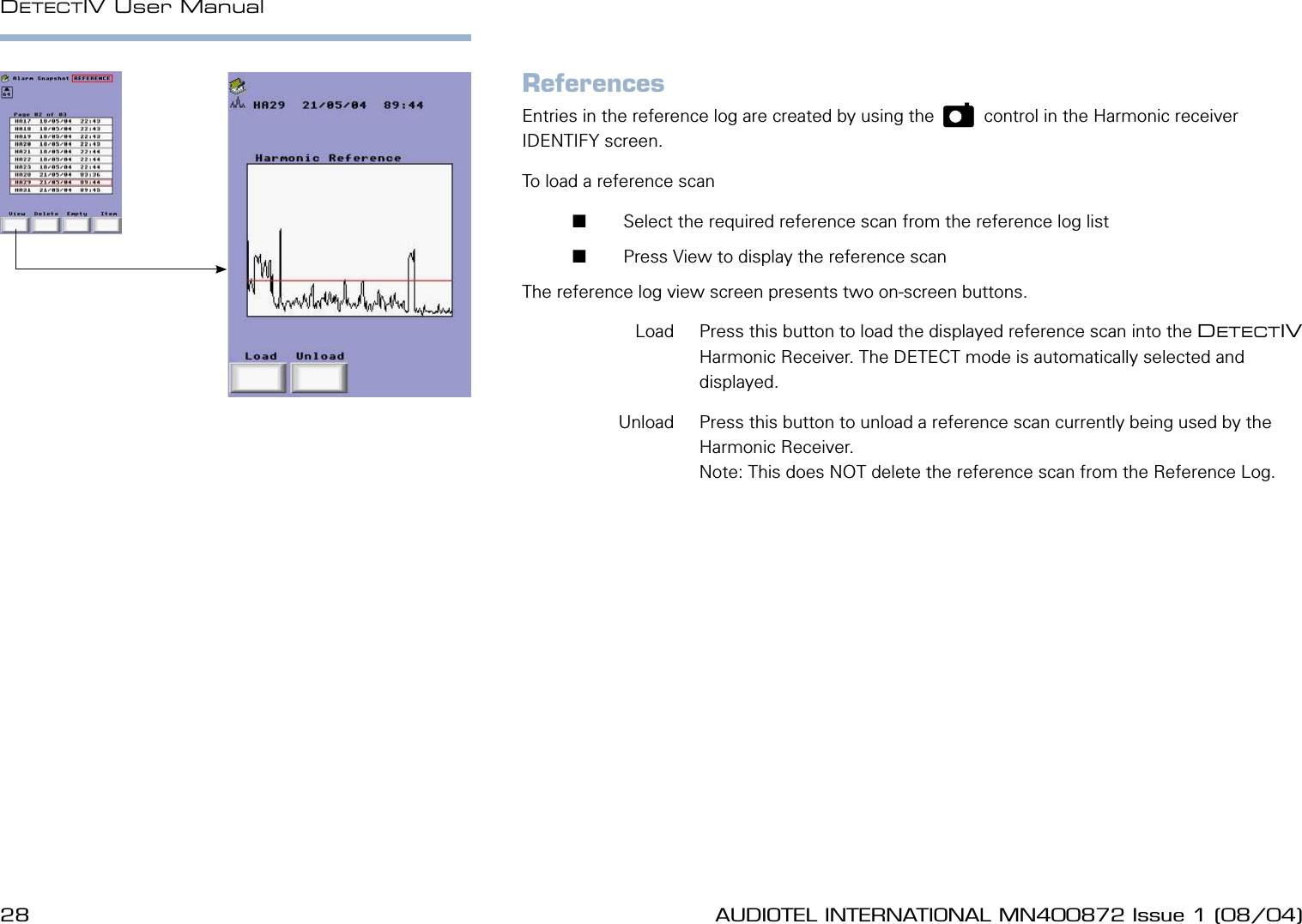
28 AUDIOTEL INTERNATIONAL MN400872 Issue 1 (08/04) DETECTIV User ManualAUDIOTEL INTERNATIONAL MN400872 Issue 1 (08/04)  29ReferencesEntries in the reference log are created by using the    p    control in the Harmonic receiver IDENTIFY screen.To load a reference scan        Select the required reference scan from the reference log list       Press View to display the reference scanThe reference log view screen presents two on-screen buttons.  Load  Press this button to load the displayed reference scan into the DETECTIV Harmonic Receiver. The DETECT mode is automatically selected and displayed.  Unload  Press this button to unload a reference scan currently being used by the Harmonic Receiver.Note: This does NOT delete the reference scan from the Reference Log.
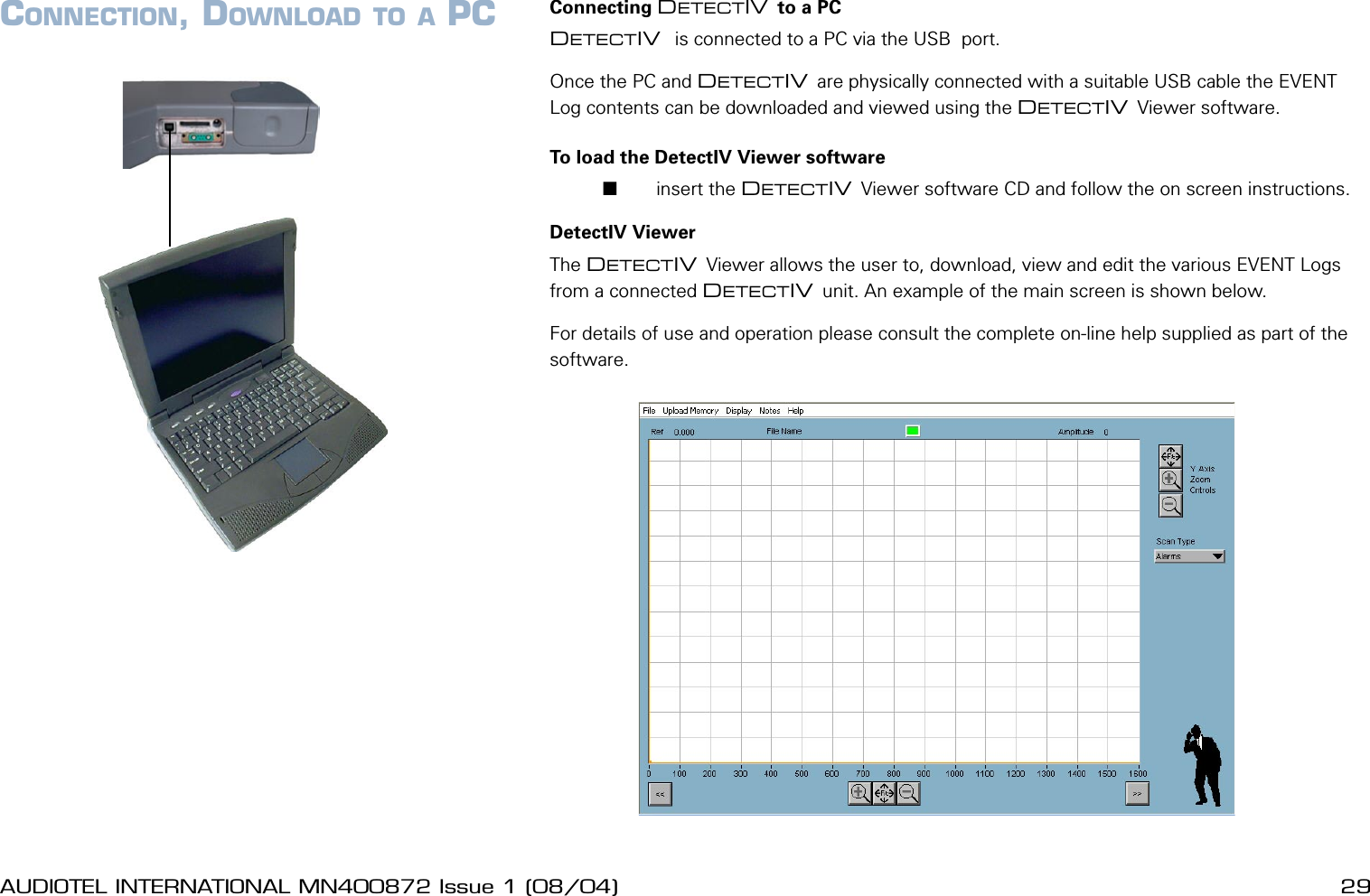
28 AUDIOTEL INTERNATIONAL MN400872 Issue 1 (08/04) DETECTIV User ManualAUDIOTEL INTERNATIONAL MN400872 Issue 1 (08/04)  29CONNECTION, DOWNLOAD TO A PC Connecting DETECTIV to a PCDETECTIV  is connected to a PC via the USB  port.Once the PC and DETECTIV are physically connected with a suitable USB cable the EVENT Log contents can be downloaded and viewed using the DETECTIV Viewer software.To load the DetectIV Viewer software       insert the DETECTIV Viewer software CD and follow the on screen instructions.DetectIV ViewerThe DETECTIV Viewer allows the user to, download, view and edit the various EVENT Logs from a connected DETECTIV unit. An example of the main screen is shown below.For details of use and operation please consult the complete on-line help supplied as part of the software.
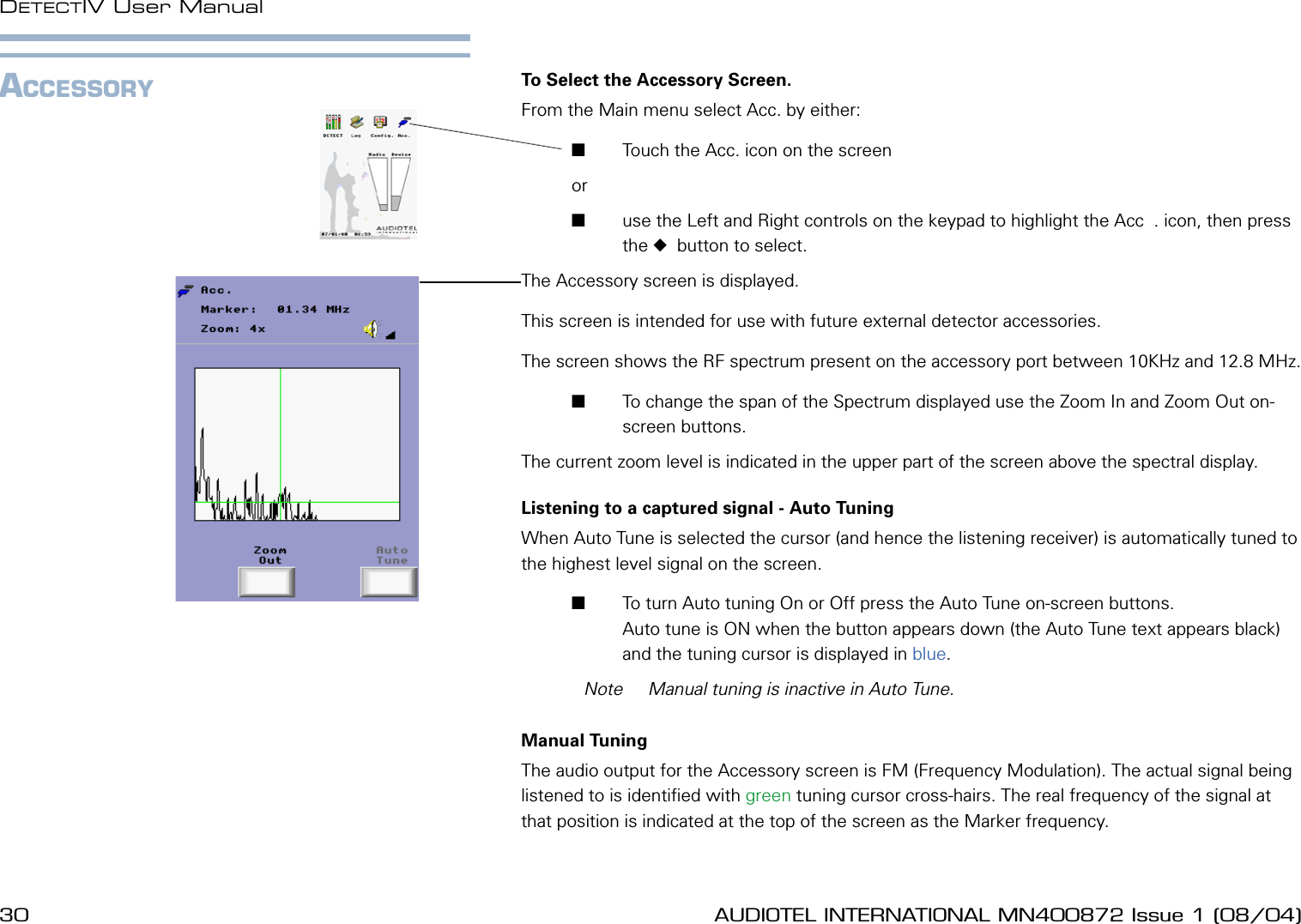
30 AUDIOTEL INTERNATIONAL MN400872 Issue 1 (08/04) DETECTIV User ManualAUDIOTEL INTERNATIONAL MN400872 Issue 1 (08/04)  31ACCESSORY To Select the Accessory Screen.From the Main menu select Acc. by either:       Touch the Acc. icon on the screen or        use the Left and Right controls on the keypad to highlight the Acc  . icon, then press the   button to select.The Accessory screen is displayed.This screen is intended for use with future external detector accessories.The screen shows the RF spectrum present on the accessory port between 10KHz and 12.8 MHz.       To change the span of the Spectrum displayed use the Zoom In and Zoom Out on-screen buttons. The current zoom level is indicated in the upper part of the screen above the spectral display.Listening to a captured signal - Auto TuningWhen Auto Tune is selected the cursor (and hence the listening receiver) is automatically tuned to the highest level signal on the screen.       To turn Auto tuning On or Off press the Auto Tune on-screen buttons. Auto tune is ON when the button appears down (the Auto Tune text appears black) and the tuning cursor is displayed in blue.  Note  Manual tuning is inactive in Auto Tune.Manual TuningThe audio output for the Accessory screen is FM (Frequency Modulation). The actual signal being listened to is identied with green tuning cursor cross-hairs. The real frequency of the signal at that position is indicated at the top of the screen as the Marker frequency.
30 AUDIOTEL INTERNATIONAL MN400872 Issue 1 (08/04) DETECTIV User ManualAUDIOTEL INTERNATIONAL MN400872 Issue 1 (08/04)  31To select a  particular signal to listen to either:       Touch the display screen on the required signal peak         or        Use the LEFT and RIGHT controls to move the cursor left or right respectively.The cursor can also be dragged using a nger to drag across the touch screen
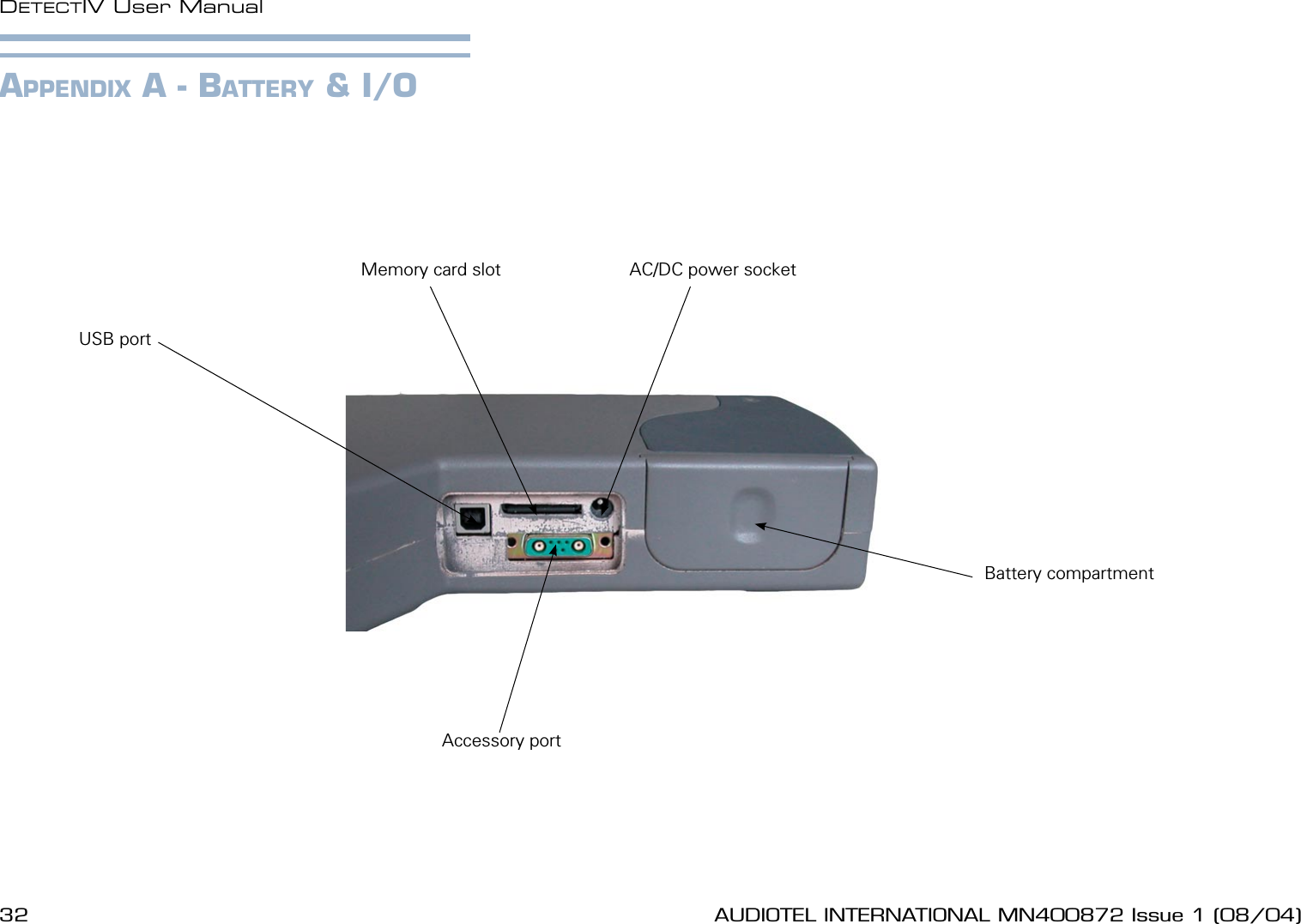
32 AUDIOTEL INTERNATIONAL MN400872 Issue 1 (08/04) DETECTIV User ManualAUDIOTEL INTERNATIONAL MN400872 Issue 1 (08/04)  33Battery compartmentAC/DC power socketMemory card slotUSB portAccessory portAPPENDIX A - BATTERY & I/O
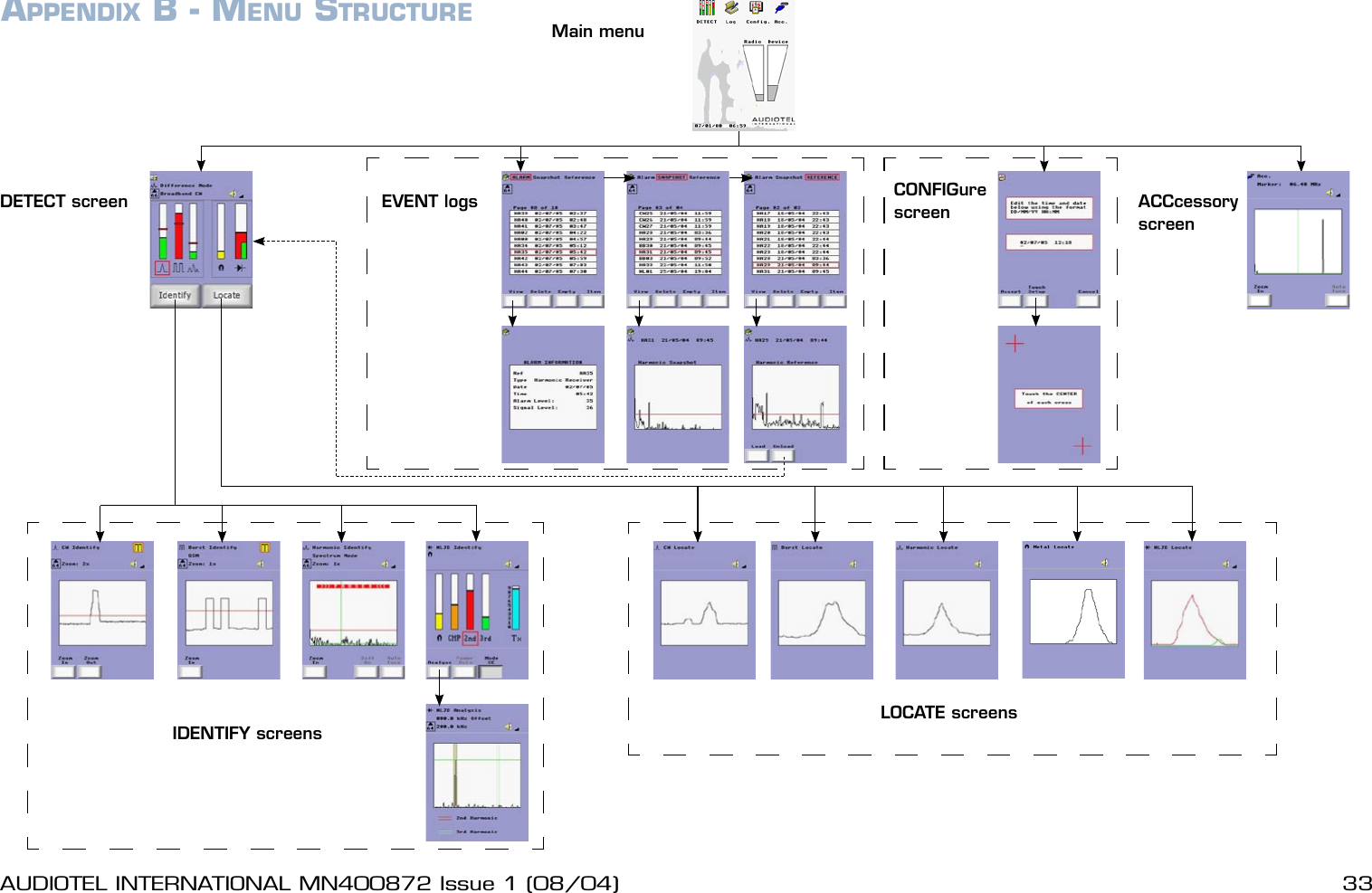
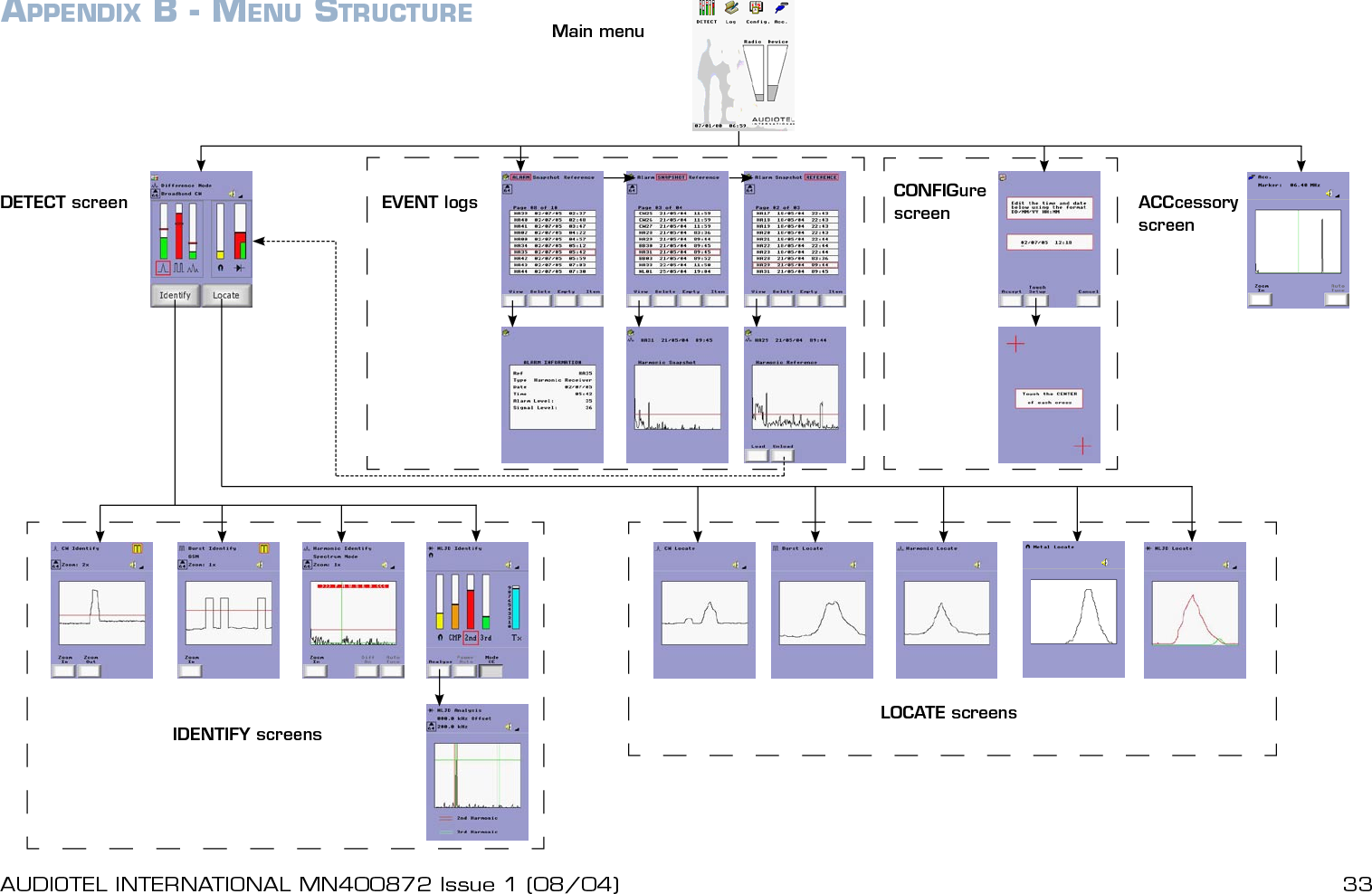
32 AUDIOTEL INTERNATIONAL MN400872 Issue 1 (08/04) DETECTIV User ManualAUDIOTEL INTERNATIONAL MN400872 Issue 1 (08/04)  33APPENDIX B - MENU STRUCTURE Main menuDETECT screen EVENT logs CONFIGure screen ACCcessory screenLOCATE screensIDENTIFY screens
DETECTIV User Manual - MN400782 Issue 1 (08/04)© 2004 Audiotel International Ltd.

Navigation menu