Aurion Srl ZWRX07 Electromyograph User Manual Multilanguage HW

Aurion Srl Electromyograph Multilanguage HW

User Manual

 USER MANUAL  COD. ZW04 REV 10  04/10/05    Pag. 1          ZEROWIRE MULTICHANNEL  ELECTROMYOGRAPH  USER MANUAL       This device complies with Part 15 of the FCC Rules. Operation is subject to the following two con-ditions: (1) this device may not cause harmful interference, and (2) this device must accept any in-terference received, including interference that may cause undesired operation. Changes or modifications not expressly approved by the party responsible for compliance could void the user’s authority to operate the equipment.
 USER MANUAL  COD. ZW04 REV 10  04/10/05    Pag. 2  1. INTRODUCTION ........................................................................................................................ 2 2. DESTINATION AND CLASSIFICATION................................................................................ 3 2.1 HOW TO USE IT....................................................................................................................... 4 3. ZEROWIRE SYSTEM COMPONENTS ................................................................................... 5 3.1 WIRELESS ELECTRODES ......................................................................................................... 6 3.2 BASE UNIT ............................................................................................................................. 7 3.3 DOCKING MODULE ................................................................................................................. 8 4. ZEROWIRE SYSTEM USE........................................................................................................ 9 4.1 ANALOG MODE ...................................................................................................................... 9 4.1.1 Supported external devices............................................................................................. 10 4.1.2 Layout of cable connections........................................................................................... 11 4.2 DIGITAL MODE ..................................................................................................................... 12 4.2.1 External trigger.............................................................................................................. 13 4.2.1.1 Trig in..................................................................................................................................14 4.2.1.2 Trig out................................................................................................................................14 4.2.2 Supported external devices............................................................................................. 14 4.3 LED STATUS INDICATORS .................................................................................................... 15 4.4 PREGELLED ELECTRODES..................................................................................................... 15 4.5 ELECTRODES BATTERY RECHARGE ...................................................................................... 15 4.6 LED INDICATOR DURING CHARGING .................................................................................... 16 4.7 WARNINGS........................................................................................................................... 16 4.8 PIEZORESISTIVE SENSORS..................................................................................................... 18 5. SYSTEM MAINTENANCE ...................................................................................................... 20 5.1 REPAIRABLE PARTS.............................................................................................................. 20 5.2 REPLACEMENT OF  ELECTRODE BATTERY............................................................................. 20 5.2.1 Module identification ..................................................................................................... 21 5.3 WARNINGS ABOUT ELECTRODES BATTERY........................................................................... 21 5.4 WARNINGS FOR BATTERY DISPOSAL..................................................................................... 22 5.5 WARNINGS FOR DEVICE DISPOSAL........................................................................................ 22 5.6 REPLACEMENT OF WORN PARTS........................................................................................... 22 5.7 ZEROWIRE CLEANING .......................................................................................................... 23 5.8 REFERENCES........................................................................................................................ 23 6. TECHNICAL SPECIFICATIONS ........................................................................................... 24 6.1 SUITABILITY......................................................................................................................... 26
 USER MANUAL  COD. ZW04 REV 10  04/10/05    Pag. 3  1.  INTRODUCTION ZeroWire system is an innovative multi-channel wireless surface electromyographic system. The leading specifications of this new system are: •  Wireless and low-power electrodes for a quick patient set-up and for movements performed in total freedom; •  Digital transmission of the EMG signal; •  Receiver device equipped with analog and digital (USB port) data output; •  Developed with high integration “SMD” technology; •  Compatible with ISM standard – low power devices (ETSI, FCC, JAPAN); •  Designed to be integrated with lab equipment for multipurpose acquisition systems.  2.  DESTINATION AND CLASSIFICATION ZeroWire is a system for the data collection of biologic signals; the main system feature is the absence of cables between the transmitters on the patient and the data receiver/recording unit.  This allows the acquisition of EMG signal while patient is free to move. This feature is very useful for clinical and scientific applications, for example in pathologic gait analy-sis or in rehabilitation. Low  invasivity  and  high safety allow to use ZeroWire system  for  patients who tolerate  the  adhesive elelctrodes and conductive gel for SEMG detection through medical electrodes.  ZeroWire system application areas are: •  Neurology; •  Physiatry and rehabilitation; •  Orthopedy; •  Ergonomics; •  Sport medicine; •  Veterinary.
 USER MANUAL  COD. ZW04 REV 10  04/10/05    Pag. 4  ZeroWire system is classified according to CEI 60601-1:1998:  -  The applied part is a BF type according to CEI EN 60601-2-40 regulation (icon):    -  Second class device working with an external power supply providing power to internal peripheral units; lithium rechargeable battery (icon):    -  IPX0 protection degree of shells (NOT water proof); -  Functioning type: continuous.  2.1  How to use it  To  use  ZeroWire,  two  pre-gelled  disposable  electrodes  for  each  channel  have  to  be  applied  to  the subject. The EMG acquisition module is applied on the surface electrodes using a snap connector. If required by the exam, piezoelectric sensors are applied for the identification of plantar supports; the foot-switch acquisition module is applied to the sensor by the appropriate cables.  ZeroWire system can be used by doctors, paramedics and technicians.   To use ZeroWire system, please, read carefully the instructions in the relative chapter.
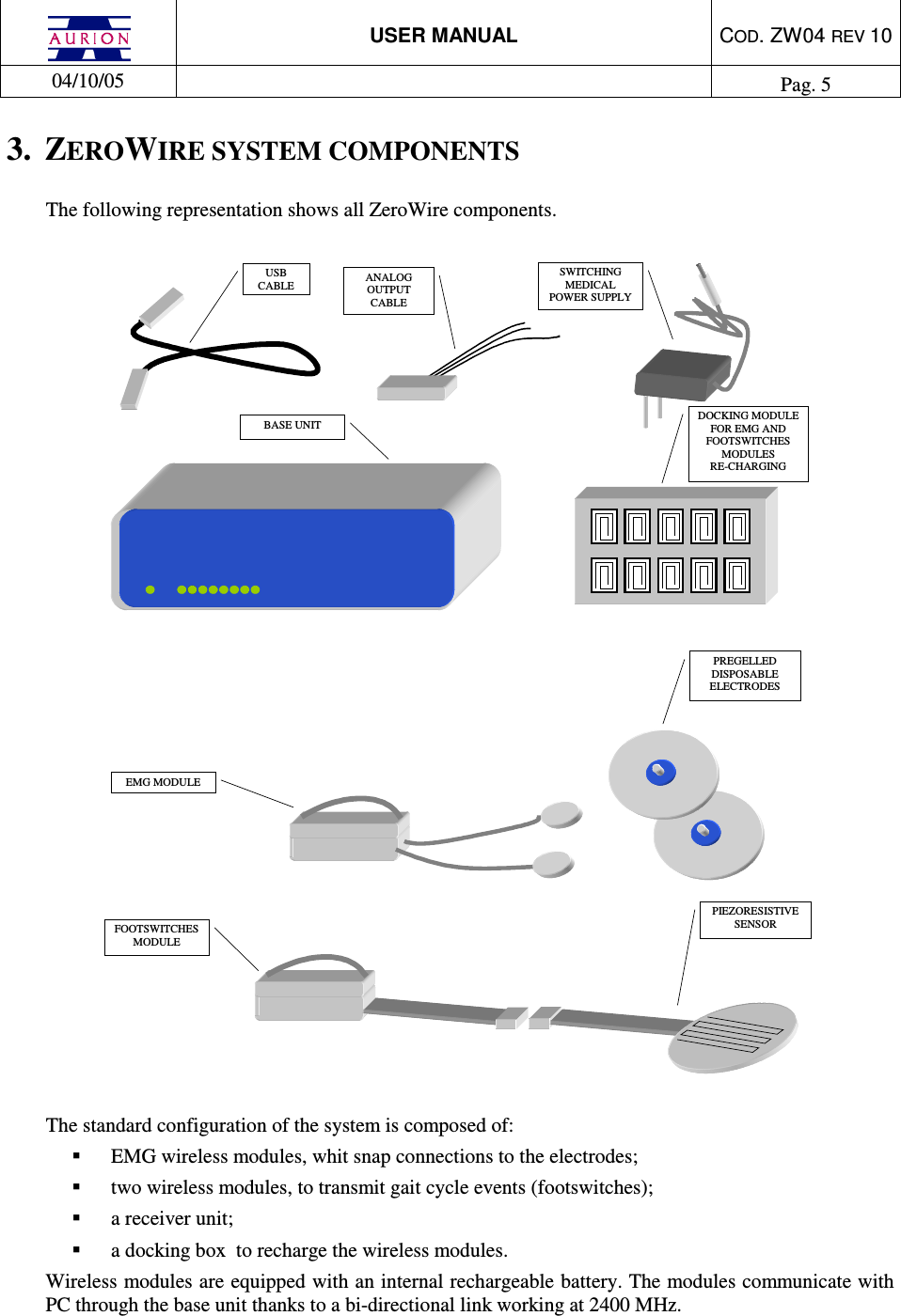
 USER MANUAL  COD. ZW04 REV 10  04/10/05    Pag. 5  3.  ZEROWIRE SYSTEM COMPONENTS The following representation shows all ZeroWire components.   USB CABLE ANALOG OUTPUT CABLE SWITCHING MEDICAL POWER SUPPLY  BASE UNIT FOOTSWITCHES MODULE PREGELLED DISPOSABLE ELECTRODES PIEZORESISTIVE SENSOR DOCKING MODULE FOR EMG AND FOOTSWITCHES MODULES  RE-CHARGING EMG MODULE  The standard configuration of the system is composed of:   EMG wireless modules, whit snap connections to the electrodes;   two wireless modules, to transmit gait cycle events (footswitches);   a receiver unit;   a docking box  to recharge the wireless modules. Wireless modules are equipped with an internal rechargeable battery. The modules communicate with PC through the base unit thanks to a bi-directional link working at 2400 MHz.
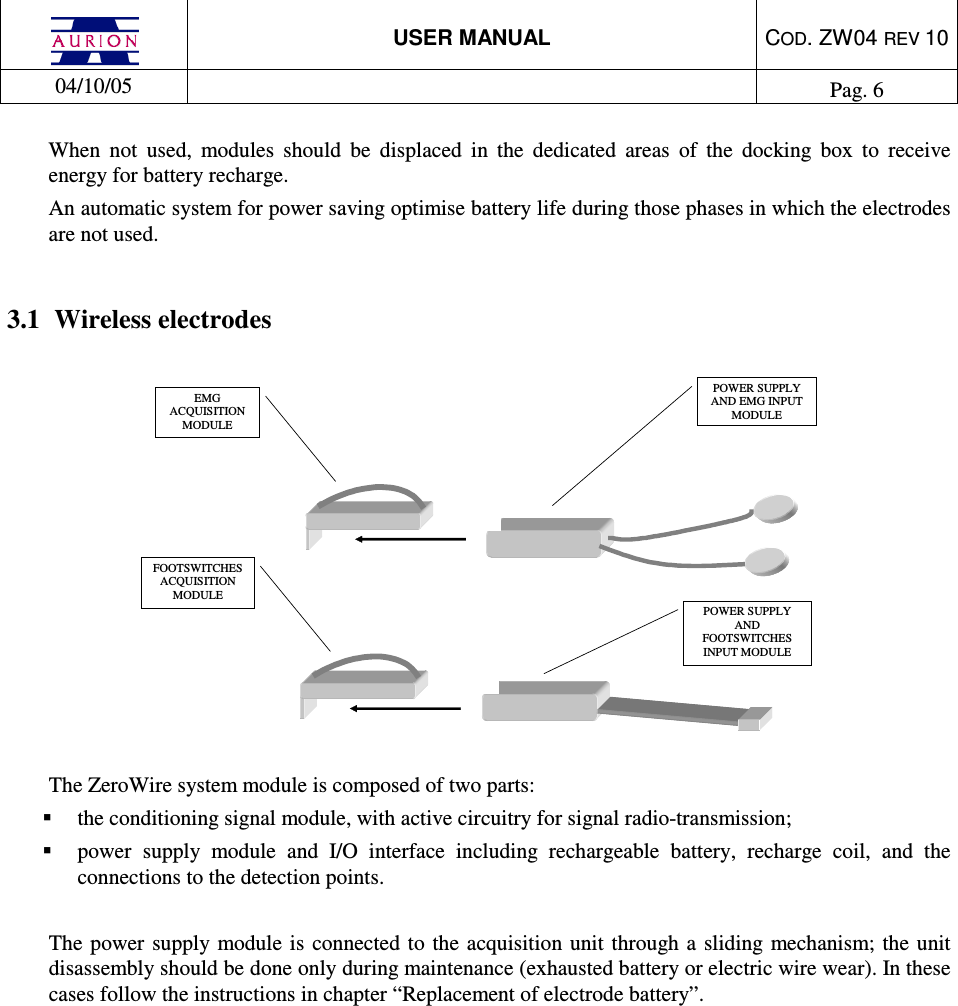
 USER MANUAL  COD. ZW04 REV 10  04/10/05    Pag. 6  When  not  used,  modules  should  be  displaced  in  the  dedicated  areas  of  the  docking  box  to  receive energy for battery recharge. An automatic system for power saving optimise battery life during those phases in which the electrodes are not used.  3.1  Wireless electrodes   EMG ACQUISITION MODULE  POWER SUPPLY AND EMG INPUT MODULE POWER SUPPLY  AND FOOTSWITCHES INPUT MODULE FOOTSWITCHES ACQUISITION MODULE    The ZeroWire system module is composed of two parts:   the conditioning signal module, with active circuitry for signal radio-transmission;   power  supply  module  and  I/O  interface  including  rechargeable  battery,  recharge  coil,  and  the connections to the detection points.  The  power supply module is  connected  to the acquisition unit through  a  sliding mechanism; the unit disassembly should be done only during maintenance (exhausted battery or electric wire wear). In these cases follow the instructions in chapter “Replacement of electrode battery”.
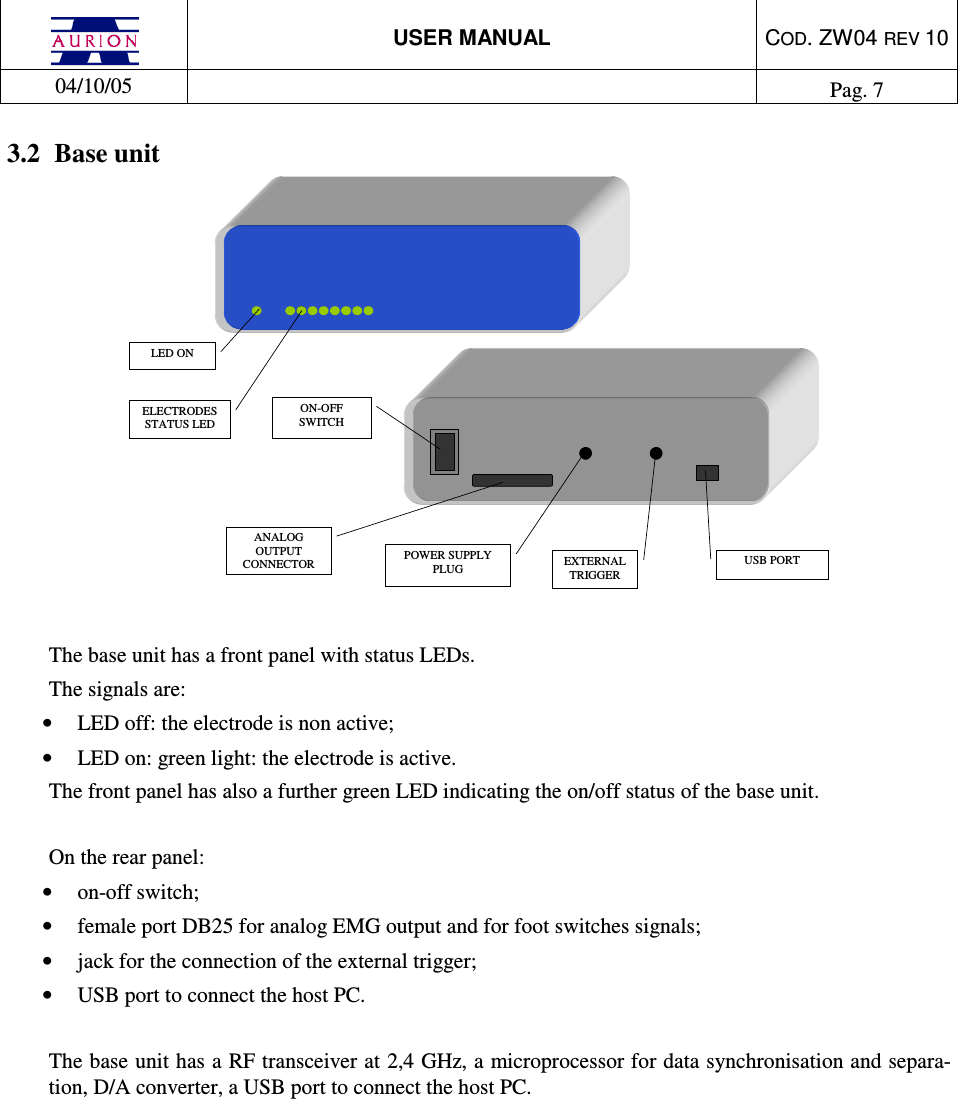
 USER MANUAL  COD. ZW04 REV 10  04/10/05    Pag. 7  3.2  Base unit  ELECTRODES STATUS LED ON-OFF SWITCH POWER SUPPLY PLUG  USB PORT EXTERNAL TRIGGER  ANALOG OUTPUT CONNECTOR LED ON   The base unit has a front panel with status LEDs.  The signals are: •  LED off: the electrode is non active;  •  LED on: green light: the electrode is active. The front panel has also a further green LED indicating the on/off status of the base unit.  On the rear panel: •  on-off switch; •  female port DB25 for analog EMG output and for foot switches signals; •  jack for the connection of the external trigger; •  USB port to connect the host PC.  The base unit has a RF transceiver at 2,4 GHz, a microprocessor for data synchronisation and separa-tion, D/A converter, a USB port to connect the host PC.
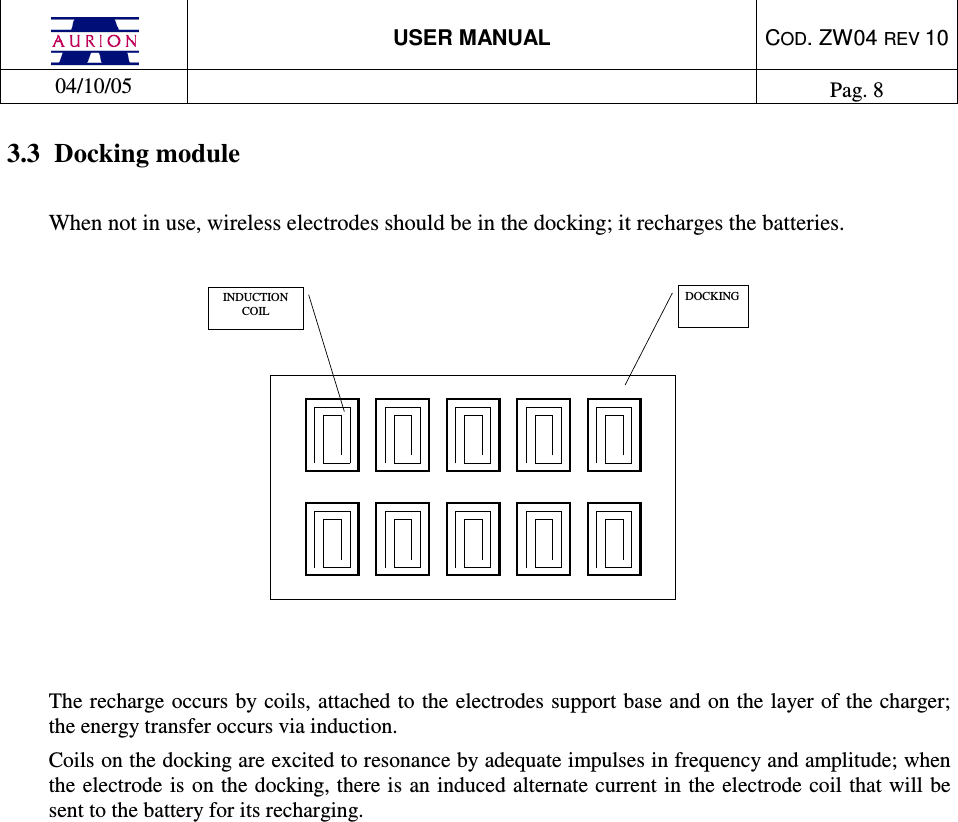
 USER MANUAL  COD. ZW04 REV 10  04/10/05    Pag. 8  3.3  Docking module  When not in use, wireless electrodes should be in the docking; it recharges the batteries.   DOCKINGINDUCTIONCOIL  The recharge occurs by coils, attached to the electrodes support base and on the layer of the charger; the energy transfer occurs via induction. Coils on the docking are excited to resonance by adequate impulses in frequency and amplitude; when the electrode is  on the docking, there is an induced alternate current in the electrode coil that will be sent to the battery for its recharging.
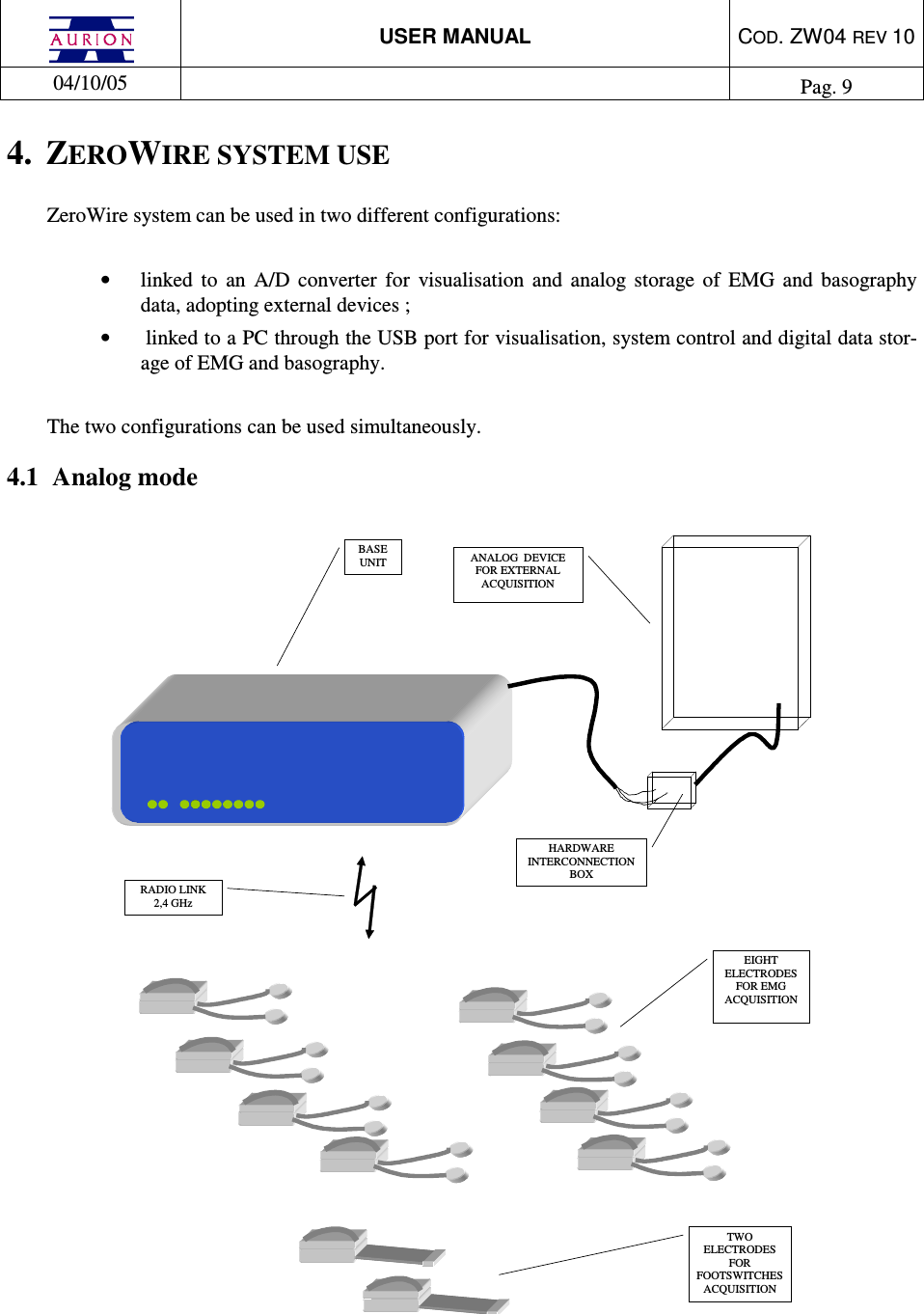
 USER MANUAL  COD. ZW04 REV 10  04/10/05    Pag. 9  4.  ZEROWIRE SYSTEM USE ZeroWire system can be used in two different configurations:  •  linked  to  an  A/D  converter  for  visualisation  and  analog  storage  of  EMG  and  basography data, adopting external devices ; •   linked to a PC through the USB port for visualisation, system control and digital data stor-age of EMG and basography.  The two configurations can be used simultaneously. 4.1  Analog mode   ANALOG  DEVICE FOR EXTERNAL ACQUISITION  TWO ELECTRODES FOR FOOTSWITCHES ACQUISITION EIGHT ELECTRODES FOR EMG ACQUISITION BASE UNIT RADIO LINK 2,4 GHz HARDWARE INTERCONNECTION BOX
 USER MANUAL  COD. ZW04 REV 10  04/10/05    Pag. 10  To operate the system: 1)  connect ZeroWire Y1 cable (analog output) to the analog A/D interface of the external de-vice 2)  if  required,  connect  the  trigger cable to  the external  device.Check trigger electric  features (voltage and timing) adopted by the system (see “Technical specifications” chapter)  3)  connect ZeroWire power supply and switch on the system   The system can be powered only with Friwo FW7555M/09 power supply provided by the producer;  the use of other power supply units  can cause electric shock  and damage the system.  If used in analog mode, the system doesn’t require a Personal Computer; switching on the base unit EMG and basographic signals are available in continuous on analog output connector J13.   4.1.1  Supported external devices   The ZeroWire system can be connected to analog devices commonly used in clinical and scientific en-vironments; these are the features required by systems: •  at least eight EMG data collection channels, with Zout = 100 ohm  and an amplitude of ± 2,5 V •  at  least  two  analog  channels  to  acquire  footswitches, configured for  signals with Zout  =  100 ohm and an amplitude of + 4 V. •  it complies with IEC 60950   The  use  of  external  devices  non  complying  with  IEC  60950  can  cause  electric shock and damage the system.
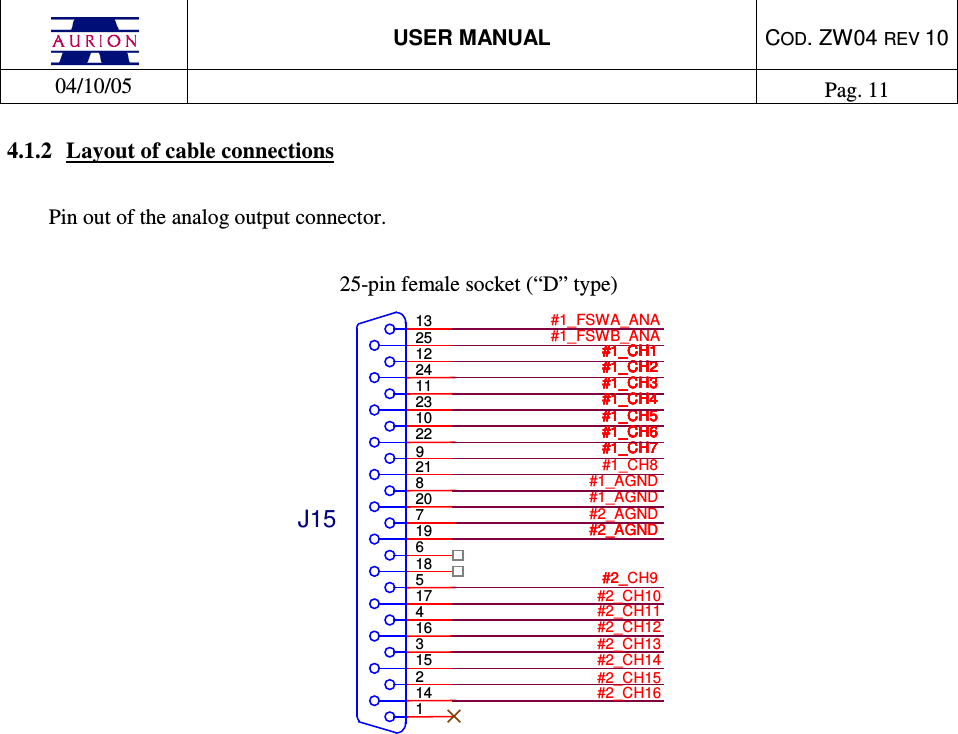
 USER MANUAL  COD. ZW04 REV 10  04/10/05    Pag. 11  4.1.2  Layout of cable connections  Pin out of the analog output connector.   25-pin female socket (“D” type) #2_#2_AGND13251224112310229218207196185174163152141J15#1_FSWA_ANA#1_FSWB_ANA#1_AGND#2_AGND#2_AGND#1_AGND#2_CH10#2_CH9#1_CH7#1_CH7#1_CH7#1_CH7#1_CH7#1_CH7#1_CH5#1_CH5#1_CH5#1_CH5#1_CH5#1_CH5#1_CH6#1_CH6#1_CH6#1_CH6#1_CH6#1_CH6#1_CH6#1_CH6#1_CH6#1_CH6#1_CH2#1_CH2#1_CH2#1_CH2#1_CH2#1_CH2#1_CH2#1_CH2#1_CH2#1_CH2#1_CH3#1_CH3#1_CH3#1_CH3#1_CH3#1_CH3#1_CH4#1_CH4#1_CH4#1_CH4#1_CH4#1_CH4#1_CH8#1_CH1#1_CH1#1_CH1#1_CH1#1_CH1#1_CH1#1_CH1#1_CH1#1_CH1#1_CH1#2_CH11#2_CH12#2_CH13#2_CH14#2_CH15#2_CH16
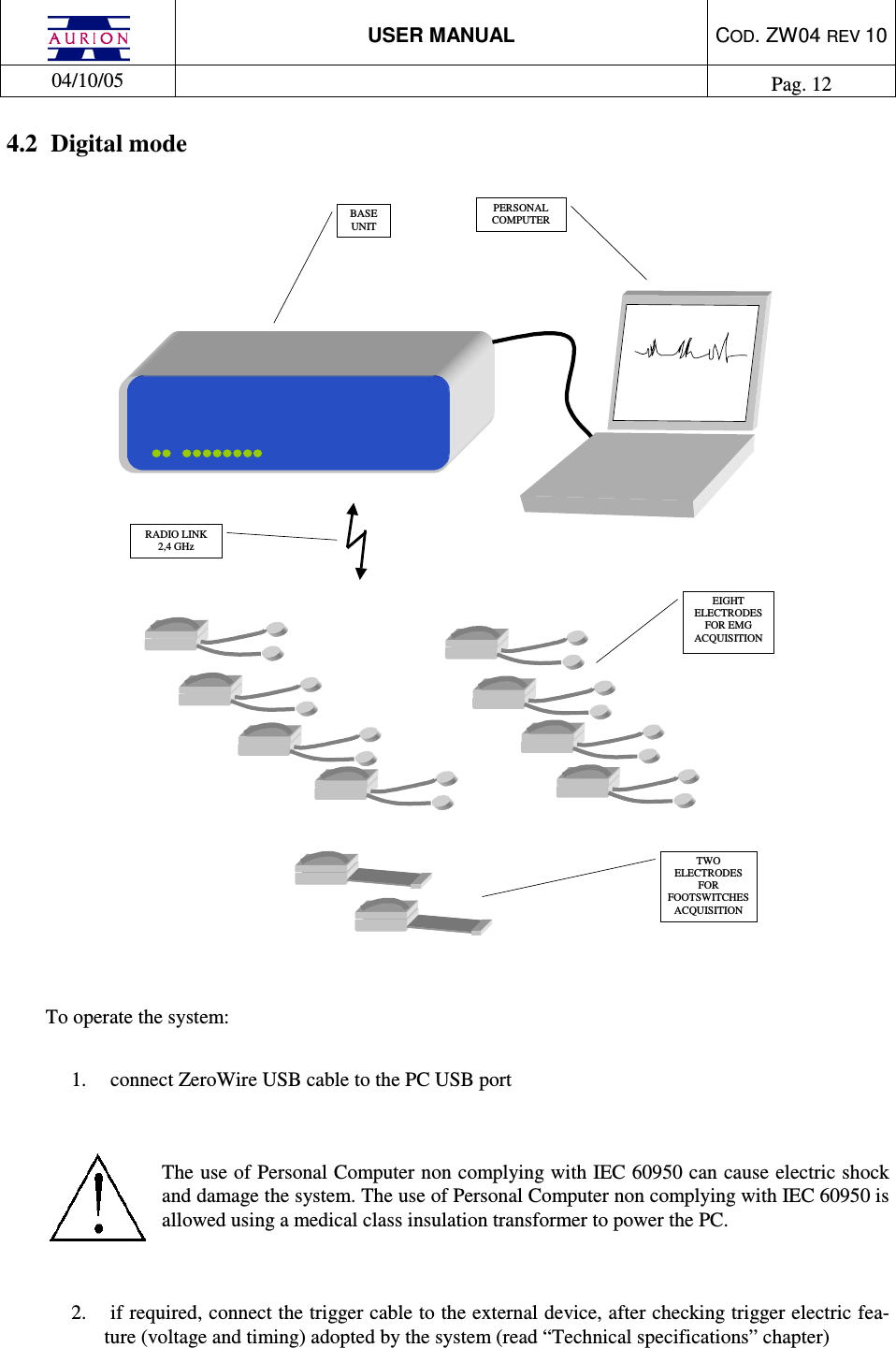
 USER MANUAL  COD. ZW04 REV 10  04/10/05    Pag. 12  4.2  Digital mode  PERSONALCOMPUTERTWOELECTRODESFORFOOTSWITCHESACQUISITIONEIGHTELECTRODESFOR EMGACQUISITIONBASEUNITRADIO LINK2,4 GHz   To operate the system:  1.  connect ZeroWire USB cable to the PC USB port    The use of Personal Computer non complying with IEC 60950 can cause electric shock and damage the system. The use of Personal Computer non complying with IEC 60950 is allowed using a medical class insulation transformer to power the PC.   2.  if required, connect the trigger cable to the external device, after checking trigger electric fea-ture (voltage and timing) adopted by the system (read “Technical specifications” chapter)
 USER MANUAL  COD. ZW04 REV 10  04/10/05    Pag. 13  3.  connect ZeroWire power supply and switch on the system   The system can be powered only with Friwo FW7555M/09 power supply provided by the producer; the use of other power supply units can cause electric shock and damage the system.   4.  open  ZeroWire  control  program and follow  the  SW indication  for  data  graphic  rendering  and digital data collection.  The PC controls ZeroWire system. See SW User Manual for the description of operating controls.    4.2.1  External trigger  ZeroWire has  a connector  for external trigger of  data capture. External trigger lines are  not insulated from the ZeroWire system ground.  The  use  of  external  devices  non  complying  with  IEC  60950  can  cause  electric shock and damage the system.  Pin out of connections to trigger and power supply:   +9V0VTRIG_INTRIG_OUTGNDJ7J10
 USER MANUAL  COD. ZW04 REV 10  04/10/05    Pag. 14  4.2.1.1  Trig in  Data capture can be synchronised with an external trigger signal. If required, connect the trigger cable to the external device after checking that the trigger control complies with the electric features required by the system (see “Technical Specifications”).  Trigger logic: 1)  data acquisition if the “trigger in” signal is at “1” logic level  2)  no data acquisition if the “trigger in” signal is at “0” logic level   The default condition of the line is “1”.  4.2.1.2  Trig out  A “trigger out” channel shows the system status:  1)  “trig out” signal at “1” logic level when the system is acquiring  2)  “trig out” signal at “0” logic level when the system is not acquiring    4.2.2  Supported external devices  ZeroWire  system  can  be connected to  any PC with USB  interface;  these are  the features required by systems:   type 2 USB interface    windows 2000 or XP    VGA graphic card with a resolution of 1024 x 768 at least   minimum ram memory, 512 MB   minimum processor frequency, 800 MHz   minimum hard disk, 20 GB  The Personal Computer linked with the ZeroWire system has to comply with IEC 60950 regulation.  ZeroWire system has a software for data collection and system set-up; for additional details see the user manual provided with the SW.
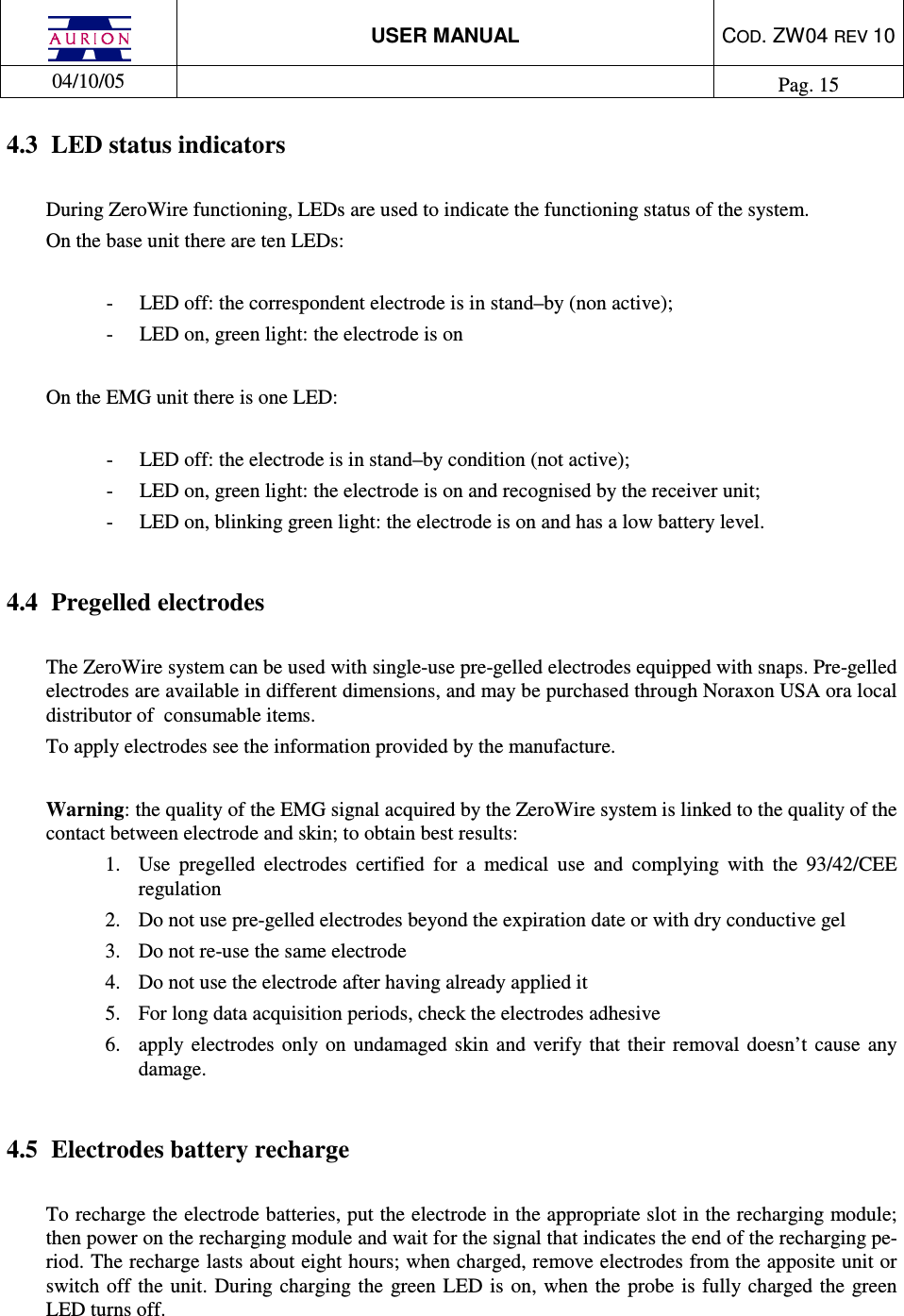
 USER MANUAL  COD. ZW04 REV 10  04/10/05    Pag. 15  4.3  LED status indicators  During ZeroWire functioning, LEDs are used to indicate the functioning status of the system.  On the base unit there are ten LEDs:   -  LED off: the correspondent electrode is in stand–by (non active); -  LED on, green light: the electrode is on   On the EMG unit there is one LED:  -  LED off: the electrode is in stand–by condition (not active); -  LED on, green light: the electrode is on and recognised by the receiver unit; -  LED on, blinking green light: the electrode is on and has a low battery level.        4.4  Pregelled electrodes  The ZeroWire system can be used with single-use pre-gelled electrodes equipped with snaps. Pre-gelled electrodes are available in different dimensions, and may be purchased through Noraxon USA ora local distributor of  consumable items.  To apply electrodes see the information provided by the manufacture.   Warning: the quality of the EMG signal acquired by the ZeroWire system is linked to the quality of the contact between electrode and skin; to obtain best results: 1.  Use  pregelled  electrodes  certified  for  a  medical  use  and  complying  with  the  93/42/CEE regulation  2.  Do not use pre-gelled electrodes beyond the expiration date or with dry conductive gel 3.  Do not re-use the same electrode  4.  Do not use the electrode after having already applied it 5.  For long data acquisition periods, check the electrodes adhesive 6.  apply  electrodes  only on undamaged  skin and verify that their removal  doesn’t  cause any damage.   4.5  Electrodes battery recharge  To recharge the electrode batteries, put the electrode in the appropriate slot in the recharging module; then power on the recharging module and wait for the signal that indicates the end of the recharging pe-riod. The recharge lasts about eight hours; when charged, remove electrodes from the apposite unit or switch off the unit. During  charging  the  green LED  is on,  when the probe  is fully charged the green LED turns off.
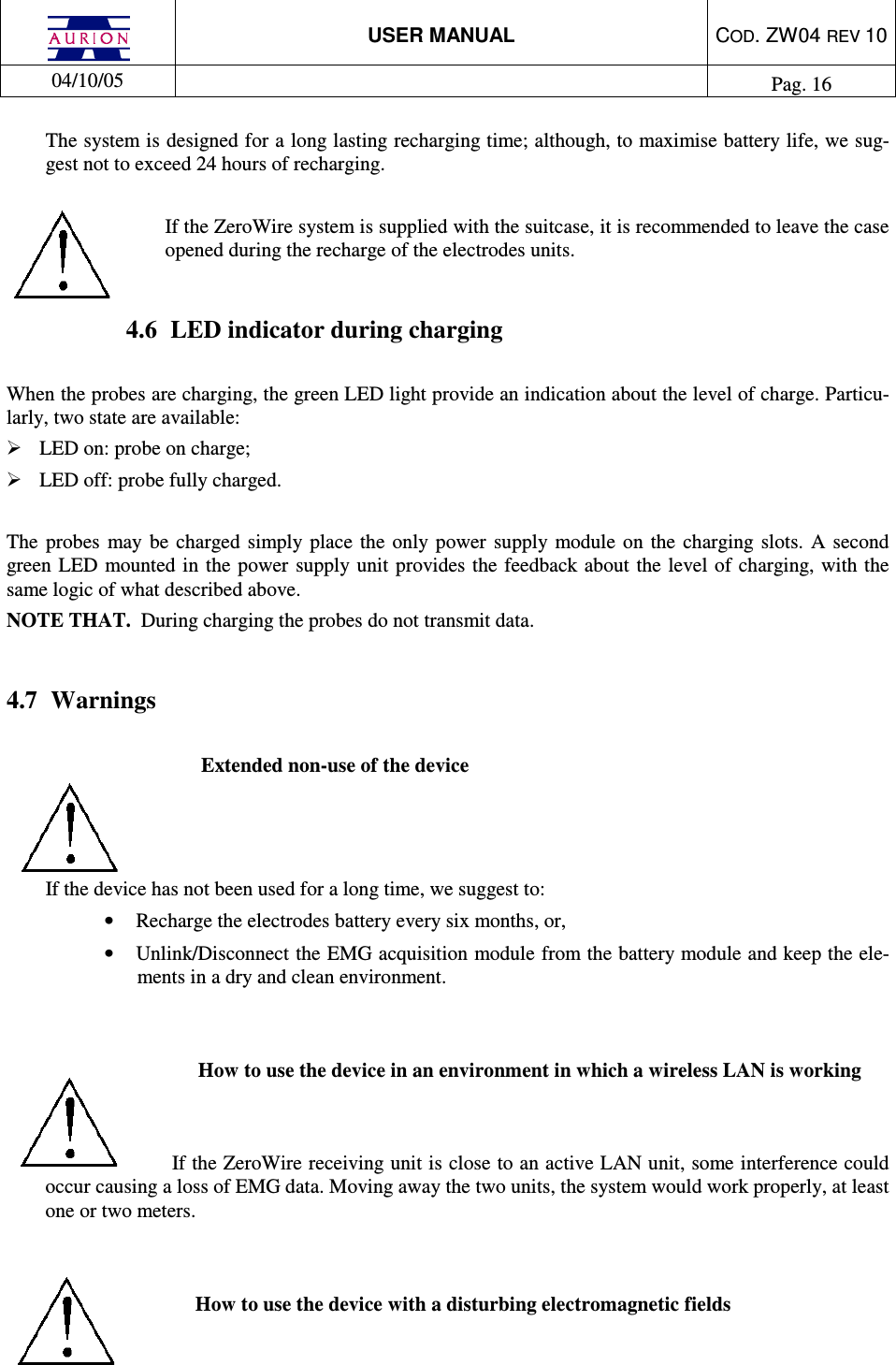
 USER MANUAL  COD. ZW04 REV 10  04/10/05    Pag. 16  The system is designed for a long lasting recharging time; although, to maximise battery life, we sug-gest not to exceed 24 hours of recharging.  If the ZeroWire system is supplied with the suitcase, it is recommended to leave the case opened during the recharge of the electrodes units.  4.6  LED indicator during charging  When the probes are charging, the green LED light provide an indication about the level of charge. Particu-larly, two state are available:  LED on: probe on charge;  LED off: probe fully charged.  The  probes  may  be  charged simply  place  the  only  power  supply module  on  the  charging slots.  A second green LED  mounted  in  the power supply unit provides the feedback about the level of charging,  with the same logic of what described above. NOTE THAT.  During charging the probes do not transmit data.  4.7  Warnings  Extended non-use of the device    If the device has not been used for a long time, we suggest to: •  Recharge the electrodes battery every six months, or,  •  Unlink/Disconnect the EMG acquisition module from the battery module and keep the ele-ments in a dry and clean environment.   How to use the device in an environment in which a wireless LAN is working   If the ZeroWire receiving unit is close to an active LAN unit, some interference could occur causing a loss of EMG data. Moving away the two units, the system would work properly, at least one or two meters.   How to use the device with a disturbing electromagnetic fields
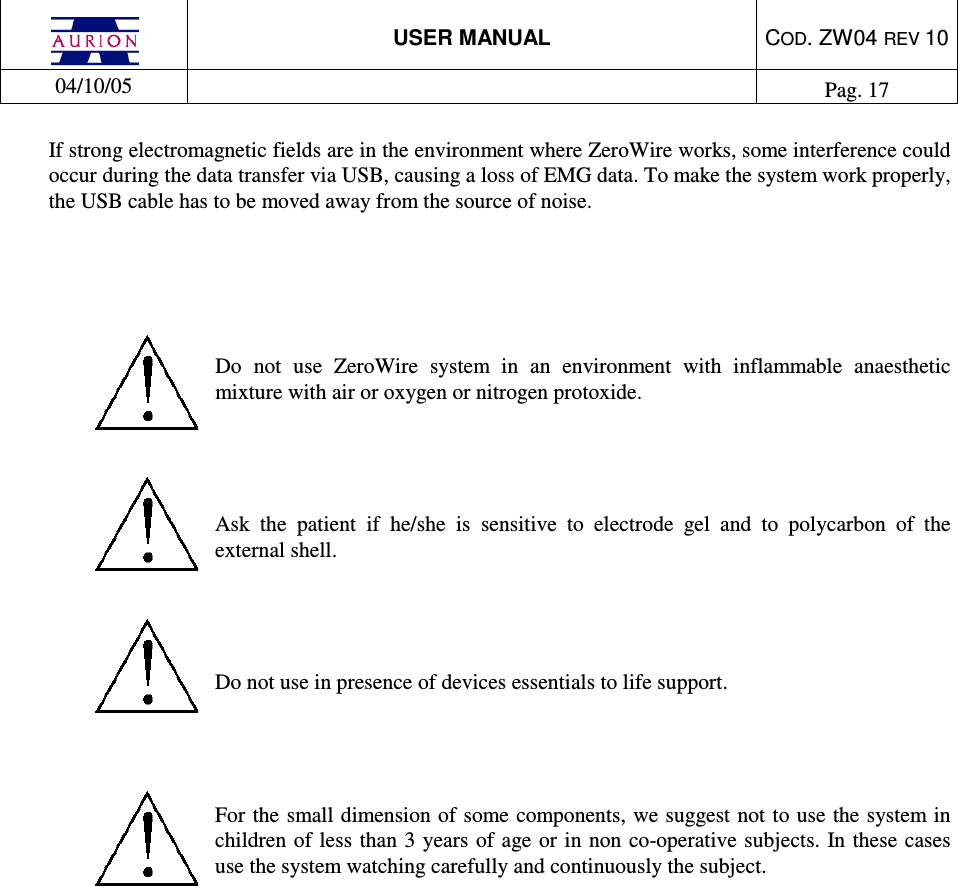
 USER MANUAL  COD. ZW04 REV 10  04/10/05    Pag. 17  If strong electromagnetic fields are in the environment where ZeroWire works, some interference could occur during the data transfer via USB, causing a loss of EMG data. To make the system work properly, the USB cable has to be moved away from the source of noise.      Do  not  use  ZeroWire  system  in  an  environment  with  inflammable  anaesthetic mixture with air or oxygen or nitrogen protoxide.    Ask  the  patient  if  he/she  is  sensitive  to  electrode  gel  and  to  polycarbon  of  the external shell.    Do not use in presence of devices essentials to life support.     For the small dimension of some components, we suggest not to use the system in children  of less  than 3 years of age or  in non co-operative subjects. In  these cases use the system watching carefully and continuously the subject.
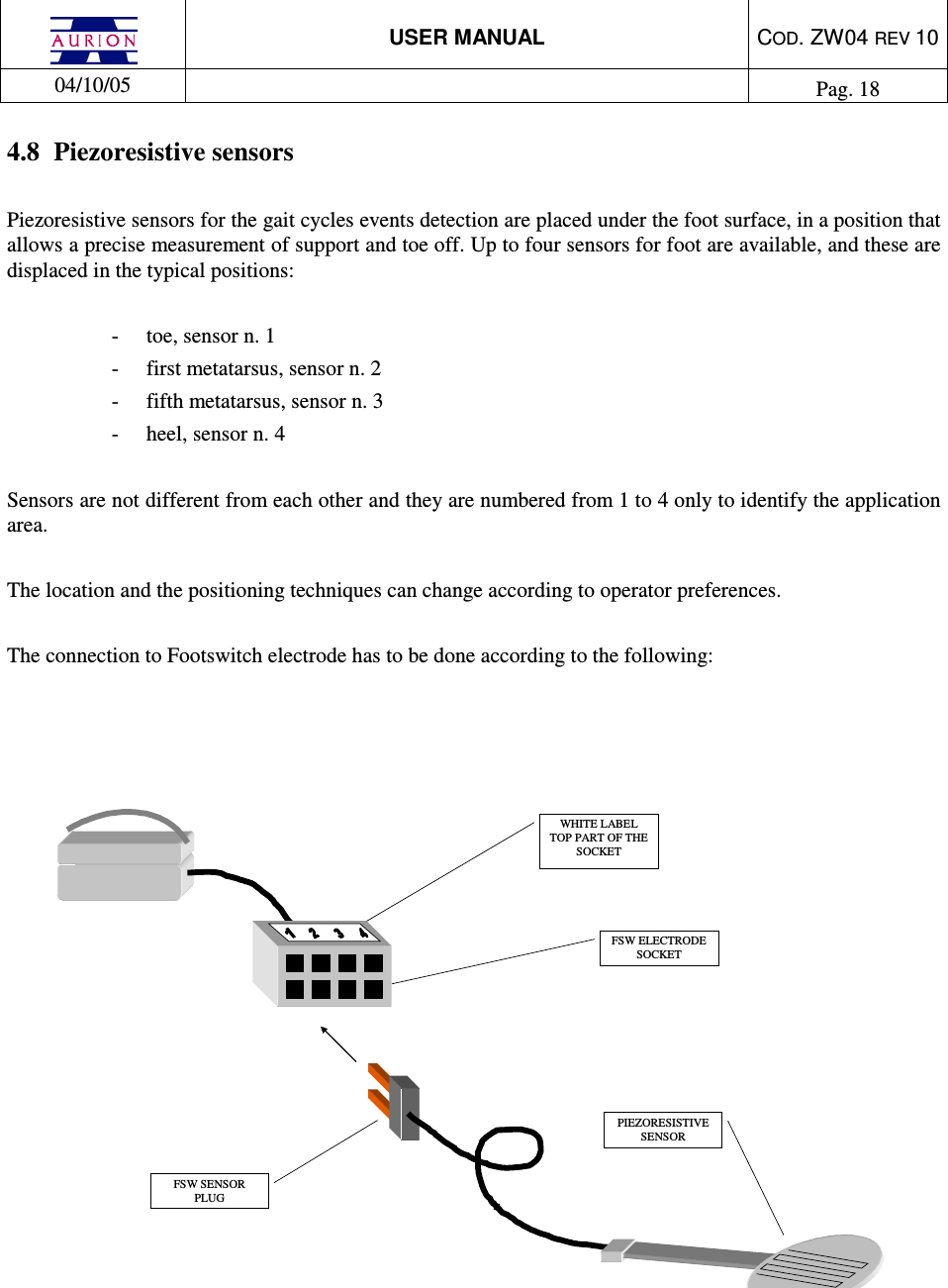
 USER MANUAL  COD. ZW04 REV 10  04/10/05    Pag. 18  4.8  Piezoresistive sensors  Piezoresistive sensors for the gait cycles events detection are placed under the foot surface, in a position that allows a precise measurement of support and toe off. Up to four sensors for foot are available, and these are displaced in the typical positions:  -  toe, sensor n. 1 -  first metatarsus, sensor n. 2 -  fifth metatarsus, sensor n. 3 -  heel, sensor n. 4  Sensors are not different from each other and they are numbered from 1 to 4 only to identify the application area.  The location and the positioning techniques can change according to operator preferences.  The connection to Footswitch electrode has to be done according to the following:      PIEZORESISTIVE SENSOR FSW ELECTRODE SOCKET FSW SENSOR PLUG WHITE LABEL  TOP PART OF THE SOCKET
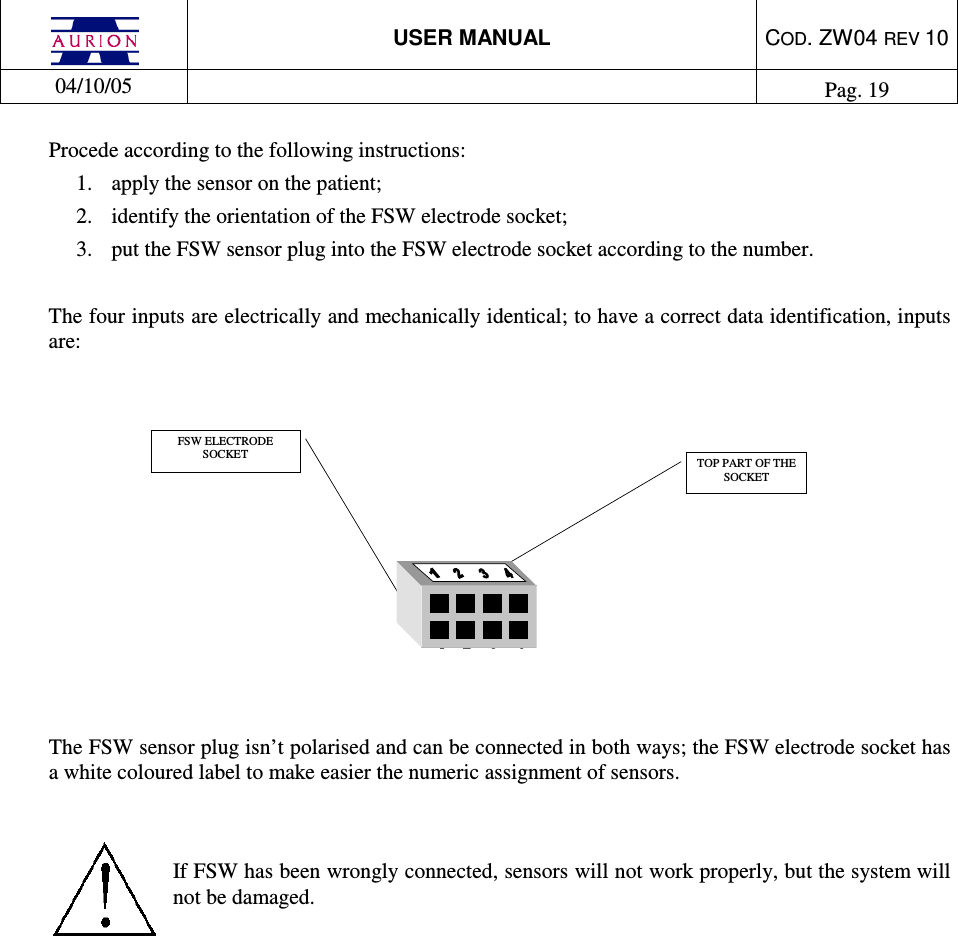
 USER MANUAL  COD. ZW04 REV 10  04/10/05    Pag. 19  Procede according to the following instructions: 1.  apply the sensor on the patient; 2.  identify the orientation of the FSW electrode socket; 3.  put the FSW sensor plug into the FSW electrode socket according to the number.  The four inputs are electrically and mechanically identical; to have a correct data identification, inputs are:    TOP PART OF THE SOCKET FSW ELECTRODE SOCKET    The FSW sensor plug isn’t polarised and can be connected in both ways; the FSW electrode socket has a white coloured label to make easier the numeric assignment of sensors.    If FSW has been wrongly connected, sensors will not work properly, but the system will not be damaged.
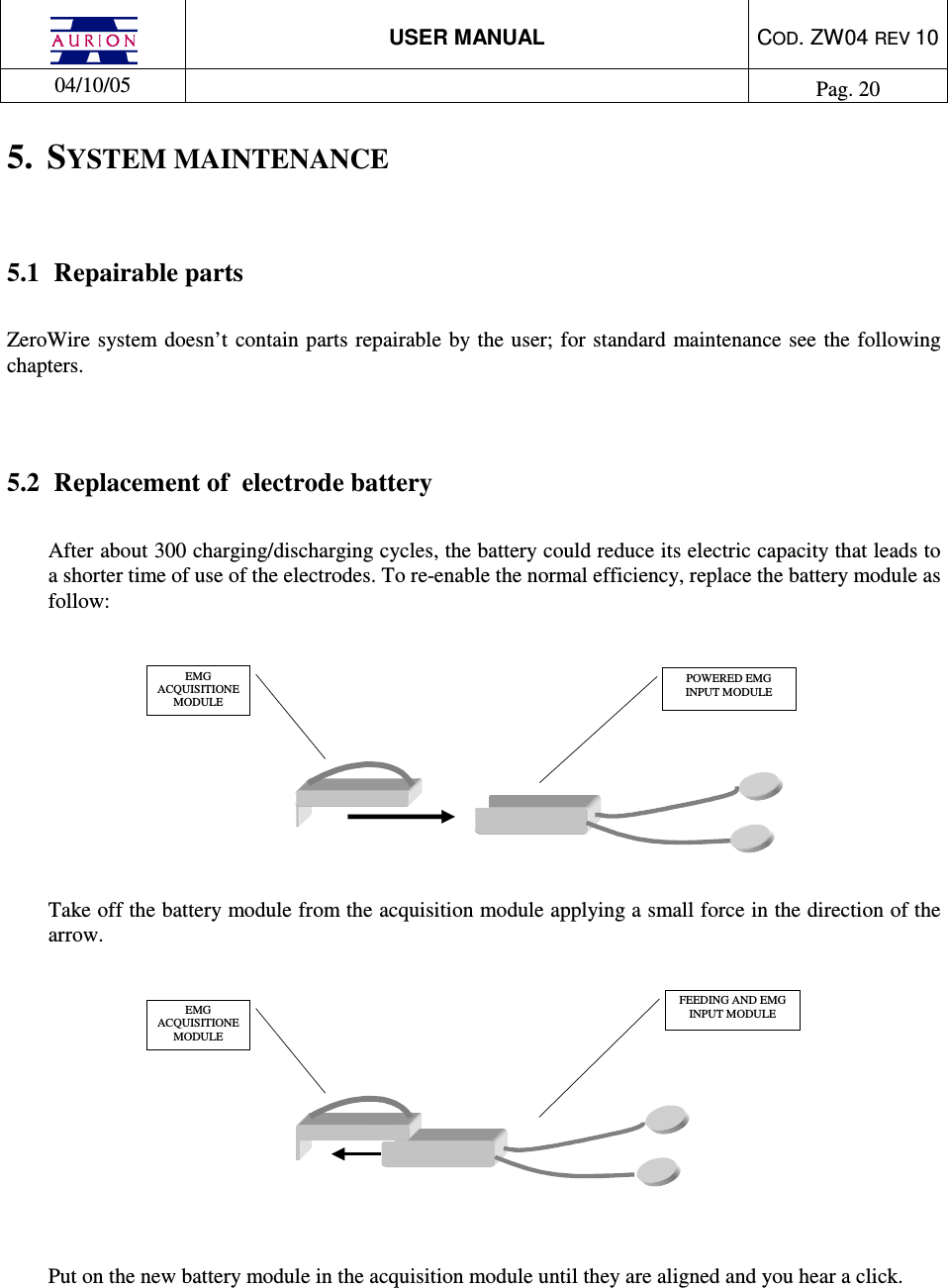
 USER MANUAL  COD. ZW04 REV 10  04/10/05    Pag. 20  5.  SYSTEM MAINTENANCE  5.1  Repairable parts  ZeroWire system  doesn’t  contain parts repairable by the user; for  standard maintenance  see the following chapters.    5.2  Replacement of  electrode battery  After about 300 charging/discharging cycles, the battery could reduce its electric capacity that leads to a shorter time of use of the electrodes. To re-enable the normal efficiency, replace the battery module as follow:   EMG ACQUISITIONE MODULE    POWERED EMG INPUT MODULE   Take off the battery module from the acquisition module applying a small force in the direction of the arrow.   EMGACQUISITIONEMODULEFEEDING AND EMGINPUT MODULE   Put on the new battery module in the acquisition module until they are aligned and you hear a click.
 USER MANUAL  COD. ZW04 REV 10  04/10/05    Pag. 21  You can find the battery module at: Aurion S.r.l. Viale Certosa, 191 20151 Milano  Tel. +39 02 87.387.000 Fax +39 02 33.499.083 e-mail: aurion@aurion.it  The replacement of the powersupply module of the foot-switch electrode is the same.    5.2.1  Module identification  Modules  are identified by a  label inside of the electrode; to access to labels see the indication in the previous paragraph.    5.3  Warnings about electrodes battery  Lithium rechargeable battery is inside the power supply module; the replacement made by the user is not allowed; only the producer can replaces it.    Lithium battery of the power supply module    Warning:    DON’T disassemble the battery.  Warning:    DON’T short-circuit the battery terminals.  Warning:  DON’T  cut  or  drill  the  battery  container;  the  electrolyte  is  dangerous  for  human body. If you touch the electrolyte, immediately wash the part with water and call a doctor.   Warning:    DON’T burn down or put the battery in the fire.  Warning:  DON’T use electrodes with battery that is losing electrolyte, or smells of electrolyte, or has the container blown up.
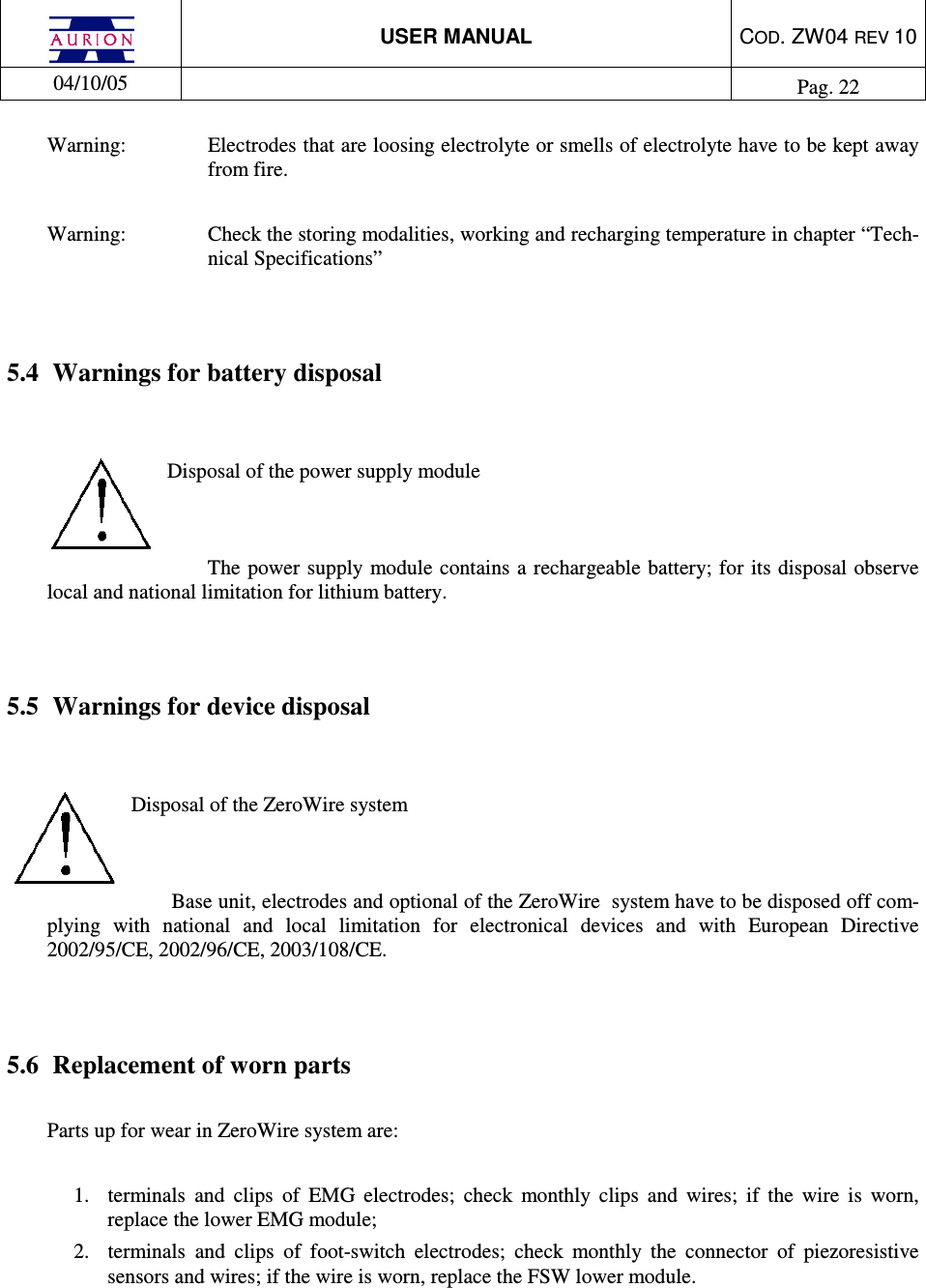
 USER MANUAL  COD. ZW04 REV 10  04/10/05    Pag. 22  Warning:  Electrodes that are loosing electrolyte or smells of electrolyte have to be kept away from fire.   Warning:  Check the storing modalities, working and recharging temperature in chapter “Tech-nical Specifications”   5.4  Warnings for battery disposal   Disposal of the power supply module   The  power supply module contains a rechargeable battery; for its disposal observe local and national limitation for lithium battery.    5.5  Warnings for device disposal   Disposal of the ZeroWire system   Base unit, electrodes and optional of the ZeroWire  system have to be disposed off com-plying  with  national  and  local  limitation  for  electronical  devices  and  with  European  Directive 2002/95/CE, 2002/96/CE, 2003/108/CE.   5.6  Replacement of worn parts   Parts up for wear in ZeroWire system are:   1.  terminals  and  clips  of  EMG  electrodes;  check  monthly  clips  and  wires;  if  the  wire  is  worn, replace the lower EMG module; 2.  terminals  and  clips  of  foot-switch  electrodes;  check  monthly  the  connector  of  piezoresistive sensors and wires; if the wire is worn, replace the FSW lower module.
 USER MANUAL  COD. ZW04 REV 10  04/10/05    Pag. 23  5.7  ZeroWire cleaning  To clean ZeroWire system components use a soft cloth damped with neutral soap. System components are NOT protected by liquid infiltration.   The cleaning of the system elements has to be done: 1.  base unit: every six months or more often if required  2.  electrodes: every 50 hour or more often if required  Warning:  liquid  infiltration can  cause  the EMG  signal amplitude reduction, or  the interruption of the electrode functioning. In these cases, proceed as follow: -  take  of  the  acquisition  module  (upper  part)  from  the  battery  module,  as  described  in “Replacement of  electrode battery” chapter; -  remove the liquid with a dry cloth;  -  make  the  modules  drying  using  a  low  temperature  source  (thermosiphon  or  owen  at maximum 30°C);  If the problem holds over, change the electrode.    5.8  References   In the event  of  non-functioning,  breakdown  or  other  problems  dealing  with  ZeroWire  system, please contact:   Aurion S.r.l. Viale Certosa, 191 20151 Milano  Tel. +39 02 87.387.000 Fax +39 02 33.499.083 e-mail: aurion@aurion.it  or the authorised service:
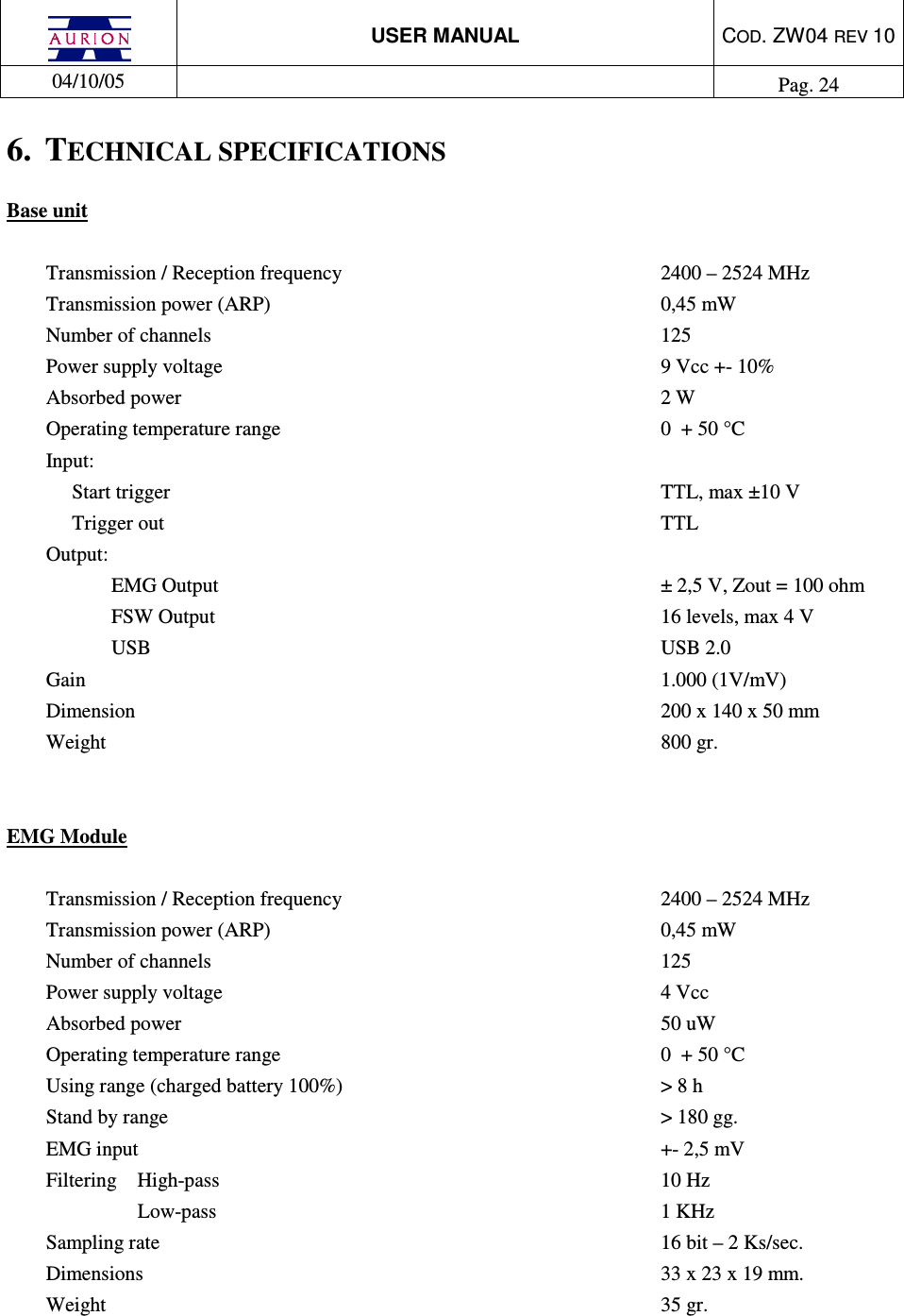
 USER MANUAL  COD. ZW04 REV 10  04/10/05    Pag. 24  6.  TECHNICAL SPECIFICATIONS Base unit  Transmission / Reception frequency          2400 – 2524 MHz Transmission power (ARP)            0,45 mW Number of channels              125 Power supply voltage              9 Vcc +- 10% Absorbed power                2 W Operating temperature range            0  + 50 °C Input:   Start trigger                TTL, max ±10 V   Trigger out                 TTL Output:                   EMG Output              ± 2,5 V, Zout = 100 ohm FSW Output              16 levels, max 4 V USB                USB 2.0 Gain                  1.000 (1V/mV) Dimension                 200 x 140 x 50 mm Weight                  800 gr.   EMG Module   Transmission / Reception frequency          2400 – 2524 MHz Transmission power (ARP)            0,45 mW Number of channels              125 Power supply voltage              4 Vcc  Absorbed power                50 uW Operating temperature range            0  + 50 °C Using range (charged battery 100%)          > 8 h Stand by range                > 180 gg. EMG input                +- 2,5 mV  Filtering  High-pass               10 Hz Low-pass                1 KHz Sampling rate                16 bit – 2 Ks/sec. Dimensions                33 x 23 x 19 mm. Weight                  35 gr.
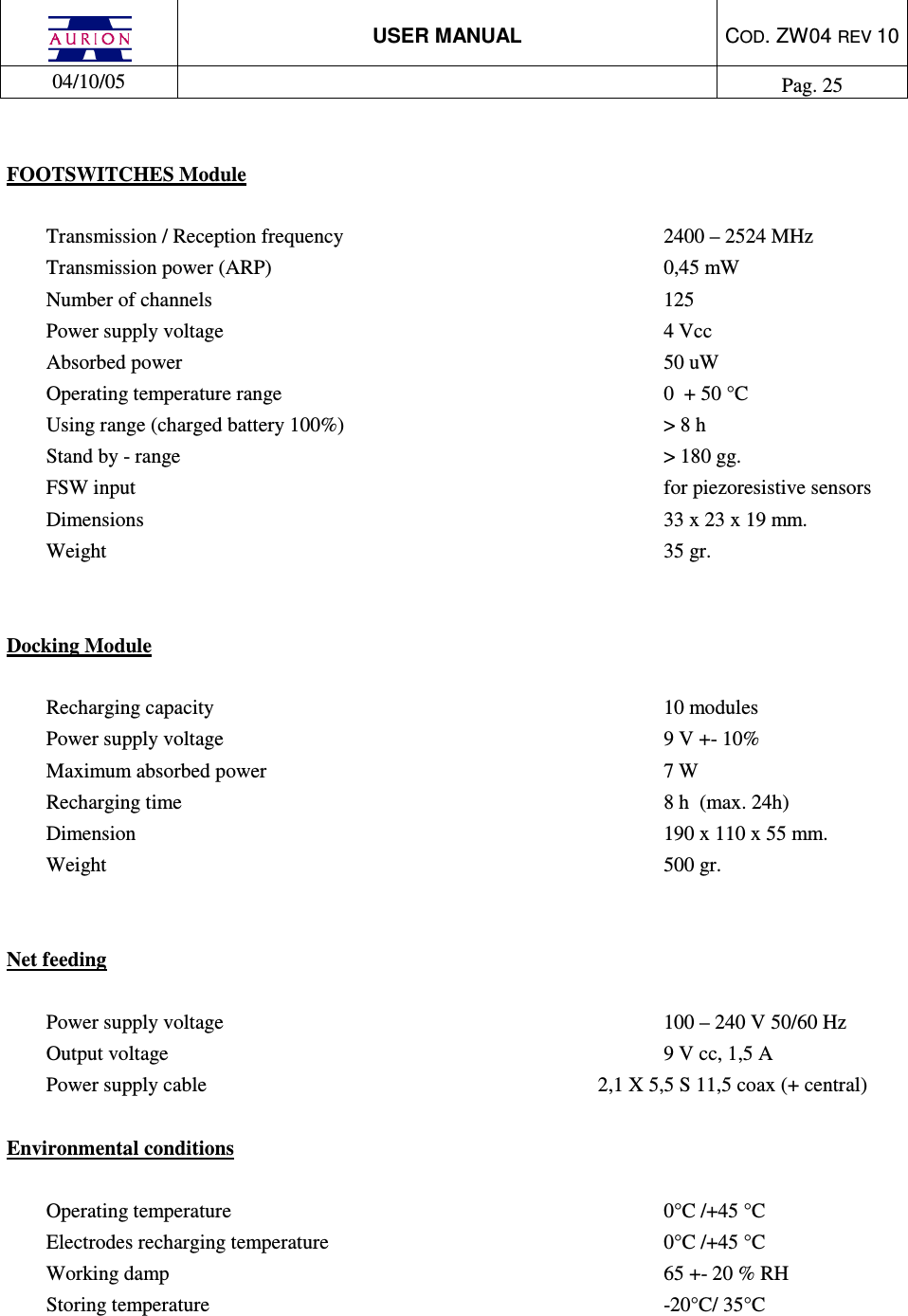
 USER MANUAL  COD. ZW04 REV 10  04/10/05    Pag. 25   FOOTSWITCHES Module   Transmission / Reception frequency          2400 – 2524 MHz Transmission power (ARP)            0,45 mW Number of channels              125 Power supply voltage              4 Vcc  Absorbed power                50 uW Operating temperature range            0  + 50 °C Using range (charged battery 100%)          > 8 h Stand by - range                > 180 gg. FSW input                 for piezoresistive sensors  Dimensions                33 x 23 x 19 mm. Weight                  35 gr.   Docking Module   Recharging capacity              10 modules Power supply voltage              9 V +- 10% Maximum absorbed power             7 W Recharging time                 8 h  (max. 24h) Dimension                 190 x 110 x 55 mm. Weight                  500 gr.   Net feeding  Power supply voltage              100 – 240 V 50/60 Hz Output voltage                9 V cc, 1,5 A Power supply cable         2,1 X 5,5 S 11,5 coax (+ central)  Environmental conditions   Operating temperature              0°C /+45 °C Electrodes recharging temperature           0°C /+45 °C Working damp                65 +- 20 % RH Storing temperature              -20°C/ 35°C
 USER MANUAL  COD. ZW04 REV 10  04/10/05    Pag. 26  6.1  Suitability  For a  correct functioning of the radio link between electrodes and base unit, the relative distance has not to be bigger than ten meters.

Navigation menu