Automotive Data Solutions TR2410A REMOTE STARTER (TWO WAY) User Manual
Automotive Data Solutions Inc. REMOTE STARTER (TWO WAY)
User manual
OWNER’S
MANUAL
®/MD
VW2 (VW2410A)
INSTRUCTIONS EN FRANÇAIS AU VERSO
2016/06
2 IDATASTART OWNER’S GUIDE
CUSTOMER SUPPORT: 866.427.2999 / WWW.IDATASTART.COM
WELCOME TO IDATASTART
Congratulations on the purchase of your iDataStart VW2 remote start system. Please take a moment to
review the following table of contents to help you quicly access the information you need.
iDataStart remote overview 3
iDataStart remote functions & confirmations 4
Programming a new iDataStart remote 4
Replacing iDataStart remote batteries 5
Remote starting from your factory key fob 5
Adjusting engine runtime settings 6
Key takeover following remote start 6
When servicing your vehicle (Valet Mode) 7
Remote start troubleshooting 8
Vehicle shutdown troubleshooting 9
Limited lifetime warranty 10
Headquartered in Montreal, Canada, Automotive Data Solutions Inc. (ADS) is a privately held company specialized in the
development and marketing of remote start and audio integration solutions destined for the automotive aftermarket. ADS’
award-winning products (marketed under the iDatalink
®
, iDatalink Maestro
®
and iDataStart
®
brands) are sold and installed
through a network of Authorized Dealers across North America, South America, Europe and Russia. For more information
about ADS’ products and services, visit www.adsdata.ca.
IDATASTART OWNER’S GUIDE 3
CUSTOMER SUPPORT: 866.427.2999 / WWW.IDATASTART.COM
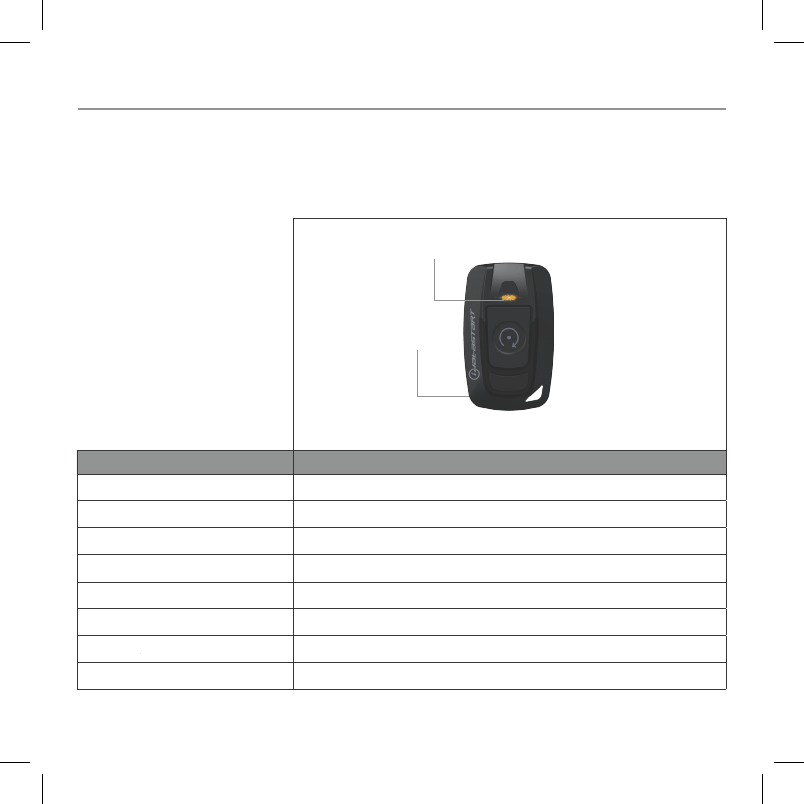
REMOTE MODEL TR2410A
Technology LoRa 2-WAY
Max. Range 1 Mile
Buttons 1
Transmit Confirmation (TX) Top LED
Receive Confirmation (RX) Top LED
Batteries Required 1 x CR2450
Avg. Battery Life 8 to 15 months
Warranty 1 year
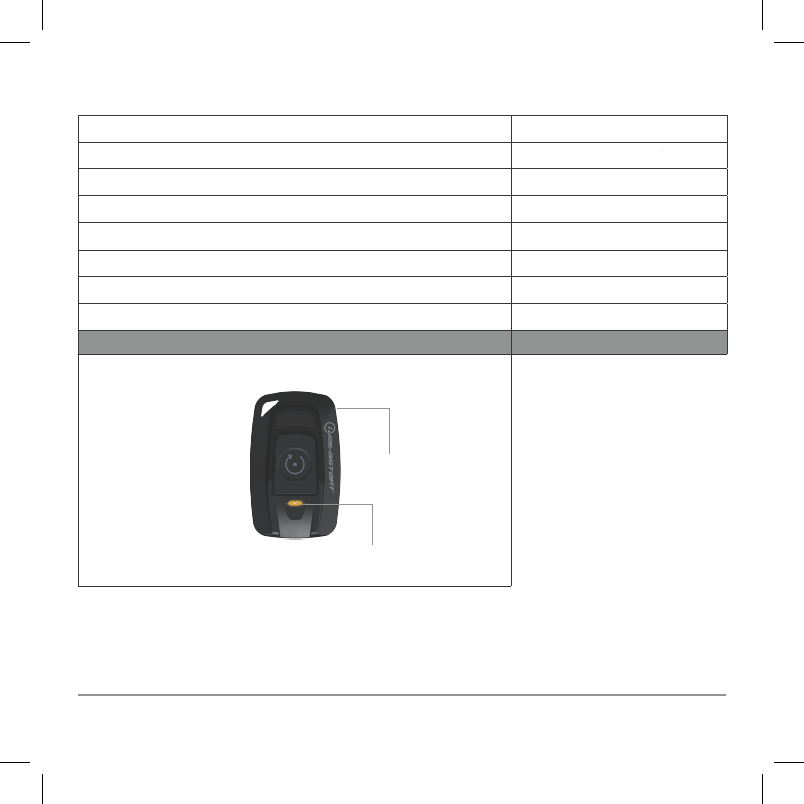
IDATASTART REMOTE OVERVIEW
Your iDataStart VW2 remote start system includes the long-range remote listed below. Please take a moment
to familiarize yourself with its general features.
TOP LED (TX/RX)
CASING
RELEASE
4 IDATASTART OWNER’S GUIDE
CUSTOMER SUPPORT: 866.427.2999 / WWW.IDATASTART.COM
IDATASTART REMOTE FUNCTIONS & CONFIRMATIONS
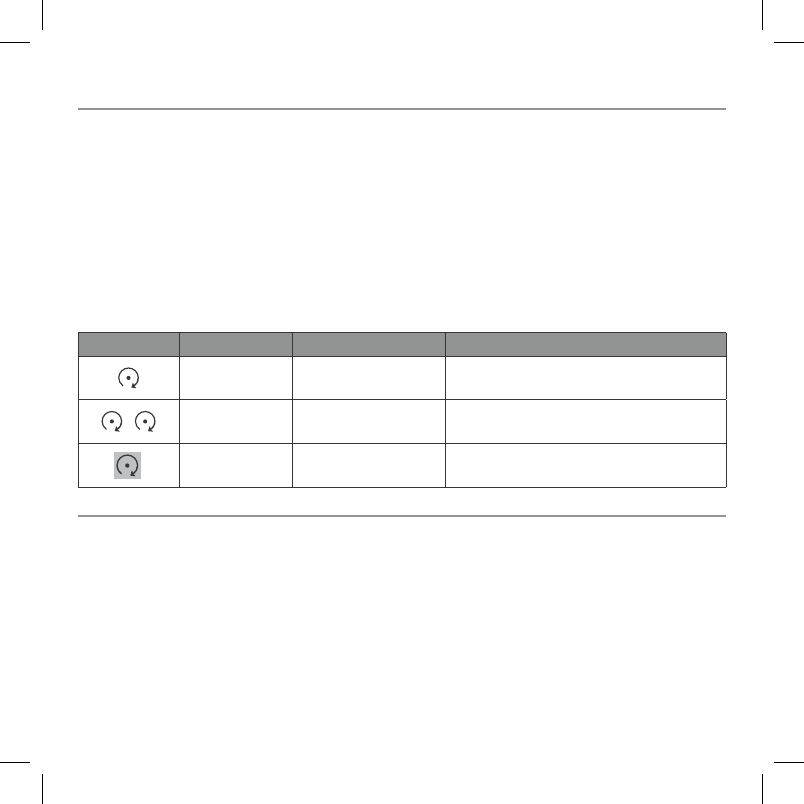
Thanks to their multiplexing technology, iDataStart remotes can start, stop, lock and unlock your vehicle
using only 1 button. Please take a moment to get acquainted with the following functions below:
NOTES:
1. Non-highlighted icons = Press & release button
2. Coma (,) between icons = Press buttons one after the other
3. Highlighted (grey) icons = Press & hold button for 2.5 seconds
4. Timeout between each button press = 3 seconds
5. Confirmations are only available with TR2310A (2-way) remote
BUTTONS FUNCTION CONFIRMATION 2WAY ONLY FUNCTION DESCRIPTION
Lock & Arm 1 chime + 1 flash Secures your vehicle by locking the doors
and arming the alarm.
, Unlock &
Disarm 2 chimes + 2 flashes Access your vehicle by unlocking the doors
and disarming the alarm.
Start/Stop 4 chimes + 4 flashes Starts and stops the engine.
PROGRAMMING A NEW IDATASTART REMOTE
Are you replacing a lost or damaged remote or simply adding an extra remote to your iDataStart system?
Please take note of the following:
1. A functional iDataStart system must already be installed in your vehicle.
2. All new remotes must be installed by an iDataStart Authorized Dealer.
3. A maximum of 4 remotes can be programmed to your iDataStart system.
IDATASTART OWNER’S GUIDE 5
CUSTOMER SUPPORT: 866.427.2999 / WWW.IDATASTART.COM
REMOTE STARTING FROM FACTORY KEY FOB
Available on most vehicles, your iDataStart system will enable remote start functionality from your factory
key fob as follows:
BUTTON PRESS FUNCTION
3x rapidly Start engine
3x rapidly Stop engine
Remote start range will vary by key fob. If your iDataStart system does not include long range remotes,
you may still add iDataStart remotes (sold separately) at a later date. Ask your iDataStart Authorized
Dealer for details.
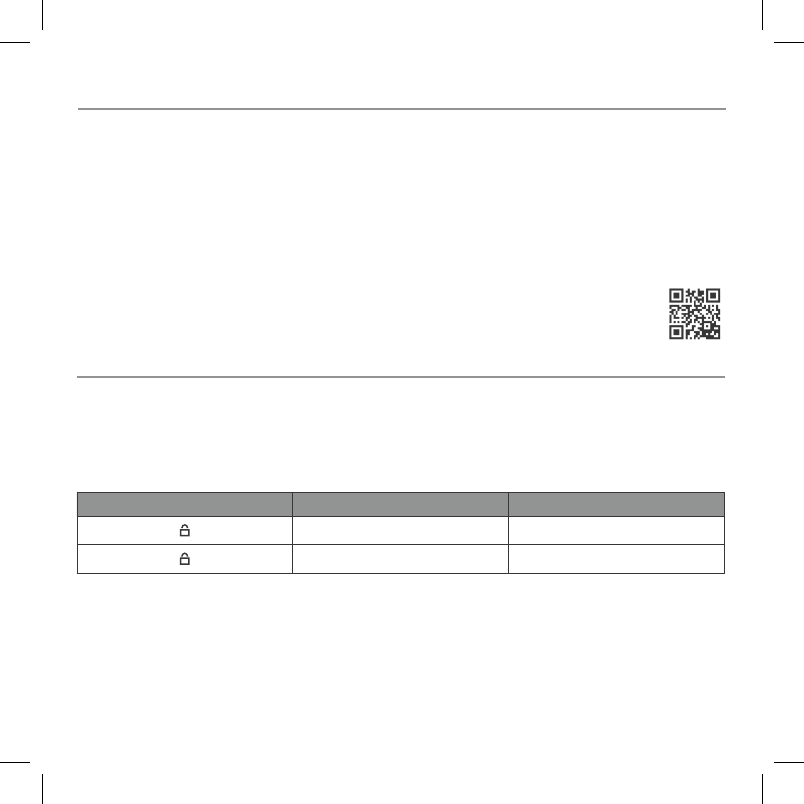
Follow the steps below to replace the batteries in your iDataStart remotes OR scan the QR code below to
view a video tutorial.
1. Insert a 25 cent coin into the hollow (bottom left) corner of your iDataStart remote.
2. Gently twist the coin until the casing pops open.
3. Use your coin to pry open the rest of the case perimeter.
4. Carefully temove the circuit board from the case.
5. Slide the old battery out of its enclosure and replace with the new battery.
6. Carefully replace the circuit board into bottom half of the casing.
7. Snap top and bottom casings back together using your hands.
REPLACING IDATASTART REMOTE BATTERIES

6 IDATASTART OWNER’S GUIDE
CUSTOMER SUPPORT: 866.427.2999 / WWW.IDATASTART.COM
ADJUSTING ENGINE RUNTIME SETTINGS
Once remote started from your factory key fob or long-range remote, your vehicle will run for the
programmed ‘runtime’ setting. The default runtime is 15 minutes but it can also be programmed for
3, 5, 10, 25, 30 or 35 minutes. If you wish to change your remote start runtime setting, contact your
iDataStart Authorized Dealer.
KEY TAKEOVER FOLLOWING REMOTE START
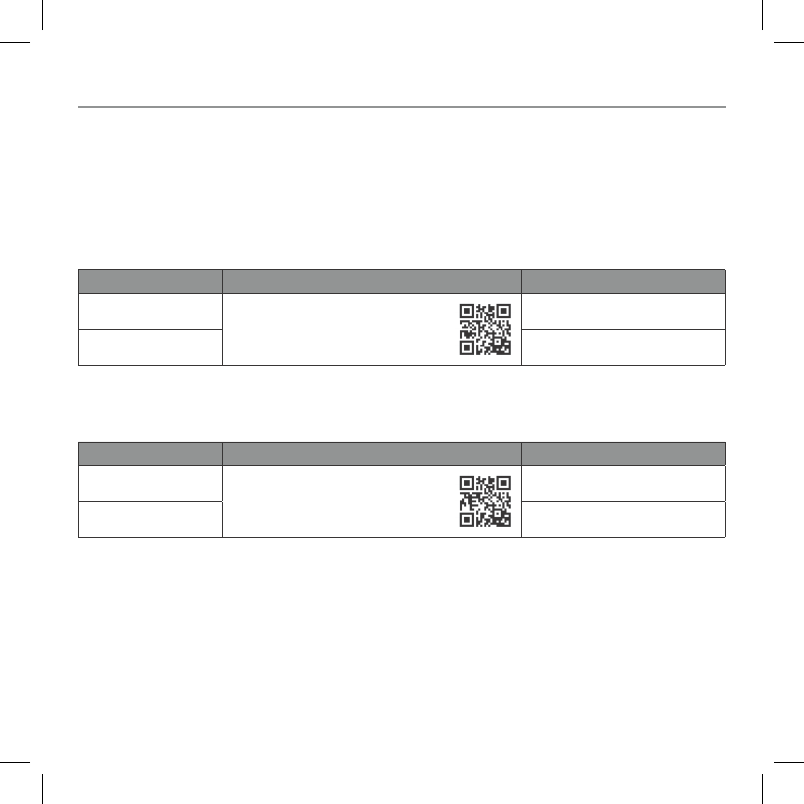
Available on some vehicles, the ‘key takeover’ procedure ensures that your engine does not turn off
when entering the car during the remote start runtime, following a remote start command. Follow the
instructions below or scan the QR code to view a video tutorial.
For Standard Key Vehicles
1. Unlock and enter vehicle
2. Close doors
3. Insert key into ignition and turn ignition to ON position
4. Press foot brake
For Push-To-Start Vehicles
1. Unlock and enter vehicle with valid smartkey
2. Close doors
3. Press foot brake
NOTE: To prevent your vehicle from shutting down, complete the steps below within the programmed
delay time (45 seconds, 90 seconds, 3 minutes or 4 minutes). Key takeover procedure may vary by
vehicle, ask your iDataStart Authorized Dealer for deatails.
IDATASTART OWNER’S GUIDE 7
CUSTOMER SUPPORT: 866.427.2999 / WWW.IDATASTART.COM
WHEN SERVICING YOUR VEHICLE
To ensure safety during vehicle servicing, the remote starter must be placed in ‘Valet Mode’. The ‘Valet
Mode’ will disable remote start functionality. To activate or deactivate the ‘Valet Mode’, follow the
instructions below or scan the QR codes to view a video tutorial.
With Vehicle Key
FUNCTION ACTION # OF PARKING LIGHT FLASHES
Valet Mode ON Cycle ignition OFF/ON 2x rapidly,
then press brake 3x.
1
Valet Mode OFF 2
With iDataStart Antenna
FUNCTION ACTION # OF LED & PARKING LIGHT FLASHES
Valet Mode ON Turn ignition ON, then press
& hold button for 5 seconds
1
Valet Mode OFF 2
8 IDATASTART OWNER’S GUIDE
CUSTOMER SUPPORT: 866.427.2999 / WWW.IDATASTART.COM
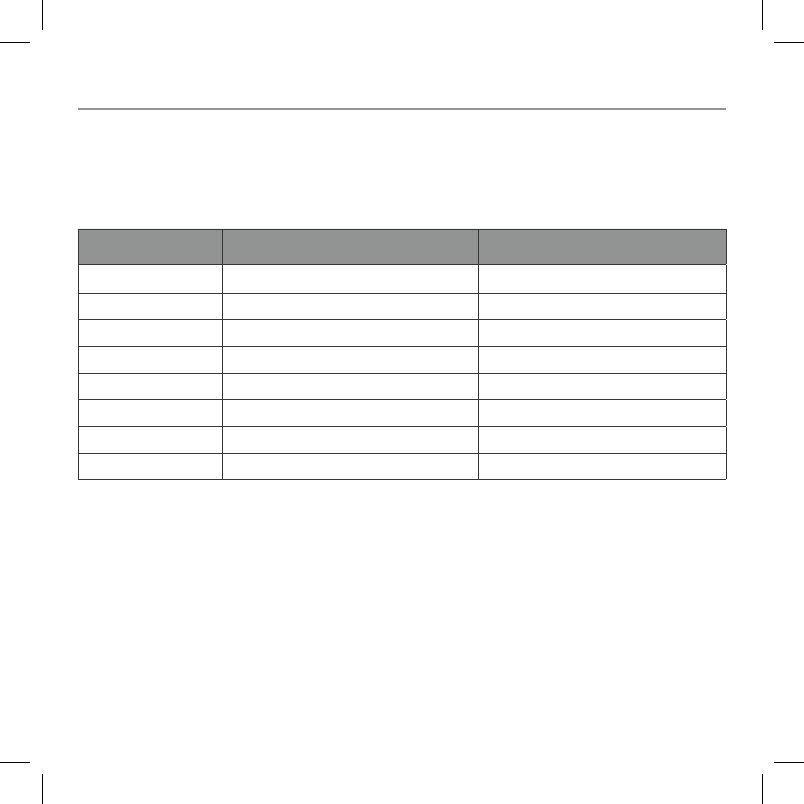
REMOTE START TROUBLESHOOTING
If your iDataStart remote fails to start the vehicle, the parking lights will flash three times immediately,
then flash a number of times according to the errors below:
# OF PARKING LIGHT
FLASHES DIAGNOSTIC SOLUTION
3 + 1 Engine is already running Turn engine OFF
3 + 2 Key in ignition at ON position Remove key from ignition
3 + 4 Trunk is open Close trunk
3 + 5 Foot brake is ON Release foot brake
3 + 6 Hood is open Close hood
3 + 8 Tach failure Contact Authorized Dealer
3 + 10 System is in Valet Mode Exit Valet Mode
3 + 11 Can communication failure Contact Authorized Dealer

IDATASTART OWNER’S GUIDE 9
CUSTOMER SUPPORT: 866.427.2999 / WWW.IDATASTART.COM
VEHICLE SHUTDOWN TROUBLESHOOTING
If the remote start sequence has been completed and the vehicle shuts down, the vehicle’s parking lights
will flash 4 times immediately, then flash a number of times according to the errors below:
# OF PARKING LIGHT
FLASHES DIAGNOSTIC SOLUTION
4+1 No engine rev detected Turn ignition ON before trying to remote
start
4+3 Foot brake detected Release foot brake
4+4 Hood open detected Close hood
4+5 Engine revving over 3000 RPM Check your accelerator pedal
4+6 Glow plug error Contact Authorized Dealer
4+7 Vehicle speed sensor error Contact Authorized Dealer
4+8 ‘Check Engine’ light detected Clear ‘Check Engine’ code
4+9 Low fuel detected Add fuel
4+10 Door open detected Close door
4+11 CAN communication failure Contact Authorized Dealer
4+13 Key takeover not allowed Key fob not detected OR Takeover
procedure not completed correctly OR
takeover is not available for your vehicle
4+14 Module overheat protection Contact Authorized Dealer

10 IDATASTART OWNER’S GUIDE
CUSTOMER SUPPORT: 866.427.2999 / WWW.IDATASTART.COM
LIMITED LIFETIME WARRANTY
Automotive Data Solutions Inc. (“ADS”) warrants to the original purchaser of the iDataStart product that
the following components product shall be free of defects in material and workmanship under normal
use and circumstances:
Control module and installation harnesses
For as long as the original purchaser owns the vehicle in which it was originally installed.
Remote transmitters and antenna
For the period of one (1) year from the date of original installation.
Excludes battery replacement.
In the event of any product malfunction during the Warranty period, the original purchaser must return
to the Authorized Dealer where it was originally purchased with the original proof of purchase. If a
malfunction is detected, the Authorized Dealer will elect to repair or replace the product at its discretion.
Labor costs may be applicable and are at the discretion of the Authorized Dealer.
THE LIMITED LIFETIME WARRANTY IS AUTOMATICALLY VOID IF:
• An original proof of purchase is not provided when servicing the product
during the warranty period;
• The date code and/or serial number is defaced, missing, or altered;
• The iDataStart product is transferred to another vehicle;
• The vehicle in which the product was originally installed is transferred to a new owner.
ADS is not responsible for any damages whatsoever, including but not limited to any consequential
damages, incidental damages, damages for loss of time, loss of earnings, commercial loss, loss of
economic opportunity and the like that may or may not have resulted from the installation or operation
of an iDataStart product.

IDATASTART OWNER’S GUIDE 11
CUSTOMER SUPPORT: 866.427.2999 / WWW.IDATASTART.COM
FCC STATEMENT
1. This device complies with Part 15 of the FCC Rules. Operation is subject to the following two conditions:
(1) This device may not cause harmful interference.
(2) This device must accept any interference received, including interference that may cause undesired
operation.
2. Changes or modifications not expressly approved by the party responsible for compliance could void the
user’s authority to operate the equipment.
NOTE: This equipment has been tested and found to comply with the limits for a Class B digital device,
pursuant to Part 15 of the FCC Rules. These limits are designed to provide reasonable protection against
harmful interference in a residential installation.
This equipment generates uses and can radiate radio frequency energy and, if not installed and used in
accordance with the instructions, may cause harmful interference to radio communications. However, there
is no guarantee that interference will not occur in a particular installation. If this equipment does cause
harmful interference to radio or television reception, which can be determined by turning the equipment off
and on, the user is encouraged to try to correct the interference by one or more of the following measures:
•
Reorient or relocate the receiving antenna.
•
Increase the separation between the equipment and receiver.
•
Connect the equipment into an outlet on a circuit different from that to which the receiver is connected.
•
Consult the dealer or an experienced radio/TV technician for help.

12 IDATASTART OWNER’S GUIDE
CUSTOMER SUPPORT: 866.427.2999 / WWW.IDATASTART.COM
SAR INFORMATION STATEMENT
Your wireless REMOTE STARTER (TWO WAY) is a radio transmitter and receiver. It is designed and
manufactured not to exceed the emission limits for exposure to radio frequency (RF) energy set by the
Federal Communications Commission of the U.S. Government. These limits are part of comprehensive
guidelines and establish permitted levels of RF energy for the general population. The guidelines are
based on standards that were developed by independent scientific organizations through periodic and
thorough evaluation of scientific studies. The standards include a substantial safety margin designed to
assure the safety of all persons, regardless of age and health.
The exposure standard for wireless REMOTE STARTER (TWO WAY) employs a unit of measurement
known as the Specific Absorption Rate, or SAR. The SAR limit set by the FCC is 4.0 W/kg. Tests for SAR are
conducted with the REMOTE STARTER (TWO WAY) transmitting at its highest certified power level in
all tested frequency bands. Although the SAR is determined at the highest certified power level, the actual
SAR level of the REMOTE STARTER (TWO WAY) while operating can be well below the maximum value.
This is because the REMOTE STARTER (TWO WAY) is designed to operate at multiple power levels so
as to use only the power required to reach the network.
Before a
REMOTE STARTER (TWO WAY) model is available for sale to the public, it must be tested and certified
to the FCC that it does not exceed the limit established by the government adopted requirement for safe
exposure. The tests are performed in positions and locations (e.g., at the ear and worn on the body) as
required by the FCC for each model. The highest SAR value for this model REMOTE STARTER (TWO
WAY) when tested for use at the extremity is 0.026W/Kg.
While there may be differences between the SAR levels of various REMOTE STARTER (TWO WAY) and
at various positions, they all meet the government requirement for safe exposure. The FCC has granted an
Equipment Authorization for this model REMOTE STARTER (TWO WAY) with all reported SAR levels
evaluated as in compliance with the FCC RF exposure guidelines. SAR information on this model REMOTE
STARTER (TWO WAY) is on file with the FCC and can be found under the Display Grant section of
http://www.fcc.gov/oet/fccid after searching on FCC ID:2AEPJ-TR2410A. Additional information on Specific
Absorption Rates (SAR) can be found on the Cellular Telecommunications Industry Association (CTIA)
website at http://www.wow-com.com.*

IDATASTART OWNER’S GUIDE 13
CUSTOMER SUPPORT: 866.427.2999 / WWW.IDATASTART.COM
IC STATEMENT
In the United States and Canada, the SAR limit for REMOTE STARTER (TWO WAY) used by the public is
4.0 W/kg averaged over 10 gram of tissue. The standard incorporates a substantial margin of
safety to give additional protection for the public and to account for any variations in measurements.
This device complies with FCC and ISED 10-g extremity SAR requirements when the device is used at 0mm
separation.
Changes or modifications not expressly approved by the party responsible for compliance could void the
user’s authority to operate the equipment.
This device complies with Industry Canada licence-exempt RSS standard(s). Operation is subject to the
following two conditions:
(1) This device may not cause interference.
(2) This device must accept any interference, including interference that may cause undesired operation
of the device.
This equipment complies with IC radiation exposure limits set forth for an uncontrolled environment.
End user must follow the specific operating instructions for satisfying RF exposure compliance.
This transmitter must not be co-located or operating in conjunction with any other antenna or transmitter.
These requirements set a SAR limit of 4.0 W/kg, averaged over 10 gram of tissue.
The highest SAR value reported under. This standard during product certification for use when properly
test at the extremity is 0.026W/kg.
CAN ICES-3 (B)/NMB-3(B)

GUIDE D’UTILISATION IDATASTART 11
SERVICE À LA CLIENTÈLE: 866.427.2999 / WWW.IDATASTART.COM
CONFORME AUX RÈGLES D’INDUSTRIE CANADA
Le présent appareil est conforme aux CNR d’Industrie Canada applicables aux appareils radio exempts de
licence. L’exploitation est autorisée aux deux conditions suivantes:
(1) l’appareil ne doit pas produire de brouillage, et
(2) l’utilisateur de l’appareil doit accepter tout brouillage radio électrique subi, même si le brouillage
est susceptible d’en compromettre le fonctionnement.
Cet équipement est conforme aux limites d’exposition aux rayonnements de la IC définies pour un
environnement non contrôlé.
L’utilisateur final doit respecter les instructions de fonctionnement spécifiques pour satisfaire la
conformité aux expositions RF. Cet émetteur ne doit pas être co-localisées ou opérant en conjonction avec
une autre antenne ou émetteur.
Ces exigences défnissent la valeur SAR limite
à 4.0 W/kg, en moyenne pour 10 gramme de tissu. La valeur SAR la plus élevée pour ce modèle d’alarme
de voiture (deux voies) lorsqu’il est testé pour une utilisation à l’extrémité est de 0.026W/ Kg.
Cet appareil respecte les exigences de 10 g extrémité SAR FCC et ISED lorsque l’appareil est utilisé lors
de la séparation de 0 mm.
CAN ICES-3 (B)/NMB-3(B)

10 GUIDE D’UTILISATION IDATASTART
SERVICE À LA CLIENTÈLE: 866.427.2999 / WWW.IDATASTART.COM
GARANTIE À VIE LIMITÉE
Automotive Data Solutions Inc. (ADS) garantit à l’acheteur original du produit iDataStart que les
composantes du produit inscrites ci-dessous sont exemptes de défauts dans les matériels et de
fabrication, et ce, dans des conditions normales d’utilisation et dans les circonstances suivantes:
Le module de contrôle et les câblages d’installation
Sous garantie tant et aussi longtemps que l’acheteur original est propriétaire du véhicule dans lequel
le produit a été initialement installé.
Les télécommandes et l’antenne
Sous garantie pour une période d’un (1) an à compter de la date d’installation initiale. Le
remplacement des batteries n’est pas couvert par la garantie.
Si le produit ne fonctionne pas correctement alors qu’il est encore sous garantie, l’acheteur original
doit retourner chez le détaillant autorisé où il a acheté son produit avec la preuve d’achat originale. Si le
détaillant autorisé détecte une quelconque anomalie, il réparera ou de remplacera le produit, et ce, à sa
discrétion. Des frais de main d’oeuvre peuvent s’appliquer et sont à la discrétion du détaillant autorisé.
LA GARANTIE À VIE LIMITÉE EST AUTOMATIQUEMENT ANNULÉE SI:
• La preuve d’achat originale n’est pas présentée lors de l’entretien du produit durant la période
couverte par la garantie;
• Le code de date et/ou le numéro de série sont raturés, manquants ou altérés;
• Le produit iDataStart est transféré à un autre véhicule;
• Le véhicule dans lequel le produit a été installé initialement est transféré à un nouveau propriétaire.
ADS n’accepte aucune responsabilité pour tout dommage, y compris, sans s’y limiter, aux dommages
consécutifs, dommages indirects, dommages pour pertes de temps, pour pertes de revenus, pour
pertes commerciales, pour pertes de possibilités économiques qui pourraient ou non avoir résulté de
l’installation ou du fonctionnement d’un produit iDataStart.
GUIDE D’UTILISATION IDATASTART 9
SERVICE À LA CLIENTÈLE: 866.427.2999 / WWW.IDATASTART.COM
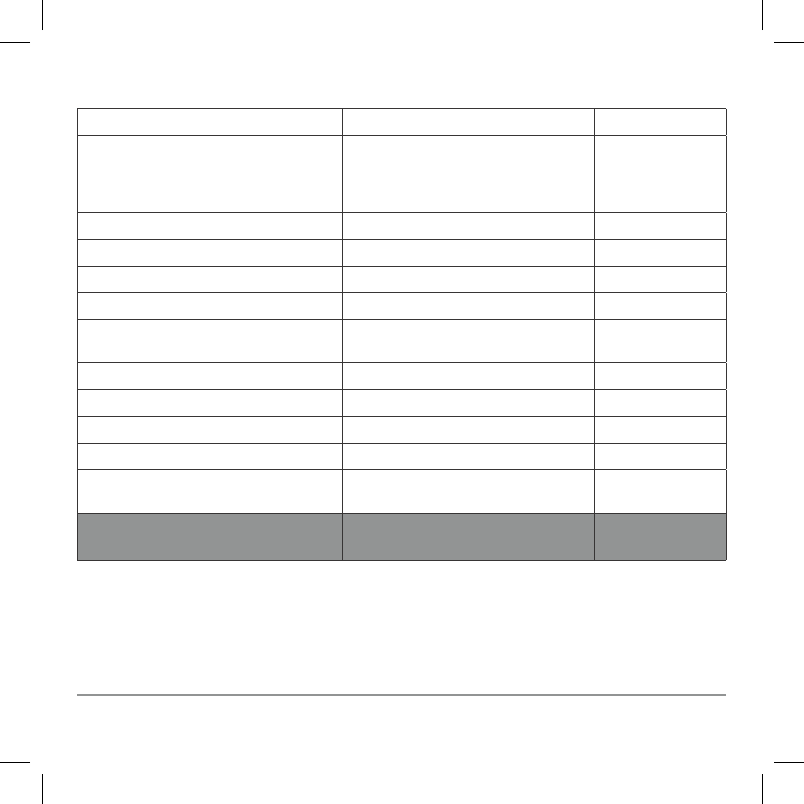
DÉPANNAGE EN CAS D'ARRÊT DU MOTEUR
Si le moteur s’éteint suite au démarrage à distance, les feux de stationnement clignoteront un certain
nombre de fois pour signaler une erreur. Veuillez consulter le tableau ci-dessous pour déterminer la
cause de l’erreur ainsi que la solution.
# DE CLIGNOTTEMENTS
DES FEUX
DE STATIONNEMENT
ERREUR SOLUTION
4+1 Aucune révolution de moteur détectée Tournez la clé à ON avant d’essayer le
démarrage à distance
4+3 Frein à main détecté Désactivez le frein à main
4+4 Capot ouvert détecté Fermez la capot
4+5 Moteur tourne à plus de 3000 RPM Vérifiez votre accélérateur
4+6 Erreur de bougies de préchauffage Contactez votre détaillant autorisé
4+7 Erreur du capteur de vitesse du
véhicule
Contactez votre détaillant autorisé
4+8 Lumière ‘Check Engine’ détectée Effacez le code ‘Check Engine’
4+9 Niveau d’essence trop bas Ajoutez de l’essence
4+10 Porte ouverte détectée Fermez la porte
4+11 Échec de la communication CAN Contactez votre détaillant autorisé
4+13 Key takeover not allowed Clé non-détectée OU procédure de prise
en charge de la clé n’est pas complétée
OU procédure de prise en charge de la
clé ne s’applique pas à votre véhicule
4+14 Protection de surchauffe du module Contactez votre détaillant autorisé
8 GUIDE D’UTILISATION IDATASTART
SERVICE À LA CLIENTÈLE: 866.427.2999 / WWW.IDATASTART.COM
DÉPANNAGE EN CAS D’ERREUR DE DÉMARRAGE
Si le véhicule ne démarre pas suite à l’envoi d’une commande de démarrage à distance, les feux de
stationnement clignoteront un certain nombre de fois pour signaler une erreur. Veuillez consulter le
tableau ci-dessous pour déterminer la cause de l’erreur ainsi que la solution.
# DE CLIGNOTTEMENTS
DES FEUX
DE STATIONNEMENT
ERREUR SOLUTION
3 + 1 Le moteur est déjà en marche Éteignez le moteur
3 + 2 Clé dans le contact à la postion ON Retirez la clé du contact
3 + 4 Le coffre est ouvert Fermez le coffre
3 + 5 La pédale de frein est activée Relâchez la pédale de frein
3 + 6 Le capot est ouvert Fermez le capot
3 + 8 Échec du tachymètre Contactez votre détaillant autorisé
3 + 10 Le système est en mode valet Désactivez le mode valet
3 + 11 Échec de la communication CAN Contactez votre détaillant autorisé
GUIDE D’UTILISATION IDATASTART 7
SERVICE À LA CLIENTÈLE: 866.427.2999 / WWW.IDATASTART.COM
LORS D'UN ENTRETIEN DE VÉHICULE (MODE VALET)
Pour éviter que le moteur soit accidentellement mis en marche lors d’un entretien de véhicule ou par
un service de voiturier, le démarreur à distance doit être mis en ‘Mode valet’. Pour activer ou désactiver
le Mode valet, suivez une des trois procédures ci-dessous ou lisez les codes QR pour voir un vidéo
didacticiel.
Avec clé du véhicule
FONCTION ACTION # DE CLIGNOTTEMENTS DES FEUX
DE STATIONNEMENT
Mode valet ON Tournez la clé à ON 2x rapidement,
appuyez ensuite sur la pédale
de frein 3x.
1
Mode valet OFF 2
Avec antenne iDataStart
FONCTION ACTION # DE CLIGNOTTEMENTS DES FEUX
DE STATIONNEMENT
Mode valet ON Tournez la clé à ON, appuyez ensuite
sur le bouton pour 5 secondes
1
Mode valet OFF 2

6 GUIDE D’UTILISATION IDATASTART
SERVICE À LA CLIENTÈLE: 866.427.2999 / WWW.IDATASTART.COM
TEMPS DE MARCHE DU MOTEUR
Une fois activé par votre télécommande d’origine ou par votre télécommande longue portée, votre
démarreur à distance mettra en marche votre véhicule pour une durée prédéterminée. Par défaut, le
réglage du temps de marche est de 15 minutes. Il est possible de changer ce réglage pour une durée
de 3, 5, 10, 25, 30 ou 35 minutes. Si vous souhaitez changer le temps de marche de votre démarrage à
distance, contactez votre détaillant autorisé iDataStart.
PRISE EN CHARGE DE LA CLÉ D'ORIGINE
Disponible sur certains véhicules, la procédure de ‘prise en charge’ de la clé d’origine assure que votre
moteur ne s’éteigne pas lorsque vous entrez dans le véhicule pendant le temps de marche du moteur
à la suite d’un démarage à distance. Suivez les instructions ci-dessous ou scanner les codes QR pour
visionner un vidéo didacticiel.
Pour véhicules à clé standard
1. Déverrouillez les portes et entrez dans le véhicule
2. Fermez les portes
3. Insérez la clé dans l’allumage et tournez la clé à la position ON
4. Appuyez sur la pédale de frein
Pour véhicules à bouton poussoir
1. Déverrouillez les portes et entrez dans le véhicule
2. Fermez les portes
3. Appuyez sur la pédale de frein
NOTE: Pour éviter que le moteur s’éteigne, complétez la procédure ci-dessus dans le délai
programmé (45 secondes, 90 secondes, 3 minutes ou 4 minutes). La procédure de prise
en charge de clé peut varier selon les véhicules, demandez à votre détaillant autorisé iDataStart
pour plus de détails.
GUIDE D’UTILISATION IDATASTART 5
SERVICE À LA CLIENTÈLE: 866.427.2999 / WWW.IDATASTART.COM
DÉMARRER À DISTANCE AVEC LA CLÉ D’ORIGINE
Disponible pour la plupart des véhicules, votre système iDataStart permet de démarrer à distance à partir
de votre clé d’origine comme suit:
BOUTON ACTION FONCTION
Appuyer et relâcher 3x rapidement Démarrer le moteur
Appuyer et relâcher 3x rapidement Éteindre le moteur
La portée varie selon la télécommande d’origine. Si votre système iDataStart n’inclut pas de
télécommandes à longue portée, l’ajout de télécommandes iDataStart vendues séparément est possible.
Demandez à votre détaillant autorisé iDataStart pour plus de détails.
Suivez les étapes ci-dessous pour remplacer les batteries de vos télécommandes iDataStart ou lisez
le code QR ci-dessous pour visionner un didacticiel vidéo.
1. Insérez une pièce de 25 cents dans le coin creux (en bas à gauche) de votre télécommande iDataStart.
2. Tournez doucement la pièce jusqu’à ce que le boîtier s’ouvre.
3. Utilisez votre pièce pour soulever le reste du périmètre de la télécommande.
4. Enlever soigneusement la carte de circuit imprimé du boîtier inférieur.
5. Enlevez la pile usagée de son enceinte et la remplacer par la nouvelle pile.
6. Replacez soigneusement la carte de circuit dans la moitié inférieure du boîtier.
7. Alignez le haut et le bas du boîtier et réassemblez-le à l’aide de vos mains.
REMPLACER LES BATTERIES
4 GUIDE D’UTILISATION IDATASTART
SERVICE À LA CLIENTÈLE: 866.427.2999 / WWW.IDATASTART.COM
FONCTIONS ET CONFIRMATIONS
Grâce à leur technologie de multiplexage, les télécommandes à longue portée iDataStart peuvent
démarrer, verrouiller et déverrouiller votre voiture en n’employant qu’un seul bouton. Afin de profiter de
vos télécommandes, veuillez vous familiariser avec les fonctions et confirmations ci-dessous:
NOTES:
1. Icônes non soulignées = appuyer et relâcher le bouton rapidement
2. Virgule (,) entre les icônes = Appuyez sur les boutons l’un après l’autre
3. Icônes soulignées (gris) = Appuyez et maintenez le bouton pendant 2,5 secondes
4. Délai entre chaque pression de touche = 3 secondes
5. Fonction * = Disponible en Mode 2e voiture
6. Les confirmations sont uniquement disponibles avec la télécommande TR2310A (bidirectionnelle)
BOUTONS FONCTION CONFIRMATION 2 VOIES DESCRIPTION
Verrouiller &
Armer* 1 carillon + 1 flash Sécurise le véhicule en verrouillant les
portes et armant votre alarme.
, Déverrouiller &
Désarmer* 2 carillons + 2 flashs Permet l’accès au véhicule en déverrouil-
lant les portes et en désarmant l’alarme.
Démarrage/
Arrêt* 4 carillons + 4 flashs Démarre et arrête le moteur.
PROGRAMMER UNE NOUVELLE TÉLÉCOMMANDE
Remplacez-vous une télécommande perdue ou endommagée ou désirez-vous ajouter une télécommande
additionnelle à votre système iDataStart? Veuillez prendre note de ce qui suit:
1. Un système iDataStart fonctionnel doit déjà être installé dans votre véhicule.
2. Toutes les nouvelles télécommandes doivent être installées par un détaillant autorisé iDataStart.
3. Un maximum de 4 télécommandes peuvent être programmées pour votre système iDataStart.
GUIDE D’UTILISATION IDATASTART 3
SERVICE À LA CLIENTÈLE: 866.427.2999 / WWW.IDATASTART.COM
SURVOL DES TÉLÉCOMMANDES IDATASTART
Votre système iDataStart VW2 comprend la télécommande à longue portée ci-dessous. Veuillez prendre un
moment pour vous familiariser avec ses caractéristiques générales.
MODÈLE DE TÉLÉCOMMANDE TR2410A
Technologie LoRa 2 voies
Portée Maximale 1 Mile
Nombre de boutons 1
Témoin de transmission (TX) DEL principal
Témoin de réception (RX) DEL principal + Carillon
Batteries requises 1 x CR2450
Durée de vie des batteries 8 à 15 mois
Garantie limitée 1 an
DEL PRINCIPAL (TX/RX)
OUVERTURE
BOÎTIER
2 GUIDE D’UTILISATION IDATASTART
SERVICE À LA CLIENTÈLE: 866.427.2999 / WWW.IDATASTART.COM
BIENVENUE À IDATASTART
Félicitations pour l’achat de votre système de démarrage à distance iDataStart VW2. Veuillez prendre un
moment pour examiner la table des matières ci-dessous afin de vous aider à accéder les informations dont
vous avez besoin rapidement.
Survol des télécommandes iDataStart 3
Fonctions et confirmations des télécommandes iDataStart 4
Programmer un nouvelle télécommande iDataStart 4
Remplacer les batteries de télécommandes iDataStart 5
Démarrer à distance avec la clé d’origine 5
Temps de marche du moteur 6
Prise en charge de la clé d’origine suite au démarrage à distance 6
Lors d’un entretien de véhicule (Mode valet) 7
En cas d’erreur de démarrage 8
En cas d’arrêt du moteur 9
Garantie à vie limitée 10
Basée à Montréal, Canada, Automotive Data Solutions Inc. (ADS) est une société privée spécialisée dans le développement
et la commercialisation de solutions de démarrage à distance et d’intégration audio destinées au marché de l’après-vente
automobile. Les produits primés d’ADS (commercialisés sous les marques iDatalink
MD
, iDatalink Maestro
MD
et iDataStart
MD
)
sont vendus et installés par un réseau de concessionnaires agréés à travers l’Amérique du Nord, l’Amérique du Sud, l’Europe
et la Russie. Pour plus de rensignements sur les produits et services d’ADS, visitez le www.adsdata.ca.
GUIDE
D’UTILISATION
®/MD
VW2 (VW2410A)
ENGLISH INSTRUCTIONS ON REVERSE
2016/06