Avalan Wireless Systems orporated AW5800M 5.8GHz Wireless Ethernet Bridge Module User Manual 684327

Avalan Wireless Systems Incorporated 5.8GHz Wireless Ethernet Bridge Module 684327

Contents

Users Manual

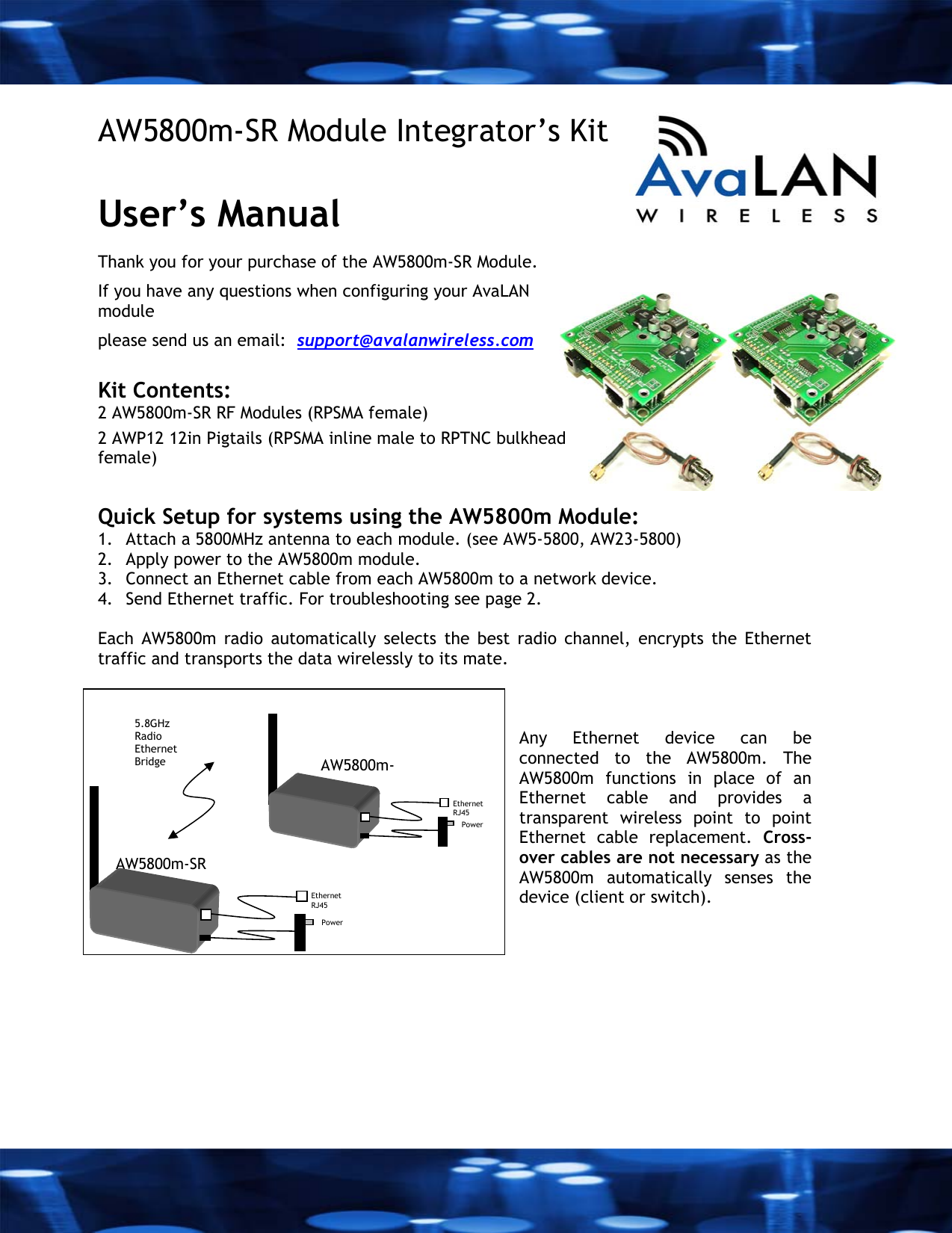
 AW5800m-SR Module Integrator’s Kit  User’s Manual  Thank you for your purchase of the AW5800m-SR Module. If you have any questions when configuring your AvaLAN module please send us an email:  support@avalanwireless.com  Kit Contents: 2 AW5800m-SR RF Modules (RPSMA female) 2 AWP12 12in Pigtails (RPSMA inline male to RPTNC bulkhead female)   Quick Setup for systems using the AW5800m Module:  1. Attach a 5800MHz antenna to each module. (see AW5-5800, AW23-5800) 2. Apply power to the AW5800m module. 3. Connect an Ethernet cable from each AW5800m to a network device.  4. Send Ethernet traffic. For troubleshooting see page 2.  Each AW5800m radio automatically selects the best radio channel, encrypts the Ethernet traffic and transports the data wirelessly to its mate.     Any Ethernet device can be connected to the AW5800m. The AW5800m functions in place of an Ethernet cable and provides a transparent wireless point to point Ethernet cable replacement. Cross-over cables are not necessary as the AW5800m automatically senses the device (client or switch). AW5800m-SR Ethernet  RJ45 Power   5.8GHz Radio Ethernet Bridge  AW5800m-Ethernet   RJ45 Power
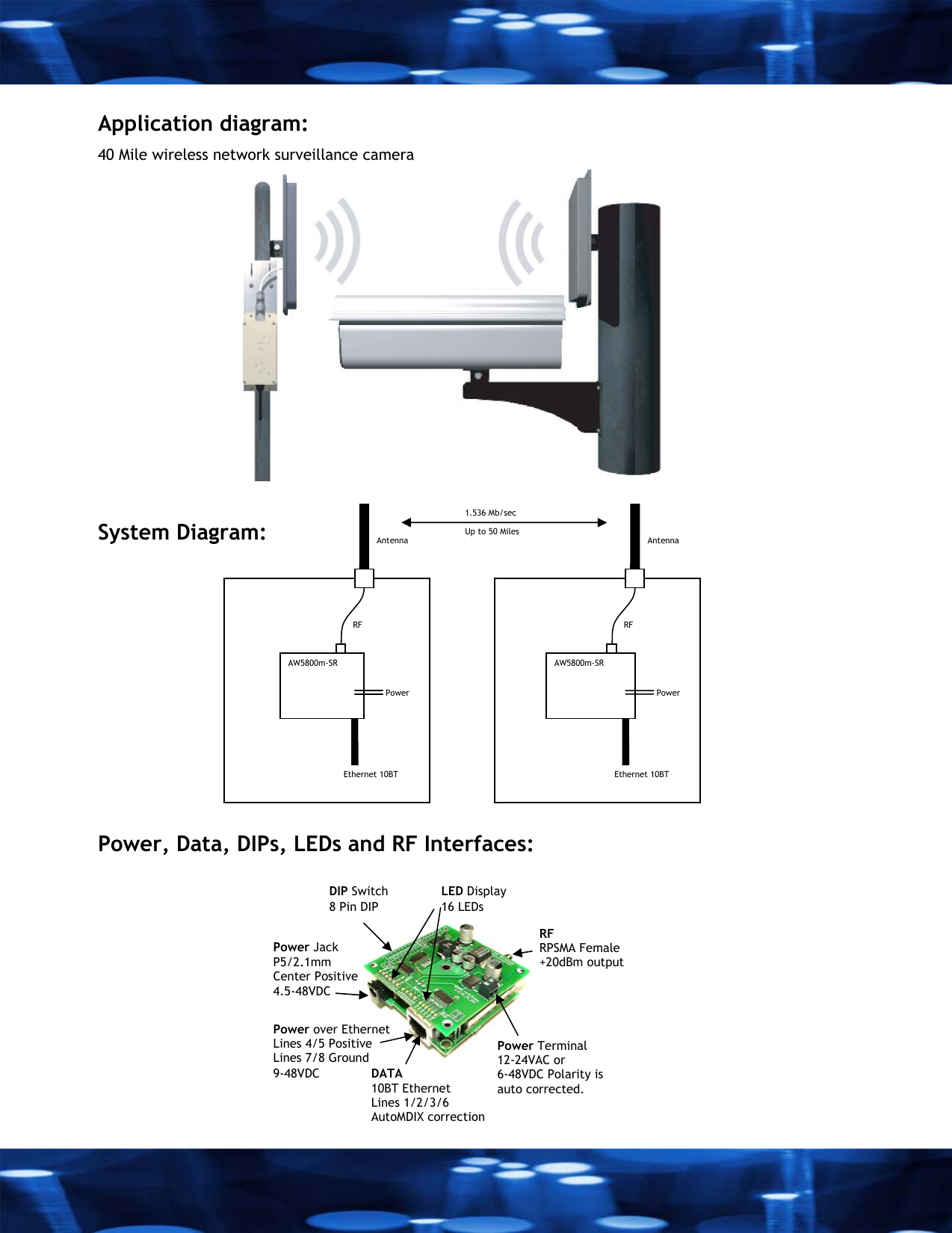
 AW5800m-SR Power Ethernet 10BT RF   Antenna AW5800m-SR Power Ethernet 10BT RF   Antenna Up to 50 Miles 1.536 Mb/sec Application diagram: 40 Mile wireless network surveillance camera           System Diagram:          Power, Data, DIPs, LEDs and RF Interfaces:   Power Jack P5/2.1mm Center Positive 4.5-48VDC Power over Ethernet Lines 4/5 Positive  Lines 7/8 Ground 9-48VDC Power Terminal 12-24VAC or 6-48VDC Polarity is auto corrected.  RF RPSMA Female +20dBm output DATA 10BT Ethernet Lines 1/2/3/6  AutoMDIX correction DIP Switch 8 Pin DIP LED Display 16 LEDs
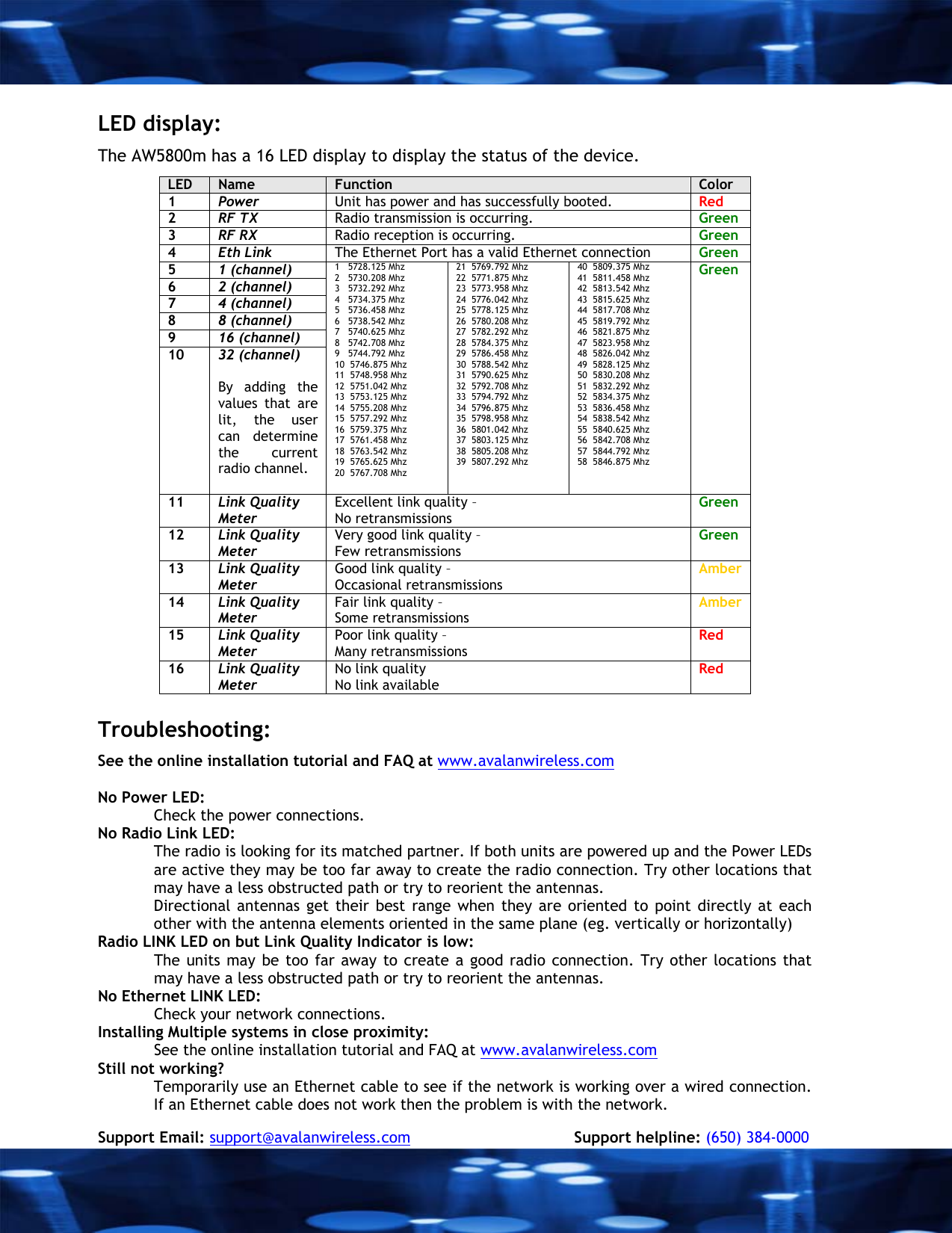
 LED display: The AW5800m has a 16 LED display to display the status of the device. LED  Name  Function  Color 1  Power  Unit has power and has successfully booted.  Red 2  RF TX  Radio transmission is occurring.  Green 3  RF RX  Radio reception is occurring.  Green 4  Eth Link  The Ethernet Port has a valid Ethernet connection  Green 5  1 (channel) 6  2 (channel) 7  4 (channel) 8  8 (channel) 9  16 (channel) 10  32 (channel)   By adding the values that are lit, the user can determine the current radio channel.  1   5728.125 Mhz 2   5730.208 Mhz 3   5732.292 Mhz 4   5734.375 Mhz 5   5736.458 Mhz 6   5738.542 Mhz 7   5740.625 Mhz 8   5742.708 Mhz 9   5744.792 Mhz 10  5746.875 Mhz 11  5748.958 Mhz 12  5751.042 Mhz 13  5753.125 Mhz 14  5755.208 Mhz 15  5757.292 Mhz 16  5759.375 Mhz 17  5761.458 Mhz 18  5763.542 Mhz 19  5765.625 Mhz 20  5767.708 Mhz 21  5769.792 Mhz 22  5771.875 Mhz 23  5773.958 Mhz 24  5776.042 Mhz 25  5778.125 Mhz 26  5780.208 Mhz 27  5782.292 Mhz 28  5784.375 Mhz 29  5786.458 Mhz  30  5788.542 Mhz 31  5790.625 Mhz 32  5792.708 Mhz 33  5794.792 Mhz 34  5796.875 Mhz 35  5798.958 Mhz 36  5801.042 Mhz 37  5803.125 Mhz 38  5805.208 Mhz 39  5807.292 Mhz 40  5809.375 Mhz 41  5811.458 Mhz 42  5813.542 Mhz 43  5815.625 Mhz 44  5817.708 Mhz 45  5819.792 Mhz 46  5821.875 Mhz 47  5823.958 Mhz 48  5826.042 Mhz 49  5828.125 Mhz 50  5830.208 Mhz 51  5832.292 Mhz 52  5834.375 Mhz 53  5836.458 Mhz 54  5838.542 Mhz 55  5840.625 Mhz 56  5842.708 Mhz 57  5844.792 Mhz 58  5846.875 Mhz Green 11  Link Quality Meter Excellent link quality –  No retransmissions  Green 12  Link Quality  Meter Very good link quality – Few retransmissions Green 13  Link Quality  Meter Good link quality – Occasional retransmissions Amber 14  Link Quality  Meter Fair link quality – Some retransmissions Amber 15  Link Quality  Meter Poor link quality – Many retransmissions Red 16  Link Quality  Meter No link quality No link available Red  Troubleshooting:  See the online installation tutorial and FAQ at www.avalanwireless.com  No Power LED: Check the power connections. No Radio Link LED:  The radio is looking for its matched partner. If both units are powered up and the Power LEDs are active they may be too far away to create the radio connection. Try other locations that may have a less obstructed path or try to reorient the antennas.  Directional antennas get their best range when they are oriented to point directly at each other with the antenna elements oriented in the same plane (eg. vertically or horizontally) Radio LINK LED on but Link Quality Indicator is low: The units may be too far away to create a good radio connection. Try other locations that may have a less obstructed path or try to reorient the antennas.  No Ethernet LINK LED:  Check your network connections. Installing Multiple systems in close proximity: See the online installation tutorial and FAQ at www.avalanwireless.com Still not working? Temporarily use an Ethernet cable to see if the network is working over a wired connection. If an Ethernet cable does not work then the problem is with the network.  Support Email: support@avalanwireless.com            Support helpline: (650) 384-0000
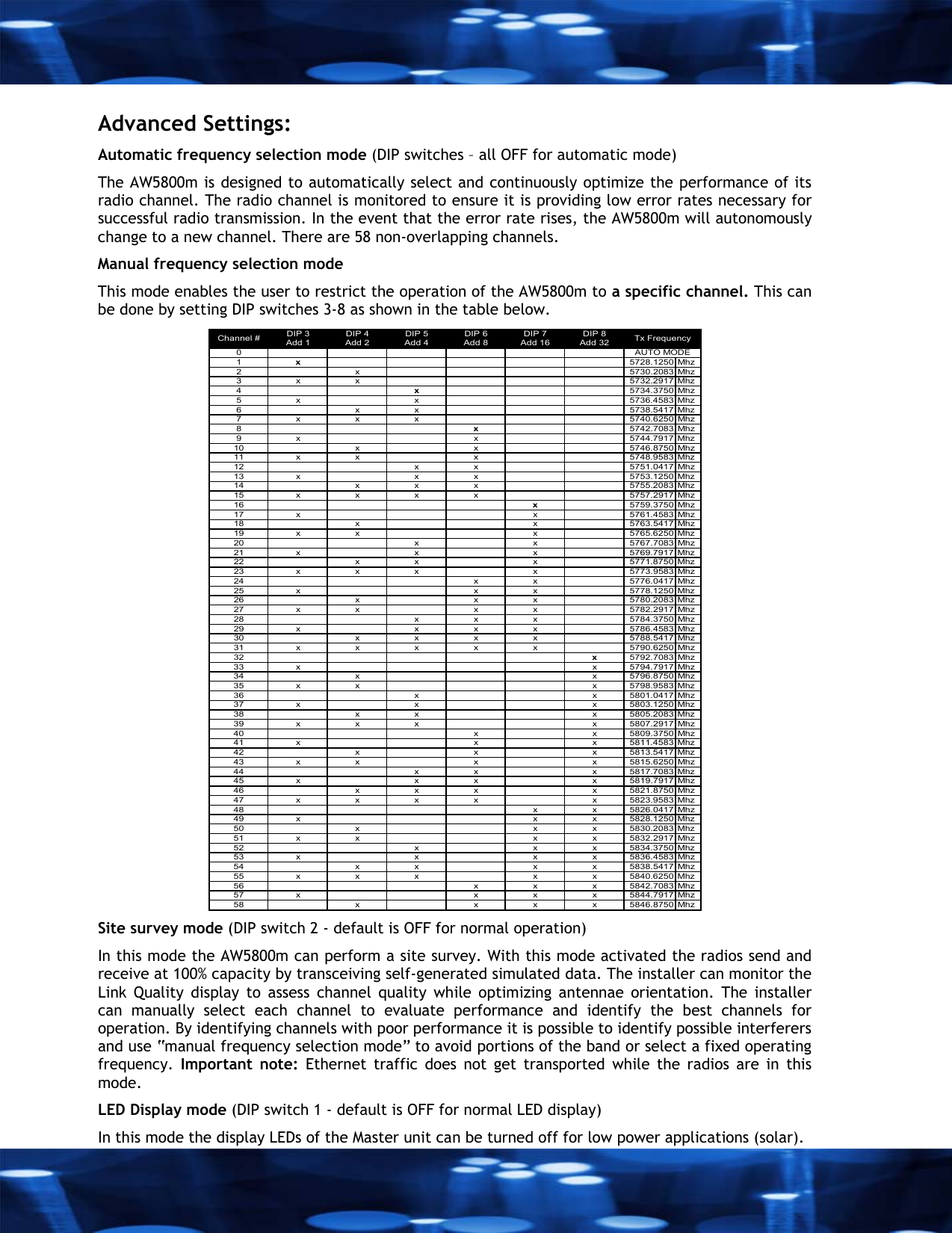
 Advanced Settings:  Automatic frequency selection mode (DIP switches – all OFF for automatic mode) The AW5800m is designed to automatically select and continuously optimize the performance of its radio channel. The radio channel is monitored to ensure it is providing low error rates necessary for successful radio transmission. In the event that the error rate rises, the AW5800m will autonomously change to a new channel. There are 58 non-overlapping channels. Manual frequency selection mode  This mode enables the user to restrict the operation of the AW5800m to a specific channel. This can be done by setting DIP switches 3-8 as shown in the table below.  DIP 3 DIP 4 DIP 5 DIP 6 DIP 7 DIP 8Add 1 Add 2 Add 4 Add 8 Add 16 Add 3201x5728.1250 Mhz2 x 5730.2083 Mhz3 x x 5732.2917 Mhz4x5734.3750 Mhz5 x x 5736.4583 Mhz6 x x 5738.5417 Mhz7 x x x 5740.6250 Mhz8x5742.7083 Mhz9 x x 5744.7917 Mhz10 x x 5746.8750 Mhz11 x x x 5748.9583 Mhz12 x x 5751.0417 Mhz13 x x x 5753.1250 Mhz14 x x x 5755.2083 Mhz15 x x x x 5757.2917 Mhz16 x5759.3750 Mhz17 x x 5761.4583 Mhz18 x x 5763.5417 Mhz19 x x x 5765.6250 Mhz20 x x 5767.7083 Mhz21 x x x 5769.7917 Mhz22 x x x 5771.8750 Mhz23 x x x x 5773.9583 Mhz24 x x 5776.0417 Mhz25 x x x 5778.1250 Mhz26 x x x 5780.2083 Mhz27 x x x x 5782.2917 Mhz28 x x x 5784.3750 Mhz29 x x x x 5786.4583 Mhz30 x x x x 5788.5417 Mhz31 x x x x x 5790.6250 Mhz32 x5792.7083 Mhz33 x x 5794.7917 Mhz34 x x 5796.8750 Mhz35 x x x 5798.9583 Mhz36 x x 5801.0417 Mhz37 x x x 5803.1250 Mhz38 x x x 5805.2083 Mhz39 x x x x 5807.2917 Mhz40 x x 5809.3750 Mhz41 x x x 5811.4583 Mhz42 x x x 5813.5417 Mhz43 x x x x 5815.6250 Mhz44 x x x 5817.7083 Mhz45 x x x x 5819.7917 Mhz46 x x x x 5821.8750 Mhz47 x x x x x 5823.9583 Mhz48 x x 5826.0417 Mhz49 x x x 5828.1250 Mhz50 x x x 5830.2083 Mhz51 x x x x 5832.2917 Mhz52 x x x 5834.3750 Mhz53 x x x x 5836.4583 Mhz54 x x x x 5838.5417 Mhz55 x x x x x 5840.6250 Mhz56 x x x 5842.7083 Mhz57 x x x x 5844.7917 Mhz58 x x x x 5846.8750 MhzAUTO MODEChannel # Tx Frequency Site survey mode (DIP switch 2 - default is OFF for normal operation) In this mode the AW5800m can perform a site survey. With this mode activated the radios send and receive at 100% capacity by transceiving self-generated simulated data. The installer can monitor the Link Quality display to assess channel quality while optimizing antennae orientation. The installer can manually select each channel to evaluate performance and identify the best channels for operation. By identifying channels with poor performance it is possible to identify possible interferers and use “manual frequency selection mode” to avoid portions of the band or select a fixed operating frequency.  Important note: Ethernet traffic does not get transported while the radios are in this mode. LED Display mode (DIP switch 1 - default is OFF for normal LED display) In this mode the display LEDs of the Master unit can be turned off for low power applications (solar).
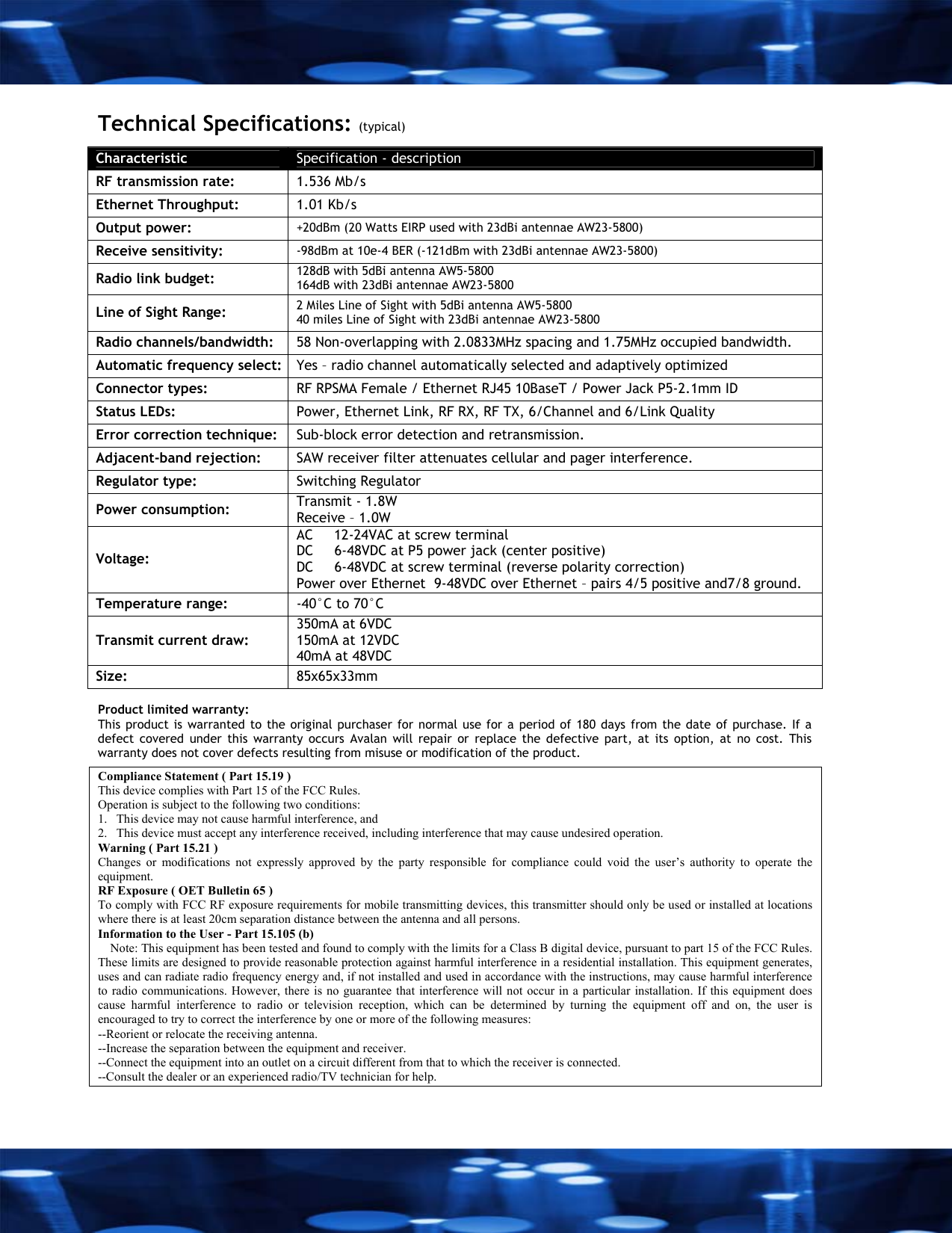
 Technical Specifications: (typical) Characteristic  Specification - description RF transmission rate:   1.536 Mb/s Ethernet Throughput:   1.01 Kb/s Output power:   +20dBm (20 Watts EIRP used with 23dBi antennae AW23-5800) Receive sensitivity:   -98dBm at 10e-4 BER (-121dBm with 23dBi antennae AW23-5800) Radio link budget:  128dB with 5dBi antenna AW5-5800 164dB with 23dBi antennae AW23-5800  Line of Sight Range:  2 Miles Line of Sight with 5dBi antenna AW5-5800  40 miles Line of Sight with 23dBi antennae AW23-5800 Radio channels/bandwidth:   58 Non-overlapping with 2.0833MHz spacing and 1.75MHz occupied bandwidth. Automatic frequency select:  Yes – radio channel automatically selected and adaptively optimized Connector types:  RF RPSMA Female / Ethernet RJ45 10BaseT / Power Jack P5-2.1mm ID Status LEDs:   Power, Ethernet Link, RF RX, RF TX, 6/Channel and 6/Link Quality Error correction technique:   Sub-block error detection and retransmission. Adjacent-band rejection:   SAW receiver filter attenuates cellular and pager interference. Regulator type:  Switching Regulator Power consumption:  Transmit - 1.8W Receive – 1.0W Voltage: AC     12-24VAC at screw terminal  DC     6-48VDC at P5 power jack (center positive) DC     6-48VDC at screw terminal (reverse polarity correction)  Power over Ethernet  9-48VDC over Ethernet – pairs 4/5 positive and7/8 ground. Temperature range:  -40°C to 70°C  Transmit current draw: 350mA at 6VDC  150mA at 12VDC 40mA at 48VDC Size:  85x65x33mm  Product limited warranty: This product is warranted to the original purchaser for normal use for a period of 180 days from the date of purchase. If a defect covered under this warranty occurs Avalan will repair or replace the defective part, at its option, at no cost. This warranty does not cover defects resulting from misuse or modification of the product.  Compliance Statement ( Part 15.19 ) This device complies with Part 15 of the FCC Rules.  Operation is subject to the following two conditions:  1.   This device may not cause harmful interference, and  2.   This device must accept any interference received, including interference that may cause undesired operation. Warning ( Part 15.21 ) Changes or modifications not expressly approved by the party responsible for compliance could void the user’s authority to operate the equipment. RF Exposure ( OET Bulletin 65 ) To comply with FCC RF exposure requirements for mobile transmitting devices, this transmitter should only be used or installed at locations where there is at least 20cm separation distance between the antenna and all persons. Information to the User - Part 15.105 (b)     Note: This equipment has been tested and found to comply with the limits for a Class B digital device, pursuant to part 15 of the FCC Rules. These limits are designed to provide reasonable protection against harmful interference in a residential installation. This equipment generates, uses and can radiate radio frequency energy and, if not installed and used in accordance with the instructions, may cause harmful interference to radio communications. However, there is no guarantee that interference will not occur in a particular installation. If this equipment does cause harmful interference to radio or television reception, which can be determined by turning the equipment off and on, the user is encouraged to try to correct the interference by one or more of the following measures: --Reorient or relocate the receiving antenna. --Increase the separation between the equipment and receiver. --Connect the equipment into an outlet on a circuit different from that to which the receiver is connected. --Consult the dealer or an experienced radio/TV technician for help.
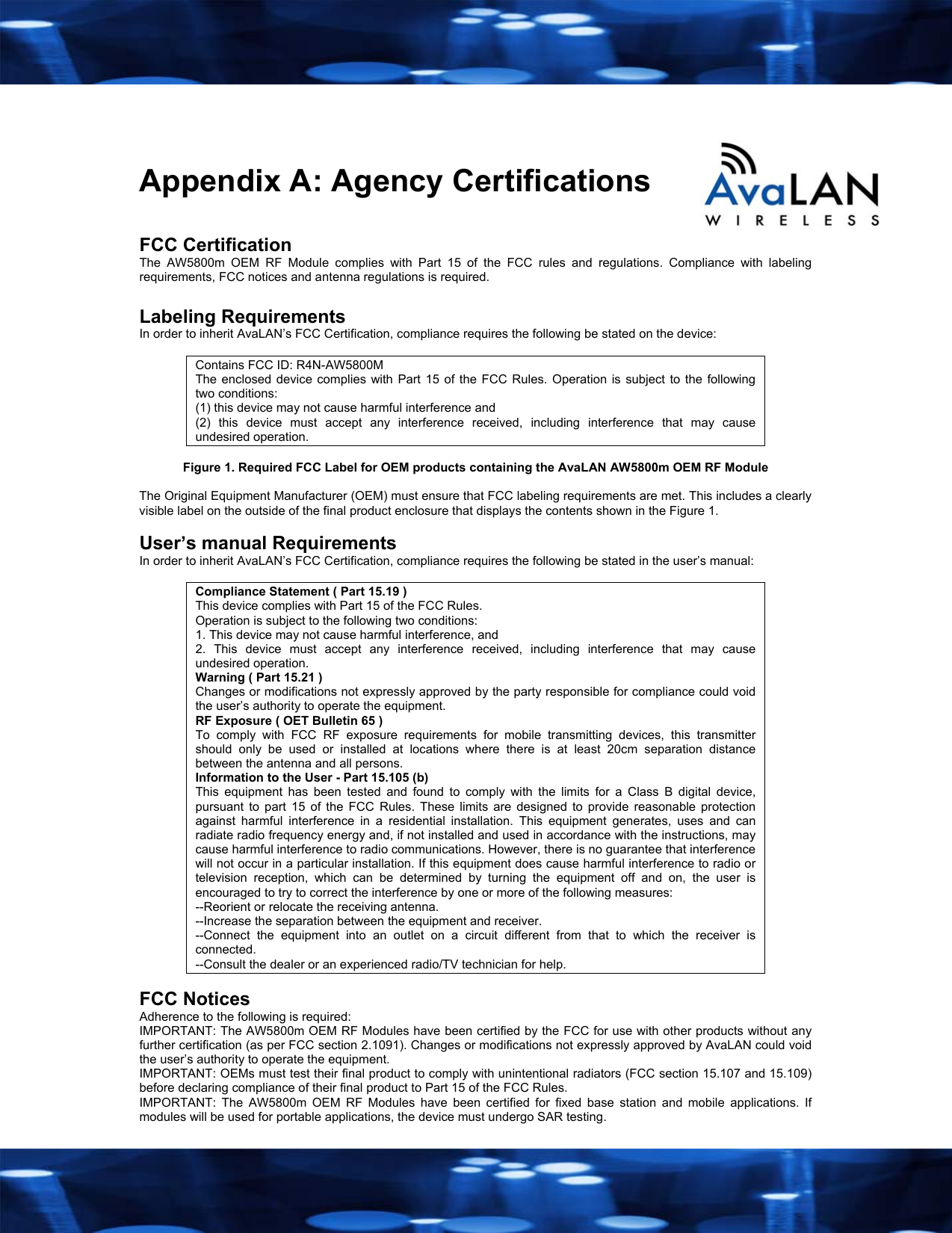
   Appendix A: Agency Certifications  FCC Certification The AW5800m OEM RF Module complies with Part 15 of the FCC rules and regulations. Compliance with labeling requirements, FCC notices and antenna regulations is required.  Labeling Requirements In order to inherit AvaLAN’s FCC Certification, compliance requires the following be stated on the device:  Contains FCC ID: R4N-AW5800M The enclosed device complies with Part 15 of the FCC Rules. Operation is subject to the following two conditions:  (1) this device may not cause harmful interference and  (2) this device must accept any interference received, including interference that may cause undesired operation.  Figure 1. Required FCC Label for OEM products containing the AvaLAN AW5800m OEM RF Module  The Original Equipment Manufacturer (OEM) must ensure that FCC labeling requirements are met. This includes a clearly visible label on the outside of the final product enclosure that displays the contents shown in the Figure 1.  User’s manual Requirements In order to inherit AvaLAN’s FCC Certification, compliance requires the following be stated in the user’s manual:  Compliance Statement ( Part 15.19 ) This device complies with Part 15 of the FCC Rules.  Operation is subject to the following two conditions:  1. This device may not cause harmful interference, and  2. This device must accept any interference received, including interference that may cause undesired operation. Warning ( Part 15.21 ) Changes or modifications not expressly approved by the party responsible for compliance could void the user’s authority to operate the equipment. RF Exposure ( OET Bulletin 65 ) To comply with FCC RF exposure requirements for mobile transmitting devices, this transmitter should only be used or installed at locations where there is at least 20cm separation distance between the antenna and all persons. Information to the User - Part 15.105 (b) This equipment has been tested and found to comply with the limits for a Class B digital device, pursuant to part 15 of the FCC Rules. These limits are designed to provide reasonable protection against harmful interference in a residential installation. This equipment generates, uses and can radiate radio frequency energy and, if not installed and used in accordance with the instructions, may cause harmful interference to radio communications. However, there is no guarantee that interference will not occur in a particular installation. If this equipment does cause harmful interference to radio or television reception, which can be determined by turning the equipment off and on, the user is encouraged to try to correct the interference by one or more of the following measures: --Reorient or relocate the receiving antenna. --Increase the separation between the equipment and receiver. --Connect the equipment into an outlet on a circuit different from that to which the receiver is connected. --Consult the dealer or an experienced radio/TV technician for help.  FCC Notices Adherence to the following is required: IMPORTANT: The AW5800m OEM RF Modules have been certified by the FCC for use with other products without any further certification (as per FCC section 2.1091). Changes or modifications not expressly approved by AvaLAN could void the user’s authority to operate the equipment. IMPORTANT: OEMs must test their final product to comply with unintentional radiators (FCC section 15.107 and 15.109) before declaring compliance of their final product to Part 15 of the FCC Rules. IMPORTANT: The AW5800m OEM RF Modules have been certified for fixed base station and mobile applications. If modules will be used for portable applications, the device must undergo SAR testing.
  FCC-Approved Antennas (5800MHz) Fixed Base Station and Mobile Applications AvaLAN Modules are pre-FCC approved for use in fixed base station and mobile applications. When the antenna is mounted at least 20 cm (8”) from nearby persons, the application is considered a mobile application.  Portable Applications and SAR Testing When the antenna is mounted closer than 20 cm to nearby persons, then the application is considered “portable” and requires an additional test be performed on the final product. This test is called the Specific Absorption Rate (SAR) testing and measures the emissions from the module and how they affect the person.  RF Exposure (This statement must be included as a CAUTION statement in OEM product manuals.)   WARNING: This equipment is approved only for mobile and base station transmitting devices. Antenna(s) used for this transmitter must be installed to provide a separation distance of at least 20 cm from all persons and must not be co-located or operating in conjunction with any other antenna or transmitter.  To fulfill FCC Certification requirements: 1. Integrator must ensure required text [Figure 1] is clearly placed on the outside of the final product. 2. AW5800m Module may be used only with Approved Antennas types that have been tested with this module.   Antenna Type  Type  Maximum Gain Omni directional  Monopole  ≤5dBi Directional Panel  ≤23dBi Table 1. Type certified Antennae  Antenna Warning WARNING: This device has been tested with Reverse Polarity SMA connectors with the antennas listed in Table 1 Appendix A. When integrated into OEM products, fixed antennas require installation preventing end-users from replacing them with non-approved antennas. Antennas not listed in the tables must be tested to comply with FCC Section 15.203 (unique antenna connectors) and Section 15.247 (emissions). To reduce potential radio interference to other users, the antenna type and its gain should be so chosen that the equivalent isotropically radiated power (e.i.r.p.) is not more than that permitted for successful communication."   IC (Industry Canada) Certification Labeling requirements for Industry Canada are similar to those of the FCC. A clearly visible label on the outside of the final product enclosure must display the following text:  Contains Model AW5800 Radio, IC: 5303A-AW5800M Figure 2. Required IC Label for OEM products containing the AvaLAN AW5800m OEM RF Module  Integrator is responsible for its product to comply with IC ICES-003 & FCC Part 15, Sub. B - Unintentional Radiators. ICES-003 is the same as FCC Part 15 Sub. B and Industry Canada accepts FCC test report or CISPR 22 test report for compliance with ICES-003.  To fulfill IC Certification requirements: 1. Integrator must ensure required text [Figure 2] is clearly placed on the outside of the final product. 2. This device has been designed to operate with the antennas listed below, and having a maximum gain of 23 dB. 3. Antennas not included in this list or having a gain greater than 23 dB are strictly prohibited for use with this device. 4. The required antenna impedance is 50 ohms.  Antenna Type  Type  Manufacturer/part number  Gain Omni directional  Monopole  Nearson / Model 151  5dBi Directional  Panel  ARC Wireless / ANT-A-1723  23dBi Table 2. Certified Antennae   AvaLAN Wireless Systems Inc. 1020 Corporation Way, Suite #207 Palo Alto, CA 94303 T(866) 533.6216 www.avalanwireless.com  V9 July 19, 2006

Navigation menu