Avalan Wireless Systems orporated AW900MR AW900mTR User Manual FCC Part 15

Avalan Wireless Systems Incorporated AW900mTR FCC Part 15

Contents

Manual

     Certification Exhibit     FCC ID:  R4N-AW900MR IC: 5303A-AW900MR  FCC Rule Part: 15.247 IC Radio Standards Specification: RSS-210  ACS Project Number:  13-2161   Manufacturer: AvaLAN Wireless Systems  Model: AW900mTR     User Manual   3998 FAU Blvd. Suite 310 Boca Raton, FL 33431 Tel: 561-961-5585  Fax: 561-961-5587
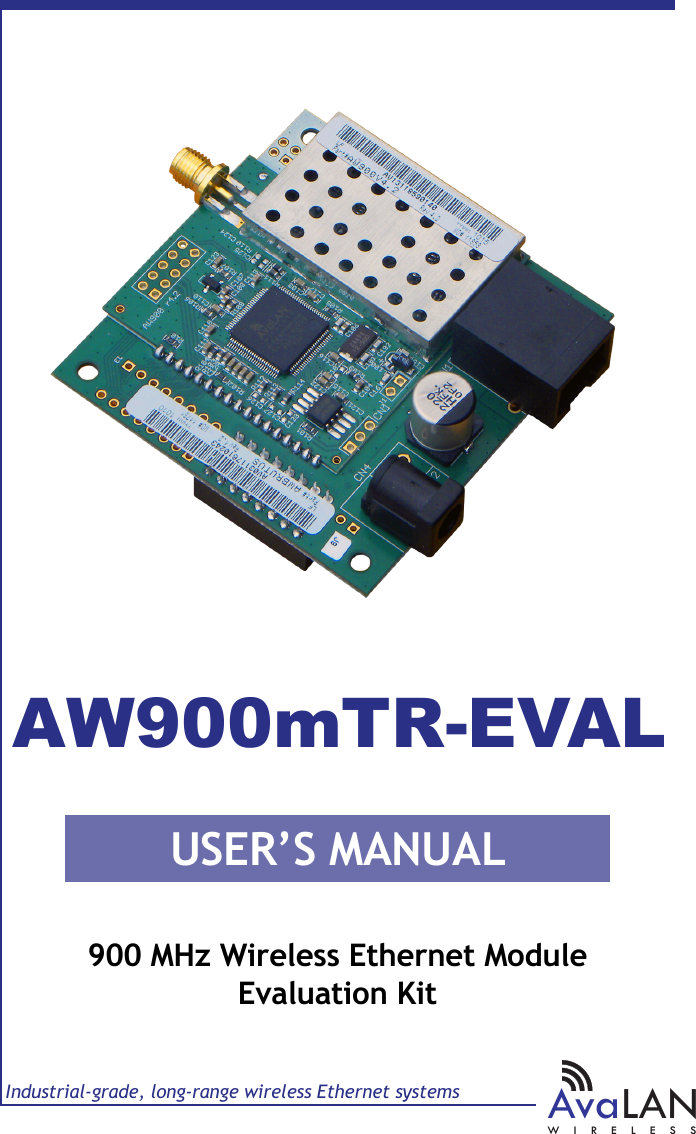
USER’S MANUALIndustrial-grade, long-range wireless Ethernet systemsAvaLANWIRELESS900 MHz Wireless Ethernet ModuleEvaluation KitAW900mTR-EVAL
AW900mTR User’s ManualPAGE 2Technical support (650) 384-0000 www.avalanwireless.com© AvaLAN Wireless Systems Inc. All rights reserved.Revision 01.31.2014125A Castle DriveMadison, AL 35758Sales: (866) 533-6216Technical Support: (650) 384-0000Customer Service: (650) 641-3011Fax: (650) 249-3591Thank you for your purchase of the AW900mTR-EVAL Wireless Ethernet Module Evaluation Kit.  If you have any questions when conguring your AvaLAN system, the best place to get answers is to visit www.avalanwireless.com. You will also nd the latest updates there.If more assistance is needed, send email to support@avalanwireless.com.To speak to a live technician, please call technical support at the number below during normal business hours.Note: Professional installation is required when using the sector antenna. This product is warranted to the original purchaser for normal use for a period of 360 days from the date of purchase. If a defect covered under this warranty occurs, AvaLAN will repair or replace the defective part, at its option, at no cost. This warranty does not cover defects resulting from misuse or modication of the product.Limited Warranty
PAGE 3Technical support (650) 384-0000 www.avalanwireless.comAW900mTRUser’s ManualOperational summaryThe AW900mTR Radio Module allows the user to create a long-range, wireless Ethernet network with up to 16 subscriber units per access point. The conguration may include any combination of AW900mTR, AW900xTR, AW900iTR and AW900xTP radios. (Please note that older AvaLAN 900 MHz radios can exist on the same LAN but cannot be used to form wireless links with the AW900mTR because link encryp-tion protocols have changed.)Conguring a wireless link with the AW900mTR requires the establishment of six elements:•  Each radio must know whether it is to be an access point (AP) or subscriber unit (SU).•  Each radio must have an IP address that is unique among all others on the same network.•  The AP must know how many SUs are expecting communication with it.•  The AP and any given SU must agree on which radio frequency channel they a r e  u s i n g .  T h i s  c a n  b e  m a n u a l l y  s e t  o r  a l l o w e d  t o  c h a n g e  a u t o m a t i c a l l y.                                                                                                     •  The SU must be assigned a unique subscriber ID to specify which time division slot it will use when communicating with the AP.•  The AP and any given SU must share a common 128-bit encryption key. AW900mTR radios may be congured by two dierent methods. They may be con-nected to  a computer  that will  run a  web browser, setting  parameters  via  their built-in browser interfaces. They may also be programmed via the “easy key” meth-od using the DIP switches and LEDs on the module. The access point (AP) automatically scans for the best of the 12 available radio fre-quency channels, encrypts Ethernet data received from the network, and transmits it wirelessly to the correct subscriber unit (SU). The AP is constantly monitoring the radio link and can automatically change the channel if performance is degraded due to interference. If two AP units are very close to one another, they may interfere if operating on adjacent frequency channels. Place them at least 10 feet apart or manually select non-adjacent channels for their operation. Also, the SU should be placed at least 10 feet from the AP to avoid overloading the radio’s receiver.Any 10/100 BaseT Ethernet client device (ECD) can be connected to an AW900mTR subscriber unit. Each SU encrypts Ethernet trac received from the attached ECD and transmits the data wirelessly to its AP. Each SU can be plugged directly into an ECD without adding drivers or loading software. Essentially, once the AP/SU pair is congured and running it behaves like a continuous Ethernet cable.
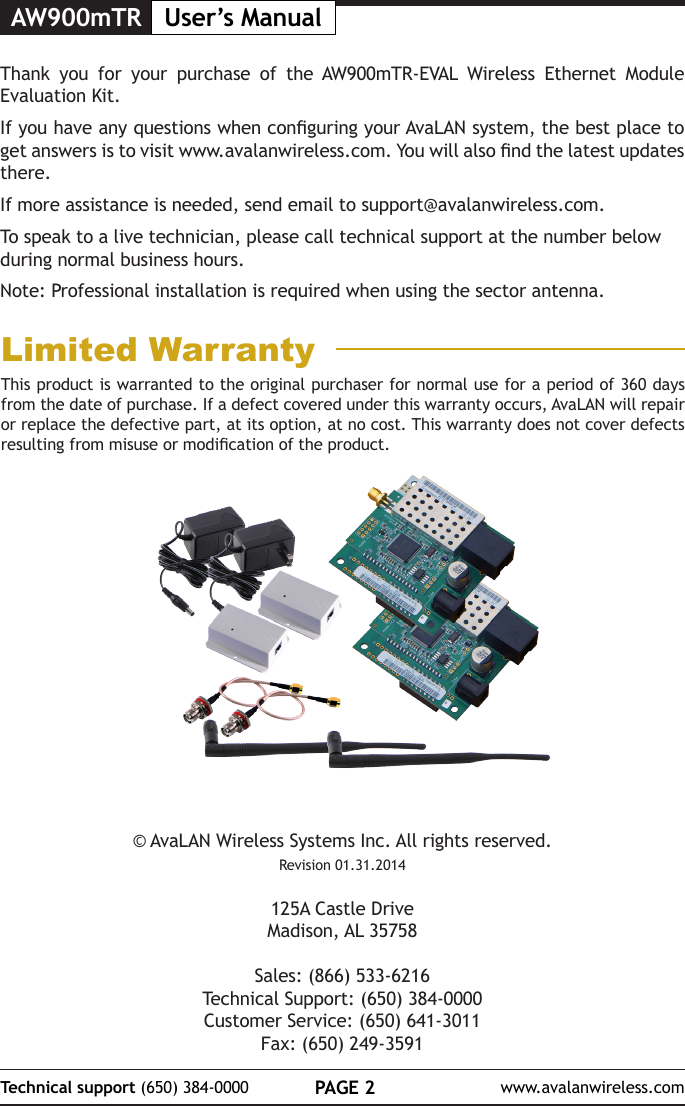
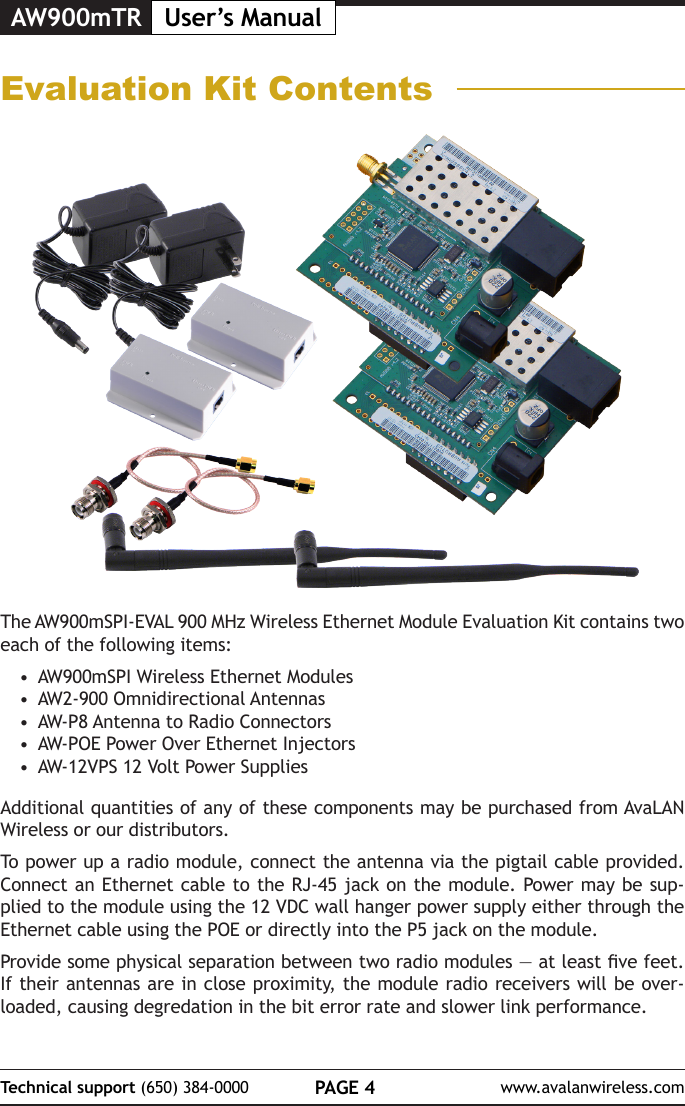
AW900mTR User’s ManualPAGE 4Technical support (650) 384-0000 www.avalanwireless.comEvaluation Kit ContentsThe AW900mSPI-EVAL 900 MHz Wireless Ethernet Module Evaluation Kit contains two each of the following items:•  AW900mSPI Wireless Ethernet Modules•  AW2-900 Omnidirectional Antennas•  AW-P8 Antenna to Radio Connectors•  AW-POE Power Over Ethernet Injectors•  AW-12VPS 12 Volt Power SuppliesAdditional quantities of any of these components may be purchased from AvaLAN Wireless or our distributors.To power up a radio module, connect the antenna via the pigtail cable provided. Connect an Ethernet cable to the RJ-45 jack on the module. Power may be sup-plied to the module using the 12 VDC wall hanger power supply either through the Ethernet cable using the POE or directly into the P5 jack on the module.Provide some physical separation between two radio modules — at least ve feet. If their antennas are in close proximity, the module radio receivers will be over-loaded, causing degredation in the bit error rate and slower link performance.
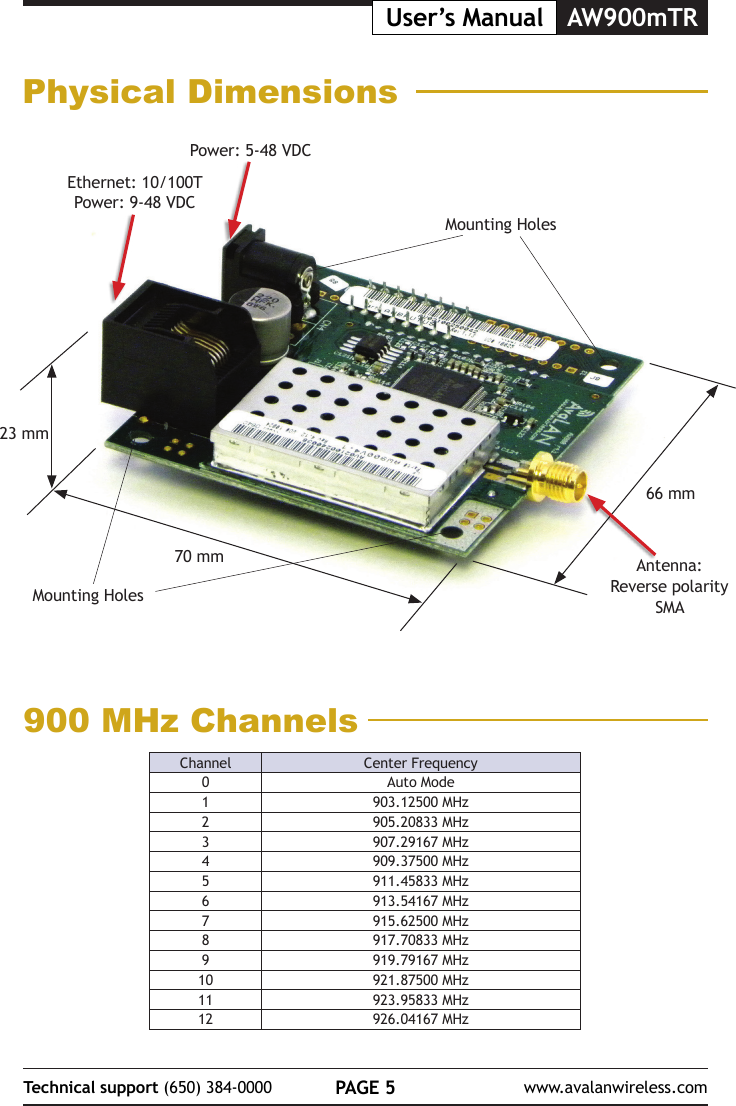
PAGE 5Technical support (650) 384-0000 www.avalanwireless.comAW900mTRUser’s ManualPhysical Dimensions23 mm70 mm66 mmPower: 5-48 VDCEthernet: 10/100TPower: 9-48 VDCAntenna: Reverse polarity SMAMounting HolesMounting Holes900 MHz ChannelsChannel Center Frequency0Auto Mode1903.12500 MHz2905.20833 MHz3907.29167 MHz4909.37500 MHz5911.45833 MHz6913.54167 MHz7915.62500 MHz8917.70833 MHz9919.79167 MHz10 921.87500 MHz11 923.95833 MHz12 926.04167 MHz
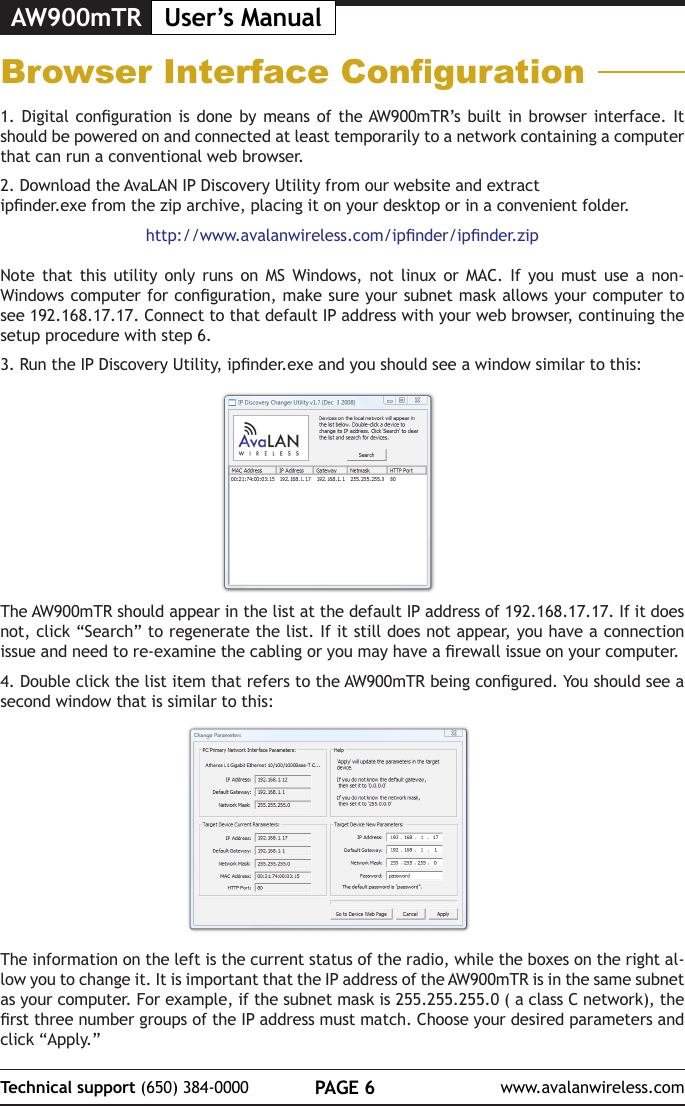
AW900mTR User’s ManualPAGE 6Technical support (650) 384-0000 www.avalanwireless.comBrowser Interface Conguration1. Digital  conguration  is done by  means of the AW900mTR’s built  in  browser interface. It should be powered on and connected at least temporarily to a network containing a computer that can run a conventional web browser. 2. Download the AvaLAN IP Discovery Utility from our website and extract ipnder.exe from the zip archive, placing it on your desktop or in a convenient folder.http://www.avalanwireless.com/ipnder/ipnder.zipNote that this utility only runs on MS Windows, not linux or MAC. If you must use a non-Windows computer for conguration, make sure your subnet mask allows your computer to see 192.168.17.17. Connect to that default IP address with your web browser, continuing the setup procedure with step 6.3. Run the IP Discovery Utility, ipnder.exe and you should see a window similar to this:The AW900mTR should appear in the list at the default IP address of 192.168.17.17. If it does not, click “Search” to regenerate the list. If it still does not appear, you have a connection issue and need to re-examine the cabling or you may have a rewall issue on your computer.4. Double click the list item that refers to the AW900mTR being congured. You should see a second window that is similar to this:The information on the left is the current status of the radio, while the boxes on the right al-low you to change it. It is important that the IP address of the AW900mTR is in the same subnet as your computer. For example, if the subnet mask is 255.255.255.0 ( a class C network), the rst three number groups of the IP address must match. Choose your desired parameters and click “Apply.”
PAGE 7Technical support (650) 384-0000 www.avalanwireless.comAW900mTRUser’s Manual7. The admin page has sections similar to the login page showing radio statistics and device information plus it adds several new sections. The Device Settings section allows setting the network information and choosing an RF frequency channel. The default is to allow the radio to choose  its own frequency  based on minimizing  interference. If you  set a xed  channel, make sure the AP and all SUs use the same one. References to DIPs on this and the next web page refer to the DIP switches on the module that are used in the “easy key” method of con-guration and may be ignored when using the browser method.If you scroll down in the Admin browser page, you will come to three more sections:•  A graphical spectrum analyzer display that may help you to select radio channels that avoid interference•  A section to be used if an update to the AW900mTR’s rmware is required•  An Advanced Links section with a dire warning about advanced users only.5. Make note of the chosen IP address and password, then click “Go to Device Web Page.” This will cause your default web browser to launch with the device IP address in the browser address bar. Or you may launch the browser on your own and enter the web page address manually: http://[the IP address you just set]. 6. The browser page that loads rst shows the current device information and QoS statistics and provides a login at the upper right. Log in using the password you just specied (or “pass-word” if you kept the default). If the login succeeds, you will see an admin page similar to this:
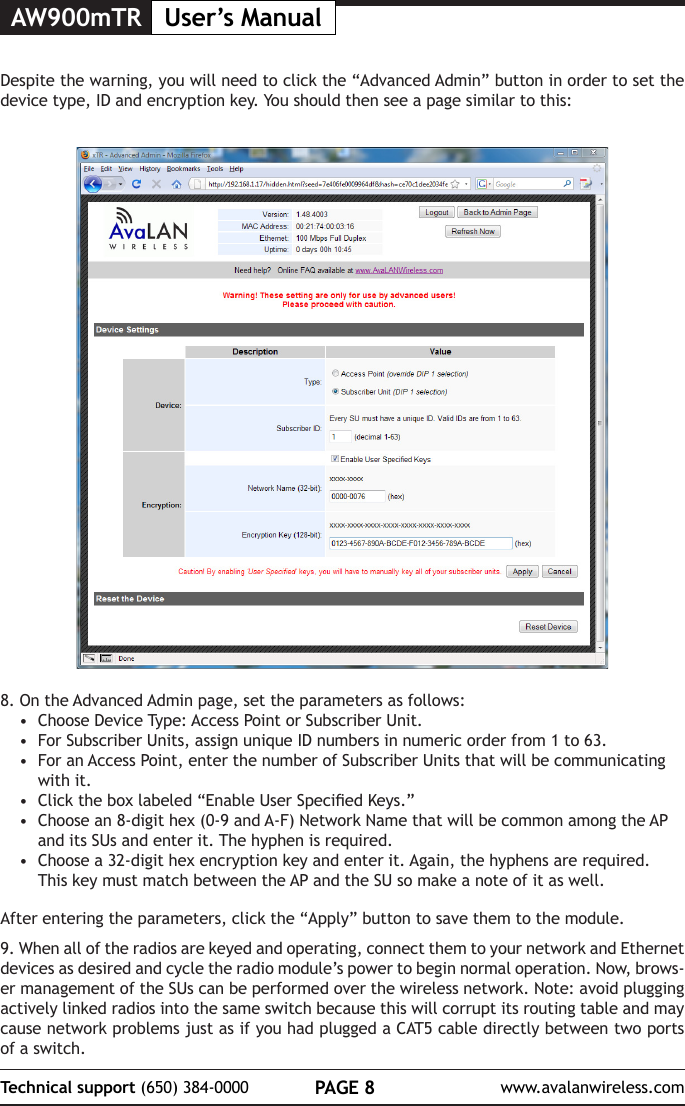
AW900mTR User’s ManualPAGE 8Technical support (650) 384-0000 www.avalanwireless.com8. On the Advanced Admin page, set the parameters as follows:•  Choose Device Type: Access Point or Subscriber Unit.•  For Subscriber Units, assign unique ID numbers in numeric order from 1 to 63.•  For an Access Point, enter the number of Subscriber Units that will be communicating with it. •  Click the box labeled “Enable User Specied Keys.”•  Choose an 8-digit hex (0-9 and A-F) Network Name that will be common among the AP and its SUs and enter it. The hyphen is required.•  Choose a 32-digit hex encryption key and enter it. Again, the hyphens are required. This key must match between the AP and the SU so make a note of it as well. After entering the parameters, click the “Apply” button to save them to the module.9. When all of the radios are keyed and operating, connect them to your network and Ethernet devices as desired and cycle the radio module’s power to begin normal operation. Now, brows-er management of the SUs can be performed over the wireless network. Note: avoid plugging actively linked radios into the same switch because this will corrupt its routing table and may cause network problems just as if you had plugged a CAT5 cable directly between two ports of a switch.Despite the warning, you will need to click the “Advanced Admin” button in order to set the device type, ID and encryption key. You should then see a page similar to this:
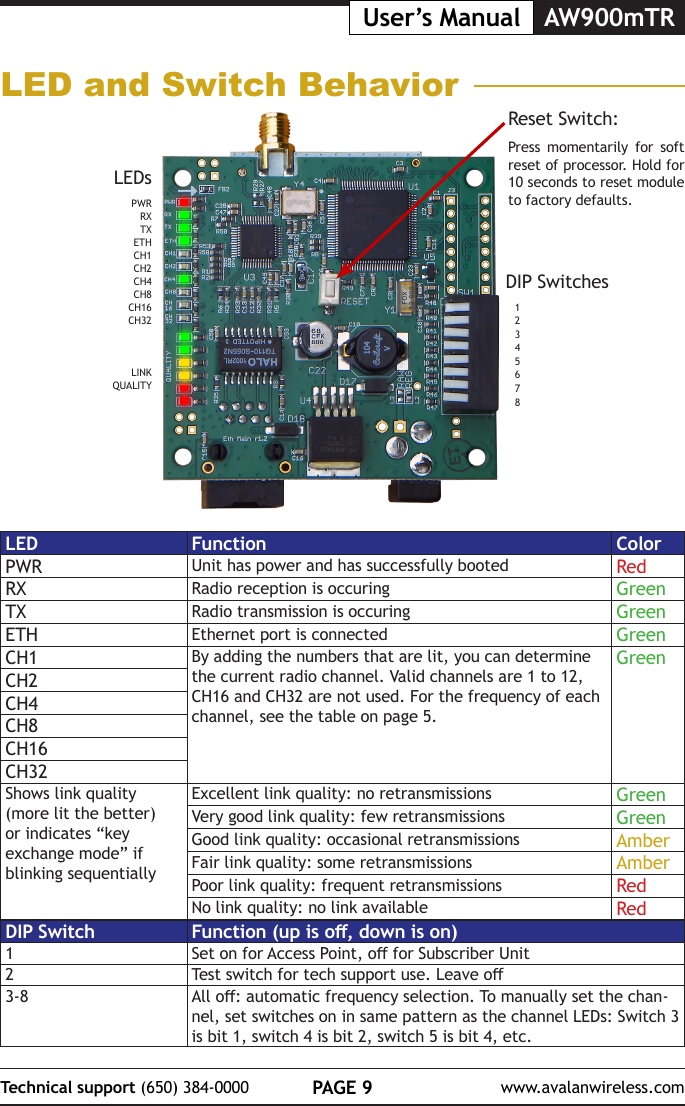
PAGE 9Technical support (650) 384-0000 www.avalanwireless.comAW900mTRUser’s ManualLED and Switch BehaviorDIP Switches12345678LEDsPWRRXTXETHCH1CH2CH4CH8CH16CH32LINKQUALITYReset Switch:Press momentarily for soft reset of processor. Hold for 10 seconds to reset module to factory defaults.LED Function ColorPWR Unit has power and has successfully booted RedRX Radio reception is occuring GreenTX Radio transmission is occuring GreenETH Ethernet port is connected GreenCH1 By adding the numbers that are lit, you can determine the current radio channel. Valid channels are 1 to 12, CH16 and CH32 are not used. For the frequency of each channel, see the table on page 5.GreenCH2CH4CH8CH16CH32Shows link quality (more lit the better) or indicates “key exchange mode” if blinking sequentiallyExcellent link quality: no retransmissions GreenVery good link quality: few retransmissions GreenGood link quality: occasional retransmissions AmberFair link quality: some retransmissions AmberPoor link quality: frequent retransmissions RedNo link quality: no link available RedDIP Switch Function (up is o, down is on)1Set on for Access Point, o for Subscriber Unit2Test switch for tech support use. Leave o3-8 All o: automatic frequency selection. To manually set the chan-nel, set switches on in same pattern as the channel LEDs: Switch 3  is bit 1, switch 4 is bit 2, switch 5 is bit 4, etc.
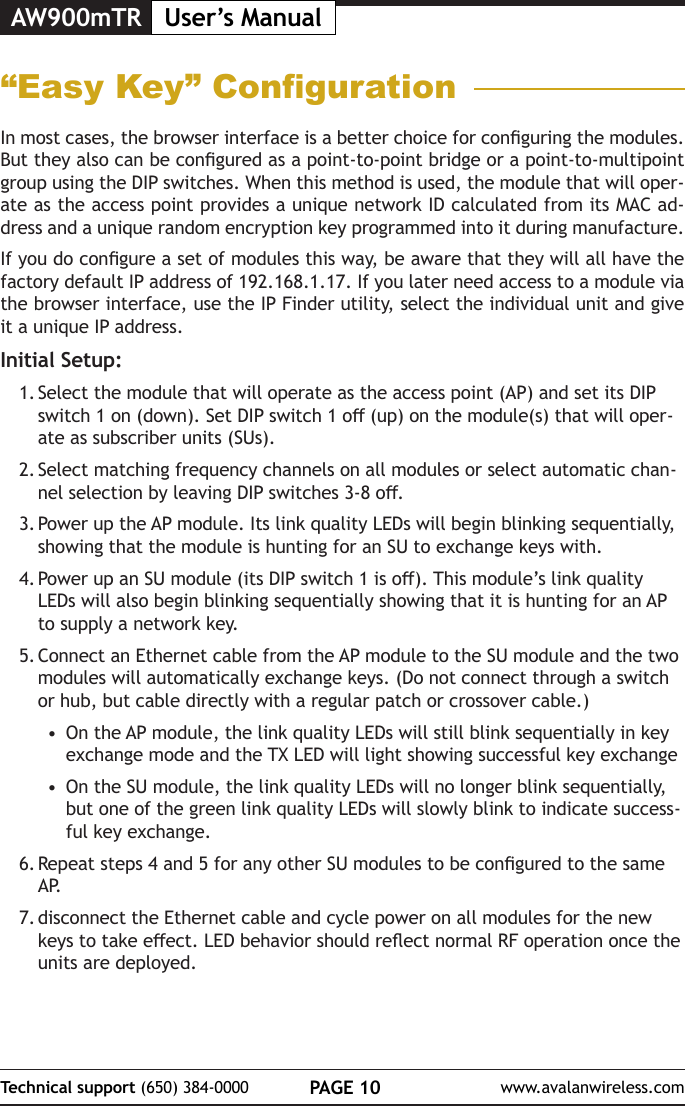
AW900mTR User’s ManualPAGE 10Technical support (650) 384-0000 www.avalanwireless.com“Easy Key” CongurationIn most cases, the browser interface is a better choice for conguring the modules. But they also can be congured as a point-to-point bridge or a point-to-multipoint group using the DIP switches. When this method is used, the module that will oper-ate as the access point provides a unique network ID calculated from its MAC ad-dress and a unique random encryption key programmed into it during manufacture.If you do congure a set of modules this way, be aware that they will all have the factory default IP address of 192.168.1.17. If you later need access to a module via the browser interface, use the IP Finder utility, select the individual unit and give it a unique IP address.Initial Setup:1. Select the module that will operate as the access point (AP) and set its DIP switch 1 on (down). Set DIP switch 1 o (up) on the module(s) that will oper-ate as subscriber units (SUs).2. Select matching frequency channels on all modules or select automatic chan-nel selection by leaving DIP switches 3-8 o.3. Power up the AP module. Its link quality LEDs will begin blinking sequentially, showing that the module is hunting for an SU to exchange keys with.4. Power up an SU module (its DIP switch 1 is o). This module’s link quality LEDs will also begin blinking sequentially showing that it is hunting for an AP to supply a network key.5. Connect an Ethernet cable from the AP module to the SU module and the two modules will automatically exchange keys. (Do not connect through a switch or hub, but cable directly with a regular patch or crossover cable.)•  On the AP module, the link quality LEDs will still blink sequentially in key exchange mode and the TX LED will light showing successful key exchange•  On the SU module, the link quality LEDs will no longer blink sequentially, but one of the green link quality LEDs will slowly blink to indicate success-ful key exchange.6. Repeat steps 4 and 5 for any other SU modules to be congured to the same A P.7. disconnect the Ethernet cable and cycle power on all modules for the new keys to take eect. LED behavior should reect normal RF operation once the units are deployed.
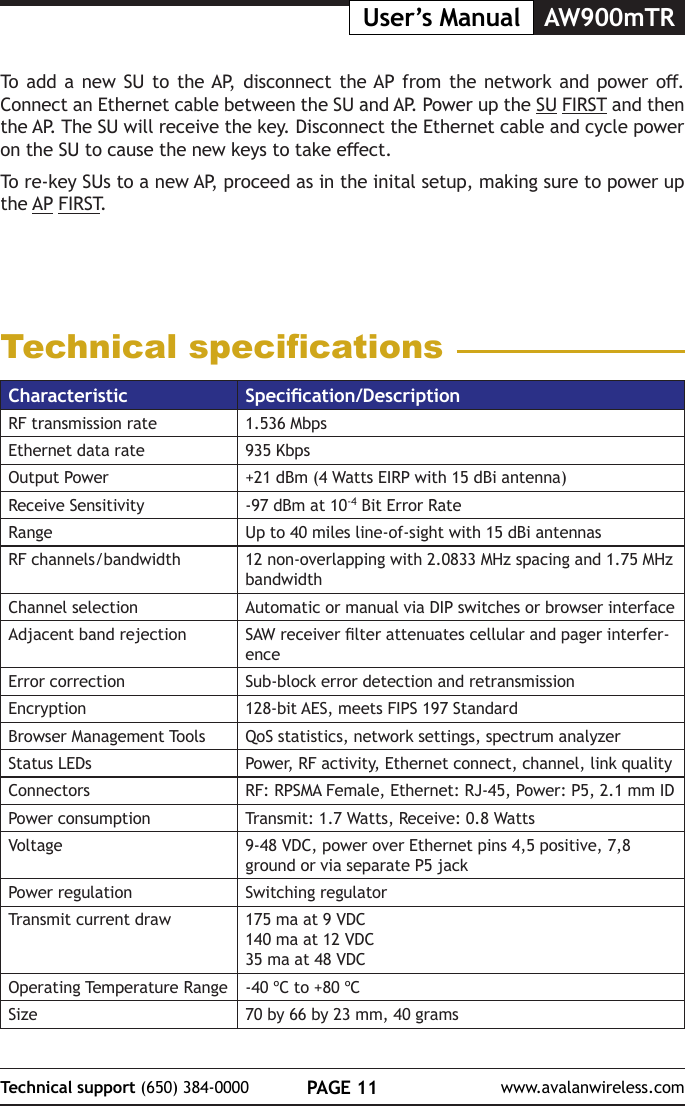
PAGE 11Technical support (650) 384-0000 www.avalanwireless.comAW900mTRUser’s ManualTo add a  new  SU to the AP,  disconnect  the AP from  the  network and  power  o. Connect an Ethernet cable between the SU and AP. Power up the SU FIRST and then the AP. The SU will receive the key. Disconnect the Ethernet cable and cycle power on the SU to cause the new keys to take eect.To re-key SUs to a new AP, proceed as in the inital setup, making sure to power up the AP FIRST.Technical specicationsCharacteristic Specication/DescriptionRF transmission rate 1.536 MbpsEthernet data rate 935 KbpsOutput Power +21 dBm (4 Watts EIRP with 15 dBi antenna)Receive Sensitivity -97 dBm at 10-4 Bit Error RateRange Up to 40 miles line-of-sight with 15 dBi antennasRF channels/bandwidth 12 non-overlapping with 2.0833 MHz spacing and 1.75 MHz bandwidthChannel selection Automatic or manual via DIP switches or browser interfaceAdjacent band rejection SAW receiver lter attenuates cellular and pager interfer-enceError correction Sub-block error detection and retransmissionEncryption 128-bit AES, meets FIPS 197 StandardBrowser Management Tools QoS statistics, network settings, spectrum analyzerStatus LEDs Power, RF activity, Ethernet connect, channel, link qualityConnectors RF: RPSMA Female, Ethernet: RJ-45, Power: P5, 2.1 mm IDPower consumption Transmit: 1.7 Watts, Receive: 0.8 WattsVoltage 9-48 VDC, power over Ethernet pins 4,5 positive, 7,8 ground or via separate P5 jackPower regulation Switching regulatorTransmit current draw 175 ma at 9 VDC140 ma at 12 VDC35 ma at 48 VDCOperating Temperature Range -40 ºC to +80 ºCSize 70 by 66 by 23 mm, 40 grams
AW900mTR User’s ManualPAGE 12Technical support (650) 384-0000 www.avalanwireless.comFCC CerticationThe AW900MTR OEM RF Module complies with Part 15 of the FCC rules and regulations. Compliance with labeling requirements, FCC notices and antenna regulations is required.Labeling RequirementsIn order to inherit AvaLAN’s FCC Certication, compliance requires the following be stated on the device and within its operation manual:FCC ID: R4N-AW900MR This device complies with Part 15 of the FCC Rules. Operation is subject to the following two conditions: (1) this device may not cause harmful interference and (2) this device must accept any interference received, including interference that may cause undesired operation.Label Warning WARNING The Original Equipment Manufacturer (OEM) must ensure that FCC labeling requirements are met. This includes a clearly visible label on the outside of the nal product enclosure that displays the contents shown in the gure below.Figure A.1. Required FCC Label for OEM products containing the AvaLAN AW900MR OEM RF ModuleContains FCC ID: R4N-AW900MRThe enclosed device complies with Part 15 of the FCC Rules. Operation is subject to the following two conditions: (1) this device may not cause harmful interference and (2) this device must accept any interference received, including interference that may cause undesired operation.FCC NoticesAdherence to the following is required:IMPORTANT: The AW900MR OEM RF Modules have been certied by the FCC for use with other products without any further certication (as per FCC section 2.1091). Changes or modications not expressly approved by AvaLAN could void the user’s authority to operate the equipment.IMPORTANT: OEMs must test their nal product to comply with unintentional radiators (FCC section 15.107 and 15.109) before declaring compli-ance of their nal product to Part 15 of the FCC Rules.IMPORTANT: The AW900MR OEM RF Modules have been certied for xed base station and mobile applications. If modules will be used for portable applications, the device must undergo SAR testing.Note: This equipment has been tested and found to comply with the limits for a Class B digital device, pursuant to Part 15 of the FCC Rules. These limits are designed to provide reasonable protection against harmful interference in a residential installation. This equipment generates, uses and can radiate radio frequency energy and, if not installed and used in accordance with the instructions, may cause harmful interference to radio communications. However, there is no guarantee that interference will not occur in a particular installation. If this equipment does cause harmful interference to radio or television reception, which can be determined by turning the equipment o and on, the user is encouraged to try to correct the interference by one or more of the following measures:•  Reorient or relocate the receiving antenna.•  Increase the separation between the equipment and receiving module.•  Connect the equipment into an outlet on a circuit dierent from that to which the receiving module is connected.•  Consult the dealer or an experienced radio/TV technician for help.FCC-Approved Antennas (900 MHz)Fixed Base Station and Mobile ApplicationsAvaLAN Modules are pre-FCC approved for use in xed base station and mobile applications. When the antenna is mounted at least 23 cm (9.06”) from nearby persons, the application is considered a mobile application.Portable Applications and SAR TestingWhen the antenna is mounted closer than 23 cm to nearby persons, then the application is considered “portable” and requires an additional test be performed on the nal product. This test is called the Specic Absorption Rate (SAR) testing and measures the emissions from the module and how they aect the person.RF Exposure(This statement must be included as a CAUTION statement in OEM product manuals.) WARNING: This equipment is approved only for mobile and base station transmitting devices. Antenna(s) used for this transmitter must be installed to provide a separation distance of at least 23 cm from all persons and must not be co-located or operating in conjunction with any other antenna or transmitter.Antenna WarningWARNING: This device has  been tested with Reverse Polarity SMA connectors with the antennas listed in Table  1 below. When integrated  into OEM products, xed antennas require installation preventing end-users from replacing them  with non-approved antennas. Antennas not listed in the table below must be tested to comply with FCC Section 15.203 (unique antenna connectors) and Section 15.247 (emissions). To fulll FCC Certication requirements:1. Integrator must ensure required text [Figure 1] is clearly placed on the outside of the nal product.2. AW900MR Module may be used only with Approved Antennas that have been tested with this module. Antenna Type Maximum GainDipole ≤ 2dBiOmni ≤ 11dBiPanel ≤ 12.5dBiYagi ≤ 16dBiSector* ≤ 18.5dBiThis Ethernet Module is approved for use only with specic antenna, cable, and output power congurations that have been tested and approved for use. Modications to the module, the antenna system, or to the power output that have not been explicitly specied by the manufacturer are not permitted and may render the radio non-compliant with applicable regulatory authorities. The radio equipment described in this manual emits radio frequency energy. Professional installation is required. The antenna(s) for this transmitter must not be collocated or operated in conjunction with any other  antenna ortransmitter. When using the sector antenna to ensure cable attentuation between the radio module and  antenna is atleast 1.4dB to maintain compliance to FCC/IC EIRP limits. The recommended cable length when using the sector antenna is 10ft of LMR200 cable.
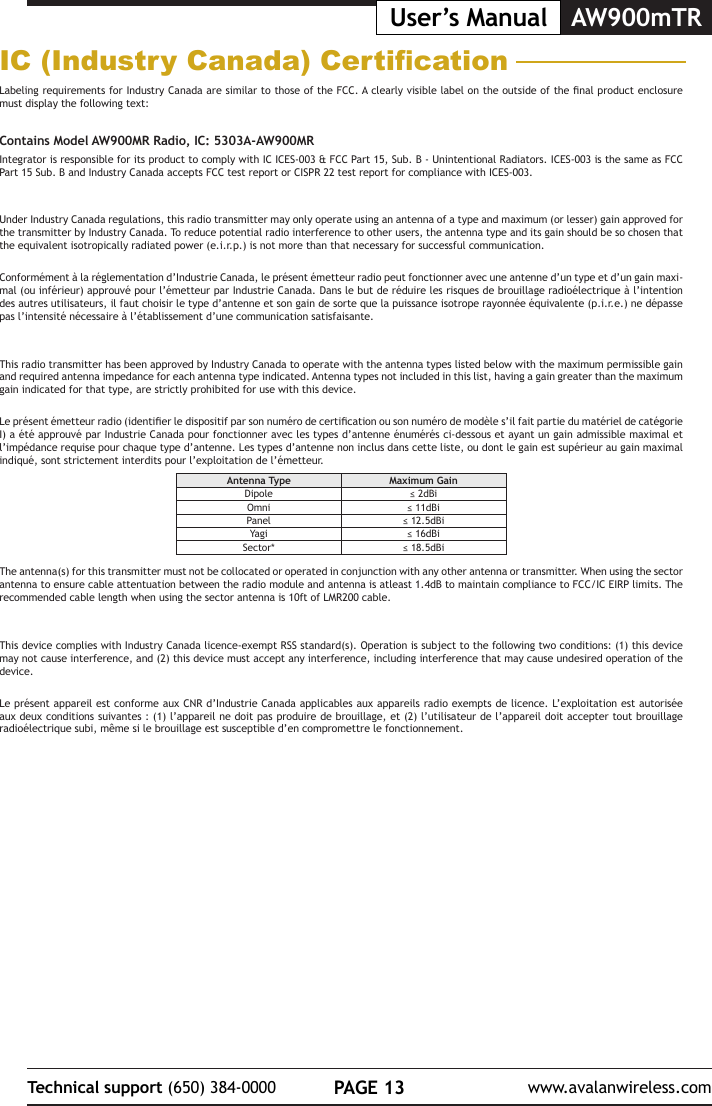
PAGE 13Technical support (650) 384-0000 www.avalanwireless.comAW900mTRUser’s ManualIC (Industry Canada) CerticationLabeling requirements for Industry Canada are similar to those of the FCC. A clearly visible label on the outside of the nal product enclosure must display the following text:Contains Model AW900MR Radio, IC: 5303A-AW900MRIntegrator is responsible for its product to comply with IC ICES-003 & FCC Part 15, Sub. B - Unintentional Radiators. ICES-003 is the same as FCC Part 15 Sub. B and Industry Canada accepts FCC test report or CISPR 22 test report for compliance with ICES-003.Under Industry Canada regulations, this radio transmitter may only operate using an antenna of a type and maximum (or lesser) gain approved for the transmitter by Industry Canada. To reduce potential radio interference to other users, the antenna type and its gain should be so chosen that the equivalent isotropically radiated power (e.i.r.p.) is not more than that necessary for successful communication.Conformément à la réglementation d’Industrie Canada, le présent émetteur radio peut fonctionner avec une antenne d’un type et d’un gain maxi-mal (ou inférieur) approuvé pour l’émetteur par Industrie Canada. Dans le but de réduire les risques de brouillage radioélectrique à l’intention des autres utilisateurs, il faut choisir le type d’antenne et son gain de sorte que la puissance isotrope rayonnée équivalente (p.i.r.e.) ne dépasse pas l’intensité nécessaire à l’établissement d’une communication satisfaisante.This radio transmitter has been approved by Industry Canada to operate with the antenna types listed below with the maximum permissible gain and required antenna impedance for each antenna type indicated. Antenna types not included in this list, having a gain greater than the maximum gain indicated for that type, are strictly prohibited for use with this device.Le présent émetteur radio (identier le dispositif par son numéro de certication ou son numéro de modèle s’il fait partie du matériel de catégorie I) a été approuvé par Industrie Canada pour fonctionner avec les types d’antenne énumérés ci-dessous et ayant un gain admissible maximal et l’impédance requise pour chaque type d’antenne. Les types d’antenne non inclus dans cette liste, ou dont le gain est supérieur au gain maximal indiqué, sont strictement interdits pour l’exploitation de l’émetteur.The antenna(s) for this transmitter must not be collocated or operated in conjunction with any other antenna or transmitter. When using the sector antenna to ensure cable attentuation between the radio module and antenna is atleast 1.4dB to maintain compliance to FCC/IC EIRP limits. The recommended cable length when using the sector antenna is 10ft of LMR200 cable.This device complies with Industry Canada licence-exempt RSS standard(s). Operation is subject to the following two conditions: (1) this device may not cause interference, and (2) this device must accept any interference, including interference that may cause undesired operation of the device.Le présent appareil est conforme aux CNR d’Industrie Canada applicables aux appareils radio exempts de licence. L’exploitation est autorisée aux deux conditions suivantes : (1) l’appareil ne doit pas produire de brouillage, et (2) l’utilisateur de l’appareil doit accepter tout brouillage radioélectrique subi, même si le brouillage est susceptible d’en compromettre le fonctionnement.Antenna Type Maximum GainDipole ≤ 2dBiOmni ≤ 11dBiPanel ≤ 12.5dBiYagi ≤ 16dBiSector* ≤ 18.5dBi

Navigation menu