Avalon RF TX600-18-23-30 Wireless Video and Audio Transmitter User Manual TX600 Series Manual Rev C2
Avalon RF Inc. Wireless Video and Audio Transmitter TX600 Series Manual Rev C2
manual
Avalon RF, Inc. • 344 Coogan Way • El Cajon, CA 92020
Phone: (619) 401-1969 • Fax: (619) 401-1971 • Email: sales@avalonrf.com
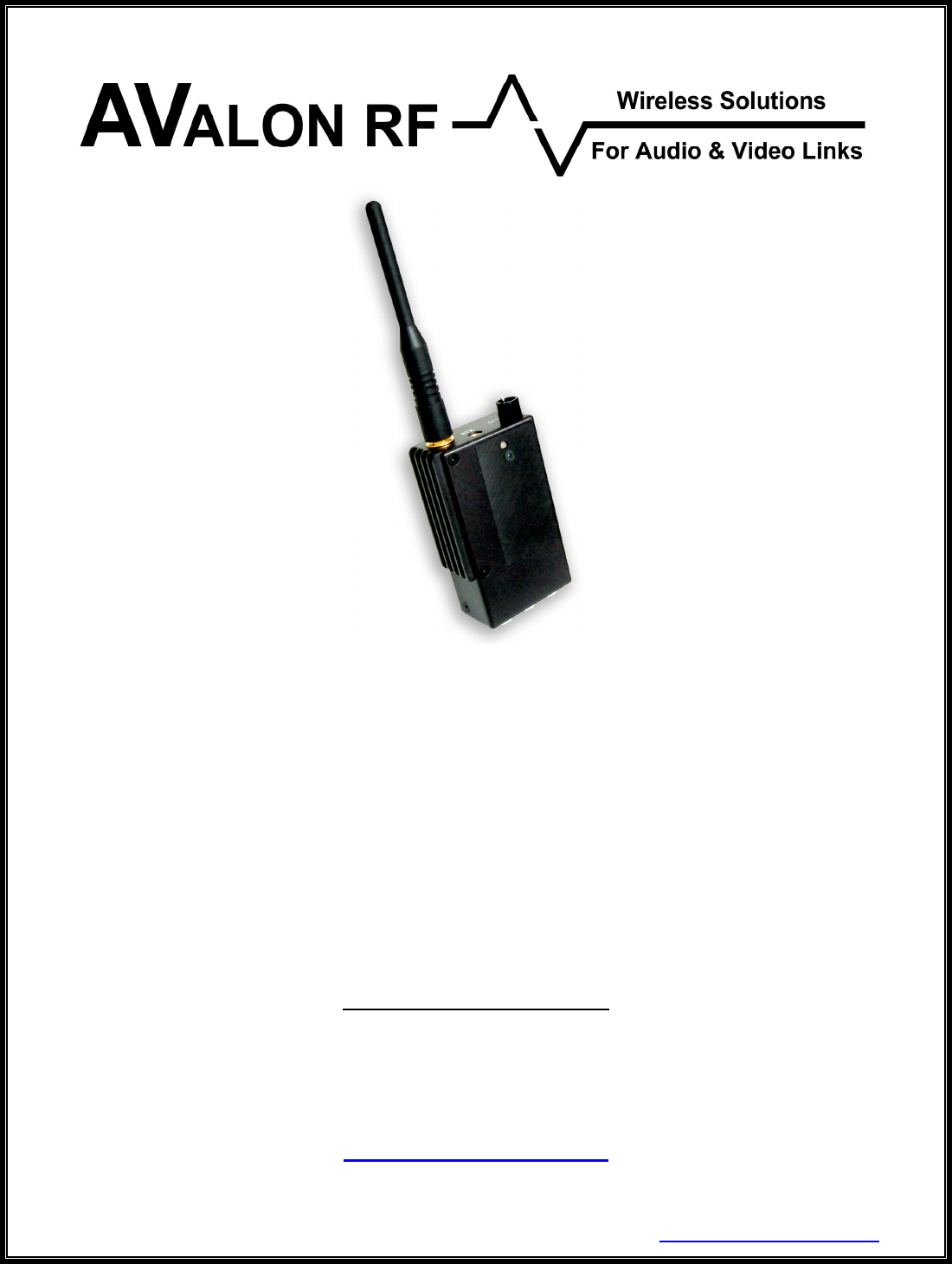
TX600/TX618/TX623/TX630
2.4GHz Video Transmitters
User's Guide & Operating Manual
AV030201/1-000
REV. C2 - 1 October 2003
FCC ID: Q7ITX600-18-23-30
Authored by Guru Mujumdar
Prepared by Steve Jones
http://www.avalonrf.com/

AVALON RF, INC. Page ii
TX600 Series User’s Guide & Operating Manual
FCC INFORMATION
FCC ID: Q7ITX600-18-23-30
This unit complies with Parts 74 & 90 of the FCC regulations.
Maximum Permissible Exposure
Any Wireless Equipment can pose health hazards if precaution is not
exercised in its use/operation, especially its proximity to the human body.
Excessive absorption of RF energy in the body is known to cause Cancer
and/or other diseases. The FCC has issued guidelines to determine the
safe distance of a transmitting antenna from the human body, to limit
absorption to safe levels. Please follow the instructions given in this
manual.
WARNING: Refer to Table 4 in Section 3 (Operating the transmitter) to
determine the MINIMUM DISTANCE the Transmitter with Antenna
mounted, or the Antenna itself (if connected via coax to the transmitter),
must be placed away from the body to minimize the health hazard. Also,
note the Warning for TX630 after Table 4. User’s failure to comply with the
instructions in this manual voids the site license granted.

AVALON RF, INC. Page iii
TX600 Series User’s Guide & Operating Manual
Table of Contents
1. General .................................................................................................1
Table 1 – Model/Output Power .............................................................1
Figure A – TX600 Series Controls and Connectors ..............................3
Video.....................................................................................................4
Audio.....................................................................................................4
Talk Back Audio Channel (Optional).....................................................4
Two Way Digital Data Link (DDL) (Optional) ........................................4
Motion Sensor Input (Optional) .............................................................4
Telemetry Input (Optional) ....................................................................5
RF Outputs............................................................................................5
2. Specifications ........................................................................................6
User Interface .......................................................................................6
Setup ....................................................................................................6
Electrical Interface ................................................................................7
Table 2 – Current Consumption............................................................7
Table 3 – Power Output ........................................................................8
Interconnecting .....................................................................................9
Figure B – DB 15 ..................................................................................9
Figure C – Power/Video......................................................................10
Figure D – Video.................................................................................10
Figure E – Audio .................................................................................10
Figure F – Data Input..........................................................................11
Mounting .............................................................................................12
Mechanical Data .................................................................................13
Environmental Conditions ...................................................................14
3. Operating the transmitter. ...................................................................15
Operater Controls & Indicators ...........................................................15
General Guidelines .............................................................................16
Table 4 – Minimum Safe Distance ......................................................17
4. Ordering information ...........................................................................18
Base Models .......................................................................................18
Options ...............................................................................................19
Recommended Accessories ...............................................................20
Antennas .........................................................................................20
Table 5 – Permissible Antenna/Transmitter Model Combinations...21
Cables .............................................................................................22
Battery Packs ..................................................................................22

AVALON RF, INC. Page 1
TX600 Series User’s Guide & Operating Manual
1. General
The TX600 series rugged transmitters are intended for use in military,
homeland security, mobile security, broadcasting and motion picture
production.
The TX600 Series is an FM modulated transmitter with a tuning range
of 2.4GHz-2.483GHz and an optional extended range of 2.15GHz-
2.5GHz.
The following table details the RF output power of the various models:
Model Output Power
TX600 1mW
TX618 70mW
TX623 200mW
TX630 900mW
Table 1 – Model/Output Power
Each Transmitter is available with a choice of 2 types of End
Connector’s:
Suffix ‘B’ is Broadcast style and comes with LEMO connectors.
Suffix ‘S’ is Security style and has only a DB15 connector.
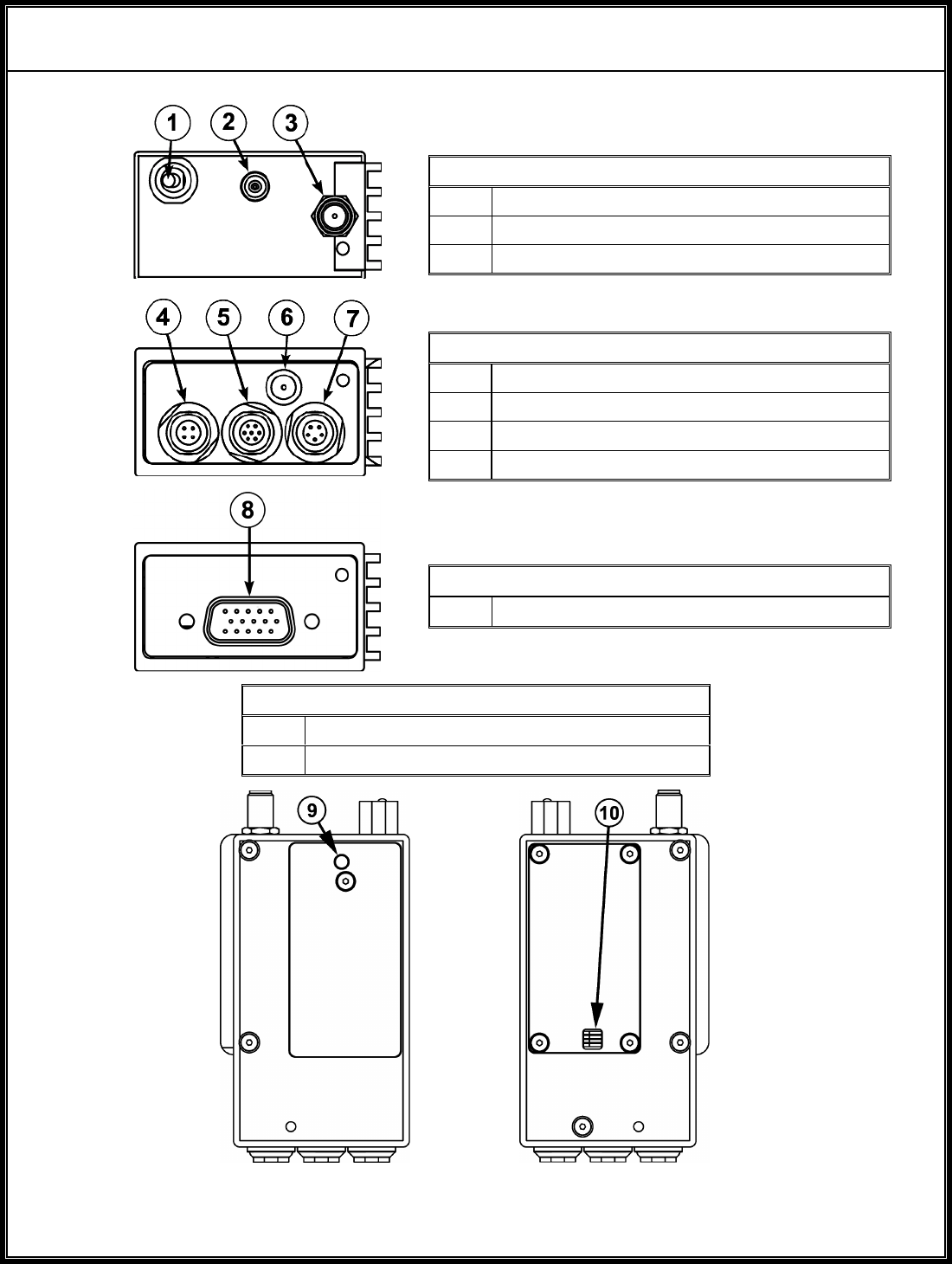
Refer to Figure ‘A’ for connector style.
The type of connector is primarily a matter of preference for the user,
with only 1 audio being a limitation of the ‘Security’ type. The
Broadcast industry also prefers to use the LEMO connector for its
robustness for connect-disconnect applications, typical to that
industry. LEMO connectors are also expensive connectors.
While ordering, please specify the desired style with the above suffix
e.g. TX630B for LEMO connectors.
All transmitters offer the following features:
• A single broadcast quality video channel with no delay.
• One/Two broadcast quality audio channels depending on model.

AVALON RF, INC. Page 2
TX600 Series User’s Guide & Operating Manual
Optional features (each ordered individually).
• Two-way Wireless Data Link (WDL) to a DX series receiver.
• Talk back audio channel.
• Alarm/Motion sensor interface.
• Telemetry inputs.
AVALON RF, INC. Page 3
TX600 Series User’s Guide & Operating Manual
Top View
1 Power Switch
2 WDL Antenna
3 Main Antenna
Bottom View – Broadcast
4 Power/Video Input – see Figure C
5 Data Input – see Figures F
6 Video Input – see Figure D
7 Audio Input – see Figure E
Bottom View – Security
8 Power/Video Input – see Figure B
Side Views
9 Power LED Indicator
10 Channel Select Dip Switch
Figure A – TX600 Series Controls and Connectors

AVALON RF, INC. Page 4
TX600 Series User’s Guide & Operating Manual
1.1 Video.
The video input is buffered, combined with the two audio subcarriers,
then DC level restored, limited by a white level clipping circuit, pre-
emphasized and FM modulates the transmitter RF carrier.
Avalon RF offers the following video indices of modulation:
• Industry standard frequency deviation of 4MHz.
Compatible to GMS, Coherent and others.
This option offers longer range at reference quality.
• Wide frequency deviation of 6MHz.
Compatible to Dynapix, Trango and others.
This option offers broadcast quality but with slightly shorter range.
1.2 Audio.
The two audio inputs are buffered and FM modulated on two
subcarriers. The factory preset subcarrier frequency is 6MHz and
6.5MHz but may be programmed to any frequency from 5MHz to
7.5MHz.
1.3 Talk Back Audio Channel (optional).
The talk back audio channel allows the camera operator (on the
transmit side) to receive instructions from the operator at the
receiver’s side. It drives an earpiece.
1.4 Two Way Wireless Digital Link (WDL) (optional).
The WDL serves as a Pan-Tilt-Zoom (PTZ) / general-purpose two-
way RS422/RS485 digital link.
1.5 Alarm/Motion Sensor Input (optional).
The motion sensor option turns the transmitter on whenever a dry
contact relay closes an external circuit and controls a remote relay in
the receiver.

AVALON RF, INC. Page 5
TX600 Series User’s Guide & Operating Manual
1.6 Telemetry Inputs (optional).
The telemetry input has 3 analog inputs. These inputs are sampled
and transmitted out to the receiver through the WDL.
1.7 RF Outputs.
The transmitters have two RF outputs (Only 1 for a standard unit,
without WDL or Talk Back Audio Option). A female SMA connector
for the main transmitter and a MCX for the WDL.
Both outputs feed antennas, either directly or through a cable.

AVALON RF, INC. Page 6
TX600 Series User’s Guide & Operating Manual
2. Specifications
2.1 User Interface.
a) On/Off Switch.
The TX600 series transmitter has an on/off switch. This shuts off
power to the entire transmitter.
b) Power on LED.
This LED has the following states:
i) Green when power in on.
ii) Red when the transmitter is on air.
c) Hands Free Back Channel (optional).
This option allows the receiver operator to communicate with the
transmitter operator via a headset that includes an earpiece and a
microphone, when the transmitter is on air.
2.2 Setup.
The TX600 series transmitters have the following setups:
a) Video carrier frequency (2.4GHz to 2.483GHz(*)).
b) Audio 1 sub-carrier frequency (5MHz to 6MHz).
c) Audio 2 sub-carrier frequency (6MHz to 7.5MHz).
(*) Option 04 extends the tuning range. See Section 4.

AVALON RF, INC. Page 7
TX600 Series User’s Guide & Operating Manual
2.3 Electrical Interface.
The transmitter has the following interfaces:
2.3.1 Power Input
a) The transmitters operate off a 9Vdc-16Vdc unregulated voltage
source.
a) This input is switched and protected against reverse polarity.
b) Typical power input current consumption for the basic
configuration is (with video present):
Model Input Current
TX600/TX618 <200mA
TX623 350mA
TX630 450mA
Table 2 – Current Consumption
‘Video Presence’ detection circuitry will turn off the power amplifier
if no video is detected. This conserves power considerably and
reduces the RF output by more than 30 dB (1000 times less), if no
video is present.
Addition of option 11 (WDL) will increase the current draw by a
maximum of 170mA.
2.3.2 Video Input.
a) The video input accepts RS170, CCIR, NTSC or PAL signals.
b) Input voltage is 1Vp.p with a negative sync tip of 0.3V.
c) The input impedance is 75 Ω (ohm).
2.3.3 Audio 1 and Audio 2 Inputs.
The audio inputs accept signals of 1Vp.p. and have an input
impedance of 600 Ω (ohm).
2.3.4 "Talk back" audio channel to the transmitter operator (optional).
The “talk back” output drives an electromagnetic earpiece.

AVALON RF, INC. Page 8
TX600 Series User’s Guide & Operating Manual
2.3.5 Two Way Wireless Digital Link (WDL) (Option 11)
The WDL is a 9.6KBaud (standard, other Baud rates are supported)
Half-Duplex RS485 compatible serial interface.
2.3.6 Main RF output to antenna.
a) The main RF output connector is a 50 Ω (ohm) female SMA
receptacle.
b) The RF output power is as follows:
Model Output Power
TX600 1mW at VSWR of 1.5:1
TX618 70mW at VSWR of 1.5:1
TX623 200mW at VSWR of 1.5:1
TX630 900mW at VSWR of 1.5:1
Table 3 – Power Output
2.3.8 Wireless Digital Link (WDL) RF output.
The WDL RF output is via a 50 Ω (ohm) MCX connector. Maximum
output power is 10dbm.
The main RF and the WDL RF outputs are identical on all the
transmitter versions.
2.3.9 Alarm/Motion Sensor input (optional – Security Type Only).
The Alarm/Motion Sensor input is an interface to a dry contact relay.
Whenever the relay circuit is closed, the transmitter goes on air.
2.3.10 Telemetry inputs (optional).
These analog inputs (3 on Security Type, 1 on Broadcast Type)
have a 1M Ω (ohm) input impedance and a sampling rate of 500Hz.
Resolution is 8 bit.
AVALON RF, INC. Page 9
TX600 Series User’s Guide & Operating Manual
2.4 Interconnecting.
All interfaces to/from the transmitter are available in one of the
following connector configurations:
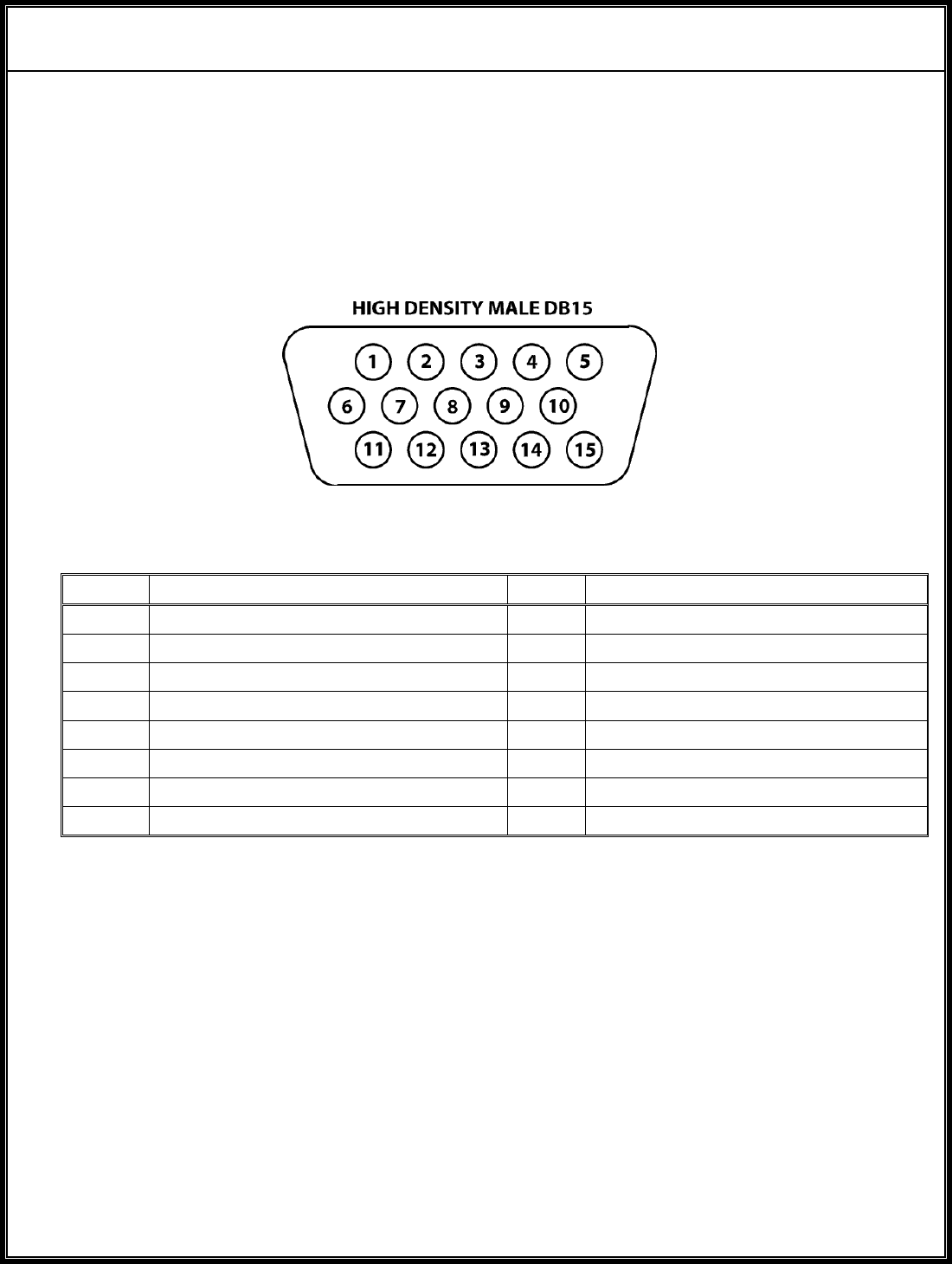
2.4.1 Security Type - DB15P connector with the following pin-out:
Figure B – DB15
Pin # Function Pin # Function
1 Power Input (+9Vdc to +16Vdc) 9 Signal Ground
2 Video Input 10 Telemetry 1 Input
3 Video Return Ground 11 Alarm/Motion Sensor Input
4 Audio 1 Input 12 RS-485 I/O ‘A’
5 Microphone Input 13 RS-485 I/O ‘B’
6 Microphone Bias 14 Telemetry 2 Input
7 Earpiece Output 15 Telemetry 3 Input
8 Power Return Ground
NOTE: This connector option allows for one audio input only, Audio 1 at 6.0
MHz (default factory set).
AVALON RF, INC. Page 10
TX600 Series User’s Guide & Operating Manual
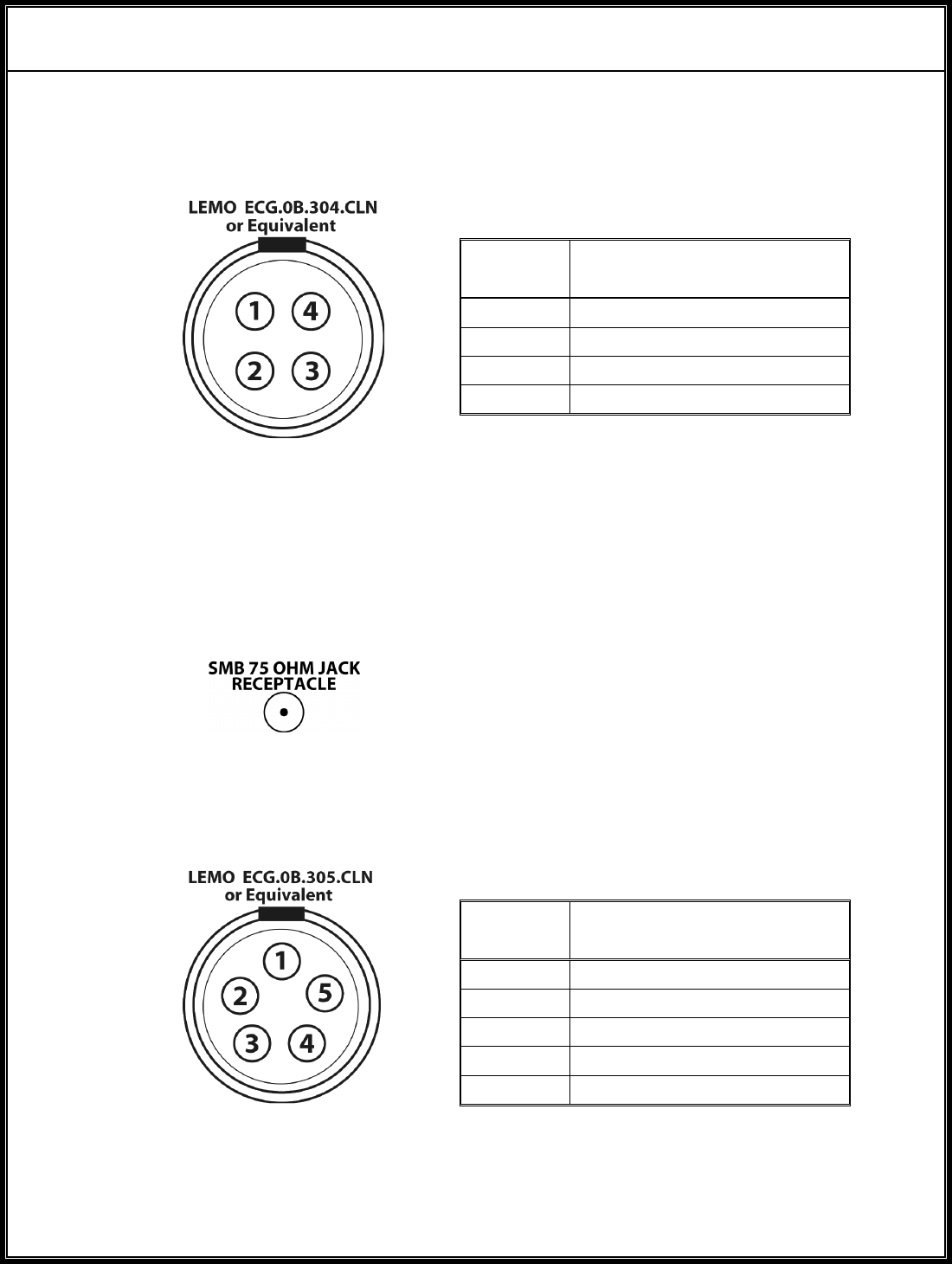
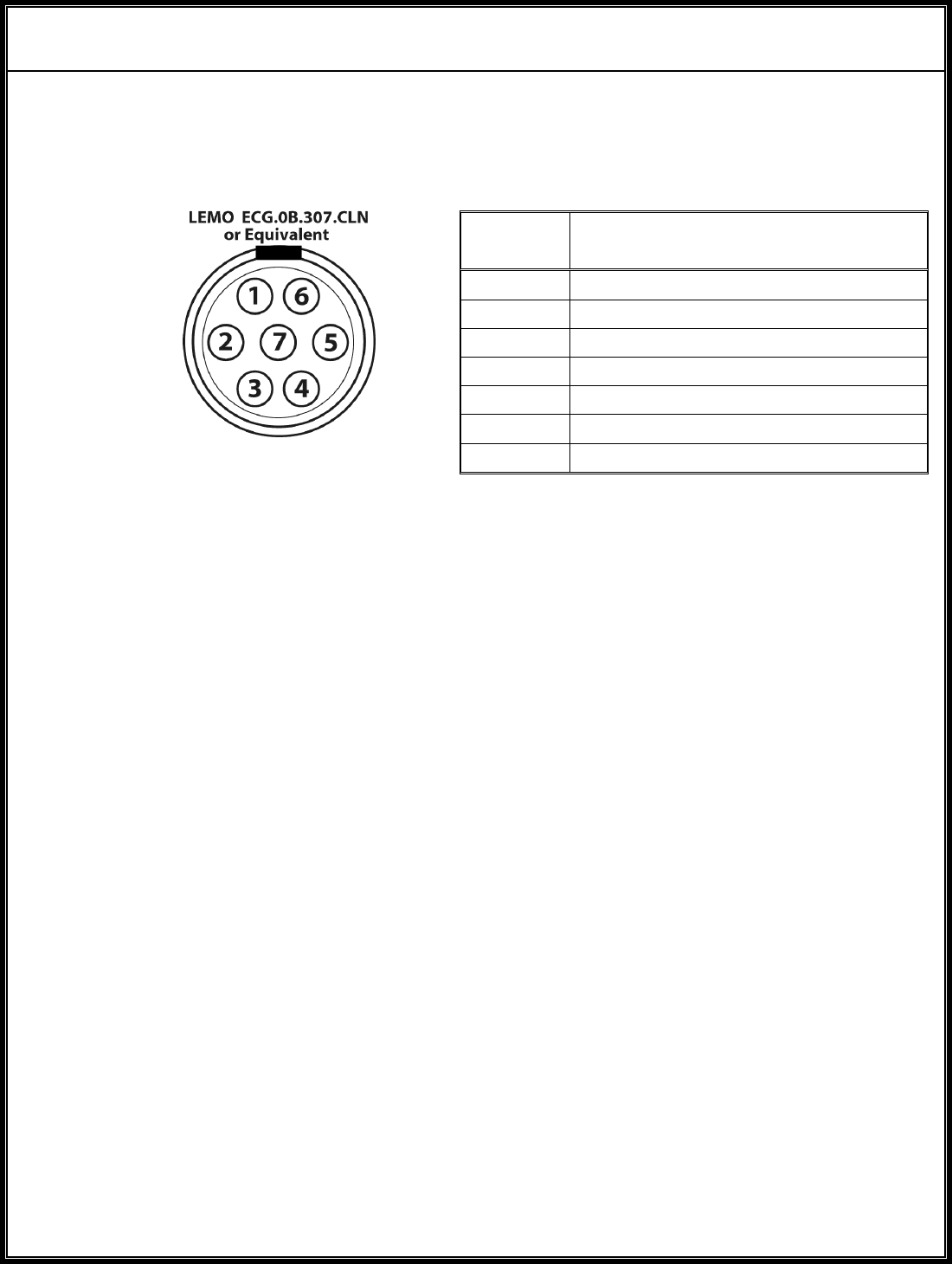
2.4.2 Broadcast Type - multiple connectors.
a) Power/Video Input.
Pin
Number Function
1 Power Return
2 Video Input
3 Video Return
4 Power Input
Figure C – Power/Video
b) Video Input.
The video signal is input either through the video 75 Ω (ohm) SMB
connector (Figure D) or the power connector (Figure C).
Figure D – Video
c) Audio Input.
Pin
Number Function
1 Audio Return
2 Audio 1 Input
3 Audio 2 Input
4N/C
5N/C
Figure E – Audio
AVALON RF, INC. Page 11
TX600 Series User’s Guide & Operating Manual
2.4.2 Broadcast Type - multiple connectors (continued).
c) Data Input.
Pin
Number Function
1 Telemetry
2 Microphone Input
3 Speaker Output
4 Microphone Bias Output
5 RS-485 I/O ‘A’
6 RS-485 I/O ‘B’
7 Ground
Figure F – Data Input

AVALON RF, INC. Page 12
TX600 Series User’s Guide & Operating Manual
2.5 Mechanical
2.5.1 Mounting.
Mounting can be done in one of the following methods:
a) Clamping.
Clamping (or hard mounting) is the only method of mounting in all
fixed installations.
Clamping is the preferred method of mounting in all mobile
installations where most electrical interfaces are used. This is due
to the heat sinking needed and the weight of the connector’s and
the cable’s.
b) Clip on.
Avalon RF offers a clip on kit. This method is recommended when
only one or two interfaces are in use. Not practical for TX623 and
TX630.
c) Velcro® to a flat surface.
Using Velcro® to secure the transmitter is recommended when
only a few interfaces are in use. Not practical for TX623 and
TX630.
d) Drop-in.
The transmitter can be dropped into a bucket mounted on the side
of the video camera, like the ones usually found in ENG service.
This can be done for the TX623 or TX630 only if adequate
ventilation (for cooling) is available in the bucket and care is taken
with other cables/equipment not being damaged from the
transmitter heat.
AVALON RF, INC. Page 13
TX600 Series User’s Guide & Operating Manual
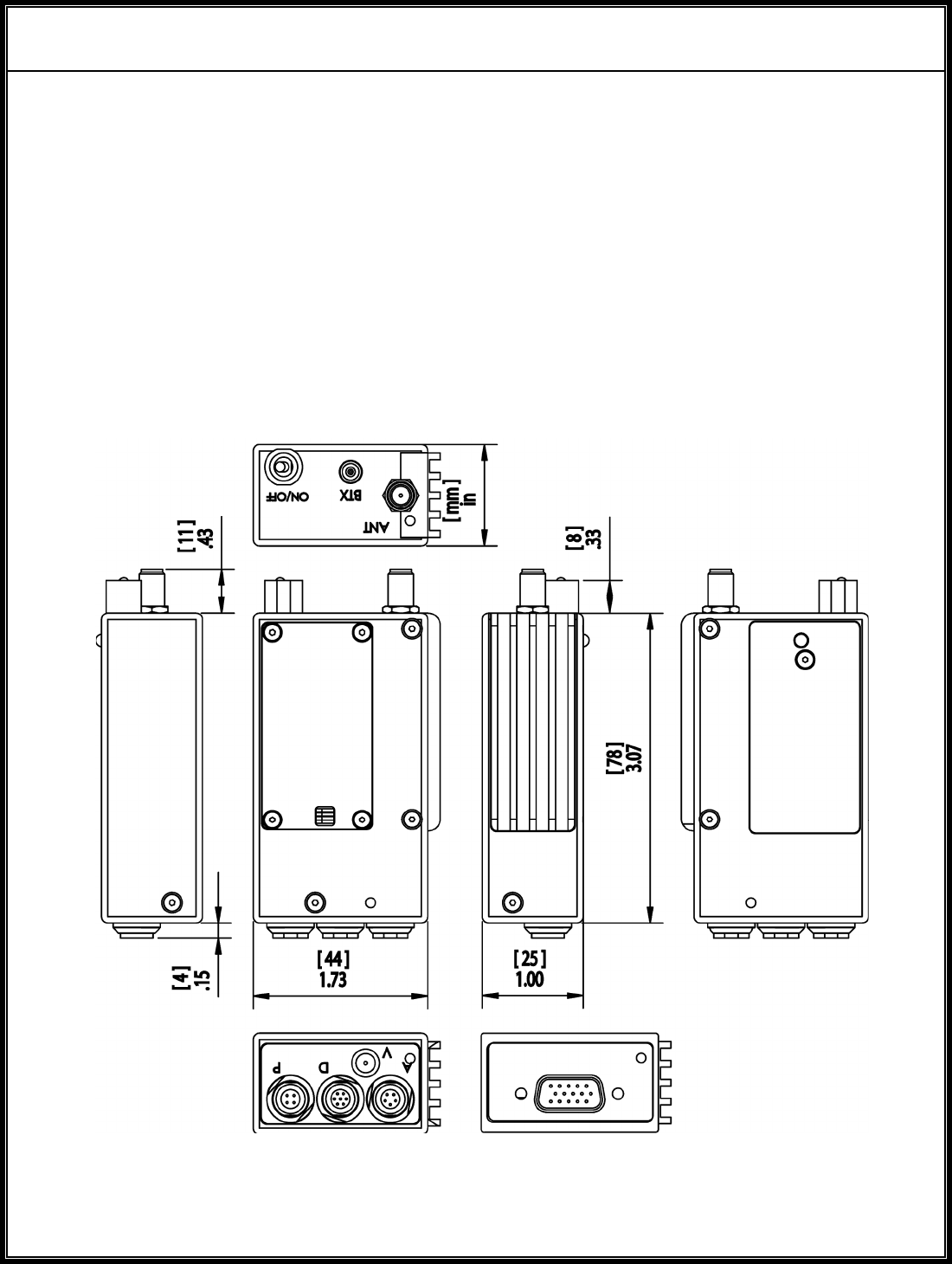
2.5.2 Mechanical Data.
a) Size 3.07” x 1.73” x 1.0 (see Figure G)
78mm x 44mm x 25.4mm
b) Weight <5.6 oz.
<158 gram
c) Shipping weight <32 oz.
<900 gram
Figure G – TX600 Series Mechanical Outline

AVALON RF, INC. Page 14
TX600 Series User’s Guide & Operating Manual
2.6 Environmental Conditions.
The TX600 Series is designed to meet the following environmental
conditions:
2.6.1 Operating temperature -4° to 122° F
-20° to 50° C
2.6.2 Storage temperature -13° to 150° F
-25° to 65° C
2.6.3 Vibration 1.5G, from 10Hz to 2KHz, sine wave, 3 axis
2.6.4 Shock 15G, 25msec, half sine wave, three axis
2.6.5 Humidity 5 to 95%, non-condensing
2.6.6 Inclination Any
2.6.7 Altitude -1500 feet to 15,000 feet
-450 meter to 4,500 meters

AVALON RF, INC. Page 15
TX600 Series User’s Guide & Operating Manual
3. Operating the transmitter.
Before applying power, make sure all connectors and all antennas
are hooked up.
NOTE
The transmitter will not transmit unless it has an antenna.
3.1 The transmitter has two operator controls and one indicator:
a) Channel select.
Units that have a manual synthesizer have a 4-position dip switch
that selects a channel number (from 1 to 16). The preset channel
numbers are defined by a label on the side wall of the transmitter.
The user is advised to select a channel within the permissible
frequency range to begin with, and if any interference is observed,
switch over to another channel.
b) On/Off switch.
3.2 The wireless data link is a secondary/utility link that is used to transfer
data/voice in the reverse direction and some alarms/telemetry data in
the forward direction. It is a narrow band UHF link operating at 473
MHz.
Following are the characteristics:
a) VOICE: Voice is transmitted from the receiver (DX side) to the
Transmitter side (TX side). It is implemented as a VOX (voice
operated transmit) and only the headset microphone is used on
the DX side & only the earpiece is used on the TX side. The
microphone is an electret mic.
b) DATA: The data rate is 9.6KBaud fixed (other data rates
supported) on a RS485 interface.
c) TELEMETRY/ALARMS: This data is sent about 5-6 times a
second.

AVALON RF, INC. Page 16
TX600 Series User’s Guide & Operating Manual
3.3 General Guidelines
The choice of a Transmitter and the Antenna to be used is dictated by
power consumption, required distance of operation of the link, if it is a
fixed or a mobile environment, the space constraints, the location
itself (indoors or outdoors, presence of nearby objects like trees,
bridges, etc.) and etc. Avalon RF will work with you to determine the
right combination. Placement/positioning of the transmitter antenna is
important for proper operation of the wireless video link. The antenna
shipped with the unit is omni-directional, which means it will radiate in
all directions and when upright (vertical) will be vertically polarized.
The receiver side antenna’s then, must also be mounted vertically.
While the above method would be the usual / most common way,
certain applications need a different placement. As an example, to
transmit between floors in a high rise building, the transmit & receive
antennas can be small, directional, high gain panel antennas,
mounted horizontally, directly ‘looking’ at each other. Circular
polarized antennas are more expensive, but give a far better
performance, especially in mobile applications.
For proper operation of the wireless link, the transmitter antenna
should be kept clear of metal objects, trees, buildings, etc. If the
transmitter is mobile such as on a video camera, ensure the antenna
is sufficiently clear of the operator’s body, especially the head. A 2.4
GHz link is a line-of-sight communications, which means the receive
antennas should ‘see’ the transmit antenna.
Another very important aspect relates to health hazards from RF
energy absorption in the body. To minimize the risk, we ask that the
user ENSURE the minimum distance of the transmitting antenna from
the human body per Table 4. These values have been calculated per
FCC Bulletin OET65, Supplement C & related documents.

AVALON RF, INC. Page 17
TX600 Series User’s Guide & Operating Manual
Minimum Distance from Body (in Inches)
Model !Antenna Gain "0 dBi 3 dBi 10 dBi 27 dBi
TX600/TX618 2” 3” 4” -
TX623 3” 4” 8” 48”
TX630 **
Distance
6” 9” 16” 84”
Table 4 – Minimum Safe Distance
WARNING:
** An Antenna extender cable is shipped with the TX630, it is meant
to hold the antenna at the minimum safe distance from the human
body. This extender cable MUST be used whenever the TX630 is
operated in a mobile environment (such as on a camera) and the
user should mount the transmitter in a way that does not defeat the
purpose of this cable. If the transmitter is mounted in a manner other
than intended with the extender cable, it SHALL be the user’s
responsibility to ensure the above minimum distance from ‘any’
human being. Avalon RF will help/advise you if necessary. Failure to
comply with these instructions will void the grant of the site license
under part 74 or part 90 (as the case may be).
If the antenna you received is not one of the above, use the next
higher distance or call/e-mail Avalon RF.
Operating range will depend on the transmit and receive antennas
used - a wide choice of antennas is available from Avalon RF. Please
visit the website (www.avalonrf.com) for more details.
For fixed installations, power saving can be achieved by turning off
the video camera or the video source. A ‘video presence’ detection
circuitry will turn off the power amp when no video is detected - power
will be restored when the video signal is restored. Besides power
conservation, it also eliminates high power RF transmission by
reducing the output by about 30 dB (1000 times less) when no video
is present.

AVALON RF, INC. Page 18
TX600 Series User’s Guide & Operating Manual
4. Ordering information
4.1 Base Models
TX600 2.4GHz-2.483GHz, FM modulated, O/P of 1mW
TX618 2.4GHz-2.483GHz, FM modulated, O/P of 70mW
TX623 2.4GHz-2.483GHz, FM modulated, O/P of 200mW
TX630 2.4GHz-2.483GHz, FM modulated, O/P of 900mW
NOTE
Models with 200mW and up are licensed to customers per FCC
Part 74 and Part 90 or for export only.
While ordering, please specify the desired connector style with the
proper suffix e.g. TX630B for LEMO connectors.
Suffix ‘B’ is Broadcast style and comes with LEMO connectors.
Suffix ‘S’ is Security style and has only a DB15 connector.
Refer to Figure ‘A’ for connector style.
All units come with the following standard accessories:
4.1.1 Omni directional whip antenna
4.1.2 A 3-foot power cord with flying leads, to be connected to a customer
specific battery pack.
4.1.3 User guide and operating manual (this manual).
4.1.4 A heavy-duty reusable carton.

AVALON RF, INC. Page 19
TX600 Series User’s Guide & Operating Manual
4.2 Options.
4.2.1 Option 01 – Remote programming. Requires option 11
4.2.2 Option 04 – Extended tuning range
TX600 series – 2.150GHz to 2.5GHz
This is ONLY the available range. User should indicate specific
frequencies licensed to them in this band at the time of ordering.
4.2.3 Option 11 – Wireless Data Link (WDL)
Includes an AX402 omni-directional whip antenna with MCX
connector.
4.2.4 Option 31 – Talk back audio channel. Requires option 11.
4.2.5 Option 41 – Alarm/Motion Sensor input. Requires option 11.
4.2.6 Option 51 – Telemetry inputs (3 on Security Type, 1 on Broadcast
Type). Requires option 11.
4.2.7 Option NM – Basic unit installed in an outdoor NEMA 4 box with an
internal power and signal distribution panel.
4.2.8 Option SP – Basic unit installed in an outdoor NEMA 4 box with
solar panel, charger and internal lead-acid battery

AVALON RF, INC. Page 20
TX600 Series User’s Guide & Operating Manual
4.3 Recommended accessories.
4.3.1 Antennas
The following is a list of antennas available from Avalon RF. Only
certain antennas can be used with high power models like TX623 &
TX630 to comply with FCC’s EIRP restrictions. Overseas customers
must check local regulations for compliance before ordering. The
choice of a particular antenna is dictated by transmitter power
consumption, the application environment, physical size constraints,
governing local regulations, etc. As a rule, the higher the antenna
gain, the larger it’s size and narrower the beam width (the more
directional the antenna).
Omni-directional antennas for mobile application:
Gain 2.4GHz Comments
0dbi AX600 ¼ wave whip (needs ground plane)
3dbi AX603CP Circular polarized whip
3dbi AX603 Linear polarized
4dbi AX604 Linear polarized
6dbi AX606 Linear polarized
8dbi AX608 Linear polarized
10dbi AX610 Linear polarized
Directional antennas for fixed point-to-point applications:
Gain 2.4GHz Comments
10dbi AX610CP Circular polarized panel
13dbi AX613CP Circular polarized panel
16dbi AX616CP Circular polarized panel
24dbi AX624PD Parabolic Dish
27dbi AX627PD Parabolic Dish

AVALON RF, INC. Page 21
TX600 Series User’s Guide & Operating Manual
The following table shows permissible Antennas that can be used with the
different transmitters:
Permissible for use with Model
Antenna FCC Part 15
(License Free)
RSS210
(Canada)
FCC Part 90
(Licensed)
FCC Part 74
(Licensed)
AX600 TX600 Any TX6XX Any TX6XX Any TX6XX
AX603
AX603CP -
TX600
TX618
TX623
Any TX6XX Any TX6XX
AX604 -
TX600
TX618
TX623
Any TX6XX Any TX6XX
AX606 -
TX600
TX618
TX623
Any TX6XX Any TX6XX
AX608 - TX600
TX618
TX600
TX618
TX623
Any TX6XX
AX610
AX610CP -TX600
TX618
TX600
TX618
TX623
Any TX6XX
AX613CP - TX600
TX600
TX618
TX623
TX600
TX618
TX623
AX616CP - TX600 TX600
TX618
TX600
TX618
TX623
AX624PD*
AX627PD*- TX600 TX600 TX600
* These antennas must be mounted on a roof or mast.
Table 5 - Permissible Antenna/Transmitter Model Combinations

AVALON RF, INC. Page 22
TX600 Series User’s Guide & Operating Manual
4.3.2 Cables
The length of the cable between the transmitter and the antenna will
have a bearing on the output power transmitted. It is not
recommended to have more than 30 feet of cable, as the cable loss
will become appreciable, even with a low loss cable. If a cable must
be used, we recommend a low loss cable like the LMR240 or
LMR400 or equivalent.
4.3.3 Battery packs
a) BAT80 – 14.4V/80WH Li-Ion battery pack with charger and power
cable to transmitter - will run a TX630 transmitter for approximately
9 hours.
b) BAT92 – 14.4V/92WH Li-Ion battery pack with charger and power
cable to transmitter - will run a TX630 transmitter for approximately
12 hours.
c) BAT103 – 14.4V/103WH Li-Ion battery pack with charger and
power cable to transmitter - will run a TX630 transmitter for
approximately 15 hours.