Avaya Sip Software Release 3 2 Notice 3.0 For IP Deskphones
2015-06-01
: Avaya Avaya-Sip-Software-Release-3-2-Notice-736738 avaya-sip-software-release-3-2-notice-736738 avaya pdf
Open the PDF directly: View PDF  .
.
Page Count: 17
- Introduction
- Enhancements
- Support for 1220 and 1230 IP Deskphones
- Support for 1165E Deskphone
- Shared Call Appearances (CS1000 Only)
- IPv6 Support
- Media security - SRTP
- Signaling Security - TLS
- Certificate-based Authentication
- Embedded Screensavers (1165E sets only)
- Pre-loaded Screensavers
- Support for Avaya Aura™ Communication Manager / Session Manager
- Quality Improvements
- IP Deskphone Compatibility
- Call Server Compatibility and Requirements
- References and Related Documents
- Product Advisements
avaya.com
SIP Software Release 3.2 for IP Deskphones
Revision History
Date Revision # Summary of Changes
23 August 2010 Original bulletin This is the original publication
5 October 2010 Revision Updated link to application note for Auratm CM/SM Interoperability
Introduction
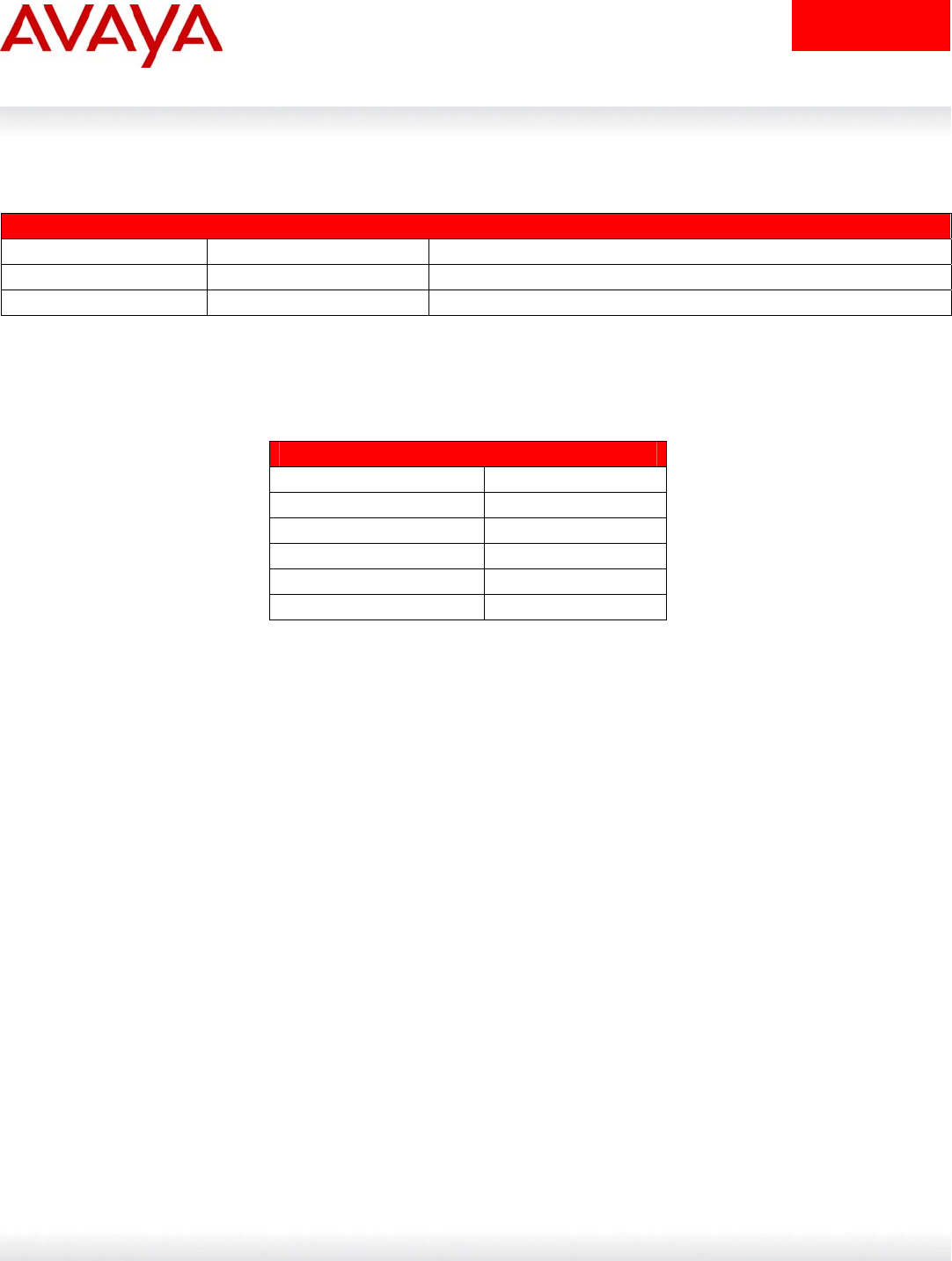
Avaya is pleased to announce the availability of SIP software Release 3.2 for IP Deskphones. SIP software release 3.2 expands the
number of supported IP Deskphone devices and makes available the following software versions for the following IP Deskphones:
SIP Software Release 3.22
IP Deskphone Software
1120E IP Deskphone 03.02.16
1140E IP Deskphone 03.02.16
1165E IP Deskphone 03.02.16
1220 IP Deskphone 03.02.16
1230 IP Deskphone 03.02.16
Avaya recommends an upgrade to this release of software for all applicable IP Deskphones and Call Servers at the earliest
convenience. SIP Software Release 3.2 includes re-branding changes both in the product as well as in supporting documentation and
is the minimum release for re-branding.
SIP software Release 3.2 for IP Deskphones is available for download from the “Software Download” link under “Support and Training”
on the product support website located at: http://support.nortel.com. The software is available by phone model under “Phones, Clients
and Accessories”.
Note: These SIP software loads have not been introduced as the default loads for the IP Deskphones shipped from Avaya.
SIP Release 3.2 Readme 1
avaya.com
Enhancements
Several enhancements have been included in SIP Release 3.2 for the 11xx and 12xx Series deskphones including:
Improved Licensing
SIP Support for 1220,1230 and 1165E IP Deskphones
Shared Call Appearances – CS1000
IPv6 Support
SRTP Media Security
TLS Signaling Security
Certificate-based Authentication
Enhanced Screensavers
Background images
Support for Avaya Aura™ Communication Manager / Session Manager
A description of each feature is provided in the following sections.
SIP Release 3.2 Readme 2
avaya.com
Improved Licensing
Licensing was introduced in the SIP 3.0 release. With SIP 3.2, the following changes are made to the licensing mechanism:
The Standard feature set is now available on all desksets without a token. This provides a basic set of SIP features conforming
to RFC 3261 (SIPPING 19) at no additional cost.
Now, when the phone is registered to a recognized Avaya call server (Avaya AuraTM, AS 5300, CS1000 or CS2100), the
Extended feature set is available as well without a token.
The Advanced feature set is reserved for Federal and DoD features on the AS 5300 call server only
The feature packages have been re-organized
o Wideband is part of Standard feature set
o IPv6 and Broadworks SCA are part of Extended feature set
o Security is now part of the Extended feature set
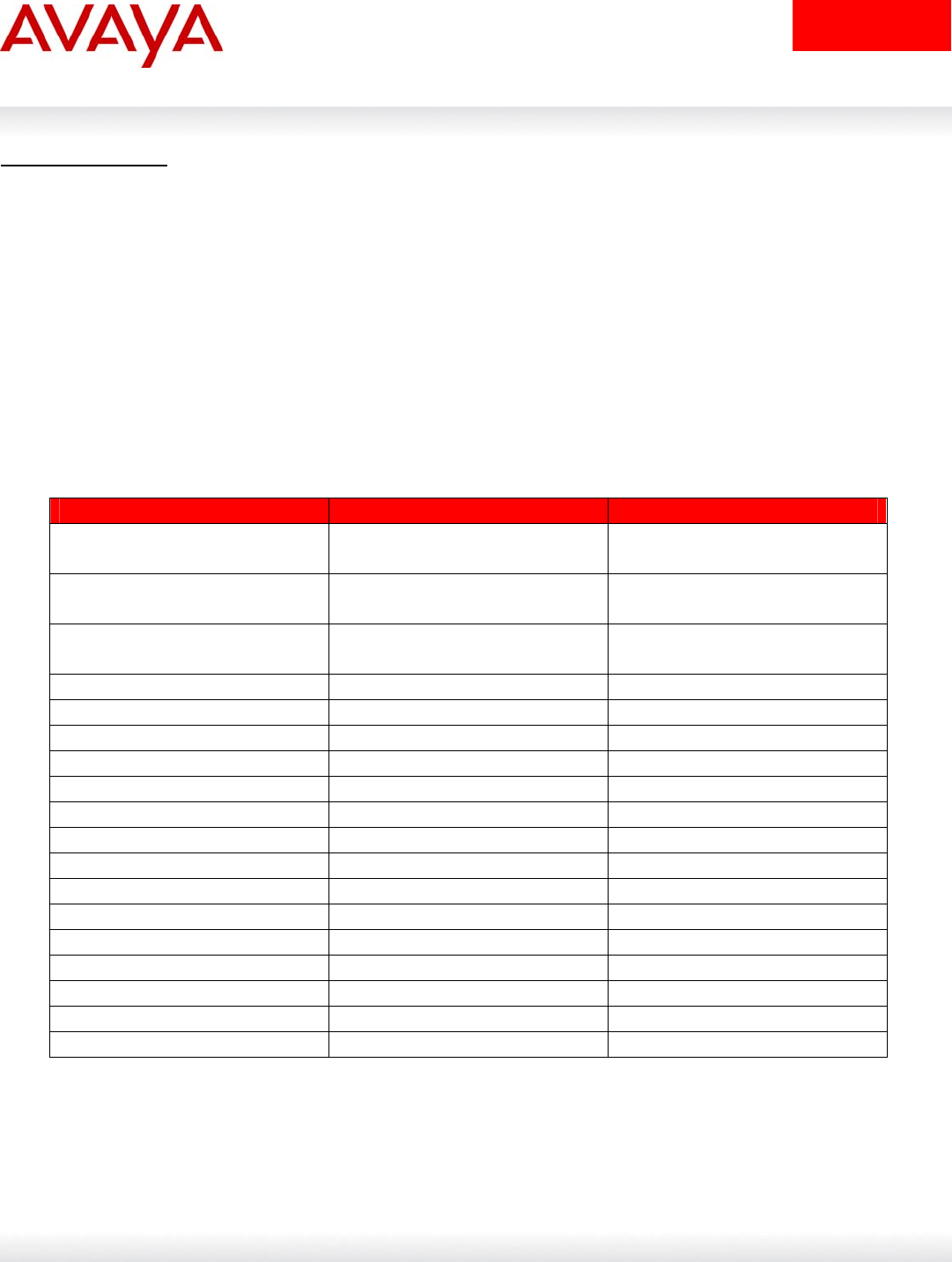
The feature packages are now as follows:
Standard Features (No Tokens) Extended Features (One Token*) Advanced Features (Two Tokens*)
SIP Core Features
(RFC3261/SIPPING 19)
Standard Feature Set Standard Feature Set
Extended Feature Set
3-way call / call conference Authentication Security Multi-Level Precedence and
Preemption (MLPP)
Audio Codecs - Standard +
Wideband
Bluetooth Headset support
(1140E/1165E only)
Call Origination Busy
Auto Login/Logout Call Server Service Package DoD Network
Background Image Expansion Module support FIPS Certified
Busy Lamp Field (BLF) Instant Messaging
Distinctive Ringing Media Security (SRTP)
Downloadable Ringtones Multi-user Login support
Image Screensaver & Lock NAT Traversal/STUN
Standard Font Languages Proactive Voice Quality Mgt
Multiple calls per user PC Client Control
Server Failover Redundancy Signaling Security (TLS)
Session Timers USB headset support for audio
SNTP (Time Server) IPv6 Support
Speed Dial List Broadsoft Broadworks SCA
Transfer to VM softkey
USB memory stick
Hotline
* - One token waived when connected to an Avaya call server
SIP Release 3.2 Readme 3
avaya.com
Support for 1220 and 1230 IP Deskphones
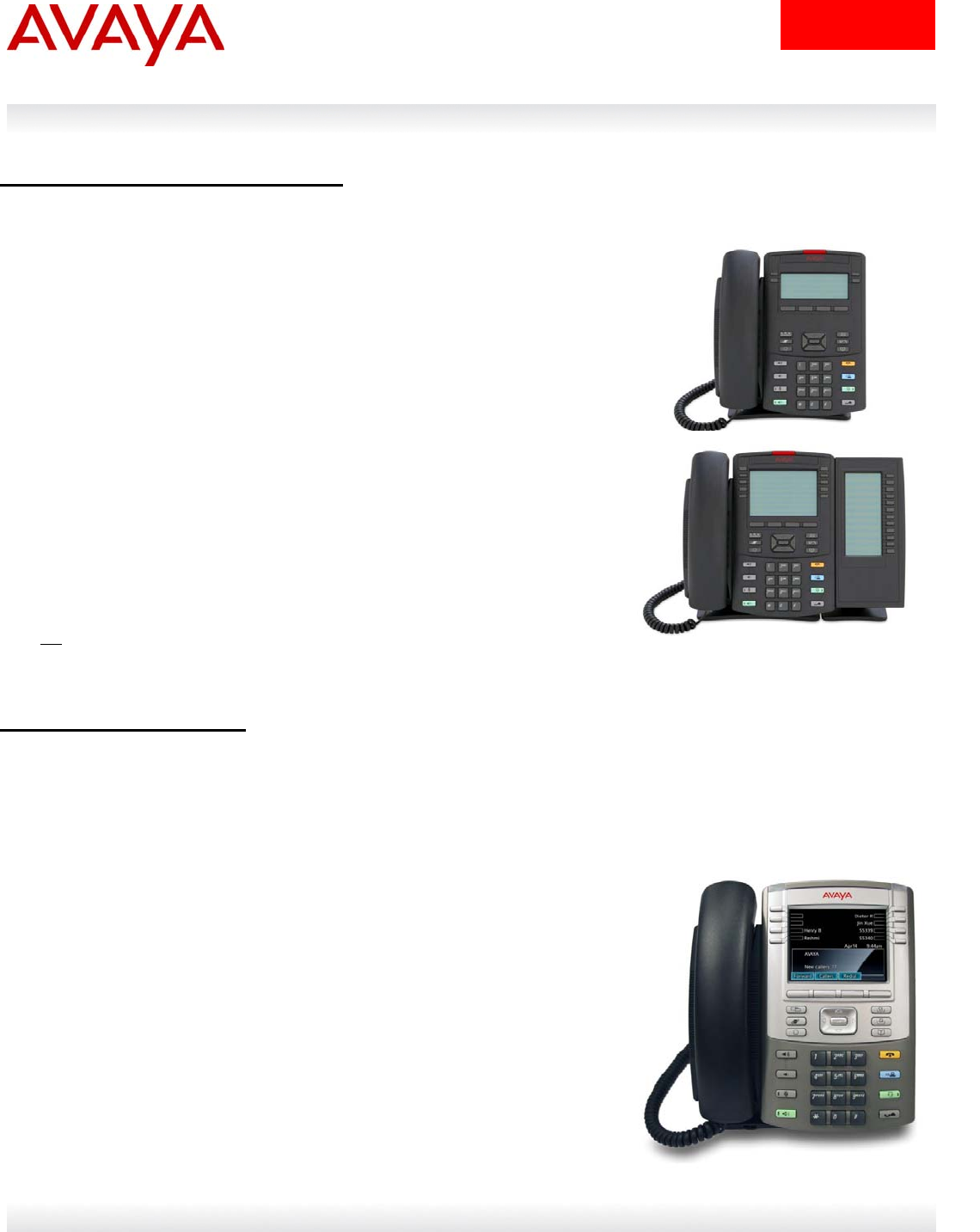
SIP Release 3.2 expands support for the Avaya 1220 and 1230 Deskphones. The 1200 series is a similar industrial design to the 1100
Series but is mechanically simpler and lower cost with a smaller processor. It is ideal for SMB and cost sensitive applications.
Key features:
Delivers High Quality Audio Experience - same full duplex algorithm as 1100 series
Fast Ethernet and switch in all models
2-position footstand + wallmount
Wideband enabled (to be supported in a future release)
Both Key Expansion Modules are supported
18-Key with LED indicators and paper labels
12-Key with self labeling LCD (shown)
Cascadable (up to 7 LCD modules)
Does not support Bluetooth wireless technology, USB, graphics or screen savers
Support for 1165E Deskphone
SIP Release 3.2 also provides support for the Avaya 1165E Deskphone. The 1165E is an advanced design with the following
features:
High resolution (240 x 360 pixels),
QVGA color, Liquid Crystal Display
Integrated 10/100/1000 Base-T Auto- Sensing Ethernet switch for shared PC access (one LAN port and one PC port)
Superior quality audio experience including wideband-ready speakerphone and handset
Power efficiency gains with support for IEEE 802.3af PoE standard as a Class 2 device
8 programmable line/feature keys
User selectable background
Digital picture slideshow
Bluetooth 2.1 support
o Headset profile
Integrated USB port for keyboard, mouse or headset connectivity
USB flash drive support
Avaya 1100 Series Expansion Module Support
o up to 54 additional line/feature keys with three Expansion Modules
SIP Release 3.2 Readme 4
avaya.com
Shared Call Appearances (CS1000 Only)
SIP Release 3.2 provides support for Shared Call Appearances (SCA) in CS1000 environments (beginning with CS1000 Release 7).
This feature allows a single DN to have shared appearances on several different deskphones. Ideal for environments where users are
moving between many different phones or where a single person, such as an administrative assistant, may be answering calls on
behalf of others.
This feature may operate in one of two ways:
Single DN – shared appearances
Single DN – multiple appearances
With shared appearances, the DN is shared between the deskphones such that there may only be one call active on the DN at a time
(server enforced). The status of DN is shown on all appearances including idle, ringing, busy, hold. Call pickup or barge-in are
possible depending on status of call. This feature is automatically enabled during registration when the deskphone is provisioned on
CS1000 call server.
With multiple appearances, each appearance of the DN can independently make/receive calls.
The SCA feature requires the use of Authentication IDs. Separate User ID and authentication ID. If the configuration file contains the
line PROMPT_AUTHNAME_ENABLE Yes (default is disabled), the user will then be prompted to enter the authentication ID.
– If the authentication ID is not specified, it will default to the login id.
– The authentication ID can be specified via
AUTOLOGIN_AUTHID_KEYxx
IPv6 Support
SIP Release 3.2 adds support for IPV4/IPv6 dual mode on 1120E, 1140E, 1165E and 1220/30 SIP deskphones. Currently, IPv6 is only
supported on AS5300 and CS1000 call servers.
Internet Protocol version 6 (IPv6) is a network layer for packet-switched internetworks and is the successor of IPv4.
IPv6 provides larger address space, which allows greater flexibility in assigning addresses. The extended address length used within
IPv6 eliminates the need to use Network Address Translation to avoid address exhaustion to simplify the aspects of address
assignment and renumbering when changing providers.
The IP Deskphones can be configured to support IPv4 and IPv6 protocols. IP Deskphones use IPv4 mechanisms (for example, DHCP)
to acquire their IPv4 addresses and IPv6 mechanisms (for example, Stateless auto configuration) to acquire their IPv6 addresses.
IPv6 uses a hierarchical method to allocate IP addresses, which provides simplified routing and renumbering.
IPv6 provides the following:
128 bits for address space compared to 32 bits for IPv4
well defined Quality of Service (QoS) mechanism
simplified configuration (stateless auto configuration)
SIP IP Deskphones provide complete support for IPv4 and IPv6 Internet protocols, as follows:
provides transition mechanism to IPv6
enables SIP IP Deskphones to interoperate with IPv4 hosts and utilize IPv4 routing
SIP Release 3.2 Readme 5
avaya.com
ability to send and receive both IPv4 and IPv6 packets
interoperates directly with IPv4 nodes using IPv4 packets
interoperates directly with IPv6 nodes using IPv6 packets
IPv6 and IPv4 IP Deskphones operate in one of two modes:
IPv4 enabled and IPv6 stack disabled (default)
both IPv4 and IPv6 stacks enabled
Three new device Configuration flags have been added to support IPv6:
IPV6_ENABLE (Y/N) enables IPv6
PREFER_IPV6 orders media lines
IPV6_STATELESS (Y/N) enables stateless auto-configuration
Media security - SRTP
With SIP 3.2, media security is provided using SRTP (RFC 3711). The deskphone may operate in one of two modes: Secure Only or
Best Effort. With secure only, a secure path must be setup before the call will complete – otherwise the call will fail. With best-effort, an
attempt will be made to initiate a secure call, however if it is not possible, the call will continue in an unsecure mode.
3 different SRTP modes are available:
BE- Cap Neg (Best Effort Capabilities negotiation)
BE- 2M Lines (Best Effort – 2M lines negotiation)
SecureOnly (If there is no SRTP on the endpoint then call fails)
These are controlled by the following configuration parameters:
SRTP_ENABLED <Yes, No>
SRTP_MODE <BE-2MLines, BE-CapNeg, SecureOnly>
Cipher support
SRTP_CIPHER_<X> <AES_128_SHA1_32, AES_128_SHA1_80>
MKI (Master Key Identifier)
Support of MKI and non-MKI modes
MKI_ENABLE <Yes, No>
Note: SRTP is not supported on CS1000 Release 7.0. It is planned for CS1000 Release 7.5.
SIP Release 3.2 Readme 6
avaya.com
Signaling Security - TLS
SIP 3.2 also provides Signaling Security via Transport Layer Security (TLS) per RFC 5246. TLS is a protocol for establishing a secure
connection between two end-points. After a connection is established using TCP, TLS negotiates the cryptographic parameters used to
secure the traffic that is sent over that connection. TLS, Public Key Cryptography, and X.509 certificates provide either mutual or server
authentication.
Mutual authentication occurs when both the client and the server have public key certificates assigned, that are used during the TLS
handshake, to validate the identity of both communicating parties. Both the server and the end point device certificates are "signed" by
well-known trusted certificate authorities.
Server authentication occurs when a server has a certificate signed by a certificate authority. The certificate is only used for the client to
validate the identity of the server it is connected to. After the TLS connection is established, the server can identify the IP Deskphone
through a user name and password.
Both mutual authentication and server authentication are supported.
Note that TLS is supported on TCP only (not UDP).
New configuration parameters to support TLS include:
Specify TCP and TLS ports (typically 5060 and 5061)
SERVER_TCP_PORT<X>_<Y> <Port number>
SERVER_TLS_PORT<X>_<Y> <Port number>
Specify listening ports
SIP_TCP_PORT <port number> e.g. SIP_TCP_PORT 5060
SIP_TLS_PORT 5061 e.g. SIP_TLS_PORT 5061
Specify TCP keep alive mechanism
KEEP_ALIVE_TYPE <CRLF or OS>
CONN_KEEP_ALIVE <time>
Certificate-based Authentication
Certificate-based authentication allows the administrator to ensure that the IP Deskphone is authorized to access the enterprise LAN
environment and to connect securely to SIP proxy and provisioning servers.
Certificates bind an identity to a pair of electronic keys that are used to encrypt and sign digital information, and make it possible to
verify someone’s claim that they have the right to use a given key. Certificates provide a complete security solution, assuring the
identity of all parties involved in a transaction. Certificates are issued by a Certification Authority (CA) and are signed with the CA’s
private key.
A Certificate Authority issues certificates to users and devices, such as IP Deskphones. A CA is a trusted third party. The certificate
issued by a CA contains a variety of data. This data includes21 the identity of the issuing CA, Certificate Usage, and expiry date for the
certificate. Certificate based authentication is provided on the IP Deskphone by installing trusted root certificates, device certificates,
SIP Release 3.2 Readme 7
avaya.com
and Certificate Trust Lists (CTL). Device Certificates are installed by importing a password protected PKCS#12 file. A PKCS#12 file
contains both private and public key pair of the certificate.
CTL is a predefined list of trusted server certificates which the IP Deskphone views as trusted endpoints. It is used a mechanism to
provide connection to only trusted servers. IP Deskphones enable the administrator to manage (view and delete) trusted certificates,
device certificates, and CTLs through user interface. Events are logged to Security Logs to mark events, such as Certificate Addition
and Deletion. The administrator is to view security and error logs from the user interface, as well. Certificates are used in various
security protocols including
TLS
HTTPS
EAP
Refer to the SIP Software for Avaya 1100 Series IP Deskphones-Administration guide for details on loading certificates onto the
Deskphones.
Note: The phone cannot be secured prior to configuring it to be secured (cart before the horse).
SIP 3.2 also adds support for EAP-PEAP in addition to EAP-MD5, EAP-TLS, EAP-PEAP and EAP-TLS. These require that certificates
be loaded on the IP Desk phone.
SIP Release 3.2 Readme 8
avaya.com
Embedded Screensavers (1165E sets only)
SIP 3.2 for the 1165E includes several embedded screensavers. These are always present on the phone regardless of whether images
were uploaded to the phone or not. These screensavers may be activated at any time.
The following embedded screensavers are provided:
Sun ball
Magic Lines
Radio Waves
Pre-loaded Screensavers
Users may upload custom screensavers to the Deskphone. Once uploaded, the screensavers are presented in a list of available
screensavers in the “Display Screensaver->Images” menu.
The following uploaded screensaver types are available:
Simple background: The screensaver just displays one image on activating.
SLIDE SHOW: The screensaver displays all images presented on the set one-after-another with a delay between displays.
SLIDE GROUP <x>: Similar to the “SLIDE SHOW” mode, however users are able to determine which collection of images will be
displayed. The collection is being predefined by special template of the file name of the image file.
Note: The SIP 3.2 IP Deskphone will not automatically resize image files. Therefore, the images must be scaled prior to loading them to
the phone. The size of the files depends upon the IP Deskphone model.
1120E = 240 x 88
1140E = 320 x 160
1165E = 320 x 240
SIP Release 3.2 Readme 9
avaya.com
Support for Avaya Aura™ Communication Manager / Session Manager
SIP Release 3.2 expands support for Avaya 1100- and 1200-Series IP Deskphones with Avaya Aura™ Communication Manager R6,
Avaya Aura™ Session Manager R6, and Avaya Modular Messaging R5.2.
Detailed information is available in an Application Note at the following address:
http://support.avaya.com/css/P8/documents/100109882
Note that the 11xx/12xx deskphones were originally developed for use with Nortel call servers, and as such do not currently support the
Avaya Advanced SIP Telephony (AST) protocol implemented in Avaya 9600 Series IP deskphones (SIP). Nevertheless,
Communication Manager and Session Manager have the capability to extend some advanced telephony features to non-AST
telephones. A summary of the features supported follows:
SUPPORTED FEATURES COMMENTS
Basic Calling features
Extension to extension call
Basic call to non-SIP phones
Intercept tones/displays Reorder with
Mute
Redial
Call Waiting
Do Not Disturb
Speed Dial buttons
Redial from call logs
Compressed codecs G.729A, G.729AB, G.722-64k
Message Waiting Support
SIPPING (RFC 5359) Features
Call Hold
Consultation Hold
Music on Hold
Unattended Transfer
Attended Transfer
Call Forward Unconditional
Call Forward Busy Via Feature Name Extension (FNE)
Call Forward No Answer Via Feature Name Extension (FNE)
3-way conference - 3rd party added
3-way conference - 3rd party joins
Find-Me Modular Messaging “Find Me”
Incoming Call Screening Via Class of Restriction
Outgoing Call Screening Via Class of Restriction
Call Park/Unpark Via Feature Name Extension (FNE)
Call Pickup Via FNE Via Feature Name Extension (FNE)
Additional Station-Side Features
Calling Name/Number Block Via Feature Name Extension (FNE)
SIP Release 3.2 Readme 10
avaya.com
Directed Call Pick-Up Via Feature Name Extension (FNE)
Priority Call Via Feature Name Extension (FNE)
Transfer to Voice Mail Via Feature Name Extension (FNE)
Whisper Page Via Feature Name Extension (FNE)
Note: Some supported features shown in the above Table can be invoked by dialing a Feature Name Extension (FNE). Or, a speed dial
button on the deskphone can be programmed to an FNE. Communication Manager automatically handles many other standard features
such as call coverage, trunk selection using Automatic Alternate Routing (AAR) and Automatic Route Selection (ARS), Class Of
Service/Class Of Restriction (COS/COR), and voice messaging.
Quality Improvements
The SIP software Release 3.2 for IP Deskphones also continues to improve the overall quality of the IP Deskphone software through
the delivery of ongoing resolution of CRs. Numerous quality improvements have been delivered and N customer cases have been
closed in SIP 3.2.
SIP software Release 3.2 for IP Deskphones closes the following customer cases:
Closed Cases
Description Case Id
30 Minute Delay for MADN Subscription after Registration 100519-47736
1100 IP Deskphone Does not Recognize 2nd DNS Server 100520-48372
100511-43242 Display issue … MADN key labeling limited to 10 digits – customer using 11-digit
number plan 100505-40578
1120 IP Deskphone: DSCP values are not set correctly for media or control payloads 100521-49010
IP Deskphone Compatibility
SIP software Release 3.2 for IP Deskphones is compatible with the following IP Deskphones:
IP Deskphone Compatibility
PEC Description Software File
NTYS03xxxxxx 1120E IP Deskphone SIP1120e03.02.16.00.bin
NTYS05xxxxxx 1140E IP Deskphone SIP1140e03.02.16.00.bin
NTYS07xxxxxx 1165E IP Deskphone SIP1165e03.02.16.00.bin
NTYS19xxxxxx 1220 IP Deskphone SIP12x0e03.02.16.00.bin
NTYS20xxxxxx 1230 IP Deskphone SIP12x0e03.02.16.00.bin
Call Server Compatibility and Requirements
SIP software release 3.2 is compatible with the Call Servers listed below.
Avaya CS1000 Release 7.0
Avaya CS2100
Avaya Aura™ Communication Manager 6.0
Avaya Aura™ Session Manager 6.0
Genband (Nortel) CS2000 CVAM 13 C20, CVAM 14
Genband (Nortel) AAE 7.0, 7.1, 8.0
SIP Release 3.2 Readme 11
avaya.com
References and Related Documents
SIP Release 3.2 for IP Deskphones related documents are available on http://www.nortel.com/support using the following product
path. Changes and Enhancements in SIP Release 3.2 have been documented in this product bulletin.
For SIP on 1120E IP Deskphone:
http://support.nortel.com/go/main.jsp?cscat=DOCUMENTATION&poid=15741
For SIP on 1140E IP Deskphone:
http://support.nortel.com/go/main.jsp?cscat=DOCUMENTATION&poid=15721
For SIP on 1165E IP Deskphone:
http://support.nortel.com/go/main.jsp?cscat=DOCUMENTATION&poid=22201
For SIP on 1220 IP Deskphone:
http://support.nortel.com/go/main.jsp?cscat=DOCUMENTATION&poid=19422
For SIP on 1230 IP Deskphone:
http://support.nortel.com/go/main.jsp?cscat=DOCUMENTATION&poid=19423
SIP Release 3.2 for IP Deskphones documentation includes the following materials:
NN43112-101 Avaya 1120E IP Deskphone with SIP Software User Guide
NN43113-101 Avaya 1140E IP Deskphone with SIP Software User Guide
NN43170-100 Avaya 1165E IP Deskphone with SIP Software User Guide
NN43110-301 Avaya 1100 Series Expansion Module for SIP Software User Guide
NN43170-600 SIP Software for Avaya 1100 Series IP Deskphones - Administration
NN43170-101 Avaya 1220 IP Deskphone with SIP Software User Guide
NN43170-102 Avaya 1230 IP Deskphone with SIP Software User Guide
NN43139-100 Avaya 1200 Series Expansion Module for SIP Software User Guide
NN43170-601 SIP Software for Avaya 1200 Series IP Deskphones – Administration
Note that beginning with SIP 3.2, the individual Administration Guides for each phone are now combined into a common Administration
Guide for the series. Hence, only 2 administration guides are now available: one for the 1100 series and one for the 1200 series
phones.
SIP Release 3.2 Readme 12
avaya.com
Product Advisements
The following is a list of advisements associated with SIP software release 3.2. Some advisements remain from previous releases of
software, whereas other advisements reflect new or changed behavior introduced with SIP software release 3.2. Advisements that are
new to SIP software release 3.2 or have changed since previous releases of SIP software are prefixed with “NEW”.
Null Screensaver
Q02160800 Set hangs after selecting Screensaver
If there are no images available for a slide show and the user sets SLIDE SHOW as screen saver then the IP deskphone can hang
when the user attempts to select one.
Analog Terminal Adapter Support
Q02036636 Noise is heard on Analog phone connected through ATA 4900
When an analog phone is connected to an ATA on an 11xx IP Deskphone, users may hear "crackling" sounds in the earpiece of the
analog set while in 2 way conversations. This will be fixed in a future release.
Audio Codec Enhancements
SIP Release 3.2 for IP Deskphones expands support of the existing G729a codec with Annex B G729b codec (comfort noise
generation) and adds support for G723.1 (high-compression codec) codec. SIP Release 3.2 for IP Deskphones supports selection of
audio codec list as below via the device configuration file. For details on the configuration files, please refer to the Administration
guides. SIP Release 3.2 for IP Deskphones supports existing Administrative setting of DEF_AUDIO_QULITY (high/med/low). The
device configuration flag shown below for codec list selection continues to be supported in SIP Release 2.2 for IP Deskphones:
ENABLE_ALTERN_CODEC_LIST YES/NO
When ENABLE_ALTERN_CODEC_LIST is set to NO, the IP Phone uses the list of codecs below:
High: ptime = 20 ms : G711, G729
Med: ptime = 30 ms : G711, G729
Low: ptime = 30 ms : G729, G711
When ENABLE_ALTERN_CODEC_LIST is set to YES, the IP Phone uses the list of codecs as below:
High: ptime = 20 ms : G711, G729
Med: ptime = 20 ms : G729, G711
Low: ptime = 40 ms : G729, G711
Thus G729 20ms or 40ms can be selected as default value and may be suitable for certain networks requiring bandwidth optimization.
Note that when using “Audio_Codecx”, these settings are ignored. This is primarily for “legacy” support.
SIP Release 3.2 Readme 13
avaya.com
Security – NAT Traversal & STUN protocol
The SIP Release for IP Deskphones supports two methods for NAT traversal of the signaling path:
• SIP_PING
• Simple Traversal of User Datagram Protocol through Network Address Translators (STUN)
SIP PING is an Avaya protocol for NAT traversal for SIP signaling only.
The STUN protocol lets a client discover the presence and type of NATs between the client and the public Internet. In addition, a client
can discover the mapping between the private IP address and port number and the public IP address and port number. Typically, an
Enterprise or a service provider operates a STUN server in the public Internet or internet domain. A STUN server can be located using
DNS SRV records using the domain as the lookup. STUN typically uses the well-known port number 3478. The NAT traversal method
can be selected manually through the Device Settings menu or configured through the device configuration file.
SIP Release 3.2 for IP Deskphones also supports NAT traversal for the Media path. However, STUN protocol cannot coexist with
Application Layer Gateway (ALG), Media Portals or RTP Proxy servers. If STUN is configured on the SIP Release, ensure none of
these devices are configured in the SIP proxy server.
802.1X and Extensible Authentication Protocol (EAP)
SIP Release 3.2 for IP Deskphones supports 802.1 X/EAP device authentications. The authentication protocol currently supported is
EAP-MD5. Customers need to procure appropriate RADIUS/authentication servers (both HW/SW). Certificate based authentication is
planned for a future release.
Shared Call Appearance
SIP Release 3.2 for IP Deskphones supports Shared Call Appearance Feature. The Shared Call Appearance feature allows a given
line to be configured with multiple locations, essentially allowing multiple endpoints to login to the system while using the same
external number. Any one of these locations can be used to originate or receive calls. Any call appears to the other party to be
originating from or terminating to the same number, regardless of the location initiating or receiving the call. The Shared Call
Appearance feature allows a user to pick up a call that was put on hold by another user of the same group and it allows a user to join
an active call of another user in the group. The Shared Call Appearance feature is supported on Broadsoft BroadWorks server.
SIP Release 1.1 and above for IP Deskphones supports Multiple Appearance Directory Number (MADN) Single Call Appearance
(SCA) feature for Genband (Nortel) Communication Servers CS2000 and CS2100.
SIP URI Dialing
SIP Release 3.2 for IP Deskphones supports URI dialing. Some Communication Servers may not support URI dialing and in such
cases, attempt to make calls from the Call softkey menu of SIP may not complete and users may get an error message. In addition, as
a valid URI is to be entered for monitoring a user’s presence state the presence state/updates may not be reflected accurately with
Communication Servers that may not support URI.
SIP Release 3.2 Readme 14
avaya.com
Expansion Module
SIP Release 3.2 for IP Deskphones supports the Expansion Module. The Expansion Module is a hardware accessory that connects to
the IP Phone and provides additional line appearances and feature keys. Up to three expansion modules are supported. The 1120E,
1140E, 1165E, 1220 and 1230 IP Deskphones can have up to 54 additional line/feature keys with three Expansion Modules. The
Expansion Module is equipped with a graphical, pixel-based, grayscale LCD display area beside the 18 line/feature keys. Each of the
18 physical keys on the Expansion Module has a 10-character display label. This label is set automatically, however, the user can edit
the label using the controls on the IP Deskphone.
The Expansion Module will display similar graphics for the key label and icons as displayed on the IP phone. Programmed keys are
stored in the user profile. Each user will be able to maintain his/her list of programmed feature keys. You can program the feature keys
as Speed Dial, Presence, Send IM, Call Forward or Do Not Disturb. The user has the ability to automatically populate the unused
Expansion Module feature keys, using the friends list or the address book as sources.
There is no specific dependency on call server for the Expansion Module to be functional. However, friends list and presence
notification are call server dependant and may require changes to the user package of your IP Deskphone.
Distinctive ringing and Call waiting
The Distinctive ringing feature permits users to distinguish between different types of call actions by playing a different ringing pattern.
The request for a specific ringing pattern comes from the server at the time the call is being established. The Avaya 1140E IP
Deskphone with SIP software does not request the playing of distinctive ringing from other parties. The ringing patterns to be used
follow the North American standards which also include call waiting tones for the times when the receiving end is already engaged in a
call session. The predefined ringing pattern identifiers available on the phone accommodate usage by the Communication server.
IEEE 802.1ab Link Layer Discovery Protocol
Discovery protocols provide a mechanism to identify devices attached to a network. Popular network-management systems use
automated discovery to obtain the topology of a network. These applications detect adds and removals, provide Layer 3 information,
and group the attached devices into IP subnets. IEEE has developed 802.1ab Link Layer Discovery Protocol (LLDP), a standard for
discovering the physical topology between neighboring devices. 802.1ab LLDP defines a standard method for Ethernet network
devices such as switches, routers and IP Deskphones to advertise information about themselves to other nodes on the network and
store the information they discover in a MIB. This feature implements 802.1ab and its IEEE 802.1/802.3 and LLDP-MED specific
extensions.
Auto Login and Per Phone Configuration
SIP Release 3.2 supports downloading a user’s login credentials from a central repository. The login credentials are associated with
the MAC address of the particular IP Deskphone. This feature simplifies installation of the IP Deskphone by allowing it to automatically
log into the SIP proxy server without end user intervention. Please refer to the Administration Guide for details on this feature and
provisioning this capability. Before the user first receives the IP Deskphone, the system administrator may configure the IP Deskphone
with the user’s login id and password. If the IP Deskphone is configured with automatic login, the user cannot use the logout function
and may need a password to access some features and functions of the SIP software. In addition, the administrators can provision
specific features for users using the configuration files based on the MAC address of the IP Deskphone.
RFC support enhancements (RFC 3262, RFC 3311, RFC 3581)
RFC 3262 & 3211: The combined support of PRACK and UPDATE allows the IP Deskphone with SIP software to provide reliability to
provisional responses, and the ability to update session parameters during call setup as well as after the initial invite has received a
final response. The combination of reliable provisional responses (PRACK) and the ability to change session before call establishment
(using UPDATE) will improve the IP Deskphone interactions with some PSTN networks where the parameters of a session may need
updating before the call is established. To provision this feature please refer to the Administration Guide listed in the reference
documents section.
SIP Release 3.2 Readme 15
avaya.com
RFC 3581: This feature implements an extension to SIP for Symmetric Response Routing for the IP Deskphone with SIP software.
This extension permits the conduction of SIP dialogs through a Symmetric Network Address Translator (NAT) using UDP. This allows
the phone to work from behind and/or in front of a symmetrical NAT with servers and/or clients that support RFC 3581. In particular, it
enhances the capability of the IP Deskphone with SIP software to interoperate with other proxies and to work in any network
configuration. For this feature to work properly, the receiving end device must support RFC 3581.To provision this feature please refer
to the Administration Guide listed in the reference documents section.
RTP port configuration
The SIP Release 3.2 for IP Deskphones provides option to set or change RTP ports. RTP port configuration is available only through
the provisioning server.
Voice Quality Monitoring (VQMon)
SIP Release 3.2 for IP Deskphones provides support for monitoring voice quality in conjunction with an Avaya Communication Server
and a Telchemy 3rd party server. When Voice Quality Monitoring (VQMon) is enabled in the SIP software, the SIP software gathers
statistics regarding the quality metrics of the current call and sends reports to the Avaya Communication Server/Telchemy 3rd party
server at regular intervals. The voice quality-related statistics include jitter, packet loss, delay, burst gap loss, listening R-factor, R-LQ,
R-CQ, MOS-LQ and MOS-CQ. This report can be used for QoS monitoring. A Telchemy server is required to collect and organize the
data. SIP Release 3.2 for IP Deskphones can interwork with Telchemy SQmediator 1.1. Please note customers are required to
procure necessary Telchemy hardware and Telchemy SQmediator Software directly from Telchemy. http://telchemy.com
Avaya Automatic QoS
When SIP Release 3.2 for IP Deskphones is deployed with Avaya switches, a better treatment for signaling and media packets is
provided. Avaya devices will use private DSCP values to give better treatment to the traffic coming from a peer Avaya device. With
SIP Release 3.2 for IP Deskphones, there are 3 methods to configure QoS for media and signaling packets 1)Through device
configuration file, 2)LLDP (MED) and 3) Through service package. If none of the above 3 methods are used, system default DSCP
values will be used. To implement this feature, a new checkbox to enable (and disable) Avaya Automatic QOS is added to the device
settings UI. Also, 2 more fields to configure DSCP values for media and signaling are introduced in the device settings UI. The
precedence of taking QoS values will be as follows: Service package, Avaya Automatic QOS, LLDP, Device settings UI and finally
device configuration file. If none of them are configured, default DSCP values will be used.
User configured DSCP values and Avaya Automatic QOS feature will work in conjunction with user configured control and media
priority bits (as is) since later is in layer 2 (VLAN ToS) and the former will be in layer 3, IP. The Device configurations file change is
given below.
The following flag is added to toggle the Avaya on Avaya feature:
NORTEL_Automatic_QOS: YES or NO (YES: Phone will use private DSCP values, unless overridden, NO: Phone will either
use one of the configured DSCP values or the system default values)
Secure Digits while in call
When users try to access voicemail by dialing the voice mail number, it is desirable the typed digits be not displayed as a plain text, it
should rather be displayed as an asterisk or a dot ).
An administrator defined configuration flag (SECURE_INCALL_DIGITS) is provided for setting the feature on or off. The feature will
come in effect only when the call is active. Most recently pressed key will be displayed but overwritten when next key is pressed. The
user has the option to hide or unhide the digits typed and next digits which he/she is going to press, if flag is set to YES otherwise by
default digits will be displayed.
SIP Release 3.2 Readme 16
SIP Release 3.2 Readme 17
avaya.com
DHCP
When a DHCP server has to issue a new IP address to the IP Deskphone after a lease expires, the IP Phone may go through a reboot
and recover process and this process may take up to five minutes for the IP Phone to get back to its ready state to make/receive calls.
In addition, if a user is on a call, the call may be dropped and the IP Phone may go through the reboot and recover process. If the
DHCP lease expires, the IP Phone must initiate a new negotiation of an IP address from the server's pool of addresses. DHCP lease
may expire so the network does not run out of IP addresses or due to instability in the network. DHCP lease expiration is not a
common event.
© 2010 Avaya Inc. All Rights Reserved.
Avaya and the Avaya Logo are trademarks of Avaya Inc. and are registered in the United States and other countries.
All trademarks identified by ®, TM or SM are registered marks, trademarks, and service marks, respectively, of Avaya Inc.
All other trademarks are the property of their respective owners. Avaya may also have trademark rights in other terms used herein.
References to Avaya include the Nortel Enterprise business, which was acquired as of December 18, 2009.
02/10
