Azlan Logistics TC-HDMIW30 HDMI Wireless Extender User Manual 1

Azlan Logistics Limited HDMI Wireless Extender 1

Contents

User Manual

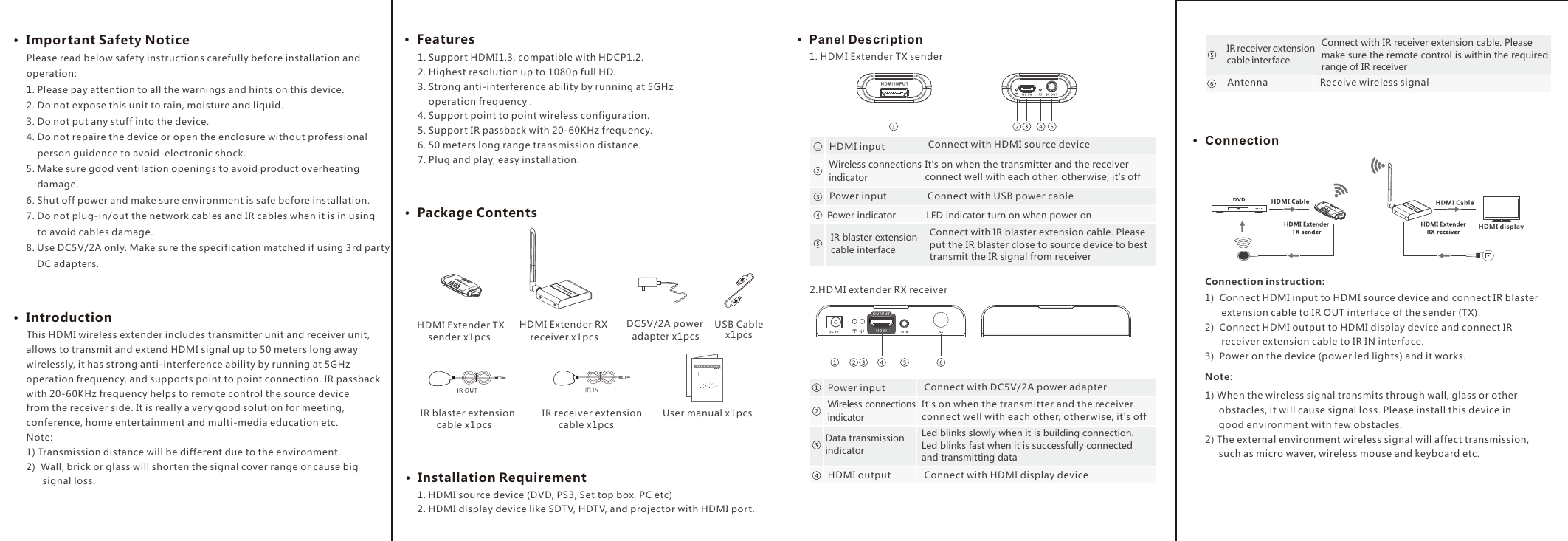
1. Support HDMI1.3, compatible with HDCP1.2.2. Highest resolution up to 1080p full HD.3. Strong anti-interference ability by running at 5GHz     operation frequency .4. Support point to point wireless configuration. 5. Support IR passback with 20-60KHz frequency.6. 50 meters long range transmission distance.  7. Plug and play, easy installation.·  Package Contents·  Important Safety Notice ·  Introduction·  Features·  Installation Requirement·  Panel Description·  ConnectionHDMI displayHDMI Extender TX     sender x1pcsHDMI Extender RX     receiver x1pcs DC5V/2A power   adapter x1pcs  IR blaster extension        cable x1pcs IR receiver extension        cable x1pcs User manual x1pcs        This HDMI wireless extender includes transmitter unit and receiver unit, allows to transmit and extend HDMI signal up to 50 meters long away wirelessly, it has strong anti-interference ability by running at 5GHz operation frequency, and supports point to point connection. IR passback with 20-60KHz frequency helps to remote control the source device from the receiver side. It is really a very good solution for meeting, conference, home entertainment and multi-media education etc.Note:1) Transmission distance will be different due to the environment.2)  Wall, brick or glass will shorten the signal cover range or cause big       signal loss.1. HDMI source device (DVD, PS3, Set top box, PC etc)2. HDMI display device like SDTV, HDTV, and projector with HDMI port.1. HDMI Extender TX sender2.HDMI extender RX receiver Connection instruction:1)  Connect HDMI input to HDMI source device and connect IR blaster       extension cable to IR OUT interface of the sender (TX).2)  Connect HDMI output to HDMI display device and connect IR      receiver extension cable to IR IN interface.3)  Power on the device (power led lights) and it works.1) When the wireless signal transmits through wall, glass or other     obstacles, it will cause signal loss. Please install this device in     good environment with few obstacles.2) The external environment wireless signal will affect transmission,      such as micro waver, wireless mouse and keyboard etc.  Note: Please read below safety instructions carefully before installation and operation:1. Please pay attention to all the warnings and hints on this device. 2. Do not expose this unit to rain, moisture and liquid. 3. Do not put any stuff into the device.4. Do not repaire the device or open the enclosure without professional    person guidence to avoid  electronic shock.5. Make sure good ventilation openings to avoid product overheating     damage.6. Shut off power and make sure environment is safe before installation.7. Do not plug-in/out the network cables and IR cables when it is in using     to avoid cables damage.8. Use DC5V/2A only. Make sure the specification matched if using 3rd party     DC adapters.IR blaster extension cable interfaceConnect with IR blaster extension cable. Please put the IR blaster close to source device to best transmit the IR signal from receiverConnect with HDMI source deviceHDMI inputConnect with HDMI display deviceHDMI outputWireless connections  indicatorIt’s on when the transmitter and the receiver connect well with each other, otherwise, it’s offConnect with USB power cablePower inputPower indicator LED indicator turn on when power on Wireless connections  indicatorIt’s on when the transmitter and the receiver connect well with each other, other wise, it’s offConnect with DC5V/2A power adapterPower inputData transmission indicatorLed blinks slowly when it is building connection. Led blinks fast when it is successfully connected and transmitting data Receive wireless signalAntennaUSB Cable x1pcsIR receiver extension cable interfaceConnect with IR receiver extension cable. Please make sure the remote control is within the required range of IR receiver
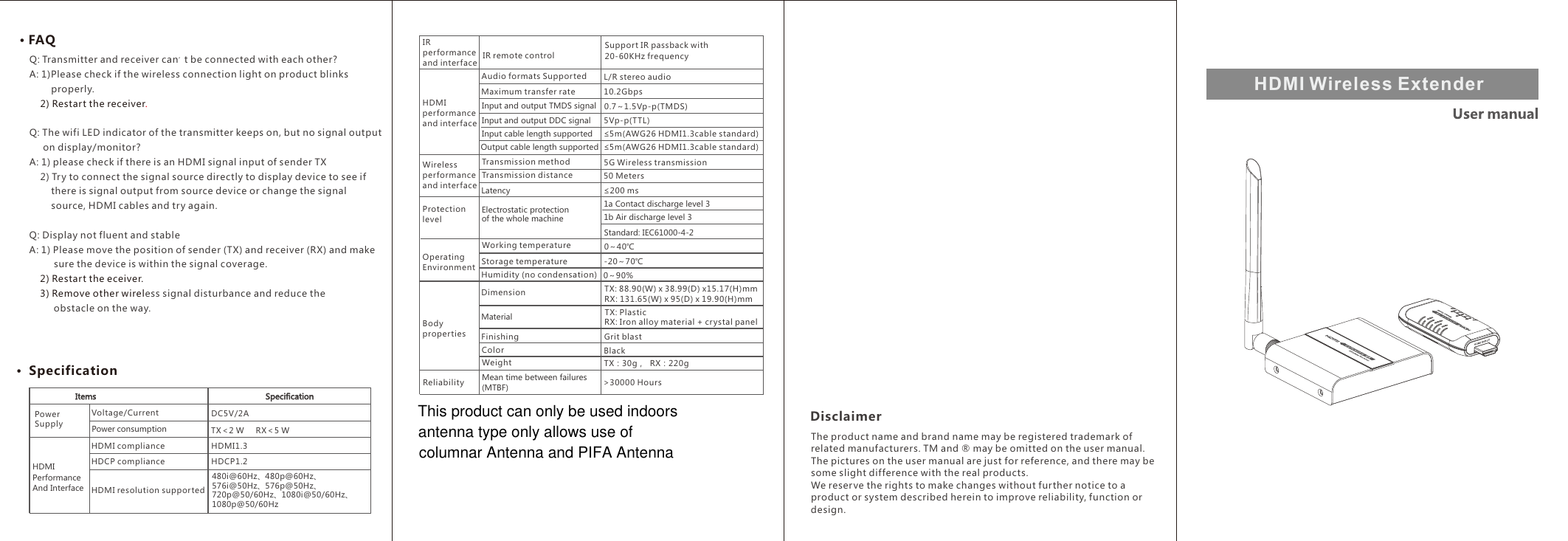
HDMI Wireless Extender ·  Specification· FAQQ: Transmitter and receiver can't be connected with each other?A: 1)Please check if the wireless connection light on product blinks        properly.   .  2) Restart the receiverQ: The wifi LED indicator of the transmitter keeps on, but no signal output      on display/monitor? A: 1) please check if there is an HDMI signal input of sender TX    2) Try to connect the signal source directly to display device to see if        there is signal output from source device or change the signal         source, HDMI cables and try again.Q: Display not fluent and stableA: 1) Please move the position of sender (TX) and receiver (RX) and make         sure the device is within the signal coverage.    2) Restart the eceiver.    3) Remove other wireless signal disturbance and reduce the          obstacle on the way.           DisclaimerThe product name and brand name may be registered trademark of related manufacturers. TM and ® may be omitted on the user manual. The pictures on the user manual are just for reference, and there may be some slight difference with the real products.We reserve the rights to make changes without further notice to a product or system described herein to improve reliability, function or design.HDMI performance and interfaceAudio formats Supported L/R stereo audioMaximum transfer rate 10.2GbpsInput and output DDC signal 5Vp-p(TTL)Input and output TMDS signal 0.7~1.5Vp-p(TMDS)Input cable length supported ≤5m(AWG26 HDMI1.3cable standard)Output cable length supported ≤5m(AWG26 HDMI1.3cable standard)Transmission method 5G Wireless transmissionElectrostatic protection of the whole machine1a Contact discharge level 3Latency ≤200 msWireless performance and interfaceTransmission distance 50 MetersProtection levelWorking temperature 0~40℃Storage temperature -20~70℃Humidity (no condensation) 0~90% Material RX: Iron alloy material + crystal panelTX: PlasticOperating EnvironmentDimensionFinishing Grit blastColor BlackWeight TX:30g,  RX:220g Body propertiesTX: 88.90(W) x 38.99(D) x15.17(H)mm RX: 131.65(W) x 95(D) x 19.90(H)mm1b Air discharge level 3 Standard: IEC61000-4-2Mean time between failures(MTBF) >30000 HoursReliabilityPower SupplyVoltage/CurrentPower consumptionDC5V/2AHDMI Performance And InterfaceHDCP1.2HDMI resolution supported480i@60Hz、480p@60Hz、576i@50Hz、576p@50Hz、720p@50/60Hz、1080i@50/60Hz、1080p@50/60HzHDMI compliance HDMI1.3HDCP complianceTX<2 W     RX<5 WIR performance and interfaceSupport IR passback with 20-60KHz frequency IR remote controlThis product can only be used indoors antenna type only allows use ofcolumnar Antenna and PIFA Antenna
FCC STATEMENT :This device complies with Part 15 of the FCC Rules. Operation is subject to the followingtwo conditions:(1) This device may not cause harmful interference, and(2) This device must accept any interference received, including interference that maycause undesired operation.Warning: Changes or modifications not expressly approved by the party responsible forcompliance could void the user's authority to operate the equipment.NOTE: This equipment has been tested and found to comply with the limits for a Class Bdigital device, pursuant to Part 15 of the FCC Rules. These limits are designed to providereasonable protection against harmful interference in a residential installation. Thisequipment generates uses and can radiate radio frequency energy and, if not installedand used in accordance with the instructions, may cause harmful interference to radiocommunications. However, there is no guarantee that interference will not occur in aparticular installation. If this equipment does cause harmful interference to radio ortelevision reception, which can be determined by turning the equipment off and on, theuser is encouraged to try to correct the interference by one or more of the followingmeasures:Reorient or relocate the receiving antenna.Increase the separation between the equipment and receiver.Connect the equipment into an outlet on a circuit different from that to which thereceiver is connected.Consult the dealer or an experienced radio/TV technician for help.FCC Radiation Exposure StatementThis equipment complies with FCC radiation exposure limits set forth for anuncontrolled environment. This equipment should be installed and operated withminimum distance 20cm between the radiator & your body

Navigation menu