BBM Electronics Group S5HX S5 Series Handheld Transmitter User Manual S5 manualV1 2 indd

BBM Electronics Group Ltd S5 Series Handheld Transmitter S5 manualV1 2 indd

Contents

Manual

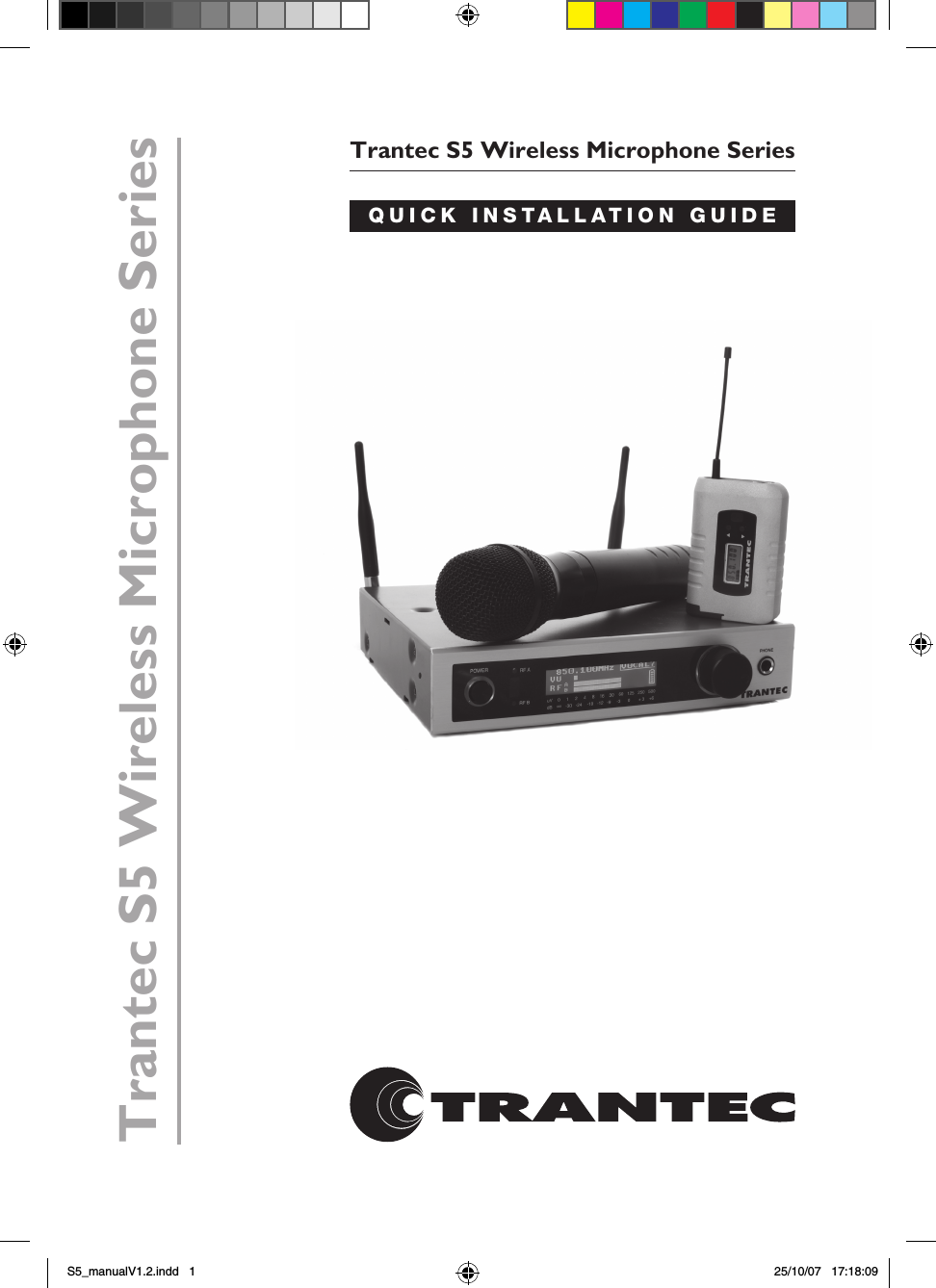
Trantec S5 Wireless Microphone SeriesQUICK INSTALLATION GUIDETrantec S5 Wireless Microphone SeriesS5_manualV1.2.indd   1 25/10/07   17:18:09
CONTENTSPage  1.  Introduction and system overview  2.  Important safety instructions and getting started  3.  Receiver set-up  4.  Receiver frequency selection  5.  Handheld transmitter set-up  6.  Beltpack transmitter set-up  7.  Operating hints and troubleshooting guide  8.  Receiver rack mount kit  9.  Technical specifications  10.  WEEE statement and warranty   INTRODUCTIONThe Trantec S5 series represents our commitment to our customers by providing high-quality, reliable wireless audio links using our considerable design expertise gained over many years as a leading edge manufacturer.We would like to thank you for purchasing this product and would like you to spend a few moments studying this Quick Installation Guide, especially the safety instructions, before going on to ‘read’ the full manual supplied on the CD Rom with this equipment.S5 SERIES SYSTEM OVERVIEWThe  S5  series  is  a  professional  UHF  wireless  microphone  system  with  features including:•  24 channel simultaneous operation  (12 channel S5.3)•  10 preset banks including 1 custom user. (9 Banks S5.3)•  True “dual receiver” diversity – to minimise drop-outs•  Intuitive LCD and operating system on both receiver and transmitter•  Infra-red programming for fast system set-up•  Software transmitter function locks•  Headphone monitoring as standard•  Both XLR  (switchable mic and line) and 1⁄4” jack AF outputs•  AF processing menu (S5.5 only)•  Over 1400 customer selectable channels•  Fully integrated PC software monitoring facility via USB port•  All metal construction of receiver and transmitters•  Rack kit and front mounting antenna adaptors included (S5.5 only)1S5_manualV1.2.indd   2 25/10/07   17:18:09
SAFETYOur aim is to supply you with a product that provides you with countless hours of trouble free use. In order to achieve these goals we recommend the following:•  Keep the system away from direct sources of heat  e.g. central heating     radiators, heaters and direct sunlight.•  Do not expose the unit to an environment where it could be splashed with    liquids as this may result in fire or electric shocks.•  Should the transmitters not be used for extended periods of time we      recommend that the batteries are removed to avoid any potential leakage.•  Keep the system clean by using a slightly damp cloth. Never use household    cleaning agents or solvents.•  Avoid using or storing the system in damp conditions.•  Always use the AC power adaptor supplied with the receiver and always    disconnect from the AC outlet when not in use. And never remove the      external covers of the equipment, so as to expose the electronics, or modify    the unit in any way.  Should the covers be removed, or any other breach of the above instruction,    the warranty becomes null and void in addition to personal risk from burns    and/or electric shock.When using the unit should any of the following conditions occur, switch off the unit and remove AC adaptor from AC outlet immediately and contact your nearest dealer.•  Smoke or unusual smell•  Water or foreign metallic object inside unit•  Damaged housings caused by physical damageNever pull cord of AC adaptor, always grasp main body of unit when connecting/disconnecting to AC power outletNever touch any part of the system during a thunderstorm, as this may result in severe electric shock GETTING STARTEDThe S5 series is a high quality, fully featured wireless microphone system with many features  including  an  intuitive  operating  system.  To  enable  you  to  get  started  we recommend you initially set up the system as outlined in the next few pages.2S5_manualV1.2.indd   3 25/10/07   17:18:09
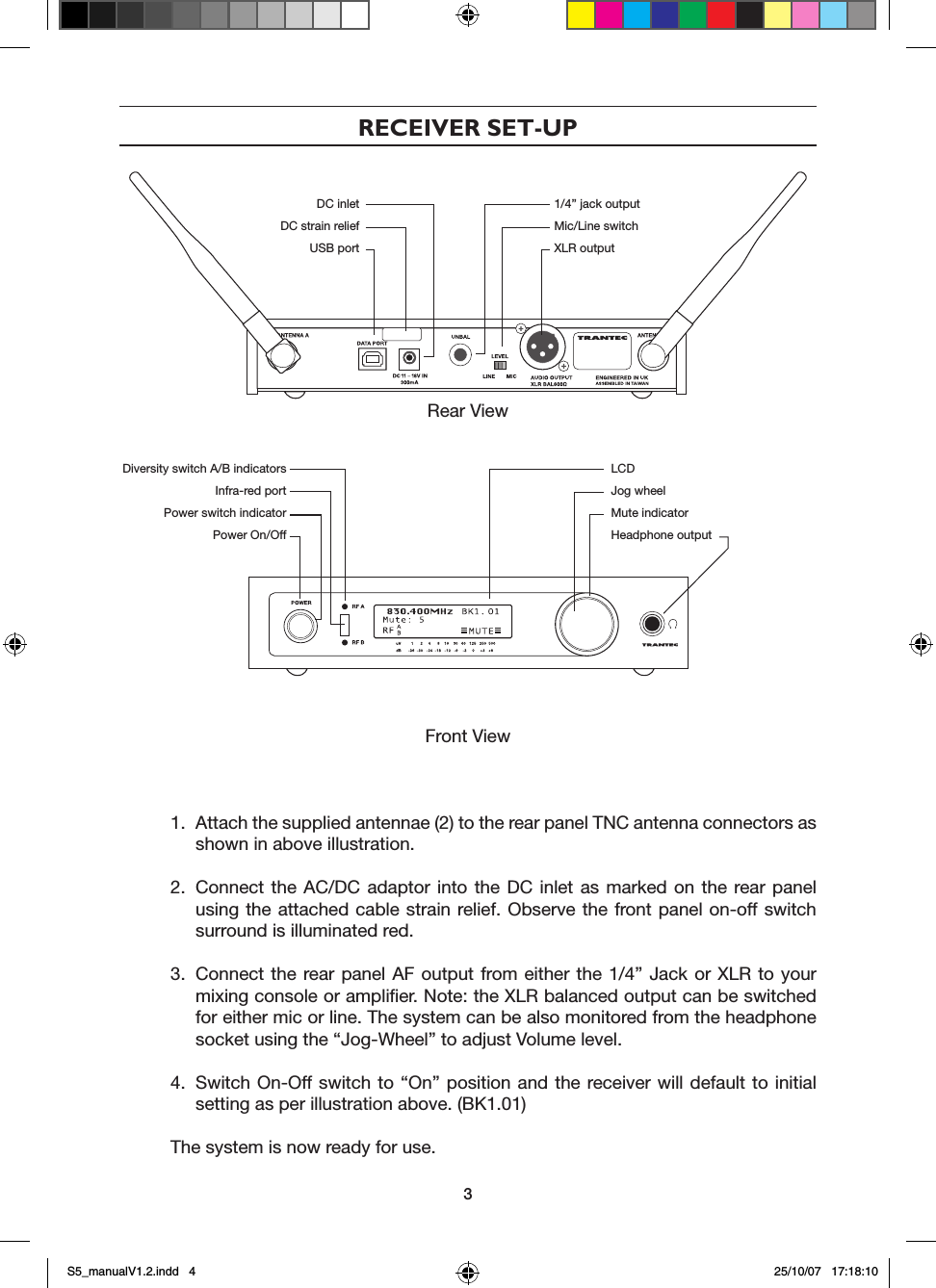
RECEIVER SET-UPRear View Front View 1.  Attach the supplied antennae (2) to the rear panel TNC antenna connectors as   shown in above illustration.2.  Connect the  AC/DC adaptor  into the  DC  inlet  as  marked  on  the  rear panel   using the attached cable strain  relief. Observe the front panel on-off switch    surround is illuminated red.3.  Connect the rear panel AF output from either the 1/4” Jack or  XLR  to  your   mixing console or amplifier. Note: the XLR balanced output can be switched   for either mic or line. The system can be also monitored from the headphone   socket using the “Jog-Wheel” to adjust Volume level.4.  Switch On-Off switch to  “On”  position  and  the  receiver will default to initial   setting as per illustration above. (BK1.01)The system is now ready for use.  DC inlet  1/4” jack output  DC strain relief  Mic/Line switch  USB port  XLR output Diversity switch A/B indicators  Infra-red port  Power switch indicator  Power On/OffLCDJog wheelMute indicatorHeadphone output3S5_manualV1.2.indd   4 25/10/07   17:18:10
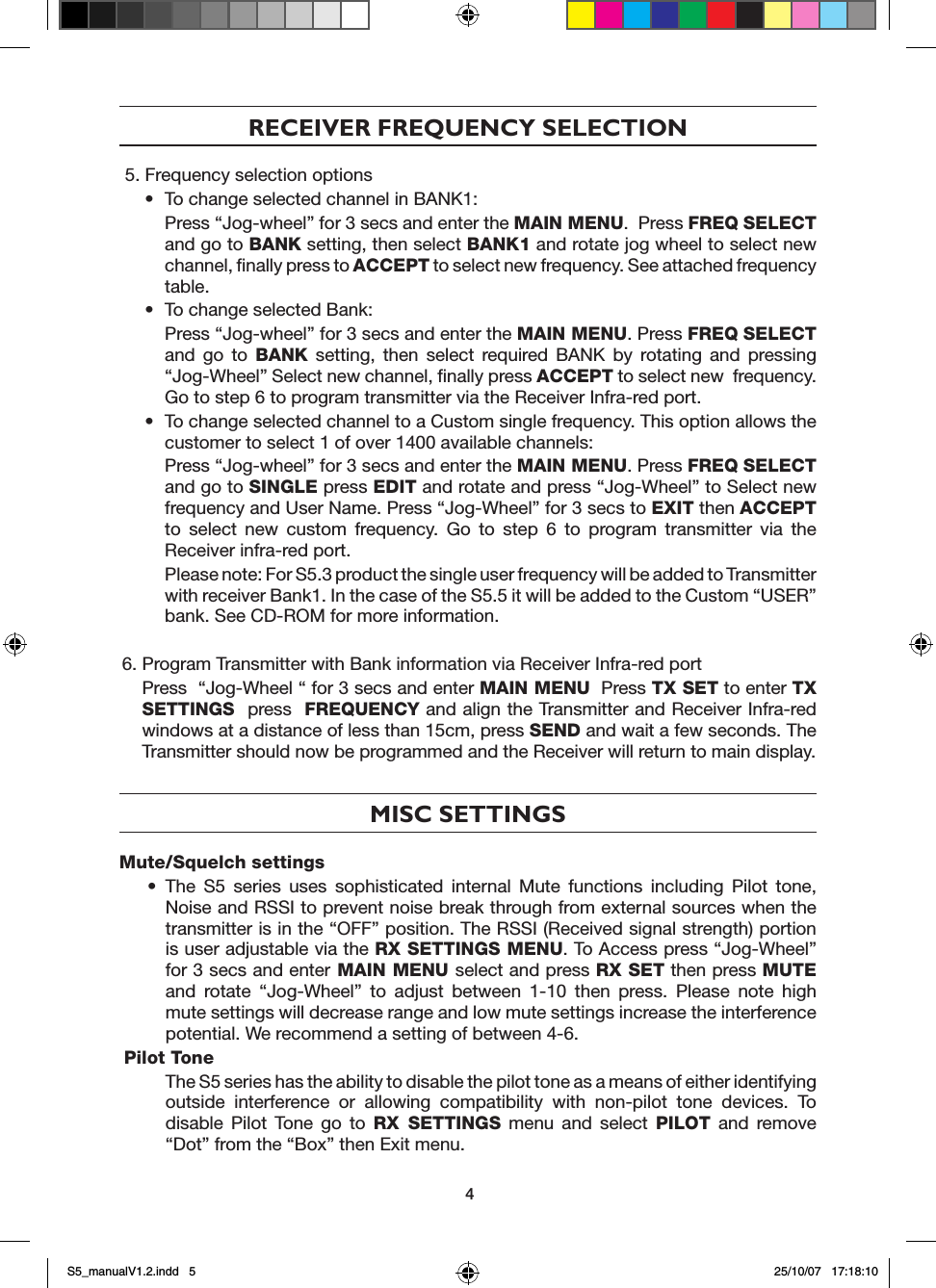
RECEIVER FREQUENCY SELECTION5. Frequency selection options•  To change selected channel in BANK1:   Press “Jog-wheel” for 3 secs and enter the MAIN MENU.  Press FREQ SELECT and go to BANK setting, then select BANK1 and rotate jog wheel to select new channel, finally press to ACCEPT to select new frequency. See attached frequency table. •  To change selected Bank:   Press “Jog-wheel” for 3 secs and enter the MAIN MENU. Press FREQ SELECT and  go  to  BANK  setting,  then  select  required  BANK  by  rotating  and  pressing “Jog-Wheel” Select new channel, finally press ACCEPT to select new  frequency. Go to step 6 to program transmitter via the Receiver Infra-red port.•  To change selected channel to a Custom single frequency. This option allows the customer to select 1 of over 1400 available channels:   Press “Jog-wheel” for 3 secs and enter the MAIN MENU. Press FREQ SELECT and go to SINGLE press EDIT and rotate and press “Jog-Wheel” to Select new frequency and User Name. Press “Jog-Wheel” for 3 secs to EXIT then ACCEPT to  select  new  custom  frequency.  Go  to  step  6  to  program  transmitter  via  the Receiver infra-red port.    Please note: For S5.3 product the single user frequency will be added to Transmitter with receiver Bank1. In the case of the S5.5 it will be added to the Custom “USER” bank. See CD-ROM for more information.6. Program Transmitter with Bank information via Receiver Infra-red port  Press  “Jog-Wheel “ for 3 secs and enter MAIN MENU  Press TX SET to enter TX SETTINGS  press  FREQUENCY and align the Transmitter and Receiver Infra-red windows at a distance of less than 15cm, press SEND and wait a few seconds. The Transmitter should now be programmed and the Receiver will return to main display.MISC SETTINGSMute/Squelch settings•  The  S5  series  uses  sophisticated  internal  Mute  functions  including  Pilot  tone, Noise and RSSI to prevent noise break through from external sources when the transmitter is in the “OFF” position. The RSSI (Received signal strength) portion is user adjustable via the RX SETTINGS MENU. To Access press “Jog-Wheel” for 3 secs and enter MAIN MENU select and press RX SET then press MUTE and  rotate  “Jog-Wheel”  to  adjust  between  1-10  then  press.  Please  note  high mute settings will decrease range and low mute settings increase the interference potential. We recommend a setting of between 4-6.Pilot Tone  The S5 series has the ability to disable the pilot tone as a means of either identifying outside  interference  or  allowing  compatibility  with  non-pilot  tone  devices.  To disable  Pilot  Tone  go  to  RX  SETTINGS  menu  and  select  PILOT  and  remove “Dot” from the “Box” then Exit menu.4S5_manualV1.2.indd   5 25/10/07   17:18:10
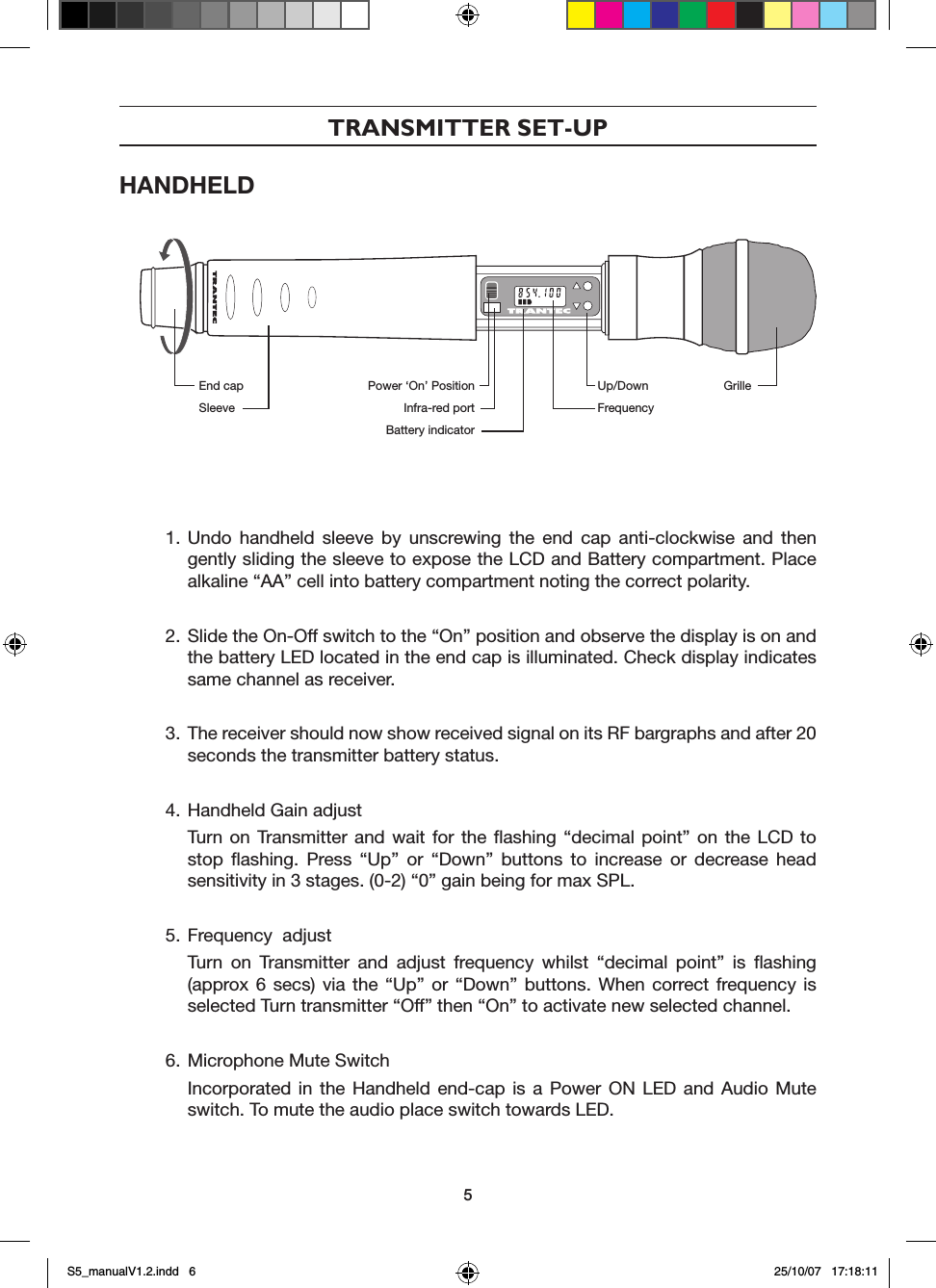
TRANSMITTER SET-UPHANDHELD 1. Undo  handheld  sleeve  by  unscrewing  the  end  cap  anti-clockwise  and  then gently sliding the sleeve to expose the LCD and Battery compartment. Place alkaline “AA” cell into battery compartment noting the correct polarity.2. Slide the On-Off switch to the “On” position and observe the display is on and the battery LED located in the end cap is illuminated. Check display indicates same channel as receiver.3. The receiver should now show received signal on its RF bargraphs and after 20 seconds the transmitter battery status.4. Handheld Gain adjust  Turn  on  Transmitter  and  wait  for  the  flashing  “decimal  point”  on  the  LCD  to stop  flashing.  Press  “Up”  or  “Down”  buttons  to  increase  or  decrease  head sensitivity in 3 stages. (0-2) “0” gain being for max SPL.5. Frequency  adjust  Turn  on  Transmitter  and  adjust  frequency  whilst  “decimal  point”  is  flashing (approx 6  secs)  via  the  “Up”  or  “Down”  buttons.  When  correct frequency  is selected Turn transmitter “Off” then “On” to activate new selected channel. 6. Microphone Mute Switch  Incorporated  in  the  Handheld  end-cap  is  a  Power  ON  LED  and  Audio  Mute switch. To mute the audio place switch towards LED.End capSleevePower ‘On’ PositionInfra-red portBattery indicatorUp/DownFrequencyGrille5S5_manualV1.2.indd   6 25/10/07   17:18:11
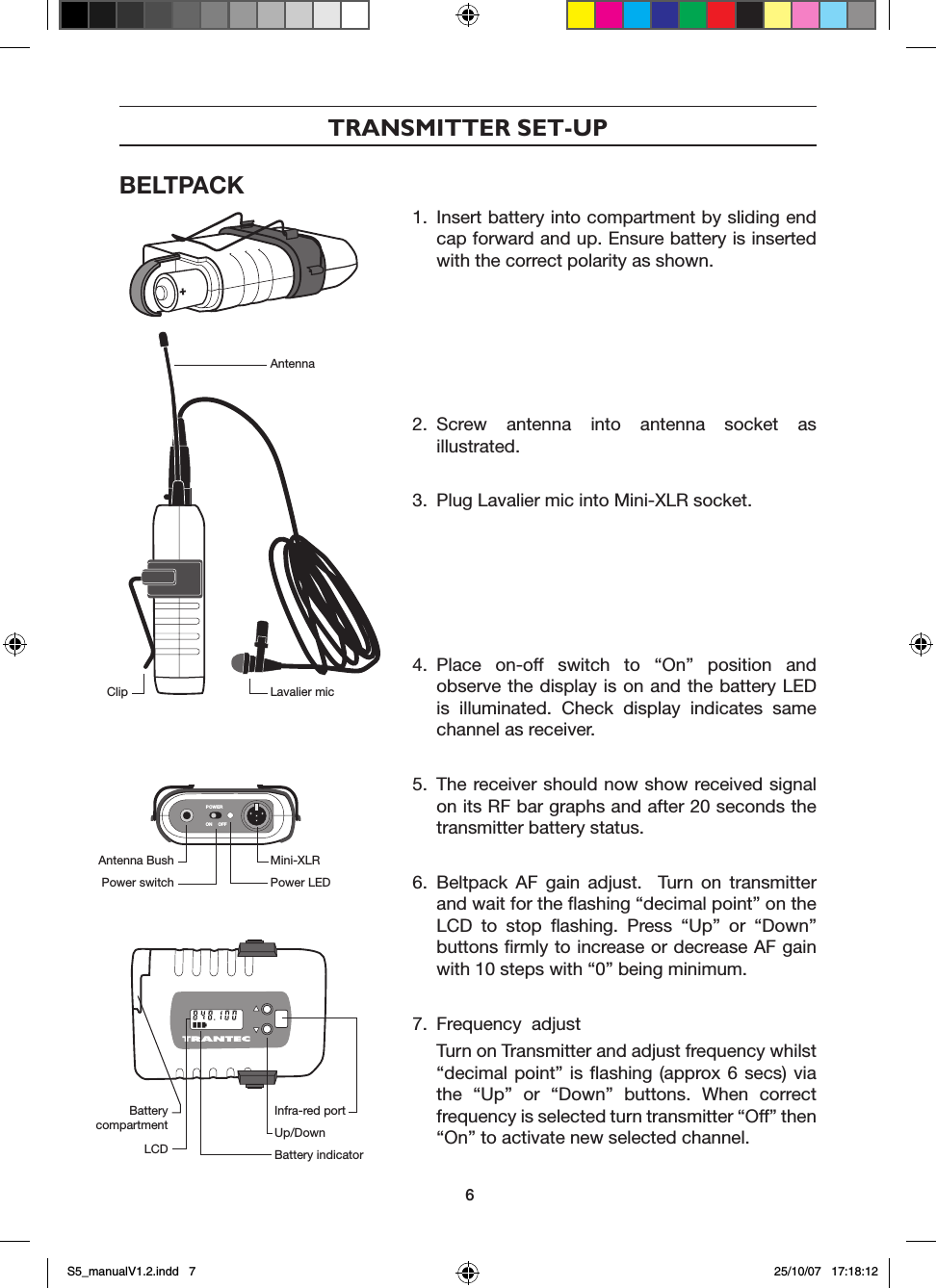
TRANSMITTER SET-UPBELTPACKPOWERON OFF1.  Insert battery into compartment by sliding end cap forward and up. Ensure battery is inserted with the correct polarity as shown.2.  Screw  antenna  into  antenna  socket  as illustrated.3.  Plug Lavalier mic into Mini-XLR socket.4.  Place  on-off  switch  to  “On”  position  and observe the display is on and the battery LED is  illuminated.  Check  display  indicates  same channel as receiver.5.  The receiver should now show received signal on its RF bar graphs and after 20 seconds the transmitter battery status.6.  Beltpack  AF  gain  adjust.    Turn  on  transmitter and wait for the flashing “decimal point” on the LCD  to  stop  flashing.  Press  “Up”  or  “Down” buttons firmly to increase or decrease AF gain with 10 steps with “0” being minimum.7.  Frequency  adjust  Turn on Transmitter and adjust frequency whilst “decimal point” is  flashing  (approx 6 secs) via the  “Up”  or  “Down”  buttons.  When  correct frequency is selected turn transmitter “Off” then “On” to activate new selected channel. AntennaLavalier micClipMini-XLRPower LEDAntenna BushPower switchInfra-red portUp/DownBattery indicatorBattery compartmentLCD6S5_manualV1.2.indd   7 25/10/07   17:18:12
OPERATING HINTSTo maximise operating performance Trantec recommend the following:•  Ensure  good  line  of  sight  between  receiver  antenna  and  transmitter,  avoid obstructions e.g. Concrete walls and metal structures.•  Always ensure the receiver antenna is at least 3m (10 feet) away from the transmitters at all times •  Always ensure transmitters are separated by at least 20cm.•  Never position the transmitter antenna directly against the body or the hand. This will reduce the operating range.•  Ensure correct setting of Mute  control for  effective control of interference whilst the transmitter is turned off. Default is normally 4-5 but may need to increase with multi-channel set-ups.•  Do not mix separate Banks in multi-channel set-ups.•  Use  SCAN  function  to  check  for  external  interference.  (See  CD-ROM  for  more information)•  Set transmitter AF gain so as the receiver VU indicates 0db with occasional peaks to +6dB.•  Keep Microphone/Instrument lead away from the antenna on the beltpack.•  Do  not  mix  other  brands  of  wireless  microphone  as  Trantec  cannot  guarantee multichannel compatibility.TROUBLESHOOTING•  No operation of Transmitter    Replace current battery with fresh correct Alkaline ‘AA’ type.•  No RF signal on receiver  Check transmitter and receiver are “Tuned” to the same channel •  Poor range  Check mute level setting. For normal range we recommend a Mute setting of 4-5.•  AF Signal distorted Check Receiver XLR mic-line switch for correct match to Mixer/Amplifier. Reduce gain of Transmitter if VU meter shows over 6dB.•  AF Signal low level with high background noise  Adjust Transmitter gain so as VU bar graph shows 0dB with 6dB peaks.•  External Head amplifiers not operating Check for shorts in the Leads and ensure Receiver PHANTOM PWR  is switched on via RX SETTINGS Menu.•  Receiver LCD contrast poor Enter receiver RX SETTINGS Menu, select LCD and press then rotate “Jog-Wheel” to adjust contrast. The receiver will automatically exit after a few seconds.7S5_manualV1.2.indd   8 25/10/07   17:18:12
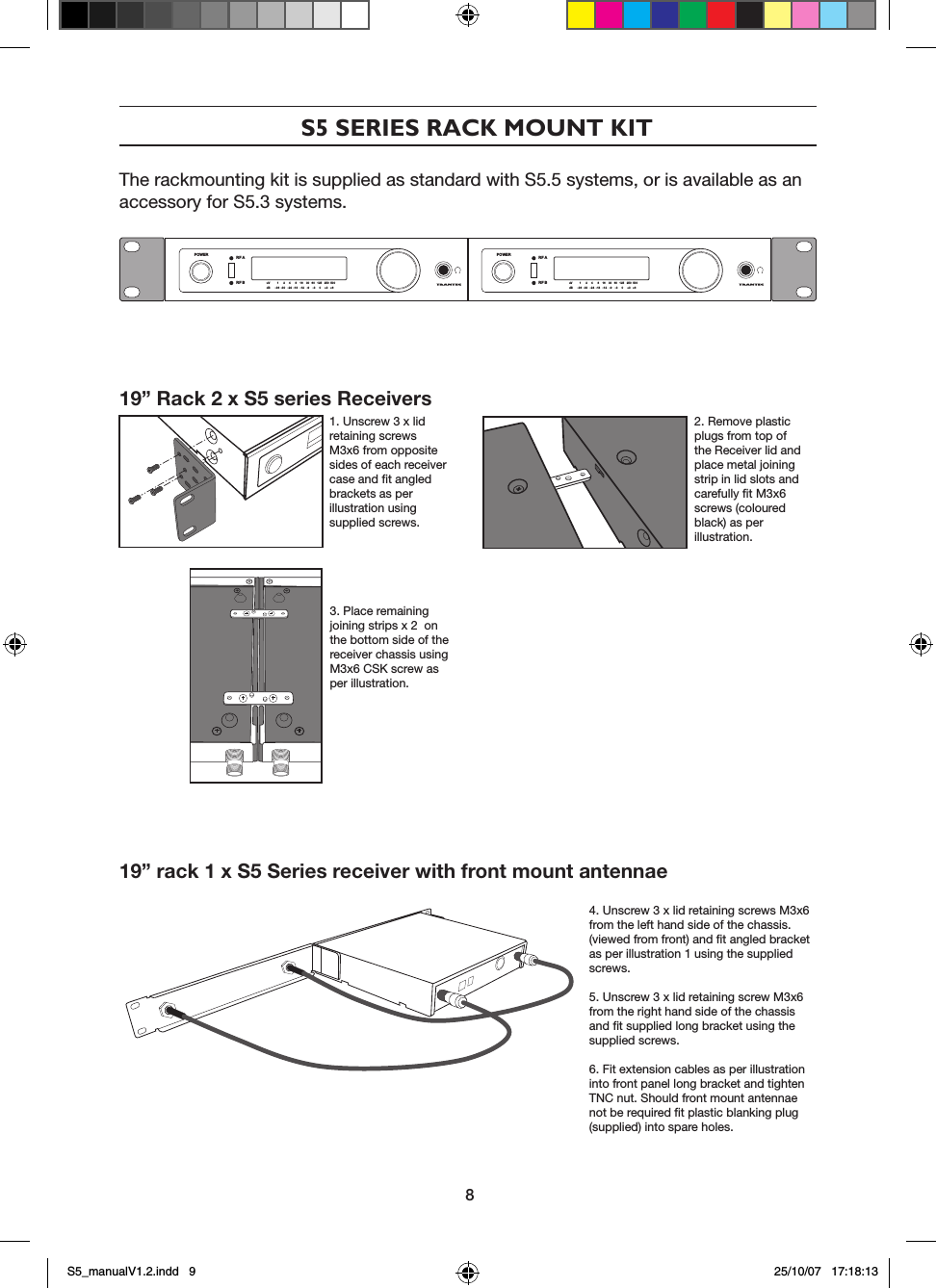
S5 SERIES RACK MOUNT KITThe rackmounting kit is supplied as standard with S5.5 systems, or is available as an accessory for S5.3 systems.19” Rack 2 x S5 series Receivers            1. Unscrew 3 x lid retaining screws M3x6 from opposite sides of each receiver case and fit angled brackets as per illustration using supplied screws.2. Remove plastic plugs from top of the Receiver lid and place metal joining strip in lid slots and carefully fit M3x6 screws (coloured black) as per illustration.3. Place remaining joining strips x 2  on the bottom side of the receiver chassis using M3x6 CSK screw as per illustration.19” rack 1 x S5 Series receiver with front mount antennae4. Unscrew 3 x lid retaining screws M3x6 from the left hand side of the chassis. (viewed from front) and fit angled bracket as per illustration 1 using the supplied  screws.5. Unscrew 3 x lid retaining screw M3x6 from the right hand side of the chassis and fit supplied long bracket using the supplied screws.6. Fit extension cables as per illustration into front panel long bracket and tighten TNC nut. Should front mount antennae not be required fit plastic blanking plug (supplied) into spare holes.POWER RF ARF B uV         1      2     4      8    16    30   60   125   250  500dB      -36  -30   -24  -18   -12   -9    -3     0     +3   +6POWER RF ARF B uV         1      2     4      8    16    30   60   125   250  500dB      -36  -30   -24  -18   -12   -9    -3     0     +3   +68S5_manualV1.2.indd   9 25/10/07   17:18:13
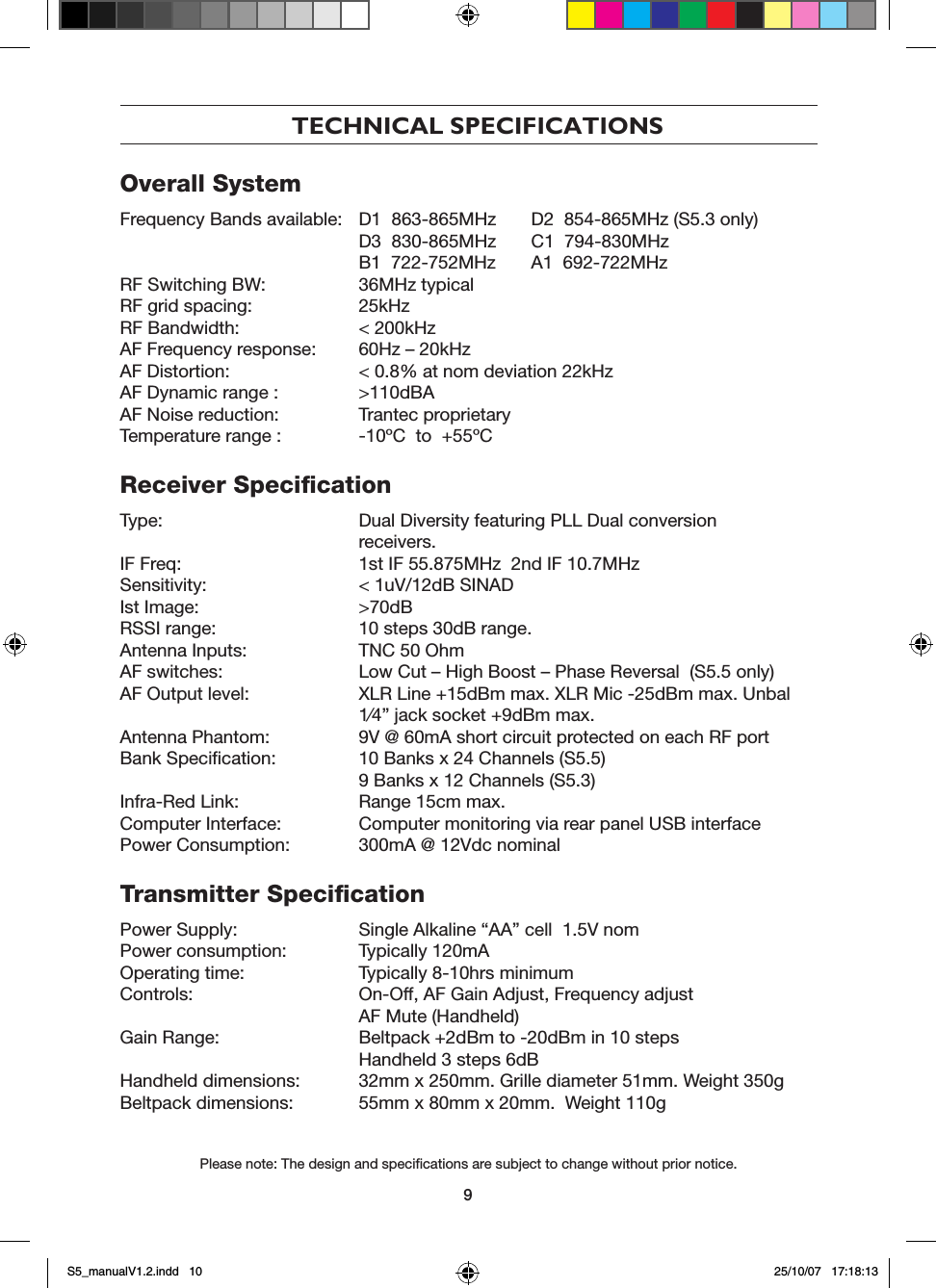
9TECHNICAL SPECIFICATIONSOverall SystemFrequency Bands available:  D1  863-865MHz  D2  854-865MHz (S5.3 only)   D3  830-865MHz  C1  794-830MHz   B1  722-752MHz  A1  692-722MHzRF Switching BW:   36MHz typicalRF grid spacing:   25kHzRF Bandwidth:   < 200kHzAF Frequency response:   60Hz – 20kHzAF Distortion:   < 0.8% at nom deviation 22kHzAF Dynamic range :  >110dBAAF Noise reduction:   Trantec proprietaryTemperature range :  -10ºC  to  +55ºCReceiver SpecificationType:   Dual Diversity featuring PLL Dual conversion      receivers.IF Freq:   1st IF 55.875MHz  2nd IF 10.7MHzSensitivity:   < 1uV/12dB SINADIst Image:   >70dBRSSI range:   10 steps 30dB range.Antenna Inputs:   TNC 50 OhmAF switches:   Low Cut – High Boost – Phase Reversal  (S5.5 only)AF Output level:    XLR Line +15dBm max. XLR Mic -25dBm max. Unbal    1⁄4” jack socket +9dBm max.Antenna Phantom:   9V @ 60mA short circuit protected on each RF portBank Specification:   10 Banks x 24 Channels (S5.5)   9 Banks x 12 Channels (S5.3)Infra-Red Link:   Range 15cm max.Computer Interface:   Computer monitoring via rear panel USB interfacePower Consumption:   300mA @ 12Vdc nominalTransmitter SpecificationPower Supply:   Single Alkaline “AA” cell  1.5V nomPower consumption:   Typically 120mAOperating time:   Typically 8-10hrs minimumControls:  On-Off, AF Gain Adjust, Frequency adjust  AF Mute (Handheld)Gain Range:    Beltpack +2dBm to -20dBm in 10 steps  Handheld 3 steps 6dBHandheld dimensions:   32mm x 250mm. Grille diameter 51mm. Weight 350gBeltpack dimensions:   55mm x 80mm x 20mm.  Weight 110g Please note: The design and specifications are subject to change without prior notice.S5_manualV1.2.indd   10 25/10/07   17:18:13
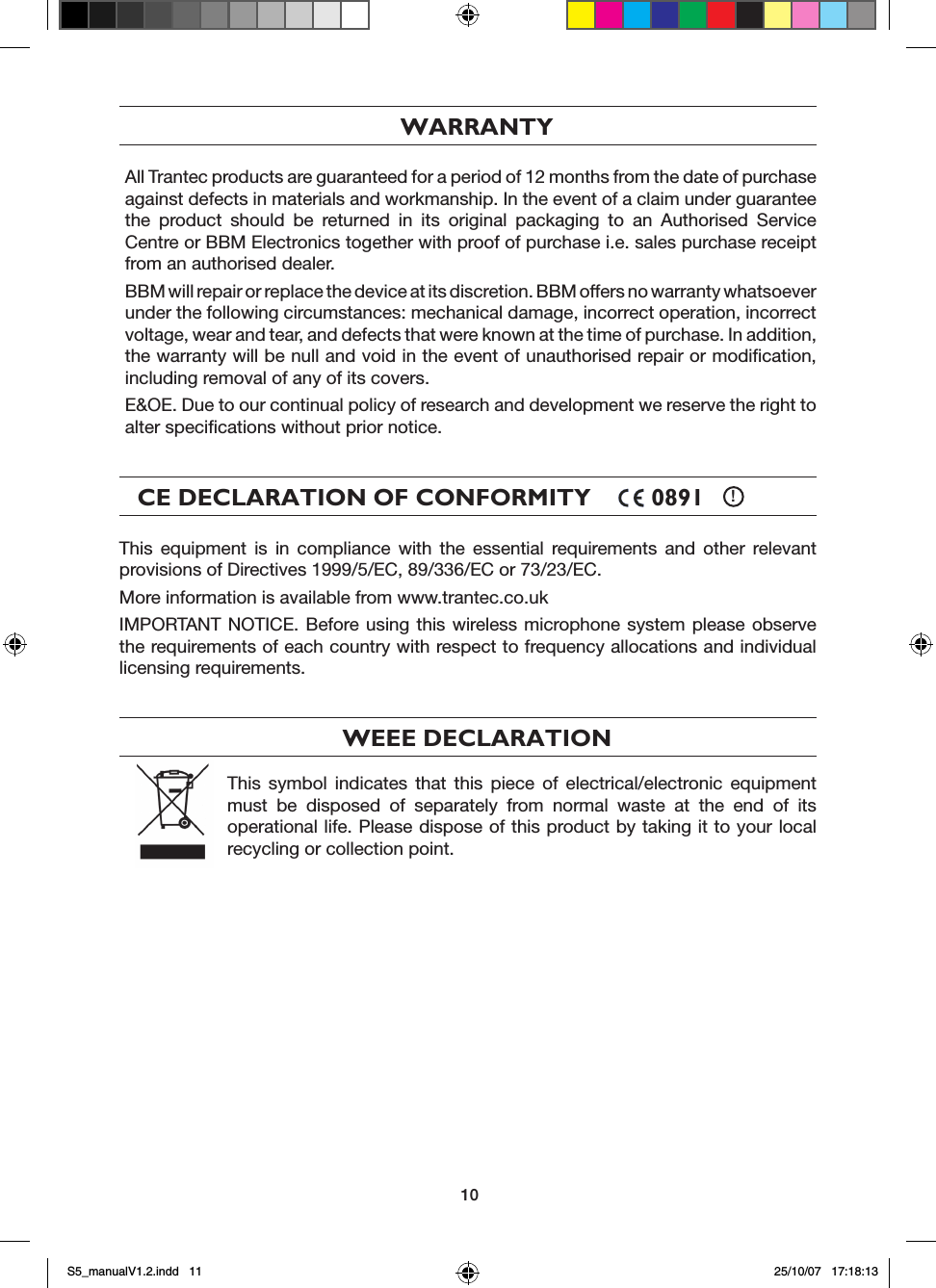
10WARRANTYAll Trantec products are guaranteed for a period of 12 months from the date of purchase against defects in materials and workmanship. In the event of a claim under guarantee the  product  should  be  returned  in  its  original  packaging  to  an  Authorised  Service Centre or BBM Electronics together with proof of purchase i.e. sales purchase receipt from an authorised dealer.BBM will repair or replace the device at its discretion. BBM offers no warranty whatsoever under the following circumstances: mechanical damage, incorrect operation, incorrect voltage, wear and tear, and defects that were known at the time of purchase. In addition, the warranty will be null and void in the event of unauthorised repair or modification, including removal of any of its covers.E&OE. Due to our continual policy of research and development we reserve the right to alter specifications without prior notice.CE DECLARATION OF CONFORMITY         0891    !This  equipment  is  in  compliance  with  the  essential  requirements  and  other  relevant provisions of Directives 1999/5/EC, 89/336/EC or 73/23/EC.More information is available from www.trantec.co.ukIMPORTANT NOTICE.  Before using  this  wireless microphone system please  observe the requirements of each country with respect to frequency allocations and individual licensing requirements.WEEE DECLARATIONThis  symbol  indicates  that  this  piece  of  electrical/electronic  equipment must  be  disposed  of  separately  from  normal  waste  at  the  end  of  its operational life. Please dispose of this product by taking it to your local recycling or collection point.S5_manualV1.2.indd   11 25/10/07   17:18:13
BBM Electronics Group Ltd         www.trantec.co.uk       Subsidiary of TOA CorporationTRANTEC SYSTEMS     Manual Pt no. S5manUK     Printed in TaiwanS5_manualV1.2.indd   12 25/10/07   17:18:14

Navigation menu