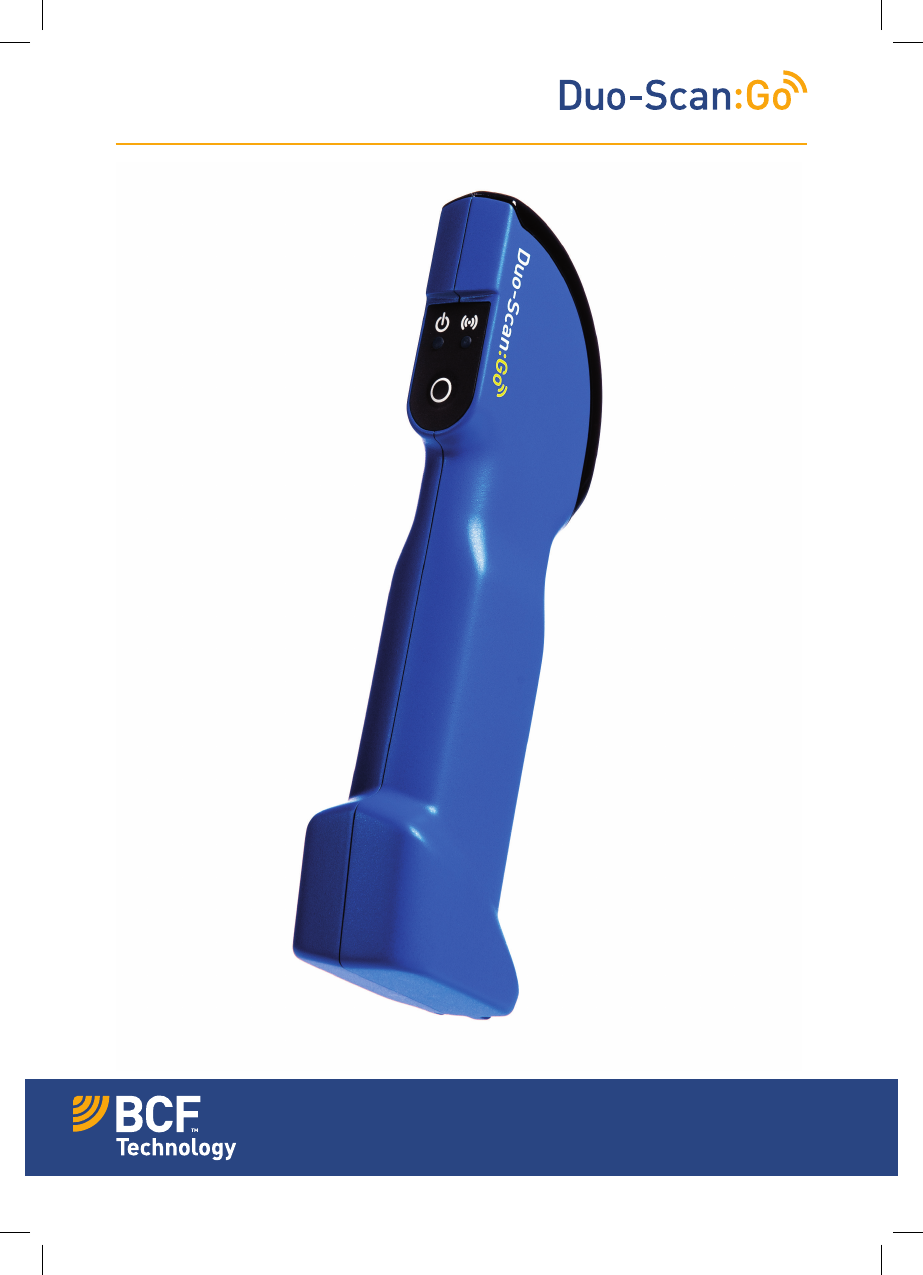
BCF Technology DSGC01 Swine Ultrasound Scanner with WLAN User Manual Duo ScanGO Quick Guide v 10 AW HR
BCF Technology Ltd Swine Ultrasound Scanner with WLAN Duo ScanGO Quick Guide v 10 AW HR
Contents
- 1. DSG Quick Guide V7
- 2. Duo-ScanGO Quick Guide v.10 AW HR
Duo-ScanGO Quick Guide v.10 AW HR
This quick guide outlines the primary user instructions for
Dou-Scan:Go (DSGC01) and Duo-Scan:Go Plus (DSGC02)
First time use – activation
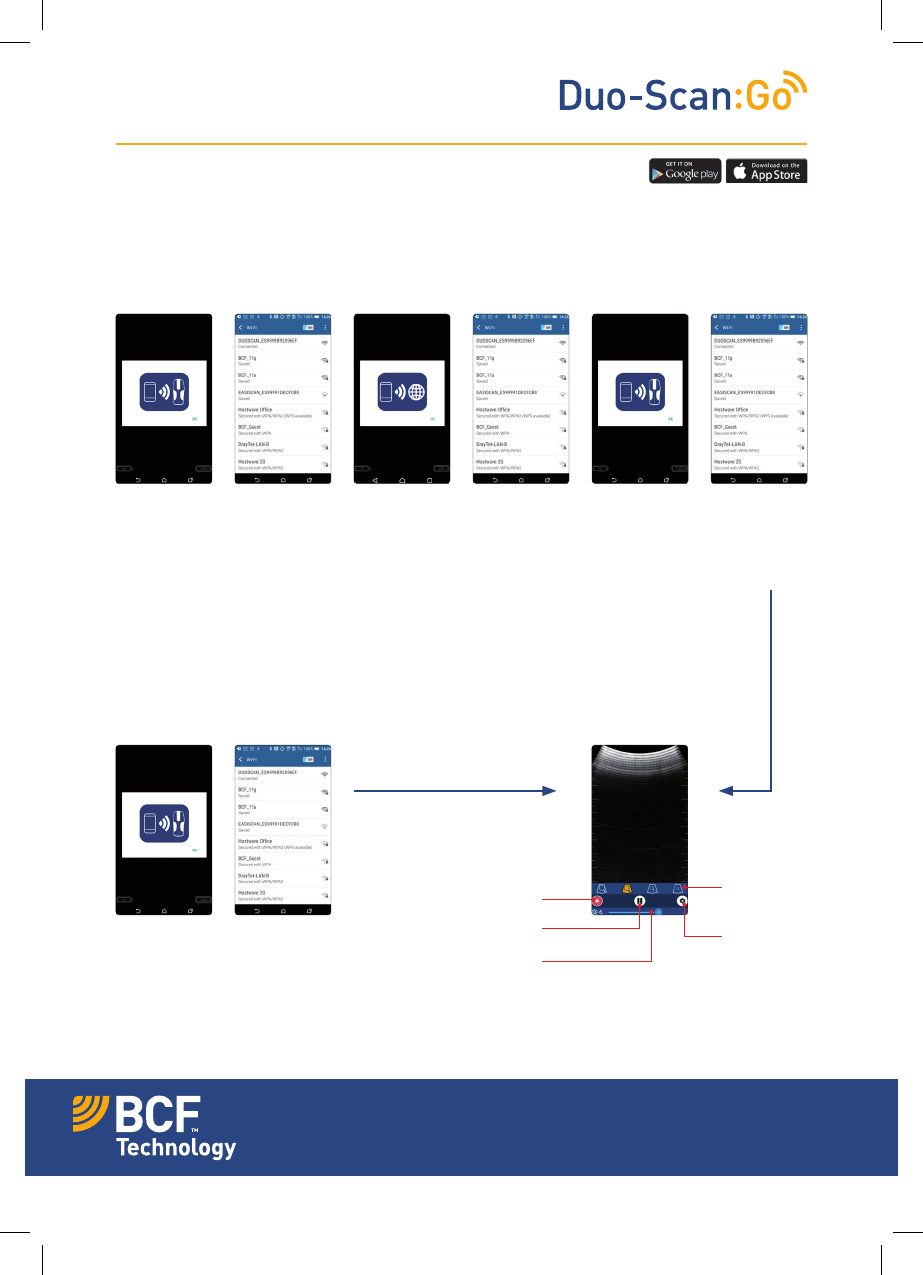
Press and hold the power button on the scanner until the blue LED switches on. Download the
BCF Go Scan app from Google Play Store or the App Store. Once downloaded launch the app. To
activate the scanner successfully you will need ensure your scanner is charged and that you have
an internet connection.
Normal start up process
After a few seconds, the ultrasound image will appear.
Touch anywhere on the screen to bring up the live scanning menu.
Quick Guide
1. App requests
to connect to
scanner
Note – if the LED
flashes on the
scanner it is not
connected to any
smart device.
1. App requests
to connect to
scanner
3. App
requests to
connect to the
internet
4. Select your
local Wi-Fi
network to
connect to the
internet
5. App
requests to
connect back
to the scanner
2. Select
DUOSCAN
from the
Wi-Fi page
2. Select
DUOSCAN
from the
Wi-Fi page
6. Select
DUOSCAN
from the
Wi-Fi page
You are now ready to scan
Adjust
scanning
depth
Start recording
Freeze ultrasound Open
Settings
Adjust gain
Your animal imaging partner

Settings menu
Backfat measurement function
Adjust screen
brightness
Fit ultrasound by
height or width
Adjust screen
contrast
Lock screen rotation
Adjust menu timeout
Select probe rotation
The backfat
measurement scale
appears in 8cm mode
after selecting grid
markings in the
settings menu
Freeze mode
Use these icons to
change the function
of the power button:
Pregnant mode
Non-pregnant
mode
The backfat
measurement scale
only appears when
you press this icon,
after selecting grid
markings in the
settings menu
bcfshop.com
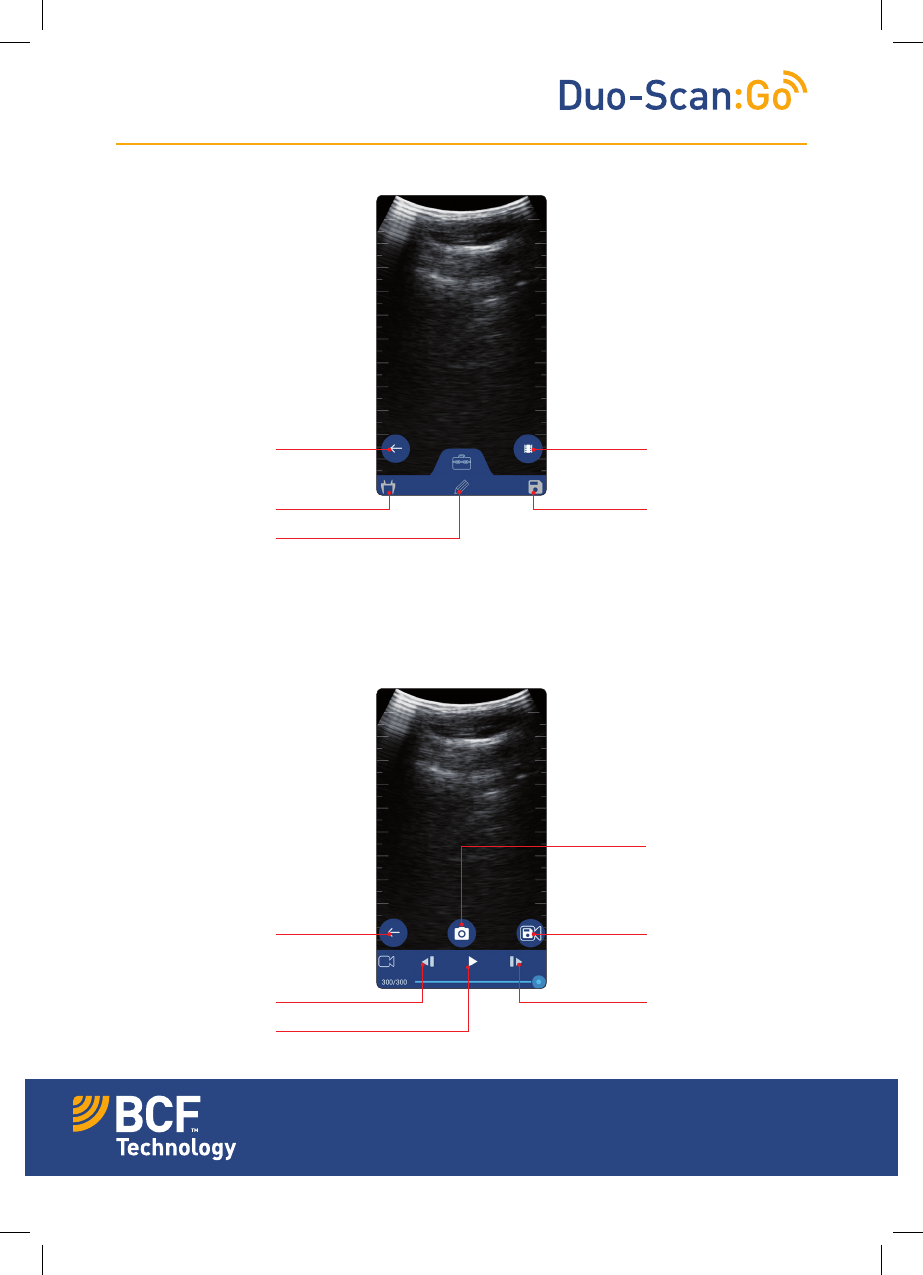
Cine loop menu
Freeze menu
Return to live
scanning
Go to cine loop
Caliper mode
Free draw mode
Save image
Return to freeze Save cine loop
as video
Save image
Frame back
Play loop
Frame forward
Your animal imaging partner
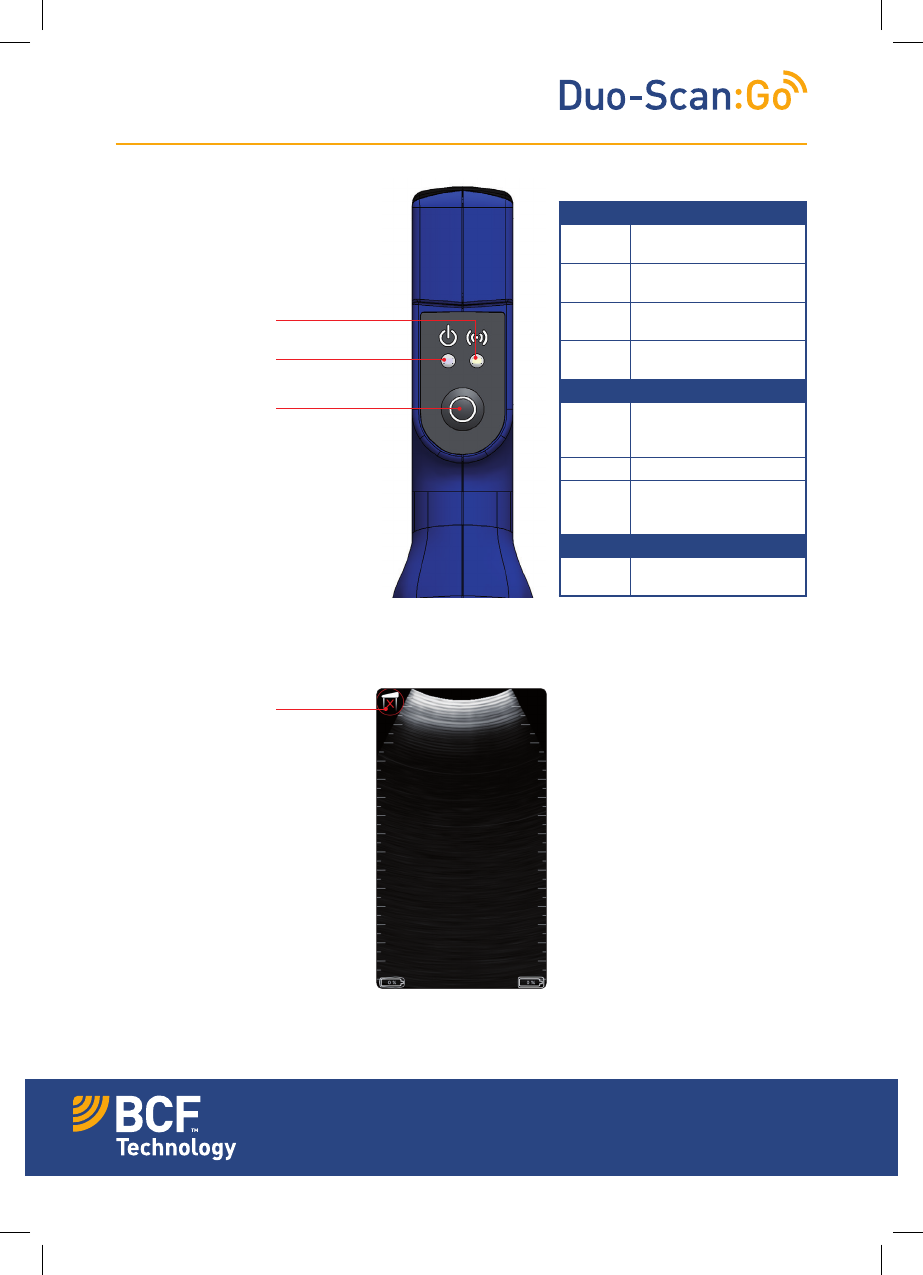
Power LED
Blue
flashing
Scanner turning on
Blue Scanner on and battery
between 66–100% charge
Yellow Scanner on and battery
between 33–66% charge
Yellow
flashing
Scanner on and battery
between 0–33% charge
Wireless LED
Blue
flashing
Scanner ready for smart
device to connect, nothing
connected
Blue Smart device connected
Blue Scanner is charging
when placed on wireless
charging plate
Both LEDs
Flashing
yellow
Software updating
Multi-function
power button:
• Freeze/Unfreeze
• Pregnant mode
• Non-pregnant mode
Power saving mode
LED sequences
The probe has no
contact
Power LED
Wireless LED
Your animal imaging partner
© BCF Technology V.10 Jan 2018
Freeze mode
This function allows you to freeze a live
ultrasound image. It will also allow you to review
the previous 10 secs of scanning through the
app’s cine loop functionality. This is good if your
sow has run off! All images and clips can be
saved in the app by pressing the save icon.
Pregnant mode
When in pregnant mode, short pressing the
power button will increment the pregnant
count. This allows the number of pregnant
sows to be easily recorded.
Non-pregnant mode
When in non pregnant mode, short pressing the
power button will increment the non-pregnant
count. This allows the number of non-pregnant
sows to be easily recorded.
Saved images
All images and video clips are stored in the smart
device’s photo and video gallery.
Care & maintenance
We have built the Duo-Scan:Go to be rugged
and water resistant. It does however contain
fragile sensitive electronics.
Duo-Scan:Go housing is water resistant enough
for gentle washing and rinsing. It will not
withstand powerful jets of water (e.g. tap full
on or hosing it down).
Charging
The scanner is charged via a wireless induction
plate. To charge the scanner place it on the
plate, with the charging symbol facing down. The
scanner should be charged in a cool environment,
ideally around 20 ˚C. When the LED turns off
the charger is fully charged. Duo- Scan:Go is
compatible with all WPC Qi-v1.2 compliant
wireless chargers and has been certified using
chargers with an output up to 5V/1A and a charge
frequency of 110kHz to 190kHz.
Specification
Size: 235 mm x 50 mm x 70 mm
Weight: 246 grams
Connection: SoundlinkTM
Power: Rechargable lithium battery
Sealing: Splash & dust proof
Operating
temperature: -20 ˚C to 35 ˚C
Battery life: 2 hours approx
Certification
Duo-Scan:Go is compliant with all CE
requirements. It is RoHS and WEEE compliant.
Note: All BCF Technology products are for animal
applications only.
CC – This device complies with part 15 of the FCC Rules.
Operation is subject to the following two conditions: (1)
This device may not cause harmful interference, and
(2) this device must accept any interference received,
including interference that may cause undesired
operation.
If the user changes any modifications not expressly
approved by the party responsible for compliance
could void the user’s authority to operate the equipment.
Need more help?
Please visit our website bcfshop.com
for video manuals and FAQs.
Contact our customer care team:
UK +44 (0)1506 460 023
North America + 1 (507) 529 8200
Head office:
BCF Technology Ltd
Imaging House
Phoenix Crescent
Bellshill
ML4 3NJ
Scotland, UK
bcfshop.com
Quick Guide
Your animal imaging partner