Betrue Technology BTS26 Bluetooth Speaker User Manual Shower Bluetooth Speaker

Shenzhen BETRUE Technology Co., Ltd. Bluetooth Speaker Shower Bluetooth Speaker

Users manual

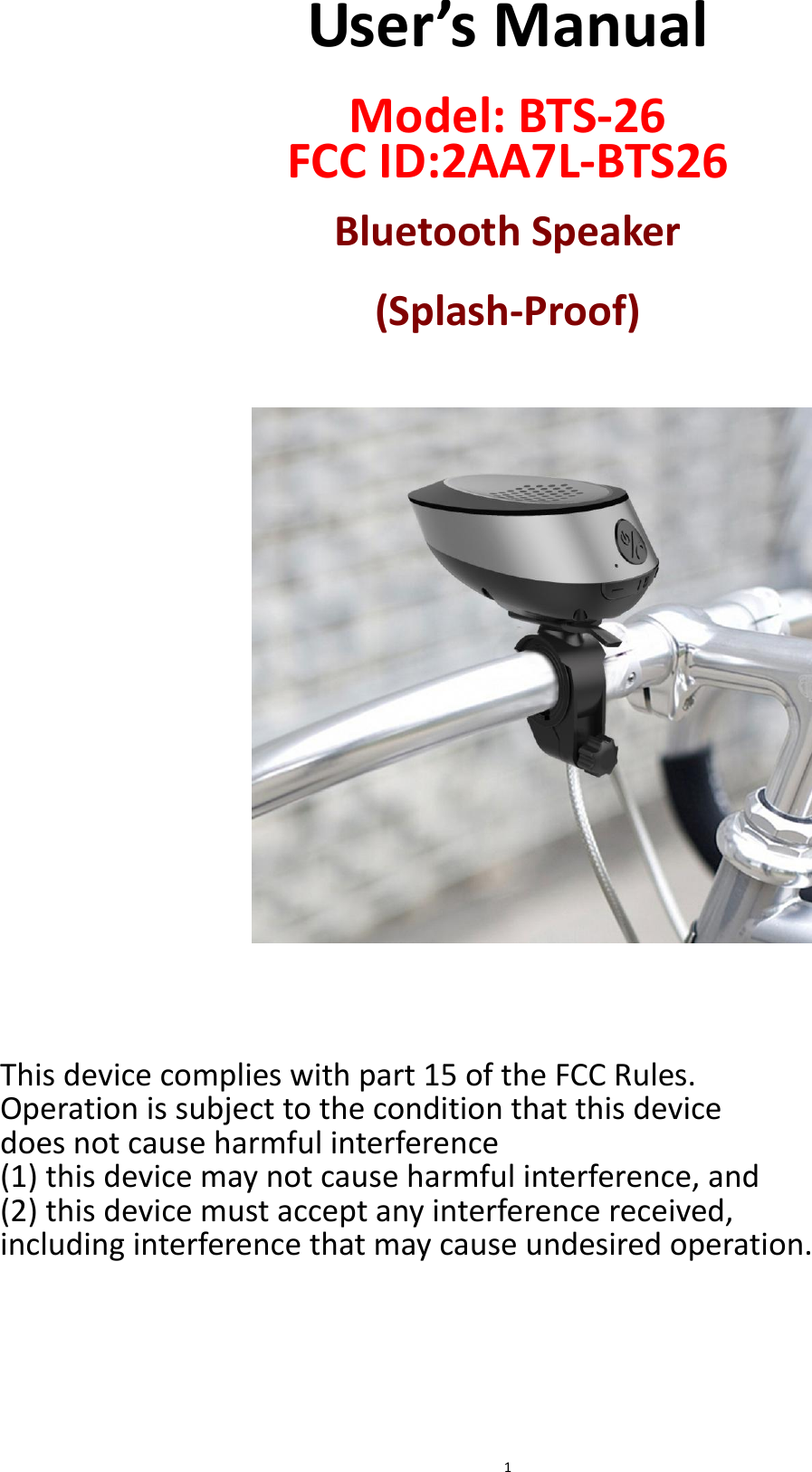
 1 User’s Manual  Model: BTS-26 FCC ID:2AA7L-BTS26  Bluetooth Speaker  (Splash-Proof)                      This device complies with part 15 of the FCC Rules.   Operation is subject to the condition that this device   does not cause harmful interference   (1) this device may not cause harmful interference, and   (2) this device must accept any interference received,   including interference that may cause undesired operation.
 2 A. Important Don’ts  Do  not  place  naked  flames,  such  as  lighted  candles  on  or  near  the product.  Do not place objects filled with liquids, such as vases on or near the product.  Do not use or store this product in a place where it is subject to direct sunlight, heat, excessive dust or vibration.  Do not keep or store this product in wet conditions for long period.  Do not push foreign objects into the slots or holes in the product.  Do  not  attempt  to  open  this  product  yourself.  There  are  no  user serviceable parts inside.  Do not allow children access to plastic bags. Safety Instructions  Before  using  this  product,  read  and  follow  all  warnings  and instructions.  This product is not intended for use by young children. Young children should be properly supervised.  This  product  is  intended  for  household  use  only  and  not  for commercial or industrial use.  No naked flame sources, such as lighted candles, should be placed on the product.  Ventilation  should  not  be  impeded  by  covering  ventilation  openings with items such as newspapers, table cloths, curtains and the like.  Make sure the unit is adjusted to a stable position. Damage caused by using this product in an unstable position or  by  failure to follow any other  warning  or  precaution  contained  within  this  user  manual  will not be covered by warranty. We,  suggests retaining the  packaging in case for  future transport  of the product. WARNING:    Never remove the casing of this apparatus.  Never  place  this  apparatus  on  the  other  electrical equipment.   Caution for Splash-proof  This unit has been constructed to resist for light splashes water or light rain. It should never be operated under running water and under no circumstances it should never be fully immersed in water.  This unit has silicon seals cover to minimize the risk of moisture/rains water  getting  inside  from  USB  port.  However,  do  not  immerse  it  in water since permanent damage to the electrical and mechanical parts will result.
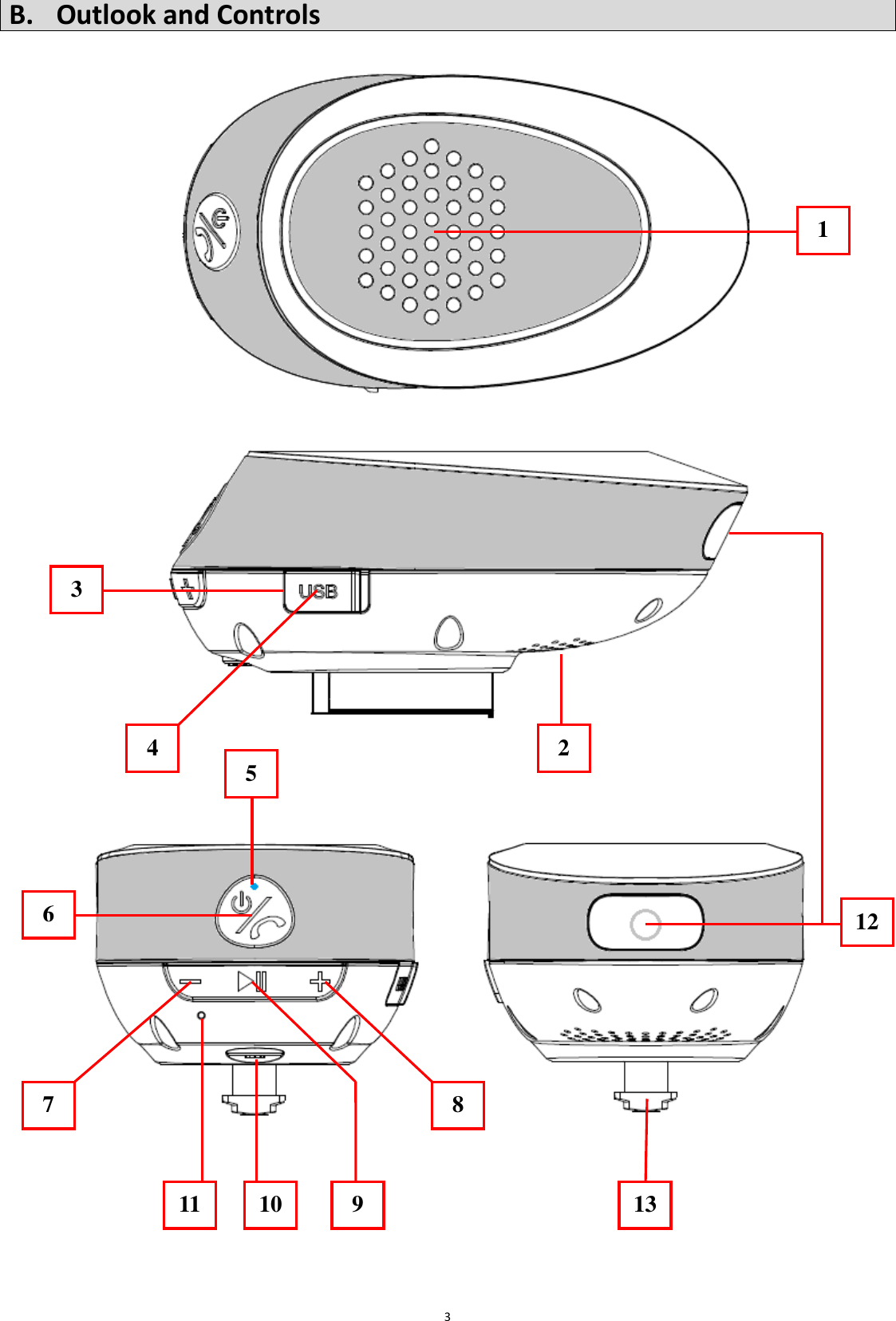
 3 B. Outlook and Controls                                           1 2 3 4 6 5 7 8 11 10 121 13 9
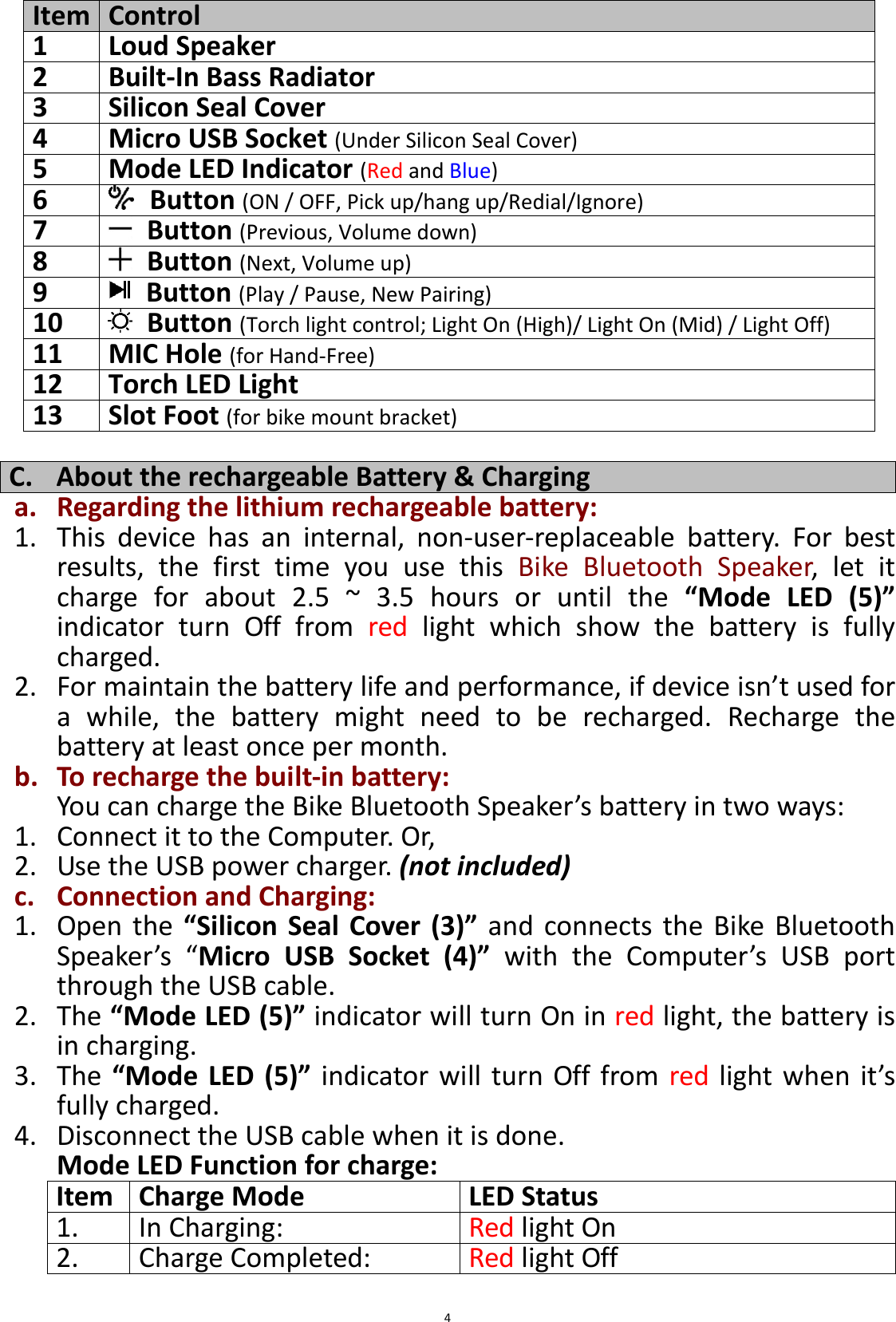
 4 Item Control 1 Loud Speaker 2 Built-In Bass Radiator 3 Silicon Seal Cover 4 Micro USB Socket (Under Silicon Seal Cover) 5 Mode LED Indicator (Red and Blue) 6   Button (ON / OFF, Pick up/hang up/Redial/Ignore) 7   Button (Previous, Volume down) 8   Button (Next, Volume up) 9   Button (Play / Pause, New Pairing) 10   Button (Torch light control; Light On (High)/ Light On (Mid) / Light Off) 11 MIC Hole (for Hand-Free) 12 Torch LED Light 13 Slot Foot (for bike mount bracket)  C. About the rechargeable Battery & Charging a. Regarding the lithium rechargeable battery: 1. This  device  has  an  internal,  non-user-replaceable  battery.  For  best results,  the  first  time  you  use  this  Bike  Bluetooth  Speaker,  let  it charge  for  about  2.5  ~  3.5  hours  or  until  the  “Mode  LED  (5)” indicator  turn  Off  from  red  light  which  show  the  battery  is  fully charged. 2. For maintain the battery life and performance, if device isn’t used for a  while,  the  battery  might  need  to  be  recharged.  Recharge  the battery at least once per month. b. To recharge the built-in battery: You can charge the Bike Bluetooth Speaker’s battery in two ways: 1. Connect it to the Computer. Or, 2. Use the USB power charger. (not included) c. Connection and Charging: 1. Open the  “Silicon  Seal Cover (3)”  and connects  the  Bike  Bluetooth Speaker’s  “Micro  USB  Socket  (4)” with  the  Computer’s  USB  port through the USB cable. 2. The “Mode LED (5)” indicator will turn On in red light, the battery is in charging. 3. The  “Mode  LED (5)”  indicator will  turn  Off  from  red light when  it’s fully charged. 4. Disconnect the USB cable when it is done. Mode LED Function for charge: Item Charge Mode LED Status 1. In Charging: Red light On 2. Charge Completed: Red light Off
 5 D. Power ON and Pairing 1. Press and hold the “  (6)” button for 2 ~ 3 seconds to turn On the device, a series of tones will sound and the “Mode LED (5)” will fast blinking  in  blue (half  second  once).  It  is  in  Bluetooth’s  searching or pairing mode;   2. Then, activate the Bluetooth function in your mobile device (such as Mobile  Phone,  MID  or  Personal  Computer);  the  mobile  device  will enter  to  Bluetooth  searching  mode  automatically,  if  not,  tap  the relate selection to manually enter to searching mode. (refer to your mobile device’s manual when necessary) 3. Your mobile device should show “BTS26” in list, and then select it for pairing.  Waiting  for  some  seconds,  then  you  will  see  connected message as shown on your mobile Bluetooth device when they are connected and paired. 4. For some mobile Bluetooth devices, you may need to input “0000” as pairing password. 5. However,  if  pairing  is  successful,  the  “Mode  LED  (5)”  indicator  will switch to slow blinking from fast. 6. Now, you can start to music play from the mobile device by it music player program. 7. Press and hold the “  (6)” button to turn Off the device when it is not in use. Mode LED Function for Bluetooth: Item Mode Description LED Status 1. Power OFF  Light Off 2. Power ON At BT pairing mode Light fast blinking in blue (half second once) At BT paired mode Light slow blinking in blue (4 seconds once)  Note:  For  saving  battery  energy,  the  Bike Bluetooth Speaker  will  turn  to off mode automatically when no device is in paired in 8 minutes.  E. Disconnect from paired device 1. To disconnect with paired device and for better result, turn OFF the Bike Bluetooth Speaker by power ON/OFF button directly. Or, 2. You  can  choose  disconnect  from  the  mobile  device’s  list  by  the paired  device,  however,  most  devices  will  go  back  to  reconnection mode  in  seconds.  Means  the  Bike  Bluetooth  Speaker  may  again reconnected  with  the  paired  device  within  some  seconds automatically.  So,  turn  OFF  the  Bluetooth  function  on  you  mobile device in this case if you want.
 6 F. Auto re-connect with paired device and New pairing 1. Every  time  you  turn  On  the  Bike  Bluetooth  Speaker  power;  it  will firstly  searching  for  the  mobile  device,  which  has  been  paired previously  and  still  in  record.  The  Bike  Bluetooth  Speaker  will re-connect this mobile device as priority if it is in Bluetooth searching device mode.   2. If  not  found  in  some  seconds,  the  Bike  Bluetooth  Speaker  then  is turn into new pairing mode internally. 3. Now you can process for new mobile device pair. (refer to item D.2~5 methods)    G. Switch to new pairing from connected mode 1. In Bluetooth connected mode, you can switch the Bluetooth Speaker into Bluetooth searching mode for paring with the new device at any time you desired; 2. Press and hold the “ (9)” button until a series of tones sound and the “Mode LED (5)” will turn back to fast blinking in blue. 3. Now you can process for new mobile device pair. (refer to item D.2~5 methods)  H. Bluetooth Music Playing Control Function a. On your Bluetooth Device: 1. Switch to music play mode and choose music to start the play, select music  by  using      /      button/icon,  Play/Pause  the  playing music by using    button/icon. And, 2. Adjust  the  volume  level  by  using  device’s  volume  control  “Down  / Up”  button/icon  on  your  Bluetooth  device.  (refer  to  your  device user’s manual when necessary) b. On Bike Bluetooth Speaker:  1. In  playing  music,  press  “  (9)”  button  to  pause  the  music.  To resume the music press it again. 2. Press and hold the “  (8)” button to increases the volume level. 3. Press and hold the “  (7)” button to decreases the volume level. 4. When  maximum  or  minimum  volume  is  reached,  a  series  of  tones will sound. 5. Press once the “  (8)” button to next music. 6. Press once the “  (7)” button to previous music.  I. Hand Free Function 1. When there is an in-coming call; 2. The  ringing  sound  will  up  and  the  playing  music  will  pause automatically. 3. Press and hold the “  (6)” button to ignore the in-coming call if you
 7 want. Or; 4. Press the “  (6)” button to pick up the call. 5. Now you have hand free function with the Bluetooth speaker. 6. Press the “  (6)” button again to hang up the call when finished. 7. To reject the incoming call, press the “ (6)” button twice to ignore. 8. The paused music will resume playing automatically.  Tip: speak to the “MIC (11)” hole direct with distance in 30 ~ 60cm to get the best speakerphone performance when necessary.  J. Redial For Last Call Function 1. To redial for last called number by the Bike Bluetooth Speaker, even it is in music playing mode. 2. Press  the  “  (6)”  button  twice  to  enter  into  redial  function,  the playing will pause and switch to hand free function for redial. 3. Press the “  (6)” button again to hang up the redial call. 4. Make sure that your mobile phone has have last dial call used, if not, the redial for last call function cannot be activated.  K. Low Power Reminder And Auto Sleep 1. The  Bike  Bluetooth  Speaker  will  send  tones  sound  from  speaker,  if the  rechargeable  lithium  battery  running  at  low  energy,  when  you heard this sounds, please connect the device to the computer or USB power for charging, if you still want to use the device. 2. If not, the Bike Bluetooth Speaker will power Off automatically when the battery is keeping low energy level in some minutes. 3. In this case, the device cannot be turned On, until you recharging the battery at  least  10  ~  15  minutes, because  the  rechargeable  battery has not enough energy.  L. Use Torch Light 1. Press the “  (10)” button to turn On the LED torch light. 2. Press  it  again  to  lower  the  torch  light  brightness  if  you  want  and press it once again to turn Off.  M. Reset the Bike Bluetooth Speaker 1. In some circumstances the device’s function may hanging and need to reset. To do this; 2. Press the ”  (7)” and “  (8)” buttons at the same time, the device should reset and turn itself to Off automatically.   3. And  now,  power  On  the  Bike  Bluetooth  Speaker  by  press  and  hold the “  (6)” button for 2 ~ 3 seconds. Important: Do not reset the device if it is proper working.
 8  N. Bike Mount Bracket Installation 1. To mount the Bike Bluetooth Speaker on the handlebar of bicycle; 2. Use  provided  Bike  Mount  Bracket  and  to  see  the  following illustration to install:                           Remark: the provided Bike Mount Bracket included 3 pcs different size of rubber pad for adjusts to fit your bicycle’s handlebar, decrease number of them when necessary.  3. To remove the Bike Bluetooth Speaker from the Bike mount Bracket and handlebar:
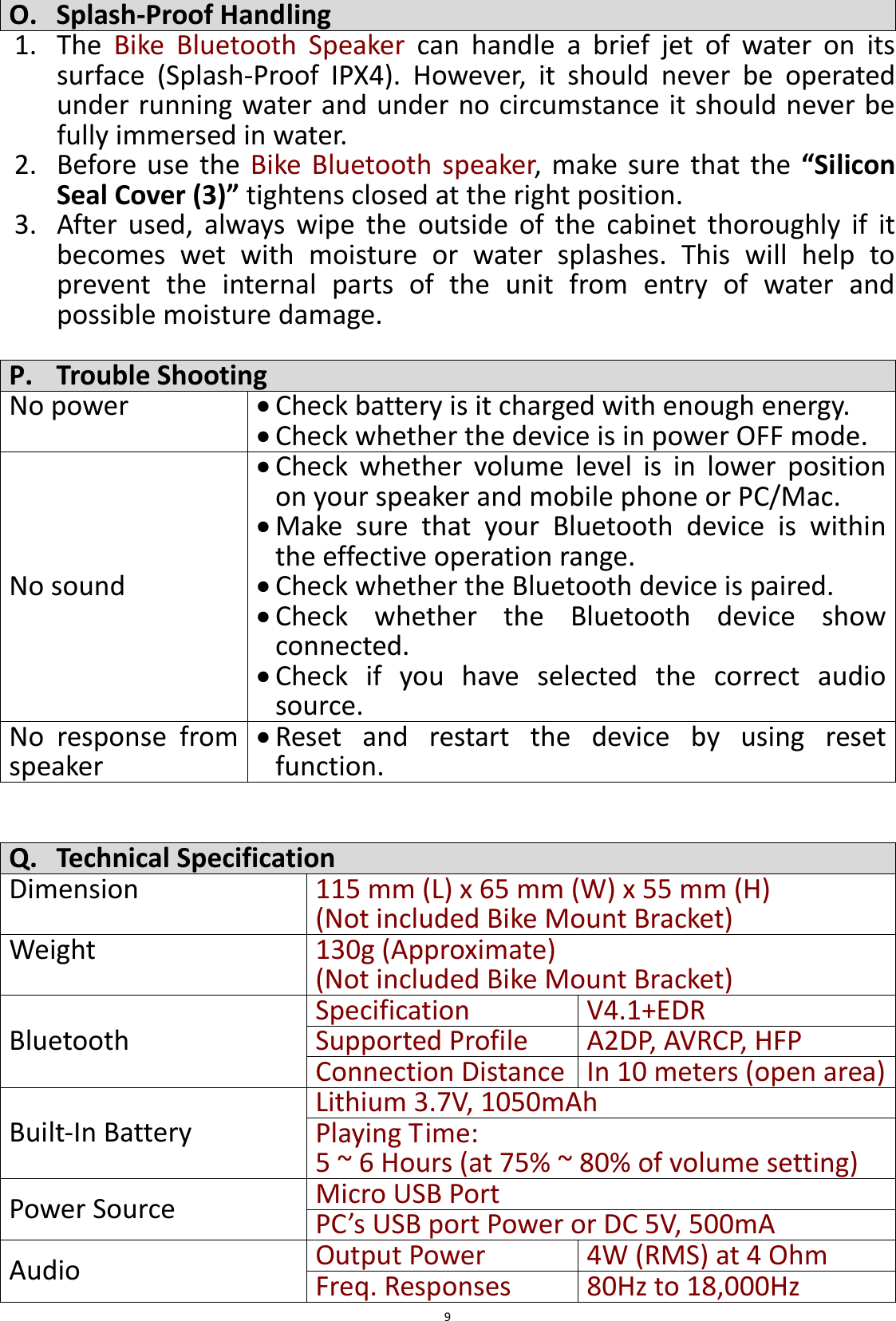
 9 O. Splash-Proof Handling 1. The  Bike  Bluetooth  Speaker  can  handle  a  brief  jet  of  water  on  its surface  (Splash-Proof  IPX4).  However,  it  should  never  be  operated under running water and under no circumstance it should never be fully immersed in water.   2. Before  use  the  Bike  Bluetooth  speaker,  make  sure that the  “Silicon Seal Cover (3)” tightens closed at the right position. 3. After  used,  always  wipe  the  outside  of  the  cabinet  thoroughly  if  it becomes  wet  with  moisture  or  water  splashes.  This  will  help  to prevent  the  internal  parts  of  the  unit  from  entry  of  water  and possible moisture damage.  P. Trouble Shooting No power  Check battery is it charged with enough energy.    Check whether the device is in power OFF mode. No sound  Check  whether  volume  level  is  in  lower  position on your speaker and mobile phone or PC/Mac.  Make  sure  that  your  Bluetooth  device  is  within the effective operation range.  Check whether the Bluetooth device is paired.  Check  whether  the  Bluetooth  device  show connected.  Check  if  you  have  selected  the  correct  audio source. No  response  from speaker  Reset  and  restart  the  device  by  using  reset function.   Q. Technical Specification Dimension 115 mm (L) x 65 mm (W) x 55 mm (H) (Not included Bike Mount Bracket) Weight 130g (Approximate)   (Not included Bike Mount Bracket) Bluetooth Specification V4.1+EDR Supported Profile A2DP, AVRCP, HFP Connection Distance In 10 meters (open area) Built-In Battery Lithium 3.7V, 1050mAh Playing Time:   5 ~ 6 Hours (at 75% ~ 80% of volume setting) Power Source Micro USB Port   PC’s USB port Power or DC 5V, 500mA Audio Output Power 4W (RMS) at 4 Ohm Freq. Responses   80Hz to 18,000Hz
 10 Torch Light Scattered Brightness High : 100 Lux (1m) Mid. : 45 Lux (1m) Water Resistance Splash-Proof IPX4 Operating Temperature 0 to 40℃  R. Disclaimer Updates  to  Firmware  and/or  hardware  components  are  made regularly. Therefore some of the instruction, specifications and pictures in this documentation may differ slightly from your particular situation. All items described in this guide for illustration purposes only  and  may not apply  to  particular  situation.  No  legal  right  or  entitlements  may  be obtained from the description made in this manual.  S. Recycling This  symbol  indicates  that  the  relevant  electrical product or battery should not be disposed of as general household waste in Europe. To ensure the correct waste treatment  of  the  product  and  battery,  please  dispose them  in  accordance  to  any  applicable  local  laws  of requirement  for  disposal  of  electrical  equipment  or batteries. In so doing, you will help to conserve natural resources  and  improve  standards  of  environmental protection in treatment and disposal of electrical waste (Waste Electrical and Electronic Equipment Directive).
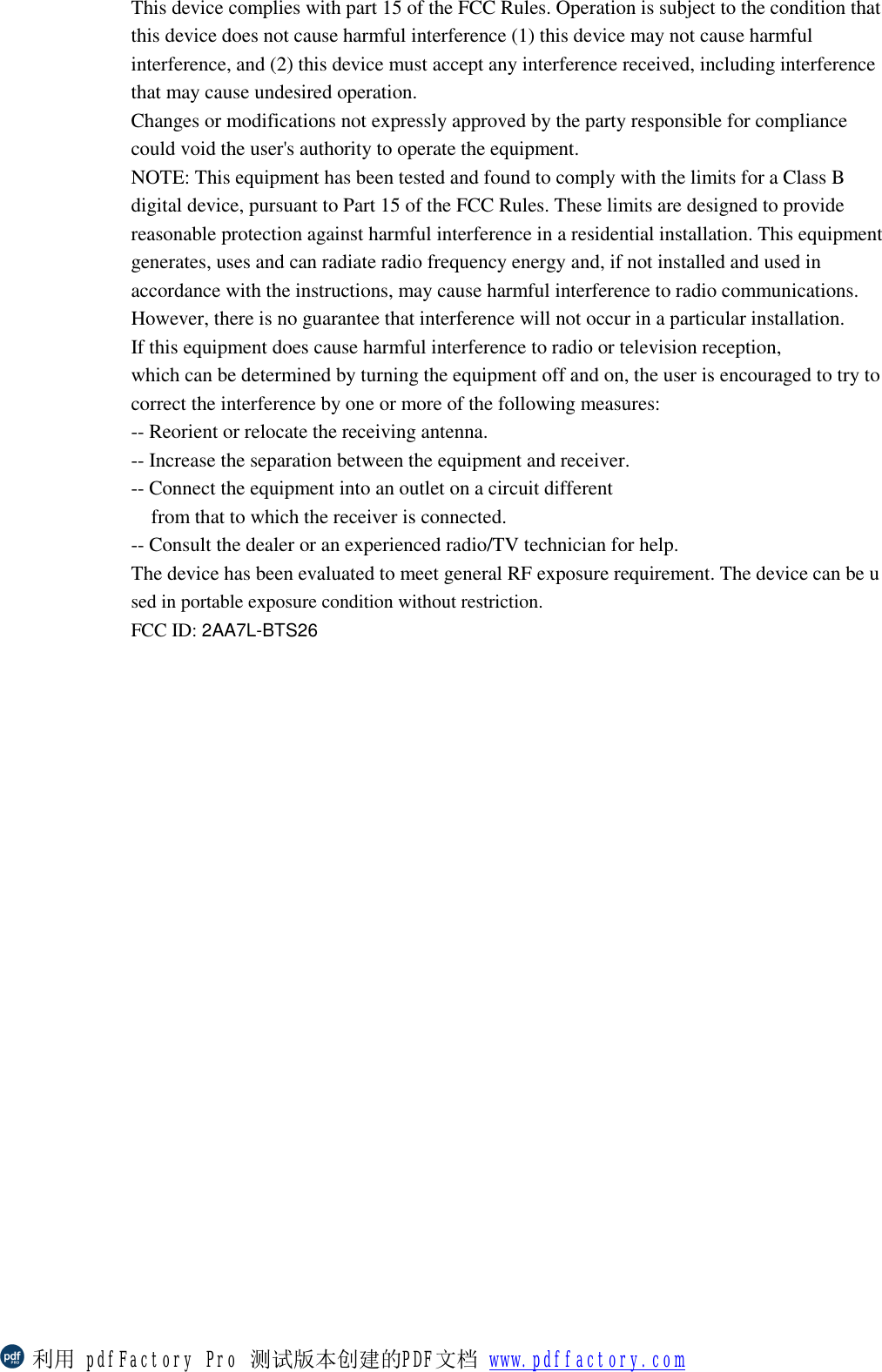
This device complies with part 15 of the FCC Rules. Operation is subject to the condition that this device does not cause harmful interference (1) this device may not cause harmful interference, and (2) this device must accept any interference received, including interference that may cause undesired operation. Changes or modifications not expressly approved by the party responsible for compliance could void the user's authority to operate the equipment. NOTE: This equipment has been tested and found to comply with the limits for a Class B digital device, pursuant to Part 15 of the FCC Rules. These limits are designed to provide reasonable protection against harmful interference in a residential installation. This equipment generates, uses and can radiate radio frequency energy and, if not installed and used in accordance with the instructions, may cause harmful interference to radio communications. However, there is no guarantee that interference will not occur in a particular installation. If this equipment does cause harmful interference to radio or television reception, which can be determined by turning the equipment off and on, the user is encouraged to try to correct the interference by one or more of the following measures: -- Reorient or relocate the receiving antenna. -- Increase the separation between the equipment and receiver. -- Connect the equipment into an outlet on a circuit different from that to which the receiver is connected. -- Consult the dealer or an experienced radio/TV technician for help. The device has been evaluated to meet general RF exposure requirement. The device can be used in portable exposure condition without restriction.  FCC ID: 2AA7L-BTS26   利用 pdfFactory Pro 测试版本创建的PDF文档 www.pdffactory.com

Navigation menu