BITWAVE 2010HBC100A HBC100 Helmet Communicator User Manual

Bitwave Private Limited HBC100 Helmet Communicator

User manual

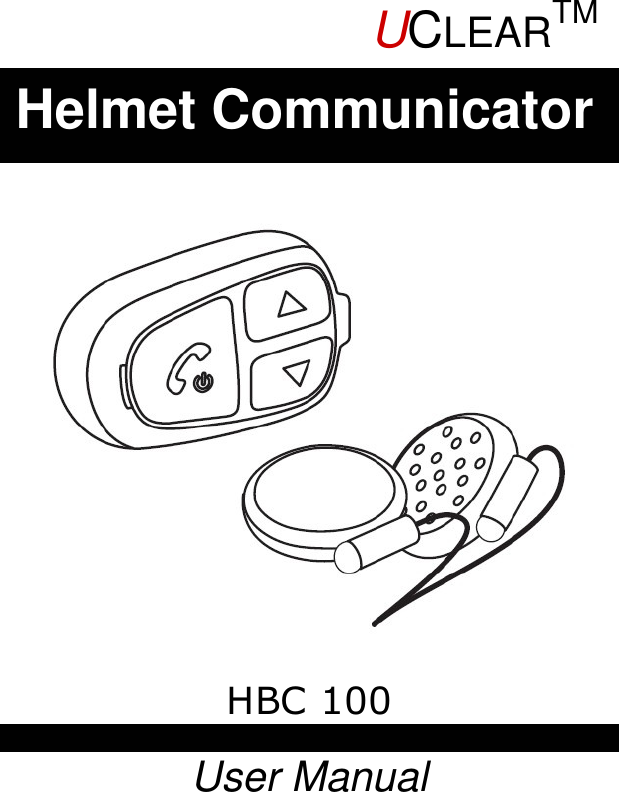
            HBC 100  User ManualHelmet Communicator UCLEARTM
  UCLEARTM 1 HBC100 Helmet Communicator User Manual                             Note Welcome to UCLEARTM
  UCLEARTM 2  Contents ---------------------------------------------  2 Quick User Guide ------------------------------------  3 Warnings and Safety Instructions ------------------  7 Features ---------------------------------------------  9 Installation ------------------------------------------  10 General Operations ---------------------------------  13 Mobile Phone Operations ---------------------------  15 Music Streaming Operations -----------------------  17 Intercom Operations -------------------------------  18 Button Configurations Summary ------------------  19 Status Indicator Configurations Summary --------  20 Technical Data --------------------------------------  21 Notices ----------------------------------------------  22                      Contents
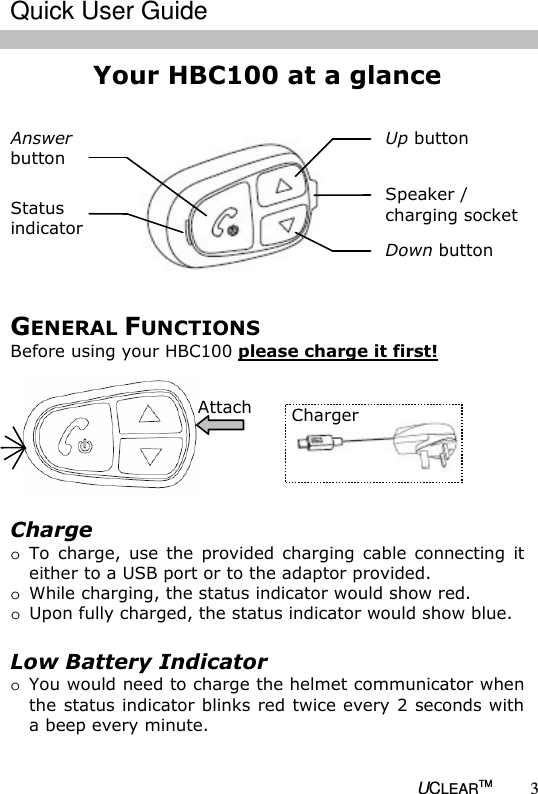
  UCLEARTM 3 Your HBC100 at a glance                    Up button  Speaker / charging socket  Down button  Status  indicator  Answer  button  Charge o To  charge, use  the  provided  charging  cable  connecting  it either to a USB port or to the adaptor provided. o While charging, the status indicator would show red. o Upon fully charged, the status indicator would show blue.  Low Battery Indicator o You would need to charge the helmet communicator when the status indicator blinks red twice every 2 seconds with a beep every minute.  Charger  Attach GENERAL FUNCTIONS Before using your HBC100 please charge it first!  Quick User Guide
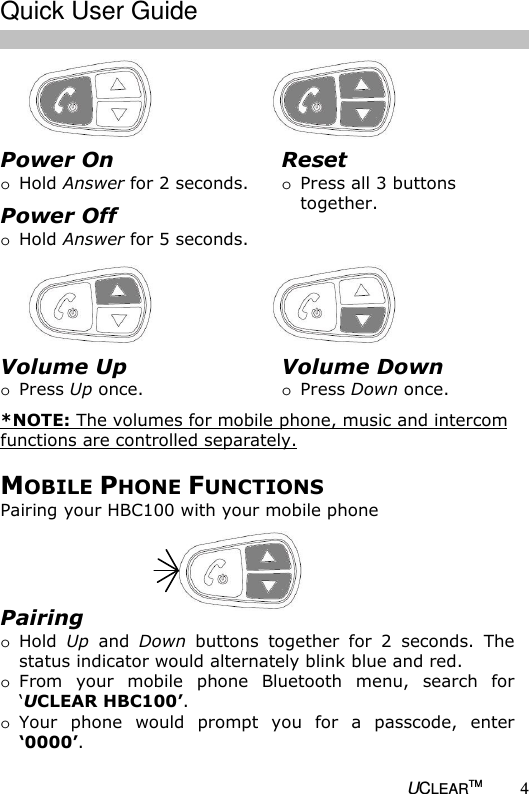
  UCLEARTM 4                MOBILE PHONE FUNCTIONS Pairing your HBC100 with your mobile phone Power On o Hold Answer for 2 seconds. Power Off o Hold Answer for 5 seconds.  Reset o Press all 3 buttons together.  Volume Up o Press Up once.  *NOTE: The volumes for mobile phone, music and intercom functions are controlled separately. Volume Down o Press Down once.  Pairing o Hold  Up  and  Down  buttons  together  for  2  seconds.  The status indicator would alternately blink blue and red. o From  your  mobile  phone  Bluetooth  menu,  search  for ‘UCLEAR HBC100’.  o Your  phone  would  prompt  you  for  a  passcode,  enter ‘0000’.   Quick User Guide
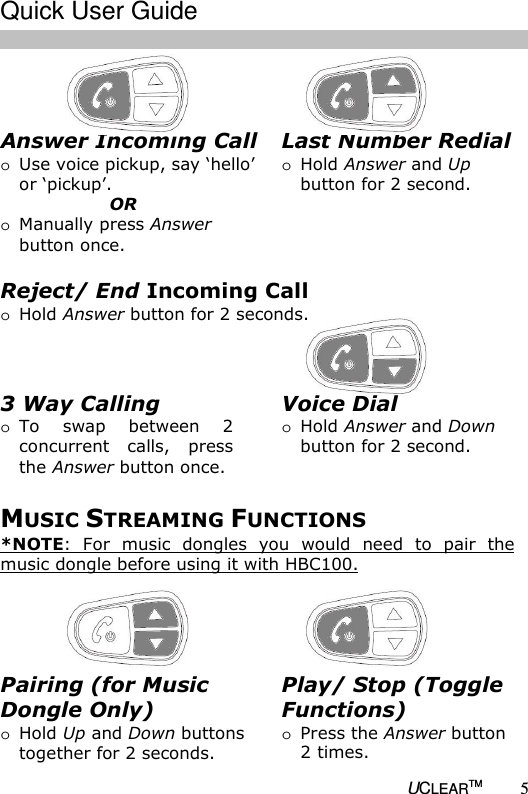
  UCLEARTM 5  Answer Incoming Call  o Use voice pickup, say ‘hello’  or ‘pickup’.        OR o Manually press Answer button once.  Voice Dial o Hold Answer and Down button for 2 second.  Last Number Redial o Hold Answer and Up button for 2 second.  Reject/ End Incoming Call  o Hold Answer button for 2 seconds.  3 Way Calling o To  swap  between  2 concurrent calls,  press the Answer button once.  MUSIC STREAMING FUNCTIONS *NOTE: For  music  dongles  you  would  need  to  pair  the music dongle before using it with HBC100.    Play/ Stop (Toggle Functions) o Press the Answer button 2 times. Pairing (for Music Dongle Only) o Hold Up and Down buttons together for 2 seconds.  Quick User Guide
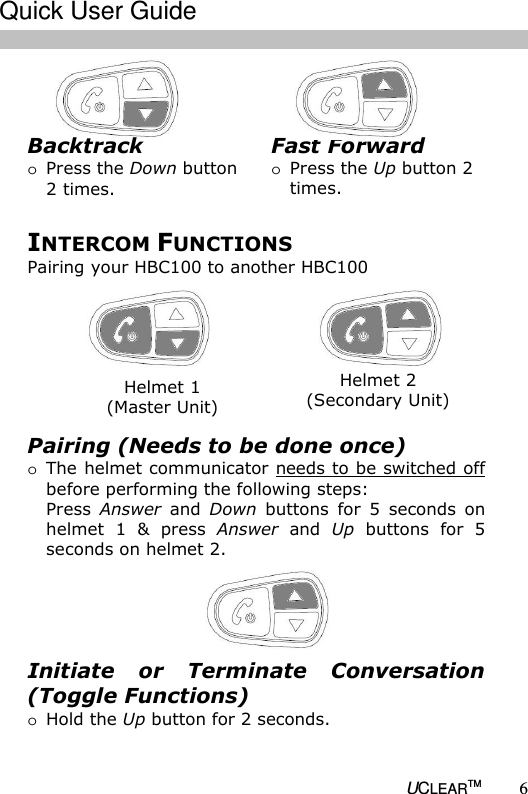
  UCLEARTM 6    INTERCOM FUNCTIONS Pairing your HBC100 to another HBC100 Helmet 1 (Master Unit) Helmet 2 (Secondary Unit) Pairing (Needs to be done once) o The helmet communicator needs to be switched off before performing the following steps: Press  Answer  and  Down  buttons  for  5  seconds  on helmet  1  &  press  Answer  and  Up  buttons  for  5 seconds on helmet 2.  Initiate  or  Terminate  Conversation (Toggle Functions) o Hold the Up button for 2 seconds.  Fast Forward o Press the Up button 2 times. Backtrack o Press the Down button 2 times.  Quick User Guide
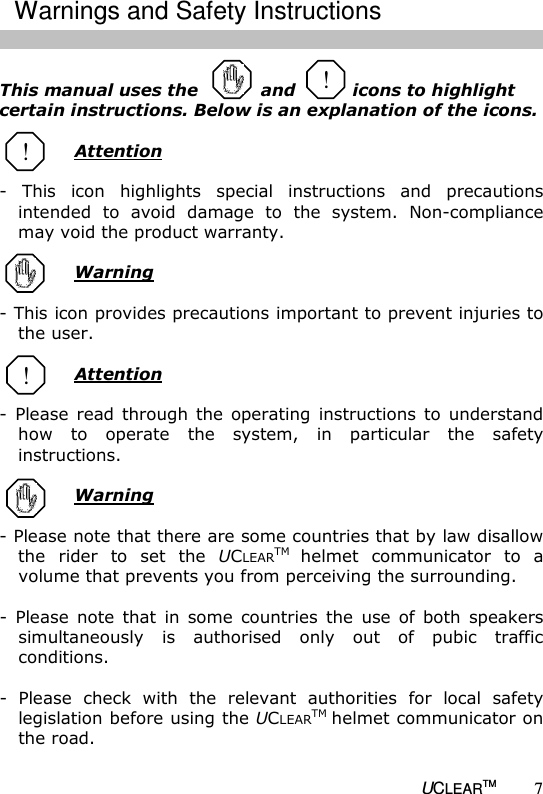
  UCLEARTM 7  This manual uses the           and          icons to highlight certain instructions. Below is an explanation of the icons.    Attention  -  This  icon  highlights  special  instructions  and  precautions intended  to  avoid  damage  to  the  system.  Non-compliance may void the product warranty.    Warning  - This icon provides precautions important to prevent injuries to the user.   Attention  -  Please  read  through  the  operating  instructions  to  understand how  to  operate  the  system,  in  particular  the  safety instructions.   Warning  - Please note that there are some countries that by law disallow the  rider  to  set  the  UCLEARTM helmet  communicator  to  a volume that prevents you from perceiving the surrounding.   -  Please  note  that  in  some  countries  the  use  of  both  speakers simultaneously  is  authorised  only  out  of  pubic  traffic conditions.   -  Please  check  with  the  relevant  authorities  for  local  safety legislation before using the UCLEARTM helmet communicator on the road.  ! ! Warnings and Safety Instructions !
  UCLEARTM 8 -  Prolonged  exposure  to  loud  sounds  may  lead  to  permanent hearing damage.   -  Do  not  attempt  to  place  an  outgoing  call  through the  mobile phone while riding on the motorcycle at any point of time.  -  Please  do  not  use  the  UCLEARTM helmet  communicator  in anyway that may distract you or hinder your judgment whilst on  the  move.  Never  ever  compromise  your  safety  and  the safety of others.  Attention  -  Charging  and  handling  rechargeable  battery  products incorrectly may cause them to overheat, catch fire or explode. To prevent this please follow the instructions below:  i)  Never  change  the  batteries  yourself,  always  bring  it  to  an authorised dealer to perform the replacement for you.  ii)When charging, use ONLY the charging cable provided or a replacement cable  from  the UCLEARTM  dealer. Using  similar, compatible  or  any  other  cables  may  lead  to  permanent product damage and will void the product warranty.  -  Never  make  any  modifications  to  any  parts  of  the  UCLEARTM helmet communicator in any way as it may cause the system to malfunction causing hurt to you.  -  Do not modify your helmet to use with this system – it is not necessary to do so.       ! Warnings and Safety Instructions
  UCLEARTM 9  The  UCLEARTM helmet  communicator  has  three  main functions: to make mobile phone calls, to listen to music entertainment  by  wireless  Bluetooth  and  for  intercom talk.   Mobile Phone Functions • Bluetooth phone audio capabilities, HFP & HSP Profile. • Voice activated call pick up.  Music Streaming Functions • Bluetooth  music  streaming  with  hi-fi  and  stereo  capabilities, A2DP Profile. • Bluetooth  Audio/Video  Remote  Control  capability,  AVRCP profile.   Intercom Functions • Motorcycle to motorcycle or rider to passenger connection via two UCLEARTM helmet communicator up to 10m range.  Advanced Product Features • Self  adaptive  intelligent  noise  cancellation  algorithms  ensure conversations on the go are clear even in noisy environments.  • Voice controlled incoming call answering.  • The  weather  resistant  engineered  design  ensures  the possibility of communication rain or shine.  • The  integrated  microphone  array  technology  allows  you  to communicate without the hassle of using boom microphones.  Features
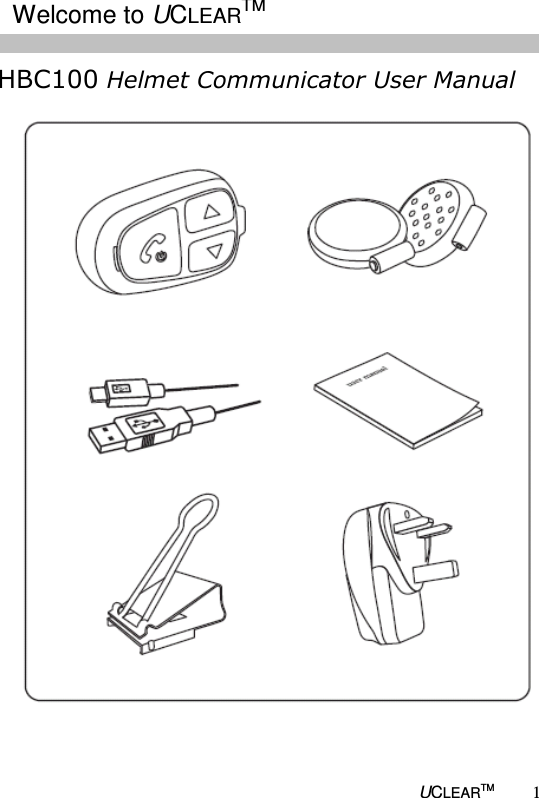
  UCLEARTM 10 The  UCLEARTM  HBC100  helmet  communicator  package contains:  o A UCLEARTM HBC100 helmet communicator    control unit  o A pair of hi-fi stereo headset with embedded    microphones   o Velcro for speakers  o A clip bracket and anti slip rubber patch  o A metal mounting bracket with double sided tape  o An AC charger and USB charging cable  o A user manual  Install Speakers  • Use  the  velcros  to  install  the speakers  into  the  ear  cavity  of  the helmet.  • The microphones MUST be placed facing out.  • Left and right speakers must be installed symmetrically.  Installation Microphone
  UCLEARTM 11  Your  UCLEARTM  HBC100  helmet  communicator  package comes with 2 types of mounting bracket: a clip bracket and  a  metal  mounting  bracket.  Use  either  of  the brackets  to  install  the  HBC100  control  unit  onto  your helmet.  Install Clip Bracket • Position and fasten the clip bracket onto the helmet.    • When in the correct position, the clip bracket should be firmly secured onto the helmet.  • Use additional anti slip rubber patch provided if required. • Remove the metal handles after clip bracket has been installed.   Installation
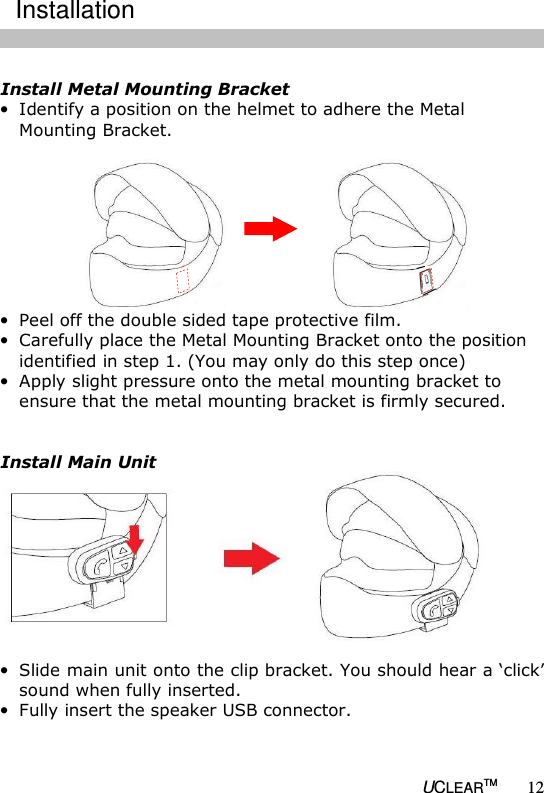
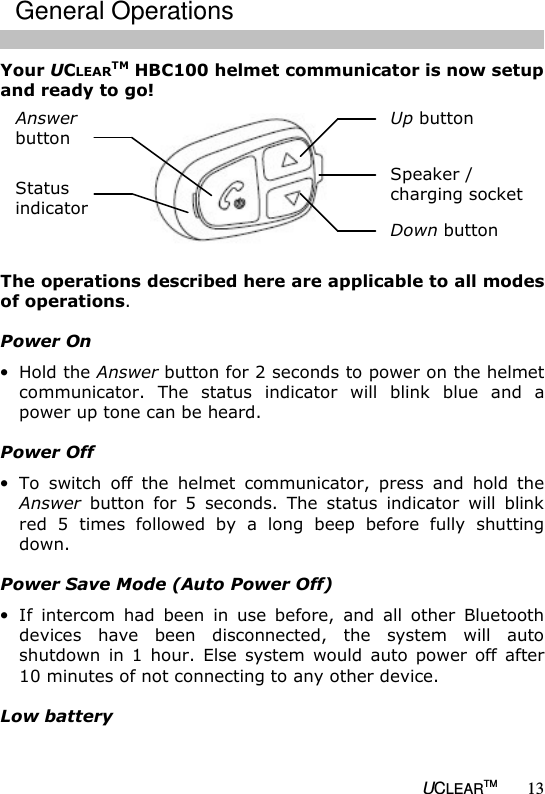
  UCLEARTM 12  Install Metal Mounting Bracket • Identify a position on the helmet to adhere the Metal Mounting Bracket.   • Peel off the double sided tape protective film.  • Carefully place the Metal Mounting Bracket onto the position identified in step 1. (You may only do this step once) • Apply slight pressure onto the metal mounting bracket to ensure that the metal mounting bracket is firmly secured.   Install Main Unit  • Slide main unit onto the clip bracket. You should hear a ‘click’ sound when fully inserted. • Fully insert the speaker USB connector.  Installation
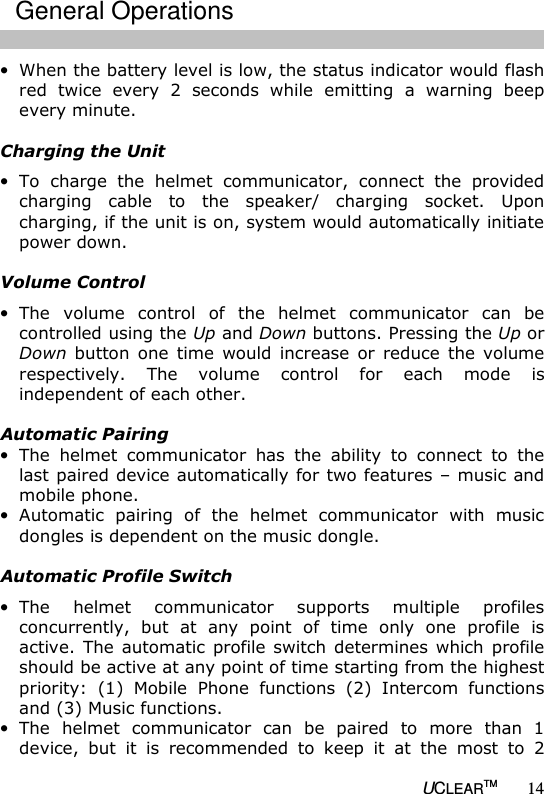
  UCLEARTM 13 Your UCLEARTM HBC100 helmet communicator is now setup and ready to go!   The operations described here are applicable to all modes of operations.  Power On • Hold the Answer button for 2 seconds to power on the helmet communicator.  The  status  indicator  will  blink  blue  and  a power up tone can be heard.  Power Off • To  switch  off  the  helmet  communicator,  press  and  hold  the Answer  button  for  5  seconds.  The  status  indicator  will  blink red  5  times  followed  by  a  long  beep  before  fully  shutting down.  Power Save Mode (Auto Power Off) • If  intercom  had  been  in  use  before,  and  all  other  Bluetooth devices  have  been  disconnected,  the  system  will  auto shutdown  in  1  hour.  Else  system  would  auto  power  off  after 10 minutes of not connecting to any other device.  Low battery Up button  Speaker / charging socket  Down button  Status  indicator  Answer  button  General Operations
  UCLEARTM 14 • When the battery level is low, the status indicator would flash red  twice  every  2  seconds  while  emitting  a  warning  beep every minute.   Charging the Unit • To  charge  the  helmet  communicator,  connect  the  provided charging  cable  to  the  speaker/  charging  socket.  Upon charging, if the unit is on, system would automatically initiate power down.   Volume Control • The  volume  control  of  the  helmet  communicator  can  be controlled using the Up and Down buttons. Pressing the Up or Down  button  one  time  would  increase  or  reduce  the volume respectively.  The  volume  control  for  each  mode  is independent of each other.     Automatic Pairing • The  helmet  communicator  has  the  ability  to  connect  to  the last paired device automatically for two features – music and mobile phone. • Automatic  pairing  of  the  helmet  communicator  with  music dongles is dependent on the music dongle.  Automatic Profile Switch • The  helmet  communicator  supports  multiple  profiles concurrently,  but  at  any  point  of  time  only  one  profile  is active. The  automatic profile  switch  determines which  profile should be active at any point of time starting from the highest priority:  (1)  Mobile  Phone  functions  (2)  Intercom  functions and (3) Music functions.  • The  helmet  communicator  can  be  paired  to  more  than  1 device,  but  it  is  recommended  to  keep  it  at  the  most  to  2 General Operations
  UCLEARTM 15 different devices  linked to  the helmet communicator in order to experience the most out of the helmet communicator.  To use the helmet communicator with your mobile phone for the first time, you must first connect them wirelessly by pairing.  Pairing • To connect the helmet communicator to a mobile phone, hold the Up and Down buttons for 2 seconds. This puts the helmet communicator  into  paring  mode.  The  status  indicator  would blink blue and red alternately.  • Next,  turn  on  the  mobile  phone  Bluetooth  functions  and search  for  Bluetooth  devices.  Select  ‘UCLEAR  HBC100’  to pair with the desired device.  • When prompted to enter a passcode, enter ‘0000’.  *Most  mobile  phones  when  paired  would  be  automatically connected with both phone and music Bluetooth capabilities.  After  pairing  the  helmet  communicator  to  your  mobile phone,  you  may  now  use  the  helmet  communicator  to answer  your  calls  or  make  outgoing  calls  or  listen  to music.   Voice Activated Pick Up Calls • When  a  call  comes  to  the  mobile  phone,  say  ‘hello’  or  ‘pick-up’ to answer the call OR Press the Answer button once.   Reject Calls • To  reject  an  incoming  call  or  an  incorrectly  placed  outgoing call hold the Answer button for 2 seconds.  Mobile Phone Operations
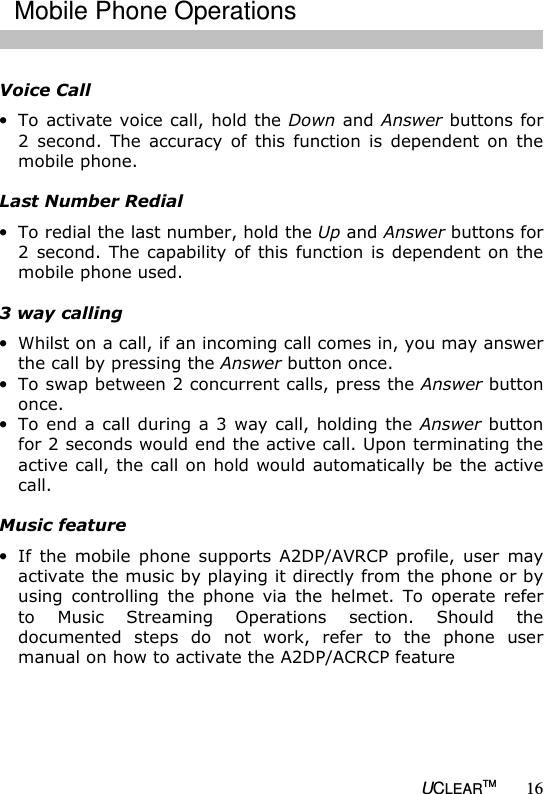
  UCLEARTM 16  Voice Call • To activate voice call, hold the Down and Answer buttons for 2  second.  The  accuracy  of  this  function  is  dependent on  the mobile phone.  Last Number Redial • To redial the last number, hold the Up and Answer buttons for 2 second.  The capability of this function  is dependent on the mobile phone used.  3 way calling • Whilst on a call, if an incoming call comes in, you may answer the call by pressing the Answer button once.  • To swap between 2 concurrent calls, press the Answer button once. • To end a call during  a 3 way call, holding the Answer button for 2 seconds would end the active call. Upon terminating the active call, the call on hold would automatically be the active call.  Music feature • If  the  mobile  phone  supports  A2DP/AVRCP  profile,  user  may activate the music by playing it directly from the phone or by using  controlling  the  phone  via  the  helmet.  To  operate  refer to  Music  Streaming  Operations  section.  Should  the documented  steps  do  not  work,  refer  to  the  phone  user manual on how to activate the A2DP/ACRCP feature  Mobile Phone Operations
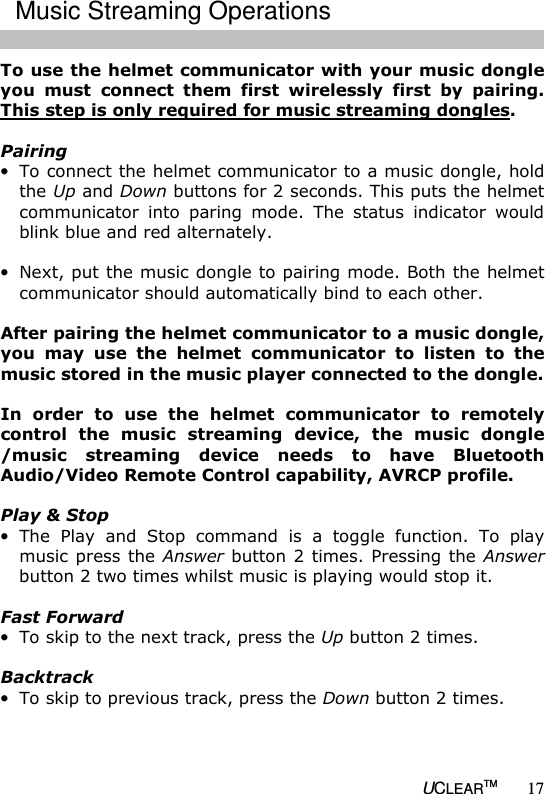
  UCLEARTM 17 To use the helmet communicator with your music dongle you  must  connect  them  first  wirelessly  first  by  pairing. This step is only required for music streaming dongles.  Pairing • To connect the helmet communicator to a music dongle, hold the Up and Down buttons for 2 seconds. This puts the helmet communicator  into  paring  mode.  The  status  indicator  would blink blue and red alternately.  • Next, put the music dongle to pairing mode. Both the helmet communicator should automatically bind to each other.  After pairing the helmet communicator to a music dongle, you  may  use  the  helmet  communicator  to  listen  to  the music stored in the music player connected to the dongle.   In  order  to  use  the  helmet  communicator  to  remotely control  the  music  streaming  device,  the  music  dongle /music  streaming  device  needs  to  have  Bluetooth Audio/Video Remote Control capability, AVRCP profile.   Play & Stop • The  Play  and  Stop  command  is  a  toggle  function.  To  play music press the Answer button 2 times. Pressing the Answer button 2 two times whilst music is playing would stop it.  Fast Forward • To skip to the next track, press the Up button 2 times.  Backtrack • To skip to previous track, press the Down button 2 times.  Music Streaming Operations
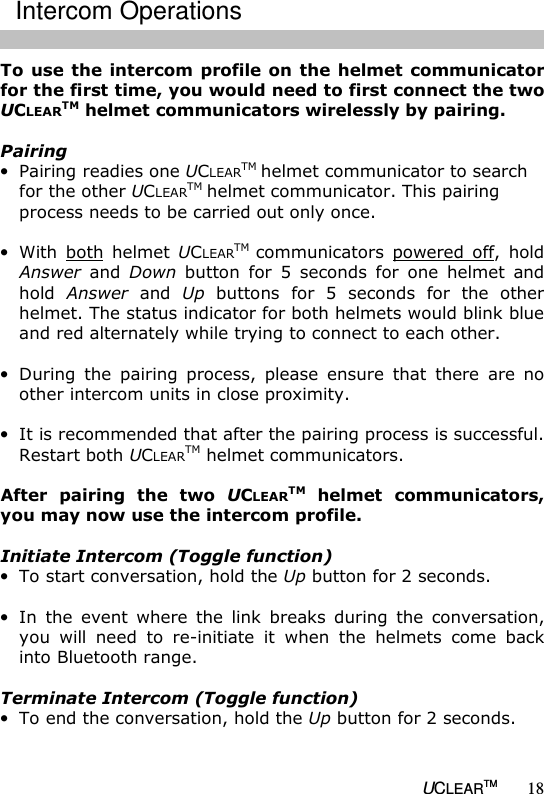
  UCLEARTM 18 To use  the intercom  profile on the  helmet communicator for the first time, you would need to first connect the two UCLEARTM helmet communicators wirelessly by pairing.   Pairing • Pairing readies one UCLEARTM helmet communicator to search for the other UCLEARTM helmet communicator. This pairing process needs to be carried out only once.  • With  both  helmet  UCLEARTM communicators  powered  off,  hold Answer  and  Down  button  for  5  seconds  for  one  helmet  and hold  Answer  and  Up  buttons  for  5  seconds  for  the  other helmet. The status indicator for both helmets would blink blue and red alternately while trying to connect to each other.  • During  the  pairing  process,  please  ensure  that  there  are  no other intercom units in close proximity.  • It is recommended that after the pairing process is successful. Restart both UCLEARTM helmet communicators.  After  pairing  the  two  UCLEARTM  helmet  communicators, you may now use the intercom profile.   Initiate Intercom (Toggle function) • To start conversation, hold the Up button for 2 seconds.  • In  the  event  where  the  link  breaks  during  the  conversation, you  will  need  to  re-initiate  it  when  the  helmets  come  back into Bluetooth range.  Terminate Intercom (Toggle function) • To end the conversation, hold the Up button for 2 seconds.    Intercom Operations
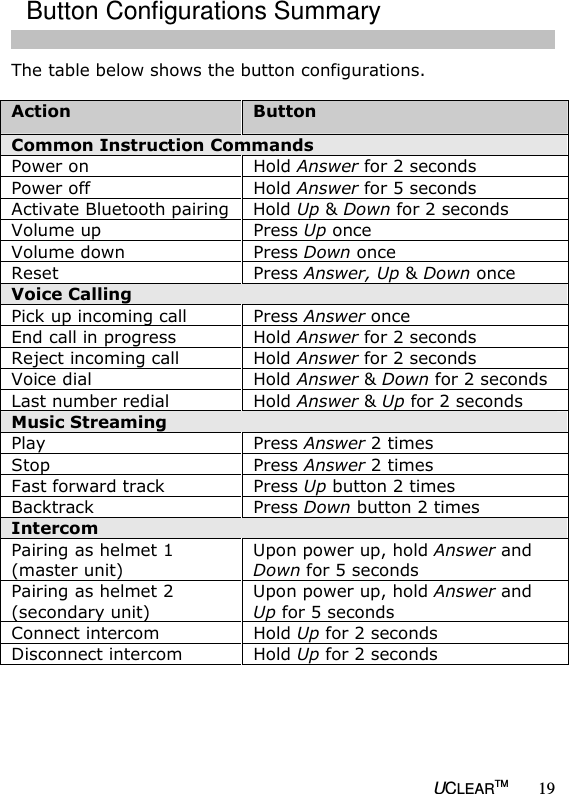
  UCLEARTM 19 The table below shows the button configurations.  Action  Button Common Instruction Commands Power on  Hold Answer for 2 seconds Power off  Hold Answer for 5 seconds Activate Bluetooth pairing Hold Up & Down for 2 seconds Volume up  Press Up once Volume down  Press Down once Reset  Press Answer, Up & Down once Voice Calling  Pick up incoming call  Press Answer once End call in progress  Hold Answer for 2 seconds Reject incoming call  Hold Answer for 2 seconds Voice dial  Hold Answer & Down for 2 seconds Last number redial  Hold Answer & Up for 2 seconds Music Streaming  Play  Press Answer 2 times Stop  Press Answer 2 times Fast forward track  Press Up button 2 times Backtrack  Press Down button 2 times Intercom Pairing as helmet 1 (master unit) Upon power up, hold Answer and Down for 5 seconds Pairing as helmet 2 (secondary unit) Upon power up, hold Answer and Up for 5 seconds Connect intercom  Hold Up for 2 seconds Disconnect intercom  Hold Up for 2 seconds      Button Configurations Summary
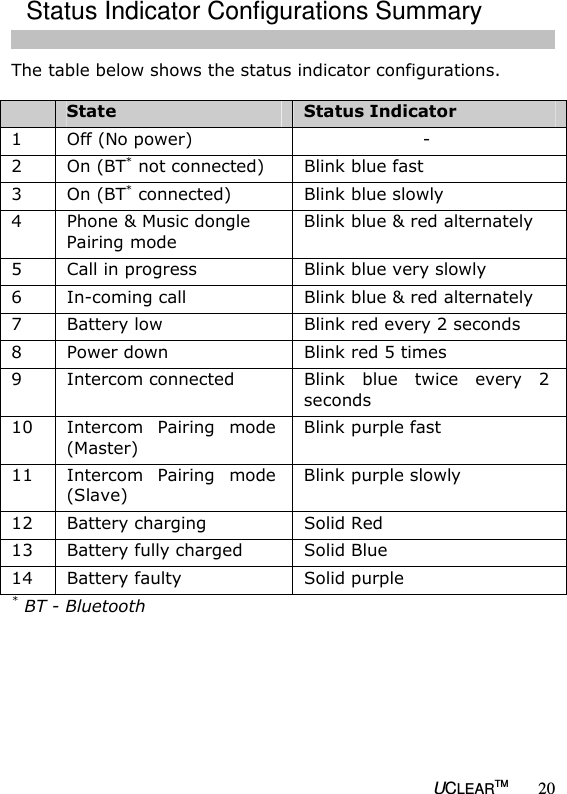
  UCLEARTM 20 The table below shows the status indicator configurations.   State  Status Indicator 1  Off (No power)  - 2  On (BT* not connected)  Blink blue fast  3  On (BT* connected)  Blink blue slowly 4  Phone & Music dongle Pairing mode Blink blue & red alternately  5  Call in progress  Blink blue very slowly 6  In-coming call  Blink blue & red alternately 7  Battery low  Blink red every 2 seconds 8  Power down  Blink red 5 times 9  Intercom connected  Blink  blue  twice  every  2 seconds 10  Intercom  Pairing  mode (Master) Blink purple fast 11  Intercom  Pairing  mode (Slave) Blink purple slowly 12  Battery charging  Solid Red  13  Battery fully charged  Solid Blue  14  Battery faulty  Solid purple * BT - Bluetooth        Status Indicator Configurations Summary
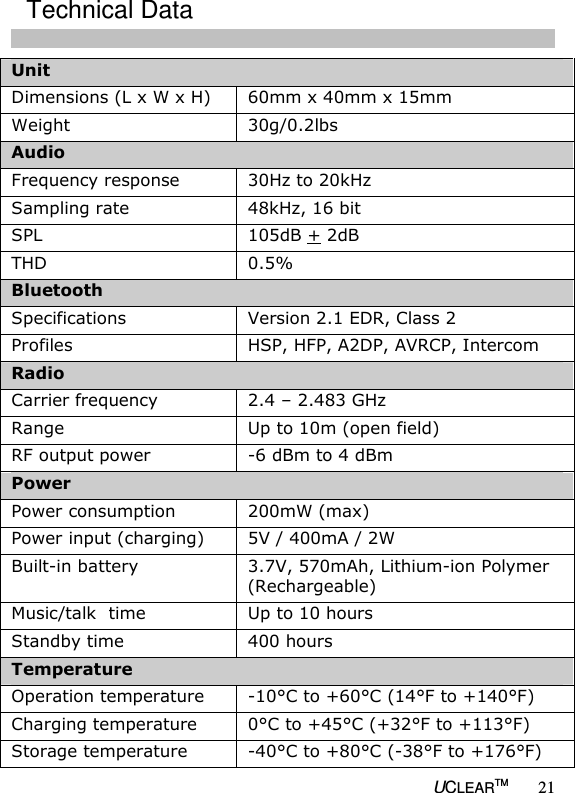
  UCLEARTM 21 Unit Dimensions (L x W x H)  60mm x 40mm x 15mm Weight  30g/0.2lbs Audio  Frequency response  30Hz to 20kHz Sampling rate  48kHz, 16 bit SPL  105dB + 2dB THD  0.5% Bluetooth Specifications  Version 2.1 EDR, Class 2  Profiles  HSP, HFP, A2DP, AVRCP, Intercom Radio Carrier frequency  2.4 – 2.483 GHz Range  Up to 10m (open field) RF output power  -6 dBm to 4 dBm Power Power consumption  200mW (max) Power input (charging)  5V / 400mA / 2W Built-in battery  3.7V, 570mAh, Lithium-ion Polymer (Rechargeable) Music/talk  time  Up to 10 hours Standby time  400 hours Temperature  Operation temperature  -10°C to +60°C (14°F to +140°F) Charging temperature  0°C to +45°C (+32°F to +113°F) Storage temperature  -40°C to +80°C (-38°F to +176°F) Technical Data
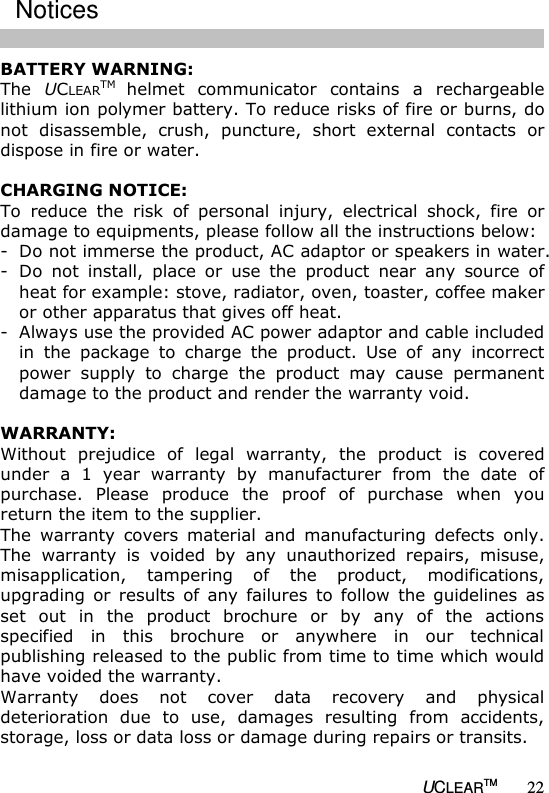
  UCLEARTM 22 BATTERY WARNING: The  UCLEARTM helmet  communicator  contains  a  rechargeable lithium ion polymer battery. To reduce risks of fire or burns, do not  disassemble,  crush,  puncture,  short  external  contacts  or dispose in fire or water.  CHARGING NOTICE: To  reduce  the  risk  of  personal  injury,  electrical  shock,  fire  or damage to equipments, please follow all the instructions below: - Do not immerse the product, AC adaptor or speakers in water. - Do  not  install,  place  or  use  the  product  near  any  source  of heat for example: stove, radiator, oven, toaster, coffee maker or other apparatus that gives off heat. - Always use the provided AC power adaptor and cable included in  the  package  to  charge  the  product.  Use  of  any  incorrect power  supply  to  charge  the  product  may  cause  permanent damage to the product and render the warranty void.   WARRANTY: Without  prejudice  of  legal  warranty,  the  product  is  covered under  a  1  year  warranty  by  manufacturer  from  the  date  of purchase.  Please  produce  the  proof  of  purchase  when  you return the item to the supplier. The  warranty  covers  material  and  manufacturing  defects  only. The  warranty  is  voided  by  any  unauthorized  repairs,  misuse, misapplication,  tampering  of  the  product,  modifications, upgrading  or  results  of  any  failures  to  follow  the  guidelines  as set  out  in  the  product  brochure  or  by  any  of  the  actions specified  in  this  brochure  or  anywhere  in  our  technical publishing released to the public from time to time which would have voided the warranty. Warranty  does  not  cover  data  recovery  and  physical deterioration  due  to  use,  damages  resulting  from  accidents, storage, loss or data loss or damage during repairs or transits. Notices
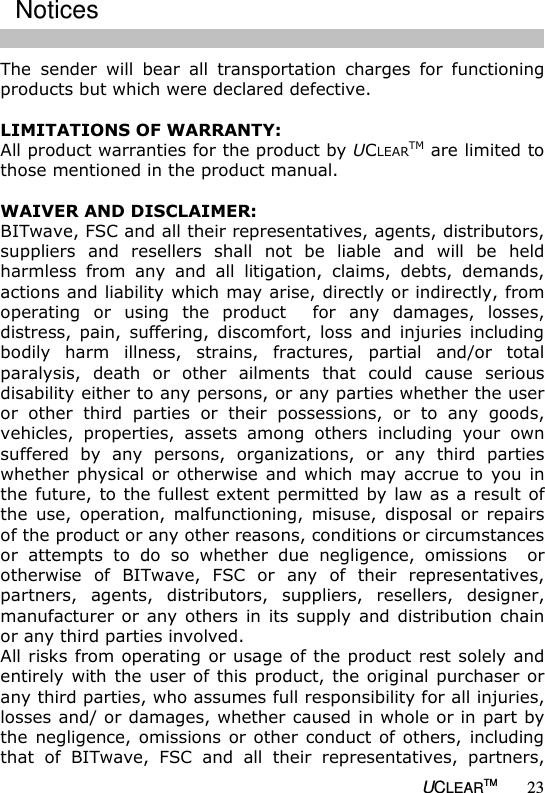
  UCLEARTM 23 The  sender  will  bear  all  transportation  charges  for  functioning products but which were declared defective.  LIMITATIONS OF WARRANTY: All product warranties for the product by UCLEARTM are limited to those mentioned in the product manual.    WAIVER AND DISCLAIMER: BITwave, FSC and all their representatives, agents, distributors, suppliers  and  resellers  shall  not  be  liable  and  will  be  held harmless  from  any  and  all  litigation,  claims,  debts,  demands, actions and liability which may arise, directly or indirectly, from operating  or  using  the  product    for  any  damages,  losses, distress,  pain,  suffering,  discomfort,  loss  and  injuries  including bodily  harm  illness,  strains,  fractures,  partial  and/or  total paralysis,  death  or  other  ailments  that  could  cause  serious disability either to any persons, or any parties whether the user or  other  third  parties  or  their  possessions,  or  to  any  goods, vehicles,  properties,  assets  among  others  including  your  own suffered  by  any  persons,  organizations,  or  any  third  parties whether physical or  otherwise  and which may  accrue to  you  in the future, to the fullest extent permitted by law as a result of the  use,  operation,  malfunctioning,  misuse,  disposal  or  repairs of the product or any other reasons, conditions or circumstances or  attempts  to  do  so  whether  due  negligence,  omissions    or otherwise  of  BITwave,  FSC  or  any  of  their  representatives, partners,  agents,  distributors,  suppliers,  resellers,  designer, manufacturer or  any  others  in its  supply  and distribution chain or any third parties involved. All risks from operating or usage of the product rest solely and entirely with  the user of  this product, the original purchaser or any third parties, who assumes full responsibility for all injuries, losses and/ or damages, whether caused in whole or in part by the negligence, omissions or other  conduct of  others,  including that  of  BITwave,  FSC  and  all  their  representatives,  partners, Notices
  UCLEARTM 24 agents,  distributors,  suppliers,  resellers  and  all  others  in  its supply  and  distribution  chain  either  due  to  the  designer’s  or manufacturer’s  negligence  or  omissions  or  any  third  parties involved.  Always comply with the local law and traffic regulations. Where use of the product is not permitted or allowed by any laws and regulations  including  the  traffic  laws  of  your  country,  we  warn you  not  to  go  against  such  restrictions.  You  will  bear  the  full responsibilities of any breaches of law and regulations.  You should not allow the operations or use of the product or any attempts  to  use  it  by  any  persons  including  yourself  to compromise  anyone’s  safety  including  your  own  or  to  cause harm  to  any  vehicles,  property,  objects,  livestock,  inventories, assets and the  like  under any circumstances. You  or any users of  the  product  are  to  take  all  necessary  safety  measures  and precautions and to remain alert to all surrounding conditions.  You  are  warned  not  to  operate  the  product  if  you  are  not physically capable of doing so in a safe manner, if you have or will consume any alcohol or any mind-altering substance during its  operation  so  that  your  alertness  is  compromised  or  if  you have  any  medical  conditions  or  needs  that  may  compromise your abilities to do so in a safe manner.  We warn you of the inherent, unforeseeable and unlimited risks and dangers in using the product while in traffic, including injury or illness, strains, fractures, partial and/or total paralysis, death or other ailments that could cause serious disability due to any causes.  This  product  is  only  for  use  by  persons eighteen  (18) years  of age  and  above  who  have  understood  the  warnings,  risks  and the terms of use.  You confirm that you have read this release of liability and fully understand  its  terms  and  that  you  have  given  up  substantial rights by using or attempting to use the product.    Notices
  UCLEARTM 25 CORRECT DISPOSAL OF THIS PRODUCT: Do not dispose this product with other household wastes at the end of its working life. There is a separate collection system for used  electronic  products  in  accordance  with  legislation  that requires proper treatment, recovery and recycling.   Household  users  should  contact  either  the  retailer  where  they purchased  this  product,  or  their  local  government  office,  for details  of  where  and  how  they  can  take  this  item  for environmentally  safe  recycling.  Business  users  should  contact their  suppliers  and  refer  to  the  terms  and  conditions  of  the purchase contract. This product should not be mixed with other commercial wastes for disposal.  PRODUCT INFORMATION: BITwave, FSC and all their representatives, agents, distributors, suppliers  or  resellers  shall  not  be  held  responsible  for  any consequences arising from any errors or omissions in the guide or resulting directly or indirectly from the use of the information herein. BITwave and FSC reserve the right to amend or improve the  product  design  or  user  guide  without  any  restrictions  and without any obligation to notify users. All information here is accurate as of the date of printing. Please  check  for  the  latest  version  of  any  the  modified  or upgraded  product  on  the  website  www.uclear-digital.com  from time to time.  PERSONAL SAFETY: Do not open the seal of the hardware, tamper, repair or modify any parts. Do not touch the product with metal objects or parts or  chemical  products.  Violation  of  the  above  will  lead  to potential fire hazards and mishaps.  Please  contact  the  technical  support  or  your  local  supplier  if your product malfunctions.   Notices
  UCLEARTM 26 TECHNICAL SUPPORT: For additional information please visit our website at www.uclear-digital.com  For technical support please contact us at: technical@uclear-digital.com  COPYRIGHTS: Copyright  ©  2010  BITwave  Pte  Ltd  &  FSC.  All  rights  reserved. No part of this guide may be reproduced in any form or by any process whatsoever without prior written consent from BITwave Pte Ltd and FSC.  LICENCES: The  UCLEARTM  trademark  and  logo  is  exclusively  owned  by BITwave  Pte  Ltd  &  FSC.  Any  use  of  the  mark  by  any  other parties  without  prior  written  permission  of  BITwave  Pte  Ltd  & FSC constitutes an infringement of legal rights. The  BluetoothTM trademark  is  owned  by  Bluetooth  SIG  and  is used under licence by BITwave Pte Ltd & FSC.  FCC COMPLIANCE STATEMENT FCC ID:NMC2010HBC100A This device complies with part 15 of the FCC rules. Operation is subject to the following two conditions: (1) This device may not cause harmful interference, and (2) This device must accept any interference received, including interference that may cause undesired operations. Note: The manufacturer is not responsible for any radio or tv interference caused by unauthorized modifications to this equipment. Such modifications could void the user’s authority to operate the equipment.Notices
                         UCLEARTM

Navigation menu