BRANDCHARGER LYNQ LYNQ User Manual 15 LYNQ UserMan r2

BRANDCHARGER LTD LYNQ 15 LYNQ UserMan r2

15_LYNQ UserMan r2

LYNQUser Manual
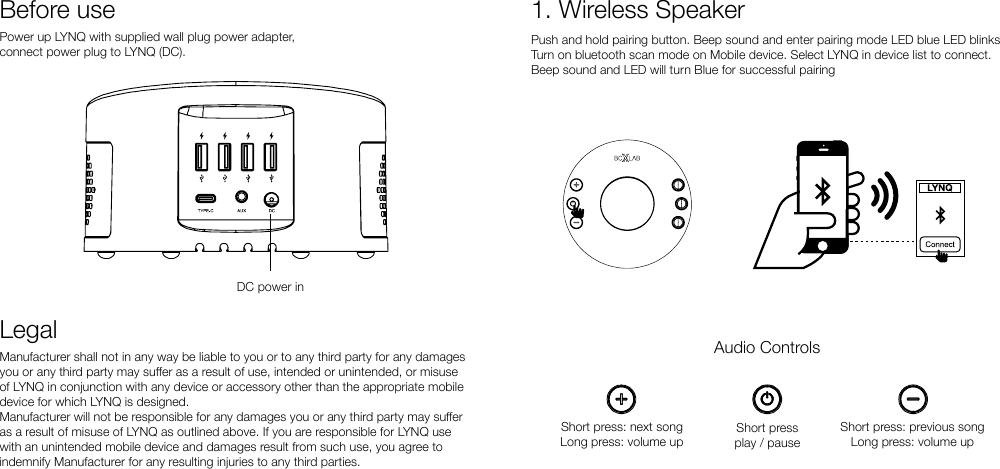
Power up LYNQ with supplied wall plug power adapter, connect power plug to LYNQ (DC).Before useDC power inLegalManufacturer shall not in any way be liable to you or to any third party for any damages you or any third party may suer as a result of use, intended or unintended, or misuse of LYNQ in conjunction with any device or accessory other than the appropriate mobile device for which LYNQ is designed.Manufacturer will not be responsible for any damages you or any third party may suer as a result of misuse of LYNQ as outlined above. If you are responsible for LYNQ use with an unintended mobile device and damages result from such use, you agree to indemnify Manufacturer for any resulting injuries to any third parties.1. Wireless SpeakerPush and hold pairing button. Beep sound and enter pairing mode LED blue LED blinksTurn on bluetooth scan mode on Mobile device. Select LYNQ in device list to connect.Beep sound and LED will turn Blue for successful pairingAudio ControlsShort pressplay / pauseShort press: next songLong press: volume upShort press: previous songLong press: volume up
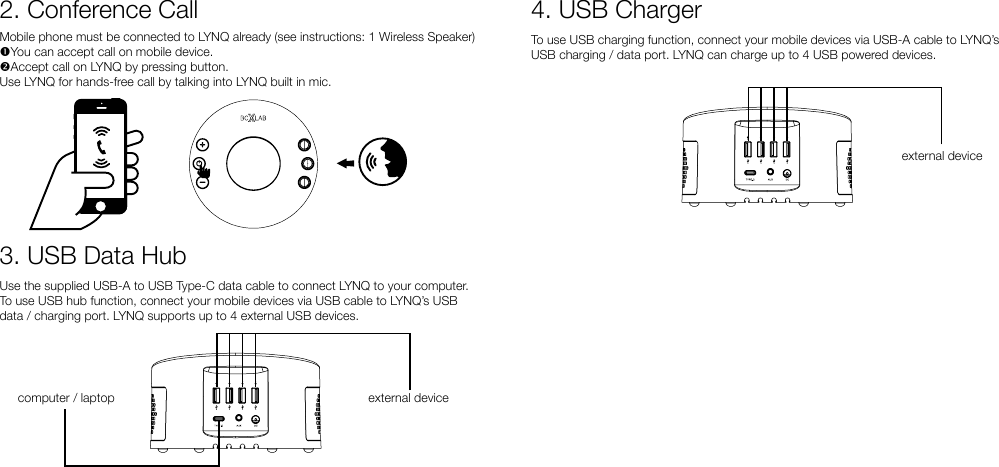
3. USB Data HubUse the supplied USB-A to USB Type-C data cable to connect LYNQ to your computer.To use USB hub function, connect your mobile devices via USB cable to LYNQ’s USB data / charging port. LYNQ supports up to 4 external USB devices.computer / laptop external deviceMobile phone must be connected to LYNQ already (see instructions: 1 Wireless Speaker)You can accept call on mobile device.Accept call on LYNQ by pressing button.Use LYNQ for hands-free call by talking into LYNQ built in mic.2. Conference Call 4. USB Chargerexternal deviceTo use USB charging function, connect your mobile devices via USB-A cable to LYNQ’s USB charging / data port. LYNQ can charge up to 4 USB powered devices.
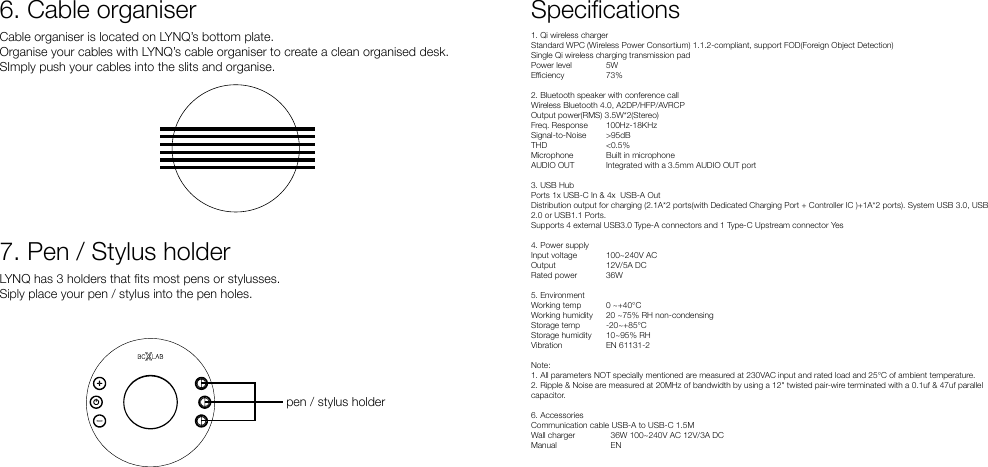
Cable organiser is located on LYNQ’s bottom plate. Organise your cables with LYNQ’s cable organiser to create a clean organised desk.SImply push your cables into the slits and organise.LYNQ has 3 holders that ts most pens or stylusses.Siply place your pen / stylus into the pen holes.6. Cable organiser7. Pen / Stylus holderpen / stylus holderSpecications1. Qi wireless charger Standard WPC (Wireless Power Consortium) 1.1.2-compliant, support FOD(Foreign Object Detection)Single Qi wireless charging transmission padPower level  5WEciency  73%2. Bluetooth speaker with conference call Wireless Bluetooth 4.0, A2DP/HFP/AVRCPOutput power(RMS) 3.5W*2(Stereo)Freq. Response 100Hz-18KHzSignal-to-Noise >95dBTHD  <0.5%Microphone  Built in microphoneAUDIO OUT  Integrated with a 3.5mm AUDIO OUT port3. USB Hub Ports 1x USB-C In & 4x  USB-A OutDistribution output for charging (2.1A*2 ports(with Dedicated Charging Port + Controller IC )+1A*2 ports). System USB 3.0, USB 2.0 or USB1.1 Ports.Supports 4 external USB3.0 Type-A connectors and 1 Type-C Upstream connector Yes4. Power supply Input voltage 100~240V ACOutput 12V/5A DCRated power  36W5. EnvironmentWorking temp 0 ~+40°CWorking humidity  20 ~75% RH non-condensingStorage temp  -20~+85°CStorage humidity  10~95% RHVibration  EN 61131-2Note:1. All parameters NOT specially mentioned are measured at 230VAC input and rated load and 25°C of ambient temperature.2. Ripple & Noise are measured at 20MHz of bandwidth by using a 12" twisted pair-wire terminated with a 0.1uf & 47uf parallel capacitor.6. Accessories Communication cable USB-A to USB-C 1.5MWall charger    36W 100~240V AC 12V/3A DCManual    EN
FCC ID: 2AG5A-LYNQChanges or modifications not expressly approved by the party responsible for compliance could void the user’s authority to operate the equipment. This device complies with Part 15 of the FCC Rules. Operation is subject to the following two conditions: (1) this device may not cause harmful interference, and (2) this device must accept any interference received, including interference that may cause undesired operation. This equipment has been tested and found to comply with the limits for a Class B digital device, pursuant to Part 15 of the FCC Rules. These limits are designed to provide reasonable protection against harmful interference in a residential installation. This equipment generates, uses and can radiate radio frequency energy and, if not installed and used in accordance with the instructions, may cause harmful interference to radio communications. However, there is no guarantee that interference will not occur in a particular installation. If this equipment does cause harmful interference to radio or television reception, which can be determined by  turning the equipment  off  and on, the  user  is encouraged  to try  to correct  the interference by one or more of the following measures: -- Reorient or relocate the receiving antenna. -- Increase the separation between the equipment and receiver. -- Connect the equipment into an outlet on a circuit different from that to which the receiver is connected. -- Consult the dealer or an experienced radio/TV technician for help. This equipment complies with FCC radiation exposure limits set forth for an  uncontrolled environment. This equipment should be installed and operated with a minimum distance of 20cm between the radiator & your body.  This transmitter must not be  co-located or operating in conjunction with any other antenna or transmitter.
www.bcxlab.com

Navigation menu