BSH Home Appliances COMGEN1 WLAN Module User Manual
BSH Home Appliances Corporation WLAN Module
Contents
- 1. User manual 1 of 2
- 2. User manual 2 of 2
User manual 1 of 2
Dishwasher
SHEM78WH5N
en-usOperating
instructions
2
en-us
Table of contents
4
Safety Definitions . . . . . . . . . . 4
(
IMPORTANT SAFETY
INSTRUCTIONS . . . . . . . . . . . . 5
(
Causes of Damage . . . . . . . . . 8
*
Getting Started . . . . . . . . . . . . 9
o
Home Connect . . . . . . . . . . . 14
+
Water softening system /
special salt . . . . . . . . . . . . . . 17
,
Rinse Aid . . . . . . . . . . . . . . . . 19
-
Loading the Dishwasher. . . . 20
.
Detergent . . . . . . . . . . . . . . . . 29
/
Dishwasher Cycles . . . . . . . . 31
0
Dishwasher Cycle
Options
. . 33
1
Operating the Dishwasher . . 36
2
Care and Maintenance . . . . . 40
3
Troubleshooting . . . . . . . . . . 44
4
Customer Service . . . . . . . . . 54
4
Statement of Limited Product
Warranty . . . . . . . . . . . . . . . . 55
5
Installation and
connection
. 59
3
en-us
'HDU 9
DOXHG &XVW
RPHU
,
7KDQN
\RX
IRU VHOHFWLQJ D %RVFK
GLVKZ
DVKHU
. <
RX
KDYH
MRLQHG W
KH
PDQ\
FRQVXPHUV ZKR GHPDQG TXLHW
DQG VXSHULRU
SHUIRUPDQFH IU
RP
W
KHLU GLVKZDVKHUV.
7KLV PDQXDO Z
DV
ZULWWHQ ZLW
K \
RXU
VDIHW\ DQG FRQYHQLHQFH LQ PLQ
G,
DQG WKH LQIRUPDWLRQ FRQWDLQHG KHUHLQ LV Y
HU
\
LPSRUWDQW. :H KLJK
O\
U
HFRPPHQG
WKDW \RX
UHDG
WKLV PDQXDO EHIRUH
XVLQJ \RXU GLVKZ
DVKHU
I
RU
WKH
ILUVW WLPH.
7
R OHDUQ PRUH DERXW \RXU GLVKZDVKHU DQG
DYDLODEOH DFFHVVRULHV,
DV
Z
HOO DV PDQ
\ R
W
KHU
WRS
TXDOLW\ %RVFK DSSOLDQFHV, YLVLW RXU ZHE
VLW
H DW:
ZZZ.ERVFK-KRPH.FRP/XV (86
$)
RU
ZZZ
.ERVFK-KRPH.FD (&DQDGD)
:KLOH WKHUH, GRQ
·
W I
RUJH
W W
R
UHJLVWHU
\RXU QHZ GLVKZDVKHU E\ FO
LF
NLQJ
RQ W
KH ´6XSSRU
Wµ WDE RU ILOOLQJ RXW
WKH SURGXFW UHJLVWUDWLRQ FD
UG
HQFORVHG ZLW
K \
RXU
QHZ XQLW.
,I \
RX
KDYH DQ\ TXHVWLRQV RU FRPPHQWV, SOHDVH FRQWDFW XV
E\ SKR
QH DW:
1-800-944-2904
RU ZULWH
XV DW:
%6+ +RPH $SSOLDQFHV &RU
SRUDWLRQ
1901 0DLQ 6WU
HH
W, 6XLW
H 600
,UYLQH, &
$ 92614
4
en-us Safety Definitions
4
Safety Definitions
9
WARNING
This indicates that death
or
serious injuries may occur as a
result of non-observance of this
warning.
9
CAUTION!
This indicates that minor
or
moderate injuries may occur as
a result of non-observance
of
this warning.
NOTICE:
This indicates that damage to the
appliance or property may occur as a
result of non-compliance with this
advisory.
Note: This alerts you to
important
information and/or tips.
5
9
IMPORTANT SAFETY INSTRUCTIONS
READ AND SAVE
THESE
INSTRUCTIONS
This dishwasher is provided with
Installation Instructions and this Use
and Care Manual. Read
and
understand all instructions
before
using the dishwasher.
This dishwasher is intended for use
up to a maximum altitude of
4,000
meters above sea level.
6
To reduce the risk of fire, electrical
shock, or serious injury, observe
the following:
9
WARNING
RISK OF INJURY OR DEATH!
Misuse of the dishwasher
can
result in serious injury or death.
Do not use the dishwasher in
any way not covered in this
manual or for any purpose other
than those explained in the
following pages.
9
WARNING
RISK OF INJURY!
Severe injury and/or
product
damage could result from the
use of unauthorized service
technicians or non-original
replacement parts. All repairs
must be performed by an
authorized service technician
using only original
equipment
factory replacement parts.
9
WARNING
RISK OF
ELECTRICAL
SHOCK
OR FIRE!
Electrical shock or fire
could
result if the electrical supply
for
the dishwasher covered in this
manual is incorrectly installed
or
if the dishwasher has been
improperly grounded. Do not
use the dishwasher covered in
this manual unless you are
certain the electrical supply has
been correctly installed and the
dishwasher has been
properly
grounded.
9
WARNING
HEALTH HAZARD!
Never use harsh chemicals
to
clean your dishwasher. Some
chloride-containing
products
can damage your dishwasher
and may present health
hazards!
Grounding Instructions
This appliance must be grounded
to
a metal, permanent wiring system
or
an equipment grounding
conductor
must be run with the
circuit
conductors and connected to the
equipment grounding terminal
or
lead
on the dishwasher. See the
Installation Instructions included with
this dishwasher for more information
on electrical requirements.

7
9
IMPORTANT SAFETY INSTRUCTIONS
READ AND SAVE
THESE
INSTRUCTIONS
9
IMPORTANT SAFETY INSTRUCTIONS
READ AND SAVE
THESE
INSTRUCTIONS
9
WARNING
RISK OF
ELECTRIC
SHOCK!
This appliance must
be
grounded. In the event of a
malfunction or
breakdown,
grounding will reduce the risk
of
electric shock by providing a
path of least resistance
for
electric current. This
appliance
is equipped with a cord having
an
equipment-grounding
conductor.
Improper connection of the
equipment-grounding
conductor
can result in risk of
electric
shock. Check with a
qualified
electrician or service technician
if you are in doubt whether the
appliance is properly
grounded.
Safe Operation
Use this dishwasher only for its
intended function, which is the
washing of household dishware
and
kitchenware rated as dishwasher
safe.
■ Do not wash plastic items
unless they are
marked
“dishwasher safe” or the
equivalent. For plastic items
not so marked, check the
manufacturer’s
recommendations.
■ Do not operate your
dishwasher unless all
enclosure panels are in
place.
■ Do not tamper with
or
override controls
and
interlocks.
Do not abuse, sit or stand on the
door or dish racks of the dishwasher.
9
WARNING
RISK OF INJURY!
To avoid risk of injury, always
use caution when opening the
door during or following a wash
cycle as hot water or steam
may escape. Do not fully
open
the door until water noises have
stopped and steam has
subsided.
Use only detergents
or
rinsing
agents
recommended for use in a
dishwasher, and keep them out
of
the reach of children.
9
C
AUTION!
When loading items to
be
washed:
■ Locate sharp items so they
are not likely to damage the
door seal.
■ Load knives and other
sharp
utensils with their HANDLES
UP to reduce the risk
of
cut-type injuries.
NSF/ANSI 184 Certified residential
dishwashers are not intended
for
licensed food establishments.
Ensure that you follow the safety
instructions, even when they are out
of reach while operating the
appliance via the Home Connect
app. Also follow the instructions
provided by the
app.
9
IMPORTANT SAFETY INSTRUCTIONS
READ AND SAVE
THESE
INSTRUCTIONS
7
Child Safety
To reduce risk of injury, do not allow
children to play in or on the
dishwasher.
When children become old
enough
to operate the appliance, it is the
responsibility of the
parents/legal
guardians to ensure the children are
instructed in safe practices by
qualified persons.
Proper Care and Maintenance
9
WARNING
To avoid dishwasher damage, do not
allow water to remain in your
dishwasher systems
through
extended periods of freezing
temperatures. Freezing temperatures
can damage the water fill valve
and
potentially other components of your
dishwasher.
NOTICE:
It is highly recommended for the
end
user to become familiar with the
procedure to shut off the
incoming
water supply and the procedure
to
shut off the incoming power supply.
RISK OF
EXPLOSION!
Under
certain conditions, hydrogen
gas
may be produced in a
hot
water
system that has not been used
for two weeks or more.
Hydrogen gas is explosive.
Before using a dishwasher that
is connected to a hot water
system that has been unused
for
two weeks or longer, turn
on
all hot water faucets and let the
water flow from each for several
minutes. This will release any
accumulated hydrogen gas. As
the gas is explosive, do not
See the Installation Instructions
or
contact your installer for
more
information.
9
WARNING
STATE
OF CALIFORNIA
PROPOSITION
65 WARNINGS!
This product contains one
or
more chemicals known to the
State of California to cause
cancer, birth defects, or other
reproductive harm.
smoke
or
use an
open
flame
during this time.
Remove the dishwasher door to the
washing compartment when
removing an old dishwasher
for
service or
discarding.
To avoid floor damage and
possible
mold growth, do not allow wet areas
to remain around or under the
dishwasher.

8
en-us Causes of Damage
(
Causes of Damage
NOTICES
■ Never use steam
cleaning
products to clean your
dishwasher. The manufacturer will
not be liable for the
possible
damages or
consequences.
■ To avoid possible dishwasher
damage, do not use harsh
chemicals, abrasive cleaners,
scouring pads (metal or plastic),
or abrasive cloths/paper towels
to
clean your dishwashers exterior
door panel. Your dishwasher's
exterior door panel can
be
damaged by doing so.
■ To avoid dishwasher damage,
do
not load the dishwasher with
paper products, plastic
bags,
packing materials or anything
other than normal, dishwasher
safe dishware and kitchenware.
Getting Started en-us
9
*
Getting Started
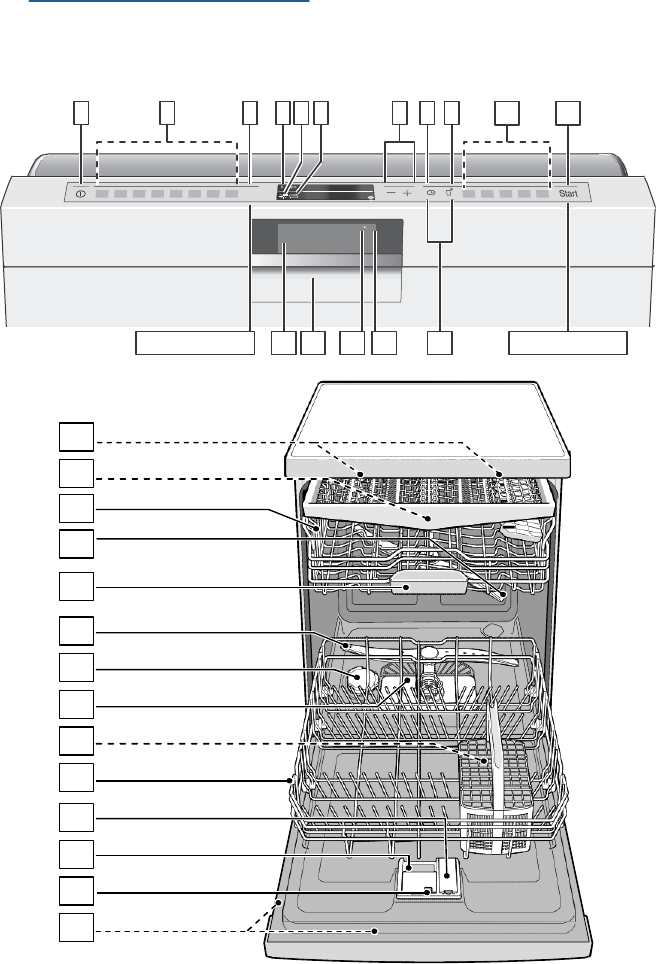
Appliance overview
1 2
3
4 5
6
7 8 9 10
11
Ù
_
6HWXS 3 VHF.
12 13 14
15
16
5HVHW 3 VHF.
20
21
22
23
24
25
26
27
28
29
30
31
32
33
en-us Getting Started
10
The numbers stated below refer
to
the overview images on the previous
page of this manual.
Operating panel
(
On/Off
button
0
Wash
cycles**
8
Info
button
@
Digital
display
H
Rinse aid refill
indicator
P
Salt refill
indicator
X
Selection
buttons
`
Time
preselection
h
Remote Start
button
)"
Wash cycle
options**
)*
START
button
)2
Front display
*
):
Open door
button
)B
Remote start
display
)J
WLAN
display
)R
< >
button
* optional feature which may or may
not be included with your dishwasher
**number of wash cycles and
options
varies on specific model
number
Dishwasher interior
components
1"
Interior light
*
1*
Third
rack*
12
Upper
rack
1:
Upper spray arm
1B
Detergent tab tray
1J
Lower spray arm
1R
Dispenser for special salt
1Z
Filters
1b
Silverware basket
*
1j
Lower
rack
9"
Rinse aid
dispenser
9*
Detergent
dispenser
92
Lock for detergent
dispenser
9:
Rating plate
* optional feature which may or may
not be included with your dishwasher
Display indicators
‹‹
:
‹‹
Cycle time remaining
% Refill rinse aid indicator
Lights up when rinse aid is
low
$
Refill salt indicator
Lights up when salt is low
}
Remote Start indicator
Function Remote Start is set
|
WLAN indicator
Wireless network
connection
is active
Info button
The Info button
8
can be used
to
display additional wash
cycle
information.
1. Press the Info button
8
.
2. Press the wash cycle button.
Information on the selected wash
cycle is indicated on the
display
window at the top
@
.
3. To leave, press Info button
8
.
Time setting
When the appliance is switched
on
for the first time, the time starts at
12:00
o’clock.
Set the time as follows:
1. Open the
door.
2. Switch on ON/OFF switch
(
.
3. Press Info button
8
for
3 seconds until the following text
is indicated on the display window
at the top
@
:
Scroll with < >
Set with
-
+
Leave with Setup 3 sec.
4. Keep pressing button >
)R
until
the time setting is indicated on the
display window at the top
@
.
5. Make the setting with setting
buttons + -
X
.
If the
selection
buttons + -
X
are held down,
the set values are changed in
10-minute increments.

Getting Started en-us
1
1
6. Press and hold the Info
button
8
for 3
seconds.
The selected setting has now been
stored.
Note: If the appliance was
disconnected from the power
supply
for a prolonged period, the time
starts at 12:00 o’clock. Set the time.
Switching on the appliance
for the first time
When the dishwasher is switched
on
for the first time, you are taken
directly to the settings for
switching
on the appliance for the first time.
Note: If you select Home Connect
during the initial start-up,
make
further settings via your dishwasher
App. Observe the supplied Home
Connect
documents.
The following text is indicated on the
display window at the top
@
:
Scroll with < >
Set with + -
Leave with Setup 3 sec.
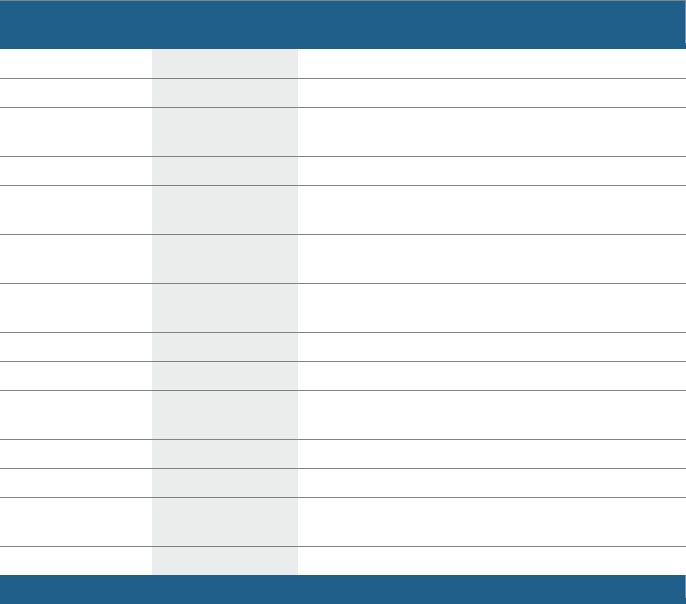
The required settings for switching
on
the appliance for the first time are
listed in the table below.
Change the setting as follows:
1. Keep pressing button >
)R
until
the required setting is displayed.
2. Make the selection with setting
buttons + -
X
.
3. Press and hold the Info
button
8
for 3
seconds.
The selected setting has now been
stored.
Settings
Factory setting
Infotext
Switching on the
by pressing Info button
appliance for the first
time
Language
American English
Language selection.
Home Connect
Manual/
Home Connect
Manual/Home Connect
Time
format
24h
12h or
24h.
Time setting
12:00
Set the current time.
Water hardness
°E
0
Setting water hardness. When using Multitabs,
select the lowest setting.
Rinse
aid disp.
Level
5
Amount of rinse aid affects drying. When using
Multitabs, select setting
0.
en-us Getting Started
12
Settings
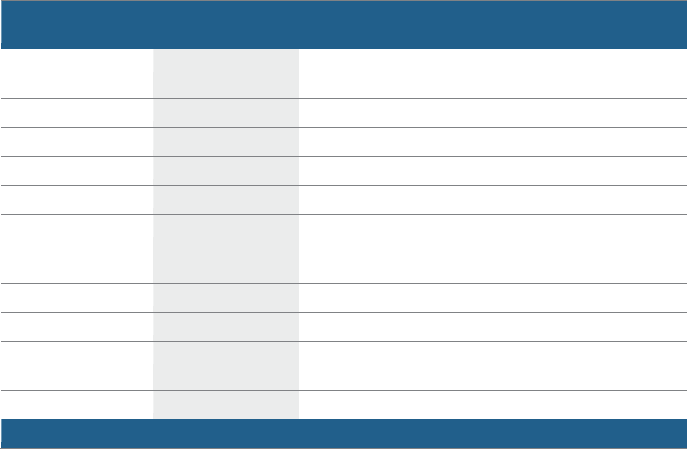
The dishwasher has been preset with
certain settings for your convenience.
You can change these factory
setting.
Change the setting as follows:
1. Open the
door.
2. Switch on ON/OFF switch
(
.
3. Press Info button
8
for
3 seconds until the following text
is indicated on the display window
at the top
@
:
Scroll with < >
Set with - +
Leave with Setup 3 sec.
4. Keep pressing button >
)R
until
the required setting is displayed.
5. Make the selection with setting
buttons + -
X
.
6. Press and hold the Info
button
8
for 3
seconds.
The chosen setting has now been
stored.
You have the option of resetting all
changed settings back to the
original
factory settings.
Note: When you reset your
dishwasher to the factory settings,
you are taken directly to the settings
for switching on the appliance for the
first time.
Setting
Factory setting
Infotext
by pressing Info button
(
Time setting
12:00
Set the current time.
Time
format
24h
12h or
24h.
Time display
Time
Show end of wash cycle with display "Finish in"
or
"Finish at".
Language
American English
Language selection.
Water hardness
°E
0
Setting water hardness. When using Multitabs, select
the lowest setting.
Rinse
aid disp.
Level
5
Amount of rinse aid affects drying. When using
Multitabs, select setting
0.
Sensor setting
Standard
Adjustment of soiling detection for optimum cleaning
result.
Extra
dry
Off
Improved drying for glasses and plasticware.
Eco
forecast
Off
Show the water and energy consumption.
Auto Power Off
Off
Appliance automatically switches off at end of rinsing
process.
Emotion Light
*
On
Interior light.
Front display
*
On
The front display can be selected.
Remaining
time
proj.
*
On
While wash cycle is running, status information is
projected onto floor.
Infolight
*
On
Light is projected to signal an active wash cycle.
*
depending on the features of your dishwasher
Getting Started en-us
1
3
Setting
Factory setting
Infotext
by pressing Info button
(
Start wash cycle
Auto 130-150° F
When switching on, the last selected wash cycle
appears.
Tone volume
*
Level
2
Volume of signal at end of wash cycle.
Button volume
Level
2
Volume when using buttons.
Child-proof lock
*
Off
Activated child-proof lock impedes opening of door.
Wi-Fi
on/off
Switch wireless network connection
on/off.
Network login
Manual/Automatic
Check WPS
function on router.
No WPS
function: Manual
WPS
function: Automatic
Connect to the app
Start with
+
Connect dom. appliance to mobile terminal device.
Eco drying
*
On
Door opens automatically at the end of the wash cycle.
Greeting
On
When switching on the appliance, the brand logo can
be deselected.
Factory setting
Reset
Resetting to the factory setting.
*
depending on the features of your dishwasher
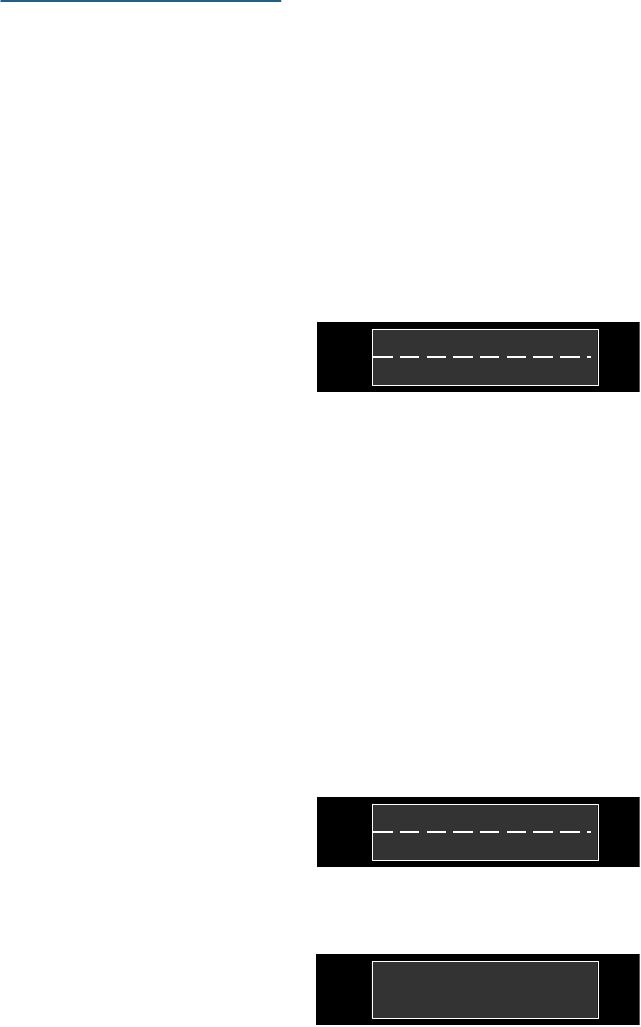
Notes
■ The “Network login” menu
option
is only available if Wi-Fi has been
switched on.
■ The “Connect to App” menu
option is only available if a
connection to the home network
has been established.
14
en-us Home Connect
o
Home Connect
This dishwasher is
Wi-Fi
capable
and
can be remotely controlled via a
mobile device.
If your dishwasher does not
connect
to the home network, you can
also
operate the dishwasher manually by
pressing the buttons.
Info button
The Info button
8
can be used
to
display additional wash
cycle
information.
1. Press the Info button
8
.
2. Press the wash cycle button.
4. Keep pressing button
>
)R
until
the required setting is
indicated
on the display window at the
top
@
.
5. Make the setting with setting
buttons + -
X
.
6. Press and hold the Info
button
8
for 3
seconds.
The chosen setting has now been
stored.
Wi-Fi
|
In the Wi-Fi menu you can activate
the wireless network connection with
“on” and deactivate it with
“off”.
- RQ +
Information on the selected wash
cycle is indicated on the
display
window at the top
@
.
<
Notes
:L)
L
!
3. To leave, press Info button
8
.
Setting up the App
To be able to operate the
appliance
via Home Connect, the Home
Connect App must be installed
on
your mobile terminal device.
Observe the supplied Home Connect
documents with regard to this.
Follow the steps specified by the
App
to implement the settings.
Setting up Home Connect
You can set your dishwasher by
pressing the remote start
button
}h
or proceed as follows:
■ If you have selected the
Wi-Fi
“off”
setting, the “Network login”
and
“Connect to App” settings are not
available.
■ Remote control of the
appliance
requires a stable wireless network
connection.
Network login
The “Network login” menu option is
not available unless you have
activated Wi-Fi.
In the “Network login” menu you
can
select between “Autom./WPS”
and
“Manual” to connect the dishwasher
to your home network.
1. Open the
door.
-
0DQXDO
$
XW
RP./:36
+
2. Switch on the ON/OFF switch
(
.
<
1H
WZRU
N
ORJLQ
!
3. Press Info button
8
for
3 seconds until the following text
is indicated on the display window
at the top
@
:
Scroll with < >
Set with
-
+
Leave with Setup 3 sec.
Automatic: Connect to the
home
network using the WPS function
of
your router.
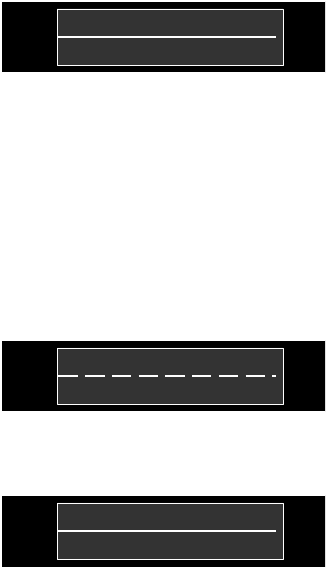
3UHVV :36
EXWWRQ
RQ WKH URXWHU
01P47V
1
5
Home Connect
en-us
Manual: Connect your
mobile
terminal device to the Home Connect
network. The network settings are
then manually entered using the
Home Connect App to connect
to
your home network.
Following successful connection, the
following text is indicated on the
display window at the top
@
.
6XFFHVVIXO
1H
WZRU
N
ORJLQ
Observe the supplied Home Connect
documents with regard to this.
Connect to App
The “Connect to App” menu option is
not available unless there was a
connection to the home network.
The “Connect to App” setting
establishes the link between the
dishwasher, App and your user
account.
6WDU
W
ZLW
K
+
<
&RQQHFW
W
R
$SS
!
Following successful connection, the
following text is indicated on the
display window at the top
@
.
6XFFHVVIXO
&RQQHFW
W
R
$SS
Observe the supplied Home Connect
documents with regard to this.
About data protection: When your
Home Connect dishwasher is
connected for the first time to a
WLAN network which is connected
to
the Internet, your Home Connect
dishwasher transmits the
following
categories of data to the Home
Connect server (initial registration):
■ Unique appliance identification
(consisting of appliance codes as
well as the MAC address of the
installed Wi-Fi
communication
module).
■ Security certificate of the Wi-Fi
communication module (to ensure
a secure IT
connection).
■ The current software
and
hardware version of your
dishwasher.
■ Status of any previous resetting
to
factory settings.
This initial registration prepares the
Home Connect functions for use
and
is activated the first time you use
these Home Connect functions.
Please note that the Home Connect
functions can be used only in
conjunction with the Home Connect
App. Information on data
protection
can be accessed in the Home
Connect
App.
Remote start button
}
When the dishwasher is connected
to
the home network, activate the
dishwasher remote control by
pressing the remote start
button
}h
.
If the dishwasher has still not
logged
into Home Connect, access the
Home Connect settings by
pressing
the remote start button
}h
.
Observe the supplied Home Connect
documents with regard to this.
Notes
■ When the login process is
complete, the remote start
button
}h
goes out.
■ To activate the remote
control,
press the remote start
button
}h
.
■ If the Home Connect Assistant
was aborted during start-up,
press
the remote start button
}h
again.
en-us Home Connect
16
RI :L-)L
$OOLDQFH.
:L-)L
LV D UHJLVWHUHG WUDGH
PDUN
■ If the connection to the router
fails, the WLAN
)J
display
flashes on the display.
Wi-Fi without a connection
to the Home Connect server
ƒ
You can use the Home Connect
App
to disconnect from the Home
Connect server.
The appliance is then
locally
connected to your mobile terminal
device without however any
connection to the Home Connect
server.
Note: If you did not deactivate the
connection to the Home Connect
server, check your Internet
connection.
Remote diagnosis
~
Customer Service can use Remote
Customer Service
~
to access your
appliance if you contact them.
Notes
■ You have to confirm Customer
Service access on your
appliance.
■ You can switch off Remote
Customer Service
~
using the
ON/OFF switch
(
or deactivate
Customer Service access in the
Home Connect
App.
Declaration of Conformity
y
Robert Bosch Hausgeräte GmbH
hereby declares that the
appliance
which features Home Connect
functionality is in accordance with the
essential requirements and the other
relevant provisions of the directive
1999/5/EC.
A detailed R&TTE
Declaration of Conformity can
be
found online at
www.bosch-home.com among the
additional documents on the
product
page for your
appliance.
17
+
Water softening
Water softening system
/
special salt en-us
Adjusting the water
softening system
system / special salt
To ensure good rinsing results, the
dishwasher requires soft water, i.e.
water which is low in lime, otherwise
limescale will be deposited on the
utensils and interior container. Tap
water above 7° dH (1.2
mmol/l)
must be softened. The water
is softened with special salt
(regeneration salt) in the water
softening system of the dishwasher.
The setting and therefore the
required amount of salt depends
on
the degree of hardness of your
tap
water (see following water hardness
table).
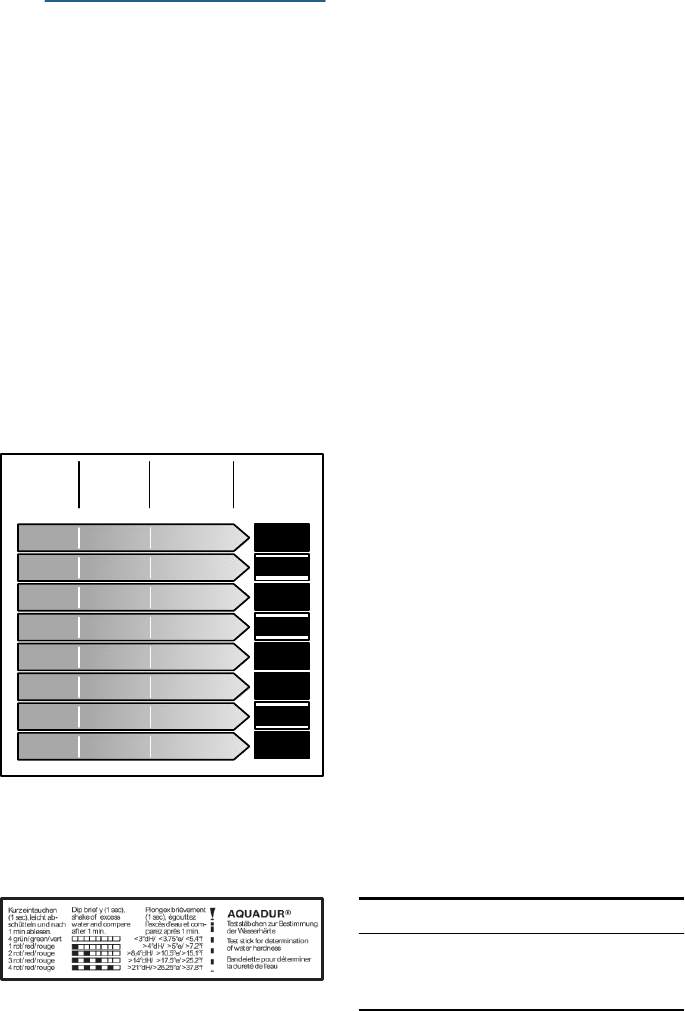
Water hardness table
The amount of salt dispensed can
be
set from 0 to 62°E. Salt is not
required at the set value 0-8.
Set the softening system as follows:
1. Ask your local water utility
company for the water hardness
value of the tap water.
2. Required setting can be found in
the water hardness table.
3. Open the
door.
4. Switch on ON/OFF switch
(
.
5. Press Info button
8
for
3 seconds until the following text
is indicated on the display window
at the top
@
:
Scroll with < >
Set with - +
Leave with Setup 3 sec.
6. Keep pressing button >
)R
until
:DWHU
KDUGQHVV
YDOXH ƒ(
0Ȣ8
9Ȣ10
11Ȣ12
13Ȣ15
16Ȣ20
21Ȣ26
27Ȣ38
39Ȣ62
+DUGQHVV
UDQJH
VRIW VRIW
PHGLXP
PHGLXP
PHGLXP
KDUG
KDUG
KDUG
PPROlO
0Ȣ1
1
1
2Ȣ1 .4
1 5Ȣ1
8
1 9Ȣ2
1
2 2Ȣ2
9
3 0Ȣ3
7
3
8Ȣ5 .4
5 5Ȣ8
9
6HW YDOXH
RQ WKH
PDFKLQH
0 -
8
9-10
11-12
13-15
16-20
21-26
27-38
39-62
the water hardness is
indicated
on the display window at the
top
@
.
7. Make the selection with setting
buttons + -
X
.
8. Press and hold the Info
button
8
for 3
seconds.
The chosen setting has now been
stored.
Using special salt
As soon as the low salt indicator
P
lights up on the digital display, salt
should be topped off. Always refill
with special salt immediately
before
switching on the appliance. This
Using a water hardness test strip
The strip will be included in the
detergent sample kit.
Sample test
strip
ensures that overrun special salt
solution is immediately washed out
and does not corrode the
rinsing
tank.
NOTICE:
Detergent will destroy the water
softening system! Never
pour
detergent into the salt dispenser.
18
en-us Water softening system
/
special salt
Top off the salt as follows:
1. Undo the screw plug on the
dispenser
1R
.
2. Fill the dispenser with water
(required only when switching
on
the appliance for the first time).
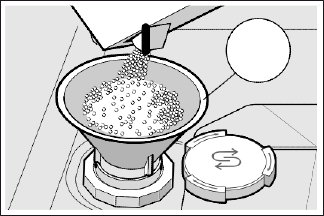
3. Add salt as illustrated (do not use
table salt or tablets).
The water is displaced and runs
out.
*
Switching off low salt
indicator / water softening
system
If the use of combined detergents
with a salt component impairs the
low salt indicator
P
on the
control
panel or the text on the
display
window at the top
@
(enough salt
for x rinse cycles), the displays
can
be switched off.
Proceed as described under
“Setting
water softening system” and set the
value to 0-8. The water softening
system and salt refill
indicator
are now switched off.
For more information about
buying
dishwasher salt, please
contact
customer service
(1-800-944-2904).
Using detergents with salt
component
If combined detergents with a salt
component are used, special salt
can
usually be omitted up to a water
hardness of 21° dH (37° fH,
26° Clarke, 3.7 mmol/l). If the water
hardness is over 21° dH, salt must
be used.
19
Rinse Aid en-us
,
Rinse Aid
To achieve proper drying, always use
a liquid rinse aid, even if your
detergent contains a rinse aid
or
drying additive.
Note: The dishwasher indicates low
rinse aid by turning on the Refill
Rinse Aid indicator. If this
indicator
lights up, you need to refill the rinse
aid dispenser
9"
by following the
directions below.
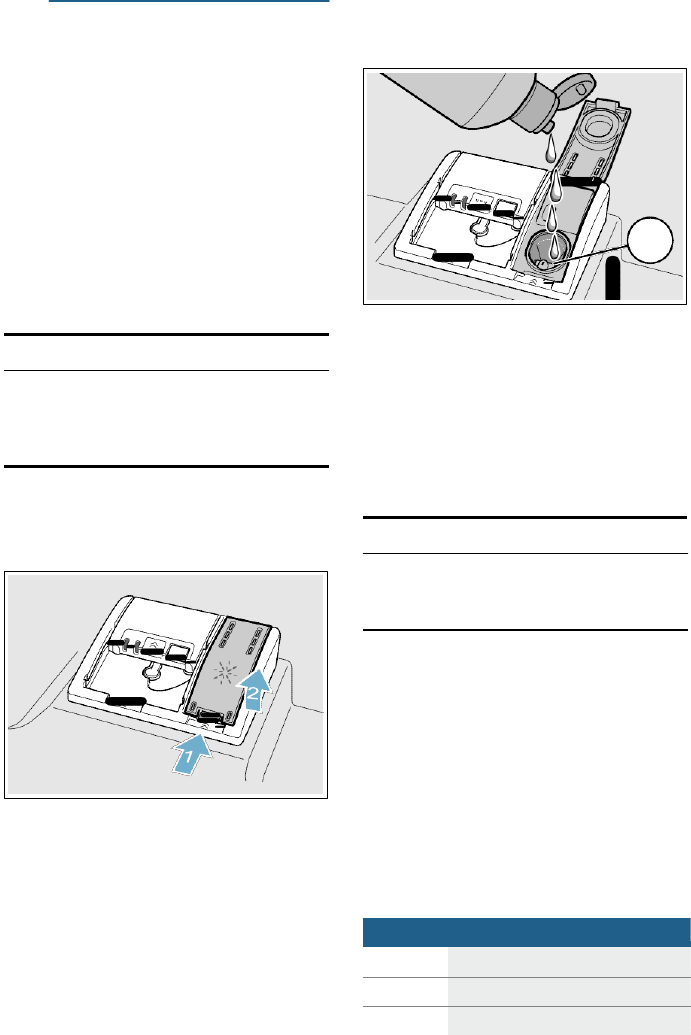
2. Add liquid rinse aid to the
dispenser
9"
until it is full. Do
not overfill.
PD[
Adding rinse aid
3. Close the lid. Lid must be fully
NOTICE:
To avoid oversudsing or clogging,
do
not overfill the rinse
aid
dispenser
9"
.
Wipe up any
spills
with a damp cloth.
closed until it clicks in order
to
seal.
4. Wipe up any excess rinse aid that
may have puddled when the
dispenser reservoir is full.
The indicator light will go out a few
moments after the dishwasher
door
is shut.
1.
Open the rinse
aid
dispenser
9"
by pressing on the latch of the
lid
and pull it open. NOTICE:
Do not fill the rinse aid dispenser
9"
with detergent. Doing so will
damage
the dishwasher.
Setting the amount of rinse
aid used
The amount of rinse aid
dispensed
can be set from
§
:
‹‹
to
§
:
‹‡
.
The
factory setting is
§
:
ܠ
.
You should only change the setting if
streaks remain on the dishes (lower
the amount), or if dishes are not
getting dry enough (increase the
amount).
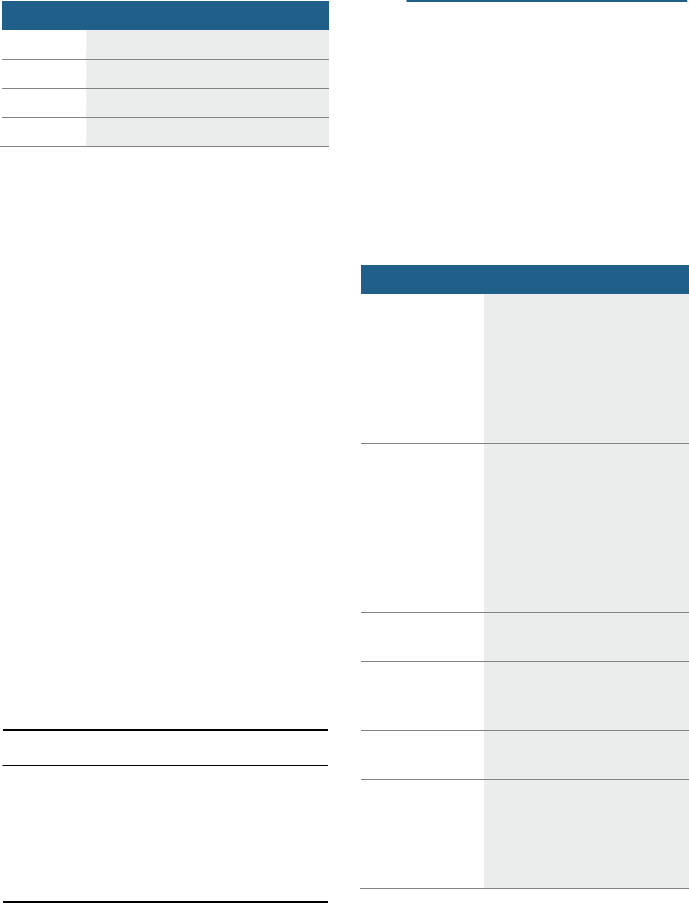
Setting
Amount
§
:
‹‹
dispenser is OFF
§
:
‹‚
lowest setting
§
:
‹ƒ
low setting
20
en-us Loading the Dishwasher
Recommended
Aluminum
Colored anodized aluminum
may fade over time.
Minerals in your water may
cause the aluminum
to
darken or spot. This can
usually be removed with a
soap-filled steel wool pad.
China, Crystal,
Stoneware
Some hand-painted utensils
may discolor, fade or spot.
Hand wash these utensils.
Position
fragile
glassware
so
that it will not topple over
or
come in contact with other
utensils during the wash
cycle.
Glass
Milk glass may
discolor or
become yellow.
Non-stick
Coatings
Apply a
light coating of
vegetable oil to non-stick
surfaces after drying.
Plastics
Make
sure
the
plasticware
is
dishwasher-safe.
Stainless Steel,
Sterling Silver
and Silver
Plates
Load these so they do
not
come in contact with other
metals, stainless steel
dishwasher
tank
walls
or
the
inner door.
Setting
Amount
§
:
‹„
medium setting
§
:
‹…
medium/high setting
§
:
ܠ
high setting
§
:
‹‡
highest setting
1. Open the
door.
2. Switch on ON/OFF button
(
.
3. Press Info button
8
for
3 seconds until the following text
is indicated on the display window
at the top
@
:
Scroll with < >
Set with - +
Leave with Setup 3 sec.
4. Keep pressing button >
)R
until
the rinse aid dispenser is
indicated on the display window
at the top
@
.
5. Make the selection with setting
buttons + -
X
.
6. Press and hold the Info
button
8
for 3
seconds.
The chosen setting has now been
stored.
Turning off rinse aid
indicator
Proceed as described in the
section
“Setting the amount of rinse
aid
used” and set value to
§
:
‹‹
.
The
rinse aid indicator is now turned off.
NOTICE:
Using rinse aid and setting the
dispenser to
§
:
‹‹
may result in
longer cycle times consuming
more
energy and water. The
higher
temperatures can damage fine
china
or glassware.
-
Loading the
Dishwasher
Dishware material
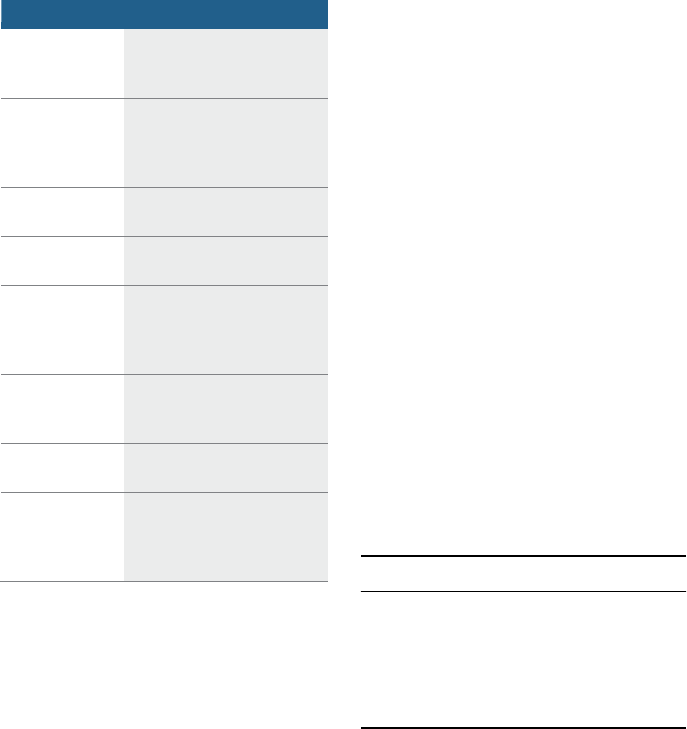
Note: Before using your dishwasher
for the first time, check the
information in this section. Some
items are not dishwasher-safe
and
should be hand washed; others
require special
loading.
21
Loading the Dishwasher en-us
Not Recommended
Acrylic
Crazing
or small cracks
throughout the acrylic, may
occur.
Adhesive-
Joined Pieces
Adhesives that join
materials such as plastic,
wood, bone, steel, copper,
tin, etc. may loosen.
Bone-Handled
Utensils
Handles may separate.
Iron
Iron will rust. Hand wash
and dry immediately.
Non-Dishware
Items
Your
dishwasher
is
intended
for use in cleaning ONLY
standard household
dishware and kitchenware.
Pewter, Brass,
Bronze
These items will tarnish.
Hand wash and dry
immediately.
Tin
Tin will stain. Hand wash
and dry immediately.
Wood
Wooden bowls, wooden
utensils and utensils
with
wooden handles can crack,
warp and lose their finish.
Glass and silverware
damage
Causes:
■ Glass type and glass
production
process.
■ Chemical composition of the
detergent.
■ Water temperature of the wash
cycle.
Recommendation:
■ Use only glasses and
porcelain
which the manufacturer
designates as dishwasher-safe.
■ Use a detergent which
protects
silverware.
■ Take glass and silverware out
of
the dishwasher as soon as
possible after the wash
cycle
ends.
Loading the racks
For best dishwashing results,
observe the following when
loading
the dishwasher:
■ Do not pre-wash items with
loosely attached food soil.
■ Remove all food particles, bones,
toothpicks and excessive grease.
■ Items having burned-on, baked-on
or starchy soils may require
some
pre-treatment.
■ Load dishes in the dishwasher
racks so the insides of bowls,
pots and pans are facing the
spray arms.
■ Avoid nesting and contact
points
between dishes.
■ Separate items of
dissimilar
metals. Use care to not
block
movement of the spray arms.
■ Only wash household dishware
and kitchenware rated as
dishwasher-safe.
Refer to the Dishware Materials
section for more information
about dishware suitability.
NOTICE:
To avoid dishwasher damage, do not
load the dishwasher with
paper
products, plastic bags,
packing
materials or anything other than
normal, dishwasher safe dishware
and kitchenware.
Loading the upper rack
Ensure items do not protrude
through
the bottom of the racks and block the
spray arms.
Note: When pushing the
upper
rack
12
into the dishwasher, push it
until it stops against the back of the
tub so the upper rack spray
arm
1:
connects to the water
supply at the back of the tub. Do not
push racks in using the
door.
22
en-us Loading the Dishwasher
Loading the lower rack
Place large items in the lower
rack
1j
.
Load pots, pans and
bowls
upside down. Do not block the vent
hole with tall baking sheets. Load
these items on the right side of the
dishwasher.
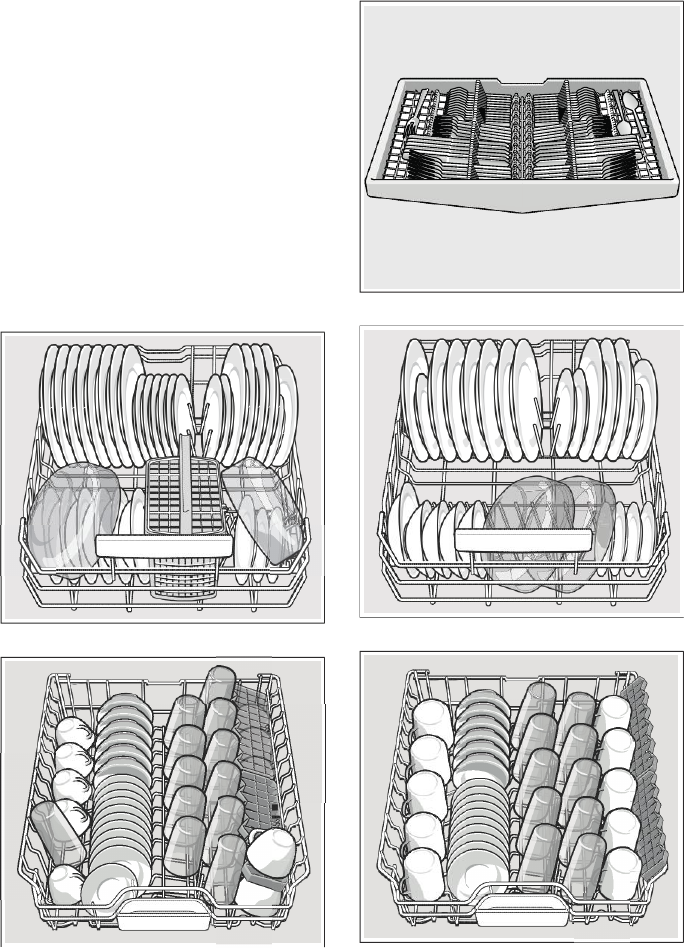
Recommended loading
pattern
Note: Folding the cup shelves
down
will allow the cups to sit at an
increased angle and reduce water
pooling on cup
bottoms.
Lower rack
-
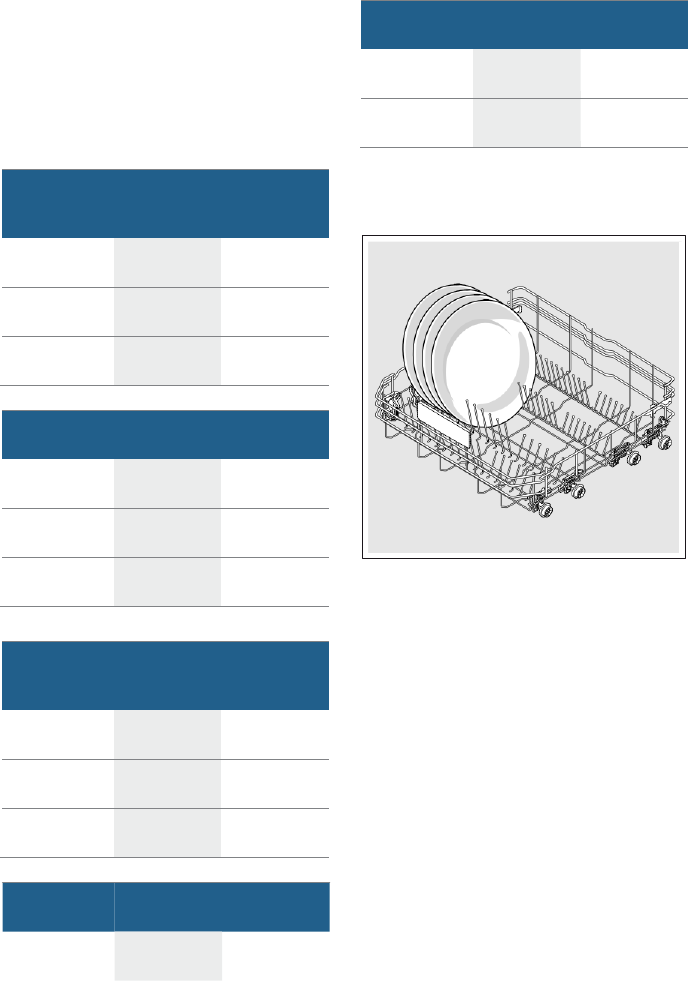
12 place setting
Upper rack
-
12 place setting
Third rack
-
12 place setting
Lower rack
-
10 place setting
Upper rack
-
10 place setting
23
Loading the Dishwasher en-us
Third rack
-
10 place setting
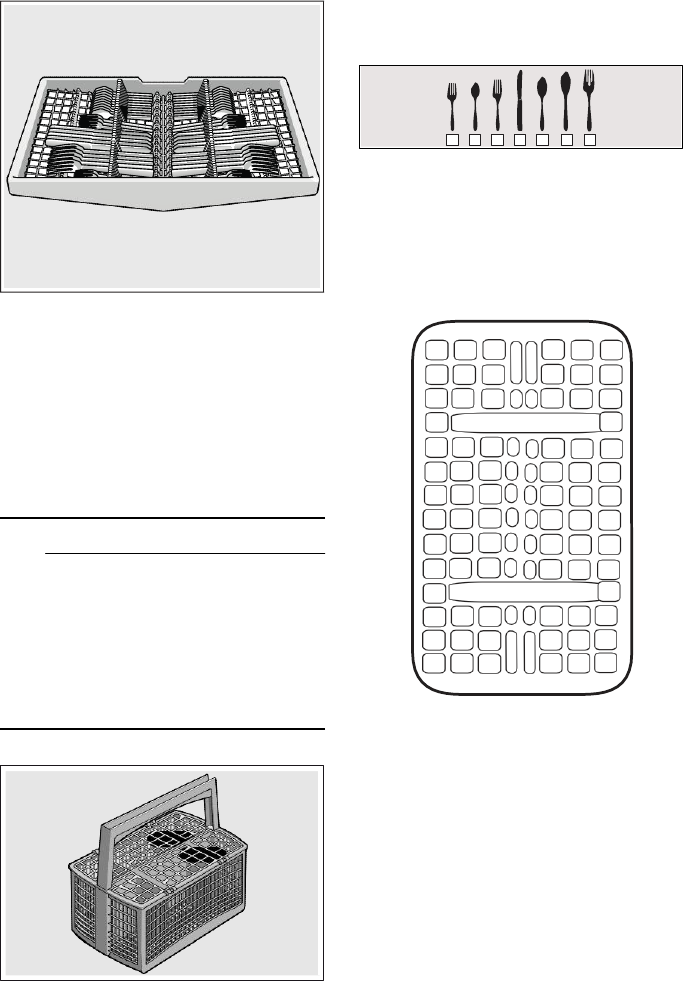
Loading the silverware
* optional feature which may or may
not be included with your dishwasher
Suggested loading patterns
1 2 3 4 5 6
7
1 Salad
fork
2 Teaspoon
3 Dinner
fork
4 Knife
5 Tablespoon
6 Serving
spoon
7 Serving
fork
basket* 3 3 3 1 1 1
Place knives and sharp utensils with
their handles up and forks
and
spoons with their handles down. If
large or oddly-shaped items are
loaded in the silverware basket,
be
sure they do not nest together.
4 4 4 4 4 4
6 7 3 3 3
5 5 1 1 1
5 5 2 2 2
9
WARNING
RISK OF INJURY!
The sharp points and edges
of
knives and other sharp utensils
can cause serious injury. Load
knives and other sharp utensils
5 5 2 2 2
5 5 2 2 2
5 5 2 2 2
5 5 1 1 1
3 3 3 6
4 4 4 4 4 4
with edges down. Do not allow
children to handle or play near
knives and sharp utensils.
1 1 1 3 3 3
Unloading the dishwasher
When unloading the dishwasher, it is
recommended to unload the lower
rack
1j
first. Next, unload the
silverware basket
1b
followed by
the upper rack
12
,
and then the
3rd
rack
1*
.
Note: Dishes are more likely to
chip
when unloading before
cooling.
24
en-us Loading the Dishwasher
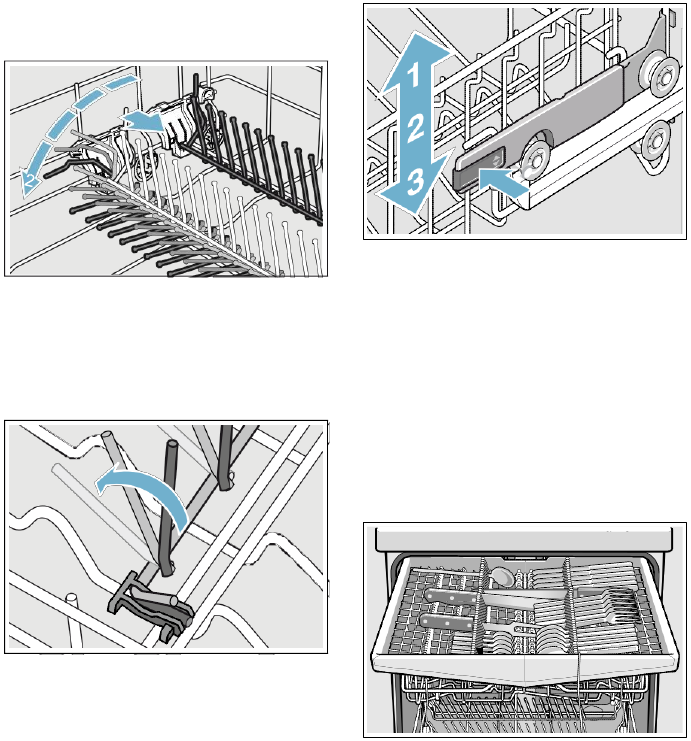
Adjusting the height of the
rack *
If required, the height of the
upper
rack
12
can be adjusted to create
more space for taller utensils either in
the upper or lower rack.
Appliance height 32 in (81.5 cm)
With
Upper rack
Lower rack
silverware
basket
Setting
1
max. ø
8.6 in
(22 cm)
12.2 in
(31 cm)
Setting
2
max. ø
9.6 in
(24.5 cm)
10.8 in
(27.5 cm)
Setting
3
max. ø
10.6 in
(27 cm)
9.8 in
(25 cm)
With
Upper rack
Lower rack
third rack
Setting
1
max. ø
6.3 in
(16 cm)
12.2 in
(31 cm)
Setting
2
max. ø
7 in
(18.5 cm)
10.8 in
(27.5 cm)
Setting
3
max. ø
8.2 in
(21 cm)
9.8 in
(25 cm)
Appliance height 35 in (86.5 cm)
With
Upper rack
Lower rack
third rack
Setting
2
max. ø
8 in
(20.5 cm)
12 in
(30.5 cm)
Setting
3
max. ø
9 in
(23 cm)
11 in (28 cm)
Arrange large plates up to a diameter
of 12.2 in/13.4* in
(31/34*
cm) in
the lower basket
1j
as illustrated.
* optional feature which may or may
not be included with your dishwasher
With
Upper rack
Lower rack
silverware
basket
Setting
1
max. ø
9.4 in
(24 cm)
13.4 in
(34 cm)
Setting
2
max. ø
10.4 in
(26.5 cm)
12 in
(30.5 cm)
Setting
3
max. ø
11.4 in
(29 cm)
11 in (28 cm)
With
third rack
Setting
1
max. ø
Upper rack
Lower rack
7 in (18 cm)
13.4 in
(34 cm)
25
Loading the Dishwasher en-us
Rack accessories
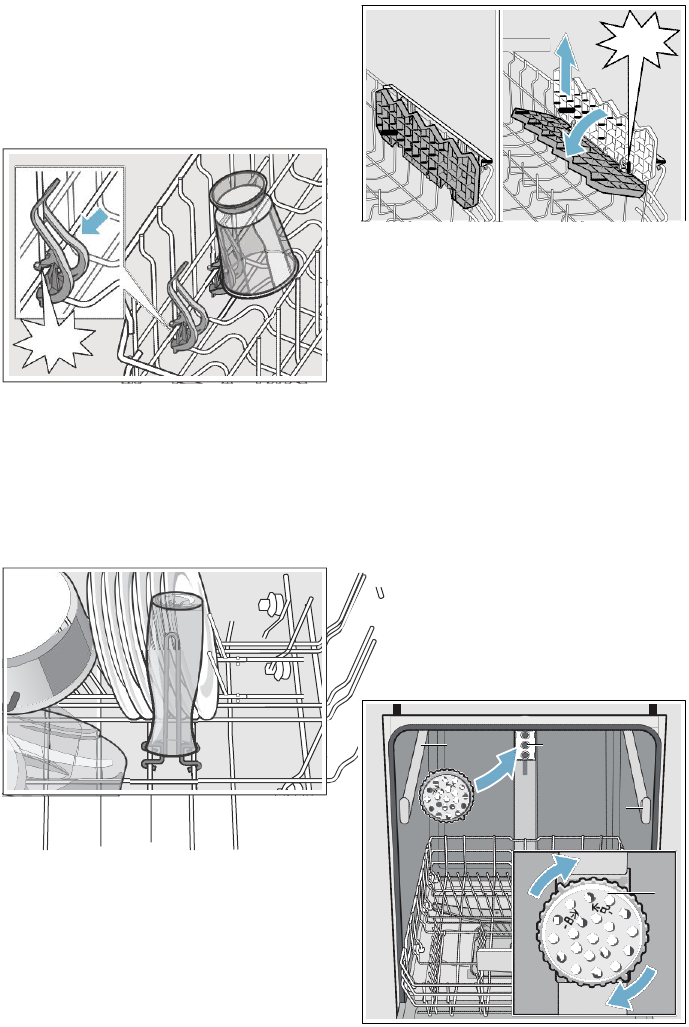
Flip tines*
The upper and lower rack are fitted
with flip tines that can be
folded
down depending on what you may
need to load in the rack.
Lower rack flip tines: To fold down,
pull flip tine gently forward
and
release it from the notch. Push the
flip tine downward to the
desired
position. To fold up, push flip tines
into an upright position until the
holder engages in the notch.
RackMatic®*
The height of the upper rack
12
can
be adjusted in 3 steps to create
more
space.
1. Pull the upper rack out of the
dishwasher until it stops.
2. To lower the rack, push the
RackMatic® lever inward.
3. To raise the rack, hold the
basket
on the sides of the upper
rack
and lift it up.
1
Upper rack flip tines: To fold down,
push flip tines downward with gentle
pressure to the desired position. To
fold up, push flip tines into an
upright
position until the holder enganges in
the notch.
* optional feature which may or may
not be included with your dishwasher
Note: Check spray arm for
clearance
after adjustment.
* optional feature which may or may
not be included with your dishwasher
3rd rack*
The 3rd rack
1*
horizontally
positions knives, spatulas and other
oversized tools for improved
cleaning
and easier loading and
unloading.
Arrange cutlery in 3rd rack
1*
as
illustrated.
* optional feature which may or may
not be included with your dishwasher
26
en-us Loading the Dishwasher
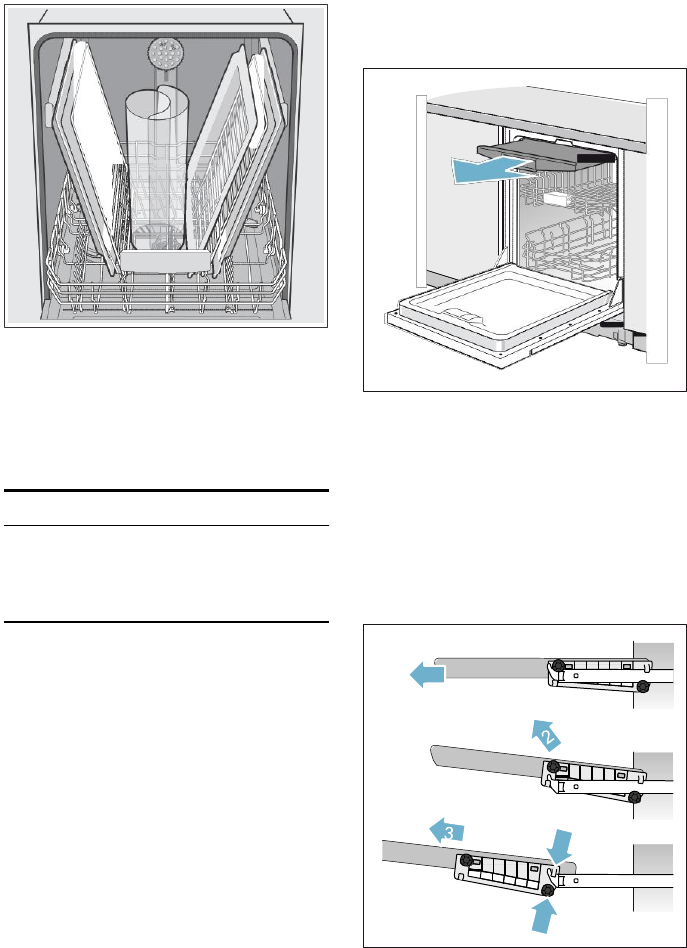
Plastic item clips*
Light-weight plastic
accessories
(cups, lids, etc.) can be held securely
by the plastic item
clips.
Press the plastic item clip against the
rack as shown until it
clicks.
&/,&
.
* optional feature which may or may
not be included with your dishwasher
&/,&
.
* optional feature which may or may
not be included with your dishwasher
Vase holder*
The vase holder can be
placed
anywhere in the lower rack to
hold
and thoroughly clean vases, bottles,
and other containers.
Extra tall item sprinkler*
If an item is too tall to be placed in
the lower rack
1j
even with the
upper rack
12
in the
raised
position, remove the empty
upper
rack
12
by pulling it out of the
dishwasher until it stops. Pull the
front of the rack upward and outward
until the rack will not slide out
anymore. Then lift it up and away
from the dishwasher, until the
rollers
are completely free of the
roller
guides (A).
Set the upper rack
12
aside
and
push the roller guides (A) back into
the dishwasher. Insert the extra tall
item sprinkler (B) into the upper
rack
spray outlet (C) and turn the
sprinkler
clockwise to lock into position.
$
&
* optional feature which may or may
not be included with your dishwasher
Cup shelves*
The cup shelves and the space %
underneath can be used for
small
cups or for larger serving utensils.
27
Loading the Dishwasher en-us
Removing/Installing third
rack
Note: Keep the vent hole on the
tub’s
left side clear by placing tall items
such as plastic cutting boards
and
tall baking sheets on the lower
rack’s
right side or center.
NOTICE:
To avoid dishwasher damage, do not
reinstall the upper rack
12
without
removing the extra tall item
sprinkler (B).
* optional feature which may or may
not be included with your dishwasher
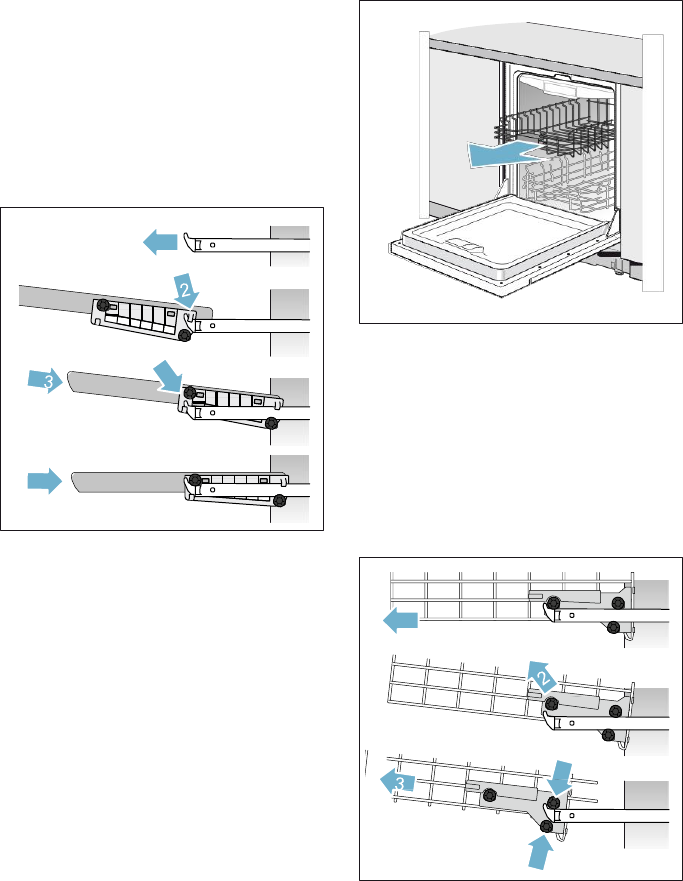
Removing third rack
1*
1. Pull out third rack all the way
(1).
2. Lift upper rollers over the
stopper
hooks of both rails
(2).
3. Pull third rack out forward
and
upward so the the holding
hooks
and the lower rollers of the
rack
slide over the stopper hooks
of
both rails
(3).
1
28
en-us Loading the Dishwasher
1
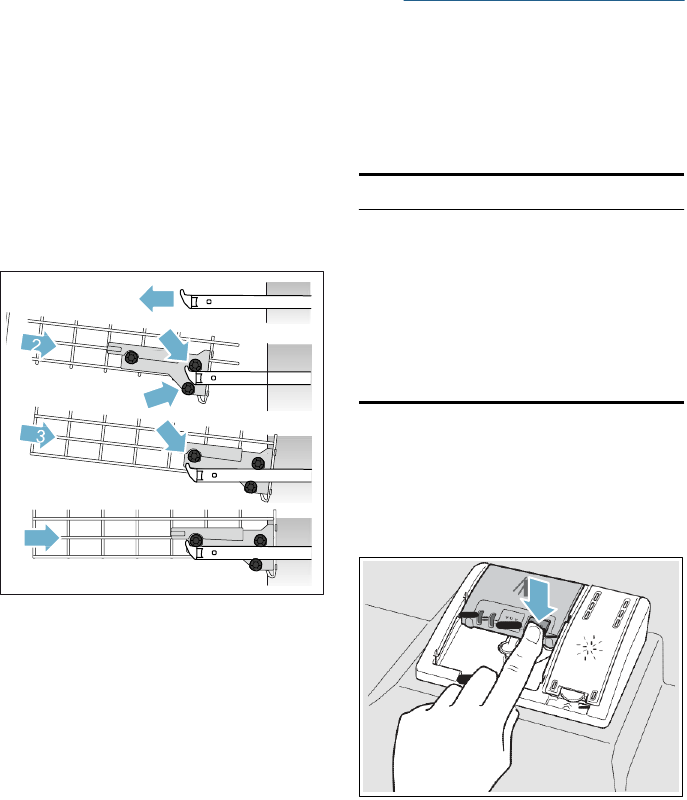
Installing third rack
1*
1. Pull out third rack rails all the
way
(1).
2. Insert third rack at an angle. Make
sure that the stopper hooks
of
both rails slide in between the
holding hooks and the lower
rollers of the third rack
(2).
3. Slide third rack in and lift the
upper rollers over the front
stopper hooks of both rails
(3).
4. Push in third rack
(4).
4
Removing/Installing upper
rack
Removing upper rack
12
1. Pull out upper rack all the way
(1).
2. Lift front rollers over the
stopper
hook of the rail
(2).
3. Pull out upper rack forwards
and
upwards so that the upper
and
lower rollers of the rack slide over
the stopper hooks of
both
rails
(3).
1
29
Detergent en-us
1
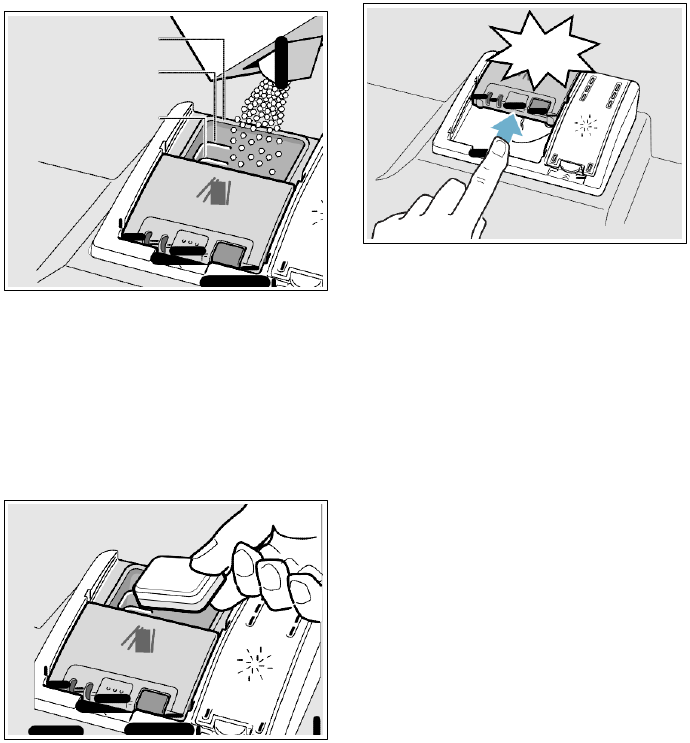
Installing upper rack
12
1. Pull out upper rack rails all the
way
(1).
2. Insert upper rack at an angle.
Make sure that the stopper
hooks
of both rails slide in between the
upper and lower rollers on the
rear side of the rack
(2).
3. Slide upper rack in and lift the
upper rollers over the front
stopper hooks of both rails
(3).
4. Push in upper rack
(4).
4
.
Detergent
Use only detergent
specifically
designed for dishwashers. For
best
results, use fresh
powdered
dishwashing detergent or detergent
tabs.
NOTICE:
To avoid dishwasher damage:
■ Do not use hand dishwashing
products in your dishwasher.
■ Do not use too much detergent if
your water is soft. Using too
much
detergent with soft water may
cause etching in glassware
and
fine china.
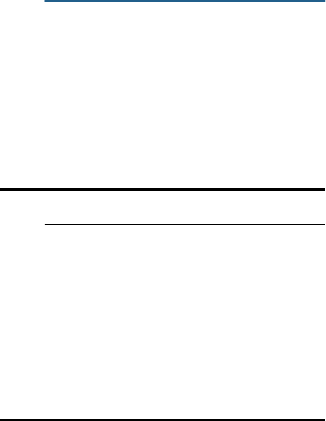
Adding detergent
1. If the detergent dispenser
9*
is
still closed, actuate the
locking
bar
92
to open it.
30
en-us Detergent
2. Poor detergent into the dry
detergent dispenser
9*
only.
Add detergent. Do not overfill the
detergent dispenser.
PD[.
3
WEVS
(45 PO)
1.75
WEVS
(25 PO)
3. Close the lid by placing the finger
on the lid as shown. Slide the
lid
closed and press down firmly until
it
clicks.
&/,&.
1
WEVS
(15 PO)
When using detergent tabs, lay
them such that they do not
come
in contact with the cover, insert a
detergent tab flat, not on its side.
Note: Do not place detergent
tabs
in the detergent tab tray
1B
.
Place tabs or other detergent
forms directly in the detergent
dispenser
9*
.
Dosage: see manufacturer’s
instructions on the
packaging.
The detergent dispenser will
open
automatically at the ideal time
for
the set cycle. The powder or
liquid
detergent is distributed in the
appliance and is dissolved,
detergent tabs will fall into the
detergent tab tray
1B
where it
dissolves during the cycle.
Tip: If the utensils are only lightly
soiled, slightly less than the
indicated
amount of detergent is usually
adequate.

Dishwasher Cycles en-us
31
/
Dishwasher Cycles
Note: In order to save energy, it is
recommended to set the Auto Power
Off feature to
˜
:
‹‚
.
Wash cycle
Recommended use
Possible wash cycle option
Heavy
Best for cleaning items with baked-on
food or grease. These dishes
would
normally require soaking or hand
scouring.
all
Auto
Smartest cycle, with most flexible soil
sensing capability. This cycle is optimal
for use with mixed dishware and food
soils.
all
Delicate
Best for delicate dishes and glasses. This
cycle lowers temperature and cycle
length
to decrease energy usage.
Delay
Speed
P
er
f
ect
Eco
Extra Dr
y
Nor
mal
(see
note at
bottom of table)
Recommended
for
daily,
regular
or
typical
use to completely wash a full load
of
normally soiled dishes.
all
Note:
In order to obtain optimal
performance with minimum energy
consumption, it is recommended
to
disable all available options and
settings, except
Auto
Power Off
Speed60
Cleans freshly soiled dishes with easy
to
remove soils.
This cycle reduces cycle time while
still
including drying.
all
Express
Cleans
lightly soiled dishes and reduces
overall wash time. Use
this cycle to clean
glasses and dessert dishware that may
need to be reused at the same event.
Delay
Extra Dr
y
Half Load
Use this cycle if you have only a
few items
to wash (e.g. glasses, cups, plates). Saves
water, energy and time. It is recommened
to put a little less detergent in the
detergent dispenser than for a full load.
all
Rinse
Use this cycle if
you need to pre-rinse
dishes to avoid odors. Place unrinsed
dishes inside the dishwasher and select
the
Rinse
cycle. Uses
less water than
hand rinsing and very low energy.
Delay
Note: The Energy Guide label was based on the Normal soil sensing cycle as
follows: The unit was tested without any rinse aid (liquid) in the rinse
aid
dispenser
9"
.
A single dose of detergent was inserted into the detergent
32
en-us
Dishwasher Cycles
dispenser
CITJ,
with no detergent being used in the
prewash.
The unit was
not
subjected to
truncated
testing per the definitions in the test
procedure. We
recommend
that dish loads such as the one in the energy
certification
test
have the rack position set in the highest
position.

Dishwasher Cycle Options en-us
33
0
Dishwasher Cycle
Options
Delay
Allows you to delay the start time
of
your dishwasher up to 24 hours.
Speed Perfect
Speed Perfect is an option that
allows saving time without
sacrificing
wash and dry performance. Selecting
this option ensures the same final
temperatures as the underlying cycle,
while heating up the dishes
more
quickly. Selecting this option
also
increases energy consumption while
reducing cycle time.
Delicate
By increasing the amount of water
during the rinse cycle and extending
the drying phase, stains are
prevented and the drying result is
improved. There is a slight increase
in the energy consumption. Rinse
aid
is recommended for the high
gloss
drying function (even when
using
combination detergents).
Sanitize
This function increases the
temperatures and retains them for an
extra long time to obtain a
defined
disinfection performance. Continuous
use of this function increases the
hygiene status. This additional
option
is ideal for cleaning e.g.
chopping
boards and baby bottles.
The sanitize LED will light when
sanitation requirements are met. The
technical sanitation measures may
also improve the drying results.
Eco
The “Eco” function can be used
to
reduce water and energy
consumption. The running time is
extended for optimum cleaning
and
drying results.
Extra Dry
An increased temperature during the
final rinse and an extended
drying
phase ensure that even plastic
parts
dry better. There is a slight increase
in the energy
consumption.
Wash Cycle Information
To save energy, this dishwasher has
EcoSense where the sensors in the
dishwasher automatically adjust the
cycle length, temperature and water
changes based on the amount
of
food soil and the incoming water
temperature. The “Smart
Control”
makes decisions that can cause the
cycle time and water usage to adjust
intermittently. Wash cycle times are
based on 120°F (49° C) water
supply. If your household water
supply is different than
120°F
(49° C), your dishwasher’s
cycle
times may be
impacted.

34
en-us Dishwasher Cycle
Options
Heavy
Auto
Delicate
Normal
Speed Express Half Load Rinse
60
Cycle
time
in min.
110
-
135
105
-
130
80
-
85
130
-
135
60
30
95-105
9
Water
cons.
in
gal/L
4.9-6.4/
18.6-24.2
3.5-6.5/
13.1-24.5
2.5-3.8/
9.3-14.5
2.2-5.3/
8.3-20.3
3.7/
14.1
2.8/
10.5
2.7-4.4/
10.2-16.5
1.1/
4.1
Wash
temp.
in
°F/°C
150-160/
66-71
127-150/
53-66
113-122/
45-50
113-131/
45-55
122/
50
113/
45
113/
45
in-
coming
Rinse
temp.
in
°F/°C
162/
72
158/
70
144/
62
144-156/
62-69
158/
70
122/
50
120/
50
in-
coming
Speed
P
er
f
ect
Cycle
time
in min.
95-110
75-90
60-70
95-105
N/A
N/A
75-90
N/A
Water
cons.
in
gal/L
4.3-5.5/
16.3-20.5
4.3-5.3/
16.1-20.0
2.4-3.3/
9.2-12.5
4.4-5.6/
16.6-21.1
N/A
N/A
4.3-5.3/
16.1-20.0
N/A
Rinse
temp.
in
°F/°C
162/
72
158/
70
144/
62
162/
72
N/A
N/A
140/
60
N/A
Delicate
Cycle
time
in min.
105-110
90-105
N/A
105-120
N/A
N/A
70-80
N/A
Water
cons.
in
gal/L
4.9-6.4/
16.3-20.5
3.5-6.5/
13.1-24.5
N/A
2.2-5.3/
8.3-20.3
N/A
N/A
2.7-4.4/
10.2-16.5
N/A
Rinse
temp.
in
°F/°C
162/
72
162/
72
N/A
162/
72
N/A
N/A
140/
60
N/A

Dishwasher Cycle Options en-us
35
Sanitize
Heavy
Auto
Delicate
Normal
Speed
60
Express Half Load Rinse
Cycle
time
in min.
130-150
125-150
N/A
140-155
N/A
N/A
115-125
N/A
Water
cons.
in
gal/L
4.9-6.4/
16.3-20.5
3.5-6.5/
13.1-24.5
N/A
2.2-5.3/
8.3-20.3
N/A
N/A
2.7-4.4/
10.2-16.5
N/A
Rinse
temp.
in
°F/°C
162/
72
158/
70
N/A
140/
60
N/A
N/A
140/
60
N/A
Eco
Cycle
time
in
min.
105-120
100-114
75-80
110-120
N/A
N/A
85-90
N/A
Water
cons.
in
gal/L
4.9-6.4/
16.3-20.5
3.5-6.5/
13.1-24.5
2.5-3.8/
9.3-14.5
2.2-5.3/
8.3-20.3
N/A
N/A
2.7-4.4/
10.2-16.5
N/A
Rinse
temp.
in
°F/°C
162/
72
162/72
162/
72
162/
72
N/A
N/A
140/
60
N/A
Extra Dr
y
Cycle
time
in
min.
135-150
125-150
115-125
140-155
70
50
1125-12
5
N/A
Water
cons.
in
gal/L
4.9-6.4/
16.3-20.5
3.5-6.5/
13.1-24.5
2.5-3.8/
9.3-14.5
2.2-5.3/
8.3-20.3
3.7/14.
1
2.8/
10.5
2.7-4.4/
10.2-16.5
N/A
Rinse
temp.
in
°F/°C
162/
72
162/
72
162/
72
162/
72
162/
72
162/
72
162/
72
N/A
Note: Only sanitizing cycles have been designed to meet the requirements
of
Section 6 of the NSF/ANSI Standard for Residential Equipment for soil removal
and sanitization efficacy. There is no intention, either directly or indirectly,
to
imply that all cycles have passed sanitization performance tests.
en-us Operating the Dishwasher
36
1
Operating the
Dishwasher
Note: With hidden controls, the
door
must be opened before
changing
settings and closed after
changing
settings.
9
WARNING
RISK OF INJURY!
To avoid risk of injury, always
use caution when opening the
door during or following a wash
cycle as hot water or steam
may escape. Do not fully
open
the door until water noises have
stopped and steam has
subsided.
Protection against
unintentional operation
Your dishwasher is equipped with a
function that helps to prevent
unintentional operation, for example
by children.
After setting the dishwasher the
appliance door has to be
closed
within 4 seconds, otherwise the
operation will be paused. There will
be a signal on the control panel
advising you to press the Start
button
again and close the
door.
This function will be activated when:
■ pressing Start to begin a wash
cycle
■ setting Delay time and
pressing
Start
■ opening the door while Delay time
is active
■ opening the door during a wash
cycle.
Note: This function cannot
be
deactivated.
Operating the touch buttons
Buttons are sensitive and should
be
touched gently. Avoid any grease
or
food particles resting on the
buttons
as they could activate the
dishwasher.
Wiping and cleaning can
also
activate the dishwasher. For
best
results, use bare, clean hands when
touching the buttons.
To clean the touch buttons wipe them
with a dry or slightly damp cloth.
Opening the door
To open the door, press the
upper
middle part of the door. The
appliance opens automatically.
If you have activated the
child-proof
lock, press twice in quick
succession
at the upper middle part of the
door.
Changing the settings
The dishwasher has been preset with
certain settings for your convenience.
You can change these factory
settings.
Change the setting as follows:
1. Open the
door.
2. Switch on ON/OFF button
(
.
3. Press Info button
8
for
3 seconds until the following text
is indicated in the digital
display
@
:
Scroll with < >
Set with - +
Leave with Setup 3 sec.
4. Keep pressing button >
)R
until
the required setting is indicated in
the display window at the
top
@
.
5. Make the selection with setting
buttons + -
X
.
6. Press and hold the Info
button
8
for 3
seconds.
The chosen setting has now been
stored.
37
Operating the Dishwasher en-us
Tip: If you change several settings,
first make all changes in
succession.
Now press the Info button
8
for
3 seconds. This saves all set values
in the
appliance.
AquaSensor *
The AquaSensor is an
optical
measuring device (light barrier)
which measures the turbidity of the
rinsing water.
The AquaSensor is used
according
to
the wash cycle. If the AquaSensor
is active, “clean” rinsing water can
be
transferred to the next rinse bath
and
water consumption can be
reduced
by 3–6 litres. If the turbidity
is greater, the water is drained
and
is replaced with fresh water. In
the automatic wash
cycles
the temperature and running time
can also be adjusted to the degree
of
soiling.
* optional feature which may or may
not be included with your dishwasher
Time display
The wash cycle time is
determined
during the wash cycle by the water
temperature, the amount of dishes,
as well as the degree of soiling
and
may vary (depending on the
selected
wash cycle). You can change the
time display into time of day
or
hours/minutes so that the remaining
cycle time of the wash cycle
appears
in the display window “Finish at”
(for
example 15:20 o’clock) or “Finish
in”
(for example 3:25 hours).
Sensor setting
The wash cycle sequence is
optmised
in Auto wash cycles with
the aid of sensors. The sensors
adjust the wash cycle strength
of
Auto wash cycles depending on the
amount and type of soiling. You
can
adjust the sensitivity of the sensors in
3 stages.
Standard: This setting is ideal for a
mixed load and heavily
soiled
utensils, but also saves energy
and
water.
Sensitive: This setting adjusts the
wash cycle strength for the effective
removal of food remnants, even if the
amount of soiling is low. The energy
and water consumption is
adjusted
accordingly.
Very sensitive: This setting adjusts
the wash cycle strength for
difficult
conditions of use, for example firmly
dried on food remnants. This setting
is recommended if using
biological
or eco detergents which
contain
lower amounts of active agents. The
energy and water consumption is
adjusted
accordingly.
extraDry
The final rinse uses a
higher
temperature which
improves
the drying result. The cycle time may
increase slightly. (Caution if utensils
are delicate!) You can switch the
extraDry function on or off.
Eco forecast
When Eco forecast is activated, the
average water and energy
consumption of the selected wash
cycle is briefly displayed in the
digital
display
@
.
38
en-us Operating the Dishwasher
AutoPowerOff (Switching
off automatically after the
end of the wash cycle)
To save energy, the dishwasher
is switched off 1 minute after
the wash cycle ends. You can
also
change this setting.
Possible settings are:
■ off: The appliance does not
switch off automatically.
■ After one minute: The
appliance
switches off after 1 minute.
■ After two hours: The
appliance
switches off after 2 hours.
EmotionLight *
The EmotionLight
1"
is on when the
door is open irrespective of whether
the ON/OFF switch
(
is
switched
on or off. When the door is
closed,
the EmotionLight is off. You
can
switch the EmotionLight on or off.
Note: Note that when the door is
open the EmotionLight is
automatically switched off after
1 hour.
* optional feature which may or may
not be included with your dishwasher
Remaining time projection
(Optical display while the
wash cycle is running) *
While wash cycle is running, an
optical display (additional
cycle
information) is indicated on the
floor
under the appliance door. If the
base
panel is pulled forwards or if the
appliance is installed at eye-level with
flush furniture front, the display is not
visible.
You can switch the optical display
on
or off.
* optional feature which may or may
not be included with your dishwasher
Infolight *
While the wash cycle is running,
a light spot shines on the floor under
the appliance door. Do not open the
appliance door until the light point is
no longer visible on the floor. If the
appliance door is not
completely
closed, the light spot flashes *. If
the appliance is installed at eye-level,
with flush furniture front, the
light
point
is not visible. You can switch
the Infolight on or off.
* optional feature which may or may
not be included with your dishwasher
Changing start wash cycle
You can change the “Start wash
cycle” setting.
Tone volume
The end of the wash cycle is
indicated by a buzzer. You can
also
change this setting.
Button volume
When you are operating the
dishwasher, a signal
sounds
whenever a button is pressed. You
can control the volume of the signal.
If you do not like the button volume,
you can switch it off.
Child-proof lock *
The dishwasher features an
electronic child-proof lock. The
child-proof lock protects
children
from potential hazards which the
dishwasher poses.
You can switch the child-proof
lock
on or off. When the child-proof lock is
on, it is difficult to open the
door.
* optional feature which may or may
not be included with your dishwasher

39
Operating the Dishwasher en-us
Greeting
When you switch on the dishwasher,
the brand logo appears. You
can
switch off the brand
logo.
Factory setting
You can reset all settings to the
factory setting.
Switching the appliance on
1. Turn on tap fully.
2. Open the
door.
3. Switch on ON/OFF switch
(
.
The AUTO 130
-
150° F wash
cycle has been preset as a
default whenever the
appliance
starts. This wash cycle remains
selected if no other wash
cycle
button
0
is pressed.
4. Press START button
)*
.
5. Close the
door.
Wash cycle sequence starts.
Note: Your dishwasher is
protected
against unintentional operation. If the
appliance door remains open
for
more than 4 seconds after
pressing
the Start button the operation will
be
paused. Press the Start button again
and close the appliance
door.
Delay start time
You can delay the start of the wash
cycle by up to 24 hours.
Depending
on the setting of the time display, the
end of cycle is indicated with
“Finish
in” (for example 3h 25m) or
“Finish
at” (for example 15:20 hours).
1. Open the
door.
2. Switch on ON/OFF switch
(
.
3. Select wash cycle
0
.
4. Press Delay start button
`
.
5. Keep pressing the setting
buttons
+ -
X
until the displayed time
corresponds with your
requirements.
6. Press START button
)*
,
timer
programming is activated.
7. To delete the delayed start time,
press START button
)*
for
approx. 3
seconds.
Delayed start time is terminated.
8. Close the
door.
Note: Your dishwasher is
protected
against unintentional operation. If the
appliance door remains open
for
more than 4 seconds after
pressing
the Start button the operation will
be
paused. Press the Start button again
and close the appliance
door.
Wash cycle end
* The wash cycle has ended when
“Finished” is indicated on the
digital
display
@
.
* The end of the wash cycle is
displayed on the floor – provided the
optical display is switched on and is
visible.
* optional feature which may or may
not be included with your dishwasher
Switching off the appliance
Short time after the end of the wash
cycle:
1. Open the
door.
2. Switch off ON/OFF button
(
.
3. Turn off tap.
4. Remove the utensils when they
have cooled down.
9
WARNING
RISK OF INJURY!
To avoid risk of injury, always
use caution when opening the
door during or following a wash
cycle as hot water or steam
may escape. Do not fully
open
the door until water noises have
stopped and steam has
subsided.

40
en-us Care and Maintenance
Interrupting the wash cycle
9
CAUTION!
Expansion (overpressure) may
cause the appliance door
to
jump open and/or water
to
escape! If the door was
opened
on an appliance which has a
hot
water connection or is
heated, always leave the
door
ajar for several minutes
and
then close.
1. Open the
door.
2. Switch off ON/OFF switch
(
.
The LEDs go out. The wash
cycle
is saved.
3. To continue the wash cycle,
switch on the ON/OFF switch
(
again.
4. Close the
door.
Note: Your dishwasher is
protected
against unintentional operation. If the
appliance door remains open
for
more than 4 seconds after
pressing
the Start button the operation will
be
paused. Press the Start button again
and close the appliance
door.
Terminating the wash cycle
(Reset)
1. Open the
door.
2. Press the START button
)*
and
hold for 3
seconds
The digital display
@
shows:
"Program was terminated".
3. Close the
door.
The wash cycle sequence lasts
approx. 1 min. The digital
display
@
shows:
“Finished”.
4. Open the
door.
5. Switch off ON/OFF switch
(
.
6. Close the
door.
Changing the wash cycle
When the START button
(
has
been pressed, the wash cycle
cannot
be changed. The only way a wash
cycle can be changed is by
terminating the wash cycle (Reset).
2
Care and
Maintenance
A regular inspection
and
maintenance of your machine will
help to prevent faults. This saves time
and prevents future
problems.
Overall condition of the
dishwasher
NOTICES
■ Never use a steam cleaner
to
clean your dishwasher. The
manufacturer is not liable for any
resulting damage.
■ Regularly wipe the front of the
appliance with a damp cloth
-
water and a small amount
of
liquid soap is adequate. Do not
use sponges as they
could
scratch the surfaces.
■ Stainless steel appliances: To
prevent corrosion, do not use
sponges or chlorine
based
cleaners. Use a stainless steel
polish to seal and protect the
surface. Do not use
chlorine
based cleaners or wipes.
■ Clean the outer edges of the
inside door panel regularly
to
remove debris that may
collect
from normal loading. If
spots
begin to appear on the stainless
steel, make sure the rinse agent is
full and functioning properly.
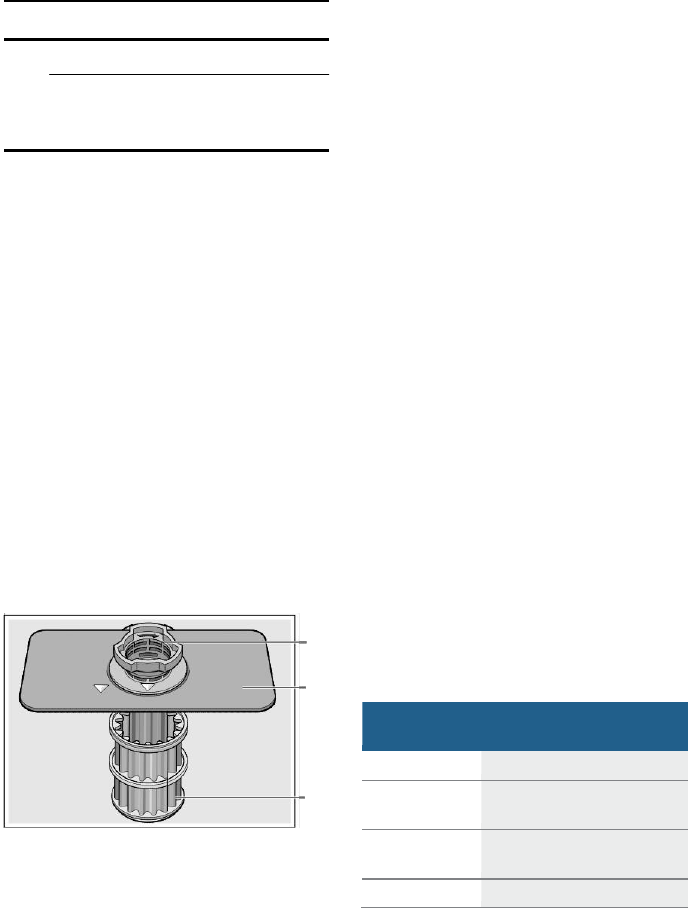
41
Care and Maintenance en-us
Cleaning
Use this setting,
interval
3 times a year
if you rinse before loading
4 times a year
if you only scrape before
loading
6 times a year
if you do not rinse or scrape
before loading
12 times a year
if you have hard water
■ Clean the door seal regularly with
a damp cloth to remove
food
particles that may collect
from
normal loading and cause odor. A
soiled door seal may not seal
properly.
9
WARNING
Use caution when
removing
parts for cleaning as
some
debris may be sharp.
Filters
The Bosch® filter system is
designed
to prevent the need to pre-rinse
normally attached food soils
from
your dishes. Simply scrape leftover
food soils off of dishware
before
loading. This process will conserve
time, water and the energy require
to
heat your household water supply.
Your dishwasher filter system is
designed to filter 100% of the water
entering the spray arms to provide a
continuous supply of clean water
to
remove food soils from your
dishware.
Filter components
The filter system consists of three
parts.
$
%
&
A Large Object Trap
Prevents objects that should not
be placed in your dishwasher
from damaging the dishwasher
pump system or clogging your
household drain.
B Flat Fine Filter
Prevents food particles
from
entering the wash chamber
and
directs particles toward the
micro
filter.
C Micro Filter
Directs the smallest of
particles
to the household plumbing drain.
Cleaning intervals
The filter system is designed
to
minimize maintenance and
reduce
noise while providing
premium
cleaning performance and
minimum
energy
consumption.
Depending on use habits and water
hardness, the filter system will require
some maintenance to sustain
premium cleaning performance.
Your filter system may need to
be
cleaned when:
■ You notice food soils remaining
on the filter system or
objects
trapped in the Large Object Trap.
■ A drop in cleaning
performance
or a gritty film forms on the
dishware.
When washing normally attached
food soils that have been
scraped
before loading, in a household that
runs the dishwasher every other day,
your filter should be cleaned:
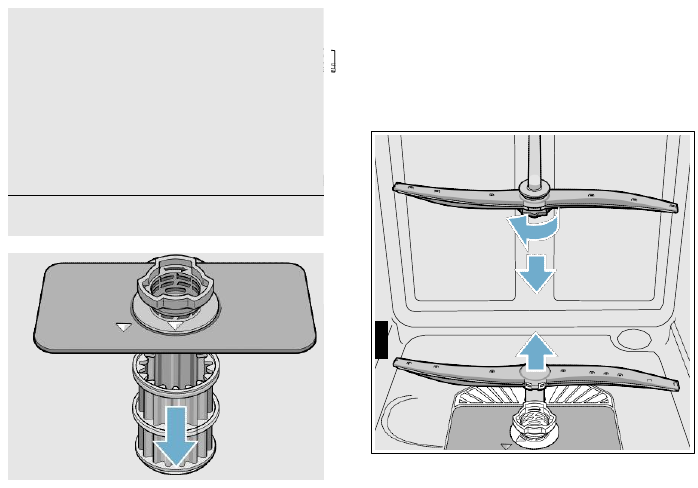
42
en-us Care and Maintenance
2
1
Note: Clean the filter after washing
loads with large amounts of
food
soils or loads with a heavy starch
content to maintain
optimal
performance.
To check or clean the filter system:
1. Unscrew the Large Object Trap as
illustrated and remove the entire
filter system.
Spray arms
Check spray arms
1:
,
1J
for
grease and limescale deposits. If you
find such
deposits:
■ Fill detergent dispenser
9*
with
detergent and start the
appliance
without utensils in the cycle with
the highest rinsing temperature.
~
"Wash Cycle Information"
on page
33
■ Clean the appliance with
detergents/appliance cleaners
which are particularly suitable
for
use with dishwashers.
■ Unscrew the spray arms
and
inspect as shown.
1
2
2. Remove any residue and clean
filters by rinsing under running
water. Note: do not use abrasive
brushes or steel wool, etc., as
they may damage the filter.
3. Reinstall the filter system in
reverse sequence and lock into
place by screwing the Large
Object Trap until the
marking
arrows align.
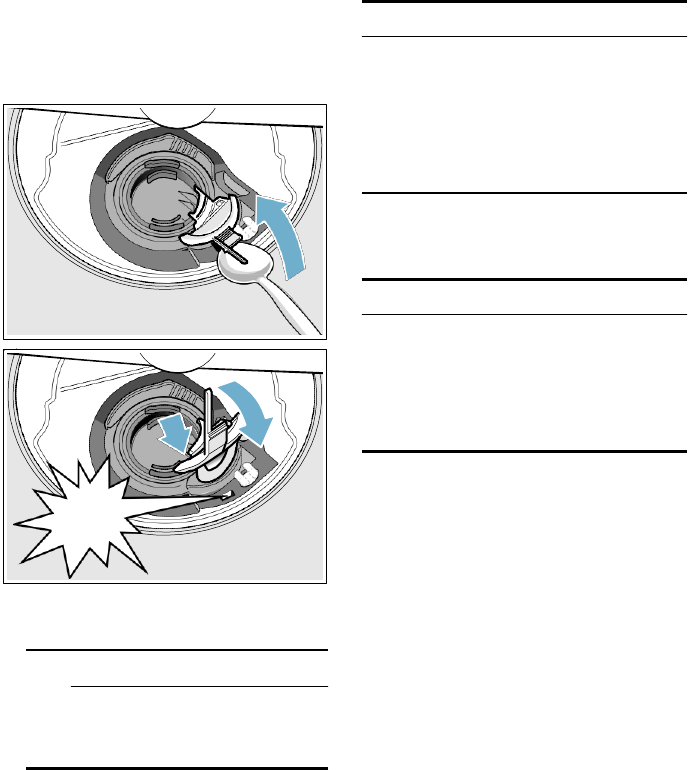
43
Care and Maintenance en-us
Drain pump
Large food remnants in the
rinsing
water not retained by the filters may
block the waste water pump. In this
case:
■ Disconnect the appliance from the
power supply.
■ Remove the filters.
~
"Filters"
on page
41
■ Scoop out standing water
-
use a
sponge if necessary.
■ Using a spoon, pry off the
pump
cover until it clicks, then grip the
cover and pull upward until it
resists and then pull forward.
1
■ Place cover in the
original
position, press down and engage.
■ Reinstall filters.
Note: The drain pump will not
work
properly if drain pump cover is not
snapped in completely until it
click.
Preparing your unit for
vacation
NOTICE:
Before leaving for vacation
during
warmer weather, besides turning off
the main valve, also turn off water
supply at the nearest point to the
dishwasher. During colder weather,
please follow the instructions
for
winterizing your unit below.
Winterizing your unit
NO
TICE:
If your dishwasher will be unused
for
a period of time in a location that
experiences freezing temperatures
(holiday home or through a vacation
period), have your dishwasher
2 3 winterized by a professional service.
&OLF
N
■ Check inner compartment
and
remove any foreign
objects.
9
WARNING
Use caution when
removing
parts for cleaning as
some
debris may be sharp.
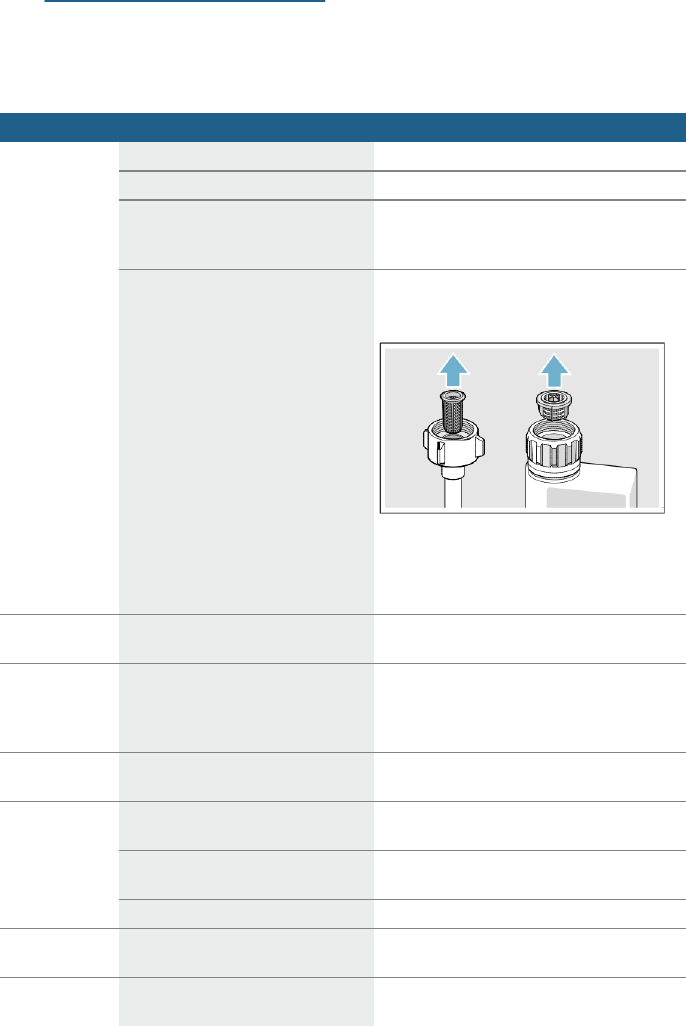
44
en-us Troubleshooting
3
Troubleshooting
Dishwashers may
occasionally
exhibit problems that are unrelated
to
a malfunction of the dishwasher itself.
The following information may
help
you with a dishwasher
problem
without involving a repair
professional.
Fault
Cause
Remedial action
Error code
“
:
‚‰
is lit.
Supply hose kinked.
Install supply hose without kinks.
Tap
turned off.
Turn on the tap.
Tap
jammed or calcified.
Turn on the tap.
Flow rate must be min. 10 l/min. when
water supply is open.
Filter in the water supply blocked.
Switch off the appliance and pull out the
mains plug. Turn off the tap. Unscrew water
connection.
Clean filter in the supply hose.
Screw water
connection on again. Check for leaks.
Reconnect power supply. Switch on the
appliance.
Error code
“
:
‹ˆ
is lit.
Intake opening (on right inside
of
appliance) covered by dishes.
Arrange dishes so that the intake opening is
not obstructed.
Error code
“
:
‚ƒ
is lit.
Heating element calcified or soiled.
Clean
appliance with dishwasher cleaning
agent or descaler. Operate the dishwasher
with water softening system and check the
setting.
Error code
“
:
ƒƒ
is lit.
Filters
1Z
are soiled or blocked.
Clean
filters.
Error code
“
:
ƒ…
is lit.
Waste-water hose
kinked or
blocked.
Install hose without kinks, remove any
residue.
Siphon connection still sealed.
Check connection to siphon and open
if
required.
Cover on the drain pump loose.
Lock cover correctly.
Error code
“
:
Ġ
is lit.
Drain
pump
blocked
or
cover
on
the
drain pump is not locked in position.
Clean
pump and lock cover correctly.
Error code
“
:
ƒˆ
is lit.
Mains voltage too low.
Not an appliance fault, have the mains
voltage and electrical installation checked.
45
Troubleshooting en-us
Fault
Cause
Remedial action
A different
error code is
indicated on
the digital
display.
(
“
:
‹‚
to
“
:
„‹
)
A technical fault has probably
occurred.
Switch off appliances with the ON/OFF
switch
(
.
After a short time restart the
appliance.
If the problem recurs, turn off the tap and
pull out the mains plug.
Call customer service and mention the
error
code.
Home
network
is not loading.
WLAN is not active on the router.
Check the wireless network connection
of
your router.
WLAN display
flashes
Connection to the home network is
not available.
Activate the wireless network on your
router.
Home Connect
cannot be
implemented
correctly.
Possible setting errors or a
technical fault.
Observe
the supplied documents and
support information for Home Connect.
Refill
indicator
for salt
P
and/or
rinse-aid
H
is lit.
No rinse aid.
Refill rinse aid.
No salt.
Refill with special salt.
Sensor does not detect salt tablets.
Use
different special salt.
Refill
indicator
for salt
P
and/or
rinse-aid
H
is not lit.
Refill indicator switched off.
Activation/deactivation ***
'
,
Rinse
Aid'
on page 19 ***, ***
'
+
Water softening
system
/
special salt' on page 17
***
There is still enough special
salt/rinse aid available.
Check refill indicator, levels.
Filter system or area under the
filters
1Z
is blocked.
Clean
filters and area underneath.
Wash cycle has not ended yet.
Wait until wash cycle ends or reset.
Water is left in
the appliance
at the end
of
the wash cycle.
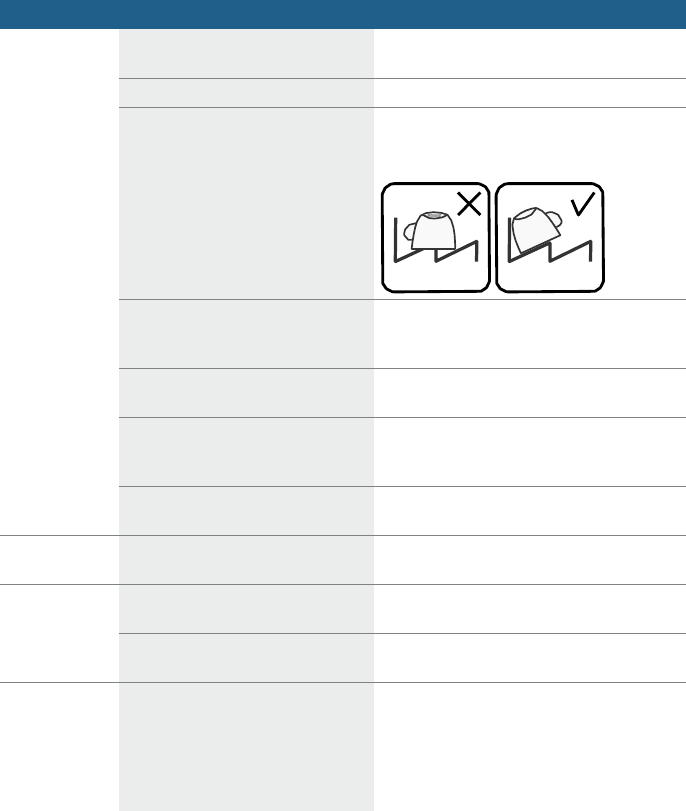
46
en-us Troubleshooting
Fault
Cause
Remedial action
Dishes not dry.
No or too little rinse aid in the
dispenser.
Refill rinse aid.
Wash cycle selected without drying.
Select wash cycle with drying.
Water collecting in depressions on
the dishes and silverware.
Arrange dishes in a sloping position,
arrange affected dishes as sloping as
possible.
The combined detergent used has
a poor drying performance
Use different combination detergent
with
better drying performance. Use
of rinse aid
also increases the drying performance.
extraDry to increase drying
not
activated.
Activate extraDry.
Dishes were removed too early
or
drying process had not ended yet.
Wait until wash cycle ends or wait until
30
min after wash cycle ends before removing
dishes.
The eco rinse aid used has a
limited
drying performance.
Use a proprietary rinse aid. Eco
products
may have limited effectiveness.
Plastic dishes
not dry.
Special properties of plastic.
Plastic has a lower heat storage capacity
and therefore dries less well.
Silverware
not
dry.
Silverware not arranged properly in
the silverware basket.
Separate silverware if possible, prevent
contact points.
Silverware not arranged properly in
the third rack.
Arrange silverware properly and separate
if
possible.
Appliance
interior wet
after rinse
cycle.
No appliance fault.
On account of the “Condensation
drying”
principle, water droplets are physically
induced and required in the container. The
humidity in the air condenses on the inner
walls of the dishwasher, drains and is
pumped out.
47
Troubleshooting en-us
Fault
Cause
Remedial action
Food
soils on
the dishes.
Dishes
placed too closely together,
racks overfilled.
Arrange dishes with adequate clearance
between them ensuring that the spray jets
can reach the surface of the dishes.
Prevent
contact points.
Spray
arm rotation obstructed.
Arrange dishes so that the spray arm can
rotate without obstruction.
Spray arm nozzles
are blocked.
Clean the spray arm nozzles.
Filters
1Z
dirty.
Clean
filters.
Filters
1Z
inserted incorrectly
and/or not engaged.
Insert and engage filters correctly.
Rinse wash cycle too
weak.
Select a more intensive rinse cycle.
Increase sensitivity of the sensors.
Dishes precleaned too intensely;
sensors therefore decide on weak
wash cycle sequence. Stubborn
soiling cannot be completely
removed.
Do not prerinse dishes. Remove
only large
food soils.
Increase sensitivity of the sensors.
Recommended wash cycle "Regular"
or
Intensive.
Tall narrow containers in
corner
areas are not rinsed adequately.
Do
not
place
hollow
containers too
obliquely
and do not place in the corner area.
Upper rack
12
on right and
left
not set to same height.
Set upper rack to same height using side
levers.
Incoming water is not warm
enough.
Before starting a cycle, run hot water faucet
at the sink closest to the dishwasher.
Cycle time can vary due
to soil and
water conditions.
Sensors in the dishwasher automatically
increase the cycle time to ensure a good
wash when heavy
soil is detected.
Rinse aid dispenser
9"
is empty.
Add rinse aid.
Dishwasher connected
to cold
water supply.
Note:
Check the typical wash cycle
length.
Verify dishwasher is connected
to hot water
supply plumbing.
Dishwasher
seems to run a
long time

48
en-us Troubleshooting
Fault
Cause
Remedial action
Detergent
residue.
Detergent dispenser cover
9*
blocked by dishes and therefore
does not open fully.
Dishes must not be placed above the
detergent tab tray
1B
.
These may
block
the lid of the detergent dispenser and
prevent it from opening fully.
Do not place dishes or fragrance dispenser
in the detergent tab tray.
Detergent dispenser cover
9*
blocked by the detergent tab.
Detergent tab must be inserted flat
and not
upright.
Detergent tab used
in the quick or
short wash cycle.
Dissolving time of the detergent is
not reached in the selected
short
wash cycle.
Dissolving time of detergent tab too long
for
a quick or short wash cycle.
Use a detergent powder or select a
more
intensive wash cycle.
Washing effect and dissolving
performance are reduced after a
prolonged storage
time or
detergent is very lumpy.
Change
detergent.
Water
stains
on
plastic parts.
Droplet
formation
on
plastic
surface
is physically unavoidable.
After
drying, water stains are visible.
Use a more intensive wash
cycle (more
water changes).
Arrange dishes in a sloping position.
Use
rinse aid.
If required, increase softening setting.
Detergent substances are
deposited. These coatings cannot
usually be removed with chemicals
(appliance cleaner, ...).
Change detergent brand.
Clean
appliance mechanically.
If there is a “white coating” on the
container floor, the water softening
system has been set very low.
Increase softening setting and change
detergent if required.
Salt dispenser cover
1R
not
closed.
Close salt dispenser cover
correctly.
Only
for glasses: Initial glass
corrosion – can only apparently be
wiped off.
See “Glass
and silverware damage”.
Washable
or
water-soluble
coatings in the
container or on
the door.

49
Troubleshooting en-us
Fault
Cause
Remedial action
White,
stubborn
coatings;
limescale on
the dishes,
container
or
door.
Detergent substances are
deposited. These coatings cannot
usually be removed with chemicals
(appliance cleaner, ...).
Change detergent brand.
Clean
appliance mechanically.
Hardness range incorrectly set
or
water hardness greater than
8.9
mmol/l.
Set water softening system according
to
instructions for use or top up salt.
3 in 1 detergent or
bio/eco
detergent not effective enough.
Set water softening system according
to
instructions for use or use separate
detergents
(proprietary
detergent,
salt,
rinse
aid).
Underdosing of detergent.
Increase detergent dosage or change
detergent.
Too weak rinse cycle selected.
Select a more intensive rinse cycle.
Tea
or lipstick
residue on the
dishes.
Too
low rinsing temperature.
Select wash cycle with higher washing
temperature.
Too
little or unsuitable detergent.
Use suitable detergent at correct dosage.
Dishes precleaned too intensely;
sensors therefore decide on weak
wash cycle sequence. Stubborn
soiling cannot be completely
removed.
Do not prerinse dishes. Remove
only large
food soils.
Increase sensitivity of the sensors.
Recommended wash cycle "Regular"
Colored (blue,
yellow, brown),
difficult
to
remove
to
non-removable
coatings in the
appliance
or
on
stainless steel
dishes.
Film formation consisting
of
ingredients from vegetables (e.g.
cabbage, celery, potatoes, noodles,
...)
or the tap water (e.g.
manganese).
Can
be partly removed with machine
cleaner
or
by
mechanical
cleaning.
Coatings
are harmless.
Film formation caused by
metallic
components on silver or aluminum
silverware.
Can
be partly removed with machine
cleaner or by mechanical cleaning.
Colored
(yellow,
orange,
brown), easily
removable
deposits inside
the appliance
(mainly in the
floor area)
Film formation consisting
of
ingredients from food soils and
substances from the tap water
(limescale),
“soapy”
Check function of the water softening
system (refill with salt) or, if using combined
detergents (tablets), activate water
softening
system.
Discoloration
of
the plastic
parts inside the
appliance.
Plastic parts inside the appliance
may become discolored during the
service life of the dishwasher.
Discoloration is normal and
will not impair
the function of the dishwasher.

50
en-us Troubleshooting
Fault
Cause
Remedial action
Plastic parts
discolored.
Too
low rinsing temperature.
Select wash cycle with higher washing
temperature.
Dishes precleaned too intensely;
sensors therefore decide on weak
wash cycle sequence. Stubborn
soiling cannot be completely
removed.
Do not prerinse dishes. Remove
only large
food soils.
Increase sensitivity of the sensors.
Recommended wash cycle "Regular"
Removable
streaks on
glasses,
glasses
with
metallic
appearance
and silverware.
Too much rinse aid.
Set rinse aid amount to lower setting.
No rinse aid added or setting too
low.
Add rinse aid and check dosage
(recommended setting
4–5).
Detergent residue in the final rinse
wash cycle section. Detergent
dispenser cover blocked by dishes
(cover does not open fully).
Detergent dispenser cover must not be
obstructed by dishes.
Do not place dishes or fragrance dispenser
in the detergent tab tray.
Dishes precleaned too intensely;
sensors therefore decide on weak
wash cycle sequence. Stubborn
soiling cannot be completely
removed.
Do not prerinse dishes. Remove
only large
food soils.
Increase sensitivity of the sensors.
Recommended wash cycle
“Regular”
Initial or
existing,
irreversible
clouding of
glass.
Glasses not dishwasher-proof,
only
suitable for dishwasher.
Use
dishwasher-proof glasses.
Avoid long steam phase (standing
time after
wash cycle ends).
Use
wash cycle at lower temperature.
Set water softening system according to
the
water hardness (if required one setting
lower).
Use detergent with glass
protection
component.
Rust
spots on
the silverware.
Silverware not adequately
rust-resistant. Knife blades are
frequently more severely
affected.
Use
corrosion-resistant silverware.
Silverware will also rust if rusting
parts are rinsed at the same
time
(pan handles, damaged utensil
baskets, etc.).
Do not wash rusting parts.
Salt content in the rinsing water too
high, as salt dispenser
lock not
fastened firmly or salt was spilled
while being refilled.
Fasten salt dispenser lock firmly or remove
spilled salt.
Appliance
cannot be
switched on
or
operated.
Malfunction.
Disconnect appliance from the power
supply; pull out the mains plug or switch
off
the fuse. Wait at least 5 seconds, then
connect the appliance to the power supply.
51
Troubleshooting en-us
Fault
Cause
Remedial action
Appliance
does
not start.
Mains fuse may have been blown
or
circuit breaker tripped.
Check mains fuse or circuit breaker.
Door may not be properly latched.
Press the main power switch to turn unit on.
Unit may not be turned on.
Shut door completely.
Delay
start may be engaged.
To reset, refer to “Delay
start” section in this
manual.
Child lock is activated.
Deactivate the child lock. Refer
to “Child
Lock” section in this manual if applicable.
The door may have been closed
without first selecting a cycle.
Select a cycle and close the door.
Power cord not inserted.
Ensure
that the power cord is plugged all
the way into the back of the appliance and
into the socket. Check that the socket
functions.
The water supply may not be
connected.
Check and turn on water supply.
The appliance door has not been
shut properly.
Close
the door.
The door has been open
for more
than 4 seconds after pressing the
START
button.
Press the START button again and close
the
appliance door within 4 seconds (see
“Protection against unintentional
operation”).
Wash
cycle
starts
automatically.
You
did not wait until wash cycle
ended.
Perform reset.
(see
“Canceling the wash cycle“).
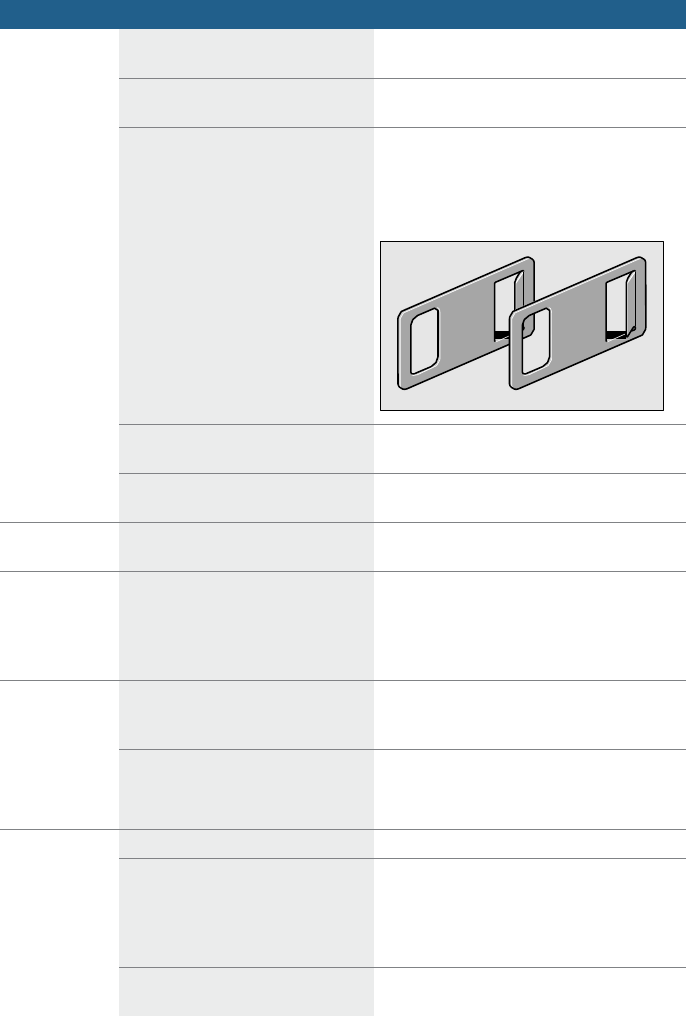
52
en-us Troubleshooting
Fault
Cause
Remedial action
Door does
not
open.
Door is not set correctly.
Set
the door correctly with the aid of the
installation instructions.
Child lock is activated.
Press twice in quick succession at the
top of
the door in the middle.
Appliance is disconnected from the
mains.
Check mains plug and fuses.
Attach
supplied
emergency
release
to
upper
right and left of the furniture panel and open
the door by gently pulling the emergency
release.
Door and door seal dirty.
Clean door and door seal with a damp
cloth
and a little washing-up
liquid.
Automatic door opening system
not
in home position.
After closing the door, wait one second
until
it can be opened again.
Door does
not
close.
Automatic door opening system
not
in home position.
After opening the door, wait one second
until it can be closed again.
Cover
on the
detergent
dispenser
cannot be
closed.
Detergent dispenser or cover guide
blocked by sticky detergent
residue.
Remove
detergent residue.
Detergent
residue in the
detergent
dispenser
9*
or in the
detergent tab
tray
1B
.
Spray arms blocked by dishes,
therefore detergent is not rinsed
out.
Ensure
that the spray arms can rotate freely.
The detergent dispenser was
damp
when filled.
Pour
detergent into the dry detergent
dispenser only.
Door not closed properly.
Close
the door.
Do not place dishes or fragrance
dispenser in the detergent tab tray.
Upper rack presses against the
door and prevents door from being
closed securely.
Check whether rear panel is being pressed
in, e.g. by socket or by hose
holder which
has not been removed.
Power and/or water supply
interrupted.
Restore power and/or water supply.
Appliance
stops in the
wash cycle
or
wash cycle is
interrupted.

53
Troubleshooting en-us
Fault
Cause
Remedial action
Filling valves
making
striking
noises.
Depends on domestic installation,
as appliance is not defective. No
effect on appliance function.
No remedial action possible.
Knocking
or
rattling noise.
Spray arm strikes the dishes,
dishes not positioned correctly.
Position dishes so that the spray arms do
not strike the dishes.
If there is a low load, the water jets
strike the washing tank directly.
Load the appliance with more dishes
or
distribute the dishes more evenly in the
dishwasher.
Light dishes move during the wash
cycle.
Arrange light dishes securely.
Unusual
foam
formation.
Handwash liquid in the rinse aid
dispenser.
Immediately refill rinse aid dispenser
with
rinse aid.
Rinse
aid spilled.
Remove rinse aid with
a cloth.
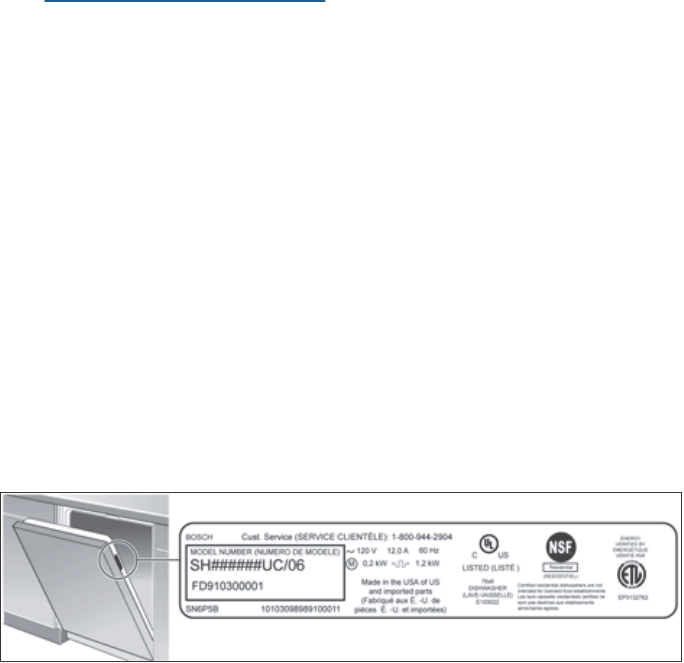
54
en-us Customer Service
4
Customer Service
Your Bosch® dishwasher requires
no
special care other than that
described
in the Care
and
Maintenance section of this manual.
If you are having a problem with your
dishwasher, before calling for service
please refer to the Troubleshooting
Guide section of the manual. If
service is necessary, contact your
dealer or installer or an authorized
service center. Do not attempt
to
repair the appliance yourself. Any
work performed by unauthorized
personnel may void the warranty.
If you are having a problem with your
Bosch® dishwasher and are not
pleased with the service you have
received, please take the
following
steps until the problem is
corrected
to your satisfaction:
1. Call us at
1-800-944-2904
2. Contact Customer Service
from
our web site:
www.bosch-home.com/us
or
www.bosch-home.ca
3. Contact your installer or the
Bosch Authorized Service
Contractor in your area.
4. Write us:
BSH Home Appliances
Corporation
1901 Main Street
Irvine, CA
92614
Please be sure to include your
model
information as well as an explanation
of the problem and the date it
started. You will find the model
and
serial number information on the
label
located on the edge of the
dishwasher door. Please make a
copy of your invoice and keep it with
this manual. The customer may
be
required to show proof of
purchase
to
obtain warranty service.
Please note that Customer Service
employees would never ask for your
Home Connect password.
55
Statement of Limited Product Warranty en-us
FCC COMPLIANCE
STATEMENT
9
C
AUTION!
Changes or modifications not
expressly approved could
void
your authority to use this
equipment.
This device complies with Part
15 of the FCC Rules.
Operation to the following two
conditions:
e. This device may not cause
harmful interference,
and
f. this device must accept any
interference received,
including interference that
may cause
undesired
operation.
INDUSTRY CANADA
STATEMENT
This device complies with Industry
Canada licence-exempt
RSS standard(s).
Operation
is subject to the following
two conditions:
1. this device may not cause
interference,
and
2. this device must accept any
interference,
including
interference that may cause
undesired operation of the device.
4
Statement of Limited
Product
W
arranty
What this Warranty Covers
& Who it Applies to:
The limited warranty provided by
BSH
Home Appliances
Corporation
(BSH) in this Statement of Limited
Product Warranty applies only
to
Bosch® dishwashers
(“Product”)
sold
to you, the first using purchaser,
provided that the Product was
purchased:
■ for your normal,
household
(non-commercial) use, and has in
fact at all times only been
used
for
normal household
purposes;
■ new at retail (not a display,
“as
is”, or previously returned
model),
and not for resale, or
commercial
use;
and
■ within the United States
or
Canada, and has at all times
remained within the country
of
original purchase. The warranties
stated herein apply only to the
first purchaser of the Product
and
are not transferable.
Please make sure to return your
registration card; while not necessary
to effectuate warranty coverage, it is
the best way for BSH to notify you in
the unlikely event of a safety notice
or
product recall.
How Long the Warranty
Lasts
BSH warrants that the Product is free
from defects in materials
and
workmanship for a period of three
hundred sixty five (365) days
from
the date of purchase. The
foregoing
timeline begins to run upon the date
of purchase, and shall not be stalled,
tolled, extended, or suspended,
for
any reason whatsoever. Labor
and
56
en-us Statement of Limited Product Warranty
shipping costs are included in this
basic coverage.
This Product is also warranted to
be
free from cosmetic defects in
material and workmanship (such as
scratches of stainless steel,
paint/porcelain blemishes,
chip,
dents, or other damage to the finish
of the Product), for a period of thirty
(30) days from the date of
purchase
or closing date for new
construction.
This cosmetic warranty excludes
slight color variations due to inherent
differences in painted and
porcelain
parts, as well as differences
caused
by kitchen lighting, product location,
or other similar factors. This
cosmetic warranty
specifically
excludes any display, floor, “As
Is”,
or
“B” stock
appliances.
Extended Limited Warranty
BSH also provides these
additional
limited warranties:
■ 5 year limited warranty
on
electronics: BSH will repair
or
replace any BSH
microprocessor
or printed circuit board if it
proves
to be defective in materials
or
workmanship (excludes
labor
charges).
■ 5 year limited warranty on
dish
racks: BSH will replace the
upper
or lower dish rack (excluding
rack
components), if the rack
proves
defective in materials
or
workmanship (excludes
labor
charges).
■ Lifetime warranty against stainless
steel rust through: BSH will
replace your dishwasher with the
same model or a current
model
that is substantially equivalent
or
better in functionality, if the inner
liner should rust
through
(excludes labor charges).
■ BSH will replace the stainless
steel door if the door should rust
through (excludes labor charges).
The foregoing timeline begins
to
run upon the date of purchase,
and shall not be stalled, tolled,
extended, or suspended, for any
reason whatsoever.
Repair/Replace as Your
Exclusive Remedy
During this warranty period, BSH
or
one of its authorized service
providers
will repair your Product
without charge to you (subject
to
certain limitations stated herein) if
your Product proves to have been
manufactured with a defect in
materials or workmanship. If
reasonable attempts to repair the
Product have been made without
success, then BSH will replace your
Product (upgraded models may
be
available to you, in the sole
discretion
of BSH, for an additional charge). All
removed parts and components shall
become the property of BSH at its
sole option. All replaced
and/or
repaired parts shall assume the
identity of the original part
for
purposes of this warranty and this
warranty shall not be extended with
respect to such parts. BSH’s
sole
liability and responsibility hereunder
is to repair manufacturer-defective
Product only, using a BSH-authorized
service provider during
normal
business hours. For safety
and
property damage concerns, BSH
highly recommends that you do not
attempt to repair the Product
yourself, or use an unauthorized
servicer; BSH will have
no
responsibility or liability for repairs
or
work performed by a non-authorized
servicer. If you choose to have
someone other than an authorized
service provider work on your
Product, THIS WARRANTY WILL
AUTOMATICALLY BECOME NULL
57
Statement of Limited Product Warranty en-us
AND VOID. Authorized service
providers are those persons
or
companies that have been specially
trained on BSH products, and who
possess, in the opinion of BSH, a
superior reputation for
customer
service and technical ability (note
that they are independent entities
and are not agents, partners,
affiliates or representatives of BSH).
Notwithstanding the foregoing, BSH
will not incur any liability, or have
responsibility, for the Product if it is
located in a remote area (more than
100 miles from an authorized service
provider) or is reasonably
inaccessible, hazardous, threatening,
or treacherous locale, surroundings,
or environment; in any such event, if
you request, BSH would still pay
for
labor and parts and ship the parts
to
the nearest authorized service
provider, but you would still be fully
liable and responsible for any travel
time or other special charges by the
service company, assuming they
agree to make the service call.
Out of Warranty Product
BSH is under no obligation, at law
or
otherwise, to provide you with any
concessions, including repairs,
pro-rates, or Product replacement,
once this warranty has expired.
Warranty Exclusions
The warranty coverage
described
herein excludes all defects
or
damage that are not the direct fault
of BSH, including without limitation,
one or more of the following:
■ Use of the Product in anything
other than its normal, customary
and intended manner
(including
without limitation, any form
of
commercial use, use or storage
of
an indoor product outdoors, use
of the Product in conjunction with
air or water-going vessels);
■ Any party’s willful
misconduct,
negligence, misuse, abuse,
accidents, neglect,
improper
operation, failure to maintain,
improper or negligent installation,
tampering, failure to follow
operating instructions,
mishandling, unauthorized service
(including self-performed
“fixing”
or exploration of the
appliance’s
internal workings);
■ Adjustment, alteration
or
modification of any
kind;
■ A failure to comply with any
applicable state, local, city,
or
county electrical, plumbing
and/or
building codes, regulations,
or
laws, including failure to install the
product in strict conformity with
local fire and building codes
and
regulations;
■ Ordinary wear and tear, spills
of
food, liquid, grease
accumulations, or other
substances that accumulate on,
in, or around the Product;
■ Any external, elemental
and/or
environmental forces and factors,
including without limitation, rain,
wind, sand, floods, fires,
mud
slides, freezing temperatures,
excessive moisture or extended
exposure to humidity, lightning,
power surges, structural failures
surrounding the appliance,
and
acts of God.
In no event shall BSH have any
liability or responsibility whatsoever
for damage to surrounding property,
including cabinetry, floors, ceilings,
and other structures or
objects
around the Product. Also
excluded
from this warranty are Products
on
which the serial numbers have been
altered, defaced, or removed; service
visits to teach you how to use the
Product, or visits where there is
nothing wrong with the Product;
correction of installation
problems
(you are solely responsible for any
structure and setting for the Product,
58
en-us Statement of Limited Product Warranty
including all electrical, plumbing
or
other connecting facilities, for
proper
foundation/flooring,
and for any
alterations including without limitation
cabinetry, walls, floors, shelving,
etc.); and resetting of breakers
or
fuses.
TO THE
EXTENT
ALLOWED BY LAW,
THIS
WARRANTY SETS
OUT YOUR
EXCLUSIVE REMEDIES
WITH
RESPECT
TO PRODUCT, WHETHER
THE CLAIM ARISES IN CONTRACT
OR TORT (INCLUDING STRICT
LIABILITY,
OR NEGLIGENCE) OR
OTHERWISE. THIS WARRANTY
IS IN
LIEU OF ALL OTHER WARRANTIES,
WHETHER EXPRESS
OR IMPLIED.
ANY
WARRANTY IMPLIED
BY LAW,
WHETHER
FOR MERCHANTABILITY
OR
FITNESS
FOR A PARTICULAR
PURPOSE,
OR
OTHERWISE,
SHALL
BE
EFFECTIVE
ONLY FOR THE
PERIOD THAT THIS EXPRESS
LIMITED WARRANTY
IS EFFECTIVE.
IN NO
EVENT
WILL THE
MANUFACTURER
BE LIABLE FOR
CONSEQUENTIAL,
SPECIAL,
INCIDENTAL, INDIRECT,
“BUSINESS
LOSS”, AND/OR PUNITIVE
DAMAGES, LOSSES,
OR
EXPENSES,
INCLUDING
WITHOUT
LIMITATION
TIME AWAY FROM WORK, HOTELS
AND/OR
RESTAURANT
MEALS,
REMODELLING
EXPENSES
IN
EXCESS
OF DIRECT DAMAGES
WHICH ARE
DEFINITIVELY
CAUSED
EXCLUSIVELY
BY BSH, OR
OTHERWISE.
SOME
STATES
DO
NOT ALLOW THE
EXCLUSION
OR
LIMITATION
OF
INCIDENTAL
OR
CONSEQUENTIAL
DAMAGES, AND
SOME
STATES
DO NOT ALLOW
LIMITATIONS
ON HOW LONG AN
IMPLIED WARRANTY LASTS,
SO
THE ABOVE
LIMITATIONS
MAY NOT
APPLY TO YOU. THIS WARRANTY
GIVES YOU
SPECIFIC
LEGAL
RIGHTS,
AND YOU MAY ALSO HAVE
OTHER RIGHTS
WHICH
VARY
FROM
STATE
TO
STATE.
No attempt
to
alter, modify or amend this warranty
shall be effective unless authorized in
writing by an officer of BSH Home
Appliances Corporation.
How to Obtain Warranty
Service
TO OBTAIN
WARRANTY
SERVICE
FOR YOUR PRODUCT, YOU
SHOULD CONTACT THE NEAREST
BSH AUTHORIZED SERVICE
CENTER,
OR CALL
1-800-944-2904

59
Installation and connection en-us
5
Installation and
connection
The dishwasher must be
connected
correctly, otherwise it will not function
properly. The
specifications
for the inlet and outlet as well as
the electrical connected loads must
correspond with the required criteria
as specified in the
following
paragraphs or in the installation
instructions.
Install the appliance in the correct
sequence:
1. Checking appliance on delivery
2. Installation
3. Drainage
connection
4. Tap water
connection
5. Electrical
connection
Parts included
If you have any complaints,
contact
the dealer from whom you
purchased
the appliance or our
customer
services department.
■ Dishwasher
■ User manual
■ Installation instructions
■ Quick reference
guide*
■ Warranty*
■ Installation materials
■ Steam guard
plate*
■ Rubber
apron*
■ Power
cord
* depending on the features of your
dishwasher
Safety instructions
Please refer to the Important Safety
Instructions for installation that are
included in the separate Installation
Instructions for your
appliance.
Delivery
Your dishwasher has been
checked
thoroughly in the factory to ensure
that it is in working order. This may
cause small water stains. These will
disappear after the first wash cycle.
Technical specifications
■ Weight:
up to 132 lbs (60
kg)
■ Voltage:
120 V, 60 Hz
■ Connected load:
1,300 W.
■ Circuit breaker:
12 A
■ Power input:
off mode (Po)* 0.50 W.
left on mode (Pl)* 50 W.
in networked standby
mode
2.00 W.
*according to regulations (EU)
nos.
1016/2010
and
1059/2010.
Additional functions and settings
may increase the power input.
■ Water pressure:
at least 0.05 MPa (0.5 bar),
maximum 1 MPa (10 bar).
At a higher water pressure:
connect pressure-reducing valve
ahead.
■ Inlet rate:
minimum 10
litres/minute
■ Water temperature:
Cold water.
Hot water:
Maximum temperature 140° F
(60
°C).
■ Capacity:
12–15 place settings
(depending
on the features of your
dishwasher).
60
en-us Installation and
connection
Installation
The required installation
dimensions
can be found in the installation
instructions. Level the appliance with
the aid of the height-adjustable feet.
Ensure that the appliance is situated
securely on the floor.
■ A built-under or integrated
appliance which is installed
subsequently as a free-standing
appliance must be secured
to
prevent it from overturning, e.g. by
screwing it to the wall or by
installing it under a
continuous
worktop which is screwed
to
adjacent
cupboards.
■ The appliance can easily
be
installed in a fitted
kitchen
between wooden and
plastic
walls.
Drain connection
1. The required work sequence
can
be found in the installation
instructions. If required, fit
a siphon with a drain
connection.
2. Connect the drain hose
to the
drain
connection of the siphon with
the enclosed parts.
Ensure that the drain hose is not
kinked, crushed or twisted
and that there is no
cover
plate in the drainage to prevent
the drain water from flowing out!
Water supply connection
1. Fasten the water
supply
connection to the tap
according
to the installation instructions
using the enclosed parts.
Ensure that the water
supply
connection is not kinked,
crushed
or twisted.
2. When replacing the
appliance,
always use a new water
supply
hose.
Water pressure:
At least 0.05 MPa (0.5 bar),
maximum 1 MPa (10 bar).
At a higher water pressure:
connect pressure-reducing valve
ahead.
Inlet rate:
Minimum 10
litres/minute
Water temperature:
Cold water.
Hot water:
Maximum temperature 140° F
(60
°C).
Hot water connection *
The dishwasher can be
connected
to cold or hot water up to max.
140° F (60 °C). Connection to
hot
water is recommended if the
hot
water can be supplied by
energetically favourable means
and
from a suitable installation, e.g.
solar
heating system with circulation line.
This will save energy and time. The
“Hot water” setting allows you
to
adjust your dishwasher optimally
to
operation with hot water. It is
recommended to have a water
temperature (temperature of the
incoming water) of at least 104° F
(40 °C) and no more than 140° F
(60 °C). It is not recommended
to
connect the appliance to hot water if
the water is supplied from an
electric
boiler.
61
Installation and connection en-us
To change the setting:
1. Open the
door.
2. Switch on ON/OFF switch
(
.
3. Press Info button
8
for
3 seconds until the following text
is indicated on the display window
at the top
@
:
Scroll with < >
Set with - +
Leave with Setup 3 sec.
4. Keep pressing the button >
)R
until water connection appears
of
the display window at the
top
@
.
5. Make the selection with setting
buttons + -
X
.
6. Press and hold the Info
button
8
for 3
seconds.
The chosen setting has now been
stored.
* optional feature which may or may
not be included with your dishwasher
Electrical connection
■ Connect the appliance to an
120
V, 60 Hz alternating current only,
via a correctly installed outlet with
protective grounding
conductor.
See rating plate for
required
fusing
9:
.
■ The outlet must be near the
appliance and freely
accessible
after the installation.
If the plug is not freely
accessible,
an allpole disconnector with a
contact opening of at least 3
mm
must be fitted on the installation
side to satisfy the relevant safety
instructions.
■ The connection may be
modified
by technicians only.
■ A power cord extension may
be
purchased from customer service
only.
■ Use only a residual current
operated circuit-breaker which
features the symbol
‚
.
Only this
extension guarantees
compliance
with the currently valid
regulations.
■ The appliance features a water
damage protection system.
Please note the system will
function only when the
power
supply is
connected.
Removing the appliance
Also observe
the sequence of worksteps here.
1. Disconnect the appliance from the
power supply.
2. Turn off the tap.
3. Undo the drain water and water
supply
connection.
4. Loosen fastening screws for the
cabinet parts.
5. If fitted, remove the base panel.
6. Pull out the appliance, carefully
pulling the hose behind.
Transporting the appliance
Empty the dishwasher and secure
loose parts.
Drain the appliance according
to the following steps:
1. Turn on the tap.
2. Open the
door.
3. Switch on ON/OFF button
(
.
4. Select wash cycle with the highest
temperature.
The estimated wash
cycle
duration
is indicated on the
digital
display
@
.
5. Press START button
)*
.
6. Close the
door.
Wash cycle sequence starts.
7. Open the door after
approx. 4 minutes.
62
en-us Installation and
connection
8. Press START button
)*
until
“Program was
terminated”/“Ready
in one
minute.” is indicated at the
digital
display
@
.
9. Close the
door.
10.
Open the door after approx.
1
minute.
The digital display
@
indicates;
“Finished”.
11.
Switch off ON/OFF switch
(
.
12.
Turn off the tap,
disconnect
supply hose and drain water.
Note: Transport appliance
upright
only. This prevents residual water
from running into the
machine
control and damaging the wash
cycle
sequence.
Securing the appliance
against frost
If the appliance is in a room where
there is a risk of frost (e.g. holiday
home), empty the
appliance
completely (see “Transporting the
appliance”).
Wi-Fi® Module
FCC/IC
Statements
M odel: COM 1
FCC I D: 2 AHES-COMGEN1
IC: 21152-COMGEN1
The Home Connect module is a communication
device designed to provide communication between
appliances and smart devices.
This module is integrated at the factory, under direct control of B/S/H Home
Appliances Corporation, and is not user serviceable or upgradable.
At least 20cm separation distance should be maintained from device to
user.
FCC COMPLIANCE STATEMENT
CAUTION: Changes or modifications not expressly approved could void your
authority to use this equipment.
This device complies with Part 15 of the FCC Rules. Operation to the following two
conditions: (1) This device may not cause harmful interference, and (2) this device
must accept any interference received, including interference that may cause
undesired operation.
INDUSTRY CANADA STATEMENT
This device complies with Industry Canada licence-exempt RSS standard(s).
Operation is subject to the following two conditions: (1) this device may not cause
interference, and (2) this device must accept any interference, including interference
that may cause undesired operation of the device.
Le présent appareil est conforme aux CNR d'Industrie Canada applicables aux
appareils radio exempts de licence. L'exploitation est autorisée aux deux conditions
suivantes : (1) l'appareil ne doit pas produire de brouillage, et (2) l'utilisateur de
l'appareil doit accepter tout brouillage radioélectrique subi, même si le brouillage est
susceptible d'en compromettre le fonctionnement.

#4) S
FTFS
W
FT UIF SJHIU UP DIBOHF TQFDJGJDBUJPOT PS EFTJHO XJU
IP
VU OP
UJDF.
4PNF NPEFMT BSF DFS
UJG
JFE
GPS VTF JO $BOBEB. #4)
JT OP
U
SFTQPOTJCMF G
PS
QSPEVDUT XIJDI BSF USBOTQPS
U
FE
GSPN
UIF 6OJUFE 4
UBU
FT
GPS VTF
JO $BOBEB.
$IFDL XJU
I Z
PVS MPDBM $BOBEJBO EJTUSJCVUPS PS EFBMFS
.
#4) TF S
ÎTFS
W
F
MF ESPJU EF NPEJGJFS MFT EPOOÎFT UFDIOJRVFT PV MF EFTJHO TBOT
QS
ÎB
WJT. $FSUBJOT NPEÑMFT TPOU DFS
UJG
JÎT QPVS VOF VUJMJTBU
JPO BV $BOBEB.
#4) O
'FTU QBT S
FTQPOTBCMF QPVS MFT QSPEVJUT USBOTQPS
U
ÎT EFT ±U
BUT-6OJT QPVS
VOF VUJMJTBUJPO BV $BOBEB. 7ÎSJGJFS BVQSÑT
E'VO NBSDIBOE PV
EJTUSJCVUFVS
DBOBEJFO.
#4) )PNF "QQMJBODFT $PS
QPSBUJPO
1901 .BJO 4
US
FF
U, 4VJU
F 600
*S
WJOF, $" 92614
1-800-944-2904
*9001182490*
9001182490
(9603)