BW Broadcast TX50V2 50W FM BROADCAST TX User Manual Technical Manual

BW Broadcast Ltd 50W FM BROADCAST TX Technical Manual

Technical Manual

V2 FM TRANSMITTERSTECHNICAL MANUALDocument rev 3.2The software in the transmitter is upgradeable. This manual may refer to an older software version. Note thatprevious versions of software may not have all of the features described in the manual. To check the latestsoftware go to www.bwbroadcast.com/downloadsNo part of this manual may be re-produced in any form without prior written permission from BW Broadcast. Theinformation and specifications contained in this document is subject to change at any time without notice.©2014 BW Broadcastwww.bwbroadcast.com
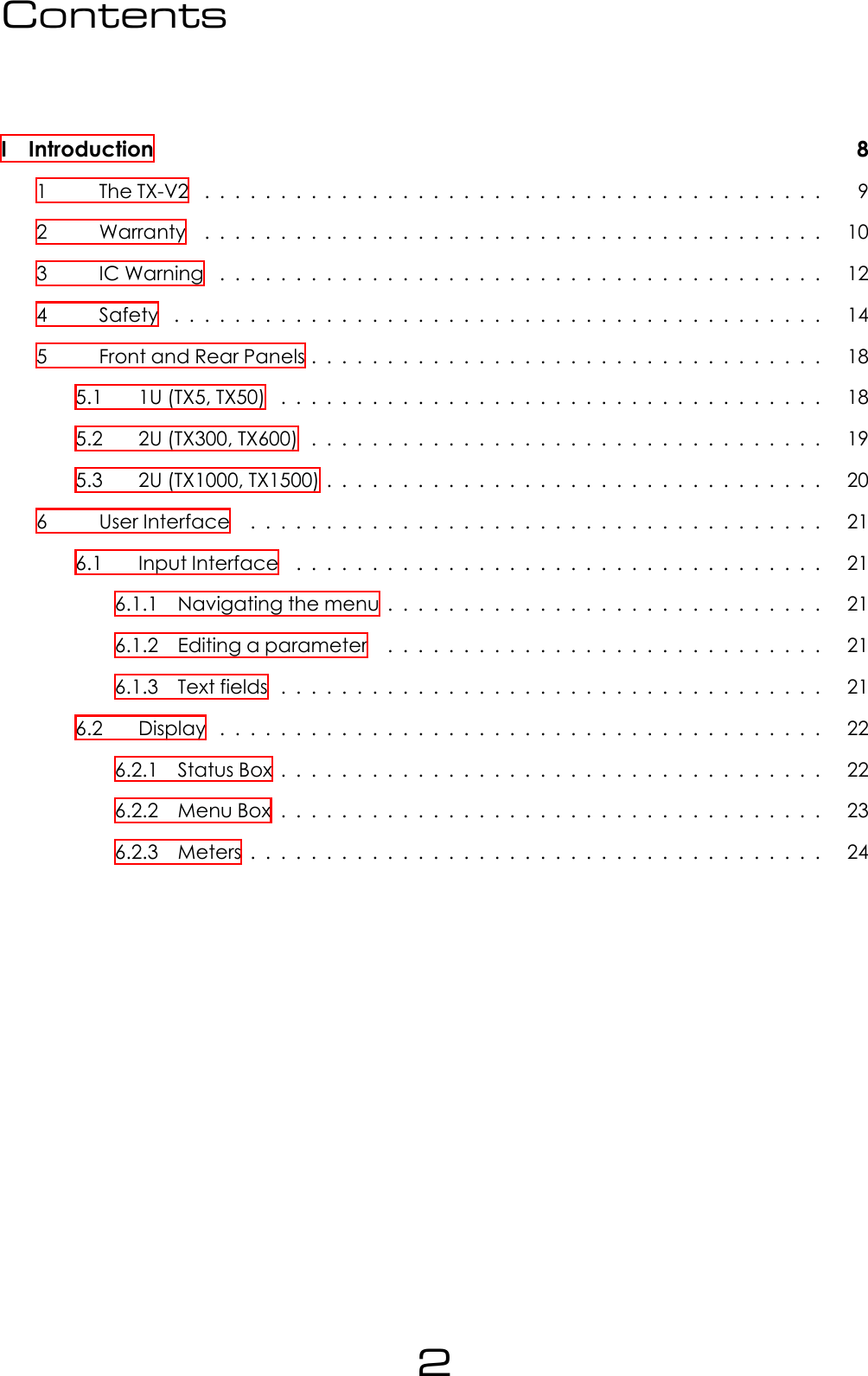
ContentsI Introduction 81 TheTX-V2 ......................................... 92 Warranty ......................................... 103 ICWarning ........................................ 124 Safety ........................................... 145 FrontandRearPanels.................................. 185.1 1U(TX5,TX50) .................................... 185.2 2U(TX300,TX600) .................................. 195.3 2U(TX1000,TX1500)................................. 206 UserInterface ...................................... 216.1 InputInterface ................................... 216.1.1 Navigatingthemenu............................. 216.1.2 Editingaparameter ............................. 216.1.3 Textfields .................................... 216.2 Display ........................................ 226.2.1 StatusBox.................................... 226.2.2 MenuBox.................................... 236.2.3 Meters...................................... 242
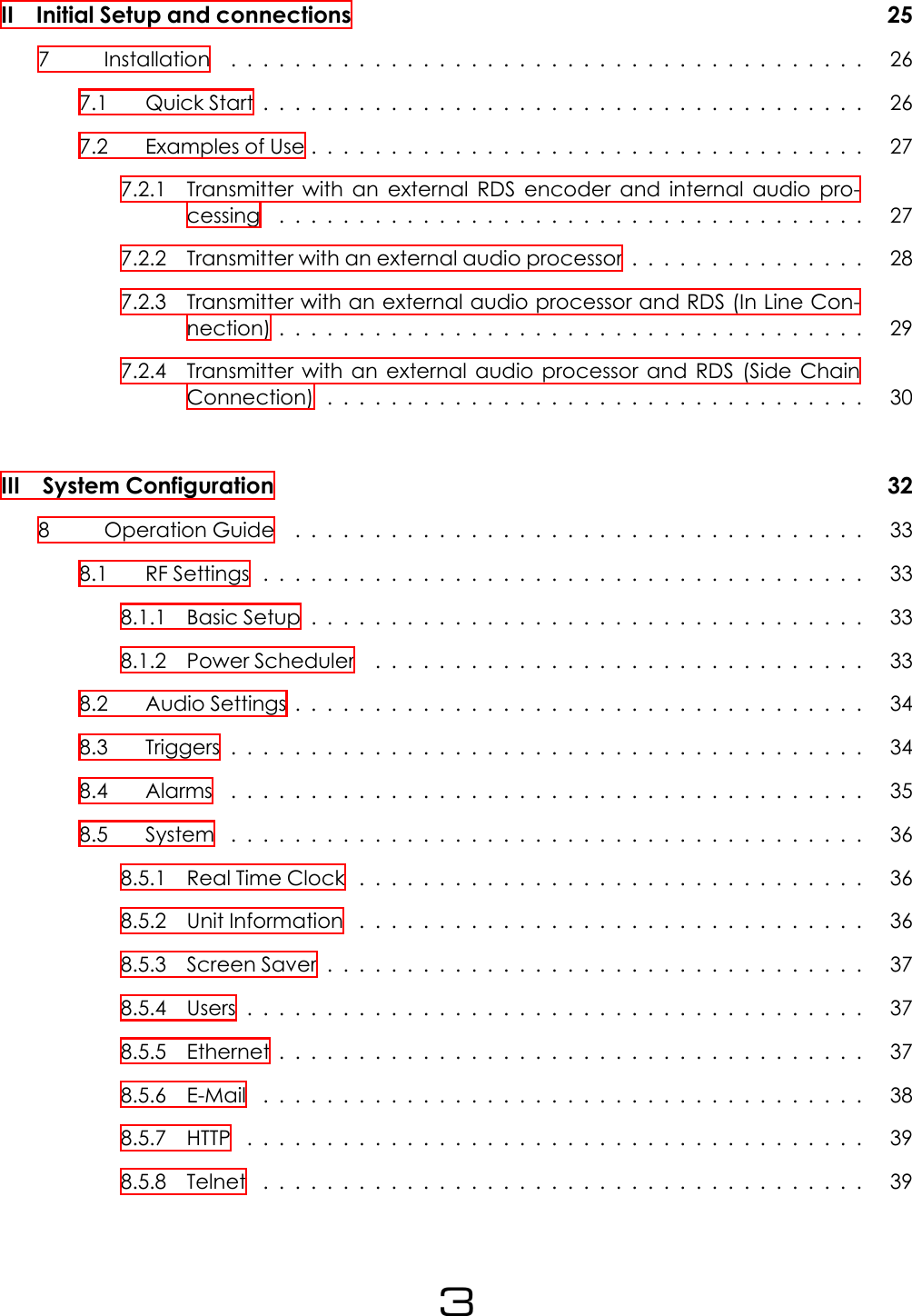
II Initial Setup and connections 257 Installation ........................................ 267.1 QuickStart...................................... 267.2 ExamplesofUse................................... 277.2.1 Transmitter with an external RDS encoder and internal audio pro-cessing ..................................... 277.2.2 Transmitter with an external audio processor . . . . . . . . . . . . . . . 287.2.3 Transmitter with an external audio processor and RDS (In Line Con-nection)..................................... 297.2.4 Transmitter with an external audio processor and RDS (Side ChainConnection).................................. 30III System Configuration 328 OperationGuide .................................... 338.1 RFSettings...................................... 338.1.1 BasicSetup................................... 338.1.2 PowerScheduler ............................... 338.2 AudioSettings.................................... 348.3 Triggers........................................ 348.4 Alarms ........................................ 358.5 System ........................................ 368.5.1 RealTimeClock ................................ 368.5.2 UnitInformation ................................ 368.5.3 ScreenSaver.................................. 378.5.4 Users....................................... 378.5.5 Ethernet..................................... 378.5.6 E-Mail ...................................... 388.5.7 HTTP ....................................... 398.5.8 Telnet ...................................... 393
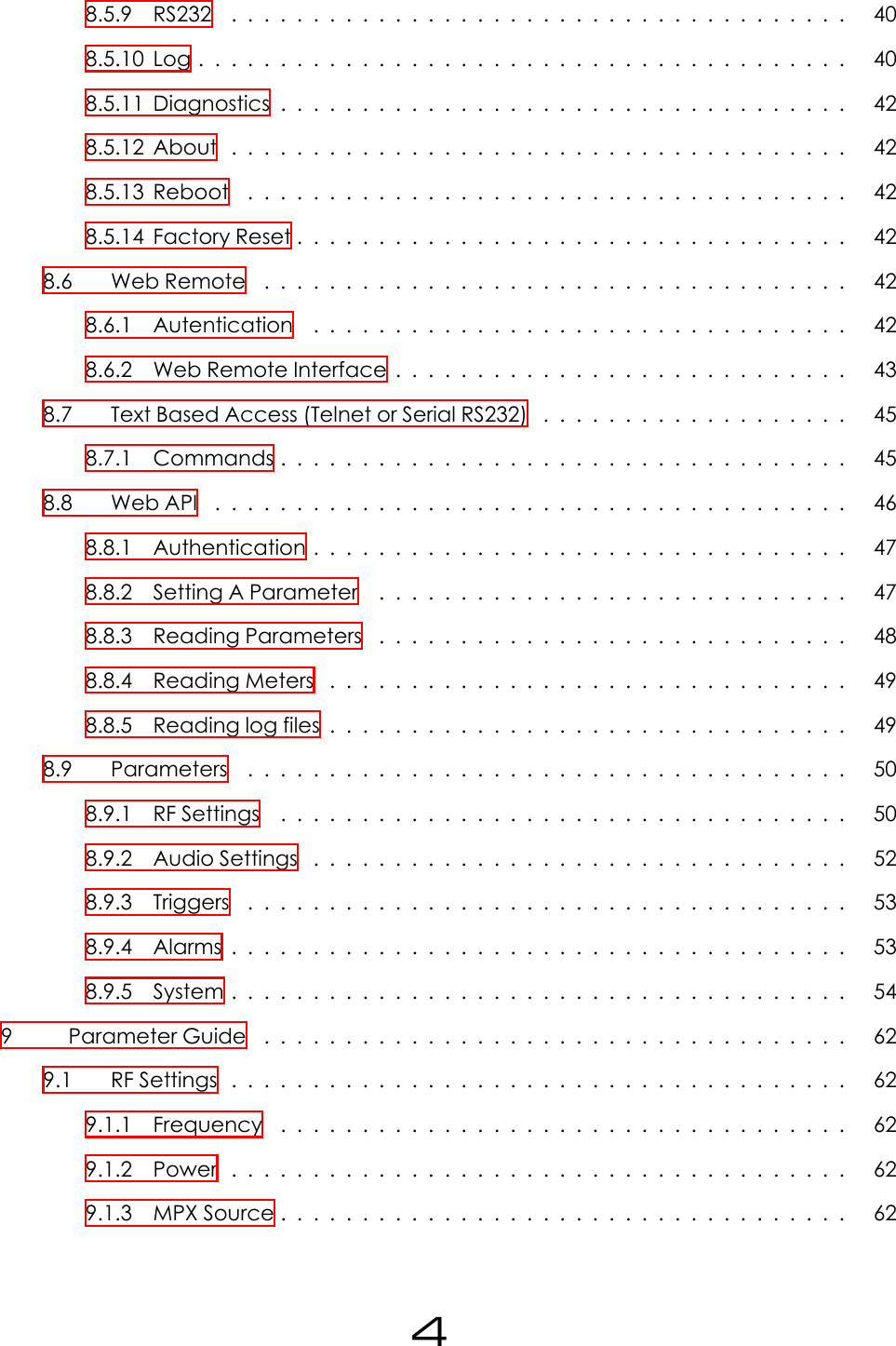
8.5.9 RS232 ...................................... 408.5.10Log........................................ 408.5.11Diagnostics................................... 428.5.12About ...................................... 428.5.13Reboot ..................................... 428.5.14FactoryReset.................................. 428.6 WebRemote .................................... 428.6.1 Autentication ................................. 428.6.2 Web Remote Interface . . . . . . . . . . . . . . . . . . . . . . . . . . . . 438.7 Text Based Access (Telnet or Serial RS232) . . . . . . . . . . . . . . . . . . . 458.7.1 Commands................................... 458.8 WebAPI ....................................... 468.8.1 Authentication................................. 478.8.2 SettingAParameter ............................. 478.8.3 ReadingParameters ............................. 488.8.4 ReadingMeters ................................ 498.8.5 Readinglogfiles................................ 498.9 Parameters ..................................... 508.9.1 RFSettings ................................... 508.9.2 AudioSettings ................................. 528.9.3 Triggers ..................................... 538.9.4 Alarms...................................... 538.9.5 System...................................... 549 ParameterGuide .................................... 629.1 RFSettings...................................... 629.1.1 Frequency ................................... 629.1.2 Power ...................................... 629.1.3 MPXSource................................... 624
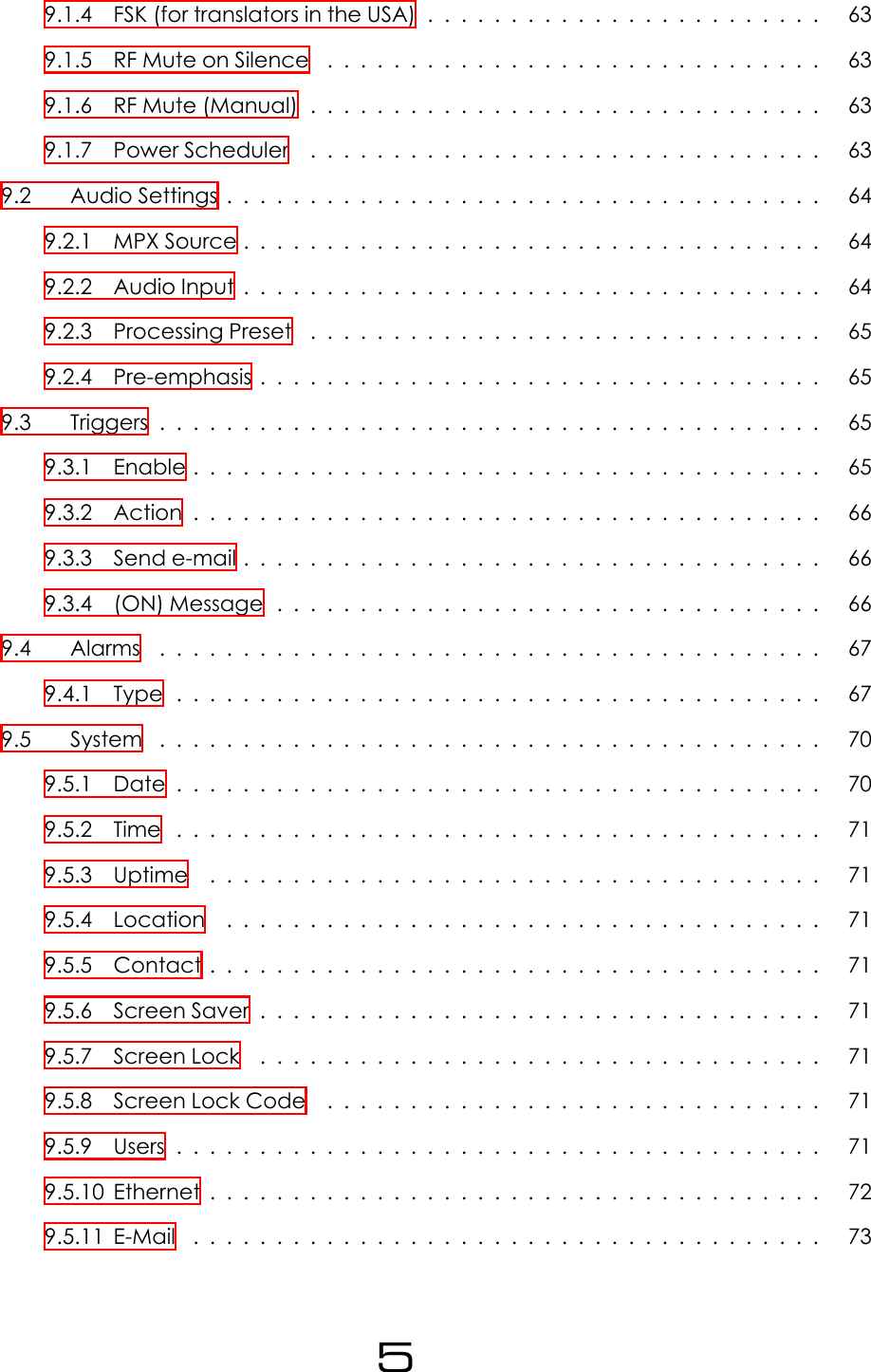
9.1.4 FSK (for translators in the USA) . . . . . . . . . . . . . . . . . . . . . . . . 639.1.5 RFMuteonSilence .............................. 639.1.6 RFMute(Manual)............................... 639.1.7 PowerScheduler ............................... 639.2 AudioSettings.................................... 649.2.1 MPXSource................................... 649.2.2 AudioInput................................... 649.2.3 ProcessingPreset ............................... 659.2.4 Pre-emphasis.................................. 659.3 Triggers........................................ 659.3.1 Enable...................................... 659.3.2 Action...................................... 669.3.3 Sende-mail................................... 669.3.4 (ON)Message................................. 669.4 Alarms ........................................ 679.4.1 Type....................................... 679.5 System ........................................ 709.5.1 Date....................................... 709.5.2 Time ....................................... 719.5.3 Uptime ..................................... 719.5.4 Location .................................... 719.5.5 Contact..................................... 719.5.6 ScreenSaver.................................. 719.5.7 ScreenLock .................................. 719.5.8 ScreenLockCode .............................. 719.5.9 Users....................................... 719.5.10Ethernet..................................... 729.5.11E-Mail ...................................... 735
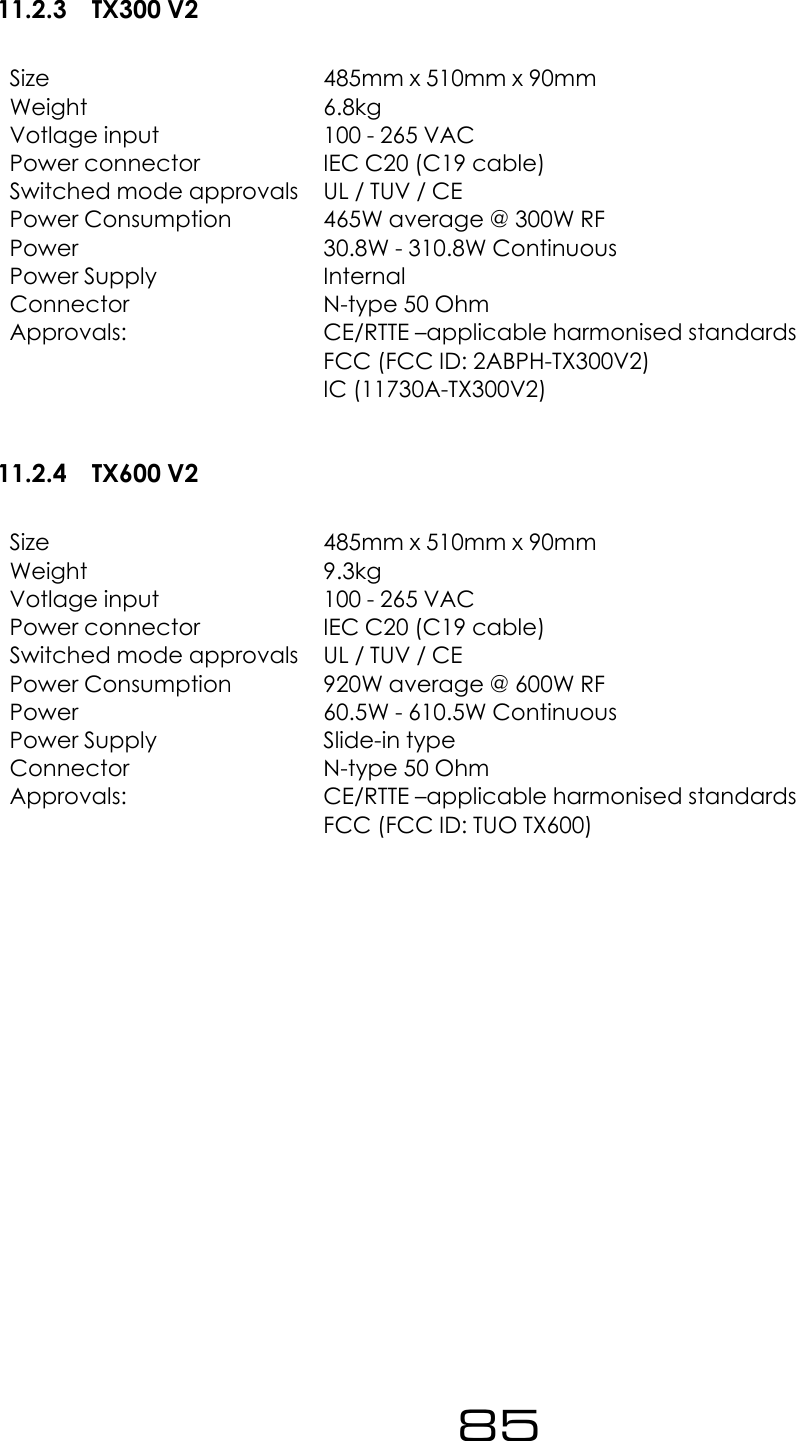
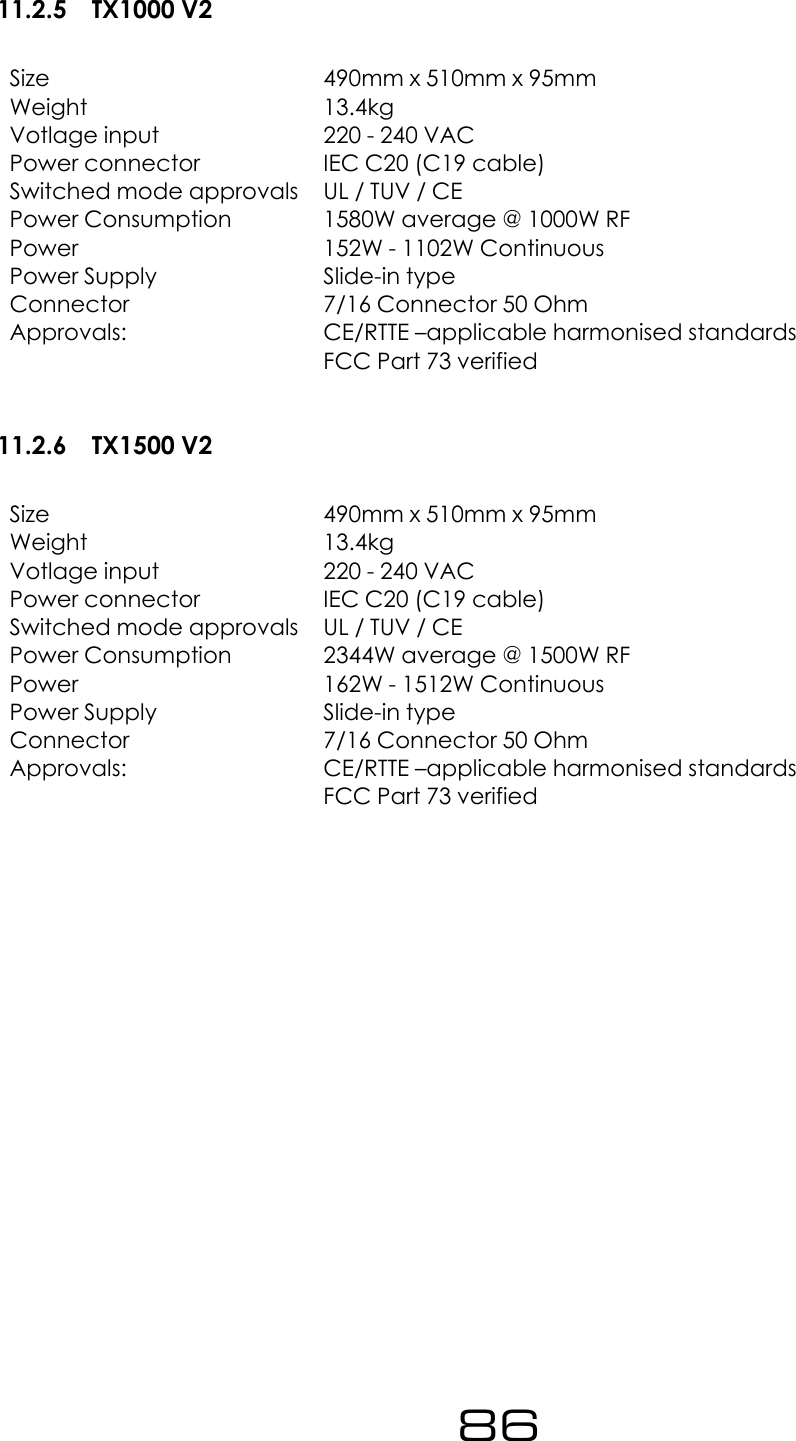
9.5.12HTTP ....................................... 749.5.13Telnet ...................................... 749.5.14RS232 ...................................... 759.5.15Log........................................ 759.5.16Diagnostics................................... 769.5.17About ...................................... 769.5.18Reboot ..................................... 779.5.19FactoryReset.................................. 77IV Troubleshooting 7810 V2 FM Transmitter Troubleshooting Guide . . . . . . . . . . . . . . . . . . . . . . 79V Technical Specifications 8111 TechnicalSpecifications ................................ 8211.1 Common Specifications . . . . . . . . . . . . . . . . . . . . . . . . . . . . . . 8211.1.1RF......................................... 8211.1.2AudioandMPXI/O .............................. 8211.1.3Stereo...................................... 8211.1.4Limiter...................................... 8311.1.5Other ...................................... 8311.1.6 Temperature Protection . . . . . . . . . . . . . . . . . . . . . . . . . . . 8311.1.7VSWRProtection................................ 8311.2 Model-Specific Specifications . . . . . . . . . . . . . . . . . . . . . . . . . . 8411.2.1TX5V2...................................... 8411.2.2TX50V2 ..................................... 8411.2.3TX300V2..................................... 8511.2.4TX600V2..................................... 856
11.2.5TX1000V2.................................... 8611.2.6TX1500V2.................................... 8611.2.7TX2500V2.................................... 877
Part IIntroduction8
1The TX-V2The BW Broadcast TX-V2 is the latest development in a high specification range of FM trans-mitters over 15 years in the making.Its broadband ”no-tune” design allows 87.5 - 108MHz operation without requiring tuning orcalibration. The inclusion of four-band DSPX audio processing means stations without a ded-icated processor sound great, right out of the box. Those who already have external pro-cessing benefit from BW Broadcast’s unique dual-loop virtual VFO exciter and field provenultra-low distortion modulator integrated into a great performing, highly stable FM transmis-sion system.Features such as slide-in power supplies, and unique solder-free Gold-Clamp transistors (onmost models) make in-field maintenance simple.A high resolution OLED screen displays RF, audio and system parameters. The control wheeland three front panel buttons allow easy navigation of the menus. Help tips for every param-eter make setup simple.Every TX-V2 Transmitter features a LAN connection for Ethernet local or remote control. TheLAN connection also supports SNMP, telnet, and email alerts via either SMTP or BW Broad-cast’s mail server. Where a LAN connection is not available, the RS232 connection can beused.Intelligent alarms and email alerts ensure busy engineers can manage their stations with min-imal intervention. A real time clock and comprehensive logging is available for those wholike to see more detailed status. Also present are 4 rear panel opto-isolated triggers that al-low external equipment to control the transmitter.It is advised that this manual is read to learn all of the advanced features of the TX-V2 Trans-mitter.9
2WarrantyPlease ensure the Warranty Registration process is completed upon receipt of this product.To do so go to www.bwbroadcast.com/warranty with your product’s serial number to hand.BW Broadcast warrants the mechanical and electronic components of this product to befree of defects in material and workmanship for a period of two (2) years* from the originaldate of purchase, in accordance with the warranty regulations described below. If the prod-uct shows any defects within the specified warranty period that are not due to normal wearand tear and/or improper handling by the user, BW Broadcast shall, at its sole discretion, ei-ther repair or replace the product. If the warranty claim proves to be justified, the product willbe returned to the user freight prepaid. Warranty claims other than those indicated aboveare expressly excluded.Return authorisation number: To obtain warranty service, the buyer (or his authorizeddealer) must contact BW Broadcast during normal business hours BEFORE returning the prod-uct. All inquiries must be accompanied by a description of the problem. BW Broadcast willthen issue a return authorization number. Subsequently, the product must be returned in itsoriginal shipping carton, together with the return authorization number to the address indi-cated by BW Broadcast. Shipments without freight prepaid will not be accepted.Warranty regulations: Any product deemed eligible for repair or replacement by BW Broad-cast under the terms of this warranty will be repaired or replaced within 30 days of receiptof the product at BW Broadcast. If the product needs to be modified or adapted in orderto comply with applicable technical or safety standards on a national or local level, in anycountry which is not the country for which the product was originally developed and man-ufactured, this modification/- adaptation shall not be considered a defect in materials orworkmanship. The warranty does not cover any such modification/adaptation, irrespectiveof whether it was carried out properly or not. Under the terms of this warranty, BW Broadcastshall not be held responsible for any cost resulting from such a modification/adaptation. Freeinspections and maintenance/repair work are expressly excluded from this warranty, in par-ticular, if caused by improper handling of the product by the user. This also applies to defectscaused by normal wear and tear, in particular, of faders, potentiometers, keys/buttons andsimilar parts. Damages/defects caused by the following conditions are not covered by thiswarranty: Misuse, neglect or failure to operate the unit in compliance with the instructionsgiven in BW Broadcast user or service manuals. Connection or operation of the unit in anyway that does not comply with the technical or safety regulations applicable in the countrywhere the product is used. Damages/defects caused by force majeure or any other con-dition that is beyond the control of BW Broadcast. Any repair or opening of the unit carriedout by unauthorized personnel (user included) will void the warranty. If an inspection of theproduct by BW Broadcast shows that the defect in question is not covered by the warranty,the inspection costs are payable by the customer. Products which do not meet the terms ofthis warranty will be repaired exclusively at the buyer’s expense. BW Broadcast will inform thebuyer of any such circumstance.10
Warranty transferability: This warranty is extended exclusively to the original buyer (cus-tomer of retail dealer) and is not transferable to anyone who may subsequently purchase thisproduct. No other person (retail dealer, etc.) shall be entitled to give any warranty promiseon behalf of BW Broadcast.Claims for damages: Failure of BW Broadcast to provide proper warranty service shall notentitle the buyer to claim (consequential) damages. In no event shall the liability of BWBroadcast exceed the invoiced value of the product.Other warranty rights and national law: This warranty does not exclude or limit the buyer’sstatutory rights provided by national law, in particular, any such rights against the seller thatarise from a legally effective purchase contract. The warranty regulations mentioned hereinare applicable unless they constitute an infringement of national warranty law.*Warranty period can be extended for an additional cost at point of purchase11
3IC WarningIC RSS-GENEnglish: Under Industry Canada regulations, this radio transmitter may only operate usingan antenna of a type and maximum (or lesser) gain approved for the transmitter by Indus-try Canada. To reduce potential radio interference to other users, the antenna type andits gain should be so chosen that the equivalent isotropically radiated power (e.i.r.p.) is notmore than that necessary for successful communication.This radio transmitter TX-V2 has been approved by Industry Canada to operate with theantenna types listed below with the maximum permissible gain and required antennaimpedance for each antenna type indicated. Antenna types not included in this list, hav-ing a gain greater than the maximum gain indicated for that type, are strictly prohibited foruse with this device. This FM transmitter is intended for use with a 50ohm antenna productdesigned for use in FM Broadcast. The use of this transmitter requires an Industry CanadaBroadcasting Certificate. The Transmitter and Antenna selection must comply with the spec-ification as outlined and approved in the application for the broadcaster’s Industry CanadaBroadcasting Certificate. In addition all antennas, masts, towers or other antenna supportingstructures are required tocomply with the terms of CPC-2-0-03 ─ Radiocommunication andBroadcasting Antenna Systems.Français: Conformément à la réglementation d’Industrie Canada, le présent émetteur ra-dio peut fonctionner avec une antenne d’un type et d’un gain maximal (ou inférieur) ap-prouvé pour l’émetteur par Industrie Canada. Dans le but de réduire les risques de brouillageradioélectrique à l’intention des autres utilisateurs, il faut choisir le type d’antenne et son gainde sorte que la puissance isotrope rayonnée quivalente (p.i.r.e.) ne dépassepas l’intensiténécessaire à l’établissement.Le présent émetteur radio TX-V2 a été approuvé par Industrie Canada pour fonctionneravec les types d’antenne énumérés ci-dessous et ayant un gain admissible maximal etl’impédance requise pour chaque type d’antenne. Les types d’antenne non inclus danscette liste, ou dont le gain est supérieur au gain maximal indiqué, sont strictement interditspour l’exploitation de l’émetteur. Cet émetteur FM est conçu pour une utilisation avec un50 ohms antenne produit conçu pour une utilisation en FM broadcast. L’utilisation de cetémetteur nécessite une industrie Canada Certificat de radiodiffusion. L’émetteur et sélec-tion de l’antenne doivent être conformes à la spécification comme indiqué et approuvédans l’application pour le radiodiffuseur Industrie Canada Certificat de radiodiffusion. Enoutre, toutes les antennes, les mâts, les tours ou antenne d’autres structures d’appui sonttenus de se conformer aux termes du CPC-2-0-03 ─ de radiocommunication et de radiod-iffusion systèmes d’antenne.12
IC RSS-102English: The TX-V2 is designed for professional operation of FM Radio Broadcast Transmitterand Antenna systems create a RF field that may be harmfull to humans. Health Canada hasoutlined exposure limits under Safety Code 6 and SAR guidelines. The compliance safe dis-tance from antenna will vary with power levels and antenna size. More information can beobtained on Safety Code 6 and SARhttp://www.hc-sc.gc.ca/ewh-semt/consult/_2014/safety_code_6-code_securite_6/final_finale-eng.phpInstallation and service of the transmission system should be completed by personnel trainedin the hazards of short-term and long term RF radiation.Français: Le TX-V2 est conçu pour utilisation professionnelle de diffusion radio FM Émetteuret systèmes d’antenne créer un champ RF qui peuvent être nuisibles pour les humains. SantéCanada a défini l’exposition limites sous Code de sécurité 6 SAR et lignes directrices. La con-formité distance de sécurité avec antenne varie en fonction de niveaux de puissance ettaille de l’antenne. Plus d’informations peuvent être obtenues sur Code de sécurité 6 et SAR.http://www.hc-sc.gc.ca/ewh-semt/consult/_2014/safety_code_6-code_securite_6/final_finale-eng.phpL’installation et l’entretien du système de transmission doit être complété par du personnelformé dans les risques à court terme et à long terme aux radiations.13
4SafetyMAINS VOLTAGE: TX5 V2 - TX600 V2 operate from an ACpower source between 110 and 240 V.TX1000 V2 - TX2500 V2 operate from a power source be-tween 220 and 240 V. WARNING: To avoid damage DONOT CONNECT TO 110V.These power supplies use a C19 plug. The wiring format is:Ground - GREEN/YELLOWNeutral - BLUELive - BROWNSWITCHED MODE POWER SUPPLY HAZARD Please note that the power supply units in thisequipment is of the switched mode variety and have lethal voltages present internally. Theswitched mode supplies are universal input fully approved type. They are non serviceablemodules and should be fully replaced should they fail.FUSES Only use fuses with the specified voltage and current ratings as stated on the backpanel. Failure to do so may increase the risk of equipment failure, shock and fire hazard.R.F. The N type R.F. power output socket contains R.F. voltages which may burn or presenta shock. Please make sure that the equipment is connected to an adequately rated load orantenna system while in operation.TOXIC HAZARD This equipment includes R.F. components that may contain Beryllium oxidewhich is a highly toxic substance that could be hazardous to health if inhaled or ingested.Care should be taken when replacing or discarding such devices. Seek expert advice fromthe manufacturer should you physically damage a device that contains Berillyium Oxide. Themain R.F. output power transistor contains Beryllium oxide.OTHER SAFETY CONSIDERATIONS Do not operate this equipment in the presence offlammable gases, fumes or liquids Do not expose this equipment to rain or water.14
CE CONFORMANCE This device complies with the re-quirements of the 1995/5/EC Radio and Telecommunica-tions Terminal Equipment (R&TTE). The equipment will meetor exceed the following standards: EN 60215:1996 (SafetyRequirements for Radio Transmitting Equipment), EN 301489-11 (ERM/EMC for Radio Equipment, Part 11 SpecificConditions for FM Transmitters), EN 302 018-2 ERM (Transmitting Equipment for FM RadioBroadcasting service)The operating frequencies of this transmitter may not be harmonised in the intended coun-tries of use. The user must obtain a license before using the product in the intended countryof use. Ensure respective country licensing requirements are complied with. Limitations of usecan apply in respect of operating frequency, transmitter power and/or channel spacing.FCC COMPLIANCE This device complies with part 15 of the FCC Rules. Operation is subjectto the condition that this device does not cause harmful interference.NOTE: BW BROADCAST IS NOT RESPONSIBLE FOR ANY CHANGES OR MODIFICATIONS NOT EX-PRESSLY APPROVED BY THE PARTY RESPONSIBLE FOR COMPLIANCE. SUCH MODIFICATIONSCOULD VOID THE USER’S AUTHORITY TO OPERATE THE EQUIPMENT.WEEE COMPLIANCE BW Broadcast Ltd is registered with NorthernCompliance PCS number WEE/P3438PR/ SCH and has been issuedwith WEE/FA0268RX as its unique producer ID by the appropriate en-vironment agency. BW Broadcast Ltd full comply with it explicit re-sponsibilities, subject to WEEE Collections Policy outlined in their Gen-eral Terms and conditions of Sale, when it sells Electrical and Elec-tronic Equipment (EEE) to B2B customers in the UK and EU.This appliance has been designed and manufactured with highquality materials and components that can be recycled and reused.Electronic appliances are liable to contain parts that are necessary inorder for the system to work properly but which can become a healthand environmental hazard if they are not handled and disposed of inthe proper way. Consequently, please do not throw your inoperativeappliance with the household waste. Having purchased this appliance it is your responsibilityto dispose of this equipment appropriately.CAUTION: To reduce the risk of electrical shock, do not remove the cover. No user service-able parts inside. refer servicing to qualified personnel.WARNING: To reduce the risk of fire or electrical shock, do not expose this appliance to rainor moisture.15
DETAILED SAFETY INSTRUCTIONS:All the safety and operation instructions should be read before the appliance is operated.Retain Instructions: The safety and operating instructions should be retained for future refer-ence.Heed Warnings: All warnings on the appliance and in the operating instructions should beadhered to.Follow instructions: All operation and user instructions should be followed.Water and Moisture: The appliance should not be used near water (e.g. near a bathtub,washbowl, kitchen sink, laundry tub, in a wet basement, or near a swimming pool etc.).The appliance should not be exposed to dripping or splashing and objects filled with liquidsshould not be placed on the appliance.Ventilation: The appliance should be situated so that its location or position does not inter-fere with its proper ventilation. For example, the appliance should not be situated on a bed,sofa rug, or similar surface that may block the ventilation openings, or placed in a built-in in-stallation, such as a bookcase or cabinet that may impede the flow of air through the venti-lation openings.Heat: The appliance should be situated away from heat sources such as radiators, heatregisters, stoves, or other appliance (including amplifiers) that produce heat.Power Source: The appliance should be connected to a power supply only of the type de-scribed in the operating instructions or as marked on the appliance.Grounding or Polarization: Precautions should be taken so that the grounding or polariza-tion means of an appliance is not defeated.Power-Cord Protection: Power supply cords should be routed so that they are not likely tobe walked on or pinched by items placed upon or against them, paying particular attentionto cords and plugs, convenience receptacles and the point where they exit from the appli-ance.Cleaning: The appliance should be cleaned only as recommended by the manufacturer.16
Non-use Periods: The power cord of the appliance should be unplugged from the outletwhen left unused for a long period of time.Object and Liquid Entry: Care should be taken so that objects do not fall and liquids are notspilled into the enclosure through openings.Damage Requiring Service: The appliance should be serviced by qualified service person-nel when:•The power supply cord or the plug has been damaged; or•Objects have fallen, or liquid has been spilled into the appliance; or•The appliance has been exposed to rain; or•The appliance does not appear to operate normally or exhibits a marked change inperformance; or•The appliance has been dropped, or the enclosure damaged.Servicing: The user should not attempt to service the appliance beyond that is described inthe Operating Instructions. All other servicing should be referred to qualified service person-nel.17
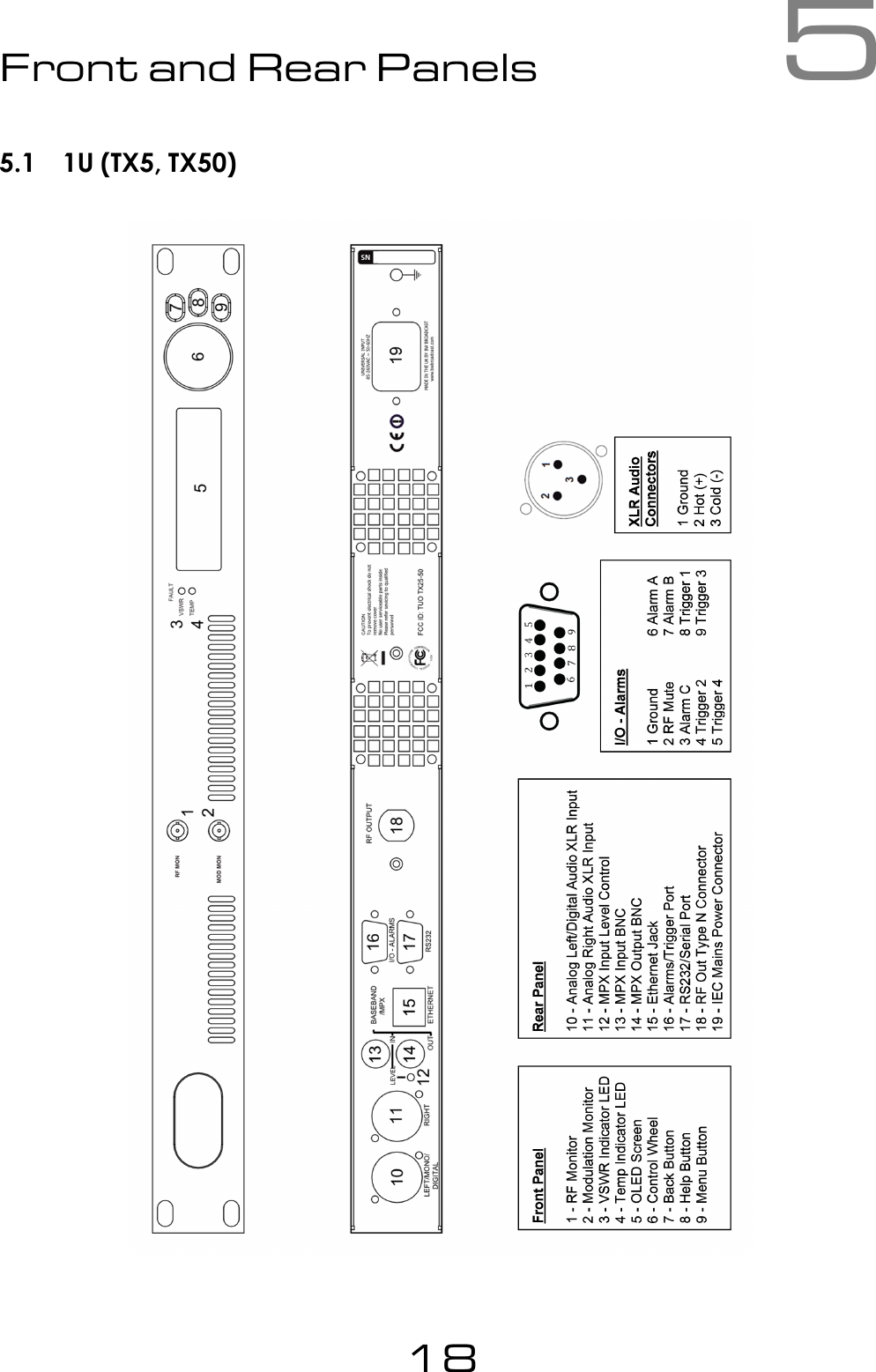
5Front and Rear Panels5.1 1U (TX5, TX50)18
5.2 2U (TX300, TX600)19
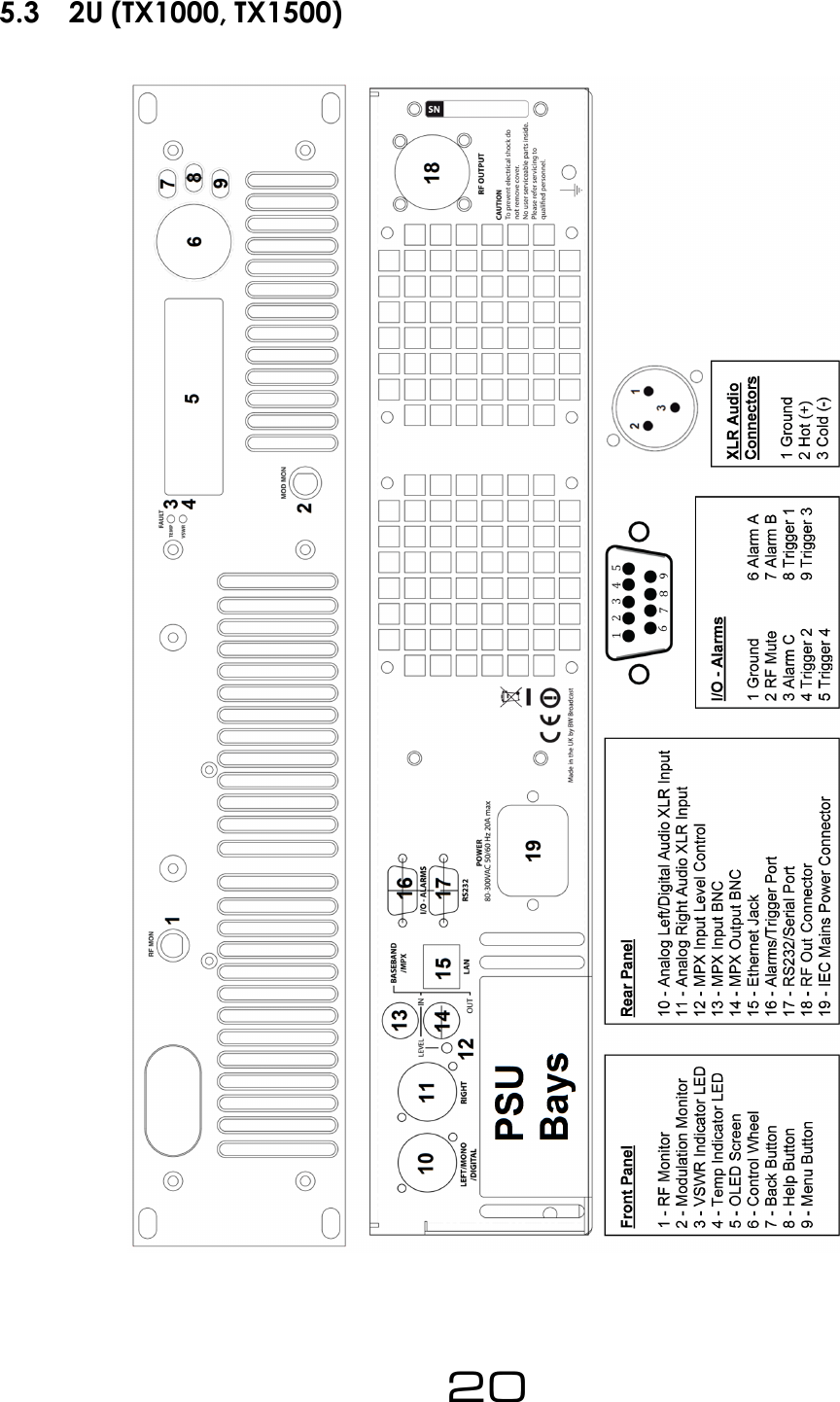
5.3 2U (TX1000, TX1500)20
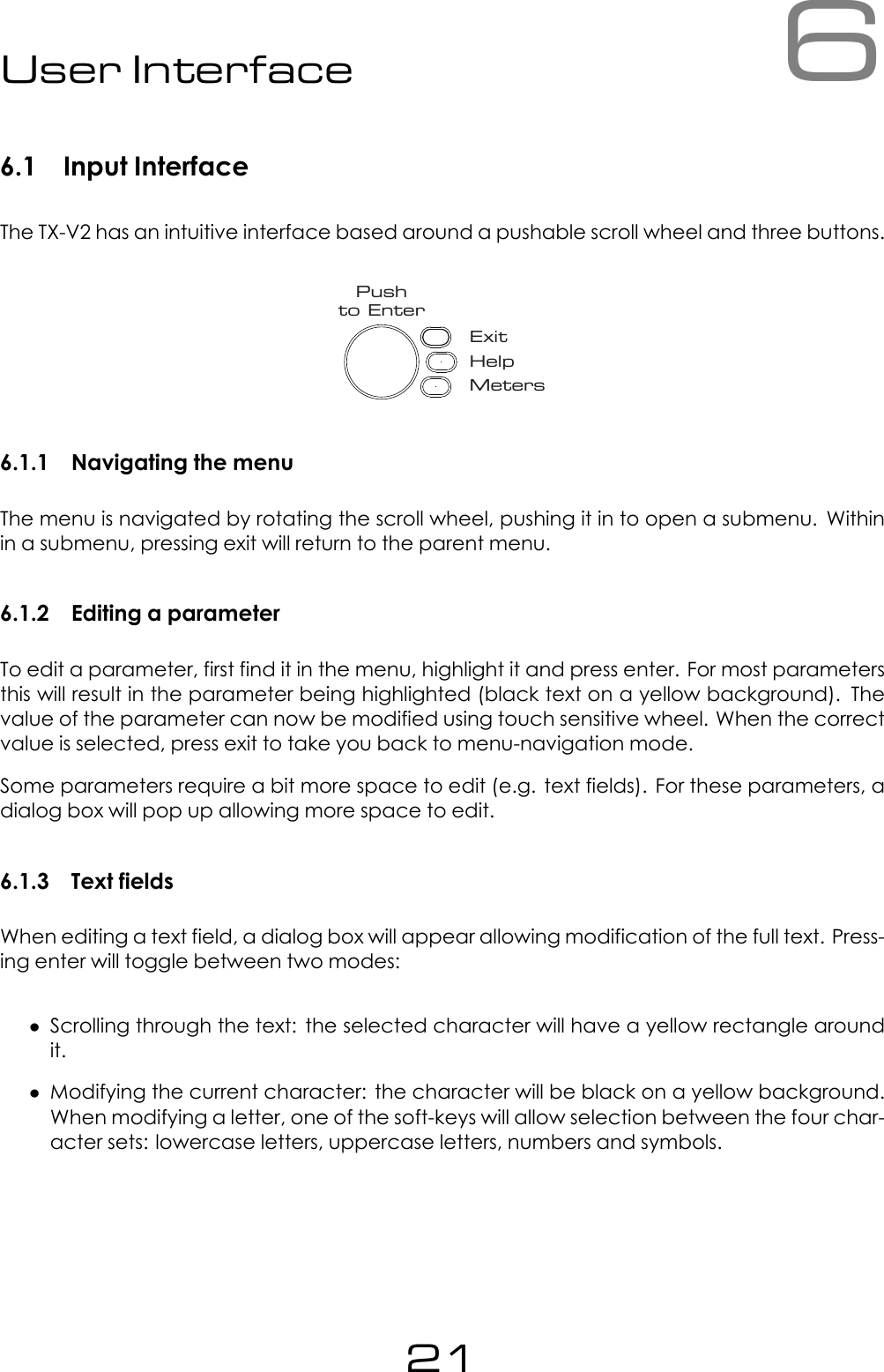
6User Interface6.1 Input InterfaceThe TX-V2 has an intuitive interface based around a pushable scroll wheel and three buttons.ExitHelpMetersPushto Enter6.1.1 Navigating the menuThe menu is navigated by rotating the scroll wheel, pushing it in to open a submenu. Withinin a submenu, pressing exit will return to the parent menu.6.1.2 Editing a parameterTo edit a parameter, first find it in the menu, highlight it and press enter. For most parametersthis will result in the parameter being highlighted (black text on a yellow background). Thevalue of the parameter can now be modified using touch sensitive wheel. When the correctvalue is selected, press exit to take you back to menu-navigation mode.Some parameters require a bit more space to edit (e.g. text fields). For these parameters, adialog box will pop up allowing more space to edit.6.1.3 Text fieldsWhen editing a text field, a dialog box will appear allowing modification of the full text. Press-ing enter will toggle between two modes:•Scrolling through the text: the selected character will have a yellow rectangle aroundit.•Modifying the current character: the character will be black on a yellow background.When modifying a letter, one of the soft-keys will allow selection between the four char-acter sets: lowercase letters, uppercase letters, numbers and symbols.21
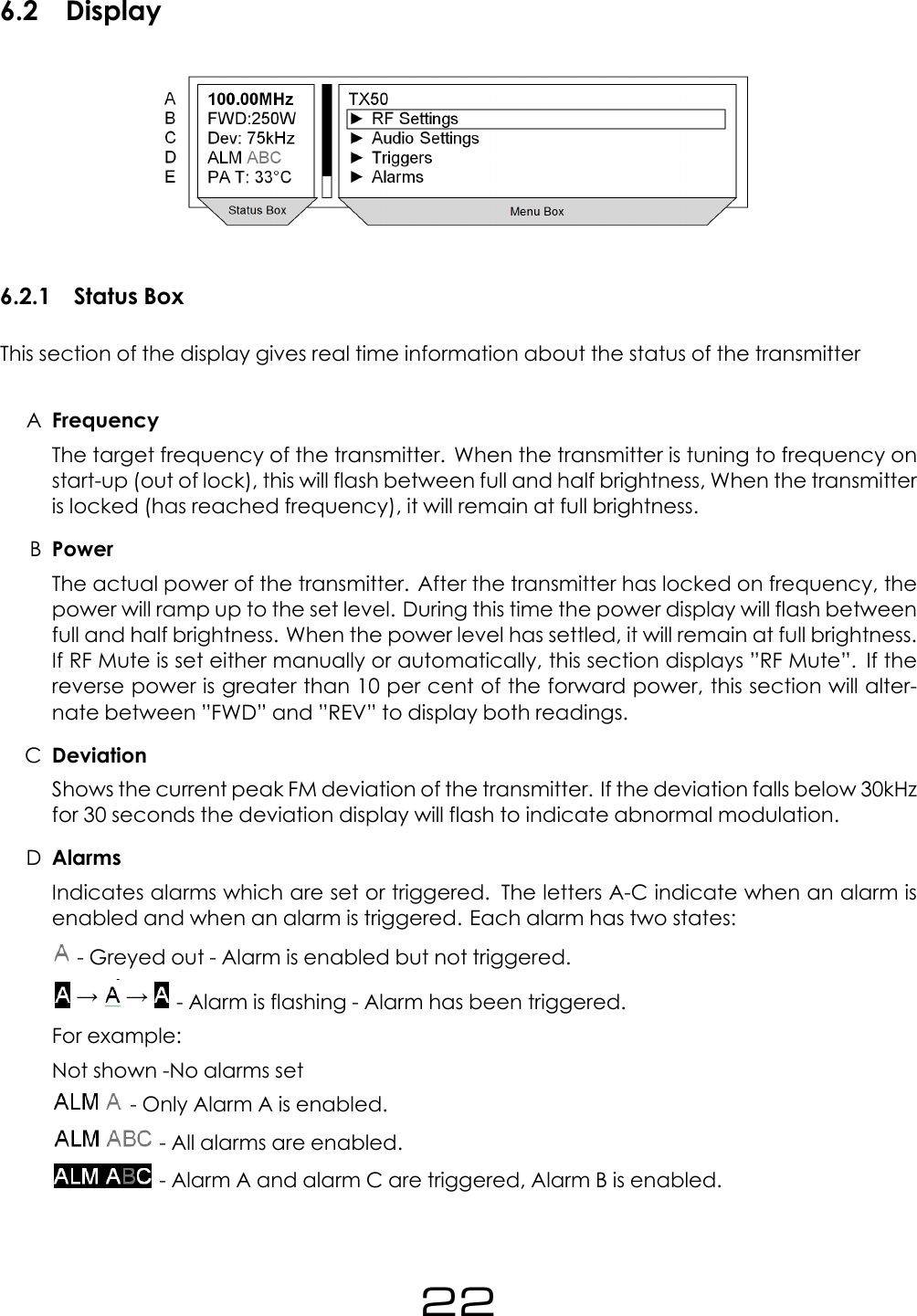
6.2 Display6.2.1 Status BoxThis section of the display gives real time information about the status of the transmitterAFrequencyThe target frequency of the transmitter. When the transmitter is tuning to frequency onstart-up (out of lock), this will flash between full and half brightness, When the transmitteris locked (has reached frequency), it will remain at full brightness.BPowerThe actual power of the transmitter. After the transmitter has locked on frequency, thepower will ramp up to the set level. During this time the power display will flash betweenfull and half brightness. When the power level has settled, it will remain at full brightness.If RF Mute is set either manually or automatically, this section displays ”RF Mute”. If thereverse power is greater than 10 per cent of the forward power, this section will alter-nate between ”FWD” and ”REV” to display both readings.CDeviationShows the current peak FM deviation of the transmitter. If the deviation falls below 30kHzfor 30 seconds the deviation display will flash to indicate abnormal modulation.DAlarmsIndicates alarms which are set or triggered. The letters A-C indicate when an alarm isenabled and when an alarm is triggered. Each alarm has two states:- Greyed out - Alarm is enabled but not triggered.- Alarm is flashing - Alarm has been triggered.For example:Not shown -No alarms set- Only Alarm A is enabled.- All alarms are enabled.- Alarm A and alarm C are triggered, Alarm B is enabled.22
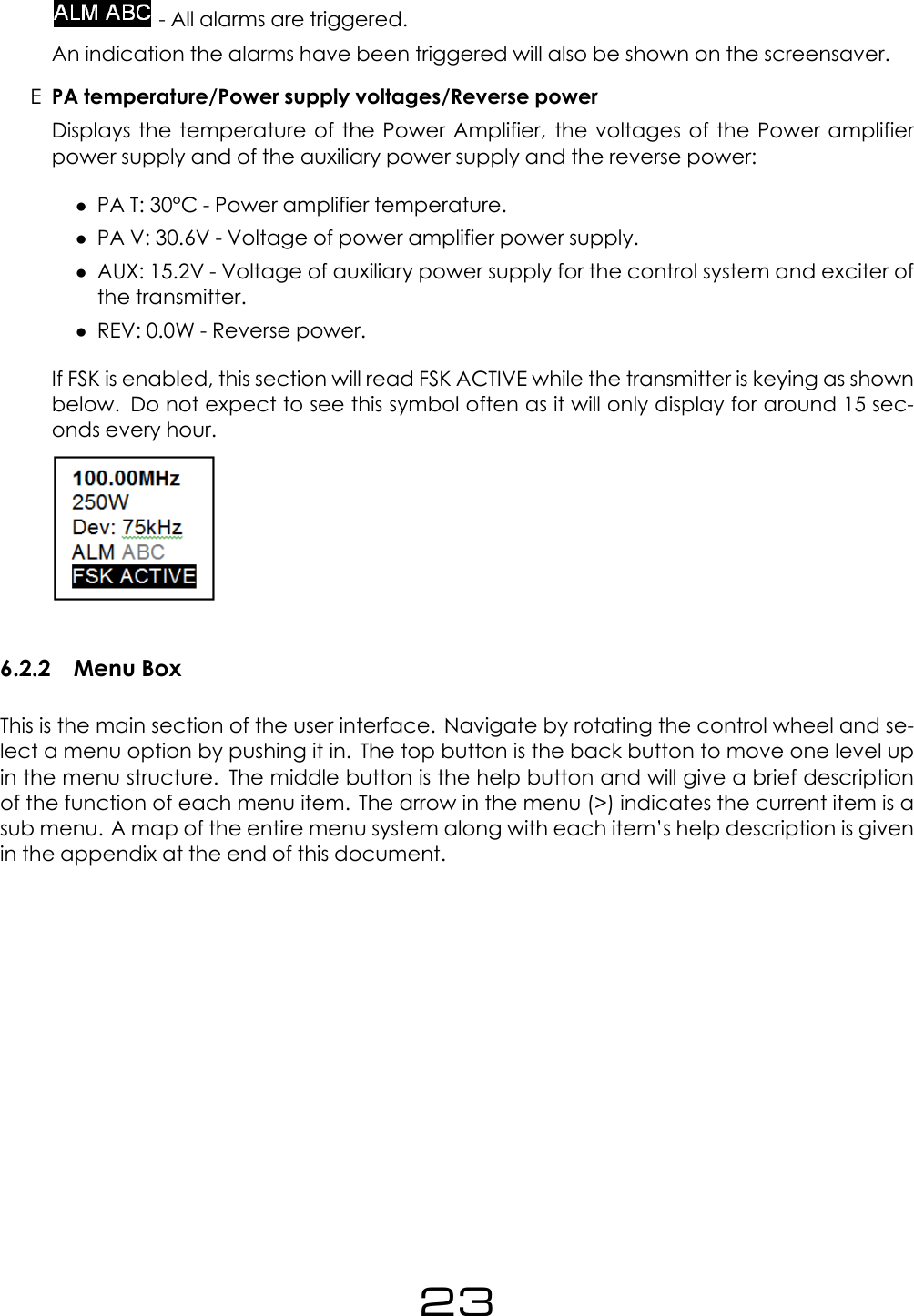
- All alarms are triggered.An indication the alarms have been triggered will also be shown on the screensaver.EPA temperature/Power supply voltages/Reverse powerDisplays the temperature of the Power Amplifier, the voltages of the Power amplifierpower supply and of the auxiliary power supply and the reverse power:•PA T: 30°C - Power amplifier temperature.•PA V: 30.6V - Voltage of power amplifier power supply.•AUX: 15.2V - Voltage of auxiliary power supply for the control system and exciter ofthe transmitter.•REV: 0.0W - Reverse power.If FSK is enabled, this section will read FSK ACTIVE while the transmitter is keying as shownbelow. Do not expect to see this symbol often as it will only display for around 15 sec-onds every hour.6.2.2 Menu BoxThis is the main section of the user interface. Navigate by rotating the control wheel and se-lect a menu option by pushing it in. The top button is the back button to move one level upin the menu structure. The middle button is the help button and will give a brief descriptionof the function of each menu item. The arrow in the menu (>) indicates the current item is asub menu. A map of the entire menu system along with each item’s help description is givenin the appendix at the end of this document.23
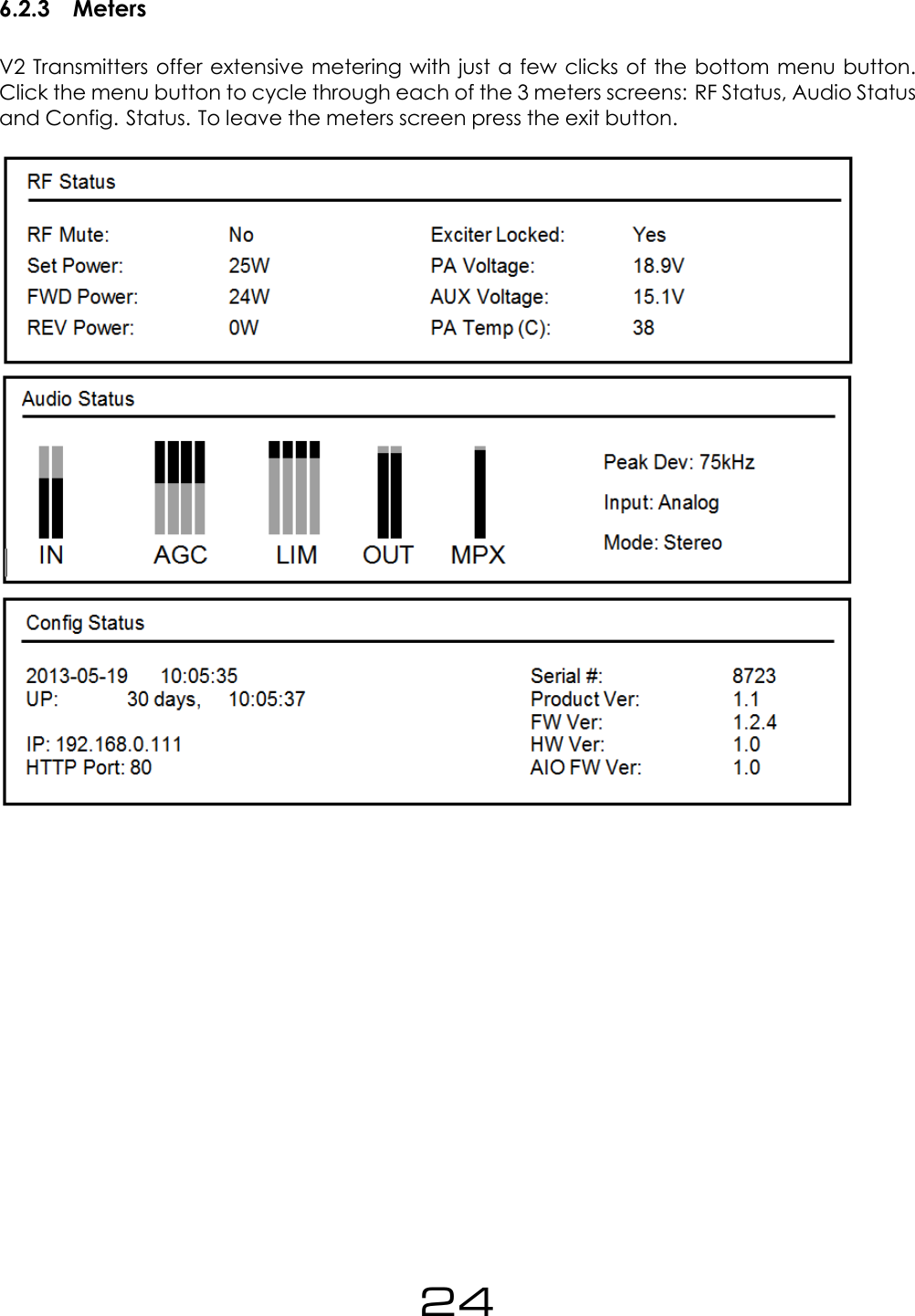
6.2.3 MetersV2 Transmitters offer extensive metering with just a few clicks of the bottom menu button.Click the menu button to cycle through each of the 3 meters screens: RF Status, Audio Statusand Config. Status. To leave the meters screen press the exit button.24
Part IIInitial Setup and connections25
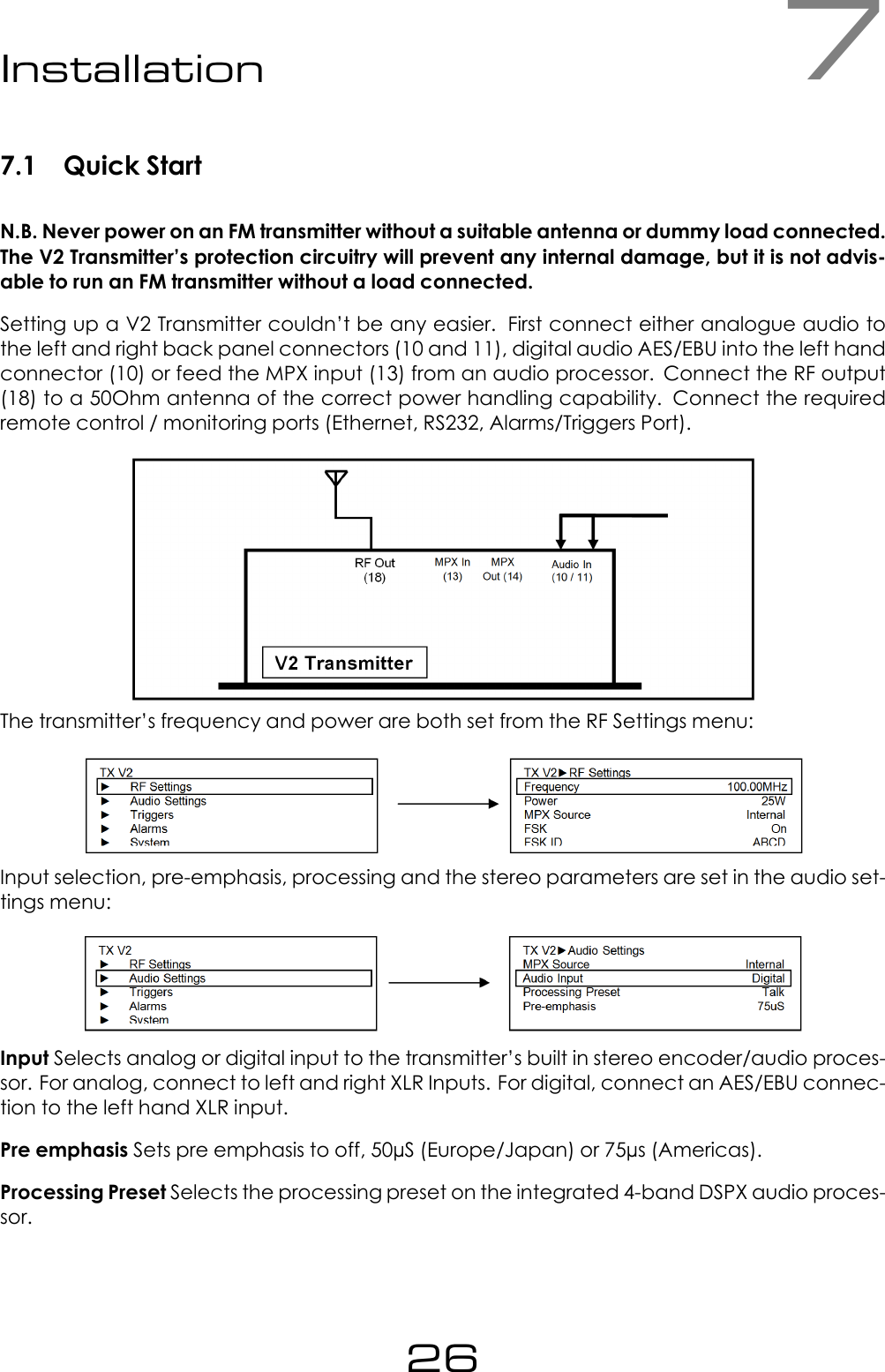
7Installation7.1 Quick StartN.B. Never power on an FM transmitter without a suitable antenna or dummy load connected.The V2 Transmitter’s protection circuitry will prevent any internal damage, but it is not advis-able to run an FM transmitter without a load connected.Setting up a V2 Transmitter couldn’t be any easier. First connect either analogue audio tothe left and right back panel connectors (10 and 11), digital audio AES/EBU into the left handconnector (10) or feed the MPX input (13) from an audio processor. Connect the RF output(18) to a 50Ohm antenna of the correct power handling capability. Connect the requiredremote control / monitoring ports (Ethernet, RS232, Alarms/Triggers Port).The transmitter’s frequency and power are both set from the RF Settings menu:Input selection, pre-emphasis, processing and the stereo parameters are set in the audio set-tings menu:Input Selects analog or digital input to the transmitter’s built in stereo encoder/audio proces-sor. For analog, connect to left and right XLR Inputs. For digital, connect an AES/EBU connec-tion to the left hand XLR input.Pre emphasis Sets pre emphasis to off, 50µS (Europe/Japan) or 75µs (Americas).Processing Preset Selects the processing preset on the integrated 4-band DSPX audio proces-sor.26
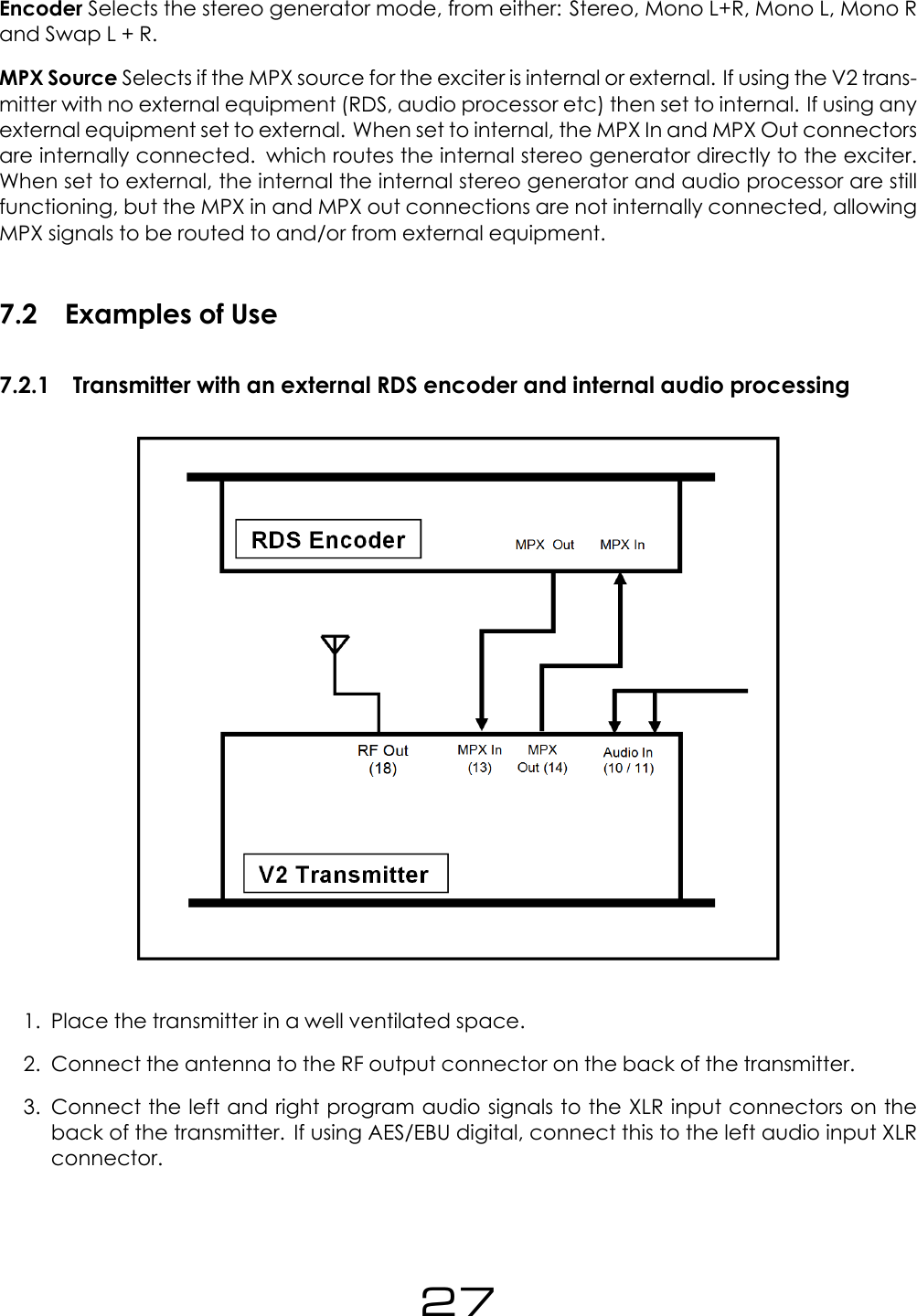
Encoder Selects the stereo generator mode, from either: Stereo, Mono L+R, Mono L, Mono Rand Swap L + R.MPX Source Selects if the MPX source for the exciter is internal or external. If using the V2 trans-mitter with no external equipment (RDS, audio processor etc) then set to internal. If using anyexternal equipment set to external. When set to internal, the MPX In and MPX Out connectorsare internally connected. which routes the internal stereo generator directly to the exciter.When set to external, the internal the internal stereo generator and audio processor are stillfunctioning, but the MPX in and MPX out connections are not internally connected, allowingMPX signals to be routed to and/or from external equipment.7.2 Examples of Use7.2.1 Transmitter with an external RDS encoder and internal audio processing1. Place the transmitter in a well ventilated space.2. Connect the antenna to the RF output connector on the back of the transmitter.3. Connect the left and right program audio signals to the XLR input connectors on theback of the transmitter. If using AES/EBU digital, connect this to the left audio input XLRconnector.27
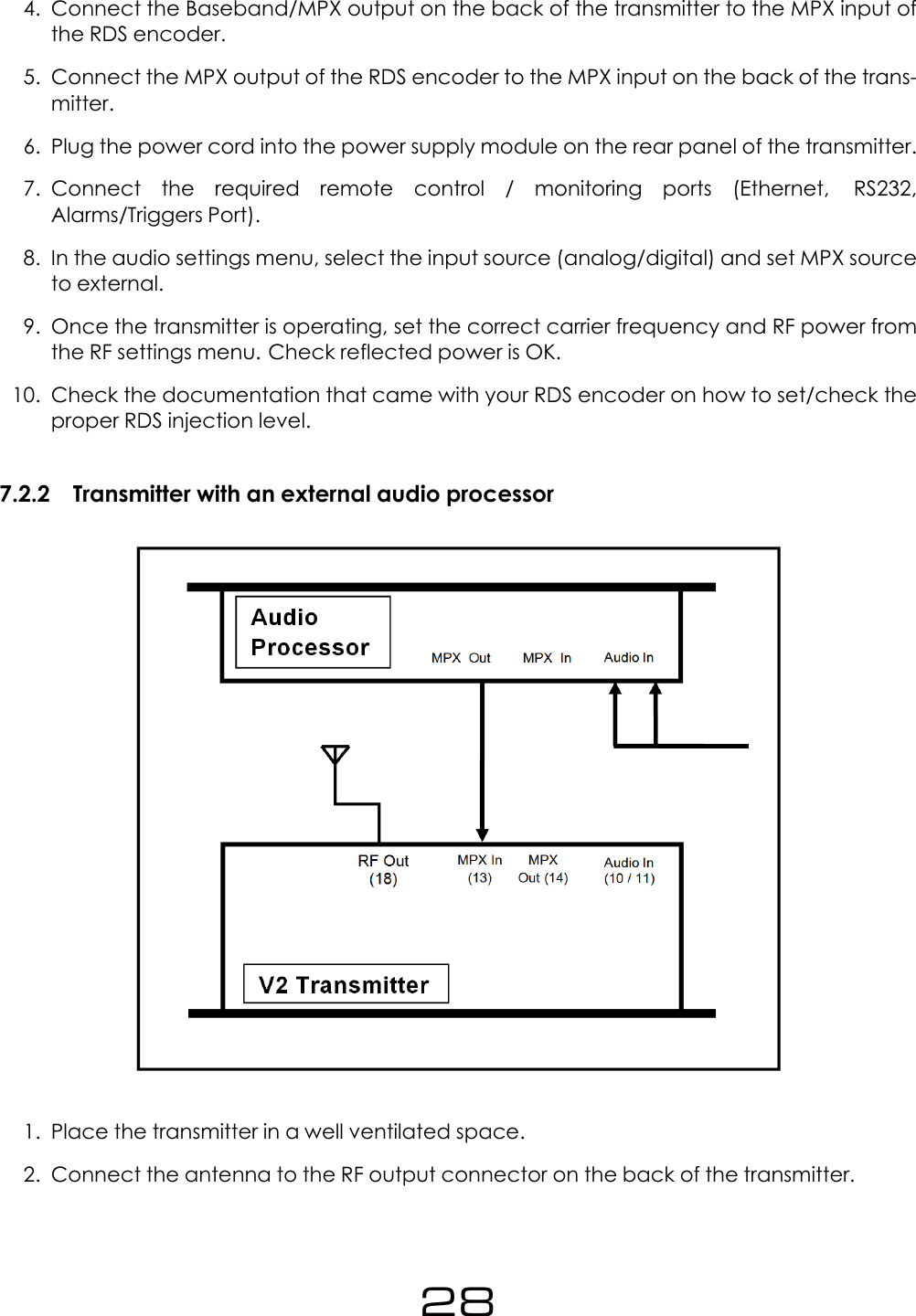
4. Connect the Baseband/MPX output on the back of the transmitter to the MPX input ofthe RDS encoder.5. Connect the MPX output of the RDS encoder to the MPX input on the back of the trans-mitter.6. Plug the power cord into the power supply module on the rear panel of the transmitter.7. Connect the required remote control / monitoring ports (Ethernet, RS232,Alarms/Triggers Port).8. In the audio settings menu, select the input source (analog/digital) and set MPX sourceto external.9. Once the transmitter is operating, set the correct carrier frequency and RF power fromthe RF settings menu. Check reflected power is OK.10. Check the documentation that came with your RDS encoder on how to set/check theproper RDS injection level.7.2.2 Transmitter with an external audio processor1. Place the transmitter in a well ventilated space.2. Connect the antenna to the RF output connector on the back of the transmitter.28
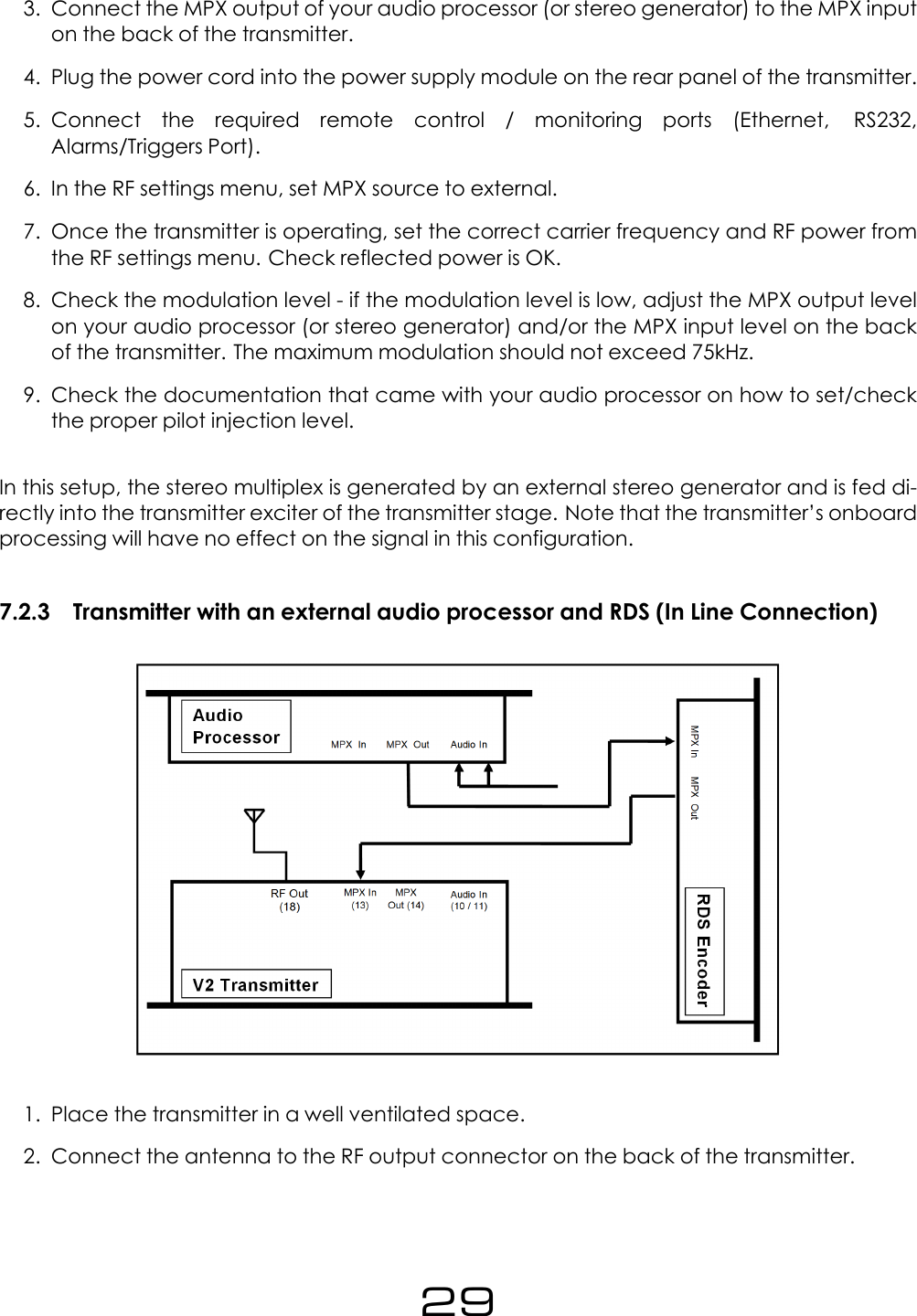
3. Connect the MPX output of your audio processor (or stereo generator) to the MPX inputon the back of the transmitter.4. Plug the power cord into the power supply module on the rear panel of the transmitter.5. Connect the required remote control / monitoring ports (Ethernet, RS232,Alarms/Triggers Port).6. In the RF settings menu, set MPX source to external.7. Once the transmitter is operating, set the correct carrier frequency and RF power fromthe RF settings menu. Check reflected power is OK.8. Check the modulation level - if the modulation level is low, adjust the MPX output levelon your audio processor (or stereo generator) and/or the MPX input level on the backof the transmitter. The maximum modulation should not exceed 75kHz.9. Check the documentation that came with your audio processor on how to set/checkthe proper pilot injection level.In this setup, the stereo multiplex is generated by an external stereo generator and is fed di-rectly into the transmitter exciter of the transmitter stage. Note that the transmitter’s onboardprocessing will have no effect on the signal in this configuration.7.2.3 Transmitter with an external audio processor and RDS (In Line Connection)1. Place the transmitter in a well ventilated space.2. Connect the antenna to the RF output connector on the back of the transmitter.29
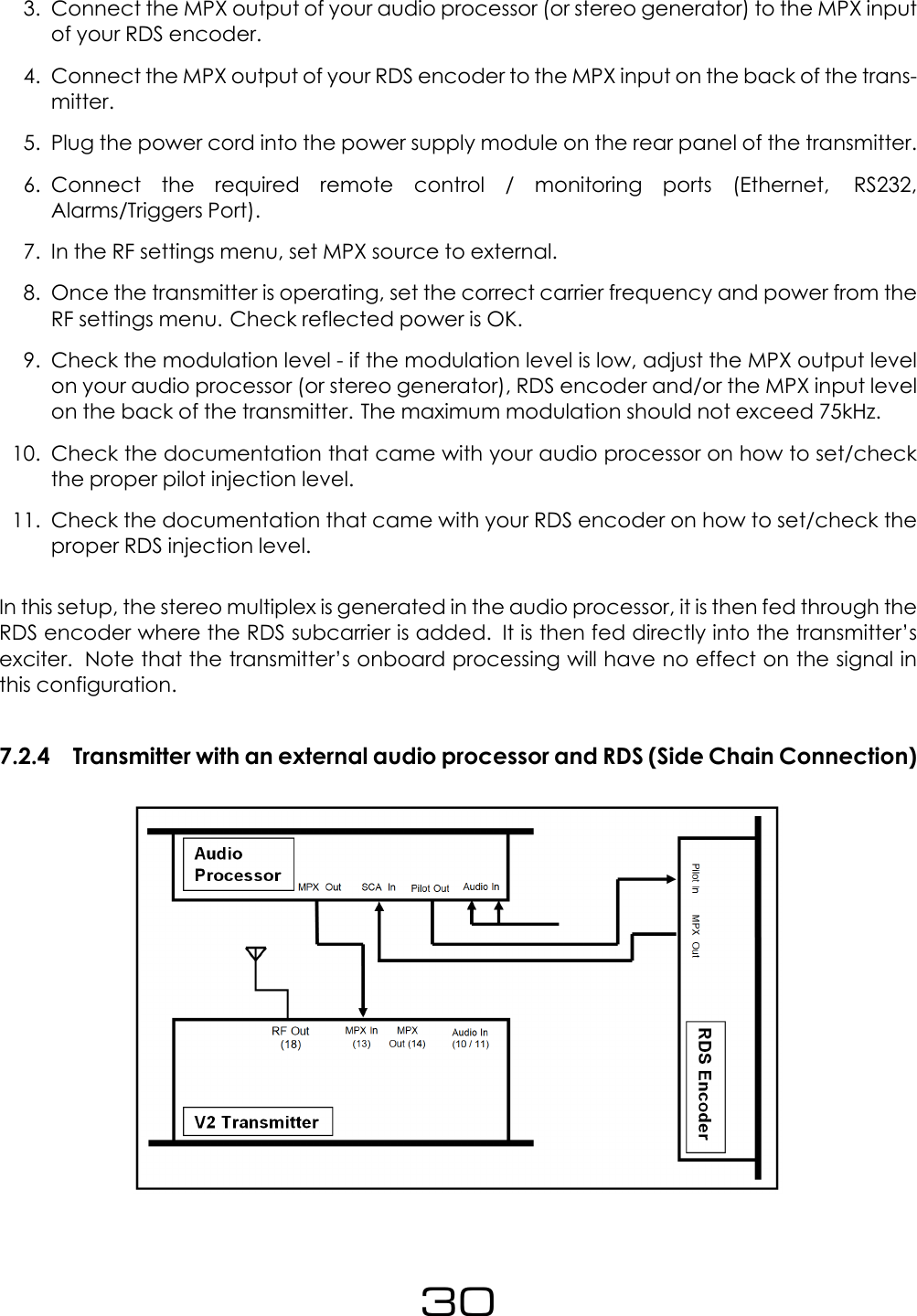
3. Connect the MPX output of your audio processor (or stereo generator) to the MPX inputof your RDS encoder.4. Connect the MPX output of your RDS encoder to the MPX input on the back of the trans-mitter.5. Plug the power cord into the power supply module on the rear panel of the transmitter.6. Connect the required remote control / monitoring ports (Ethernet, RS232,Alarms/Triggers Port).7. In the RF settings menu, set MPX source to external.8. Once the transmitter is operating, set the correct carrier frequency and power from theRF settings menu. Check reflected power is OK.9. Check the modulation level - if the modulation level is low, adjust the MPX output levelon your audio processor (or stereo generator), RDS encoder and/or the MPX input levelon the back of the transmitter. The maximum modulation should not exceed 75kHz.10. Check the documentation that came with your audio processor on how to set/checkthe proper pilot injection level.11. Check the documentation that came with your RDS encoder on how to set/check theproper RDS injection level.In this setup, the stereo multiplex is generated in the audio processor, it is then fed through theRDS encoder where the RDS subcarrier is added. It is then fed directly into the transmitter’sexciter. Note that the transmitter’s onboard processing will have no effect on the signal inthis configuration.7.2.4 Transmitter with an external audio processor and RDS (Side Chain Connection)30
1. Place the transmitter in a well ventilated space2. Connect the antenna to the RF output connector on the back of the transmitter.3. Connect the MPX output of your audio processor (or stereo generator) to the MPX inputon the back of the transmitter.4. Connect the Pilot output of your audio processor (or stereo generator) to the pi-lot/reference input on your RDS encoder.5. Connect the MPX output of your RDS encoder to the SCA input on your audio processor.6. Plug the power cord into the power supply module on the rear panel of the transmitter.7. Connect the required remote control / monitoring ports (Ethernet, RS232,Alarms/Triggers Port).8. Once the transmitter is operating, set the correct carrier frequency and power from theRF settings menu. Check reflected power is OK.9. In the RF settings menu, set MPX source to external.10. Check the modulation level - if the modulation level is low, adjust the MPX output levelon your audio processor (or stereo generator) and/or the MPX input level on the backof the transmitter. The maximum modulation should not exceed 75kHz.11. Check the documentation that came with your audio processor on how to set/checkthe proper pilot injection level.12. Check the documentation that came with your RDS encoder on how to set/check theproper RDS injection level.In this setup, the audio stereo multiplex is generated in the audio processor. The RDS data isfed into the audio processor where it is combined with the audio multiplex. This combinedsignal is fed directly into the transmitter exciter. Note that the transmitter’s onboard process-ing will have no effect on the signal in this configuration. This is the best connection in termsof pilot and RDS subcarrier phase synchronization and MPX spectrum cleanliness.31
Part IIISystem Configuration32
8Operation Guide8.1 RF SettingsN.B. Never power on an FM transmitter without a suitable antenna or dummy load con-nected. The V2 Transmitter’s protection circuitry will prevent any internal damage, but it isnot advisable to run an FM transmitter without a load connected.8.1.1 Basic Setup1. Select the required Frequency. Note that the frequency displayed on the Status box willflash for a few seconds, indicating that the system is out of lock and hast not reachedthe frequency. Once locked, the value will become steady.2. Select the required Power. The system will take some time to ramp the power to the se-lected value. During this time, the value displayed in the Status box will flash.3. Set the MPX Source parameter. This selects the source for the exciter. Select Internal ifthe analog/digital inputs are used. (which are connected to the built-in audio proces-sor) or External if the transmitter is used with an external audio source connected to itsMPX BNC input.4. Select whether you require the unit to send the FSK ID every hour. If enabled, enter theFSK ID.5. If the unit is required to mute the RF output on silence detection, then select set RF Muteon Silence to the amount of time after which the transmitter’s output will be muted if thetransmitter is transmitting silence. (Note that the unit understands silence as a signal thatproduces less than 30 kHz modulation. Look at the Deviation meter ”DEV:” on the statusbox).6. RF Mute (Manual) must be switched to off (once the unit is set-up) to begin transmission.8.1.2 Power SchedulerThis feature will switch the output power of the unit to an alternate value set at Power Sched-uler ⇒Power during the selected time interval. This feature is intended to allow users to lowerthe power of their transmission at night time to reduce power consumption and avoid in-creasing the range of the transmission due to the change in atmospheric conditions.In order to setup the feature:1. In Power, select the power that the unit will use during the scheduled interval2. Select the Start Time at which the unit will switch to the alternate scheduled power.33
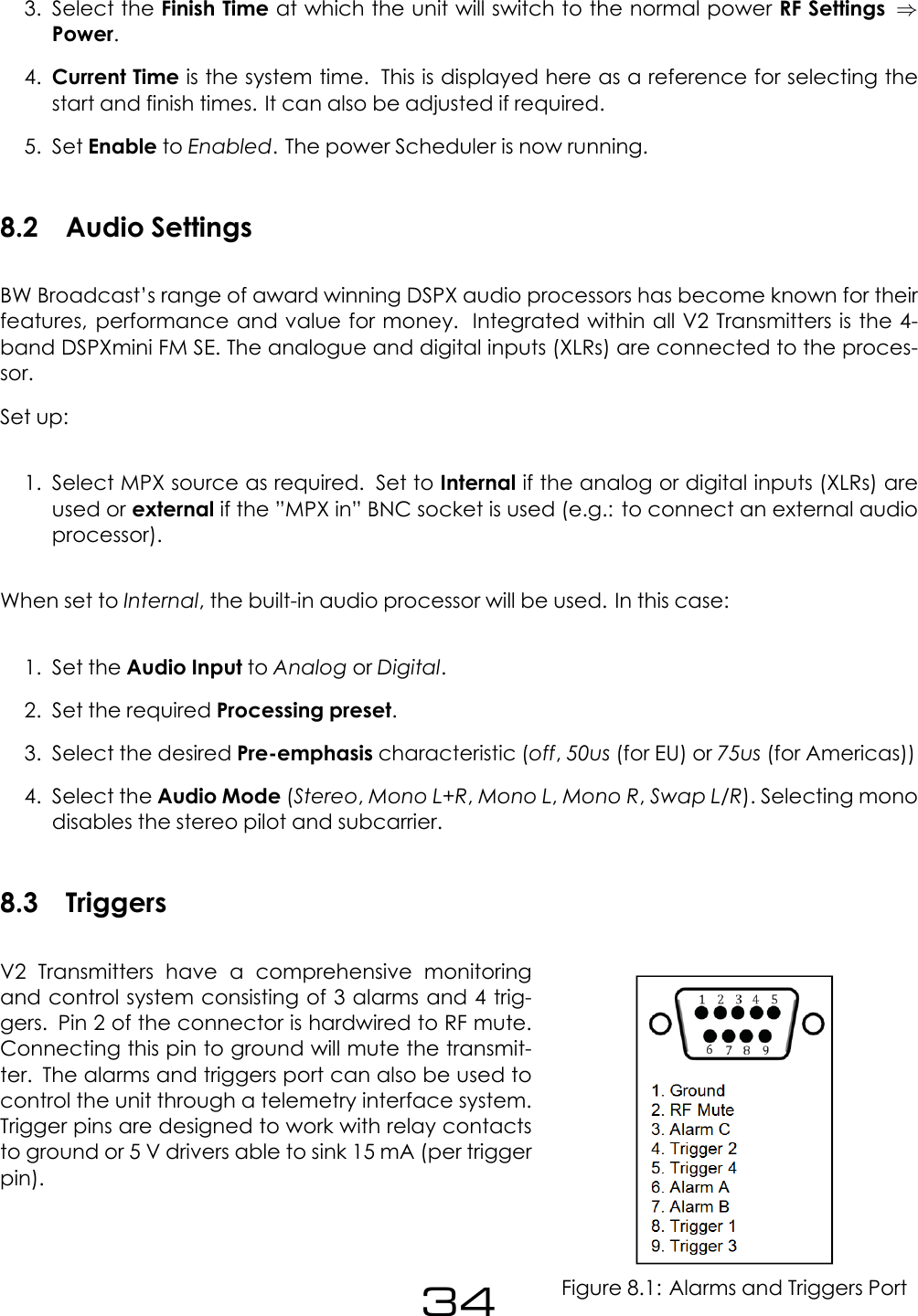
3. Select the Finish Time at which the unit will switch to the normal power RF Settings ⇒Power.4. Current Time is the system time. This is displayed here as a reference for selecting thestart and finish times. It can also be adjusted if required.5. Set Enable to Enabled. The power Scheduler is now running.8.2 Audio SettingsBW Broadcast’s range of award winning DSPX audio processors has become known for theirfeatures, performance and value for money. Integrated within all V2 Transmitters is the 4-band DSPXmini FM SE. The analogue and digital inputs (XLRs) are connected to the proces-sor.Set up:1. Select MPX source as required. Set to Internal if the analog or digital inputs (XLRs) areused or external if the ”MPX in” BNC socket is used (e.g.: to connect an external audioprocessor).When set to Internal, the built-in audio processor will be used. In this case:1. Set the Audio Input to Analog or Digital.2. Set the required Processing preset.3. Select the desired Pre-emphasis characteristic (off,50us (for EU) or 75us (for Americas))4. Select the Audio Mode (Stereo,Mono L+R,Mono L,Mono R,Swap L/R). Selecting monodisables the stereo pilot and subcarrier.8.3 TriggersFigure 8.1: Alarms and Triggers PortV2 Transmitters have a comprehensive monitoringand control system consisting of 3 alarms and 4 trig-gers. Pin 2 of the connector is hardwired to RF mute.Connecting this pin to ground will mute the transmit-ter. The alarms and triggers port can also be used tocontrol the unit through a telemetry interface system.Trigger pins are designed to work with relay contactsto ground or 5 V drivers able to sink 15 mA (per triggerpin).34
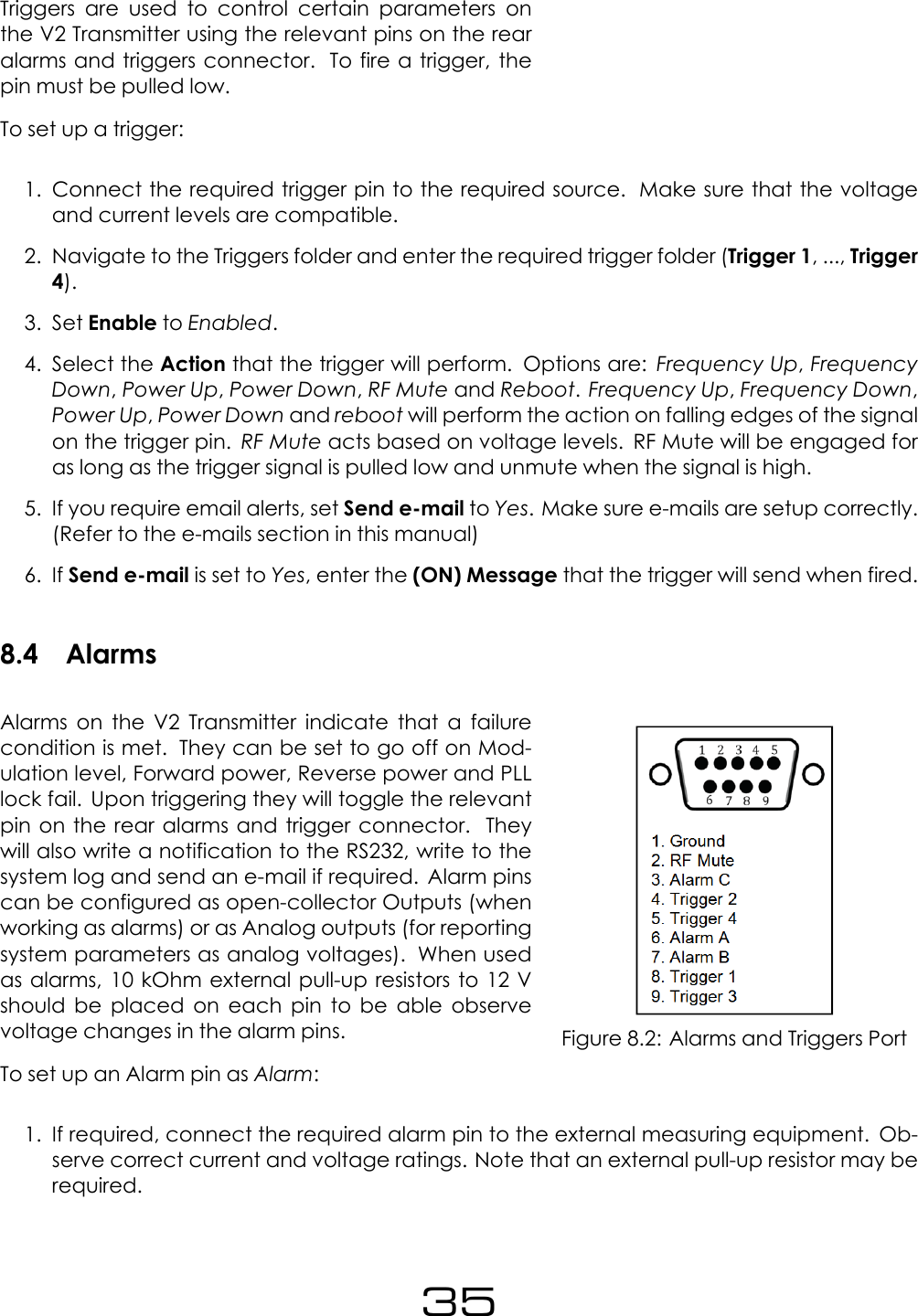
Triggers are used to control certain parameters onthe V2 Transmitter using the relevant pins on the rearalarms and triggers connector. To fire a trigger, thepin must be pulled low.To set up a trigger:1. Connect the required trigger pin to the required source. Make sure that the voltageand current levels are compatible.2. Navigate to the Triggers folder and enter the required trigger folder (Trigger 1, ..., Trigger4).3. Set Enable to Enabled.4. Select the Action that the trigger will perform. Options are: Frequency Up,FrequencyDown,Power Up,Power Down,RF Mute and Reboot.Frequency Up,Frequency Down,Power Up,Power Down and reboot will perform the action on falling edges of the signalon the trigger pin. RF Mute acts based on voltage levels. RF Mute will be engaged foras long as the trigger signal is pulled low and unmute when the signal is high.5. If you require email alerts, set Send e-mail to Yes. Make sure e-mails are setup correctly.(Refer to the e-mails section in this manual)6. If Send e-mail is set to Yes, enter the (ON) Message that the trigger will send when fired.8.4 AlarmsFigure 8.2: Alarms and Triggers PortAlarms on the V2 Transmitter indicate that a failurecondition is met. They can be set to go off on Mod-ulation level, Forward power, Reverse power and PLLlock fail. Upon triggering they will toggle the relevantpin on the rear alarms and trigger connector. Theywill also write a notification to the RS232, write to thesystem log and send an e-mail if required. Alarm pinscan be configured as open-collector Outputs (whenworking as alarms) or as Analog outputs (for reportingsystem parameters as analog voltages). When usedas alarms, 10 kOhm external pull-up resistors to 12 Vshould be placed on each pin to be able observevoltage changes in the alarm pins.To set up an Alarm pin as Alarm:1. If required, connect the required alarm pin to the external measuring equipment. Ob-serve correct current and voltage ratings. Note that an external pull-up resistor may berequired.35
2. Navigate to the Alarms folder and then enter the Alarm folder that you require (AlarmA, B, C).3. Set Type to Alarm.4. Set the source for the Alarm. For a detailed description consult the parametric guidesection on Alarms.5. Set the Threshold for the selected fail condition.6. Set the Pin Polarity7. Set the On Delay8. Set the Off Delay9. If an e-mail notification is required, set Send e-mail to Yes. Make sure that e-mails areset up correctly.To set up an Alarm pin as Analog Output:1. Connect the required alarm pin to the external measuring equipment. Observe correctcurrent and voltage ratings. Note that an external pull-up resistor may be required.2. Navigate to the Alarms folder and enter the Alarm folder that you require (Alarm A, B,C, ..).3. Set Type to Analog Out.4. Set the Source for the Analog Out. For a detailed description consult the parametricguide section on Alarms.8.5 System8.5.1 Real Time Clock1. Set the Date (day Month Year)2. Set the Time (hh:mm:ss). It is important to set up the clock and date for support diagnos-tics.8.5.2 Unit Information1. Set Location (a brief description of the physical location of the device)2. Set Contact (Name of the person who manages the unit)36
8.5.3 Screen Saver1. Select the Screen Saver time-out before the Screensaver starts.2. Enable or disable Screen Lock as required. If enabled, enter the desired 4 digit ScreenLock Code. This code will be requested in order to exit the screen saver screen.8.5.4 Users1. Enter the Username for the remote login.2. Enter the Password for the remote login.8.5.5 EthernetEnable or Disable DHCP as required.With DHCP set to off (Static IP):1. Enter the Static IP2. Enter the Static SM3. Enter the Static GW4. Enter the Static DNS 15. Enter the Static DNS 26. The MAC address of the unit is displayed here and can be used for setting up the net-work.With DHCP set to on (Static IP):1. The system will take some time (usually a few seconds, depending on the networksetup) to gather the required IP configuration from the DHCP server.2. Once the unit has received the IP configuration information, it will display it in the follow-ing parameters: DHCP IP,DHCP SM,DHCP GW,DHCP DNS 1,DHCP DNS 2.3. The ”Static” Parameters are shown but are not used.37
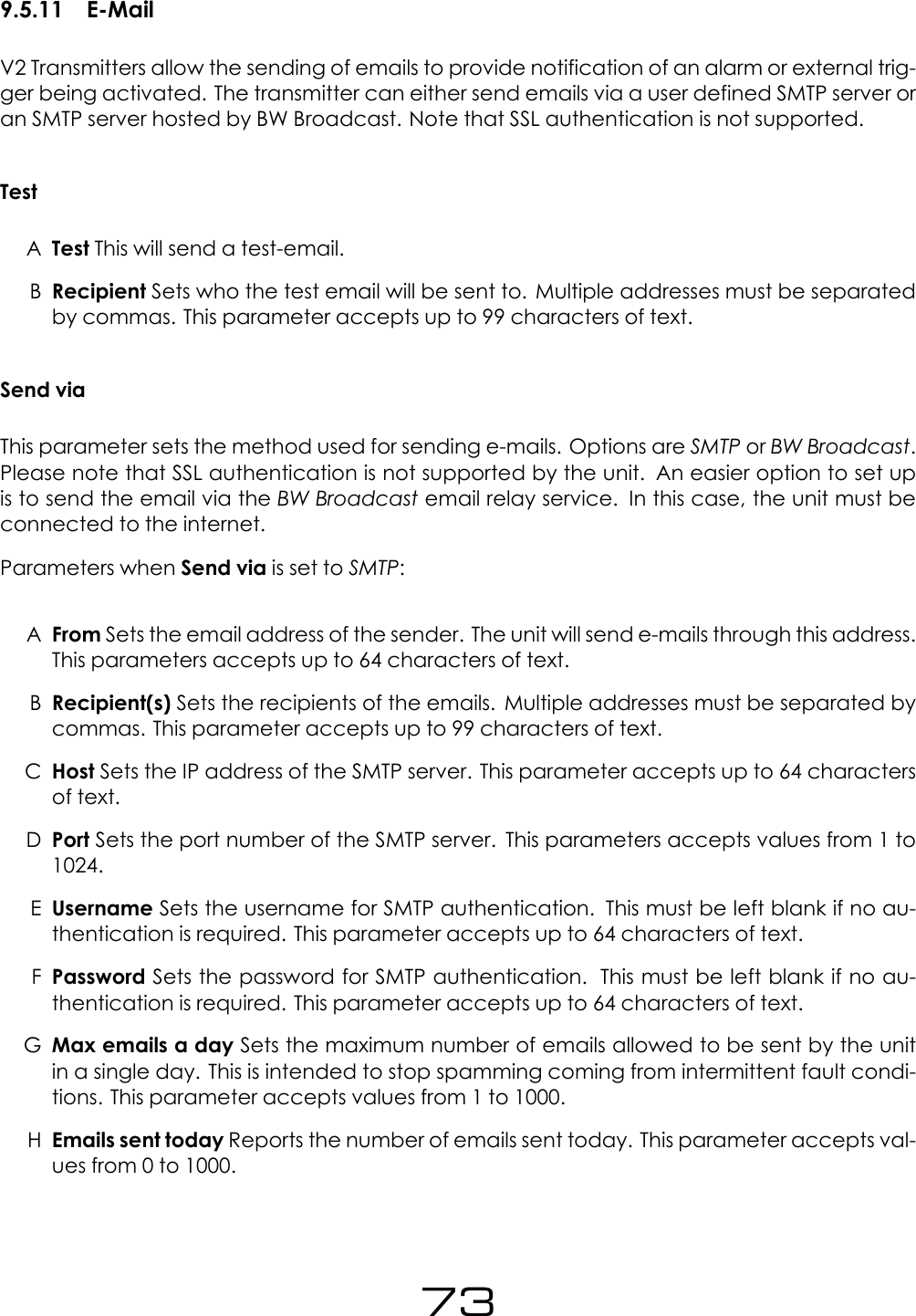
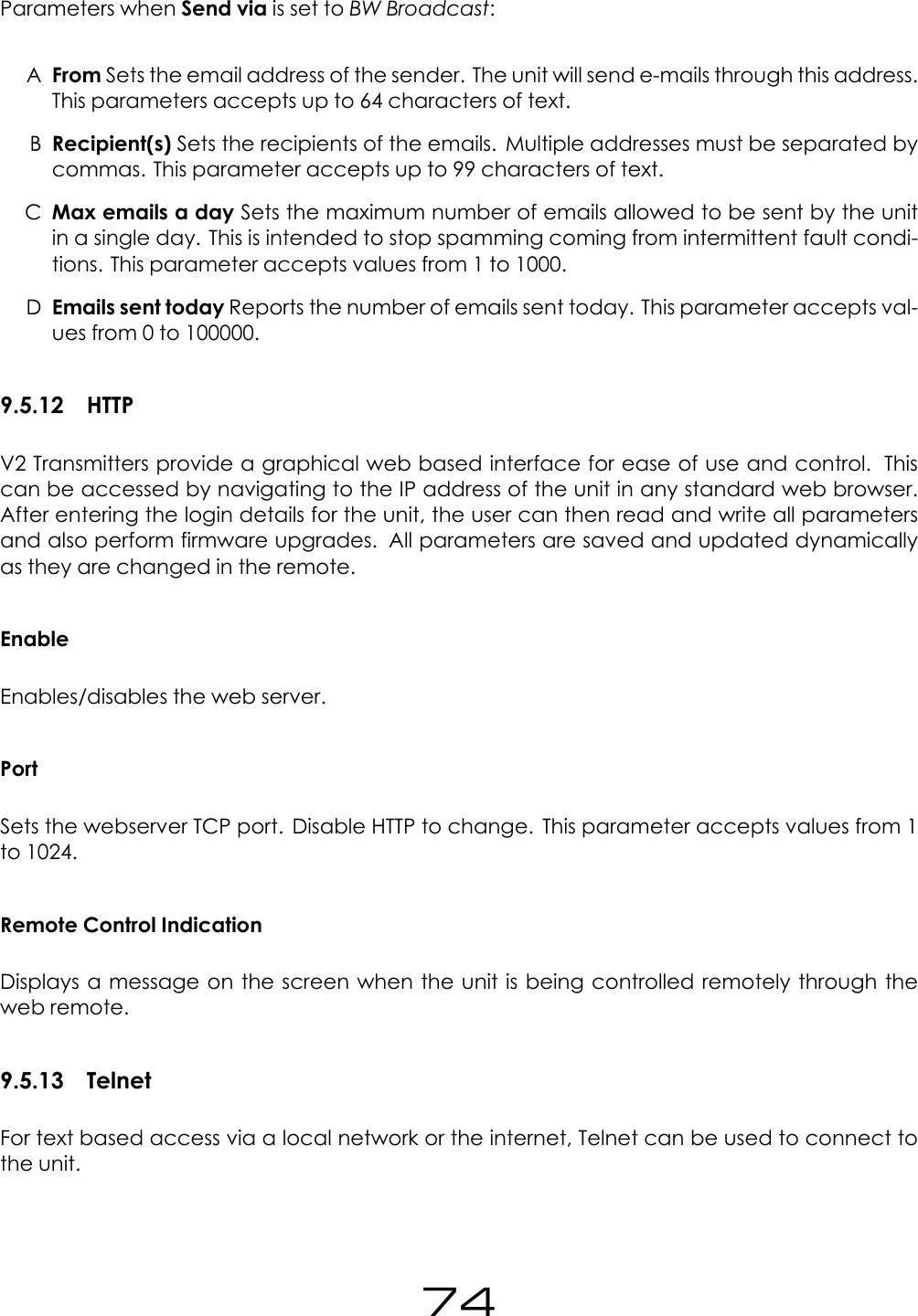
8.5.6 E-MailV2 Transmitters can send e-mails to provide notifications of alarms or external triggers becom-ing active. The transmitter can either send emails via a user defined SMTP server or an SMTPserver hosted by BW Broadcast. Please note that SSL authentication is not supported by theunit. The easier option to set up is to send the email via the BW Broadcast email relay service.In this case, the unit must be connected to the internet in order to connect to the service.Ensure the unit is connected to an Ethernet socket and Ethernet is set up correctly to use thisfeature.Sending emails via your own SMTP server (SSL is not supported):1. Set Send via to SMTP.2. Enter the email address of the sender in From.3. Enter the email address(es) of the receiver(s) in Recipient(s). Separate receivers bycommas.4. Enter the IP address of the SMTP server in Host5. Enter the Port number of the SMTP server in Port6. Enter the Username for SMTP authentication. If no authentication is required, this fieldmust be left blank.7. Enter the Password for the SMTP authentication. If no authentication is required, this fieldmust be left blank.8. Set Max emails a day to the maximum number of emails allowed to be sent by the unitin a single day.9. Enter the Test folder and set the Recipient(s) for this test email.10. Set Test to Yes. Check if the e-mail has been received.Sending emails via BW Broadcast email relay:1. Set Send via to BW Broadcast.2. Enter the email address of the sender in From.3. Enter the email address(es) of the receiver(s) in Recipient(s). Separate receivers bycommas.4. Navigate to the Test folder (System ⇒E-Mail ⇒Test) and enter the Recipient(s) for thistest email.5. Set Test to Yes. Check if the e-mail has been received.38
8.5.7 HTTPV2 Transmitters provide a graphical web based interface for ease of use and control. Thiscan be accessed by navigating to the IP address of the unit in any standard web browser.After entering the login details for the unit, the user can then read and write all parametersand also perform firmware upgrades. All parameters are saved and updated dynamicallyas they are changed in the remote.Ensure the unit is connected to an Ethernet socket and Ethernet is set up correctly to use thisfeature.By default, HTTP is enabled and running on port 80. In order to change these settings:1. Navigate to System ⇒HTTP.2. Set Enable to Disabled.3. Set the Webserver TCP port number in Port.4. Set Enable to Enabled.5. The Remote Control Indication parameter can be set to Enabled or Disabled. If set toEnabled, the system will show a message on the screen when being controlled throughthe web remote.For further information on how to use the web remote, please refer to the ”Web RemoteTutorial” section.8.5.8 TelnetV2 Transmitters offer many options for remote monitoring and control. All parameters avail-able on the front panel are available remotely. For text based access via a local network orthe internet, Telnet can be used to connect to the unit. By default, Telnet is enabled on port23. In order to change these settings:1. Navigate to System ⇒Telnet.2. Set Enable to Disabled.3. Set the required Port number.4. Set Enable to Enabled.For further information on how to use the Telnet remote, refer to the ”Text Based Access” sec-tion.39
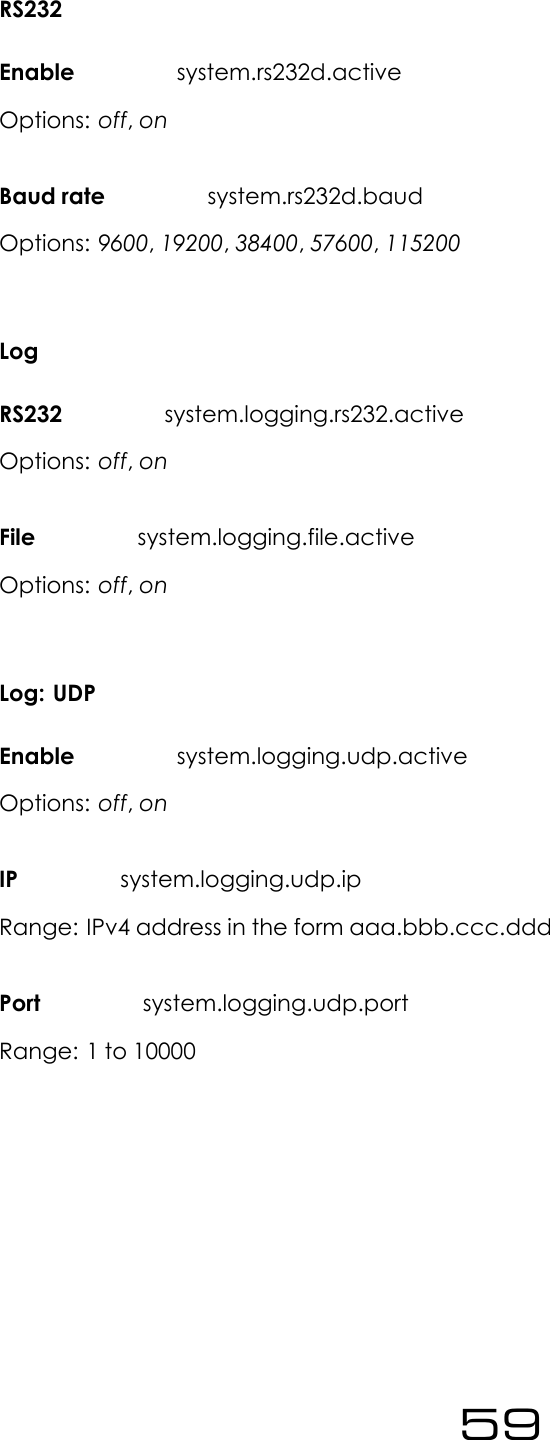
8.5.9 RS232V2 Transmitters offer many options for remote monitoring and control. All parameters avail-able on the front panel are available remotely.To connect to the unit via RS232 connection, connect a standard serial cable between thetransmitter and the PC, and use the following settings for the COM port:•Baud rate - Selected Baud rate set in the Unit (default: 19200bps)•Data Bits - 8•Parity - None•Stop Bits - 1•Flow Control - HardwareIn order to change these settings in the unit:1. Navigate to System ⇒RS232.2. Enable or disable the feature by adjusting the Enable parameter.3. Select the required Baud rate for the connection.8.5.10 LogV2 Transmitters have three methods of logging. Regardless of the log location, the formatis the same. V2 Transmitters will output a list of important parameters, all meter settings andalarm and trigger statuses 2 minutes after a parameter change and then at hourly intervals.These can be either received via RS232, UDP or saved to a file on the internal memory of thetransmitter. Each method can be enabled or disabled. In order to enable/disable the differ-ent logging methods, navigate to System ⇒Log and set the different methods to Enabledor Disabled.UDP will send the log messages via UDP to an IP address. In order to changes the UDP settings:1. Navigate to System ⇒Log ⇒UDP.2. Set Enable to Disabled.3. Set the IP address where the log message should be sent via UDP.4. Set the Port number.5. Set Enable to Enabled.6. Ensure that the unit is connected to an Ethernet socket and Ethernet is set up correctlyto use this feature.40
Logging to a File in internal memoryIf enabled, the system will keep logs of the last 31 days. These logs can be accessed throughthe web remote.An example section from a log file is shown below:2013-04-22 11:40:06 DTLG > M: exciter_locked = 1DTLG > M: peak_deviation = 75kDTLG > M: fwd_power = 250DTLG > M: rev_power = 3DTLG > M: pa_voltage = 30.1DTLG > M: aux_voltage = 15.1DTLG > M: pa_temp = 30.0DTLG > M: cpu_temp = 25.0DTLG > M: tx_input_l = -38.997DTLG > M: tx_input_r = -38.997DTLG > M: agc1 = 0mDTLG > M: agc2 = 0mDTLG > M: agc3 = 0mDTLG > M: agc4 = 0mDTLG > M: lim1 = -5997mDTLG > M: lim2 = -5997mDTLG > M: lim3 = -5997mDTLG > M: lim4 = -5997mDTLG > M: tx_output_l = -14.000DTLG > M: tx_output_r = -14.000DTLG > M: tx_output_mpx = 0mDTLG > P: transmitter.frequency = 98.00MHzDTLG > Alarm status [3-0]: Off Off On OffDTLG > Trigger status [3-0]: On On On On41
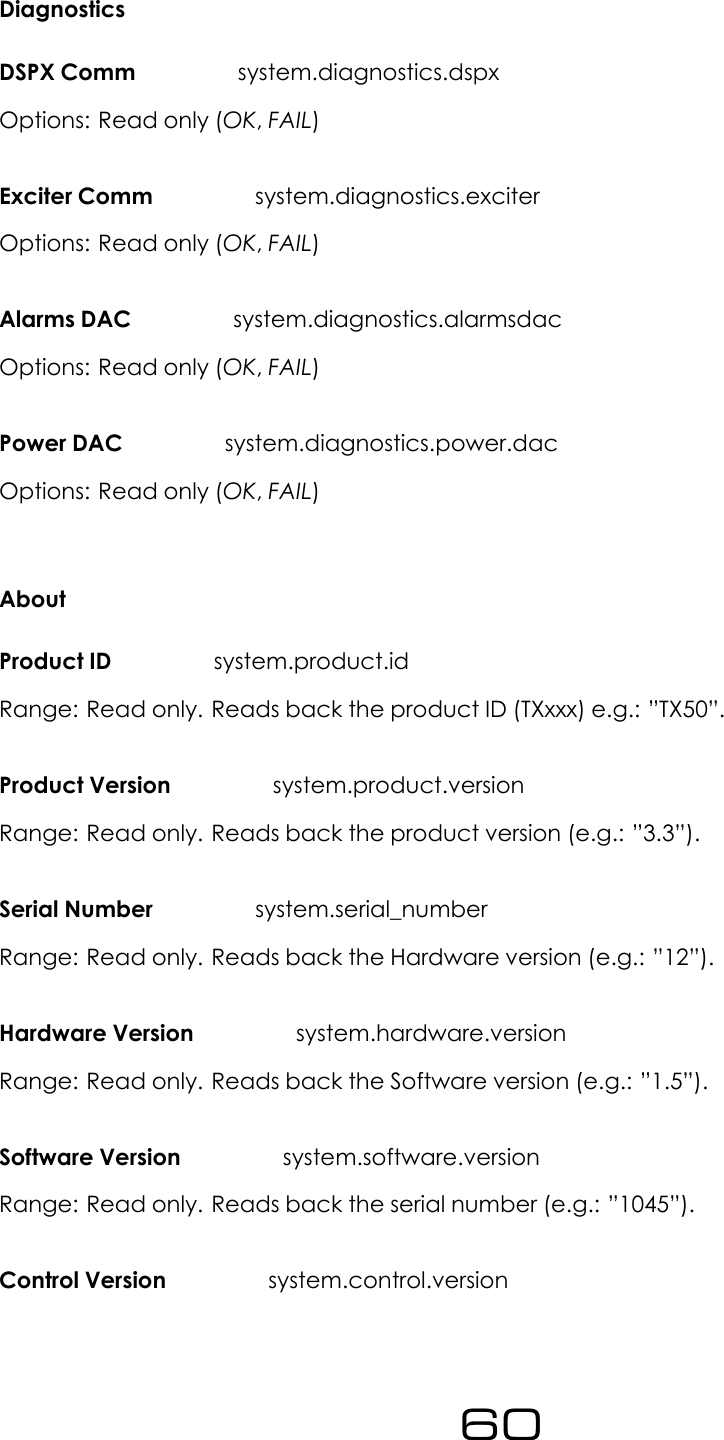
8.5.11 DiagnosticsThis set of parameters report the state of various parts of the system upon boot (OK or fail). Ifan error condition is observed, the unit should be re-booted and these parameters should beexamined. This information will be useful when contacting support.8.5.12 AboutThe about menu contains the version numbers of the different parts of the system. These val-ues should be available when contacting support.8.5.13 RebootThis parameter will reboot the unit.8.5.14 Factory ResetPerforms a factory reset, setting all the parameters to its default value except for Network set-tings. All user changes will be lost.8.6 Web RemoteV2 Transmitters provide a graphical web based interface for ease of use and control. Thiscan be accessed by navigating to the IP address of the unit in any standard web browser.After entering the login details for the unit, the user can then read and write all parametersand also perform firmware upgrades. All parameters are saved and updated dynamicallyas they are changed in the remote. The system serves a mobile-optimised version when ac-cessed from a mobile web browser.8.6.1 AutenticationBrowse to the IP of the unit (Navigate to System ⇒Ethernet in the FP. Refer to the Ethernetsection in this manual to set up Ethernet). You will be required to authenticate by entering thepassword. This password must match the one selected in the FP (System ⇒Users ⇒Pass-word). The default password is ”pass”.42
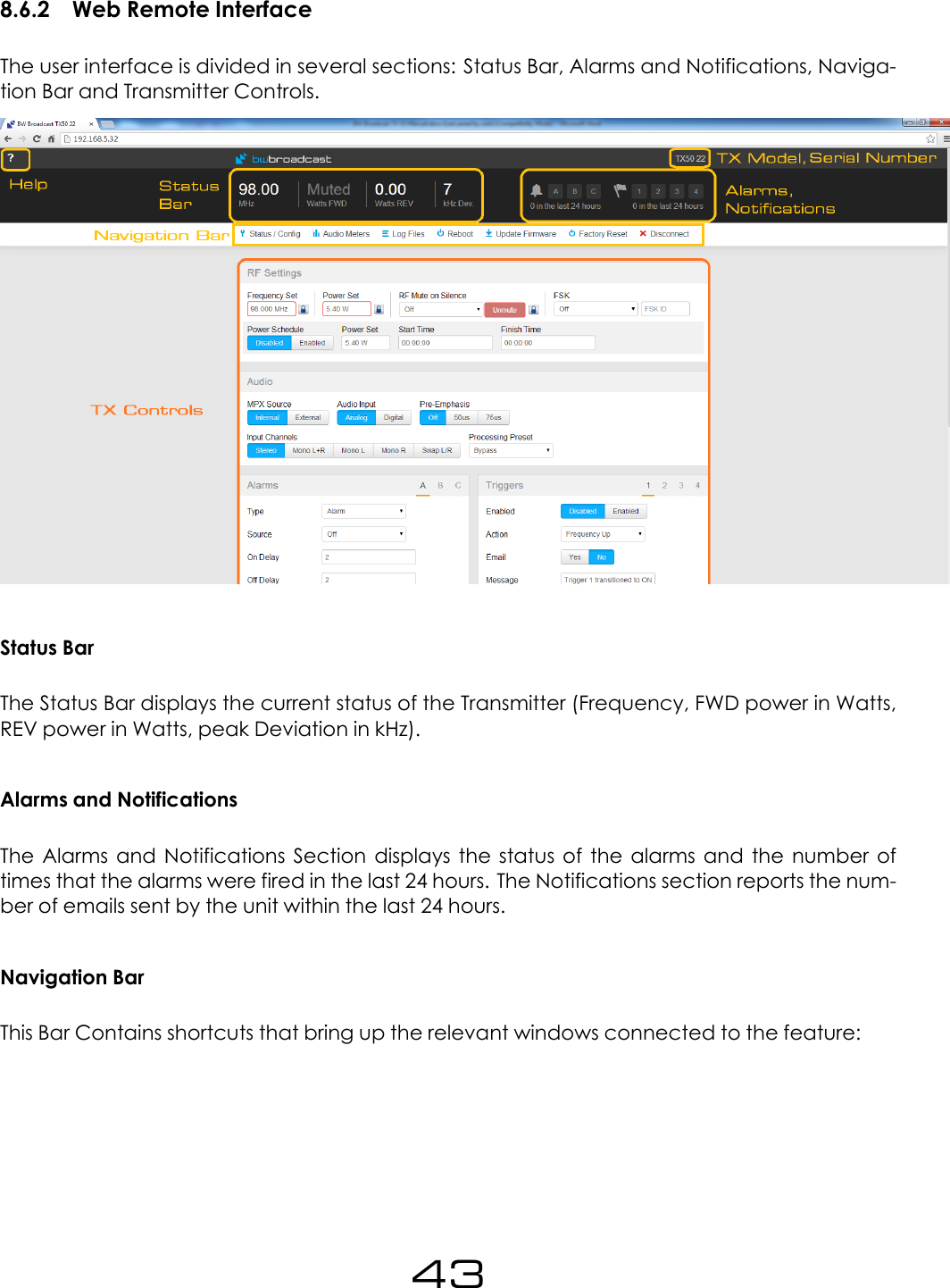
8.6.2 Web Remote InterfaceThe user interface is divided in several sections: Status Bar, Alarms and Notifications, Naviga-tion Bar and Transmitter Controls.Status BarThe Status Bar displays the current status of the Transmitter (Frequency, FWD power in Watts,REV power in Watts, peak Deviation in kHz).Alarms and NotificationsThe Alarms and Notifications Section displays the status of the alarms and the number oftimes that the alarms were fired in the last 24 hours. The Notifications section reports the num-ber of emails sent by the unit within the last 24 hours.Navigation BarThis Bar Contains shortcuts that bring up the relevant windows connected to the feature:43
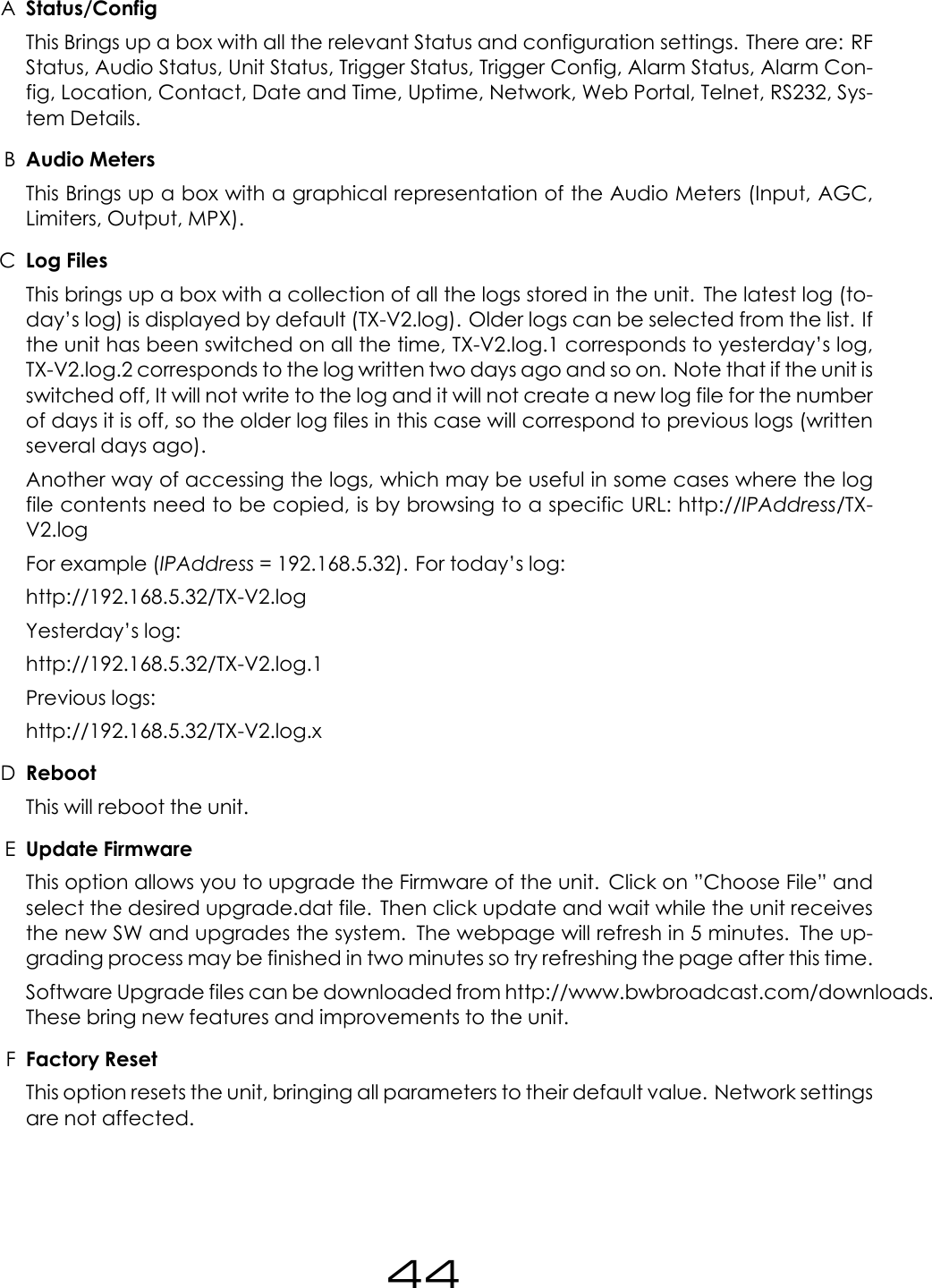
AStatus/ConfigThis Brings up a box with all the relevant Status and configuration settings. There are: RFStatus, Audio Status, Unit Status, Trigger Status, Trigger Config, Alarm Status, Alarm Con-fig, Location, Contact, Date and Time, Uptime, Network, Web Portal, Telnet, RS232, Sys-tem Details.BAudio MetersThis Brings up a box with a graphical representation of the Audio Meters (Input, AGC,Limiters, Output, MPX).CLog FilesThis brings up a box with a collection of all the logs stored in the unit. The latest log (to-day’s log) is displayed by default (TX-V2.log). Older logs can be selected from the list. Ifthe unit has been switched on all the time, TX-V2.log.1 corresponds to yesterday’s log,TX-V2.log.2 corresponds to the log written two days ago and so on. Note that if the unit isswitched off, It will not write to the log and it will not create a new log file for the numberof days it is off, so the older log files in this case will correspond to previous logs (writtenseveral days ago).Another way of accessing the logs, which may be useful in some cases where the logfile contents need to be copied, is by browsing to a specific URL: http://IPAddress/TX-V2.logFor example (IPAddress = 192.168.5.32). For today’s log:http://192.168.5.32/TX-V2.logYesterday’s log:http://192.168.5.32/TX-V2.log.1Previous logs:http://192.168.5.32/TX-V2.log.xDRebootThis will reboot the unit.EUpdate FirmwareThis option allows you to upgrade the Firmware of the unit. Click on ”Choose File” andselect the desired upgrade.dat file. Then click update and wait while the unit receivesthe new SW and upgrades the system. The webpage will refresh in 5 minutes. The up-grading process may be finished in two minutes so try refreshing the page after this time.Software Upgrade files can be downloaded from http://www.bwbroadcast.com/downloads.These bring new features and improvements to the unit.FFactory ResetThis option resets the unit, bringing all parameters to their default value. Network settingsare not affected.44
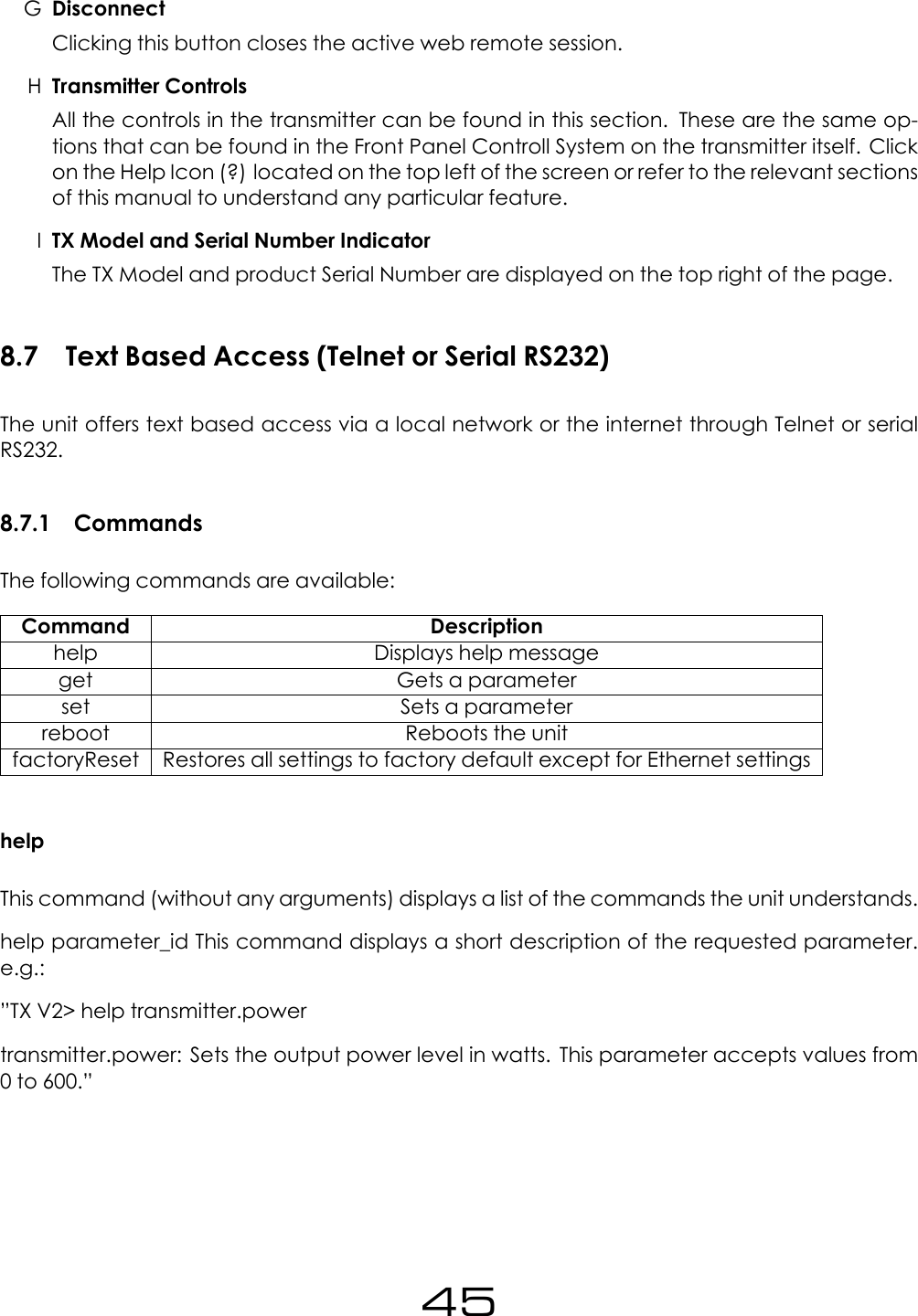
GDisconnectClicking this button closes the active web remote session.HTransmitter ControlsAll the controls in the transmitter can be found in this section. These are the same op-tions that can be found in the Front Panel Controll System on the transmitter itself. Clickon the Help Icon (?) located on the top left of the screen or refer to the relevant sectionsof this manual to understand any particular feature.ITX Model and Serial Number IndicatorThe TX Model and product Serial Number are displayed on the top right of the page.8.7 Text Based Access (Telnet or Serial RS232)The unit offers text based access via a local network or the internet through Telnet or serialRS232.8.7.1 CommandsThe following commands are available:Command Descriptionhelp Displays help messageget Gets a parameterset Sets a parameterreboot Reboots the unitfactoryReset Restores all settings to factory default except for Ethernet settingshelpThis command (without any arguments) displays a list of the commands the unit understands.help parameter_id This command displays a short description of the requested parameter.e.g.:”TX V2> help transmitter.powertransmitter.power: Sets the output power level in watts. This parameter accepts values from0 to 600.”45
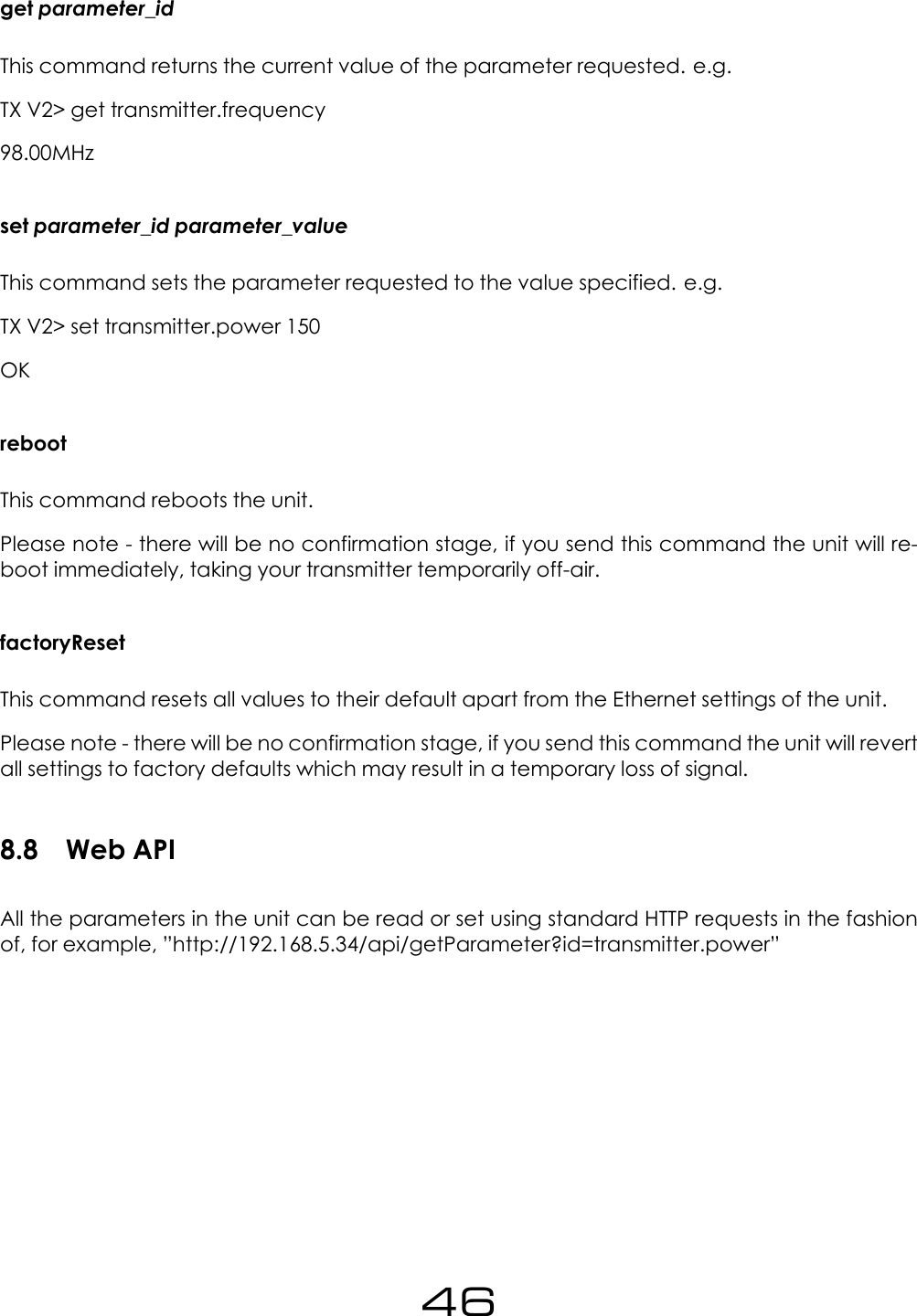
get parameter_idThis command returns the current value of the parameter requested. e.g.TX V2> get transmitter.frequency98.00MHzset parameter_id parameter_valueThis command sets the parameter requested to the value specified. e.g.TX V2> set transmitter.power 150OKrebootThis command reboots the unit.Please note - there will be no confirmation stage, if you send this command the unit will re-boot immediately, taking your transmitter temporarily off-air.factoryResetThis command resets all values to their default apart from the Ethernet settings of the unit.Please note - there will be no confirmation stage, if you send this command the unit will revertall settings to factory defaults which may result in a temporary loss of signal.8.8 Web APIAll the parameters in the unit can be read or set using standard HTTP requests in the fashionof, for example, ”http://192.168.5.34/api/getParameter?id=transmitter.power”46
8.8.1 AuthenticationLogging inIn order be able to read or modify parameters through the Web API, the user must first au-thenticate by sending the following request:”http://IP_ADRESS/api/auth?password=PASSWORDWhere IP_ADRESS is the IP Adress of the unit and PASSWORD is the password set in the FontPanel (System ⇒Users ⇒Password)The unit will respond with a page with xml content (text/xml) and the following content if thelogin attempt is correct:<response login=”true” sid=”884498006”/>Note that the sid value will be different in different sessions.Logging OutThe following request performs a ’log out’. This request should be issued when finished usingthe unit through the Web API.”http://IP_ADDRESS/api/logout”8.8.2 Setting A ParameterTo set parameters, use the following request:”http://IP_ADRESS/api/setParameter?id=PARAMETER_NAME&value=PARAMETER_VALUE”The unit will respond with a page with xml content (text/xml) and the following if the requestwas successful:”<response success=”true”/>”Please refer to the ”Parameter list” subsection for a list with all the parameters available in theunit.E.g. To set the frequency to 99 MHz, issue the following request:”http://192.168.5.34/api/setParameter?id=transmitter.frequency&value=99M”Note that for parameters containing brackets in their name (such as alarm[1].email.active),these characters should be escaped and must be written as ”%5B” and ”%5D” in the htmlrequest. E.g.:”http://192.168.5.34/api/setParameter?id=alarm%5B1%5D.email.active&value=yes”47
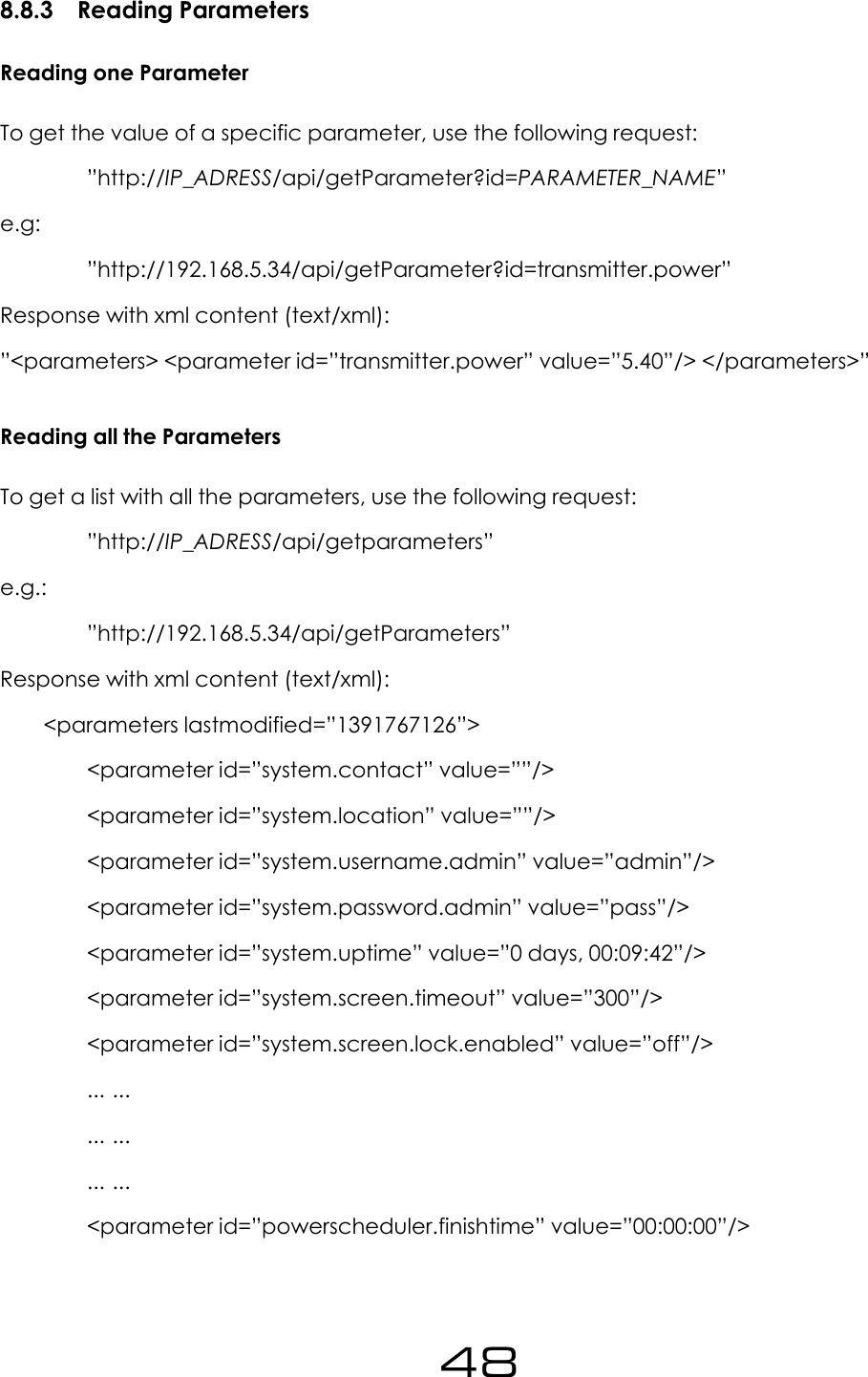
8.8.3 Reading ParametersReading one ParameterTo get the value of a specific parameter, use the following request:”http://IP_ADRESS/api/getParameter?id=PARAMETER_NAME”e.g:”http://192.168.5.34/api/getParameter?id=transmitter.power”Response with xml content (text/xml):”<parameters> <parameter id=”transmitter.power” value=”5.40”/> </parameters>”Reading all the ParametersTo get a list with all the parameters, use the following request:”http://IP_ADRESS/api/getparameters”e.g.:”http://192.168.5.34/api/getParameters”Response with xml content (text/xml):<parameters lastmodified=”1391767126”><parameter id=”system.contact” value=””/><parameter id=”system.location” value=””/><parameter id=”system.username.admin” value=”admin”/><parameter id=”system.password.admin” value=”pass”/><parameter id=”system.uptime” value=”0 days, 00:09:42”/><parameter id=”system.screen.timeout” value=”300”/><parameter id=”system.screen.lock.enabled” value=”off”/>... ...... ...... ...<parameter id=”powerscheduler.finishtime” value=”00:00:00”/>48
<parameter id=”powerscheduler.power” value=”5.40”/></parameters>8.8.4 Reading MetersThe following request will return a page with all the values for the different meters:”http://IP_ADRESS/api/streammeters”8.8.5 Reading log filesThe following request will return a page with the latest log contained in the unit (today’s log):”http://IP_ADRESS/TX-V2.log”To access old log files, use the following requests:For yesterday’s log:”http://IP_ADRESS/TX-V2.log.1”Two days ago:”http://IP_ADRESS/TX-V2.log.2”ndays ago:”http://IP_ADRESS/TX-V2.log.n”49
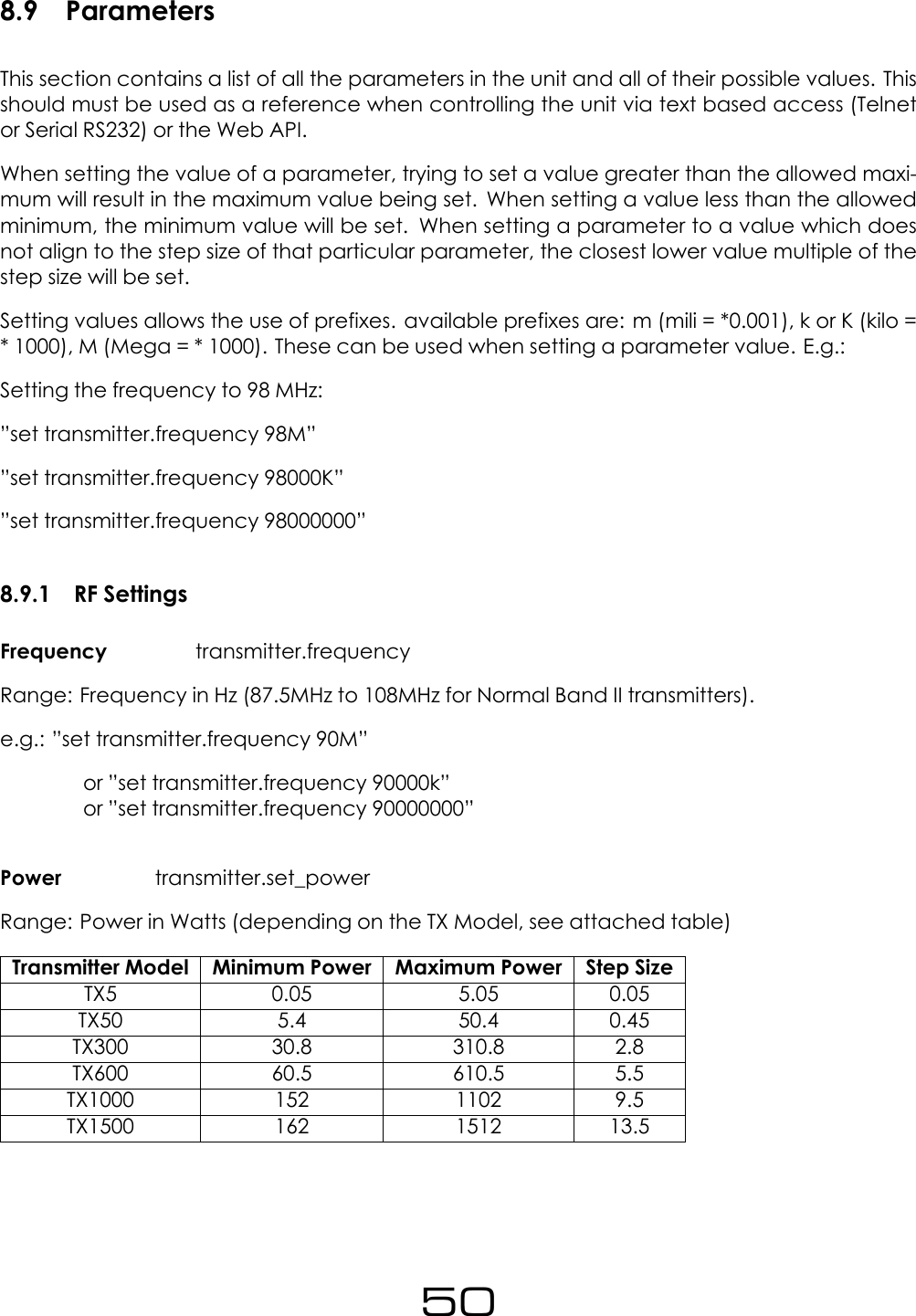
8.9 ParametersThis section contains a list of all the parameters in the unit and all of their possible values. Thisshould must be used as a reference when controlling the unit via text based access (Telnetor Serial RS232) or the Web API.When setting the value of a parameter, trying to set a value greater than the allowed maxi-mum will result in the maximum value being set. When setting a value less than the allowedminimum, the minimum value will be set. When setting a parameter to a value which doesnot align to the step size of that particular parameter, the closest lower value multiple of thestep size will be set.Setting values allows the use of prefixes. available prefixes are: m (mili = *0.001), k or K (kilo =* 1000), M (Mega = * 1000). These can be used when setting a parameter value. E.g.:Setting the frequency to 98 MHz:”set transmitter.frequency 98M””set transmitter.frequency 98000K””set transmitter.frequency 98000000”8.9.1 RF SettingsFrequency transmitter.frequencyRange: Frequency in Hz (87.5MHz to 108MHz for Normal Band II transmitters).e.g.: ”set transmitter.frequency 90M”or ”set transmitter.frequency 90000k”or ”set transmitter.frequency 90000000”Power transmitter.set_powerRange: Power in Watts (depending on the TX Model, see attached table)Transmitter Model Minimum Power Maximum Power Step SizeTX5 0.05 5.05 0.05TX50 5.4 50.4 0.45TX300 30.8 310.8 2.8TX600 60.5 610.5 5.5TX1000 152 1102 9.5TX1500 162 1512 13.550
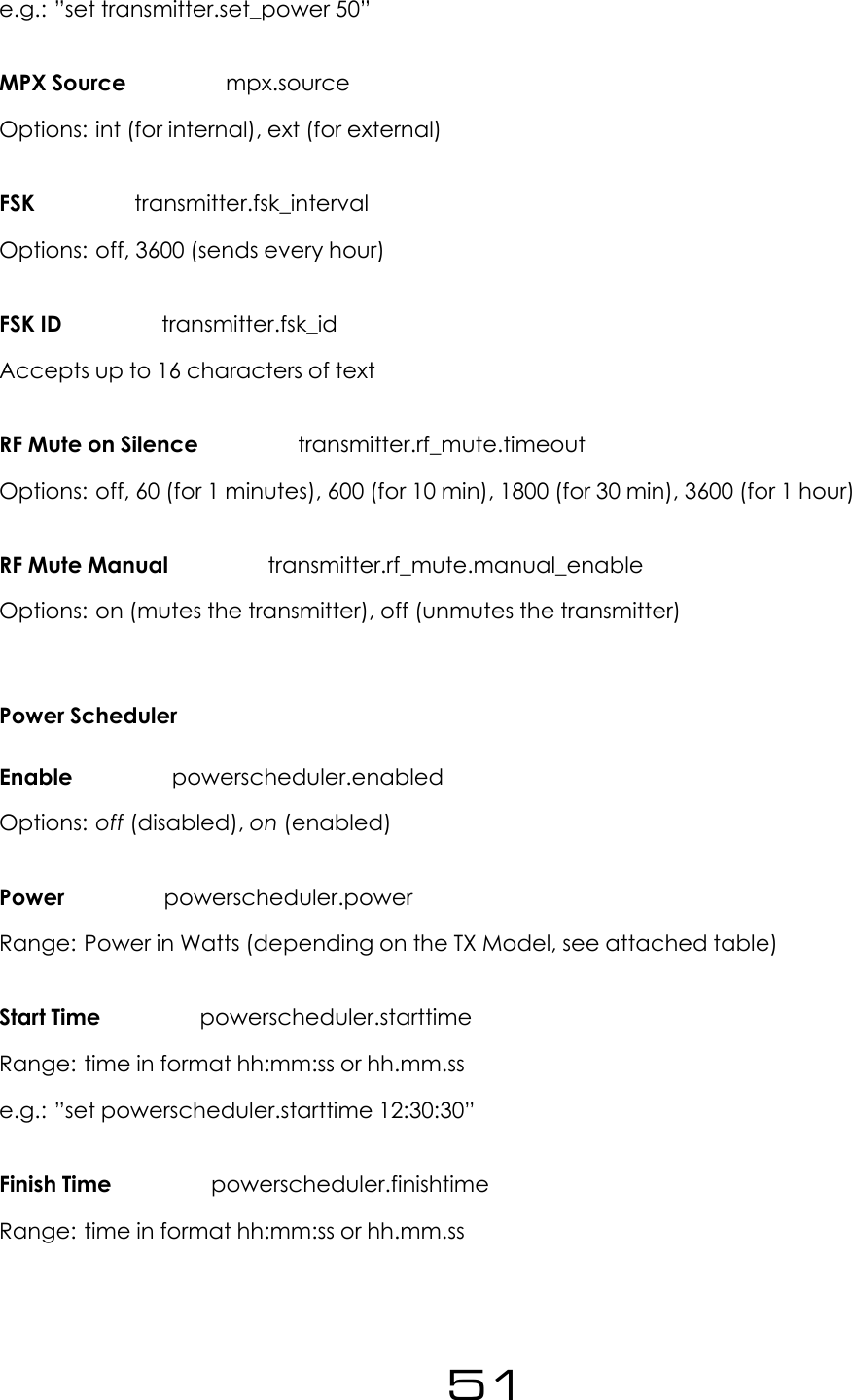
e.g.: ”set transmitter.set_power 50”MPX Source mpx.sourceOptions: int (for internal), ext (for external)FSK transmitter.fsk_intervalOptions: off, 3600 (sends every hour)FSK ID transmitter.fsk_idAccepts up to 16 characters of textRF Mute on Silence transmitter.rf_mute.timeoutOptions: off, 60 (for 1 minutes), 600 (for 10 min), 1800 (for 30 min), 3600 (for 1 hour)RF Mute Manual transmitter.rf_mute.manual_enableOptions: on (mutes the transmitter), off (unmutes the transmitter)Power SchedulerEnable powerscheduler.enabledOptions: off (disabled), on (enabled)Power powerscheduler.powerRange: Power in Watts (depending on the TX Model, see attached table)Start Time powerscheduler.starttimeRange: time in format hh:mm:ss or hh.mm.sse.g.: ”set powerscheduler.starttime 12:30:30”Finish Time powerscheduler.finishtimeRange: time in format hh:mm:ss or hh.mm.ss51
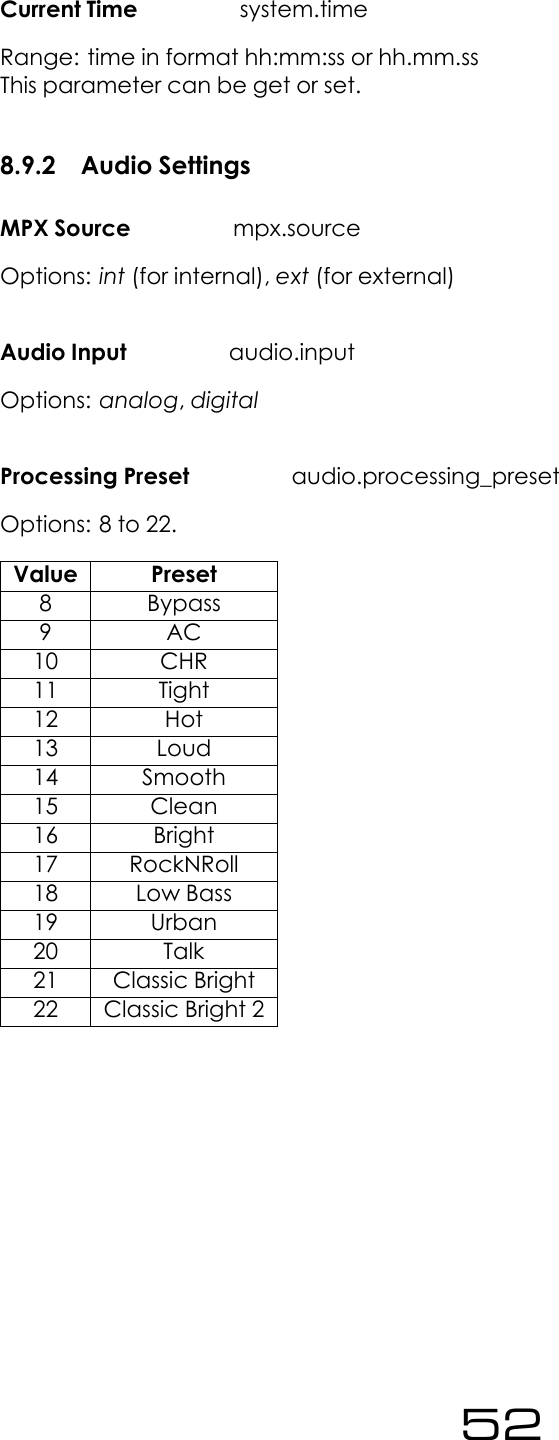
Current Time system.timeRange: time in format hh:mm:ss or hh.mm.ssThis parameter can be get or set.8.9.2 Audio SettingsMPX Source mpx.sourceOptions: int (for internal), ext (for external)Audio Input audio.inputOptions: analog,digitalProcessing Preset audio.processing_presetOptions: 8 to 22.Value Preset8 Bypass9 AC10 CHR11 Tight12 Hot13 Loud14 Smooth15 Clean16 Bright17 RockNRoll18 Low Bass19 Urban20 Talk21 Classic Bright22 Classic Bright 252
Pre-Emphasis audio.preemphasisOptions: Options: 0(for Off), 50 (50 us), 75 (75us)Audio Mode audio.stereoOptions: stereo,mono_lr (for Mono L+R), mono_l (Mono L), mono_r (Mono R), swap_lr (SwapL/R)8.9.3 TriggersThe following parameters can be used to configure any trigger (trigger[x], where x is 1 to 4)Enable trigger[x].activeOptions: off,onAction trigger[x].actionOptions: fup (for Frequency Up), fdown (Frequency Down), pup (Power Up), pdown (PowerDown), rfmute (RF Mute), reboot (Reboot)Send e-mail trigger[x].email.activeOptions: Options: yes,no(ON) Message trigger[x].message.onAccepts up to 300 characters of text.8.9.4 AlarmsType alarm[x].typeOptions: alarm,telemetry (for Analog Out)Source (for Analog Out) alarm[x].telemetrysourceOptions: fwdpow (for Fwd Power), revpow (Rev Power), pavolts (PA Volts), auxvolts (AuxVolts), peakmod (Peak Modulation), patemp (PA Temp), rfmute (RF Mute),Modulation Threshold alarm[x].modulation_threshold53
Range: 1000 to 100000.Fwd Power Threshold alarm[x].fwd_power_thresholdRange: 0 to double the Maximum Power of the transmitter (Refer to transmitter.set_power).Rev Power Threshold alarm[x].rev_power_thresholdRange: 0 to double the Maximum Power of the transmitter (Refer to transmitter.set_power).Pin Polarity alarm[x].polarityOptions: positive (for +ve), negative (for -ve)On Delay alarm[x].on_delayRange: 2 to 600 (seconds)Off Delay alarm[x].off_delayRange: 2 to 600 (seconds)Send e-mail alarm[x].email.activeOptions: yes,no8.9.5 SystemDate system.dateRange: Date in the following format yyyy-mm-dde.g.: ”set system.date 2014-02-22”Time system.timeRange: Time in the following format hh.mm.sse.g.: ”set system.time 22:10:55”Uptime system.uptime54
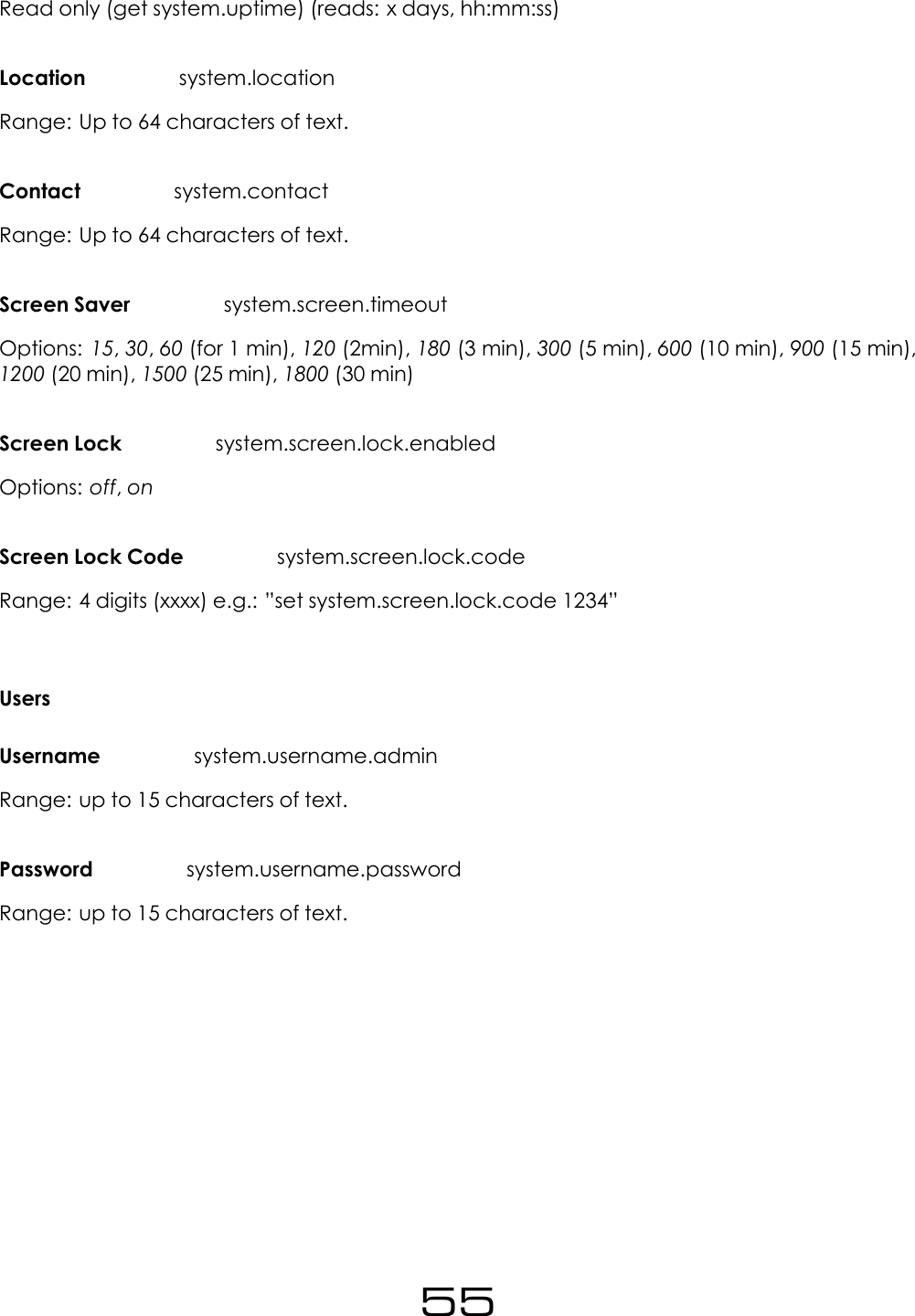
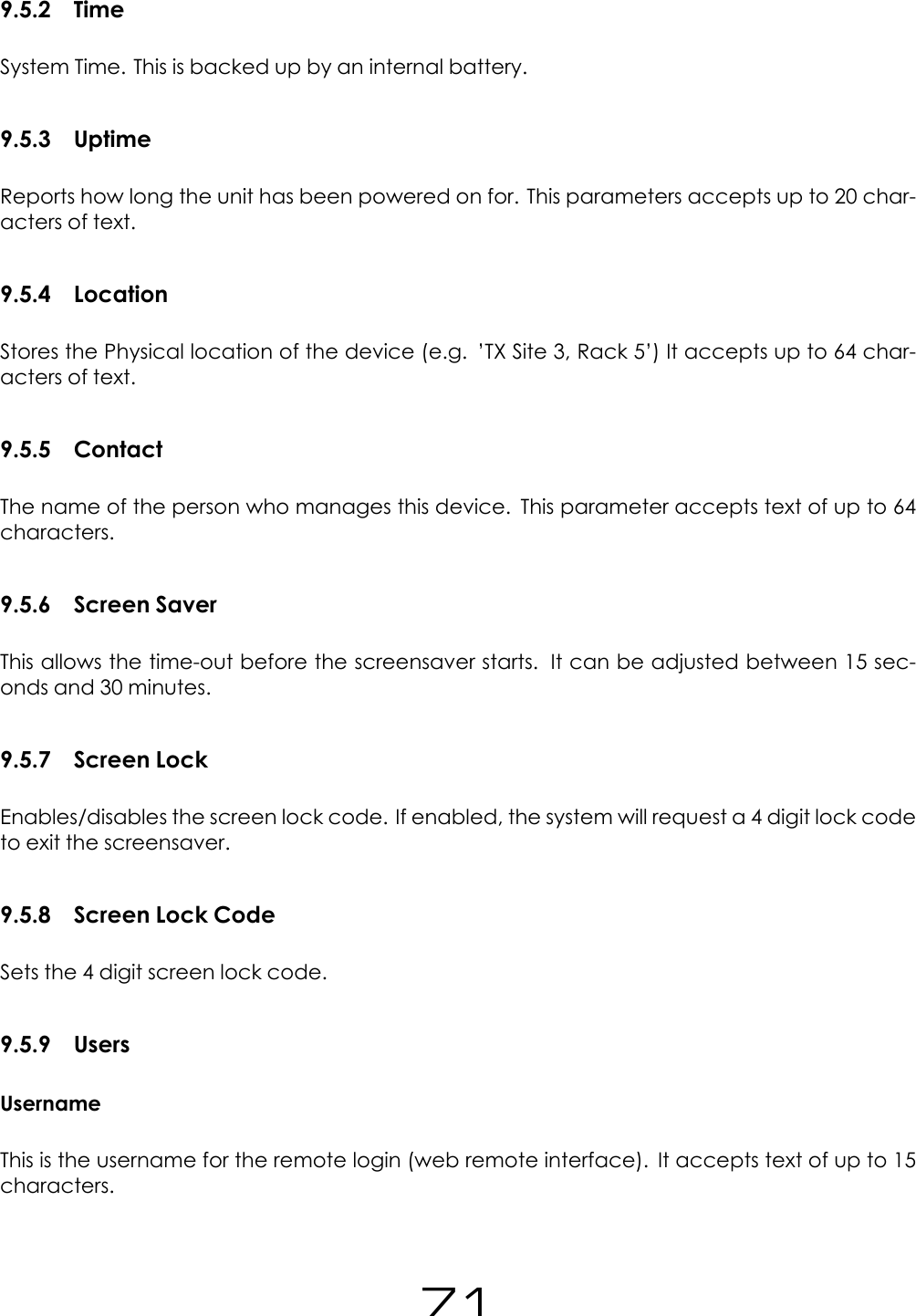
Read only (get system.uptime) (reads: x days, hh:mm:ss)Location system.locationRange: Up to 64 characters of text.Contact system.contactRange: Up to 64 characters of text.Screen Saver system.screen.timeoutOptions: 15,30,60 (for 1 min), 120 (2min), 180 (3 min), 300 (5 min), 600 (10 min), 900 (15 min),1200 (20 min), 1500 (25 min), 1800 (30 min)Screen Lock system.screen.lock.enabledOptions: off,onScreen Lock Code system.screen.lock.codeRange: 4 digits (xxxx) e.g.: ”set system.screen.lock.code 1234”UsersUsername system.username.adminRange: up to 15 characters of text.Password system.username.passwordRange: up to 15 characters of text.55
EthernetDHCP system.ethernet.dhcpOptions: off,onDHCP IP system.ethernet.dhcp.ipRange: Read only. Reads IPv4 address in the form aaa.bbb.ccc.dddDHCP SM system.ethernet.dhcp.smRange: Read only. Reads IPv4 address in the form aaa.bbb.ccc.dddDHCP SM system.ethernet.dhcp.smRange: Read only. Reads IPv4 address in the form aaa.bbb.ccc.dddDHCP GW system.ethernet.dhcp.gwRange: Read only. Reads IPv4 address in the form aaa.bbb.ccc.dddDHCP DNS1 system.ethernet.dhcp.dns[1]Range: Read only. Reads IPv4 address in the form aaa.bbb.ccc.dddDHCP DNS2 system.ethernet.dhcp.dns[2]Range: Read only. Reads IPv4 address in the form aaa.bbb.ccc.dddStatic IP system.ethernet.static.ipRange: Read only. Reads IPv4 address in the form aaa.bbb.ccc.dddStatic SM system.ethernet.static.smRange: Read only. Reads IPv4 address in the form aaa.bbb.ccc.dddStatic GW system.ethernet.static.gwRange: Read only. Reads IPv4 address in the form aaa.bbb.ccc.ddd56
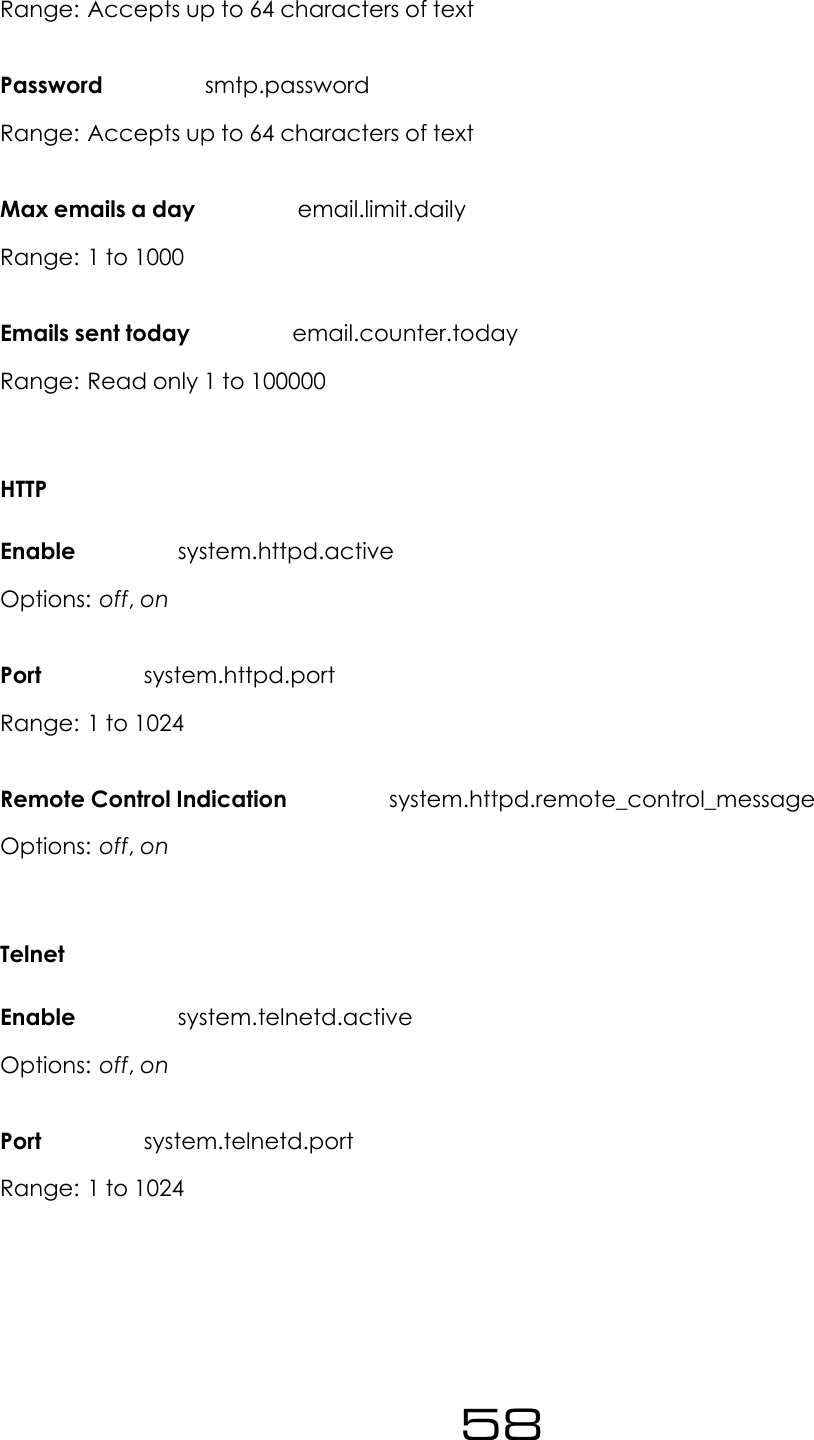
Static DNS 1 system.ethernet.static.dns[1]Range: Read only. Reads IPv4 address in the form aaa.bbb.ccc.dddStatic DNS 2 system.ethernet.static.dns[2]Range: Read only. Reads IPv4 address in the form aaa.bbb.ccc.dddMAC system.ethernet.macRange: Read only. xx:xx:xx:xx:xx:xxE-MailTest email.test.sendOptions: yes (to send a test email. It will automatically go back to no)Recipient(s) (For the test e-mail) email.test.recipientRange: Accepts text up to 99 characters. Multiple addresses must be separated by com-mas.Send Via email.methodOptions: SMTP,BWBroadcastFrom email.fromOptions: Accepts up to 64 characters of text.Recipient(s) email.recipientRange: Accepts up to 99 characters of text.Port smtp.portRange: 1 to 1024Username smtp.username57
Range: Accepts up to 64 characters of textPassword smtp.passwordRange: Accepts up to 64 characters of textMax emails a day email.limit.dailyRange: 1 to 1000Emails sent today email.counter.todayRange: Read only 1 to 100000HTTPEnable system.httpd.activeOptions: off,onPort system.httpd.portRange: 1 to 1024Remote Control Indication system.httpd.remote_control_messageOptions: off,onTelnetEnable system.telnetd.activeOptions: off,onPort system.telnetd.portRange: 1 to 102458
RS232Enable system.rs232d.activeOptions: off,onBaud rate system.rs232d.baudOptions: 9600,19200,38400,57600,115200LogRS232 system.logging.rs232.activeOptions: off,onFile system.logging.file.activeOptions: off,onLog: UDPEnable system.logging.udp.activeOptions: off,onIP system.logging.udp.ipRange: IPv4 address in the form aaa.bbb.ccc.dddPort system.logging.udp.portRange: 1 to 1000059
DiagnosticsDSPX Comm system.diagnostics.dspxOptions: Read only (OK,FAIL)Exciter Comm system.diagnostics.exciterOptions: Read only (OK,FAIL)Alarms DAC system.diagnostics.alarmsdacOptions: Read only (OK,FAIL)Power DAC system.diagnostics.power.dacOptions: Read only (OK,FAIL)AboutProduct ID system.product.idRange: Read only. Reads back the product ID (TXxxx) e.g.: ”TX50”.Product Version system.product.versionRange: Read only. Reads back the product version (e.g.: ”3.3”).Serial Number system.serial_numberRange: Read only. Reads back the Hardware version (e.g.: ”12”).Hardware Version system.hardware.versionRange: Read only. Reads back the Software version (e.g.: ”1.5”).Software Version system.software.versionRange: Read only. Reads back the serial number (e.g.: ”1045”).Control Version system.control.version60
Range: Read only. Reads back the Control version (e.g.: ”1.0”).AIO FW Version system.aio_fw.versionRange: Read only. Reads back the Software version (e.g.: ”1.5”).RebootReboot system.rebootOptions: yes (to perform the reboot). Note that the unit will close the Telnet connection. Youwill need to reconnect after a few seconds to allow the unit to reboot.Factory ResetFactory Reset system.factory_resetOptions: yes (to perform the factory reset). Note that all the user settings will be lost and unitwill load the default values for all the parameters.61
9Parameter Guide9.1 RF Settings9.1.1 FrequencyThis sets the transmission frequency. The range for this parameter depends on the Band. Fornormal Band II transmitters the range is 87.5 MHz to 108 MHz. The normal step size is 50 kHz.Other frequency ranges and step sizes are also available on request. Please contact a salesrepresentative for more information.9.1.2 PowerThis sets the RF output level in watts. The range and the step size for this parameter dependon the model of the transmitter. The following table lists all the ranges for the different modelsin Watts:Transmitter Model Minimum Power Maximum Power Step SizeTX5 0.05 5.05 0.05TX50 5.4 50.4 0.45TX300 30.8 310.8 2.8TX600 60.5 610.5 5.5TX1000 152 1102 9.5TX1500 162 1512 13.5Note that when setting the power, the unit will automatically adjust the power output toreach the selected value. This may take a few seconds. During this time, the FWD power indi-cator in the Status Box will flash to indicate that the unit is still adjusting to reach the selectedpower.9.1.3 MPX SourceThis selects the source for the exciter. Options are Internal or External.Internal selects the in-ternal generator, i.e. the output from the internal audio processor. This option must be se-lected when the digital or analog inputs are used. External selects the MPX BNC input. Thisoption must be selected when the transmitter is used with an external audio processor con-nected to the MPX BNC input.62
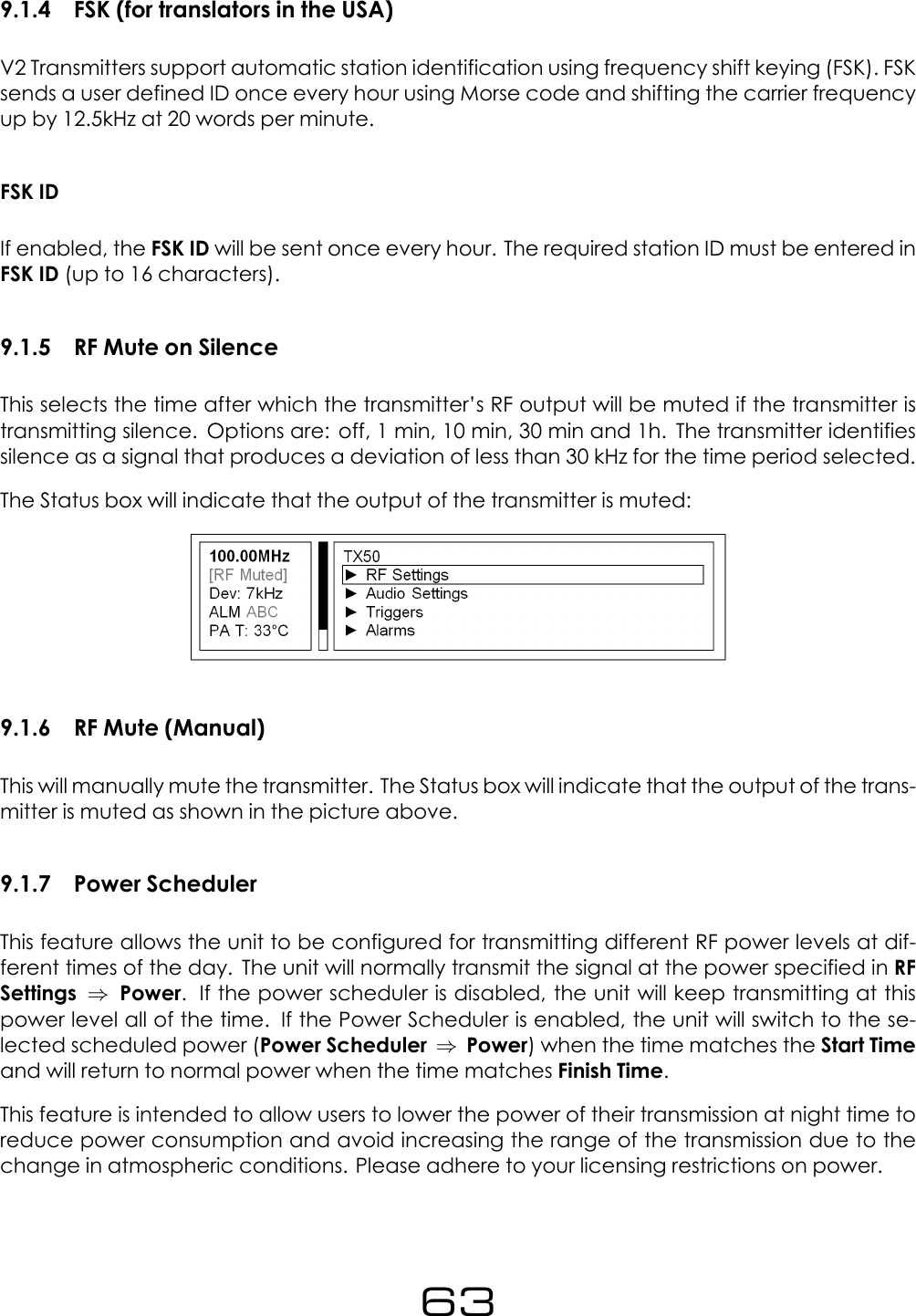
9.1.4 FSK (for translators in the USA)V2 Transmitters support automatic station identification using frequency shift keying (FSK). FSKsends a user defined ID once every hour using Morse code and shifting the carrier frequencyup by 12.5kHz at 20 words per minute.FSK IDIf enabled, the FSK ID will be sent once every hour. The required station ID must be entered inFSK ID (up to 16 characters).9.1.5 RF Mute on SilenceThis selects the time after which the transmitter’s RF output will be muted if the transmitter istransmitting silence. Options are: off, 1 min, 10 min, 30 min and 1h. The transmitter identifiessilence as a signal that produces a deviation of less than 30 kHz for the time period selected.The Status box will indicate that the output of the transmitter is muted:9.1.6 RF Mute (Manual)This will manually mute the transmitter. The Status box will indicate that the output of the trans-mitter is muted as shown in the picture above.9.1.7 Power SchedulerThis feature allows the unit to be configured for transmitting different RF power levels at dif-ferent times of the day. The unit will normally transmit the signal at the power specified in RFSettings ⇒Power. If the power scheduler is disabled, the unit will keep transmitting at thispower level all of the time. If the Power Scheduler is enabled, the unit will switch to the se-lected scheduled power (Power Scheduler ⇒Power) when the time matches the Start Timeand will return to normal power when the time matches Finish Time.This feature is intended to allow users to lower the power of their transmission at night time toreduce power consumption and avoid increasing the range of the transmission due to thechange in atmospheric conditions. Please adhere to your licensing restrictions on power.63
EnableEnables/disables Power Scheduling.PowerSelects the power that the transmitter will produce during the scheduled interval.Start TimeSelects the time at which the output power will change from normal power to scheduledpower.Finish TimeSelects the time at which the output power will change from scheduled power to normalpower.Current TimeCurrent time set in the unit. It can be modified to adjust the time in the Real Time Clock.9.2 Audio Settings9.2.1 MPX SourceThis is the same parameter as described in RF Settings. It has been placed in the Audio set-tings menu for convenience of access. This selects the source for the exciter. Options areInternal or External.Internal selects the internal generator, i.e. the output from the internalaudio processor. This option must be selected when the digital or analog inputs are used. Ex-ternal selects the MPX BNC input. This option must be selected when the transmitter is usedwith an external audio processor connected to its MPX BNC input.9.2.2 Audio InputSelects Digital or Analog as the audio input. These are the XLR connectors in the back panel.Note that the MPX Source parameter must be set to Internal to use the analog or digital in-puts.64
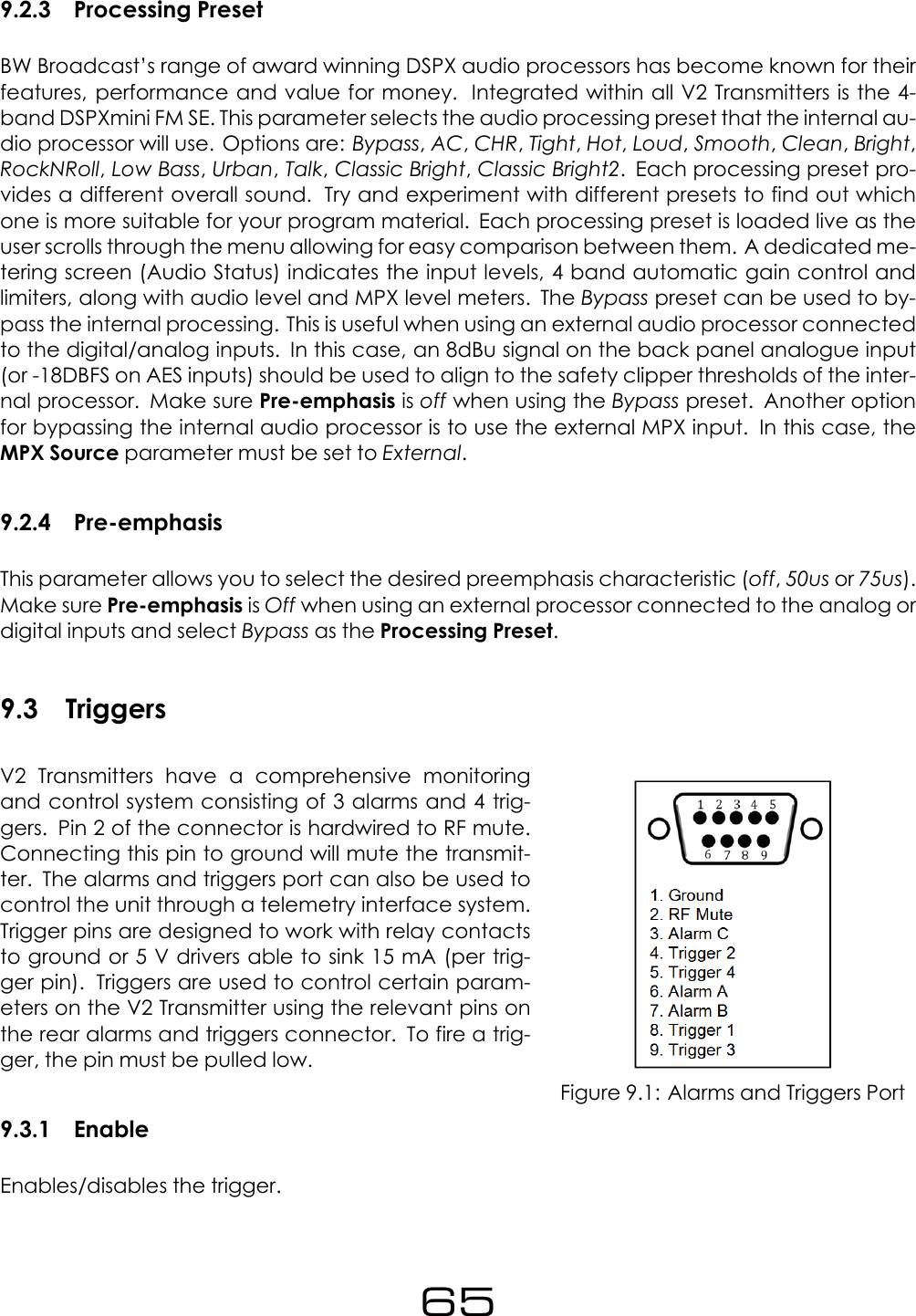
9.2.3 Processing PresetBW Broadcast’s range of award winning DSPX audio processors has become known for theirfeatures, performance and value for money. Integrated within all V2 Transmitters is the 4-band DSPXmini FM SE. This parameter selects the audio processing preset that the internal au-dio processor will use. Options are: Bypass,AC,CHR,Tight,Hot,Loud,Smooth,Clean,Bright,RockNRoll,Low Bass,Urban,Talk,Classic Bright,Classic Bright2. Each processing preset pro-vides a different overall sound. Try and experiment with different presets to find out whichone is more suitable for your program material. Each processing preset is loaded live as theuser scrolls through the menu allowing for easy comparison between them. A dedicated me-tering screen (Audio Status) indicates the input levels, 4 band automatic gain control andlimiters, along with audio level and MPX level meters. The Bypass preset can be used to by-pass the internal processing. This is useful when using an external audio processor connectedto the digital/analog inputs. In this case, an 8dBu signal on the back panel analogue input(or -18DBFS on AES inputs) should be used to align to the safety clipper thresholds of the inter-nal processor. Make sure Pre-emphasis is off when using the Bypass preset. Another optionfor bypassing the internal audio processor is to use the external MPX input. In this case, theMPX Source parameter must be set to External.9.2.4 Pre-emphasisThis parameter allows you to select the desired preemphasis characteristic (off,50us or 75us).Make sure Pre-emphasis is Off when using an external processor connected to the analog ordigital inputs and select Bypass as the Processing Preset.9.3 TriggersFigure 9.1: Alarms and Triggers PortV2 Transmitters have a comprehensive monitoringand control system consisting of 3 alarms and 4 trig-gers. Pin 2 of the connector is hardwired to RF mute.Connecting this pin to ground will mute the transmit-ter. The alarms and triggers port can also be used tocontrol the unit through a telemetry interface system.Trigger pins are designed to work with relay contactsto ground or 5 V drivers able to sink 15 mA (per trig-ger pin). Triggers are used to control certain param-eters on the V2 Transmitter using the relevant pins onthe rear alarms and triggers connector. To fire a trig-ger, the pin must be pulled low.9.3.1 EnableEnables/disables the trigger.65
9.3.2 ActionSelects what the trigger will do when it is detected. Options are: Frequency Up,FrequencyDown,Power Up,Power Down,RF Mute,Switch to Int MPX,Switch to Ext MPX,Switch to Mono,Switch to Stereo,Reboot.Frequency Up,Frequency Down,Power Up,Power Down and Re-boot will perform the action on falling edges of the signal at the trigger pin. RF Mute actsbased on voltage levels. RF Mute will be engaged for as long as the trigger signal is pulledlow and unmute when the signal is high.Note that the RFMute pin (Pin 2) mutes the unit unconditionally. (Triggers set to RFMute willnot be able to unmute the unit if this pin is connected to ground).9.3.3 Send e-mailSelects if an e-mail will be sent when the trigger is fired. Make sure that the unit is connectedto the network and that E-mails have been set up correctly System ⇒E-Mail to use this fea-ture.9.3.4 (ON) MessageSets the message that will be sent when the Trigger changes to ON. This parameter acceptstext up to 300 characters.Sample e-mail:”Trigger 1 transitioned to ON.Equipment: TX-V2, Serial Number #8790Location:Local IP Address: 192.168.5.31If you require off-air emergency technical support, please contact the BW Broadcast 24/7support team:International Phone: +44 208 2530295US Toll Free: 1-888-233-1663Email: support@bwbroadcast.comPlease note that this is an automatic email alert generated by a BW Broadcast TX-V2. To pre-vent further emails please clear the cause of the alarm or turn off alarm emails on the TX-V2’scontrol system.”66
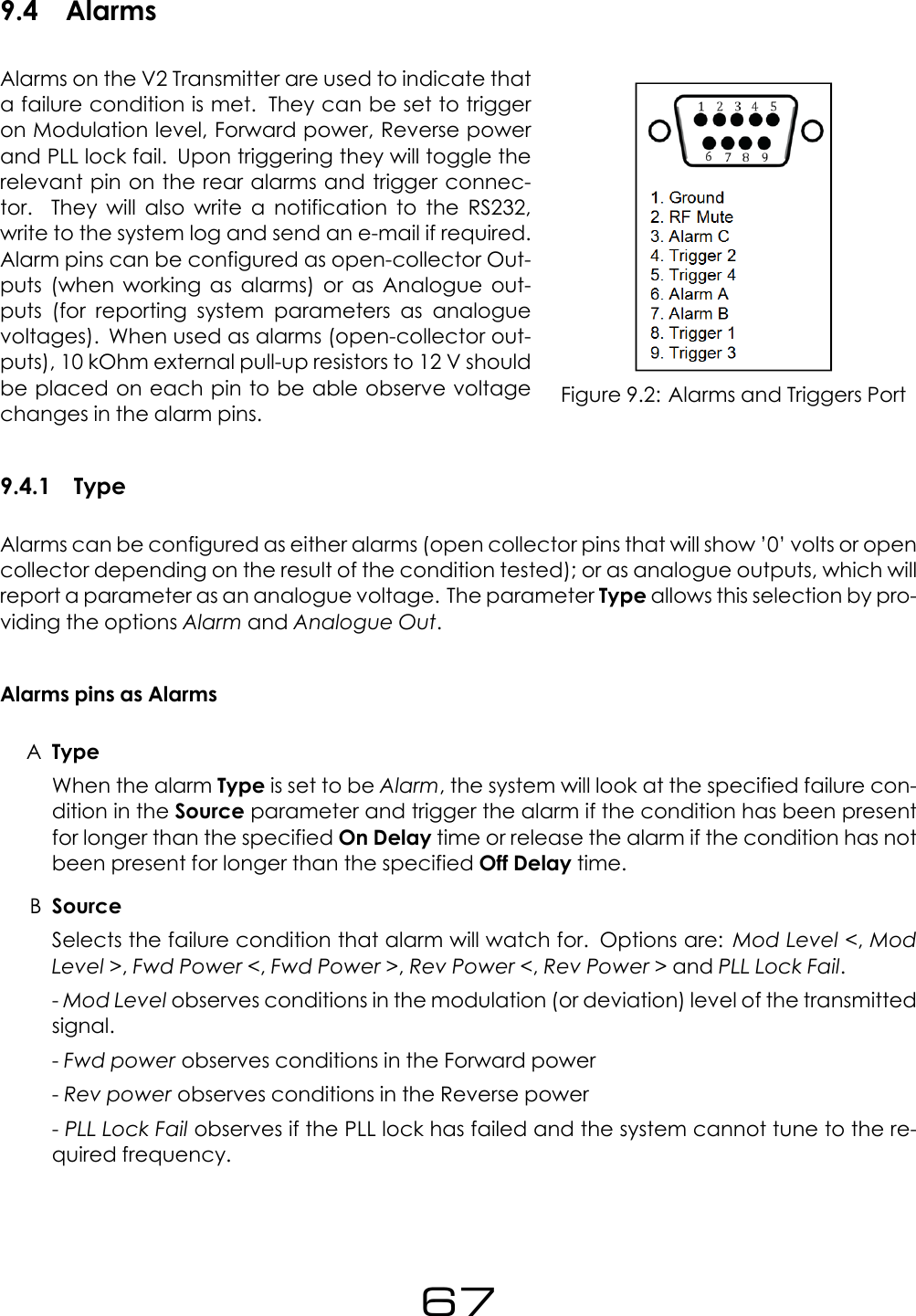
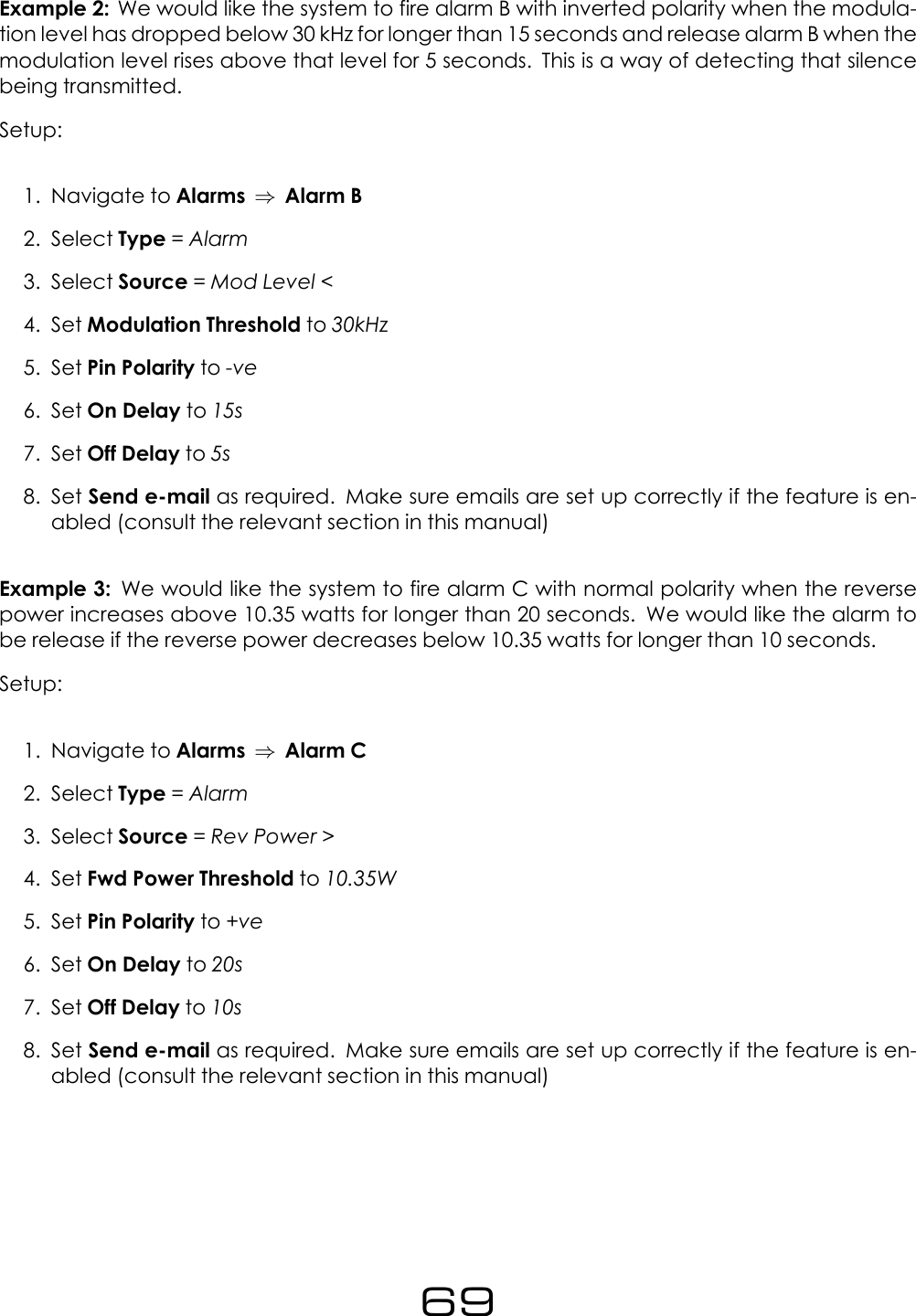
9.4 AlarmsFigure 9.2: Alarms and Triggers PortAlarms on the V2 Transmitter are used to indicate thata failure condition is met. They can be set to triggeron Modulation level, Forward power, Reverse powerand PLL lock fail. Upon triggering they will toggle therelevant pin on the rear alarms and trigger connec-tor. They will also write a notification to the RS232,write to the system log and send an e-mail if required.Alarm pins can be configured as open-collector Out-puts (when working as alarms) or as Analogue out-puts (for reporting system parameters as analoguevoltages). When used as alarms (open-collector out-puts), 10 kOhm external pull-up resistors to 12 V shouldbe placed on each pin to be able observe voltagechanges in the alarm pins.9.4.1 TypeAlarms can be configured as either alarms (open collector pins that will show ’0’ volts or opencollector depending on the result of the condition tested); or as analogue outputs, which willreport a parameter as an analogue voltage. The parameter Type allows this selection by pro-viding the options Alarm and Analogue Out.Alarms pins as AlarmsATypeWhen the alarm Type is set to be Alarm, the system will look at the specified failure con-dition in the Source parameter and trigger the alarm if the condition has been presentfor longer than the specified On Delay time or release the alarm if the condition has notbeen present for longer than the specified Off Delay time.BSourceSelects the failure condition that alarm will watch for. Options are: Mod Level <,ModLevel >,Fwd Power <,Fwd Power >,Rev Power <,Rev Power > and PLL Lock Fail.-Mod Level observes conditions in the modulation (or deviation) level of the transmittedsignal.-Fwd power observes conditions in the Forward power-Rev power observes conditions in the Reverse power-PLL Lock Fail observes if the PLL lock has failed and the system cannot tune to the re-quired frequency.67
CThresholdSelects the threshold value that will be used to detect the error condition. This doesn’tapply to the PLL Lock Fail alarm.DPin PolaritySelects whether the alarm output pin is active high or active low. When +ve is selected,the output will act as a 430 Ohm resistor to ground when the alarm is active and as a 100KOhm resistor to ground when the alarm is not active and vice-versa if -ve is selected.EOn DelaySelects how long the failure condition must be present for before the alarm is fired. Thiscan be set from 2 seconds to 600 seconds.FOff DelaySelects how long the failure condition must have stopped for before the alarm is re-leased. This can be set from 2 seconds to 600 seconds.GSend e-mailSelects if an e-mail will be sent when the alarm state changes. Ensure that the unit isconnected to the network and that E-mails have been set up correctly System ⇒E-Mail to use this feature.Examples of alarm uses and set-upExample 1: We would like the system to fire alarm A with normal polarity when the forwardpower has dropped below 40.5 watts for longer than 20 seconds. We would like the alarm tobe release if the power rises above 40.5 watts for longer than 10 seconds.Setup:1. Navigate to Alarms ⇒Alarm A2. Select Type =Alarm3. Select Source =Fwd Power <4. Set Fwd Power Threshold to 40.5W5. Set Pin Polarity to +ve6. Set On Delay to 20s7. Set Off Delay to 10s8. Set Send e-mail as required. Make sure emails are set up correctly if the feature is en-abled (consult the relevant section in this manual)68
Example 2: We would like the system to fire alarm B with inverted polarity when the modula-tion level has dropped below 30 kHz for longer than 15 seconds and release alarm B when themodulation level rises above that level for 5 seconds. This is a way of detecting that silencebeing transmitted.Setup:1. Navigate to Alarms ⇒Alarm B2. Select Type =Alarm3. Select Source =Mod Level <4. Set Modulation Threshold to 30kHz5. Set Pin Polarity to -ve6. Set On Delay to 15s7. Set Off Delay to 5s8. Set Send e-mail as required. Make sure emails are set up correctly if the feature is en-abled (consult the relevant section in this manual)Example 3: We would like the system to fire alarm C with normal polarity when the reversepower increases above 10.35 watts for longer than 20 seconds. We would like the alarm tobe release if the reverse power decreases below 10.35 watts for longer than 10 seconds.Setup:1. Navigate to Alarms ⇒Alarm C2. Select Type =Alarm3. Select Source =Rev Power >4. Set Fwd Power Threshold to 10.35W5. Set Pin Polarity to +ve6. Set On Delay to 20s7. Set Off Delay to 10s8. Set Send e-mail as required. Make sure emails are set up correctly if the feature is en-abled (consult the relevant section in this manual)69
Alarms pins as Analogue OutputsWhen the alarm Type is set to be Analog Out, the alarm pin will report the status parameterselected in Source as an analogue voltage on the alarms pins. This setup is typically usedto connect the unit to remote control equipment (also known as telemetry interfaces). TheSouce can be set to any of the following parameters: Fwd Power,Rev Power,PA Volts,AuxVolts,Peak Modulation,PA Temp,RF Mute.Use the following equation to translate voltage levels into parameter values:CurrentValue =VOut ∗1.2 ∗NominalValue5(9.1)Where:VOut is the voltage on the pin in Volts.NominalValue is defined in the following table:Parameter NominalValueFWD PowerFor TX50 = 50WattsFor TX300 = 300 Watts...REV Power Same as FWD PowerPA VoltsFor TX5 = 15 VoltsFor TX25 and TX50 = 24 VoltsFor TX300 or greater = 48VoltsAux Volts 15 VoltsPeak Mod 100 kHzPA Temp 100°C*RF Mute* This parameter does not use the above equation.Its representation is:If RF Mute = On, VOut = 5 VoltsIf RF Mute = Off, VOut = 0 VoltsFor example, if the measured Voltage level is 4.166 Volts on a TX50 reporting Forward Power,the actual current value will be:Power (watts)= (4.166*1.2*50)/5 = 49.992 Watts (Approx. 50 Watts)9.5 System9.5.1 DateSystem Date. This is backed up by an internal battery.70
9.5.2 TimeSystem Time. This is backed up by an internal battery.9.5.3 UptimeReports how long the unit has been powered on for. This parameters accepts up to 20 char-acters of text.9.5.4 LocationStores the Physical location of the device (e.g. ’TX Site 3, Rack 5’) It accepts up to 64 char-acters of text.9.5.5 ContactThe name of the person who manages this device. This parameter accepts text of up to 64characters.9.5.6 Screen SaverThis allows the time-out before the screensaver starts. It can be adjusted between 15 sec-onds and 30 minutes.9.5.7 Screen LockEnables/disables the screen lock code. If enabled, the system will request a 4 digit lock codeto exit the screensaver.9.5.8 Screen Lock CodeSets the 4 digit screen lock code.9.5.9 UsersUsernameThis is the username for the remote login (web remote interface). It accepts text of up to 15characters.71
PasswordThis is the password for the remote login. It accepts text of up to 15 characters9.5.10 EthernetThe V2 Transmitters have a built in web server which can monitor and control all transmitterparameters remotely without the need to install any software. The unit can use either staticor dynamic IP addressing. All Ethernet parameters are set in this folder.Ethernet Parameters:DHCPSets whether the Ethernet is configured manually or by DHCP.Parameters when DHCP is on:ADHCP IP This read only parameter shows the IP given by the DHCP to the unit.BDHCP SM This read only parameter shows the DHCP subnet mask.CDHCP GW This read only parameter shows the DHCP gatewayDDHCP DNS 1 This read only parameter shows the DHCP Primary DNS server.EDHCP DNS 2 This read only parameter shows the DHCP Secondary server.FMAC This read only parameter shows the Ethernet MAC address.Parameters when DHCP is off:AStatic IP Sets the manual IP address. Accepts an IPv4 address in the formaaa.bbb.ccc.dddBStatic SM Sets the manual subnet mask. Accepts an IPV4 address in the formaaa.bbb.ccc.dddCStatic GW Sets the manual gateway. Accepts an IPV4 address in the formaaa.bbb.ccc.dddDStatic DNS1 Sets the manual Primary DNS server. Accepts an IPv4 address in the formaaa.bbb.ccc.dddEStatic DNS2 Sets the manual Secondary DNS server. Accepts an IPv4 address in the formaaa.bbb.ccc.dddFMAC This read only parameter shows the Ethernet MAC address.72
9.5.11 E-MailV2 Transmitters allow the sending of emails to provide notification of an alarm or external trig-ger being activated. The transmitter can either send emails via a user defined SMTP server oran SMTP server hosted by BW Broadcast. Note that SSL authentication is not supported.TestATest This will send a test-email.BRecipient Sets who the test email will be sent to. Multiple addresses must be separatedby commas. This parameter accepts up to 99 characters of text.Send viaThis parameter sets the method used for sending e-mails. Options are SMTP or BW Broadcast.Please note that SSL authentication is not supported by the unit. An easier option to set upis to send the email via the BW Broadcast email relay service. In this case, the unit must beconnected to the internet.Parameters when Send via is set to SMTP:AFrom Sets the email address of the sender. The unit will send e-mails through this address.This parameters accepts up to 64 characters of text.BRecipient(s) Sets the recipients of the emails. Multiple addresses must be separated bycommas. This parameter accepts up to 99 characters of text.CHost Sets the IP address of the SMTP server. This parameter accepts up to 64 charactersof text.DPort Sets the port number of the SMTP server. This parameters accepts values from 1 to1024.EUsername Sets the username for SMTP authentication. This must be left blank if no au-thentication is required. This parameter accepts up to 64 characters of text.FPassword Sets the password for SMTP authentication. This must be left blank if no au-thentication is required. This parameter accepts up to 64 characters of text.GMax emails a day Sets the maximum number of emails allowed to be sent by the unitin a single day. This is intended to stop spamming coming from intermittent fault condi-tions. This parameter accepts values from 1 to 1000.HEmails sent today Reports the number of emails sent today. This parameter accepts val-ues from 0 to 1000.73
Parameters when Send via is set to BW Broadcast:AFrom Sets the email address of the sender. The unit will send e-mails through this address.This parameters accepts up to 64 characters of text.BRecipient(s) Sets the recipients of the emails. Multiple addresses must be separated bycommas. This parameter accepts up to 99 characters of text.CMax emails a day Sets the maximum number of emails allowed to be sent by the unitin a single day. This is intended to stop spamming coming from intermittent fault condi-tions. This parameter accepts values from 1 to 1000.DEmails sent today Reports the number of emails sent today. This parameter accepts val-ues from 0 to 100000.9.5.12 HTTPV2 Transmitters provide a graphical web based interface for ease of use and control. Thiscan be accessed by navigating to the IP address of the unit in any standard web browser.After entering the login details for the unit, the user can then read and write all parametersand also perform firmware upgrades. All parameters are saved and updated dynamicallyas they are changed in the remote.EnableEnables/disables the web server.PortSets the webserver TCP port. Disable HTTP to change. This parameter accepts values from 1to 1024.Remote Control IndicationDisplays a message on the screen when the unit is being controlled remotely through theweb remote.9.5.13 TelnetFor text based access via a local network or the internet, Telnet can be used to connect tothe unit.74
EnableEnables/disables the telnet server.PortSets the telnet TCP port. Telnet must be set to Disabled to change. This parameter acceptsvalues from 1 to 1024.9.5.14 RS232EnableEnables/disables the RS232 remote.Baud RateSets the RS232 baud rate.9.5.15 LogV2 Transmitters have three methods of logging, regardless of the log location, the format isthe same. V2 Transmitters will output a list of important parameters, all meter settings andalarm and trigger statuses 2 minutes after a parameter change and then at hourly intervals.These can be either received via RS232, UDP or saved to a file on the device. Each methodcan be enabled or disabled.RS232Enables/disables logging to RS232.FileEnables/disables logging to file.75
UDPAEnable Enables/disables logging messages to a remote UDP logging/syslog server.BIP Sets the IP address where the log messages should be sent via UDP. This parameteraccepts IPv4 addresses in the form aaa.bbb.ccc.ddd.CPort Sets the port where the log messages should be sent via UDP. Disable UDP tochange. This parameter accepts values from 1 to 10000.9.5.16 DiagnosticsThis set of parameters report the state of various parts of the system upon boot (OK or fail). Ifan error condition is observed, the unit should be re-booted and these parameters should beexamined. This information will be useful when contacting support.DSPX CommThis read only parameter reports communication failure with DSPX chip (OK/FAIL). Restart theunit to refresh this value in case of failure.Exciter CommThis read only parameter reports communication failure with AIO exciter chip (OK/FAIL).Restart the unit to refresh this value in case of failure.Alarms DAC CommThis read only parameter reports communication failure with Alarms DAC chip (OK/FAIL).Restart the unit to refresh this value in case of failure.Power DAC CommThis read only parameter reports communication failure with Power DAC chip (OK/FAIL).Restart the unit to refresh this value in case of failure.9.5.17 AboutProduct IDThis read only parameter displays the product ID.76
Product VersionThis read only parameter displays the product version.Serial NumberThis read only parameter displays the serial number.Hardware VersionThis read only parameter displays the HW version.Software VersionThis read only parameter displays the SW version.Control VersionThis read only parameter displays the control board version.AIO FW VersionThis read only parameter displays the AIO(All in One) PLL+ firmware version.9.5.18 RebootReboots the unit. When the reboot is performed from the FP, a confirmation window will popup asking to confirm the choice.9.5.19 Factory ResetPerforms a factory reset, setting all the parameters to its default value. All user changes willbe lost except network settings.77
Part IVTroubleshooting78
10V2 FM Transmitter TroubleshootingGuideThere is no or low RF output power•Please ensure that you are using the correct mains voltage as specified in the transmit-ter’s technical manual.•On the menu, check that the unit is not set to RF mute or that the alarm ports at the backare not set to RF mute.•If the unit has a slide-in power supply, please check that the power supply is pushed incorrectly at the back of the unit.•Check that the set power on the menu to the desired RF power. (BW Broadcast trans-mitters are set to minimum output power when they leave the factory. This can be ad-justed on the front panel via RF settings ⇒Power. You may want to increase this pa-rameter to the desired power.•Check that the Power Scheduler feature is disabled (if not required). Or set-up correctlyif required. Check that the System time is correct. All these settings are contained in thefolder: RF Settings ⇒Power SchedulerVSWR fault light is on•The front panel VSWR fault LED illuminates when there is high reverse RF power from theantenna. This is usually caused by factors external to the transmitter. In this case, pleasecheck the antenna, cable and connectors, as well as the antenna itself.I am not able to change any settings on the unit (Passcode)•This usually means that the front panel screen has been locked with a 4 digit passcode.The original 4 digit code has to be entered before any settings can be changed. Oncethe correct code is inserted, press the middle button on the right hand side to confirmthe passcode.I have no modulation•Please check that the correct input source has been selected on the front panel con-troller Audio Settings ⇒MPX Source. If you are using the digital or analog inputs (XLRconnectors), this option must be set to Internal. If you are using the external MPX BNCinput, this option must be set to External.79
Modulation level is too low•Most professional signal sources will be able to drive BW Broadcast transmitters to full de-viation. Some battery-powered or weaker sources, such as PC sound cards, may not beable to provide enough drive to achieve full modulation in the transmitter. If using theXLR inputs and the internal audio processor then we advise that you check the metersscreen in the Front Panel (Please press the bottom button on the right until meters screenappears). Assuming that the transmitter preset is not set to Bypass, then you should beable to observe movement on the meters labeled ”LIM” and ”AGC”. If you they do notmove, then you should increase the level in your audio source so that they do.If you are not able to increase your audio level from your external audio source you canincrease it by adjusting the level pot located on the left hand side of the 2 BNCs on therear panel.I am using the MPX input and have strange sound issues•Ensure that Audio Settings ⇒MPX Source is set to External.•Leaving it switched to Internal will feed the internal stereo generator audio into the ex-citer. This will result in distortion and interference with the signal you are feeding fromyour external composite source connected to the MPX input of the transmitter.Transmitter occasionally changes RF power•Please check tat the Power Scheduler feature is not enabled (RF Settings ⇒PowerScheduler). If this feature is required, ensure it is correctly set-up and the time in the sys-tem is correct. Please refer to Operation Guide ⇒RF Settings ⇒Power Scheduler onthis manual to properly configure this feature.Temp fault light is on•Please ensure that the fans are running and not obstructed and the transmitter is in awell ventilated area.Other IssuesIf your issue is not covered in this guide or you have tried the above and still having trouble,you can contact our 24 Hour Support Team:International Phone: +44 208 253 0295US Toll Free: +1-888-233-1663Email: support@bwbroadcast.com80
Part VTechnical Specifications81
11Technical Specications11.1 Common Specifications11.1.1 RFHarmonics better than -75 dBcSpurious <-90dBcFrequency range 87.5 - 108 MHzFrequency steps 50 kHzFrequency selection User interface with display or web remote controlFrequency control type Dual speed phase locked loopFrequency stability <+/- 500 Hz (fine adjustment available)Modulation Direct frequency modulationSynchronous AM Noise >70dBAsynchronous AM Noise >70dB11.1.2 Audio and MPX I/OMPX input connector BNCMPX input level MPX input level -10 dB to +10 dB (adjustable)MPX input response MPX input response +/- 0.02 dB, 5 Hz to 100 kHzAudio input connectors XLR balancedAnalog Input impedance 10 kOhmAES/EBU Sampling Rates 32kHz, 44.1kHz, 48kHz, 88.2kHz and 96kHz11.1.3 StereoSubcarrier generation Microprocessor generated 8x over-sampledPilot 19 kHz +/- 1 Hz (adjustable)Pilot generation Microprocessor generated 16x over-sampledOutput level +6dBu (BNC)15 kHz filtering >= 80dB at 19kHz (DSP based)Overshoot filter clipping DSP basedSpurious>80 kHz > -60dBr>160 kHz > -80dBrStereo separation >50dB (20Hz - 15kHz)82
11.1.4 LimiterAudio input levels -10dB to +24dB for level control, DSP auto levellingInput CMRR > 60dBAudio distortion <0.05% at limiting 1 KHz (bypass preset)Frequency response 20 Hz to 20 kHz +/- 0.2dB (pre-emphasis off)Processing range Processing control range 40dBPre-emphasis 50 µs,75 µs and 0 µs (off)Processing type Multiband DSP Processor. DSPXmini FMSEProcess modes Multiple presets11.1.5 OtherUser Interface 3 buttons, rotary encoder and 256x64 graphics displayExternal control/monitor I/O Alarms D9-type Male; RS232 D9-Type Female,Telnet and Web remote RJ45 Ethernet11.1.6 Temperature ProtectionThe temperature protection circuitry will protect the unit against over-temperature condi-tions by reducing the output power. The reduction will start at 71 °C. At 81 °C, the power willbe reduced to 50% and at 85 °C to around 6%.11.1.7 VSWR ProtectionThe VSWR protection circuitry will protect the unit against high VSWR conditions by reduc-ing the output power. This protection will reduce the output power to 50% when the reversepower is 10% of the forward power.83
11.2 Model-Specific Specifications11.2.1 TX5 V2Size 485mm x 350mm x 45mmWeight 2kgVotlage input 100 - 265 VACPower connector IECSwitched mode approvals UL / TUV / CEPower Consumption 30W average @ 5W RFPower 0.05W - 5.05W ContinuousPower Supply InternalConnector N-type 50 OhmApprovals: CE/RTTE –applicable harmonised standardsFCC Part 73 verified11.2.2 TX50 V2Size 485mm x 350mm x 45mmWeight 6.8kgVotlage input 100 - 265 VACPower connector IECSwitched mode approvals UL / TUV / CEPower Consumption 104W average @ 50W RFPower 5.4W - 50.4W ContinuousPower Supply InternalConnector N-type 50 OhmApprovals: CE/RTTE –applicable harmonised standardsFCC (FCC ID: TUO TX25-50)84
11.2.3 TX300 V2Size 485mm x 510mm x 90mmWeight 6.8kgVotlage input 100 - 265 VACPower connector IEC C20 (C19 cable)Switched mode approvals UL / TUV / CEPower Consumption 465W average @ 300W RFPower 30.8W - 310.8W ContinuousPower Supply InternalConnector N-type 50 OhmApprovals: CE/RTTE –applicable harmonised standardsFCC (FCC ID: 2ABPH-TX300V2)IC (11730A-TX300V2)11.2.4 TX600 V2Size 485mm x 510mm x 90mmWeight 9.3kgVotlage input 100 - 265 VACPower connector IEC C20 (C19 cable)Switched mode approvals UL / TUV / CEPower Consumption 920W average @ 600W RFPower 60.5W - 610.5W ContinuousPower Supply Slide-in typeConnector N-type 50 OhmApprovals: CE/RTTE –applicable harmonised standardsFCC (FCC ID: TUO TX600)85
11.2.5 TX1000 V2Size 490mm x 510mm x 95mmWeight 13.4kgVotlage input 220 - 240 VACPower connector IEC C20 (C19 cable)Switched mode approvals UL / TUV / CEPower Consumption 1580W average @ 1000W RFPower 152W - 1102W ContinuousPower Supply Slide-in typeConnector 7/16 Connector 50 OhmApprovals: CE/RTTE –applicable harmonised standardsFCC Part 73 verified11.2.6 TX1500 V2Size 490mm x 510mm x 95mmWeight 13.4kgVotlage input 220 - 240 VACPower connector IEC C20 (C19 cable)Switched mode approvals UL / TUV / CEPower Consumption 2344W average @ 1500W RFPower 162W - 1512W ContinuousPower Supply Slide-in typeConnector 7/16 Connector 50 OhmApprovals: CE/RTTE –applicable harmonised standardsFCC Part 73 verified86
11.2.7 TX2500 V2Size 490mm x 510mm x 133mmWeight 19.5kgVotlage input 220 - 240 VACPower connector IEC C20 (C19 cable)Switched mode approvals UL / TUV / CEPower Consumption 3325W average @ 2500W RFPower 200W - 2500W ContinuousPower Supply 2 x Slide-inConnector 7/16 Connector 50 OhmApprovals: CE/RTTE –applicable harmonised standardsFCC Part 73 verified87
THIS PAGE IS INTENTIONALLY LEFT BLANK88

Navigation menu