BagelLabs BAGEL001 Bagel Smart Tape Measure User Manual
BagelLabs co.,Ltd. Bagel Smart Tape Measure
User manual
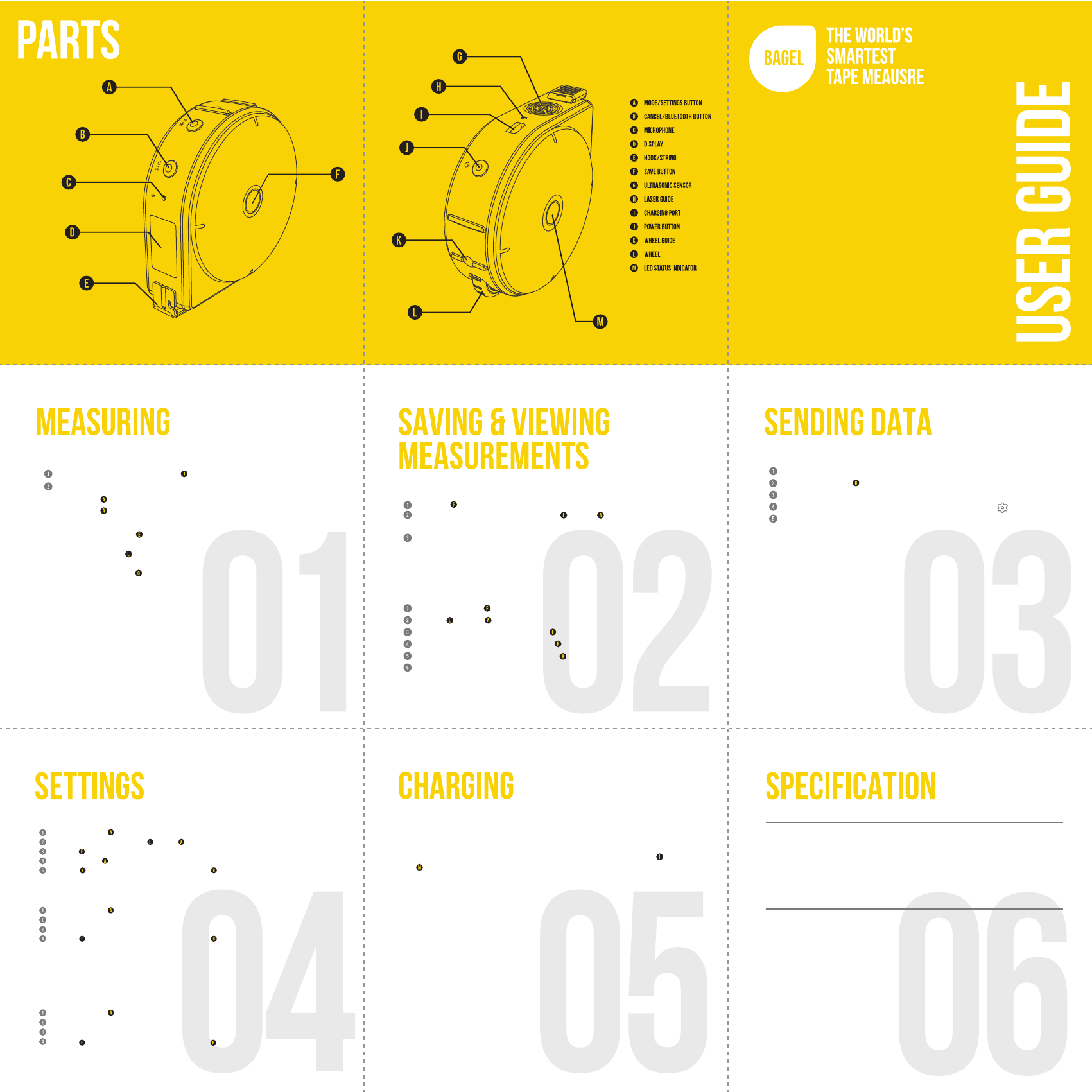
Dimensions 80 x 80 x 30mm (L x W x H)
Weight 118g
Voltage Input: 5V DC / Driving: 3.3V DC
Display 0.96” OLED (128x64)
Storage Capacity 32MB
BaeryBuilt-in rechargeable Li-Po (500mAh, 3.7V DC)
Wireless Connecvity Bluetooth 4.0 BLE (Only)
Laser Voltage: 3V DC / Current: <25mA,
Wavelength 660nm Red / Class: 2
Materials Polycarbonate Casing / Dyneema String
Compable OS Android, iOS
Measurement Range String : 0-300cm (0-9’ 10’’)
Wheel: 0-999cm (0-32’ 9’’)
Remote: 30cm - 500cm (1’-16’ 4’’)
Bluetooth Frequency 2.4GHz
Turn the device on by pressing the Power Button
Select a measurement mode (String/Wheel/Remote).
Press the Mode/Settings button to enter mode menu.
Press the Mode/Settings button again to switch between modes.
String Mode: Pull out the hook/string.
Wheel Mode: Roll the wheel in the direcon guided by the wheel guide laser.
Remote Mode: Point the ultrasonic sensor at the target of measurement.
Bagel has three modes of measurement: String, Wheel, and Remote.
→
→
To view your measurements on the device:
Press and hold the save button to view logs .
Use the wheel or MODE/SETTINGS BUTTON to scroll through saved measurements.
To delete a measurement, press the save button and select “Yes”.
To delete all measurements, hold the save button and select “Yes”.
You can leave the menu by clicking the cancel/bluetooth button .
Factory default me zone may differ from yours. You can sync Bagel's me zone
to yours by pairing the device with a smartphone (Secon 03).
You can save your measurement with a simple buon click.
Press the save button once to save the measurement shown on the digital display.
On the “Voice Memo?” screen, use the WHEEL or MODE/SETTINGS BUTTON
to select “Yes” in order to record a voice memo.
Alternavely, select “No” to save without a voice memo.
Adding a voice tag to your measurement is oponal and you can
always add or edit tags through Bagel’s mobile app.
To pair Bagel with your smartphone:
Aer pairing is complete, we recommend running the app tutorial
to learn how to sync Bagel’s data.
Press and hold the cancel/bluetooth button to enter pairing mode on Bagel.
Download and install the Bagel Labs mobile app from hp://www.bagel-labs.com.
“Pairing…” should show up on the digital display.
On the mobile app, enter the sengs menu by clicking the buon.
Click on [Bluetooth Pairing] to start the scan for Bagel.
Changing the Unit of Measure
Press and hold the mode/setting button to enter sengs menu.
Scroll through menus using the wheel or mode/setting button to highlight [Units].
Press the save button to enter.
Use the wheel or mode/setting button to select [cm], [in], or [mm].
Press the save button to save and exit. Or, press the cancel/bluetooth button to return
to sengs menu without saving.
Turning Laser Guide ON/OFF
Press and hold the mode/setting button to enter sengs menu.
Scroll through menus to highlight [Laser] and enter.
Select [On] or [Off].
Press the save button to save and exit. Or, press the cancel/bluetooth button to return
to sengs menu without saving.
Seng Inside/Outside Measurements
By default, Bagel’s measurements start from 0 (Offset seng OFF). If you want to make inside
measurements, e.g. length of window sill, you can set Bagel to offset mode (Offset seng ON).
Then, Bagel’s measurements will start from 8cm (3.15”), which is the diameter of Bagel.
Press and hold the mode/setting button to enter sengs menu.
Scroll through menus to highlight [Offset] and enter.
Select [On] or [Off].
Press the save button to save and exit. Or, press the cancel/bluetooth button to return
to return to sengs menu without saving.
Charging the baery before use is recommended but not required.
Bagel ships pre-charged but inial charge will vary.
To charge Bagel, simply connect the included micro USB cable to the charging port.
The LED STATUS INDICATOR should turn red while charging.
Bagel will display “Low baery” at 5%.
Full discharge of the baery can reset the Real Time Clock (RTC) and cause me
inaccuracy. To resynchronize me, pair Bagel with its mobile app.
This device can be operated while charging.
Note: The micro USB port is for charging purpose only and does not support data transfer.
DO NOT subject the device to extreme temperatures or variaons in temperature.
Avoid heavy impact or falling of the device.
DO NOT use the string on sharp edges.
DO NOT expose the device to connuous vibraon.
DO NOT expose the device to extremely hot or cold temperatures.
Always store the device indoors.
Always keep the device free of dust, water, and direct sunlight.
Clean the tool with a damp cloth.
DO NOT disassemble or modify the device in any way.
DO NOT aempt to change any part of the laser lens.
Full discharge of the baery can reset the Real Time Clock (RTC) and cause me inaccuracy.
String mode accuracy can be influenced by the speed of pull and retracon.
Avoid pulling the string too quickly or completely leng it go to ensure
maximum accuracy. Pulling the string no faster than 50cm/s (20in/s) and retracng
no faster than 10m/s (4in/s) is required for accuracy.
When you retract the string too quickly, Bagel will display "!", nofying
that the measurement may be out of its accuracy range. In this case, you can
press the MODE/SETTINGS BUTTON to reset Bagel's measurement to zero.
In string mode, the digital display may somemes malfuncon due to string
tension affecng Bagel's sensor. This is a temporary glitch and you can fix it
by restarng the device.
Read all instrucons. Failure to follow all instrucons listed below may result in
hazardous radiaon exposure, electric shock, fire, choking and/or serious injury.
Use of controls or adjustments or performance of procedures other than those
specified herein may result in hazardous radiaon exposure.
Have the device repaired only through qualified specialist using original spare parts.
This ensures that the safety of the device is maintained.
DO NOT use this device for any purpose other than those outlined in this manual.
DO NOT leave the device “ON” unaended in any normal operang mode.
DO NOT disassemble the device. There are no user serviceable parts inside.
Disassembling the device will void all warranes on the device.
DO NOT modify the device in any way. Modifying the device may result in
hazardous laser radiaon exposure.
Bagel Labs (“Seller”) warrants to the original purchaser only, that Bagel Smart
Tape Measure will be free from defects in material or workmanship for a period of
one (1) year from date of purchase.
SELLER’S SOLE OBLIGATION AND YOUR EXCLUSIVE REMEDY under this Limited
Warranty and, to the extent permied by law, any warranty or condion implied
by law, shall be the repair of replacement of parts, without charge, which are
defecve in material or workmanship and which have not been misused, carelessly
handled, or misrepaired by persons other than Seller or Authorized Service Center.
To make a claim under this Limited Warranty, you must return the complete Bagel
Smart Tape Measure, transportaon prepaid, to any Seller’s Factory Service
Center or Authorized Service Center. Please include a dated proof of purchase
with your tool. For locaons of service centers visit hp://www.bagel-labs.com.
THIS LIMITED WARRANTY DOES NOT APPLY TO OTHER ACCESSORY ITEMS AND
RELATED ITEMS.
FCC ID : 2AJ8I-BAGEL001
FCC COMPLIANCE STATEMENT:
This device complies with part 15 of the FCC Rules.
Operaon is subject to the following two condions:
(1) This device may not cause harmful interference, and (2) this device must accept any interference
received, including interference that may cause undesired operaon.
INFORMATION TO USER:
This equipment has been tested and found to comply with the limits for a Class B digital device,
pursuant to Part 15 of FCC Rules. These limits are designed to provide reasonable protecon against
harmful interference in a residenal installaon. This equipment generates, uses, and can radiate
radio frequency energy. If not installed and used in accordance with the instrucons, it may cause
harmful interference to radio communicaons. However, there is no guarantee that interference will
not occur in a parcular installaon. If this equipment does cause harmful interference to radio or
television recepon, which can be determined by tuning the equipment off and on, the user is encouraged
to try and correct the interference by one or more of the following measures:
- Reorient or relocate the receiving antenna
- Increase the distance between the equipment and the receiver.
- Connect the equipment to outlet on a circuit different from that to which the receiver is connected.
- Consult the dealer or an experienced radio/TV technician for help.
WARNING:
Changes or modificaons (including on the antenna) not expressly approved by the party responsible for compliance could
void the user’s authority to operate the equipment.
LASER CLASSIFICATION:
This device produces visible laser beams, which are emied from the instrument:
It is a Class 2 laser product in accordance with EN 60825-1: 2007 “Safety of Laser Product”.
Laser Class2 Products:
Do not stare into the laser beam or direct it towards other people unnecessarily.
Eye protecon is normally afforded by aversion responses including the blink reflex.
NEVER aim the beams at a workplace with a reflecve surface. Bright shiny
reflecve sheet steel or similar reflecve surfaces are not recommended for laser use.
Reflecve surfaces could direct the beams back towards the operator.
DO NOT allow children to use the device without supervision.
The string can cause strangulaon and children could unintenonally blind other persons.
The use of opcal instruments with this device will increase eye hazards.