Barracuda Networks SC1 Network Appliance User Manual QSG NGSC indd
Barracuda Networks, Inc. Network Appliance QSG NGSC indd
User manual
Quick Start Guide
Kurzanleitung
Guía de Inicio Rápido
Guide de Démarrage Rapide
Guida Rapida
Hızlı Başlangıç Rehberi
クイックスタートガイド

Dear Barracuda Networks Customer,
Thank you for choosing the Barracuda NextGen Secure Connector
appliance. Barracuda Networks o ers a complimentary telephone
installation appointment with this purchase to help you plan your
installation, con gure your system, and verify the operation of
your Barracuda NextGen Secure Connector appliance following
installation. Please contact our Technical Support team to schedule
your complimentary telephone installation appointment.
Of course, this complimentary telephone installation appointment
is not designed to replace the local support you may receive
from your Barracuda Networks reseller. If you prefer, please do not
hesitate to contact your Barracuda Networks reseller, whom we
will be happy to coordinate with in order to provide additional
deployment support.
Thank you again for choosing the Barracuda NextGen Secure
Connector appliance. We encourage you to contact your reseller
or our Technical Support team that is available around the clock
to assist with technical questions or concerns. We look forward
to helping you with your current and future needs in the areas
of security, networking, and data protection.
Sincerely,
BJ Jenkins
CEO
Table of Contents
English
Setup
Support
Security
Warranty
Deutsch
Sicherheit
Garantie
Español
Seguridad
Garantía
Français
Sécurité
Garantie
Italiano
Sicurezza
Garanzia
Türk
Güvenlik
Garanti
Japanese
セキュリティ
保証
4-5
5
6
7
8
9
10
11
12
13
14
15
16
17
18
19
4
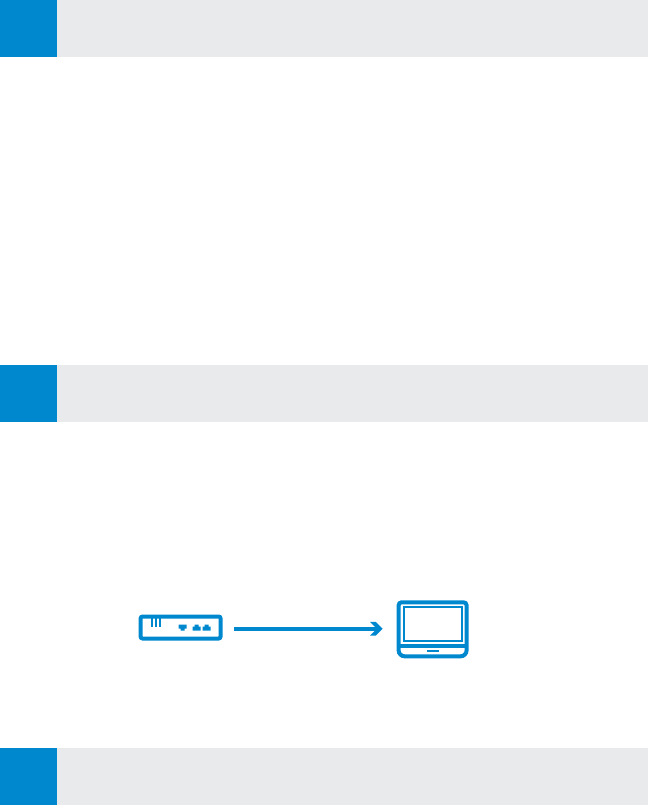
• Connect the USB cable to the Secure Connector OTG port.
• Connect the other end of the USB cable to your PC.
The Secure Connector powers on automatically and is mounted as a mass
storage device on your PC. This can take up to two minutes.
• Copy the sca.conf le to the Secure Connector.
• Unplug the Secure Connector from your PC and remove the USB cable from the
OTG port.
Setup
2Connect
Barracuda recommends reading these instructions fully before starting
to install. Adhere to standard electrical safety precautions to protect yourself
from harm and to protect the appliance from damage, and place your appliance
in a stable location. To install and con gure, you need the following:
• Security Appliance
• Ethernet Crossover Cable (red)
• USB Power Cord
• External Power Supply and Clips
• Accessories Pack
1Getting Started
Management PC
Secure Connector’s
OTG Port
3Provision
5
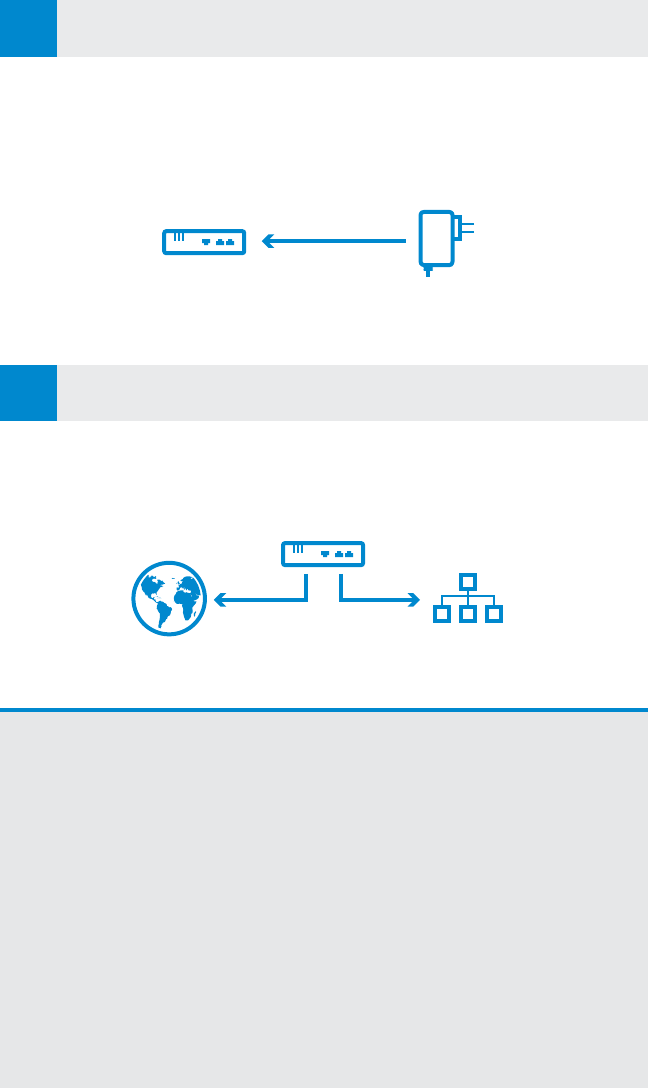
• Connect the WAN port of the Secure Connector to the Internet.
• Connect the LAN port of the Secure Connector to the corporate network.
1. Connect the USB cable to the appliance DC 5V port and connect the power
supply to power up the appliance.
2. The appliance powers on automatically. Wait two minutes until fully booted.
3. Verify that all LEDs on the front of the Secure Connector are on.
5Connect WAN and LAN
Online Support
• To open a Technical Support case online, please visit
https://www.barracuda.com/support_case
• For help from other Barracuda Networks customers, please visit the Barracuda
Networks Support Forum at https://forum.barracuda.com. Please register to
post questions and exchange information.
Telephone Support
• For urgent matters, please call Technical Support at +1 408.342.5300.
Phone lines are open 24 hours a day, 7 days a week.
Documentation
• Technical documentation is available online at https://techlib.barracuda.com
Setup / Support
4Boot
USB Power Supply
Secure Connector’s
DC 5V Port
Secure Connector
LAN
Cor
p
orate LAN
WAN
Internet
6
Electrical Safety
Follow these basic electrical safety precautions to protect yourself from harm and to protect the appliance
from damage:
• Be aware of the power switch locations on the appliance chassis, the emergency power-o switch for the housing
room, the disconnection switch, and the electrical outlet. This awareness allows quick removal of electrical power
from the system should an electrical accident occur.
• Do not work alone when working with high voltage components.
• When working around exposed electrical circuits, another person familiar with the power-o controls should be
nearby to switch o the power if necessary.
• Use only one hand when working with powered-on electrical equipment. This prevents making a complete
circuit, which can cause electrical shock. Use extreme caution when using metal tools, which can easily damage
electrical components or circuit boards when they come into contact with them.
• Do not use mats designed to decrease electrostatic discharge to protect from electrical shock. Instead, use rubber
mats that have been speci cally designed as electrical insulators.
• The power supply power cord must include a grounding plug and must be plugged into grounded electrical outlets.
• To prevent re or shock hazard, do not expose the unit to rain or moisture, or install this product near water.
• Avoid installing this product during a lightning storm.
• Ensure that the air vents (openings along the sides and back) are never blocked and that there is su cient air ow
through the vents to prevent over-heating.
General Safety
• Keep the area around the appliance clean and free of clutter.
• Locate a safe and dry location to set this product, keeping it away from wet surfaces/surroundings.
• While working on the system, do not wear loose clothing, such as neckties and unbuttoned shirt sleeves, which
can contact electrical circuits or be pulled into a cooling fan.
• Remove any jewelry or metal objects from your body, which can act as excellent metal conductors, creating short
circuits, and potentially harming you if they contact printed circuit boards or powered areas.
• For plugged in equipment, the socket-outlet must be installed near the equipment and be easily accessible.
Electrostatic Discharge Precautions
Electrostatic discharge (ESD) is generated by two objects with di erent electrical charges coming into contact
with one another. An electrical discharge, which can damage electronic components and printed circuit boards,
neutralizes this di erence.
• Use a grounded wrist strap designed to prevent static discharge.
• Keep all components and printed circuit boards (PCBs) in their antistatic bags until ready for use.
• Touch a grounded metal object before removing the board from the antistatic bag.
• Do not let components or PCBs contact your clothing, which may result in a charge despite wearing a wrist strap.
• Handle a board by its edges only; do not touch its components, peripheral memory modules, or contacts.
• When handling chips or modules, avoid touching their pins.
• Put the server board and peripherals back into their antistatic bags when not in use.
• For grounding purposes, make sure your computer chassis provides excellent conductivity between the power
supply, the case, the mounting fasteners, and the server board.
• After accessing the inside of a system, close the system back up and secure it to the rack unit with the retention
screws after ensuring that all connections have been made.
Security
Federal Communication Commission interference statement
This equipment has been tested and found to comply with the limits for a Class B
digital device, pursuant to part 15 of the FCC rules. These limits are designed to
provide reasonable protection against harmful interference in a residential
installation. This equipment generates, uses and can radiate radio frequency
energy and, if not installed and used in accordance with the instructions, may
cause harmful interference to radio communications. However, there is no
guarantee that interference will not occur in a particular installation. If this
equipment does cause harmful interference to radio or television reception, which
can be determined by turning the equipment off and on, the user is encouraged to
try to correct the interference by one or more of the following measures:
-Reorient or relocate the receiving antenna.
-Increase the separation between the equipment and receiver.
-Connect the equipment into an outlet on a circuit different from that to which the
receiver is connected.
-Consult the dealer or an experienced radio/TV technician for help.
This device complies with Part 15 of the FCC Rules. Operation is subject to the
following two conditions:
(1) this device may not cause harmful interference and
(2) this device must accept any interference received, including interference that
may cause undesired operation
RF Exposure Warning
The equipment complies with RF exposure limits set forth for an uncontrolled
environment. The antenna(s) used for this transmitter must not be co-located or
operating in conjunction with any other antenna or transmitter.
You are cautioned that changes or modifications not expressly approved by the
party responsible for compliance could void your authority to operate the
equipment.
This equipment should be installed and operated with a minimum distance of 20
centimeters between the radiator and your body.

7
United States Patents
This Barracuda product is covered by one or more of the following U.S. patents:
9,021,017 8,559,450 8,122,493 7,861,300 7,093,287
8,849,836 8,558,888 8,069,244 7,836,267 7,010,611
8,843,612 8,555,365 8,050,251 7,788,291 6,778,941
8,838,965 8,463,797 7,996,475 7,688,815 6,324,582
8,831,030 8,447,856 7,987,267 7,519,727 6,266,701
8,789,178 8,443,193 7,974,288 7,328,247 6,098,108
8,788,831 8,434,140 7,970,899 7,272,155 6,097,697
8,788,597 8,285,997 7,930,428 7,254,038 5,999,967
8,775,604 8,280,895 7,917,943 7,149,795 5,796,948
8,726,384 8,219,644 7,917,756 7,149,222 5,503,561
8,725,704 8,204,948 7,898,953 7,103,913
8,571,042 8,194,174 7,877,789 7,093,294
Software License
Barracuda software is provided under license from Barracuda Networks, Inc. and other licensors, and certain of the
programs included in the software may be provided under the GNU Gen eral Public License (GPL) or the Lesser
General Public License (LGPL). In accordance with the terms of the GPL and LGPL, you may request a copy of the
relevant source code. This o er is valid for up to three years from the date of original purchase of the product. For
details and information about the applicable licenses, please contact Barracuda at contact@barracuda.com
Barracuda software license terms are located at: https://www.barracuda.com/legal/software-license-agreement
Warranty
The hardware and software is warranted as set forth in the warranty located at:
https://www.barracuda.com/legal/warranty
Export Compliance
Barracuda is committed to complying fully with U.S. government and host country government laws and
regulations, including export and import laws. Any person or entity exporting or re-exporting Barracuda Networks
products directly or indirectly and via any means, including electronic transfer, is wholly responsible for doing so
in accordance with the U.S. Export Administration Regulations and the laws of host countries and must obtain and
maintain all approvals and licenses from the appropriate governmental authorities. U.S. export laws restrict product
from being shipped to embargoed countries and denied persons or entities. For details on U.S. export laws, please
visit http://www.bis.doc.gov.
To assist you meet your obligations with regard to export compliance, Barracuda Networks provides a product
export classi cation matrix located at: www.barracuda.com/tradecompliance.
Should your organization have any questions regarding this obligation or our trade compliance policies, please contact
your Barracuda Networks Channel Account Manager or send an email to TradeCompliance_Team@barracuda.com
Warranty
8
Sicherheit im Umgang mit Elektrizität
Befolgen Sie diese grundlegenden Regeln zur elektrischen Sicherheit, um sich selbst und das Gerät vor Schaden
zu bewahren:
• Merken Sie sich die Orte, an denen sich der Ein-/Aus-Schalter am Gerätegehäuse, der Notfall-Ausschalter des
Serverraums, der Trennschalter und die Steckdose be nden. Diese Kenntnisse ermöglichen Ihnen das rasche
Abschalten des Stroms bei einem Elektrizitätsunfall.
• Arbeiten Sie mit Hochspannungskomponenten nur in Anwesenheit einer zweiten Person.
• Beim Arbeiten in der Nähe freiliegender stromführender Teile sollte sich eine weitere Person, die weiß wie der
Stromkreis unterbrochen werden kann, in der Nähe be nden, um die Stromversorgung zu unterbrechen, falls
dies nötig wird.
• Verwenden Sie nur eine einzige Hand, wenn Sie mit eingeschalteten elektrischen Komponenten arbeiten.
Dadurch verhindern Sie die Bildung eines geschlossenen Kreises, der zum Elektroschock führen kann. Seien Sie
extrem vorsichtig mit Werkzeugen aus Metall, die elektrische Komponenten und Schaltkreise leicht beschädigen
können, wenn sie mit ihnen in Kontakt kommen.
• Verwenden Sie keinen Antistatik-Matten als Schutzmaßnahme gegen Elektroschocks. Verwenden Sie stattdessen
Gummimatten, die speziell zum Zweck der elektrischen Isolierung hergestellt wurden.
• Das Stromkabel muss über einen Erdungsstecker verfügen und darf nur an geerdete Steckdosen
angeschlossen werden.
• Um Feuer oder Elektroschocks zu vermeiden, setzen Sie das Gerät keinem Regen und keiner Feuchtigkeit aus und
stellen Sie es nicht in der Nähe von Wasser auf.
• Installieren Sie dieses Produkt nicht während eines Gewitters.
• Stellen Sie sicher, dass die Lüftungsö nungen (Ö nungen an den Seiten und an der Rückseite) niemals
verschlossen werden und genügend Frischluftzufuhr an den Lüftungsö nungen vorhanden ist, um
Überhitzung zu vermeiden.
Generelle Sicherheit
• Sorgen Sie dafür, dass die Umgebung des Gerätes sauber und aufgeräumt ist.
• Suchen Sie nach einem sicheren und trockenen Ort, um das Produkt aufzustellen. Halten Sie es von nassen
Ober ächen und Umgebungen fern.
• Tragen Sie während der Arbeit am System keine zu weite Kleidung wie Krawatten oder unbefestigte Hemdsärmel,
die mit dem Stromkreis in Berührung kommen oder in Kühlerventilatoren hineingezogen werden könnten.
• Entfernen Sie jeglichen Schmuck und Metallobjekte von Ihrem Körper, die Elektrizität gut leiten können. Es
besteht das Risiko, dass diese Gegenstände Kurzschlüsse erzeugen und Sie gefährden, wenn sie mit Platinen mit
gedruckten Schaltkreisen oder stromführenden Bereichen in Berührung kommen.
• Für ans Stromnetz anzuschließende Geräte muss die Steckdose nahe des Gerätes installiert und leicht
zugänglich sein.
Vorsichtsmaßnahmen gegen elektrostatische Entladung
Elektrostatische Entladung (ESD) wird von zwei Gegenständen ausgelöst, die unterschiedlich elektrisch geladen sind
und miteinander in Kontakt kommen. Eine elektrische Entladung, die elektronische Komponenten und Platinen mit
gedruckten Schaltkreise beschädigen kann, neutralisiert diesen Ladungsunterschied.
• Verwenden Sie ein geerdetes Armband, um statische Entladungen zu vermeiden.
• Belassen Sie alle Komponenten und Platinen mit gedruckten Schaltkreisen (PCBs) in ihren antistatischen
Verpackungen, bis Sie bereit sind, sie einzusetzen.
• Berühren Sie ein geerdetes Metallobjekt, bevor Sie die Platine aus der antistatischen Verpackung nehmen.
• Lassen Sie Komponenten oder PCBs nicht mit Ihrer Kleidung in Berührung kommen, denn dies könnte trotz
Tragens eines geerdeten Armbandes zu einer Entladung führen.
• Berühren Sie eine Platine nur an ihren Außenkanten. Vermeiden Sie die Berührung ihrer Komponenten, peripheren
Speichermodule oder Kontakte.
• Wenn Sie mit Chips oder Modulen arbeiten, vermeiden Sie das Berühren der Kontaktstifte.
• Geben Sie die Serverplatine und die Peripheriekomponenten zurück in ihre antistatischen Verpackungen, wenn
sie nicht in Verwendung sind.
• Um gute Erdung zu gewährleisten, muss Ihr Computergehäuse hervorragende elektrische Leitfähigkeit zwischen
Stromversorgung, Gehäuse, Montagebefestigungen und Serverplatine aufweisen.
• Nach der Arbeit mit Komponenten im Inneren eines Computersystems verschließen Sie das Gehäuse wieder
und sichern Sie es mittels der Schrauben im Rack, nachdem Sie sich davon überzeugt haben, dass alle
Verbindungen hergestellt sind.
Sicherheit

9
Patente in den Vereinigten Staaten
Dieses Barracuda-Produkt ist Teil eines oder mehrerer der folgenden U.S.-Patente:
9,021,017 8,559,450 8,122,493 7,861,300 7,093,287
8,849,836 8,558,888 8,069,244 7,836,267 7,010,611
8,843,612 8,555,365 8,050,251 7,788,291 6,778,941
8,838,965 8,463,797 7,996,475 7,688,815 6,324,582
8,831,030 8,447,856 7,987,267 7,519,727 6,266,701
8,789,178 8,443,193 7,974,288 7,328,247 6,098,108
8,788,831 8,434,140 7,970,899 7,272,155 6,097,697
8,788,597 8,285,997 7,930,428 7,254,038 5,999,967
8,775,604 8,280,895 7,917,943 7,149,795 5,796,948
8,726,384 8,219,644 7,917,756 7,149,222 5,503,561
8,725,704 8,204,948 7,898,953 7,103,913
8,571,042 8,194,174 7,877,789 7,093,294
Softwarelizenz
Barracuda-Software wird unter Lizenz von Barracuda Networks, Inc., und anderen Lizenzgebern bereitgestellt.
Bestimmte Programme, die in der Software enthalten sind, könnten der GNU Gen eral Public License (GPL) oder der
Lesser General Public License (LGPL) unterstehen. In Übereinstimmung mit den Bestimmungen der GPL und der
LGPL können Sie eine Kopie des relevanten Quellcodes anfordern. Dieses Angebot gilt während eines Zeitraums
von bis zu drei Jahren ab dem Datum des Originalkaufs des Produktes. Für Details und Informationen über die
anzuwendenden Lizenzen kontaktieren Sie bitte Barracuda unter contact@barracuda.com.
Barracuda-Softwarelizenzbedingungen be nden sich auf:
https://www.barracuda.com/legal/software-license-agreement.
Garantie
Auf die Hardware und Software wird Garantie gewährt wie unter https://www.barracuda.com/legal/warranty beschrieben.
Exportkonformität
Barracuda bekennt sich zur vollen Übereinstimmung mit den Gesetzen und Bestimmungen der Regierung
der Vereinigten Staaten von Amerika und des Importlandes, inklusive der gesetzlichen Export- und
Importbestimmungen. Jede natürliche oder juristische Person, die Produkte von Barracuda Networks auf welche
Art auch immer, inklusive elektronischer Methoden, exportiert oder re-exportiert, ist vollumfänglich verantwortlich
dafür, dass dies in Übereinstimmung mit den U.S. Export Administration Regulations und den gesetzlichen
Bestimmungen der Importländer geschieht, und muss jegliche Genehmigungen und Lizenzen von den
entsprechenden Regierungsstellen einholen und p egen. Die Exportgesetze der Vereinigten Staaten von Amerika
verbieten den Export von Produkten in mit einem Embargo belegte Länder sowie mit einem entsprechenden
Verbot belegte natürliche oder juristische Personen. Besuchen Sie bitte http://www.bis.doc.gov um Details der
Exportgesetze der Vereinigten Staaten von Amerika einzusehen.
Zu Ihrer Unterstützung in der Wahrnehmung Ihrer P ichten hinsichtlich Exportkonformität stellt Barracuda Networks
eine Produktexport-Klassi zierungsmatrix zur Verfügung, die Sie hier nden: www.barracuda.com/tradecompliance.
Falls Ihre Organisation Fragen hinsichtlich dieser Verp ichtungen oder unserer Handelskonformitätsrichtlinien an uns
richten möchte, kontaktieren Sie bitte Ihren Barracuda Networks Channel Account Manager oder senden Sie ein E-Mail
an TradeCompliance_Team@barracuda.com.
Garantie
10
Seguridad Eléctrica
Sigue estas medidas básicas sobre seguridad eléctrica para protegerte y proteger el dispositivo de cualquier daño:
• Presta atención a la ubicación de los interruptores de alimentación en el bastidor del dispositivo, al interruptor de
parada de emergencia del compartimiento de la carcasa, al interruptor de desconexión y a la toma de corriente.
Este nivel de alerta te permite suprimir rápidamente la alimentación eléctrica del sistema en caso de que se
produzca un accidente eléctrico.
• No trabajes solo cuando manipules componentes de alta tensión.
• Cuando trabajes cerca de circuitos eléctricos al descubierto, deberías estar con una persona familiarizada con los
controles de desconexión para apagar la alimentación si fuera necesario.
• Utiliza solo una mano cuando trabajes con equipos eléctricos encendidos. De esta manera se evita completar el
circuito, lo que podría provocar una descarga eléctrica. Presta mucha atención al utilizar herramientas metálicas ya
que pueden dañar fácilmente los componentes eléctricos o las placas de circuitos si entran en contacto con ellos.
• No utilices alfombrillas diseñadas para disminuir la descarga electrostática para protegerte de las descargas
eléctricas. En su lugar, utiliza alfombrillas de goma diseñadas especialmente como aislantes eléctricos.
• El cable de alimentación debe incluir una conexión a tierra y debe estar conectado a tomas con conexión a tierra.
• Para evitar riesgos de incendio o de descarga eléctrica, no expongas el equipo a la lluvia o a la humedad, ni lo
instales cerca del agua.
• Evita la instalación de este producto durante una tormenta eléctrica.
• Asegúrate de que los respiraderos (aperturas en los laterales y en la parte trasera) nunca estén bloqueados y de
que exista su ciente ujo de aire a través ellos para evitar el sobrecalentamiento.
Seguridad General
• Mantén la zona que rodea el dispositivo limpia y ordenada.
• Localiza una zona seca y segura para colocar este producto, alejado de entornos y super cies húmedos.
• Cuando trabajes en el sistema, no utilices ropa holgada, como corbatas o mangas de camisa desabrochadas, ya
que podría entrar en contacto con los circuitos eléctricos o quedar atrapada en un ventilador.
• Retira todos los objetos metálicos y joyas de tu cuerpo, ya que puedan actuar como excelentes conductores
metálicos, creando cortocircuitos y posibles daños personales si entran en contacto con las placas de circuito
impreso o las zonas con energía.
• Para conectar el equipo, el enchufe debe estar instalado cerca del equipo y debe ser fácilmente accesible.
Precauciones ante Descargas Electrostáticas
La descarga electrostática (ESD por sus siglas en inglés) se genera a partir de dos objetos con diferentes cargas
eléctricas que entran en contacto. Una descarga eléctrica, que puede dañar los componentes electrónicos y las
placas de circuito impreso, neutraliza esta diferencia.
• Utiliza una pulsera con conexión a tierra para evitar la descarga estática.
• Guarda todos los componentes y placas de circuito impreso (PCB) en sus bolsas antiestáticas hasta que estén
listas para su uso.
• Toca un objeto metálico conectado a tierra antes de retirar la placa de la bolsa antiestática.
• No permitas que los componentes o placas de circuito impreso entren en contacto con tu ropa, ya que podría
provocar una carga a pesar de llevar una pulsera.
• Manipula la placa únicamente por sus bordes; no toques sus componentes, ni los módulos de memoria
periféricos o contactos.
• Cuando manipules los chips o módulos, evita tocar sus terminales.
• Vuelve a colocar la placa del servidor y los periféricos en sus bolsas antiestáticas cuando no los utilices.
• Para la conexión a tierra, comprueba que el chasis del ordenador proporcione una conductividad excelente entre
la fuente de alimentación, la carcasa, las abrazaderas de montaje y la placa del servidor.
• Después de acceder al interior de un sistema, vuelve a cerrarlo y fíjalo a la unidad del bastidor con los tornillos de
retención una vez comprobadas todas las conexiones.
Seguridad

11
Patentes de los Estados Unidos
Este producto de Barracuda está protegido por una o más de las siguientes patentes de los Estados Unidos:
9,021,017 8,559,450 8,122,493 7,861,300 7,093,287
8,849,836 8,558,888 8,069,244 7,836,267 7,010,611
8,843,612 8,555,365 8,050,251 7,788,291 6,778,941
8,838,965 8,463,797 7,996,475 7,688,815 6,324,582
8,831,030 8,447,856 7,987,267 7,519,727 6,266,701
8,789,178 8,443,193 7,974,288 7,328,247 6,098,108
8,788,831 8,434,140 7,970,899 7,272,155 6,097,697
8,788,597 8,285,997 7,930,428 7,254,038 5,999,967
8,775,604 8,280,895 7,917,943 7,149,795 5,796,948
8,726,384 8,219,644 7,917,756 7,149,222 5,503,561
8,725,704 8,204,948 7,898,953 7,103,913
8,571,042 8,194,174 7,877,789 7,093,294
Licencia del Software
El software de Barracuda se entrega bajo licencia de Barracuda Networks, Inc. y otros cedentes, y determinados
programas incluidos en el software pueden entregarse bajo la Licencia Pública General de GNU (GPL por sus siglas
en inglés) o bajo la Licencia Pública General Reducida de GNU (LGPL por sus siglas en inglés). De acuerdo con los
términos de la GPL y de la LGPL, puedes solicitar una copia del código fuente pertinente. Esta oferta es válida hasta
un máximo de tres años desde la fecha de la compra original del producto. Para obtener más detalles e información
sobre las licencias aplicables, ponte en contacto con Barracuda en contact@barracuda.com.
Las condiciones de la licencia de software de Barracuda se encuentran en:
https://www.barracuda.com/legal/software-license-agreement
Garantía
El hardware y el software están garantizados según se establece en la garantía que se encuentra en:
https://www.barracuda.com/legal/warranty
Cumplimiento Normativo en Exportaciones
Barracuda se compromete a cumplir plenamente con las leyes y normativas del gobierno de los Estados Unidos
y del gobierno del país an trión, incluyendo la legislación sobre importación y exportación. Cualquier persona
o entidad que exporte o reexporte productos de Barracuda Networks directa o indirectamente, y por cualquier
medio, incluyendo transferencia electrónica, es totalmente responsable de hacerlo de acuerdo con la Normativa de
la Administración Estadounidense en materia de Exportación y con la legislación de los países an triones y debe
obtener y conservar todas las aprobaciones y licencias de las autoridades gubernamentales pertinentes. Las leyes de
exportación estadounidenses limitan la comercialización de productos a países sujetos a embargos y a entidades o
personas prohibidas. Para más información sobre las leyes de exportación estadounidenses, visita
http://www.bis.doc.gov.
Para ayudarte a satisfacer tus obligaciones relacionadas con el cumplimiento de las exportaciones, Barracuda
Networks ofrece una matriz de clasi cación para la exportación de productos en:
www.barracuda.com/tradecompliance.
Si tu organización tuviera alguna duda relacionada con esta obligación o con el cumplimiento de nuestras políticas
comerciales, ponte en contacto con tu gestor de cuentas de canal de Barracuda Networks o envíanos un correo
electrónico a TradeCompliance_Team@barracuda.com
Garantía
12
Sécurité Électrique
Tenez compte des consignes de sécurité élémentaires suivantes pour vous protéger de dangers et éviter un
endommagement du système:
• Faites attention à l’emplacement des interrupteurs de marche-arrêt sur le châssis du système, le bouton d’arrêt
d’urgence de la salle d’hébergement, l’interrupteur de déconnexion et la prise électrique. Le fait de savoir où ils se
trouvent permet une mise hors tension rapide du système en cas d’incident électrique.
• Ne pas travailler seul sur des composants haute tension.
• Lors de travaux à proximité de circuits électriques exposés, une autre personne connaissant les dispositifs de mise
hors tension doit se trouver à proximité pour mettre hors tension si nécessaire.
• Utilisez une seule main lors de travaux sur des équipements électriques sous tension. Ceci permet d’éviter de
fermer le circuit et ainsi de provoquer un choc électrique. Soyez extrêmement prudent lors de l’utilisation d’un
outillage métallique, ceci risquant aisément d’endommager des composants électriques ou circuits imprimés, lors
d’une entrée en contact.
• Ne pas utiliser de nattes destinées à réduire les décharges électrostatiques pour protéger contre les chocs
électriques. Au lieu de cela, utilisez des nattes en caoutchouc spécialement conçues en tant qu’isolants électriques.
• Le cordon secteur d’alimentation doit prévoir une prise de terre et doit être branché à une prise électrique
mise à la terre.
• Pour éviter les incendies ou les risques de choc électrique, n’exposez l’appareil ni à la pluie, ni à l’humidité et ne
pas l’installer à proximité d’eau.
• Évitez d’installer ce produit pendant un orage.
• Assurez-vous que la ventilation (les ouvertures latérales et à l’arrière) soit toujours dégagée et qu’un ux d’air
su sant traverse ces ouvertures pour éviter une surchau e.
Sécurité Générale
• Gardez les alentours de l’appareil propres et ordonnés.
• Localisez un endroit sûr et sec pour installer ce produit, tout en le gardant à l’écart de surfaces/d’un
environnement humides.
• Lors de travaux réalisés sur le système, ne pas porter de vêtements amples, tels qu’une cravate et des
manches de chemises déboutonnées risquant d’entrer en contact avec des circuits électriques ou d’être
happés par un ventilateur.
• Enlevez tout bijou ou objet métallique que vous portez, celui-ci risquant d’agir comme un excellent conducteur
métallique et donc de créer des courts-circuits et éventuellement de vous blesser, s’il entre en contact avec des
circuits imprimés ou des zones sous tension.
• Dans le cadre d’un équipement branché, le socle de la prise de courant doit se trouver près de l’équipement et
être aisément accessible.
Mesures de Protection ESD
Une décharge électrostatique (ESD) est causée par deux objets ayant des charges électriques di érentes et entrant
en contact l’un avec l’autre. Une décharge électrique risquant d’endommager des composants électroniques et des
circuits imprimés neutralise cette di érence.
• Utilisez un bracelet de mise à la terre pour éviter les décharges électrostatiques.
• Conservez tous les composants et les circuits imprimés (PCB) dans leur sachet anti-statique jusqu’à leur utilisation.
• Touchez un objet métallique mis à la terre avant de sortir le circuit imprimé du sachet anti-statique.
• Ne laissez pas des composants ou PCB entrer en contact avec vos vêtements, ceci risquant d’entraîner une
décharge électrostatique malgré le port d’un bracelet anti-statique.
• Manipulez une carte de circuit imprimé en la tenant uniquement par les coins. Ne pas toucher ses composants,
modules mémoire périphériques ou contacts.
• Lors de la manutention de puces ou modules, évitez de toucher leurs contacts.
• Remettez la carte serveur et les périphériques dans leurs sachets anti-statiques, lorsque vous ne les utilisez pas.
• À des ns de mise à la terre, assurez-vous que le châssis de votre ordinateur fournisse une excellente conductivité
entre l’alimentation électrique, le boîtier, les xations de montage et la carte serveur.
• Après avoir accédé à l’intérieur du système, refermez l’arrière de ce dernier et arrimez-le au rack à l’aide des vis de
serrage, après vous être assuré d’avoir tout raccordé.
Sécurité

13
Brevets Américains
Ce produit Barracuda est couvert par un ou plusieurs brevets Américains:
9,021,017 8,559,450 8,122,493 7,861,300 7,093,287
8,849,836 8,558,888 8,069,244 7,836,267 7,010,611
8,843,612 8,555,365 8,050,251 7,788,291 6,778,941
8,838,965 8,463,797 7,996,475 7,688,815 6,324,582
8,831,030 8,447,856 7,987,267 7,519,727 6,266,701
8,789,178 8,443,193 7,974,288 7,328,247 6,098,108
8,788,831 8,434,140 7,970,899 7,272,155 6,097,697
8,788,597 8,285,997 7,930,428 7,254,038 5,999,967
8,775,604 8,280,895 7,917,943 7,149,795 5,796,948
8,726,384 8,219,644 7,917,756 7,149,222 5,503,561
8,725,704 8,204,948 7,898,953 7,103,913
8,571,042 8,194,174 7,877,789 7,093,294
Contrat de Licence Logiciel
Le logiciel de Barracuda est fourni sous licence par Barracuda Networks, Inc. et d’autres donneurs de licences,
certains des programmes faisant partie du logiciel pouvant être concédés sous GPL (GNU Gen¬eral Public License)
ou LGPL (Lesser General Public License). Conformément aux conditions de la GPL et de la LGPL, vous pouvez
demander une copie du code source. Cette o re est valable pour 3 ans maximum à partir de la date de l’achat
d’origine du produit. Pour des informations supplémentaires et des informations sur les licences applicables, veuillez
contacter Barracuda à l’adresse suivante: contact@barracuda.com
Les termes du contrat de licence logiciel Barracuda sont disponibles à l’adresse suivante:
https://www.barracuda.com/legal/software-license-agreement
Garantie
Les conditions de garantie du matériel et du logiciel sont disponibles à l’adresse suivante:
https://www.barracuda.com/legal/warranty
Conformité en Matière D’exportation
Barracuda s’engage à respecter entièrement la législation o cielle et la réglementation américaines et des pays
hôtes, y compris les lois d’importation et d’exportation. Toute personne physique ou morale exportant ou ré-
exportant des produits de Barracuda Networks directement ou indirectement et par quelque moyen que ce soit,
y compris par transfert électronique, est tenue de le faire entièrement en conformité avec les réglementations
américaines en matière d’exportation et les lois des pays hôtes et doit obtenir et mettre à jour toutes les
approbations et licences des autorités gouvernementales compétentes. La législation américaine en matière
d’exportation limite l’expédition de produits aux pays frappés d’embargo et aux personnes physiques ou morales
faisant l’objet d’une interdiction. Pour des informations supplémentaires sur les lois américaines d’exportation,
veuillez visiter le site http://www.bis.doc.gov.
A n de vous aider à remplir vos obligations au niveau de la conformité en matière d’exportation, Barracuda
Networks met à disposition un tableau de classement des exportations de produits à l’adresse suivante:
www.barracuda.com/tradecompliance
Pour toute question de la part de votre entreprise sur cette obligation ou nos politiques de conformité commerciale,
veuillez contacter votre Barracuda Networks Channel Account Manager ou envoyer un e-mail à
TradeCompliance_Team@barracuda.com
Garantie
14
Sicurezza Elettrica
Seguire queste precauzioni base di sicurezza in ambito elettrico per evitare lesioni e proteggere il dispositivo da danni:
• Prestare attenzione alle sedi degli interruttori di alimentazione sul telaio del dispositivo, all’interruttore di arresto di
emergenza dell’area di alloggiamento, all’interruttore di disconnessione e alla presa elettrica. In questo modo sarà
possibile eliminare rapidamente l’energia elettrica dal sistema in caso di incidente elettrico.
• Non lavorare da soli su componenti ad alta tensione.
• Al momento di lavorare su circuiti elettrici scoperti, è richiesta la presenza di un’altra persona esperta in ambito di
controlli di spegnimento per disattivare la corrente in caso di necessità.
• Utilizzare una sola mano al momento di lavorare su strumentazione elettrica collegata. In questo modo si evita la
creazione di un circuito completo, il quale potrebbe provocare shock elettrico. Prestare particolare attenzione agli
utensili metallici, i quali possono facilmente danneggiare i componenti elettrici o le schede elettroniche in caso di
contatto con esse.
• Non utilizzare tappetini per la riduzione della scarica elettrostatica come protezione da shock elettrico. Utilizzare
invece tappetini di gomma appositamente studiati per l’isolamento elettrico.
• Il cavo dell’alimentatore deve essere dotato di connettore di terra ed essere inserito in prese elettriche con
messa a terra.
• Per evitare incendi o rischio di shock non esporre l’unità a pioggia o umidità, né installare il prodotto in
prossimità di acqua.
• Evitare di installare il prodotto durante i temporali.
• Assicurarsi che le prese dell’aria (aperture poste lungo i lati e sul retro) siano sempre libere e che vi sia su ciente
ricambio d’aria al loro interno per evitare il surriscaldamento.
Sicurezza Generale
• L’area intorno al dispositivo deve essere pulita e sgombra.
• Individuare una posizione sicura e asciutta per collocare il prodotto, tenendolo a distanza da super ci/aree
circostanti umide.
• Al momento di operare sul sistema non indossare indumenti svolazzanti quali cravatte e maniche di
camicia sbottonate, i quali possono entrare in contatto con i circuiti elettrici o restare impigliati nelle ventole
di ra reddamento.
• Rimuovere gioielli o oggetti di metallo indossati, i quali possono rivelarsi ottimi conduttori di metallo e creare così
corto circuito, provocando lesioni in caso di contatto con circuiti stampati o aree sotto tensione.
• Nel caso di strumentazione alimentata da rete elettrica, la presa elettrica deve essere installata in prossimità della
strumentazione ed essere facilmente accessibile.
Precauzioni da Scarica Elettrostatica
Una scarica elettrostatica (ESD) è generata da oggetti con cariche elettriche di erenti che vengono in contatto tra
loro. Una scarica elettrica, la quale può danneggiare i componenti elettronici e i circuiti stampati, neutralizza tale
di erenza.
• Utilizzare un bracciale antistatico progettato per prevenire la scarica statica.
• Conservare tutti i componenti e i circuiti stampati (PCB) nelle proprie sacche antistatiche no al momento dell’uso.
• Toccare un oggetto di metallo messo a terra prima di rimuovere la scheda dalla sacca antistatica.
• I componenti o i PCB non devono entrare in contatto con gli indumenti, poiché potrebbe crearsi una carica
nonostante si indossi il bracciale.
• La scheda va maneggiata tenendola solo dai bordi: non toccare i componenti, moduli di memoria periferica
o contatti.
• Al momento di maneggiare chip o moduli, evitare di toccare i pin.
• Rimettere la scheda server e le periferiche nelle sacche antistatiche se non in uso.
• Per motivi di messa a terra, assicurarsi che il telaio del computer o ra eccellente conducibilità tra alimentazione,
case, ssaggi di montaggio e scheda server.
• Dopo l’accesso all’interno di un sistema, richiudere il medesimo e assicurarlo all’unità rack con le viti di ssaggio,
una volta veri cato che tutte le connessioni siano state eseguite.
Sicurezza

15
Brevetti Stati Uniti
Questo prodotto Barracuda è coperto da uno o più dei seguenti brevetti statunitensi:
9,021,017 8,559,450 8,122,493 7,861,300 7,093,287
8,849,836 8,558,888 8,069,244 7,836,267 7,010,611
8,843,612 8,555,365 8,050,251 7,788,291 6,778,941
8,838,965 8,463,797 7,996,475 7,688,815 6,324,582
8,831,030 8,447,856 7,987,267 7,519,727 6,266,701
8,789,178 8,443,193 7,974,288 7,328,247 6,098,108
8,788,831 8,434,140 7,970,899 7,272,155 6,097,697
8,788,597 8,285,997 7,930,428 7,254,038 5,999,967
8,775,604 8,280,895 7,917,943 7,149,795 5,796,948
8,726,384 8,219,644 7,917,756 7,149,222 5,503,561
8,725,704 8,204,948 7,898,953 7,103,913
8,571,042 8,194,174 7,877,789 7,093,294
Licenza Software
Barracuda software è fornito dietro licenza da Barracuda Networks, Inc. e altri licenziatari e alcuni dei programmi
compresi nel software possono essere forniti dietro licenza GNU Gen¬eral Public License (GPL) o Lesser General
Public License (LGPL). In accordo con i termini delle licenze GPL e LGPL è possibile richiedere una copia del codice
sorgente necessario. Questa o erta è valida per tre anni dalla data di acquisto originale del prodotto. Per dettagli e
informazioni sulle licenze applicabili è possibile contattare Barracuda a contact@barracuda.com.
I termini delle licenze software Barracuda sono indicati in:
https://www.barracuda.com/legal/software-license-agreement.
Garanzia
L’hardware e il software sono coperti da garanzia come indicato nella garanzia presente in:
https://www.barracuda.com/legal/warranty
Conformità All’esportazione
Barracuda si impegna a rispettare in toto le leggi e le normative del Governo USA e quelle del Paese ospitante, ivi
comprese le leggi in materia di importazione ed esportazione. Qualsiasi persona o entità che esporti o ri-esporti i
prodotti di Barracuda Networks direttamente o indirettamente e con qualunque mezzo, compreso il trasferimento
elettronico, è completamente responsabile della sua esecuzione in accordo con le Normative per l’Amministrazione
delle Esportazioni degli Stati Uniti e le leggi dei Paesi ospitanti, e dovrà ottenere e mantenere tutti i permessi e le
licenze dalle rispettive autorità governative. Le leggi USA sulle esportazioni vietano il trasporto del prodotto in Paesi
sottoposti a embargo e a persone/entità soggette a restrizioni. Per dettagli relativi alle leggi USA sulle esportazioni
vedere http://www.bis.doc.gov.
Per consentire il rispetto degli obblighi in materia di conformità sulle esportazioni, Barracuda Networks o re una
griglia di classi cazione per l’esportazione dei prodotti all’indirizzo: www.barracuda.com/tradecompliance.
Qualora la propria organizzazione abbia domande relative a tale obbligo o alle nostre politiche di conformità in ambito
commerciale, si prega di contattare il Barracuda Networks Channel Account Manager competente o inviare una e-mail
all’indirizzo TradeCompliance_Team@barracuda.com.
Garanzia
16
Elektrik Güvenliği
Kendinizi korumak ve cihaza zarar gelmesini önlemek için elektrikle ilgili aşağıda belirtilen temel güvenlik
önlemlerini alın:
• Cihaz kasası üzerindeki elektrik anahtarının, muhafaza için acil güç kapama anahtarının, bağlantı kesme
anahtarının ve elektrik prizinin yerini iyi öğrenin. Bu sayede elektrik arızası oluşması halinde sistemin elektriğini
en hızlı şekilde kesebilirsiniz.
• Yüksek voltajlı bileşenler üzerinde tek başınıza çalışmayın.
• Çıplak elektrik devreleriyle çalışırken gerekli durumlarda elektriği kesmek için deneyimli bir kişinin yakınlarda
olması gerekir.
• Elektriğe bağlı ekipmanlar üzerinde çalışırken yalnızca tek elinizi kullanın. Bu sayede devrenin tamamlanmasını
önleyerek elektrik şokuna karşı koruma sağlayabilirsiniz. Elektrikli bileşenlere veya devre kartlarına temas ettiğinde
kolayca zarar verebileceğinden metal aletlerle çalışırken çok dikkatli olun.
• Elektrik şoklarından koruma amacıyla elektrostatik boşalmayı azaltmak üzere tasarlanmış paspasları kullanmayın.
Bunun yerine elektrik yalıtımı için tasarlanmış kauçuk paspasları kullanın.
• Elektrik kablosunda topraklı ş olması ve topraklı prize bağlanması gerekir.
• Yangın veya şok tehlikesini önlemek için cihazı yağmura veya neme maruz bırakmayın, suya yakın yerlere
monte etmeyin.
• Yıldırım düşmesi tehlikesine karşı fırtınalı havalarda ürünü monte etmeyin.
• Hava kanallarının (yanlarda ve arkadaki açıklıklar) engellenmediğinden ve kanallardan aşırı ısınmayı önlemeye
yetecek kadar hava akışı sağlandığından emin olun.
Genel Güvenlik
• Cihaz çevresindeki alanı temiz tutun ve dağınık bırakmayın.
• Bu ürünü güvenli ve kuru bir yere yerleştirin, ıslak yüzeylerden/yerlerden uzakta tutun.
• Sistem üzerinde çalışırken kravat ve iliklenmemiş gömlek kolları gibi elektrik devreleriyle kontağa geçebilecek veya
soğutma fanlarına çekilebilecek nitelikte kıyafetler giymeyin.
• Varsa üzerinizdeki mücevherleri ve metal nesneleri çıkarın. Bu nesneler metal iletken görevi görerek kısa devre
oluşturabilir, devre kartları veya elektrik bulunan alanlara temas ederse zarar verebilir.
• Cihazın bağlandığı priz cihaza yakın ve kolay erişilebilir olmalıdır.
Elektrostatik Boşalma Önlemleri
Elektrostatik boşalma (ESD), farklı elektrik yüklerine sahip iki nesnenin birbiriyle temasa geçmesinden kaynaklanır.
İki yük arasındaki farkı sıfırlamak için ortaya çıkan elektrik boşalması, elektronik bileşenlere ve baskılı devre kartlarına
zarar verebilir.
• Statik boşalmayı önlemek için üretilmiş topraklı bileklikleri kullanın.
• Tüm bileşenleri ve baskılı devre kartlarını (PCB) kullanıma hazır olana kadar antistatik poşetlerinden çıkarmayın.
• Kartı antistatik poşetinden çıkarmadan önce topraklanmış bir metale dokunun.
• Bileşenlerin veya baskılı devre kartlarının kıyafetinize temas etmesine izin vermeyin. Bileklik kullansanız dahi
yüklenme oluşabilir.
• Kartı yalnızca kenarlarından tutun. Üzerindeki bileşenlere, bellek modüllerine veya uçlarına dokunmayın.
• Yongalar veya modüllerle çalışırken pinlerine dokunmamaya dikkat edin.
• Sunucu kartını ve çevre birimlerini kullanılmadığı zamanlarda antistatik poşetlerine koyun.
• Topraklama için bilgisayarınızın kasasının güç kaynağı, kasa, sabitleyiciler ve sunucu kartı arasında tam iletkenlik
sağladığından emin olun.
• Sistemin içini açıp çalıştıktan sonra tekrar kapatın, rafa sabitleyin ve tüm bağlantıların yapıldığından emin olun.
Güvenlik

17
Birleşik Devletler Patentleri
Bu Barracuda ürünü aşağıdaki ABD patentlerinden biri veya daha fazlası kapsamındadır:
9,021,017 8,559,450 8,122,493 7,861,300 7,093,287
8,849,836 8,558,888 8,069,244 7,836,267 7,010,611
8,843,612 8,555,365 8,050,251 7,788,291 6,778,941
8,838,965 8,463,797 7,996,475 7,688,815 6,324,582
8,831,030 8,447,856 7,987,267 7,519,727 6,266,701
8,789,178 8,443,193 7,974,288 7,328,247 6,098,108
8,788,831 8,434,140 7,970,899 7,272,155 6,097,697
8,788,597 8,285,997 7,930,428 7,254,038 5,999,967
8,775,604 8,280,895 7,917,943 7,149,795 5,796,948
8,726,384 8,219,644 7,917,756 7,149,222 5,503,561
8,725,704 8,204,948 7,898,953 7,103,913
8,571,042 8,194,174 7,877,789 7,093,294
Yazılım Lisansı
Barracuda yazılımı, Barracuda Networks, Inc. ve diğer lisans sahiplerinin lisanslarıyla sunulmaktadır. Yazılım içindeki
programlar GNU Gen¬eral Public License (GPL) veya Lesser General Public License (LGPL) çerçevesinde sunuluyor
olabilir. GPL ve LGPL şartları uyarınca ilgili kaynak kodların bir kopyasını talep edebilirsiniz. Bu teklif ürünün ilk satın
alma tarihinden itibaren üç yıl boyunca geçerlidir. İlgili lisanslar hakkında ayrıntılı bilgi için lütfen Barracuda ile
iletişime geçin: contact@barracuda.com.
Barracuda yazılımı lisans şartları şu adreste yer almaktadır:
https://www.barracuda.com/legal/software-license-agreement.
Garanti
Donanım ve yazılım, şu adreste yer alan garanti şartları çerçevesinde garanti altına alınmıştır:
https://www.barracuda.com/legal/warranty.
İhracata Uygunluk
Barracuda, ihracat ve ithalat yasaları dahil olmak üzere ABD ve ev sahibi ülkelerin yasalarına uygunluk konusunda
bağlılık göstermektedir. Barracuda Networks ürünlerini elektronik transfer dahil olmak üzere herhangi bir
şekilde doğrudan veya dolaylı olarak ihraç veya ithal eden kişi veya kurumlar, faaliyetlerini ABD İhracat Yönetimi
Düzenlemeleri ve ev sahibi ülkelerin yasaları çerçevesinde yürütmekten sorumlu olacaktır ve bu kişi veya kuruluşların
ilgili devlet kurumlarından gerekli tüm onayları ve lisansları alması zorunludur. ABD ihracat yasaları ürünün ambargo
uygulanan ülkelerin yanı sıra reddedilmiş kişi veya kurumlara gönderilmesini kısıtlamaktadır. ABD ihracat yasaları
hakkında ayrıntılı bilgi için lütfen şu adresi ziyaret edin: http://www.bis.doc.gov.
Barracuda Networks, ihracata uygunluk konusundaki yükümlülüklerinizi yerine getirmenize destek olmak amacıyla
şu adreste bir ürün ihracat sını andırması tablosu sunmaktadır: www.barracuda.com/tradecompliance.
Kuruluşunuzun bu yükümlülük veya ticari uygunluk politikalarımız hakkında soruları olması halinde lütfen Barracuda
Networks Kanal Hesap Yöneticisi ile iletişime geçin veya şu adrese e-posta gönderin:
TradeCompliance_Team@barracuda.com
Garanti
18 セキュリティー
電源周りの安全性
電気関連の安全性に関する注意に従い、危険から身を守り、デバイスが損傷を受けないようにします。
• デバイスのシャシーの電源スイッチ、部屋の緊急電源スイッチ、切断スイッチ、電源コンセント の場所を確
認してください。確認しておくことで、システムから電源を素 早く取り除き、電源周りの事故の発生を防ぐこと
ができます。
• 高電圧のコンポーネントを使用して作業する場合は、一人で作業しないようにしてください。
• 露出している電源回路の周辺で作業を行う場合には、必要に応じて電源をオフできるように、電源制御に
ついて把握している人の近くで作業を行うようにしてください。
• 電源がついている電源装置で作業をする場合は、片手で作業するようにしてください。こうすることで、閉
回路(電気ショックが発生する可能性がある)にならないようにします。金属工具を使用する場合は細心の
注意を払うようにしてください。金属工具が電気パーツや回路基板に触れると簡単に損傷してしまいます。
• 電気ショックから身を守るために静電気放電(ESD)用のマットを使用しないでください。代わりに、電気絶縁
体用に設計されたゴムマットを使用するようにしてください。
• 電源コードには接地コンセントが含まれており、必ず接地極付コンセントに接続するようにしてください。
• 火災や電気ショックが発生しないように、雨や湿気に装置が降れないようにし、本製品を水気の近くに設置
しないようにしてください。
• 雷雨発生時には、本製品を設置しないようにしてください。
• 換気口 (横および背部) が遮断されないようにし、換気口への空気の流れを確保して デバイスの過熱を防ぎ
ます。
安全性について
• デバイスの周辺は清潔に保ち、ごみなどがない状態にします。
• 安全で乾燥した場所に本製品を設置します。湿気のある箇所/エリアには設置しないでください。
• システムで作業する再は、ネクタイやシャツの袖のボタンが留められていないものなどゆったりした衣服を
着用しないようにしてください。これらの衣服が電気回路に降れたり、冷却ファンに引きこまれたりする可能
性があります。
• ジュエリーや金属関連のものは着用しないようにしてください。金属導体として機能し、ショートし たり、印刷
回路基板または電源部分に触れた場合に怪我をしたりする可能性があります。
• 差し込み装置については、装置の近くに壁コンセントを設置して簡単にアクセスできるようにします。
静電気放電に関する注意
静電気放電(ESD) は、2 つの異質の電荷が接触することで発生します。静電気放電はこの違いを中和させます
が、電気コンポーネントおよび印刷回路基板に損傷を与える可能性があります。
• 静電気放電を予防する接地抵抗タイプのリストバンドを使用するようにしてください。
• 使用の準備ができるまで、すべてのコンポーネントおよび印刷回路板 (PCB) は帯電防止袋にいれておくよ
うにしてください。
• 接地している金属体に触れてから、帯電防止袋から回路版を取り出します。
• コンポーネントまたはPCBが着用している衣服に触れないようにしてください。リストバンドを着用していて
も、電気が発生してしまう可能性があります。
• 基板は末端のみを取り扱うようにしてください。コンポーネント、周辺メモリーモジュールまたはコンタクト
に触れないようにしてください。
• チップまたはモジュールを取り扱い際には、ピンに触れないようにしてください。
• 使用時以外は、サーバーボードおよび周辺機器を帯電防止袋に入れておいてください。
• 接地の目的で、お使いのコンピューターシャシーにより、電源、ケース、固 定 ファスナ ー、サーバーボードの間
で優れた伝導性が提供されるようにしてください。
• システム内部にアクセスした後、すべての接続が完了してからシステムバックアップを閉じ、固定ネジでラッ
ク装置を固定してください。

19
保証
米国特許
このバラクーダ製品は下記の1件以上の米国特許の対象です。
9,021,017 8,559,450 8,122,493 7,861,300 7,093,287
8,849,836 8,558,888 8,069,244 7,836,267 7,010,611
8,843,612 8,555,365 8,050,251 7,788,291 6,778,941
8,838,965 8,463,797 7,996,475 7,688,815 6,324,582
8,831,030 8,447,856 7,987,267 7,519,727 6,266,701
8,789,178 8,443,193 7,974,288 7,328,247 6,098,108
8,788,831 8,434,140 7,970,899 7,272,155 6,097,697
8,788,597 8,285,997 7,930,428 7,254,038 5,999,967
8,775,604 8,280,895 7,917,943 7,149,795 5,796,948
8,726,384 8,219,644 7,917,756 7,149,222 5,503,561
8,725,704 8,204,948 7,898,953 7,103,913
8,571,042 8,194,174 7,877,789 7,093,294
ソフトウェアライセンス
Barracuda ソフトウェアは、Barracuda Networks, Inc. および他のライセンス提供者のライセンスに基づき提供
されています。またこのソフトウェアに含まれるプログラムの一部は、 GNU General Public License (GPL) また
は Lesser General Public License (LGPL)をベースに提供されている場合があります。GPL およびLGPL の条件
に従い、該当するソースコードのコピーを依頼する場合があります。このライセンスは、本製品の購入日から3
年間有効です。適切なライセンスに関する情報はBarracuda (contact@barracuda.com) までお問い合わせくだ
さい。
Barracuda ソフトウェアライセンスの条件は、以下のURLを参照してください。
https://www.barracuda.com/
legal/software-license-agreement
保証
以下のURLにある保証にて記載されている内容どおりに、ハードウェアおよびソフトウェアは保証されるもの
としま す。 https://www.barracuda.com/legal/warranty
輸入に関するコンプライアンス
Barracuda は、輸出入法を含む、US政府および現地法および規則に完全準拠するように努めていま
す。Barracuda Neworks の製品を直接的または間接的、および電信などあらゆる手段で輸出または再輸出す
る個人または法人は、米国輸出管理規制および現地法に準拠し、適切な自治体から承認またはライセンスを
取得して保 持 するものとします。US輸出法では、輸出入を禁止する国および人または法人への製品の出荷を
制限しています。US 輸出法に関する詳細は http://www.bis.doc.govを参照してください。
輸出コンプライアンスに関する責務を果せるように、Barracuda Networks は、以下のURLで製品輸出区分の
表を提供しています。
www.barracuda.com/tradecompliance
本義務または貿易コンプライアンスポリシーについてご質問がある場合は、Barracuda Networks チャネルア
カウントマネージャーにお問い合わせいただくか、
TradeCompliance_Team@barracuda.comまでメールでご連
絡ください。

Copyright 2016 Barracuda Networks Inc.
3175 S. Winchester Blvd., Campbell, CA 95008
408-342-5400/888-268-4772 (US & Canada)
barracuda.com
v1.0.0-01-030916