Behringer Europack Ub1222Fx Pro Users Manual EURORACK
Behringer-Eurorack-Ub1222Fx-Pro-Owners-Manual behringer-eurorack-ub1222fx-pro-owners-manual
Behringer UB1222FX-PRO User Manual UB1222FX-PRO_M_EN Behringer - UB1222FX-PRO - User Manual
Behringer UB1222FX-PRO User Manual ub1222fx-pro_m_en Behringer - UB1222FX-PRO - User Manual
Behringer UB1222FX-PRO User Manual ub1222fx-pro_m_en Behringer - UB1222FX-PRO - User Manual
2015-06-29
: Behringer Behringer-Europack-Ub1222Fx-Pro-Users-Manual-752295 behringer-europack-ub1222fx-pro-users-manual-752295 behringer pdf
Open the PDF directly: View PDF  .
.
Page Count: 16
User Manual
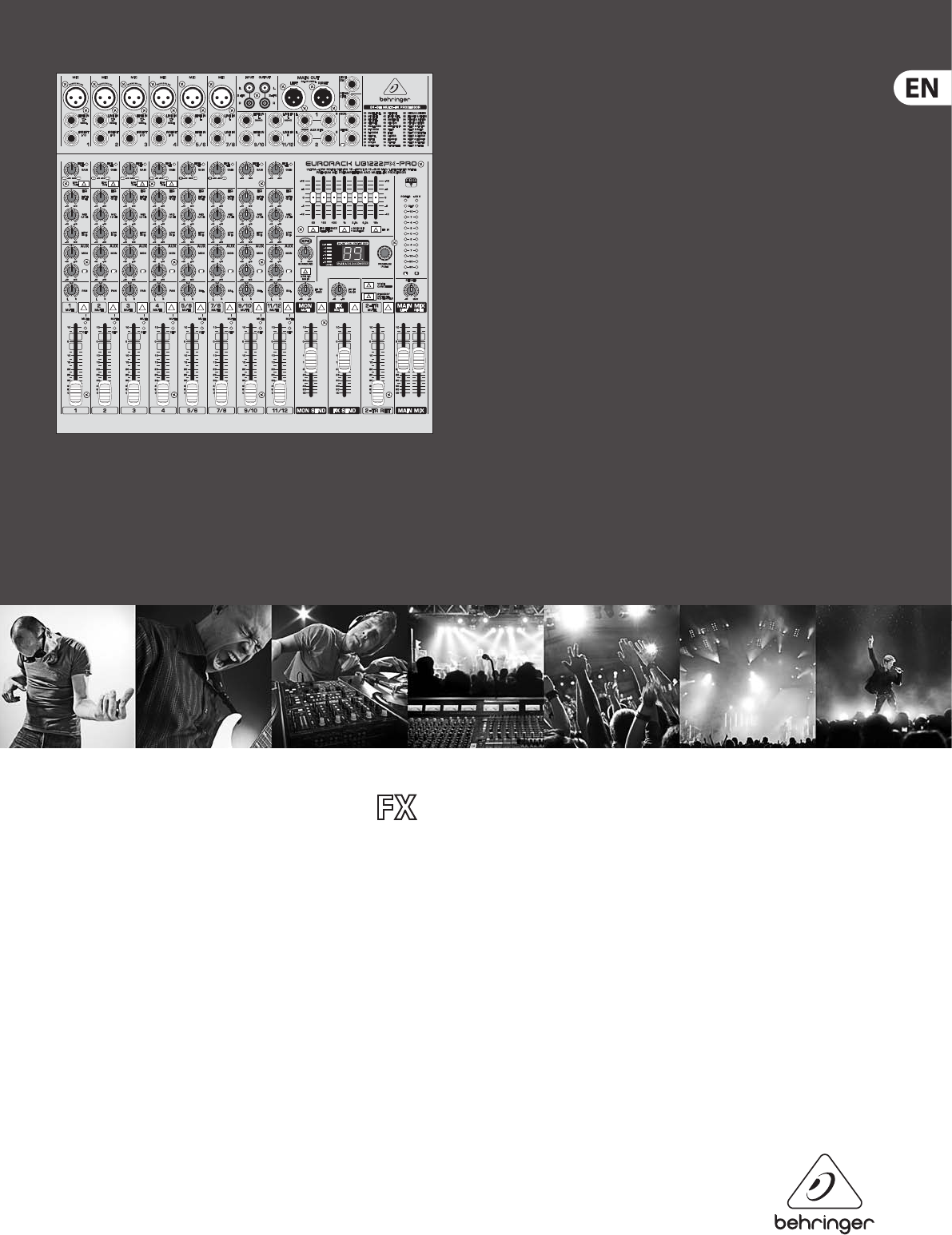
EURORACK UB1222 -PRO
Ultra-Low Noise Design 16-Input 2/2-Bus Mic/Line Mixer
with Premium Mic Preampliers and Multi-FX Processor

2EURORACK UB1222FX-PRO User Manual
Table of Contents
Important Safety Instructions ...................................... 3
Legal Disclaimer ............................................................. 3
Limited warranty ............................................................ 3
1. Introduction ............................................................... 4
1.1 General mixing console functions ............................... 4
1.2 The user’s manual ............................................................... 5
1.3 Before you get started ...................................................... 5
2. Control Elements and Connectors .......................... 5
2.1 Mono channels .................................................................... 5
2.2 Stereo channels ................................................................... 7
2.3 Connector panel and main section ............................. 7
2.4 Graphic 7-band equalizer .............................................. 10
2.5 Rear view of UB1222FX-PRO ......................................... 11
3. Digital Eects Processor
and XPQSurround Function ....................................... 11
3.1 Digital eects processor ................................................. 11
3.2 XPQ surround function .................................................. 12
4. Installation ............................................................... 12
4.1 Rack mounting ................................................................... 12
4.2 Cable connections ........................................................... 12
5. Specications ........................................................... 13
3EURORACK UB1222FX-PRO User Manual
Important Safety
Instructions
LEGAL DISCLAIMER
LIMITED WARRANTY
Terminals marked with this symbol carry
electrical current of su cient magnitude
to constitute risk of electric shock.
Use only high-quality professional speaker cables with
¼" TS or twist-locking plugs pre-installed. Allother
installation or modi cation should be performed only
by quali edpersonnel.
This symbol, wherever it appears,
alertsyou to the presence of uninsulated
dangerous voltage inside the
enclosure-voltage that may be su cient to constitute a
risk ofshock.
This symbol, wherever it appears,
alertsyou to important operating and
maintenance instructions in the
accompanying literature. Please read the manual.
Caution
To reduce the risk of electric shock, donot
remove the top cover (or the rear section).
No user serviceable parts inside. Refer servicing to
quali ed personnel.
Caution
To reduce the risk of re or electric shock,
do not expose this appliance to rain and
moisture. The apparatus shall not be exposed to dripping
or splashing liquids and no objects lled with liquids,
suchas vases, shall be placed on the apparatus.
Caution
These service instructions are for use
by quali ed service personnel only.
Toreduce the risk of electric shock do not perform any
servicing other than that contained in the operation
instructions. Repairs have to be performed by quali ed
servicepersonnel.
1. Read these instructions.
2. Keep these instructions.
3. Heed all warnings.
4. Follow all instructions.
5. Do not use this apparatus near water.
6. Clean only with dry cloth.
7. Do not block any ventilation openings. Install in
accordance with the manufacturer’s instructions.
8. Do not install near any heat sources such as
radiators, heat registers, stoves, or other apparatus
(including ampli ers) that produce heat.
9. Do not defeat the safety purpose of the polarized
or grounding-type plug. A polarized plug has two blades
with one wider than the other. A grounding-type plug
has two blades and a third grounding prong. The wide
blade or the third prong are provided for your safety. Ifthe
provided plug does not t into your outlet, consult an
electrician for replacement of the obsolete outlet.
10. Protect the power cord from being walked on or
pinched particularly at plugs, convenience receptacles,
and the point where they exit from the apparatus.
11. Use only attachments/accessories speci ed by
themanufacturer.
12. Use only with the
cart, stand, tripod, bracket,
or table speci ed by the
manufacturer, orsold with
the apparatus. When a cart
is used, use caution when
moving the cart/apparatus
combination to avoid
injury from tip-over.
13. Unplug this apparatus during lightning storms or
when unused for long periods of time.
14. Refer all servicing to quali ed service personnel.
Servicing is required when the apparatus has been
damaged in any way, such as power supply cord or plug
is damaged, liquid has been spilled or objects have fallen
into the apparatus, the apparatus has been exposed
to rain or moisture, does not operate normally, or has
beendropped.
15. The apparatus shall be connected to a MAINS socket
outlet with a protective earthing connection.
16. Where the MAINS plug or an appliance coupler is
used as the disconnect device, the disconnect device shall
remain readily operable.
TECHNICAL SPECIFICATIONS AND APPEARANCES
ARE SUBJECT TO CHANGE WITHOUT NOTICE AND
ACCURACY IS NOT GUARANTEED. BEHRINGER,
KLARKTEKNIK, MIDAS, BUGERA, AND TURBOSOUND
ARE PART OF THE MUSIC GROUP MUSICGROUP.COM.
ALL TRADEMARKS ARE THE PROPERTY OF THEIR
RESPECTIVE OWNERS. MUSICGROUP ACCEPTS NO
LIABILITY FOR ANY LOSS WHICH MAY BE SUFFERED
BY ANY PERSON WHO RELIES EITHER WHOLLY OR
IN PART UPON ANY DESCRIPTION, PHOTOGRAPH
OR STATEMENT CONTAINED HEREIN. COLORS AND
SPECIFICATIONS MAY VARY FROM ACTUAL PRODUCT.
MUSIC GROUP PRODUCTS ARE SOLD THROUGH
AUTHORIZED FULLFILLERS AND RESELLERS ONLY.
FULLFILLERSAND RESELLERS ARE NOT AGENTS OF
MUSICGROUP AND HAVE ABSOLUTELY NO AUTHORITY
TO BIND MUSICGROUP BY ANY EXPRESS OR IMPLIED
UNDERTAKING OR REPRESENTATION. THIS MANUAL
IS COPYRIGHTED. NO PART OF THIS MANUAL MAY
BE REPRODUCED OR TRANSMITTED IN ANY FORM
OR BY ANY MEANS, ELECTRONIC OR MECHANICAL,
INCLUDING PHOTOCOPYING AND RECORDING OF ANY
KIND, FOR ANY PURPOSE, WITHOUT THE EXPRESS
WRITTEN PERMISSION OF MUSICGROUPIPLTD.
ALL RIGHTS RESERVED.
© 2013 MUSICGroupIPLtd.
Trident Chambers, Wickhams Cay, P.O. Box 146,
Road Town, Tortola, British Virgin Islands
For the applicable warranty terms and conditions
and additional information regarding MUSIC Group’s
Limited Warranty, please see complete details online at
www.music-group.com/warranty.

4EURORACK UB1222FX-PRO User Manual
1. Introduction
Congratulations! In purchasing the BEHRINGER EURORACK you have acquired a
mixer whose small size belies its incredible versatility and audio performance.
The BEHRINGER EURORACK mixing console oers you premium-quality
microphone preampliers with optional phantom power supply, balanced line
inputs and the ability to connect external eects devices. Because of its extensive
and carefully thought-out routing possibilities, your EURORACK lends itself
equally to both live and studio use.
FBQ Feedback Detection System
The FBQ Feedback Detection System, integrated into the graphic equalizer, is one
of the most outstanding characteristics of this mixing console. This ingenious
circuitry lets you immediately recognize and eliminate feedback frequencies.
TheFBQ Feedback Detection System uses the LEDs in the frequency band faders
of the graphic EQ to indicate the critical frequencies. This way, what once used to
be a labor-intensive search for feedback frequencies is now an activity that even
a child could master.
IMP “Invisible” Mic Preamp
The microphone channels are tted with BEHRINGER’s brand new high-end IMP
invisible mic preamps that boast the following features:
• 130 dB dynamic range for an incredible amount of headroom
• a bandwidth ranging from below 10 Hz to over 200 kHz for crystal-clear
reproduction of even the nest nuances
• the extremely low-noise and distortionless circuitry gua rantees absolutely
natural and transparent signal repro duction
• they are perfectly matched to every conceivable micro phone with up to
60dB gain and +48 volt phantom power supply and
• they enable full utilisation of the greatly extended dynamic range of your
24-bit/192 kHz HD recorder, thereby main taining optimal audio quality
Additionally, your UB mixing console has an eects processor with 24-bit A/D
and D/A converters included, which gives you 100 presets producing rst-class
reverb, delay and modulation eects plus numerous multi-eects in excellent
audio quality.
The mixing consoles of the PRO series feature a state of the art,
integratedswitch-mode power supply. One of the great advantages is that
(compared to conventional circuits) a switch-mode power supply adapts to mains
voltages between 100 and 240 volts automatically. Furthermore, due to its much
greater eciency, it consumes much less energy than a conventional power
supply unit.
CAUTION!
◊ We would like to draw your attention to the fact that extreme volumes
may damage your hearing and/or your headphones or loudspeakers.
Turn the MAIN MIX faders and the PHIONES control in the main section
fully down before you switch on the unit. Always be careful to set the
appropriate volume.
1.1 General mixing console functions
A mixing console fulls three main functions:
• Signal processing:
Preamplication
Microphones convert sound waves into voltage that has to be amplied
several-fold; then, this voltage is turned into sound that is reproduced
in a loudspeaker. Because micro phone capsules are very delicate in their
construction, output voltage is very low and therefore susceptible to
interference. Therefore, mic signal voltage is amplied directly at the mixer
input to a higher signal level that is less prone to interference. This higher,
interference-safe signal level has to be achieved through amplication
using an amplier of the highest quality in order to amplify the signal
and add as little noise to it as possible. The IMP “Invisible” Mic Preamp
performs this role beautifully, leaving no traces of noise or sound coloration.
Interferencethat could take place at the preamplication level could aect
signal quality and purity, and would then be passed on to all other devices,
resulting in inaccurate sounding program during recording or playback.
Level-setting
Signals fed into the mixer using a DI-box (Direct Injection) or the output of a
sound card or a keyboard, often have to be adjusted to the operating level of
your mixing console.
Frequency response correction
Using the equalizers found in each channel strip, you can simply, quickly and
eectively adjust the way a signal sounds.
Eects mixing
In addition to the eects processor contained in your mixer, using the
insert connectors on the mono channels and both aux busses lets you insert
additional signal processors into your signal path.
• Signal distribution:
Individual signals adjusted at each channel strip are laid out at the aux
sends and returns, and are either fed into external eects processors or fed
back to the internal eects processor. Then, the signals are brought back
into the main mix either via the aux return connectors or via direct internal
wiring. The mix for the on-stage musicians is also created using the aux
sends (monitor mix). Similarly, for example, signals for recording equipment,
power ampli ers, headphones and 2-track outputs can also be taken.
• Mix:
All other mixing console functions fall under this vital category. Creating a
mix means primarily adjusting the volume levels of individual instruments
and voices to one another as well as giving them the appropriate weight
within the overall frequency spectrum. Likewise, you’ll have to sensibly
spread individual voices across the stereo image of a signal. At the end of
this process, adjusting the level of the entire mix to other equipment in the
signal path is required (e. g. recorder/crossover/amplier).
The interface of BEHRINGER mixing consoles is optimized for these tasks,
enabling you to easily keep track of the signal path.
5EURORACK UB1222FX-PRO User Manual
1.2 The user’s manual
The user’s manual is designed to give you both an overview of the controls, aswell
as detailed information on how to use them. In order to help you understand the
links between the controls, we have arranged them in groups according to their
function. If you need to know more about specic issues, please visit our website at
http://behringer.com. Additional information and explanations about various music
industry/audio technology terminology can be found on individual product pages as
well as in the glossary in the ULTRANET area of behringer.com.
◊ The block diagram supplied with the mixing console gives you an
overview of the connections between the inputs and outputs, as well
as the associated switches and controls.
For the moment, just try and trace the signal path from the microphone input
to the MON SEND connector. Don’t be put o by the huge range of possibilities;
it’seasier than you think! If you look at the overview of the controls at the same
time, you’ll be able to quickly familiarize yourself with your mixing console and
you’ll soon be making the most of all its many possibilities.
1.3 Before you get started
1.3.1 Shipment
Your mixing console was carefully packed in the factory to guarantee safe
transport. Nevertheless, we recommend that you carefully examine the
packaging and its contents for any signs of physical damage, which may have
occurred during transit.
◊ If the unit is damaged, please do NOT return it to us, but notify your
dealer and the shipping company immediately, otherwise claims for
damage or replacement may not be granted.
1.3.2 Initial operation
Be sure that there is enough space around the unit for cooling purposes and to
avoid over-heating. Please do not place your mixing console on high-temperature
devices such as radiators or power amps. The console is connected to the mains
via the supplied power cable. The console meets the required safety standards.
Blown fuses must only be replaced by fuses of the same type and rating.
◊ Please note that all units must be properly grounded. For your own
safety, you should never remove any ground connectors from electrical
devices or power cables, or render them in operative.
◊ Please ensure that only qualified people install and operate the
mixing console. During installation and operation, the user must have
sufficient electrical contact to earth, otherwise electrostatic discharges
might affect the operation of the unit.
1.3.3 Online registration
Please register your new BEHRINGER equipment right after your purchase by visiting
http://behringer.com and read the terms and conditions of our warrantycarefully.
Should your BEHRINGER product malfunction, it is our intention to have it
repaired as quickly as possible. To arrange for warranty service, please contact
the BEHRINGER retailer from whom the equipment was purchased. Shouldyour
BEHRINGER dealer not be located in your vicinity, you may directly contact
one of our subsidiaries. Corresponding contact information is included in the
original equipment packaging (Global Contact Information/European Contact
Information). Should your country not be listed, please contact the distributor
nearest you. A list of distributors can be found in the support area of our website
(http://behringer.com).
Registering your purchase and equipment with us helps us process your repair
claims more quickly and eciently.
Thank you for your cooperation!
2. Control Elements and Connectors
This chapter describes the various control elements of your mixing console.
Allcontrols, switches and connectors will be discussed in detail.
2.1 Mono channels
2.1.1 Microphone and line inputs
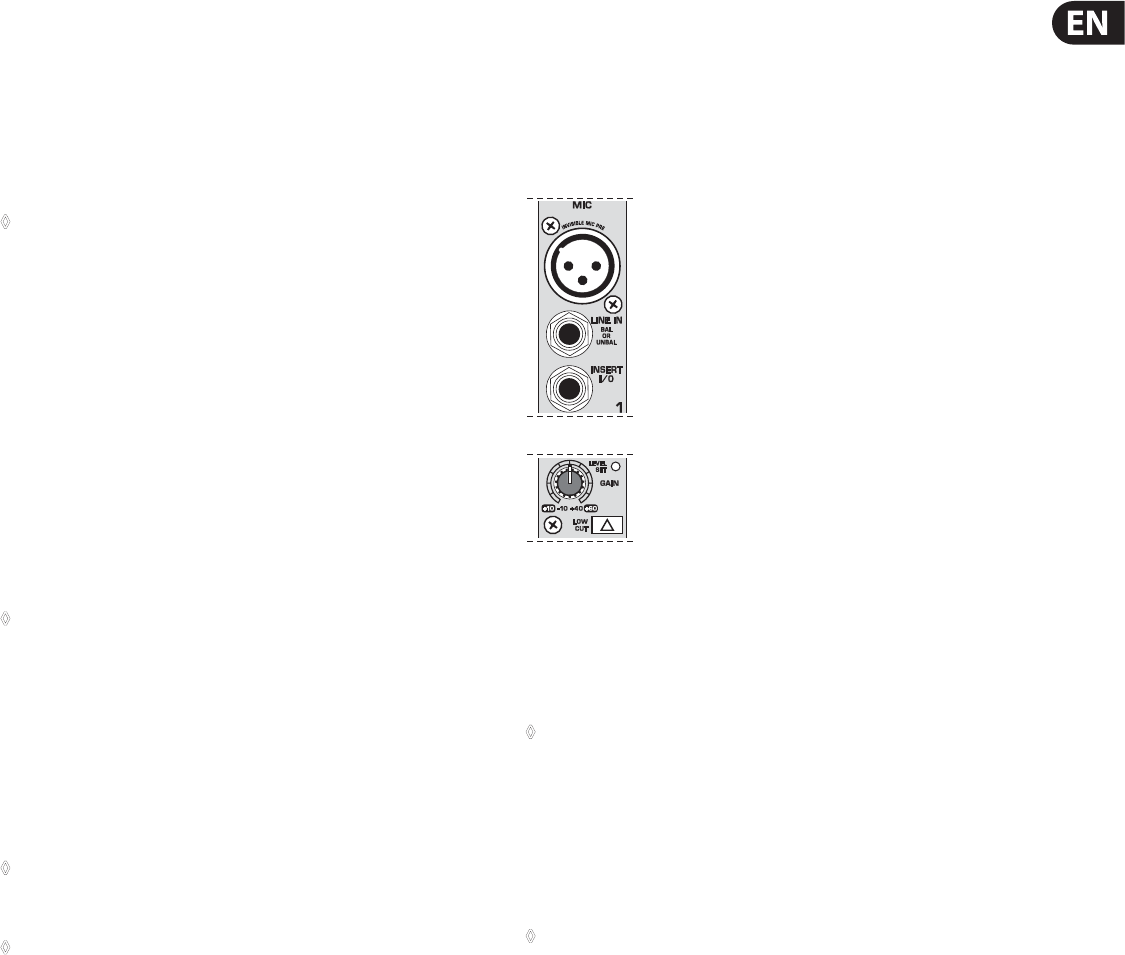
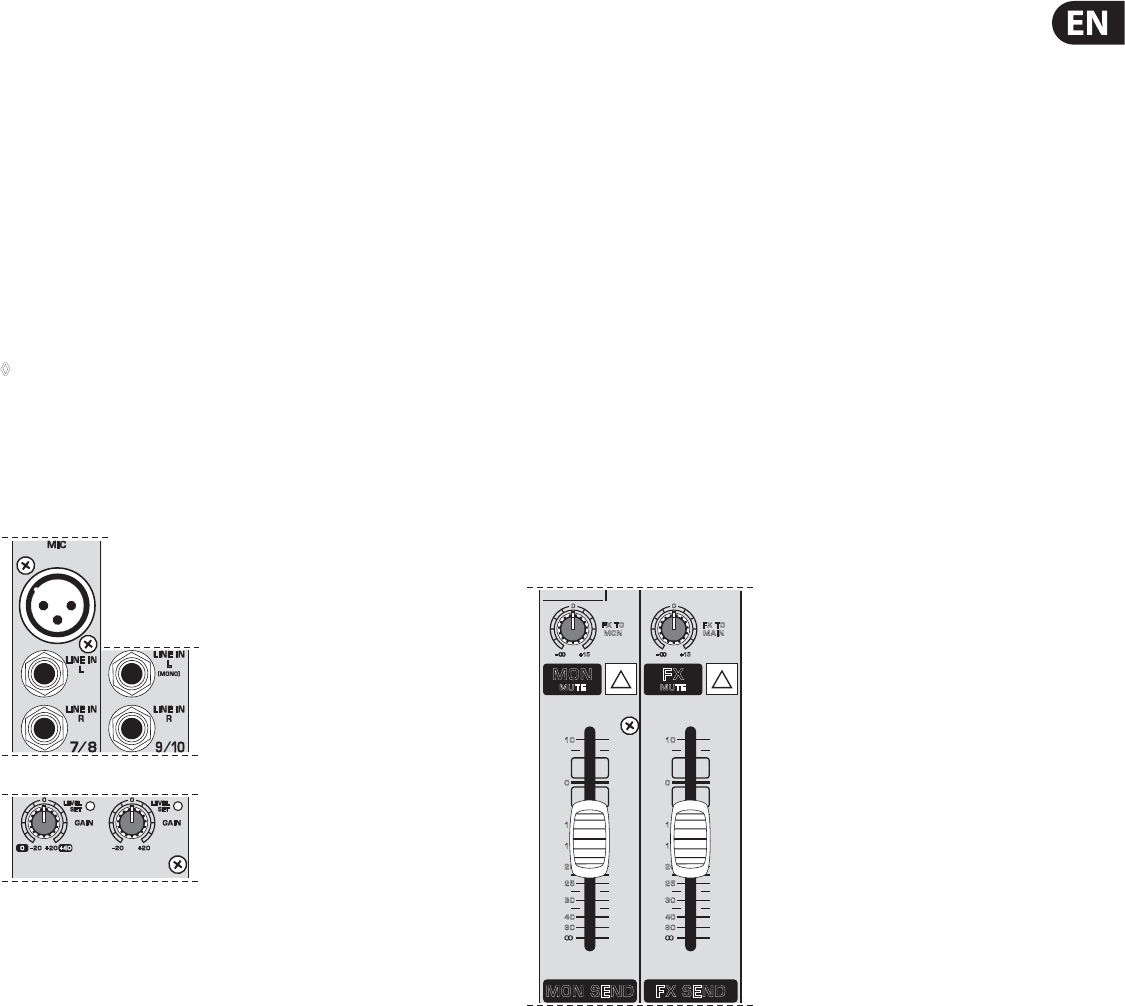
Fig. 2.1: Connectors and controls of mic/line inputs
MIC
Each mono input channel oers a balanced microphone input via the XLR
connector and also features a switchable +48 V phantom power supply for
condenser microphones (see rear panel).
◊ Please mute your playback system before you activate the phantom
power supply to prevent switch-on thumps being directed to your
loud speakers. Please also note the instructions in chapter 2.5
“Rear view of UB1222FX-PRO”.
LINE IN
Each mono input also features a balanced line input on a ¼" connector.
Unbalanced devices (mono jacks) can also be connected to these inputs.
◊ Please remember that you can only use either the microphone
or the line input of a channel at any one time. You can never use
both simultaneously!
INSERT
Insert points enable the processing of a signal with dynamic processors or
equalizers. They are sourced pre-fader, pre-EQ and pre-aux send. Unlike reverb
or other eects devices, whose signals are usually added to the dry signal,
dynamicprocessors are most eective on the complete signal. In this case,
aux send paths are a less-than-perfect solution. It is better to interrupt the
signal path and insert a dynamic processor and/or equalizer. After processing,
the signal is routed back to the console at precisely the same point it left.
However, thechannel signal path is interrupted only if a plug is inserted into the
corresponding jack (stereo phone plug: tip = signal output; ring = return input).
All mono input channels are equipped with inserts.
Inserts can also be used as pre-EQ direct outputs, without interrupting the signal
path. To this end, you will need a cable tted with mono phone plugs on the tape
machine or eects device end, and a bridged stereo phone plug on the console
side (tip and ring connected).
6EURORACK UB1222FX-PRO User Manual
LOW CUT
The mono channels of the mixing consoles have a high-slope LOW CUT lter for
eliminating unwanted, low-frequency signal components (80 Hz, 18 dB/octave).
TRIM
Use the TRIM control to adjust the input gain. This control should always be
turned fully counter-clockwise whenever you connect or disconnect a signal
source to one of the inputs.
The scale has 2 dierent value ranges: the rst value range (+10 to +60 dB)
refers to the MIC input and shows the amplication for the signals fed in there.
The second value range (+10 to -40 dBu) refers to the line input and shows its
sensitivity. The settings for equipment with standard line-level signals (-10dBV
or +4 dBu) look like this: While the TRIM control is turned all the way down,
connect your equipment. Set the TRIM control to the external devices’ standard
output level. If that unit has an output signal level display, it should show 0 dB
during signal peaks. For +4dBu, turn up TRIM slightly, for -10 dBV a bit more.
Tweaking is done using the LEVEL SET LED.
LEVEL SET
This LED lights up when the optimum operating signal level is achieved.
Duringnormal use, this LED should only light up during signal peaks.
2.1.2 Equalizer
All mono input channels include a 3-band equalizer. All bands provide boost or
cut of up to 15 dB. In the central position, the equalizer is inactive.
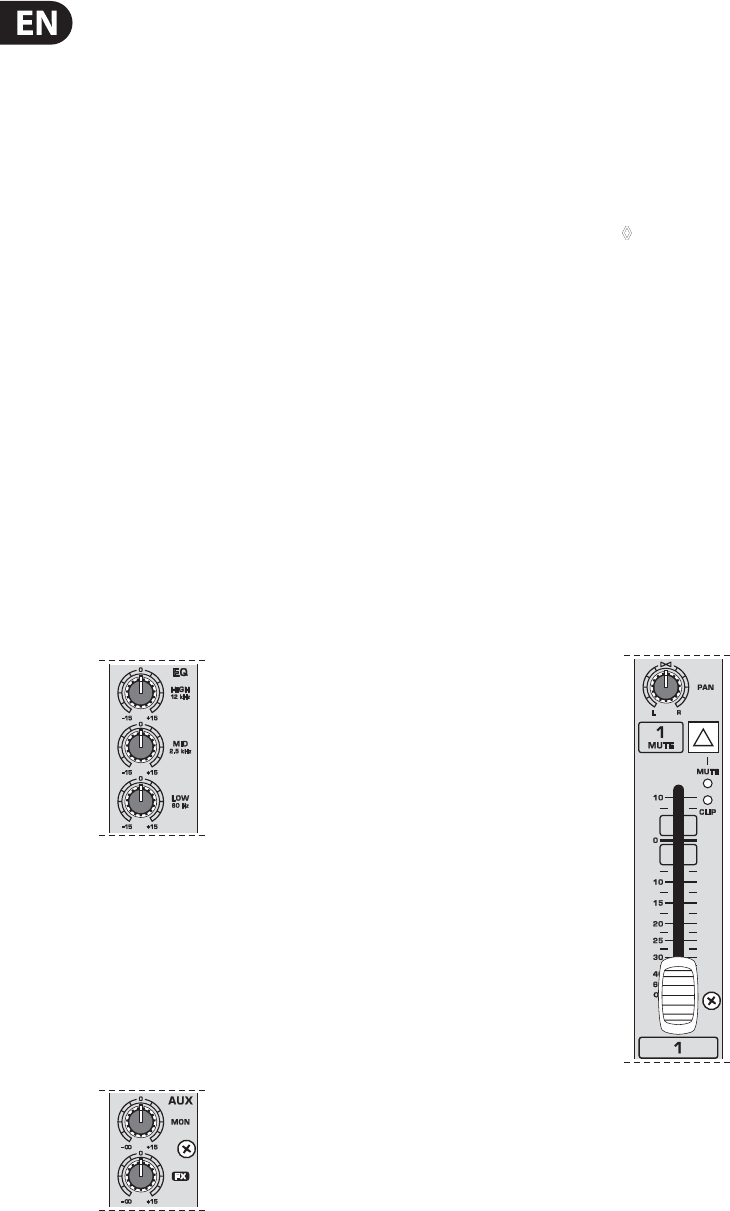
Fig. 2.2: The equalizer of the input channels
The upper (HIGH) and the lower band (LOW) are shelving lters that increase
or decrease all frequencies above or below their cut-o frequency. The cut-o
frequencies of the upper and lower band are 12 kHz and 80Hz respectively.
Themid band is congured as a peak lter with a center frequency of 2.5 kHz.
Unlike shelving lters, the peak lter processes a frequency range that extends
upwards and downwards around its middle frequency.
2.1.3 Aux sends (MON and FX)
Fig. 2.3: The AUX SEND controls in the channel strips
Aux sends take signals via a control from one or more channels and sum these
signals to a so-called bus. This bus signal is sent to an aux send connector and
then routed, for example, to an active monitor speaker or an external eects
device. The return from an external eects device can then be brought back into
the console via the aux return connectors.
For situations that require eects processing, the aux sends are usually switched
post-fader so that the eects volume in a channel corresponds to the position
of the channel fader. If this were not the case, the eects signal of the channel
would remain audible even when the fader is turned to zero.
When setting up a monitor mix, the aux sends are generally switched to
pre-fader; i.e. they operate independently of the position of the channel fader.
Both aux sends are mono, are sourced after the equalizer and oer up to
+15dBgain.
◊ If you press the MUTE switch of the respective channel, aux sends and
returns (MON and FX) are not being muted.
MON
In the UB1222FX-PRO, aux send 1 (MON) is wired pre-fader and is thus
particularly suitable for setting up monitor mixes.
FX
The aux send labeled FX is for feeding external eects devices and is thus set up
to be post-fader.
In the UB1222FX-PRO, the FX send is routed directly to the built-in eects
processor. To make sure that the eects processor receives an input signal,
youshouldn’t turn this control all the way to the left (-∞). Don’t have the
FXMUTE switch pressed, and you should also not have the FX SEND fader
pulleddown.
2.1.4 Pan, mute switch and channel fader
Fig. 2.4: Channel fader and additional control elements
PAN
The PAN control determines the position of the channel signal within the stereo
image. This control features a constant-power characteristic, which means the
signal is always maintained at a constant level, irrespective of position in the
stereo panorama.
MUTE
Use the MUTE switch to mute the channel. This means that the channel signal
is no longer present in the main mix. However, the aux sends (MON and FX)
remainactive.
7EURORACK UB1222FX-PRO User Manual
MUTE LED
The MUTE LED indicates that the relevant channel is muted.
CLIP LED
The CLIP LED lights up when the input signal is driven too high. In this case,
lower apparent frequency increase on the channel EQ to avoid distortion.
Forexample, lower the mids and the highs somewhat to emphasize the bass.
Ifyou don’t wish to change the EQ settings under any circumstances, try lowering
the TRIM control somewhat (counterclockwise).
If you inserted an external eects processor via the insert connector
(e.g.adynamic processor), then you should also control its output signal level.
Itshould not be higher than its input signal level (0 dB).
The channel fader determines the level of the channel signal in the main mix.
◊ Attention: Since the aux path for the effect processor is connected
post-fader, the channel fader has to be turned up in order to get this
channel’s signal to the effects processor!
2.2 Stereo channels
2.2.1 Channel inputs
Fig. 2.5: Stereo channel inputs
Each stereo channel features two line-level inputs on ¼" connectors for left and
right channels. Channels 9/10 and 11/12 can also be used in mono if you only use
the connector labeled “L.”
Both channels 5/6 and 7/8 feature an additional balanced XLR input for
microphones with available +48 V phantom power.
All stereo channel strips have a TRIM control for level setting. In those channels
in which a mic input is present in the channel, the TRIM control has two scales:
just like in the mono channels, there is a 0 to +40 dB scale that shows the
preamplication of the mic signal; the +20 to -20 dB scale shows the sensitivity
for the corresponding input level that is applied to the line input.
Both inputs can also be used with balanced or unbalanced connectors.
2.2.2 Equalizer stereo channels
The equalizer of the stereo channels is, of course, stereo. The lter characteristics
and crossover frequencies are the same as those of the mono channels. A stereo
equalizer is always preferable to two mono equalizers if frequency correction of a
stereo signal is needed. There is often a discrepancy between the settings of the
left and the right channels when using separate equalizers.
2.2.3 Aux sends stereo channels
In principle, the aux sends of the stereo channels function in just the same way as
those of the mono channels. As aux send paths are always mono, the signal on a
stereo channel is rst summed to mono before it reaches the aux bus.
2.2.4 Balance, mute switch and channel fader
BAL
The function of the BAL(ANCE) control corresponds to the PAN control in the
mono channels.
The balance control determines the relative proportion between the left and
right input signals before both signals are routed to the main stereo mix bus.
The MUTE switch, MUTE LED, CLIP LED and channel fader function in the same
way as the mono channels.
2.3 Connector panel and main section
Whereas it was useful to trace the signal ow from top to bottom in order to gain
an understanding of the channel strips, we now look at the mixing console from
left to right. The signals are, so to speak, collected from one point on each of the
channel strips and then routed to the main section all together.
2.3.1 Monitor send and FX send channels
10
10
15
20
25
30
40
60
0
10
10
15
20
25
30
40
60
0
FX TO
MON
FX TO
MAIN
0
+15
0
+15
MON SEND FX SEND
MON
MUTE
F X
MUTE
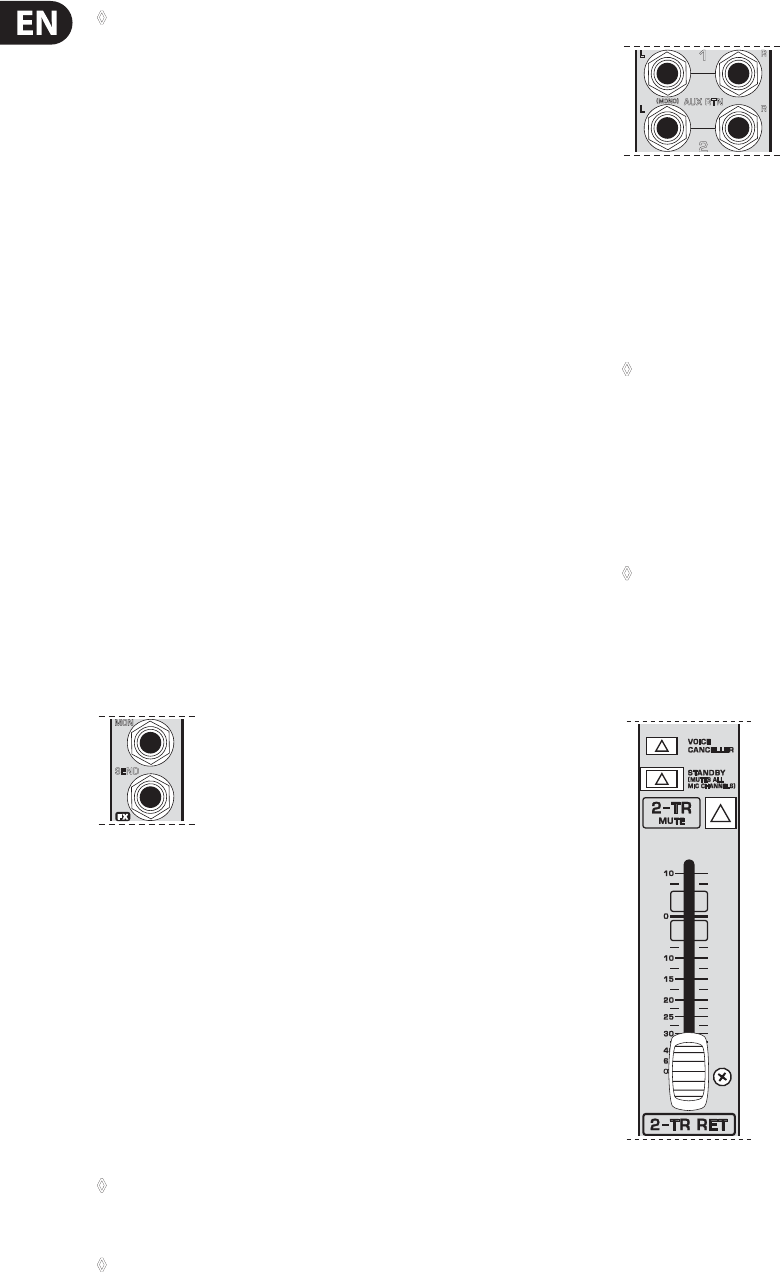
Fig. 2.6: Aux send controls of the main section
A channel signal is routed to the MON(ITOR) send bus if the MON control is turned
up on the corresponding channel.
MON SEND
The aux send control MON SEND acts as master control for the monitor bus
and determines the level of the summed signal that is taken from the mixer via
the MON SEND connector and that can for example be fed to an amplier for
monitorpurposes.
Using the audio signal from this output, you can also feed a subwoofer if you
don’t require stage monitors. To this end, you should implement a crossover in
your signal path pre-subwoofer and pre-amplier, so that only low frequencies
are fed into the subwoofer. You can achieve the same eect by using the built-in
graphical equalizer. Lower all frequencies above 160 Hz and assign the equalizer
to “Monitor”.
8EURORACK UB1222FX-PRO User Manual
◊ When you use the MAIN MIX fader to reduce the overall volume, keep in
mind that the subwoofer is still receiving a signal!
FX TO MON
You can use this control to insert an eects signal from the built-in eects
processor to your monitor mix. Of course, to do this, your eects processor must
rst receive a signal, i.e. the FX controls in the channel strips must be turned up,
and the FX SEND fader (see g. 2.6) hast to be open.
MON MUTE
If the MON MUTE switch is pressed, the monitor bus is muted, i.e. there is no
signal at the MON SEND connector.
FX SEND
The FX SEND fader determines the overall level of the eects bus. Both external
eects processors (via the FX SEND connector) and the built-in processor only
receive an input signal if this control is open.
FX TO MAIN
Use the FX TO MAIN control to feed the eects signal into the main mix. If the
control is turned all the way to the left, no eects signal can be heard.
FX MUTE
If the FX MUTE switch is pressed, the eects channel is muted, i.e. no signal is
present at the FX SEND connector and the eects processor no longer receives an
input signal.
2.3.2 Monitor send and FX send connector
MON
SEND
Fig. 2.7: Aux send connectors MON and FX
MON SEND
Connect the input of your monitor power amp or an active monitor system here
to make the monitor mix audible to the musicians on the stage. The signal mix is
created using the channels’ MON controls.
FX SEND
The FX SEND connector outputs the signal you picked up from the individual
channels using the FX controls. You can connect this to the input of an external
eects device in order to process the FX bus’ master signal. Once an eects mix is
created, the processed signal can then be routed from the eects device outputs
back into the AUX RETURN connectors.
◊ If the connected effects processor receives no input signal,
the FX MUTE switch is probably pressed and/or the FX SEND control
is too low. This also goes for the built-in effects processor.
◊ Adjust your external effects processor to 100% wet (effects signal
only), because the effects signal is added to the main mix along with
the “dry” channel signals.
2.3.3 Aux return connectors
AUX RTN
(MONO)
L
L
R
R
1
2
Fig. 2.8: Aux return connectors
AUX RETURN 1
The AUX RETURN 1 connectors generally serve as the return path for the eects
mix generated using the FX send. This is where you connect the output signal
of the external eects device. If only the left connector is used, the aux return
1automatically operates in mono.
◊ You can also use these connectors as additional line inputs.
AUX RETURN 2
The AUX RETURN 2 connectors are used exactly the same way as the
AUXRETURN 1 connectors. If these connectors already function as additional
inputs, youcan route the eects signal back into the console via a dierent stereo
channel, with the added benet that the channel EQ can be used to adjust the
frequency response of the eects return signal.
◊ In this instance, the FX control of the channel being used as an effects
return should be turned fully counter-clockwise, otherwise feedback
problems can occur!
2.3.4 2-Track return channel, voice canceller and
connection socket
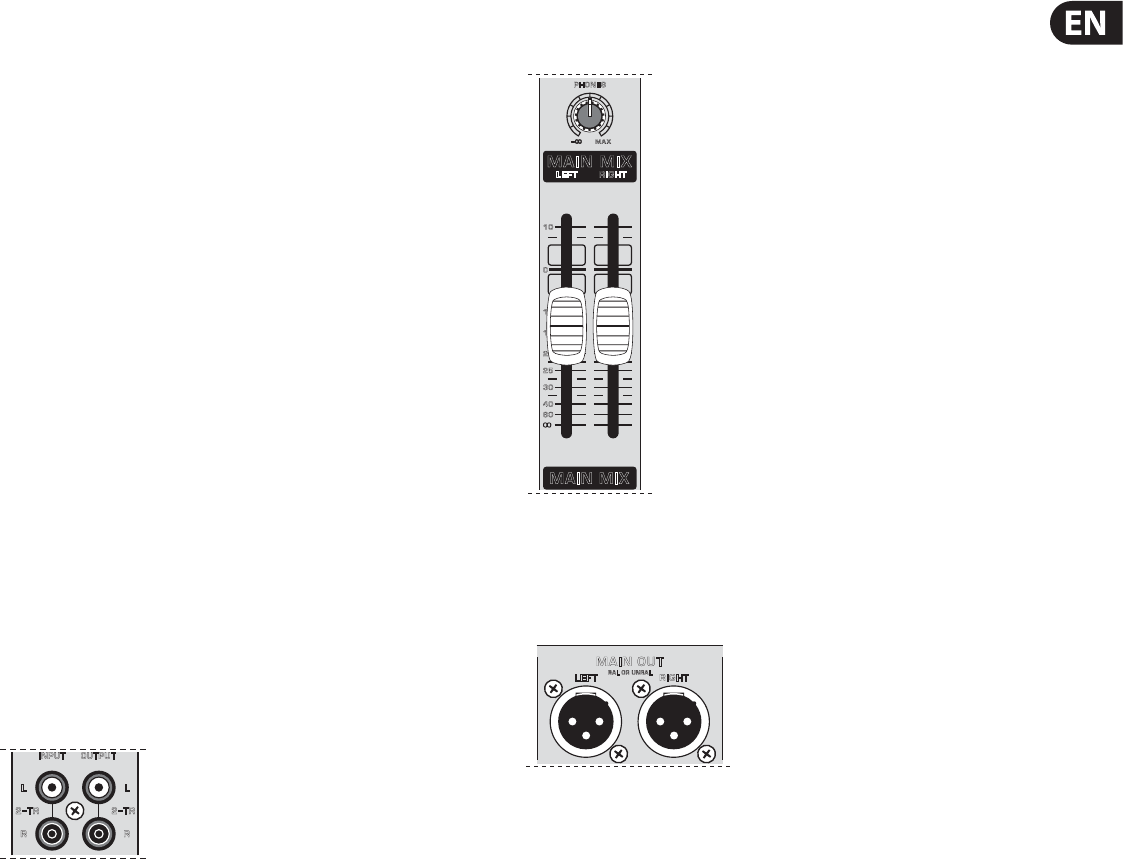
Fig. 2.9: 2-Track return channel
This channel, intended especially for connecting stereo signal sources
(CDplayers,DAT recorders or even sound cards) features a particularly practical
feature: the VOICE CANCELLER.
9EURORACK UB1222FX-PRO User Manual
VOICE CANCELLER
Here, you have a lter circuitry that lets you almost entirely remove the
vocal portion of a recording. The lter is constructed in such a way that voice
frequencies are targeted without majorly aecting the rest of the signal.
Additionally, the lter seizes only the middle of the stereo image, exactly there
where the vocals are typically located.
Possible applications for the Voice Canceller are obvious: you can very simply
stage background music for Karaoke events. Of course, you can also do this at
home or at your rehearsal room before you hit the stage. Singers with their own
band can practice singing dicult parts using a complete playback from a tape
player or a CD, thus minimizing rehearsal time.
STANDBY
If the STANDBY switch is pressed, all input channels with a mic connector
(XLRconnector) are muted. During breaks or stage conversion, you can prevent
noise from entering the sound system via the microphones. Such noise can in the
worst-case scenario even irreparably damage loudspeaker membranes. The cool
thing about this is that the main mix faders can remain open, so that you can play
music from a CD at the same time. Similarly, the faders for the muted channels
can also remain in their position.
To bring in other sound sources, you can use the 2-track inputs, stereo input
channels 9 to 12 and the aux return inputs.
2-TRACK MUTE
Using this switch, the input signal from the 2-track inputs is muted.
2-TRACK RET(URN)
This stereo fader assigns the input signal from the 2-track inputs into the
mainmix.
OUTPUTINPUT
R
L
R
2
–
TR 2
–
TR
L
Fig. 2.10: 2-track connectors
2-TRACK INPUT
The 2-TRACK INPUT RCA connectors are provided for connecting a 2-track
machine (e.g. DAT recorder) or also a CD player. They can also be used as stereo
line input. Alternatively, the output signal of a second EURORACK or BEHRINGER
ULTRALINK PRO MX882 can also be connected. If you connect a hi- amplier
with a source selection switch to the 2-TRACK INPUT, you can easily switch
between additional sources (e.g. cassette recorder, MDplayer, sound card etc.).
Using the voice canceller function, you can process all signals being brought into
your mixing console via these connectors.
2-TRACK OUTPUT
These connectors are wired pre graphic EQ and pre XPQ surround function.
Theycarry the main mix signal (unbalanced), eects mix included. Connect the
2-TRACK OUTPUT to the inputs of your recording device. If you wish to use your
mixer solely for recording purposes, the main outputs are also an alternative.
2.3.5 Main mix, main out connectors
andheadphoneconnector
10
10
15
20
25
30
40
60
0
PHONES
MAIN MIX
MAIN MIX
LEFT RIGHT
MAX
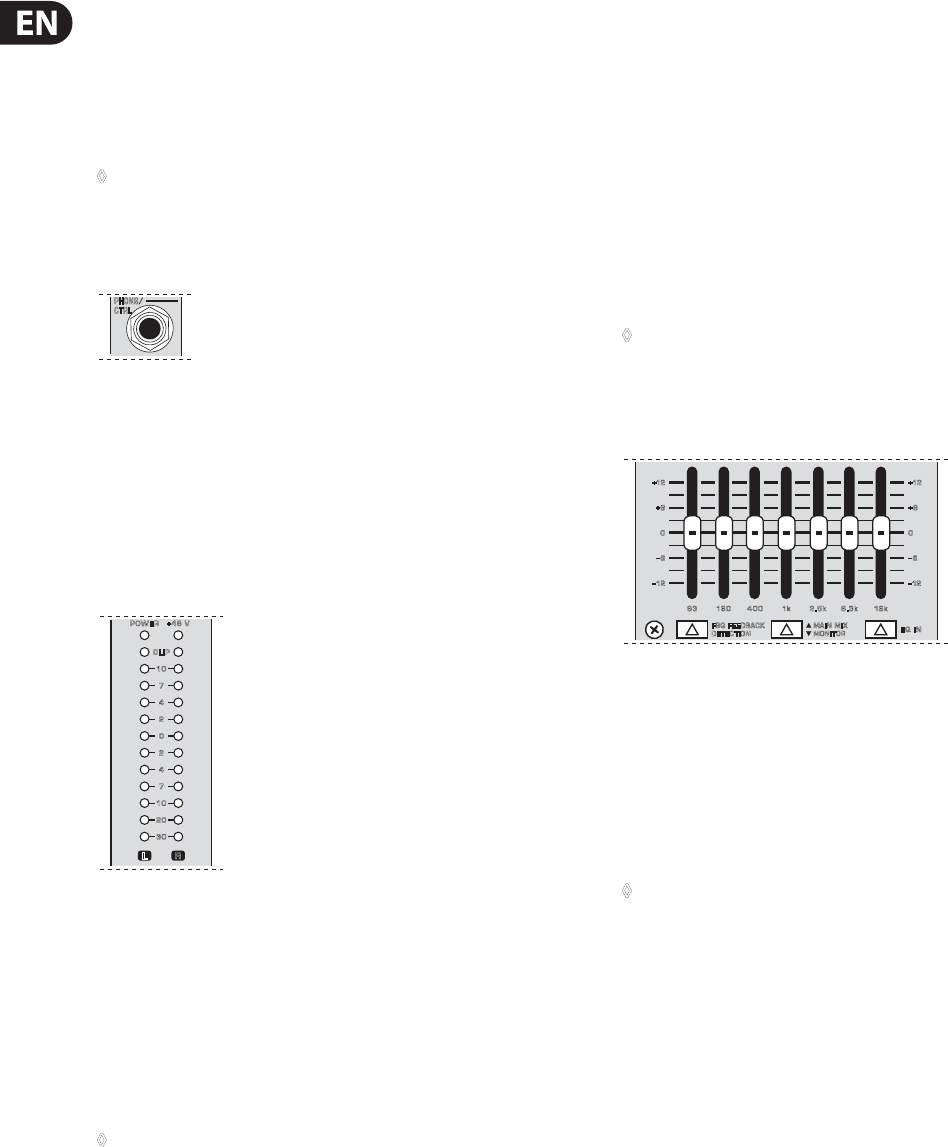
Fig. 2.11: Main mix fader
MAIN MIX
Use the high-precision quality faders to control the output level of the main mix.
LEFT RIGHT
BAL OR UNBAL
MAIN OUT
Fig. 2.12: Main out connectors
MAIN OUT
The MAIN outputs carry the MAIN MIX signal and are on balanced XLR connectors
with a nominal level of +4 dBu. Depending on how you wish to use your mixer
and which gear you own, you can connect the following equipment:
Live PA systems:
A stereo dynamics processor (optional), stereo equalizer (optional) and the stereo
power amplier for full-range loud-speakers with passive crossovers.
If you wish to use multi-way loudspeaker systems without an integrated
crossover, you have to use an active crossover and several power ampliers.
Often, limiters are already built into active crossovers (e.g. BEHRINGER SUPER-X
PRO CX2310 and ULTRADRIVE PRO DCX2496). Active crossovers are implemented
directly before the power amplier, and they divide the frequency range into
several segments that are rst amplied in the ampliers and then passed onto
the corresponding loudspeakers.
Recording:
For mastering, using a stereo compressor such as the COMPOSER PRO-XL
MDX2600 can be recommended. Use it to custom-tailor the dynamic
characteristics of your signal to the dynamic range of the recording equipment
you are using. The signal is in this case passed on from the compressor into
therecorder.
10 EURORACK UB1222FX-PRO User Manual
PHONES
The PHONES control adjusts the volume of the headphones connected to the
PHONES/CTRL connector. If you connect active monitors or an amplier, use this
connector to adjust the output signal level.
CAUTION!
◊ We would like to draw your attention to the fact that extreme volumes
may damage your hearing and/or your headphones or loudspeakers.
Turn the MAIN MIX faders and the PHONES control in the main section
fully down before you switch on the unit. Always be careful to set the
appropriate volume.
PHONS
/
CTRL
Fig. 2.13: PHONES/CTRL connector
PHONES/CTRL connector
You can connect headphones to this ¼" TRS connector. The connector can also
be used for feeding active monitor loudspeakers (or an amplier) in your control
room. For this purpose, the signal is taken directly before it is passed on to the
main mix faders.
2.3.6 Level meter and level setting
CLIP
10
7
4
2
0
2
4
7
10
20
30
+48 VPOWER
L R
Fig. 2.14: Level meter
POWER
The blue POWER LED indicates that the device is switched on.
+48 V
The red “+48 V” LED lights up when the phantom power supply is switched
on. The phantom power supply is necessary for condenser microphones and is
activated using the corresponding switch on the rear of the device.
◊ Connect microphones before you switch on the phantom power supply.
Please do not connect microphones to the mixer (or the stagebox/
wallbox) while the phantom power supply is switched on. In addition,
the monitor/PA loudspeakers should be muted before you activate the
phantom power supply. After switching on, wait approx. one minute to
allow for system stabilization.
LEVEL METER/CLIP
The high-precision level meter accurately displays the appropriate signal level.
LEVEL SETTING:
When recording to a digital device, the recorder’s peak meter should not exceed
0 dB. This is because, unlike analog recordings, slightly excessive levels can create
unpleasant digital distortion.
When recording to an analog device, the VU meters of the recording machine
should reach approx. +3 dB with low-frequency signals (e.g. kick drum). Due to
their inertia VU meters tend to display too low a signal level at frequencies above
1 kHz. This is why, for example, a Hi-Hat should only be driven as far as -10dB.
Snaredrums should be driven to approx. 0 dB.
◊ The peak meters of your EURORACK display the level virtually
independent of frequency. A recording level of 0 dB is recommended
for all signal types.
2.4 Graphic 7-band equalizer
EQ IN
FBQ FEEDBACK
DETECTION
+12
+6
0
–
12
63 160 400 1k 2.5k 6.3k 16k
–
6
+12
+6
0
–
12
–
6
MAIN MIX
MONITOR
Fig. 2.15: The graphic stereo equalizer
The graphic stereo equalizer allows you to tailor the sound to the room acoustics.
FBQ FEEDBACK DETECTION
The switch turns on the FBQ Feedback Detection System. It uses the LEDs in the
frequency band faders to indicate the critical frequencies. On a per-need basis,
lower the frequency range in question somewhat in order to avoid feedback.
Thegraphic stereo equalizer has to be turned on in order to use this function.
◊ Logically, at least one (ideally several) microphone channels have to be
open for feedback to occur at all!
Feedback is particularly common when stage monitors (“wedges”)
areconcerned, because monitors project sound in the direction of microphones.
Therefore, you can also use the FBQ Feedback Detection for monitors by placing
the equalizer in the monitor bus (see MAIN MIX/MONITOR).
EQ IN
Use this switch to activate the graphic equalizer. When activated, the fader LEDs
will illuminate.
MAIN MIX/MONITOR
This toggles the graphic equalizer between the main mix and the monitor mix.
Withthe switch up (not depressed), the equalizer is active in stereo on the main
mix, andinactive on the monitor mix.
When the switch is depressed the equalizer is active in mono on the monitor mix,
and inactive on the main mix.
11 EURORACK UB1222FX-PRO User Manual
2.5 Rear view of UB1222FX-PRO
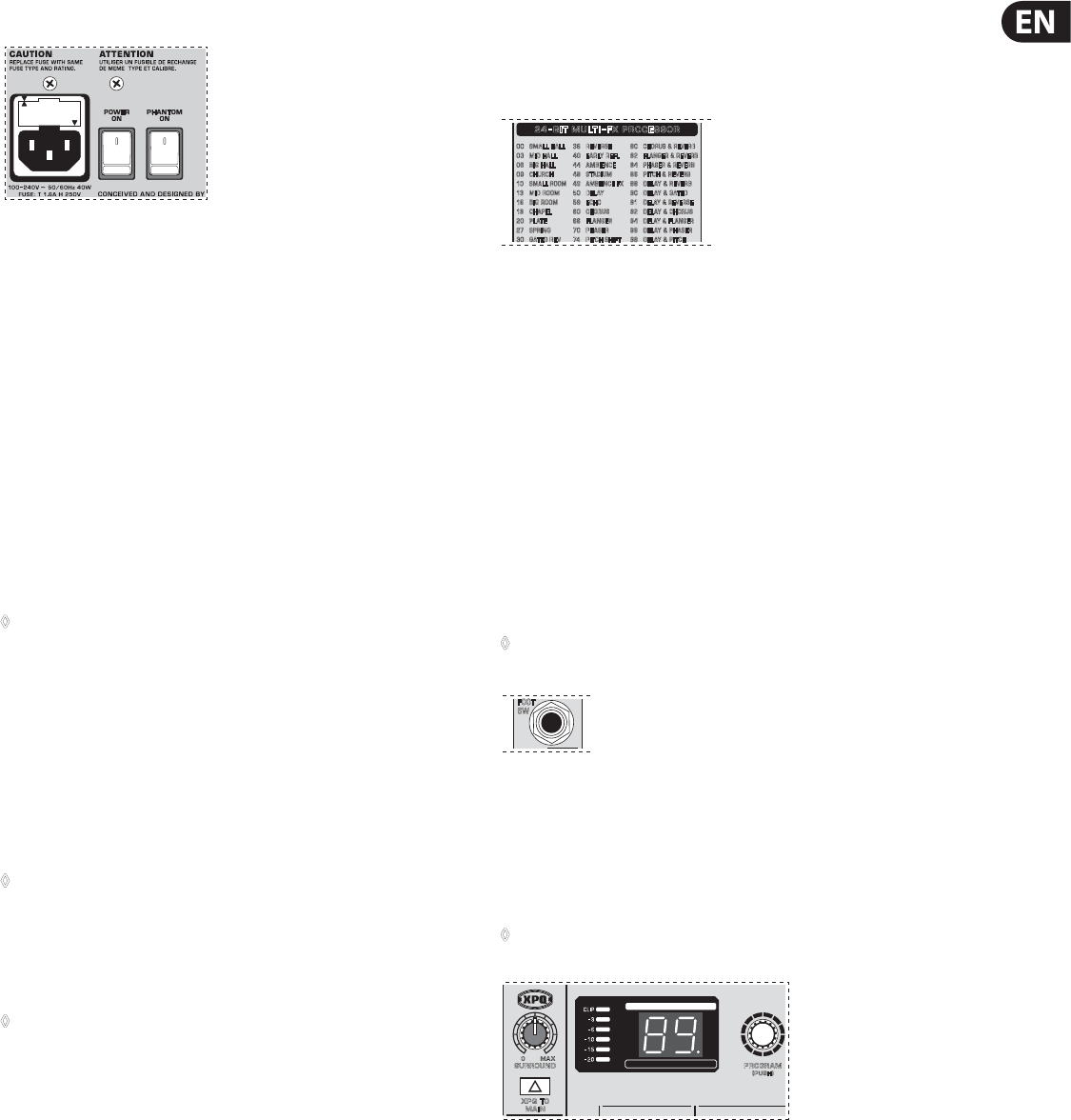
Fig. 2.16: Voltage supply and fuse
FUSE HOLDER/IEC MAINS RECEPTACLE
The console is connected to the mains via the cable supplied, which meets the
required safety standards. Blown fuses must only be replaced by fuses of the
same type and rating. The mains connection is made via a cable with IEC mains
connector. An appropriate mains cable is supplied with the equipment.
POWER
Use the POWER switch to power up the mixing console. The POWER switch
should always be in the “O” position when you are about to connect your unit
to the mains.
To disconnect the unit from the mains, pull out the main cord plug.
Wheninstalling the product, ensure that the plug is easily accessible. If mounting
in a rack, ensure that the mains can be easily disconnected by a plug pull or by an
all-pole disconnect switch on or near the rack.
◊ Attention: The POWER switch does not fully disconnect the unit from
the mains. Unplug the power cord completely when the unit is not used
for prolonged periods of time.
PHANTOM
The PHANTOM switch activates the phantom power supply for the XLR
microphone inputs, which is required to operate condenser microphones.
Thered+48 V LED lights up when phantom power is on. As a rule,
dynamicmicrophones can still be used with phantom power switched on,
provided that they are wired in a balanced conguration. In case of doubt,
contact the microphonemanufacturer!
◊ Connect microphones before you switch on the phantom power supply.
Please do not connect microphones to the mixer (or the stagebox/
wallbox) while the phantom power supply is switched on. In addition,
the monitor/PA loudspeakers should be muted before you activate the
phantom power supply. After switching on, wait approx. one minute to
allow for system stabilization.
◊ Caution! You must never use unbalanced XLR connectors (PIN 1 and
3 connected) on the MIC input connectors if you want to use the
phantom power supply.
SERIAL NUMBER
Please note the important information on the serial number given in
chapter1.3.3.
3. Digital Eects Processor and
XPQSurround Function
3.1 Digital eects processor
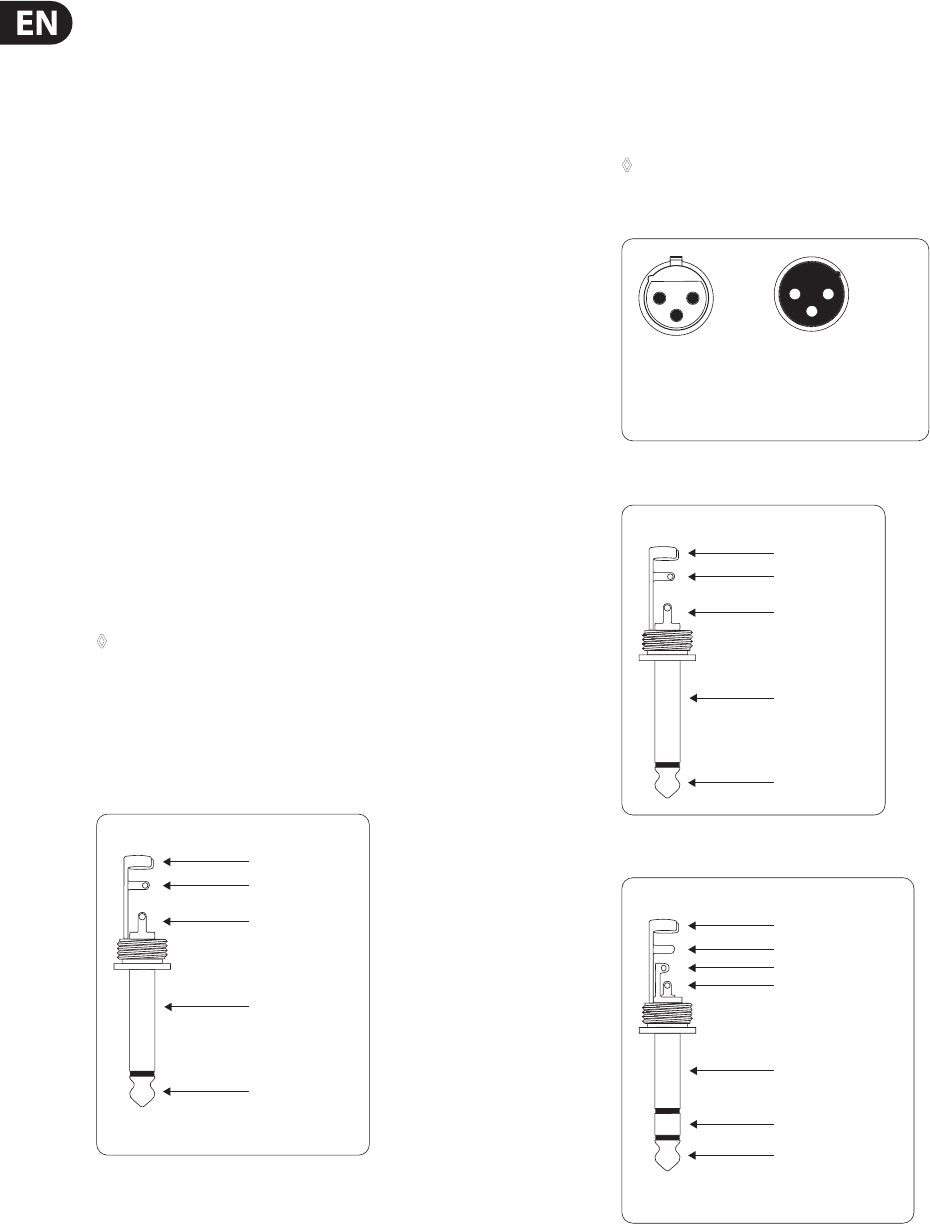
00 SMALL HALL
03 MID HALL
06 BIG HALL
09 CHURCH
10
SMALL ROOM
13 MID ROOM
16 BIG ROOM
19 C HAP EL
20 P LATE
27 SPRING
30 GATED REV
36 REVERSE
40 EARLY REFL
44 AMBIENCE
48 STADIUM
49
AMBIENCE FX
50 DELAY
59 ECHO
60 CHORUS
66 FLANGER
70 PHASER
74 PITCH SHIFT
80
CHORUS & REVERB
82
FLANGER & REVERB
84
PHASER & REVERB
86 PITCH & REVERB
88 DELAY & REVERB
90 DELAY & GATED
91
DELAY & REVERSE
92 DELAY & CHORUS
94
DELAY & FL ANGER
96 DELAY & PHASER
98 DELAY & PITCH
24
–
BIT MULTI
–
FX PROCESSOR
Fig. 3.1: Eects presets overview
24-BIT MULTI-EFFECTS PROCESSOR
Here you can nd a list of all presets stored in the multi-eects processor.
This built-in eects module produces high-grade standard eects such as
reverb, chorus, anger, delay and various combination eects. The integrated
eects module has the advantage of requiring no wiring. This way, the danger
of creating ground loops or uneven signal levels is eliminated at the outset,
completely simplifying the handling.
These eect presets are designed to be added to dry signals. If you move the
FXTO MAIN control, you mix the channel signal (dry) and the eect signal.
This also goes for mixing eects signals with the monitor mix. The main
dierence is that the mix ratio is adjusted using the FX TO MON control. Of course,
a signal has to be fed into the eects processor via the FX control in the channel
strip for both applications.
◊ Turn down the FX controls in those channel strips whose signals you
don’t wish to process.
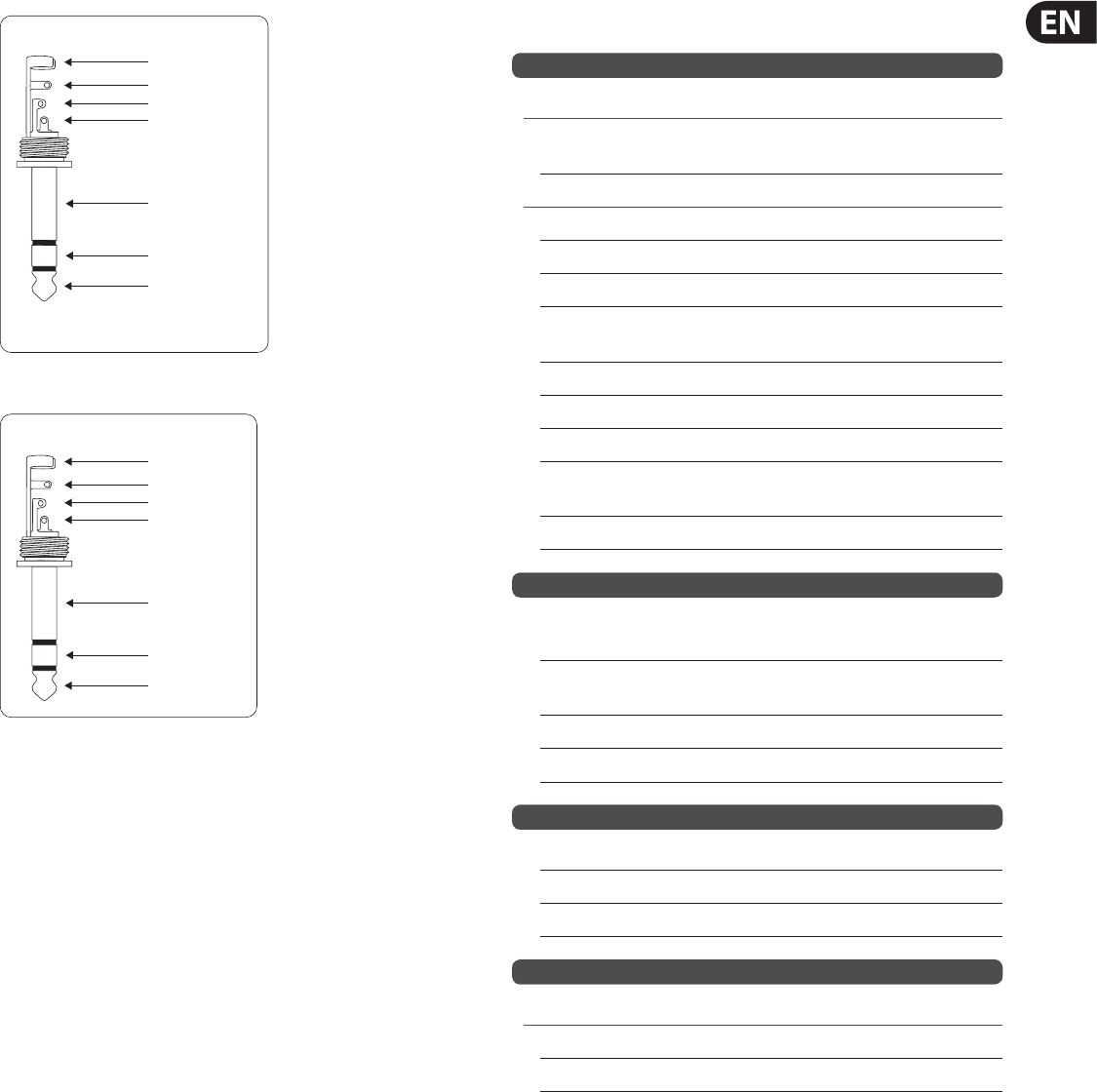
FOOT
SW
Fig. 3.2: Connection socket for the footswitch
FOOTSWITCH
Connect a standard footswitch to the footswitch connector; use this to switch the
eects processor on and o. A ashing dot at the bottom of the display indicates
if the eects processor is muted via the footswitch.
◊ In chapter 4.2, you will find an illustration showing how to connect
your footswitch correctly.
XPQ TO
MAIN
PROGRAM
(PUSH)
SURROUND
MAX
0
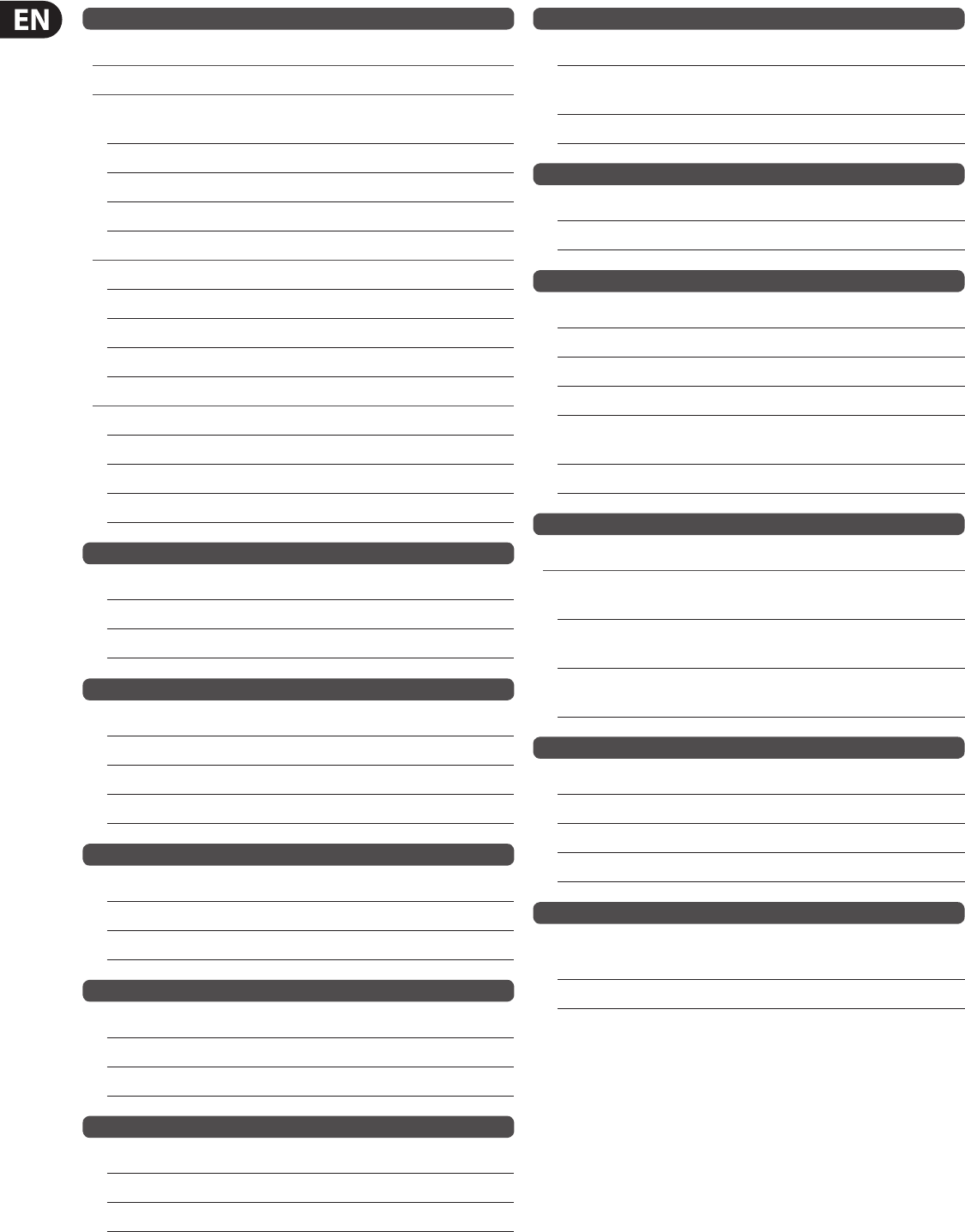
24–BIT A/D & D/A CONVERTER
24–BIT DUAL ENGINE DSP
LEVEL
Fig. 3.3: Digital eects module and XPQ surround function control elements
LEVEL
The LED level meter on the eects module should display a suciently high
level. Take care to ensure that the clip LED only lights up at peak levels. If it is
lit constantly, you are overloading the eects processor and this could cause
unpleasant distortion. The FX SEND fader determines the level that reaches the
eects module.
12 EURORACK UB1222FX-PRO User Manual
PROGRAM
You can select the eect preset by turning the PROGRAM control. The display
ashes the number of the current preset. To recall the selected preset, pressthe
button; the ashing stops. You can also recall the selected preset using
thefootswitch.
3.2 XPQ surround function
The surround function can be enabled/disabled with the XPQTOMAIN switch.
This is a built-in eect that widens the stereo width, thus making the sound more
lively and transparent. Use the SURROUND control to determine the intensity of
this eect.
4. Installation
4.1 Rack mounting
The packaging of your mixing console contains two 19" rack mount brackets
which can be installed on the side panels of the console.
Before you can attach the rack mount brackets to the mixing console, you need
to remove the screws holding the left and right side panels. Use these screws to
fasten the two brackets onto the console, being careful to note that each bracket
ts a specic side. With the rack mount brackets installed, you can mount the
mixing console in a commercially available 19" rack. Be sure to allow for proper
air ow around the unit, and do not place the mixing console close to radiators or
power amps, so as to avoid overheating.
◊ Only use the screws holding the mixing console side panels to fasten
the 19" rack mounts.
4.2 Cable connections
You will need a large number of cables for the various connections to and from
the console. The following illustrations show the wiring of these cables. Be sure
to use only high-grade cables.
strain relief clamp
sleeve
tip
sleeve
pole 1/ground
tip
pole 2
The footswitch connects both poles momentarily
¼" TS footswitch connector
Fig. 4.1: ¼" TS footswitch connector
4.2.1 Audio connections
Please use commercial RCA cables to wire the 2-track inputs and outputs.
You can, of course, also connect unbalanced devices to the balanced
input/outputs. Use either mono plugs, or ensure that ring and sleeve are bridged
inside the stereo plug (or pins 1 & 3 in the case of XLR connectors).
◊ Caution! You must never use unbalanced XLR connectors (pins 1 and
3 connected) on the MIC inputs if you intend to use the phantom
power supply.
For unbalanced use, pin 1 and pin 3 have to be bridged
1 = ground/shield
2 = hot (+ve)
3 = cold (-ve)
input
12
3
output
12
3
Fig. 4.2: XLR connections
strain relief clamp
sleeve
tip
sleeve
(ground/shield)
Unbalanced ¼" TS connector
tip
(signal)
Fig. 4.3: ¼" TS connector
strain relief clamp
sleeve
ring
tip
sleeve
ground/shield
For connection of balanced and unbalanced plugs,
ring and sleeve have to be bridged at the stereo plug.
Balanced ¼" TRS connector
ring
cold (-ve)
tip
hot (+ve)
Fig. 4.4: ¼" TRS connector
13 EURORACK UB1222FX-PRO User Manual
strain relief clamp
sleeve
ring
tip
sleeve
ground/shield
Connect the insert send with the input and the
insert return with the output of the eects device.
Insert send return ¼" TRS connector
ring
return (in)
tip
send (out)
Fig. 4.5: Insert send return ¼" TRS connector
strain relief clamp
sleeve
ring
tip
sleeve
ground/shield
¼" TRS headphones connector
ring
right signal
tip
left signal
Fig. 4.6: ¼" TRS connector for headphones
5. Specications
Mono Inputs
Microphone Inputs (IMP “Invisible” Mic Preamp)
Type XLR, electronically balanced,
discrete input circuitry
Mic E.I.N. (20 Hz - 20 kHz)
@ 0 Ω source resistance -134 dB / 135.7 dB A-weighted
@ 50 Ω source resistance -131 dB / 133.5 dB A-weighted
@ 150 Ω source resistance -129 dB / 130.5 dB A-weighted
Frequency response <10 Hz - 150 kHz (-1 dB),
<10 Hz - 200 kHz (-3 dB)
Gain range +10 to +60 dB
Max. input level +12 dBu @ +10 dB Gain
Impedance approx. 2.6 kΩ balanced
Signal-to-noise ratio 110 dB / 112 dB A-weighted
(0 dBu In @ +22 dB Gain)
Distortion (THD + N) 0.005% / 0.004% A-weighted
Line Input
Type ¼" TRS connector,
electronically balanced
Impedance approx. 20 kΩ balanced
approx. 10 kΩ unbalanced
Gain range -10 to +40 dB
Max. input level +22 dBu @ 0 dB Gain
Fade-Out Attenuation1 (Crosstalk Attenuation)
Main fader closed 98 dB
Channel muted 85 dB
Channel fader muted 85 dB
Frequency Response
Microphone Input to Main Out
<10 Hz - 90 kHz +0 dB / -1 dB
<10 Hz - 160 kHz +0 dB / -3 dB
14 EURORACK UB1222FX-PRO User Manual
Stereo Inputs
Channels 5/6, 7/8
Microphone Input
Type XLR microphone connector,
electronically balanced
Impedance approx. 2.6 kΩ balanced
Gain range 0 dB to +40 dB
Max. input level +2 dBu
Stereo Inputs
Type 2 x ¼" TRS connector, unbalanced
Impedance approx. 40 kΩ @ 0 dB Gain
Gain range -20 dB to +20 dB
Max. input level +22 dBu @ 0 dB Gain
Channels 9/10, 11/12
Type 2 x ¼" TRS connector, unbalanced
Impedance approx. 40 kΩ @ 0 dB Gain
Gain range -20 dB to +20 dB
Max. input level +22 dBu @ 0 dB Gain
2-Track In
Type RCA connectors
Impedance approx. 10 kΩ
Max. input level +22 dBu
EQ Mono Channels
Low 80 Hz / ±15 dB
Mid 2.5 kHz / ±15 dB
High 12 kHz / ±15 dB
Low cut 80 Hz, 18 dB/oct.
EQ Stereo Channels
Low 80 Hz / ±15 dB
Mid 2.5 kHz / ±15 dB
High 12 kHz / ±15 dB
MON/FX Send
Type ¼" TS connector, unbalanced
Impedance approx. 120 Ω
Max. output level +22 dBu
Aux Returns
Type ¼" TRS connector, unbalanced
Impedance approx. 10 kΩ
Max. input level +22 dBu
Main Outputs
Type XLR, electronically balanced
Impedance approx. 240 Ω balanced
approx. 120 Ω unbalanced
Max. output level +28 dBu
Headphone Output
Type ¼" TRS connector, unbalanced
Max. output level +19 dBu / 150 Ω (+25 dBm)
2-Track Out
Type RCA connectors
Impedance approx. 1 kΩ
Max. output level +22 dBu
DSP Texas Instruments
Converter 24-bit Sigma-Delta,
64/128-times oversampling
Sampling rate 40 kHz
Main Mix System Data2
Noise
Main mix @ -∞, -99 dB / -101 dB A-weighted
Channel fader -∞
Main mix @ 0 dB, -84 dB / -87 dB A-weighted
Channel fader -∞
Main mix @ 0 dB, -80 dB / -82 dB A-weighted
Channel fader @ 0 dB
Power Supply
Mains voltage 100 to 240 V~, 50/60 Hz
Power consumption 40 W
Fuse 100 - 240 V~: T 1.6 A H
Mains connection Standard IEC receptacle
Physical
Dimensions (H x W x D) approx. 97 x 345 x 334 mm
(3.8 x 13.6 x 13.1")
Weight (net) approx. 4.49 kg (9.9 lbs)
Measuring conditions:
1: 1 kHz rel. to 0 dBu; 20 Hz - 20 kHz; line input; main output; unity gain.
2: 20 Hz - 20kHz; measured at main output. Channels 1 - 4 unity gain; EQ flat; all channels on main mix;
channels ¹⁄₃ as far left as possible, channels ²⁄₄ as far right as possible. Reference = +6 dBu.
BEHRINGER is constantly striving to manintain the highest professional standards. As a result of these efforts,
modifications may be made from time to time to existing products without prior notice. Specifications and
appearance may differ from those listed or illustrated.
15 EURORACK UB1222FX-PRO User Manual
FEDERAL COMMUNICATIONS
COMMISSION COMPLIANCE
INFORMATION
Responsible Party Name: MUSIC Group Services US Inc.
Address: 18912 North Creek Parkway,
Suite 200 Bothell, WA 98011,
USA
Phone Number: +1 425 672 0816
EURORACK UB1222FX-PRO
complies with the FCC rules as mentioned in the followingparagraph:
This equipment has been tested and found to comply with the limits for a ClassB
digital device, pursuant to part 15 of the FCC Rules. These limits are designed
to provide reasonable protection against harmful interference in a residential
installation. This equipment generates, uses and can radiate radio frequency
energy and, if not installed and used in accordance with the instructions, may cause
harmful interference to radio communications. However, there is no guarantee that
interference will not occur in a particular installation. If this equipment does cause
harmful interference to radio or television reception, which can be determined
by turning the equipment o and on, the user is encouraged to try to correct the
interference by one or more of the followingmeasures:
• Reorient or relocate the receiving antenna.
• Increase the separation between the equipment and receiver.
• Connect the equipment into an outlet on a circuit dierent from that to which the
receiver is connected.
• Consult the dealer or an experienced radio/TV technician forhelp.
This device complies with Part 15 of the FCC rules. Operation is subject to the
following two conditions:
(1) this device may not cause harmful interference, and
(2) this device must accept any interference received, including interference that may
cause undesired operation.
Important information:
Changes or modications to the equipment not expressly approved by MUSIC Group
can void the user’s authority to use the equipment.
EURORACK UB1222FX-PRO
We Hear You
