Behringer Tube Ultragain Mic100 Users Manual
Behringer-Tube-Ultragain-Mic100-Owners-Manual behringer-tube-ultragain-mic100-owners-manual
2015-06-29
: Behringer Behringer-Tube-Ultragain-Mic100-Users-Manual-751649 behringer-tube-ultragain-mic100-users-manual-751649 behringer pdf
Open the PDF directly: View PDF  .
.
Page Count: 19
User Manual
TUBE ULTRAGAIN MIC100
Audiophile Vacuum Tube Preamplier with Limiter
INPUT OUTPUT

2TUBE ULTRAGAIN MIC100 User Manual
Table of Contents
Thank you ............................................................................................ 2
Important Safety Instructions ........................................................... 3
1. Introduction .................................................................................... 6
1.1 The design concept ...................................................................................... 6
1.2 Online registration ....................................................................................... 7
2. Control Elements ............................................................................ 8
2.1 Connections (Side Panel) ........................................................................... 8
2.2 User interface ................................................................................................. 9
3. Wiring Examples ...........................................................................11
3.1 Enhancing vocals and instruments in liveapplications ............... 11
3.2 “Direct to Disk” application in studio or home
recording environments .................................................................................. 12
3.3 The MIC100 as DI-box ...............................................................................13
4. Audio Connectors ........................................................................ 14
5. Specications ............................................................................... 16
Thank you
Thank you for the condence you have placed in us by purchasing the MIC100.
Your MIC100 is a professional mic preamp that can be used in a variety of
applications. Due to its incredible functionality and the broad range of connection
options, the MIC100 ensures outstanding performance. You will soon appreciate the
MIC100’s exibility, be it live on stage or in the home/professional recording studio.

3TUBE ULTRAGAIN MIC100 User Manual TUBE ULTRAGAIN MIC100 User Manual
Terminals marked with this
symbol carry electrical
current of su cient
magnitude to constitute risk of electric
shock. Use only high-quality professional
speaker cables with ¼" TS or twist-locking
plugs pre-installed. Allother installation
or modi cation should be performed only
by quali edpersonnel.
This symbol, wherever it
appears, alertsyou to the
presence of uninsulated
dangerous voltage inside the
enclosure-voltage that may be su cient
to constitute a risk ofshock.
This symbol, wherever it
appears, alertsyou to
important operating and
maintenance instructions in the
accompanying literature. Please read
themanual.
Caution
To reduce the risk of electric
shock, donot remove the
top cover (or the rear section). No user
serviceable parts inside. Refer servicing to
quali ed personnel.
Caution
To reduce the risk of re or
electric shock, do not expose
this appliance to rain and moisture.
The apparatus shall not be exposed to
dripping or splashing liquids and no
objects lled with liquids, suchas vases,
shall be placed on the apparatus.
Caution
These service instructions
are for use by quali ed
service personnel only. Toreduce the
risk of electric shock do not perform any
servicing other than that contained in the
operation instructions. Repairs have to be
performed by quali ed servicepersonnel.
1. Read these instructions.
2. Keep these instructions.
3. Heed all warnings.
4. Follow all instructions.
5.
Do not use this apparatus near water.
6. Clean only with dry cloth.
Important Safety
Instructions

4TUBE ULTRAGAIN MIC100 User Manual
7. Do not block any ventilation
openings. Install in accordance with the
manufacturer’s instructions.
8. Do not install near any heat sources
such as radiators, heat registers, stoves,
or other apparatus (including ampli ers)
that produce heat.
9. Do not defeat the safety purpose
of the polarized or grounding-type plug.
Apolarized plug has two blades with one
wider than the other. A grounding-type
plug has two blades and a third grounding
prong. The wide blade or the third
prong are provided for your safety. Ifthe
provided plug does not t into your outlet,
consult an electrician for replacement of
the obsolete outlet.
10. Protect the power cord from being
walked on or pinched particularly at plugs,
convenience receptacles, and the point
where they exit from the apparatus.
11. Use only attachments/accessories
speci ed by themanufacturer.
12. Use only with
the cart, stand, tripod,
bracket, or table speci ed
by the manufacturer,
orsold with the apparatus. When a cart is
used, use caution when moving the cart/
apparatus combination to avoid injury
from tip-over.
13. Unplug this apparatus during
lightning storms or when unused for long
periods of time.
14. Refer all servicing to quali ed
service personnel. Servicing is required
when the apparatus has been damaged
in any way, such as power supply cord or
plug is damaged, liquid has been spilled
or objects have fallen into the apparatus,
the apparatus has been exposed to rain or
moisture, does not operate normally, or
has beendropped.
15. The apparatus shall be connected to
a MAINS socket outlet with a protective
earthing connection.
16. Where the MAINS plug or an
appliance coupler is used as the
disconnect device, the disconnect device
shall remain readily operable.

5TUBE ULTRAGAIN MIC100 User Manual TUBE ULTRAGAIN MIC100 User Manual
TECHNICAL SPECIFICATIONS AND
APPEARANCES ARE SUBJECT TO
CHANGE WITHOUT NOTICE AND
ACCURACY IS NOT GUARANTEED.
BEHRINGER, KLARKTEKNIK, MIDAS,
BUGERA, AND TURBOSOUND
ARE PART OF THE MUSIC GROUP
MUSICGROUP.COM. ALL
TRADEMARKS ARE THE PROPERTY
OF THEIR RESPECTIVE OWNERS.
MUSICGROUP ACCEPTS NO LIABILITY
FOR ANY LOSS WHICH MAY BE
SUFFERED BY ANY PERSON WHO RELIES
EITHER WHOLLY OR IN PART UPON
ANY DESCRIPTION, PHOTOGRAPH
OR STATEMENT CONTAINED HEREIN.
COLORS AND SPECIFICATIONS MAY
VARY FROM ACTUAL PRODUCT.
MUSICGROUP PRODUCTS ARE
SOLD THROUGH AUTHORIZED
FULLFILLERS AND RESELLERS ONLY.
FULLFILLERSAND RESELLERS ARE
NOT AGENTS OF MUSICGROUP AND
HAVE ABSOLUTELY NO AUTHORITY
TO BIND MUSICGROUP BY ANY
EXPRESS OR IMPLIED UNDERTAKING
OR REPRESENTATION. THIS MANUAL
IS COPYRIGHTED. NO PART OF THIS
MANUAL MAY BE REPRODUCED OR
TRANSMITTED IN ANY FORM OR BY ANY
MEANS, ELECTRONIC OR MECHANICAL,
INCLUDING PHOTOCOPYING
AND RECORDING OF ANY KIND,
FORANY PURPOSE, WITHOUT THE
EXPRESS WRITTEN PERMISSION OF
MUSICGROUPIPLTD.
ALL RIGHTS RESERVED.
© 2013 MUSICGroupIPLtd.
Trident Chambers, Wickhams Cay,
P.O. Box 146, Road Town, Tortola,
British Virgin Islands
For the applicable warranty terms
and conditions and additional
information regarding MUSICGroup’s
Limited Warranty, pleasesee
complete details online at
www.music-group.com/warranty.
LEGAL DISCLAIMER
LIMITED WARRANTY

6TUBE ULTRAGAIN MIC100 User Manual
1. Introduction
With the MIC100, you have purchased an extremely musical mic preamp that
is equipped with a 12AX7 vacuum tube. An integrated limiter, a phase reverse
function, phantom power supply, a highly accurate LED meter and a switchable pad
function complement this powerful device.
1.1 The design concept
The heart of the TUBEULTRAGAIN is an extremely low-noise microphone preamp
circuitry that uses discrete components and produces a highly trans-parent
sound. In combination with our BEHRINGER tube technology, the operational
ampliers 4580 and a sophisticated circuit topology, the TUBEULTRAGAIN yields
excellent noise and distortion properties. The innovative UTC circuitry that has
been developed by our engineering team oers an abundance of sound-shaping
possibilities. Absolute musicality was our major goal when we designed the
TUBE ULTRAGAIN. The result is a device that, thanks to our tube circuitry, lends an
incredible punch to percussion instruments. On the other hand, instruments that
are rich in upper harmonics will receive more transparency. The sound will be warm,
detailed and brilliant.
Surely you know the recording problem that single instruments or vocals sometimes
don’t cut through. Thanks to the TUBEULTRAGAIN, vocals gain in presence and
volume without masking other instruments. As a result, your voice will be perfectly
integrated in the mix.

7TUBE ULTRAGAIN MIC100 User Manual TUBE ULTRAGAIN MIC100 User Manual
1.2 Online registration
Please register your new BEHRINGER equipment right after your purchase by visiting
http://behringer.com and read the terms and conditions of our warranty carefully.
Should your BEHRINGER product malfunction, it is our intention to have it repaired
as quickly as possible. To arrange for warranty service, please contact the BEHRINGER
retailer from whom the equipment was purchased. Should your BEHRINGER dealer
not be located in your vicinity, you may directly contact one of our subsidiaries.
Corresponding contact information is included in the original equipment packaging
(Global Contact Information/European Contact Information). Should your country
not be listed, please contact the distributor nearest you. A list of distributors can be
found in the support area of our website (http://behringer.com).
Registering your purchase and equipment with us helps us process your repair claims
more quickly and eciently.
Thank you for your cooperation!
8TUBE ULTRAGAIN MIC100 User Manual
2. Control Elements
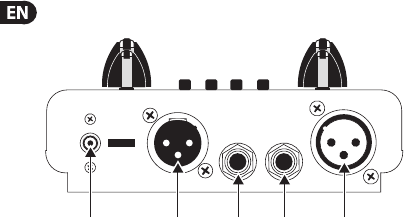
(1) (2) (5)(3) (4)
Fig. 2.1: Side panel of the MIC100
2.1 Connections (Side Panel)
(1) Use the POWER SUPPLY CONNECTOR to hook up the enclosed power supply
unit. Next to this connector you’ll nd the strain relief clamp, which prevents
accidental release of the power supply.
(2) This is the balanced XLR OUTPUT of your MIC100. Use this connector to feed the
XLR input of your mixing console, multitrack recorder or power amp.
(3) The balanced ¼" TRS OUTPUT of your MIC100 can also be connected to either
mixer, recording system or power amp.
(4) The balanced ¼" TRS INPUT of your MIC100 can be used to connect your
electric guitar, for example. This input is wired parallelly to the XLR input.
(5) Use the balanced XLR INPUT to connect your microphone.
◊ In contrast to its outputs, the MIC100’s inputs should never be
used simultaneously!

9TUBE ULTRAGAIN MIC100 User Manual TUBE ULTRAGAIN MIC100 User Manual
2.2 User interface
(7) (8) (13)(12)(11)(10)(9)(6)
Fig. 2.2: User interface of the MIC100

10 TUBE ULTRAGAIN MIC100 User Manual
(6) The GAIN control allows applying gain from +26 to +60 dB to the input signal.
This control should be set fully counterclockwise when (dis)connecting a sound
source to the MIC100. When all connections are made, slowly start raising gain.
(7) We recommend using the LED meter to adjust gain. The LED chain displays the
output signal level in dB. Please make sure that the clip LED never lightsup
permanently. It should light up only at peak signals, but never allthe time.
(8) If your MIC100 is connected to the mains via the enclosed power supply unit,
the POWER LED lights up to indicate that your MIC100 is running.
(9) The 20 dB PAD button reduces the input sensitivity by 20 dB. The appropriate
setting depends on the equipment connected. No matter what your application
is, the clip LED warns you to reduce the gain setting, so as to avoid distortion.
(10) This +48 V switch activates the phantom power supply for the XLR input.
Phantom power supply is required for operating condenser microphones.
(11) With the PHASE REVERSE switch, the input signal is reversed by 180°.
This function is available for both mic and line signals. Use this function
in a multi-microphone setup if you detect phase cancellations in specic
frequency bands.
(12) Use the LIMITER switch to limit the signal and to prevent distortion.
(13) The OUTPUT control governs the output level of the device within a range from
-∞ to +10 dB. If the control is set fully counter-clockwise, there is no output
signal at all. The more the control is set clockwise, the higher the output level.
The device’s SERIAL NUMBER is found on the bottom side of the unit.
11TUBE ULTRAGAIN MIC100 User Manual TUBE ULTRAGAIN MIC100 User Manual
3. Wiring Examples
You’ll be surprised how exibly you can set up your MIC100. The following chapter
describes some typical wiring examples.
3.1 Enhancing vocals and instruments in
liveapplications
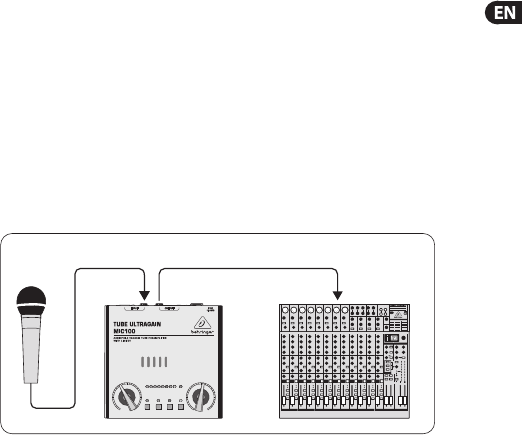
Here, the MIC100 is wired before the mixer’s channel input. Thus, the sound
gains in warmth and transparency. Due to the integrated limiter, distortion is
eliminated eectively.
XLR-input XLR-output Microphone input
Fig. 3.1: Standard live application
12 TUBE ULTRAGAIN MIC100 User Manual
3.2 “Direct to Disk” application in studio or
home recording environments
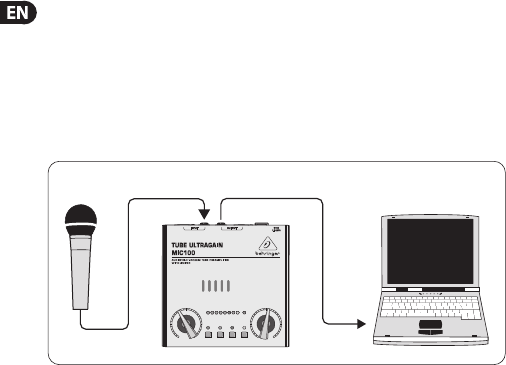
If you are looking for a device that considerably enhances the sound of your digital
workstation, this is where the MIC100 comes in. Many hard disk recorders lack a
certain “liveliness”. In addition, they are often equipped with “lousy” microphone
preamps. Such problems can be solved perfectly with the MIC100.
¼" TRS outputXLR input
Fig. 3.2: Connection of the MIC100 and the soundcard of your PC
13TUBE ULTRAGAIN MIC100 User Manual TUBE ULTRAGAIN MIC100 User Manual
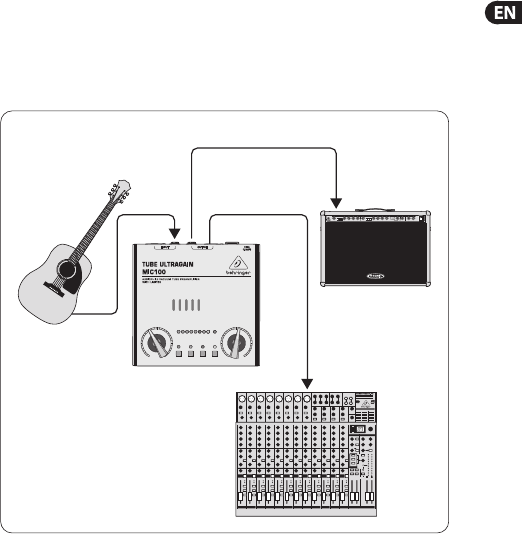
3.3 The MIC100 as DI-box
Your MIC100 is excellently suited for this application. For example, you can connect
an unbalanced acoustic guitar signal to the MIC100 to prevent hum or interference
noise. What you get is a balanced, noise-free signal.
¼" TRS
input Insert
¼" TRS output
XLR output
Microphone input
Fig. 3.3: The MIC100 as DI-box
14 TUBE ULTRAGAIN MIC100 User Manual
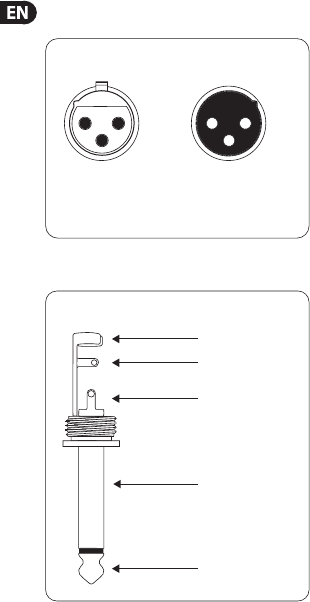
4. Audio Connectors
output
For unbalanced use,
pin 1 and pin 3
have to be bridged
1 = ground/shield
2 = hot (+ve)
3 = cold (-ve)
input
12
3
12
3
Balanced use with XLR connectors
Fig. 4.1: XLR connectors
strain relief clamp
sleeve
tip
sleeve
(ground/shield)
Unbalanced ¼" TS connector
tip
(signal)
Fig. 4.2: ¼" TS connector
15TUBE ULTRAGAIN MIC100 User Manual TUBE ULTRAGAIN MIC100 User Manual
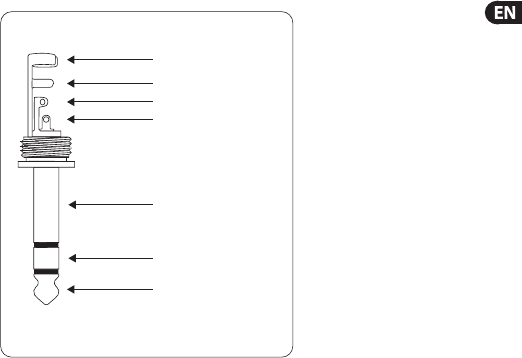
strain relief clamp
sleeve
ring
tip
sleeve
ground/shield
For connection of balanced and unbalanced plugs,
ring and sleeve have to be bridged at the stereo plug.
Balanced ¼" TRS connector
ring
cold (-ve)
tip
hot (+ve)
Fig. 4.3: ¼" TRS connector

16 TUBE ULTRAGAIN MIC100 User Manual
5. Specications
XLR Input
Connector balanced/unbalanced
Type transformerless, DC-decoupledinput
Impedance approx. 2kΩ
Max. input level +7dBu / -20 dB with pad
¼" TRS Input
Connector balanced/unbalanced
Type transformerless, DC-decoupledinput
Impedance approx. 1MΩ
Max. input level +16dBu / -20 dB with pad
Audio Outputs
Connectors XLR connector + ¼" TRS jack
balanced/unbalanced
Type transformerless, DC-decoupledoutput
Impedance approx. 700Ω balanced,
approx.350Ω unbalanced
Max. output level approx. +26dBu @ 100kΩ

17TUBE ULTRAGAIN MIC100 User Manual TUBE ULTRAGAIN MIC100 User Manual
Frequency Response
Mic input <10Hz to 43kHz (±3dB)
Line input <10Hz to 40kHz (±3dB)
Function Controls
GAIN variable (+26dB to +60dB)
OUTPUT variable (-∞ to +10dB)
Function Switches
20 dB PAD level attenuation (20dB)
+48 V activates the phantom power
PHASE REVERSE Phase reverse (180°)
LIMITER limits the output signal
Indicators
Input Level 8-segment LED meter:
-24, -18, -12, -6, 0, +6, +12, Clip
Power LED indicates operation

18 TUBE ULTRAGAIN MIC100 User Manual
Power Supply
Adapter PSU
Mains Voltage
USA/Canada 120V~, 60Hz
Europe/U.K./Australia 230V~, 50Hz
China 220V~, 50Hz
Korea 220V~, 60Hz
Japan 100V~, 50 / 60Hz
Physical/Weight
Dimensions (H x W x D) approx. 2.5 x 5.3 x 5.3" / 64x 135x 135mm
Weight (without power supply) approx. 2.2lbs / 1kg
BEHRINGER is constantly striving to maintain the highest professional standards. As a result of these efforts,
modifications may be made from time to time to existing products without prior notice. Specifications and appearance
may differ from those listed or illustrated.
We Hear You
