Beijing Choice Electronic Technology MD100E-B Handheld ECG Monitor User Manual MD100E B Rev2
Beijing Choice Electronic Technology Co., Ltd. Handheld ECG Monitor MD100E B Rev2
MD100E-B_User Manual-Rev2
HANDHELD ECG MONITOR
INSTRUCTION
MANUAL
Ver1.0E-B

Ver1.0E-B HANDHELD ECG MONITOR
- 2 -
Customer Instructions
Dear users, thank you for purchasing our product Handheld ECG Monitor.
Please be sure to read the manual carefully before using this device for the
first time. Failure to follow these instructions may cause measuring
abnormality, equipment damage or personal injury. We assume no
responsibility for personal injury or damage sustained by or through use of
this product.
No part of this manual may be photocopied, reproduced, modified or
translated into another language without the prior written consent. We
reserve the right to improve and amend it at any time without prior notice.
In case of modifications, you will NOT be advised with a Modification Notice.
The information in this manual should NOT be regarded as the promise of
our company.
All rights reserved.
Issue date: January 12, 2012

Ver1.0E-B HANDHELD ECG MONITOR
- 3 -
Notes on Safety
This device is intended to monitor the ECG waveform, not for medical
diagnosis. Never use the device in critical situations!
- Self-diagnosis and treatment is dangerous.
The measurement results are reference for analyzing the cardiac rhythm of
patients by doctors only, and should never be used as a basis for starting
or modifying treatment without independent confirmation by medical
examination. Do not make diagnosis by yourself according to the
measurement and analysis results; always consult your doctor if abnormal
information is presented frequently.
- The values displayed by the device are the values at the time of
measurement.
Medical conditions can change suddenly. If you notice any change in your
condition, consult your doctor, regardless of the measurement results.
- Do NOT Use the device for treatment; we will not be responsible for the
suddenness happened during a measurement.
Warnings!
Do not use with a cardiac pacemaker.
Do not use with a defibrillator.
Do not use in the presence of flammable anesthetics, drugs or
pressurized oxygen (such as in a hyperbaric chamber, ultraviolet
sterilizer or oxygen tent).
Do not attempt self-diagnosis of the measurement results and analysis.
Always consult your doctor.
- Self-diagnosis may lead to deterioration in your condition.
Do not use on patients with significant resting tremors.
Do not use on people with sensitive skin or allergies.
- This may result in exanthema, skin irritation, or eczema.
Keep out of reach of small children and people who cannot express their
consent.
Do not use for any purpose other than obtaining an electrocardiograph.
Do not expose the device to strong shocks or vibrations, or drop or step
on the device.
Do not use batteries of a type other than that specified in this manual.

Ver1.0E-B HANDHELD ECG MONITOR
- 4 -
Do not apply over clothing.
Do not take measurements when there are drops of water on your skin,
such as from sweat or after bathing.
Do not take measurements where the device will be exposed to strong
electromagnetic forces.
Chemicals from a broken LCD display panel are toxic when ingested.
Use caution when the monitor has a broken display panel.
The user should operate the equipment according to the EMC
information provided in the accompanying documents.
Portable and mobile RF communications equipment can affect medical
electrical equipment.
This equipment should not be used adjacent to or stacked with other
equipment.
The Handheld ECG oximeter is not intended for use during patient
transport outside the healthcare facility
Caution!
Do not expose the device to static electricity. Always disperse any static
electricity from your body before handling the device.
Do not take measurements in a moving vehicle.
Do not use a cellular phone near the device.
Do not disassemble, repair, or modify the device.
Do not insert batteries with their polarities reversed.
The chest electrode will be impeded by excessive body hair, regularly
remove hair at the electrode contact point.
General
Avoid extremes in temperature and humidity. Do not use this device in
locations subject to high or low temperatures or humidity.
Use at a temperature within 5°C to 40 °C and below 80% RH.
Do not sterilize this device in an autoclave or gas sterilizer (EOG,
formaldehyde, high density ozone etc.)
Do not wash this device with water.
Do not store the device in the following ambient conditions.
- Locations exposed to direct sunlight.
- Locations subject to high temperatures and high humidity.
- Wet or damp locations where water may get on the device.

Ver1.0E-B HANDHELD ECG MONITOR
- 5 -
- Dusty locations.
- Near fires or open flames.
- Locations exposed to strong vibration.
- Locations exposed to strong electromagnetic fields.
Dispose of the device and its accessory according to applicable local
regulations.

Ver1.0E-B HANDHELD ECG MONITOR
- 6 -
Contents
1. General Description ........................................................................... - 7 -
2. Inserting and Replacing Batteries .................................................... - 9 -
3. Setting the ID, Date and Time ......................................................... - 11 -
4. Using SD Card .................................................................................. - 12 -
5. Taking a measurement .................................................................... - 13 -
6. ECG Data Display ............................................................................. - 23 -
7. System Settings ............................................................................... - 25 -
8. Data Management ............................................................................ - 26 -
9. Factory Settings ............................................................................... - 27 -
10. Data Transmission ......................................................................... - 27 -
11. Version ............................................................................................ - 28 -
12. Trouble Shooting ........................................................................... - 28 -
13. Key Symbols .................................................................................. - 29 -
14. Technical specifications ................................................................ - 30 -
15. Maintenance and Storage .............................................................. - 36 -
16. General information about the Heart and ECG Measurements .. - 39 -
Ver1.0E-B HANDHELD ECG MONITOR
- 7 -
1. General Description
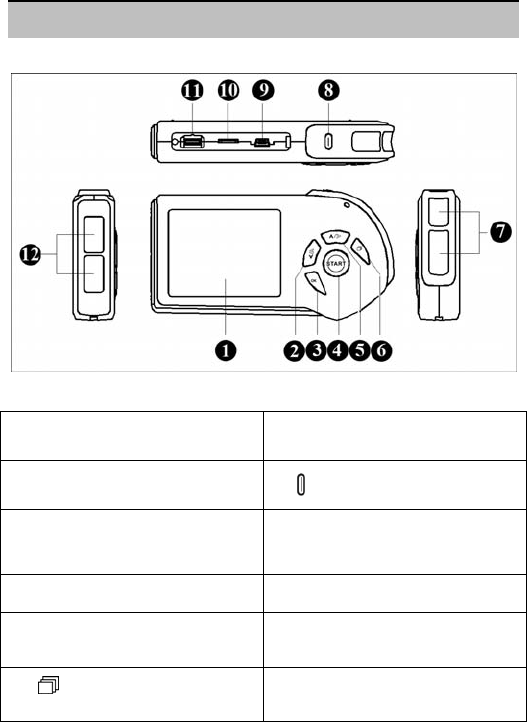
1.1 Know Your Device
Fig.1-1
Description of Fig. 1-1:
①. LCD display: Display the parameters
include the current date and time, battery
power indicator, etc.
⑦. Metal Electrodes: Hold these two with
right index finger when taking a
measurement.
②. Left/Down Button: Press this button
to move the cursor/ waveform to the left or
change the number. ⑧. POWER button: Power on/off.
③. OK button: Press this button to
confirm the selection and enter the
submenu or confirm the setting and select
the next item.
⑨. USB interface: Transmit data to the
PC through this interface.
④. START button: Shortcut key for taking
a measurement.
⑩. SD card socket: A SD card is
intended to be inserted this socket.
⑤. Up/Right Button:Press this button to
move the cursor/waveform to the right or
change the number.
⑾. ECG cable interface: Connect the
ECG cable with this port.
⑥. MENU button: Return to the
previous menu by pressing this button.
⑿. Metal Electrodes: Place this against
the center of left palm or chest when
taking a measurement.

Ver1.0E-B HANDHELD ECG MONITOR
- 8 -
1.2 Product Features
Easy to use
Convenient to carry
High-definition color display
User Friendly interface
Two optional measurement modes
Support using Micro-SD Card saving more data records.
The saving records can be uploaded to PC for review or management.
1.3 Intended Use
The MD100E-B ECG monitor is a handheld device indicated for use in
non-invasively detecting and displaying ECG waveform for self testing of
adult in daily life; otherwise it also can provide the doctor with relevant data
on the heart condition of the patient in hospital. It is available to manually
record transient cardiac events immediately at any time, suitable for patient
and professional use, helpful in determining cardiac aetiology of
symptomatic events. This ECG monitor allows the consumer to record their
ECG data into the device memory and displays the ECG data to the
healthcare professional during office visits.
NOTE: The product is not suitable to monitor patient continuously.
1.4 Main Menu
Main Menu Screen:
Fig.1-2
Ver1.0E-B HANDHELD ECG MONITOR
- 9 -
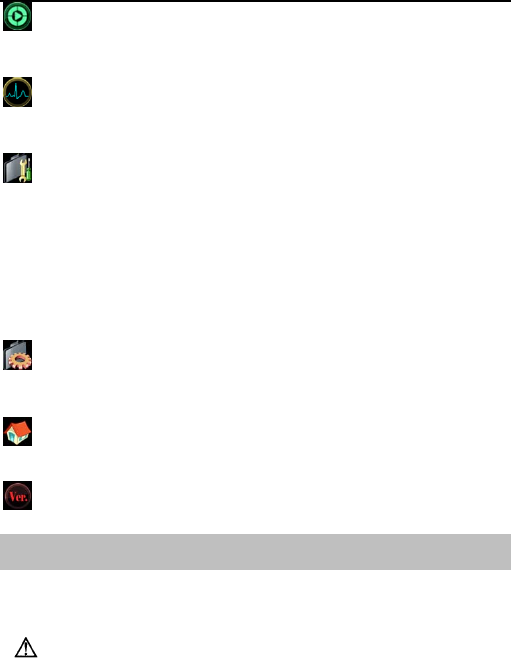
ECG Measurement:
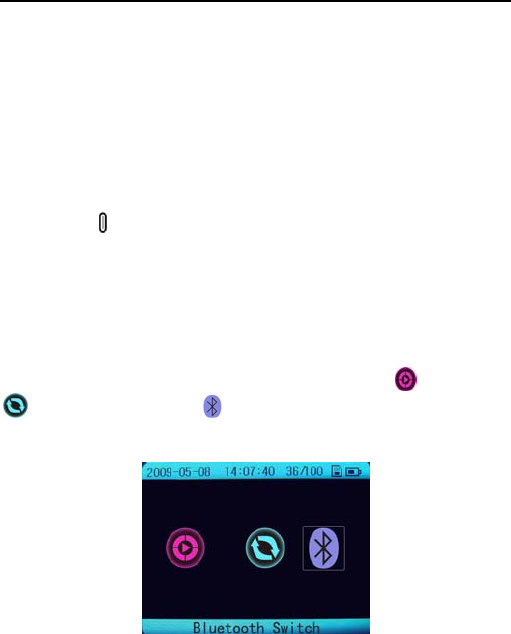
In this menu,there are three options “Easy Mode”, “Continuous Mode” and
“Bluetooth Switch”
Records Review:
Entering this menu, there are data records and ECG waveform stored
available.
System unit Settings:
Entering this menu, there are six submenus:
1. Date and Time Settings
2. Brightness Settings
3. Beep Settings
4. User ID Settings
5. Wave scale Settings
6. Auto power off Settings
Data Management:
Entering this menu, the records stored in the monitor can be deleted or
copied to an SD card.
Factory Settings:
The factory settings can be restored or not according user needs.
Version:
The user can acquire the version, SN serial number and register information.
2. Inserting and Replacing Batteries
2.1 Open the battery cover on the back panel of the device.
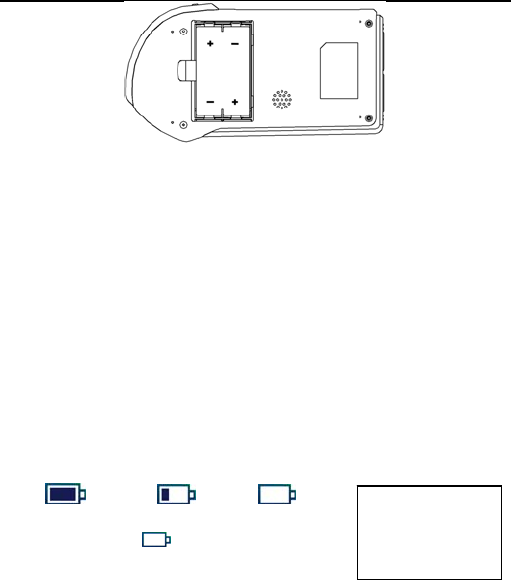
2.2 Insert two AA batteries lightly as indication of the polarity sign: (refer to
Fig. 2-1).
Make sure the polarities of the batteries are correct.
Ver1.0E-B HANDHELD ECG MONITOR
- 10 -
Fig. 2-1
2.3 Close the battery cover.
Battery life and replacement:
When the “Battery power is low please change with new ones in time.”
message appears, replace batteries with new ones immediately.
Always turn off the device before replacing the batteries.
Dispose of the used batteries according to the applicable local
regulations.
Battery life:
Two new AA batteries will last for about 500 measurements. (If
measurements are performed once a day at room temperature (22℃).)
The batteries enclosed in the package are used for demonstration
purpose. It is possible that these batteries will not last for 500
measurements.
The battery life can be confirmed in the upper right of the LCD display.
Warning!
If battery fluid should get in your eyes, immediately rinse with plenty of clean
water. Consult doctor immediately.
Full power low power no power
When the sign “” appears, it means the
battery power is not sufficient, and the device will
show information as Fig. 2-2. It is suggested that
users re
p
lace the batteries with new ones in time.
Battery power is
low please change
with new ones in
time.
Fig. 2-2

Ver1.0E-B HANDHELD ECG MONITOR
- 11 -
Cautions!
Do not use batteries not specified for this device. Do not insert the
batteries with the polarities in the wrong direction.
Do not dispose of batteries in fire.
If battery fluid should get on your skin or clothing, immediately rinse with
plenty of clean water.
Remove batteries from this device when you are not going to use it for a
long period of time (approximately three months or more).
Do not use batteries of a different type together.
Do not use new and used batteries together.
3. Setting the ID, Date and Time
Always set the ID number, Date and Time before using the device for
the first time.
Set the ID number for different user. Make sure the date and time are correct
before using the device, reset them if necessary. The ID number, date and
time are important indicators when a measurement is taken.
3.1 Date and time setting
Note: The date and time information will be displayed on the screen in
format of “Year-Month-Date”; “Hour: Minute: Second”.
3.1.1 Press the Power button to turn on the device.
3.1.2 Select [System unit settings] [Data and Time settings]. Press the OK
button to select the item which you want to adjust.
3.1.3 Press the up/right or left/down button to increase or decrease the
number.
3.1.4 In the same way, set the month, day, hour, minute and second.
Ver1.0E-B HANDHELD ECG MONITOR
- 12 -
3.1.5 Press the MENU button to return to the previous menu.
3.2 ID settings
NOTE: ALWAYS set different ID number for every user before taking a
measurement.
3.2.1 Select [System unit settings][User ID Setting], then press the “OK”
button to enter.
3.2.2 Press the up/right or left/down button to adjust the ID number. Its range
is from 1 to 255. After setting, press “OK” button to confirm the setting and
return to the previous menu.
4. Using SD Card
The monitor includes an SD card for storing ECG data, which can be viewed
by your doctor later. This section describes how to insert and eject an SD
card, and how to format a card so it can be used to store ECG data.
NOTE: DO NOT store data other than ECG data from the monitor on the
card.
4.1 Inserting an SD card
The SD ( ) mark is displayed in the top right corner of the screen while the
SD memory card is inserted, and the monitor is turned on.
4.1.1 Open the cover on the side of the monitor and insert the SD card in its
slot. Insert the card until it clicks into position.
Caution! When inserting the SD card, do not try to force the card into the
slot. Be sure that the side with silk faces upwards. Otherwise, that could
damage the card or the unit itself.
4.1.2 Close the SD card slot cover.
4.2 Ejecting the SD card
4.2.1 Open the SD card slot cover and press the card. The lock is released
and the card is ejected lightly.

Ver1.0E-B HANDHELD ECG MONITOR
- 13 -
4.2.2 Remove the SD card, and then close the SD card slot cover.
4.3 Formatting an SD card
Insert the SD card into the SD card reader; then connect the SD card reader
with a computer’s USB interface. In the right mouse button menu, select the
“fat” item to start formatting the SD card.
NOTE:
It is recommended to use the approved micro-SD cards and Readers.
If the prompt information “Do not support this file system. Please
format SD card with fat16” appears, format the SD card on a
computer.
5. Taking a measurement
The methods of measurement include palm measurement, chest
measurement and cable measurement. The measurement modes include
Easy Mode and Continuous Mode.
Important Notes on Taking a Measurement
In order to obtain a good ECG reading, it is important that measurements
are taken correctly. Please read the instructions carefully before taking a
measurement for the first time, and follow the instructions each time you
take a measurement.
Make sure that the electrodes are directly touching your skin.
If your hands or skin are dry, wipe them with a damp towel so that they
are slightly moist.
If the electrodes are dirty, wipe any dirt off with a soft cloth moistened with
disinfectant alcohol or a cotton swab.
- Take care not to use too much disinfectant alcohol when cleaning the
electrodes.
- Do not wipe or get disinfectant alcohol on parts other than the
electrodes.
Ver1.0E-B HANDHELD ECG MONITOR
- 14 -
Do not move during measurement.
- Movement, including talking, coughing or sneezing, during
measurement can affect the measurement results.
If the position of your finger or arm is inappropriate during measurement,
the results may be unreliable, so be sure to check their position before
taking a measurement.
After taking a measurement, disinfect the electrodes by wiping them with
a soft cloth or cotton swab moistened with disinfectant alcohol. If you do
not disinfect the electrodes there is a risk of skin disease.
5.1 Press the Power button for about 3 seconds to turn on the device and
4 seconds to turn off.
Note: If you forget to turn the device off, it will automatically shut down within
4 minutes (default).
Users can set the auto power off time “OFF, 1 min, 2 min…10 min” in the
[System Settings] menu.
There are three options in the [Measurement mode] menu “Easy Mode”
“Continuous Mode” and “Bluetooth Switch”. Choose “Easy Mode”,
then click “OK” button. When the device counts down from six to zero, the
measurement will start.
Fig. 5-1
5.2 Make sure that you are in a relaxed position. Then press the “START”
button to start a measurement, and the measuring mode depends on your
Ver1.0E-B HANDHELD ECG MONITOR
- 15 -
selection in the [Measurement Mode] menu.
Before you take a measurement, the ideal posture is one where you are
seated comfortably with your back straight and hands on your legs.
Note: You can also take a measurement while you are standing or while
lying down.
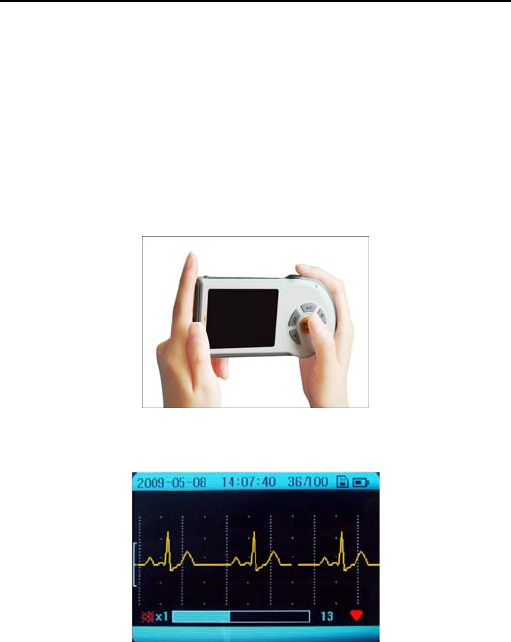
5.3 Palm Measurement
Make sure hold the “7” metal electrodes of the device with right index finger
firmly, and place the “12” electrodes against the center of the left palm. While
maintaining the same posture, press the START button. (Refer to Fig. 5-2)
Fig. 5-2
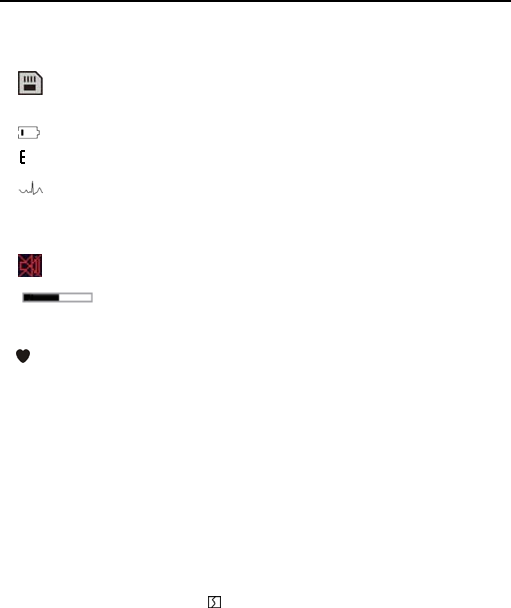
Measuring Screen (Easy Mode)
:
Fig. 5-3
Description of Fig. 5-3:
“2009-05-08”: The current date.
Ver1.0E-B HANDHELD ECG MONITOR
- 16 -
“14:07:40”: The current time.
“36/100”: The device can store 100 records.
The current measurement record is the 36th one.
: With SD card, it displays this icon; without SD card, it doesn’t display
this icon.
: Indication of the power of battery
: ECG amplitude bar
: The ECG waveform
×1: ECG waveform scale. You can set the displaying scale (x0.5, x1, x1.5,
or x2) in the [System unit Settings].
: Beep is OFF.
: The status bar of measurement progress.
13: Indication of measurement time.
: The sign of heartbeat, it twinkles synchronously with the heartbeat.
It takes 30 seconds to complete the measurement. During the measurement,
the device will beep synchronously with the heartbeat, the screen displays
the ECG waveform and progress bar at the bottom of the screen indicates
the measurement progress.
Notes:
During a measurement the device will only respond to the “MENU”,
“START” or “POWER” buttons.
If the contact between electrodes and skin becomes loose, or the
conditions change during the measurement, the result may be unreliable.
When the electrodes are contacted not well during the measurement, the
device will remind you with “ ” icon flashing at the bottom of the screen.
Keep still and do not move until the measurement is complete.
Wrong Operation Methods:
A. Both hands move at will.
B. Both hands contact with electrodes loosely during the measurement.
C. No palm/finger touches electrodes.
Ver1.0E-B HANDHELD ECG MONITOR
- 17 -
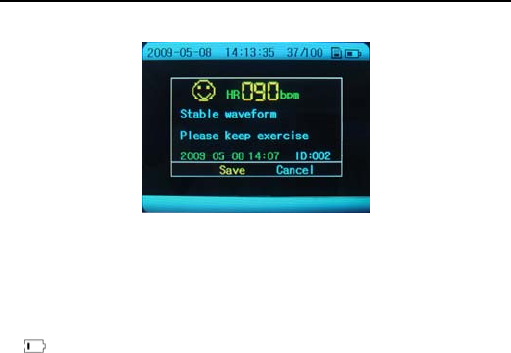
A measurement result message is displayed when the measurement has
been completed (refer to Fig. 5-4 for details).
Fig. 5-4
Description of Picture 5-4:
“2009-05-08”: The current date.
“14:13:35”: The current time.
“37/100”: The current measurement record is the 37th one.
: Indication of the power of battery.
“HR 090 bpm”: The heart rate is 90 beats per minute.
“2009-05-08”: The record storage date.
“14:07”: The record storage time.
“ID: 002”: The ID number is 002.
The results will be stored automatically within 5 seconds. The monitor can
memorize 100 pieces of records at most.
When the records are full, the message “Storage is full” will appear on the
centre of the screen. If you want to store another record, the system will
remind you that the record cannot be stored, until the user deleted the
unnecessary records. Or copy the records to a SD card to be stored, and
then delete the records in the monitor. After that the new measurement
records can be stored.
Caution!
DO NOT make any direct diagnostic or analytical decision according to the
result, but use it for reference ONLY.
Ver1.0E-B HANDHELD ECG MONITOR
- 18 -
5.4 Chest measurement
If palm measurement is not ideal, please adopt chest measurement.
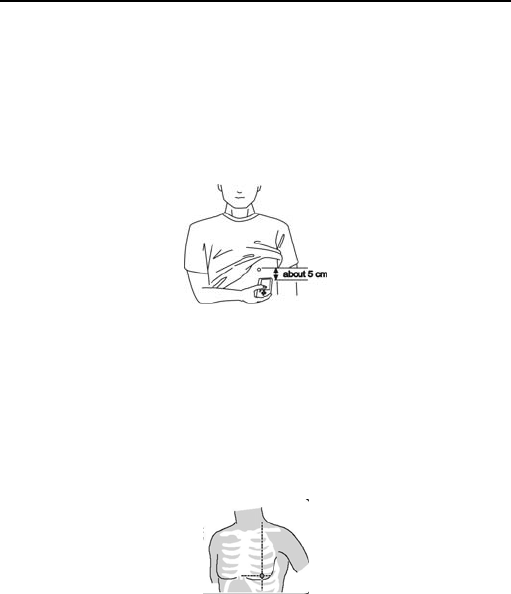
5.4.1 Measurement for Male:
Hold the device with the right hand; make sure that the right index finger
makes contact with the “7” metal electrodes sufficiently. Place the “12”
electrodes against left chest on bare skin about 5cm bellow your left nipple.
While maintaining the same posture, press the START button. (Refer to Fig.
5-5)
Fig. 5-5
Note: If you have problems in applying the device so that the “12” metal
electrodes are flat against your chest, please ask your doctor for advice.
5.4.2 Measurement for Female
Locate the ECG monitor at the lower end of breastbone and move
horizontally to the middle of the left part of the chest. If necessary, gently lift
the breast and place the “12” electrodes under the left breast. Unless the
electrodes come in contact with the brassiere, it is NOT necessary to
remove it; if you are unsure please consult your doctor.
Fig. 5-6
To obtain the high quality ECG, users can adopt the cable measurement.
Note: The small open circle indicates the proper position of electrodes,
as shown in Fig. 5-6.

Ver1.0E-B HANDHELD ECG MONITOR
- 19 -
Improper Operation Methods:
A. The touching point of the “12” electrodes do NOT contact left chest.
B. The handhold gesture is NOT correct.
C. The “12” electrodes do not contact fully the skin. (E.g. the monitor is
impeded by clothes while taking a measurement)
Notes:
Make sure that you are relaxed and that your chest is free of tension.
Press the electrodes close against your bare chest. Do not place the
electrodes on clothing as this will result in an inaccurate measurement.
If measuring in dry circumstance, which might cause weak heart pulse
signal, please wet your skin or hands with some diluted salt water or clean
water. This would strengthen the heart pulse signals, and make the
recording much more accurate.
When doing chest measurement, if you have problems applying the
device so that the “12” metal electrodes are flat against your chest, please
ask your doctor for advice.
Keep sill and do not move until the measurement is complete.
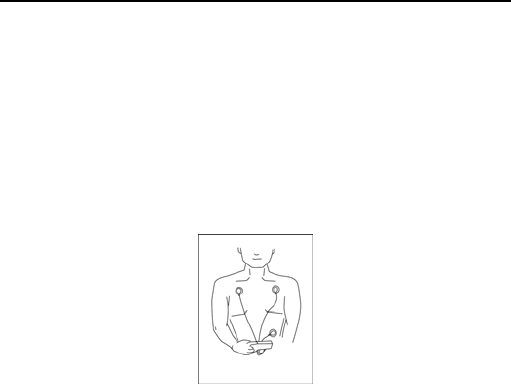
5.5 Leg Measurement
Besides palm and chest measurement, user can adopt leg measurement. As
shown in the following picture. Touch the electrodes on the right side of the
monitor with right hand and get the left side electrodes touched with left
ankle.
Fig. 5-7
Ver1.0E-B HANDHELD ECG MONITOR
- 20 -
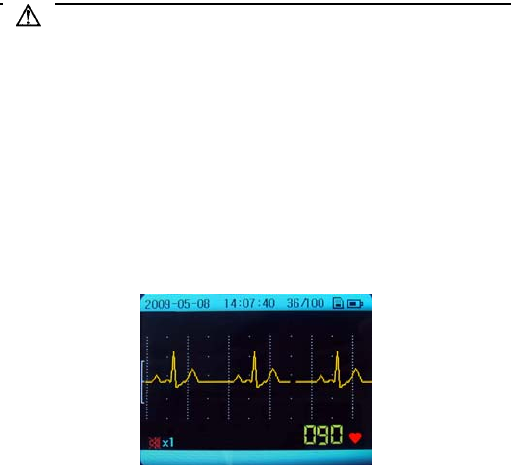
5.6 Cable Measurement
If palm measurement is not ideal and it is not convenient to adopt chest
measurement, the cable measurement will be recommended. Connect the
cable and the unit effectively through the lead port. The position for placing
the cable electrode is shown in Fig. 5-8.
NOTE:
Make sure that you are relaxed and that your chest is free of tension.
Press the chest electrodes close against your bare chest. Do not place
the electrodes on clothing as this will result in an inaccurate
measurement.
Fig. 5-8
AHA:
White(right arm RA)electrode — put it under the clavicle ,next to the right
shoulder.
Black(left arm LA)electrode — put it under the clavicle ,next to the left
shoulder.
Red(left leg LL)electrode — put it at the left of the underbelly.
IEC:
Red(right arm R)electrode — put it under the clavicle ,next to the right
shoulder.
Yellow(left arm L)electrode — put it under the clavicle ,next to the left
shoulder.
Green(left leg F)electrode — put it at the left of the underbelly.
Wrong Operation Methods:
A. Connect wrong cable mount.
B. Electrodes contact wrong position of the body.
Ver1.0E-B HANDHELD ECG MONITOR
- 21 -
Warnings! Very Important!
Users are strictly prohibited to attach the lead cable electrodes on their body
if the lead cable is not connected with the device. Before measurement,
firstly the lead cable should be connected with the device, secondly the lead
cable electrodes should be attached to your body; After measurement, firstly
the lead cable electrodes should be removed from body, secondly the lead
cable should be disconnected with the device.
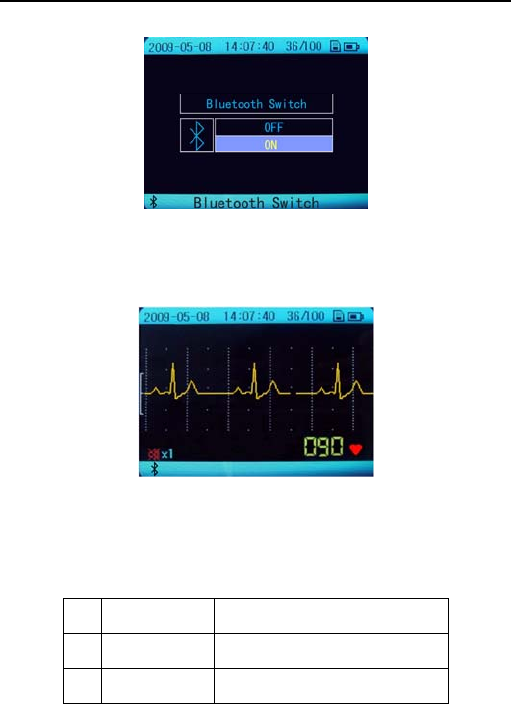
5.7 Continuous Mode
In the [Measurement Mode] menu you can select the “Continuous Mode” for
long term measuring. The measurement can last for about 6 hours with two
new batteries.
Fig. 5-9
“090”: The inspected Heart rate is 90 bpm.
Note: In the continuous Mode, the measurement results cannot be
saved in the monitor, but can be saved into SD card. The measurement
results can be real-timely displayed on a computer by the data
transmission software after connecting the monitor with computer via
the USB data cable or the USB adapter.
5.8 Bluetooth Switch
In the [Measurement Mode] menu you can select the “Bluetooth Switch” for
measuring.
Ver1.0E-B HANDHELD ECG MONITOR
- 22 -
When you select the “Bluetooth Switch”, you enter the following interface.
Fig. 5-10
Select “ON” and you can take a measurement. The following figure is the
measurement interface.
Fig. 5-11
“090”: The inspected Heart rate is 90 bpm.
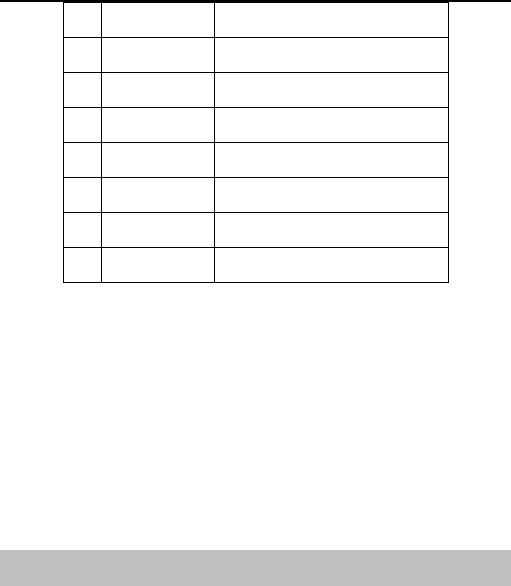
There is an analysis result of a measurement in the continuous mode.
The function is optional, so the user should purchase for applying.
No. Abbr. Analysis
1 ASYSTOLE Suspected Sinus halted beat
2 TAHY Suspected fast beat
Ver1.0E-B HANDHELD ECG MONITOR
- 23 -
3 BRADY Suspected slow beat
4 MISSBEAT Suspected missing beat
5 RUNPVC Suspected Repeating early beat
6 TRIGEMIN Suspected trigeminy
7 BIGEMINY Suspected bigeminy
8 R On T Suspected R wave on T wave
9 COUPLET Suspected Twin early beat
10 PVC Suspected early beat
Cautions!
Please note that while the measurements from an ECG monitor are a
useful guide for your doctor, they cannot detect all changes in heart
conditions. Always consult your doctor if you notice any changes in
your condition, regardless of the measurement results. Consult a
doctor even if “Stable waveform” is displayed as the measurement
result, if you have been diagnosed with a heart condition.
The values displayed by the device are the values at the time of
measurement. Medical conditions can change suddenly. If you
notice any change in your condition, consult your doctor, regardless
of the measurement results.
6. ECG Data Display
6.1 Reviewing records
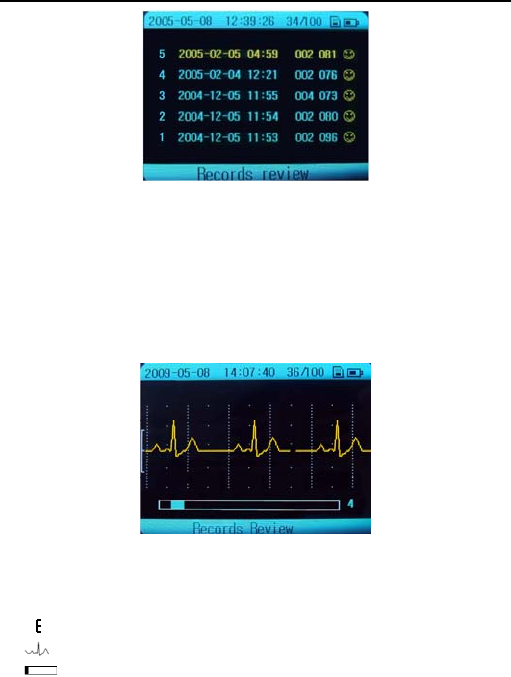
Select [Records Review] in the main menu, and then press “OK” button. And
the saved records are displayed in graph as show in the Fig. 6-1.
Ver1.0E-B HANDHELD ECG MONITOR
- 24 -
Fig. 6-1
NOTE: If the device does NOT have stored records ever, it will show the
prompt information “No record!”, when entering the [Records Review] menu.
6.2 Reviewing ECG waveforms
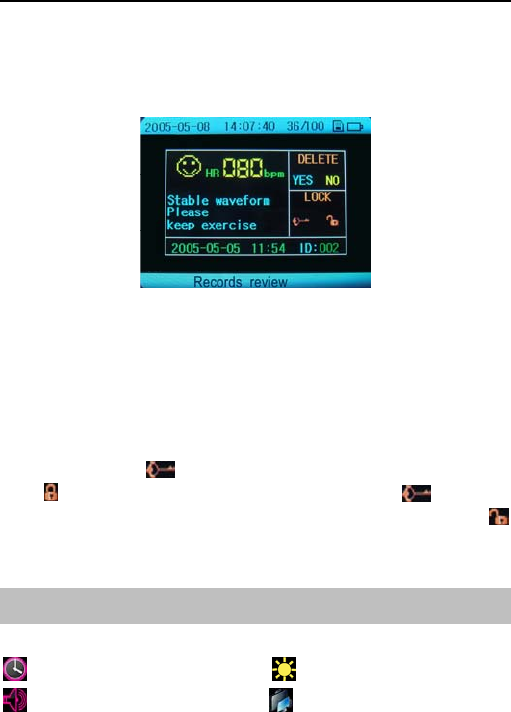
Select a record in the records list, and press the “OK” button. The
corresponding waveform will be displayed. (Refer to Fig.6-2). Press the
Navigation buttons to move the waveform forward or backward.
Fig. 6-2
Description of Fig. 6-2:
“036/100”: It means that the device can store one hundred records and
the current record is the 36th one.
: ECG amplitude ruler
: ECG waveform
: Measurement progress bar
“4”: The interval of the current ECG waveform.
Ver1.0E-B HANDHELD ECG MONITOR
- 25 -
Every piece of stored ECG data is displayed with date, time and a character
representing the measured waveform.
Measuring result depiction: After reviewing the certain ECG waveform,
press the “OK” button to enter the corresponding result depiction, refer to Fig.
6-3.
Fig. 6-3
In the current menu press navigation button to select YES, NO, or the KEY
icon, and then press the “OK” button to reserve, delete or lock the result.
Deleting or locking ECG records
Deleting: Under the Fig. 6-3 menu, press up/right or left/down button to
select the “YES” item, you will delete the current ECG record.
Locking: Select the icon, the current ECG record will be locked. The
mark will be displayed besides this record. Select the icon again
and press the “OK” button, the record will be unlocked with the icon
appearing.
NOTE: The locked records can NOT be deleted.
7. System Settings
In the [System unit Settings] menu, there are six options as follow:
Date and Time Settings Brightness Settings
Beep Settings User ID Settings

Ver1.0E-B HANDHELD ECG MONITOR
- 26 -
Wave scale Settings Auto poweroff Settings
7.1 ID, Date and Time Settings
Please refer to the section “3. Setting the Date and Time”.
7.2 Brightness Settings
1. Select [System unit Settings] [Brightness Settings], then press the “OK”
button to enter.
2. Press up/right or left/down button to set the backlight. And press the “OK”
or MENU button return to the previous menu.
7.3 Beep Settings
1. Select [System unit Settings] [Beep Settings], then press the “OK”
button to enter.
2. Press up/right or left/down button to select “ON” or “OFF”, then press “OK”
button to confirm your settings.
7.4 Wave Scale Settings
1. Select [System unit Settings] [Wave scale Settings], then press the
“OK” button to enter.
2. Press up/right or left/down button to select “x0.5, x1, x1.5, x2”, then press
“OK” button to confirm your settings.
7.5 Auto Power off Settings
1. Select [System unit Settings] [Auto power off Settings], then press the
“OK” button to enter.
2. Press up/right or left/down button to set the time limit “OFF, 1 Min. 2
Min…10 Min”, and press “OK” button to confirm your settings.
8. Data Management
8.1 Erase all data
In the main menu screen, Press up/right or left/down button to select [Data
Management] and then press the “OK” button to enter.
Select [Erase all data], there are two options “Clear local data” and “Clear
Ver1.0E-B HANDHELD ECG MONITOR
- 27 -
SD card data”. Select your desired one, and then press the “OK” button.
8.2 Copy to SD card
Select [Data Management] [Copy to SD card], and then press the “OK”
button. All the data in the monitor will be copied into the SD card.
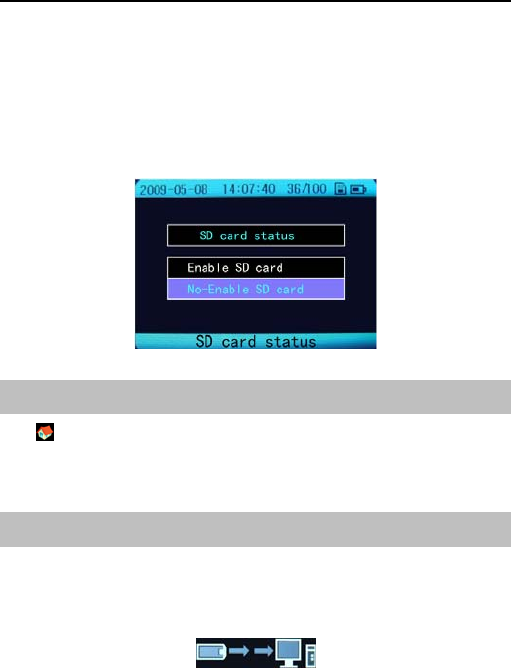
8.3 SD card status
When you insert the SD card, you can choose the SD card status. Select
[Data Management] [SD card status]. You can enter the following the
interface.
Fig. 8-1
9. Factory Settings
The factory settings can be restored or not according to user needs. The
settings include that the Measurement Mode is Easy Mode; the Brightness is
the second level; Beep is ON; the ID number is 1; the Wave scale is X1 and
the time of Auto power off is 4 min.
10. Data Transmission
Before data transmission, make sure to turn the device on and connect it
with a computer by the data cable attached. The operations refer to the User
Manual of the data transmission Software. During data transmitting,the
following figure will appear on the screen.
Fig. 10-1

Ver1.0E-B HANDHELD ECG MONITOR
- 28 -
FCC Warnings!
This device complies with Part 15 of the FCC Rules. Operation is subject to
the following two conditions: (1) this device may not cause harmful
interference, and (2) this device must accept any interference received,
including interference that may cause undesired operation.
Any changes or modifications not expressly approved by the party
responsible for compliance could void the user's authority to operate the
equipment.
This equipment has been tested and found to comply with the limits for a
Class B digital device, pursuant to Part 15 of the FCC Rules. These limits
are designed to provide reasonable protection against harmful interference
in a residential installation. This equipment generates, uses and can radiate
radio frequency energy and, if not installed and used in accordance with the
instructions, may cause harmful interference to radio communications.
However, there is no guarantee that interference will not occur in a particular
installation. If this equipment does cause harmful interference to radio or
television reception, which can be determined by turning the equipment off
and on, the user is encouraged to try to correct the interference by one or
more of the following measures:
-- Reorient or relocate the receiving antenna.
-- Increase the separation between the equipment and receiver.
-- Connect the equipment into an outlet on a circuit different from that to
which the receiver is connected.
-- Consult the dealer or an experienced radio/TV technician for help.
11. Version
In the main menu, press up/right or left/down button to select the [Version],
you will get the monitor information.
Actually ECG arrhythmia analysis function is embedded in the device, but
this function could only be initiated with a register Code. If arrhythmia
analysis function is really in need, please contact the local supplier for the
Register Code.
Note: The Register Code will be surcharged.
12. Trouble Shooting
Ver1.0E-B HANDHELD ECG MONITOR
- 29 -
Problem Cause Solution
The device
can NOT be
turned on.
1 The batteries are worn
out.
2. The batteries are
inserted incorrectly.
3. The device might be
broken out.
1. Replace batteries with new ones.
2. Reinstall batteries with their
polarities correctly.
3. Please contact the local service
center.
The device is
failed to
measure
heart rate.
1. The electrodes are not
made good contact with
your body.
2. Move when measuring
3.Electromagnetic
interference
4. The signal is too weak
1 Place the electrode correctly.
2.Keep motionless and avoid
moving when measuring
3.Keep away from electromagnetic
interference
4. Change another method of
measurement.
(e.g. Chest/Cable measurement)
ECG
waveform
unstable or
too much
irrelevant
waveforms
exist.
1. Your skin is dry.
2.Electrode and the body
does not contact well
3. Your body is too tense.
1. Cleaning skin with soap and
water and moisten your skin with
damp towel.
2. Check the instructions and repeat
measurement.
3. Relax and repeat the
measurement.
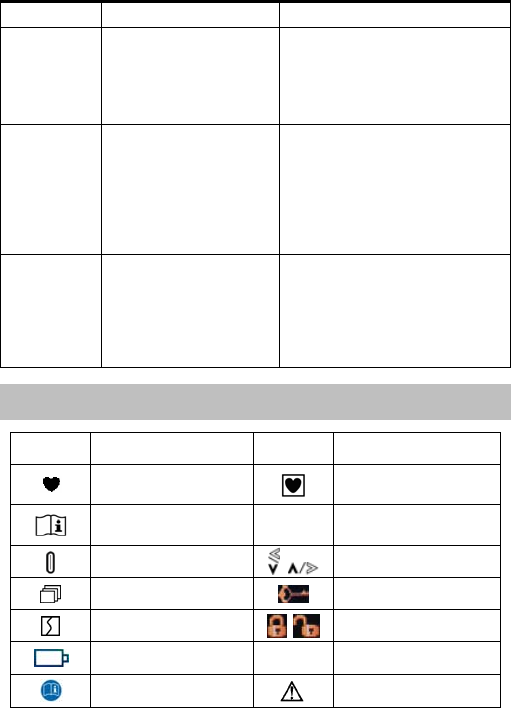
13. Key Symbols
Symbol Meaning Symbol Meaning
Heart rate (Device:
BPM-beat per minute.) The safe class of this
device is type CF.
Operating instructions SN Serial number
Power button Navigation buttons
MENU button Key icon
Lead off Lock/Unlock icons
Low battery voltage START Start a measurement.
Follow operating
instructions Caution

Ver1.0E-B HANDHELD ECG MONITOR
- 30 -
14. Technical specifications
Classification:
According to the type of protection against electric shock, it can be
classified as internally power equipment. Its application type is CF and it
is the movable common facility with no defibrillator or protection.
Operating Environment:
Power supply: 2 AA batteries
Operation Voltage: DC 3V (+0.3V, -0.8V);
Operation Temperature: 5℃~40℃
Operation Humidity: ≤80%
Atmosphere Pressure Range: 86kPa-106kPa
Storage Environment
Storage Temperature: -20℃~55℃
Storage Humidity: ≤93%
Atmosphere Pressure Range: 50kPa-106kPa
ECG Measurement:
Channel amount: 1 (differential input)
Measuring electrodes: Four integrative metal electrode, or three ECG
electrode pieces connected to the ECG cable mount with selected ECG
cable.
Three Measuring parts: The signals measured can be Ⅰ lead and
approximate Ⅱ lead and leadⅢ.
Signal bandwidth: 0.5Hz-75Hz (+0.4dB, -3.0dB)
Sampling rate:250Hz
Heart rate measuring range: 30bpm-240bpm
Heart rate accuracy: 30~100bpm: ≤±2bpm; 101~240bpm: ≤±4bpm or
2 %( the smaller)
Display Mode:
Display screen type:TFT
The dimension of display area:60mm×45mm
Backlight:LCD backlight

Ver1.0E-B HANDHELD ECG MONITOR
- 31 -
Data Storage:
Every record stores ECG data for 30 seconds.
The device can store 100 items of ECG strips records at most.
SD Card type: Micro-SD card
Dimension and Weight:
Dimension: 140mmX75mmX26mm(Length × Width × Height)
Weight: 125g (without batteries)
Accessories:
Battery (AA)……………………………………………………………..2 pieces
Pouch……………………………………………………………………...1 piece
USB data cable …………………………………………………………..1 piece
Software CD………………….…………………………………………..1 piece
Instruction manual………………………………………………………..1 piece
Quick Operation Guide…………………………………………………..1 piece
Mircro-SD Card…………………………………………………………..1 piece
SD Card reader (optional)……..………………………………………..1 piece
ECG cable (optional)...…………………………………………………..1 piece
ECG Electrode (optional)...………………………………………….1 package
Notes:
Specifications may be changed without prior notice.
Disposal of this product and used batteries should be carried out
in accordance with the local regulations for the disposal of
electronic products.
Please use the approved accessories supplied by our company,
change other accessories may cause degrading the safety
performance.
Guidance and Manufacturer’s declaration – electromagnetic
emissions-For Handheld ECG Monitor
1 Guidance and Manufacturer’s declaration - electromagnetic
emission
2 The MD100E-B Handheld ECG Monitor is intended for use in the
electromagnetic environment specified below. The customer or the
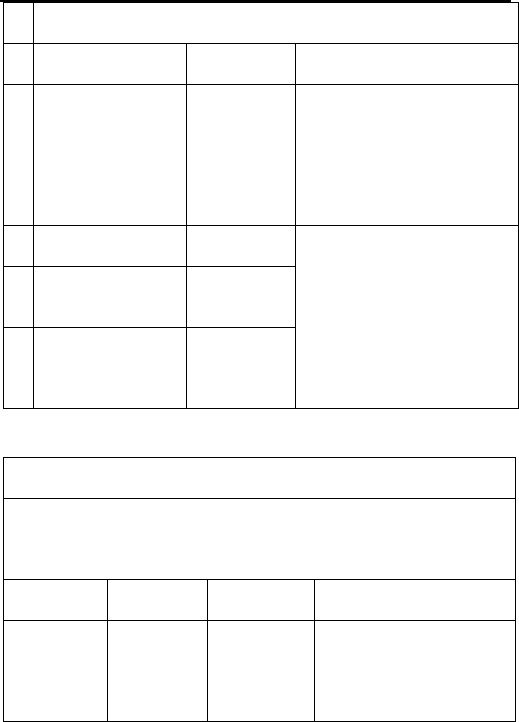
Ver1.0E-B HANDHELD ECG MONITOR
- 32 -
user of MD100E-B Handheld ECG Monitor should assure that it is
used in such an environment.
3 Emission test Compliance Electromagnetic
Environment – guidance
4
RF emissions
CISPR 11
Group 1
The MD100E-B Handheld
ECG Monitor uses RF energy
only for its internal function.
Therefore, its RF emissions
are very low and are not likely
to cause any interference in
nearby electronic equipment.
5 RF emissions
CISPR 11 Class B The MD100E-B Handheld
ECG Monitor is suitable for
use in all establishments other
than domestic and those
directly connected to the
public low-voltage power
supply network that supplies
buildings used for domestic
purposes.
6
Harmonic
emissions IEC
61000-3-2
Not
applicable
7
Voltage
fluctuations/ flicker
emissions
IEC 61000-3-3
Not
applicable
Guidance and Manufacturer’s declaration – electromagnetic
immunity- For Handheld ECG monitor
Guidance and Manufacturer’s declaration - electromagnetic
immunity
The MD100E-B Handheld ECG Monitor is intended for use in the
electromagnetic environment specified below.
The customer or the user of the MD100E-B Handheld ECG Monitor should
assure that it is used in such an environment.
Immunity
test IEC 60601
test level Compliance
Level Electromagnetic
Environment – guidance
Electrostatic
Discharge
(ESD) IEC
61000-4-2
+/- 6kV
contact
+/- 8kV air
+/- 6kV
contact
+/- 8kV air
Floors should be wood,
concrete or ceramic tile. If
floor are covered with
synthetic material, the
relative humidity should be

Ver1.0E-B HANDHELD ECG MONITOR
- 33 -
at least 30%.
Electrostatic
transient /
burst IEC
61000-4-4
±2kV for
power
supply lines
±1kV for
input/output
lines
Not
applicable
Mains power quality should
be that of a typical
commercial or hospital
environment.
Surge IEC
61000-4-5
± 1 kV
differential
mode
± 2 kV
common
mode
Not
applicable
Mains power quality should
be that of a typical
commercial or hospital
environment.
Voltage
dips, short
interruptions
and voltage
variations
on power
supply input
lines IEC
61000-4-11
< 5 % UT
(>95 % dip
in UT) for
0.5 cycle
40 % UT
(60 % dip in
UT) for 5
cycles
70 % UT
(30 % dip in
UT) for 25
cycles
< 5 % UT
(>95 % dip
in UT) for 5
sec
Not
applicable
Mains power quality should
be that of a typical
commercial or hospital
environment. If the user of
the MD100E-B Handheld
ECG Monitor requires
continued operation during
power mains interruptions,
it is recommended that the
MD100E-B Handheld ECG
Monitor be powered from
an uninterruptible power
supply or a battery.
Power
frequency
(50/60 Hz)
magnetic
field IEC
61000-4-8
3A/m 3A/m
Power frequency magnetic
fields should be at levels
characteristics of a typical
location in a typical
commercial or hospital
environment.
NOTE UT is the a. c. mains voltage prior to application of the test level.
Ver1.0E-B HANDHELD ECG MONITOR
- 34 -
Guidance and Manufacturer’s declaration – electromagnetic
immunity –
For Handheld ECG monitor that are not LIFE-SUPPORTING
Guidance and Manufacturer’s declaration - electromagnetic
immunity
The MD100E-B Handheld ECG Monitor is intended for use in the
electromagnetic environment specified below.
The customer or the user of the MD100E-B Handheld ECG Monitor should
assure that it is used in such an environment.
Immunity
test
IEC
60601
test
level
Compliance
Level Electromagnetic Environment –
guidance
Conducted
RF IEC
61000-4-6
Radiated
RF IEC
61000-4-3
3
Vrms
150
kHz
to 80
MHz
3 V/m
80
MHz
to 2.5
GHz
3 Vrms
3 V/m
Portable and mobile RF
communications equipment
should be used no closer to any
part of the MD100E-B Handheld
ECG Monitor, including cables,
than the recommended
separation distance calculated
from the equation applicable to
the frequency of the transmitter.
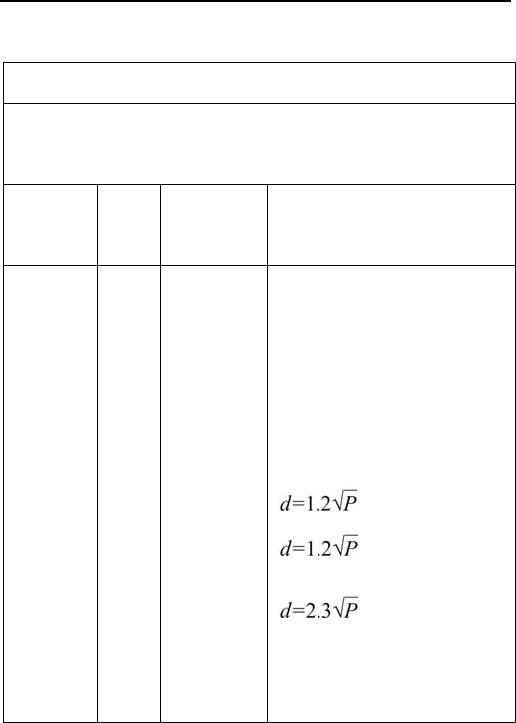
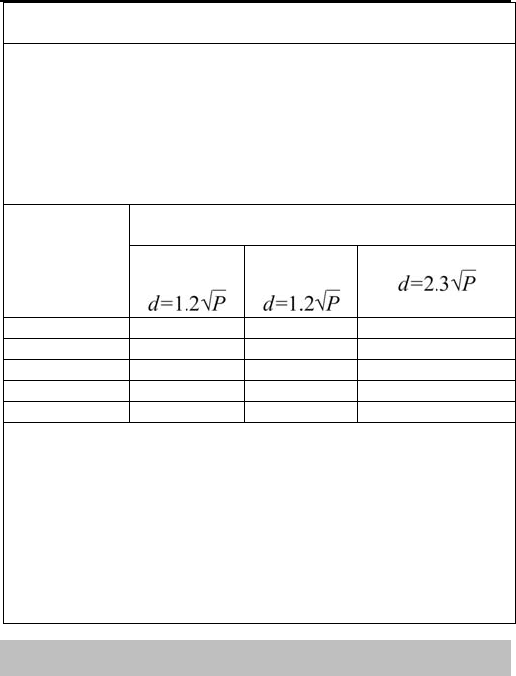
Recommended separation
distance
80 MHz to 800 MHz
800 MHz to 2.5 GHz
Where P is the maximum output
power rating of the transmitter in
watts (W) according to the
transmitter manufacturer and d is
Ver1.0E-B HANDHELD ECG MONITOR
- 35 -
the recommended separation
distance in meters (m).
Field strengths from fixed RF
transmitters, as determined by an
electromagnetic site surveya,
should be less than the
compliance level in each
frequency range. b
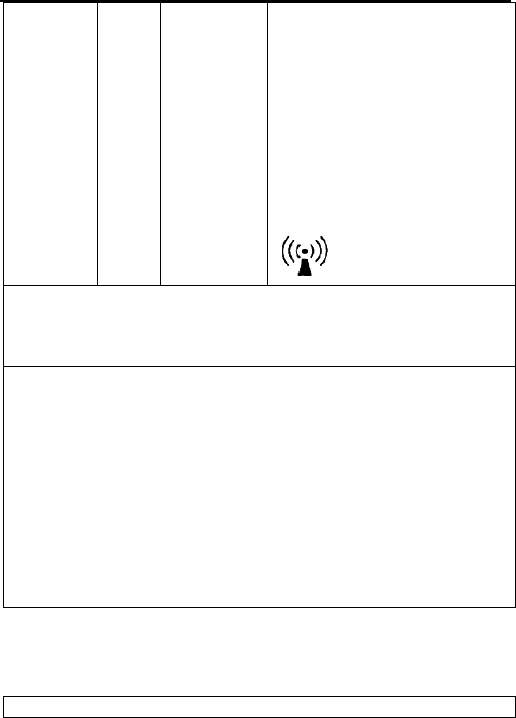
Interference may occur in the
vicinity of equipment marked with
following symbol:
NOTE 1 At 80 MHz and 800 MHz, the higher frequency range applies.
NOTE 2 These guidelines may not apply in all situations,
Electromagnetic propagation is affected by absorption and reflection
structures, objects and people.
a Field strengths from fixed transmitters, such as base station for radio
(cellular/cordless) telephones and land mobile radios, amateur radio, AM
and FM radio broadcast and TV broadcast cannot be predicted
theoretically with accuracy. To assess the electromagnetic environment
due to fixed RF transmitters, an electromagnetic site survey should be
considered. If the measured field strength in the location in which the
Handheld ECG Monitor (MD100E-B) should be observed to verify normal
operation. If abnormal performance is observed, additional measurements
may be necessary, such as reorienting of the relocating the Handheld
ECG Monitor (MD100E-B).
b Over the frequency range 150 kHz to 80 MHz, fields strengths should
be less than 3 V/m
Recommended separation distances between portable and
mobile RF communications equipment and
the EQUIPMENT or SYSTEMS - For Handheld ECG monitor that
are not LIFE-SUPPORTING
Recommended separation distances between
Ver1.0E-B HANDHELD ECG MONITOR
- 36 -
portable and mobile RF communications equipment and the
MD100E-B Handheld ECG Monitor
The MD100E-B Handheld ECG Monitor is intended for use in an
electromagnetic environment in which radiated RF disturbances are
controlled. The customer or the user of the MD100E-B Handheld ECG
Monitor can help prevent electromagnetic interference by maintaining a
minimum distance between portable and mobile RF communications
equipment (transmitters) and the MD100E-B Handheld ECG Monitor as
recommended below, according to the maximum output power of the
communications equipment
Rated
maximum
output of
transmitter
(W)
Separation distance according to frequency of
transmitter (m)
150 kHz to 80
MHz
80 MHz to
800 MHz
800 MHz to 2.5 GHz
0.01 0.12 0.12 0.23
0.1 0.38 0.38 0.73
1 1.2 1.2 2.3
10 3.8 3.8 7.3
100 12 12 23
For transmitters rated at a maximum output power not listed above the
recommended separation distance d in meters (m) can be estimated using
the equation applicable to the frequency of the transmitter, where P is the
maximum output power rating of the transmitter in watts (W) according to
the transmitter manufacturer.
NOTE 1 At 80 MHz and 800 MHz, the separation distance for the higher
frequency range applies.
NOTE 2 These guidelines may not apply in all situations. Electromagnetic
propagation is affected by absorption and reflection from structures,
objects and people.
15. Maintenance and Storage
Clean the device with a cloth lightly dampened with water, disinfectant
alcohol or detergent, and then wipes it dry with a dry cloth.

Ver1.0E-B HANDHELD ECG MONITOR
- 37 -
Wipe the electrodes using a cloth dampened with disinfectant alcohol.
Do not wipe the device with benzene, gasoline, paint thinner,
concentrated alcohol, or other volatile detergents.
Do not place objects on top of the device. This could damage the device.
Do not disassemble the device. There are no user serviceable parts.
Repairs should only be carried out by authorized personnel.
Do not sterilize this device in an autoclave, ultraviolet sterilizer or gas
sterilizer (EOG, formaldehyde, high density ozone etc.)
This device does not require calibration during the expected life cycle.
When display the low voltage mark “ ”, please change the batteries in
time. Dispose the used batteries according to the applicable local
regulations.
Please remove the batteries if the device is not to be used for a long
period of time.
The environment temperature for transport or storage of the packaged
device is -4oF~131oF(-20℃~55℃), and the humidity is ≤93%.
Caution:
Keep operating environment clean, quiet, no erodent and no flammable
material. Do not use this device in the environment with too high or too
low temperature and humidity
If this device is splashed or contaminated by water drop, please stop
operating.
Please do not use the device at once when it is moved from cold place to
the warm and moist place.
Please do not use sharp tools to operate any of buttons.
Do not immerge the device into liquids or clean the surface with organic
liquid, and do not splash liquids on the device.
15.1 Service Method
Service support: Our Company will offer user telephone and e-mail support
as well as in-house repair at our facility
Parts replacement: Our Company will replace parts, accessories, free of

Ver1.0E-B HANDHELD ECG MONITOR
- 38 -
charge during the warranty period.
Our company will update the system software free of charge.
15.2 Exempt and limitation
a) Our company isn’t responsible for such damage caused by force majeure.
For example: fire, thunder flash, flood, cyclone, hail, earthquake, house
collapse, commotion, plane failing and traffic accident, deliberate damage,
lack of fuel or water, labor and capital bother, strike and stop-working etc.
b) No-service offer
The corresponding charge and insurance charge of disassembling,
refurbishing, repackaging and moving the oximeter or the part of it.
The damage caused by the third company not commended by our company
to adjust, install, replace the parts of the oximeter.
The damage and failure caused by user or its representative doesn’t comply
with the operator’s manual.
c) The oximeter is installed or connected with such external device without
our company permission as printer, computer, netline and lead to oximeter
failure. Our company will charge for the maintenance.
d)Responsibility limitation
During the period of maintenance contract validity, if user changes the parts
manufactured by other manufacturers without our company permission, our
company is entitled to stop contract.
15.3 User Guarantee
a) Please read user manual carefully before operation.
b) Please operate and make daily maintenance as request of manual and
guarantee.
c) Power supply and environment.
15.4 No-guarantee principle
●There is no-dispelled smut and not-original mark in the crust.
●There is physical damage on oximeter and its accessory.
●There are liquid leftover and eyewinker on oximeter, which may lead to
short circuit and plug board failure.
●All the probe and accessories belong to consumption and beyond free
change range.

Ver1.0E-B HANDHELD ECG MONITOR
- 39 -
●Such damage of probe caused by mechanical force doesn’t belong to free
change range.
●During measurement of SPO2, principle leads to measuring value difficultly
or inaccurate measurement.
●Not-original package leads to damaging oximeter during transportation
●Not our company professionals or authorized personnel disassemble
oximeter and lead to oximeter failure.
●Not carefully read manual and so wrong operation lead to oximeter
damage and failure.
15.5 User’s Special Request for Guarantee Time
Our guarantee constitution for oximeter complies with electronic product
after-sale service standard regulated by national laws. We regulate the
guarantee time of hoist board is one year and all the accessories are three
months. If users request the guarantee time beyond our regulated
guarantee time, we should take it into consideration. Because electronic
product has such character of quick changing, for such user asking more
than three years guarantee time, our company will not sell oximeter parts
during maintenance. Our company will upgrade oximeter or change new
maintenance methods, for this, we charge the lowest price for new oximeter
with user permission.
15.6 Repackage
●Take all the accessories and put them into plastic cover
●Try to use original package and packing material. User will be responsible
for such damage caused by bad package during transportation.
●Please offer guarantee list and copy of invoice to standby with the period of
guarantee.
●Please describe failure phenomenon in detail and altogether offer oximeter.
●Pack the product with the hard bag, and put the foam between the inner
box and the carton to alleviate the shake.
16. General information about the Heart and ECG Measurements
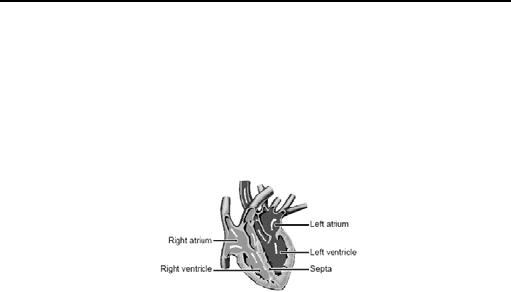
The heart is a muscular pump controlled by electrical impulses generated by
the body. It is divided into two by the septa and each side has two chambers
–an atrium and a ventricle-linked by a one-way valve. The left atrium and
Ver1.0E-B HANDHELD ECG MONITOR
- 40 -
ventricle control oxygenated blood, and the right atrium and ventricle control
de-oxygenated (“used”) blood.
The electrical impulse that causes the heart to beat spreads across the atria,
causing the left and right atrium to contract and pump blood into the left and
right ventricles respectively. The two ventricles then contract and pump
blood out of the heart. The heart muscle then relaxes, or re-polarises,
allowing blood to fill up the heart again.
Fig. 16-1
An ECG monitor is able to measure the electrical impulse as it passes
across and through the heart, causing the heart to beat. An ECG does not
measure the movement of your heartbeat, but rather the electrical activity
that causes the heart to beat. The measurements recorded by an ECG
monitor, when combined with a medical examination, can help your doctor
monitor your heart condition. The ECG measurements recorded by the
device are NOT designed or intended for medical diagnosis. Conditions
such as arrhythmia and Ischemia can only be diagnosed by a doctor through
a special examination.
About the ECG Waveform
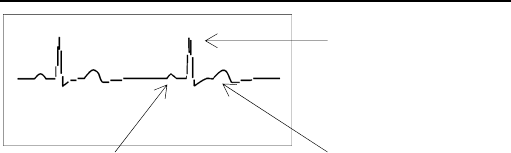
The ECG waveform shows the rhythm of your heartbeat during the
30-second measurement and displays the electrical activity causing the
heart to beat. The waveform for each heartbeat shows the progress of the
electrical impulse across and through the heart.
Ver1.0E-B HANDHELD ECG MONITOR
- 41 -
Fig. 16-2
The first peak indicates the spread of the impulse over the atria and the
beginning of their contraction. This is known as the P wave. The second
peak indicates the spread of impulse over the ventricles and the beginning
of their contraction. This is known as the QRS complex. The third peak
indicates the activity as the heart relaxes (re-polarization), and is known as
the T wave.
What is Arrhythmia?
Arrhythmia is a condition where the heartbeat rhythm is abnormal due to
flaws in the bio-electrical system that drives the heartbeat. Typical
symptoms are skipped heartbeats, premature contraction, an abnormally
rapid (tachycardia) or slow (bradycardia) pulse. This can be caused by
heart disease, ageing, physical predisposition, stress, lack of sleep, fatigue
etc. Arrhythmia can only be diagnosed by a doctor through a special
examination.
What is Ischemia?
Ischemia is a condition in which insufficient oxygen is supplied to parts of the
heart or other parts of the body. This is usually due to a blockage or partial
blockage of an artery.
Ischemia can only be diagnosed by a doctor through a special examination.
Ventricular contraction
(QRS complex)
Re-
p
olarization
(
T wave
)
Atria contraction (P wave)

Ver1.0E-B HANDHELD ECG MONITOR
- 42 -
Manufacturer address:
Beijing Choice Electronic Technology Co.,Ltd.
Bailangyuan Building B
Rm. 1127-1128, Fuxing Road, A36
100039 Beijing
PEOPLE’S REPUBLIC OF CHINA