Beijing Choice Electronic Technology MD2000C Vital Sign Monitor User Manual

Beijing Choice Electronic Technology Co., Ltd. Vital Sign Monitor Users Manual

Users Manual

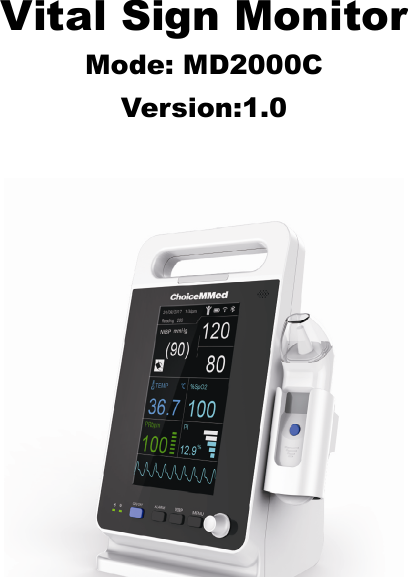
Vital Sign MonitorMode: MD2000CVersion:1.0
CopyrightOur company owns all rights to this unpublished work and intends to  maintain  this  work  as  condential.  Our  company  may  also  seek  to maintain  this work as an unpublished  copyright.  This  publication  is  to be used solely for the purpose of reference, operation, maintenance or repair of our equipment. No part of this can be disseminated for other purposes.In the event of inadvertent or deliberate publication, our company intends to enforce its right to this work under copyright laws as a published work. Those having access to this manual may not copy,  disseminate or disclose the information in this work unless expressly authorized by our company.All  information  contained  in  this  manual  is  believed  to  be  correct. Our company shall not be liable for errors contained herein nor for incidental or consequential damages in connection with the furnishing, performance,  or  use  of  this  material.  This  publication  may  refer  to information and protected by copyrights or patents and does not convey any license under the patent rights of our company, nor the rights of others. Our  company  does  not  assume any  liability  arising  out  of any infringements of patents or other rights of third parties.Our Company reserves the right to make changes in specications and features shown herein, or discontinue the product described at any time without  notice  or  obligation. Also,  content  of  the  manual  is  subject  to change without prior notice..All Rights Reserved Issue Date: July 18, 2018Version: Ver1.0CONTENTCHAPTER 1 INTRODUCTION .........................................................................11.1 About the Manual....................................................................................... 11.2 Contraindications ....................................................................................... 11.3 Safety Information ..................................................................................... 11.4 Intended Use ............................................................................................. 41.5 Electromagnetic Interference..................................................................... 41.6 Symbols Denition ..................................................................................... 41.7 Product Properties ..................................................................................... 5CHAPTER 2 GENERAL DESCRIPTIONS .......................................................62.1 understanding the monitor ......................................................................... 62.2 Power supply ............................................................................................. 82.3 Charging the device................................................................................... 82.4 Check the proper function of the device and accessories ......................... 82.5 Power off  .................................................................................................. 9CHAPTER 3 Setting ........................................................................................ 10CHAPTER 4 Take a measurement  ................................................................174.1 Preparation ................................................................................................ 174.2 NIBP .......................................................................................................... 184.3 SpO2, PR and PI ....................................................................................... 23CHAPTER 5 MAINTENANCE ..........................................................................285.1 Examination ............................................................................................... 285.2 Cleaning and Disinfection  ......................................................................... 285.3 Troubleshooting  ........................................................................................ 285.4 Warranty and Repair ................................................................................. 29CHAPTER  6 SPECIFICATIONS .....................................................................32CHAPTER 7 Compliance Information for EMC Test .................................... 37
1CHAPTER 1 INTRODUCTION1.1 About the ManualBefore using  the  MD2000C  vital  sign monitor, the user  must carefully read this manual so that the user can operate the monitor properly and make it reach the specic safety standard and performance index.This manual explains how to set up and use the monitor. Important safety information relating to general use of the monitor appears after this introduction.  Other  important  safety  information  is  located  throughout the text where appropriate.Note: There  requires no  routine  calibration,  safety  maintenance  or  in-service during the monitor’s life.1.2 Contraindications•  Active patients.•  Intravascular dyes such as indocyanine green or methylene blue.•  Signicant levels of dysfunctional hemoglobins (such as carbonxy- hemoglobin or methemoglobin).•  The presence of high ambient light. Shield the sensor area (with a surgical towel, or direct sunlight, for example) if necessary.•  Venous  pulsations  may  cause  erroneous  low  readings(e.g. tricuspid value regurgitation)•  Venous congestion may cause under reading of actual arterial oxygen saturation. Therefore, assure proper venous outow from monitored site. Sensor should be not below heart level ( e.g. sensor on hand of a patient in a bed with arm dangling to the oor)•  Avoid placing the sensor on any extremity with an arterial catheter, intravascular line or blood pressure cuff.•  Exercise caution with poorly perfuse patients; skin erosion and/or pressure necrosis may occur.•  Do not use the monitor when the patient in cardiac arrest or in debrillation.1.3 Safety InformationWarnings: alert the user to potential serious outcomes, such as injury or adverse events to the patient or user.Cautions: alert the user to exercise care necessary for the safe and
23medical electrical equipment.•  Chemicals  from  a  broken  panel  are  toxic  when  ingested.  Use caution when the monitor has a broken display screen.•  Debrillation  protection  only  implement  on  the  ECG  cable  which has the debrillation function.•  When using debrillation, it needs to remove other non-debrillation applied parts from patients.•  The use of the device is restricted to one patient at a time.•  Use  a  debrillator  on  a  patient,  the  device  requires  special protection when the discharge of a debrillator affects the device.•  Please use the accessories that approved by the manufacturer. •  If the device has the battery, it still working after interruption of the supply mains exceeding 30s. Or else it power off.•  PACEMAKER  PATIENTS.  Rate  meters  may  continue  to  count the pacemaker rate during occurrences of cardiac arrest or some arrhythmias.  Do  not  rely  entirely  upon  heart  rate  meter  ALARM SIGNALS.•  To avoid the risk of leakage on the patients, the cable is isolated by  high  voltage  and  adopted  the  insulation  material.  In  order  to improve the service life of the cable, we use the high quality cables. •  These materials that contact with the patient’s skin are all pass the ISO10993-5  Tests  for  invitro  cytotoxicity  and  ISO10993-10  Tests for irritation and delayed-type hypersensitivity.•  Please  take  attention  that  changes  or  modication  not  expressly approved by the party responsible for compliance could void the user’s authority to operate the equipment.•  This equipment should be installed and operated with a minimum distance 20cm between the radiator and your body.Cautions!•  Check whether the equipment in the correct status or not.•  Check all the leads connection; make sure all of them connect well.•  Check the quantity and status of the battery.•  Make sure  the safety  of  the  patient,  if it  needs cut  off the  power supply, take out the leads or sensor.•  Do drop the re goods, medal or liquid into the equipment. If these effective use of the monitor.Notes: contain important information that may be overlooked or missed.Warnings!•  Before use, carefully read the manual.•  Operation of the equipment may be affected by the use of an electrosurgical unit (ESU) or high-frequency interference.•  Do not use the equipment in an MRI or CT environment.•  Do not use the equipment in an explosive ammable or anesthesia atmosphere.•  Do not use the equipment on the airplane.•  Do not use the equipment with debrillator, pacemaker or hearing-aid.•  The equipment is intended only as an adjunct in patient assessment. It  must  be  used  in  conjunction  with  other  methods  of  assessing clinical signs and symptoms.•  In order to ensure correct sensor alignment and skin integrity, the maximum application time at a single site for our device should be less than half an hour.•  Do not sterilize the device using autoclaving, ethylene oxide sterilizing,  or  immersing  the  device  in  liquid.  The  device  is  not intended for sterilization.•  Only  the  qualied  physician  can  use  the  equipment,  the  patient should follow the physician’s advice use the equipment.•  Only  use  the  accessories  approved  by  our  company.  Other accessories  may  affect  the  equipment  performance.  The accessories contain battery, external power supply line, cuff, SpO2 sensor and temperature sensor.•  Avoid extremes in temperature and humidity. Do not use this device in locations subject too high or too low temperature or humidity.•  Avoid to store in the place that has chemicals or gas leakage dangerous.•  Follow local ordinances and recycling instructions regarding disposal or recycling of the device and device components, including batteries.•  Portable  and  mobile  RF  communications  equipment  can  affect
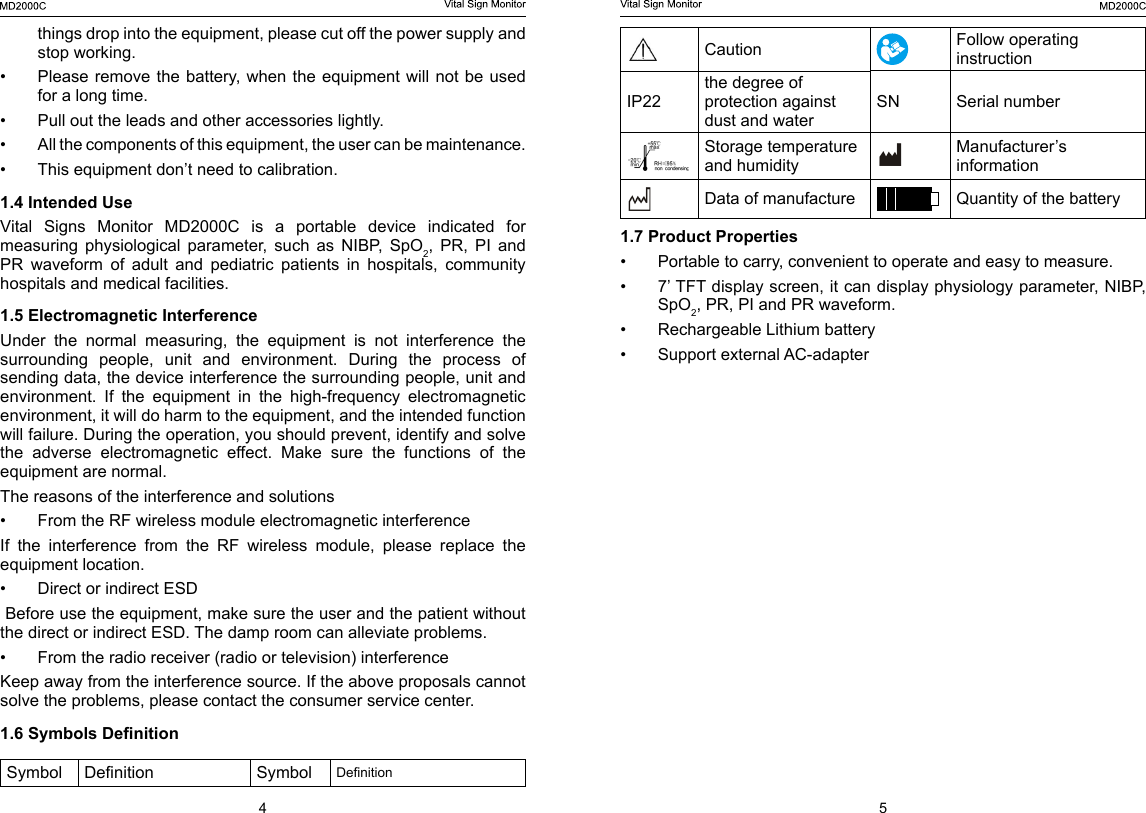
4 5Caution Follow operating instructionIP22the degree of protection against dust and waterSN Serial numberStorage temperature and humidityManufacturer’s informationData of manufacture Quantity of the battery1.7 Product Properties•  Portable to carry, convenient to operate and easy to measure.•  7’ TFT display screen, it can display physiology parameter, NIBP, SpO2, PR, PI and PR waveform.•  Rechargeable Lithium battery•  Support external AC-adapter things drop into the equipment, please cut off the power supply and stop working.•  Please remove the battery,  when  the equipment will not be used for a long time.•  Pull out the leads and other accessories lightly. •  All the components of this equipment, the user can be maintenance. •  This equipment don’t need to calibration.1.4 Intended UseVital  Signs  Monitor  MD2000C  is  a  portable  device  indicated  for measuring  physiological  parameter,  such  as  NIBP,  SpO2,  PR,  PI  and PR  waveform  of  adult  and  pediatric  patients  in  hospitals,  community hospitals and medical facilities.1.5 Electromagnetic InterferenceUnder  the  normal  measuring,  the  equipment  is  not  interference  the surrounding  people,  unit  and  environment.  During  the  process  of sending data, the device interference the surrounding people, unit and environment.  If  the  equipment  in  the  high-frequency  electromagnetic environment, it will do harm to the equipment, and the intended function will failure. During the operation, you should prevent, identify and solve the  adverse  electromagnetic  effect.  Make  sure  the  functions  of  the equipment are normal.The reasons of the interference and solutions•  From the RF wireless module electromagnetic interferenceIf the interference from the RF wireless module, please replace the equipment location.•  Direct or indirect ESD Before use the equipment, make sure the user and the patient without the direct or indirect ESD. The damp room can alleviate problems.•  From the radio receiver (radio or television) interferenceKeep away from the interference source. If the above proposals cannot solve the problems, please contact the consumer service center.1.6 Symbols DenitionSymbol Denition Symbol Denition
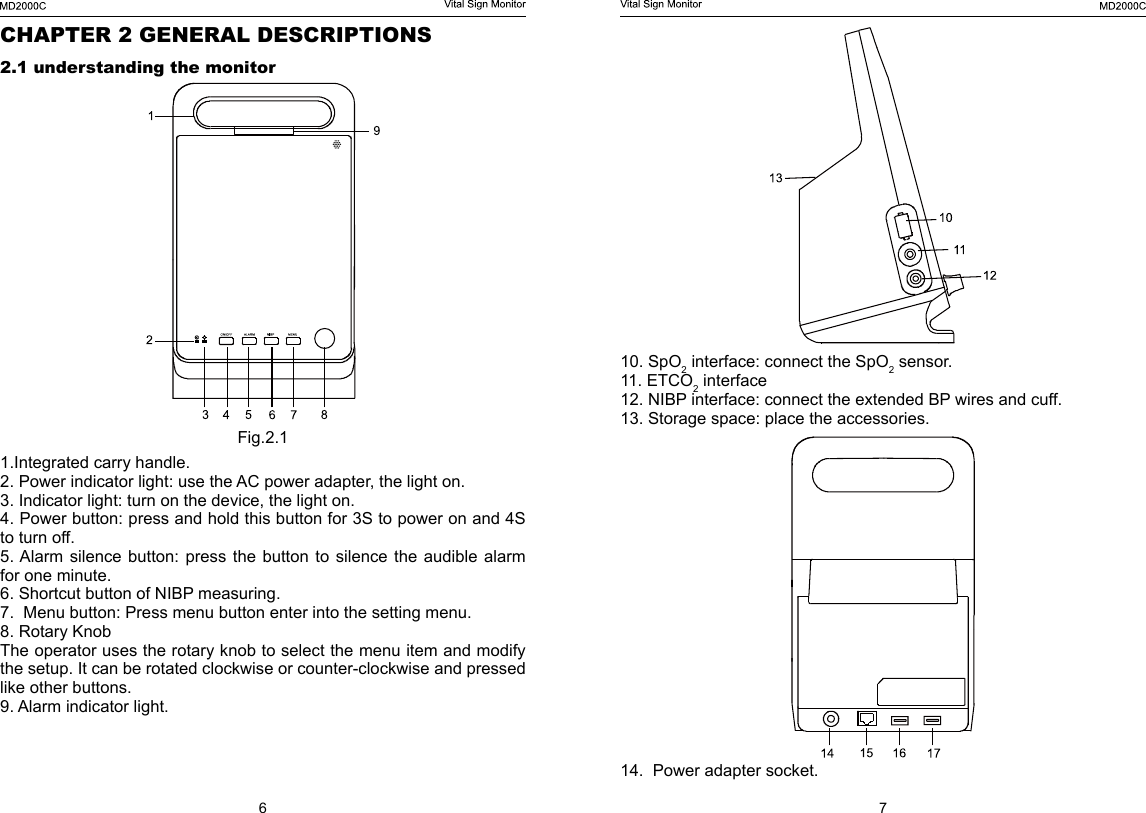
6 710. SpO2 interface: connect the SpO2 sensor.11. ETCO2 interface12. NIBP interface: connect the extended BP wires and cuff.13. Storage space: place the accessories.14.  Power adapter socket.CHAPTER 2 GENERAL DESCRIPTIONS2.1 understanding the monitorFig.2.11.Integrated carry handle.2. Power indicator light: use the AC power adapter, the light on.3. Indicator light: turn on the device, the light on.4. Power button: press and hold this button for 3S to power on and 4S to turn off.5. Alarm  silence button:  press  the button  to silence  the  audible  alarm for one minute.6. Shortcut button of NIBP measuring.7.  Menu button: Press menu button enter into the setting menu.8. Rotary KnobThe operator uses the rotary knob to select the menu item and modify the setup. It can be rotated clockwise or counter-clockwise and pressed like other buttons. 9. Alarm indicator light.
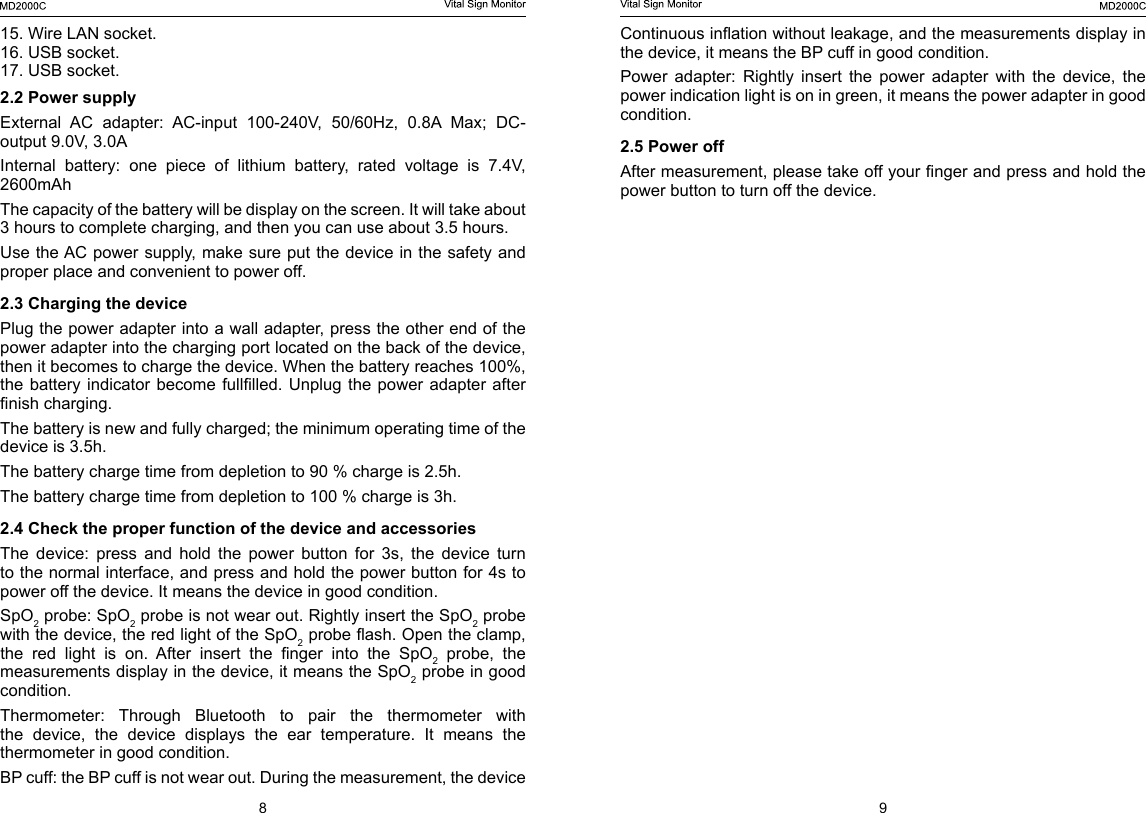
8 9Continuous ination without leakage, and the measurements display in the device, it means the BP cuff in good condition.Power  adapter:  Rightly  insert  the  power  adapter  with  the  device,  the power indication light is on in green, it means the power adapter in good condition.2.5 Power off After measurement, please take off your nger and press and hold the power button to turn off the device.15. Wire LAN socket.16. USB socket.17. USB socket.2.2 Power supplyExternal  AC  adapter:  AC-input  100-240V,  50/60Hz,  0.8A  Max;  DC-output 9.0V, 3.0A Internal  battery:  one  piece  of  lithium  battery,  rated  voltage  is  7.4V, 2600mAhThe capacity of the battery will be display on the screen. It will take about 3 hours to complete charging, and then you can use about 3.5 hours.Use the AC power supply, make sure put the device in the safety and proper place and convenient to power off.2.3 Charging the devicePlug the power adapter into a wall adapter, press the other end of the power adapter into the charging port located on the back of the device, then it becomes to charge the device. When the battery reaches 100%, the battery  indicator become  fulllled.  Unplug the  power adapter  after nish charging.The battery is new and fully charged; the minimum operating time of the device is 3.5h.The battery charge time from depletion to 90 % charge is 2.5h.The battery charge time from depletion to 100 % charge is 3h.2.4 Check the proper function of the device and accessoriesThe  device:  press  and  hold  the  power  button  for  3s,  the  device  turn to the normal interface, and press and hold the power button for 4s to power off the device. It means the device in good condition. SpO2 probe: SpO2 probe is not wear out. Rightly insert the SpO2 probe with the device, the red light of the SpO2 probe ash. Open the clamp, the  red  light  is  on.  After  insert  the  nger  into  the  SpO2 probe, the measurements display in the device, it means the SpO2 probe in good condition.Thermometer:  Through  Bluetooth  to  pair  the  thermometer  with the  device,  the  device  displays  the  ear  temperature.  It  means  the thermometer in good condition.BP cuff: the BP cuff is not wear out. During the measurement, the device
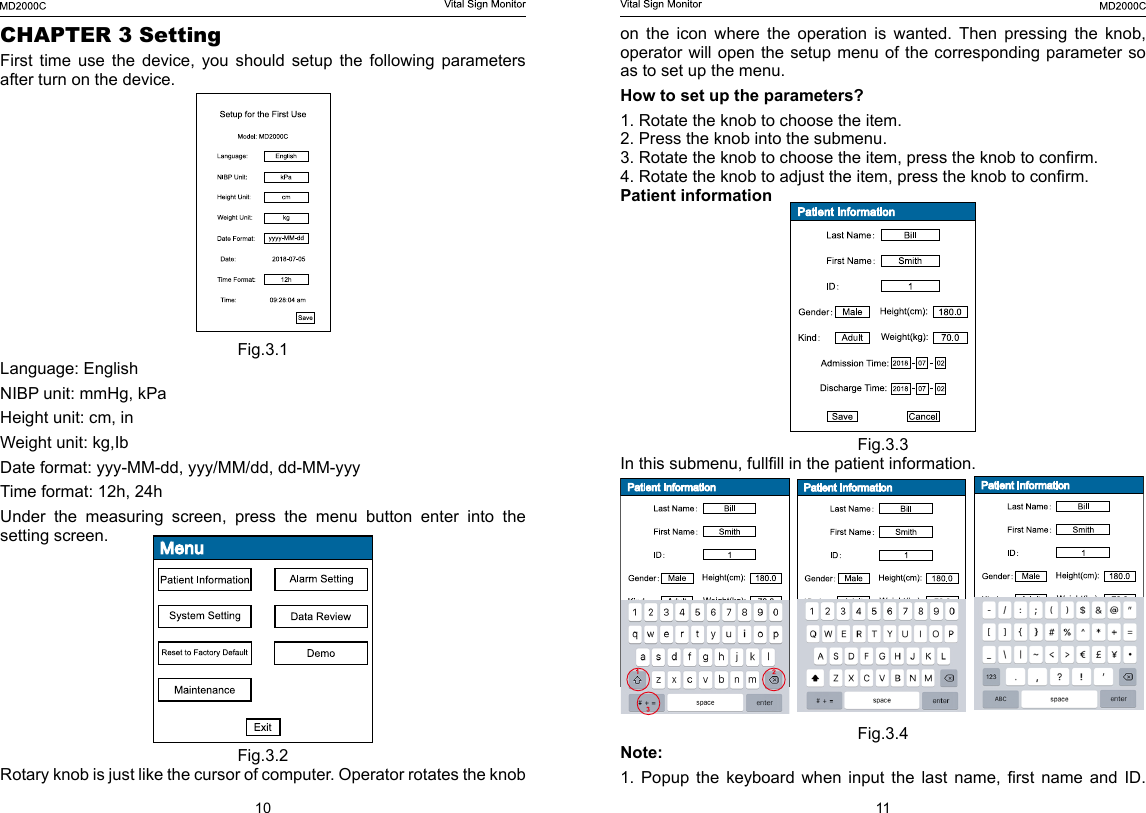
10 11on  the  icon  where  the  operation  is  wanted.  Then  pressing  the  knob, operator will open the setup menu of the corresponding parameter so as to set up the menu.How to set up the parameters?1. Rotate the knob to choose the item.2. Press the knob into the submenu.3. Rotate the knob to choose the item, press the knob to conrm.4. Rotate the knob to adjust the item, press the knob to conrm.Patient informationFig.3.3In this submenu, fullll in the patient information.Fig.3.4Note: 1.  Popup  the  keyboard  when  input  the  last  name,  rst  name  and  ID. CHAPTER 3 SettingFirst time use the device, you should setup the following parameters after turn on the device.Fig.3.1Language: EnglishNIBP unit: mmHg, kPaHeight unit: cm, inWeight unit: kg,IbDate format: yyy-MM-dd, yyy/MM/dd, dd-MM-yyyTime format: 12h, 24hUnder  the  measuring  screen,  press  the  menu  button  enter  into  the setting screen.Fig.3.2 Rotary knob is just like the cursor of computer. Operator rotates the knob
12 131. turn on or off the alarm.2. Adjust the value of alarm volume, there are 5 levels, and the default level is 3.SpO2 Fig.3. 7High limit SpO2 range is71mmHg ~100mmHgLow Limit SpO2 range is 70mmHg ~99mmHgHigh Limit PR range is 31mmHg ~350mmHgLow Limit PR range is 30mmHg ~349mmHgNote: the low limit should less than the high limit.NIBPFig.3.8Rotate the knob to input them.2. Rotate the knob to the shift icon (red cycle 1) then press to change case, rotate the knob to the delete icon (red cycle 2) then press to delete letter or number, rotate the knob to the symbol icon (red cycle 2) then press to the symbol keyboard. 3. About the kind, adult  and Pediatric .Alarm settingBefore setting, please enter password (2222) to set the parameter.Fig.3.5How do you input passwords?1. Rotate the knob to choose the item. 2. Press the knob to conrm.3. Rotate the knob to adjust the number 2.4. Press the knob to conrm.5. Repeat the step one.Note:  Every  time  enter  into  the  Alarm  Setting  you  should  input  the password.VolumeFig.3. 6
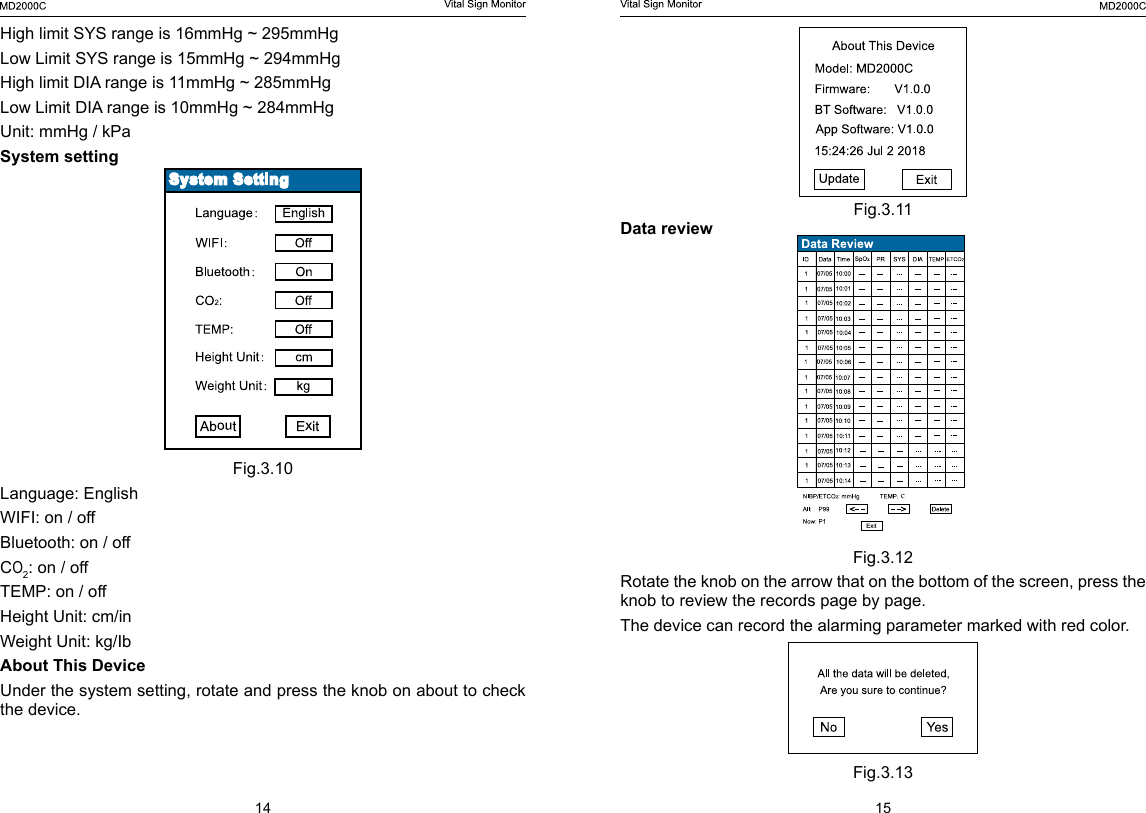
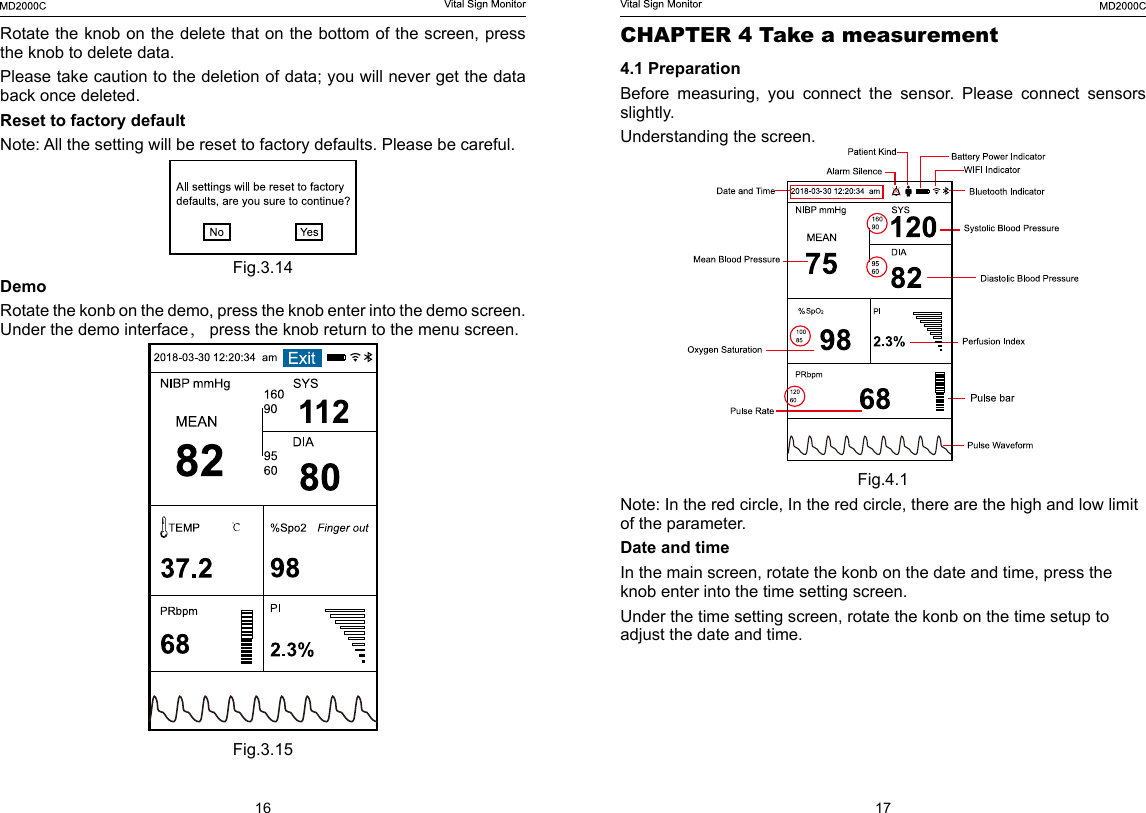
14 15Fig.3.11Data reviewFig.3.12Rotate the knob on the arrow that on the bottom of the screen, press the knob to review the records page by page.The device can record the alarming parameter marked with red color. Fig.3.13High limit SYS range is 16mmHg ~ 295mmHgLow Limit SYS range is 15mmHg ~ 294mmHgHigh limit DIA range is 11mmHg ~ 285mmHgLow Limit DIA range is 10mmHg ~ 284mmHgUnit: mmHg / kPaSystem settingFig.3.10Language: EnglishWIFI: on / offBluetooth: on / offCO2: on / offTEMP: on / offHeight Unit: cm/inWeight Unit: kg/IbAbout This DeviceUnder the system setting, rotate and press the knob on about to check the device.
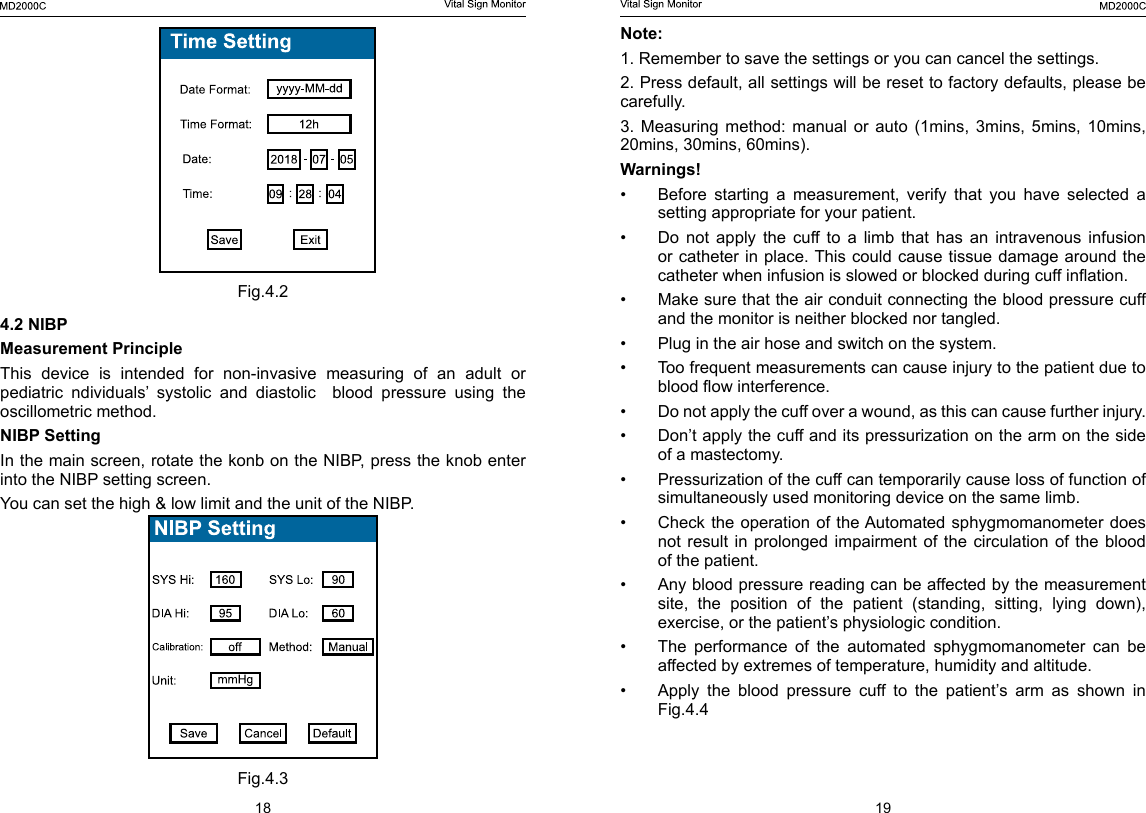
16 17CHAPTER 4 Take a measurement 4.1 PreparationBefore  measuring,  you  connect  the  sensor.  Please  connect  sensors slightly. Understanding the screen.Fig.4.1Note: In the red circle, In the red circle, there are the high and low limit of the parameter. Date and timeIn the main screen, rotate the konb on the date and time, press the knob enter into the time setting screen. Under the time setting screen, rotate the konb on the time setup to adjust the date and time.Rotate the knob on the delete that on the bottom of the screen, press the knob to delete data.Please take caution to the deletion of data; you will never get the data back once deleted.Reset to factory defaultNote: All the setting will be reset to factory defaults. Please be careful.Fig.3.14DemoRotate the konb on the demo, press the knob enter into the demo screen. Under the demo interface, press the knob return to the menu screen.Fig.3.15
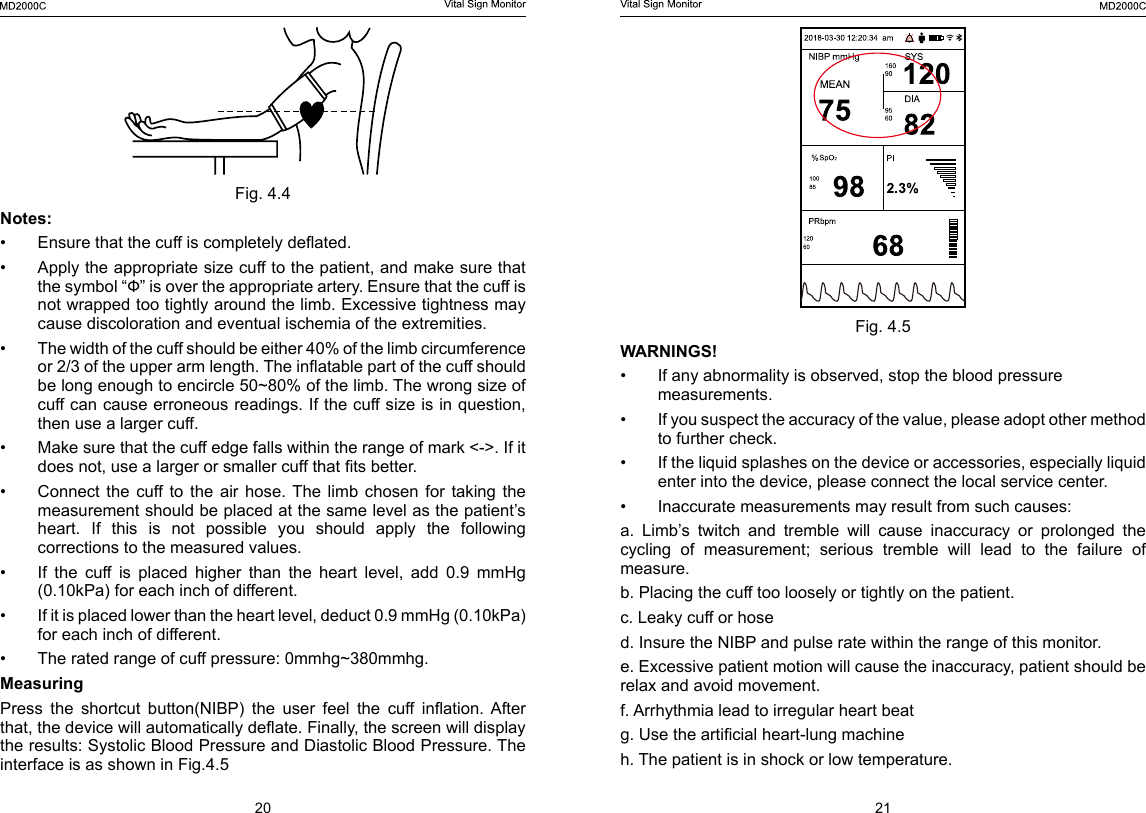
18 19Note: 1. Remember to save the settings or you can cancel the settings. 2. Press default, all settings will be reset to factory defaults, please be carefully. 3.  Measuring  method:  manual  or  auto  (1mins,  3mins,  5mins,  10mins, 20mins, 30mins, 60mins).Warnings!•  Before  starting  a  measurement,  verify  that  you  have  selected  a setting appropriate for your patient.•  Do not apply the cuff to a limb that has an intravenous infusion or catheter in place. This  could  cause  tissue damage around the catheter when infusion is slowed or blocked during cuff ination.•  Make sure that the air conduit connecting the blood pressure cuff and the monitor is neither blocked nor tangled.•  Plug in the air hose and switch on the system.•  Too frequent measurements can cause injury to the patient due to blood ow interference.•  Do not apply the cuff over a wound, as this can cause further injury.•  Don’t apply the cuff and its pressurization on the arm on the side of a mastectomy.•  Pressurization of the cuff can temporarily cause loss of function of simultaneously used monitoring device on the same limb.•  Check the operation of the Automated sphygmomanometer does not result in prolonged impairment of the circulation of the blood of the patient.•  Any blood pressure reading can be affected by the measurement site,  the  position  of  the  patient  (standing,  sitting,  lying  down), exercise, or the patient’s physiologic condition.•  The  performance  of  the  automated  sphygmomanometer  can  be affected by extremes of temperature, humidity and altitude.•  Apply the blood pressure cuff to the patient’s arm as shown in Fig.4.4     Fig.4.24.2 NIBPMeasurement PrincipleThis  device  is  intended  for  non-invasive  measuring  of  an  adult  or pediatric ndividuals’ systolic and diastolic  blood pressure using the oscillometric method.NIBP SettingIn the main screen, rotate the konb on the NIBP, press the knob enter into the NIBP setting screen.You can set the high & low limit and the unit of the NIBP.Fig.4.3
20 21Fig. 4.5WARNINGS! •  If any abnormality is observed, stop the blood pressure measurements.•  If you suspect the accuracy of the value, please adopt other method to further check.•  If the liquid splashes on the device or accessories, especially liquid enter into the device, please connect the local service center. •  Inaccurate measurements may result from such causes:a.  Limb’s  twitch  and  tremble  will  cause  inaccuracy  or  prolonged  the cycling  of  measurement;  serious  tremble  will  lead  to  the  failure  of measure.b. Placing the cuff too loosely or tightly on the patient.c. Leaky cuff or hosed. Insure the NIBP and pulse rate within the range of this monitor.e. Excessive patient motion will cause the inaccuracy, patient should be relax and avoid movement.f. Arrhythmia lead to irregular heart beatg. Use the articial heart-lung machineh. The patient is in shock or low temperature.Fig. 4.4Notes:•  Ensure that the cuff is completely deated.•  Apply the appropriate size cuff to the patient, and make sure that the symbol “Ф” is over the appropriate artery. Ensure that the cuff is not wrapped too tightly around the limb. Excessive tightness may cause discoloration and eventual ischemia of the extremities.•  The width of the cuff should be either 40% of the limb circumference or 2/3 of the upper arm length. The inatable part of the cuff should be long enough to encircle 50~80% of the limb. The wrong size of cuff can cause erroneous readings. If the cuff size is in question, then use a larger cuff.•  Make sure that the cuff edge falls within the range of mark <->. If it does not, use a larger or smaller cuff that ts better.•  Connect  the  cuff  to  the  air  hose.  The  limb  chosen  for  taking  the measurement should be placed at the same level as the patient’s heart.  If  this  is  not  possible  you  should  apply  the  following corrections to the measured values.•  If  the  cuff  is  placed  higher  than  the  heart  level,  add  0.9  mmHg (0.10kPa) for each inch of different.•  If it is placed lower than the heart level, deduct 0.9 mmHg (0.10kPa) for each inch of different.•  The rated range of cuff pressure: 0mmhg~380mmhg.Measuring Press  the  shortcut  button(NIBP)  the  user  feel  the  cuff  ination.  After that, the device will automatically deate. Finally, the screen will display the results: Systolic Blood Pressure and Diastolic Blood Pressure. The interface is as shown in Fig.4.5
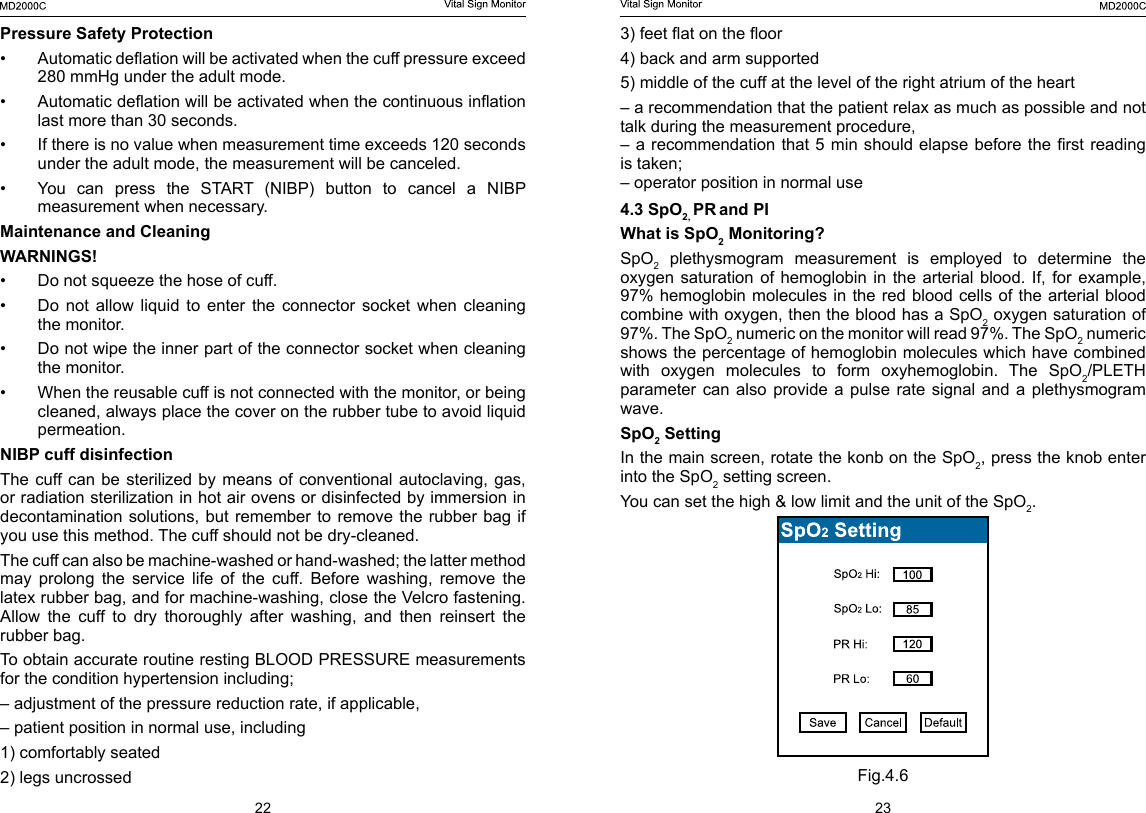
22 233) feet at on the oor4) back and arm supported5) middle of the cuff at the level of the right atrium of the heart– a recommendation that the patient relax as much as possible and not talk during the measurement procedure,– a recommendation that 5 min should elapse before the rst reading is taken;– operator position in normal use4.3 SpO2, PR and PIWhat is SpO2 Monitoring?SpO2 plethysmogram measurement is employed to determine the oxygen saturation  of  hemoglobin  in  the arterial  blood.  If,  for  example, 97% hemoglobin molecules in the red blood cells of the arterial blood combine with oxygen, then the blood has a SpO2 oxygen saturation of 97%. The SpO2 numeric on the monitor will read 97%. The SpO2 numeric shows the percentage of hemoglobin molecules which have combined with  oxygen  molecules  to  form  oxyhemoglobin.  The  SpO2/PLETH parameter can also provide a pulse rate signal and a plethysmogram wave.SpO2 SettingIn the main screen, rotate the konb on the SpO2, press the knob enter into the SpO2 setting screen.You can set the high & low limit and the unit of the SpO2.Fig.4.6Pressure Safety Protection•  Automatic deation will be activated when the cuff pressure exceed 280 mmHg under the adult mode.•  Automatic deation will be activated when the continuous ination last more than 30 seconds.•  If there is no value when measurement time exceeds 120 seconds under the adult mode, the measurement will be canceled.•  You  can  press  the  START  (NIBP)  button  to  cancel  a  NIBP measurement when necessary.Maintenance and CleaningWARNINGS!•  Do not squeeze the hose of cuff.•  Do not allow liquid to enter the connector socket when cleaning the monitor.•  Do not wipe the inner part of the connector socket when cleaning the monitor.•  When the reusable cuff is not connected with the monitor, or being cleaned, always place the cover on the rubber tube to avoid liquid permeation.NIBP cuff disinfection  The cuff can be  sterilized by means  of conventional autoclaving,  gas, or radiation sterilization in hot air ovens or disinfected by immersion in decontamination solutions, but remember to remove the rubber bag if you use this method. The cuff should not be dry-cleaned.The cuff can also be machine-washed or hand-washed; the latter method may  prolong  the  service  life  of  the  cuff.  Before  washing,  remove  the latex rubber bag, and for machine-washing, close the Velcro fastening. Allow the cuff to dry thoroughly after washing, and then reinsert the rubber bag.To obtain accurate routine resting BLOOD PRESSURE measurements for the condition hypertension including;– adjustment of the pressure reduction rate, if applicable,– patient position in normal use, including1) comfortably seated2) legs uncrossed
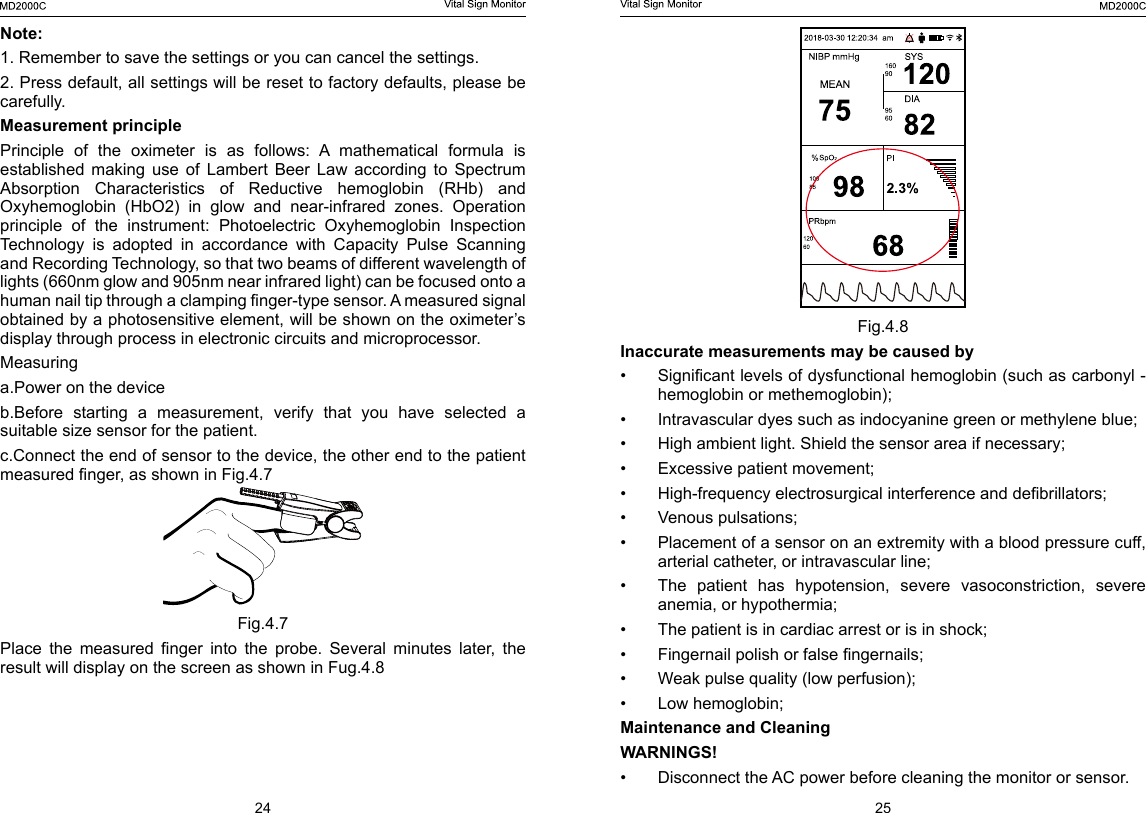
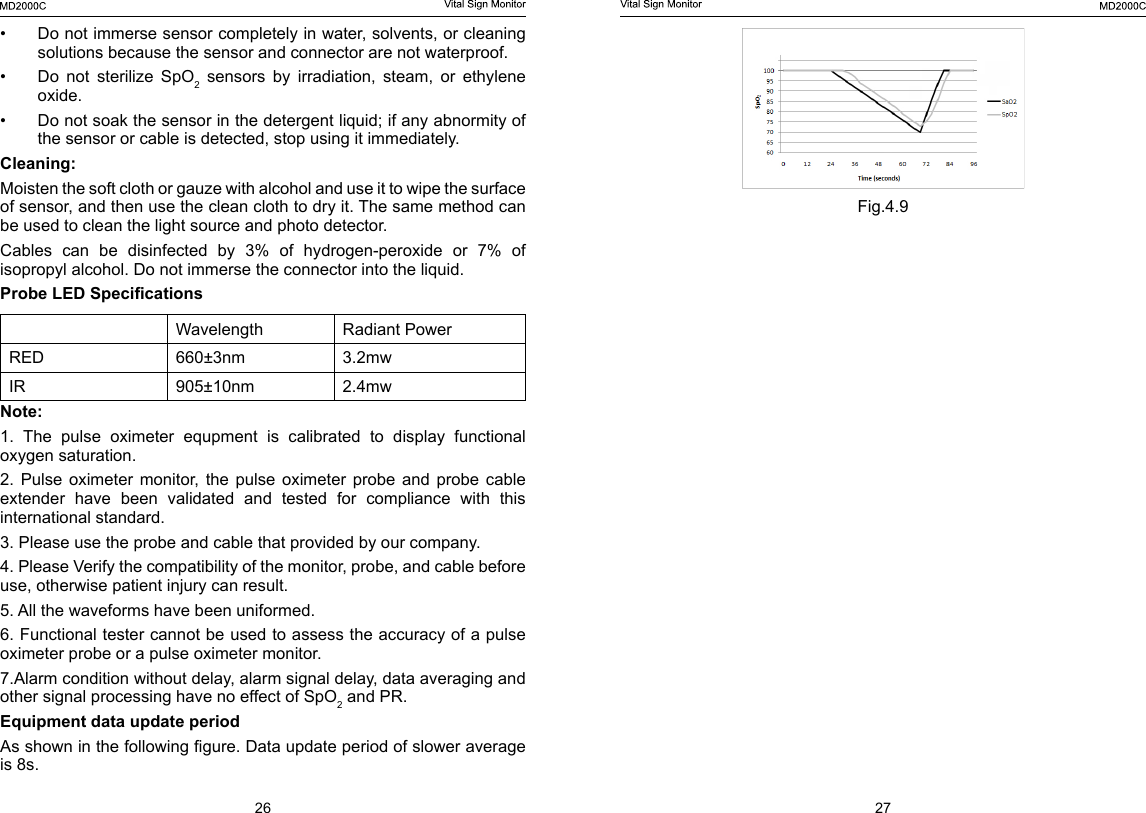
24 25Fig.4.8Inaccurate measurements may be caused by•  Signicant levels of dysfunctional hemoglobin (such as carbonyl - hemoglobin or methemoglobin);•  Intravascular dyes such as indocyanine green or methylene blue;•  High ambient light. Shield the sensor area if necessary;•  Excessive patient movement;•  High-frequency electrosurgical interference and debrillators;•  Venous pulsations;•  Placement of a sensor on an extremity with a blood pressure cuff, arterial catheter, or intravascular line;•  The  patient  has  hypotension,  severe  vasoconstriction,  severe anemia, or hypothermia;•  The patient is in cardiac arrest or is in shock;•  Fingernail polish or false ngernails;•  Weak pulse quality (low perfusion);•  Low hemoglobin;Maintenance and CleaningWARNINGS!•  Disconnect the AC power before cleaning the monitor or sensor.Note: 1. Remember to save the settings or you can cancel the settings. 2. Press default, all settings will be reset to factory defaults, please be carefully. Measurement principlePrinciple  of  the  oximeter  is  as  follows:  A  mathematical  formula  is established  making  use  of  Lambert  Beer  Law  according  to  Spectrum Absorption  Characteristics  of  Reductive  hemoglobin  (RHb)  and Oxyhemoglobin  (HbO2)  in  glow  and  near-infrared  zones.  Operation principle  of  the  instrument:  Photoelectric  Oxyhemoglobin  Inspection Technology  is  adopted  in  accordance  with  Capacity  Pulse  Scanning and Recording Technology, so that two beams of different wavelength of lights (660nm glow and 905nm near infrared light) can be focused onto a human nail tip through a clamping nger-type sensor. A measured signal obtained by a photosensitive element, will be shown on the oximeter’s display through process in electronic circuits and microprocessor.Measuringa.Power on the deviceb.Before  starting  a  measurement,  verify  that  you  have  selected  a suitable size sensor for the patient.c.Connect the end of sensor to the device, the other end to the patient measured nger, as shown in Fig.4.7Fig.4.7Place  the  measured  nger  into  the  probe.  Several  minutes  later,  the result will display on the screen as shown in Fug.4.8
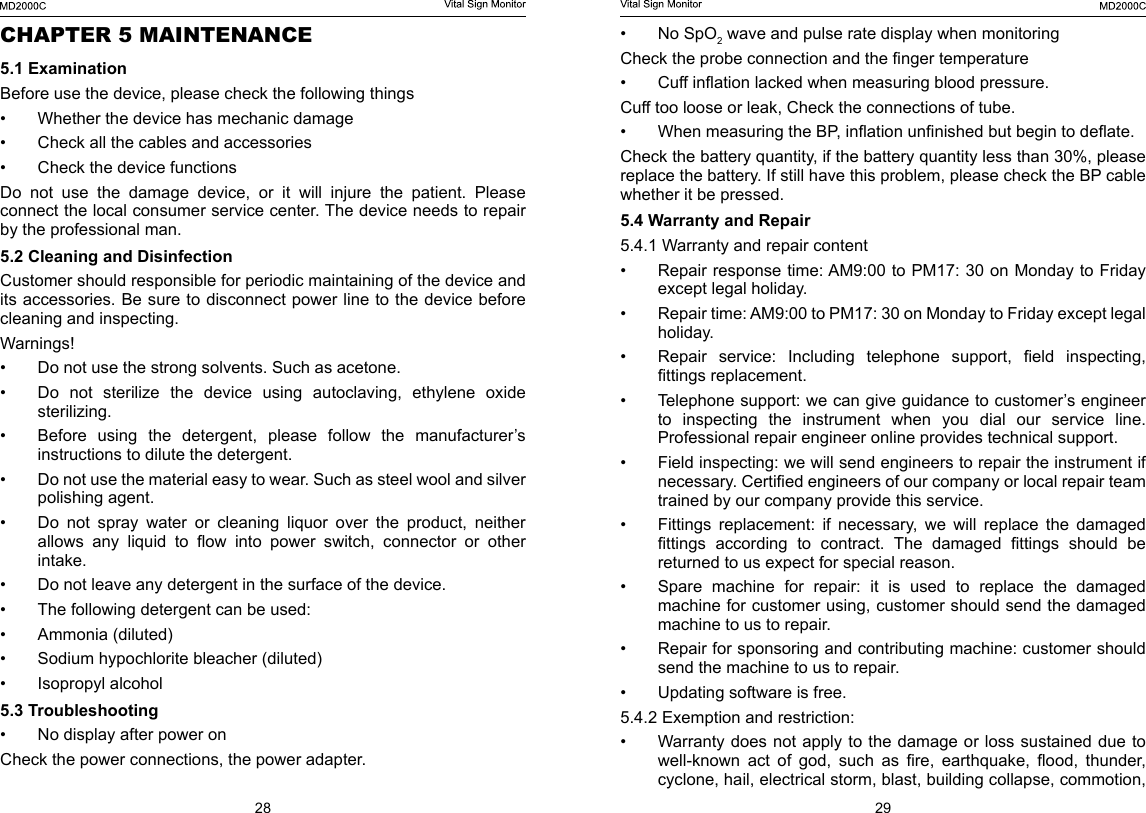
26 27Fig.4.9•  Do not immerse sensor completely in water, solvents, or cleaning solutions because the sensor and connector are not waterproof.•  Do  not  sterilize  SpO2 sensors by irradiation, steam, or ethylene oxide. •  Do not soak the sensor in the detergent liquid; if any abnormity of the sensor or cable is detected, stop using it immediately.Cleaning:Moisten the soft cloth or gauze with alcohol and use it to wipe the surface of sensor, and then use the clean cloth to dry it. The same method can be used to clean the light source and photo detector.Cables  can  be  disinfected  by  3%  of  hydrogen-peroxide  or  7%  of isopropyl alcohol. Do not immerse the connector into the liquid.Probe LED Specications Wavelength Radiant PowerRED 660±3nm  3.2mwIR 905±10nm 2.4mwNote: 1.  The  pulse  oximeter  equpment  is  calibrated  to  display  functional oxygen saturation.2.  Pulse  oximeter  monitor, the  pulse  oximeter  probe  and  probe  cable extender have been validated and tested for compliance with this international standard.3. Please use the probe and cable that provided by our company. 4. Please Verify the compatibility of the monitor, probe, and cable before use, otherwise patient injury can result.5. All the waveforms have been uniformed.6. Functional tester cannot be used to assess the accuracy of a pulse oximeter probe or a pulse oximeter monitor.7.Alarm condition without delay, alarm signal delay, data averaging and other signal processing have no effect of SpO2 and PR.Equipment data update periodAs shown in the following gure. Data update period of slower average is 8s.
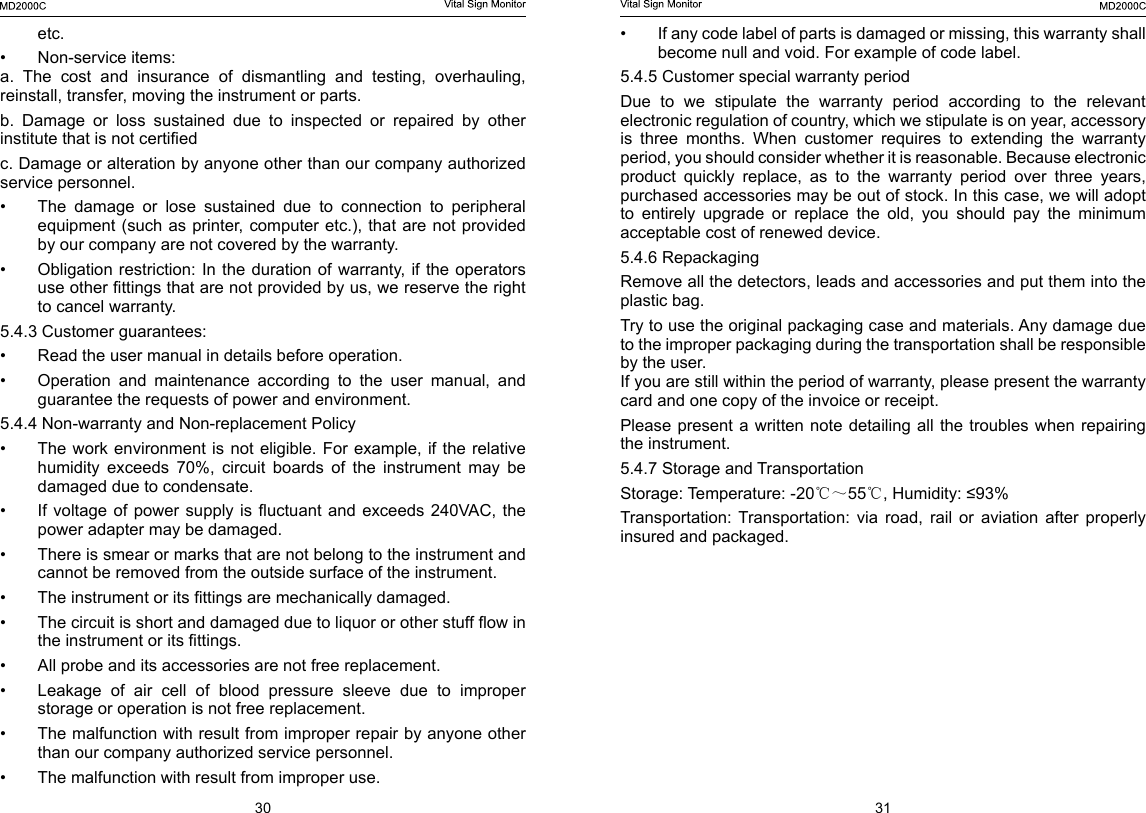
28 29•  No SpO2 wave and pulse rate display when monitoringCheck the probe connection and the nger temperature •  Cuff ination lacked when measuring blood pressure.Cuff too loose or leak, Check the connections of tube.•  When measuring the BP, ination unnished but begin to deate. Check the battery quantity, if the battery quantity less than 30%, please replace the battery. If still have this problem, please check the BP cable whether it be pressed.5.4 Warranty and Repair5.4.1 Warranty and repair content•  Repair response time: AM9:00 to PM17: 30 on Monday to Friday except legal holiday.•  Repair time: AM9:00 to PM17: 30 on Monday to Friday except legal holiday. •  Repair  service:  Including  telephone  support,  eld  inspecting, ttings replacement.•  Telephone support: we can give guidance to customer’s engineer to  inspecting  the  instrument  when  you  dial  our  service  line. Professional repair engineer online provides technical support.•  Field inspecting: we will send engineers to repair the instrument if necessary. Certied engineers of our company or local repair team trained by our company provide this service.•  Fittings replacement: if necessary, we will replace the damaged ttings  according  to  contract.  The  damaged  ttings  should  be returned to us expect for special reason.•  Spare  machine  for  repair:  it  is  used  to  replace  the  damaged machine for customer using, customer should send the damaged machine to us to repair.•  Repair for sponsoring and contributing machine: customer should send the machine to us to repair.•  Updating software is free.5.4.2 Exemption and restriction:•  Warranty does not apply to the damage or loss sustained due to well-known  act  of  god,  such  as  re,  earthquake,  ood,  thunder, cyclone, hail, electrical storm, blast, building collapse, commotion, CHAPTER 5 MAINTENANCE5.1 ExaminationBefore use the device, please check the following things•  Whether the device has mechanic damage•  Check all the cables and accessories•  Check the device functions Do  not  use  the  damage  device,  or  it  will  injure  the  patient.  Please connect the local consumer service center. The device needs to repair by the professional man.5.2 Cleaning and Disinfection Customer should responsible for periodic maintaining of the device and its accessories. Be sure to disconnect power line to the device before cleaning and inspecting.Warnings!•  Do not use the strong solvents. Such as acetone.•  Do not sterilize the device using autoclaving, ethylene oxide sterilizing.•  Before  using  the  detergent,  please  follow  the  manufacturer’s instructions to dilute the detergent.•  Do not use the material easy to wear. Such as steel wool and silver polishing agent.•  Do not spray water or cleaning liquor over the product, neither allows  any  liquid  to  ow  into  power  switch,  connector  or  other intake.•  Do not leave any detergent in the surface of the device.•  The following detergent can be used:•  Ammonia (diluted)•  Sodium hypochlorite bleacher (diluted)•  Isopropyl alcohol5.3 Troubleshooting •  No display after power on Check the power connections, the power adapter.
30 31•  If any code label of parts is damaged or missing, this warranty shall become null and void. For example of code label.5.4.5 Customer special warranty periodDue to we stipulate the warranty period according to the relevant electronic regulation of country, which we stipulate is on year, accessory is  three  months.  When  customer  requires  to  extending  the  warranty period, you should consider whether it is reasonable. Because electronic product quickly replace, as to the warranty period over three years, purchased accessories may be out of stock. In this case, we will adopt to entirely upgrade or replace the old, you should pay the minimum acceptable cost of renewed device.5.4.6 RepackagingRemove all the detectors, leads and accessories and put them into the plastic bag.Try to use the original packaging case and materials. Any damage due to the improper packaging during the transportation shall be responsible by the user.If you are still within the period of warranty, please present the warranty card and one copy of the invoice or receipt.Please present a written note  detailing  all the troubles when repairing the instrument.5.4.7 Storage and TransportationStorage: Temperature: -20℃~55℃, Humidity: ≤93%Transportation:  Transportation:  via  road,  rail  or  aviation  after  properly insured and packaged.etc. •  Non-service items:a.  The  cost  and  insurance  of  dismantling  and  testing,  overhauling, reinstall, transfer, moving the instrument or parts. b.  Damage  or  loss  sustained  due  to  inspected  or  repaired  by  other institute that is not certiedc. Damage or alteration by anyone other than our company authorized service personnel.•  The  damage  or  lose  sustained  due  to  connection  to  peripheral equipment (such as printer, computer etc.), that are not provided by our company are not covered by the warranty.•  Obligation restriction: In the duration of warranty, if the operators use other ttings that are not provided by us, we reserve the right to cancel warranty.5.4.3 Customer guarantees:•  Read the user manual in details before operation.•  Operation and maintenance according to the user manual, and guarantee the requests of power and environment.5.4.4 Non-warranty and Non-replacement Policy•  The work environment  is  not eligible. For example,  if the relative humidity  exceeds  70%,  circuit  boards  of  the  instrument  may  be damaged due to condensate.•  If voltage  of power supply  is uctuant  and exceeds  240VAC, the power adapter may be damaged.•  There is smear or marks that are not belong to the instrument and cannot be removed from the outside surface of the instrument.•  The instrument or its ttings are mechanically damaged. •  The circuit is short and damaged due to liquor or other stuff ow in the instrument or its ttings.•  All probe and its accessories are not free replacement.•  Leakage  of  air  cell  of  blood  pressure  sleeve  due  to  improper storage or operation is not free replacement.•  The malfunction with result from improper repair by anyone other than our company authorized service personnel.•  The malfunction with result from improper use.
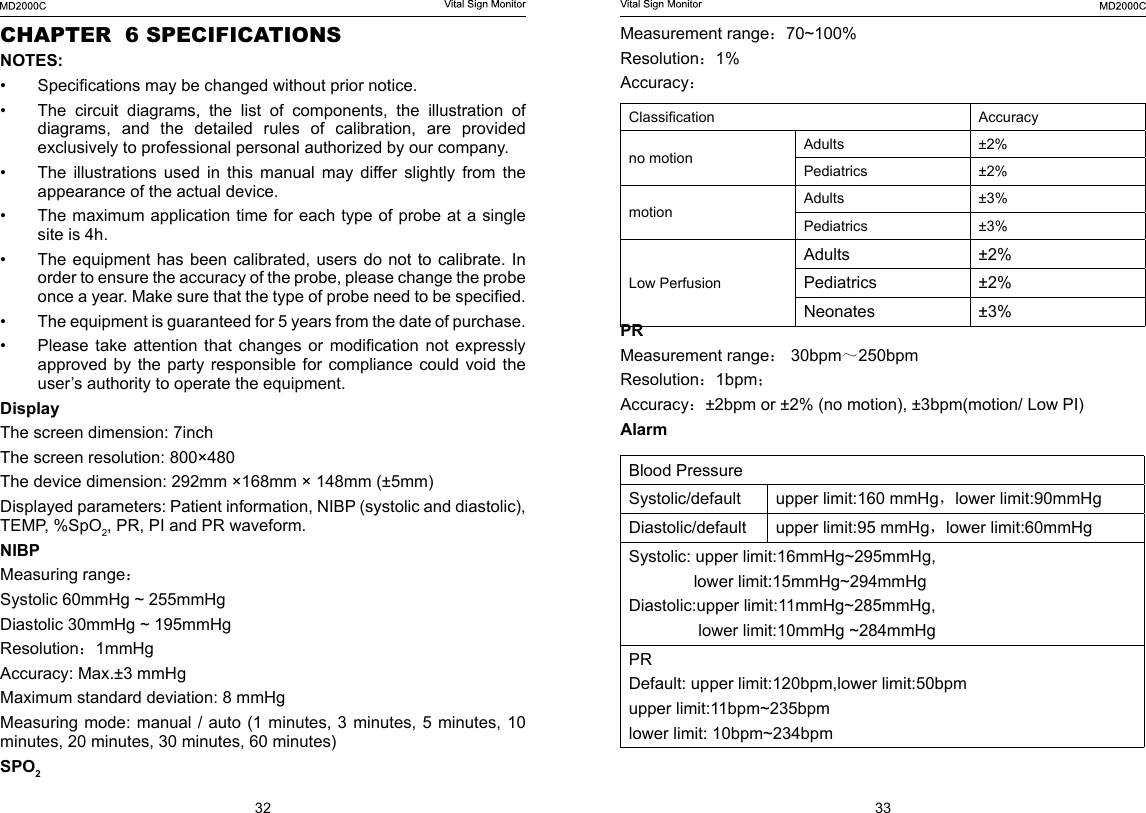
32 33Measurement range:70~100%Resolution:1%Accuracy:Classication  Accuracyno motion Adults ±2%Pediatrics ±2%motion Adults ±3%Pediatrics ±3%Low PerfusionAdults ±2%Pediatrics ±2%Neonates ±3%PRMeasurement range: 30bpm~250bpmResolution:1bpm;Accuracy:±2bpm or ±2% (no motion), ±3bpm(motion/ Low PI)AlarmBlood PressureSystolic/default upper limit:160 mmHg,lower limit:90mmHgDiastolic/default upper limit:95 mmHg,lower limit:60mmHgSystolic: upper limit:16mmHg~295mmHg,               lower limit:15mmHg~294mmHgDiastolic:upper limit:11mmHg~285mmHg,               lower limit:10mmHg ~284mmHgPRDefault: upper limit:120bpm,lower limit:50bpmupper limit:11bpm~235bpmlower limit: 10bpm~234bpmCHAPTER  6 SPECIFICATIONSNOTES:•  Specications may be changed without prior notice.•  The  circuit  diagrams,  the  list  of  components,  the  illustration  of diagrams, and the detailed rules of calibration, are provided exclusively to professional personal authorized by our company.•  The  illustrations  used  in  this  manual  may  differ  slightly  from  the appearance of the actual device.•  The maximum application time for each type of probe at a single site is 4h.•  The equipment has been  calibrated, users do not  to  calibrate. In order to ensure the accuracy of the probe, please change the probe once a year. Make sure that the type of probe need to be specied.•  The equipment is guaranteed for 5 years from the date of purchase.•  Please  take  attention  that  changes  or  modication  not  expressly approved by the party responsible for compliance could void the user’s authority to operate the equipment.DisplayThe screen dimension: 7inch The screen resolution: 800×480The device dimension: 292mm ×168mm × 148mm (±5mm)Displayed parameters: Patient information, NIBP (systolic and diastolic), TEMP, %SpO2, PR, PI and PR waveform.NIBPMeasuring range:Systolic 60mmHg ~ 255mmHgDiastolic 30mmHg ~ 195mmHgResolution:1mmHgAccuracy: Max.±3 mmHgMaximum standard deviation: 8 mmHgMeasuring mode: manual /  auto  (1 minutes, 3 minutes,  5  minutes, 10 minutes, 20 minutes, 30 minutes, 60 minutes) SPO2
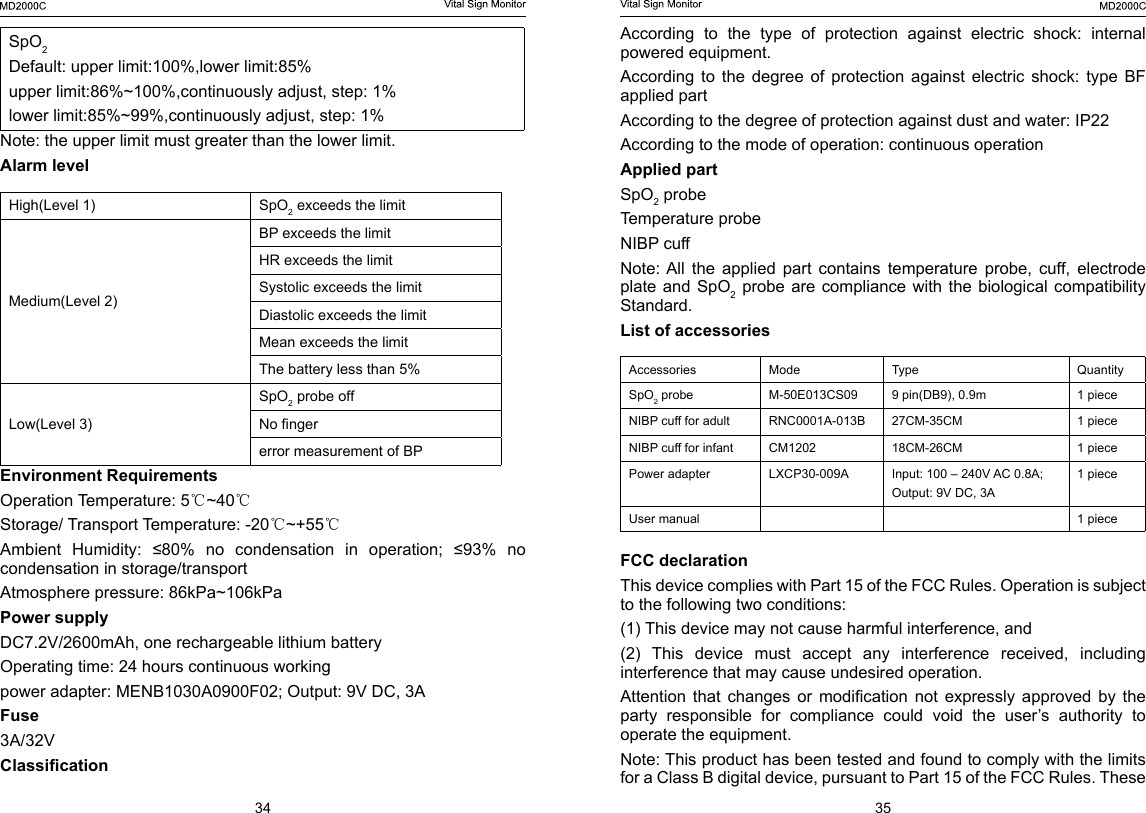
34 35SpO2Default: upper limit:100%,lower limit:85%upper limit:86%~100%,continuously adjust, step: 1%lower limit:85%~99%,continuously adjust, step: 1%Note: the upper limit must greater than the lower limit.Alarm levelHigh(Level 1) SpO2 exceeds the limitMedium(Level 2)BP exceeds the limitHR exceeds the limitSystolic exceeds the limitDiastolic exceeds the limitMean exceeds the limitThe battery less than 5%Low(Level 3)SpO2 probe offNo ngererror measurement of BPEnvironment RequirementsOperation Temperature: 5℃~40℃Storage/ Transport Temperature: -20℃~+55℃Ambient  Humidity:  ≤80%  no  condensation  in  operation;  ≤93%  no condensation in storage/transportAtmosphere pressure: 86kPa~106kPaPower supply     DC7.2V/2600mAh, one rechargeable lithium batteryOperating time: 24 hours continuous workingpower adapter: MENB1030A0900F02; Output: 9V DC, 3A Fuse3A/32VClassicationAccording to the type of protection against electric shock: internal powered equipment.According  to  the  degree  of  protection  against  electric  shock:  type  BF applied partAccording to the degree of protection against dust and water: IP22According to the mode of operation: continuous operation Applied part SpO2 probeTemperature probeNIBP cuffNote: All  the  applied  part  contains  temperature  probe,  cuff,  electrode plate and  SpO2 probe are compliance with the biological compatibility Standard.List of accessories Accessories  Mode Type Quantity SpO2 probe M-50E013CS09 9 pin(DB9), 0.9m 1 pieceNIBP cuff for adult  RNC0001A-013B 27CM-35CM 1 pieceNIBP cuff for infant  CM1202 18CM-26CM 1 piecePower adapter  LXCP30-009A Input: 100 – 240V AC 0.8A; Output: 9V DC, 3A1 pieceUser manual 1 pieceFCC declaration     This device complies with Part 15 of the FCC Rules. Operation is subject to the following two conditions: (1) This device may not cause harmful interference, and (2)  This  device  must  accept  any  interference  received,  including interference that may cause undesired operation. Attention  that  changes  or  modication  not  expressly  approved  by  the party responsible for compliance could void the user’s authority to operate the equipment.Note: This product has been tested and found to comply with the limits for a Class B digital device, pursuant to Part 15 of the FCC Rules. These
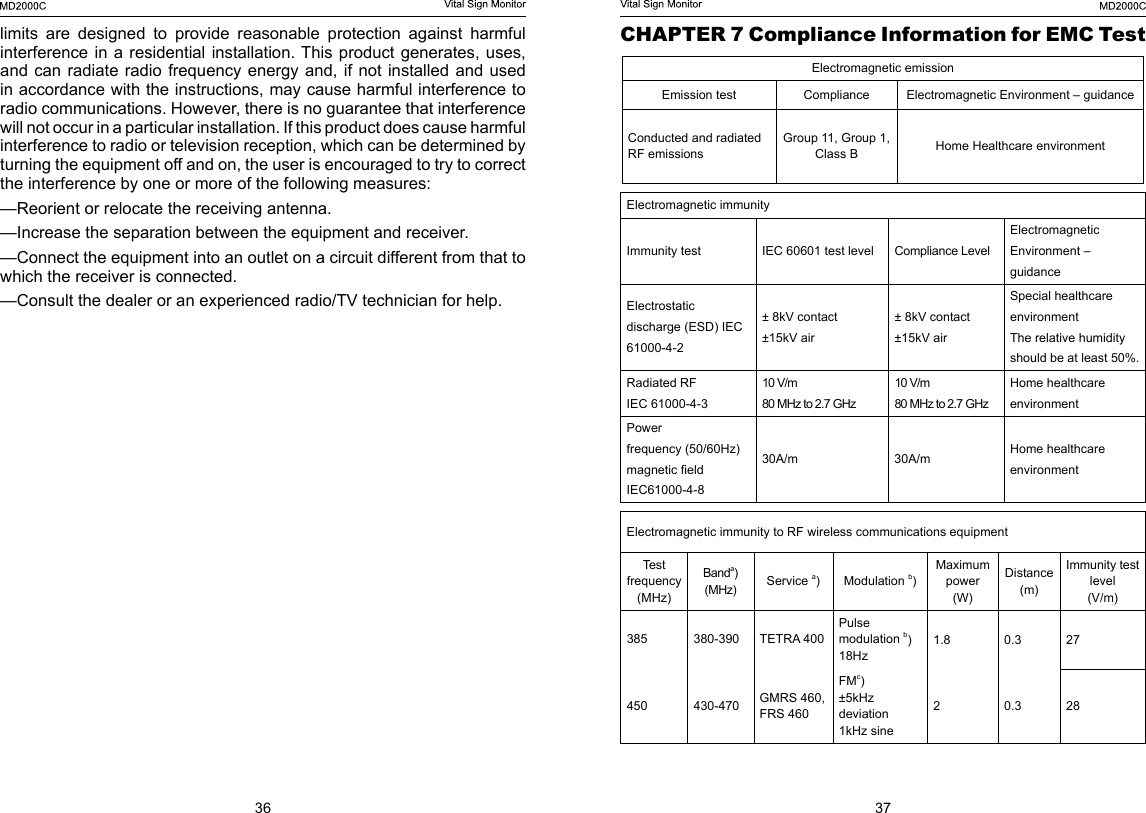
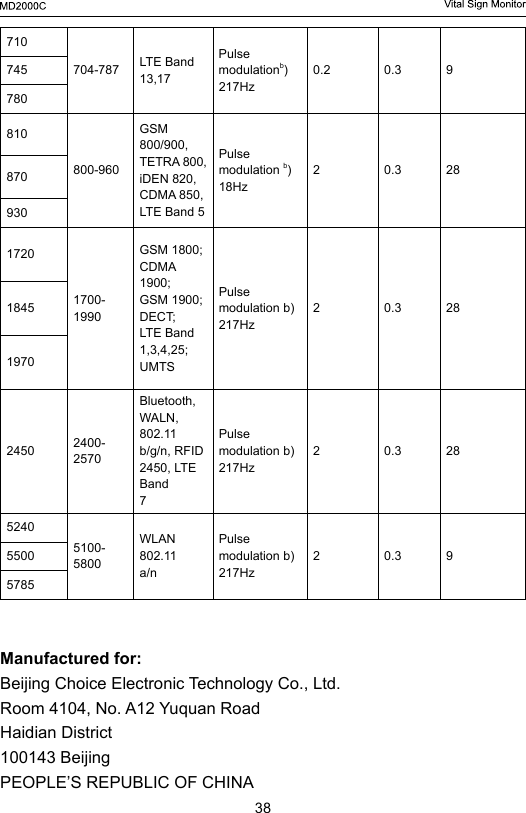
36 37limits are designed to provide reasonable protection against harmful interference in a  residential installation. This product generates,  uses, and can radiate radio frequency energy and, if not installed and used in accordance with the instructions, may cause harmful interference to radio communications. However, there is no guarantee that interference will not occur in a particular installation. If this product does cause harmful interference to radio or television reception, which can be determined by turning the equipment off and on, the user is encouraged to try to correct the interference by one or more of the following measures: —Reorient or relocate the receiving antenna. —Increase the separation between the equipment and receiver. —Connect the equipment into an outlet on a circuit different from that to which the receiver is connected. —Consult the dealer or an experienced radio/TV technician for help.CHAPTER 7 Compliance Information for EMC TestElectromagnetic emissionEmission test Compliance Electromagnetic Environment – guidanceConducted and radiatedRF emissions Group 11, Group 1, Class B Home Healthcare environmentElectromagnetic immunityImmunity test IEC 60601 test level Compliance LevelElectromagnetic Environment – guidanceElectrostatic discharge (ESD) IEC 61000-4-2± 8kV contact±15kV air± 8kV contact±15kV airSpecial healthcare environmentThe relative humidity should be at least 50%.Radiated RFIEC 61000-4-310 V/m80 MHz to 2.7 GHz10 V/m80 MHz to 2.7 GHzHome healthcare environmentPowerfrequency (50/60Hz)magnetic eldIEC61000-4-830A/m 30A/m Home healthcare environmentElectromagnetic immunity to RF wireless communications equipmentTest frequency(MHz)Banda) (MHz) Service a)Modulation b)Maximum power(W)Distance(m)Immunity test level(V/m)385 380-390 TETRA 400Pulsemodulation b)18Hz1.8 0.3 27450 430-470 GMRS 460,FRS 460FMc)±5kHzdeviation1kHz sine20.3 28
38710704-787 LTE Band 13,17Pulsemodulationb)217Hz0.2 0.3 9745780810800-960GSM 800/900,TETRA 800,iDEN 820,CDMA 850,LTE Band 5Pulsemodulation b)18Hz20.3 2887093017201700-1990GSM 1800;CDMA 1900;GSM 1900;DECT;LTE Band1,3,4,25; UMTSPulsemodulation b)217Hz20.3 28184519702450 2400-2570Bluetooth,WALN, 802.11b/g/n, RFID2450, LTE Band7Pulsemodulation b)217Hz20.3 2852405100-5800WLAN 802.11a/nPulsemodulation b)217Hz20.3 955005785Manufactured for:Beijing Choice Electronic Technology Co., Ltd.Room 4104, No. A12 Yuquan RoadHaidian District100143 BeijingPEOPLE’S REPUBLIC OF CHINA

Navigation menu