Beijing Choice Electronic Technology MD300W4 Pulse Oximeter User Manual
Beijing Choice Electronic Technology Co., Ltd. Pulse Oximeter
User Manual
Copyright
Beijing Choice Electronic Technology Co., Ltd (hereinafter called Choice) owns the intellectual property
rights to this product and this manual. This manual may refer to information protected by copyrights or
patents and does not convey any license under the patent rights of Choice, nor the rights of others.
Choice does not assume any liability arising out of any infringements of patents or other rights of third
parties.
Choice intends to maintain the contents of this manual as confidential information. Disclosure of the
information in this manual in any manner whatsoever without the written permission of Choice is strictly
forbidden. Release, amendment, reproduction, distribution, rent, adaption and translation of this
manual in any manner whatsoever without the written permission of Choice is strictly forbidden.
© Beijing Choice Electronic Technology Co., Ltd.
All trademarks are the property of Beijing Choice Electronic Technology Co., Ltd. unless otherwise
noted.
Content of the manual is subject to change without prior notice.
ALL RIGHTS RESERVED
Ver1.0
Issue Date: April 10, 2011

MD300W4 PULSE OXIMETER
Content
1. INTRODUCTION ............................................................................................................ 3
1.1 Brief Introduction.............................................................................................. 3
1.2 Safety Information ............................................................................................ 3
1.3 Intended Use ..................................................................................................... 6
1.4 Electromagnetism Interference ....................................................................... 6
1.5 Explanation of Symbols ................................................................................... 7
1.6 Product Features .............................................................................................. 8
2. GENERAL DESCRIPTION ............................................................................................. 9
2.1 Appearance ....................................................................................................... 9
2.2 Power Supply .................................................................................................. 10
3. TAKE A MEASUREMENT ............................................................................................ 12
3.1 Sensor Installation.......................................................................................... 12
3.2 Take a Measurement....................................................................................... 12
3.3 Factors That May Affect The Measurement.................................................. 13
3.4 Applying The Belt ........................................................................................... 15
4. SETTINGS.................................................................................................................... 16
4.1 Brightness Setting.......................................................................................... 16
4.2 Battery Setting ................................................................................................ 16
1

MD300W4 PULSE OXIMETER
4.3 Reading ID Setting.......................................................................................... 17
4.4 Version Information ........................................................................................ 17
4.5 Return .............................................................................................................. 17
5. MAINTENANCE AND CLEANING ............................................................................... 17
5.1 Equipment Maintenance................................................................................. 17
5.2 Battery Maintenance....................................................................................... 18
5.3 Preventive Maintenance................................................................................. 18
6. TROUBLESHOOTING ................................................................................................. 21
7. WARRANTY AND REPAIR .......................................................................................... 21
7.1 Service Method ............................................................................................... 21
7.2 Warranty Limitations ...................................................................................... 22
7.3 User Guarantee............................................................................................... 22
7.4 No-Warranty Principle .................................................................................... 23
7.5 Warranty Period .............................................................................................. 23
7.6 Repackage....................................................................................................... 23
7.7 Storage and Transportation ........................................................................... 24
APPENDIX SPECIFICATIONS......................................................................................... 24
2

MD300W4 PULSE OXIMETER
1. INTRODUCTION
1.1 Brief Introduction
Thank you for purchasing the Pulse Oximeter. The main functions of the device are to measure
Haemoglobin Saturation (SpO2) and Pulse Rate (PR) value of single patient and transmit data by
GPRS or USB. Please read the instruction manual carefully before using the device.
Note: The illustrations used in this manual may differ slightly from the actual product.
1.2 Safety Information
Conception of Warning, Caution and Note
The Warning, Caution and Note in this document are special information in favor of users’ operation.
★ Warning
Indicate that maybe some potential hurt or damage to patients or device.
★ Caution
Make user take a serious attitude toward the incorrect operation, which are likely to incur some
life-threatening incidents.
★ Note
Serve as a pivotal notice to avoid preventable incidents during application of this equipment.
Warnings!
Before use, please read the manual directions, all precautions and specifications carefully. Our
company will assume no warranty for using the device improperly.
The user must check that the device functions safely and ensure that it is in proper working
3

MD300W4 PULSE OXIMETER
conditions.
Do not use the pulse oximeter in the presence of flammable anesthetics, vapors or liquids.
Do not use the pulse oximeter in an MRI or CT environment which is the source of some electric
noise to influence the accuracy of the equipment and following measurement.
This equipment is intended only as an adjunct in patient assessment, and the measurement results
only serve as a reference for any relevant treatment.
Prolonged use of the probe/sensor or the patient’s condition may require changing the sensor site
periodically. Change the sensor site and check skin integrity, circulatory status, and correct
alignment at least every 4 hours. Prolonged use may cause blisters, skin deterioration, and
discomfort.
Connect the sensor correctly; please follow the directions for use of any accessories.
The sensor is a sensitive device so please strictly follow the sensor application instructions.
Use only the SpO2 sensors supplied by our company. Use of sensors not intended for the device
may cause wrong alarm.
The malfunction of sensor may cause inaccurate measurement result.
The disposable accessories should not be cycled.
The device does not require periodic calibration and maintenance, except replacing batteries.
When connecting this equipment to other peripherals, make sure that you are qualified operator to
operate this device. Any peripherals must be certified according to the protocol of IEC 950 and IEC
60601-1-2. Any input/output device should be following the protocol of IEC 60601-1-2.
Cautions
This device is intended for use by persons trained in professional health care. The operator must be
4

MD300W4 PULSE OXIMETER
thoroughly familiar with the information in the manual before using the device.
The surface of the device can be wiped with alcohol gently. The device is strictly forbided to contact
with strong acid or alkali.
Unplug the sensor from the pulse oximeter before cleaning or disinfecting to prevent the sensor or
pulse oximeter from being damaged, and also to protect the user under safety situation.
Clean the probe with an H2O solution and a neutral detergent.
Don’t submerge the device or probe into any liquid. Do not use the device in autoclave (sterilizer).
The materials that contact with human bodies are all non-toxic.
If the specification or function of the device is abnormal during measuring, stop measuring
immediately and consult us.
Federal Law (U.S.A) restricts this device to sale by or on the order of a physician.
Notes
Application of this device in the background of electromagnetic areas may influence the
measurement accuracy such as electro-surgery environment.
SpO2 measurement may be adversely affected in the presence of strong ambient light. Shield the
sensor area (with a surgical towel, for example) if necessary.
Dyes introduced into the bloodstream, such as methylene blue, indocyanine green, indigo carmine,
and fluorescein, may adversely affect the accuracy of the SpO2 measurement.
Any condition that restricts blood flow, such as using a blood pressure cuff or extremes in systemic
vascular resistance, may cause a failure to detect the accurate SpO2 value and pulse rate.
Remove fingernail polish or artificial fingernails before applying SpO2 probes. Fingernail polish or
artificial fingernails may lead to inaccurate SpO2 readings.
5

MD300W4 PULSE OXIMETER
Optical cross talk can occur when two or more probes are located in adjoining area. It can be
eliminated by covering each site with opaque material. Optical cross talk may adversely affect the
accuracy of the SpO2 readings
Obstructions or dirt on the sensor’s emission or receiving windows may cause a sensor failure.
Make sure there are no obstructions and the sensor is clean.
Hazards arising from software errors have been minimized. Hazard analysis conforms to meet
ISO14971: 2000 and EN60601-1-4: 1996. Significant levels of dysfunctional hemoglogins, such as
carboxyhemoglogin or methhemoglobin, will spawn an affection of the accuracy of the SpO2
measurement.
For routine equipment maintenance, please refer to the service procedures at the specific sections
as indicated in the manual.
The circuit diagrams, the list of components, the illustration of diagrams, and the detailed rules of
calibration, are provided exclusively to professional personnel authorized by our company.
Dispose of the device or its accessories end of life in accordance with the local ordinances and
regulations, otherwise, discarding them as you like may cause pollution to the environment.
As to other attentions, please carefully look through the specific chapter in this instruction manual.
1.3 Intended Use
This pulse oximeter is a portable, non-invasive device intended for continuous monitoring or spot
checking, displaying and transmitting functional arterial oxygen saturation (SpO2) and pulse rate of
single adult and pediatric (greater than 3 years of age) patients in hospital and home care. The device
is reusable. The application site is finger.
1.4 Electromagnetism Interference
6
MD300W4 PULSE OXIMETER
This pulse oximeter is designed and tested in compliance with the EMC standard, complying with the
international standard for the EMC of the electronic medical device - IEC 60601-1-2. However, because
of the proliferation of radio frequency transmitting equipment and other sources of electrical noise in the
health-care and home environments (e.g. cellular phones, mobile two-way radios, electrical appliances)
it is possible that high levels of such interference due to close proximity or strength of a source, may
result in disruption of performance of this device.
This apparatus complies with the IEC 60601-1-2 international standard. The requirements of this
international standard are: CISPR11, GROP1, and CLASS B.
1.5 Explanation of Symbols
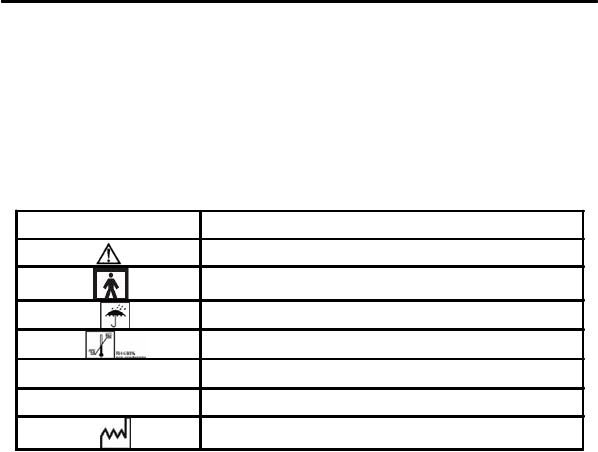
Symbol
IPX1
SN
Meaning
Attention, consult the accompanying documents.
Type BF applied part
Prevent from rain
Storage temperature and relative humidity
Protected against dripping water
Serial number
Date of Manufacture
7
MD300W4 PULSE OXIMETER
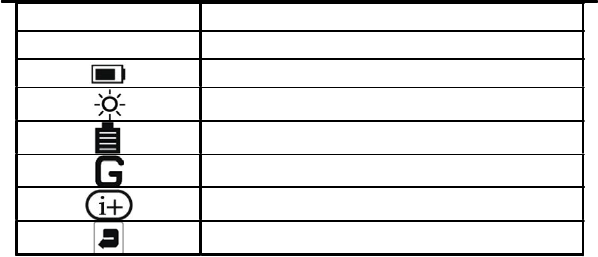
SpO2
PR
1.6 Product Features
Haemoglobin Saturation
Pulse Rate
Battery power indication
Brightness Setting
Battery Setting
Reading ID Setting
Version Information
Return
Simple to use and easy to operate.
Portable and compact in design.
Long-distance data transmission by GPRS.
OLED display screen.
Power off automatically after 30s if no operation and measure are carried out.
Low power consumption: the backlight will turn off automatically when there is no operation in
30s.
Prompt information for low battery.
8
MD300W4 PULSE OXIMETER
2. GENERAL DESCRIPTION
2.1 Appearance
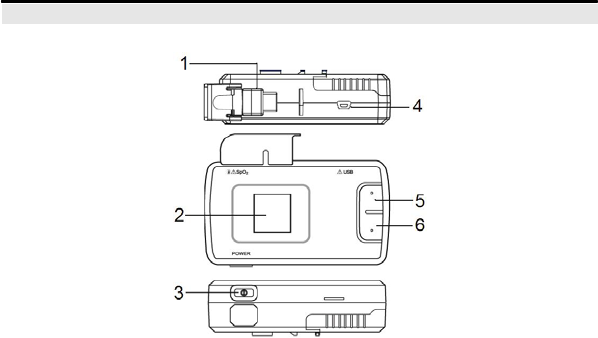
Fig.2-1
Description of Fig.2-1
(1) SpO2 Socket: used for connecting SpO2 probe;
(2) DisplayScreen;
(3) Power Button: Press and hold this button for about 3 seconds to power the device on, and for
about 4 seconds to turn the device off.
9
MD300W4 PULSE OXIMETER
When there is no measurement and no press on keys for 30 seconds, “Auto Power Down”
displays on the screen. And then it will power off automatically.
(4) USB Interface: used for data transmission and power charging;
(5) Menu Button: You can enter the menu interface by press this button in the measuring screen,
press this button to enter the selected menu item and conform your setting;
(6) Adjust Button: press this button to select different menu item and adjust its corresponding value;
2.2 Power Supply
The device can be powered by Lithium-ion rechargeable battery. The Lithium-ion rechargeable battery
with capacity 1500mAh can support the device working for 10 hours.
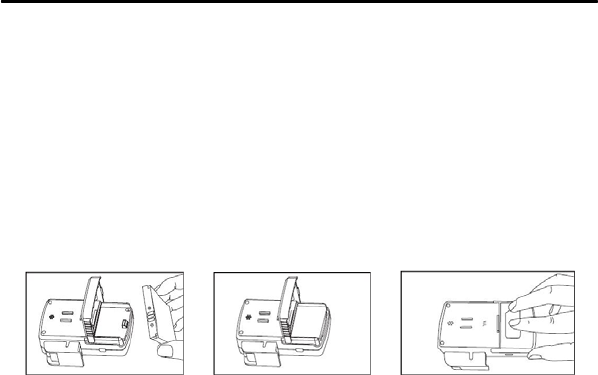
Battery Installation:
(1) Use your thumb to slide the battery cover in the direction of the mark, and lift the end of the cover
upwards.
Fig.2-2 Fig.2-3
Fig.2-4
(2) Put the battery into the battery compartment with correct polarity.
(3) Carefully re-position the battery cover. Do not force the cover into other place; it fits well only when
positioned properly.
10

MD300W4 PULSE OXIMETER
Notes:
Keep away from source of fire and/or heat;
Do not disassemble battery and/or battery pack;
Do not connect the positive and negative pole directly using conductive metal; avoid short
circuit;
Do not put the battery into water or damp it;
Do not cut the battery;
Do not strike or needle the battery;
Charge the battery using specified chargers;
Do not solder the battery directly;
Do not use the battery in un-specified application;
Battery Charging:
Power low alarm: When the battery indicator becomes a frame with display of “Power low” information,
the unit will power off a time later. You should charge the battery in time.
You can charge the battery by connecting the device to a computer through a USB cable.
11
MD300W4 PULSE OXIMETER
3. TAKE A MEASUREMENT
3.1 Sensor Installation
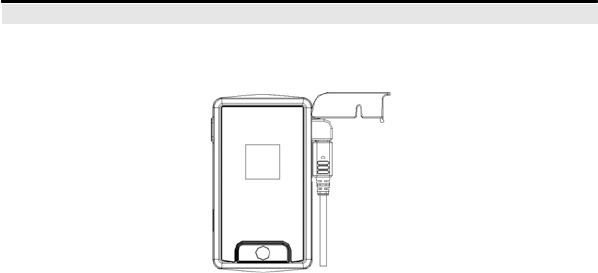
Before measuring, connect the sensor/probe to the pulse oximeter as shown in the following figure.
Fig.3-1
3.2 Take a Measurement
(1) First plug the sensor into the interface of the pulse oximeter.
Ensure that the sensor is plugged correctly and firmly.
(2) Secondly fix the sensor on your finger correctly as shown in Fig.3-2. Be sure to make the finger
touches the bottom of the probe and the nail surface is facing upwards.
12

MD300W4 PULSE OXIMETER
Fig.3-2
(3) After several seconds the following interface will appear.
Fig.3-3
Description of Fig.3-3
(1) SpO2 value measured;
(2) Blood Oxygen plethysmogram;
(3) Power quality indicator;
(4) Pulse Bar;
(5) Pulse rate value measured;
3.3 Factors That May Affect The Measurement
13

MD300W4 PULSE OXIMETER
Proper sensor placement is critical for good performance. The following factors may degrade the
performance of the pulse oximeter.
Inaccurate measurements may be caused by:
1.Incorrect sensor application or use;
2.Excessive patient movement;
3.Significant levels of dysfunctional hemoglobins (e.g.,carboxyhemoglobin or methemoglobin);
4.Exposure to excessive light such as xenon light sources, bilirubin lamps or direct sunlight (should this
occur, cover the sensor and application site with opaque material);
5.Intravascular dyes such as indocyanine green or methylene blue.
Loss of pulse signal may be caused by:
1. Patient is in cardiac arrest or shock;
2. Applying the sensor too tightly;
3. Inflating a blood pressure cuff on the extremity where the sensor is attached;
4. Patient who has hypotension, severe vasoconstriction, severe anemia or hypothermia;
5. An arterial occlusion proximal to the sensor;
6. Excessive illumination.
Potential adverse events:
The following potential risks may be associated with the use of pulse oximetry sensors. The frequency
and severity of these adverse events can vary, and may necessitate additional medical intervention,
including surgery.
1. Swelling or reddening of skin;
2. Burns;
14
MD300W4 PULSE OXIMETER
3. Blisters;
4. Pressure sores;
5. Skin removal.
3.4 Applying The Belt
The longer belt is applied to secure the oximeter around the user’s waist and the shorter one is for
securing it around the user’s wrist.
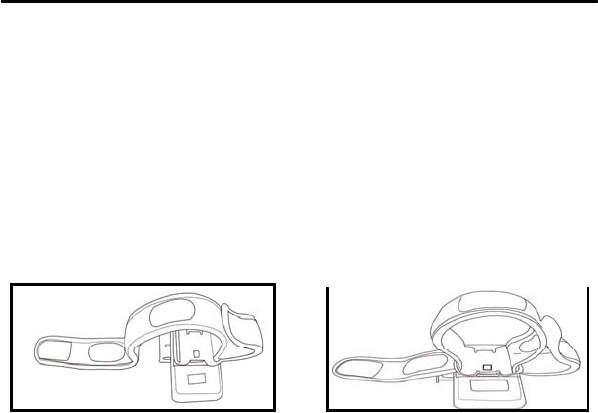
Please use the following steps to apply the belt securely and comfortably around the user’s waist or
wrist:
(1). Thread one terminal of the belt through one hole of the bracket, make sure the even side faces the
oximeter and hook-and-loop fastener back to it.
(2). One the already-threaded terminal of the belt, press the hook side onto the loop side to fix them,
refer to Fig.3-4.
(3) Thread the other terminal of the belt through the other hole of the bracket, refer to Fig.3-5.
Fig.3-4
Fig.3-5
15
MD300W4 PULSE OXIMETER
4. SETTINGS
Press and hold this button for about 3 seconds to power the device on, and then press the Menu button
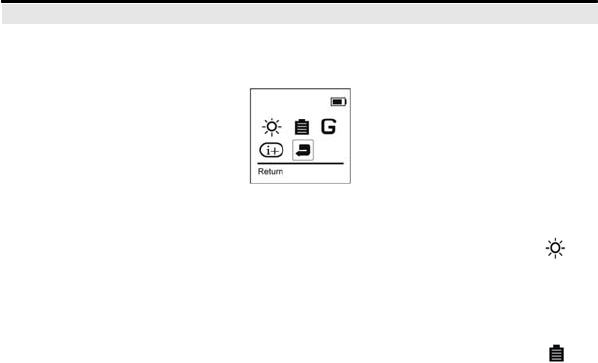
to enter the menu interface as shown in the following interface.
Fig.4-1
4.1 Brightness Setting
In the menu interface as shown in Fig.4-1 press the Adjust button to select the brightness icon , and
then press the Menu button to enter the brightness set interface, you can change the brightness level
by pressing the Adjust button. The setting range is 1~7.
4.2 Battery Setting
In the menu interface as shown in Fig.4-1 press the Adjust button to select the battery icon , and
then press the Menu button to enter the battery set interface, you can set the Power Save mode on or
off.
Power Save Mode: The screen will darkle in case of no press on keys for 20 seconds; The light of
backlight will be restored whenever there is a key-press.
16

MD300W4 PULSE OXIMETER
4.3 Reading ID Setting
In the menu interface as shown in Fig.4-1 press the Adjust button to select the Reading ID icon ,
and then press the Menu button to enter the Reading ID set interface, you can set patient ID in this
interface.
4.4 Version Information
In the menu interface as shown in Fig.4-1 press the Adjust button to select the version icon , and
then press the Menu button to enter the version information interface, you can check the information on
version of software.
4.5 Return
You can return to the measurement screen by performing this item.
Note: The system returns to the measurement screen as shown in Fig.3-3 in case of no press on keys
for 10 seconds.
5. MAINTENANCE AND CLEANING
Warning!
The advanced circuit inside the oximeter does not require periodic calibration and maintenance,
instead of replacing the batteries. Don’t open the cover of oximeter or repair electronic circuits.
Its open will cause the damage of the device and the annulment of the warranty.
5.1 Equipment Maintenance
Use only the substances approved by us and methods listed in this chapter to clean or disinfect
17

MD300W4 PULSE OXIMETER
your equipment. Warranty does not cover damage caused by unapproved substances or methods.
We make no claims regarding the efficacy of the listed chemicals or methods as a means for controlling
infection. For the method to control infection, consult your hospital’s Infection Control Officer or
Epidemiologist. Keep your equipment and accessories free of dust and dirt. To avoid damage to the
equipment, follow these rules:
Always dilute according the manufacturer’s instructions or use lowest possible concentration.
Do not immerse any part of the equipment into liquid.
Do not pour liquid onto the equipment or accessories.
Do not allow liquid to enter the case.
Never use abrasive materials (such as steel wool or silver polish), or erosive cleaners (such as
acetone or acetone-based cleaners).
Caution: If you spill liquid on the equipment or accessories, contact us or your service personnel.
Note: To clean or disinfect reusable accessories, refer to the instructions delivered with the
accessories.
5.2 Battery Maintenance
Warning!
Dispose of all used batteries in a proper waste disposal according to local applicable
regulations.
For detailed information about battery maintenance please refer to chapter 2.2 Power Supply.
5.3 Preventive Maintenance
The following simple preventive maintenance tasks should be performed monthly to ensure
18

MD300W4 PULSE OXIMETER
continued performance of the device at maximum capacity, and to reduce the possibility of a failure.
Mechanical Inspection
Check for splits, cracks or imperfections in the case. If you have any questions or doubts, call your
service provider.
Do not make any repairs by yourself
Do not attempt to open or disassemble your oximeter, if so you may run the risk of electric shock and
void the limited warranty. No user-serviceable parts are inside. Only authorized service personnel may
repair the product.
5.4 Cleaning
Your equipment should be cleaned on a regular basis. If there is heavy pollution or lots of dust and sand
in your place, the equipment should be cleaned more frequently. Before cleaning the equipment,
consult your hospital’s regulations for cleaning the equipment.
Recommended cleaning agents are:
Mild soap (diluted)
Ammonia (diluted)
Sodium hypochlorite bleach (diluted)
Hydrogen peroxide (3%)
Ethanol
Isopropanol (70%)
To clean your equipment, follow these rules:
1. Shut down the pulse oximeter and take the batteries out of the battery compartment.
19

MD300W4 PULSE OXIMETER
2. Clean the display screen using a soft, clean cloth dampened with a glass cleaner.
3. Clean the exterior surface of the equipment using a soft cloth dampened with the cleaner.
4. Wipe off all the cleaning solution with a dry cloth after cleaning if necessary.
5. Dry your equipment in a ventilated, cool place.
Cautions:
Do not allow any liquid to enter the case, and avoid pouring water or other liquid on the device
while cleaning.
Never use abrasives such as wire wool or metal polish.
During cleaning, make sure you do not expose the device to temperature excess of 40°C.
Please take out batteries before cleaning the oximeter.
Warnings!
To reduce the chance of shock or injury, do not use your oximeter in or near water or wet locations.
Keep your oximeter away from sources of liquids, such as drinks, wash basins, bathtubs,
shower stalls, and so on.
Protect your oximeter from direct sunlight and rain or other moisture.
Take care not to spill any food or liquid on oximeter. If you do, unplug oximeter before cleaning
up the spill.
Depending on what you spilled and how much of it got into your equipment, you may have to
send your equipment to Apple for service.
Environment
Keep away from extreme heat. Do not leave it on the dashboard of a car or near a heater. Do
not leave it in any place that is extremely damp or dusty.
20

MD300W4 PULSE OXIMETER
As this product is not waterproof, do not use it or store it where fluids such as water can splash
onto it. Raindrops, water spray, juice, coffee, steam, perspiration, etc. may also cause a
malfunction.
Keep accessories that might be swallowed away from children.
6. TROUBLESHOOTING
Trouble 1: When the probe is not inserted or the probe is faulted, the system may prompt user by the
information “Probe Off”.
Solution 1: Reinsert the sensor or change to a new available sensor.
Trouble 2: When the finger is not inserted into the probe or the probe can not detect any signal, the
system may prompt user by the information“Finger Off”.
Solution 2: Pull your finger out and reinsert it to make your finger fully contact the inner detector of
probe or rub your hands to warm them if your hands are too cool.
When encountering other troubles, please contact our service department.
7. WARRANTY AND REPAIR
7.1 Service Method
a)Maintenance responding time: 9:00am~17:30pm, Monday to Friday
b)Service support: Our company will offer user telephone and e-mail support and parts change.
Parts change: our company will change parts when necessary, free of charge during the warranty
period.
User should send all defective parts back to our company if not specified otherwise.
21

MD300W4 PULSE OXIMETER
c)Update the system software free of charge.
7.2 Warranty Limitations
a) Our company isn’t responsible for such damage caused by force majeure. For example: fire, thunder
flash, flood, cyclone, hail, earthquake, house collapse, commotion, plane crash and traffic accident,
deliberate damage, lack of fuel or water, labor and capital bother, strike and stop-working etc.
b) No-service offer
The corresponding charge and insurance charge of disassembling, refurbishing, repackaging and
moving the oximeter or the part of it.
The damage caused by the third party not authorized by our company to adjust, install, replace the
parts of the oximeter.
The damage and failure caused by the user or its representative non-compliance with the operator’s
manual.
c) The oximeter is installed or connected with an external device (eg. printer, computer) without our
company’s permission and this leads to oximeter failure. In such case our company will charge for the
maintenance.
d)Responsibility limitation
During the period of maintenance contract validity, if user changes any parts manufactured by other
manufacturers without the permission of our company, our company is entitled to stop the contract.
7.3 User Guarantee
a) Please read the manual carefully before operation
22

MD300W4 PULSE OXIMETER
b) The advanced circuit inside the oximeter does not require periodic calibration and maintenance,
instead of replacing the batteries.
7.4 No-Warranty Principle
The annulment of the warranty will be caused by following instances:
There is physical damage to the oximeter and/or its accessories.
There are liquid leftovers and this has led to short circuit and plugboard failure.
The probe and accessories belong to consumption and will not be replaced free.
Damage of probe caused by mechanical force will not be replaced free.
Oximeter Maintenance seal has been removed.
Bad packaging leads to oximeter damage during the transportation.
Oximeter operation by non-professional or without reading the manual first leads to oximeter
failure.
7.5 Warranty Period
Our warranty for oximeter complies with electronic product after-sale service standard regulated by
national laws. The warranty period of mainboard is one year, and for all the accessories the period is
three months.
7.6 Repackage
Take all the accessories and put them into plastic bag.
Try to use original package and packing materials. User will be responsible for such damage
caused by bad package during transportation.
Please describe failure in detail
23

MD300W4 PULSE OXIMETER
7.7 Storage and Transportation
Storage: Storage Temperature -20°C~55°C, Relative Humidity≤93%.
Transportation: Transport by air, train or vessel after packing according to request.
APPENDIX SPECIFICATIONS
Note: The specifications are subject to change without prior notice.
Display
Display Type: OLED
Display Parameter: SpO2, pulse rate, pulse bar, SpO2 plethysmogram, date and time, power quality
indicator and other prompt information.
Data Update Time: <15s.
SpO2
Display Range: 0%-100%
Measuring Range: 70%-100%
Measuring Accurate: 70%-100%±3%, <70% unspecified
Resolution: 1%
PR
Display Range: 0~255bpm
Measuring Range: 30~235bpm
Measuring Accurate: ±2bpm or 2% (the greater)
Resolution: 1bpm
Operating Conditions 24

MD300W4 PULSE OXIMETER
Operating temperature: 5℃~40℃
Relative humidity: ≤80% (non-condensation)
Atmosphere pressure: 86kPa~106kPa
Package & Storage Conditions
Storage temperature: -20℃~55℃
Relative humidity: ≤93% (non-condensation)
Atmosphere pressure: 50kPa~106kPa
Power Support
A rechargeable Li-battery with the voltage of 4.2V and battery capacity 1500mAh.
Continuous working time: 10 hours.
Equipment Classification
According to the type of protection against Electrical shock:
Internal electrical power source equipment;
According to the degree of protection against Electrical shock:
Type BF equipment;
According to the degree of protection against harmful ingress of water:
IPX1;
According to the mode of operation:
Continuous operation;
Dimensions & Weight
Dimensions: 133mmX63mmX33mm (length×width×height)
Weight: 200g (including batteries) 25

FCC ID: WWIMD300W4
Model No.: MD300W4
Manufacturer: Beijing Choice Electronic Technology Co., ltd
This device complies with Part 15 of the FCC Rules.
Operation is subject to the following two conditions: (1) this device
may not cause harmful interference, and (2) this device must
accept any interference received, including interference that may
cause undesired operation.
Any changes or modifications not expressly approved by the party responsible for compliance
could void the user's authority to operate the equipment.
NOTE: This equipment has been tested and found to comply with the limits for a
Class B digital device, pursuant to Part 15 of the FCC Rules. These limits are
designed to provide reasonable protection against harmful interference in a
residential installation. This equipment generates, uses and can radiate radio
frequency energy and, if not installed and used in accordance with the
instructions, may cause harmful interference to radio communications. However,
there is no guarantee that interference will not occur in a particular installation.
If this equipment does cause harmful interference to radio or television reception,
which can be determined by turning the equipment off and on, the user is
encouraged to try to correct the interference by one or more of the following
measures:
-- Reorient or relocate the receiving antenna.
-- Increase the separation between the equipment and receiver.
-- Connect the equipment into an outlet on a circuit different
from that to which the receiver is connected.
-- Consult the dealer or an experienced radio/TV technician for help.
This equipment complies with FCC radiation exposure limits set forth for an uncontrolled
environment. End users must follow the specific operating instructions for satisfying RF
exposure compliance. This transmitter must not be co-located or operating in conjunction
with any other antenna or transmitter. This equipment has been SAR-evaluated for use in
hand. SAR measurements are based on a 0cm spacing from the body and that compliance is
achieved at that distance.
The highest SAR value tested when properly worn on the body is 0.367 W/kg.

MD300W4 PULSE OXIMETER
Standard Accessories
One SpO2 Sensor (model: M-50G)
One lithium ion rechargeable battery (1500mAh)
One USB cable
One Operator’s manual
One piece of wrist belt
One clip for wrist belt
Manufacturer address: Beijing Choice Electronic Technology Co.,Ltd.
Bailangyuan Building B
Rm. 1127-1128, Fuxing Road, A36
100039 Beijing
PEOPLE’S REPUBLIC OF CHINA
26