Beijing Kangshuo Information Technology G10 Lenovo G10 Heart Rate Band User Manual SH10 1

Beijing Kangshuo Information Technology Co.,Ltd Lenovo G10 Heart Rate Band SH10 1

User Manual

G10
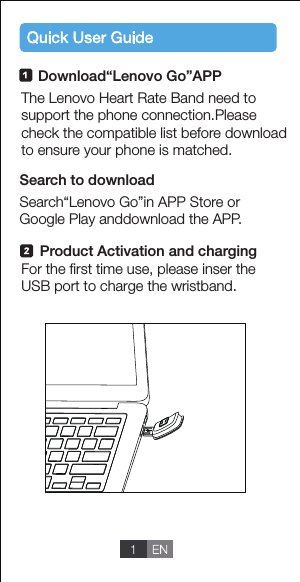
Download“Lenovo Go”APPSearch“Lenovo Go”in APP Store orGoogle Play anddownload the APP.The Lenovo Heart Rate Band need to support the phone connection.Pleasecheck the compatible list before downloadto ensure your phone is matched.For the first time use, please inser the USB port to charge the wristband.Search to downloadProduct Activation and charging
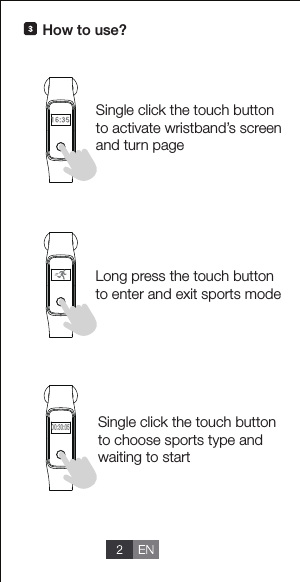
Single click the touch button to activate wristband’s screen and turn pageSingle click the touch button to choose sports type and waiting to start00:30:05Long press the touch button to enter and exit sports modeHow to use?
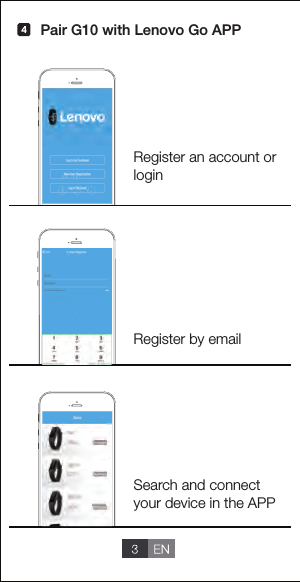
Register an account or loginRegister by emailSearch and connect your device in the APPPair G10 with Lenovo Go APP
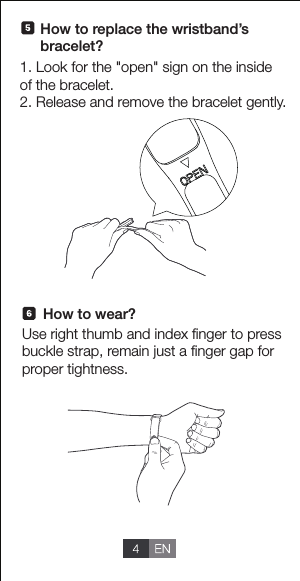
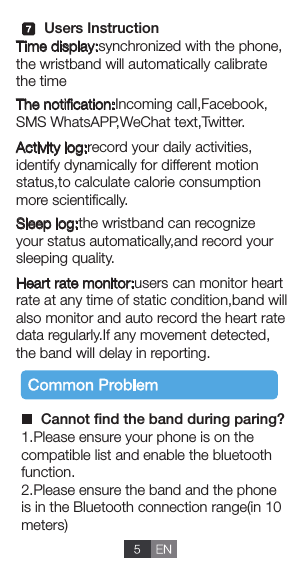
1. Look for the "open" sign on the inside of the bracelet.2. Release and remove the bracelet gently.How to wear?Use right thumb and index finger to press buckle strap, remain just a finger gap for proper tightness.How to replace the wristband’sbracelet?
Time display:synchronized with the phone,the wristband will automatically calibrate the time The notification:Incoming call,Facebook,SMS WhatsAPP,WeChat text,Twitter.Sleep log:the wristband can recognize your status automatically,and record your sleeping quality.Heart rate monitor:users can monitor heartrate at any time of static condition,band will also monitor and auto record the heart rate data regularly.If any movement detected,the band will delay in reporting. Activity log:record your daily activities,identify dynamically for different motion status,to calculate calorie consumptionmore scientifically.1.Please ensure your phone is on the compatible list and enable the bluetoothfunction.2.Please ensure the band and the phone is in the Bluetooth connection range(in 10meters) Cannot find the band during paring?Users Instruction
The situation appeared occasionally when the Bluetooth is connected with the other phones.3.Please ensure the band’s power condition.If problem still not solved after battery charged,please contact us.If it is connected successfully but fail toreceive the messages,please try out the following steps:1.Go to the security setting on the phone,enable the access to read the message2.If it cant be resolved,please connect theG10 with APP again and click the button of “factory reset” in the main menu,clear up the data and reconnect th wristband.1.If the wristband has connected with thephone,select the“device”in APP,click restore the factory setting.2.While charging the wristband,long press the“battery and device ID”to wake up therestore setting option. Bluetooth disconnected occasionally?How to restore the fatory settingWristband fail to receive the message?
FCC StatementThis equipment has been tested and found to comply with the limits for a Class B digital device, pursuant to Part 15 of the FCC Rules. These limits are designed to provide reasonable protection against harmful interference in a residential installation. This equipment generates uses and can radiate radio frequencyenergy and, if not installed and used in accordance with the instructions, may cause harmful interference to radio communications. However, there is no guarantee that interference will not occur in a particular installation. If this equipment does cause harmful interference to radio or television reception, which can be determined by turning the equipment off and on, the user is encouraged to try to correct the interference by one or more of the following measures: -- Reorient or relocate the receiving     antenna.
-- Increase the separation between the equipment and receiver.-- Connect the equipment into an outlet on a circuit different from that to which the receiver is connected.-- Consult the dealer or an experienced radio/TV technician for help.This device complies with part 15 of the FCC Rules. Operation is subject to the following two conditions:(1) This device may not cause harmful interference, and (2) this device must accept any interference received, including interference that may cause undesired operation.Changes or modifications not expressly approved by the party responsible for compliance could void the user's authority to operate the equipment.13
14FCC ID:2ALYI-G10Beijing Kangshuo Information Technology Co.,Ltd official licenseefor this product.Complies WithIDA StandardsDB106306

Navigation menu