Beijing Yueme Technology XMYX02YM MI Bluetooth Speaker mini User Manual

Beijing Yueme Technology Co.,LTD. MI Bluetooth Speaker mini

User Manual

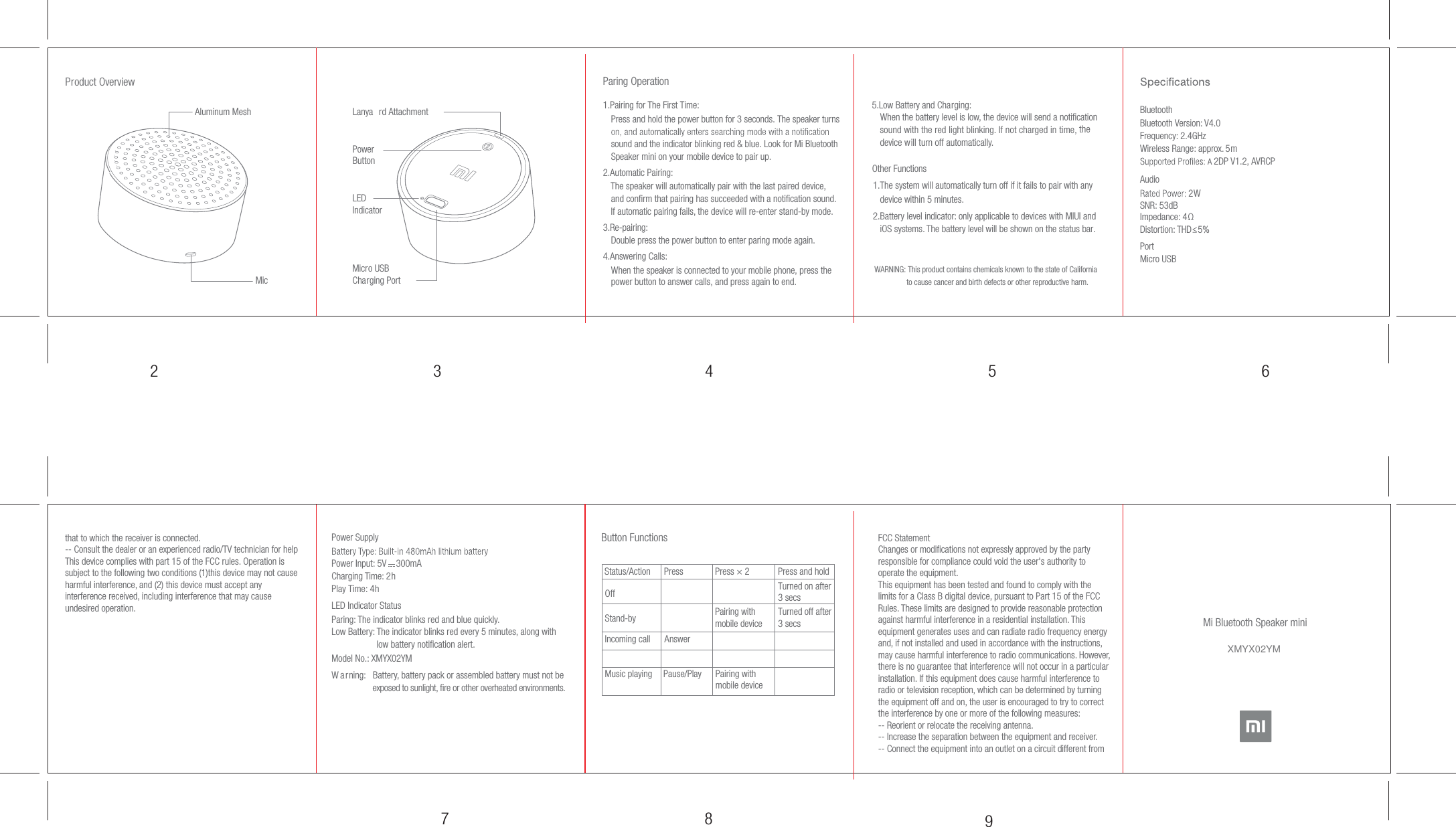
97 832 4 5 6Button Functions  PressPairing with mobile deviceOffStand-byIncoming callMusic playing Pause/Play Pairing withmobile deviceAnswerStatus/Action Press and holdTurned on after3 secsTurned off after3 secsPress × 2Product OverviewMicMicro USB Charging PortAluminum MeshLED IndicatorLanya rd AttachmentPower ButtonMi Bluetooth Speaker miniParing Operation1.Pairing for The First Time:  Press and hold the power button for 3 seconds. The speaker turns sound and the indicator blinking red & blue. Look for Mi Bluetooth Speaker mini on your mobile device to pair up.WARNING: This product contains chemicals known to the state of California                 to cause cancer and birth defects or other reproductive harm.2.Automatic Pairing:     The speaker will automatically pair with the last paired device,     and confirm that pairing has succeeded with a notification sound.     If automatic pairing fails, the device will re-enter stand-by mode.3.Re-pairing:      Double press the power button to enter paring mode again.4.Answering Calls:    When the speaker is connected to your mobile phone, press the power button to answer calls, and press again to end.5.Low Battery and Charging:    When the battery level is low, the device will send a notification    sound with the red light blinking. If not charged in time, the   device will turn off automatically. Other Functions 1.The system will automatically turn off if it fails to pair with any     device within 5 minutes. 2.Battery level indicator: only applicable to devices with MIUI and    iOS systems. The battery level will be shown on the status bar.        BluetoothBluetooth Version: V4.0Frequency: 2.4GHzWireless Range: approx.  5mA2DP V1.2, AVRCPAudio2WSNR: 53dBImpedance: 4ΩDistortion: THD≤5%  PortMicro USBPower SupplyPower Input: 5V    300mACharging Time: 2hPlay Time: 4hLED Indicator StatusParing: The indicator blinks red and blue quickly.Low Battery: The indicator blinks red every 5 minutes, along with                    low battery notification alert.Model No.: XMYX02YM                   W a rning:  Battery, battery pack or assembled battery must not be                  exposed to sunlight, fire or other overheated environments. FCC StatementChanges or modifications not expressly approved by the party responsible for compliance could void the user's authority to operate the equipment.This equipment has been tested and found to comply with the limits for a Class B digital device, pursuant to Part 15 of the FCC Rules. These limits are designed to provide reasonable protection against harmful interference in a residential installation. This equipment generates uses and can radiate radio frequency energy and, if not installed and used in accordance with the instructions, may cause harmful interference to radio communications. However, there is no guarantee that interference will not occur in a particular installation. If this equipment does cause harmful interference to radio or television reception, which can be determined by turning the equipment off and on, the user is encouraged to try to correct the interference by one or more of the following measures:-- Reorient or relocate the receiving antenna.-- Increase the separation between the equipment and receiver.-- Connect the equipment into an outlet on a circuit different from that to which the receiver is connected.-- Consult the dealer or an experienced radio/TV technician for helpThis device complies with part 15 of the FCC rules. Operation is subject to the following two conditions (1)this device may not cause harmful interference, and (2) this device must accept any interference received, including interference that may cause undesired operation.XMYX02YM

Navigation menu